
A work queue lets several people share one list of jobs, such as support tickets, review tasks or documents to check. Each person clicks Take Next and gets the most urgent job that nobody else is working on. Two people must never get the same job, even when they click at the same moment.
This guide builds such a queue in Oracle APEX. A PL/SQL package reads the queue in priority order with SELECT ... FOR UPDATE SKIP LOCKED, so a row that another session is taking is skipped instead of waited for. The page shows the user's own tickets with a Mark Done link, the waiting tickets, and a Take Next button.
The guide uses support tickets as the example; the same steps work for any table of jobs. The post How to Lock Rows with SELECT FOR UPDATE in Oracle explains the locking clauses in SQL. This one uses SKIP LOCKED for a Take Next button in an APEX page and tests it with real sessions.
Step 1: Create the Tables
The example needs one table. WQ_TICKETS holds the tickets with a priority (1 High, 2 Medium, 3 Low), a status (NEW, IN_PROGRESS or DONE), the user who took the ticket, and the times when it was created, taken and done.
Create the table, the indexes and the sample data:
Example:
create table wq_tickets (
  ticket_id    number generated by default on null as identity,
  subject      varchar2(200)  not null,
  priority     number(1)      default on null 3 not null,
  status       varchar2(12)   default on null 'NEW' not null,
  assigned_to  varchar2(128),
  created_on   timestamp      default on null systimestamp not null,
  taken_on     timestamp,
  done_on      timestamp,
  constraint wq_tickets_pk primary key (ticket_id),
  constraint wq_tickets_priority_ck check (priority between 1 and 3),
  constraint wq_tickets_status_ck check (status in ('NEW', 'IN_PROGRESS', 'DONE')),
  constraint wq_tickets_assign_ck check (
    (status = 'NEW' and assigned_to is null and taken_on is null and done_on is null)
    or (status = 'IN_PROGRESS' and assigned_to is not null and taken_on is not null and done_on is null)
    or (status = 'DONE' and assigned_to is not null and taken_on is not null and done_on is not null))
);

create index wq_tickets_queue_ix on wq_tickets (status, priority, created_on, ticket_id);

create unique index wq_tickets_one_open_uk on wq_tickets (
  case when status = 'IN_PROGRESS' then assigned_to end);

create index wq_tickets_assigned_ix on wq_tickets (assigned_to, status);

insert into wq_tickets (subject, priority, created_on) values ('Printer on floor 2 does not print', 3, systimestamp - interval '50' minute);
insert into wq_tickets (subject, priority, created_on) values ('Cannot sign in to the VPN', 1, systimestamp - interval '40' minute);
insert into wq_tickets (subject, priority, created_on) values ('Order 1042 shows the wrong total', 2, systimestamp - interval '35' minute);
insert into wq_tickets (subject, priority, created_on) values ('New laptop for a starter on Monday', 3, systimestamp - interval '30' minute);
insert into wq_tickets (subject, priority, created_on) values ('Email to customers bounces', 1, systimestamp - interval '20' minute);
insert into wq_tickets (subject, priority, created_on) values ('Report export to Excel is slow', 2, systimestamp - interval '10' minute);
insert into wq_tickets (subject, priority, created_on) values ('Add a user to the sales group', 3, systimestamp - interval '5' minute);
commit;

select ticket_id, subject, priority, status, to_char(created_on, 'HH24:MI') created
from wq_tickets
order by priority, created_on, ticket_id;
Output:
Table WQ_TICKETS created.

Index WQ_TICKETS_QUEUE_IX created.

Index WQ_TICKETS_ONE_OPEN_UK created.

Index WQ_TICKETS_ASSIGNED_IX created.

1 row inserted.

1 row inserted.

1 row inserted.

1 row inserted.

1 row inserted.

1 row inserted.

1 row inserted.

Commit complete.

   TICKET_ID SUBJECT                                  PRIORITY STATUS    CREATED
____________ _____________________________________ ___________ _________ __________
           2 Cannot sign in to the VPN                       1 NEW       10:15
           5 Email to customers bounces                      1 NEW       10:35
           3 Order 1042 shows the wrong total                2 NEW       10:20
           6 Report export to Excel is slow                  2 NEW       10:45
           1 Printer on floor 2 does not print               3 NEW       10:05
           4 New laptop for a starter on Monday              3 NEW       10:25
           7 Add a user to the sales group                   3 NEW       10:50

7 rows selected.- WQ_TICKETS_PRIORITY_CK allows only the priorities 1 to 3, and WQ_TICKETS_STATUS_CK only the three status values.
- WQ_TICKETS_ASSIGN_CK keeps the columns in step with the status: a NEW ticket has no user and no times, an IN_PROGRESS ticket has a user and a taken time, and a DONE ticket also has a done time.
- WQ_TICKETS_QUEUE_IX covers the queue order: status, priority, created time and ID.
- WQ_TICKETS_ONE_OPEN_UK is a function-based unique index. It returns the user only for IN_PROGRESS rows, so each user can have only one ticket in progress at a time.
- WQ_TICKETS_ASSIGNED_IX supports the list of tickets per user.
PRIORITY, STATUS and CREATED_ON use DEFAULT ON NULL, so a new ticket needs only a subject. The final query shows the queue order: high priority first, and the oldest ticket first within the same priority.
Step 2: Why FETCH FIRST and ROWNUM Do Not Work Here
The first idea for Take Next is one query that returns the top row and locks it. To test it, a first session locked ticket 2, the top of the queue, and held the lock for 20 seconds:
Example:
set serveroutput on feedback on
select ticket_id from wq_tickets where ticket_id = 2 for update;
exec dbms_session.sleep(20)
rollback;
While ticket 2 was locked, a second session ran three versions of the query:
Example:
set feedback on timing on
select ticket_id, subject
from wq_tickets
where status = 'NEW'
order by priority, created_on, ticket_id
fetch first 1 row only
for update skip locked;

select ticket_id, subject
from (select ticket_id, subject
      from wq_tickets
      where status = 'NEW'
      order by priority, created_on, ticket_id)
where rownum = 1
for update skip locked;

select ticket_id, subject
from wq_tickets
where status = 'NEW'
and rownum = 1
for update skip locked;
rollback;
Output:
Error starting at line : 2 File @ b72/11-pitfalls.sql
In command -
select ticket_id, subject
from wq_tickets
where status = 'NEW'
order by priority, created_on, ticket_id
fetch first 1 row only
for update skip locked
Error at Command Line : 2 Column : 1 File @ b72/11-pitfalls.sql
Error report -
SQL Error: ORA-02014: cannot select FOR UPDATE from view with DISTINCT, GROUP BY, etc.
Help: https://docs.oracle.com/error-help/db/ora-02014/
Elapsed: 00:00:00.020

Error starting at line : 9 File @ b72/11-pitfalls.sql
In command -
select ticket_id, subject
from (select ticket_id, subject
      from wq_tickets
      where status = 'NEW'
      order by priority, created_on, ticket_id)
where rownum = 1
for update skip locked
Error at Command Line : 10 Column : 6 File @ b72/11-pitfalls.sql
Error report -
SQL Error: ORA-02014: cannot select FOR UPDATE from view with DISTINCT, GROUP BY, etc.
Help: https://docs.oracle.com/error-help/db/ora-02014/
Elapsed: 00:00:00.005

0 rows selected.

Elapsed: 00:00:00.014

Rollback complete.

Elapsed: 00:00:00.002
FETCH FIRST 1 ROW ONLY with FOR UPDATE fails with ORA-02014. The ordered inline view with ROWNUM = 1 fails with the same error. The third query runs, but it returned no row although six other tickets were free.
The execution plan of the third query explains why. COUNT STOPKEY stops after the first row from the index, ticket 2, and only then does FOR UPDATE SKIP LOCKED drop that locked row. So the query must not limit the rows itself. A cursor solves this: it reads the queue in order and the program fetches just one row.
Step 3: Create the Work Queue Package
The package has two procedures. TAKE_NEXT assigns the next free ticket to a user, and COMPLETE_TICKET marks a ticket as done:
Example:
create or replace package wq_pkg as
  procedure take_next (
    p_user      in  varchar2,
    p_ticket_id out number);
  procedure complete_ticket (
    p_ticket_id in number,
    p_user      in varchar2);
end wq_pkg;
/

create or replace package body wq_pkg as

  procedure take_next (
    p_user      in  varchar2,
    p_ticket_id out number)
  is
    cursor c_next is
      select ticket_id
      from wq_tickets
      where status = 'NEW'
      order by priority, created_on, ticket_id
      for update skip locked;
    l_open number;
  begin
    select count(*)
    into l_open
    from wq_tickets
    where status = 'IN_PROGRESS'
    and assigned_to = p_user;

    if l_open > 0 then
      raise_application_error(-20001,
        'Finish your current ticket before you take the next one.');
    end if;

    open c_next;
    fetch c_next into p_ticket_id;

    if c_next%found then
      update wq_tickets
      set status = 'IN_PROGRESS',
          assigned_to = p_user,
          taken_on = systimestamp
      where current of c_next;
    else
      p_ticket_id := null;
    end if;

    close c_next;
  exception
    when dup_val_on_index then
      if c_next%isopen then
        close c_next;
      end if;
      raise_application_error(-20001,
        'Finish your current ticket before you take the next one.');
  end take_next;

  procedure complete_ticket (
    p_ticket_id in number,
    p_user      in varchar2)
  is
  begin
    update wq_tickets
    set status = 'DONE',
        done_on = systimestamp
    where ticket_id = p_ticket_id
    and assigned_to = p_user
    and status = 'IN_PROGRESS';

    if sql%rowcount = 0 then
      raise_application_error(-20002,
        'This ticket is not in progress for you.');
    end if;
  end complete_ticket;

end wq_pkg;
/

select object_name, object_type, status
from user_objects
where object_name = 'WQ_PKG'
order by object_type;
Output:
Package WQ_PKG compiled

Package Body WQ_PKG compiled

OBJECT_NAME    OBJECT_TYPE     STATUS
______________ _______________ _________
WQ_PKG         PACKAGE         VALID
WQ_PKG         PACKAGE BODY    VALID
TAKE_NEXT works in this order:
- It refuses a user who already has a ticket in progress (ORA-20001).
- It opens the cursor C_NEXT. The cursor orders the NEW tickets by priority, created time and ID, and has FOR UPDATE SKIP LOCKED.
- It fetches one row. With SKIP LOCKED, the row is locked at fetch time, and rows that other sessions hold are skipped.
- If a row was found, it sets the ticket to IN_PROGRESS for the user with UPDATE ... WHERE CURRENT OF. If the queue is empty, it returns NULL.
The exception handler covers a rare case: the same user takes a ticket in two browser tabs at the same moment. Both calls pass the first check, and the unique index WQ_TICKETS_ONE_OPEN_UK stops the second one. The handler turns that ORA-00001 into the same friendly ORA-20001 message.
COMPLETE_TICKET updates the ticket only when it is IN_PROGRESS and belongs to the given user. Otherwise it raises ORA-20002. Neither procedure commits; APEX commits at the end of the page request.
Step 4: Test Two Sessions at the Same Time
The reason for SKIP LOCKED is two people who click Take Next together. Session A took the next ticket and waited 10 seconds before COMMIT:
Example:
set serveroutput on feedback off timing on
declare
  l_ticket_id number;
begin
  wq_pkg.take_next(p_user => 'AGENT_A', p_ticket_id => l_ticket_id);
  dbms_output.put_line('Session A took ticket ' || l_ticket_id);
  dbms_session.sleep(10);
end;
/
commit;
Four seconds later, session B ran the same call for another user:
Example:
set serveroutput on feedback off timing on
declare
  l_ticket_id number;
begin
  wq_pkg.take_next(p_user => 'AGENT_B', p_ticket_id => l_ticket_id);
  dbms_output.put_line('Session B took ticket ' || l_ticket_id);
end;
/
commit;
Output of session A:
Session A took ticket 2

Elapsed: 00:00:10.090
Elapsed: 00:00:00.018
Output of session B:
Session B took ticket 5

Elapsed: 00:00:00.057
Elapsed: 00:00:00.007
Session A took ticket 2. Session B did not wait at all: it skipped the locked ticket 2 and took ticket 5, the next one in the queue, in 0.06 seconds.
For comparison, session B ran the same cursor without SKIP LOCKED while session A held ticket 2 again:
Example:
set serveroutput on feedback off timing on
declare
  cursor c_next is
    select ticket_id
    from wq_tickets
    where status = 'NEW'
    order by priority, created_on, ticket_id
    for update;
  l_ticket_id number;
begin
  open c_next;
  fetch c_next into l_ticket_id;
  close c_next;
  dbms_output.put_line('Session B got ticket ' || l_ticket_id);
end;
/
rollback;
Output:
Session B got ticket 5

Elapsed: 00:00:06.062
Elapsed: 00:00:00.006
Without SKIP LOCKED, session B waited about 6 seconds until session A committed. It did get ticket 5 in the end, but every user behind a busy row waits. With many agents, the queue would move one person at a time.
The last test ran the second session for the same user AGENT_A, like a second browser tab:
Example:
set serveroutput on feedback off timing on
declare
  l_ticket_id number;
begin
  wq_pkg.take_next(p_user => 'AGENT_A', p_ticket_id => l_ticket_id);
  dbms_output.put_line('Second tab took ticket ' || l_ticket_id);
end;
/
rollback;
Output:
declare
*
ERROR at line 1:
ORA-20001: Finish your current ticket before you take the next one.
ORA-06512: at "APXSOL.WQ_PKG", line 45
ORA-06512: at line 4
Help: https://docs.oracle.com/error-help/db/ora-20001/

Elapsed: 00:00:06.072
Elapsed: 00:00:00.005
The second call skipped ticket 2 and tried to take ticket 5. The unique index made it wait for session A, and after the COMMIT it refused the second ticket with ORA-20001. After each of these tests, the tickets were set back to NEW.
Step 5: Test the Package in SQL
Now run the normal flow in one session: AGENT_A takes a ticket, tries to take a second one, AGENT_B tries to finish the ticket of AGENT_A, and AGENT_A finishes it:
Example:
set serveroutput on feedback off
declare
  l_ticket_id number;
begin
  wq_pkg.take_next(p_user => 'AGENT_A', p_ticket_id => l_ticket_id);
  dbms_output.put_line('AGENT_A took ticket ' || l_ticket_id);
end;
/
commit;

declare
  l_ticket_id number;
begin
  wq_pkg.take_next(p_user => 'AGENT_A', p_ticket_id => l_ticket_id);
end;
/

exec wq_pkg.complete_ticket(p_ticket_id => 2, p_user => 'AGENT_B')
exec wq_pkg.complete_ticket(p_ticket_id => 2, p_user => 'AGENT_A')
commit;

select ticket_id, status, assigned_to,
       to_char(taken_on, 'HH24:MI:SS') taken, to_char(done_on, 'HH24:MI:SS') done
from wq_tickets
where ticket_id = 2;
Output:
AGENT_A took ticket 2

declare
*
ERROR at line 1:
ORA-20001: Finish your current ticket before you take the next one.
ORA-06512: at "APXSOL.WQ_PKG", line 22
ORA-06512: at line 4
Help: https://docs.oracle.com/error-help/db/ora-20001/

BEGIN wq_pkg.complete_ticket(p_ticket_id => 2, p_user => 'AGENT_B'); END;
*
ERROR at line 1:
ORA-20002: This ticket is not in progress for you.
ORA-06512: at "APXSOL.WQ_PKG", line 62
ORA-06512: at line 1
Help: https://docs.oracle.com/error-help/db/ora-20002/

   TICKET_ID STATUS    ASSIGNED_TO    TAKEN       DONE
____________ _________ ______________ ___________ ___________
           2 DONE      AGENT_A        10:58:41    10:58:41
AGENT_A got ticket 2, the oldest high-priority ticket. The second Take Next and the call by AGENT_B were refused with the package messages. The ticket is now DONE with both times filled.
The check constraints also protect the table when someone bypasses the package:
Example:
update wq_tickets set status = 'IN_PROGRESS' where ticket_id = 1;
insert into wq_tickets (subject, priority) values ('Urgent test', 0);
rollback;
Output:
Error starting at line : 1 File @ b72/31-constraints.sql
In command -
update wq_tickets set status = 'IN_PROGRESS' where ticket_id = 1
Error report -
ORA-02290: check constraint (APXSOL.WQ_TICKETS_ASSIGN_CK) violated
Help: https://docs.oracle.com/error-help/db/ora-02290/

Error starting at line : 2 File @ b72/31-constraints.sql
In command -
insert into wq_tickets (subject, priority) values ('Urgent test', 0)
Error report -
ORA-02290: check constraint (APXSOL.WQ_TICKETS_PRIORITY_CK) violated
Help: https://docs.oracle.com/error-help/db/ora-02290/

Rollback complete.
Step 6: Create the Work Queue Page
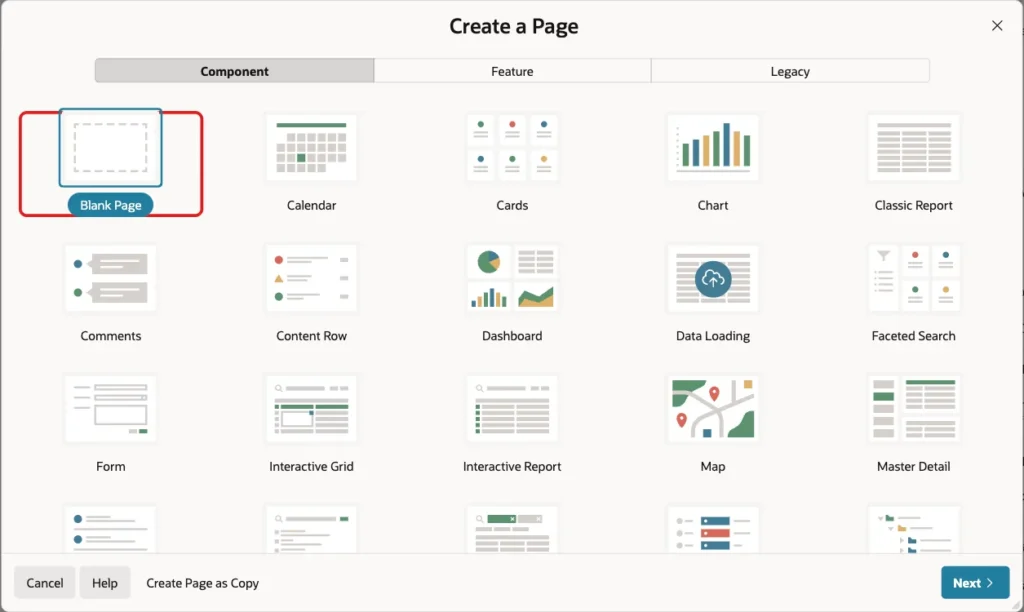
In App Builder, open the application, click Create Page and select Blank Page:
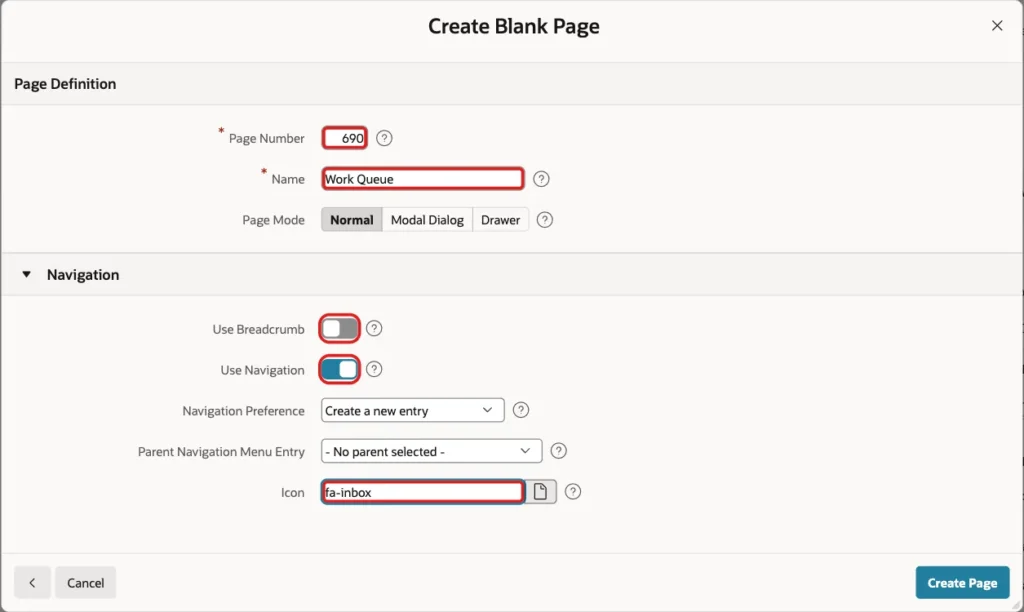
Enter page number 690 and the name Work Queue. Turn Use Breadcrumb off, keep Use Navigation on and enter the icon fa-inbox. Click Create Page:
Step 7: Allow the Page Only for Editors
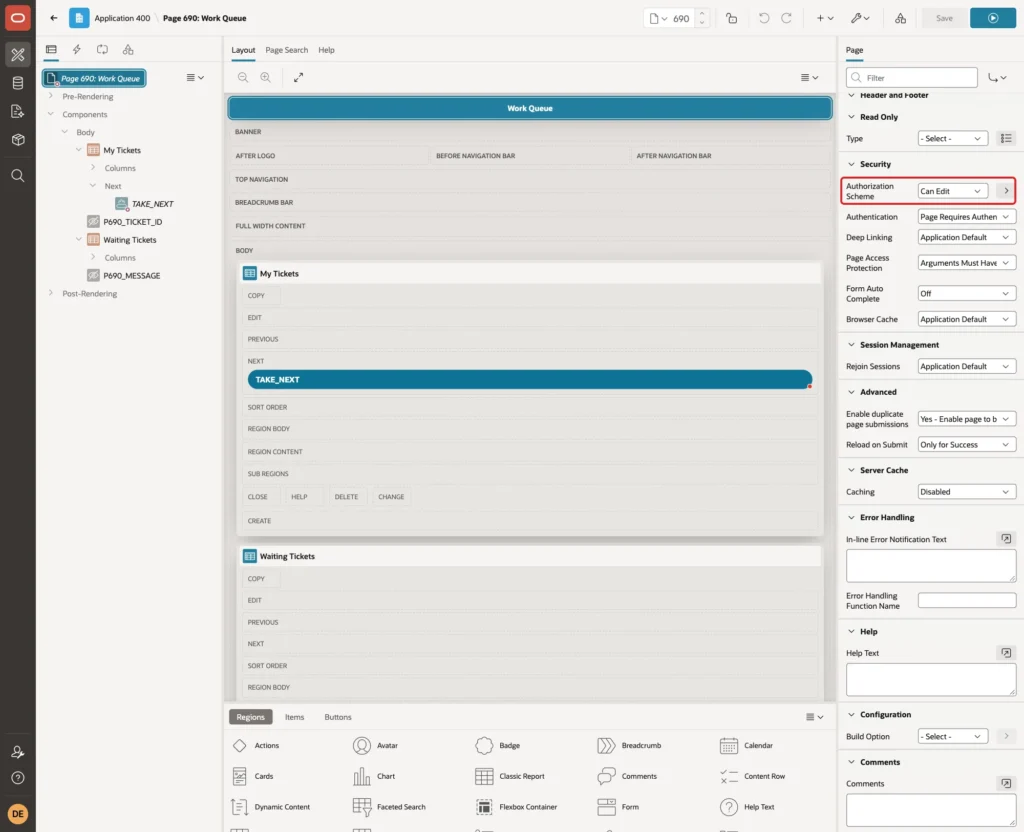
Only users who work on tickets should open the queue. In Page Designer, select the page node and set Security, Authorization Scheme to Can Edit. In this example, Can Edit passes for editors and administrators:
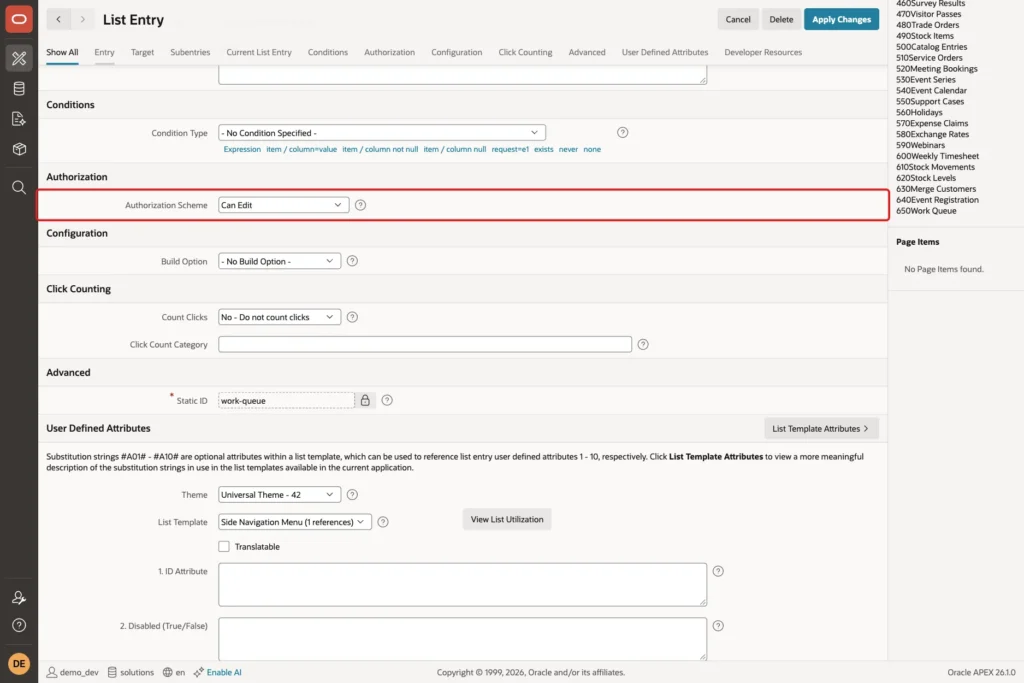
The wizard also created a Work Queue entry in the navigation menu. In Shared Components, open Navigation Menu, edit the Work Queue entry and set Authorization Scheme to Can Edit too, then click Apply Changes:
Step 8: Add the My Tickets Report
In Page Designer, right-click Body and select Create Region. Set Name to My Tickets, Type to Classic Report and enter this SQL Query:
Example:
select ticket_id,
       subject,
       case priority when 1 then 'High' when 2 then 'Medium' else 'Low' end as priority_label,
       initcap(replace(status, '_', ' ')) as status_label,
       taken_on,
       done_on,
       case when status = 'IN_PROGRESS' then 'Mark Done' end as done_action
from   wq_tickets
where  assigned_to = :APP_USER
order  by case status when 'IN_PROGRESS' then 0 else 1 end,
          done_on desc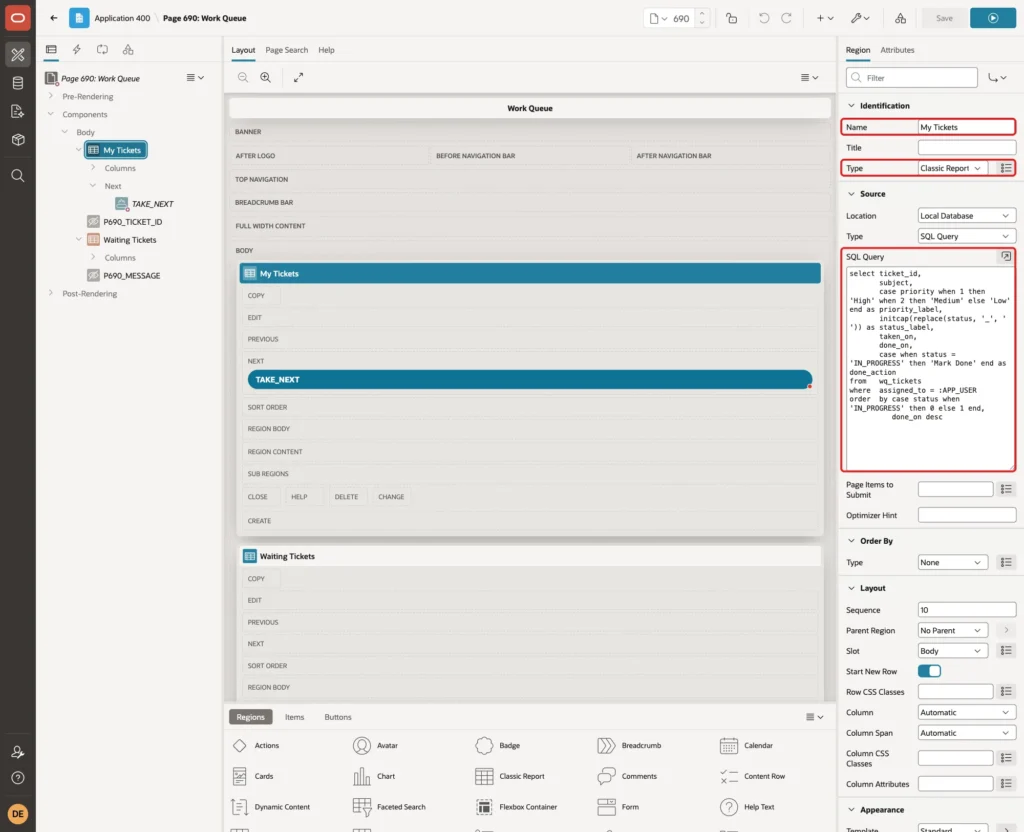
The query shows the tickets of :APP_USER, with the ticket in progress first and then the finished ones, newest first. DONE_ACTION holds the link text Mark Done only for the ticket in progress.
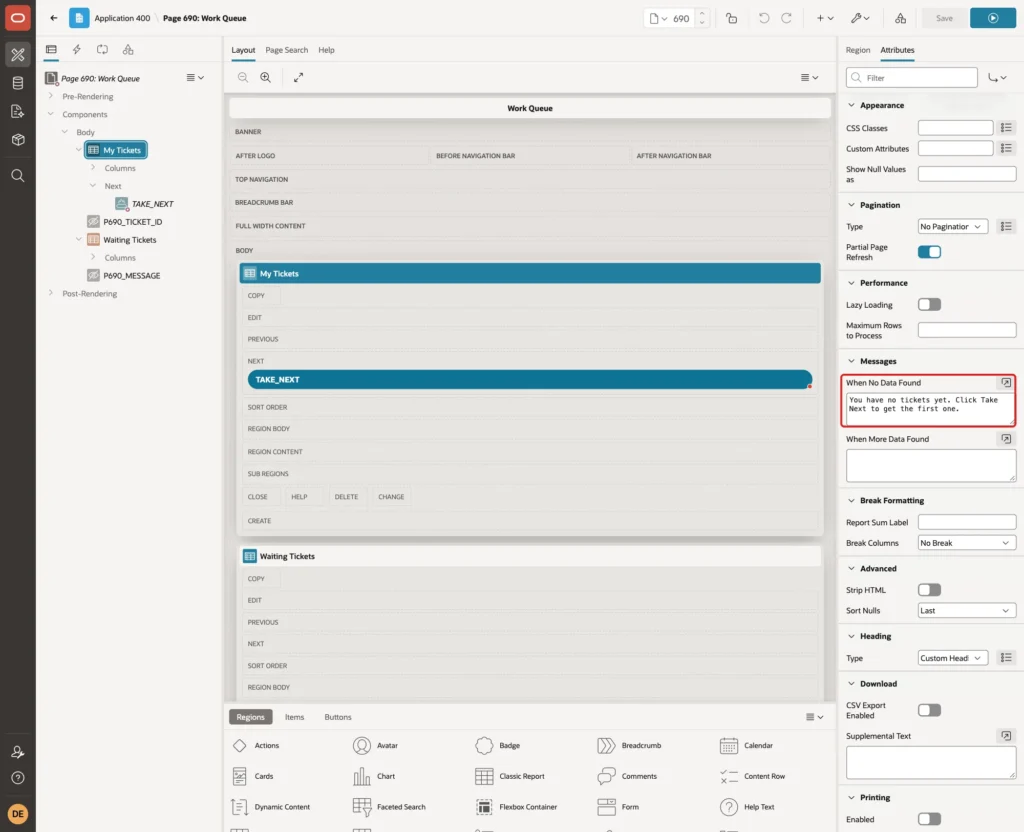
On the Attributes tab, set When No Data Found to "You have no tickets yet. Click Take Next to get the first one.":
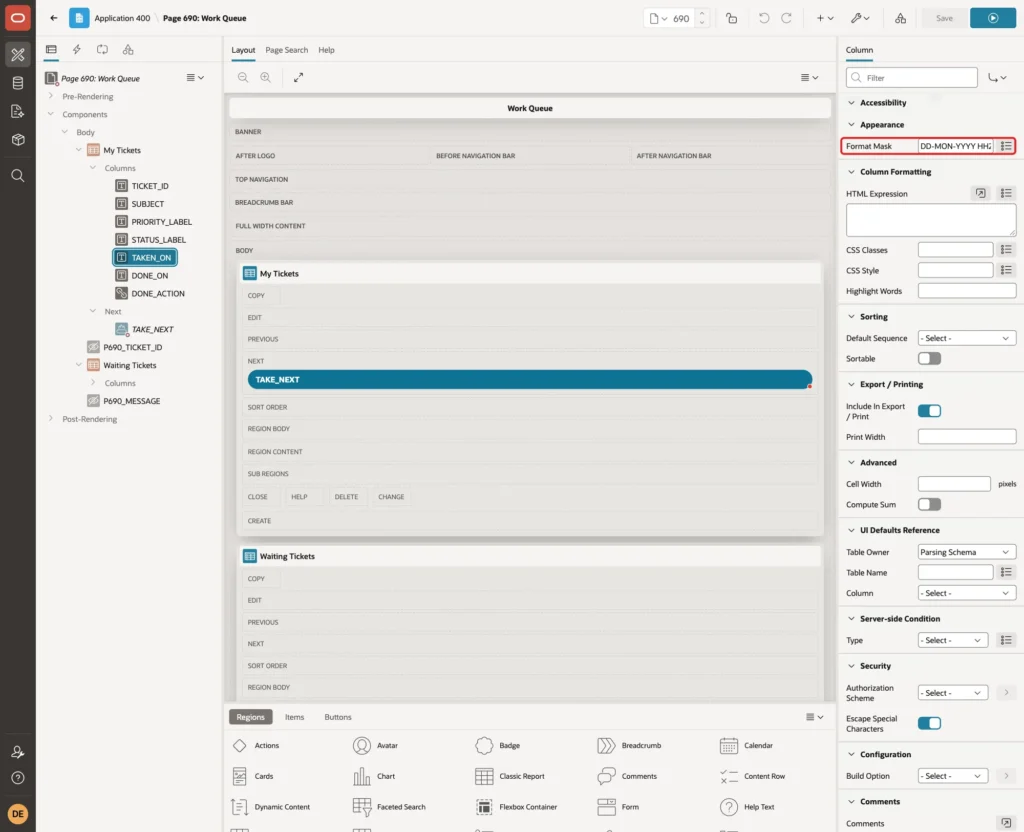
Expand Columns and select TAKEN_ON. Set Appearance, Format Mask to DD-MON-YYYY HH24:MI. Do the same for DONE_ON:
Set the column headings to Ticket, Subject, Priority, Status, Taken On, Done On and Action, and align the ticket number to the right. Turn Sorting, Sortable off for each column so the report keeps the order of the query.
Step 9: Make the Action Column a Mark Done Link
Select the column DONE_ACTION. Set Type to Link and Link Text to #DONE_ACTION#:
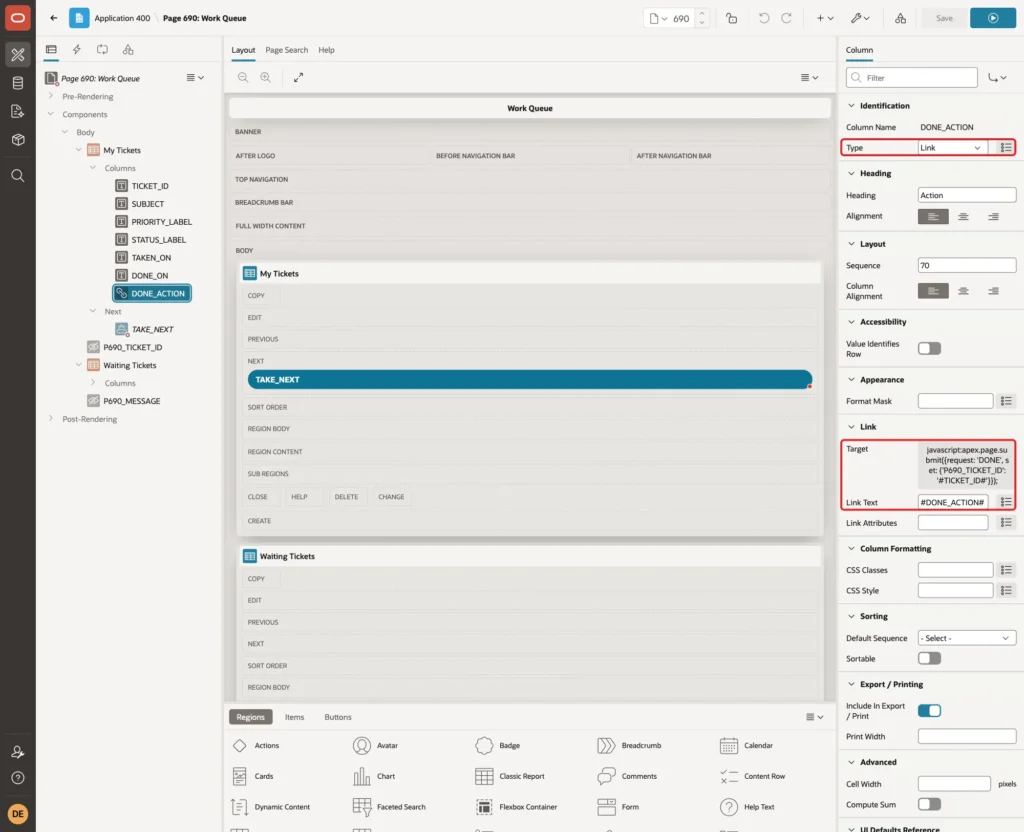
Click Target. In the Link Builder, set Type to URL and enter this URL:
Example:
javascript:apex.page.submit({request: 'DONE', set: {'P690_TICKET_ID': '#TICKET_ID#'}});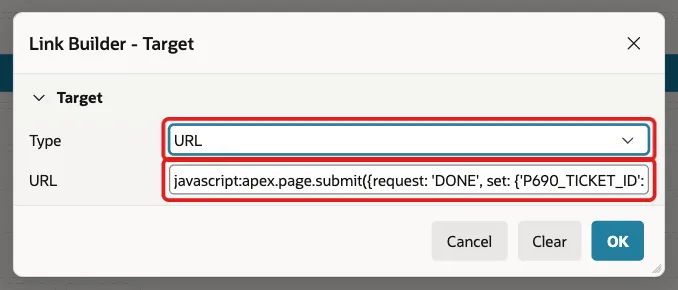
apex.page.submit sets the hidden item P690_TICKET_ID to the ticket of the row and submits the page with the request DONE. Finished tickets have no link text, so APEX shows no link in their rows.
Step 10: Add the Take Next Button
Right-click the region My Tickets and select Create Button. Set Button Name to TAKE_NEXT, Label to Take Next, Slot to Next and turn Hot on:
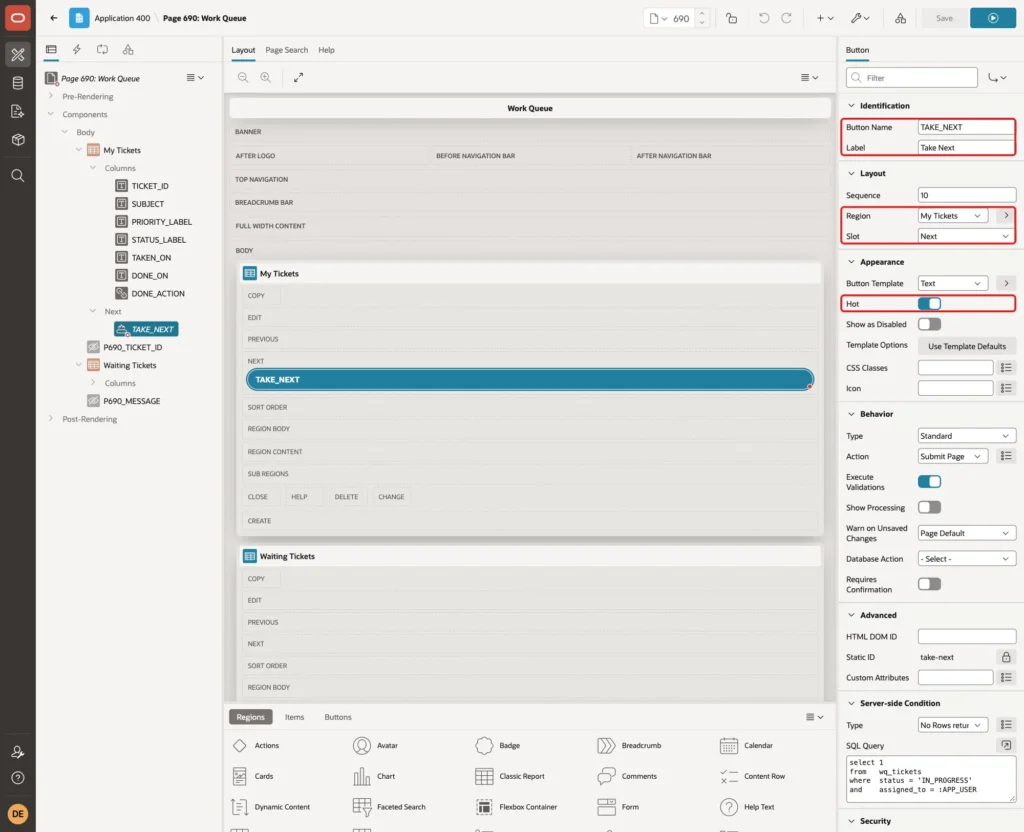
The button keeps the default action Submit Page. A user with a ticket in progress should finish it first, so hide the button in that case. Under Server-side Condition, set Type to No Rows returned and enter this SQL Query:
Example:
select 1
from   wq_tickets
where  status = 'IN_PROGRESS'
and    assigned_to = :APP_USER
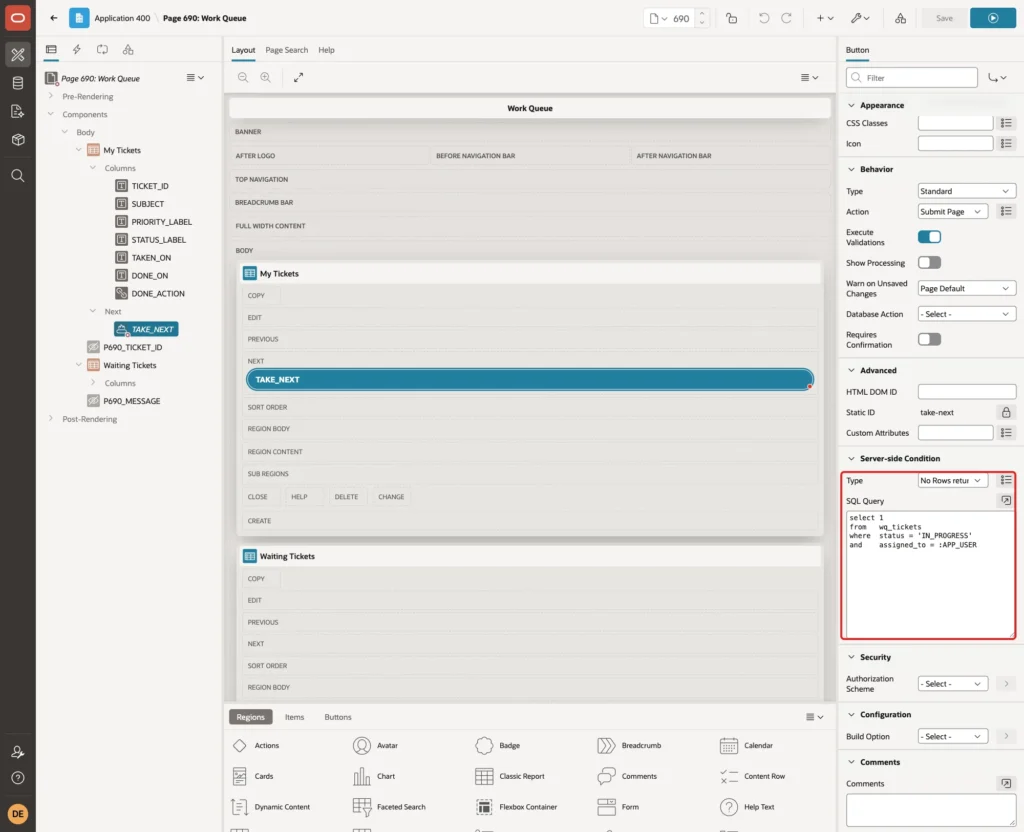
The condition only hides the button. The package still checks the rule on the server, because a request can be sent without the button.
Step 11: Add the Waiting Tickets Report
Create a second region below the first one. Set Name to Waiting Tickets, Type to Classic Report and enter this SQL Query:
Example:
select ticket_id,
       subject,
       case priority when 1 then 'High' when 2 then 'Medium' else 'Low' end as priority_label,
       created_on,
       round((cast(systimestamp as date) - cast(created_on as date)) * 24 * 60) as waiting_minutes
from   wq_tickets
where  status = 'NEW'
order  by priority, created_on, ticket_id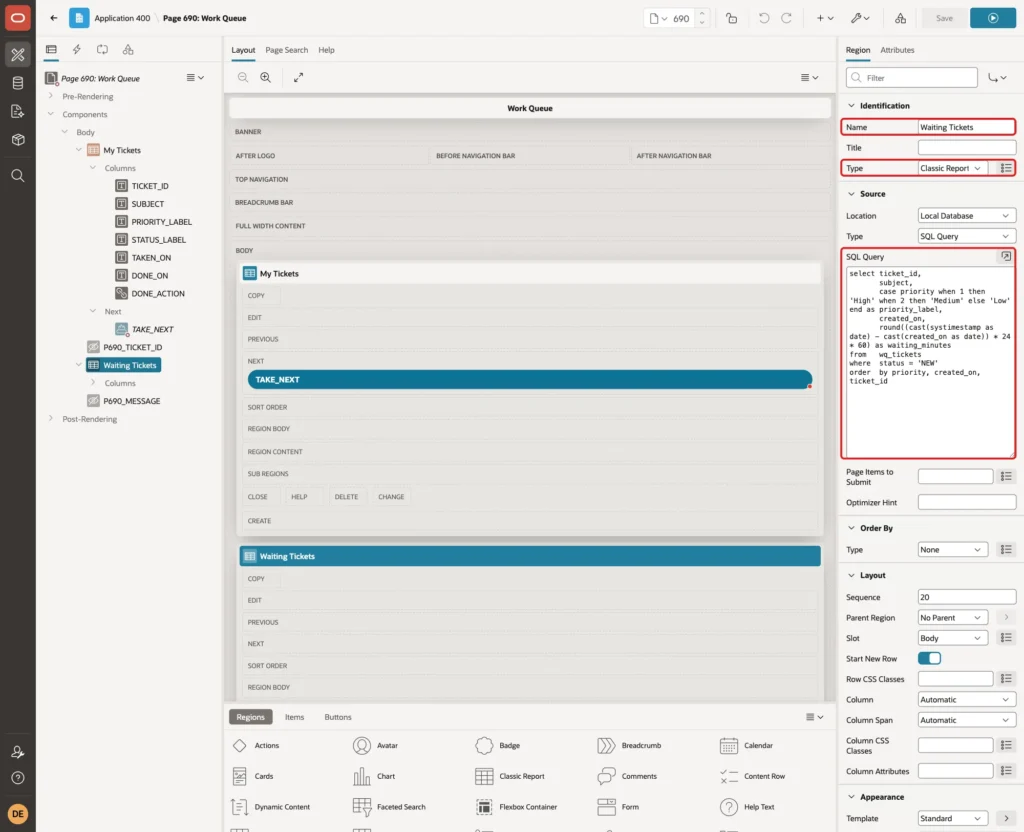
The report lists the NEW tickets in the same order as the cursor in the package, so users see which ticket Take Next gives them. WAITING_MINUTES shows how long each ticket has waited.
The label column is named PRIORITY_LABEL on purpose. If it were named PRIORITY, the ORDER BY would sort by the alias, so High, Low and Medium would be sorted alphabetically.
On the Attributes tab, set When No Data Found to "The queue is empty.":
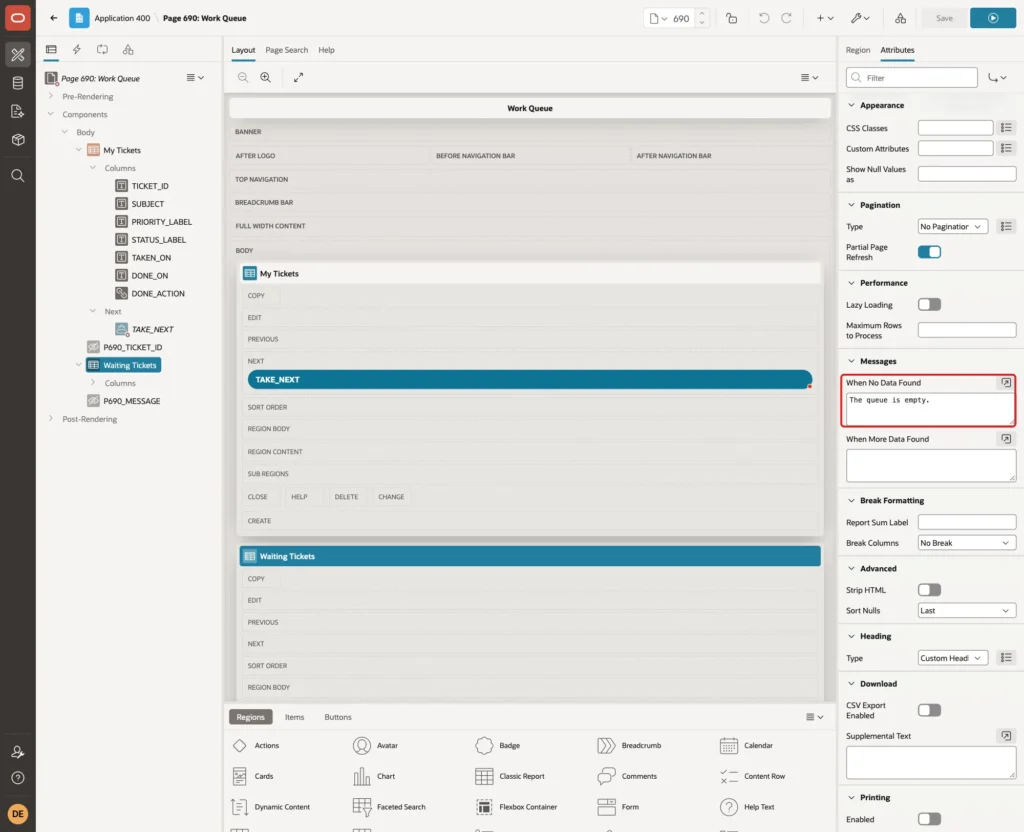
Set the format mask DD-MON-YYYY HH24:MI on CREATED_ON, the headings Ticket, Subject, Priority, Created On and Waiting (Minutes), and turn Sortable off for the columns, as in Step 8.
Step 12: Add the Hidden Items
Right-click Body, select Create Page Item and set these properties:
- Name: P690_TICKET_ID
- Type: Hidden
- Value Protected: off
- Session State, Storage: Per Request (Memory Only)
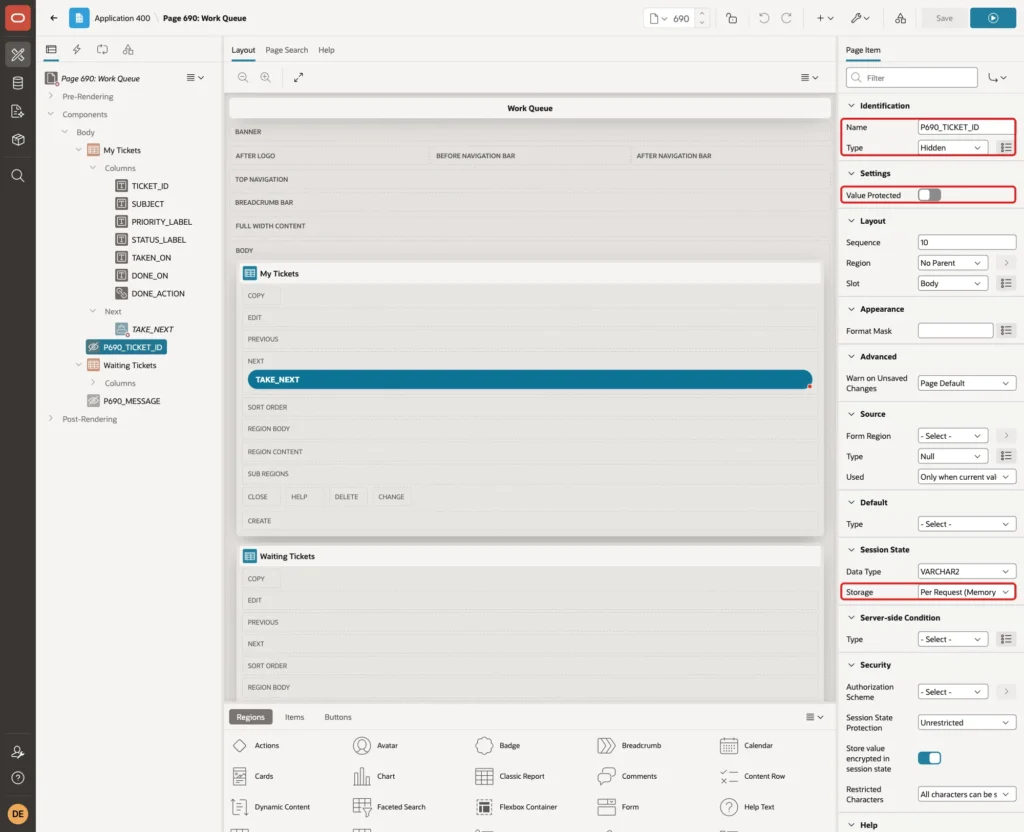
Value Protected must be off, because JavaScript sets the value in the browser. Create a second hidden item, P690_MESSAGE, with Storage Per Request (Memory Only) and Value Protected left on. The Take Next process fills it with the message for the user.
Step 13: Add the Processes and the Branch
Open the Processing tab, right-click Processing and select Create Process. Set Name to Take Next Ticket, Type to Execute Code and enter this PL/SQL Code:
Example:
declare
    l_ticket_id number;
begin
    wq_pkg.take_next(
        p_user      => :APP_USER,
        p_ticket_id => l_ticket_id);

    :P690_MESSAGE := case
                       when l_ticket_id is null then 'There are no tickets waiting in the queue.'
                       else 'Ticket ' || l_ticket_id || ' is now yours.'
                     end;
end;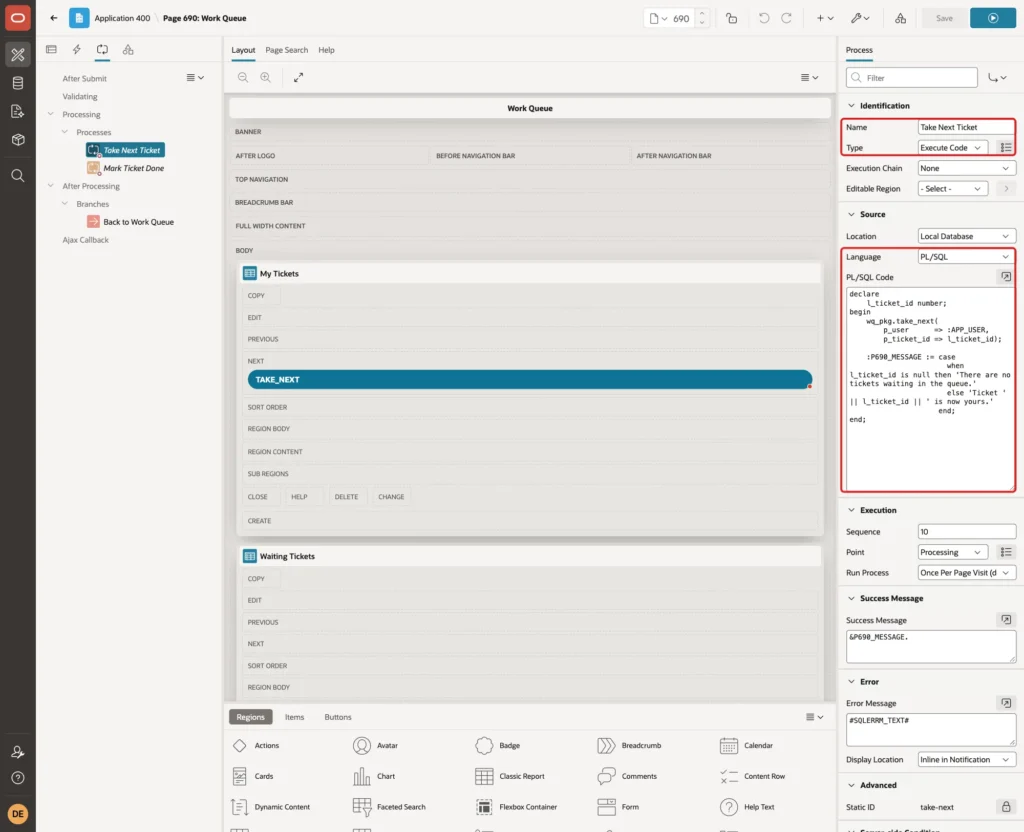
Set Success Message to &P690_MESSAGE. and Error Message to #SQLERRM_TEXT#. Under Server-side Condition, set When Button Pressed to TAKE_NEXT:
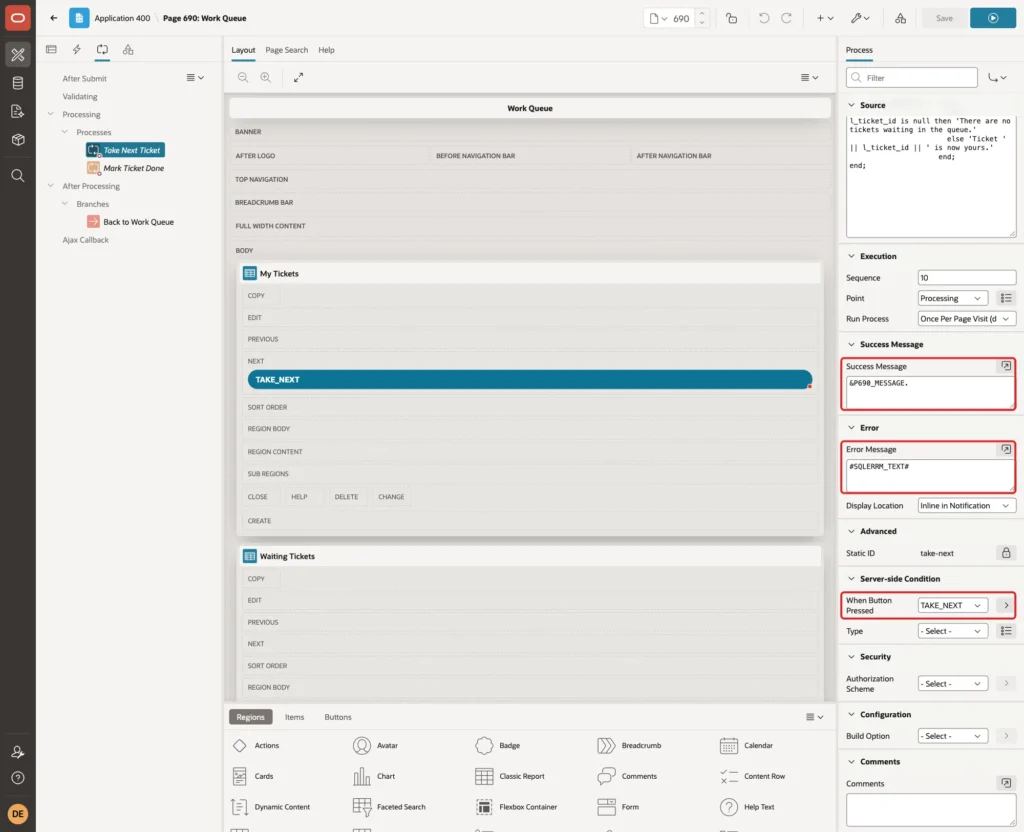
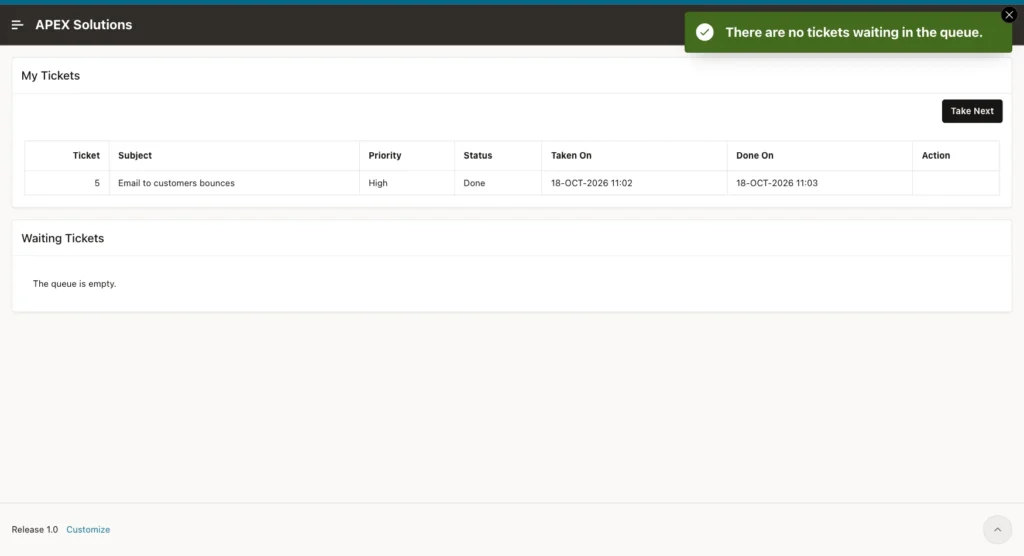
#SQLERRM_TEXT# shows the text of the package error without the ORA- number. An empty queue is not an error, so the process shows "There are no tickets waiting in the queue." as a normal message.
Create a second process. Set Name to Mark Ticket Done, Type to Execute Code and enter this PL/SQL Code:
Example:
begin
    wq_pkg.complete_ticket(
        p_ticket_id => :P690_TICKET_ID,
        p_user      => :APP_USER);
end;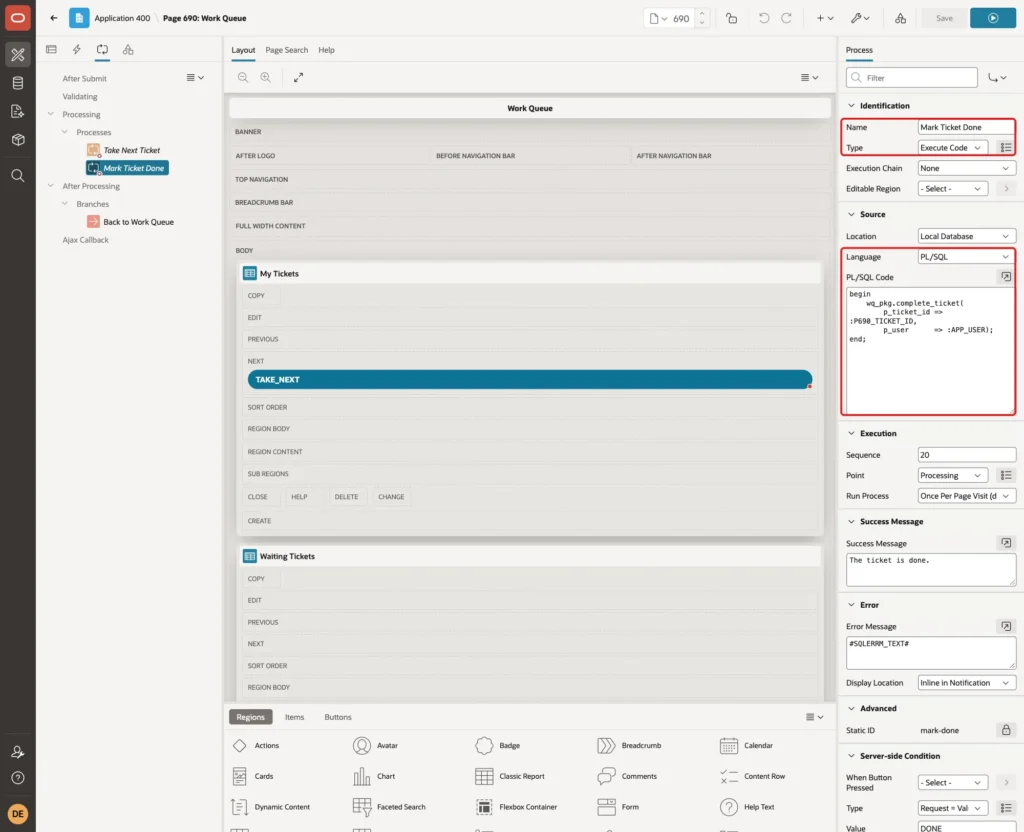
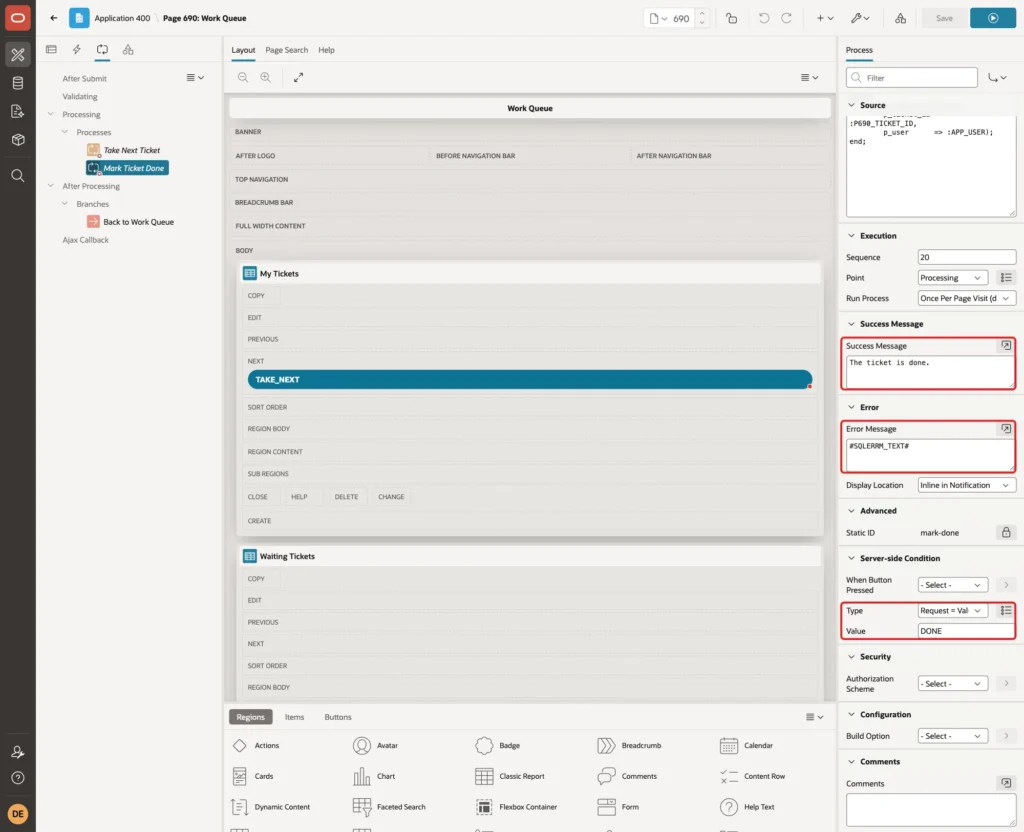
Set Success Message to "The ticket is done.", Error Message to #SQLERRM_TEXT#, and the Server-side Condition to Request = Value with Value DONE:
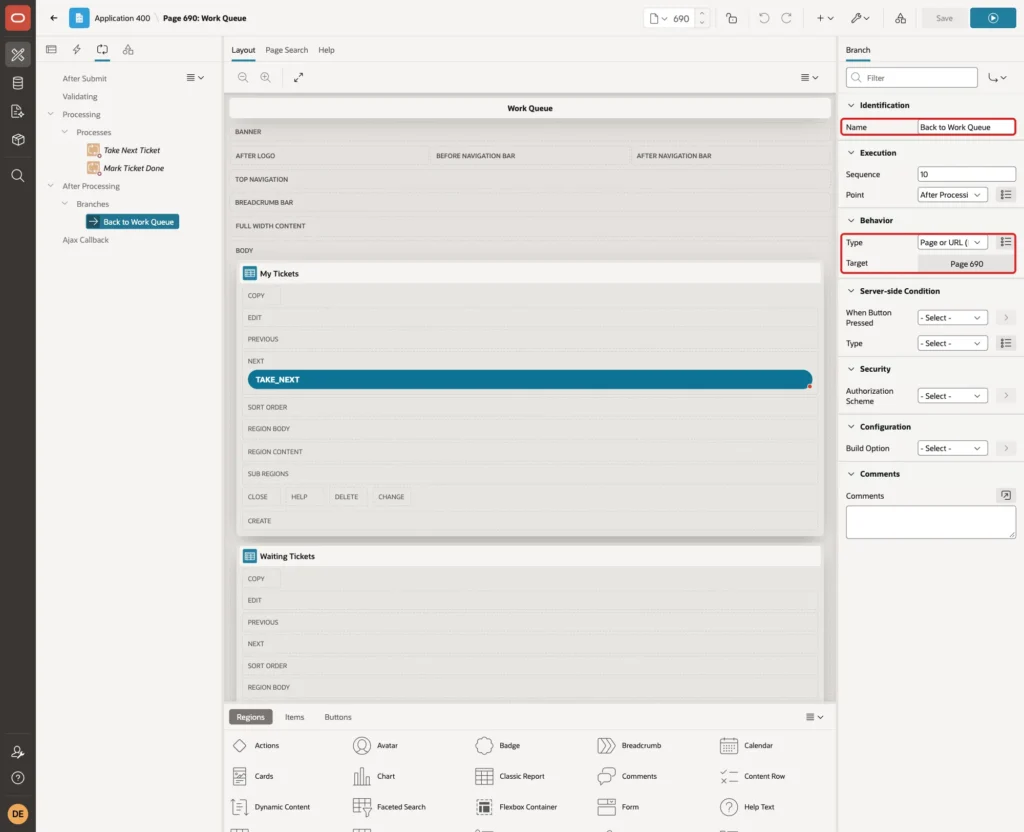
Right-click After Processing and select Create Branch. Set Name to Back to Work Queue, Type to Page or URL (Redirect) and Target to page 690:
Save the page.
Step 14: Test Take Next
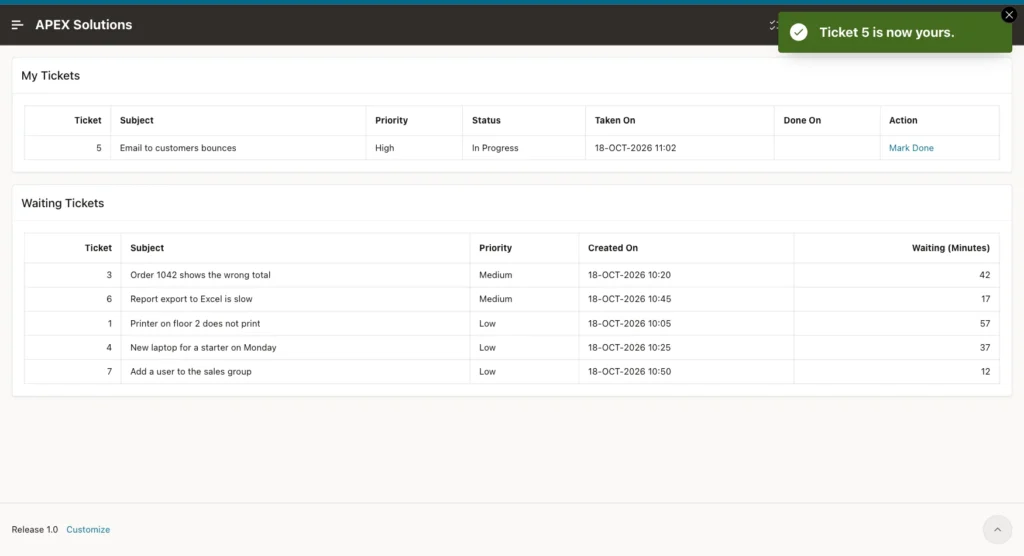
Run the page as DEMO_DEV. The user has no tickets yet, and six tickets are waiting. Click Take Next:
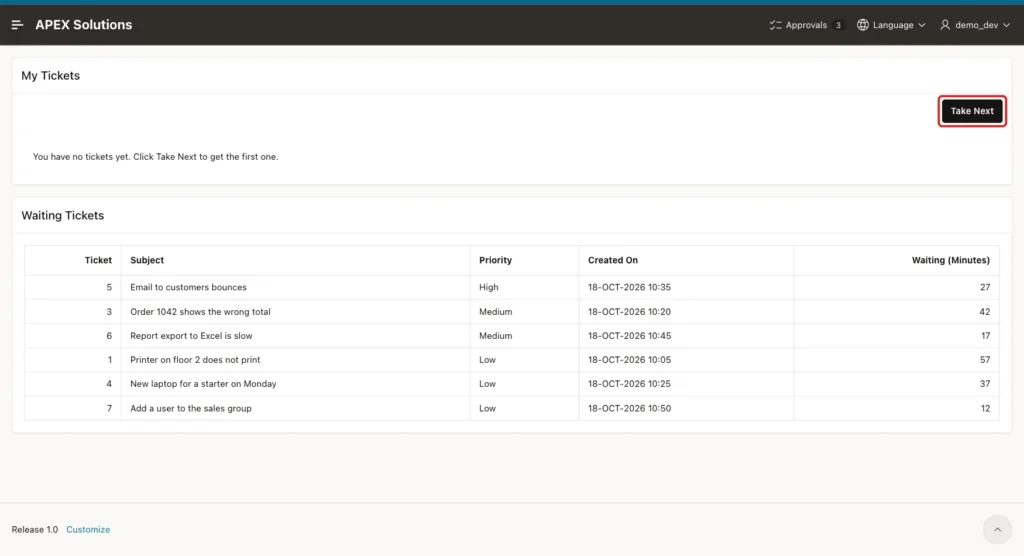
The message says "Ticket 5 is now yours." Ticket 5 is the only high-priority ticket left after the SQL test, so it was first in the queue. It moved from Waiting Tickets to My Tickets, and the Take Next button is gone:
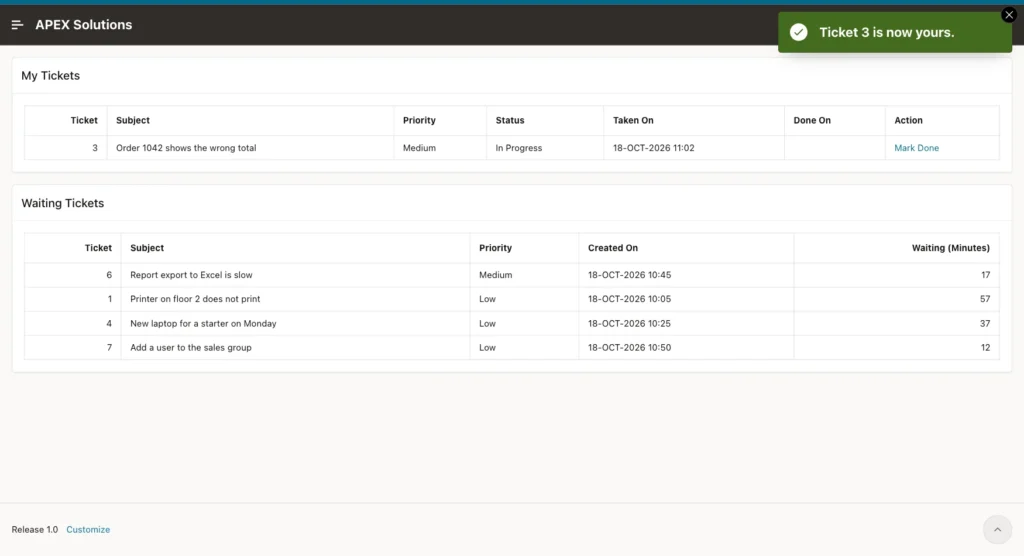
Then sign in as ORDER_EDITOR and click Take Next. This user gets ticket 3, the oldest medium-priority ticket:
Step 15: Test the Checks
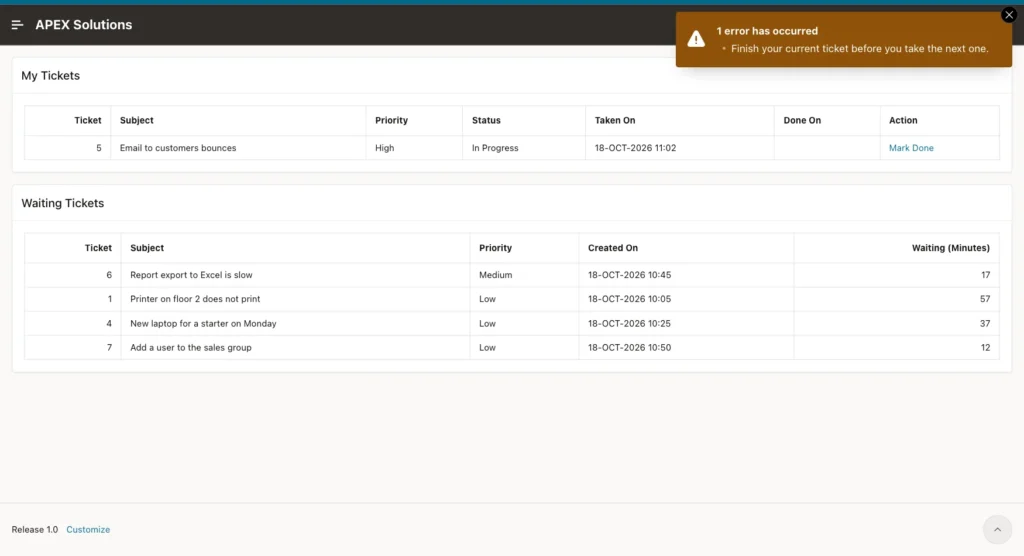
The button is hidden while DEMO_DEV has a ticket in progress, but the request can still be sent from the browser. The test ran apex.page.submit({request: 'TAKE_NEXT'}) in the browser console:
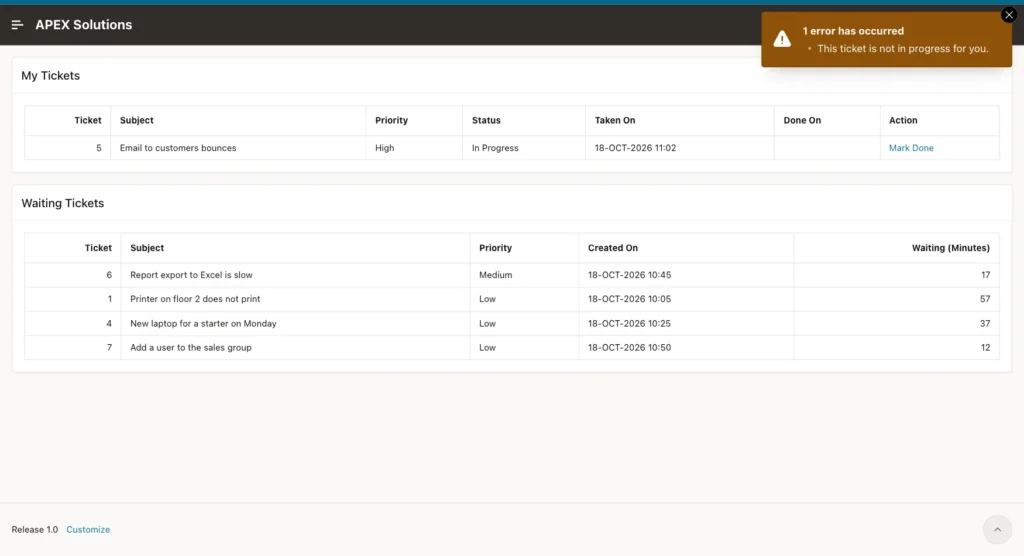
Next, DEMO_DEV sent the request DONE with P690_TICKET_ID set to 3, the ticket of ORDER_EDITOR. The package found no ticket in progress for DEMO_DEV with that ID, so nothing was changed:
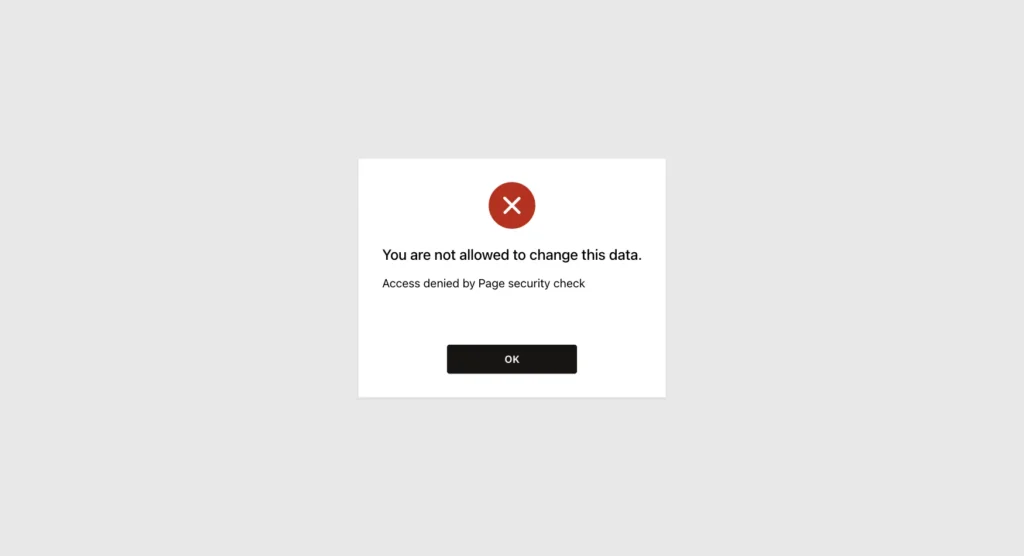
SALES_USER is a reader. The Work Queue entry is not in the navigation menu for this user, and opening the page URL directly shows an access error:
Step 16: Test Mark Done and the Empty Queue
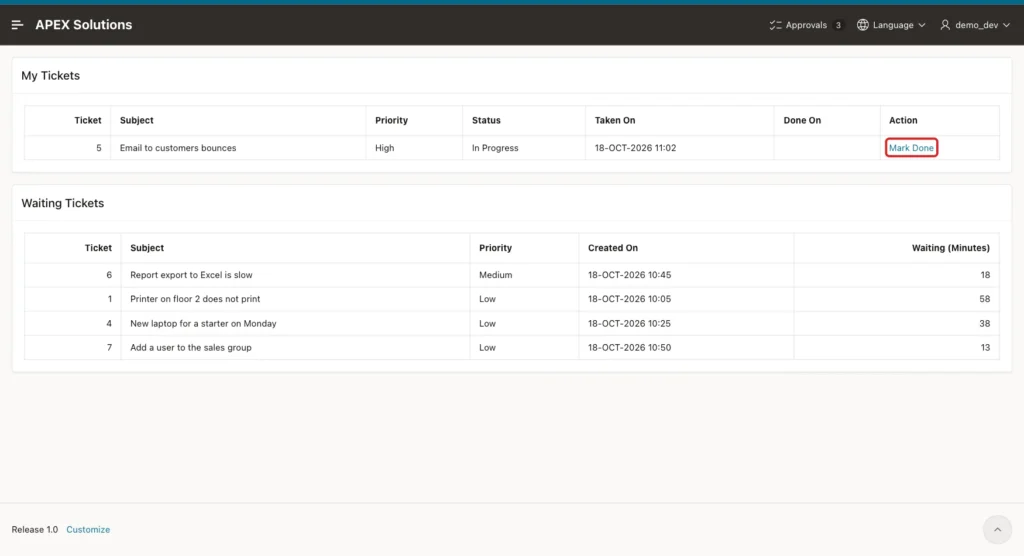
As DEMO_DEV, click Mark Done in the row of ticket 5:
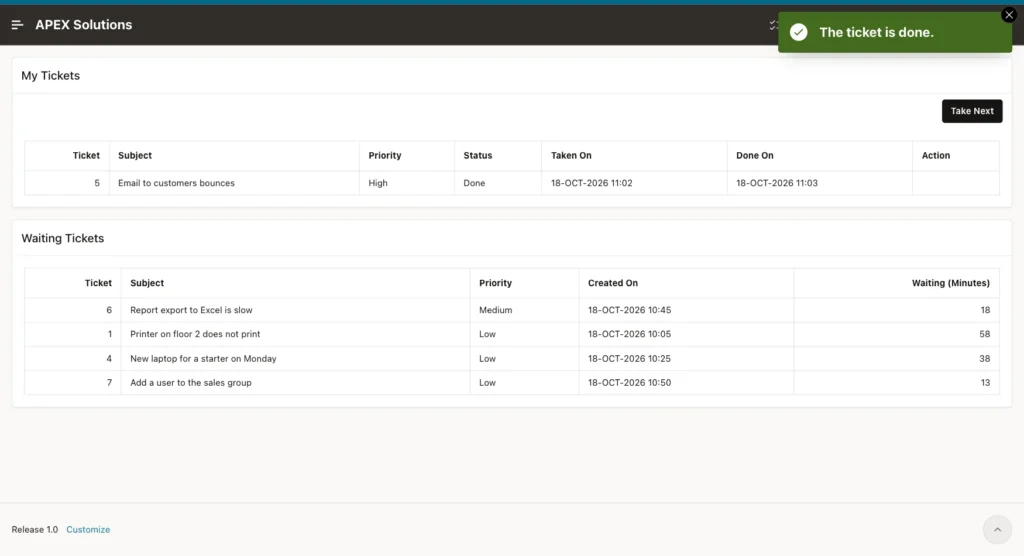
The message "The ticket is done." appears. Ticket 5 is now Done with a Done On time, and the Take Next button is back:
To test an empty queue, the remaining four NEW tickets were assigned to scratch users in SQL for a moment. DEMO_DEV clicked Take Next:
After this test, the four tickets were set back to NEW.
Step 17: Test Two Users Who Click Together
Finally, two browsers signed in as DEMO_DEV and SALES_MANAGER clicked Take Next at the same moment. DEMO_DEV got ticket 6 and SALES_MANAGER got ticket 1. Check the table in SQL:
Example:
select ticket_id, status, assigned_to,
       to_char(taken_on, 'HH24:MI:SS') taken,
       to_char(done_on, 'HH24:MI:SS') done
from wq_tickets
order by ticket_id;
Output:
   TICKET_ID STATUS         ASSIGNED_TO      TAKEN       DONE
____________ ______________ ________________ ___________ ___________
           1 IN_PROGRESS    SALES_MANAGER    11:05:35
           2 DONE           AGENT_A          10:58:41    10:58:41
           3 IN_PROGRESS    ORDER_EDITOR     11:02:39
           4 NEW
           5 DONE           DEMO_DEV         11:02:22    11:03:11
           6 IN_PROGRESS    DEMO_DEV         11:05:35
           7 NEW

7 rows selected.
Both tickets were taken in the same second, and each user got a different one. Tickets 4 and 7 are still waiting.
Things to Know
- Do not limit the rows in a SKIP LOCKED query with FETCH FIRST or ROWNUM. Use a cursor and fetch one row, as in TAKE_NEXT.
- SKIP LOCKED skips only rows that are locked right now. A ticket that another session has taken and committed is no longer NEW, so the WHERE clause excludes it.
- The lock on the taken ticket is held only until the page request commits, so other users skip it for a fraction of a second.
- The procedures take the user name as a parameter. In APEX it is :APP_USER; never take it from a page item, or users could take tickets in the name of others.
- The times use SYSTIMESTAMP, which is the clock of the database server. The server in this example runs on UTC.
Related Guides
- How to Lock Rows with SELECT FOR UPDATE in Oracle
- How to Build an Event Registration with Seat Limits in Oracle APEX
Conclusion
A work queue with Take Next in Oracle APEX needs one table, one PL/SQL package and one page. The package reads the queue in priority order with a SELECT ... FOR UPDATE SKIP LOCKED cursor and fetches one row, so users who click together get different tickets without waiting.
Constraints and a function-based unique index keep the data valid and allow one open ticket per user. The page adds a Take Next button, the user's own tickets with a Mark Done link, and the waiting queue. Forced requests, readers and an empty queue were tested and handled safely.
