
Administrators of an application often need to answer simple questions: who is using the application right now, who signed in today, and are there failed sign-ins that look like someone guessing passwords? Oracle APEX already records this information. Every sign-in attempt is written to a login access log, every page view to an activity log, and every session is kept until it ends. This guide builds an admin page with two reports on these APEX views: the active users of the last 30 minutes and the login history with the result of each attempt.
The Views
- APEX_WORKSPACE_ACCESS_LOG: one row per sign-in attempt, with APPLICATION_ID, USER_NAME, ACCESS_DATE, IP_ADDRESS, and AUTHENTICATION_RESULT.
- APEX_WORKSPACE_SESSIONS: one row per existing session, with APEX_SESSION_ID, USER_NAME, REMOTE_ADDR, and SESSION_CREATED. It has no application column, and it also lists App Builder sessions.
- APEX_WORKSPACE_ACTIVITY_LOG: one row per page view, with APPLICATION_ID, APEX_USER, APEX_SESSION_ID, and VIEW_DATE.
The parsing schema of the application can query them for its own workspace, so the reports need no extra grants.
Step 1: The Login History Report
On a new page, Login History, add a Classic Report region with this query. :APP_ID is the current application, so the page can be copied to other applications unchanged:
Example:
select access_date,
       user_name,
       ip_address,
       case authentication_result
           when 'AUTH_SUCCESS' then 'Success'
           else 'Failed: ' || initcap(replace(replace(authentication_result, 'AUTH_'), '_', ' '))
       end as result
from   apex_workspace_access_log
where  application_id = :APP_ID
order  by access_date desc
The CASE expression turns the result codes into readable text. To see the raw codes, here for application 400 in SQLcl, after a test with a wrong password for SALES_USER and a sign-in attempt for a user that does not exist, JSMITH:
Example:
select to_char(access_date, 'HH24:MI:SS') as time,
       user_name,
       authentication_result
from   apex_workspace_access_log
where  application_id = 400
order  by access_date desc
fetch  first 6 rows only;
Output:
TIME        USER_NAME     AUTHENTICATION_RESULT
___________ _____________ __________________________
08:47:08    DEMO_DEV      AUTH_SUCCESS
08:47:01    SALES_USER    AUTH_SUCCESS
08:46:58    JSMITH        AUTH_UNKNOWN_USER
08:46:54    SALES_USER    AUTH_PASSWORD_INCORRECT
08:46:33    DEMO_DEV      AUTH_SUCCESS
08:46:26    SALES_USER    AUTH_SUCCESS

6 rows selected.
AUTH_UNKNOWN_USER and AUTH_PASSWORD_INCORRECT tell the two failures apart: many unknown users from one IP address suggest someone trying names, many wrong passwords for one user suggest someone trying passwords.
Step 2: The Active Users Report
An active user is someone with an existing session who requested a page recently. The query joins the sessions with the activity log of this application and keeps the sessions with a page view in the last 30 minutes:
Example:
select s.user_name,
       s.remote_addr,
       s.session_created,
       max(l.view_date) as last_activity,
       count(*)         as page_views
from   apex_workspace_sessions s
join   apex_workspace_activity_log l on l.apex_session_id = s.apex_session_id
where  l.application_id = :APP_ID
and    s.user_name <> 'nobody'
group  by s.user_name, s.remote_addr, s.apex_session_id, s.session_created
having max(l.view_date) > sysdate - 30 / 1440
order  by last_activity desc
The join to the activity log does two jobs: it limits the sessions to this application, which APEX_WORKSPACE_SESSIONS alone cannot do, and it gives the time of the last page view. The user name nobody is the public user of pages viewed before signing in, such as the login page itself.
Step 3: Keep the Query's Order
Classic report columns are sortable by default, and a sort chosen by the user is saved as a preference. In a first test, the history showed the oldest sign-ins first, because an earlier visit had sorted by the first column. For a log, turn off Sortable for each column in the Sorting group, so the ORDER BY of the query always applies. Format the date columns with a format mask such as DD-MON-YYYY HH24:MI:SS, so the time is visible.
The Result
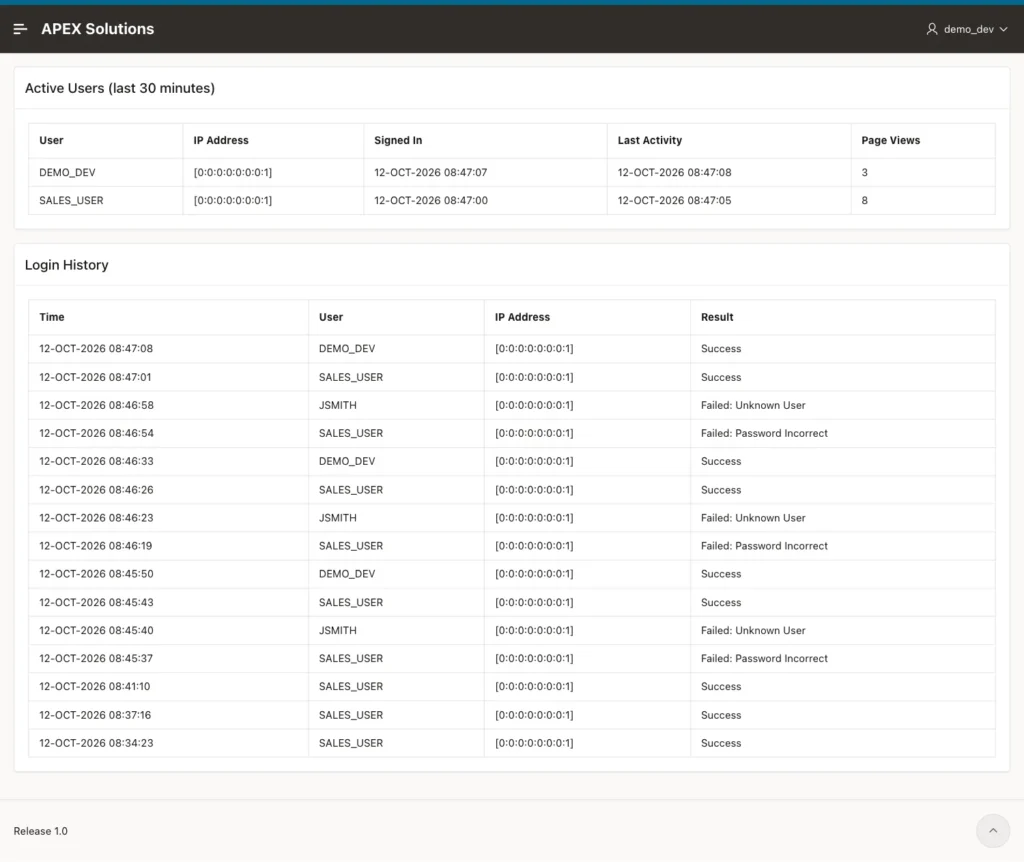
All rows show the IP address [0:0:0:0:0:0:0:1], the IPv6 loopback address, because the test browser ran on the same machine as ORDS. Behind a load balancer or a proxy, the address can be the proxy's, unless it is configured to pass the client address.
Things to Know
- Restrict the page to administrators with an authorization scheme on the page; the logs show user names and addresses.
- Signing out removes the session, so the user leaves the active list at once. In the test, importing the application again also removed its sessions, and the users had to sign in again.
- APEX keeps these logs for a limited time set by the instance administrator. For a longer history, copy the rows into your own table with a scheduled job.
- For a busier application, use an Interactive Report for the history, so administrators can filter by user, result, and date themselves.
Related Guides
- Oracle APEX Authorization and Application Security
- Oracle APEX Authentication: Schemes, Custom Login, and Sessions
Conclusion
To show login history and active users in Oracle APEX, query the views APEX already maintains: APEX_WORKSPACE_ACCESS_LOG for every sign-in attempt and its result, and APEX_WORKSPACE_SESSIONS joined with APEX_WORKSPACE_ACTIVITY_LOG for the users with recent page views. Put both in reports on an admin page, filter by :APP_ID, and turn off column sorting so the newest rows stay on top.
