
Authentication tells Oracle APEX who somebody is. Authorization decides what they may do once they are in: which pages open, which buttons appear, which processes are allowed to run.
This guide covers authorization schemes and roles, the difference between hiding a control and actually protecting it, and then the application-wide settings that matter: session state protection, browser security, a Content Security Policy built on the nonces APEX generates, and the handful of coding habits that prevent most vulnerabilities.
Every query, trigger, and snippet in this article runs against the Orbit Outfitters sample schema: customers, products, orders, stores, and about 2,300 orders of sample data. Install it once and you can follow along in your own workspace.
git clone https://github.com/devvinish/orb_tables.git
-- then, as your schema:
@orbit/install.sql
Authorization Schemes
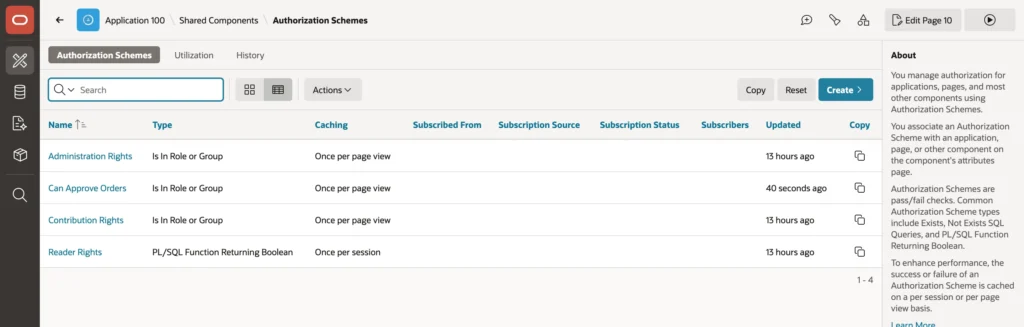
An authorization scheme answers one question with yes or no: may the current user do this? Components name a scheme in their Security properties and are shown or run only when the answer is yes.
| Scheme Type | Answers by checking |
|---|---|
| Is In Role or Group | An application role, a workspace group, or a group from the authentication scheme |
| PL/SQL Function Returning Boolean | Your own code |
| Exists or NOT Exists SQL Query | Whether a query returns rows |
| Item or preference comparisons | A value against an item or user preference |
Each scheme also carries an error message, shown when somebody opens a page it denies, and a caching setting that quietly decides how your application behaves when roles change.
| Caching | Means |
|---|---|
| Once per session | Fastest. The answer is remembered until the session ends, so role changes apply at the next sign-in |
| Once per page view | Evaluated once per page request, so role changes apply on the next page |
| Once per component | Evaluated per component, for answers that depend on what is being edited |
| Always | Evaluated every single time |
Once per session is tempting because it is cheapest, but it means revoking somebody's rights does nothing until they sign in again. For anything you might need to take away in a hurry, once per page view is the honest default.
Roles and Application Access Control
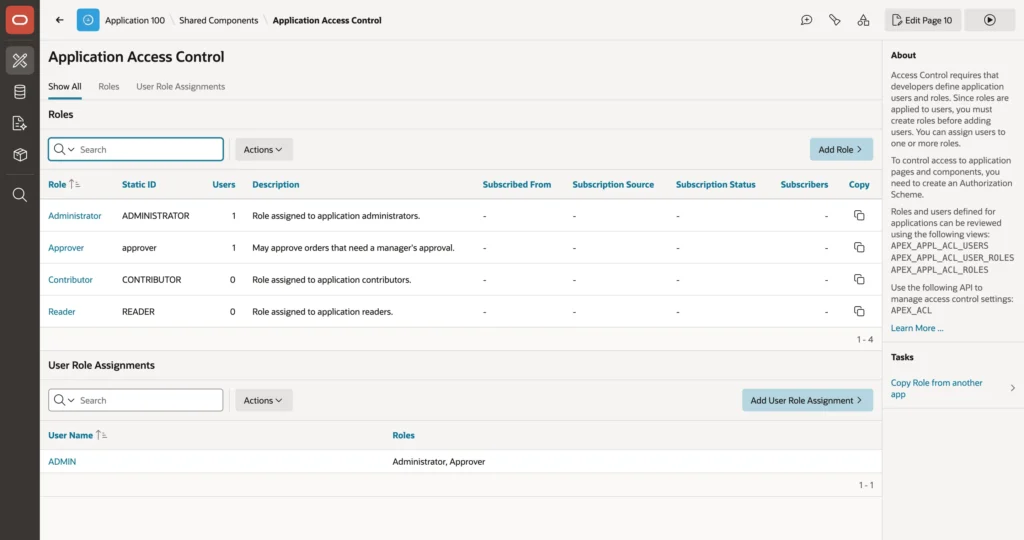
Application Access Control manages roles and assigns them to users. The split matters at deployment time: roles are part of the application and travel with an export, while the assignments of users to roles belong to each installation and do not. Development, test, and production each keep their own, which is exactly what you want and also the reason a fresh import appears to have no permissions.
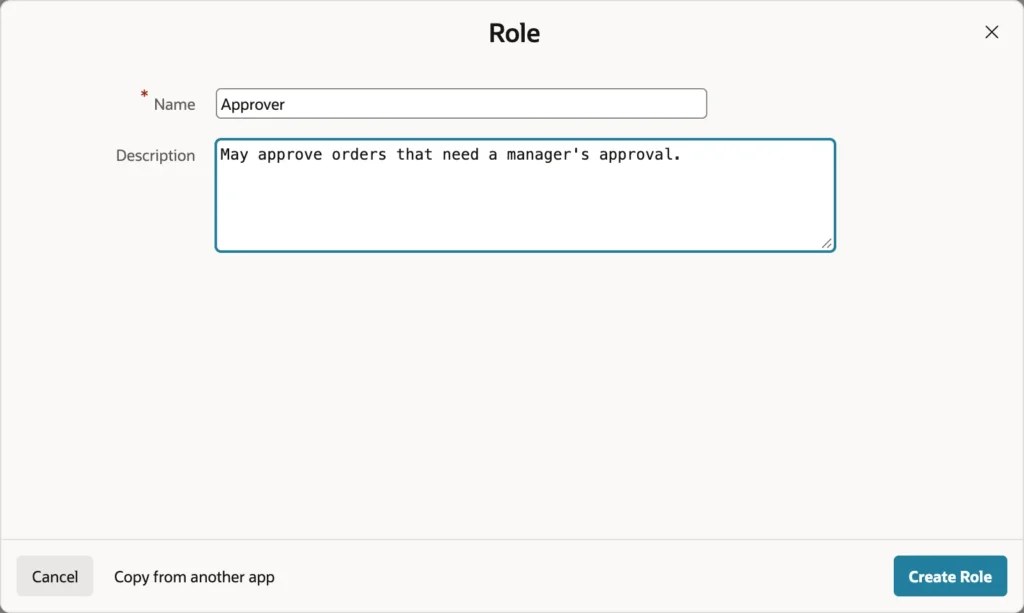
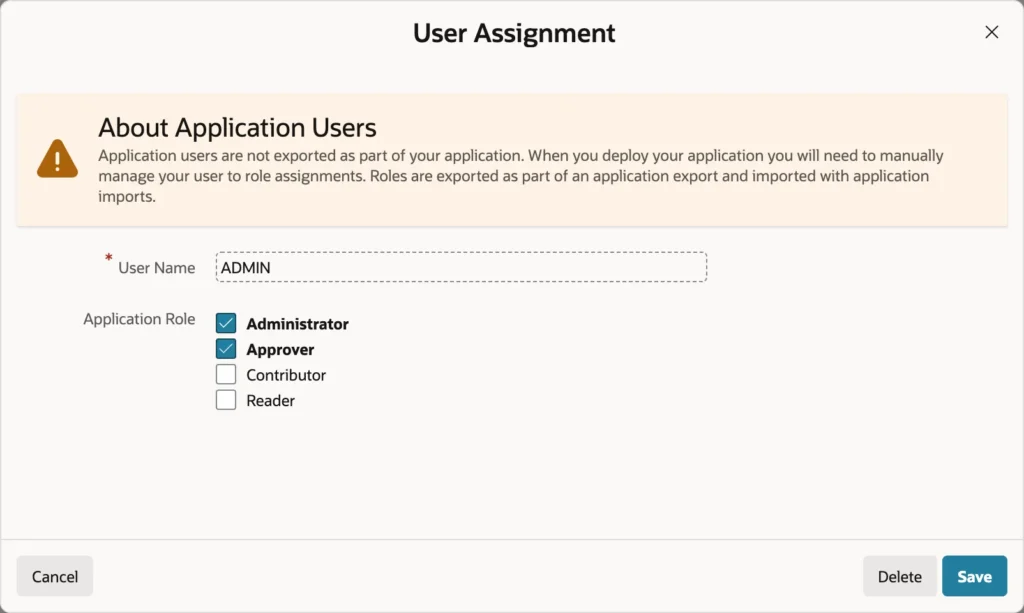
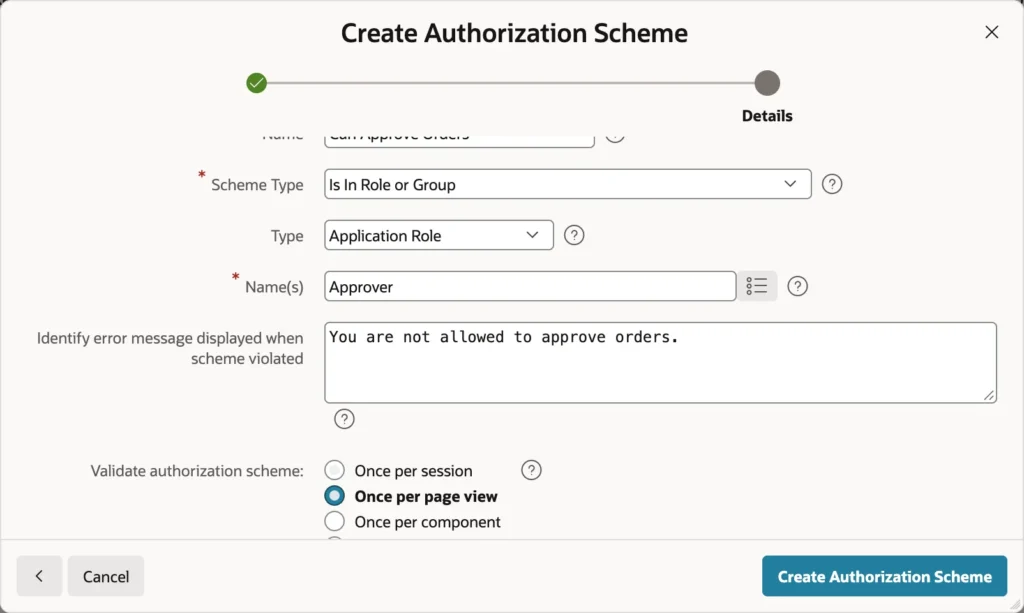
Creating a right is two steps: add the role, then add an authorization scheme of type Is In Role or Group that names it. From then on, any component can require that right by naming the scheme.
apex_acl.add_user_role(
    p_application_id => 100,
    p_user_name      => 'JANE',
    p_role_static_id => 'approver');

if apex_authorization.is_authorized('Can Approve Orders') then
    ...
end if;
The same assignments can be managed in code with APEX_ACL, which is how you build an administration page or a deployment script, and APEX_AUTHORIZATION evaluates a scheme from PL/SQL. Where Is In Role or Group looks for its answer is set by Security Attributes: the access control assignments, the authentication scheme (such as groups returned by a social provider), or custom code.
Applying Authorization in the Right Places
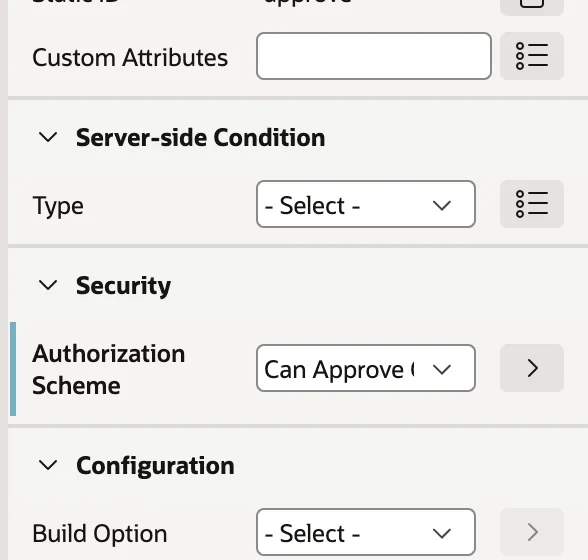
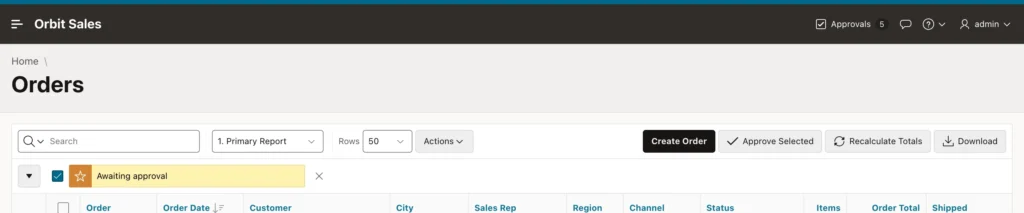
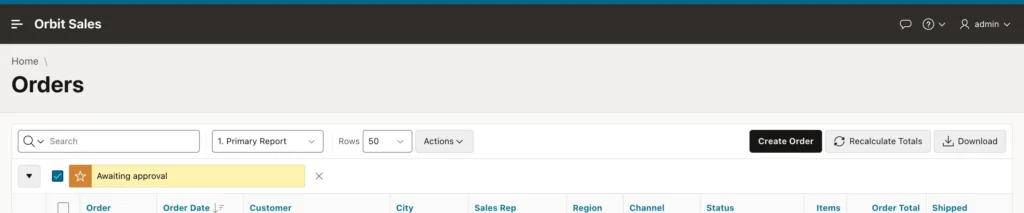
Hiding the button is a convenience. The authorization on the process is the protection, and the distinction is not academic.
A user without the role can still submit the page with the request that the button would have sent, by editing it in the browser's developer tools. If only the button carries the scheme, the process runs and the orders get approved. Protect the component that does the work: processes, Ajax callbacks, and pages, not merely the controls that lead to them.
Schemes can be set on nearly everything: pages, regions, items, buttons, processes, validations, computations, dynamic actions, report columns, list entries, and breadcrumb entries. A page with a scheme cannot be opened at all by a user it denies, which is how generated administration pages stay closed. Security Attributes can also set one scheme for the whole application, with a switch deciding whether it applies to public pages too.
Session State Protection
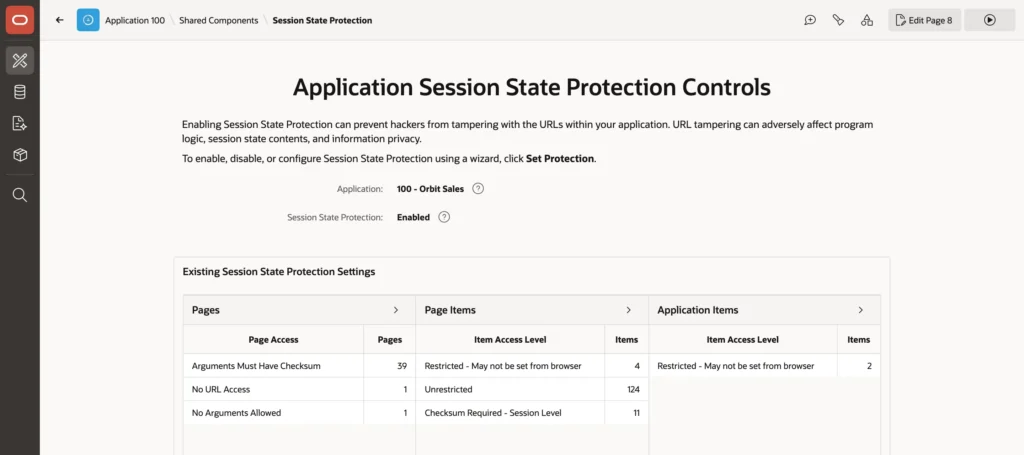
Session state protection is the counterpart to authorization: authorization decides who may act, this decides which values the server will believe.
- Page Access Protection: Unrestricted, Arguments Must Have Checksum (the default for new pages), No Arguments Supported, or No URL Access for pages reachable only by a branch.
- Item Protection: Unrestricted, Checksum Required at application, user, or session level, or Restricted so only server-side code may set the value.
None of it applies unless session state protection is enabled in Security Attributes, and the Set Protection wizard can apply sensible defaults across every page and item at once. The rule of thumb is short: any page receiving values in its URL needs a checksum, any hidden item the browser must not change is protected, and every application item is restricted.
Browser Security
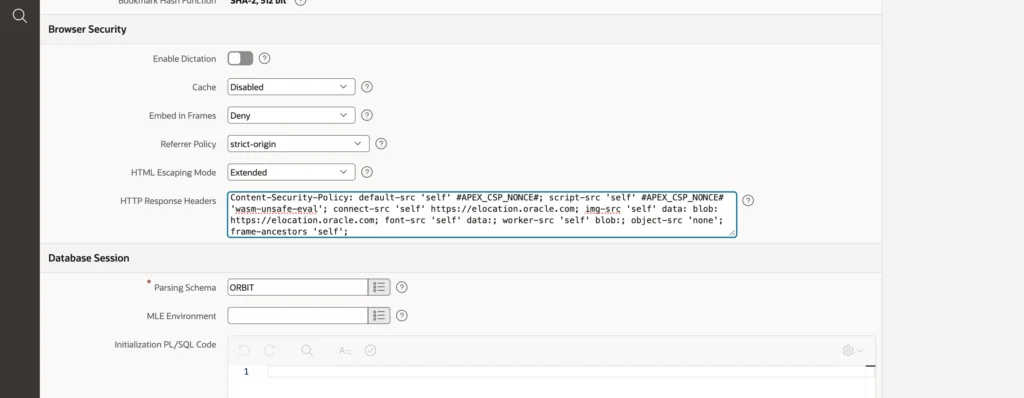
- Cache decides whether browsers may store pages. Disabled is safer, because it stops the back button showing data after somebody signs out.
- Embed in Frames set to Deny protects against clickjacking, where another site frames your application invisibly and tricks users into clicking. APEX modal dialogs keep working, since they are frames of the same page.
- Referrer Policy limits how much of your URL is sent to other sites.
- HTML Escaping Mode set to Extended also escapes quotes and slashes, which makes escaped values safe in more contexts. Keep it.
- HTTP Response Headers is where a Content Security Policy goes.
A Content Security Policy That Works with APEX
A Content Security Policy tells the browser which sources of scripts, styles, images, and connections a page may use. If an attacker does manage to inject a script tag, the browser refuses to run it because it came from nowhere the policy allows.
Historically this was painful for generated applications, because a policy strict enough to be useful also blocks the framework's own inline scripts. APEX solves it with nonces: every script it generates carries a random value that changes each request, and the substitution string for the nonce can be placed in the header so the policy allows exactly those scripts and nothing else.
Content-Security-Policy: default-src 'self' #APEX_CSP_NONCE#; object-src 'none';
  img-src 'self' data:; frame-ancestors 'self';
Start there, then test every page with the browser console open, because a policy that is too strict fails silently. In a typical application most pages pass immediately and a couple do not, usually the ones loading something from outside.
Content-Security-Policy: default-src 'self' #APEX_CSP_NONCE#;
  script-src 'self' #APEX_CSP_NONCE# 'wasm-unsafe-eval';
  connect-src 'self' https://elocation.oracle.com;
  img-src 'self' data: blob: https://elocation.oracle.com;
  font-src 'self' data:;
  worker-src 'self' blob:;
  object-src 'none';
  frame-ancestors 'self';
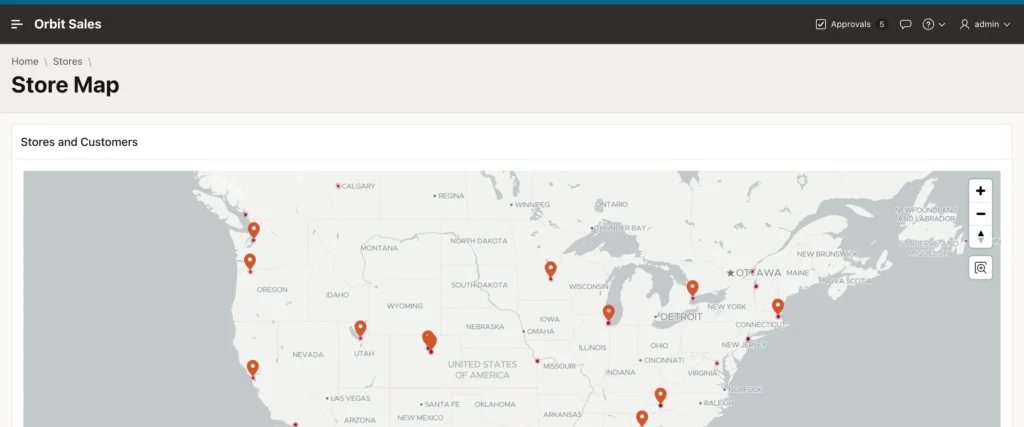
Each violation in the console names the directive that blocked it, so widening the policy is a matter of reading rather than guessing. A map region needs its tile server for connections and images, workers created from blob URLs, and WebAssembly. A calendar may load an icon font from a data URL. Note that allowing WebAssembly does not require allowing JavaScript eval, and the policy above still permits no inline scripts beyond the ones APEX signed.
Roll it out with the report-only header first. Browsers accept a variant that reports violations without blocking anything, so you can collect a few days of real traffic in production, fix what shows up, and only then switch to the enforcing header. Retest whenever you add a plug-in, a map background, or a library from another host.
The Database Session
Security Attributes also sets the parsing schema, whose privileges every statement in the application runs with, plus initialization and cleanup PL/SQL that runs at the start and end of each request, which is where a virtual private database context gets set.
Give that schema only the privileges the application actually needs. A schema owning the application's tables and nothing else puts a hard ceiling on what any mistake or attack can reach. In the same section, Runtime API Usage controls whether the application may modify itself, other applications, or the workspace, and should stay off unless the application is deliberately an administration tool.
Secure Coding Habits
Most vulnerabilities in APEX applications come from a short list, and each has a one-line fix.
- SQL injection: never build SQL from item values with substitution strings or concatenation. A substitution in a where clause lets a user type their way into every row, while a bind variable treats the value as data. In dynamic SQL, bind with using, and validate identifiers with dbms_assert or an allow-list.
- Cross-site scripting: escape every value written into HTML. Keep Escape special characters on, use apex_escape.html in dynamic content, and pick the substitution modifier that matches the context.
- Broken access control: protect processes, callbacks, and pages, not just buttons and links, and protect the values the server trusts.
- Trusting the browser: client-side validation, hidden fields, and disabled buttons are for users, not for security. Check again on the server.
- Secrets in code: keep passwords and API keys in web credentials and application settings, never as literals in PL/SQL.
The App Builder's Advisor checks an application for many of these automatically, including unescaped columns, substitutions inside SQL, and pages without checksum protection. Running it before a release costs a minute.
Conclusion
Authorization in APEX is straightforward to configure and easy to apply in the wrong place. Schemes answer yes or no from roles, queries, or PL/SQL, Application Access Control holds the roles while each environment keeps its own assignments, and the caching setting decides whether revoking a right takes effect now or at the next sign-in. The rule that matters most is to protect the component that does the work rather than the button that starts it, because a request can be sent without ever touching your interface. Around that sits the rest of the defense: session state protection so the server only believes values it signed, browser settings that disable caching and refuse framing, and a Content Security Policy that is finally practical thanks to the nonce APEX puts on its own scripts, rolled out in report-only mode until the console is quiet. Add bind variables, escaped output, server-side validation, credentials kept out of code, and a parsing schema with the minimum privileges, and the application is defended at every layer rather than just the visible one.
