
Every request to an Oracle APEX application belongs to a session, and every session has a user. That user is either the public user, called nobody, or somebody who has proved who they are.
Authentication is that proof, whether it comes from APEX itself, the database, a directory, your own table, or a token from Microsoft Entra ID or Google. This guide covers how the sign-in actually works, every scheme type available, a custom scheme with properly hashed passwords, social sign-in, and the session settings that decide how long people stay signed in.
Every query, trigger, and snippet in this article runs against the Orbit Outfitters sample schema: customers, products, orders, stores, and about 2,300 orders of sample data. Install it once and you can follow along in your own workspace.
git clone https://github.com/devvinish/orb_tables.git
-- then, as your schema:
@orbit/install.sql
How Authentication Works
When a request arrives, APEX checks whether its session is valid and signed in. If not, and the page requires authentication, the scheme's Session Not Valid setting takes over, which normally means showing the login page.
The login page calls apex_authentication.login with the user name and password. The scheme's authentication function decides whether they are correct, and if they are, APEX records the user in the session, runs the post-authentication procedure, and redirects to the page the user originally asked for. From that moment the user name is available everywhere as APP_USER.
Every page is either public or protected through its Security Authentication property. The login page is public, for obvious reasons.
The Login Page
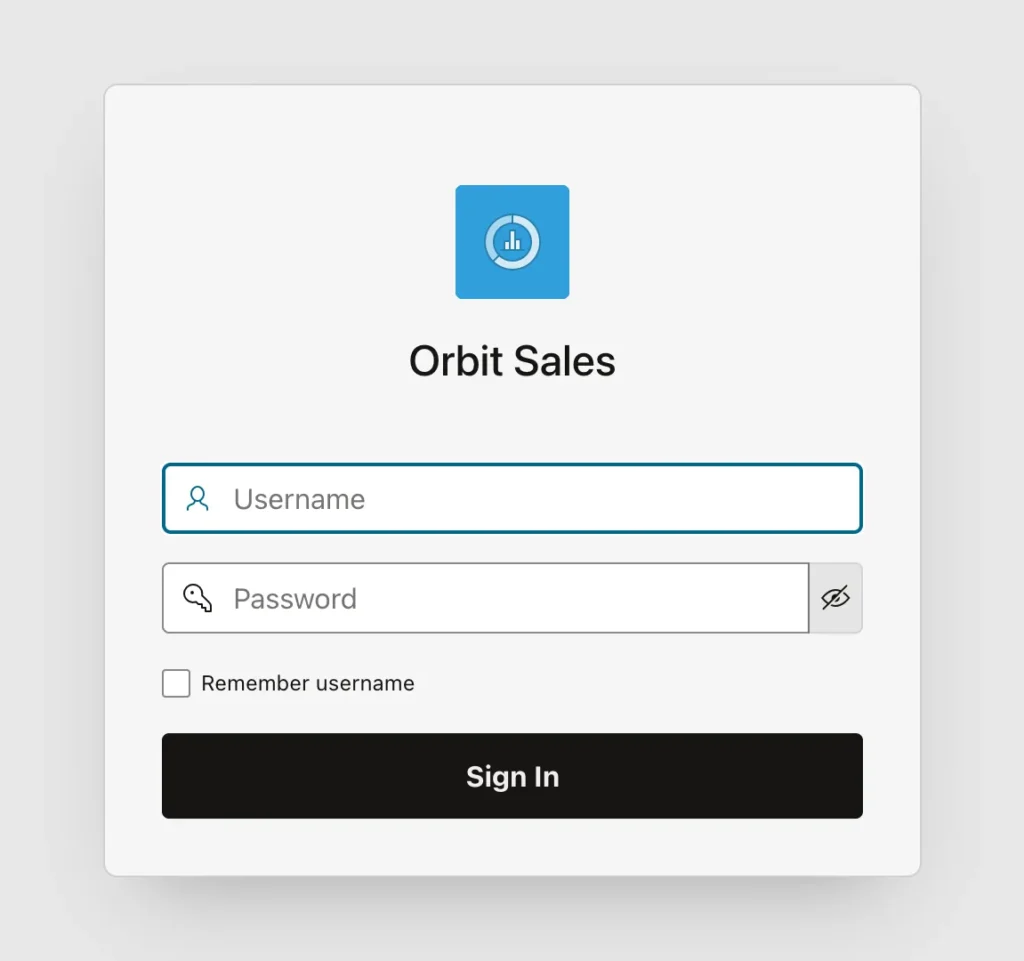
The wizard generates a login page holding username, password, and remember items, plus four processes that are worth knowing by name.
- Get Username Cookie fills in the remembered user name before the page is shown.
- Set Username Cookie stores it on submit when the box is checked.
- Login is an Invoke API process calling apex_authentication.login with the two items.
- Clear Page Cache empties the login items, so the password does not linger in session state.
Because this page works with any scheme that checks a name and a password, it rarely needs changing beyond its appearance. A fifth item appears when an instance administrator enables persistent authentication, which lets people stay signed in across browser restarts.
Signing Out
The Sign Out entry links to a LOGOUT_URL substitution string that calls apex_authentication.logout. That ends the session and sends the user wherever the scheme's Post-Logout URL points, which by default is the home page and therefore, since it requires authentication, straight back to the login page.
Authentication Schemes
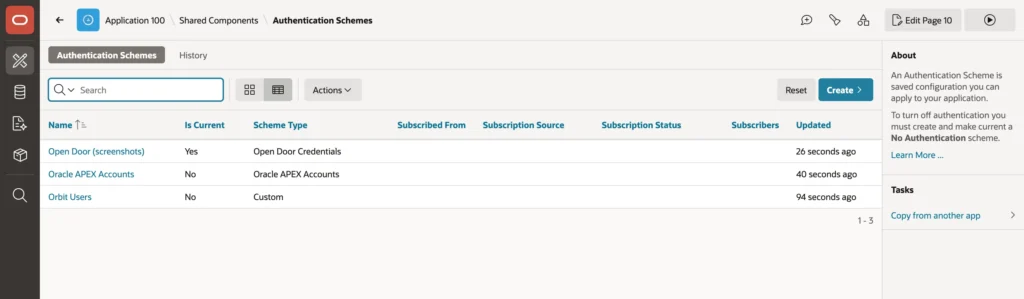
| Type | Checks users against |
|---|---|
| Oracle APEX Accounts | The users of the APEX workspace |
| Database Accounts | Database users, by schema name and password |
| LDAP Directory | An LDAP server such as Active Directory |
| Social Sign-In | An OAuth2 or OpenID Connect provider |
| SAML Sign-In | A SAML 2.0 identity provider, once the instance is configured for it |
| HTTP Header Variable | A user name set by a single sign-on proxy in front of ORDS |
| Custom | Your own PL/SQL function |
| Open Door Credentials | Nothing at all, accepting any user name. Demonstrations only |
| No Authentication | Nothing. Everyone is the public user |
Oracle APEX Accounts is the fastest start, with users managed in the workspace along with password rules and lock-out. It suits internal applications with a small, stable user base.
For anything used across an organization, signing in through that organization's identity provider is almost always the better answer. Users keep one password, multi-factor authentication comes free, and someone who leaves loses access the moment their account is disabled rather than whenever somebody remembers to tidy your user table.
Writing a Custom Authentication Scheme
A custom scheme calls your PL/SQL function with the user name and password and signs the user in when it returns true. It is the right choice when your users live in your own table, such as customers of a portal.
Storing Passwords Safely
Never store passwords, not even encrypted. Store a hash: the output of a one-way function that cannot be reversed, computed with a random salt per user so identical passwords produce different hashes, and made deliberately slow through many iterations so guessing is expensive.
create table orb_app_users (
    user_id        number generated always as identity primary key,
    username       varchar2(100 char) not null,
    full_name      varchar2(200 char),
    password_hash  raw(64)            not null,
    password_salt  raw(16)            not null,
    is_active      varchar2(1 char)   default 'Y' not null,
    failed_logins  number             default 0   not null,
    last_login_on  date,
    constraint orb_app_users_uk        unique (username),
    constraint orb_app_users_active_ck check (is_active in ('Y', 'N'))
);
The hashing itself is PBKDF2 with HMAC-SHA512, the standard algorithm for passwords, built on DBMS_CRYPTO. Twenty thousand iterations costs about 40 milliseconds per sign-in, which nobody notices and an attacker grinding through a password list very much does.
    -- PBKDF2 with HMAC-SHA512, one 64-byte block (RFC 8018).
    function pbkdf2 (p_password in varchar2, p_salt in raw) return raw is
        l_key raw(2000) := utl_i18n.string_to_raw(p_password, 'AL32UTF8');
        l_u   raw(64);
        l_t   raw(64);
    begin
        l_u := dbms_crypto.mac(utl_raw.concat(p_salt, hextoraw('00000001')),
                               dbms_crypto.hmac_sh512, l_key);
        l_t := l_u;
        for i in 2 .. c_iterations loop
            l_u := dbms_crypto.mac(l_u, dbms_crypto.hmac_sh512, l_key);
            l_t := utl_raw.bit_xor(l_t, l_u);
        end loop;
        return l_t;
    end pbkdf2;
This needs one grant from a DBA, because DBMS_CRYPTO is not granted to schemas by default.
grant execute on sys.dbms_crypto to orbit;
Creating a user or changing a password generates a fresh salt every time, and a merge handles both cases in one statement.
    procedure set_password (
        p_username  in varchar2,
        p_password  in varchar2,
        p_full_name in varchar2 default null)
    is
        l_salt raw(16) := dbms_crypto.randombytes(16);
        l_hash raw(64) := pbkdf2(p_password, l_salt);
    begin
        merge into orb_app_users u
        using (select upper(p_username) as username from dual) s
           on (u.username = s.username)
         when matched then update
              set u.password_hash = l_hash,
                  u.password_salt = l_salt,
                  u.failed_logins = 0,
                  u.full_name     = nvl(p_full_name, u.full_name)
         when not matched then insert (username, full_name, password_hash, password_salt)
              values (s.username, p_full_name, l_hash, l_salt);
    end set_password;
The Authentication Function
APEX calls the function with two parameters and expects a Boolean back. What makes this version safe is not the happy path but everything around it.
    function authenticate (
        p_username in varchar2,
        p_password in varchar2) return boolean
    is
        l_user orb_app_users%rowtype;
        l_hash raw(64);
    begin
        select * into l_user
          from orb_app_users
         where username = upper(p_username);

        l_hash := pbkdf2(p_password, l_user.password_salt);

        if l_user.is_active = 'N' or l_user.failed_logins >= c_max_failures then
            return false;
        elsif l_hash = l_user.password_hash then
            return true;
        else
            record_failure(l_user.user_id);
            return false;
        end if;
    exception
        when no_data_found then
            -- Spend the same time as for a real user, so that timing does not reveal user names.
            l_hash := pbkdf2(p_password, hextoraw('00'));
            return false;
    end authenticate;
Three decisions there deserve attention.
Every failure returns the same false, whether the user does not exist, the password is wrong, the account is inactive, or it is locked. The login page shows one message for all of them, so nobody can discover which user names are real by reading error text.
The exception branch still computes a hash for a user that does not exist. Without it, a missing user would answer in a millisecond while a real one takes forty, and that difference alone is enough to enumerate your user list. Spending the time deliberately closes that channel.
The failure counter is written by an autonomous transaction, which matters because APEX rolls back the transaction of a failed sign-in. Without the pragma the count would be rolled back too, and the lock-out would never trigger.
    -- Counts a failed attempt, even though APEX rolls back the failed sign-in.
    procedure record_failure (p_user_id in number) is
        pragma autonomous_transaction;
    begin
        update orb_app_users
           set failed_logins = failed_logins + 1
         where user_id = p_user_id;
        commit;
    end record_failure;
A post-authentication procedure runs after a successful sign-in, inside the new session, which is where you record the sign-in and clear the failure count.
    procedure post_authenticate is
    begin
        update orb_app_users
           set last_login_on = sysdate,
               failed_logins = 0
         where username = upper(sys_context('APEX$SESSION', 'APP_USER'));
    end post_authenticate;
Creating the Scheme
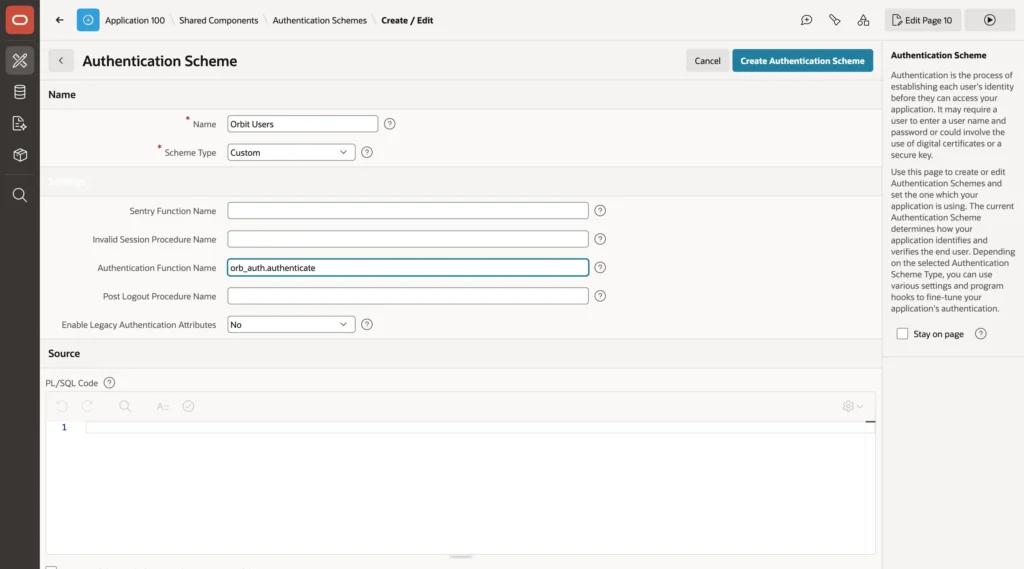
- In Shared Components, Authentication Schemes, click Create, then Next.
- Name the scheme and choose the Custom type.
- Enter the authentication function name, and set Enable Legacy Authentication Attributes to No.
- Open the finished scheme and enter the post-authentication procedure name.
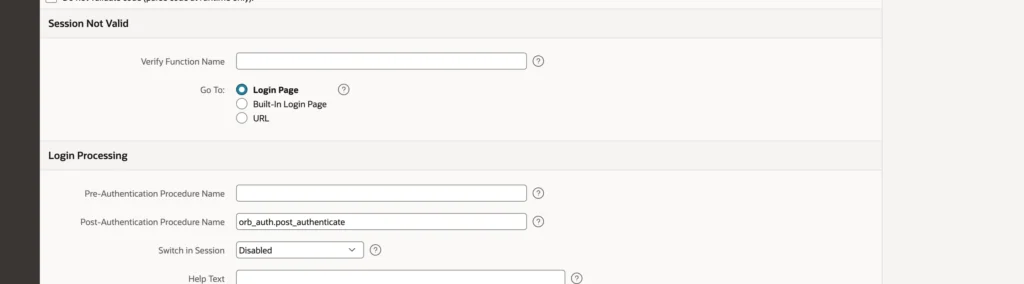
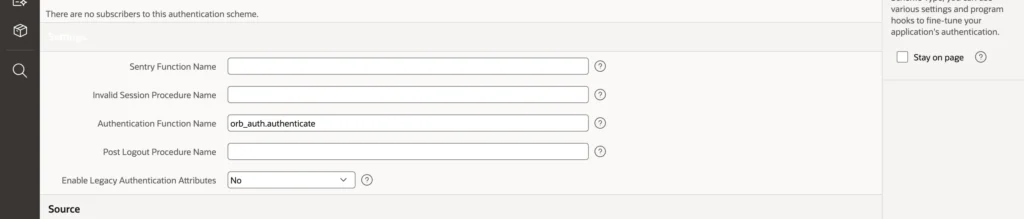
Three more hooks sit in the scheme's settings. A sentry function runs on every request to decide whether the session is still valid, which is how you sign out somebody whose account was deactivated a minute ago. An invalid session procedure runs when it is not, and a post-logout procedure runs at sign-out. Name them from a package rather than pasting code into the scheme, so they can be tested and versioned like anything else.
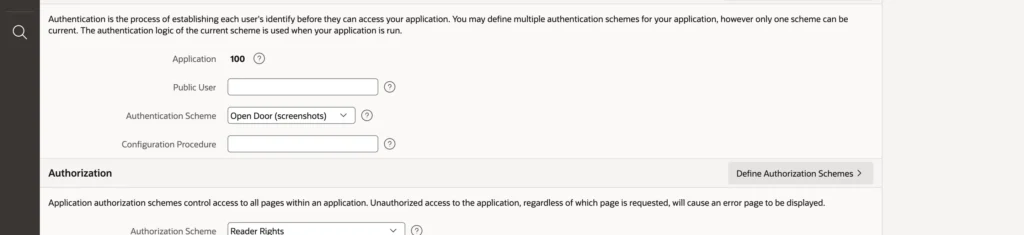
One warning before you click Make Current Scheme. Switching the current scheme changes how everyone signs in, immediately. Create a user first, test the function from SQL, and keep an App Builder session open in another browser while you try it, because the builder's own sign-in is independent of the application's and that open session is what lets you fix a mistake instead of being locked out of your own application.
Social Sign-In
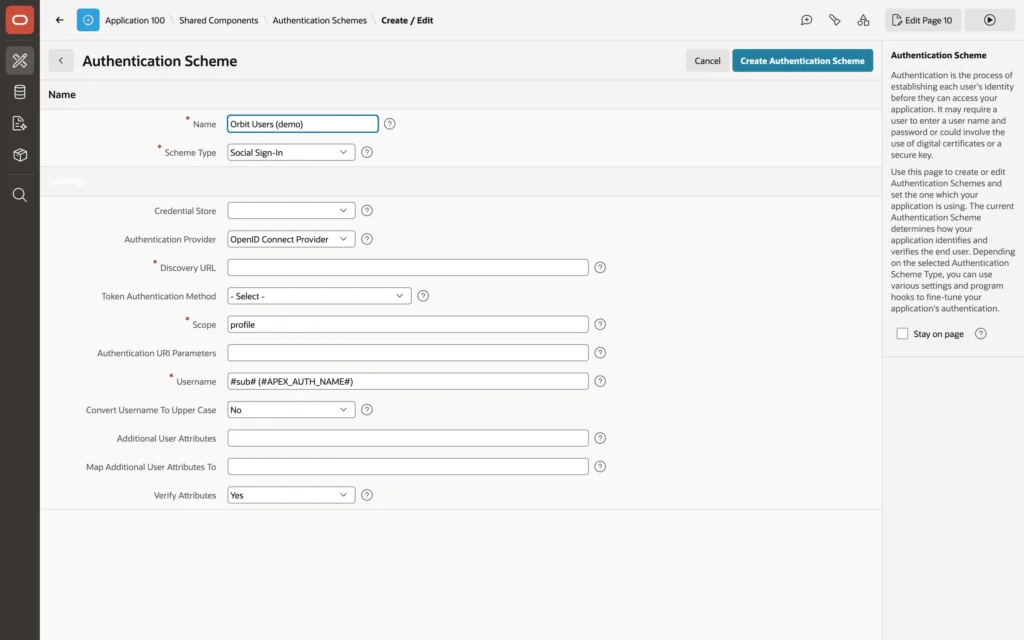
Social Sign-In hands authentication to an identity provider over OpenID Connect or OAuth2. The user signs in at the provider, under the provider's password policy and multi-factor rules, and returns with a token naming them. Your application never sees a password at all.
- Register the application with the provider, using a redirect URL ending in apex_authentication.callback. The provider issues a client ID and a client secret.
- Create a web credential in Shared Components, of type OAuth2 Client Credentials, holding those two values.
- Create the scheme with the Social Sign-In type and fill in its attributes.
The attributes that matter are the credential store, the authentication provider (most enterprise providers are OpenID Connect providers), the discovery URL that tells APEX where the provider's endpoints are, the scope of information requested, and the claim that becomes APP_USER, usually the email or preferred username. Additional claims such as given name or group membership can be mapped into application items.
Storing the client secret in a web credential rather than in the scheme is the point worth holding on to: credentials are stored encrypted and are not included when the application is exported.
The Other Scheme Types
Database Accounts signs users in as database users, which suits tools for DBAs and developers but ties application users to database users, something most applications should avoid.
LDAP Directory checks the password against a directory, turning the user name into a distinguished name through a pattern. Use SSL should always be on, because the password travels to the directory.
HTTP Header Variable trusts a user name that a single sign-on proxy writes into a header. It is safe only when every request reaches ORDS through that proxy. If any path bypasses it, anyone can set the header and become any user, which makes this the scheme with the sharpest edge.
SAML Sign-In works like social sign-in for SAML 2.0 providers and must be configured by an instance administrator before applications can pick it.
Session Settings
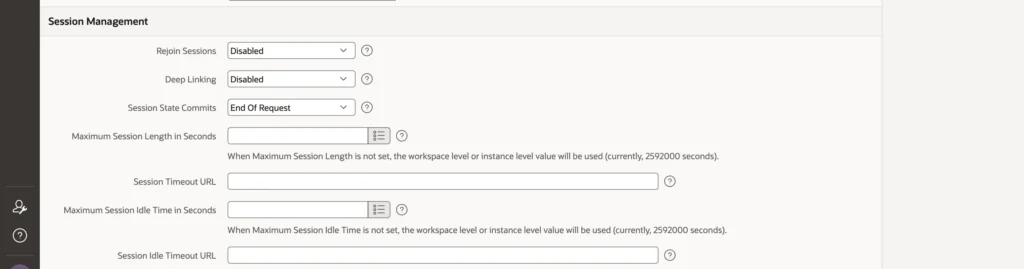
- Maximum Session Length and Maximum Session Idle Time cap total and inactive duration. Left empty, the workspace or instance values apply, which default to eight hours and one hour.
- Session Timeout URL and Session Idle Timeout URL send expired users somewhere other than the login page.
- Session Timeout Warning warns before an idle session dies, which is the difference between losing unsaved work and not.
- Rejoin Sessions decides whether a URL without a session ID may join an existing session. Keep it off unless you know exactly why you need it.
- Deep Linking returns users to the page they asked for after signing in.
A scheme's Session Sharing setting lets applications in one workspace share a session, so users sign in once for all of them, and Switch in Session lets an application change schemes mid-session, for example to offer a second sign-in method.
Conclusion
Authentication is the point where an application decides whom it is talking to, and APEX gives you the whole range: its own accounts for a small internal audience, database accounts for developer tools, LDAP for a directory, HTTP headers behind a single sign-on proxy, SAML and social sign-in for an organization's identity provider, and a custom function when the users are yours. Prefer the identity provider when there is one, because it brings password policy, multi-factor authentication, and prompt deprovisioning that you would otherwise have to build. When you do write a custom scheme, the security lives in the details rather than the comparison: hash with PBKDF2 and a per-user salt, answer identically for every kind of failure, spend the same time on a user that does not exist, count failures in an autonomous transaction so a rollback cannot erase the lock-out, and put the secret for any provider in a web credential rather than in the scheme. Then set sensible session limits with a timeout warning, keep rejoin sessions switched off, and test the whole thing with a second browser open before you make it current.
