
Some values on a form are never typed: a line's amount, an invoice total, the balance still owed. In Oracle Forms, these are calculated items, and Forms keeps them up to date on its own as the user types.
This guide shows the two kinds of calculated items in Oracle Forms 14.1.2, formula items and summary items, using an invoice form whose line amounts, totals, and balance follow every keystroke. It also covers the two requirements that trip up most summary items.
Sample Form for This Guide
The examples and screenshots use the sample form CH09_INVOICE from the Oracle Forms code repository on GitHub. Download it, open it in Forms Builder, and connect as CAREWELL to follow along.
| Form | File | What it shows |
|---|---|---|
| CH09_INVOICE | forms/ch09/ch09_invoice.fmb | Formula and summary items for line amounts and totals |
The forms run against the CareWell Clinic sample schema, which you install first.
Formula vs. Summary Items
| Formula item | Summary item | |
|---|---|---|
| Calculation Mode | Formula | Summary |
| Computes | One PL/SQL expression | A statistic of one item over all records of a block |
| Recalculated | When an item it uses changes, and when a record is queried | When the summarized records change |
| Example | A line's amount, the balance | The total of the lines, the total paid |
A calculated item computes its value, so the user never types it. It is usually a display item, and it is not a database item. You set it up in the Calculation group of the Property Palette.
Create a Formula Item
A formula is a single PL/SQL expression, with no semicolon and no statements. It can use items of the form, functions, and program units.
The formula of the AMOUNT item, with Calculation Mode set to Formula:
:invoice_lines.quantity * :invoice_lines.unit_price
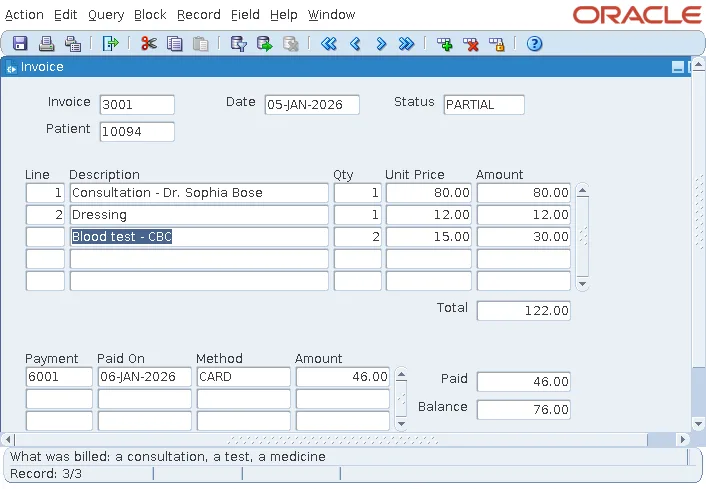
Forms recalculates the item whenever an item the formula uses changes, and when a record is queried. In the screenshot, the third line's amount appeared as soon as the user typed its price.
Keep formulas free of side effects. A formula must not change other items or the database, and it cannot call a function that does.
Create a Summary Item
A summary computes a statistic of one item over all the records of a block. Set three properties:
- Summary Function: Sum, Average, Count, Maximum, Minimum, Standard Deviation, or Variance.
- Summarized Block: the block whose records it summarizes.
- Summarized Item: the item it summarizes.
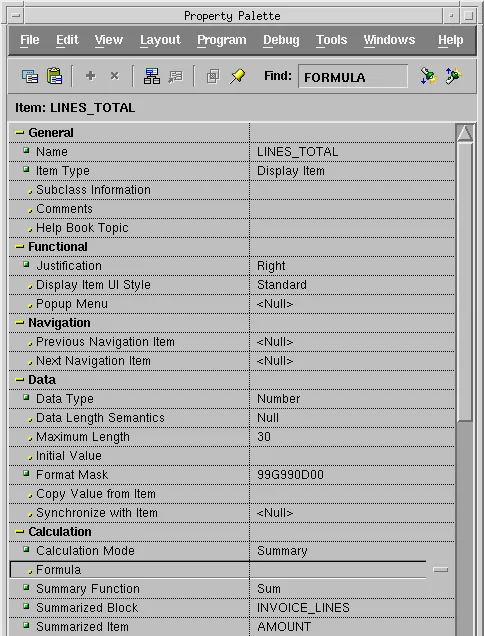
The item LINES_TOTAL is the sum of INVOICE_LINES.AMOUNT, so it is a summary of a formula item.
Two Requirements for Summary Items
A summary adds up the records the block holds, so Forms must hold all of them. That leads to two requirements:
- The summarized block must have Query All Records set to Yes, so a query fetches every row instead of the first screenful. Alternatively, set Precompute Summaries to Yes, and Forms computes the summary with a separate aggregate query.
- The summary item must be in the summarized block itself, or in a control block whose Single Record property is Yes.
CH09_INVOICE puts its totals in a control block called TOTALS: LINES_TOTAL, PAID (the sum of PAYMENTS.AMOUNT), and BALANCE.
Combine Them: a Formula over Summaries
BALANCE is a formula item that uses the two summaries, with NVL so an invoice with no payments still shows a balance.
The formula of BALANCE:
nvl(:totals.lines_total, 0) - nvl(:totals.paid, 0)
For invoice 3001, the form shows the same totals as the database view INVOICE_TOTALS: 92.00 billed and 46.00 paid. While the user adds a line, the total and the balance follow each keystroke.
When Not to Use a Summary Item
Summary items are only as good as the records the block holds. For large blocks, fetching every record just to add them up is expensive, and an aggregate query in a trigger is cheaper.
| Situation | Better choice |
|---|---|
| A few dozen detail records, such as invoice lines | A summary item, with Query All Records |
| Thousands of records | Precompute Summaries, or an aggregate query in a trigger |
| A value that depends on other items of the same record | A formula item |
The item properties that calculated items share with other items, such as format masks and justification, are covered in how to use text items in Oracle Forms. Query All Records and the other block properties are explained in how to create data blocks in Oracle Forms, and the invoice form's master-detail structure in how to create a master-detail form.
Conclusion
Calculated items in Oracle Forms come in two kinds. Formula items compute a single PL/SQL expression and recalculate whenever the items they use change, while summary items compute Sum, Average, Count, and other statistics over a block. A summary needs Query All Records or Precompute Summaries on the summarized block, and must live in that block or in a single-record control block. Combine them, as the invoice's BALANCE does, and your totals stay correct with every keystroke.
