
Query by example is powerful, but many users never learn Enter Query mode. They expect a search screen: a few fields at the top, a Find button, and the results below.
This guide builds that screen in Oracle Forms 14.1.2. Users find patients by any mix of part of a name, a city, and a range of birth dates. The criteria stay bind variables, so the search is safe from SQL injection.
Sample Form for This Guide
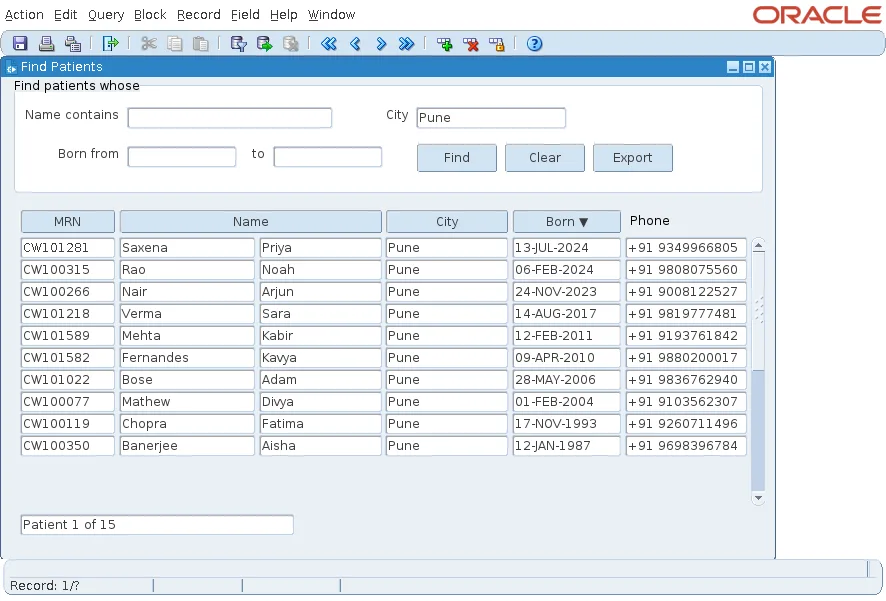
The examples and screenshots use the sample form CH39_FIND from the Oracle Forms code repository on GitHub. Download it, open it in Forms Builder, and connect as CAREWELL to follow along.
| Form | File | What it shows |
|---|---|---|
| CH39_FIND | forms/ch39/ch39_find.fmb | The search panel on patients |
The forms run against the CareWell Clinic sample schema, which you install first.
How the Search Panel Works
The panel has two blocks:
- A control block, CTL, holds the criteria items: Name contains, City, Born from, and to. It is not based on a table.
- A data block, PATIENTS, shows the results in a multi-record layout.
One procedure reads the criteria the user filled in, builds a WHERE clause from them, and queries the data block. Three places call it:
| Caller | What happens |
|---|---|
| WHEN-NEW-FORM-INSTANCE | The form opens with every patient listed. |
| Find button | The block is queried with the criteria entered. |
| Clear button | The criteria are emptied, then the procedure lists everyone again. |
Build the WHERE Clause from the Criteria
Each criterion that has a value adds a condition beginning with ' and '. At the end, SUBSTR(v_where, 6) drops the first ' and ', and SET_BLOCK_PROPERTY with DEFAULT_WHERE gives the clause to the block.
Example (program unit FIND_PATIENTS):
procedure find_patients is
  v_where varchar2(1000);
begin
  -- each criterion the user filled adds a condition; the values stay bind references
  if :ctl.name is not null then
    v_where := v_where || ' and upper(last_name || '' '' || first_name) like ''%'' || upper(:ctl.name) || ''%''';
  end if;
  if :ctl.city is not null then
    v_where := v_where || ' and city = :ctl.city';
  end if;
  if :ctl.born_from is not null then
    v_where := v_where || ' and birth_date >= :ctl.born_from';
  end if;
  if :ctl.born_to is not null then
    v_where := v_where || ' and birth_date < :ctl.born_to + 1';
  end if;
  set_block_property('PATIENTS', DEFAULT_WHERE, substr(v_where, 6));   -- without the first ' and '
  go_block('PATIENTS');
  :system.message_level := '25';         -- hide FRM-40355, the message of COUNT_QUERY (level 25)
  count_query;
  :system.message_level := '0';
  :ctl.total := get_block_property('PATIENTS', QUERY_HITS);
  execute_query;
end;
DEFAULT_WHERE replaces the block's WHERE clause for every later query, until it is set again. More on the property is in how to change block properties at run time using SET_BLOCK_PROPERTY.
The lines around COUNT_QUERY count the matching rows before the query, for a "Patient 1 of 15" counter, explained in how to show a record count before scrolling in Oracle Forms. You can leave them out if the screen needs no counter.
Why the Criteria Stay Bind Variables
Look at the condition for the city: the clause contains the text :ctl.city, not the city the user typed. Forms treats a reference to an item in a WHERE clause as a bind variable and reads the item's value when the query runs.
That has two benefits:
- The user's text never becomes part of the SQL. A quote, or ' or 1=1, typed into Name contains is only an odd name to search for.
- The database can reuse one statement for every search with the same criteria filled in.
Do not build the clause from the values themselves. This version is open to SQL injection.
Example (do not use):
v_where := v_where || ' and city = ''' || :ctl.city || '''';
Handle an Empty Search
With no criteria filled in, v_where stays null, the WHERE clause is null, and the query returns every patient. That suits a small table, and it is what the form does when it opens.
For a table of millions of rows, refuse an empty search instead: check the criteria at the start of the procedure, show a message, and return before the query.
If your users do know query by example, the two approaches can live side by side; see how to search records using query by example in Oracle Forms.
Conclusion
A search panel is a control block of criteria and a procedure that turns the filled criteria into the data block's DEFAULT_WHERE, then runs EXECUTE_QUERY. Keep every value as a reference to its item, such as :ctl.city, so Forms binds it: the search is safe from SQL injection and the database reuses the statement. Decide what an empty search should do before the form meets a large table.
