
A doctor cannot see two patients at once, a room cannot be booked twice, and a person cannot work two shifts at the same hour. The rule is the same each time: a new record must not overlap another one that is already there, or another one in the same save.
This guide shows how to check for overlapping records in Oracle Forms 14.1.2, in WHEN-VALIDATE-RECORD for the user and again in PRE-INSERT and PRE-UPDATE, which catch records of the same save that validation cannot see.
Sample Form for This Guide
The examples and screenshots use the sample form CH39_BOOKING from the Oracle Forms code repository on GitHub. Download it, open it in Forms Builder, and connect as CAREWELL to follow along.
| Form | File | What it shows |
|---|---|---|
| CH39_BOOKING | forms/ch39/ch39_booking.fmb | The checks against double booking |
The forms run against the CareWell Clinic sample schema, which you install first.
Write the Check Once
Two time ranges overlap when each one begins before the other ends. The procedure looks for any other appointment of the same doctor that is not cancelled and overlaps the current one.
Example (program unit CHECK_DOUBLE_BOOKING):
-- one doctor, one patient at a time: refuses an appointment that overlaps another of the same doctor
procedure check_double_booking is
  v_other appointments.appt_id%type;
begin
  if :appointments.status = 'CANCELLED' then
    return;
  end if;
  select min(appt_id) into v_other
    from appointments a
   where a.doctor_id = :appointments.doctor_id
     and a.status <> 'CANCELLED'
     and a.appt_id <> nvl(:appointments.appt_id, -1)
     and a.appt_start < :appointments.appt_start + :appointments.duration_min / 1440
     and :appointments.appt_start < a.appt_start + a.duration_min / 1440;
  if v_other is not null then
    message('Dr ' || :appointments.doctor_name || ' already has appointment ' || v_other
            || ' at that time.');
    raise form_trigger_failure;
  end if;
end;
Points to note:
- Oracle dates count in days, so a duration in minutes is divided by 1,440.
- a.appt_id <> nvl(:appointments.appt_id, -1) keeps a record from overlapping itself when it is updated.
- A cancelled appointment neither needs the check nor blocks others.
- FORM_TRIGGER_FAILURE stops whatever the trigger was doing: validation or the save.
Check When the Record Is Validated
Call the procedure from WHEN-VALIDATE-RECORD. It runs when the user leaves the record or saves, before anything is written, and keeps the user in the record with a clear message.
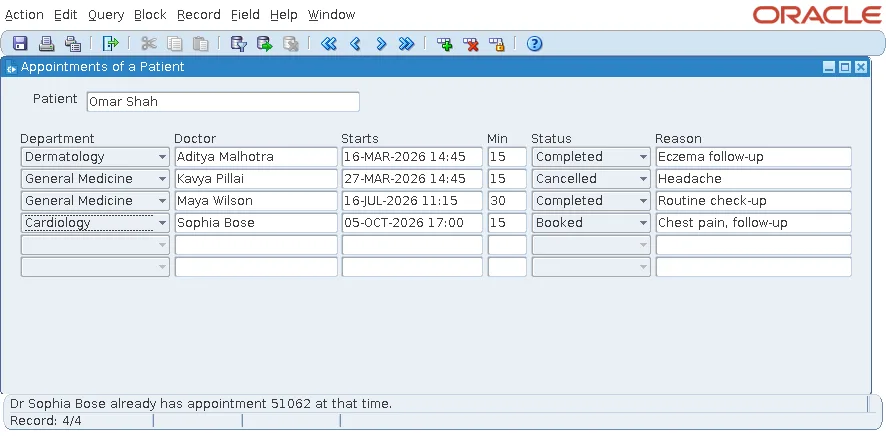
An appointment at 17:00 for a doctor already booked from 16:45 to 17:15 was refused as soon as the user saved.
Check Again Before Each Insert
Validation has a blind spot. Two new records in the same block can overlap each other, and neither is in the database while they are validated. A test showed it: an appointment at a free time, 18:00, was copied with Duplicate Record (Shift+F6), and both copies passed validation.
The fix is to run the same check in PRE-INSERT, and in PRE-UPDATE for changed records.
Example (PRE-INSERT trigger on block APPOINTMENTS):
:appointments.appt_id := appointments_seq.nextval;
check_double_booking;          -- again: sees the records this save has already posted
Forms posts the records of a save one by one. When the second copy's PRE-INSERT ran, its query saw the first copy, already inserted within the same transaction, and stopped the save.
Output:
Dr Sophia Bose already has appointment 51342 at that time.
Appointment 51342 was the first record of that very save. Forms rolled the save back to its savepoint, so neither appointment was kept. The order of these triggers during a save is described in how to save changes using commit processing in Oracle Forms.
Two Users at the Same Moment
The checks in the form give the user a clear message, but they cannot see another user's unsaved appointment. If two users save overlapping appointments at the same moment, only the database can decide. Two ways to close the gap:
- A database constraint or trigger that enforces the rule.
- A lock on the doctor's row, with SELECT ... FOR UPDATE in the same procedure, held until the commit, so a second save for that doctor waits for the first.
Conclusion
To prevent overlapping records in Oracle Forms, write one check that looks for a range beginning before this one ends and ending after it begins. Call it from WHEN-VALIDATE-RECORD to stop the user early, and from PRE-INSERT and PRE-UPDATE to catch overlaps within the same save. Back it with a database constraint or a row lock for users saving at the same moment.
