
An editable Interactive Grid saves many rows at once, so its checks have to work row by row: a quantity out of range, a product entered twice on one order, a required value missing. Oracle APEX runs validations for every created and changed row when the validation is tied to the grid's region, and shows the error at the cell it concerns. This guide adds two such validations to an order lines grid, shows what each catches, and covers the case no row validation can see: duplicates between new rows of the same save.
The Grid
Page 60 has a select list of open orders, P60_ORDER_ID, and an editable Interactive Grid on ORDER_LINES with the Where Clause order_id = :P60_ORDER_ID and P60_ORDER_ID in Page Items to Submit. PRODUCT_ID is a select list column on the PRODUCTS table, and ORDER_ID is hidden.
For new rows, a row-level PL/SQL process with Editable Region Order Lines, placed before the grid's save process, sets the parent key on the server, so the browser cannot choose it:
Example:
:ORDER_ID := :P60_ORDER_ID;
In a grid process or validation, :COLUMN_NAME refers to the current row's value, and :P60_ORDER_ID to the page item, which the grid sends with every save because it is in Page Items to Submit.
Validation 1: Quantity Between 1 and 100
In the Processing tab, create a validation and set:
- Editable Region: Order Lines. This makes it a row validation, run for each row.
- Type: Expression, Language PL/SQL, PL/SQL Expression :QUANTITY between 1 and 100.
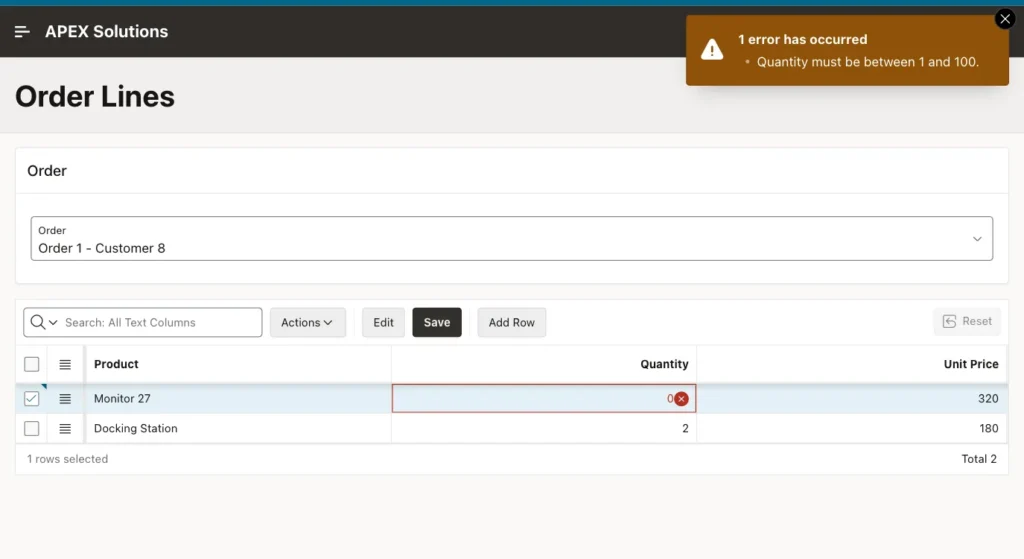
- Error Message: Quantity must be between 1 and 100. Associated Column: QUANTITY.
Changing a quantity to 0 and saving shows the message, and marks the cell:
Validation 2: A Product Only Once per Order
This rule needs the other lines of the order, so it is a query:
- Editable Region: Order Lines. Type: No Rows returned, with the query below.
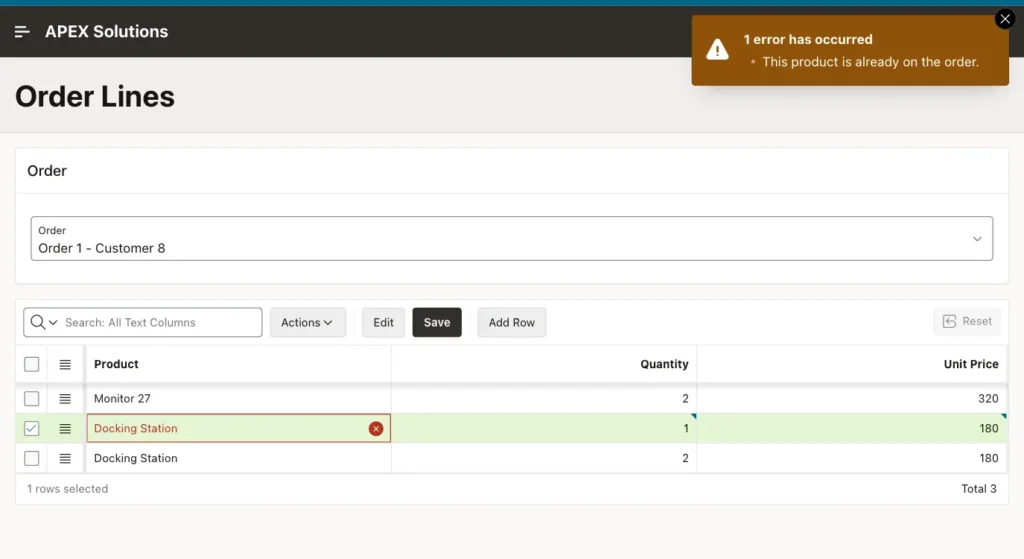
- Error Message: This product is already on the order. Associated Column: PRODUCT_ID.
- Server-side Condition: Expression, PL/SQL, :APEX$ROW_STATUS in ('C', 'U'), so the check runs for created and updated rows, not for deleted ones.
Example:
select 1
from   order_lines
where  order_id   = :P60_ORDER_ID
and    product_id = :PRODUCT_ID
and    line_id   <> nvl(:LINE_ID, -1)
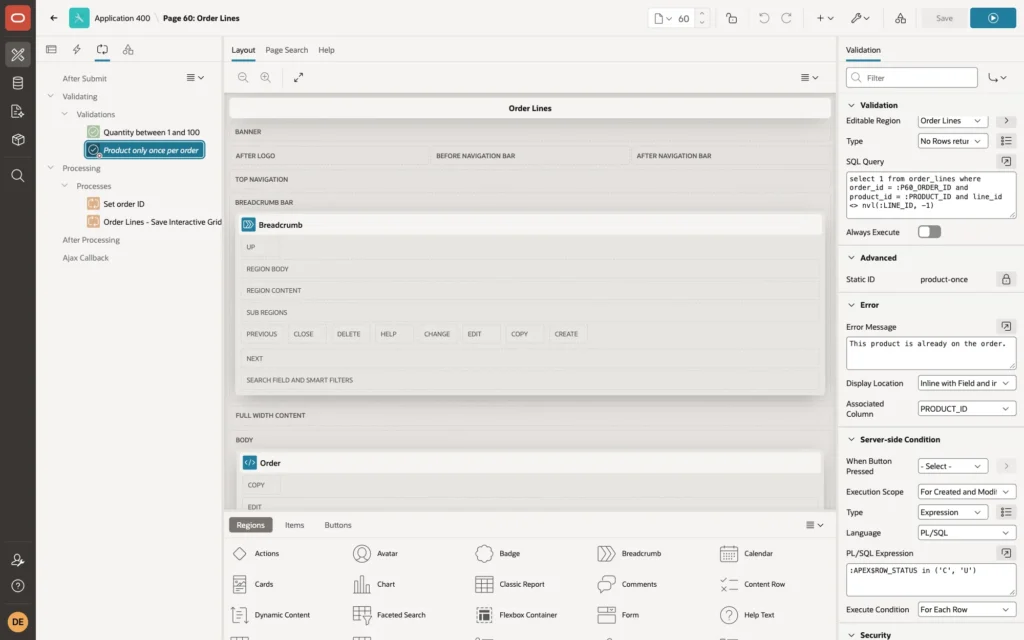
The LINE_ID condition excludes the row itself, so updating an existing line does not count as a duplicate of itself; new rows have no LINE_ID yet, hence the NVL. Adding a second Docking Station line to an order that already has one is rejected:
The Case Row Validations Cannot See
Each row is validated against the rows already in the table. Two new rows with the same product, added in the same save, both pass, because neither is in the table yet. Only the database can catch that, here with a unique constraint on (ORDER_ID, PRODUCT_ID):
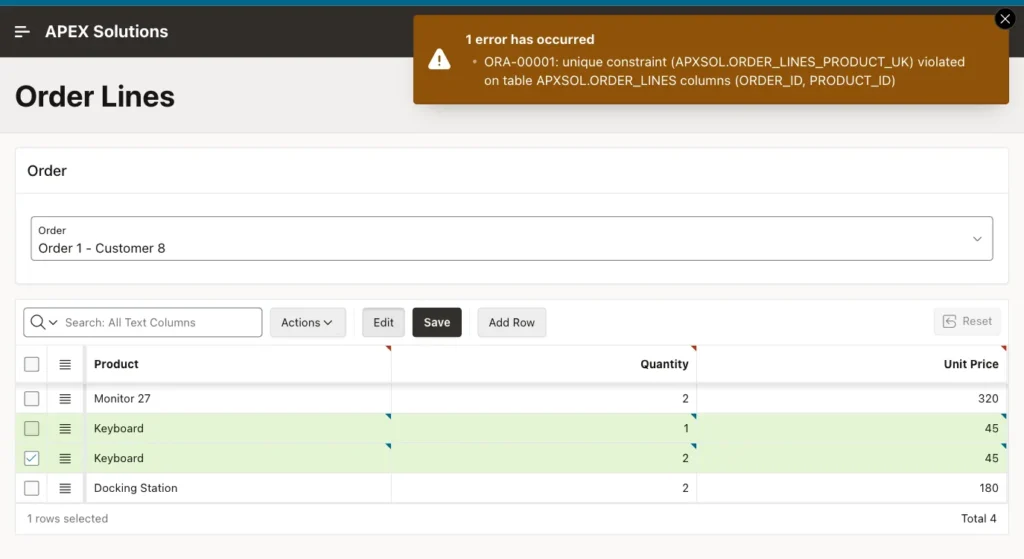
The save is rolled back, so no partial data is written. To show a friendly message instead of ORA-00001, translate the constraint name in an application error handling function. Keep the constraint either way: it also protects the data from every other program that writes to the table.
A Valid Save
A new Headset line passes both validations; the process sets its ORDER_ID, and the grid saves it:
Example:
select l.order_id, p.name as product, l.quantity, l.unit_price
from   order_lines l join products p on p.product_id = l.product_id
where  l.order_id = 1
order  by l.line_id;
Output:
   ORDER_ID PRODUCT               QUANTITY    UNIT_PRICE
___________ __________________ ___________ _____________
          1 Monitor 27                   2           320
          1 Docking Station              2           180
          1 Headset                      1            95
Things to Know
- Column-level checks, such as Value Required or a maximum length, are set on the column itself and are checked in the browser too.
- Execution Scope on a row validation decides which rows it runs for: by default created and modified rows.
- Validations that do not name an editable region run once per page submit, not per row.
- Associated Column for a grid validation is the plain column name; the message then appears at that column's cell.
Related Guides
- Oracle APEX Interactive Grid: A Complete Guide
- Handle All Errors in One Place in Oracle APEX: Error Handling Function and Error Log
Conclusion
Validate Interactive Grid rows by tying validations to the grid's editable region and using :COLUMN_NAME for the current row's values. Use a condition on :APEX$ROW_STATUS where deleted rows should be skipped, set parent keys in a row process on the server, and back the row checks with database constraints for what one row cannot see.
