
An APEX session ends after a period of inactivity, set by the application's idle time. A user who fills in a long form, takes a phone call, and then clicks Save can lose the work, because the session ended while the page was open. Oracle APEX can warn users before that happens: a dialog shows when the session will end and offers to extend it with one click. This is a setting, not code. This guide sets it up, shows the warning and the end-of-session dialog, and checks that extending really keeps the session alive.
Step 1: Set the Idle Time and the Warning
In App Builder, open Shared Components, then Security Attributes, and go to Session Management:
- Maximum Session Idle Time in Seconds: how long a session may be inactive before it ends.
- Session Timeout Warning in Seconds: how many seconds before the end the warning appears.
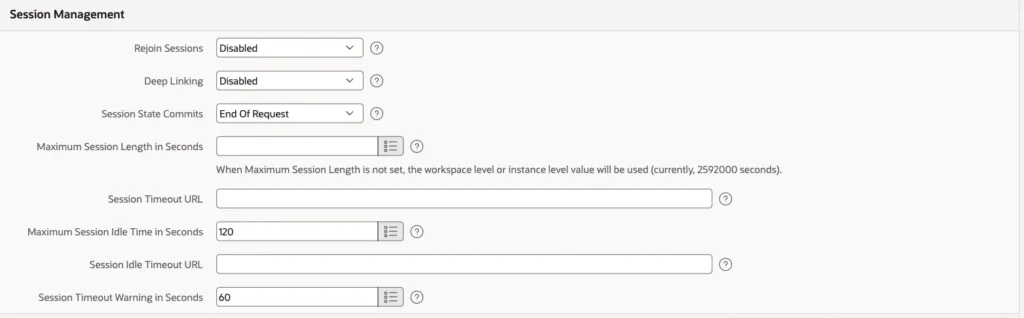
The values here are short so the behavior can be tested in two minutes. In a real application, typical values are an idle time of 1800 to 3600 seconds and a warning of 120 to 300 seconds. When the idle time is empty, the workspace or instance value applies.
The settings can be checked with a query:
Example:
select maximum_session_life_seconds as max_length,
       maximum_session_idle_seconds as max_idle,
       session_timeout_warn_seconds as warn_before
from   apex_applications
where  application_id = 400;
Output:
   MAX_LENGTH    MAX_IDLE    WARN_BEFORE
_____________ ___________ ______________
                      120             60
Step 2: What the User Sees
A user, SALES_USER, opens the Sales Dashboard and leaves it alone. After 60 seconds without activity, 60 seconds before the end, the warning appears with the time at which the session will end:
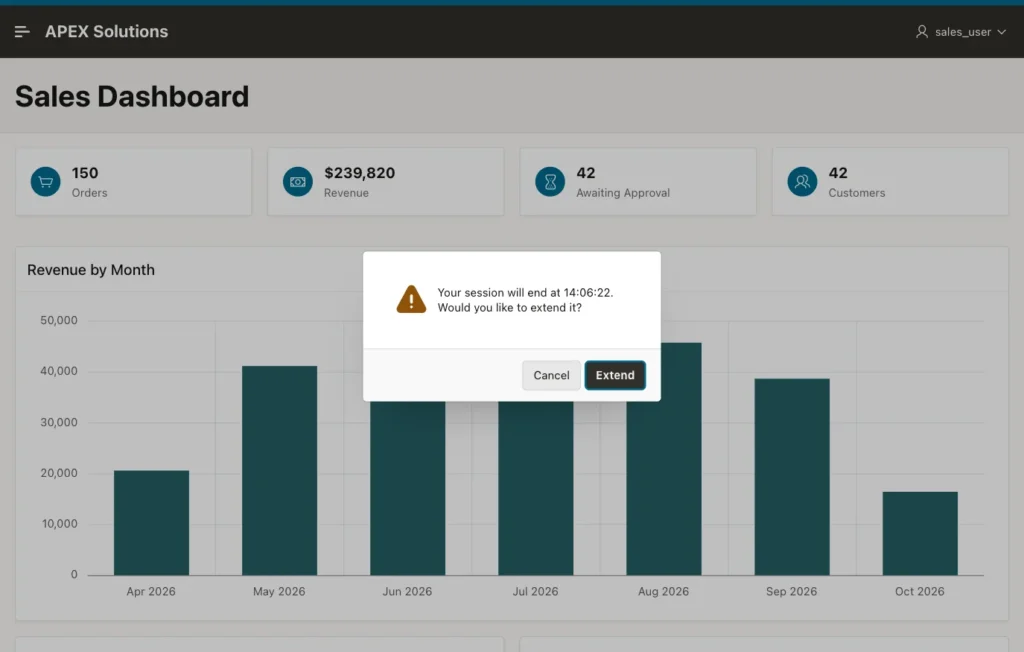
Extend sends a request to the server, which counts as activity, so the idle time starts again. Cancel closes the dialog and leaves the session to end. If the user does nothing, the session ends at the time shown, and the dialog changes:
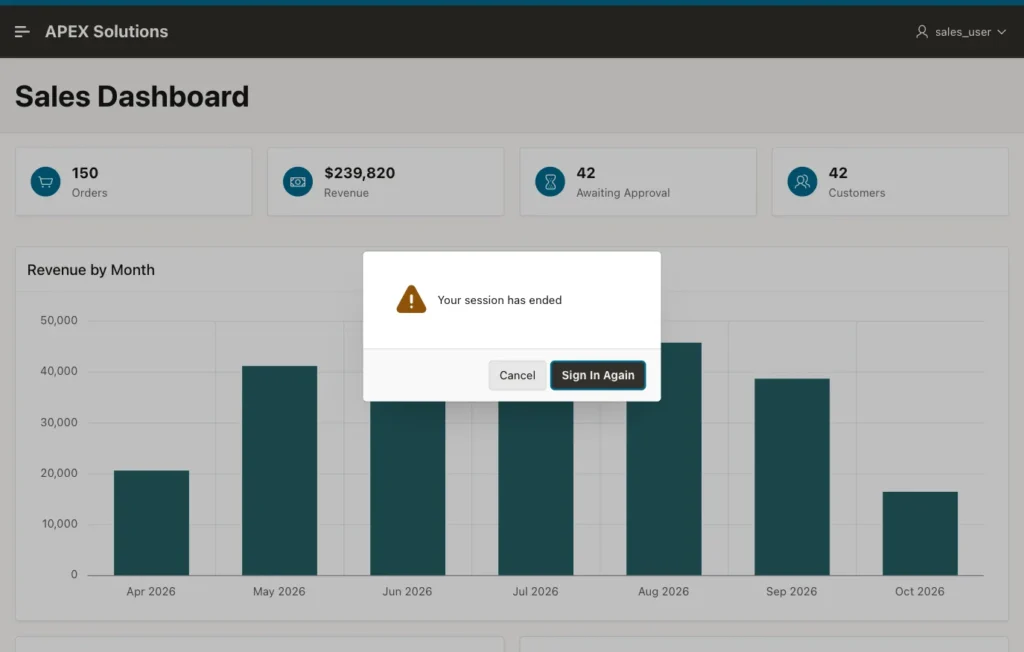
Sign In Again goes to the login page. The page that was open is not submitted, so unsaved values on it are lost; the warning is what gives the user the chance to avoid that.
Testing the Extend Button
In a test, the warning appeared 56 seconds after the page loaded, and Extend was clicked. At 136 seconds, past the original end of the session at 120 seconds, the session was still alive: reloading the page showed the dashboard, not the login page. Because the page was idle again after the click, a new warning had appeared, with a new end time.
Things to Know
- Activity means requests to the server: page loads, submits, and Ajax calls such as a refreshing region. Typing in a form without submitting it is not activity, which is why long forms need the warning.
- Maximum Session Length in Seconds limits the total length of a session, however active it is. Extend cannot go beyond it.
- Session Idle Timeout URL and Session Timeout URL send the user to a page of your choice instead of the default login page, for example a page that explains why the session ended.
- The settings are per application. Workspace and instance administrators can set defaults for applications that leave them empty.
Related Guides
- Oracle APEX Authentication: Schemes, Custom Login, and Sessions
- Oracle APEX Session State and Substitution Strings
Conclusion
To warn Oracle APEX users before their session times out, set Maximum Session Idle Time and Session Timeout Warning in Security Attributes. APEX then shows a dialog with the end time and an Extend button, which restarts the idle time, and a Sign In Again dialog when the session has ended. No JavaScript is needed.
