
A report on a REST Data Source calls the web service on every page view. When the data changes slowly, or you need to join it with your own tables, it is better to keep a local copy and refresh it on a schedule. Oracle APEX does this with REST Source Synchronization.
The earlier guide How to Show Data from a REST API in a Report in Oracle APEX showed the first Merge run. This guide goes further: scheduling with the Interval Builder, what Merge, Append and Replace do to local columns and deleted rows, removing rows deleted at the source, and refreshing only the changed rows with a synchronization step.
The example is a parts catalog from a supplier. The same steps work for any web service that returns JSON.
Step 1: Create the Tables
PARTS_FEED plays the supplier's system. In a real project this table is in the other system; here it is in the same database, so the guide can change the source data and watch the copy follow.
The trigger stamps UPDATED_ON on updates, because a column default only applies to inserts:
Example:
create table parts_feed (
    part_id     number generated by default as identity
                constraint parts_feed_pk primary key,
    part_no     varchar2(20)  not null
                constraint parts_feed_no_uk unique,
    part_name   varchar2(100) not null,
    category    varchar2(30)  not null,
    unit_cost   number(10,2)  not null
                constraint parts_feed_cost_ck check (unit_cost >= 0),
    updated_on  timestamp with time zone default on null systimestamp not null
);

create index parts_feed_cat_ix on parts_feed (category);
create index parts_feed_upd_ix on parts_feed (updated_on);

create or replace trigger parts_feed_bu
before update on parts_feed
for each row
begin
    :new.updated_on := systimestamp;
end;
/

insert into parts_feed (part_no, part_name, category, unit_cost) values
    ('BRG-101', 'Ball Bearing 6201',        'Bearings',  4.50),
    ('BRG-102', 'Ball Bearing 6202',        'Bearings',  5.10),
    ('BRG-103', 'Roller Bearing NU204',     'Bearings',  9.75),
    ('BRG-104', 'Thrust Bearing 51104',     'Bearings',  7.20),
    ('BRG-105', 'Needle Bearing HK1010',    'Bearings',  3.85),
    ('BLT-201', 'Hex Bolt M8 x 40',         'Fasteners', 0.18),
    ('BLT-202', 'Hex Bolt M10 x 50',        'Fasteners', 0.31),
    ('NUT-203', 'Lock Nut M8',              'Fasteners', 0.09),
    ('NUT-204', 'Lock Nut M10',             'Fasteners', 0.14),
    ('WSH-205', 'Flat Washer M8',           'Fasteners', 0.03),
    ('WSH-206', 'Spring Washer M10',        'Fasteners', 0.05),
    ('SCR-207', 'Socket Screw M6 x 20',     'Fasteners', 0.12),
    ('BLT-301', 'V-Belt A42',               'Belts',     6.40),
    ('BLT-302', 'V-Belt B55',               'Belts',     8.90),
    ('BLT-303', 'Timing Belt 5M-450',       'Belts',    14.25),
    ('BLT-304', 'Flat Belt 40 mm',          'Belts',    11.00),
    ('SEL-401', 'Oil Seal 25 x 40 x 7',     'Seals',     1.35),
    ('SEL-402', 'Oil Seal 30 x 47 x 7',     'Seals',     1.60),
    ('SEL-403', 'O-Ring 20 x 2.5',          'Seals',     0.22),
    ('SEL-404', 'O-Ring 35 x 3',            'Seals',     0.28),
    ('GSK-405', 'Flange Gasket DN50',       'Seals',     2.90),
    ('FLT-501', 'Oil Filter Element',       'Filters',  12.40),
    ('FLT-502', 'Air Filter Panel',         'Filters',  18.60),
    ('FLT-503', 'Hydraulic Filter 10 micron','Filters', 27.80);

commit;

select category, count(*) as parts, min(unit_cost) as min_cost, max(unit_cost) as max_cost
from   parts_feed
group  by category
order  by category;
Output:
Table PARTS_FEED created.

Index PARTS_FEED_CAT_IX created.

Index PARTS_FEED_UPD_IX created.

Trigger PARTS_FEED_BU compiled

24 rows inserted.

Commit complete.

CATEGORY        PARTS    MIN_COST    MAX_COST
____________ ________ ___________ ___________
Bearings            5        3.85        9.75
Belts               4         6.4       14.25
Fasteners           7        0.03        0.31
Filters             3        12.4        27.8
Seals               5        0.22         2.9
Step 2: Publish the Table as a REST API with ORDS
The API returns 10 rows per page, so the 24 parts need three requests. That makes the paging visible in the synchronization log later. The guide How to Create a REST Module, Template, and Handler with ORDS.DEFINE_MODULE explains these calls in detail:
Example:
begin
    ords.define_module(
        p_module_name    => 'parts',
        p_base_path      => '/parts/',
        p_items_per_page => 10);
    ords.define_template(
        p_module_name => 'parts',
        p_pattern     => 'feed/');
    ords.define_handler(
        p_module_name    => 'parts',
        p_pattern        => 'feed/',
        p_method         => 'GET',
        p_source_type    => ords.source_type_collection_feed,
        p_items_per_page => 10,
        p_source         =>
'select part_id, part_no, part_name, category, unit_cost, updated_on
from   parts_feed
order  by part_id');
    commit;
end;
/
select name, uri_prefix, status from user_ords_modules where name = 'parts';
Output:
PL/SQL procedure successfully completed.

NAME     URI_PREFIX    STATUS
________ _____________ ____________
parts    /parts/       PUBLISHED
Step 3: Allow the Database to Call the API
The database, not the browser, calls the API, so it needs a network ACL for the host and port. In this example the database runs in a Docker container and reaches ORDS at localhost:8443 over HTTPS. That setup, including the wallet, is described in How to Query a Remote Database with REST-Enabled SQL in Oracle APEX:
Example:
begin
    dbms_network_acl_admin.append_host_ace(
        host       => 'localhost',
        lower_port => 8443,
        upper_port => 8443,
        ace        => xs$ace_type(
                          privilege_list => xs$name_list('http'),
                          principal_name => 'APEX_260100',
                          principal_type => xs_acl.ptype_db));
    commit;
end;
/

begin
    apex_instance_admin.set_parameter(
        p_parameter => 'WALLET_PATH',
        p_value     => 'file:/home/oracle/ords_wallet');
    commit;
end;
/

select host, lower_port, upper_port, principal, privilege
from   dba_host_aces
where  principal = 'APEX_260100'
and    host = 'localhost';

select apex_instance_admin.get_parameter('WALLET_PATH') as wallet_path
from   dual;
Output:
PL/SQL procedure successfully completed.

PL/SQL procedure successfully completed.

HOST	     LOWER_PORT UPPER_PORT PRINCIPAL	  PRIVILEGE
------------ ---------- ---------- -------------- ----------
localhost	   8443       8443 APEX_260100	  HTTP

1 row selected.

WALLET_PATH
----------------------------------------
file:/home/oracle/ords_wallet

1 row selected.
Step 4: Create the REST Data Source
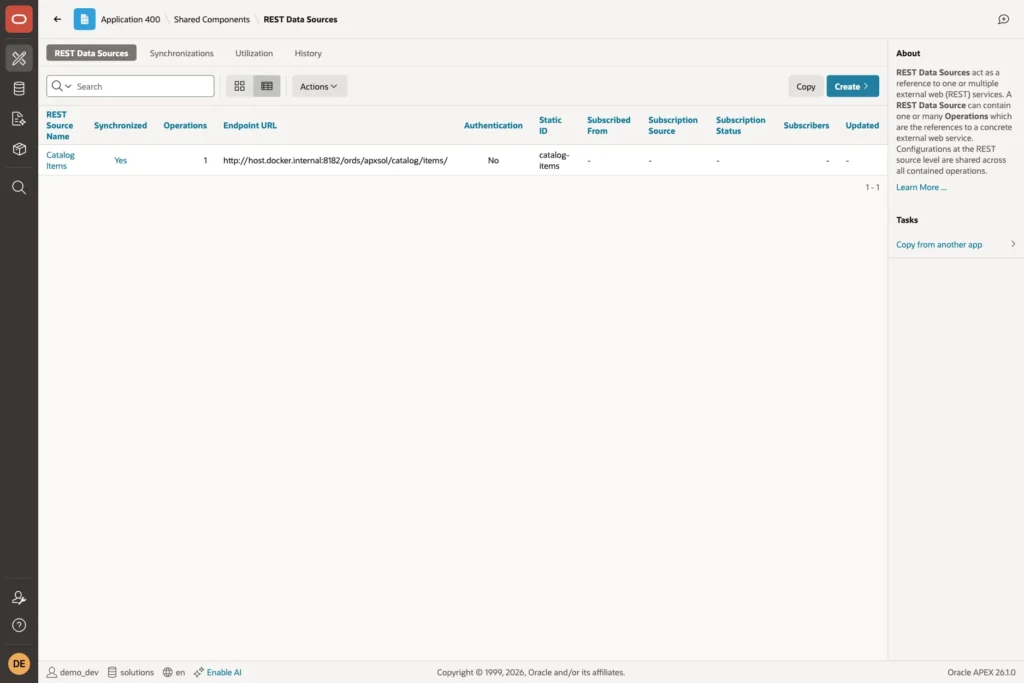
In App Builder, open Shared Components, click REST Data Sources, and click Create:
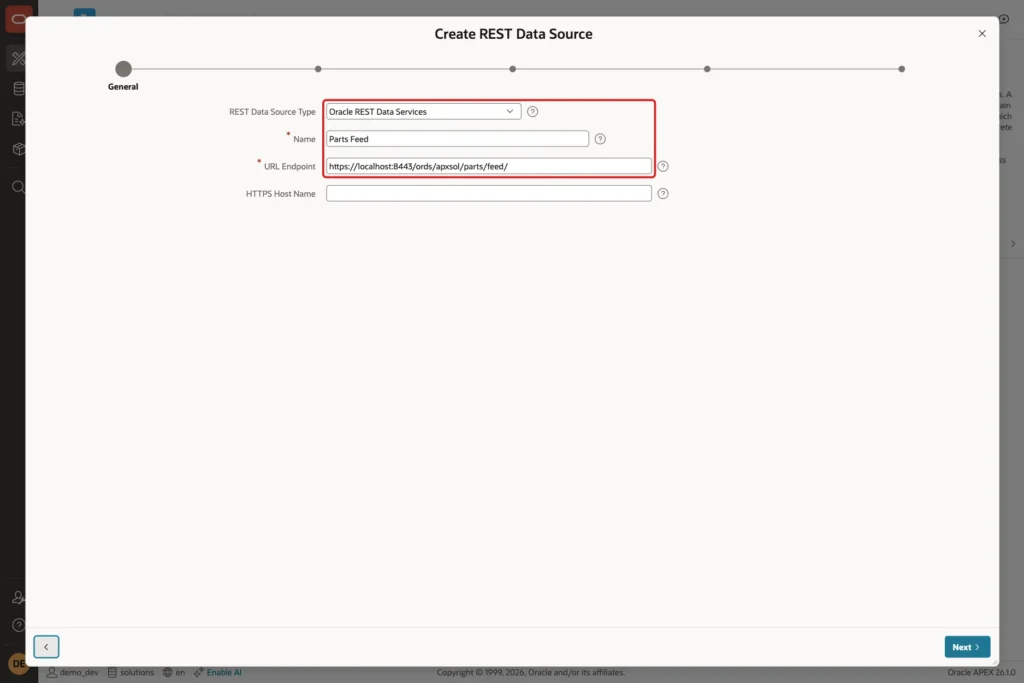
On the first screen keep From scratch and click Next. On the General screen set REST Data Source Type to Oracle REST Data Services, Name to Parts Feed, and URL Endpoint to the URL of the API:
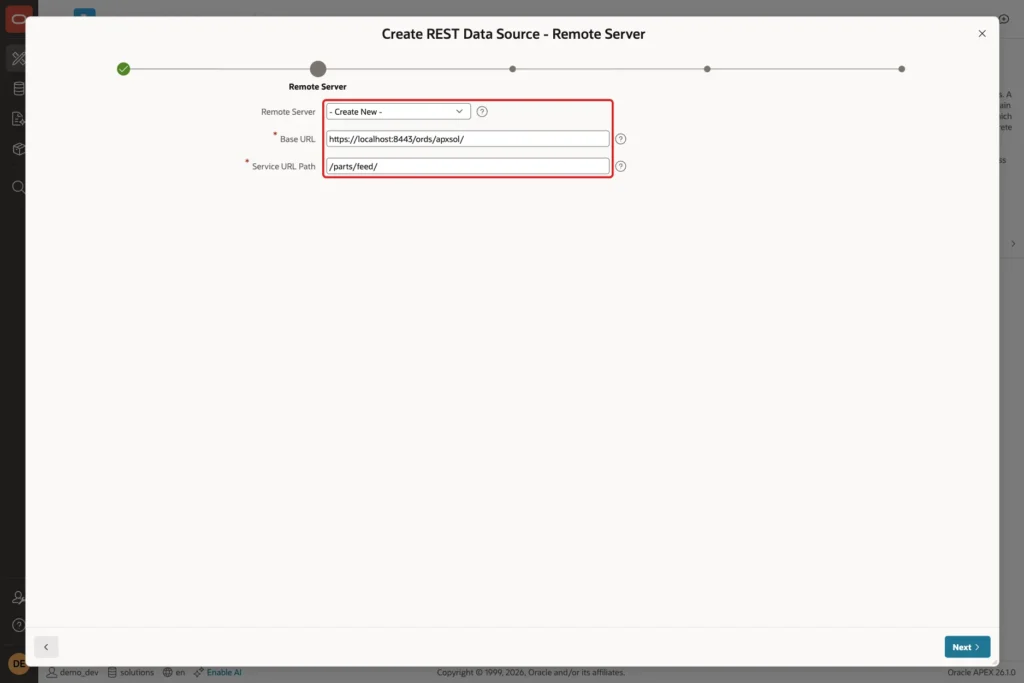
APEX splits the URL into a Base URL and a Service URL Path. Keep Remote Server on Create New and click Next:
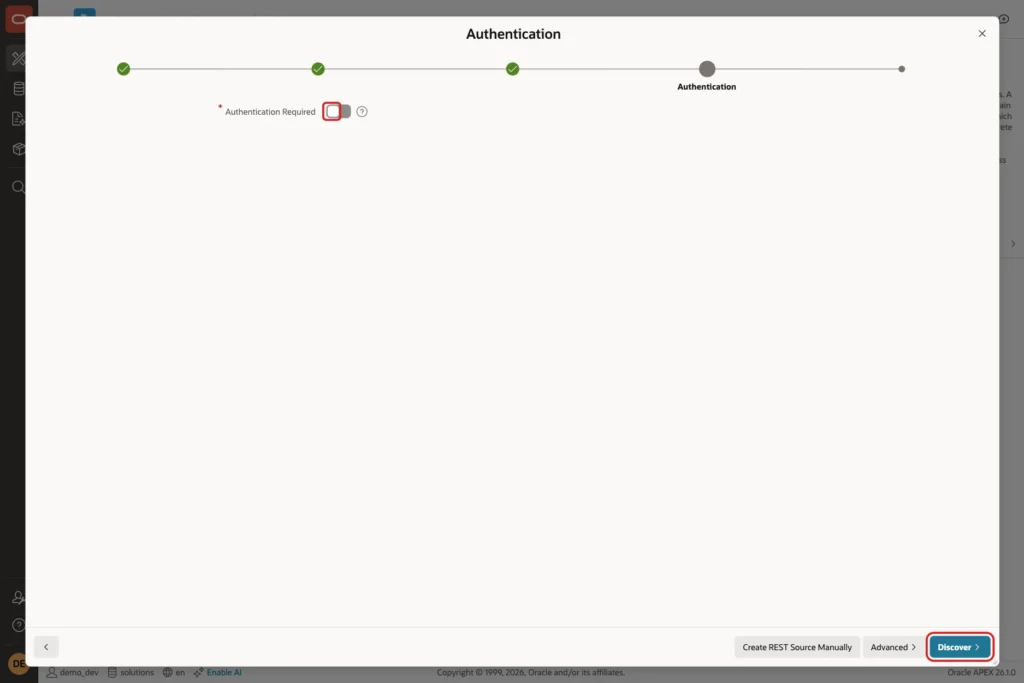
The API is public, so leave Authentication Required off and click Discover:
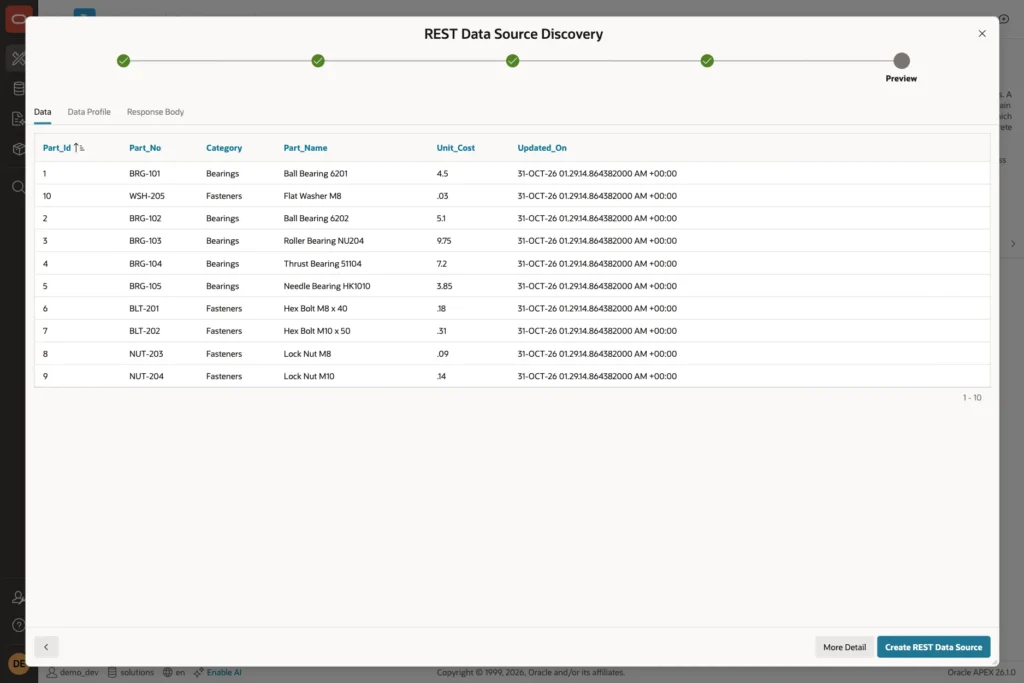
APEX calls the API and shows the first page of rows. Only 10 rows appear because of the ORDS paging:
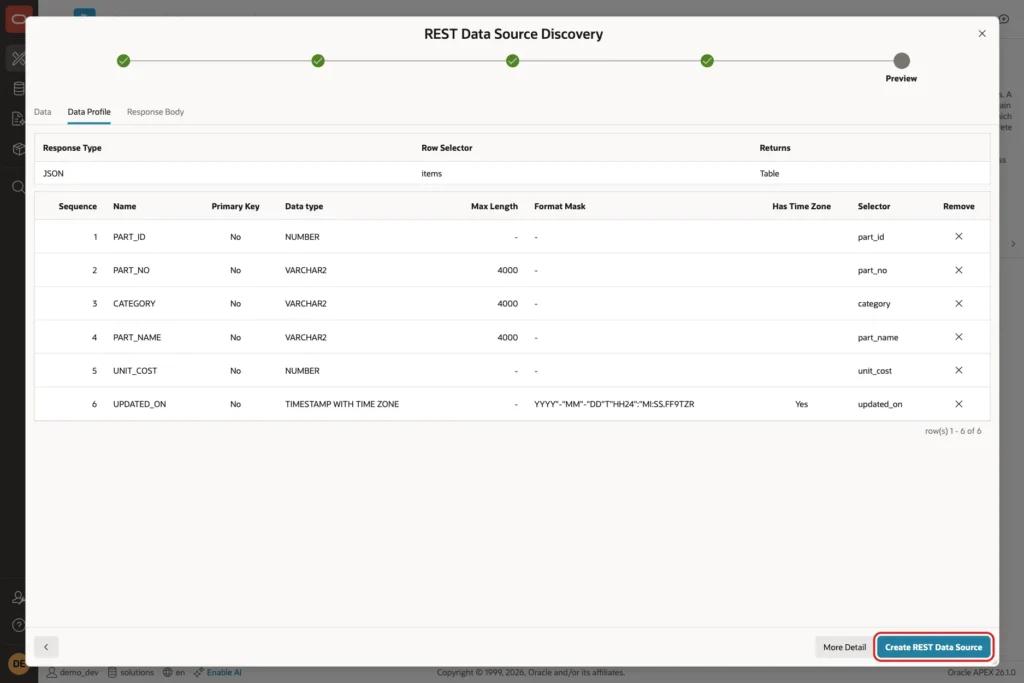
Open the Data Profile tab. APEX found six columns, but it did not mark a primary key. Click Create REST Data Source:
Step 5: Mark the Primary Key
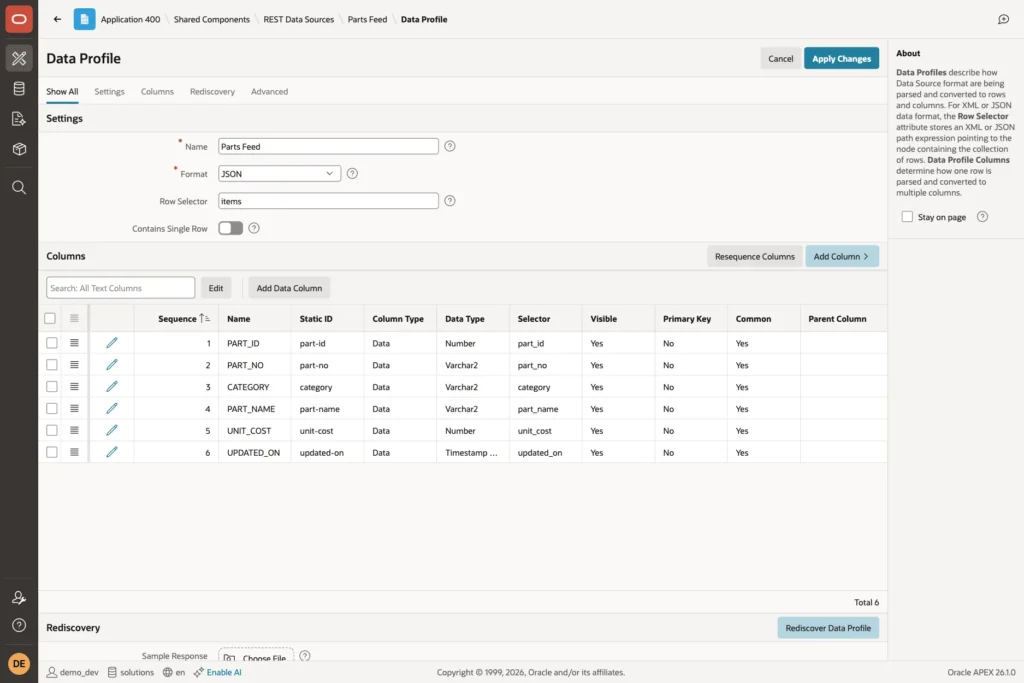
Merge needs a key to decide which rows to update. Open Parts Feed, click Edit Data Profile, and open the PART_ID column:
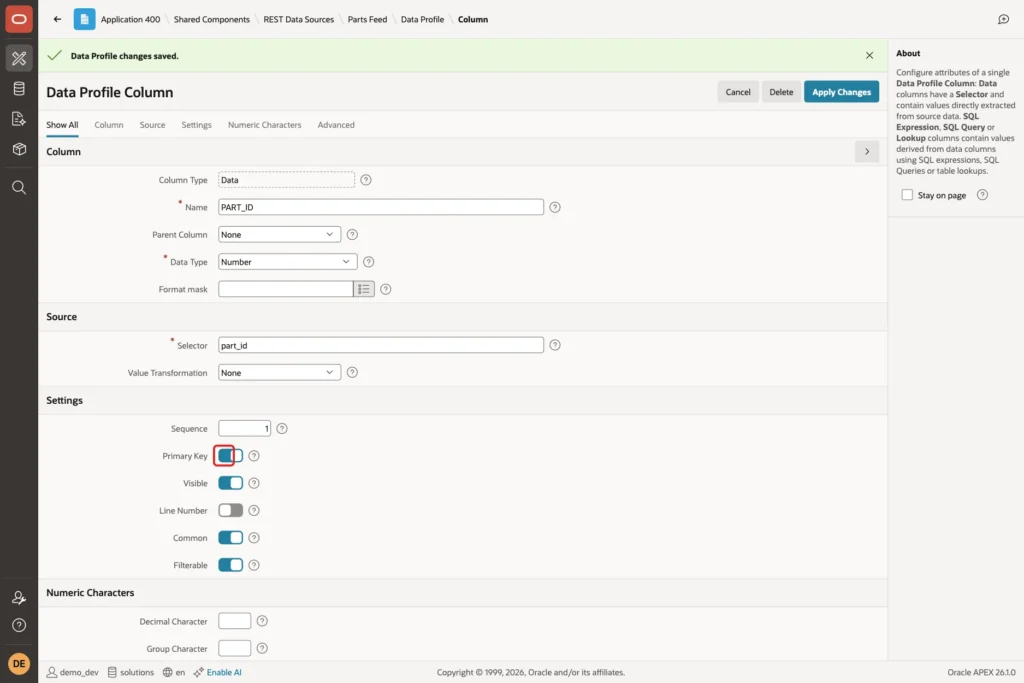
Turn on Primary Key and click Apply Changes:
Step 6: Create the Local Table
APEX can create the local table for you, but an existing table lets you add your own columns and constraints. LOCAL_NOTE is a column that does not exist in the API. APEX never writes to it, which matters in the tests below:
Example:
create table parts_local (
    part_id     number
                constraint parts_local_pk primary key,
    part_no     varchar2(20)  not null
                constraint parts_local_no_uk unique,
    part_name   varchar2(100) not null,
    category    varchar2(30)  not null,
    unit_cost   number(10,2)  not null,
    updated_on  timestamp with time zone,
    local_note  varchar2(200)
);

create index parts_local_cat_ix on parts_local (category);

select count(*) as row_count from parts_local;
Output:
Table PARTS_LOCAL created.

Index PARTS_LOCAL_CAT_IX created.

   ROW_COUNT
____________
           0
Step 7: Configure the Synchronization
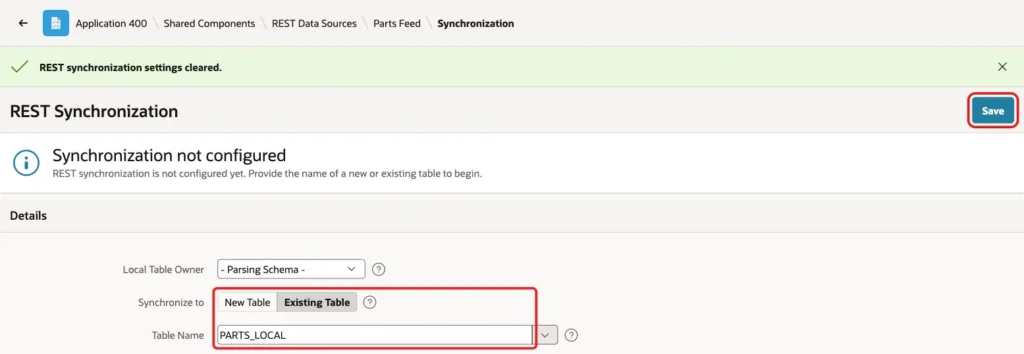
Open the Parts Feed REST Data Source and click Manage Synchronization in the right column. Set Synchronize to Existing Table, choose PARTS_LOCAL as the Table Name, and click Save:
Set Synchronization Type to Merge. Then click the wrench icon under the schedule to open the Interval Builder. Set Frequency to Hourly and Interval to 6:
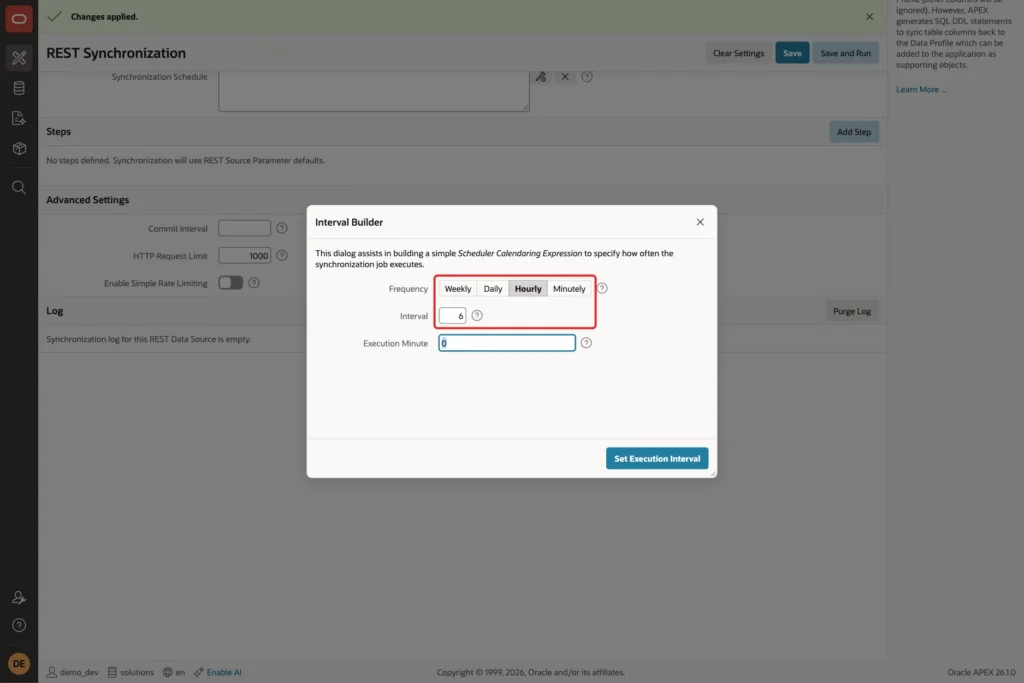
Click Set Execution Interval. The builder writes a Scheduler calendaring expression, FREQ=HOURLY;INTERVAL=6;BYMINUTE=0;BYSECOND=0, into Synchronization Schedule. You can also type any other expression yourself. Click Save and Run:
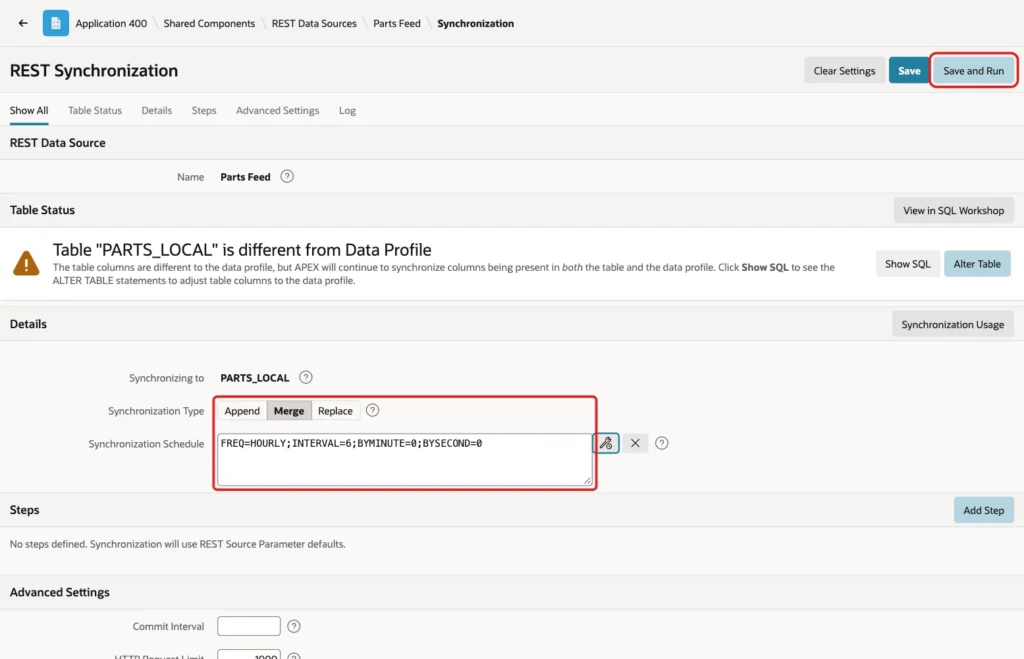
The page warns that PARTS_LOCAL is different from the data profile, because the table has an extra column and smaller sizes. APEX still copies every column that exists in both.
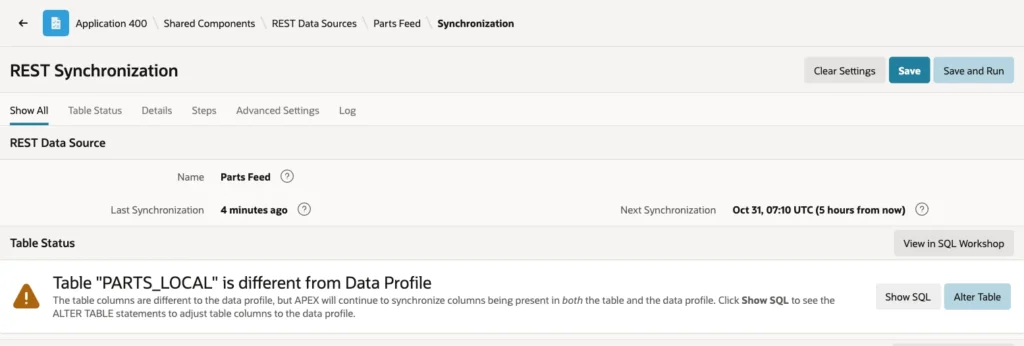
After the run, the top of the page shows the last run and the next scheduled run:
Step 8: Check the First Run
The table has all 24 parts. Now add a note to two of them in the local column. These notes belong to the local copy, not to the supplier:
Example:
select count(*) as row_count from parts_local;

update parts_local
set    local_note = 'Preferred supplier'
where  part_no in ('BRG-101', 'FLT-503');

commit;

select part_id, part_no, part_name, unit_cost, local_note
from   parts_local
where  part_no in ('BRG-101', 'BRG-102', 'FLT-503')
order  by part_id;
Output:
   ROW_COUNT
____________
          24

2 rows updated.

Commit complete.

   PART_ID PART_NO    PART_NAME                        UNIT_COST LOCAL_NOTE
__________ __________ _____________________________ ____________ _____________________
         1 BRG-101    Ball Bearing 6201                      4.5 Preferred supplier
         2 BRG-102    Ball Bearing 6202                      5.1
        24 FLT-503    Hydraulic Filter 10 micron            27.8 Preferred supplier
Step 9: Create a Report on the Local Table
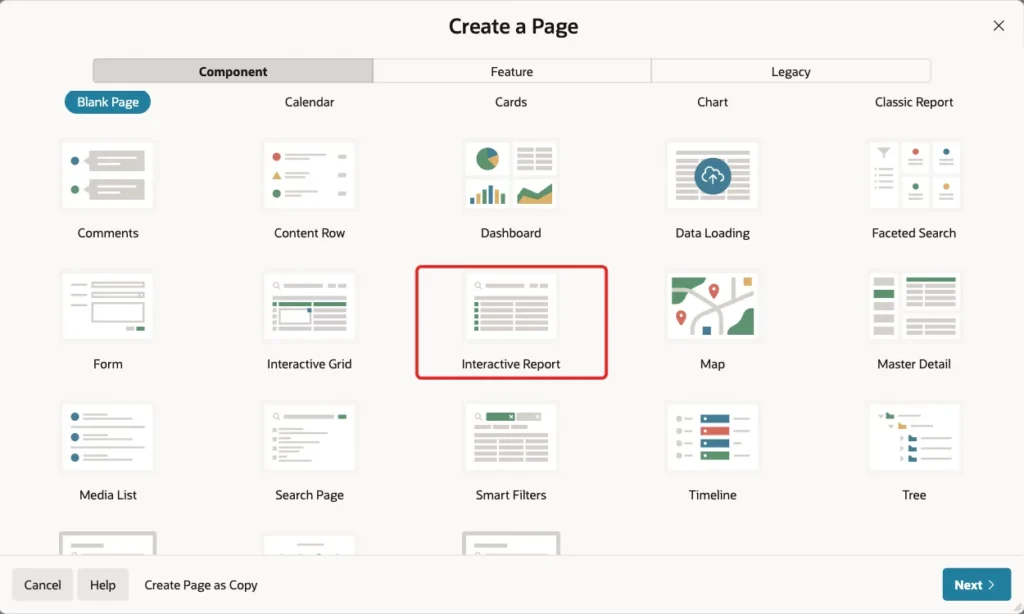
Because the data is now in a table, a report needs no REST call. In App Builder, click Create Page and choose Interactive Report:
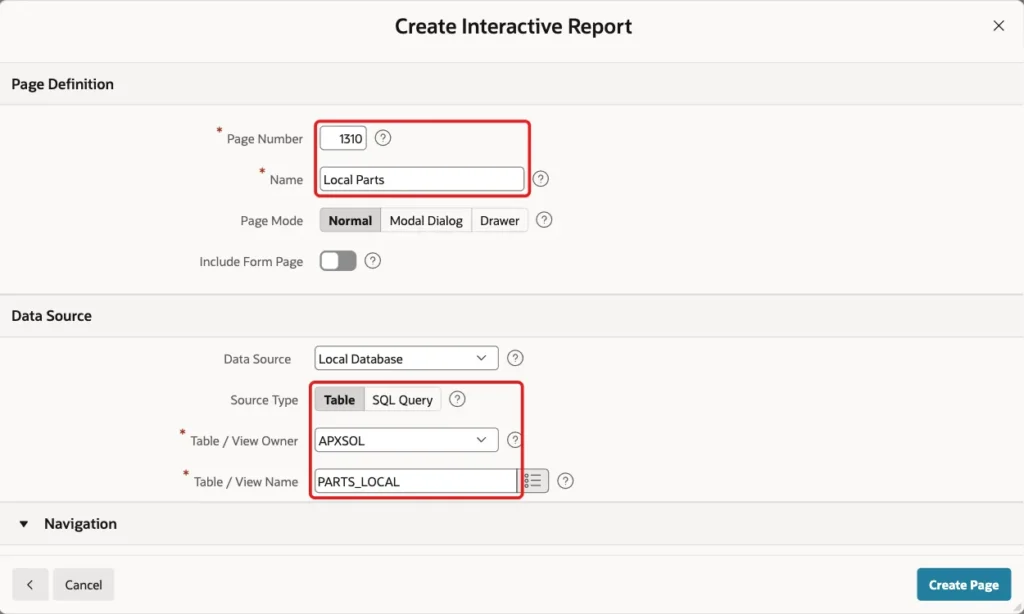
Set Page Number to 1310 and Name to Local Parts. Keep Data Source on Local Database, set Source Type to Table, and enter PARTS_LOCAL as the Table / View Name. Click Create Page:
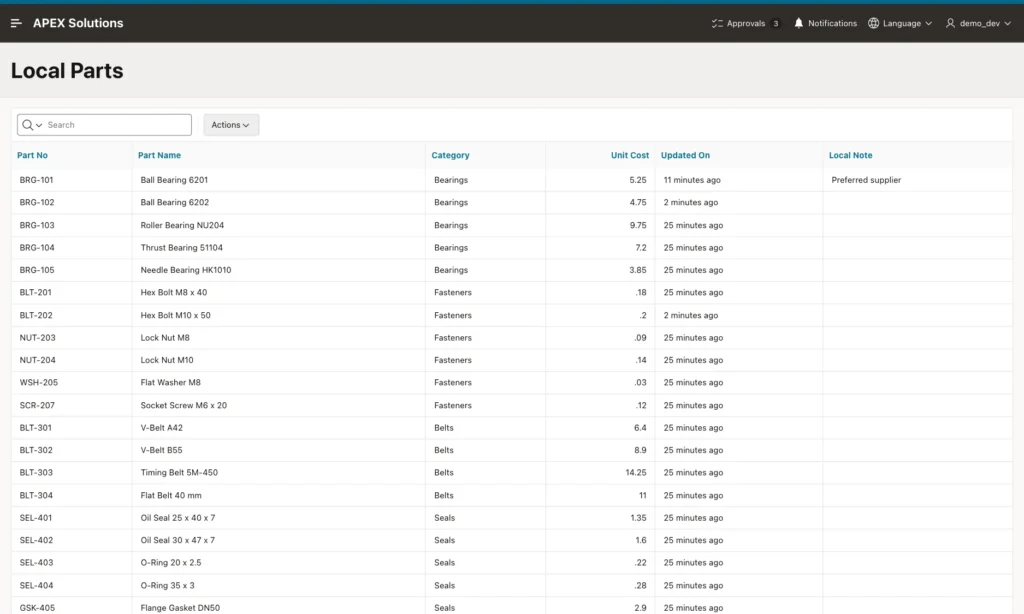
Run the page. It shows the parts with the local note next to the synchronized columns:
Test Merge: Updates, New Rows, and a Deleted Row
Change the supplier's data: a new cost for BRG-101, a new part BRG-106, and FLT-503 removed:
Example:
update parts_feed
set    unit_cost = 5.25
where  part_no = 'BRG-101';

insert into parts_feed (part_no, part_name, category, unit_cost)
values ('BRG-106', 'Angular Contact Bearing 7204', 'Bearings', 15.60);

delete from parts_feed
where  part_no = 'FLT-503';

commit;

select count(*) as feed_rows from parts_feed;
Output:
1 row updated.

1 row inserted.

1 row deleted.

Commit complete.

   FEED_ROWS
____________
          24
You do not have to wait for the schedule. APEX_REST_SOURCE_SYNC.SYNCHRONIZE_DATA runs the synchronization from PL/SQL. Outside an APEX page it needs a session, which APEX_SESSION.CREATE_SESSION provides:
Example:
begin
    apex_session.create_session(
        p_app_id   => 400,
        p_page_id  => 1,
        p_username => 'DEMO_DEV');

    apex_rest_source_sync.synchronize_data(
        p_module_static_id  => 'parts-feed',
        p_run_in_background => false);
end;
/

select part_id, part_no, unit_cost, local_note
from   parts_local
where  part_no in ('BRG-101', 'BRG-106', 'FLT-503')
order  by part_id;

select count(*) as row_count from parts_local;
Output:
PL/SQL procedure successfully completed.

   PART_ID PART_NO       UNIT_COST LOCAL_NOTE
__________ __________ ____________ _____________________
         1 BRG-101            5.25 Preferred supplier
        24 FLT-503            27.8 Preferred supplier
       221 BRG-106            15.6

   ROW_COUNT
____________
          25
Merge updated the cost of BRG-101, inserted BRG-106, and kept the local note. FLT-503 is still in the local table, although the supplier no longer has it. Merge never deletes rows.
Test Replace: Deleted Rows Go, Local Notes Go Too
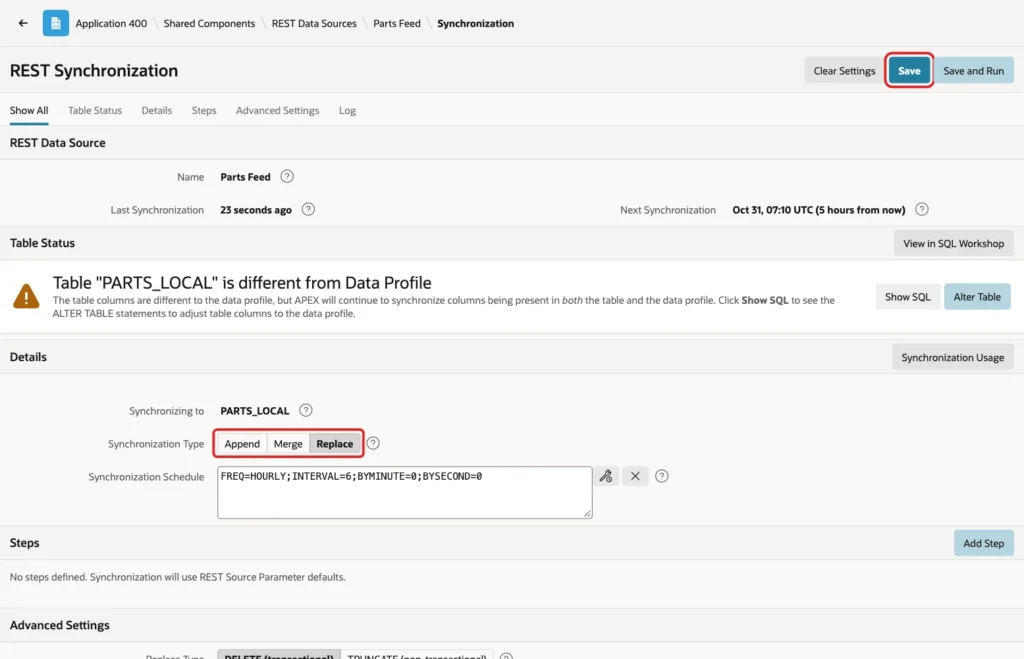
Replace is the type that removes deleted rows. On the same page, set Synchronization Type to Replace and click Save:
Run the synchronization again:
Example:
begin
    apex_session.create_session(
        p_app_id   => 400,
        p_page_id  => 1,
        p_username => 'DEMO_DEV');

    apex_rest_source_sync.synchronize_data(
        p_module_static_id  => 'parts-feed',
        p_run_in_background => false);
end;
/

select part_id, part_no, unit_cost, local_note
from   parts_local
where  part_no in ('BRG-101', 'BRG-106', 'FLT-503')
order  by part_id;

select count(*) as row_count from parts_local;
Output:
PL/SQL procedure successfully completed.

   PART_ID PART_NO       UNIT_COST LOCAL_NOTE
__________ __________ ____________ _____________
         1 BRG-101            5.25
       221 BRG-106            15.6

   ROW_COUNT
____________
          24
FLT-503 is gone, which is what we wanted. But the local note on BRG-101 is gone too, because Replace rebuilds every row. If a local column holds data that the API does not have, Replace loses it.
Set the type back to Merge and click Save. The next sections keep Merge and remove deleted rows another way.
Remove Rows Deleted at the Source
This procedure reads the whole feed once and deletes the local rows whose key is no longer in it. It stops with an error if the feed cannot be read, so a failed call never empties the table:
Example:
create or replace procedure purge_deleted_parts
is
    l_response clob;
begin
    l_response := apex_web_service.make_rest_request(
                      p_url         => 'https://localhost:8443/ords/apxsol/parts/feed/?limit=10000',
                      p_http_method => 'GET');

    if apex_web_service.g_status_code <> 200
       or not json_exists(l_response, '$.items')
    then
        raise_application_error(-20001,
            'Feed not read, nothing removed. HTTP status ' || apex_web_service.g_status_code);
    end if;

    delete from parts_local l
    where  not exists (
               select 1
               from   json_table(l_response, '$.items[*]'
                          columns (part_id number path '$.part_id')) r
               where  r.part_id = l.part_id);

    dbms_output.put_line(sql%rowcount || ' local row(s) removed');
end purge_deleted_parts;
/
show errors
Output:
Procedure PURGE_DELETED_PARTS compiled

No errors.
Test it. Add a local note to WSH-206, delete WSH-206 at the supplier, and run Merge:
Example:
update parts_local
set    local_note = 'Preferred supplier'
where  part_no in ('BRG-101', 'WSH-206');

commit;

delete from parts_feed
where  part_no = 'WSH-206';

commit;

begin
    apex_session.create_session(
        p_app_id   => 400,
        p_page_id  => 1,
        p_username => 'DEMO_DEV');

    apex_rest_source_sync.synchronize_data(
        p_module_static_id  => 'parts-feed',
        p_run_in_background => false);
end;
/

select count(*) as feed_rows  from parts_feed;
select count(*) as local_rows from parts_local;

select part_no, local_note
from   parts_local
where  part_no in ('BRG-101', 'WSH-206');
Output:
2 rows updated.

Commit complete.

1 row deleted.

Commit complete.

PL/SQL procedure successfully completed.

   FEED_ROWS
____________
          23

   LOCAL_ROWS
_____________
           24

PART_NO    LOCAL_NOTE
__________ _____________________
BRG-101    Preferred supplier
WSH-206    Preferred supplier
The feed has 23 rows and the local table still has 24. Now run the procedure:
Example:
set serveroutput on

begin
    apex_session.create_session(
        p_app_id   => 400,
        p_page_id  => 1,
        p_username => 'DEMO_DEV');

    purge_deleted_parts;
    commit;
end;
/

select count(*) as local_rows from parts_local;

select part_no, local_note
from   parts_local
where  part_no in ('BRG-101', 'WSH-206');
Output:
1 local row(s) removed

PL/SQL procedure successfully completed.

   LOCAL_ROWS
_____________
           23

PART_NO    LOCAL_NOTE
__________ _____________________
BRG-101    Preferred supplier
WSH-206 is removed and the note on BRG-101 is still there.
Negative test: stop the service the database calls and run the procedure again. It fails and removes nothing:
Example:
set serveroutput on

begin
    apex_session.create_session(
        p_app_id   => 400,
        p_page_id  => 1,
        p_username => 'DEMO_DEV');

    purge_deleted_parts;
    commit;
end;
/

select count(*) as local_rows from parts_local;

select part_no, local_note
from   parts_local
where  part_no in ('BRG-101', 'WSH-206');
Output:
begin
*
ERROR at line 1:
ORA-29273: HTTP request failed
ORA-06512: at "APEX_260100.WWV_FLOW_WEB_SERVICES", line 745
ORA-06512: at "APEX_260100.WWV_FLOW_WEB_SERVICES_INVOKER", line 1032
ORA-06512: at "APEX_260100.WWV_FLOW_WEB_SERVICES_INVOKER", line 634
ORA-30698: network connection failed: connection refused
ORA-06512: at "SYS.UTL_HTTP", line 380
ORA-06512: at "SYS.UTL_HTTP", line 1189
ORA-06512: at "APEX_260100.WWV_FLOW_WEB_SERVICES_INVOKER", line 588
ORA-06512: at "APEX_260100.WWV_FLOW_WEB_SERVICES_INVOKER", line 825
ORA-06512: at "APEX_260100.WWV_FLOW_WEB_SERVICES_INVOKER", line 1387
ORA-06512: at "APEX_260100.WWV_FLOW_WEB_SERVICES", line 702
ORA-06512: at "APEX_260100.WWV_FLOW_WEBSERVICES_API", line 670
ORA-06512: at "APXSOL.PURGE_DELETED_PARTS", line 5
ORA-06512: at line 7
Help: https://docs.oracle.com/error-help/db/ora-29273/

   LOCAL_ROWS
_____________
           23

PART_NO    LOCAL_NOTE
__________ _____________________
BRG-101    Preferred supplier
Refresh Only the Changed Rows with a Synchronization Step
A full run reads every row. For a big feed, ask only for the rows changed since the last run. A synchronization step holds an External Filter, which APEX sends to ORDS as a filter on the data.
On the Manage Synchronization page, click Add Step. Turn Active off, so the scheduled job keeps doing the normal full run, and add a comment. APEX gave the step the Static ID synchronization-step:
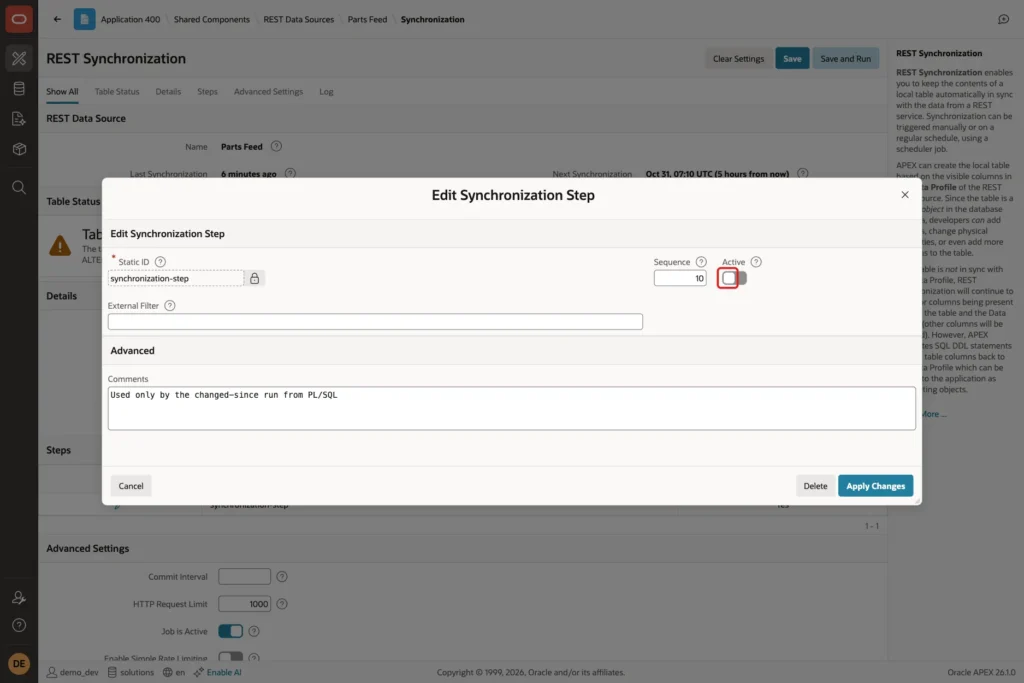
The filter changes with every run, so it is passed from PL/SQL. APEX_REST_SOURCE_SYNC.GET_LAST_SYNC_TIMESTAMP gives the time of the last run, and the ORDS filter asks for rows with a later UPDATED_ON. Two prices change and one part is added at the supplier first:
Example:
set serveroutput on
update parts_feed set unit_cost = 4.75  where part_no = 'BRG-102';
update parts_feed set unit_cost = 0.20  where part_no = 'BLT-202';

insert into parts_feed (part_no, part_name, category, unit_cost)
values ('SEL-406', 'Shaft Seal 40 x 62 x 8', 'Seals', 3.40);

commit;

declare
    l_last   timestamp with time zone;
    l_filter varchar2(400);
begin
    apex_session.create_session(
        p_app_id   => 400,
        p_page_id  => 1,
        p_username => 'DEMO_DEV');

    l_last   := apex_rest_source_sync.get_last_sync_timestamp(
                    p_module_static_id => 'parts-feed');
    l_filter := '{"updated_on":{"$gt":{"$date":"'
                || to_char(l_last at time zone 'UTC', 'YYYY-MM-DD"T"HH24:MI:SS"Z"')
                || '"}}}';

    dbms_output.put_line(l_filter);

    apex_rest_source_sync.dynamic_synchronize_data(
        p_module_static_id         => 'parts-feed',
        p_sync_static_id           => 'synchronization-step',
        p_sync_external_filter_expr => l_filter);
end;
/

select part_no, unit_cost
from   parts_local
where  part_no in ('BRG-102', 'BLT-202', 'SEL-406')
order  by part_no;

select count(*) as local_rows from parts_local;
Output:
1 row updated.

1 row updated.

1 row inserted.

Commit complete.

{"updated_on":{"$gt":{"$date":"2026-10-31T01:51:45Z"}}}

PL/SQL procedure successfully completed.

PART_NO       UNIT_COST
__________ ____________
BLT-202             0.2
BRG-102            4.75
SEL-406             3.4

   LOCAL_ROWS
_____________
           24
In a first test, the filter {"updated_on":{"$gt":"2026-10-31T01:30:00.000Z"}} with a plain timestamp string failed with Bad Request. In these tests ORDS accepted the date only in the {"$date": ...} form used above.
Read the Synchronization Log
The Log section of the page lists every run. The last row is the step run with 3 rows and 1 request; the full runs read 23 or 24 rows in 3 requests:
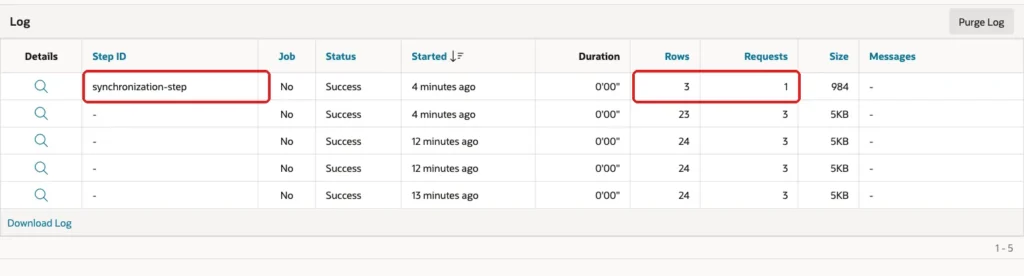
The same log is available in SQL in APEX_REST_SOURCE_SYNC_LOG. The three runs with 24 rows are the first run, the Merge test, and the Replace test:
Example:
select to_char(start_timestamp at time zone 'UTC', 'HH24:MI:SS') as started,
       status,
       nvl(sync_step_static_id, '-')          as step_id,
       rows_processed
from   apex_rest_source_sync_log
where  rest_source_name = 'Parts Feed'
order  by start_timestamp;
Output:
STARTED     STATUS        STEP_ID                    ROWS_PROCESSED
___________ _____________ _______________________ _________________
01:43:09    Successful    -                                      24
01:43:36    Successful    -                                      24
01:44:09    Successful    -                                      24
01:51:45    Successful    -                                      23
01:52:07    Successful    synchronization-step                    3
APEX_WEBSERVICE_LOG shows what APEX sent to the API. A full run is a few GET requests, one per page. The filtered step run is a single POST, because APEX sends the filter in the request body:
Example:
select to_char(request_date, 'HH24:MI:SS') as called_at,
       http_method,
       status_code,
       substr(url, instr(url, '/parts')) as url_path
from   apex_webservice_log
where  url like '%/parts/feed/%'
and    request_date > sysdate - interval '60' minute
order  by request_date desc
fetch first 5 rows only;
Output:
CALLED_AT    HTTP_METHOD       STATUS_CODE URL_PATH
____________ ______________ ______________ ___________________________
01:52:07     POST                      200 /parts/feed/
01:51:48     GET                       200 /parts/feed/?limit=10000
01:51:46     GET                       200 /parts/feed/?offset=10
01:51:46     GET                       200 /parts/feed/?offset=20
01:51:45     GET                       200 /parts/feed/
Things to Know
- Merge updates and inserts but never deletes. Replace deletes, but it also resets every column that the API does not return.
- The Interval Builder covers simple schedules. For others, type a Scheduler calendaring expression in the schedule field.
- The primary key in the Data Profile is required for Merge. Discovery did not set it in this test.
- A synchronization step is run by name from PL/SQL with DYNAMIC_SYNCHRONIZE_DATA, and the filter can be built at run time.
Related Guides
- How to Show Data from a REST API in a Report in Oracle APEX
- How to Query a Remote Database with REST-Enabled SQL in Oracle APEX
Conclusion
To keep a local copy of a REST Data Source in Oracle APEX, mark the primary key, choose an existing table, set Synchronization Type to Merge, and set a schedule with the Interval Builder. Local columns survive Merge, and a report on the table needs no web service call.
Remove rows deleted at the source with a small procedure that reads the feed, and use a synchronization step with a changed-since filter when a full run is too big. The log shows the rows and requests of every run.
See my articles more often when you search Google.
