
A "Recently Viewed" list shows each user the records they opened last, newest first. It saves a search every time someone returns to a record they were working on a few minutes ago, and it is a familiar pattern from online shops, wikis and help desks.
Oracle APEX has no built-in recently viewed feature, but it needs only one table, a small PL/SQL procedure called by a Before Header process, and a classic report. This guide builds it step by step and tests it with two users.
The guide uses wiki pages as the example; the same steps work for any table. It differs from the guide How to Let Users Mark Records as Favorites in Oracle APEX: favorites are picked by the user with a click, while this list is recorded automatically each time a record is opened.
Step 1: Create the Tables
The example needs three tables. WIKI_SPACES and WIKI_PAGES hold the example data. RECENT_VIEWS stores one row for each record a user has opened, with the time of the last visit and a visit count:
Example:
create table wiki_spaces (
    space_id   number generated by default on null as identity,
    space_name varchar2(50) not null,
    constraint wiki_spaces_pk primary key (space_id),
    constraint wiki_spaces_name_uk unique (space_name)
);

create table wiki_pages (
    page_id    number generated by default on null as identity,
    space_id   number         not null,
    title      varchar2(100)  not null,
    body       varchar2(4000) not null,
    updated_on date           default on null sysdate not null,
    constraint wiki_pages_pk primary key (page_id),
    constraint wiki_pages_space_fk foreign key (space_id)
        references wiki_spaces (space_id),
    constraint wiki_pages_title_uk unique (space_id, title)
);

create index wiki_pages_space_ix on wiki_pages (space_id);

create table recent_views (
    view_id         number generated by default on null as identity,
    user_name       varchar2(255) default on null
                        coalesce(sys_context('APEX$SESSION', 'APP_USER'),
                                 sys_context('USERENV', 'SESSION_USER')) not null,
    entity_type     varchar2(30)  not null,
    entity_id       number        not null,
    view_count      number        default on null 1 not null,
    first_viewed_on timestamp     default on null systimestamp not null,
    viewed_on       timestamp     default on null systimestamp not null,
    constraint recent_views_pk primary key (view_id),
    constraint recent_views_uk unique (user_name, entity_type, entity_id),
    constraint recent_views_type_ck check (entity_type in ('WIKI_PAGE')),
    constraint recent_views_count_ck check (view_count > 0)
);

create index recent_views_user_ix on recent_views (user_name, viewed_on);

insert into wiki_spaces (space_name) values ('Onboarding');
insert into wiki_spaces (space_name) values ('Development');
insert into wiki_spaces (space_name) values ('Operations');

insert into wiki_pages (space_id, title, body)
values (1, 'Welcome Guide', 'Start here: accounts, tools and the first week plan.');

insert into wiki_pages (space_id, title, body)
values (1, 'Holiday Policy', 'How to request leave and who approves it.');

insert into wiki_pages (space_id, title, body)
values (1, 'Office Locations', 'Addresses, opening hours and parking for each office.');

insert into wiki_pages (space_id, title, body)
values (1, 'IT Help Desk', 'How to open a ticket and the response times.');

insert into wiki_pages (space_id, title, body)
values (2, 'Coding Standards', 'Naming rules, formatting and code review checklist.');

insert into wiki_pages (space_id, title, body)
values (2, 'Git Workflow', 'Branches, pull requests and release tags.');

insert into wiki_pages (space_id, title, body)
values (2, 'Database Naming', 'Table, column, constraint and index naming rules.');

insert into wiki_pages (space_id, title, body)
values (2, 'Release Checklist', 'Steps to build, test and deploy a release.');

insert into wiki_pages (space_id, title, body)
values (3, 'Backup Schedule', 'Which databases are backed up, when and where.');

insert into wiki_pages (space_id, title, body)
values (3, 'Incident Response', 'Who to call and what to do when a system is down.');

insert into wiki_pages (space_id, title, body)
values (3, 'Monitoring Dashboards', 'Links to the dashboards and what each chart means.');

insert into wiki_pages (space_id, title, body)
values (3, 'Patch Calendar', 'Planned maintenance windows for the next quarter.');

insert into recent_views (user_name, entity_type, entity_id, view_count, viewed_on)
values ('SALES_USER', 'WIKI_PAGE', 2, 3, systimestamp - interval '2' hour);

insert into recent_views (user_name, entity_type, entity_id, view_count, viewed_on)
values ('SALES_USER', 'WIKI_PAGE', 9, 1, systimestamp - interval '1' day);

commit;

select p.page_id, s.space_name, p.title
from   wiki_pages p
join   wiki_spaces s on s.space_id = p.space_id
order  by p.page_id;

select user_name, entity_type, entity_id, view_count
from   recent_views
order  by view_id;
Output:
Table WIKI_SPACES created.

Table WIKI_PAGES created.

Index WIKI_PAGES_SPACE_IX created.

Table RECENT_VIEWS created.

Index RECENT_VIEWS_USER_IX created.

1 row inserted.

1 row inserted.

1 row inserted.

1 row inserted.

1 row inserted.

1 row inserted.

1 row inserted.

1 row inserted.

1 row inserted.

1 row inserted.

1 row inserted.

1 row inserted.

1 row inserted.

1 row inserted.

1 row inserted.

1 row inserted.

1 row inserted.

Commit complete.

   PAGE_ID SPACE_NAME     TITLE
__________ ______________ ________________________
         1 Onboarding     Welcome Guide
         2 Onboarding     Holiday Policy
         3 Onboarding     Office Locations
         4 Onboarding     IT Help Desk
         5 Development    Coding Standards
         6 Development    Git Workflow
         7 Development    Database Naming
         8 Development    Release Checklist
         9 Operations     Backup Schedule
        10 Operations     Incident Response
        11 Operations     Monitoring Dashboards
        12 Operations     Patch Calendar

12 rows selected.

USER_NAME     ENTITY_TYPE       ENTITY_ID    VIEW_COUNT
_____________ ______________ ____________ _____________
SALES_USER    WIKI_PAGE                 2             3
SALES_USER    WIKI_PAGE                 9             1
A few details in the tables:
- RECENT_VIEWS_UK on USER_NAME, ENTITY_TYPE and ENTITY_ID keeps one row per user and record. Opening a record again updates that row instead of adding a new one.
- ENTITY_TYPE says which table the record belongs to. The check constraint RECENT_VIEWS_TYPE_CK lists the allowed types; add a value when you track views of another table.
- USER_NAME, VIEW_COUNT, FIRST_VIEWED_ON and VIEWED_ON use DEFAULT ON NULL, so no trigger is needed. USER_NAME takes the APEX user, or the database user outside APEX.
- VIEWED_ON is a TIMESTAMP, so two pages opened in the same second still sort in the right order.
- The index RECENT_VIEWS_USER_IX on USER_NAME and VIEWED_ON supports the "last 10 for this user" query.
In the sample data, SALES_USER has already opened Holiday Policy three times (two hours ago) and Backup Schedule once (a day ago). DEMO_DEV has not opened any page yet.
Step 2: Create the Procedure That Records a View
Recording a view is a small piece of DML: insert a row the first time, update it on every later visit. Put it in a procedure, so every page that shows a record can call it with one line:
Example:
create or replace procedure record_recent_view (
    p_entity_type in varchar2,
    p_entity_id   in number,
    p_keep_rows   in pls_integer default 20)
is
    l_user recent_views.user_name%type :=
        coalesce(sys_context('APEX$SESSION', 'APP_USER'),
                 sys_context('USERENV', 'SESSION_USER'));
begin
    if p_entity_id is null then
        return;
    end if;

    begin
        merge into recent_views v
        using (select l_user        as user_name,
                      p_entity_type as entity_type,
                      p_entity_id   as entity_id
               from   dual) s
        on (    v.user_name   = s.user_name
            and v.entity_type = s.entity_type
            and v.entity_id   = s.entity_id)
        when matched then update
            set v.viewed_on  = systimestamp,
                v.view_count = v.view_count + 1
        when not matched then insert (user_name, entity_type, entity_id)
            values (s.user_name, s.entity_type, s.entity_id);
    exception
        when dup_val_on_index then
            update recent_views
            set    viewed_on  = systimestamp,
                   view_count = view_count + 1
            where  user_name   = l_user
            and    entity_type = p_entity_type
            and    entity_id   = p_entity_id;
    end;

    delete from recent_views
    where  view_id in (
               select view_id
               from   recent_views
               where  user_name = l_user
               order  by viewed_on desc, view_id desc
               offset p_keep_rows rows);
end record_recent_view;
/

show errors
Output:
Procedure RECORD_RECENT_VIEW compiled

No errors.
The MERGE statement updates VIEWED_ON and adds 1 to VIEW_COUNT when the user has opened the record before. Otherwise it inserts a new row, and the column defaults fill in the user, the count and the times.
The DUP_VAL_ON_INDEX handler covers two sessions of the same user opening the same record for the first time at the same moment. The second MERGE then fails on the unique key, and the handler updates the row the first session inserted. Step 10 tests this.
The final DELETE prunes the list. It keeps the newest 20 rows of the current user (P_KEEP_ROWS) and removes older ones, so the table does not grow forever. The page shows 10 rows, so 20 leaves room to spare.
Step 3: Create the Wiki Home Page
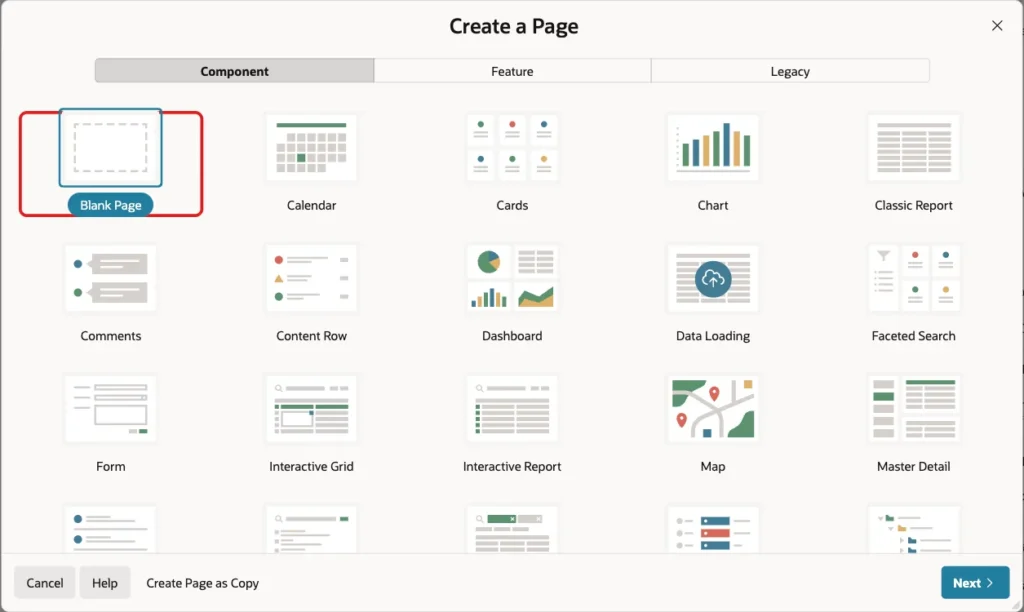
In App Builder, open the application and click Create Page. On the Component tab, select Blank Page:
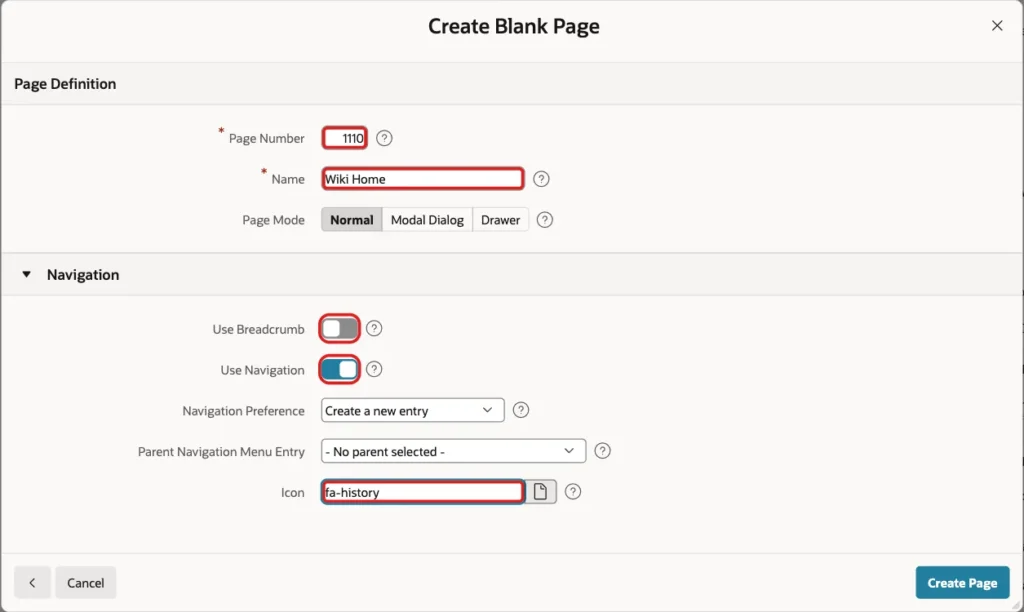
Set Page Number to 1110 and Name to Wiki Home. Turn Use Breadcrumb off, keep Use Navigation on with Create a new entry, set Icon to fa-history and click Create Page:
Step 4: Create the Wiki Page Detail Page
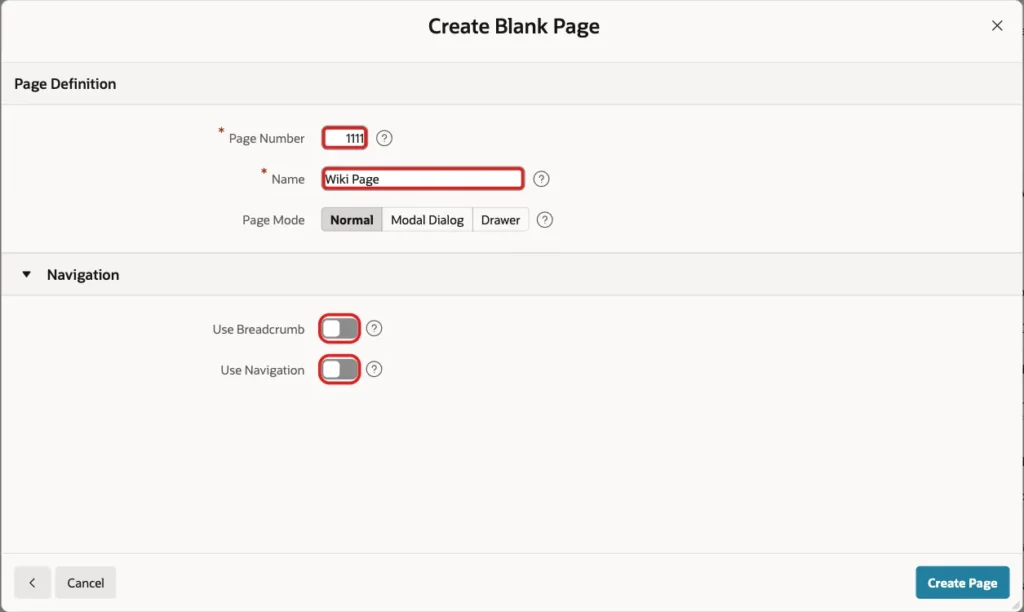
Click Create Page again and select Blank Page. Set Page Number to 1111 and Name to Wiki Page. Turn both Use Breadcrumb and Use Navigation off, because this page is opened from links only, and click Create Page:
Step 5: Show the Wiki Page
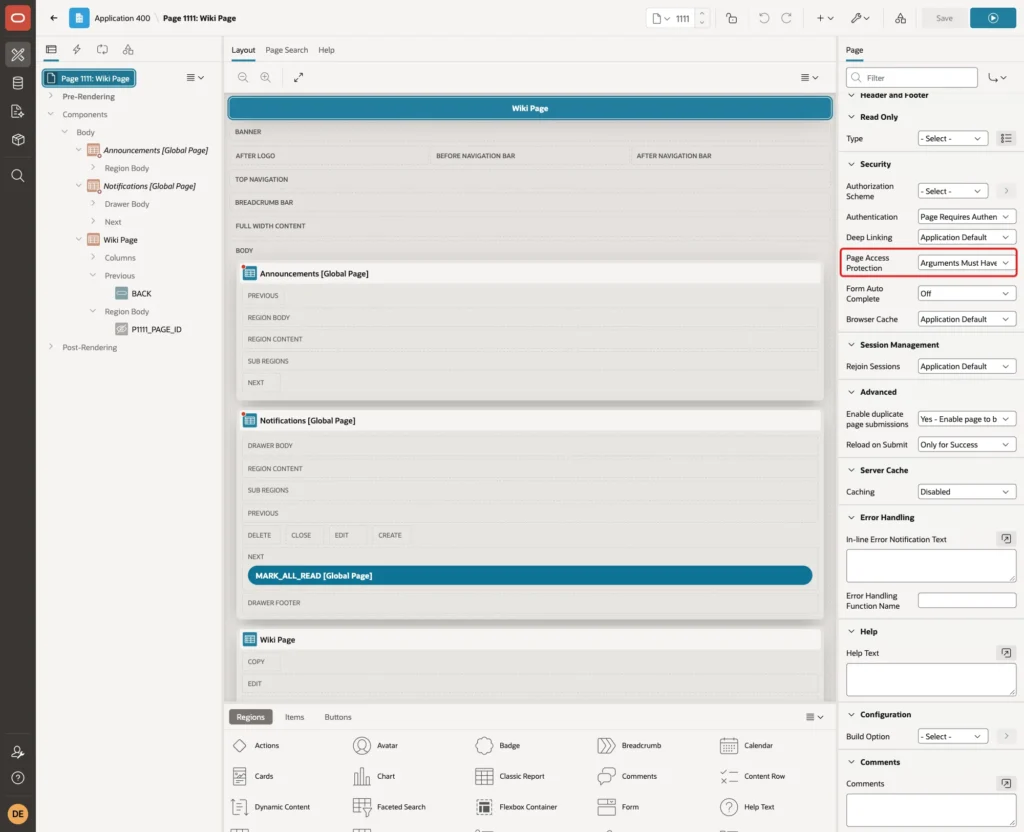
Page 1111 shows one wiki page and records the view. Select Page 1111: Wiki Page in the Rendering tree. Under Security, Page Access Protection is already Arguments Must Have Checksum; keep it. Links built by APEX then carry a checksum, and a hand-edited URL is refused:
Right-click Body and choose Create Region. Set Name to Wiki Page and Type to Classic Report. Under Source, keep Type SQL Query and enter this query:
Example:
select s.space_name,
       p.title,
       p.body,
       p.updated_on
from   wiki_pages p
join   wiki_spaces s on s.space_id = p.space_id
where  p.page_id = :P1111_PAGE_ID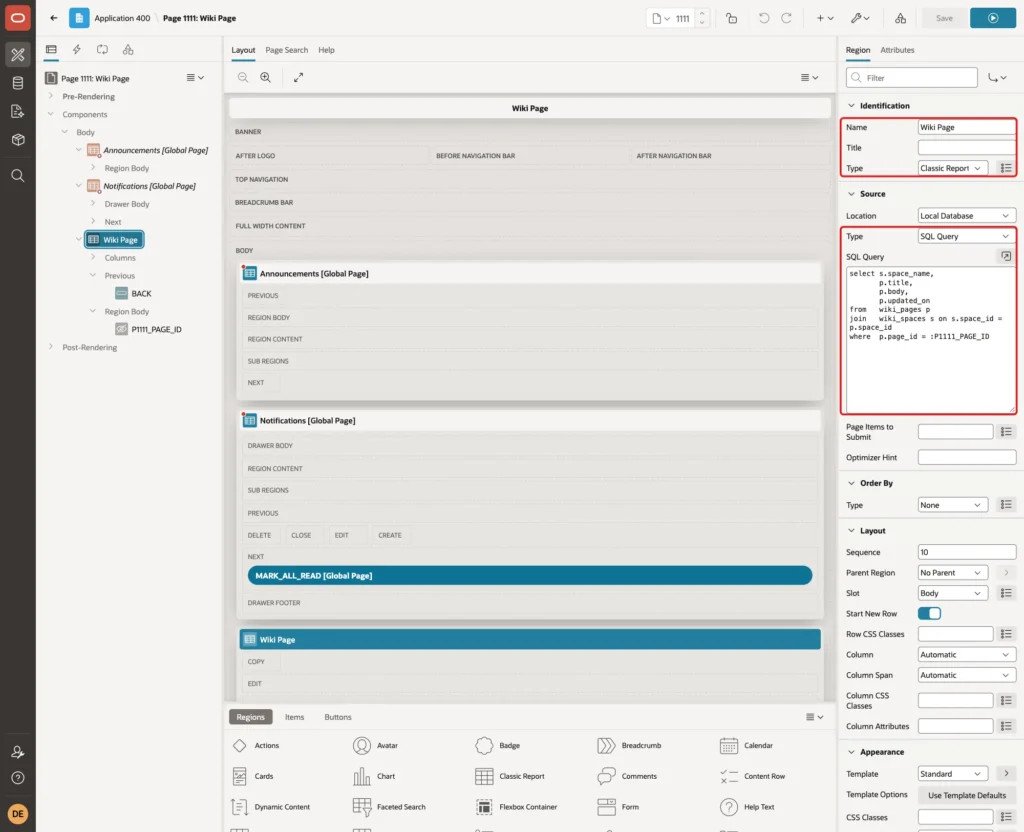
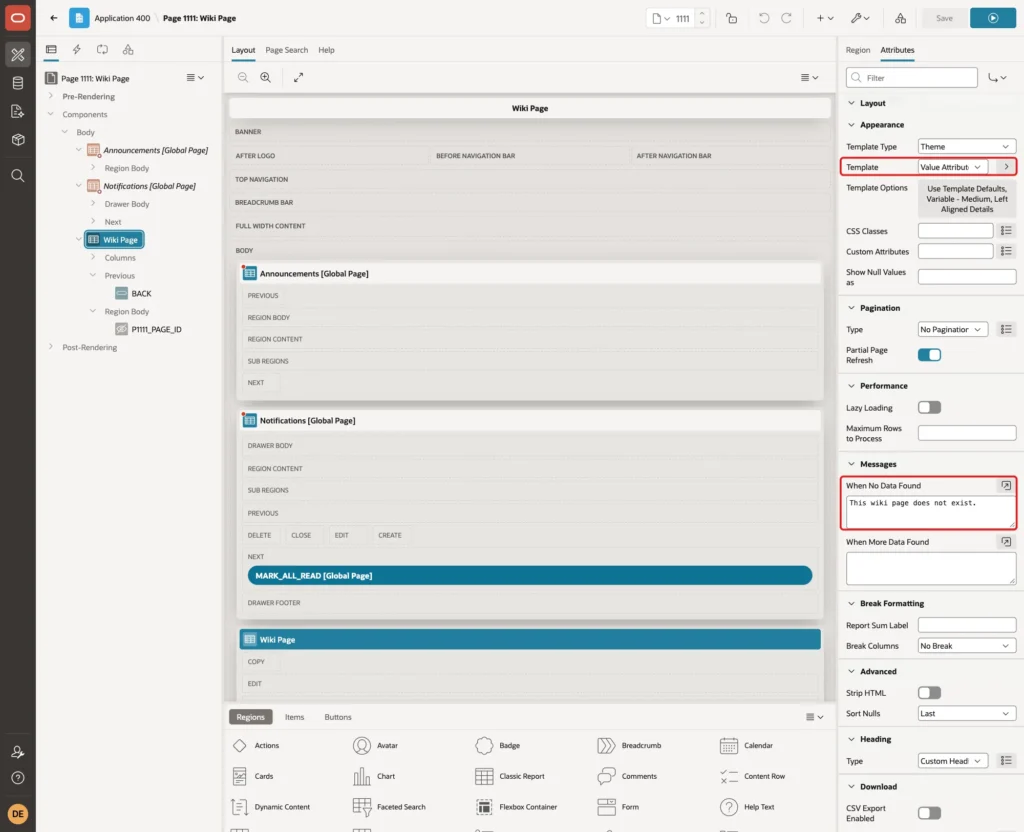
Click the Attributes tab. Under Appearance, set Template to Value Attribute Pairs - Column, and in Template Options choose Variable - Medium and Left Aligned Details. Under Messages, set When No Data Found to "This wiki page does not exist.":
Expand Columns and set the headings to Space, Title, Content and Updated. For UPDATED_ON, set Format Mask to DD-MON-YYYY.
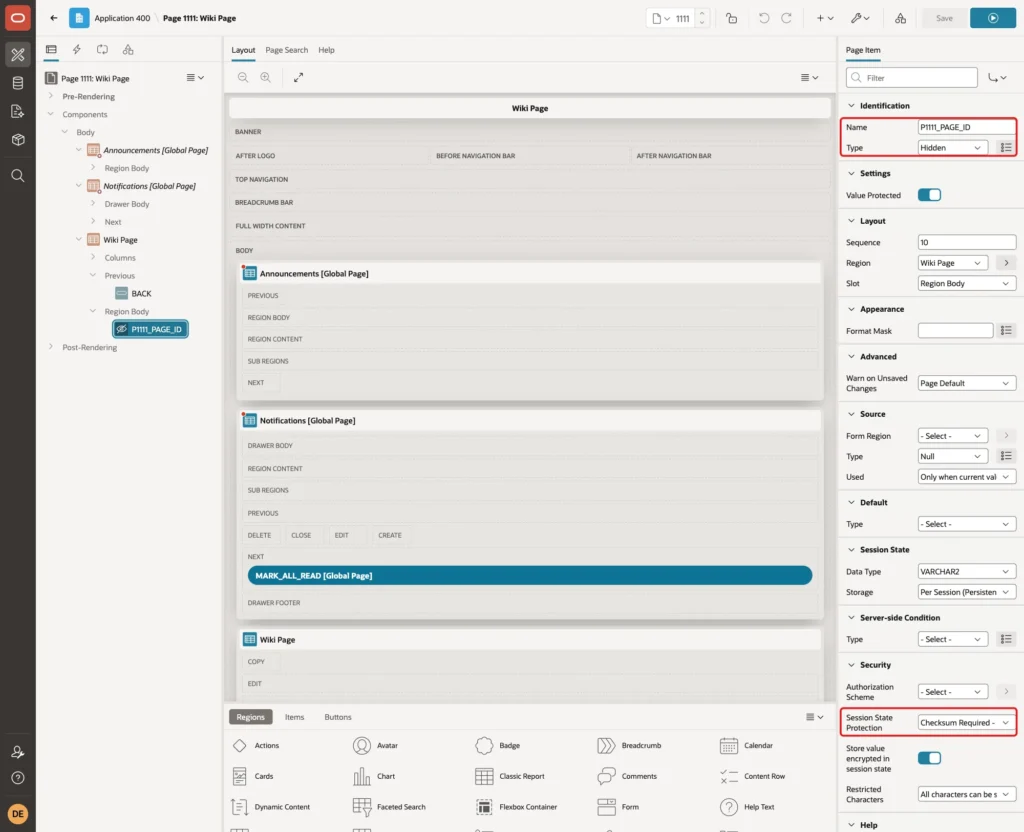
Right-click the Wiki Page region and choose Create Page Item. Set Name to P1111_PAGE_ID and Type to Hidden. Keep Value Protected on, and under Security set Session State Protection to Checksum Required - Session Level:
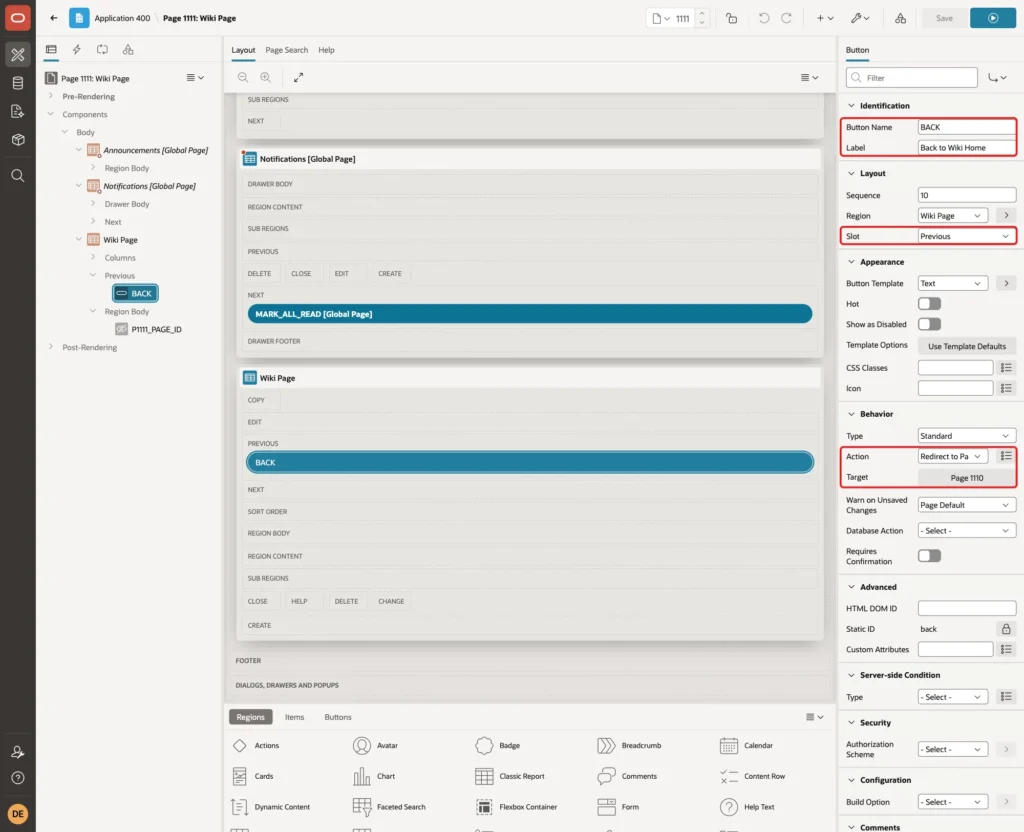
Right-click the Wiki Page region and choose Create Button. Set Button Name to BACK, Label to Back to Wiki Home and Slot to Previous. Under Behavior, set Action to Redirect to Page in this Application and Target to page 1110:
Step 6: Record the View in a Before Header Process
In the Rendering tree, right-click Pre-Rendering > Before Header and choose Create Process. Set Name to Record View and Type to Execute Code, and enter this PL/SQL code. Under Execution, Point is Before Header:
Example:
record_recent_view(
    p_entity_type => 'WIKI_PAGE',
    p_entity_id   => :P1111_PAGE_ID);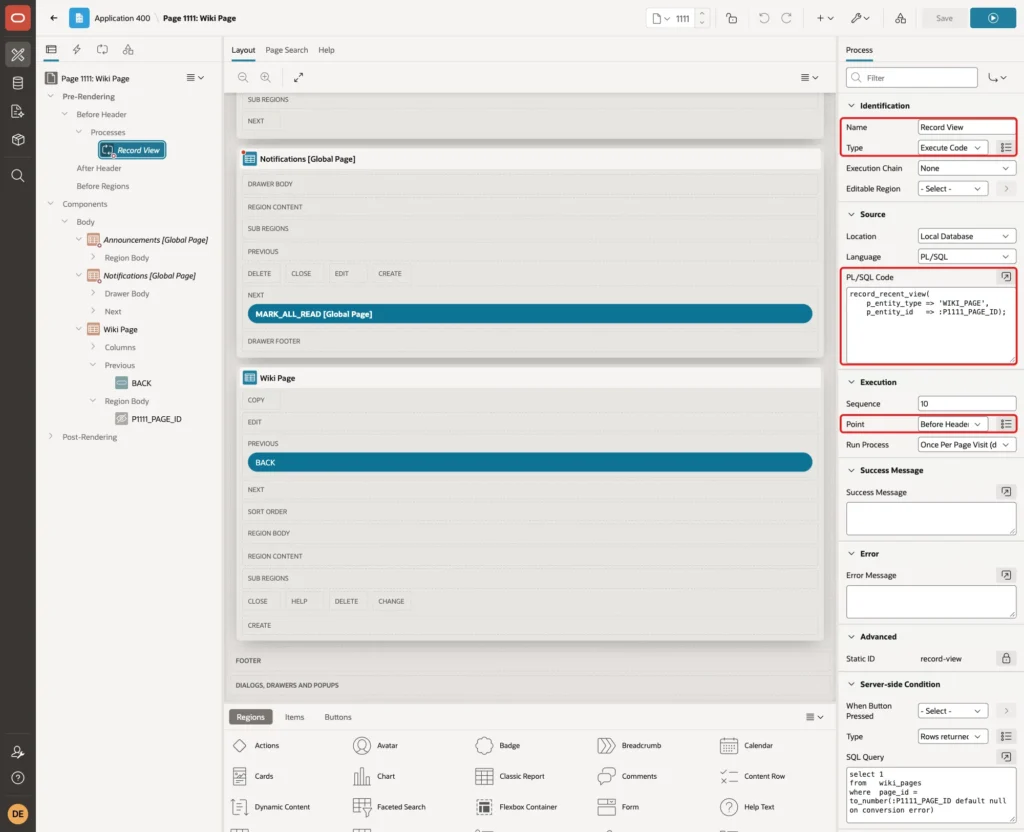
Before Header runs before any region is drawn, and after APEX has set P1111_PAGE_ID from the link. Each visit, including a reload, counts as one view.
Under Server-side Condition, set Type to Rows returned and enter this SQL Query:
Example:
select 1
from   wiki_pages
where  page_id = to_number(:P1111_PAGE_ID default null on conversion error)
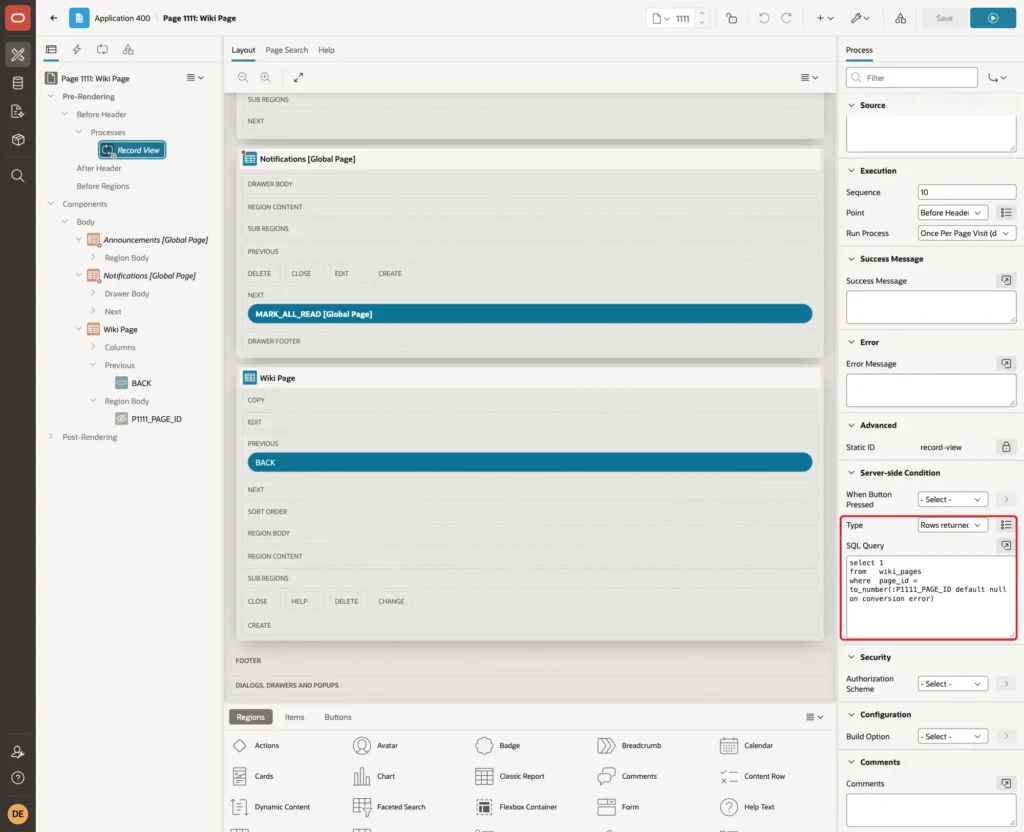
The condition is declarative, so the procedure stays generic. If the page was deleted, nothing is recorded. TO_NUMBER with DEFAULT NULL ON CONVERSION ERROR turns a value that is not a number into NULL instead of raising an error.
Save page 1111.
Step 7: Add the All Pages Report
Open page 1110 in Page Designer. Right-click Body and choose Create Region. Set Name to All Pages and Type to Classic Report. Under Source, keep Type SQL Query and enter this query:
Example:
select p.page_id,
       p.title,
       s.space_name,
       p.updated_on
from   wiki_pages p
join   wiki_spaces s on s.space_id = p.space_id
order  by s.space_name, p.title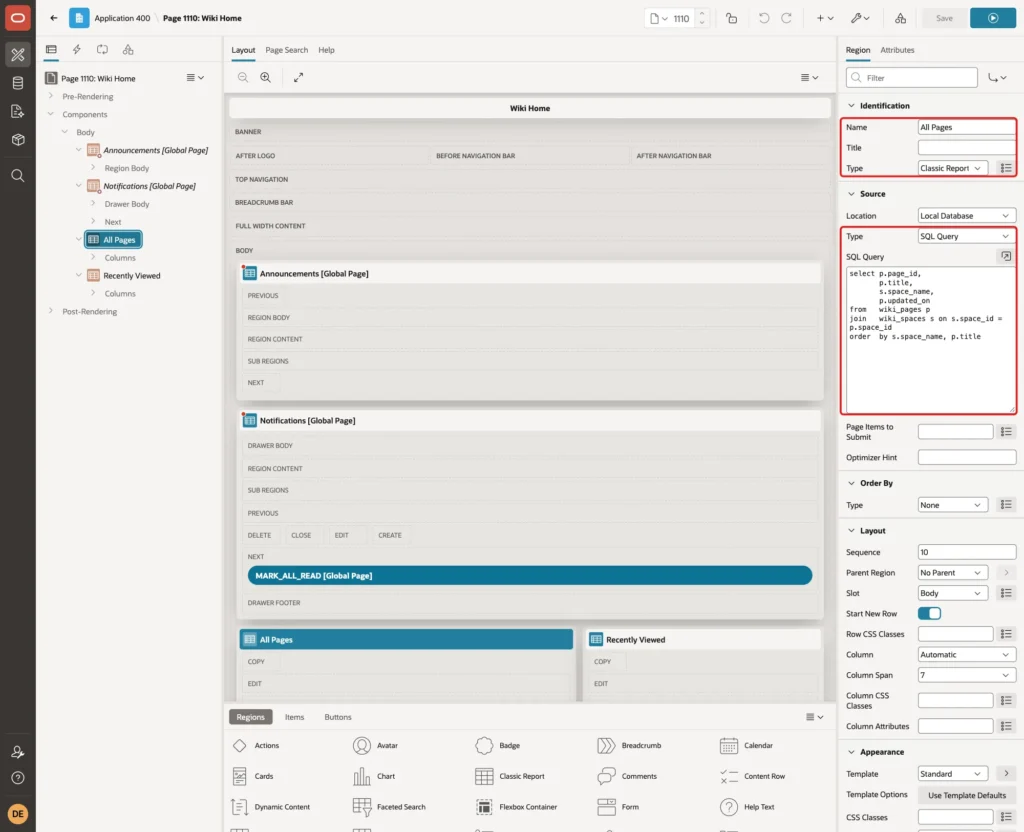
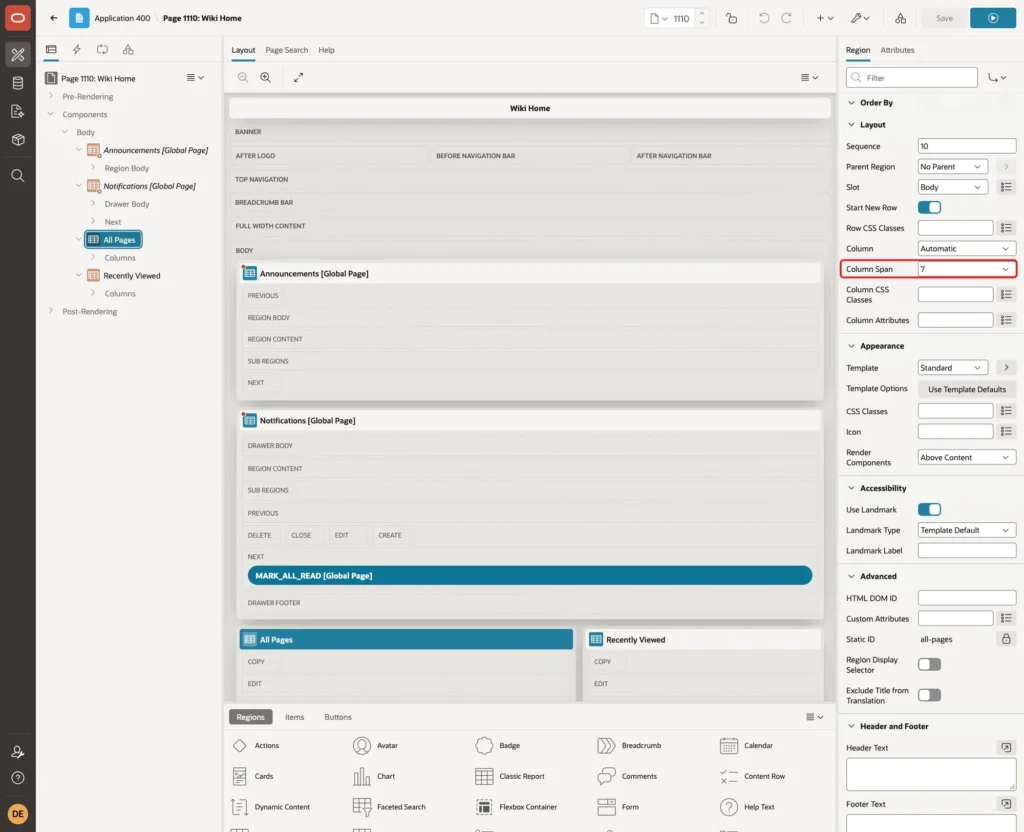
Under Layout, set Column Span to 7. The Recently Viewed region will use the other 5 columns:
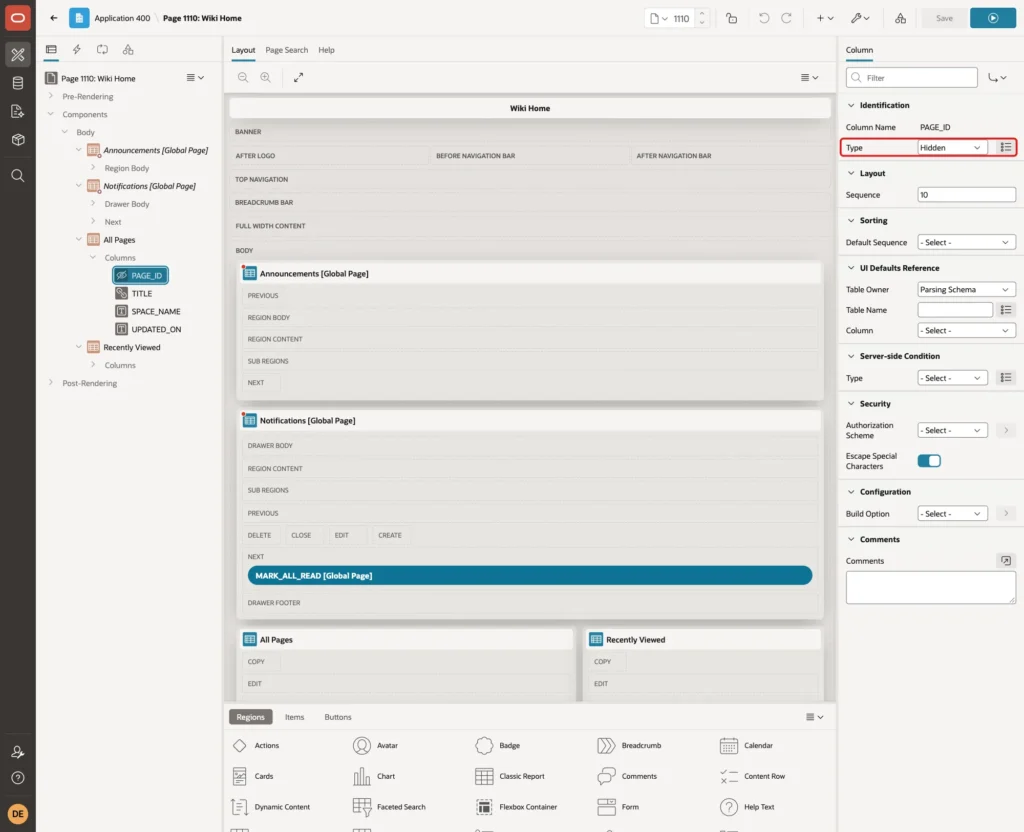
Expand the region's Columns and select PAGE_ID. Set Type to Hidden Column. The value stays available as #PAGE_ID# for the link:
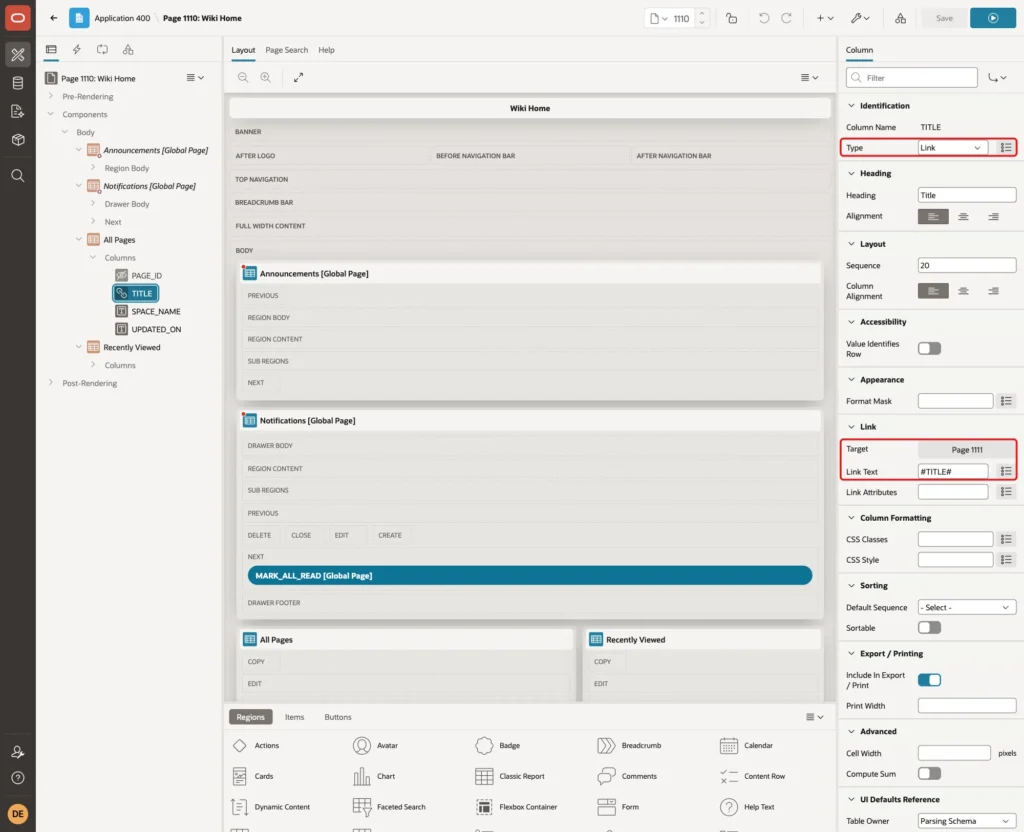
Select TITLE and set Type to Link. Click Target, set Page to 1111, set the item P1111_PAGE_ID to the value #PAGE_ID#, set Clear Cache to 1111 and click OK. Set Link Text to #TITLE#:
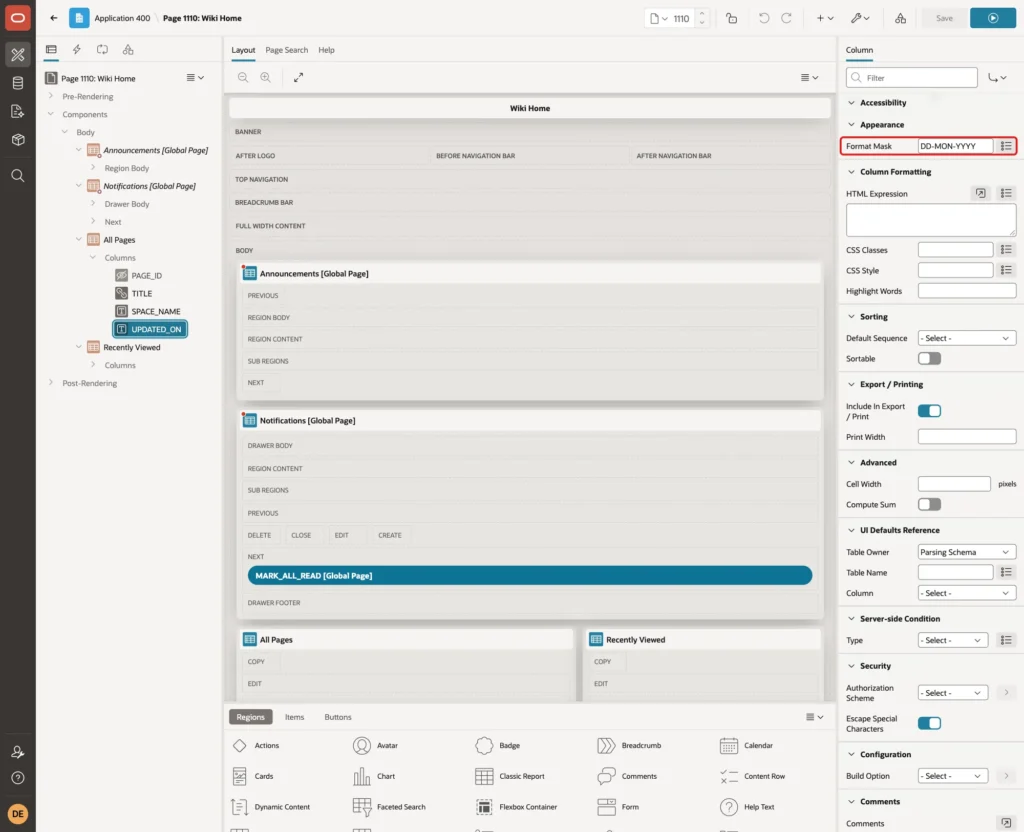
Set the headings of SPACE_NAME and UPDATED_ON to Space and Updated. For UPDATED_ON, set Format Mask to DD-MON-YYYY:
Step 8: Add the Recently Viewed Region
Right-click Body and choose Create Region. Set Name to Recently Viewed and Type to Classic Report. Under Source, keep Type SQL Query and enter this query:
Example:
select p.page_id,
       p.title,
       s.space_name,
       v.viewed_on,
       v.view_count
from   recent_views v
join   wiki_pages p  on p.page_id = v.entity_id
join   wiki_spaces s on s.space_id = p.space_id
where  v.user_name   = :APP_USER
and    v.entity_type = 'WIKI_PAGE'
order  by v.viewed_on desc
fetch  first 10 rows only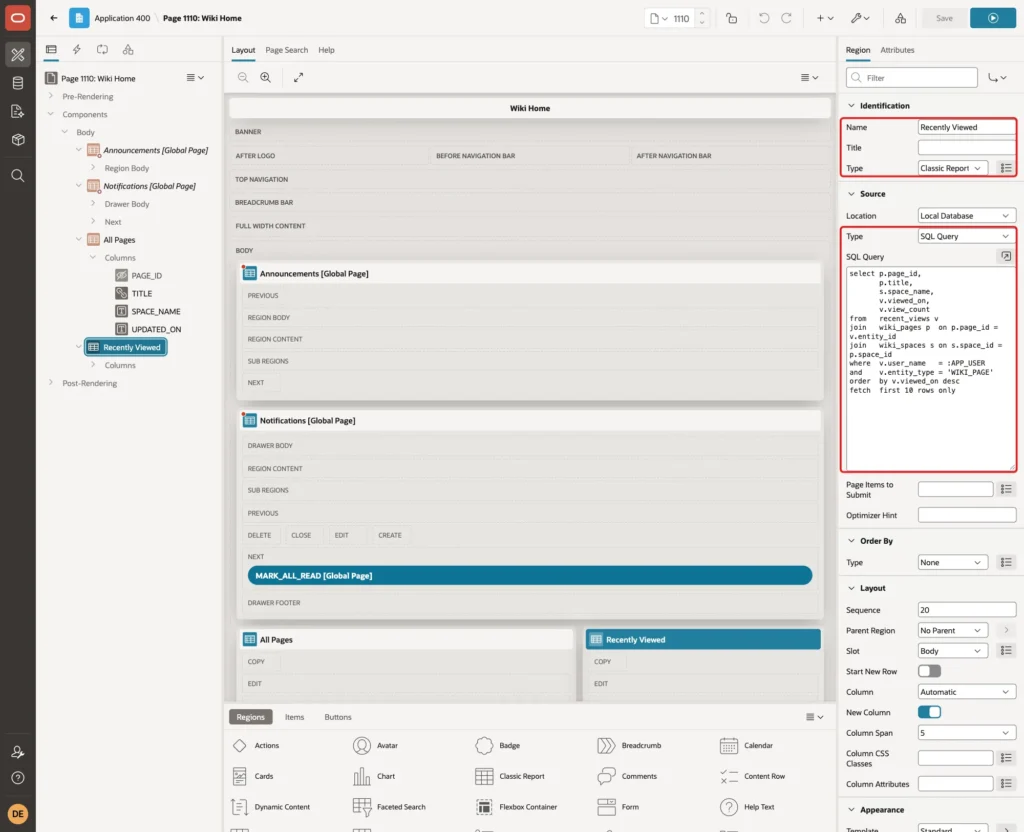
The query reads only the rows of :APP_USER, newest first, and FETCH FIRST 10 ROWS ONLY limits the list. The join to WIKI_PAGES also hides views of pages that were deleted later.
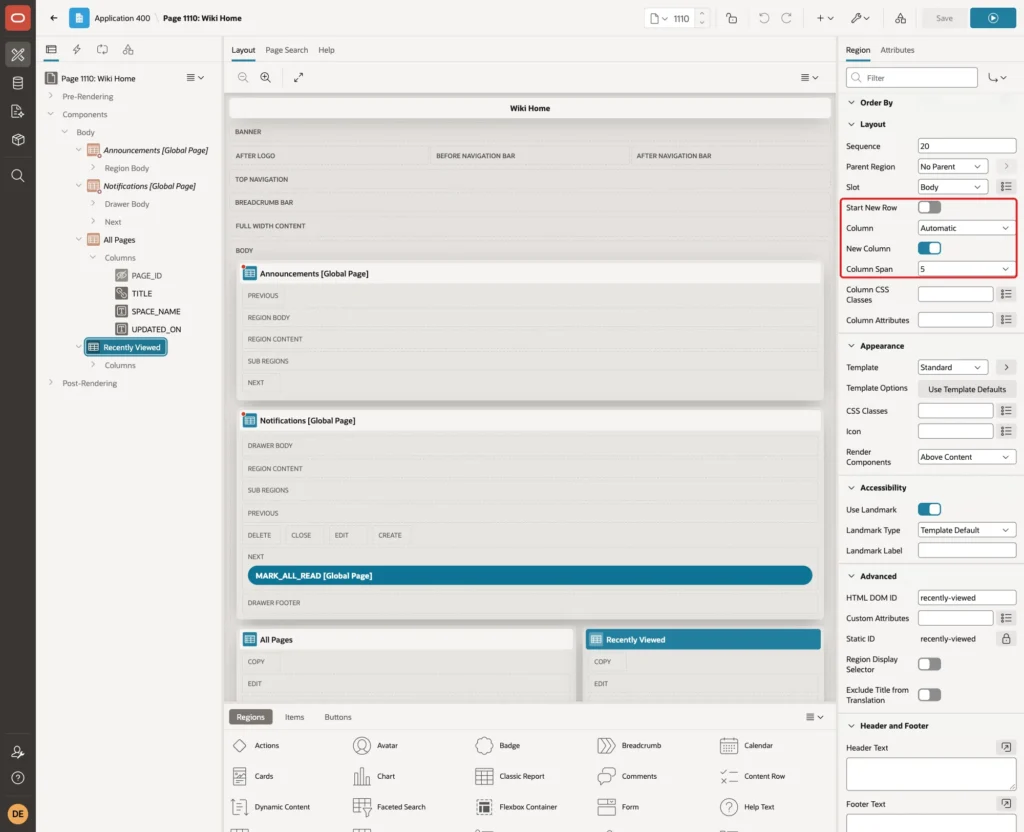
Under Layout, turn Start New Row off and set Column Span to 5. New Column turns on by itself, so the region appears to the right of All Pages:
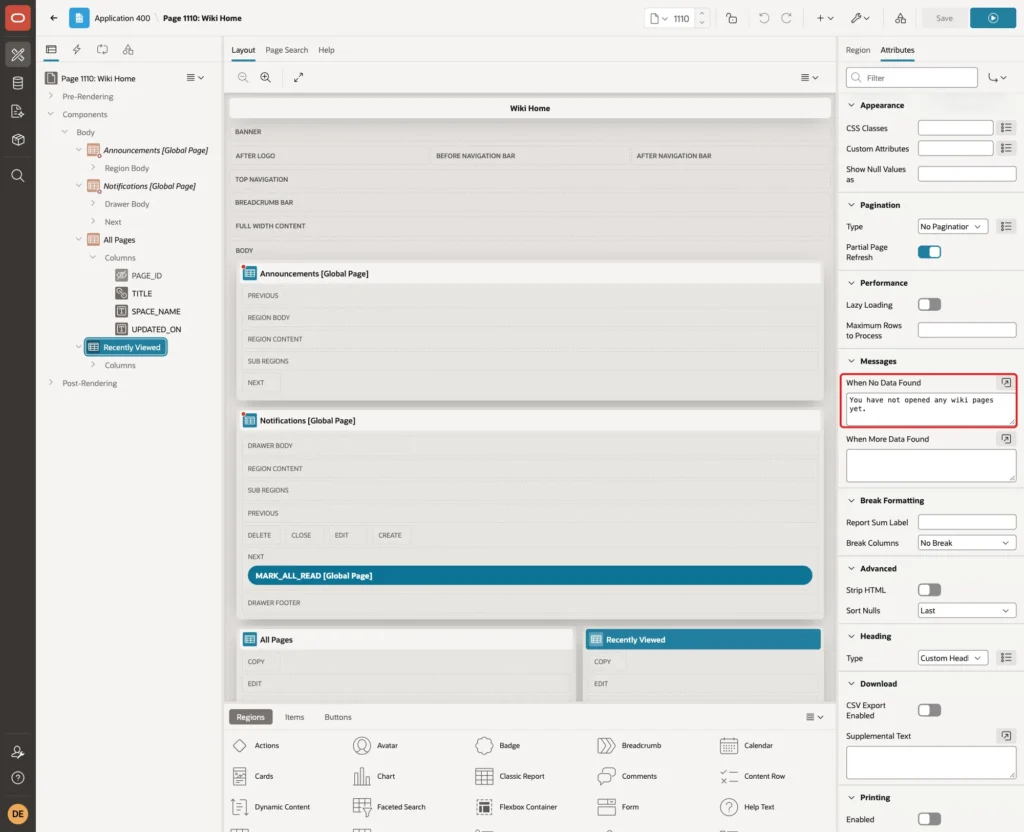
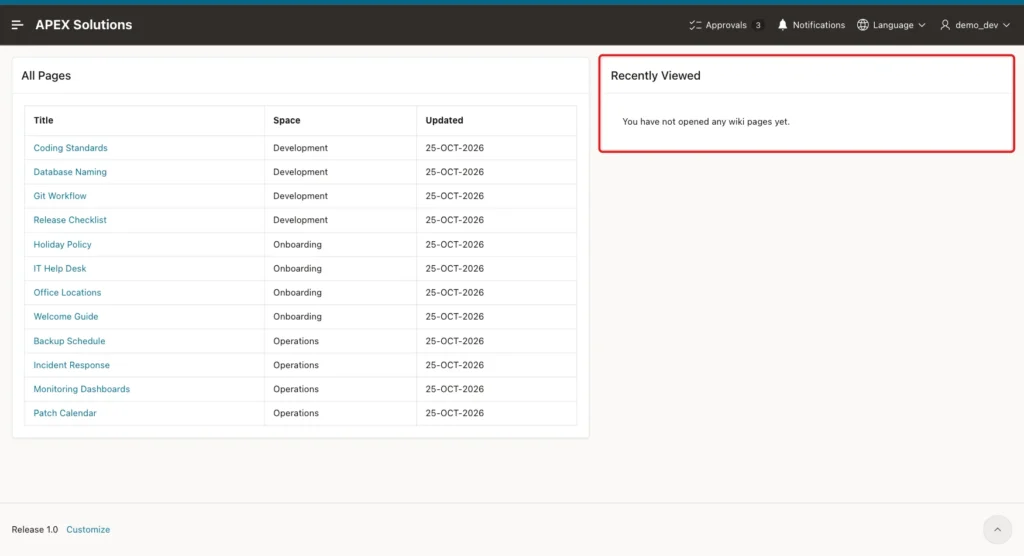
Click the Attributes tab. Under Messages, set When No Data Found to "You have not opened any wiki pages yet.":
Set up PAGE_ID and TITLE exactly as in Step 7: PAGE_ID as Hidden Column, TITLE as a Link to page 1111 with P1111_PAGE_ID = #PAGE_ID#. Set the heading of SPACE_NAME to Space.
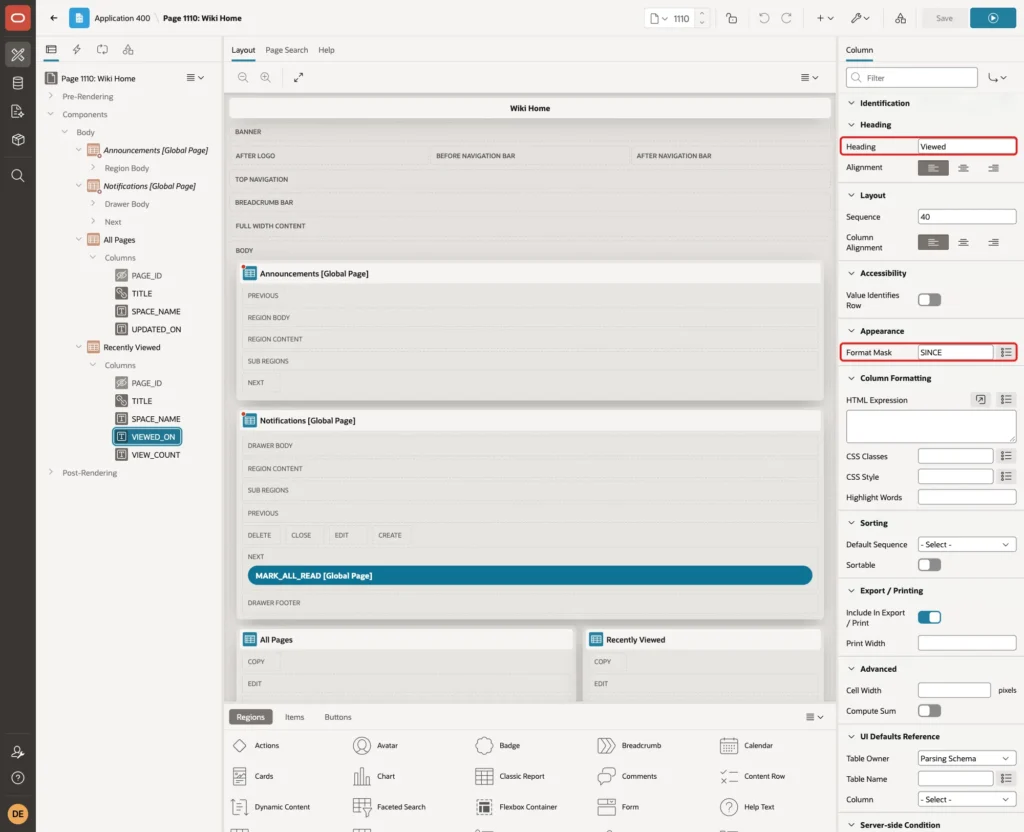
Select VIEWED_ON. Set Heading to Viewed and Format Mask to SINCE. APEX then shows the time as "2 seconds ago" or "2 hours ago":
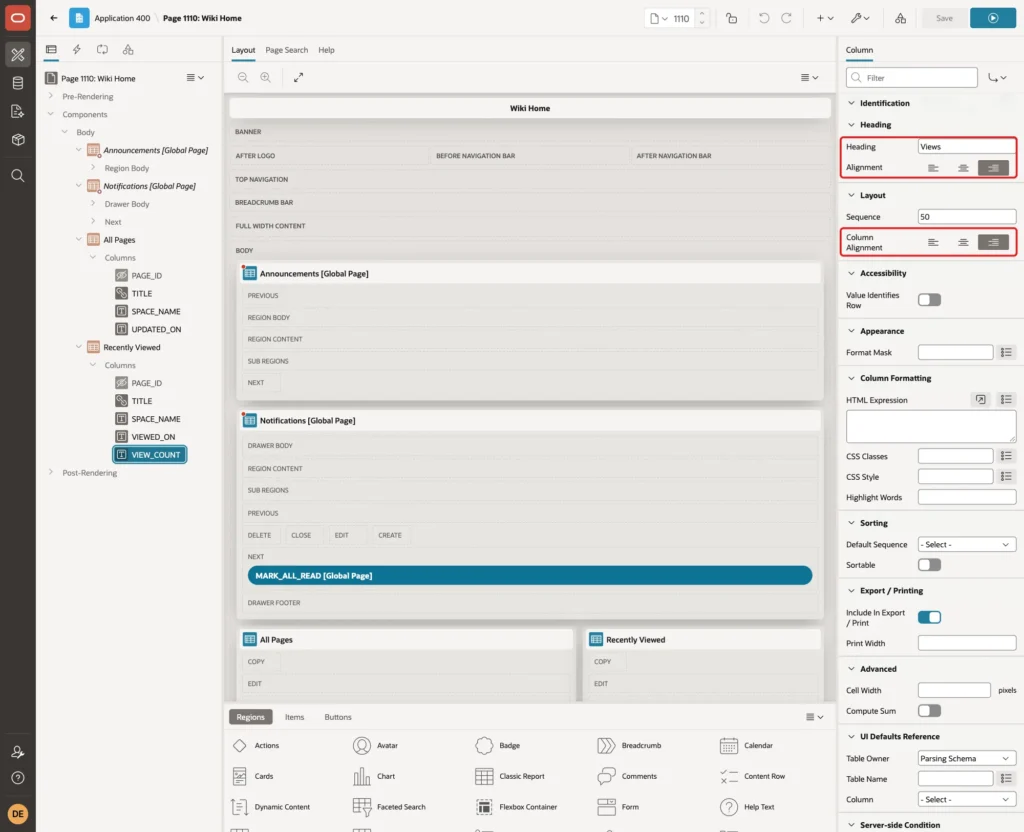
Select VIEW_COUNT. Set Heading to Views, and set both the heading Alignment and the Layout Column Alignment to end:
Save the page.
Step 9: Test the Recently Viewed List
Sign in as DEMO_DEV and open Wiki Home. DEMO_DEV has not opened any page yet, so the region shows the No Data Found message:
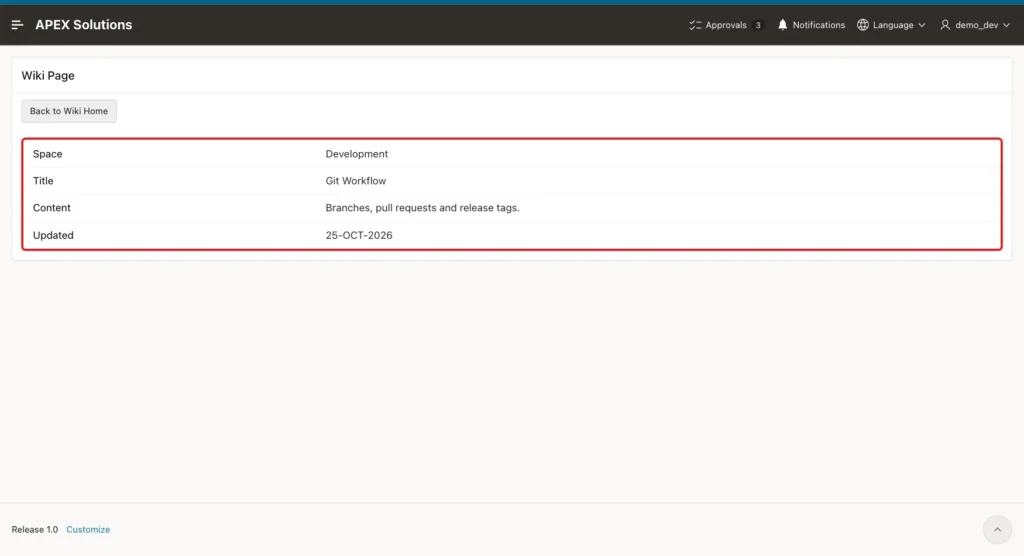
Click Git Workflow. Page 1111 shows the wiki page, and the Before Header process records the view:
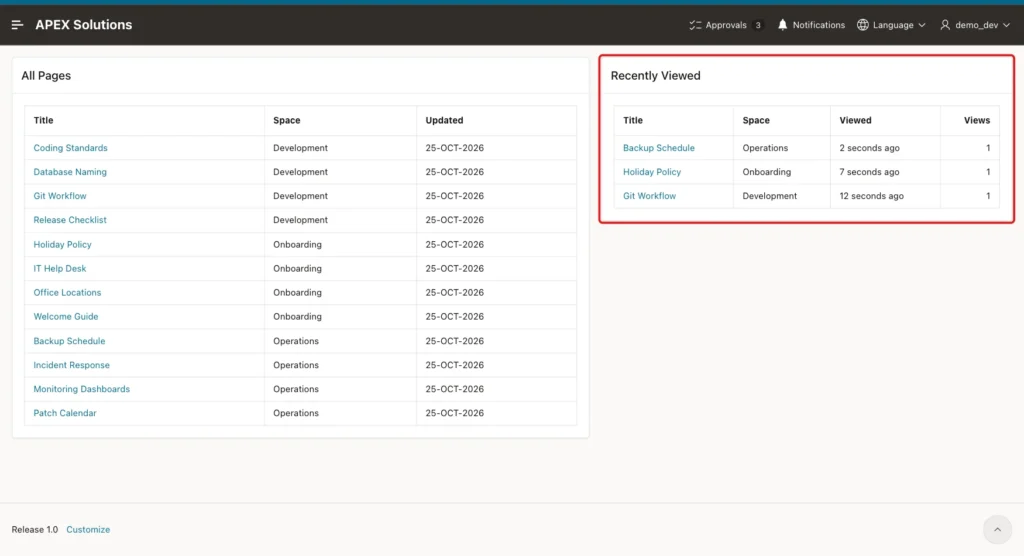
Click Back to Wiki Home, then open Holiday Policy and Backup Schedule the same way. Recently Viewed now lists the three pages, the last one at the top:
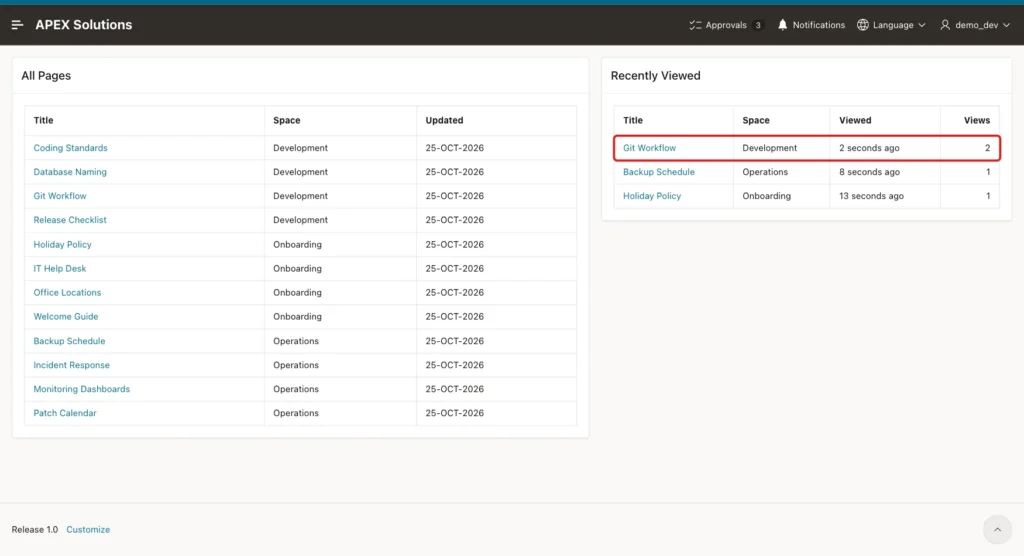
Click Git Workflow in the Recently Viewed region and go back. The row moves to the top and Views changes to 2. No second row was added:
Going back with the browser's Back button instead of the button gave the same result. The Wiki Home page was loaded again, so the list was up to date.
Sign in as SALES_USER. The list shows only the two pages from the sample data, Holiday Policy and Backup Schedule. The pages DEMO_DEV opened are not shown:
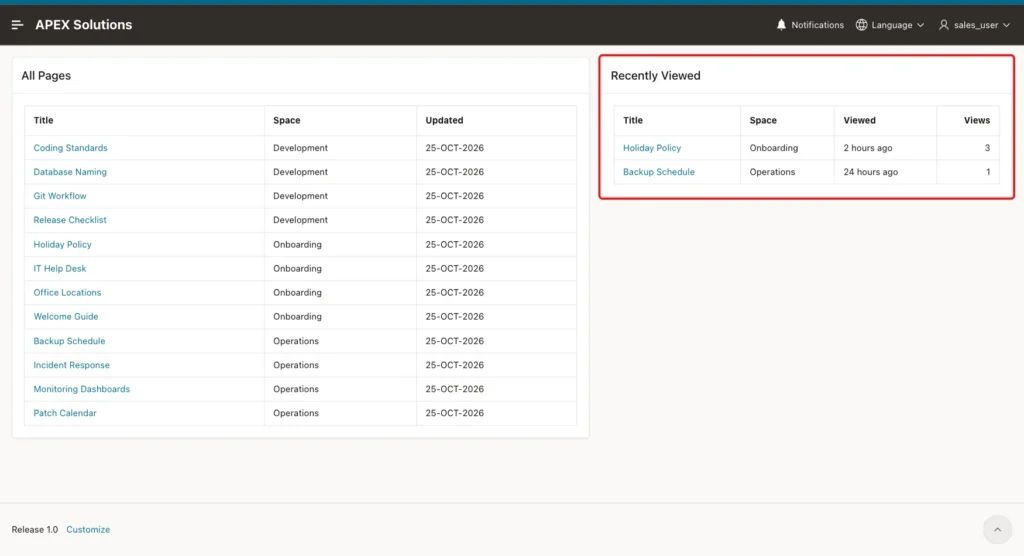
As DEMO_DEV, all 12 wiki pages were opened one after another. The region showed exactly 10 rows, from Patch Calendar (opened last) down to Git Workflow:

Two negative tests checked the protection of page 1111:
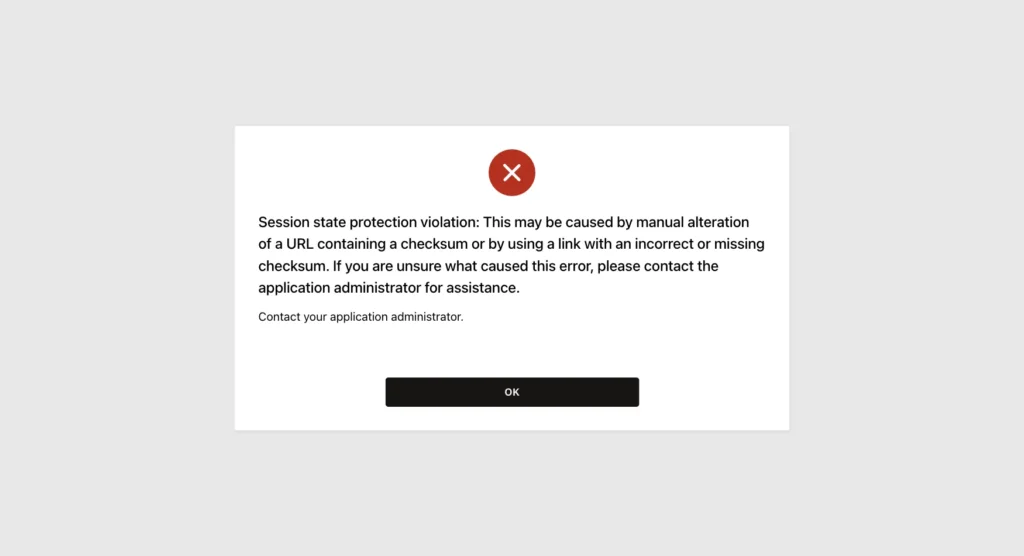
- In the link to Git Workflow, P1111_PAGE_ID was changed from 6 to 7 by hand. APEX refused the URL with the error below, with or without the old checksum, and no view was recorded.
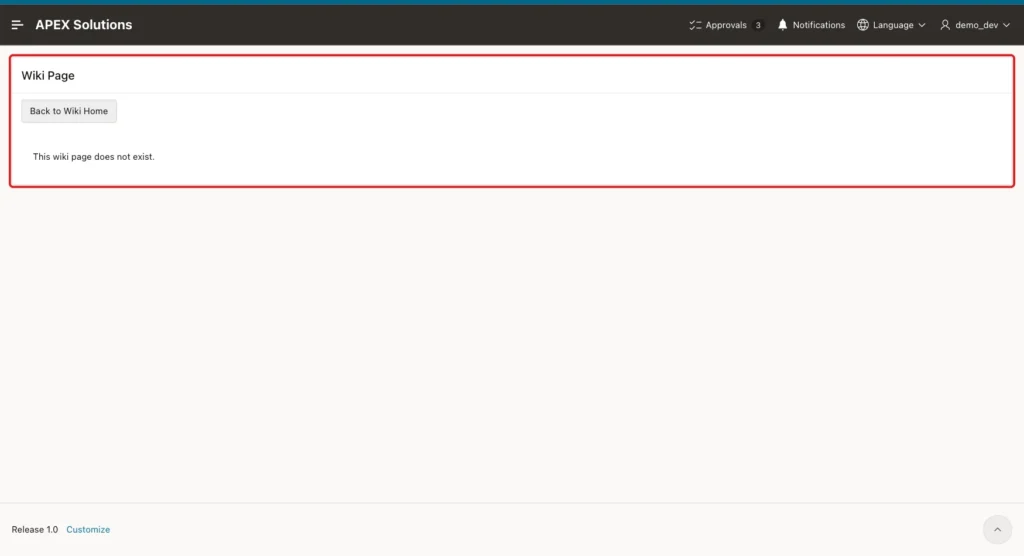
- A temporary page, ZZ Temp Page, was added and the Wiki Home page was loaded. The page was then deleted in SQL, and its link was clicked. Page 1111 showed "This wiki page does not exist." and the Record View process did not run.
Step 10: Check the Data in SQL
This query lists the recorded views with the page titles:
Example:
select v.user_name,
       p.title,
       v.view_count,
       to_char(v.viewed_on, 'DD-MON HH24:MI:SS') as viewed_at
from   recent_views v
join   wiki_pages p on p.page_id = v.entity_id
where  v.entity_type = 'WIKI_PAGE'
order  by v.user_name, v.viewed_on desc;
After the tests, DEMO_DEV had 12 rows, one per page, with 3 views of Git Workflow and 2 of Holiday Policy and Backup Schedule. The rows of SALES_USER were unchanged. No row was recorded for the deleted temporary page:
Output:
USER_NAME    TITLE                       VIEW_COUNT VIEWED_AT
____________ ________________________ _____________ __________________
APXSOL       Release Checklist                    1 25-OCT 07:05:13
APXSOL       Database Naming                      1 25-OCT 07:05:13
APXSOL       Git Workflow                         1 25-OCT 07:05:13
APXSOL       Coding Standards                     1 25-OCT 07:05:13
APXSOL       IT Help Desk                         1 25-OCT 07:05:13
DEMO_DEV     Patch Calendar                       1 25-OCT 07:03:17
DEMO_DEV     Monitoring Dashboards                1 25-OCT 07:03:13
DEMO_DEV     Incident Response                    1 25-OCT 07:03:10
DEMO_DEV     Backup Schedule                      2 25-OCT 07:03:07
DEMO_DEV     Welcome Guide                        1 25-OCT 07:03:03
DEMO_DEV     Office Locations                     1 25-OCT 07:03:00
DEMO_DEV     IT Help Desk                         1 25-OCT 07:02:57
DEMO_DEV     Holiday Policy                       2 25-OCT 07:02:54
DEMO_DEV     Release Checklist                    1 25-OCT 07:02:50

USER_NAME     TITLE                  VIEW_COUNT VIEWED_AT
_____________ ___________________ _____________ __________________
DEMO_DEV      Git Workflow                    3 25-OCT 07:02:47
DEMO_DEV      Database Naming                 1 25-OCT 07:02:44
DEMO_DEV      Coding Standards                1 25-OCT 07:02:40
SALES_USER    Holiday Policy                  3 25-OCT 04:57:14
SALES_USER    Backup Schedule                 1 24-OCT 06:57:14

19 rows selected.
The pruning was tested outside APEX, where USER_NAME is the database user. This script opened 8 pages with P_KEEP_ROWS set to 5. Only the 5 newest rows were kept. These test rows were deleted afterwards:
Example:
begin
    for i in 1 .. 8 loop
        record_recent_view(
            p_entity_type => 'WIKI_PAGE',
            p_entity_id   => i,
            p_keep_rows   => 5);
    end loop;
    commit;
end;
/

select entity_id, view_count
from   recent_views
where  user_name = user
order  by viewed_on desc;
Output:
PL/SQL procedure successfully completed.

   ENTITY_ID    VIEW_COUNT
____________ _____________
           8             1
           7             1
           6             1
           5             1
           4             1
The last test ran two sessions of the same user at once. Session A recorded a view of Incident Response and waited 6 seconds before its COMMIT:
Example:
exec record_recent_view(p_entity_type => 'WIKI_PAGE', p_entity_id => 10)
exec dbms_session.sleep(6)
commit;
Session B started 2 seconds later and recorded a view of the same page:
Example:
exec dbms_session.sleep(2)
select to_char(systimestamp, 'HH24:MI:SS') as started from dual;
exec record_recent_view(p_entity_type => 'WIKI_PAGE', p_entity_id => 10)
select to_char(systimestamp, 'HH24:MI:SS') as finished from dual;
commit;

select entity_id, view_count
from   recent_views
where  user_name = user
and    entity_id = 10;
Output:
PL/SQL procedure successfully completed.

STARTED
___________
07:06:05

PL/SQL procedure successfully completed.

FINISHED
___________
07:06:09

Commit complete.

   ENTITY_ID    VIEW_COUNT
____________ _____________
          10             2
Session B waited until session A committed, then completed without an error. The row shows 2 views. A copy of the procedure without the DUP_VAL_ON_INDEX handler failed in the same test with ORA-00001 on RECENT_VIEWS_UK, so the handler is needed.
Things to Know
- The unique constraint keeps one row per user and record. The MERGE and the DUP_VAL_ON_INDEX handler only make sure that a second visit updates the row instead of failing.
- A generic table with ENTITY_TYPE cannot have a foreign key. The report joins to the record table, so views of deleted records are never shown. Clean them up in a scheduled job, or use one table per entity with a foreign key ON DELETE CASCADE.
- To track another table, add its type to RECENT_VIEWS_TYPE_CK, call RECORD_RECENT_VIEW from its detail page with that type, and query the views with that type.
- The Before Header process runs on every load of the page, including a reload, so VIEW_COUNT counts page loads, not unique visits.
- Keep Page Access Protection and Session State Protection on for the detail page. The procedure records whatever ID the page receives, so the page must decide which IDs are valid.
- In this example the database runs in UTC and the browser in India Standard Time. The SINCE format mask still showed correct times such as "2 seconds ago", because VIEWED_ON is filled from the database clock.
Related Guides
- How to Let Users Mark Records as Favorites in Oracle APEX
- How to Show Login History and Active Users in Oracle APEX
Conclusion
A recently viewed list in Oracle APEX needs one table with a unique key, a procedure that merges a row for the current user, and a Before Header process on the detail page. A classic report with FETCH FIRST 10 ROWS ONLY and the SINCE format mask shows the list.
The tests showed separate lists for two users, a reopened page moving to the top, a limit of 10 rows, pruning of old rows, and protection against changed URLs, deleted records and two sessions at once. The same table and procedure work for any other kind of record.
See my articles more often when you search Google.
