
When a JavaScript error happens in the browser, the user sees a button that does nothing and you see nothing at all. The error stays in the browser console of one person. Server errors reach your logs, but browser errors do not unless you send them yourself.
This guide builds a small error logger for Oracle APEX. A script catches every uncaught error and every failed promise, an application process saves it into a table, and an administrator page lists the errors. The logger limits how much one browser can send, so a loop of errors cannot fill the table.
The guide Handle All Errors in One Place in Oracle APEX: Error Handling Function and Error Log logs errors that happen on the server. This guide logs the ones that happen in the browser.
Step 1: Create the Table
The table CLIENT_ERRORS stores one row per error. It keeps the application, page, user and session, the message, the script file with line and column, the stack trace and the browser. The identity column and the creation time are filled by the database with defaults, so no trigger is needed.
Two check constraints and indexes keep the data tidy. ERROR_TYPE is ERROR for a normal error and PROMISE for a promise that failed without a handler. The three sample rows are errors that other users could have reported earlier.
Example:
create table client_errors (
    error_id     number generated by default on null as identity,
    app_id       number                not null,
    page_id      number,
    apex_user    varchar2(255),
    session_id   number,
    error_type   varchar2(10)          not null,
    message      varchar2(1000)        not null,
    script_url   varchar2(500),
    line_no      number,
    column_no    number,
    stack_trace  varchar2(4000),
    user_agent   varchar2(500),
    created_on   timestamp with time zone default on null systimestamp not null,
    constraint client_errors_pk primary key (error_id),
    constraint client_errors_type_ck check (error_type in ('ERROR', 'PROMISE'))
);

create index client_errors_created_ix on client_errors (created_on);
create index client_errors_page_ix on client_errors (app_id, page_id);

insert into client_errors (app_id, page_id, apex_user, session_id, error_type, message, script_url, line_no, column_no, user_agent, created_on)
values (400, 100, 'ORDER_EDITOR', 1001, 'ERROR', 'Uncaught TypeError: Cannot read properties of null (reading ''value'')', 'https://example.com/f?p=400:100', 42, 17, 'Mozilla/5.0 (Windows NT 10.0)', systimestamp - interval '2' day);
insert into client_errors (app_id, page_id, apex_user, session_id, error_type, message, script_url, line_no, column_no, user_agent, created_on)
values (400, 100, 'SALES_USER', 1002, 'ERROR', 'Uncaught TypeError: Cannot read properties of null (reading ''value'')', 'https://example.com/f?p=400:100', 42, 17, 'Mozilla/5.0 (Macintosh)', systimestamp - interval '1' day);
insert into client_errors (app_id, page_id, apex_user, session_id, error_type, message, script_url, user_agent, created_on)
values (400, 120, 'ORDER_EDITOR', 1003, 'PROMISE', 'Failed to fetch', null, 'Mozilla/5.0 (Linux; Android 14)', systimestamp - interval '3' hour);
commit;

select error_id, page_id, apex_user, error_type, substr(message, 1, 45) as message, line_no
from   client_errors
order  by error_id;
Output:
Table CLIENT_ERRORS created.

Index CLIENT_ERRORS_CREATED_IX created.

Index CLIENT_ERRORS_PAGE_IX created.

1 row inserted.

1 row inserted.

1 row inserted.

Commit complete.

   ERROR_ID    PAGE_ID APEX_USER       ERROR_TYPE    MESSAGE                                             LINE_NO
___________ __________ _______________ _____________ ________________________________________________ __________
          1        100 ORDER_EDITOR    ERROR         Uncaught TypeError: Cannot read properties of            42
          2        100 SALES_USER      ERROR         Uncaught TypeError: Cannot read properties of            42
          3        120 ORDER_EDITOR    PROMISE       Failed to fetch
Step 2: Write the Logger Script
The script listens to two browser events. The error event fires for an uncaught error. The unhandledrejection event fires for a failed promise, for example a fetch call whose result is not checked. Both call one function that sends the data to the server.
The function has two protections. It sends at most five errors per page load, and it ignores an error that it already sent from the same line. It also wraps the call in try and catch, so a failing logger can never raise another error that triggers the logger again.
Example:
var clientErrorLog = {
    sent: 0,
    seen: {},
    max: 5,
    send: function (type, message, source, line, column, stack) {
        var key = type + "|" + message + "|" + line;
        if (clientErrorLog.sent >= clientErrorLog.max || clientErrorLog.seen[key]) {
            return;
        }
        clientErrorLog.seen[key] = true;
        clientErrorLog.sent += 1;
        try {
            apex.server.process("LOG_CLIENT_ERROR", {
                x01: type,
                x02: String(message).substring(0, 1000),
                x03: String(source || "").substring(0, 500),
                x04: String(line || ""),
                x05: String(column || ""),
                x06: String(stack || "").substring(0, 4000),
                x07: navigator.userAgent.substring(0, 500)
            }, { dataType: "text" }).catch(function () {});
        } catch (e) {}
    }
};

window.addEventListener("error", function (event) {
    if (!event.message) {
        return;
    }
    clientErrorLog.send("ERROR", event.message, event.filename, event.lineno, event.colno,
        event.error && event.error.stack);
});

window.addEventListener("unhandledrejection", function (event) {
    var reason = event.reason;
    clientErrorLog.send("PROMISE", (reason && reason.message) || String(reason),
        "", "", "", reason && reason.stack);
});
The call apex.server.process starts an Ajax callback named LOG_CLIENT_ERROR. The values x01 to x07 are the standard parameters of that call. The text is shortened before it is sent, so a huge stack trace cannot make the request too large.
Step 3: Upload the Script as a Static File
Go to Shared Components and open Static Application Files. Click Create File:
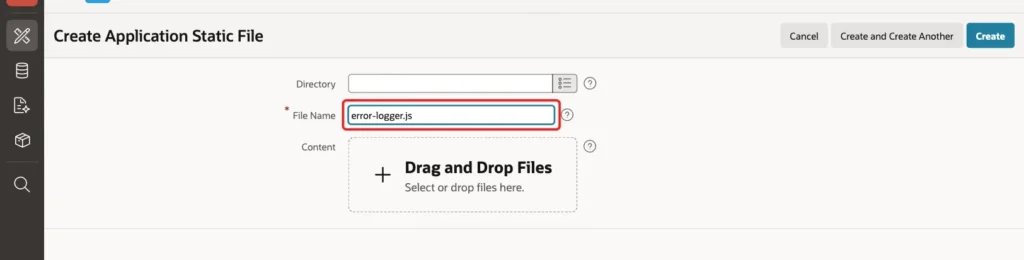
Enter the File Name error-logger.js, drop the script file into the Content area and click Create. The list shows the file with the reference #APP_FILES#error-logger.js:

Step 4: Load the Script on Every Page
Go to Shared Components, open User Interface Attributes and select the JavaScript tab. In File URLs enter #APP_FILES#error-logger.js and click Apply Changes:
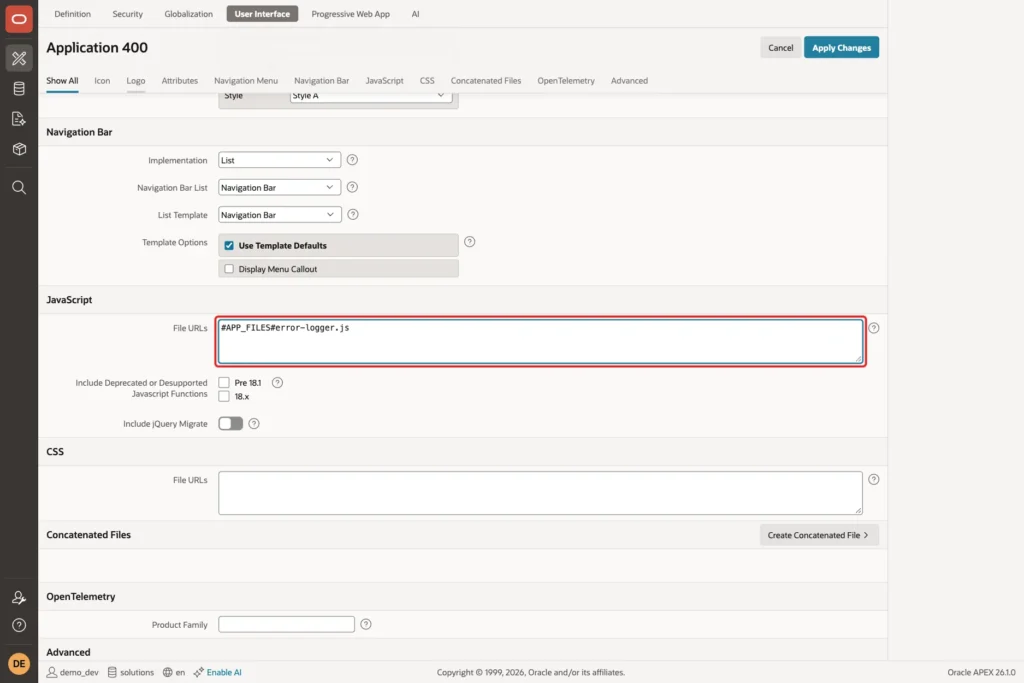
A script in this list is added to every page, so the logger watches the whole application. You do not have to touch any single page.
Step 5: Create the Application Process
In Shared Components open Application Processes and click Create. Set the Name to LOG_CLIENT_ERROR and the Process Point to Ajax Callback:
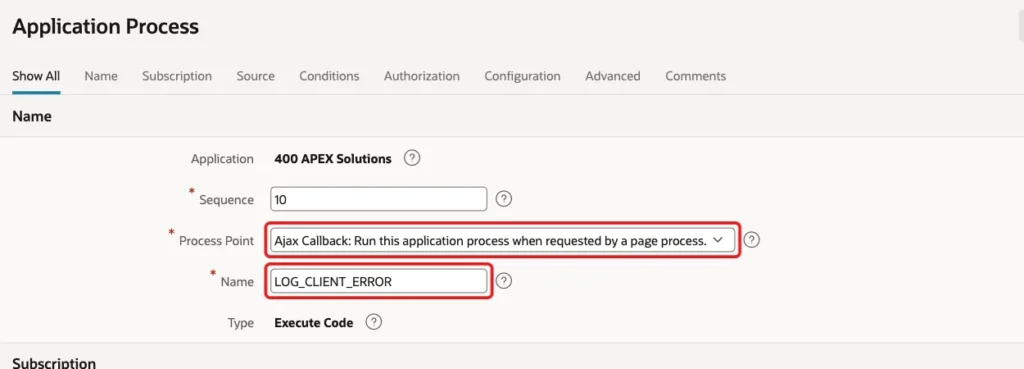
Set the Type to Execute Code and enter the PL/SQL code below. The process works for every page, because an application process does not belong to one page:
Example:
insert into client_errors
    (app_id, page_id, apex_user, session_id, error_type, message,
     script_url, line_no, column_no, stack_trace, user_agent)
select :APP_ID,
       :APP_PAGE_ID,
       :APP_USER,
       :APP_SESSION,
       case when apex_application.g_x01 = 'PROMISE' then 'PROMISE' else 'ERROR' end,
       substr(nvl(apex_application.g_x02, 'Unknown error'), 1, 1000),
       substr(apex_application.g_x03, 1, 500),
       to_number(apex_application.g_x04 default null on conversion error),
       to_number(apex_application.g_x05 default null on conversion error),
       substr(apex_application.g_x06, 1, 4000),
       substr(apex_application.g_x07, 1, 500)
from   dual
where  (select count(*)
        from   client_errors
        where  session_id = :APP_SESSION
        and    created_on > systimestamp - interval '1' minute) < 20;
The code is one INSERT with a SELECT from DUAL. The WHERE condition is the second protection: it counts the errors of the same session in the last minute and inserts nothing when there are already 20. The user, the session and the page come from the session state, so the browser cannot claim to be somebody else.
The conversion TO_NUMBER ... DEFAULT NULL ON CONVERSION ERROR turns a bad line or column number into null instead of raising an error. A logger must not fail because of the data it logs.
Step 6: Create the Administrator Page
In App Builder click Create Page and select Blank Page:
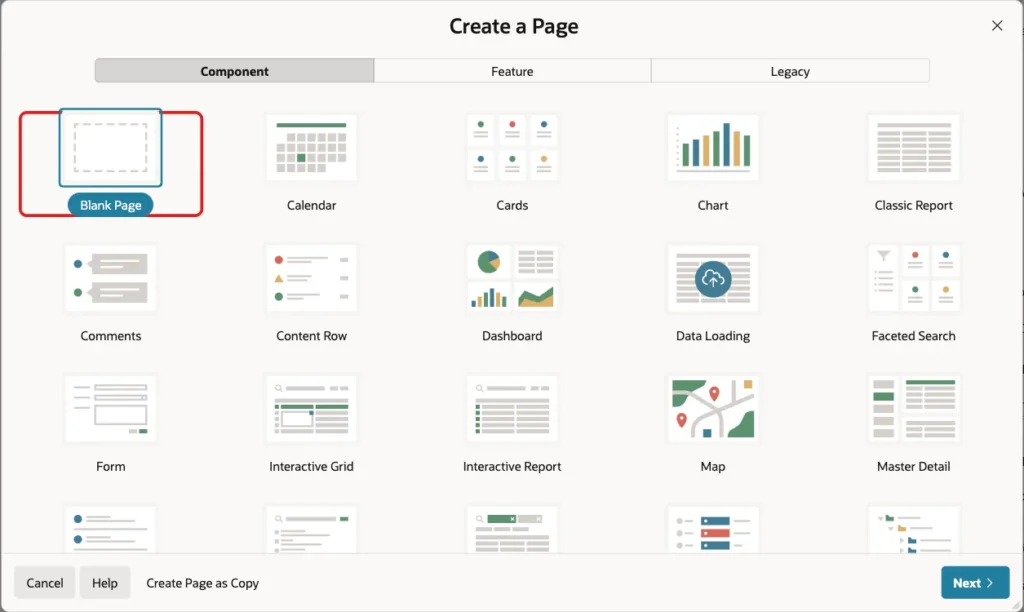
Enter Page Number 1260 and Name Client Errors. Turn off Use Breadcrumb and Use Navigation, then click Create Page:

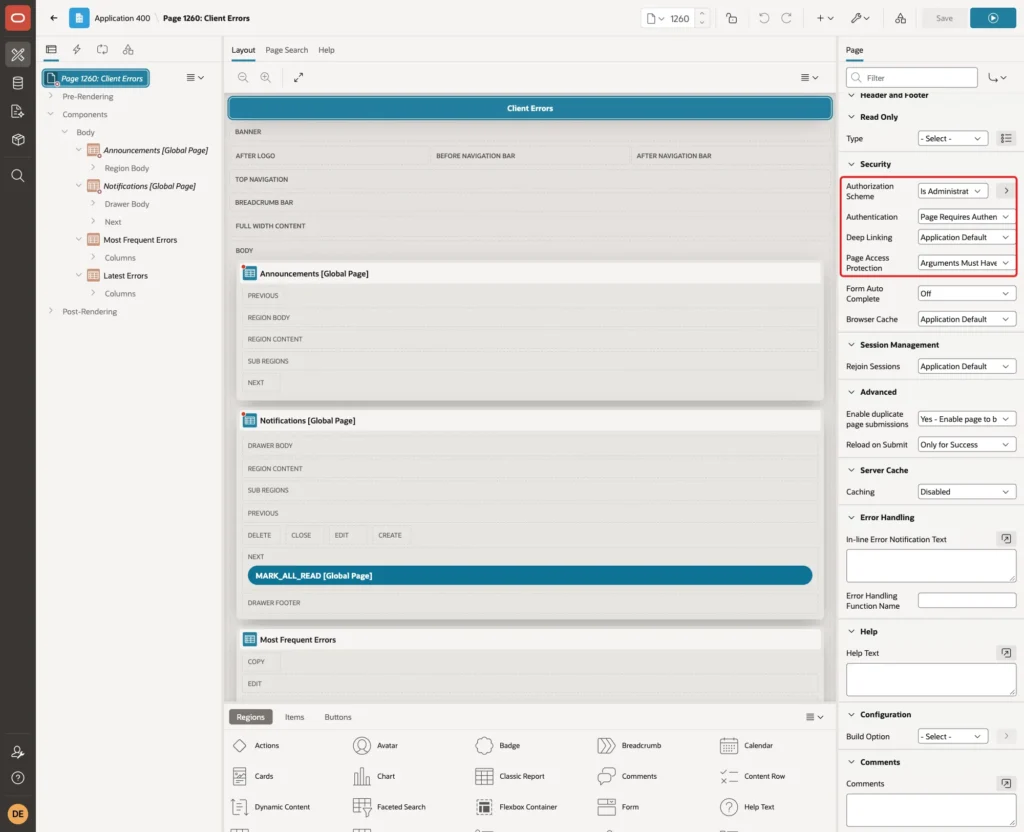
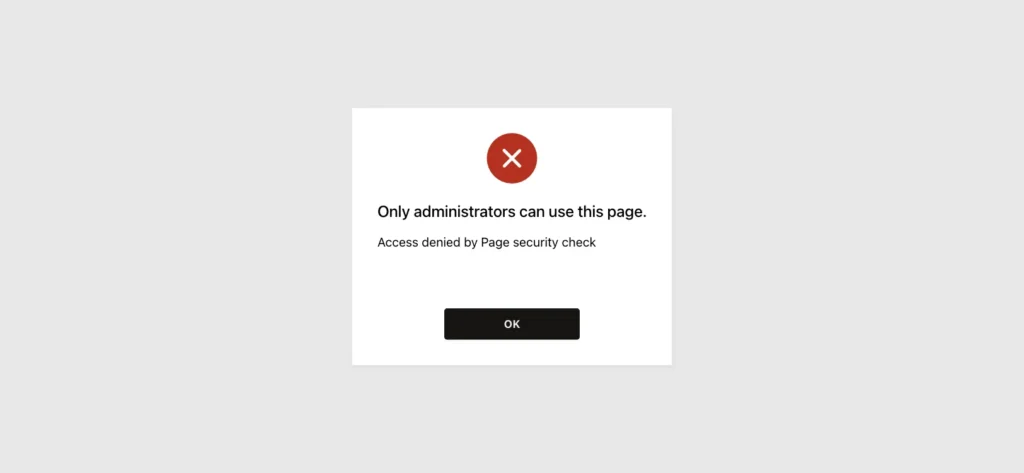
Error messages can contain user names and page details, so only administrators should see them. Click the page name in the tree. Under Security set Authorization Scheme to Is Administrator and Page Access Protection to Arguments Must Have Checksum. Click Save:
Step 7: Add the Most Frequent Errors Report
Create a region in the Body slot. Set the Title to Most Frequent Errors and the Type to Classic Report. Under Source set Location to Local Database and Type to SQL Query:
Example:
select page_id,
       message,
       count(*) as occurrences,
       count(distinct apex_user) as users,
       to_char(max(created_on), 'YYYY-MM-DD HH24:MI') as last_seen
from   client_errors
where  app_id = :APP_ID
group  by page_id, message
order  by occurrences desc, max(created_on) desc
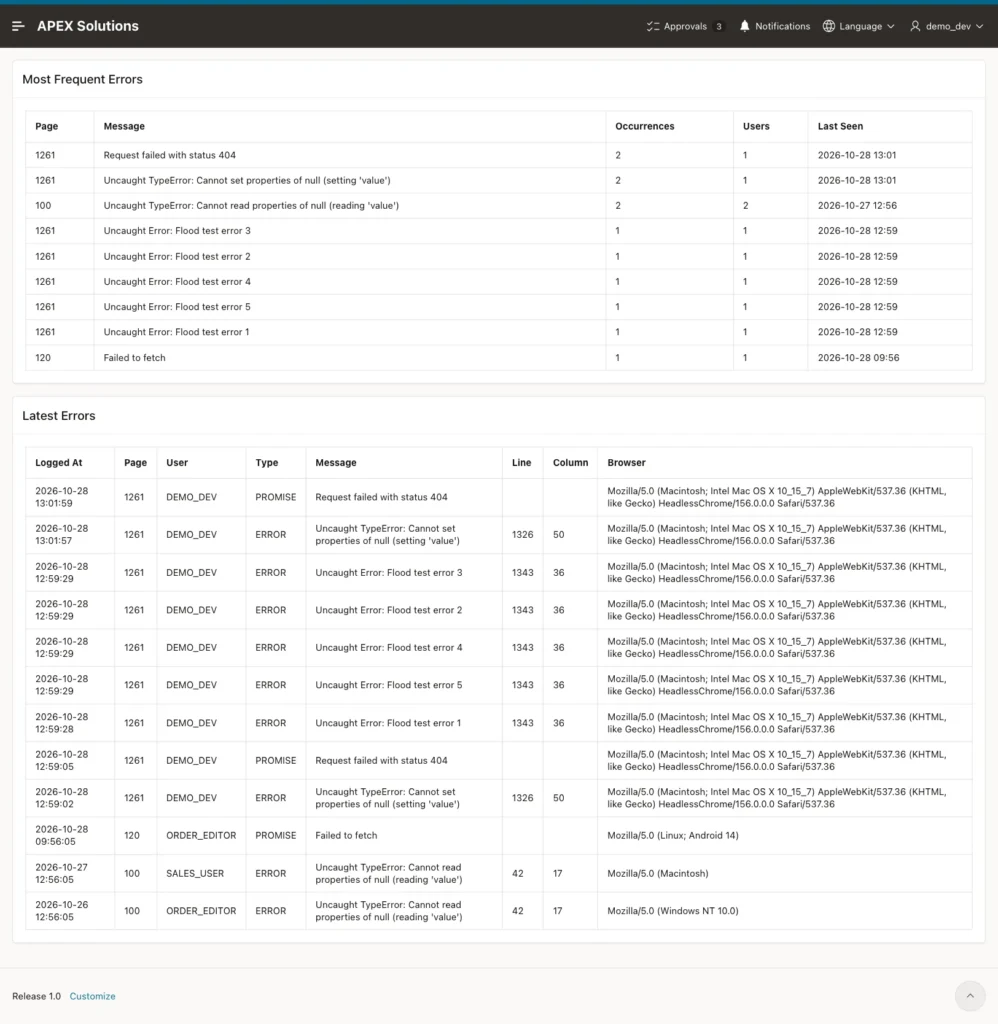
The report answers the first question about any error: how often does it happen and how many users does it hit. The condition app_id = :APP_ID keeps the report to this application. Under Messages set When No Data Found to No errors logged.
Step 8: Add the Latest Errors Report
Create a second Classic Report region with the Title Latest Errors, Location Local Database and Type SQL Query. It shows the details of the newest 20 errors, including line, column and browser:
Example:
select to_char(created_on, 'YYYY-MM-DD HH24:MI:SS') as logged_at,
       page_id,
       apex_user,
       error_type,
       message,
       line_no,
       column_no,
       user_agent
from   client_errors
where  app_id = :APP_ID
order  by error_id desc
fetch  first 20 rows only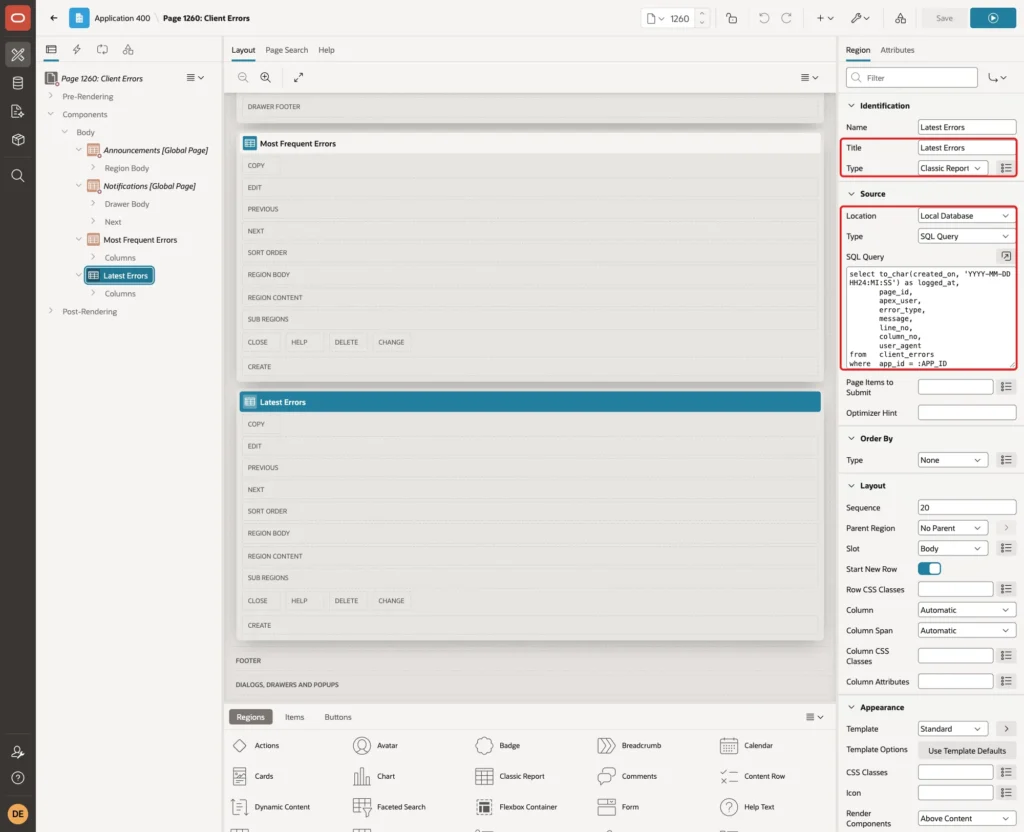
Set the column headings to Logged At, Page, User, Type, Message, Line, Column and Browser, and set Sorting off for the columns. For the first report use the headings Page, Message, Occurrences, Users and Last Seen. Click Save.
Step 9: Create a Page to Trigger Errors
To test the logger you need real errors. Create a second blank page with Page Number 1261 and Name Error Test, with Use Breadcrumb and Use Navigation off:

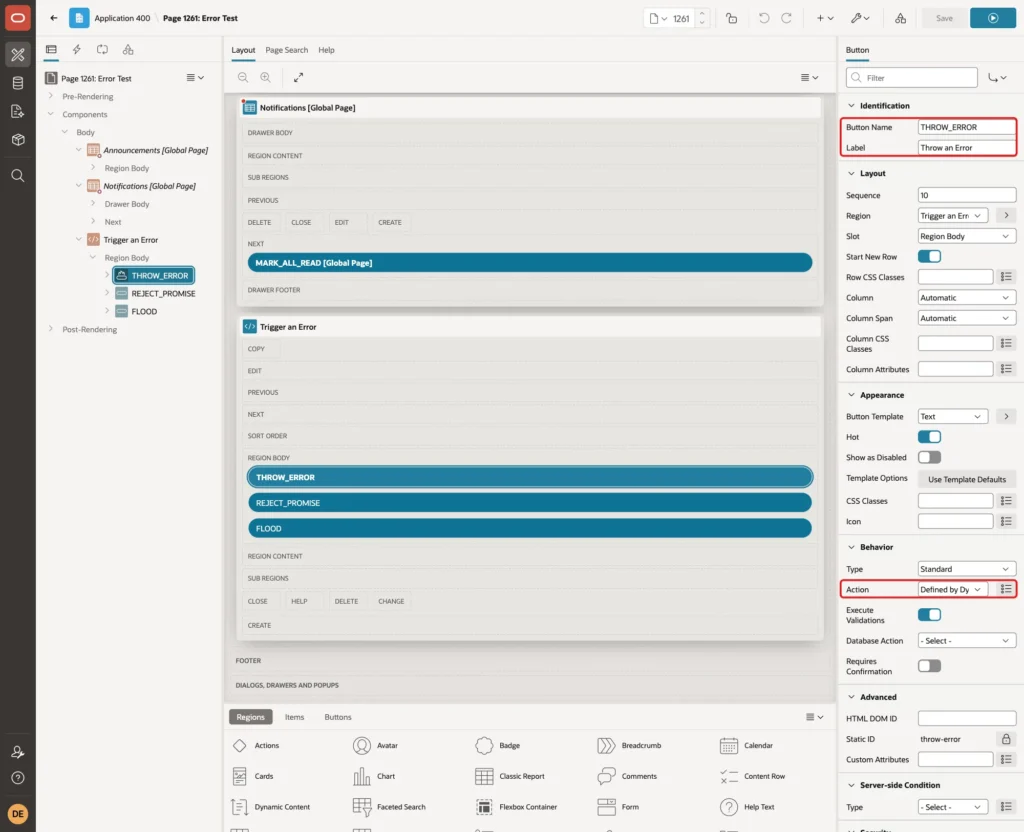
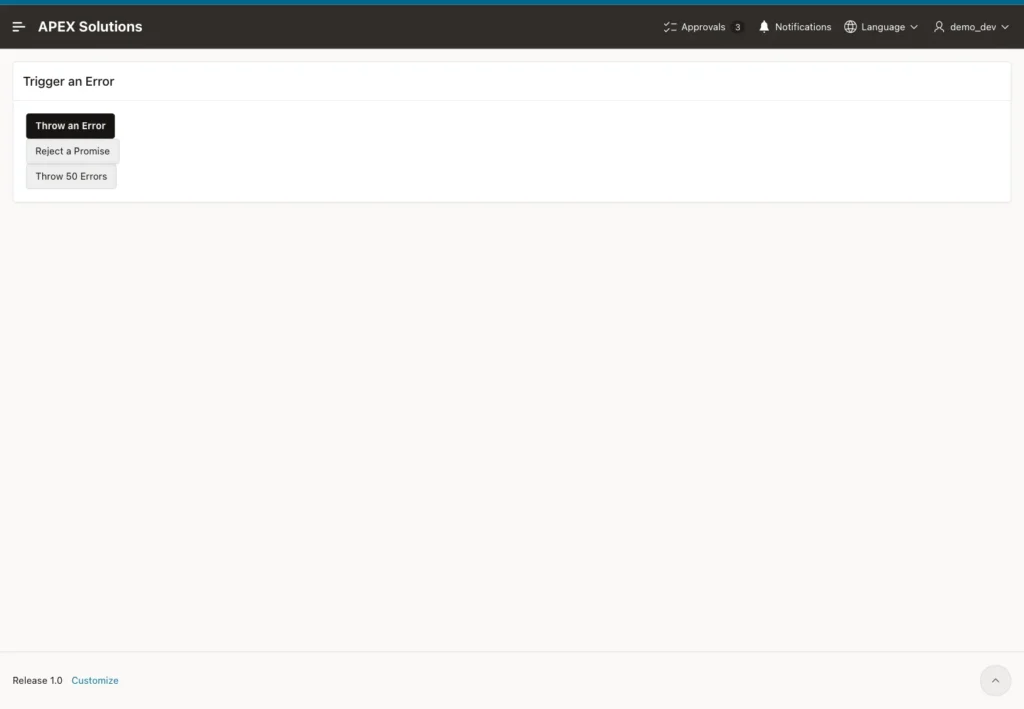
Add a Static Content region named Trigger an Error. Add three buttons to it: THROW_ERROR with the label Throw an Error, REJECT_PROMISE with the label Reject a Promise, and FLOOD with the label Throw 50 Errors. Set Action to Defined by Dynamic Action for each:
Create a dynamic action for each button with the event Click and the action Execute JavaScript Code. The code for Throw an Error reads a property of an element that does not exist:
Example:
document.getElementById("no-such-element").value = "x";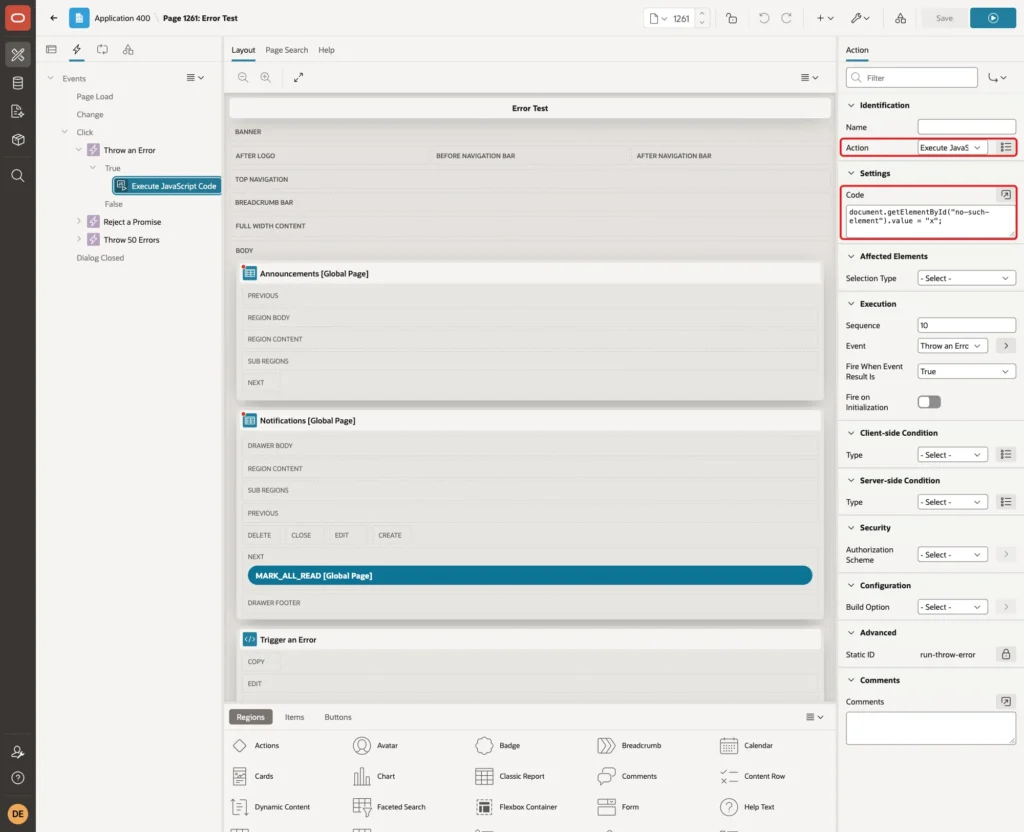
The code for Reject a Promise calls a path that does not exist and throws when the answer is not successful. Nothing catches the error, so it becomes an unhandled rejection:
Example:
fetch("/no-such-path-for-test").then(function (r) {
    if (!r.ok) {
        throw new Error("Request failed with status " + r.status);
    }
});
The code for Throw 50 Errors starts 50 separate errors, each with its own message:
Example:
for (let i = 1; i <= 50; i++) {
    setTimeout(function () { throw new Error("Flood test error " + i); }, 0);
}
Step 10: Test the Logger
Sign in as an administrator and open the Error Test page. Click Throw an Error and then Reject a Promise:
Then query the table for the new rows. Both errors were saved with the right page, user and type. The error from the missing element has the line and column of the script, and the promise has none:
Example:
select error_id, page_id, apex_user, error_type, substr(message, 1, 50) as message, line_no, column_no
from   client_errors
where  error_id > 3
order  by error_id;
Output:
   ERROR_ID    PAGE_ID APEX_USER    ERROR_TYPE    MESSAGE                                                  LINE_NO    COLUMN_NO
___________ __________ ____________ _____________ _____________________________________________________ __________ ____________
         21       1261 DEMO_DEV     ERROR         Uncaught TypeError: Cannot set properties of null           1326           50
         22       1261 DEMO_DEV     PROMISE       Request failed with status 404
Now test the protections. In a new session click Throw 50 Errors. The browser raised 50 errors, but the script sent only 5. After that, the test called the Ajax process 30 times directly from the browser console, which skips the script limit. The server saved only 15 more, because the session reached 20 rows in one minute:
Example:
select case when message like '%Flood test%' then 'Flood: 50 errors thrown'
            else 'Direct calls: 30 sent' end as test,
       count(*) as rows_logged
from   client_errors
where  session_id = (select session_id
                     from   client_errors
                     where  error_id = (select max(error_id)
                                        from   client_errors
                                        where  message like '%Flood test%'))
and    (message like '%Flood test%' or message like 'Direct call%')
group  by case when message like '%Flood test%' then 'Flood: 50 errors thrown'
               else 'Direct calls: 30 sent' end
order  by test;

select count(*) as rows_in_session
from   client_errors
where  session_id = (select session_id
                     from   client_errors
                     where  error_id = (select max(error_id)
                                        from   client_errors
                                        where  message like '%Flood test%'));
Output:
TEST                          ROWS_LOGGED
__________________________ ______________
Direct calls: 30 sent                  15
Flood: 50 errors thrown                 5

   ROWS_IN_SESSION
__________________
                20
Now open the Client Errors page. The first report groups the errors by page and message, and the second lists the details:
Finally, the negative test. Sign in as SALES_USER, who is not an administrator, and open the page. The authorization scheme blocks it:
Things to Know
- The Ajax callback is open to every signed-in user, because every user can have a browser error. Anyone can also send fake messages, so treat the table as a hint and never as proof.
- The logger only works after the script has loaded. Errors in the first moments of page loading, before the script runs, are not caught.
- Errors from scripts of other domains often arrive with the text Script error and no line, because the browser hides the details for security reasons.
- The server limit counts per session. A bot that opens many sessions can still add rows, so delete old rows with a scheduled job.
- The message and stack trace can contain data from the page. Keep the page for administrators only and do not log form values.
Related Guides
- Handle All Errors in One Place in Oracle APEX: Error Handling Function and Error Log
- How to See Which Pages Are Used Most in Oracle APEX
Conclusion
A short script, one table and one application process are enough to see the errors that your users run into in the browser. The two limits keep the log small, even when a loop raises hundreds of errors.
Check the Most Frequent Errors report after each release. An error that many users hit on one page is the first one to fix.
See my articles more often when you search Google.
