
A report row often shows only a name or a code, while the useful details sit in another table. A hover popup, also called a hover card or tooltip, shows those details in a small box next to the row when the user points at it. The user reads them without leaving the report or opening another page.
Oracle APEX has no built-in hover card for report cells, but an Ajax Callback, some page JavaScript and a few CSS rules build one. This guide loads the details only when needed, waits a moment before loading, ignores replies that arrive too late and works with the keyboard and on touch screens.
How to Expand a Report Row to Show Its Details in Oracle APEX opens child rows inside the report after a click. Here nothing is clicked or expanded: a floating card shows a summary of the related record on hover or keyboard focus and disappears again.
The example uses orders and their customers. The same steps work for any report and any related table.
Step 1: Create the Tables
Two tables hold the data:
- RETAIL_CUSTOMERS has one row per customer: name, a unique email, phone, city, segment and the date the customer joined.
- RETAIL_ORDERS has one row per order, with a unique order number, the customer, order date, amount and status.
Create the tables with four customers and eight orders. One customer name contains HTML tags on purpose, to test the escaping later:
Example:
create table retail_customers (
    customer_id    number generated by default on null as identity,
    customer_name  varchar2(100) not null,
    email          varchar2(255) not null,
    phone          varchar2(30),
    city           varchar2(60),
    segment        varchar2(20) default on null 'STANDARD' not null,
    customer_since date default on null trunc(sysdate) not null,
    constraint retail_customers_pk primary key (customer_id),
    constraint retail_customers_email_uk unique (email),
    constraint retail_customers_segment_ck check (segment in ('STANDARD', 'GOLD', 'PLATINUM'))
);

create table retail_orders (
    order_id     number generated by default on null as identity,
    order_no     varchar2(20) not null,
    customer_id  number not null,
    order_date   date default on null trunc(sysdate) not null,
    amount       number(12,2) not null,
    status       varchar2(20) default on null 'NEW' not null,
    constraint retail_orders_pk primary key (order_id),
    constraint retail_orders_no_uk unique (order_no),
    constraint retail_orders_customer_fk foreign key (customer_id)
        references retail_customers (customer_id),
    constraint retail_orders_amount_ck check (amount >= 0),
    constraint retail_orders_status_ck check (status in ('NEW', 'SHIPPED', 'CANCELLED'))
);

create index retail_orders_customer_ix on retail_orders (customer_id, order_date);

insert into retail_customers (customer_name, email, phone, city, segment, customer_since)
values ('Northwind Traders', 'buyer@northwind.example', '+1 206 555 0101', 'Seattle', 'GOLD', date '2023-03-14');
insert into retail_customers (customer_name, email, phone, city, segment, customer_since)
values ('Blue Harbor Foods', 'orders@blueharbor.example', '+1 617 555 0144', 'Boston', 'STANDARD', date '2024-07-02');
insert into retail_customers (customer_name, email, phone, city, segment, customer_since)
values ('Summit Outdoor Supply', 'purchasing@summit.example', null, 'Denver', 'PLATINUM', date '2021-11-20');
insert into retail_customers (customer_name, email, phone, city, segment, customer_since)
values ('<b>Bold</b> Retail', 'it@boldretail.example', '+1 512 555 0190', 'Austin', 'STANDARD', date '2025-01-09');

insert into retail_orders (order_no, customer_id, order_date, amount, status) values ('RO-1001', 1, date '2026-09-02', 1250.00, 'SHIPPED');
insert into retail_orders (order_no, customer_id, order_date, amount, status) values ('RO-1002', 2, date '2026-09-05',  480.50, 'SHIPPED');
insert into retail_orders (order_no, customer_id, order_date, amount, status) values ('RO-1003', 1, date '2026-09-18', 2300.00, 'SHIPPED');
insert into retail_orders (order_no, customer_id, order_date, amount, status) values ('RO-1004', 3, date '2026-09-21', 5120.75, 'SHIPPED');
insert into retail_orders (order_no, customer_id, order_date, amount, status) values ('RO-1005', 2, date '2026-10-01',  215.00, 'CANCELLED');
insert into retail_orders (order_no, customer_id, order_date, amount, status) values ('RO-1006', 4, date '2026-10-06',  760.00, 'NEW');
insert into retail_orders (order_no, customer_id, order_date, amount, status) values ('RO-1007', 3, date '2026-10-12', 1890.00, 'NEW');
insert into retail_orders (order_no, customer_id, order_date, amount, status) values ('RO-1008', 1, date '2026-10-15',  640.25, 'NEW');
commit;

select c.customer_id, c.customer_name, c.city, c.segment,
       count(o.order_id) as orders,
       sum(o.amount) as total_amount
from   retail_customers c
left join retail_orders o on o.customer_id = c.customer_id
group  by c.customer_id, c.customer_name, c.city, c.segment
order  by c.customer_id;
Output:
Table RETAIL_CUSTOMERS created.

Table RETAIL_ORDERS created.

Index RETAIL_ORDERS_CUSTOMER_IX created.

1 row inserted.

1 row inserted.

1 row inserted.

1 row inserted.

1 row inserted.

1 row inserted.

1 row inserted.

1 row inserted.

1 row inserted.

1 row inserted.

1 row inserted.

1 row inserted.

Commit complete.

   CUSTOMER_ID CUSTOMER_NAME            CITY       SEGMENT        ORDERS    TOTAL_AMOUNT
______________ ________________________ __________ ___________ _________ _______________
             1 Northwind Traders        Seattle    GOLD                3         4190.25
             2 Blue Harbor Foods        Boston     STANDARD            2           695.5
             3 Summit Outdoor Supply    Denver     PLATINUM            2         7010.75
4 <b>Bold</b> Retail Austin STANDARD 1 760- RETAIL_ORDERS_CUSTOMER_FK links each order to its customer. RETAIL_ORDERS_CUSTOMER_IX indexes that foreign key, which the popup lookup uses.
- RETAIL_CUSTOMERS_EMAIL_UK and RETAIL_ORDERS_NO_UK stop duplicate emails and order numbers.
- The check constraints allow only known segments and statuses, and no negative amounts.
- SEGMENT, CUSTOMER_SINCE, ORDER_DATE and STATUS use DEFAULT ON NULL, so new rows get sensible values without a trigger.
Step 2: Create the Classic Report Page
The report lists the orders with the customer name. The query also returns ORDER_ID and CUSTOMER_ID, which stay hidden but are used later:
Example:
select o.order_id,
       o.order_no,
       o.customer_id,
       c.customer_name,
       o.order_date,
       o.amount,
       o.status
from   retail_orders o
join   retail_customers c on c.customer_id = o.customer_id
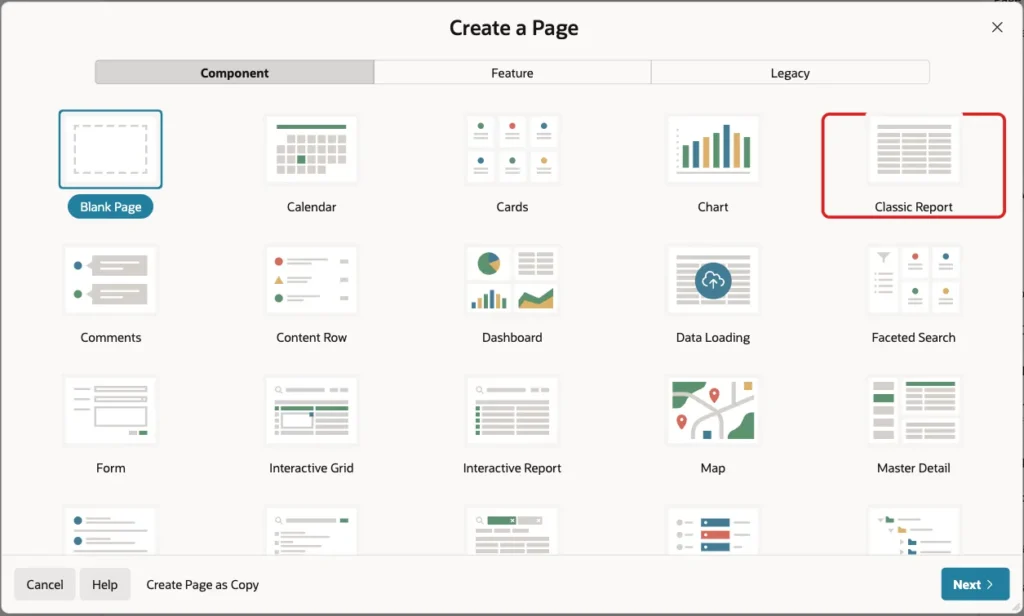
In Page Designer, click Create (the plus icon) and choose Page. Select the Classic Report tile:
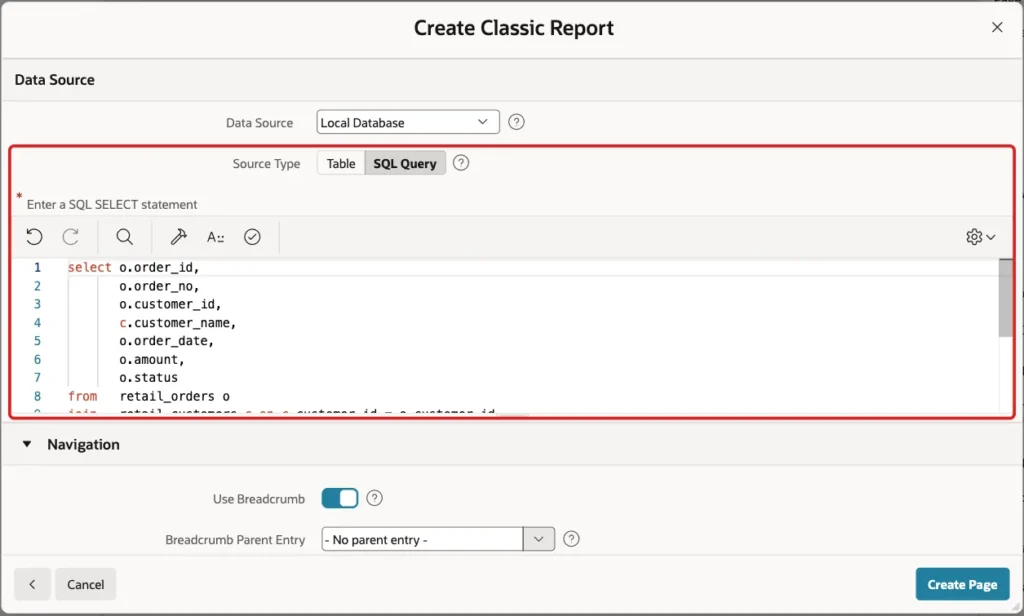
On the Create Classic Report screen, enter Page Number 880 and Name Recent Orders. Leave Page Mode Normal and Include Form Page off:

Under Data Source, keep Local Database, set Source Type to SQL Query and paste the query above into the editor:
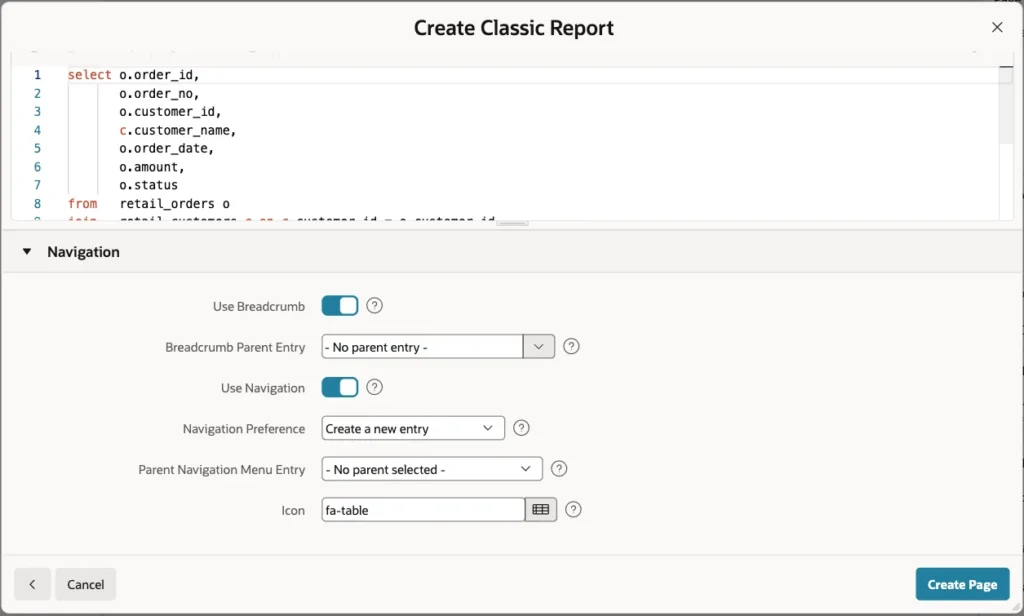
Under Navigation, keep the defaults: a breadcrumb and a new navigation menu entry with the icon fa-table. Click Create Page:
Step 3: Set Up the Report Columns
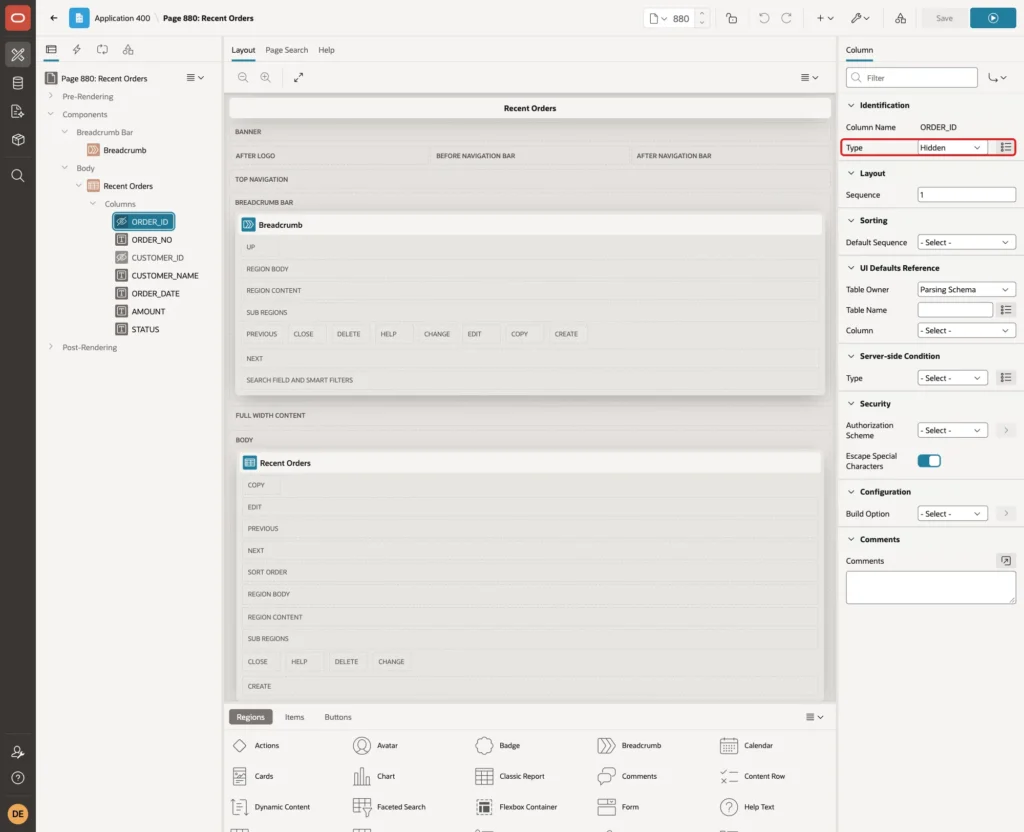
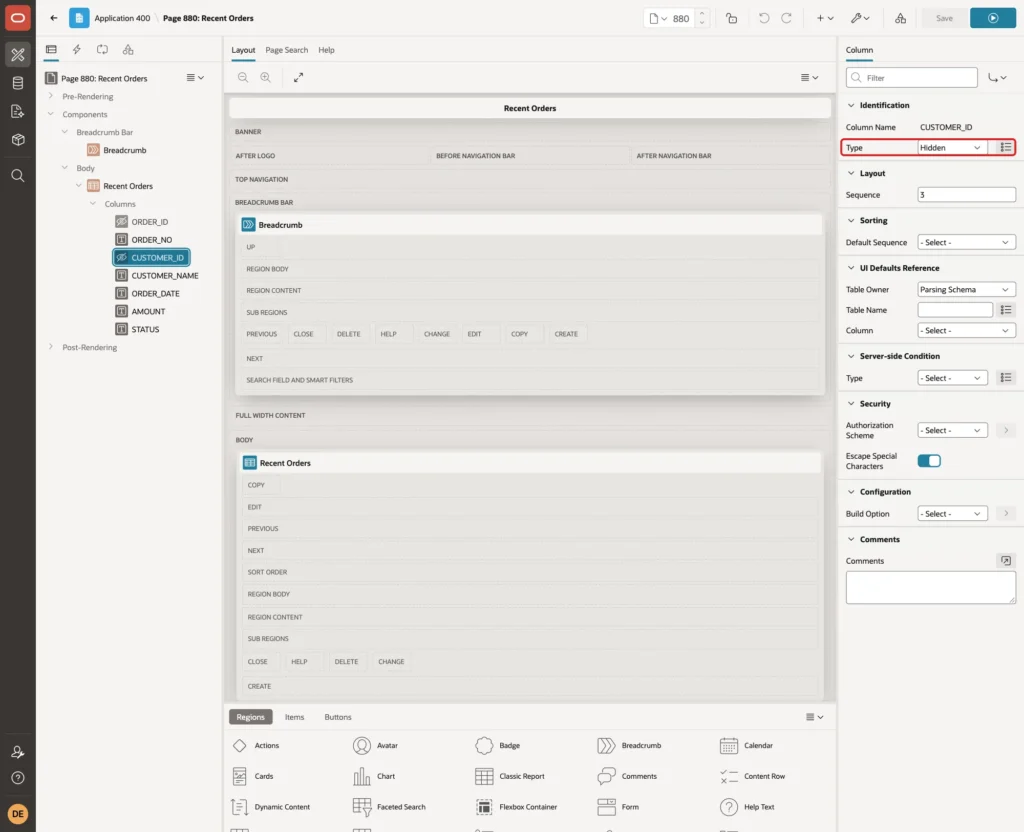
Page Designer opens page 880. In the Rendering tree, expand the Recent Orders region and its Columns. Select ORDER_ID and set Type to Hidden:
Select CUSTOMER_ID and set Type to Hidden too. The customer column uses its value as #CUSTOMER_ID# in the next step:
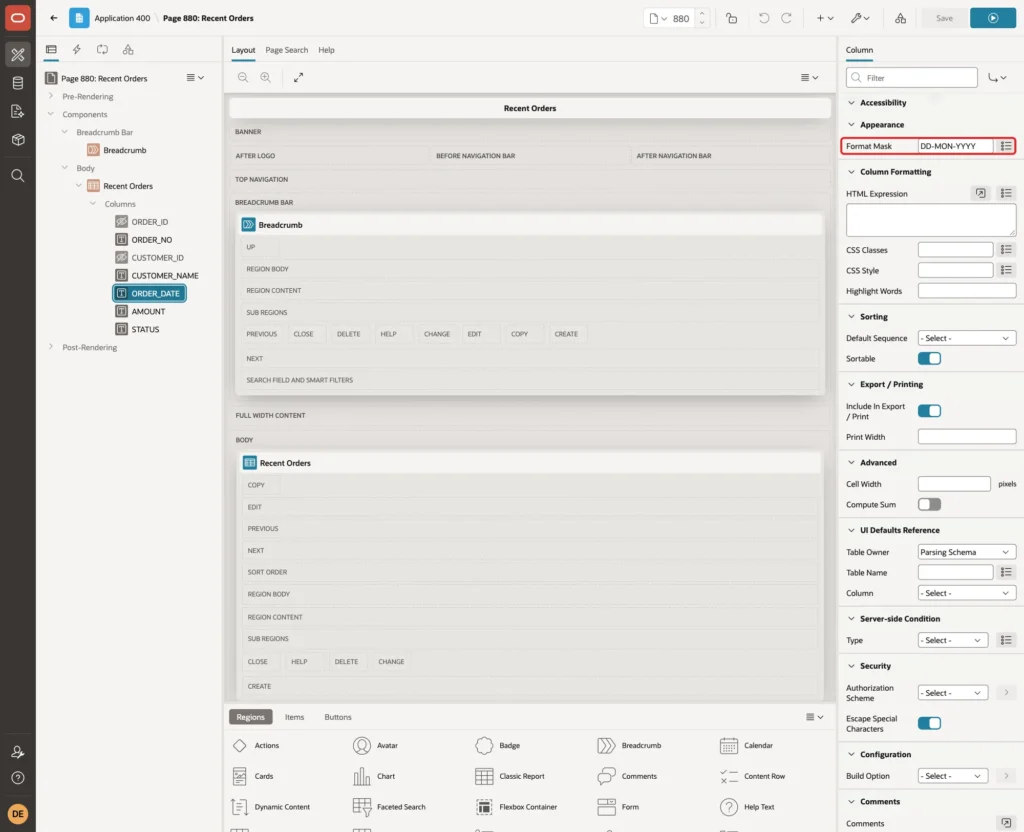
Select ORDER_DATE and set Format Mask to DD-MON-YYYY under Appearance:
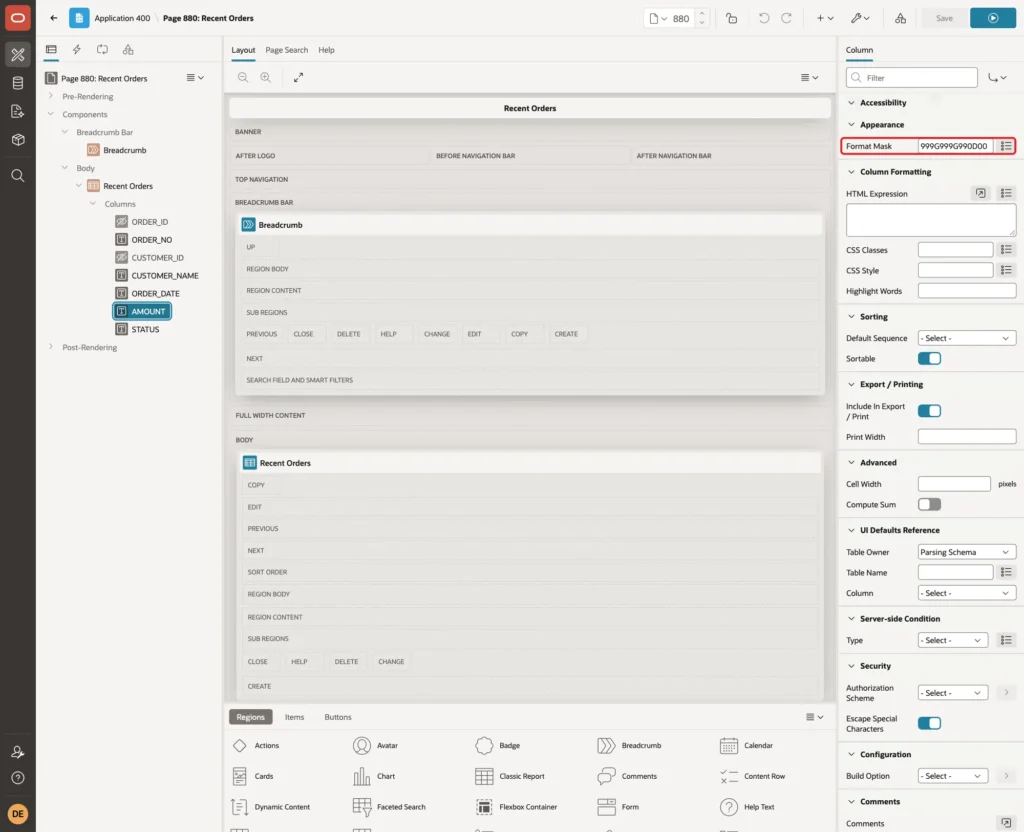
Select AMOUNT and set Format Mask to 999G999G990D00:
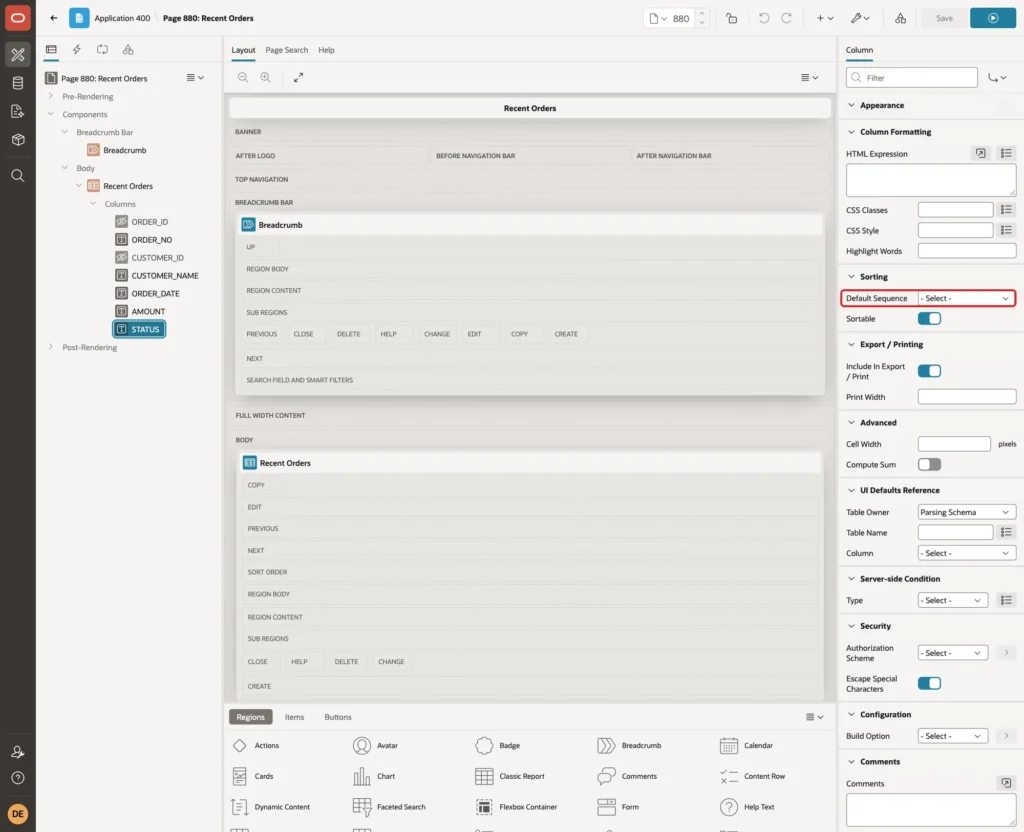
In this example, the wizard gave ORDER_NO, CUSTOMER_NAME and STATUS a Default Sequence of 1 under Sorting. Keep it on ORDER_NO only. Select STATUS and set Default Sequence to - Select -:
Step 4: Turn the Customer Name into a Hover Trigger
Select the CUSTOMER_NAME column. Set Heading to Customer. Under Column Formatting, enter this HTML Expression:
Example:
<button type="button" class="customer-link" data-id="#CUSTOMER_ID#" aria-describedby="customer-card">#CUSTOMER_NAME#</button>
Under Sorting, set Default Sequence to - Select -. The column stays sortable by its heading:
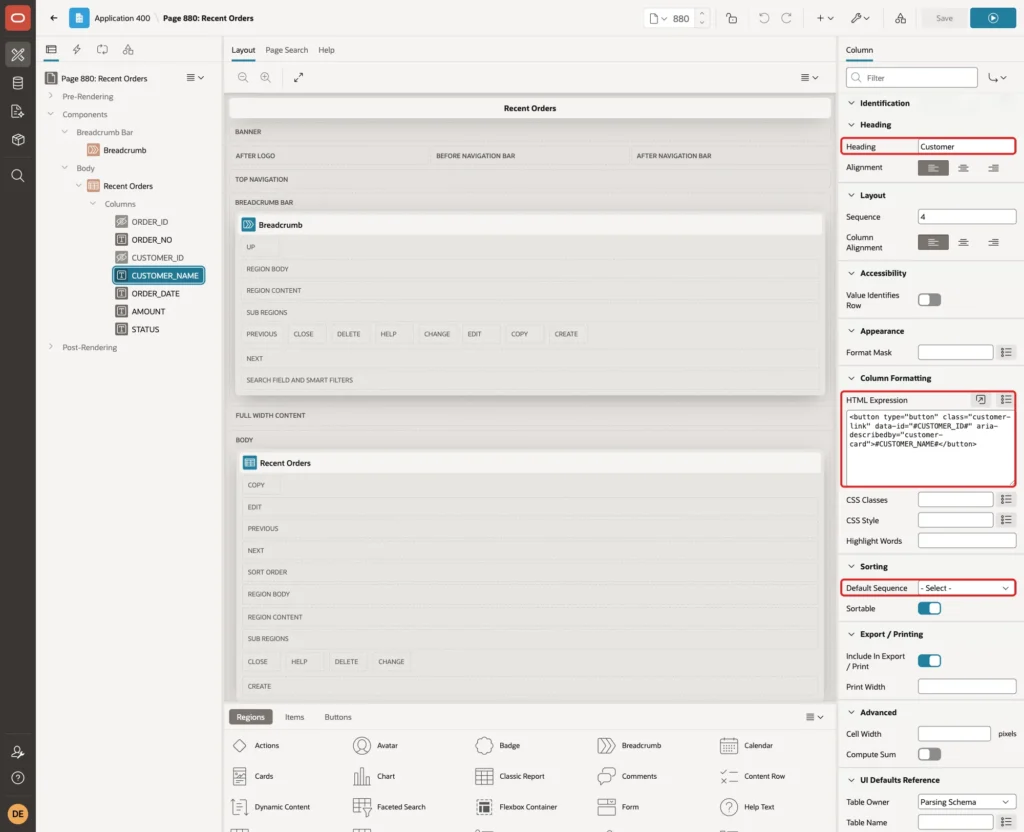
- A button can get keyboard focus and can be tapped on a phone, so the popup does not depend on a mouse.
- type="button" stops the button from submitting the page.
- The class customer-link is what the CSS and JavaScript look for.
- data-id carries the customer ID of the row from the hidden CUSTOMER_ID column.
- aria-describedby points to the popup element, which has the ID customer-card. Screen readers then read the card as the description of the button.
- #CUSTOMER_NAME# is escaped by the column, so the test name with HTML tags shows as plain text in the report.
Step 5: Give the Region an HTML DOM ID
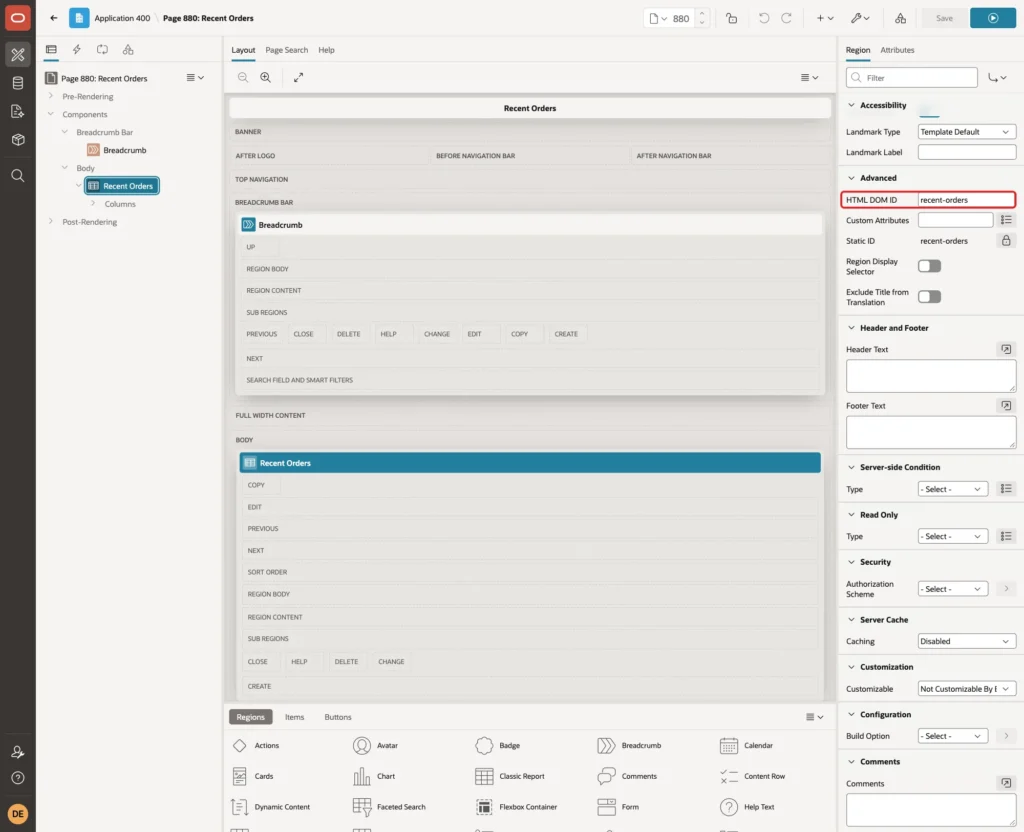
The JavaScript needs a fixed ID for the report. Select the Recent Orders region. Under Advanced, set HTML DOM ID to recent-orders:
Step 6: Add the Ajax Callback That Returns the Customer Details
The details are not loaded with the page. They come from the server only when the popup opens for a customer. Open the Processing tab, right-click Ajax Callback and choose Create Process.
Set Name to GET_CUSTOMER_CARD and Type to Execute Code. Keep Language PL/SQL and enter this PL/SQL Code:
Example:
declare
    l_customer_id retail_customers.customer_id%type;
begin
    l_customer_id := to_number(apex_application.g_x01 default null on conversion error);

    for r in (
        select c.customer_name,
               c.email,
               nvl(c.phone, '-') as phone,
               nvl(c.city, '-') as city,
               initcap(c.segment) as segment,
               to_char(c.customer_since, 'DD-MON-YYYY') as customer_since,
               to_char(count(o.order_id)) as order_count,
               to_char(nvl(sum(case when o.status <> 'CANCELLED' then o.amount end), 0),
                       'FM999G999G990D00') as total_spent,
               nvl(to_char(max(o.order_date), 'DD-MON-YYYY'), '-') as last_order
        from   retail_customers c
        left join retail_orders o on o.customer_id = c.customer_id
        where  c.customer_id = l_customer_id
        group  by c.customer_name, c.email, c.phone, c.city, c.segment, c.customer_since
    ) loop
        apex_json.open_object;
        apex_json.write('NAME',       r.customer_name);
        apex_json.write('EMAIL',      r.email);
        apex_json.write('PHONE',      r.phone);
        apex_json.write('CITY',       r.city);
        apex_json.write('SEGMENT',    r.segment);
        apex_json.write('SINCE',      r.customer_since);
        apex_json.write('ORDERS',     r.order_count);
        apex_json.write('TOTAL',      r.total_spent);
        apex_json.write('LAST_ORDER', r.last_order);
        apex_json.close_object;
        return;
    end loop;

    apex_json.open_object;
    apex_json.write('message', 'Customer not found.');
    apex_json.close_object;
end;
Under Execution, check that Point is Ajax Callback:
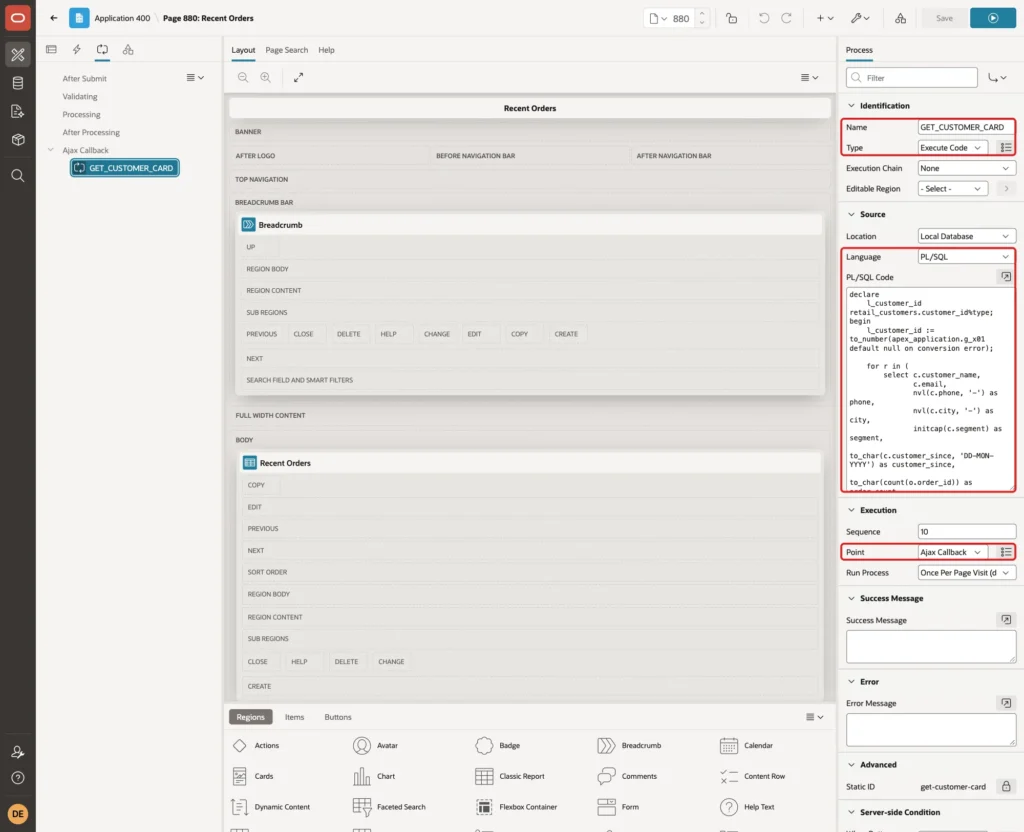
- apex_application.g_x01 holds the customer ID that the JavaScript sends. DEFAULT NULL ON CONVERSION ERROR turns any value that is not a number into NULL, so no exception is raised.
- The query returns one row with the customer and a summary of the orders. Total Spent leaves out cancelled orders.
- Dates and numbers are formatted on the server, and the order count is sent as text. The reason is explained in Step 7.
- An unknown ID writes a JSON object with a message key.
Do not name that key error. In a first test, the reply used an error key. apex.server.process treated the whole call as failed, so the message never reached the code that shows it.
Step 7: Add the Page JavaScript
Select the page (Page 880: Recent Orders) in the Rendering tree. Under JavaScript, enter this code in Function and Global Variable Declaration:
Example:
var customerCard = (function () {
    var tip, current, showTimer, hideTimer, seq = 0, cache = {};
    var template =
        '<strong class="customer-card-name">#NAME!HTML#</strong>' +
        '<dl class="customer-card-list">' +
        '<dt>Email</dt><dd>#EMAIL!HTML#</dd>' +
        '<dt>Phone</dt><dd>#PHONE!HTML#</dd>' +
        '<dt>City</dt><dd>#CITY!HTML#</dd>' +
        '<dt>Segment</dt><dd>#SEGMENT!HTML#</dd>' +
        '<dt>Customer Since</dt><dd>#SINCE!HTML#</dd>' +
        '<dt>Orders</dt><dd>#ORDERS!HTML#</dd>' +
        '<dt>Total Spent</dt><dd>#TOTAL!HTML#</dd>' +
        '<dt>Last Order</dt><dd>#LAST_ORDER!HTML#</dd>' +
        '</dl>';

    function place(el) {
        var r = el.getBoundingClientRect(),
            left = r.right + 12,
            top = Math.max(8, Math.min(r.top - 8, window.innerHeight - tip.offsetHeight - 8));
        if (left + tip.offsetWidth > window.innerWidth - 8) {
            left = Math.max(8, r.left - tip.offsetWidth - 12);
        }
        tip.style.left = (left + window.scrollX) + 'px';
        tip.style.top = (top + window.scrollY) + 'px';
    }

    function render(el, html) {
        tip.innerHTML = html;
        tip.hidden = false;
        place(el);
    }

    function show(el) {
        var id = el.getAttribute('data-id'),
            mine = ++seq;
        current = el;
        if (cache[id]) {
            render(el, cache[id]);
            return;
        }
        render(el, 'Loading...');
        apex.server.process('GET_CUSTOMER_CARD', { x01: id }, { dataType: 'json' })
            .done(function (data) {
                var html = data.message
                    ? apex.util.escapeHTML(data.message)
                    : apex.util.applyTemplate(template, { placeholders: data });
                if (!data.message) {
                    cache[id] = html;
                }
                if (mine === seq) {
                    render(el, html);
                }
            })
            .fail(function () {
                if (mine === seq) {
                    render(el, 'Could not load the details.');
                }
            });
    }

    function hide() {
        clearTimeout(showTimer);
        clearTimeout(hideTimer);
        seq++;
        current = null;
        tip.hidden = true;
    }

    function init(container) {
        tip = document.createElement('div');
        tip.id = 'customer-card';
        tip.className = 'customer-card';
        tip.setAttribute('role', 'tooltip');
        tip.hidden = true;
        document.body.appendChild(tip);

        $(container)
            .on('mouseenter focusin', '.customer-link', function () {
                var el = this;
                clearTimeout(hideTimer);
                if (el === current) {
                    return;
                }
                if (current) {
                    hide();
                }
                clearTimeout(showTimer);
                showTimer = setTimeout(function () { show(el); }, 300);
            })
            .on('mouseleave focusout', '.customer-link', function () {
                clearTimeout(showTimer);
                hideTimer = setTimeout(hide, 200);
            })
            .on('click', '.customer-link', function () {
                if (this === current) {
                    hide();
                } else {
                    clearTimeout(showTimer);
                    show(this);
                }
            })
            .on('apexafterrefresh', hide);

        $(tip)
            .on('mouseenter', function () { clearTimeout(hideTimer); })
            .on('mouseleave', function () { hideTimer = setTimeout(hide, 200); });

        $(document).on('keydown', function (e) {
            if (e.key === 'Escape') {
                hide();
            }
        });
    }

    return { init: init };
})();
Enter this line in Execute when Page Loads:
Example:
customerCard.init('#recent-orders');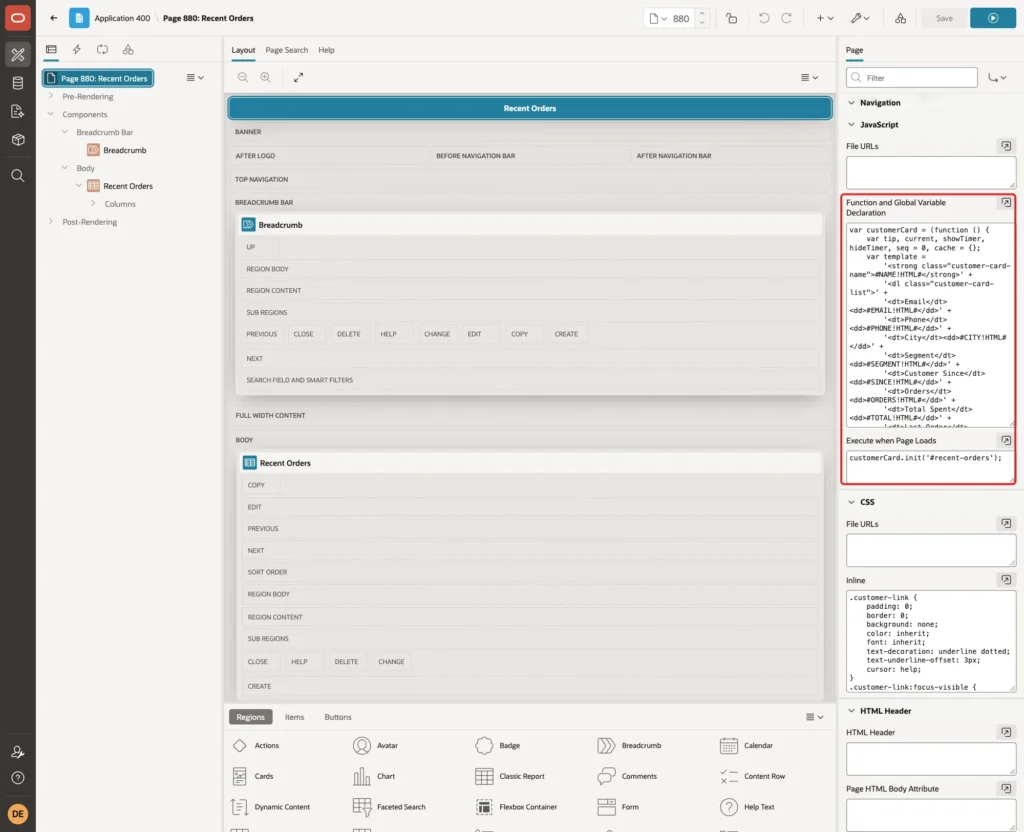
The code creates one popup element for the page, with role tooltip and the ID customer-card. It listens to events on the report container, so the buttons keep working after the report is sorted, paged or refreshed.
- Mouse enter or keyboard focus starts a 300 ms timer. The details load only if the pointer is still on the name, so moving the mouse across the report does not send a request for every row.
- Each load gets a number in seq. A reply is shown only if no newer popup was opened or closed in the meantime. A slow reply for an earlier row is ignored.
- Loaded cards are kept in cache, so pointing at the same customer again needs no second request.
- Leaving the name hides the popup after 200 ms. Moving the pointer onto the popup cancels that, so the user can move onto it and read it.
- Escape closes the popup. A click or tap on the name opens or closes it at once, which is what touch screens need.
- apexafterrefresh closes the popup when the report is refreshed, because the button it belongs to is replaced.
- The card opens to the right of the name, so the names in the rows below stay reachable.
apex.util.applyTemplate fills the card with the JSON values. Use the !HTML filter on every placeholder, as in #NAME!HTML#.
In a first test, the template used plain #NAME#. The customer name with tags was then shown in bold in the popup, which means the HTML ran. With #NAME!HTML#, the tags show as text.
The !HTML filter expects text. When the order count was sent as a JSON number, applyTemplate stopped with "e.replace is not a function". That is why the callback sends it with to_char.
Step 8: Add the CSS
Under CSS, enter these rules in Inline:
Example:
.customer-link {
    padding: 0;
    border: 0;
    background: none;
    color: inherit;
    font: inherit;
    text-decoration: underline dotted;
    text-underline-offset: 3px;
    cursor: help;
}
.customer-link:focus-visible {
    outline: 2px solid #0572ce;
    outline-offset: 2px;
}
.customer-card {
    position: absolute;
    z-index: 1000;
    width: 300px;
    padding: 12px 14px;
    background: #fff;
    color: #262626;
    border: 1px solid #d0d0d0;
    border-radius: 8px;
    box-shadow: 0 6px 18px rgba(0, 0, 0, .15);
    font-size: 13px;
}
.customer-card[hidden] {
    display: none;
}
.customer-card-name {
    display: block;
    margin-bottom: 8px;
    font-size: 14px;
}
.customer-card-list {
    display: grid;
    grid-template-columns: auto 1fr;
    gap: 4px 12px;
    margin: 0;
}
.customer-card-list dt {
    color: #6b6b6b;
}
.customer-card-list dd {
    margin: 0;
}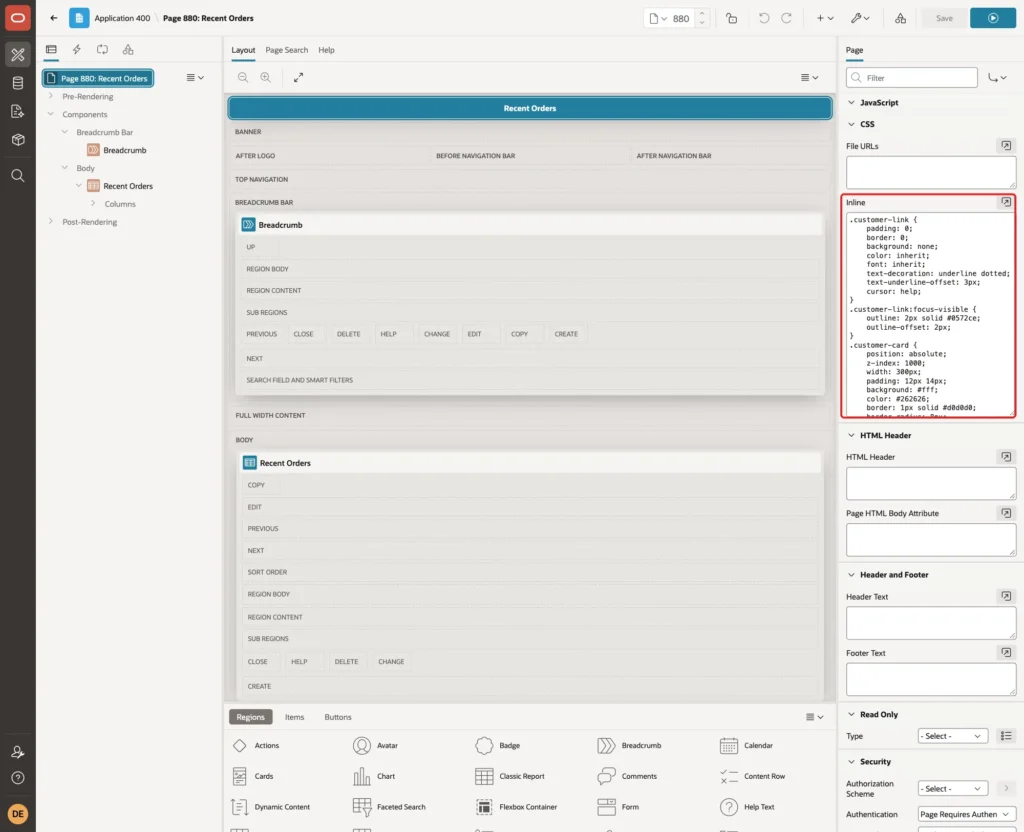
- The trigger keeps the look of normal text, with a dotted underline and a help cursor as a hint.
- :focus-visible draws an outline when the button is reached with the keyboard.
- The card is positioned absolutely on the page, above the report, with a light border and shadow.
- A two-column grid lines up the labels and values.
Save the page.
Step 9: Test the Popup
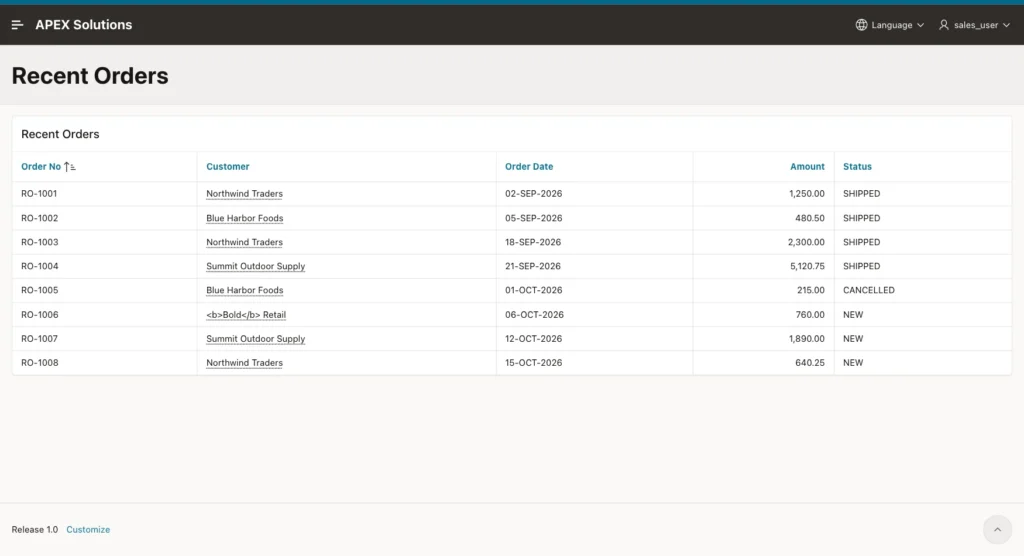
Run page 880. The report lists the orders, and each customer name has a dotted underline:
Point at Northwind Traders. After a short pause, the card shows the customer's details next to the name:
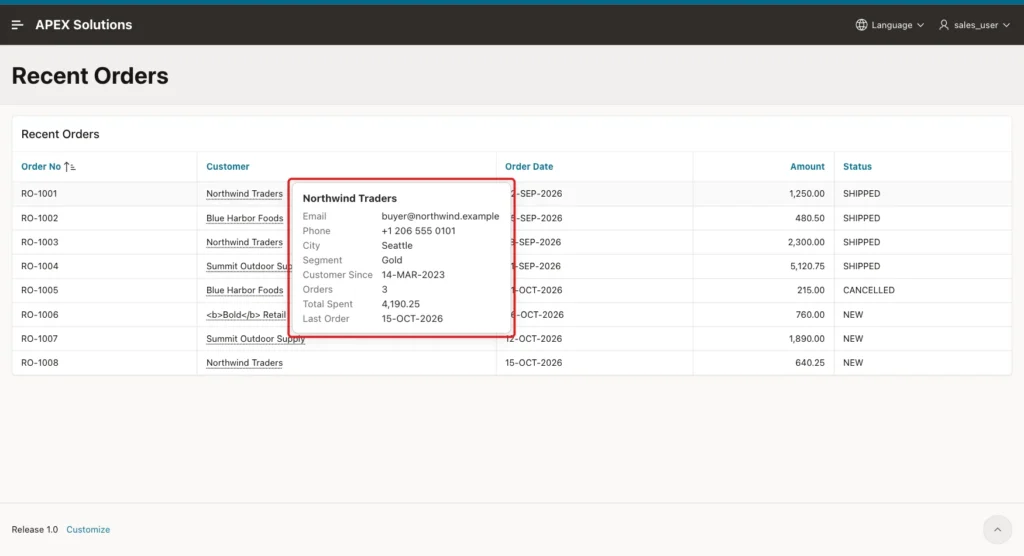
Compare the card values with the tables:
Example:
select c.customer_name,
       count(o.order_id) as orders,
       nvl(sum(case when o.status <> 'CANCELLED' then o.amount end), 0) as total_spent,
       to_char(max(o.order_date), 'DD-MON-YYYY') as last_order
from   retail_customers c
left join retail_orders o on o.customer_id = c.customer_id
group  by c.customer_name
order  by c.customer_name;
Output:
CUSTOMER_NAME               ORDERS    TOTAL_SPENT LAST_ORDER
________________________ _________ ______________ ______________
<b>Bold</b> Retail               1            760 06-OCT-2026
Blue Harbor Foods                2          480.5 01-OCT-2026
Northwind Traders                3        4190.25 15-OCT-2026
Summit Outdoor Supply            2        7010.75 12-OCT-2026
The card shows 3 orders, 4,190.25 and 15-OCT-2026 for Northwind Traders, the same as the query. For Blue Harbor Foods it showed 480.50, without the cancelled order of 215.00.
These tests were run in the browser with Playwright:
- 150 ms after pointing at a name, no card was visible yet. After the 300 ms delay and the request, it was.
- The pointer was moved over four names, 100 ms on each. Only one request was sent, for the last name.
- The reply for Northwind Traders was held back for 2.5 seconds, and the pointer moved to Blue Harbor Foods. The card showed Blue Harbor Foods and still did so after the slow reply arrived.
- Moving the pointer from the name onto the card kept it open. Leaving the card closed it.
- Escape closed the card while the pointer was still on the name.
- A click on a name opened the card at once, and a second click closed it.
- After apex.region("recent-orders").refresh(), the open card closed, and the new buttons opened their cards as before.
Now press Tab until a customer name has focus. The card opens for the focused name, and Tab moves it to the next one:
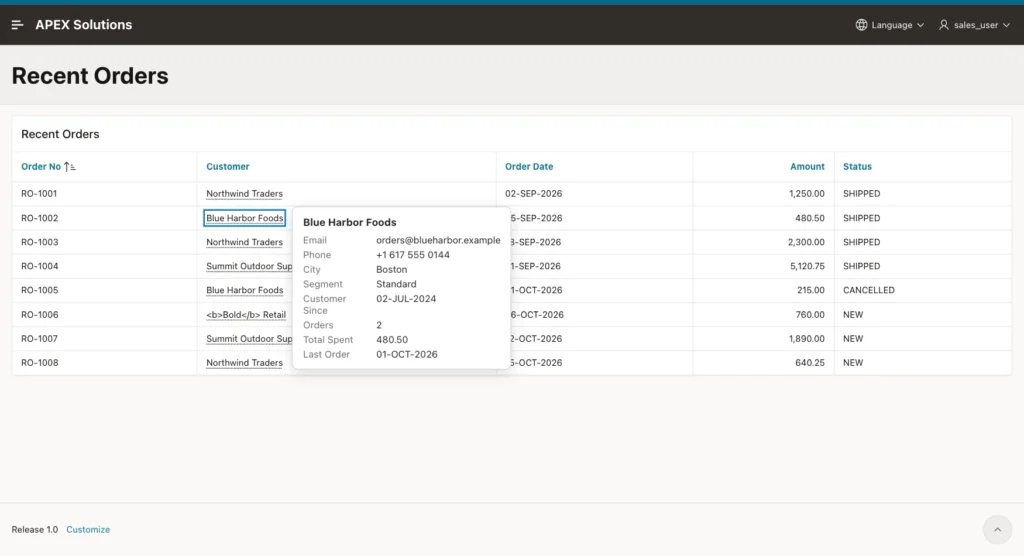
Point at the customer whose name contains HTML tags. The tags appear as text, both in the report and in the card:
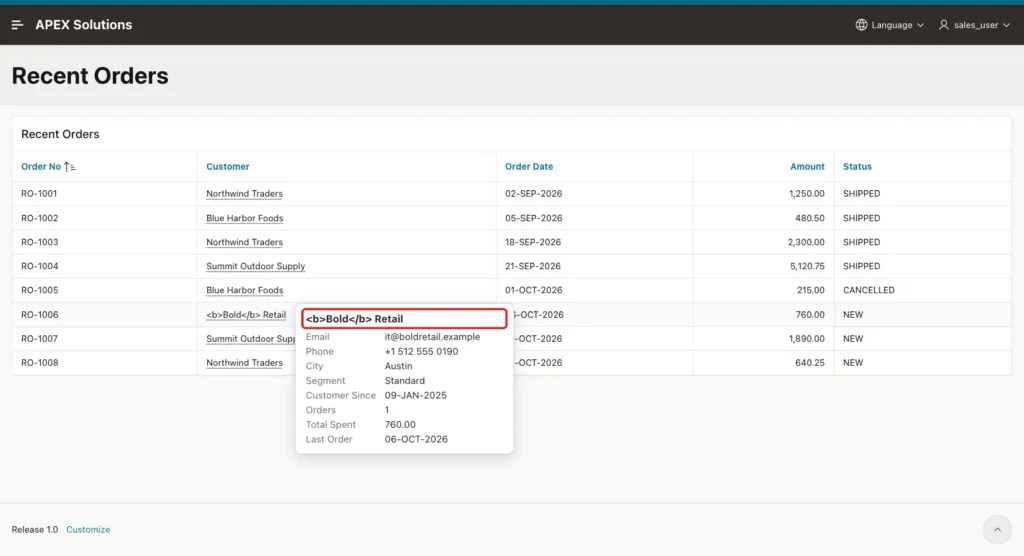
Finally, call the callback with values a user could send by hand, from the browser console on page 880:
Example:
['999', 'abc', '1 or 1=1'].forEach(function (v) {
    apex.server.process('GET_CUSTOMER_CARD', { x01: v }, { dataType: 'json' })
        .done(function (data) { console.log(v, JSON.stringify(data)); });
});
Output:
1 or 1=1 {"message":"Customer not found."}
999 {"message":"Customer not found."}
abc {"message":"Customer not found."}
An unknown ID, text and an injection attempt all return the same message. When the data-id of a button was changed to 999 in the browser, the card showed "Customer not found."
Things to Know
- The Ajax Callback returns any customer whose ID it receives, as long as the user can open page 880. If users may see only some records, add the same filter to the callback query as to the report.
- apex.server.process treats a JSON reply with a top-level error key as a failed call. Use another key, such as message, for normal "not found" answers.
- apex.util.applyTemplate does not escape #NAME# placeholders. Use #NAME!HTML#, and send the values as text.
- Do not show important information only in the popup. The user has to point at each row to see it.
- The cache lives until the page is reloaded. If the details change often, remove the cache or clear it with a timer.
- A long name in another row can be partly covered by an open card. The visible part of the name still works.
Related Guides
- How to Expand a Report Row to Show Its Details in Oracle APEX
- How to Add Help Text and Inline Hints to Form Fields in Oracle APEX
Conclusion
A hover detail popup in Oracle APEX needs a button in the report column, an Ajax Callback that returns JSON, a page-level script and a few CSS rules. The script waits before loading, ignores late replies, caches cards and closes them on Escape or refresh.
In this example, the cards matched the SQL totals, a fast sweep over the rows sent one request, a delayed reply did not overwrite the newer card, and HTML in the data stayed text. The same steps work for any report where users need a quick look at a related record.
See my articles more often when you search Google.
