
Cascading select lists are lists whose choices depend on another list: pick a country, and the State list shows only that country's states; pick a state, and the City list shows only its cities. In Oracle APEX this needs no JavaScript. The child item's list of values query refers to the parent item, and the Cascading List of Values setting tells APEX to refresh the child whenever the parent changes. This guide builds a customer form with three cascading levels and shows what APEX does at each step.
Sample Tables
Three tables hold the hierarchy: countries, states with a COUNTRY_ID, and cities with a STATE_ID. CUSTOMERS stores the three chosen IDs. The data for two of the countries:
Example:
select c.name as country, s.name as state, count(ci.city_id) as cities
from   countries c
join   states s on s.country_id = c.country_id
left   join cities ci on ci.state_id = s.state_id
where  c.name in ('India', 'Germany')
group  by c.name, s.name
order  by c.name, s.name;
Output:
COUNTRY    STATE             CITIES
__________ ______________ _________
Germany    Bavaria                2
Germany    Berlin                 1
India      Delhi                  1
India      Karnataka              2
India      Maharashtra            3
Step 1: The Parent List
Create a form page on the CUSTOMERS table, or use an existing form. Set the item P10_COUNTRY_ID to Type Select List, and in its List of Values group set Type to SQL Query with this query:
Example:
select name, country_id
from   countries
order  by name
A list of values query returns two columns: the display value first, then the return value, which is stored in the item. Set Display Null Value to On with the text - Select Country -, so the user starts with no country chosen.
Step 2: The Child List
Set P10_STATE_ID to Select List as well. Its query filters the states by the country item, as a bind variable:
Example:
select name, state_id
from   states
where  country_id = :P10_COUNTRY_ID
order  by name
Then, in the item's Cascading List of Values group, set Parent Item(s) to P10_COUNTRY_ID and leave Parent Required on:
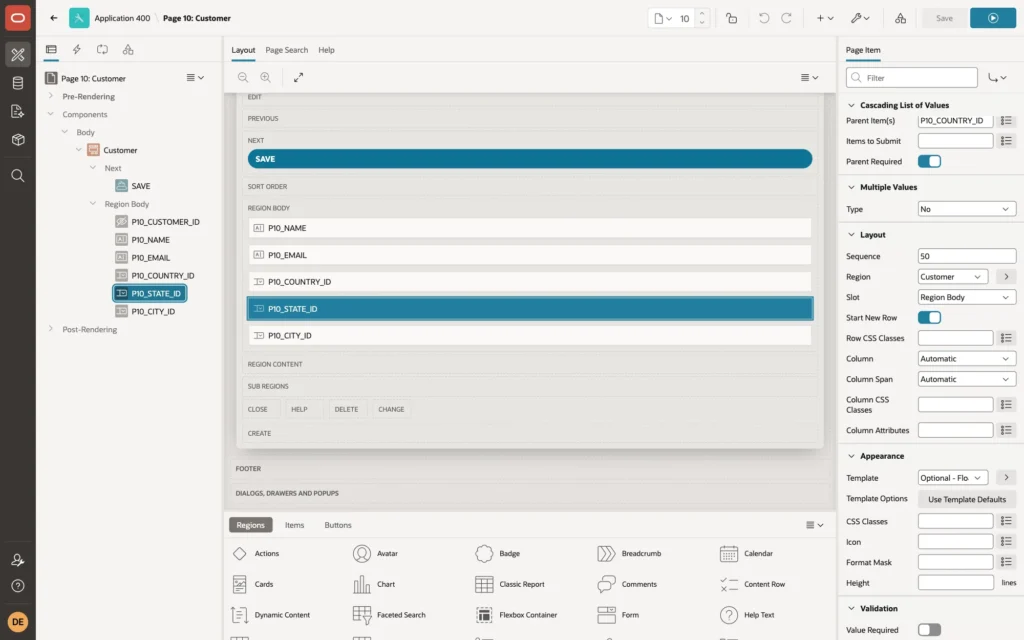
- Parent Item(s) makes APEX send the parent's value to the server and refresh this list whenever the parent changes. The parent value is also what :P10_COUNTRY_ID returns in the query.
- Parent Required: with it on, the child shows only its null entry until a parent value is chosen, without running its query.
- Items to Submit: other items the query refers to, besides the parents. Here there are none.
Step 3: The Third Level
P10_CITY_ID follows the same pattern one level down, with P10_STATE_ID as its parent:
Example:
select name, city_id
from   cities
where  state_id = :P10_STATE_ID
order  by name
The Result
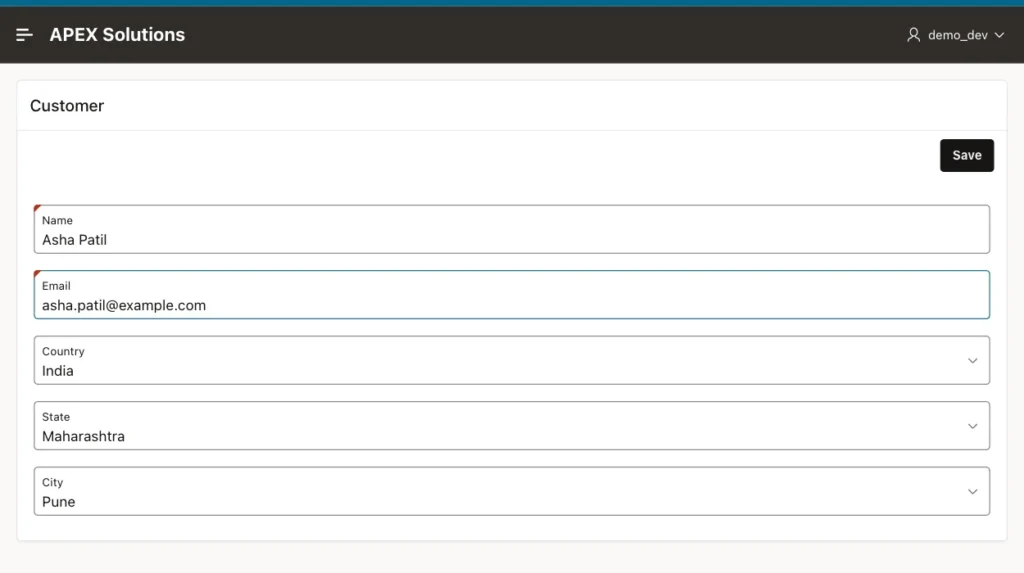
After choosing India, the State list holds only Delhi, Karnataka, and Maharashtra, and after choosing Maharashtra, the City list holds only Mumbai, Nagpur, and Pune:
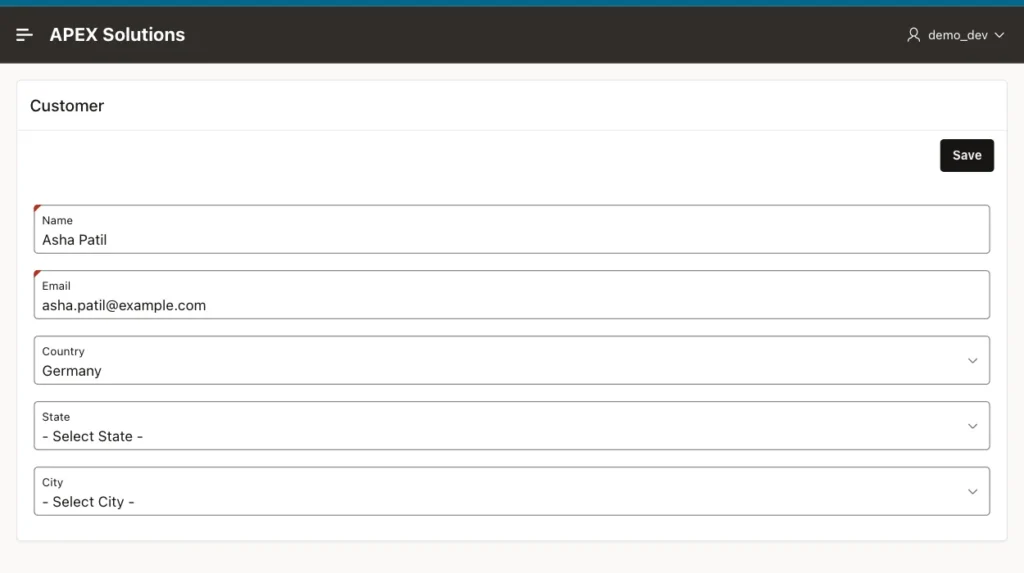
Changing the country to Germany clears the state and the city at once, and the State list now offers Bavaria and Berlin:
Save stores the three IDs in the CUSTOMERS row, as any form item would:
Example:
select cu.name, co.name as country, s.name as state, ci.name as city
from   customers cu
join   countries co on co.country_id = cu.country_id
join   states s     on s.state_id = cu.state_id
join   cities ci    on ci.city_id = cu.city_id
where  cu.email = 'asha.patil@example.com';
Output:
NAME          COUNTRY    STATE          CITY
_____________ __________ ______________ _______
Asha Patil    India      Maharashtra    Pune
Things to Know
- A child can have several parents, separated by commas, for example a city list filtered by both country and a "Capitals only" switch.
- When a parent value changes, APEX clears the child and triggers its change event, so the clearing cascades down every level.
- The same setting works for Popup LOV, Select One, Radio Group, and Checkbox Group items, and Interactive Grid columns have Parent Column(s) for cascading lists inside the grid.
- When a form opens an existing row, APEX loads each list with the stored parent values, so the saved state and city are shown correctly.
- Index the foreign key columns, such as STATES.COUNTRY_ID, so each refresh is a quick lookup.
Related Guides
- Oracle APEX Page Items: Types, Properties, and Lists of Values
- Oracle APEX Lists of Values, Plug-ins, Shortcuts, and Component Settings
Conclusion
A cascading select list in Oracle APEX is a select list whose query refers to its parent item as a bind variable, with that item named in Cascading List of Values, Parent Item(s). Chain as many levels as the data has, keep Parent Required on, and APEX refreshes and clears the child lists for you.
