
Every application has values that are not data but configuration: after how many days an order is cancelled, the email address for support, a feature that is switched on in one environment and off in another. Hard-coded in SQL and PL/SQL, such values need a code change and a new deployment every time the business wants a different number.
Oracle APEX has Application Settings for this: named values stored with the application, read with APEX_APP_SETTING.GET_VALUE and changed with SET_VALUE, with a list of valid values and the option to keep a changed value when a new version of the application is installed. This guide moves the seven days of an order cleanup automation into a setting, builds a page where an administrator changes it, and tests what happens on change, on invalid values, and on reinstall.
Step 1: The Tables
The setting will control which NEW orders are cancelled. The orders table and its related tables, with their keys:
Example:
create table customers (
    customer_id number generated by default as identity
                constraint customers_pk primary key,
    name        varchar2(100) not null,
    email       varchar2(120) not null
);

create table products (
    product_id number generated by default as identity
               constraint products_pk primary key,
    name       varchar2(60)  not null,
    category   varchar2(30)  not null,
    price      number(10, 2) not null
);

create table orders (
    order_id    number generated by default as identity
                constraint orders_pk primary key,
    customer_id number not null
                constraint orders_customer_fk references customers,
    order_date  date default sysdate not null,
    status      varchar2(12) default 'NEW' not null
                constraint orders_status_ck
                check (status in ('NEW', 'APPROVED', 'SHIPPED', 'CANCELLED')),
    approved_by varchar2(60),
    approved_on date
);

create table order_lines (
    line_id    number generated by default as identity
               constraint order_lines_pk primary key,
    order_id   number not null
               constraint order_lines_order_fk references orders on delete cascade,
    product_id number not null
               constraint order_lines_product_fk references products,
    quantity   number not null
               constraint order_lines_qty_ck check (quantity > 0),
    unit_price number(10, 2) not null,
    constraint order_lines_product_uk unique (order_id, product_id)
);

create index order_lines_order_ix on order_lines (order_id);
create index order_lines_product_ix on order_lines (product_id);
The setting is used in the query of a scheduled automation, Cancel unapproved orders, that cancels NEW orders older than a number of days. Until now, that number was hard-coded as 7.
Step 2: Create the Application Setting
In App Builder, open Shared Components, click Application Settings, and click Create Setting. Enter:
- Static ID: ORDER_CANCEL_DAYS, the name used in code.
- Value: 7.
- Value Required: on, so the setting can never be empty.
- Valid Values: 7,14,30, a comma-separated list of the only values allowed.
- Comments: what the setting is for, so the next developer knows.
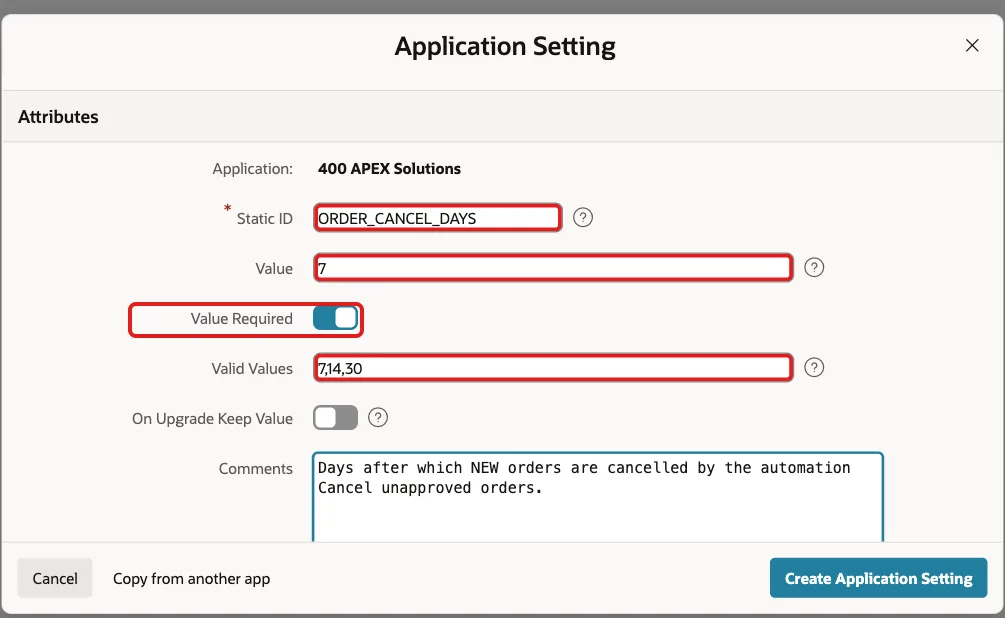
Then edit the setting and turn on On Upgrade Keep Value. It decides what happens when a new version of the application is installed over this one: with it on, the installed application keeps its current value instead of the value in the new version. The list of settings then shows the setting with Keep Value Yes:

Step 3: Read the Setting in SQL and PL/SQL
APEX_APP_SETTING.GET_VALUE returns the value as text, in SQL or PL/SQL running in the application. In the automation's query, replace the 7 with the setting:
Example:
select order_id, order_date
from   orders
where  status = 'NEW'
and    order_date < trunc(sysdate)
                    - to_number(apex_app_setting.get_value('ORDER_CANCEL_DAYS'))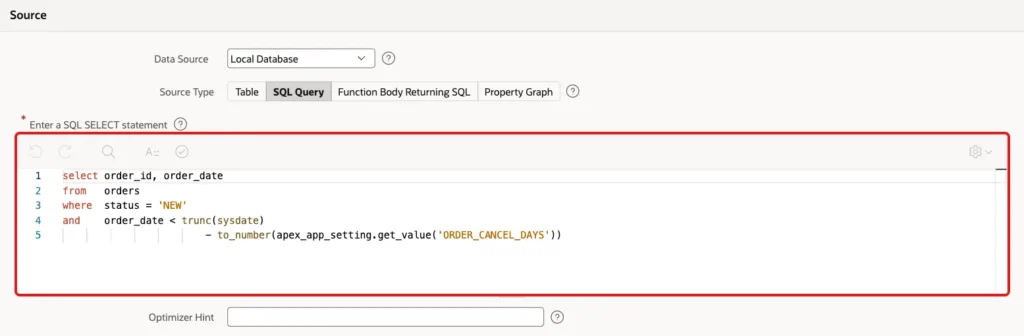
TO_NUMBER converts the text to a number for the date arithmetic. The setting's name is case-insensitive.
Step 4: A Page to Change the Setting
Create a Blank Page, here page 170, Order Cleanup Settings, with:
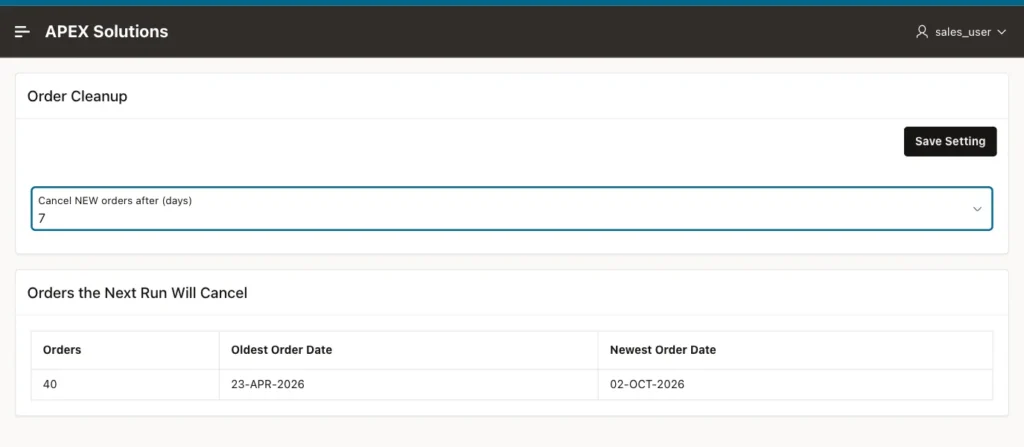
- A Static Content region, Order Cleanup, with a select list item P170_CANCEL_DAYS, label Cancel NEW orders after (days), and static values 7, 14, and 30, the same as the setting's valid values.
- A button SAVE, label Save Setting, with Action Submit Page.
- A Classic Report, Orders the Next Run Will Cancel, with the count of NEW orders the setting currently selects, so the administrator sees the effect of a change.
A PL/SQL process at the point Before Header loads the current value into the item:
Example:
:P170_CANCEL_DAYS := apex_app_setting.get_value('ORDER_CANCEL_DAYS');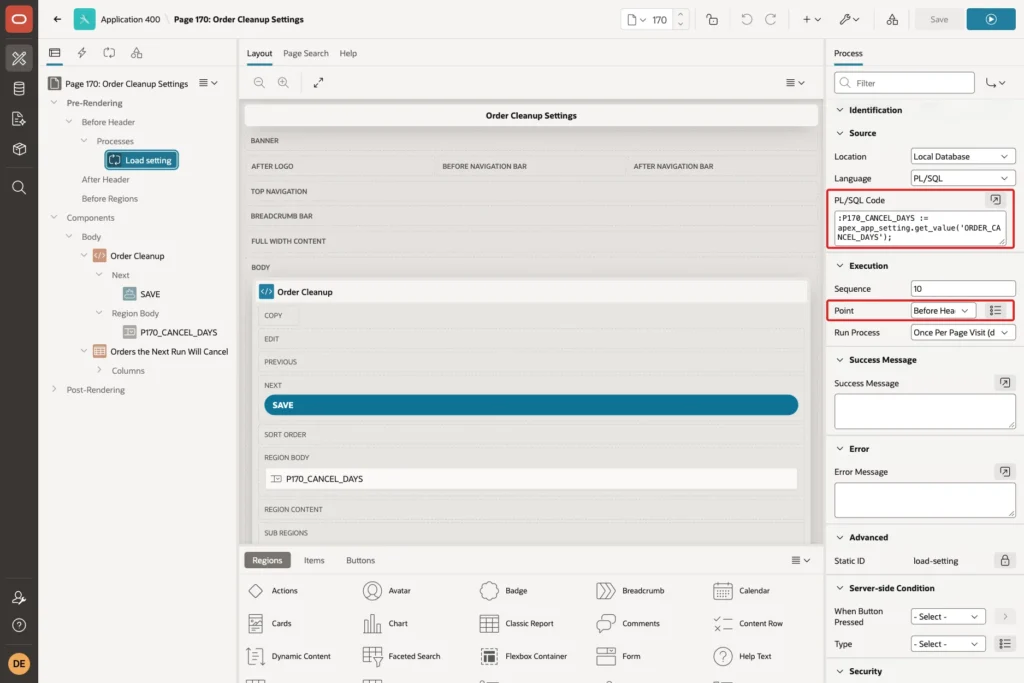
A PL/SQL process in Processing, with the server-side condition When Button Pressed SAVE, stores the new value. p_raise_error => true raises an error if the value is not valid:
Example:
apex_app_setting.set_value(
    p_name        => 'ORDER_CANCEL_DAYS',
    p_value       => :P170_CANCEL_DAYS,
    p_raise_error => true);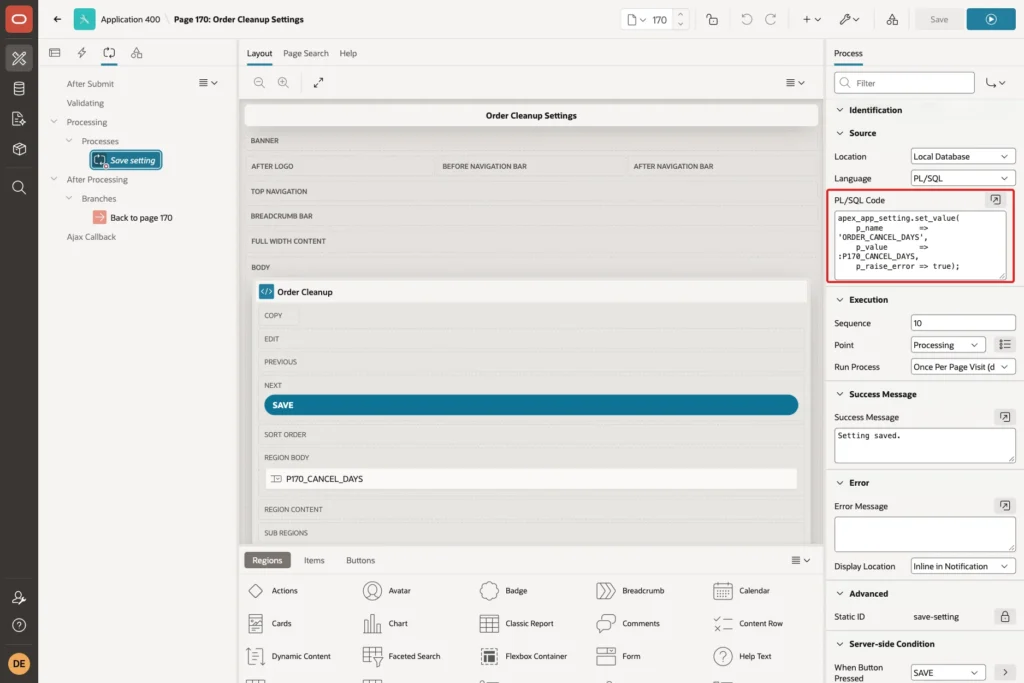
Add a branch back to page 170 after processing.
Step 5: Test It
With the value 7, the page showed 40 orders that the next run would cancel:
Changing the value to 30 and clicking Save Setting stored it at once, and the count dropped to 36, the NEW orders older than 30 days. No code changed and nothing was redeployed:
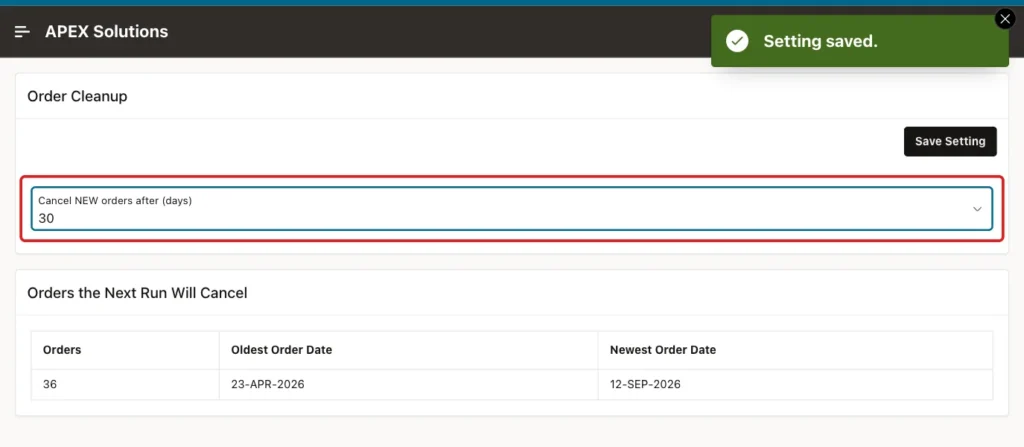
The value is stored with the application, not in the session: another user, DEMO_DEV, opened the page afterwards and saw 30 as well.
A value outside the valid values is rejected. This block tries to set 10 from SQL, in an APEX session created for the test, and is run with SET SERVEROUTPUT ON:
Example:
begin
    apex_session.create_session(
        p_app_id   => 400,
        p_page_id  => 170,
        p_username => 'DEMO_DEV');

    dbms_output.put_line('Current value: ' || apex_app_setting.get_value('ORDER_CANCEL_DAYS'));

    apex_app_setting.set_value(
        p_name        => 'ORDER_CANCEL_DAYS',
        p_value       => '10',
        p_raise_error => true);
exception
    when others then
        dbms_output.put_line('Error: ' || sqlerrm);
        apex_session.delete_session;
end;
/
Output:
Current value: 30
Error: ORA-20987: APEX - Application Setting ORDER_CANCEL_DAYS value is invalid - Contact your application administrator.

PL/SQL procedure successfully completed.
Finally, the application was installed again from its source, in which the setting's value is still 7. Because On Upgrade Keep Value is on, the installed application kept the administrator's 30:
Example:
select name, value, is_required, valid_values, on_upgrade_keep_value
from   apex_application_settings
where  application_id = 400;
Output:
NAME                 VALUE    IS_REQUIRED    VALID_VALUES    ON_UPGRADE_KEEP_VALUE
____________________ ________ ______________ _______________ ________________________
ORDER_CANCEL_DAYS    30       Y              7,14,30         Yes
Things to Know
- Restrict the settings page to administrators with an authorization scheme: changing a setting changes the application's behavior for everyone.
- Settings hold text. Convert them with TO_NUMBER or TO_DATE where needed, and keep the valid values in a format that converts safely.
- For secrets such as API keys or passwords, use Web Credentials instead of application settings; settings are visible to developers in App Builder.
- Settings can have a Build Option, so a setting exists only in builds where a feature is included.
Related Guides
- How to Run a Scheduled Task with Automations in Oracle APEX
- Oracle APEX Application Logic: Items, Processes, Settings, and Build Options
Conclusion
To store configuration values in Oracle APEX, create an Application Setting with a value, Value Required, and a list of valid values, and turn on On Upgrade Keep Value for values that administrators change in production.
Read it with APEX_APP_SETTING.GET_VALUE in SQL and PL/SQL, and let administrators change it on a page with SET_VALUE. The application then changes behavior at once, without a code change or a new deployment.
See my articles more often when you search Google.
