
Most logic belongs to a page. Some belongs to the whole application: a value every page can show, code that runs once when a session starts, a configuration value an administrator should be able to change without calling a developer, a feature switched on for one customer and off for another.
Oracle APEX keeps these under Shared Components, in Application Logic. This guide covers the application definition and its substitution strings, application items, processes, computations, settings, and build options, and shows when each one is the right answer rather than the nearest one.
The Application Definition
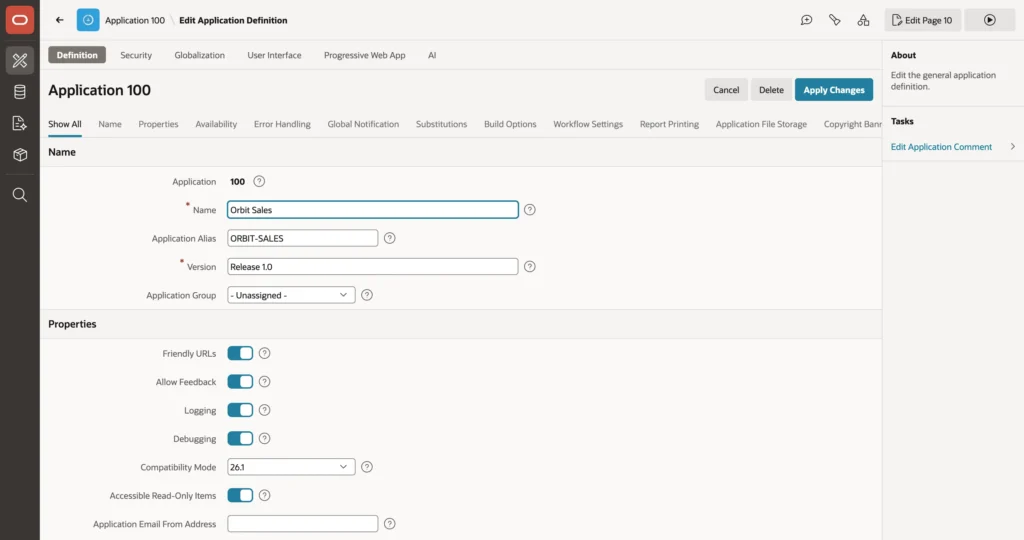
The Definition tab holds the name, alias used in friendly URLs, version, and application group, plus four groups worth knowing about.
- Properties turns friendly URLs, activity logging, and debugging on or off, and sets compatibility mode for applications upgraded from an older release.
- Availability sets the status, which is how you take an application down for maintenance with a message rather than an error, and the build status.
- Error Handling sets the default error display location and names an error handling function that can turn raw database errors into readable ones.
- Global Notification puts a message on every page through a substitution string, which is the quickest way to announce planned downtime.
Substitution Strings

Substitutions define up to twenty application-level name and value pairs that pages reference exactly like items. They suit text that is identical on every page but may differ between installations, such as a company name.
The difference from an item is that a substitution string has no session state at all. Its value is fixed in the application definition, usable anywhere substitutions are allowed, and costs nothing at runtime.
Application Items
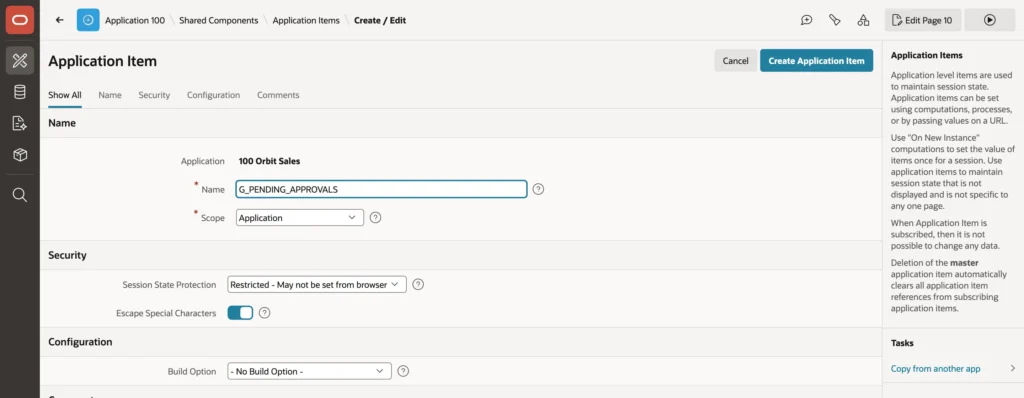
An application item has a name and a value in session state but belongs to no page and is never displayed. Every page can read it as a bind variable or a substitution string, and any process can set it. Prefixing these with G_ for global is a convention worth adopting, because it makes clear at a glance that a name is not a page item.
| Session State Protection | Means |
|---|---|
| Unrestricted | Any URL or submit may set the value. Only for harmless values |
| Checksum Required | Only URLs APEX generated, with a valid checksum, may set it |
| Restricted - May not be set from browser | Only server-side code may set it |
Restricted is almost always the right choice, and the reason is worth spelling out. Application items typically hold values the server computed, such as a count, a threshold, or the user's department. Leave one unrestricted and a user can append it to a URL with a value of their choosing, which turns a display value into an input you never validated. Restricted means the attempt produces an error instead, which is the same protection that raises a session state protection violation elsewhere.
Application Computations
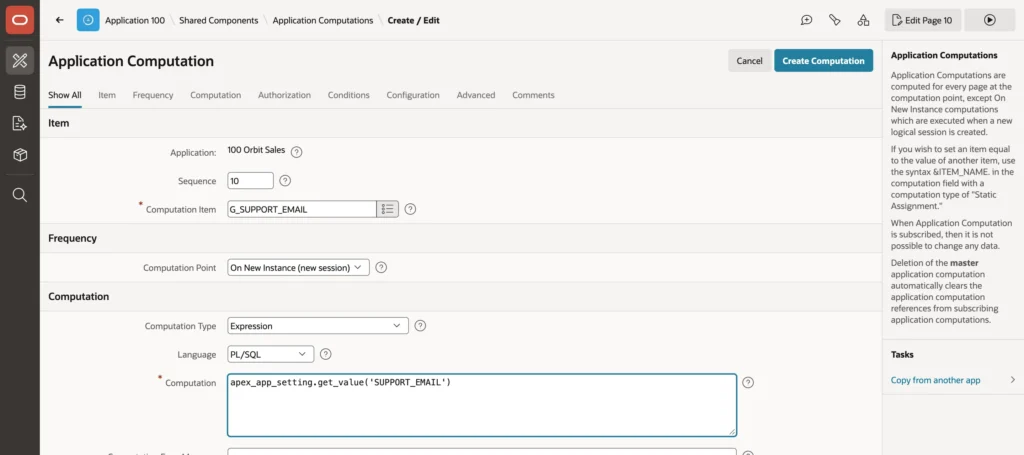
An application computation sets an item at a chosen point, on every page. The computation point is where the cost lives, and choosing it carelessly is how applications get slow.
The rendering points, Before Header through After Footer, run on every single page view. Anything expensive there is paid for repeatedly by every user. On New Instance and After Authentication run once, at the start of a session and just after sign-in, which makes them right for values that do not change while somebody is signed in.
A support address read from configuration is a good example: it belongs in a once-per-session computation, not on every page render.
Application Settings
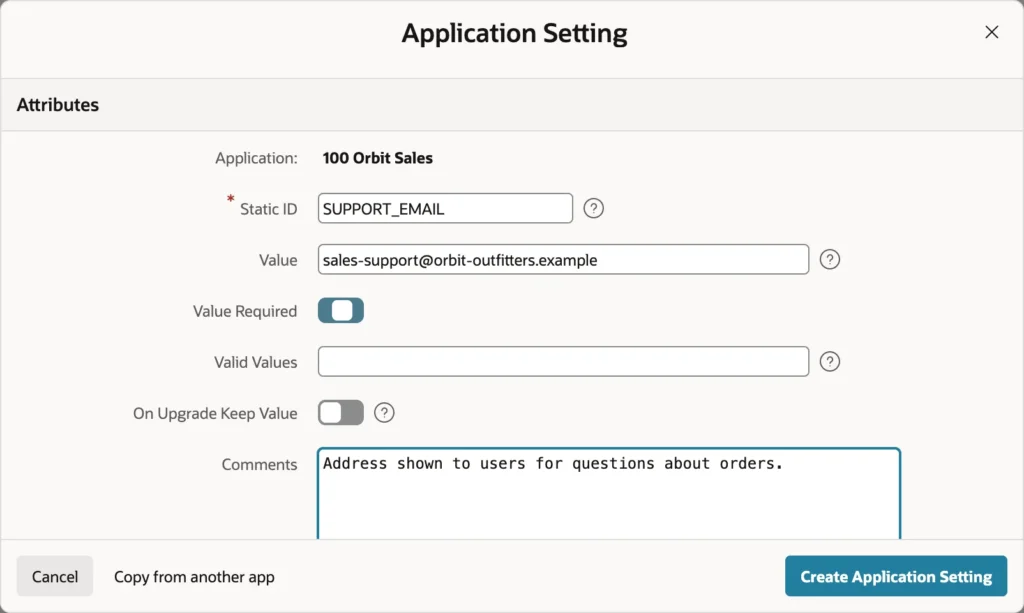
An application setting is a named value belonging to the application that can be changed while it runs. It is the proper home for configuration: an email address, a threshold, an API endpoint, a feature switch.
l_email := apex_app_setting.get_value('SUPPORT_EMAIL');

apex_app_setting.set_value(
    p_name  => 'SUPPORT_EMAIL',
    p_value => 'orders@example.com');
Two properties decide how a setting behaves over time. Value Required stops it ever being emptied, and Valid Values restricts it to a list. The important one is On Upgrade Keep Value: without it, every time you import a new version of the application over an installation, that installation's carefully set value is replaced by whatever the developer had. With it, local configuration survives releases.
Because set_value exists, you can build an administration page where administrators change settings themselves. That is the real payoff: configuration changes stop requiring a developer and a deployment.
Choosing between the two is straightforward. A substitution string is for fixed text that appears in pages. An application setting is for values code reads, that administrators may change at runtime, or that must survive an upgrade.
Application Processes
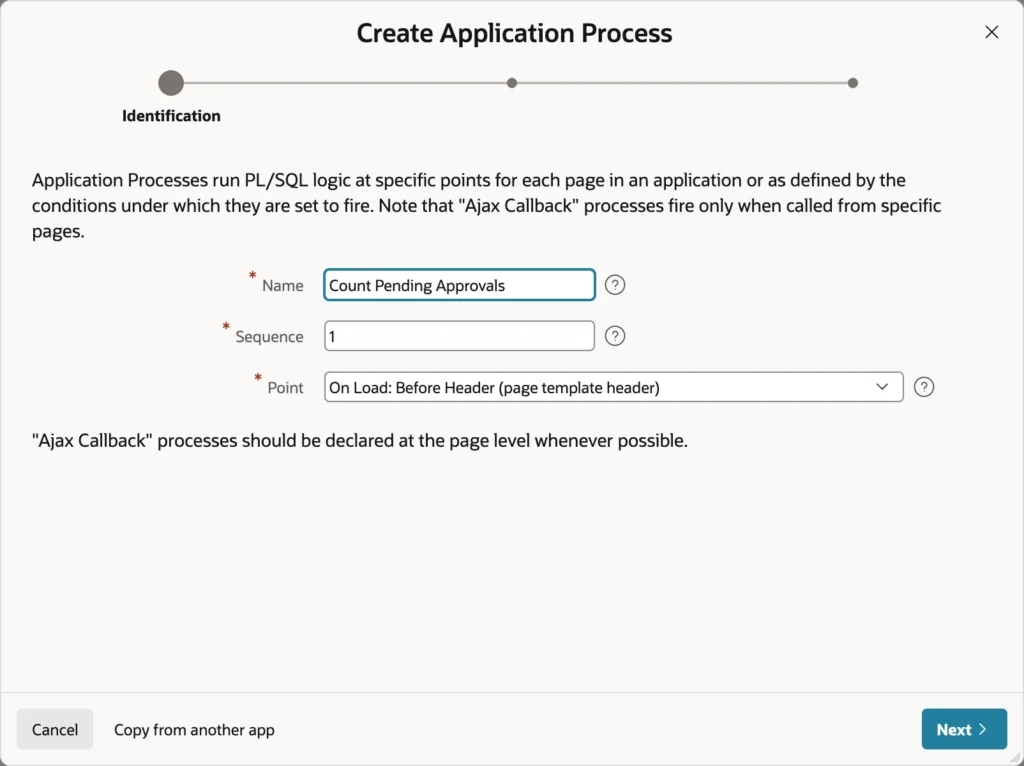
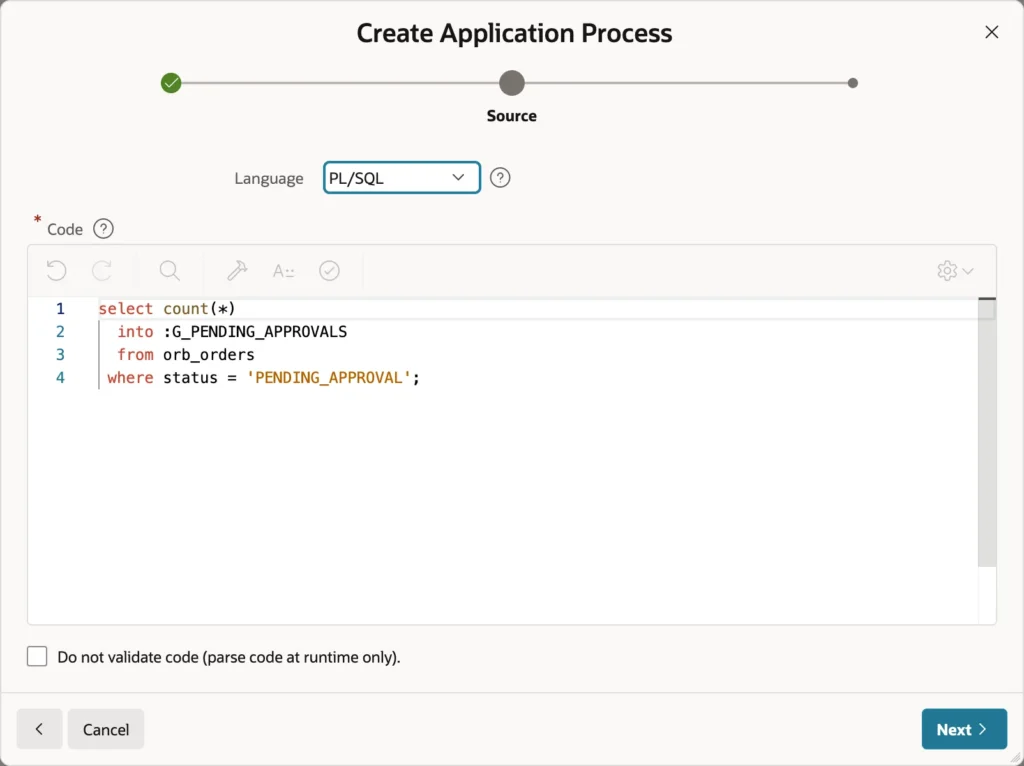
select count(*)
  into :G_PENDING_APPROVALS
  from orb_orders
 where status = 'PENDING_APPROVAL';
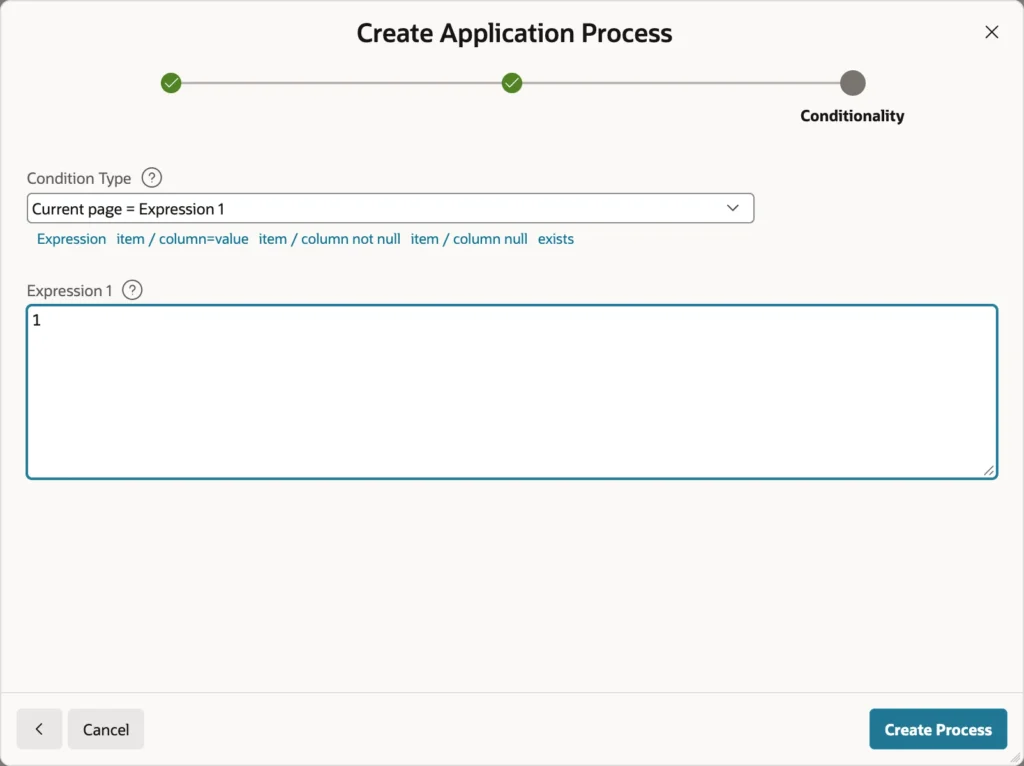
That condition is the whole lesson of this section. Without it, a count that only the home page displays would run on every page view for every user, which is a query nobody asked for multiplied by your entire user base. Conditions and authorization schemes are how application processes stay cheap and safe: run them only where their result is used, and only for users who need it.
The available points mirror page processes: the On Load rendering points, the On Submit points, On New Instance, After Authentication, and Ajax Callback. That last one is genuinely useful, because an application process at the Ajax Callback point can be called from any page with apex.server.process, which makes it the home for callbacks several pages share.
Putting the Values to Work

Once these pieces exist, a region's HTML can pull all three together: the company name from a substitution string, a live count from an application item filled by the process, and a support address from the setting copied into an item when the session began.
Two details catch people out when writing that text. A substitution ending a sentence needs two periods, one to close the substitution and one for the sentence. And an address placed inside an href attribute needs the ATTR escape rather than the default HTML escaping, because attribute context has different rules.
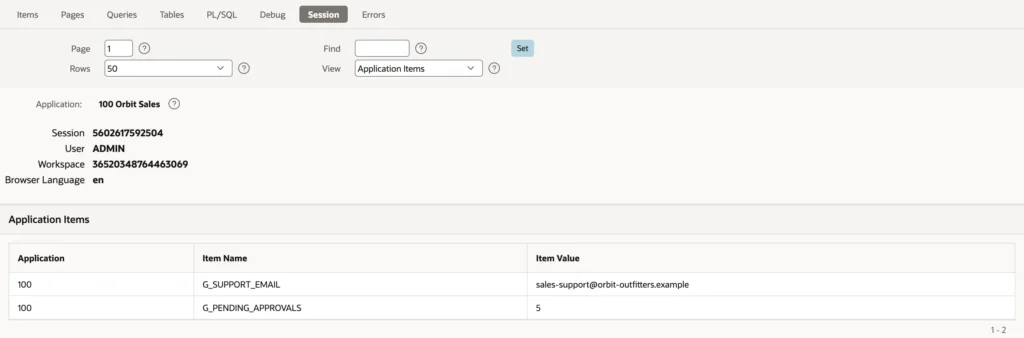
Change the setting's value and new sessions pick it up immediately, while existing sessions keep theirs until they end. That is the direct consequence of a once-per-session computation, and it is worth knowing before somebody reports it as a bug.
Build Options
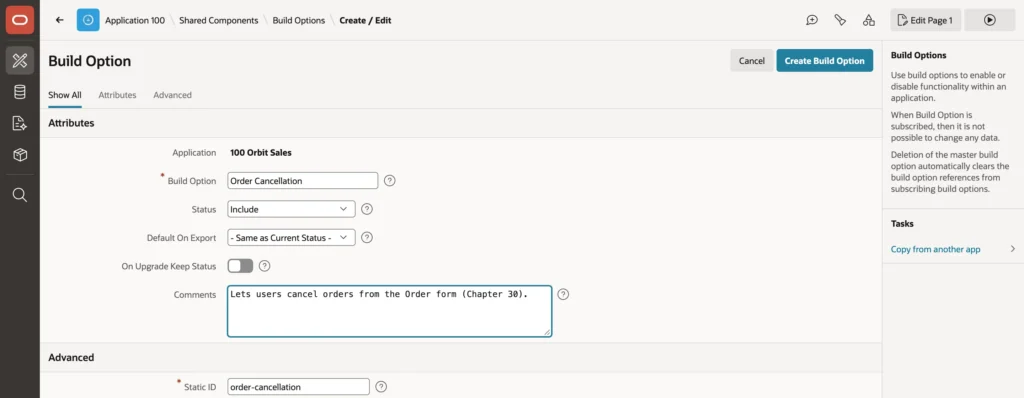
A build option switches a group of components on or off. Every component has a Build Option property: pages, regions, items, buttons, processes, dynamic actions, list entries. When the option's status is Include, they behave normally. When it is Exclude, APEX treats them as though they do not exist.
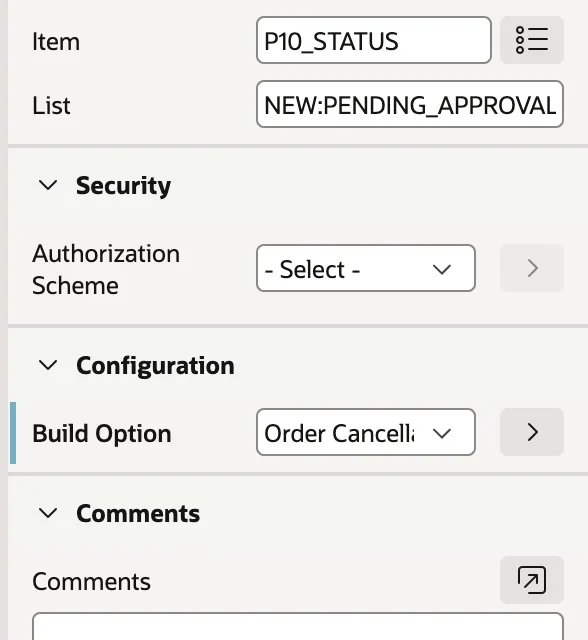
The discipline is to tag everything a feature consists of. A cancellation feature is not just a button: it is the button and the dynamic action behind it. Miss one and excluding the option leaves an orphan that either does nothing or, worse, still works.

Components can also use the negation of an option, so a note explaining that cancellations must go through the sales office appears precisely when the cancellation feature is switched off. That pairing turns a missing button into an explanation.
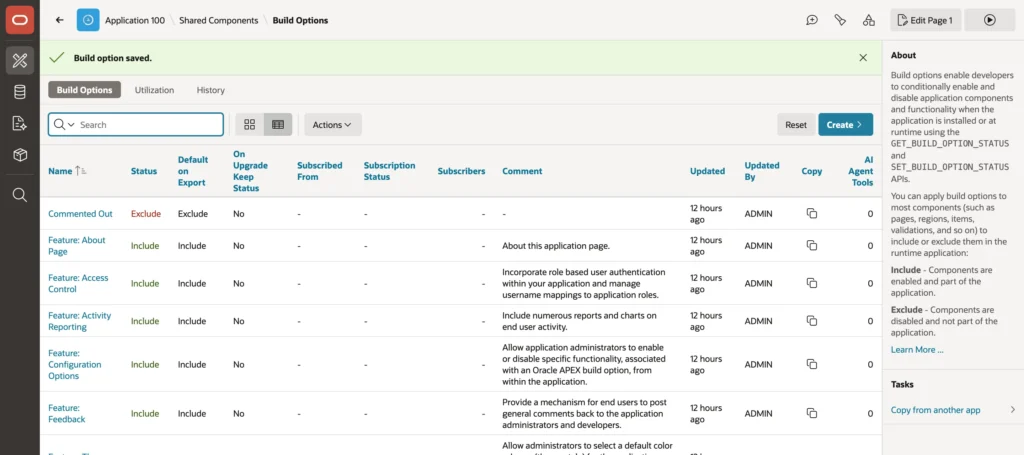
Two properties govern deployment. Default On Export sets the status written into the export file, so a feature under development ships as Exclude while staying Include in your workspace. On Upgrade Keep Status preserves an installation's own choice when a new version is imported over it.
Build options can also be switched at runtime from PL/SQL, which is exactly what the generated Configuration Options page does for the wizard's feature options. Your own features can appear on that same page.
One last use worth knowing: the wizard creates a build option called Commented Out, set to Exclude. Assign it to something you want gone but not deleted, and you have a reversible delete.
Conclusion
Application logic is where an application stops being a set of pages and starts having a configuration. Substitution strings hold fixed text that varies per installation, while application items hold server-computed values every page can read, and those should be Restricted so nobody can set them from a URL. Application computations and processes run across pages, which makes their point and their condition the most consequential settings in this whole area: once per session for values that do not change, a tight condition for anything expensive, and never a query on every page view that only one page displays. Application settings are the proper home for configuration, readable and writable through the API, and with On Upgrade Keep Value they let each installation keep its own values across releases, which in turn lets administrators change things without a developer. Build options wrap a feature's components in a single switch, including the components people forget, and with their negation they can replace a missing button with an explanation. Get these right and the same application can be deployed twice with different behavior and no code changes at all.
