
A forgot password flow lets users get back into an application without asking an administrator. The user enters an email address and receives a link by email. The link opens a page where the user chooses a new password.
The link must be safe. In this guide it is random, it works once, it expires after 30 minutes, and only its hash is stored.
The page never tells a stranger whether an email address is registered. This guide uses a table of users as the example, and the same steps work for any custom user table. Every part was tested in a running application.
The guide Create Change Password Screen for Custom Authentication in Oracle Apex is for a user who is signed in and knows the old password. Here the user has forgotten it, and the email link is the proof. The user table follows the idea of How to Build a Sign-Up Page for New Users in Oracle APEX.
Step 1: Create the Tables
RESET_USERS holds the accounts. It keeps a random salt and the SHA-512 hash of the password and the salt, never the password itself. RESET_TOKENS holds one row for each reset link that was sent.
Example:
create table reset_users (
  user_id             number generated by default on null as identity,
  username            varchar2(30 char)  not null,
  email               varchar2(120 char) not null,
  password_salt       raw(16)            default on null sys_guid() not null,
  password_hash       varchar2(128 char) not null,
  password_changed_on timestamp with time zone default on null systimestamp not null,
  constraint reset_users_pk primary key (user_id),
  constraint reset_users_user_uk unique (username),
  constraint reset_users_email_uk unique (email),
  constraint reset_users_user_ck check (username = upper(username)),
  constraint reset_users_email_ck check (email = lower(email))
);

create table reset_tokens (
  token_id   number generated by default on null as identity,
  user_id    number                      not null,
  token_hash varchar2(64 char)           not null,
  created_on timestamp with time zone    default on null systimestamp not null,
  expires_on timestamp with time zone    default on null systimestamp + interval '30' minute not null,
  used_on    timestamp with time zone,
  constraint reset_tokens_pk primary key (token_id),
  constraint reset_tokens_hash_uk unique (token_hash),
  constraint reset_tokens_user_fk foreign key (user_id)
    references reset_users (user_id) on delete cascade,
  constraint reset_tokens_dates_ck check (expires_on > created_on)
);

create index reset_tokens_user_ix on reset_tokens (user_id);

select table_name, constraint_name, constraint_type
from   user_constraints
where  table_name in ('RESET_USERS', 'RESET_TOKENS')
and    constraint_name not like 'SYS%'
order  by table_name, constraint_type, constraint_name;
Output:
Table RESET_USERS created.

Table RESET_TOKENS created.

Index RESET_TOKENS_USER_IX created.

TABLE_NAME      CONSTRAINT_NAME          CONSTRAINT_TYPE
_______________ ________________________ __________________
RESET_TOKENS    RESET_TOKENS_DATES_CK    C
RESET_TOKENS    RESET_TOKENS_PK          P
RESET_TOKENS    RESET_TOKENS_USER_FK     R
RESET_TOKENS    RESET_TOKENS_HASH_UK     U
RESET_USERS     RESET_USERS_EMAIL_CK     C
RESET_USERS     RESET_USERS_USER_CK      C
RESET_USERS     RESET_USERS_PK           P
RESET_USERS     RESET_USERS_EMAIL_UK     U
RESET_USERS     RESET_USERS_USER_UK      U

9 rows selected.
A few details in the tables:
- The user name is unique and stored in upper case. The email address is unique and stored in lower case. Check constraints keep both rules in the database.
- TOKEN_HASH stores the SHA-256 hash of the token, not the token. If someone reads the table, the hashes cannot be used as links.
- CREATED_ON, EXPIRES_ON, the salt and the password change time use DEFAULT ON NULL, so an insert never has to set them. The link is valid for 30 minutes by default.
- USED_ON stays empty until the link is used. The foreign key deletes the tokens of a user who is deleted, and the index on USER_ID keeps the lookup of a user fast.
Step 2: Create the Package
One package holds the rules, so the pages and the SQL tests use the same code. NEW_TOKEN creates a link token and SEND_LINK mails it. TOKEN_USER tells which user a token belongs to, and RESET_PASSWORD changes the password. AUTHENTICATE is the function for a custom authentication scheme.
Example:
create or replace package password_reset as
  c_min_length   constant pls_integer := 10;
  c_valid_minutes constant pls_integer := 30;

  function  password_problem (p_username in varchar2, p_password in varchar2) return varchar2;
  procedure add_user (p_username in varchar2, p_email in varchar2, p_password in varchar2);
  function  authenticate (p_username in varchar2, p_password in varchar2) return boolean;
  function  new_token (p_email in varchar2) return varchar2;
  procedure send_link (p_email in varchar2, p_url_template in varchar2);
  function  token_user (p_token in varchar2) return varchar2;
  procedure reset_password (p_token in varchar2, p_password in varchar2);
end password_reset;
/
create or replace package body password_reset as

  function hash_password (p_salt in raw, p_password in varchar2) return varchar2 is
    l_hash varchar2(128 char);
  begin
    select standard_hash(utl_raw.cast_to_raw(p_password) || p_salt, 'SHA512')
    into   l_hash
    from   dual;
    return l_hash;
  end hash_password;

  function hash_token (p_token in varchar2) return varchar2 is
    l_hash varchar2(64 char);
  begin
    select standard_hash(p_token, 'SHA256') into l_hash from dual;
    return l_hash;
  end hash_token;

  function password_problem (p_username in varchar2, p_password in varchar2) return varchar2 is
  begin
    if p_password is null or length(p_password) < c_min_length then
      return 'Use at least ' || c_min_length || ' characters.';
    elsif not regexp_like(p_password, '[A-Z]') or not regexp_like(p_password, '[a-z]') or not regexp_like(p_password, '[0-9]') then
      return 'Use upper case letters, lower case letters and a digit.';
    elsif instr(upper(p_password), upper(p_username)) > 0 then
      return 'The password must not contain the user name.';
    end if;
    return null;
  end password_problem;

  procedure add_user (p_username in varchar2, p_email in varchar2, p_password in varchar2) is
    l_salt reset_users.password_salt%type := sys_guid();
    l_hash reset_users.password_hash%type := hash_password(l_salt, p_password);
  begin
    insert into reset_users (username, email, password_salt, password_hash)
    values (upper(p_username), lower(p_email), l_salt, l_hash);
  end add_user;

  function authenticate (p_username in varchar2, p_password in varchar2) return boolean is
    l_user reset_users%rowtype;
  begin
    select * into l_user
    from   reset_users
    where  username = upper(p_username);
    return l_user.password_hash = hash_password(l_user.password_salt, p_password);
  exception
    when no_data_found then
      return false;
  end authenticate;

  function new_token (p_email in varchar2) return varchar2 is
    l_user_id reset_users.user_id%type;
    l_token   varchar2(64 char);
    l_hash    reset_tokens.token_hash%type;
  begin
    select user_id into l_user_id
    from   reset_users
    where  email = lower(trim(p_email));

    update reset_tokens
    set    expires_on = systimestamp
    where  user_id = l_user_id
    and    used_on is null
    and    expires_on > systimestamp;

    l_token := lower(rawtohex(dbms_crypto.randombytes(32)));
    l_hash  := hash_token(l_token);

    insert into reset_tokens (user_id, token_hash, expires_on)
    values (l_user_id, l_hash, systimestamp + numtodsinterval(c_valid_minutes, 'MINUTE'));
    return l_token;
  exception
    when no_data_found then
      return null;
  end new_token;

  procedure send_link (p_email in varchar2, p_url_template in varchar2) is
    l_token varchar2(64 char) := new_token(p_email);
    l_url   varchar2(1000 char);
    l_body  clob;
  begin
    if l_token is null then
      return;
    end if;
    l_url := replace(p_url_template, 'TOKENVALUE', l_token);
    l_body := '<p>We received a request to reset your password.</p>'
           || '<p><a href="' || l_url || '">Choose a new password</a></p>'
           || '<p>The link works once and expires in ' || c_valid_minutes || ' minutes. '
           || 'If you did not ask for it, ignore this message.</p>';
    apex_mail.send(
      p_to        => lower(trim(p_email)),
      p_from      => 'no-reply@example.com',
      p_subj      => 'Reset your password',
      p_body      => to_clob('Open this link to choose a new password: ' || l_url),
      p_body_html => l_body);
  end send_link;

  function token_user (p_token in varchar2) return varchar2 is
    l_username reset_users.username%type;
    l_hash     reset_tokens.token_hash%type := hash_token(p_token);
  begin
    select u.username into l_username
    from   reset_tokens t
    join   reset_users  u on u.user_id = t.user_id
    where  t.token_hash = l_hash
    and    t.used_on is null
    and    t.expires_on > systimestamp;
    return l_username;
  exception
    when no_data_found then
      return null;
  end token_user;

  procedure reset_password (p_token in varchar2, p_password in varchar2) is
    l_token_id reset_tokens.token_id%type;
    l_user_id  reset_users.user_id%type;
    l_username reset_users.username%type;
    l_problem  varchar2(200 char);
    l_salt     reset_users.password_salt%type := sys_guid();
    l_hash     reset_tokens.token_hash%type := hash_token(p_token);
    l_pw_hash  reset_users.password_hash%type;
  begin
    begin
      select t.token_id, u.user_id, u.username
      into   l_token_id, l_user_id, l_username
      from   reset_tokens t
      join   reset_users  u on u.user_id = t.user_id
      where  t.token_hash = l_hash
      and    t.used_on is null
      and    t.expires_on > systimestamp
      for update of t.used_on;
    exception
      when no_data_found then
        raise_application_error(-20010, 'This link is not valid any more. Ask for a new one.');
    end;

    l_problem := password_problem(l_username, p_password);
    if l_problem is not null then
      raise_application_error(-20011, l_problem);
    end if;

    l_pw_hash := hash_password(l_salt, p_password);

    update reset_users
    set    password_salt       = l_salt,
           password_hash       = l_pw_hash,
           password_changed_on = systimestamp
    where  user_id = l_user_id;

    update reset_tokens
    set    used_on = systimestamp
    where  token_id = l_token_id;

    update reset_tokens
    set    expires_on = systimestamp
    where  user_id = l_user_id
    and    used_on is null
    and    expires_on > systimestamp;
  end reset_password;

end password_reset;
/
show errors
Output:
Package PASSWORD_RESET compiled

Package Body PASSWORD_RESET compiled

No errors.
How the package works:
- NEW_TOKEN makes 32 random bytes with DBMS_CRYPTO, shows them as 64 hex characters and stores only the hash. A new request ends every link of that user that is still open, so only the newest link works.
- For an unknown email address NEW_TOKEN returns NULL and SEND_LINK sends nothing and raises no error. The page cannot be used to find out which addresses are registered.
- TOKEN_USER returns a user name only for a token that is unused and not expired.
- RESET_PASSWORD locks the token row with FOR UPDATE, so two requests with the same link cannot both succeed. It checks the password rules, saves a new salt and hash, marks the token as used and ends any other open link of the user.
- The URL is passed in as a template with the word TOKENVALUE, because the package does not know the address of the application.
The password rules are the same as in the sign-up guide: at least 10 characters, upper case, lower case, a digit, and no user name inside the password. For a real application, use a slow hashing method or an identity provider.
Step 3: Add Two Users
Two users are added by SQL. Replace the placeholders with your own test passwords:
Example:
begin
  password_reset.add_user('RESET_ANNA', 'anna@example.com', '<password for RESET_ANNA>');
  password_reset.add_user('RESET_BEN', 'ben@example.com', '<password for RESET_BEN>');
  commit;
end;
/

select user_id, username, email
from   reset_users
order  by user_id;
Output:
PL/SQL procedure successfully completed.

   USER_ID USERNAME      EMAIL
__________ _____________ ___________________
        43 RESET_ANNA    anna@example.com
        44 RESET_BEN     ben@example.com
Step 4: Test the Package in SQL
Before any page exists, the package can be tested. The script sets the workspace, asks for links, tries bad and good passwords and then uses a link a second time. Another link is made old by moving its expiry time into the past. Each line shows what the call returned:
Example:
set serveroutput on
declare
  l_token  varchar2(64 char);
  l_token2 varchar2(64 char);

  procedure show (p_label in varchar2, p_value in varchar2) is
  begin
    dbms_output.put_line(rpad(p_label, 44) || p_value);
  end show;

  function yn (p_value in boolean) return varchar2 is
  begin
    return case when p_value then 'TRUE' else 'FALSE' end;
  end yn;

  procedure try_reset (p_label in varchar2, p_token in varchar2, p_password in varchar2) is
  begin
    password_reset.reset_password(p_token, p_password);
    show(p_label, 'password changed');
  exception
    when others then
      show(p_label, sqlerrm);
  end try_reset;
begin
  apex_util.set_workspace('SOLUTIONS');

  l_token := password_reset.new_token('Anna@Example.com');
  show('Token for a known email', case when l_token is not null then 'created, ' || length(l_token) || ' characters' end);
  show('Token for an unknown email', nvl(password_reset.new_token('nobody@example.com'), 'NULL (nothing created)'));
  show('Owner of the token', password_reset.token_user(l_token));
  show('Owner of a wrong token', nvl(password_reset.token_user('abc'), 'NULL'));

  l_token2 := password_reset.new_token('anna@example.com');
  show('Old token after a second request', nvl(password_reset.token_user(l_token), 'NULL (replaced)'));
  show('New token', password_reset.token_user(l_token2));

  try_reset('Weak password (too short)', l_token2, 'Short1');
  try_reset('Password contains the user name', l_token2, 'Reset_anna-2026x');
  show('Token still valid after refused attempts', nvl(password_reset.token_user(l_token2), 'NULL'));

  try_reset('Good password', l_token2, '<password for RESET_NEW>');
  show('New password works?', yn(password_reset.authenticate('RESET_ANNA', '<password for RESET_NEW>')));
  show('Old password works?', yn(password_reset.authenticate('RESET_ANNA', '<password for RESET_ANNA>')));
  try_reset('Same link used a second time', l_token2, '<password for RESET_NEW>');
  show('Other user unchanged (Ben signs in)?', yn(password_reset.authenticate('RESET_BEN', '<password for RESET_BEN>')));

  l_token := password_reset.new_token('ben@example.com');
  update reset_tokens
  set    created_on = systimestamp - interval '2' hour,
         expires_on = systimestamp - interval '90' minute
  where  user_id = (select user_id from reset_users where username = 'RESET_BEN')
  and    used_on is null;
  show('Expired link, who owns it?', nvl(password_reset.token_user(l_token), 'NULL (expired)'));
  try_reset('Reset with an expired link', l_token, '<password for RESET_NEW>');
  commit;
end;
/

select u.username,
       to_char(t.created_on, 'HH24:MI:SS') as created,
       case when t.used_on is not null then 'USED'
            when t.expires_on <= systimestamp then 'EXPIRED'
            else 'OPEN' end as state,
       length(t.token_hash) as hash_length
from   reset_tokens t
join   reset_users u on u.user_id = t.user_id
order  by t.token_id;
Output:
Token for a known email                     created, 64 characters
Token for an unknown email                  NULL (nothing created)
Owner of the token                          RESET_ANNA
Owner of a wrong token                      NULL
Old token after a second request            NULL (replaced)
New token                                   RESET_ANNA
Weak password (too short)                   ORA-20011: Use at least 10 characters.
Password contains the user name             ORA-20011: The password must not contain the user name.
Token still valid after refused attempts    RESET_ANNA
Good password                               password changed
New password works?                         TRUE
Old password works?                         FALSE
Same link used a second time                ORA-20010: This link is not valid any more. Ask for a new one.
Other user unchanged (Ben signs in)?        TRUE
Expired link, who owns it?                  NULL (expired)
Reset with an expired link                  ORA-20010: This link is not valid any more. Ask for a new one.

PL/SQL procedure successfully completed.

USERNAME      CREATED     STATE         HASH_LENGTH
_____________ ___________ __________ ______________
RESET_ANNA    13:12:10    EXPIRED                64
RESET_ANNA    13:12:10    USED                   64
RESET_BEN     11:12:10    EXPIRED                64
The results match the rules:
- A known email address got a token of 64 characters, in any letter case. An unknown address got nothing, and a wrong token belongs to nobody.
- A second request replaced the first link.
- Two bad passwords were refused, and the link stayed valid, so the user can try again.
- The good password worked at once, and the old password did not.
- The same link could not be used twice, and an expired link was refused. Ben, who did not change anything, could still sign in with his own password.
The test left its rows behind, so the tables were emptied and the two users were added again before the browser tests.
Step 5: Create the Forgot Password Page
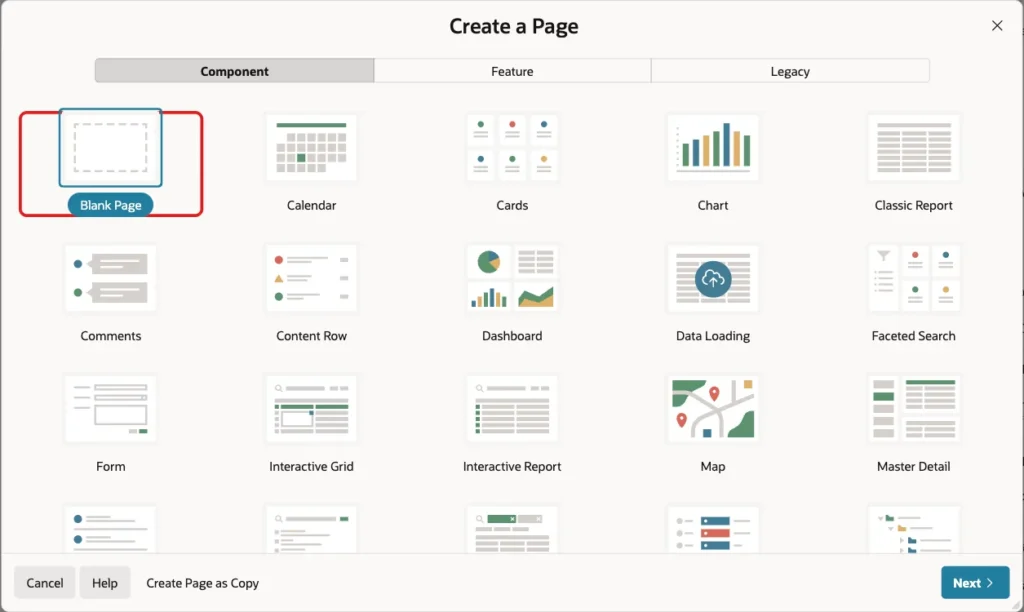
In App Builder, click Create Page. Select Blank Page and click Next:
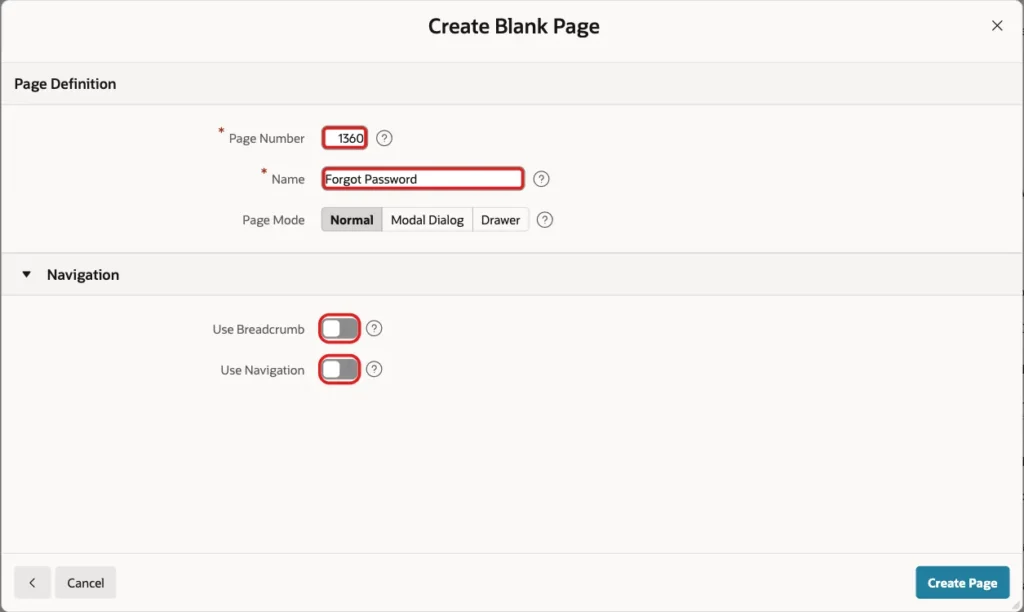
Enter Page Number 1360 and Name Forgot Password. Turn off Use Breadcrumb and Use Navigation, because visitors reach this page from the sign-in page. Click Create Page:
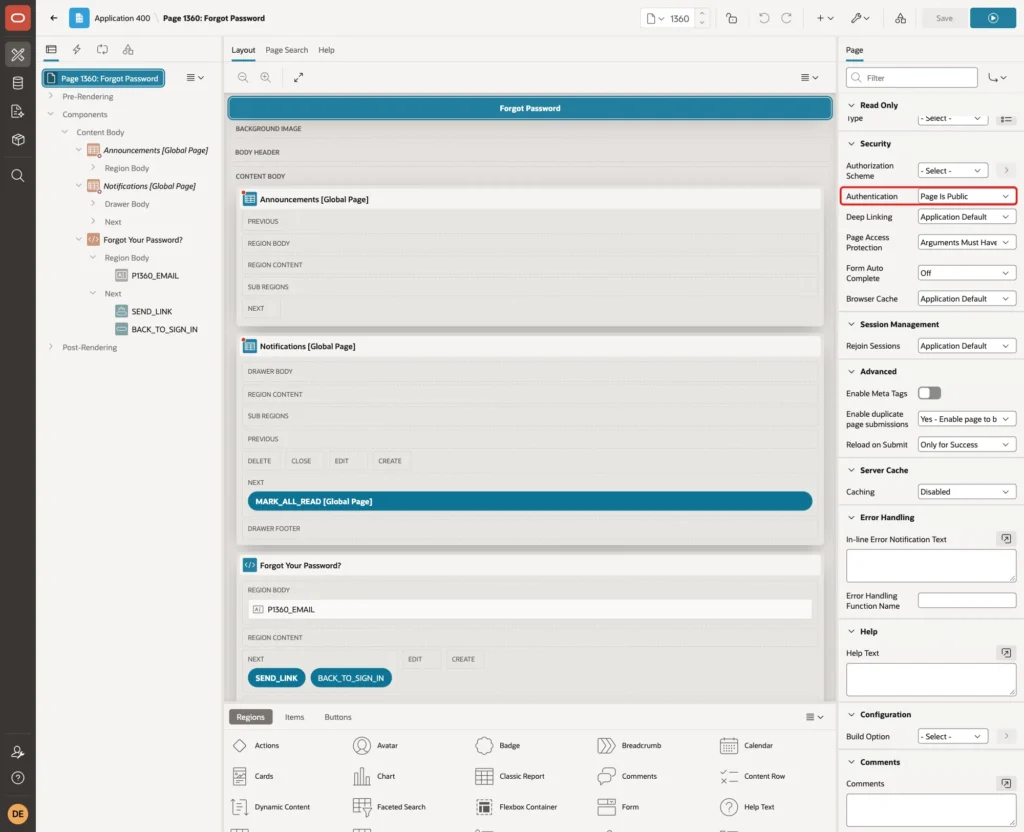
In Page Designer, select the page. Set Page Template to Login, the template of the sign-in page. Then, under Security, set Authentication to Page Is Public. A user who forgot the password has no session, so the page must not ask for a sign-in:
Create a Static Content region named Forgot Your Password? with the Login template in the Content Body slot. Put the sentence that explains the page into its HTML Code, for example: Enter the email address of your account. If it is registered, we send a link to choose a new password.
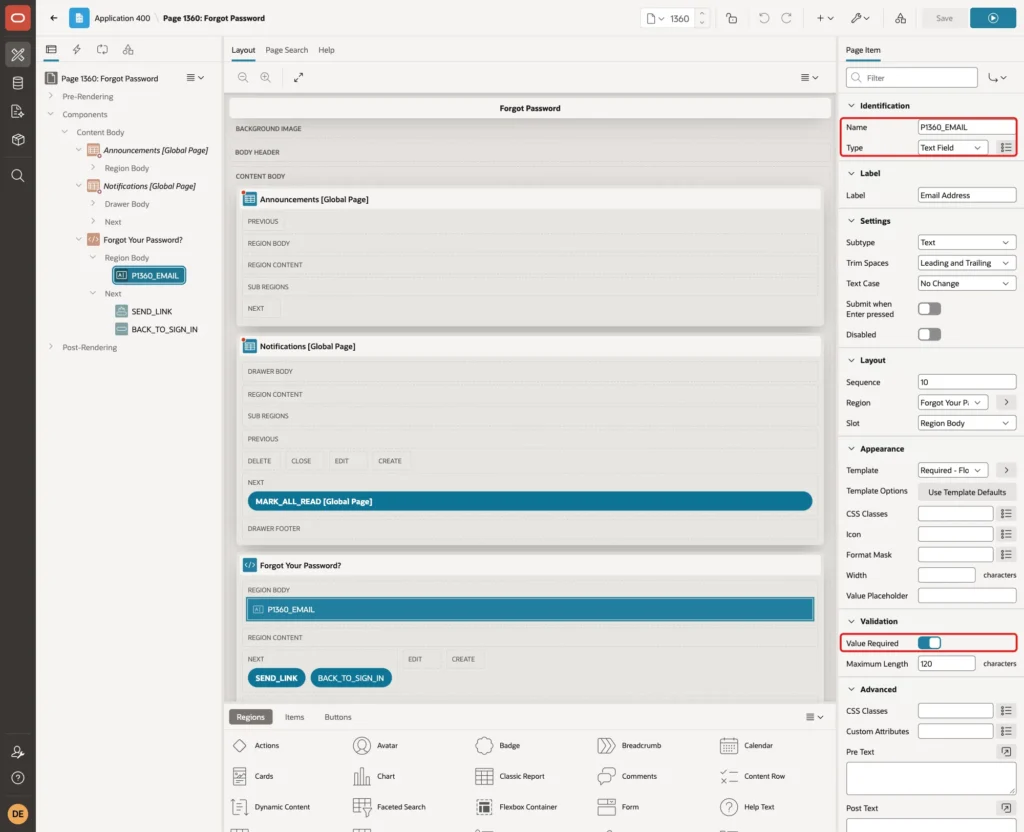
Create the item P1360_EMAIL of Type Text Field with the label Email Address and Maximum Length 120. Turn Value Required on and set the Template to Required - Floating:
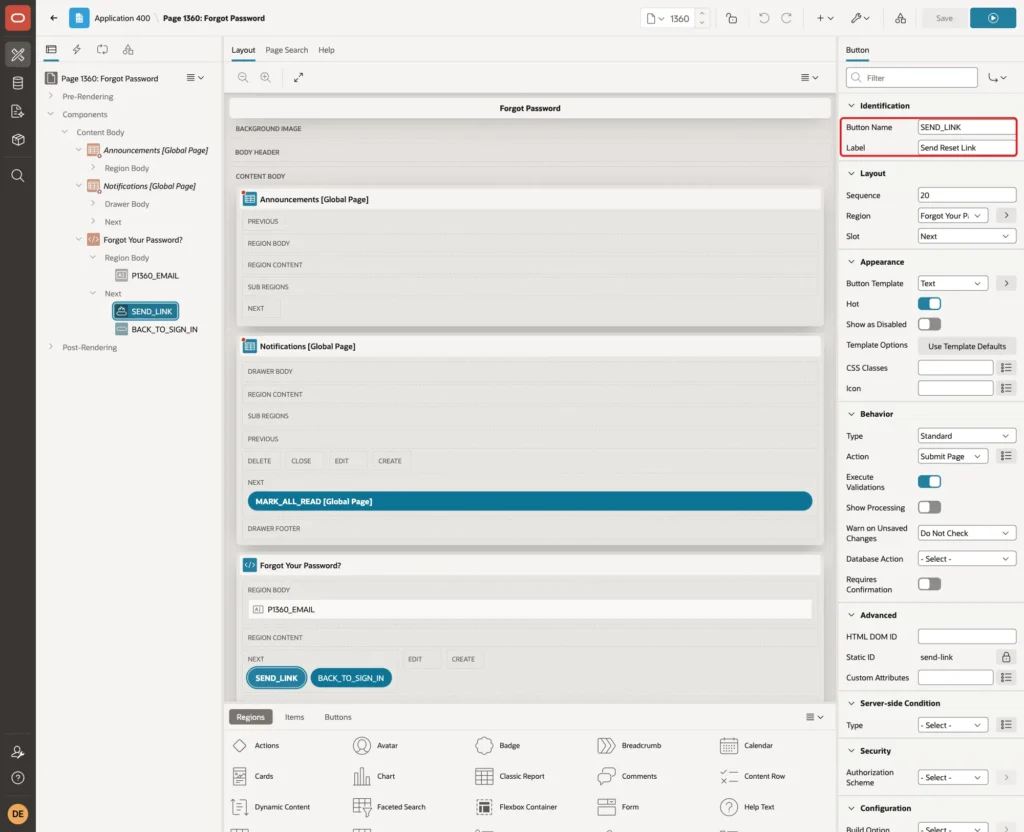
Create a button named SEND_LINK with the label Send Reset Link in the Next slot of the region. Turn Hot on, so it is the main button.
Create a second button, BACK_TO_SIGN_IN with the label Back to Sign In. Its Action is Redirect to Page in this Application with Target page 9999, and Warn on Unsaved Changes is Do Not Check:
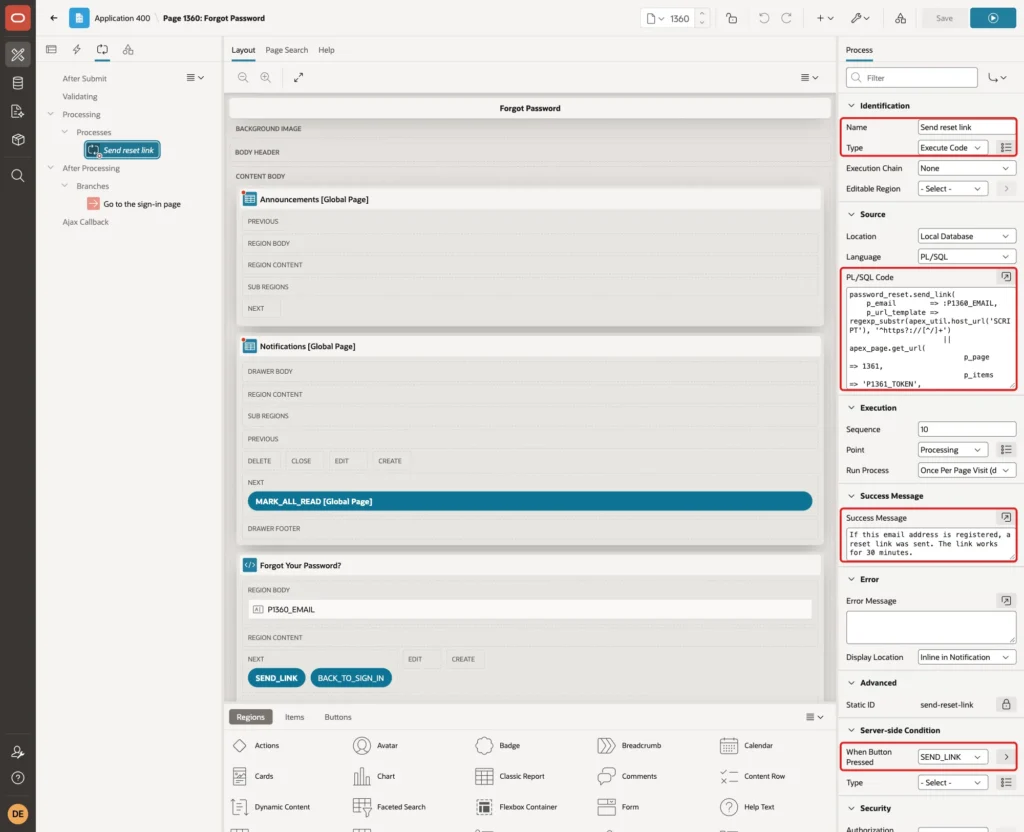
Open the Processing tab and create a process named Send reset link. Set Type to Execute Code and use the code below. The code builds the address of page 1361 with the word TOKENVALUE in place of the token. Set the Success Message to the text below and the Server-side Condition When Button Pressed to SEND_LINK:
Example:
password_reset.send_link(
    p_email        => :P1360_EMAIL,
    p_url_template => regexp_substr(apex_util.host_url('SCRIPT'), '^https?://[^/]+')
                      || apex_page.get_url(
                           p_page      => 1361,
                           p_items     => 'P1361_TOKEN',
                           p_values    => 'TOKENVALUE',
                           p_plain_url => true,
                           p_session   => 0));
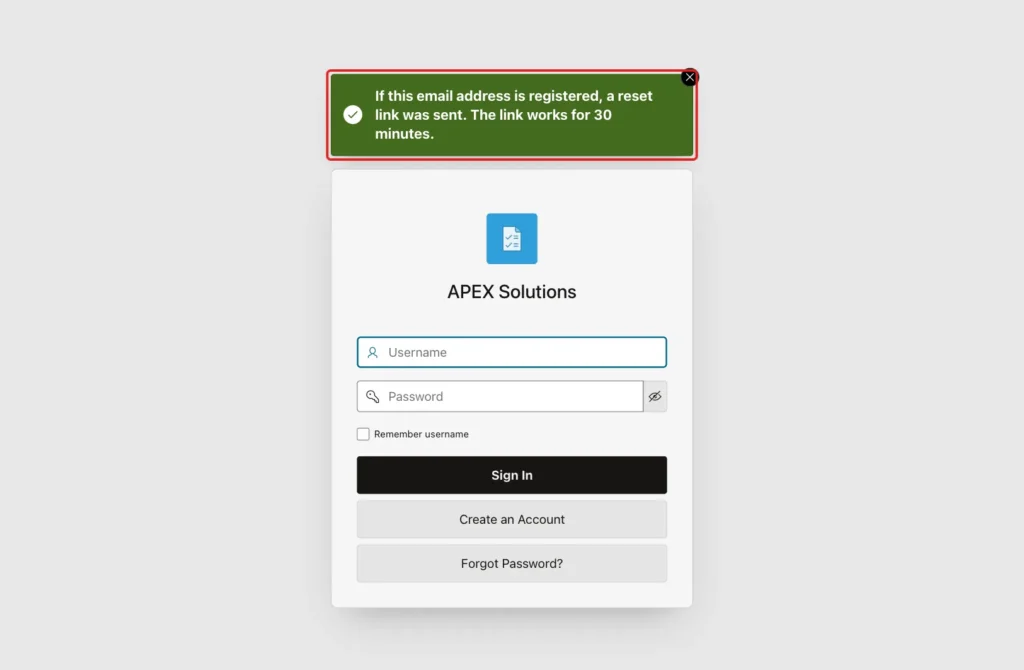
The success message is: If this email address is registered, a reset link was sent. The link works for 30 minutes. The same message appears for every address, so it tells nothing about the user table:
Under After Processing, create a branch to page 9999, the sign-in page, so the user sees the message there. Click Save.
Step 6: Create the Reset Password Page
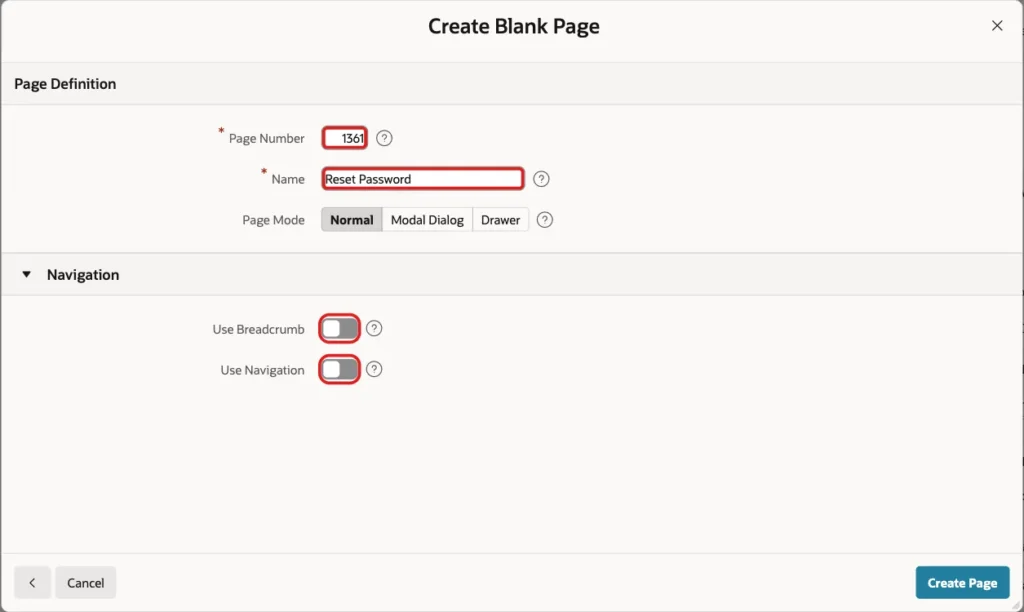
Create a second blank page with Page Number 1361 and Name Reset Password. Turn off breadcrumb and navigation again:
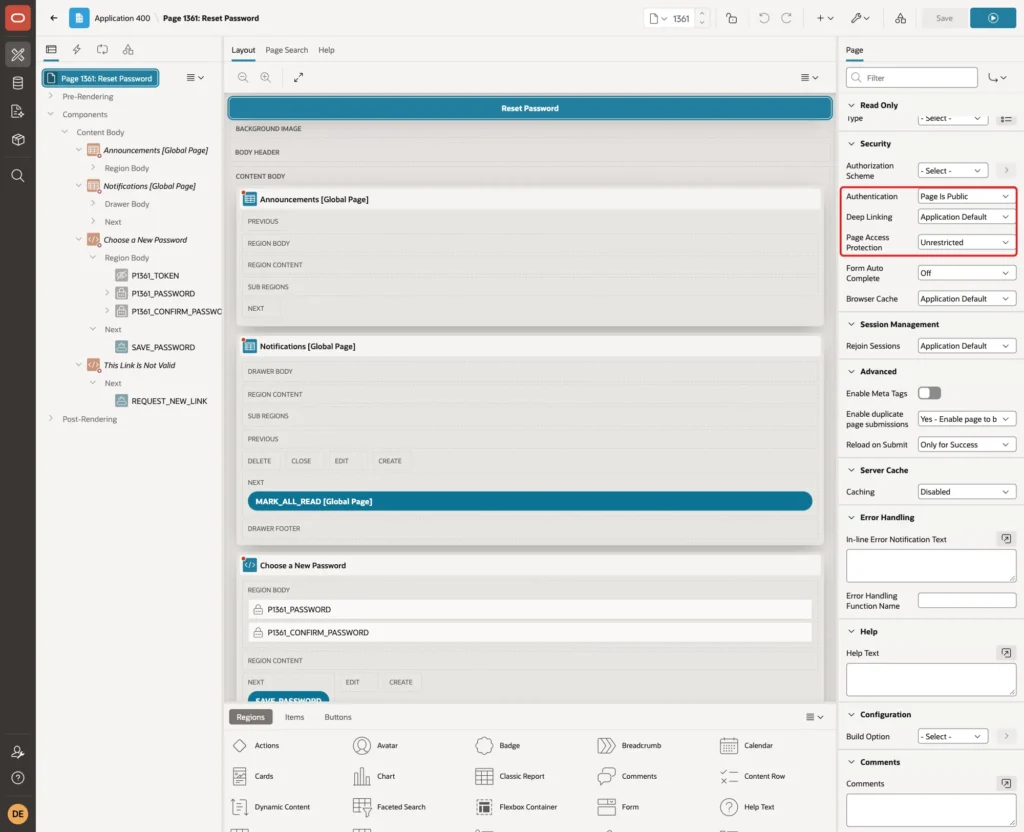
Select the page in Page Designer. Set Page Template to Login. Under Security, set Authentication to Page Is Public. Set Page Access Protection to Unrestricted, because the link in the email carries the token and cannot carry a checksum for a session that does not exist yet:
Create the region Choose a New Password, a Static Content region with the Login template in the Content Body slot. Create three items in it:
- P1361_TOKEN, Type Hidden. This item receives the token from the address.
- P1361_PASSWORD, Type Password, label New Password, Maximum Length 100.
- P1361_CONFIRM_PASSWORD, Type Password, label Confirm New Password, Maximum Length 100.
For the two password items, turn Value Required on and set the Template to Required - Floating. Set Session State Storage to Per Request (Memory Only), so passwords are never kept in the session.
For P1361_TOKEN also set the storage to Per Request. Turn Value Protected off, because the token comes from the address and not from the page. Session State Protection stays Unrestricted:
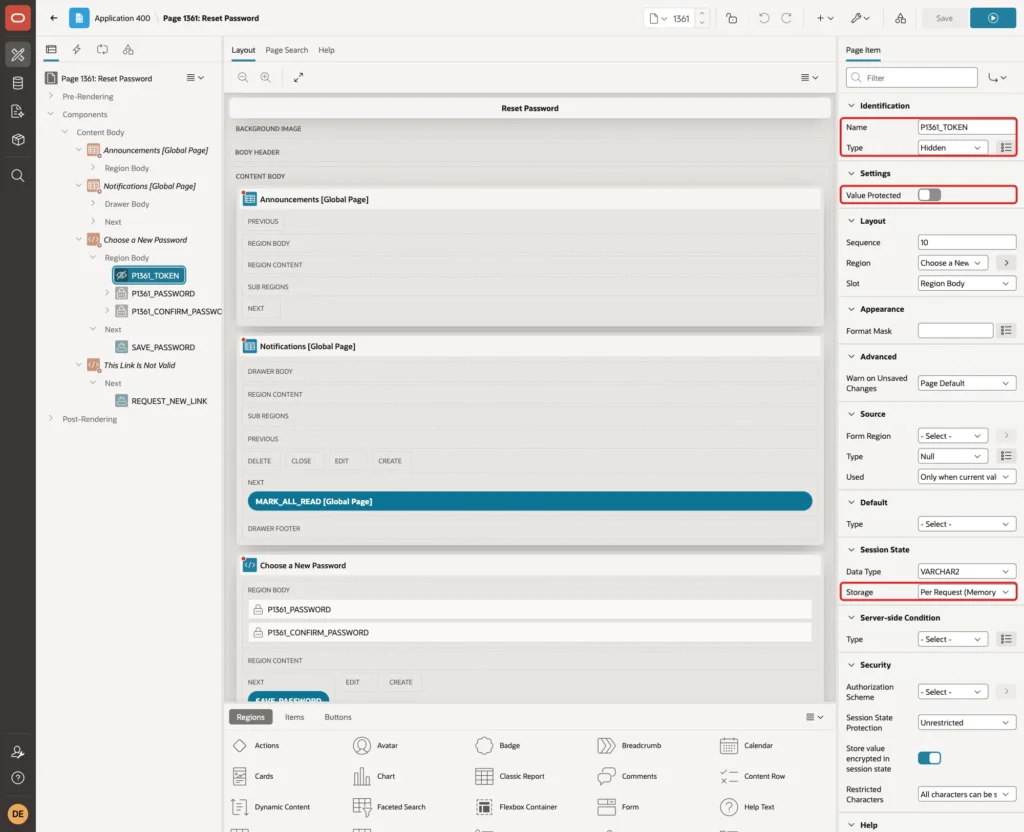
Create a button named SAVE_PASSWORD with the label Save New Password in the Next slot of this region, with Hot turned on. The region must appear only when the link is good. Under Server-side Condition, set Type to Expression, Language to PL/SQL and enter the expression below:
Example:
password_reset.token_user(:P1361_TOKEN) is not null
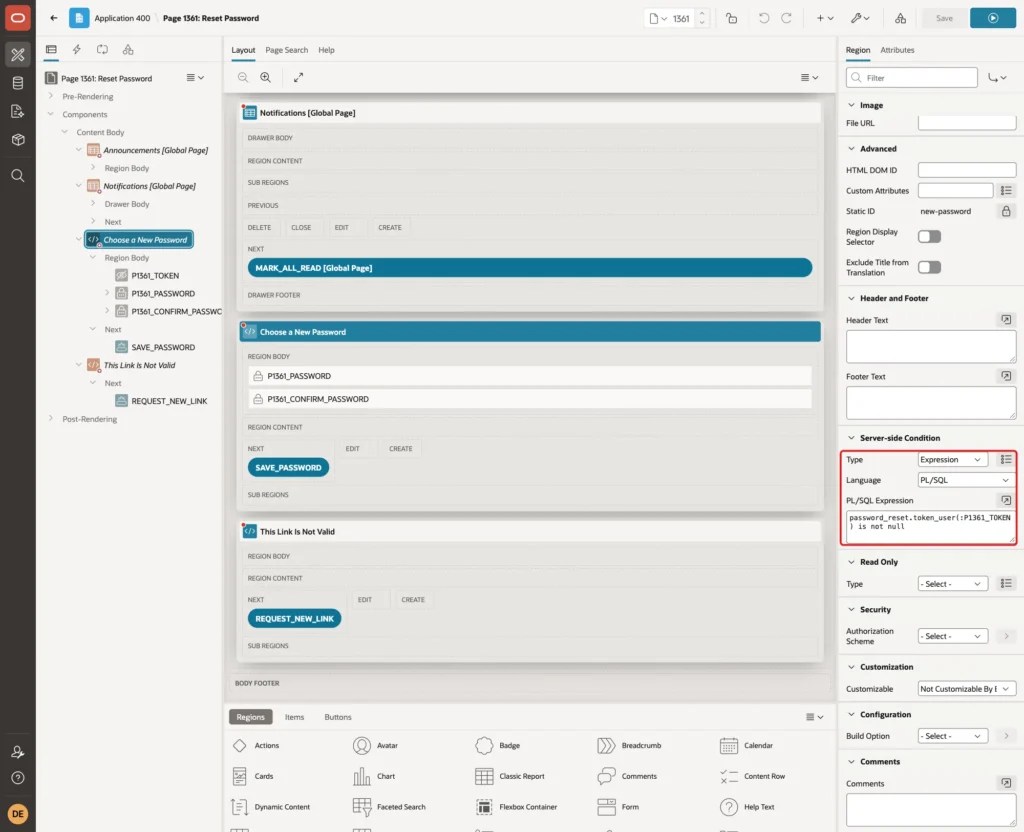
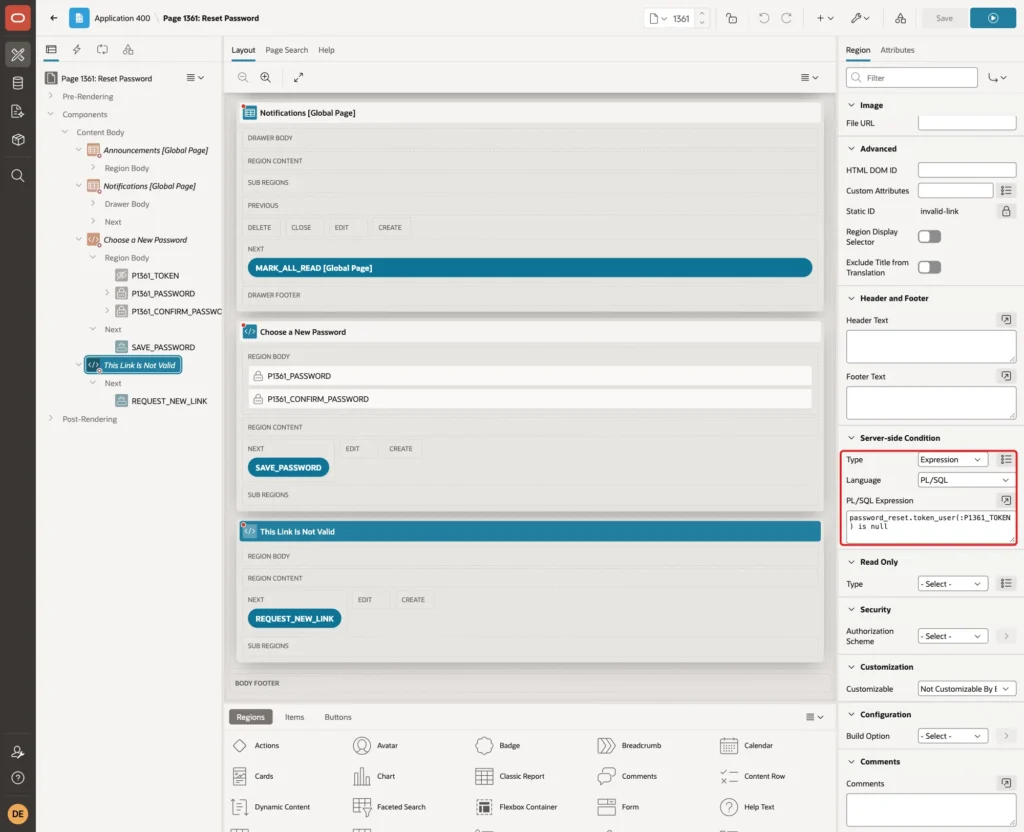
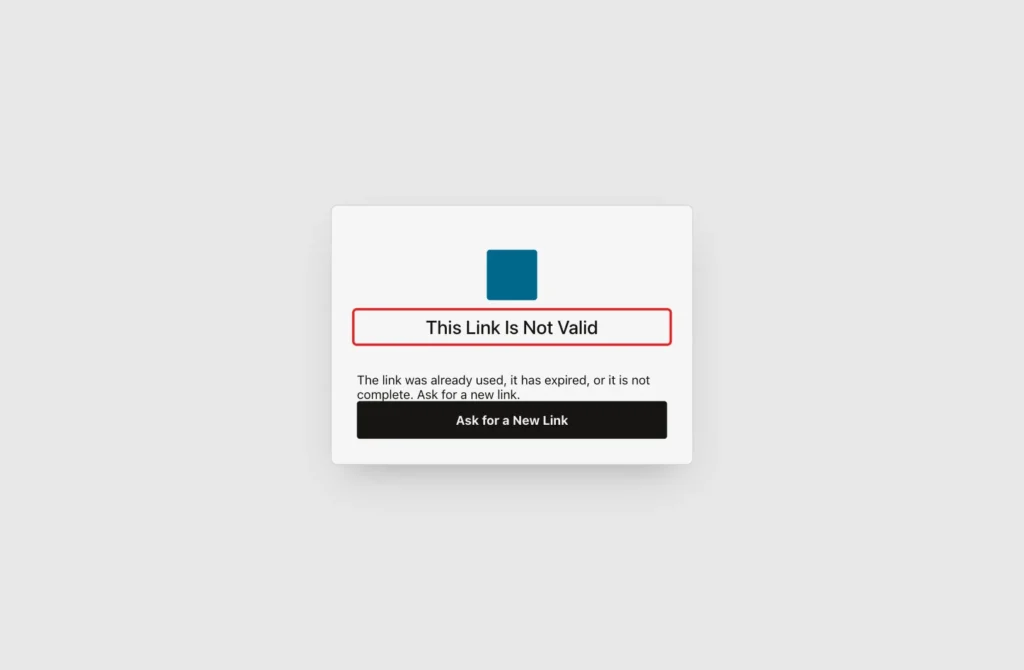
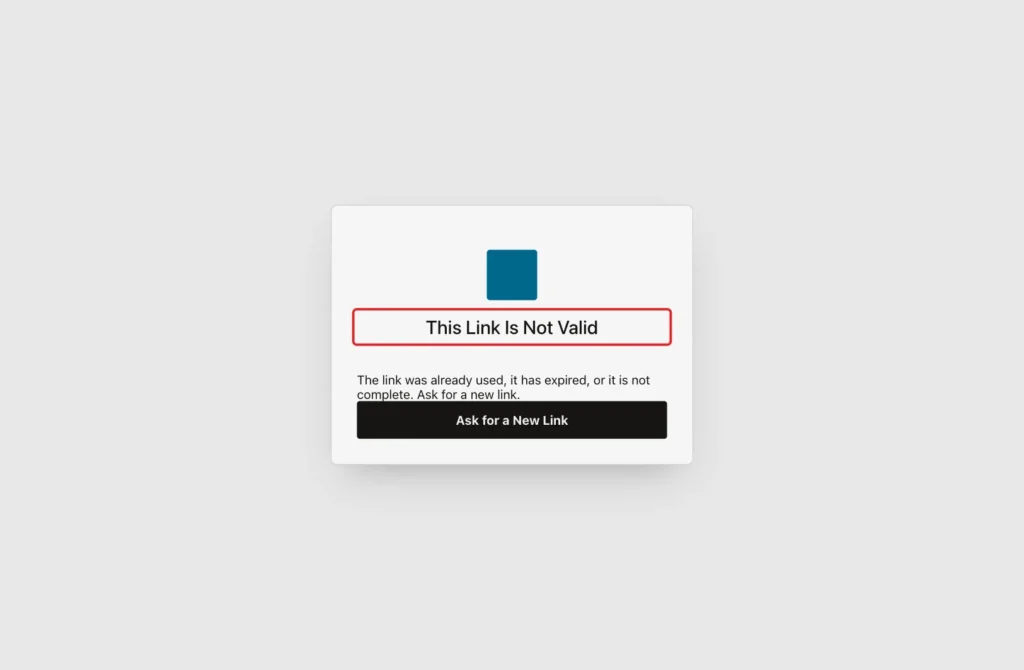
Create a second Static Content region named This Link Is Not Valid with the Login template. In its HTML Code, write: The link was already used, it has expired, or it is not complete. Ask for a new link. Add a Hot button REQUEST_NEW_LINK with the label Ask for a New Link that redirects to page 1360.
The condition is the opposite expression:
Example:
password_reset.token_user(:P1361_TOKEN) is null
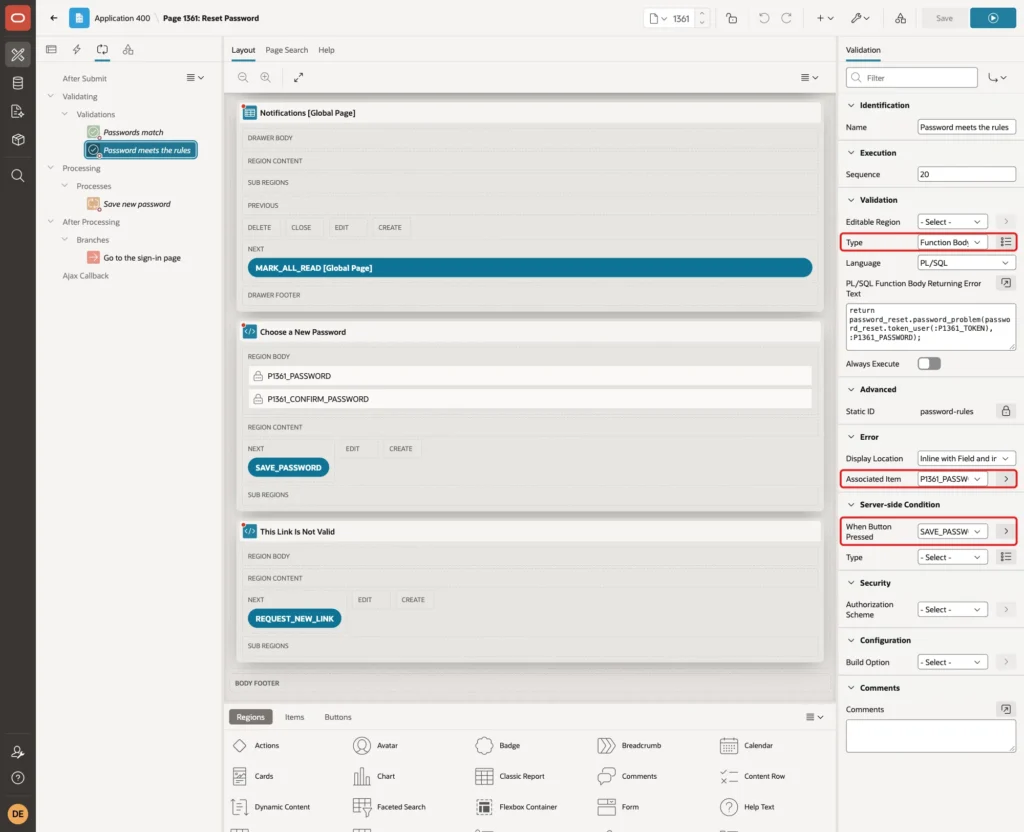
The page needs two validations, which run only when the button is pressed. Open the Processing tab. The first, Passwords match, has Type Expression with the PL/SQL expression below. Its Error Message is The passwords do not match. The Associated Item is P1361_CONFIRM_PASSWORD, and When Button Pressed is SAVE_PASSWORD:
Example:
:P1361_PASSWORD = :P1361_CONFIRM_PASSWORD
The second, Password meets the rules, has Type Function Body (returning error text) with the code below. The Associated Item is P1361_PASSWORD, and When Button Pressed is SAVE_PASSWORD:
Example:
return password_reset.password_problem(password_reset.token_user(:P1361_TOKEN), :P1361_PASSWORD);
Create the process Save new password with Type Execute Code and the code below. Set the Success Message to Your password was changed. Sign in with the new password. Set the Error Message to #SQLERRM_TEXT# and When Button Pressed to SAVE_PASSWORD:
Example:
password_reset.reset_password(
    p_token    => :P1361_TOKEN,
    p_password => :P1361_PASSWORD);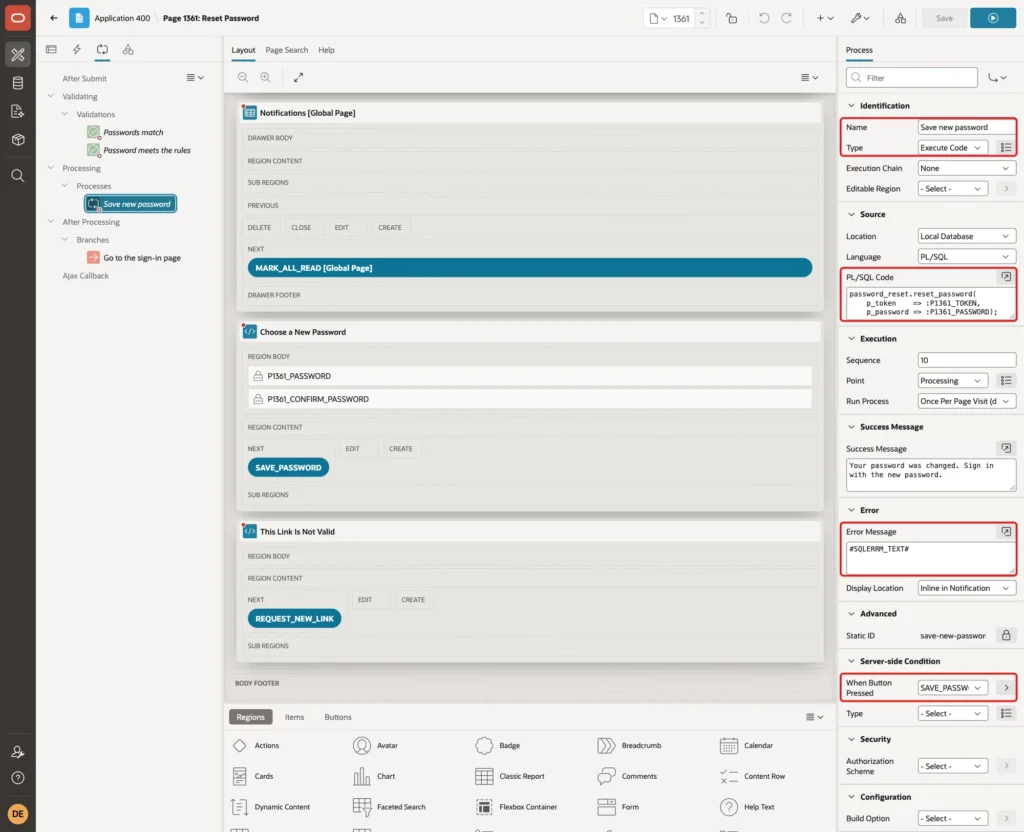
Under After Processing, create a branch to page 9999. Click Save. The validations already check the rules, and the package checks them again, so the database is protected even if someone posts the form without the page.
Step 7: Add a Link to the Sign-In Page
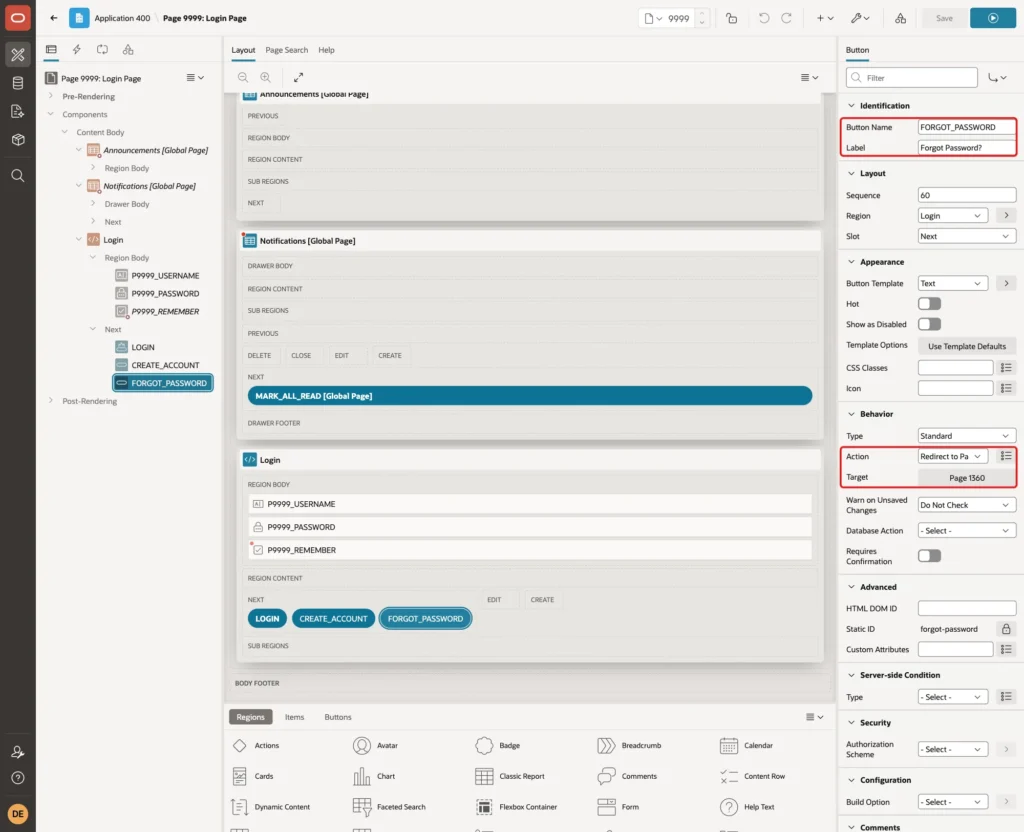
Open page 9999. In the region Login, create a button named FORGOT_PASSWORD with the label Forgot Password?. Put it in the Next slot with Sequence 60. Set Action to Redirect to Page in this Application with Target page 1360, and Warn on Unsaved Changes to Do Not Check:
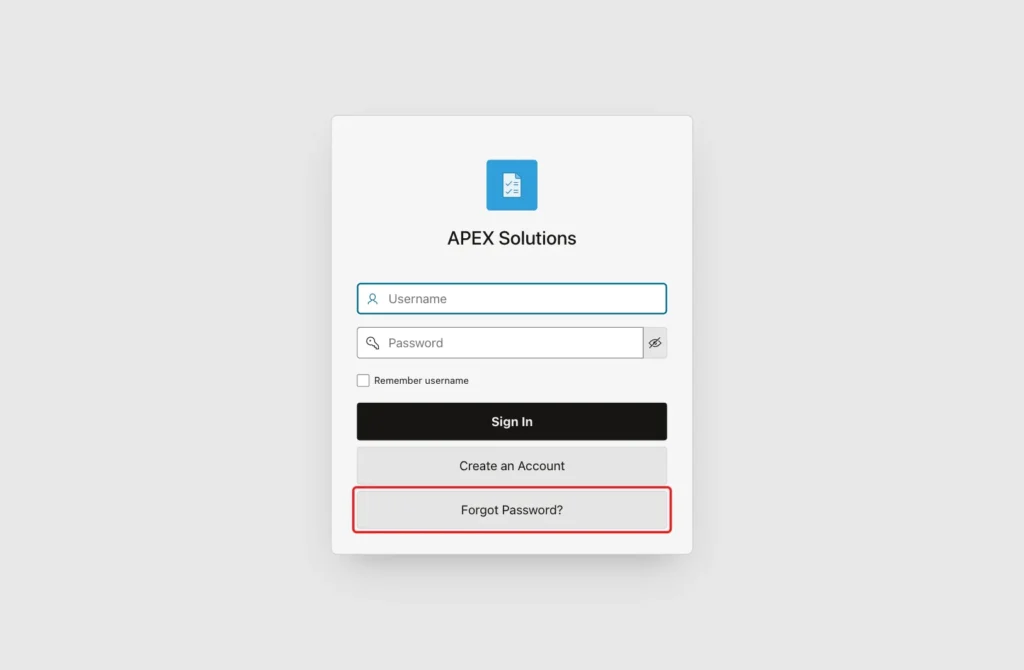
The sign-in page now shows the new button under Create an Account:
Step 8: Test the Flow in a Browser
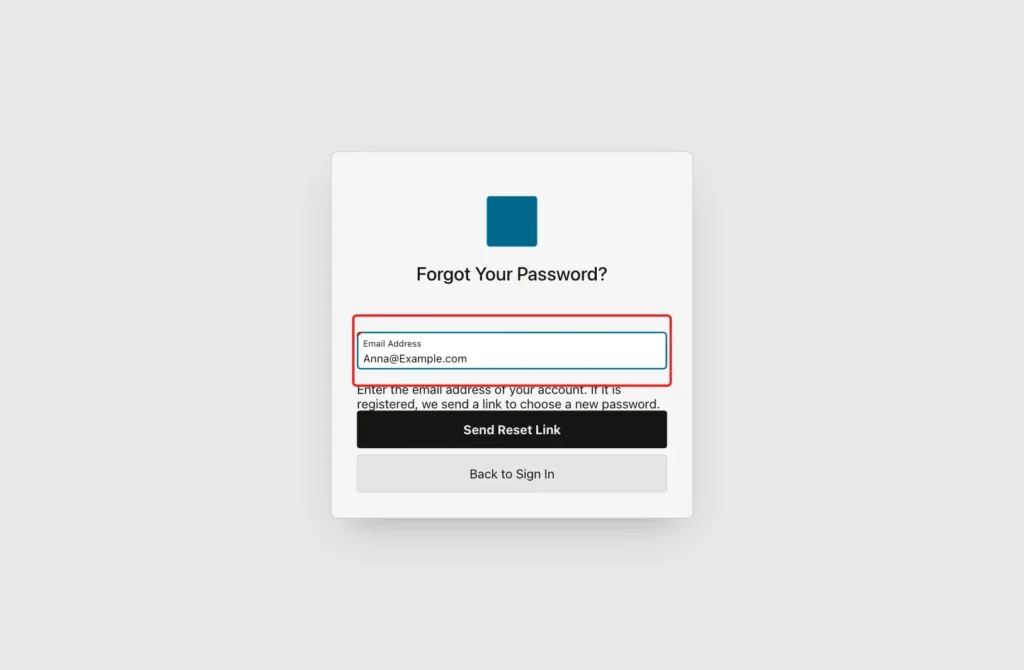
The tests ran in a browser without a session. A click on Forgot Password opens the public page. The email address was entered in capital letters, to test that it is matched in lower case:
After the click, the sign-in page showed the message. The message is the same for every address:
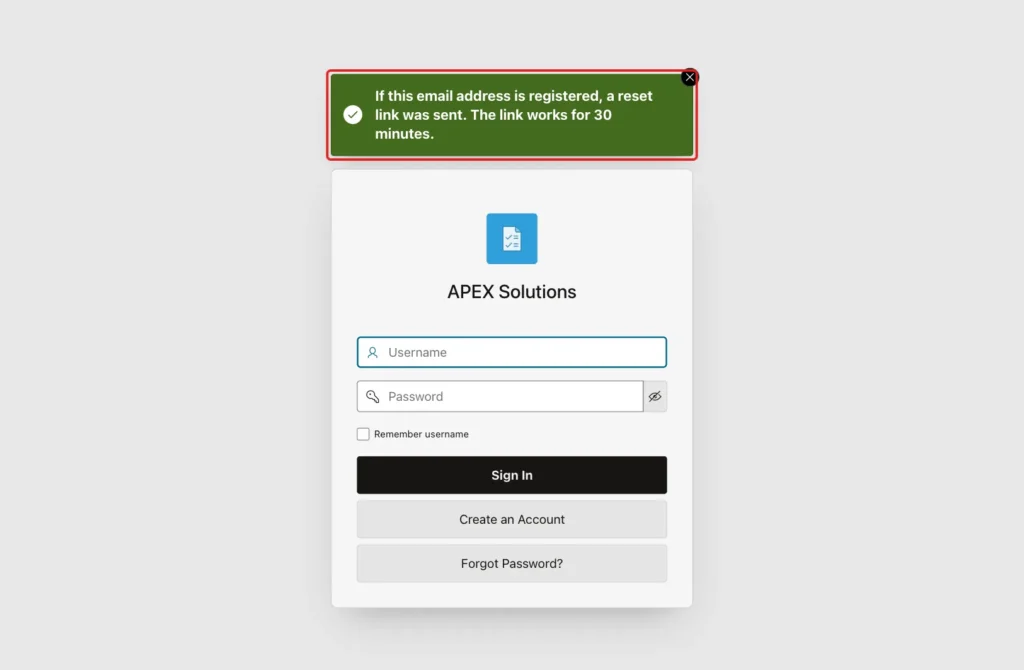
To test an unknown address, nobody@example.com was entered. The page showed exactly the same message, and no mail reached the test mail server:
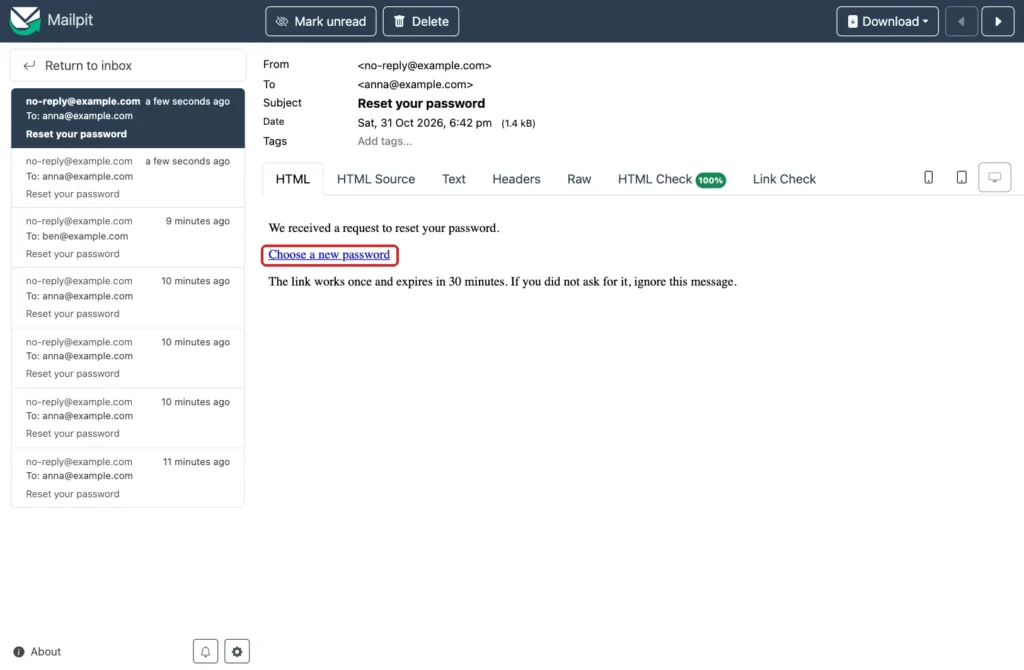
The mail arrived at a local test mail server, which catches every message so nothing reaches a real inbox. In your own system, the real SMTP settings go into the instance administration. The mail has the link, the validity time and a line for people who did not ask for it:
Anna asked for a link twice, so two mails arrived. The link of the first mail was opened and showed that it is not valid, because the second request replaced it:
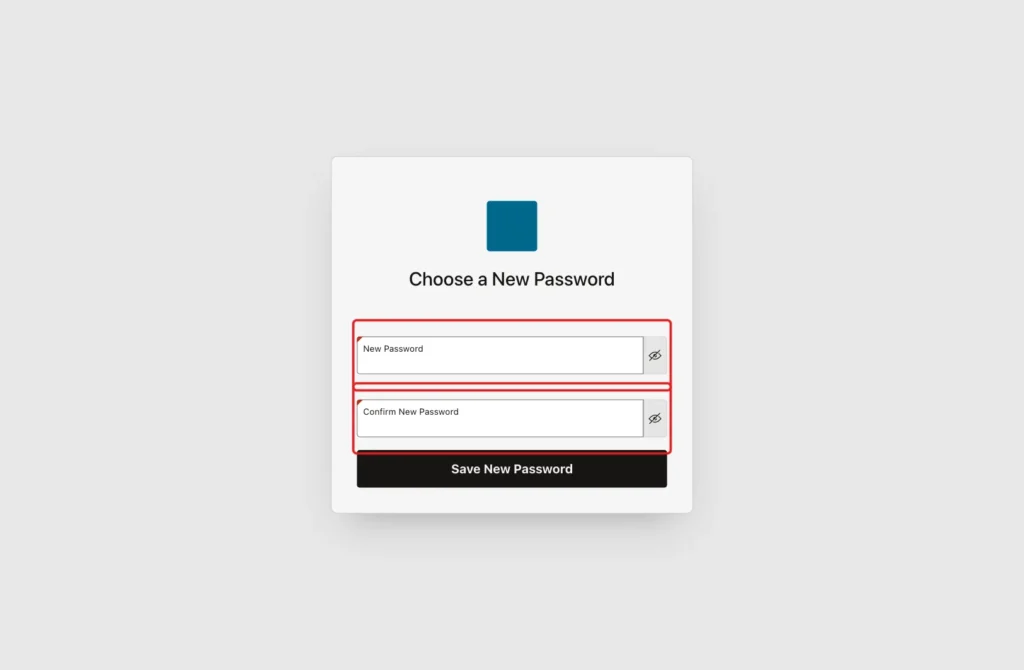
The link of the second mail opened the form with two empty password fields:
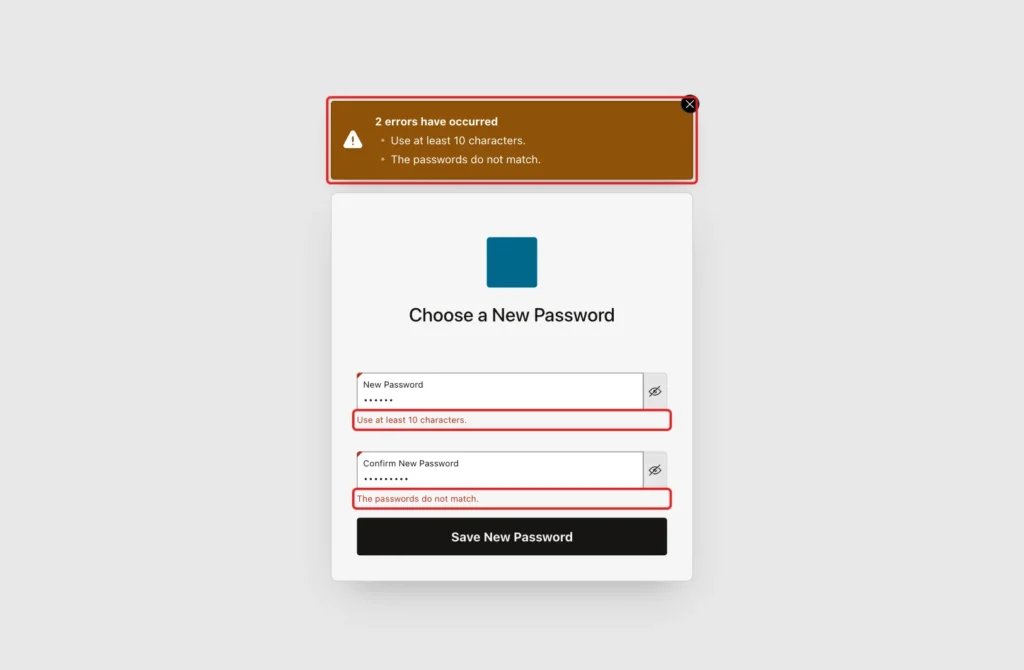
First, the password short1 and a different text in the confirmation were sent. Both rules answered at once, each next to its own field:
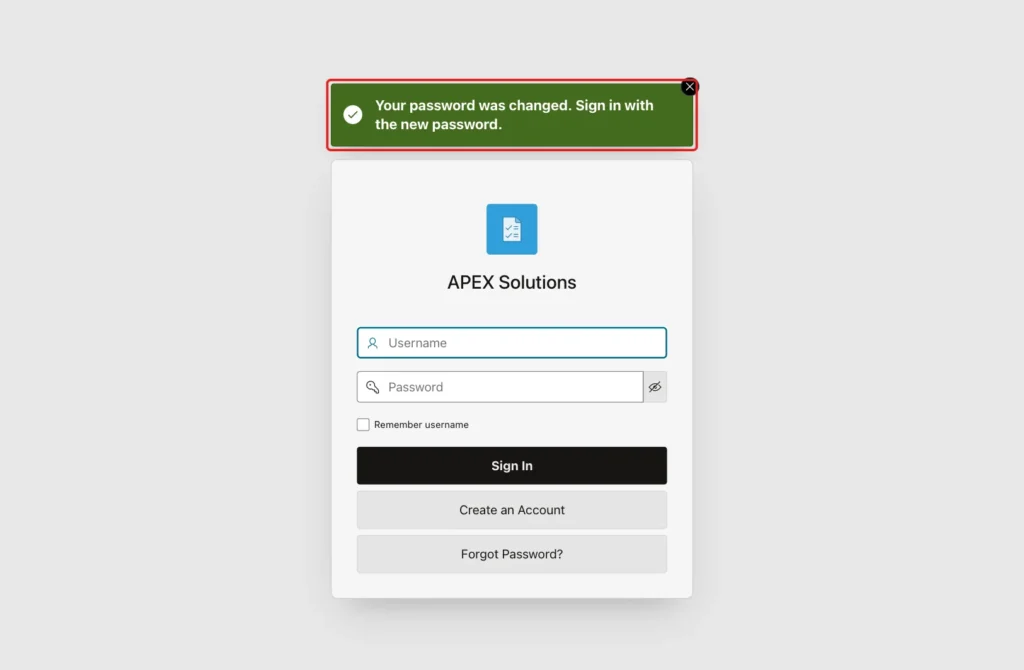
Then a good password was entered twice. The user came back to the sign-in page with the success message:
These results were checked next:
- The same link, opened again, showed This Link Is Not Valid, because it was used.
- A link with a changed token, and the page without any token, showed the same message.
- A link that was made 90 minutes old in the table showed the same message. The script for it is below.
Example:
update reset_tokens
set    created_on = systimestamp - interval '2' hour,
       expires_on = systimestamp - interval '90' minute
where  user_id = (select user_id from reset_users where username = 'RESET_BEN')
and    used_on is null;
commit;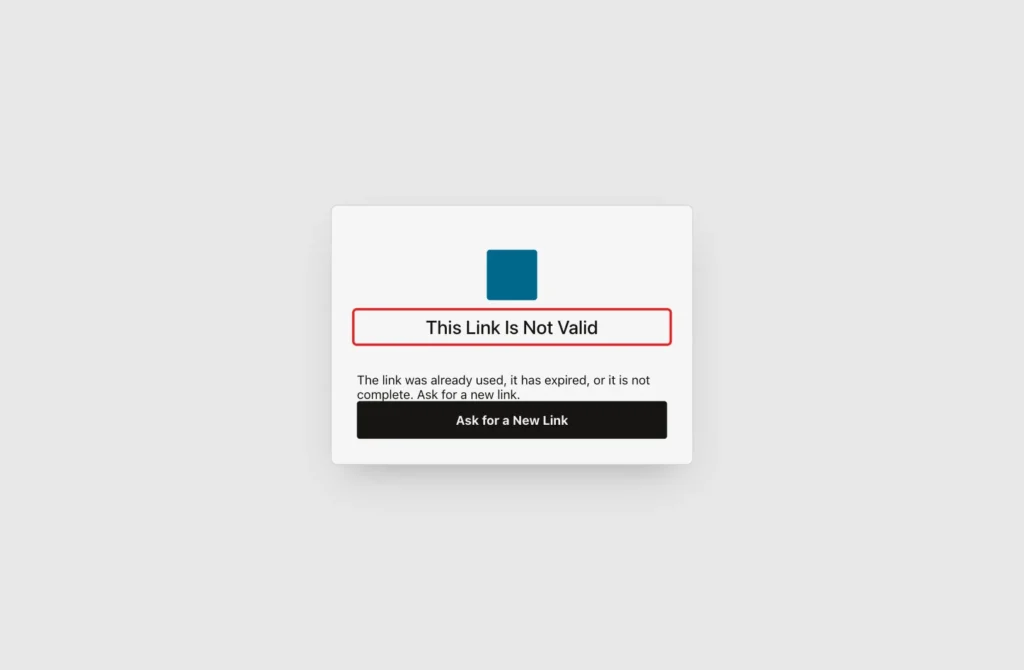
The tables confirm the result. The password of RESET_ANNA works, and the password of RESET_BEN does not, because Ben never used his link. Every token is stored as a hash of 64 characters, and no link is still open:
Example:
select u.username,
       case when password_reset.authenticate(u.username, '<password for RESET_NEW>') then 'TRUE' else 'FALSE' end as new_password_works,
       length(u.password_hash) as hash_length
from   reset_users u
order  by u.user_id;

select u.username,
       case when t.used_on is not null then 'USED'
            when t.expires_on <= systimestamp then 'EXPIRED'
            else 'OPEN' end as state,
       length(t.token_hash) as hash_length
from   reset_tokens t
join   reset_users u on u.user_id = t.user_id
order  by t.token_id;
Output:
USERNAME      NEW_PASSWORD_WORKS       HASH_LENGTH
_____________ _____________________ ______________
RESET_ANNA    TRUE                             128
RESET_BEN     FALSE                            128

USERNAME      STATE         HASH_LENGTH
_____________ __________ ______________
RESET_ANNA    EXPIRED                64
RESET_ANNA    USED                   64
RESET_BEN     EXPIRED                64
Things to Know
- In a first test, the package did not compile. A private function cannot be called inside a SQL statement, so the hashes are now first put into variables. The overload of APEX_MAIL.SEND for the plain text body also needs TO_CLOB.
- In a first test, the mail had an empty token. The text #TOKEN# in the template is a substitution string for APEX and was replaced by nothing, so the template uses the plain word TOKENVALUE. The address of the server and the path were also doubled, which the REGEXP_SUBSTR in the process fixes.
- APEX_MAIL.SEND only puts the mail in a queue, and a background job sends it. In the tests, the queue was pushed by hand, so the mail arrived without waiting.
- The sign-in itself uses a custom authentication scheme that calls password_reset.authenticate, as shown in the sign-up guide. In this test the function was tested in SQL, and the application kept its own scheme.
- The page does not tell a visitor if an address exists, but a script can still measure how long the answer takes. Add a CAPTCHA or a limit for requests from one address before you put the page on the internet.
- Delete old rows of RESET_TOKENS with a job. Rows that are expired or used are of no use.
- Send the link only by email, never show it on the page, and keep the validity short.
Related Guides
- Create Change Password Screen for Custom Authentication in Oracle Apex
- Implementing Email OTP Verification After Login in Oracle APEX
Conclusion
A token table, a package and two public pages give you a forgot password flow that is safe. The link is random, works once and ends after 30 minutes. Only the hash of the token is stored, and every answer to a stranger is the same.
The tests showed that an old link, a used link, an expired link and a wrong token are all refused, and that a bad password does not use up the link. Keep the rules in the package, so the pages and the SQL tests never disagree.
See my articles more often when you search Google.
