
Not every page of an application needs a sign-in. A price list, a help page or a sign-up form should open for any visitor. In Oracle APEX you do this with one page property, Authentication, set to Page Is Public. The rest of the application stays protected.
This guide builds a public list of items that anyone can open from a link, and a second page that still asks for a sign-in. It uses items with a price and a cost as the example, and the same steps work for any table.
The guide How to Build a Sign-Up Page for New Users in Oracle APEX uses a public page as one of its parts. This guide is only about the public page itself: what it may show, how to open it with a plain link and how to prove that the other pages are still protected.
Step 1: Create the Table
SHOWCASE_ITEMS holds the items. PUBLISHED decides which rows may be shown to the public, and COST_PRICE is internal data that must never appear on a public page. One item, the Prototype Keyboard, is not published.
Example:
create table showcase_items (
  item_id     integer generated by default on null as identity,
  item_name   varchar2(100 char) not null,
  description varchar2(400 char),
  list_price  number(10,2) not null,
  cost_price  number(10,2) not null,
  published   varchar2(1 char) default on null 'Y' not null,
  created_on  date default on null sysdate not null,
  constraint showcase_items_pk primary key (item_id),
  constraint showcase_items_name_uk unique (item_name),
  constraint showcase_items_list_ck check (list_price >= 0),
  constraint showcase_items_cost_ck check (cost_price >= 0),
  constraint showcase_items_pub_ck check (published in ('Y','N'))
);

create index showcase_items_pub_ix on showcase_items (published);

insert into showcase_items (item_name, description, list_price, cost_price, published) values ('Desk Lamp', 'LED lamp with three brightness levels', 29.00, 14.50, 'Y');
insert into showcase_items (item_name, description, list_price, cost_price, published) values ('Notebook A5', 'Hardcover notebook, 200 ruled pages', 8.50, 3.10, 'Y');
insert into showcase_items (item_name, description, list_price, cost_price, published) values ('Wireless Mouse', 'Quiet-click mouse with USB receiver', 19.90, 9.75, 'Y');
insert into showcase_items (item_name, description, list_price, cost_price, published) values ('Standing Desk Frame', 'Electric height-adjustable frame', 349.00, 210.00, 'Y');
insert into showcase_items (item_name, description, list_price, cost_price, published) values ('Prototype Keyboard', 'Not released yet', 120.00, 80.00, 'N');
commit;

select item_id, item_name, list_price, cost_price, published from showcase_items order by item_id;
Output:
Table SHOWCASE_ITEMS created.

Index SHOWCASE_ITEMS_PUB_IX created.

1 row inserted.

1 row inserted.

1 row inserted.

1 row inserted.

1 row inserted.

Commit complete.

   ITEM_ID ITEM_NAME                 LIST_PRICE    COST_PRICE PUBLISHED
__________ ______________________ _____________ _____________ ____________
         1 Desk Lamp                         29          14.5 Y
         2 Notebook A5                      8.5           3.1 Y
         3 Wireless Mouse                  19.9          9.75 Y
         4 Standing Desk Frame              349           210 Y
         5 Prototype Keyboard               120            80 N
A few details in the table:
- Named constraints keep the primary key, the unique item name and the checks easy to find.
- PUBLISHED and CREATED_ON use DEFAULT ON NULL, so an insert that leaves them out still gets a value.
- The index on PUBLISHED supports the filter that the public page uses.
Step 2: Decide What the Public Page May Show
A public page runs for anybody on the internet, so its query is the only protection of the data. Select only the columns that are safe to show, and filter the rows in the query itself. Do not rely on hiding a column in the report, because the data would still be sent to the browser.
The query below returns only published items and leaves out COST_PRICE. Run it in SQL first:
Example:
select item_name, description, list_price
from   showcase_items
where  published = 'Y'
order  by item_name;
Output:
ITEM_NAME              DESCRIPTION                                 LIST_PRICE
______________________ ________________________________________ _____________
Desk Lamp              LED lamp with three brightness levels               29
Notebook A5            Hardcover notebook, 200 ruled pages                8.5
Standing Desk Frame    Electric height-adjustable frame                   349
Wireless Mouse         Quiet-click mouse with USB receiver               19.9
Four items are returned. The Prototype Keyboard and all cost prices are not part of the result.
Step 3: Create the Page
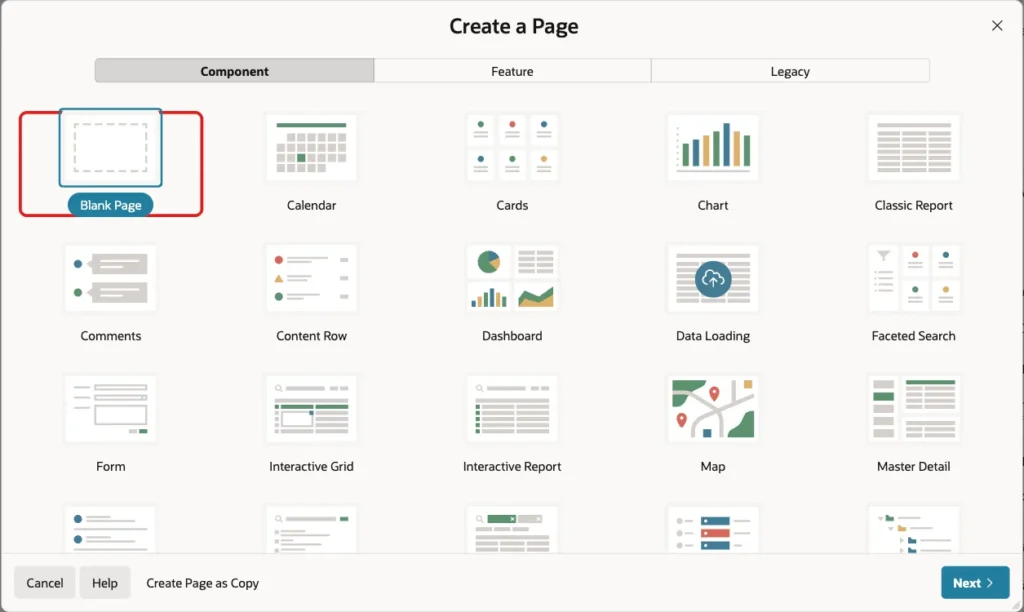
In App Builder, click Create Page. Select Blank Page and click Next:
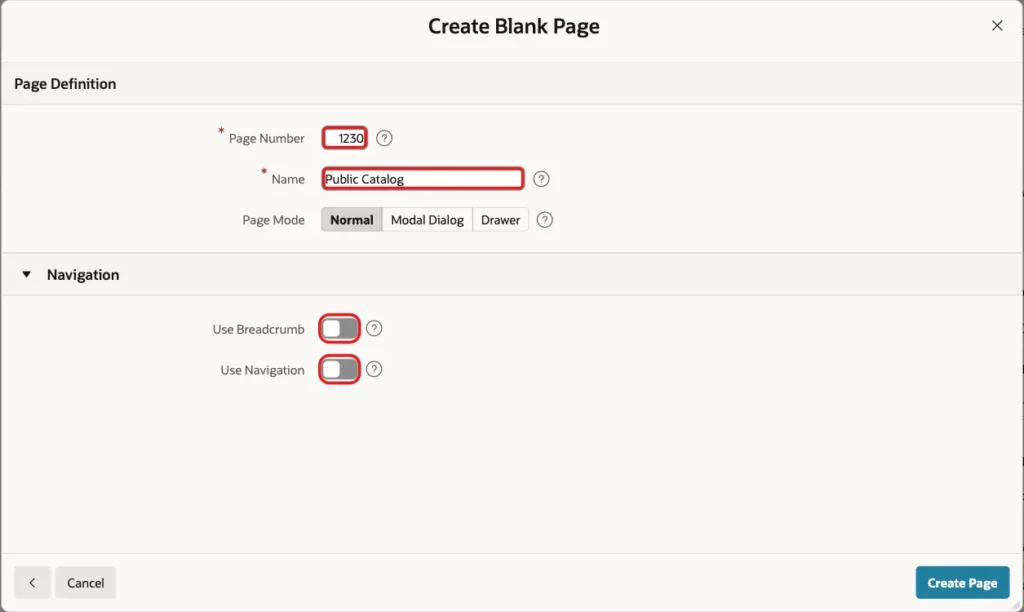
Enter Page Number 1230 and Name Public Catalog. Turn off Use Breadcrumb and Use Navigation. Visitors reach this page by a link, so it needs no menu entry. Click Create Page:
Step 4: Add the Report
In Page Designer, create a region in the Body slot. Set the Title to Our Items and the Type to Classic Report. Under Source, set Location to Local Database and Type to SQL Query, and paste the query from Step 2:
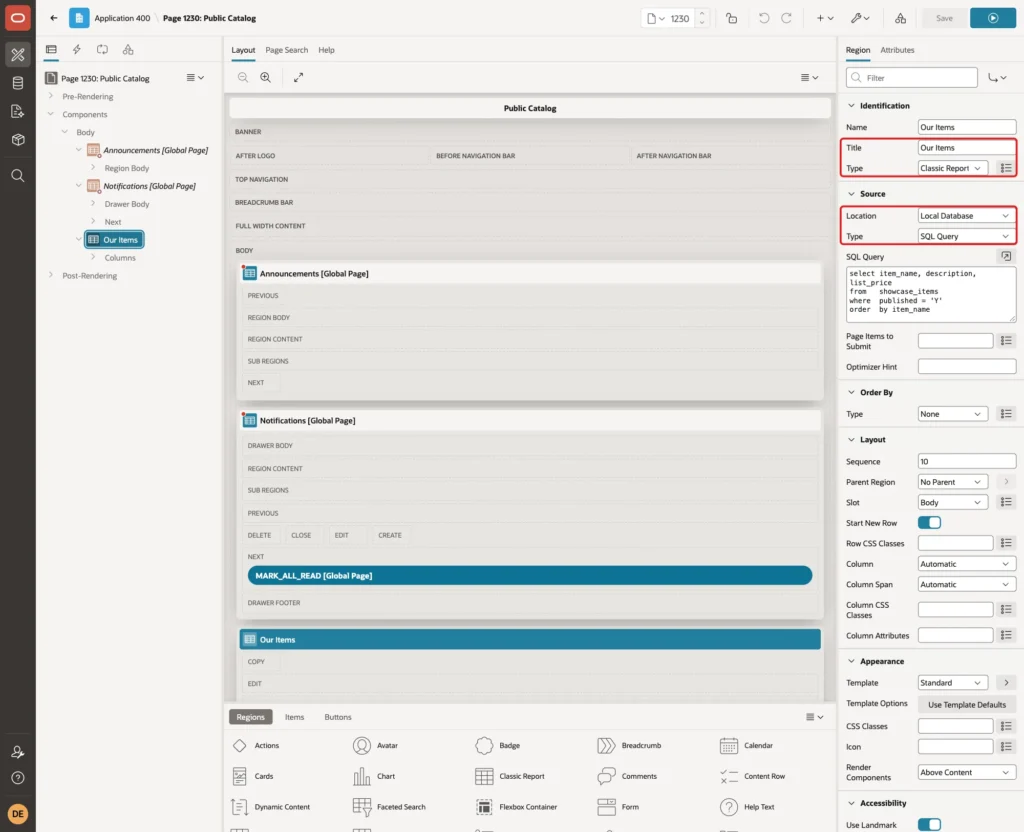
Set the column headings to Item, Description and Price. The query is written for this page only. If somebody later adds a column to the table, it will not appear here until the query changes.
Step 5: Make the Page Public
Click the page name at the top of the tree to select the page. In the property list, under Security, set Authentication to Page Is Public. This is the setting that removes the sign-in requirement for this page:
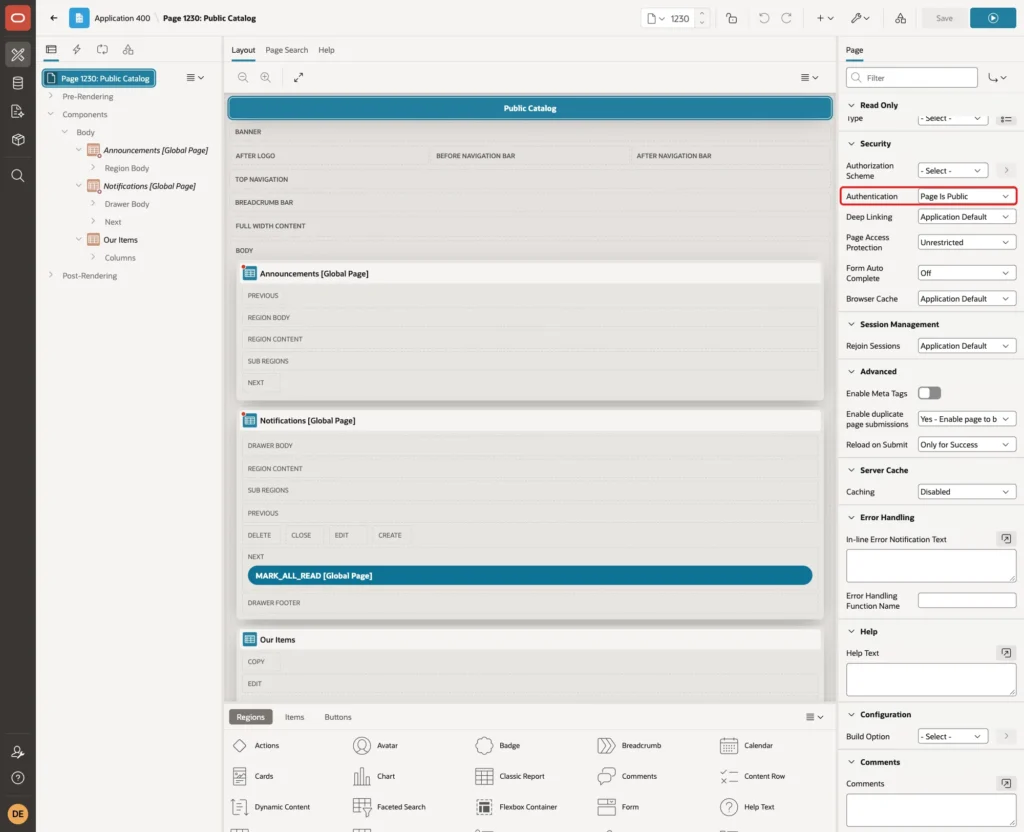
Leave Page Access Protection at Unrestricted. The page has no items that change data, so a visitor can open it with a plain address. Click Save.
The page alias is PUBLIC-CATALOG. The address of the page is therefore the application address followed by the alias:
Example:
https://localhost:8443/ords/r/solutions/apex-solutions/public-catalog
This is a deep link. It has no session number, and APEX creates a new session for the visitor when the page opens.
Step 6: Create a Page That Stays Protected
To prove the difference, create a second page in the same way. Use Page Number 1231 and Name Item Costs. Add a Classic Report region with the query below.
This page shows the cost prices and the unpublished item, so it must not be public. Do not change Authentication. The page then follows the application setting, which requires a sign-in.
Example:
select item_name, list_price, cost_price, published
from   showcase_items
order  by item_name
Step 7: Test the Pages
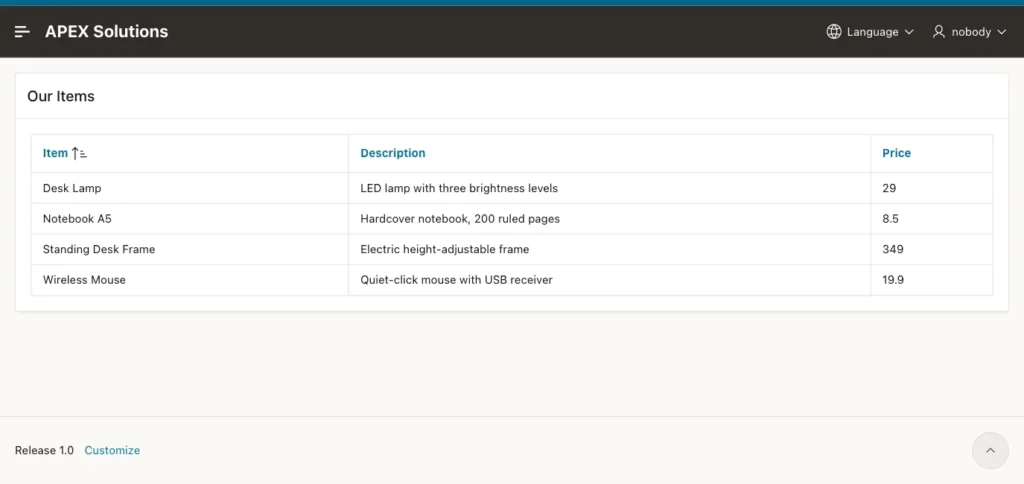
The tests use a new browser session with no sign-in. First, open the public address. The page opens at once, shows the four published items and shows the user name nobody in the header. The Prototype Keyboard and the cost prices are not on the page:
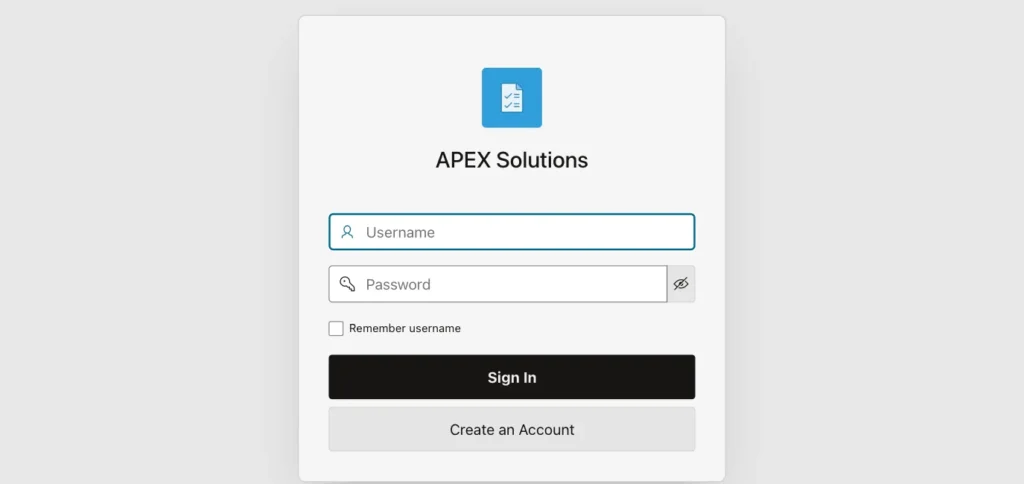
Next, in the same browser, open the address of the Item Costs page (item-costs). APEX sends the visitor to the sign-in page, and no data is shown:
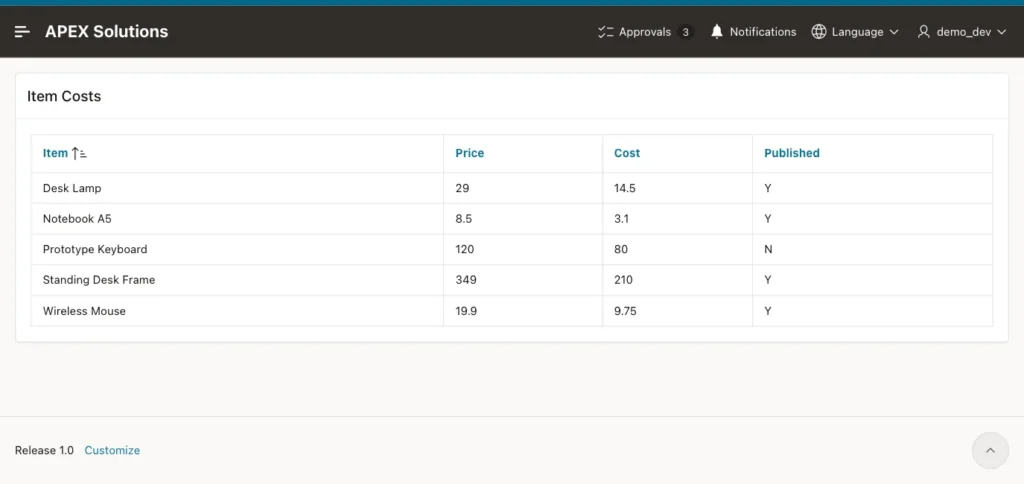
Now sign in as DEMO_DEV and open the Item Costs page. It shows all five items, the cost prices and the unpublished item:
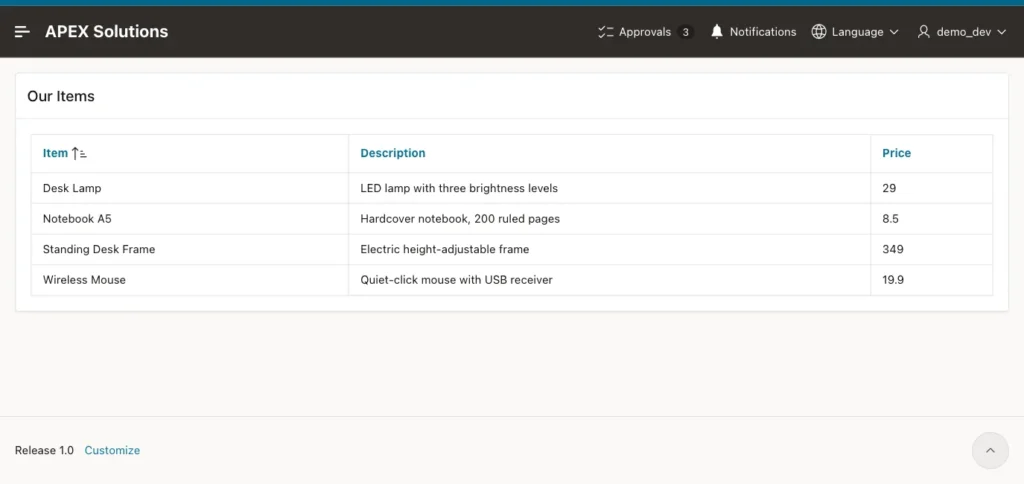
The public page also works for a signed-in user. When the page was opened with the session number of the signed-in user, the header showed demo_dev:
In the last test, the same browser opened the plain public address again, without a session number. The page opened with the user name nobody. The sign-in of the first tab was not reused, because the plain address starts a new session. The application setting Rejoin Sessions was left at Application Default, and this was the result with it.
Things to Know
- A public page has no user. Do not use APP_USER in its queries to decide what to show, because the value is nobody.
- Do not put data of a person on a public page, and do not build a link on a public page that points to data by a number that can be guessed.
- Keep sensitive columns out of the query, as in Step 2, instead of hiding them in the report.
- Every page you do not mark as public keeps the application setting, so adding a new public page does not open the others.
- Do not add a page with a form that changes data as a public page without extra checks. Anybody can send a request to it.
Related Guides
- How to Build a Sign-Up Page for New Users in Oracle APEX
- How to Show Login History and Active Users in Oracle APEX
Conclusion
A public page needs one property: Authentication set to Page Is Public. Because anybody can open it, the query must return only safe columns and rows. Everything else in the application keeps asking for a sign-in.
The tests showed that a visitor without a sign-in could open the catalog page and not the cost page, and that the catalog showed no unpublished item and no cost price.
See my articles more often when you search Google.
