
A leaderboard ranks people or items by a score and shows only the best ones. It answers a simple question at a glance: who is ahead right now? Rank badges, avatars and a bar that compares each score with the leader make the list easy to read.
Oracle APEX can build this with no custom JavaScript. This guide uses the RANK analytic function for fair ties, a Content Row region for the layout, and a select list with one dynamic action to switch the time period. It also shows why FETCH FIRST 10 ROWS ONLY is the wrong filter for a top 10.
Oracle APEX Cards, Content Rows, and Template Components explains the Content Row component in general. Here it is used for one job: a ranked top 10 list that changes with a period filter.
The example ranks sales reps by the amount of their closed deals. The same steps work for any table with a score, such as points, tickets solved or page views.
Step 1: Create the Tables
Two tables hold the data:
- SALES_REPS has one row per person: the name and a region.
- CLOSED_DEALS has one row per deal: the rep, a deal name, the close date and the amount.
The sample deals are dated relative to today (trunc(sysdate) minus a number of days). The periods in this guide then give the same results on any day you run the script.
Example:
create table sales_reps (
  rep_id      number generated by default on null as identity,
  full_name   varchar2(100) not null,
  region      varchar2(20)  not null,
  constraint sales_reps_pk primary key (rep_id),
  constraint sales_reps_name_uk unique (full_name),
  constraint sales_reps_region_ck check (region in ('North', 'South', 'East', 'West'))
);

create table closed_deals (
  deal_id     number generated by default on null as identity,
  rep_id      number        not null,
  deal_name   varchar2(100) not null,
  closed_on   date          not null,
  amount      number(12,2)  not null,
  constraint closed_deals_pk primary key (deal_id),
  constraint closed_deals_rep_fk foreign key (rep_id) references sales_reps (rep_id),
  constraint closed_deals_amount_ck check (amount > 0)
);

create index closed_deals_rep_ix on closed_deals (rep_id);
create index closed_deals_closed_ix on closed_deals (closed_on);

insert into sales_reps (full_name, region)
select full_name, region
from (values
  ('Aisha Khan',    'North'),
  ('Marco Rossi',   'South'),
  ('Priya Nair',    'East'),
  ('Daniel Brooks', 'West'),
  ('Elena Petrova', 'North'),
  ('Kenji Sato',    'East'),
  ('Sofia Alvarez', 'South'),
  ('Liam Walsh',    'West'),
  ('Fatima Zahra',  'North'),
  ('Noah Fischer',  'East'),
  ('Grace Lee',     'South'),
  ('Omar Haddad',   'West'),
  ('Hannah Berg',   'North'),
  ('Victor Lima',   'East'),
  ('Ravi Menon',    'South')
) v (full_name, region);

insert into closed_deals (rep_id, deal_name, closed_on, amount)
select r.rep_id, v.deal_name, trunc(sysdate) - v.days_ago, v.amount
from (values
  ('Aisha Khan',    'Cloud Migration',      5,  42000),
  ('Aisha Khan',    'Support Renewal',     40,  18000),
  ('Aisha Khan',    'Data Platform',      200,  30000),
  ('Marco Rossi',   'POS Rollout',         12,  25000),
  ('Marco Rossi',   'Warehouse Scanners',  70,  30000),
  ('Priya Nair',    'HR Portal',            3,  20000),
  ('Priya Nair',    'Payroll Upgrade',     50,  28000),
  ('Daniel Brooks', 'Security Audit',      20,  48000),
  ('Daniel Brooks', 'Training Package',   100,   5000),
  ('Elena Petrova', 'CRM Licenses',         8,  21000),
  ('Elena Petrova', 'Mobile App',          85,  20000),
  ('Kenji Sato',    'Network Refresh',     60,  37500),
  ('Sofia Alvarez', 'Backup Service',      15,  13000),
  ('Sofia Alvarez', 'Office 365 Setup',    45,  20000),
  ('Liam Walsh',    'ERP Module',          25,  29000),
  ('Fatima Zahra',  'Laptop Fleet',         2,  12000),
  ('Fatima Zahra',  'Printer Lease',       66,  14500),
  ('Noah Fischer',  'BI Dashboards',       35,  22000),
  ('Grace Lee',     'Website Redesign',    10,   9000),
  ('Grace Lee',     'SEO Retainer',        80,  13000),
  ('Omar Haddad',   'Call Center',         55,  18000),
  ('Omar Haddad',   'Fleet Tracking',     120,  40000),
  ('Omar Haddad',   'Telephony',          300,  25000),
  ('Hannah Berg',   'Kiosk Pilot',         28,   9500),
  ('Hannah Berg',   'Data Center Move',   400,  50000),
  ('Victor Lima',   'Retail Analytics',   150,  75000)
) v (full_name, deal_name, days_ago, amount)
join sales_reps r on r.full_name = v.full_name;

commit;

set pagesize 100

select r.full_name, count(d.deal_id) deals, nvl(sum(d.amount), 0) total_amount
from sales_reps r
left join closed_deals d on d.rep_id = r.rep_id
group by r.full_name
order by total_amount desc, r.full_name;
Output:
Table SALES_REPS created.

Table CLOSED_DEALS created.

Index CLOSED_DEALS_REP_IX created.

Index CLOSED_DEALS_CLOSED_IX created.

15 rows inserted.

26 rows inserted.

Commit complete.

FULL_NAME           DEALS    TOTAL_AMOUNT
________________ ________ _______________
Aisha Khan              3           90000
Omar Haddad             3           83000
Victor Lima             1           75000
Hannah Berg             2           59500
Marco Rossi             2           55000
Daniel Brooks           2           53000
Priya Nair              2           48000
Elena Petrova           2           41000
Kenji Sato              1           37500
Sofia Alvarez           2           33000
Liam Walsh              1           29000
Fatima Zahra            2           26500
Grace Lee               2           22000
Noah Fischer            1           22000
Ravi Menon              0               0

15 rows selected.
- CLOSED_DEALS_REP_FK links each deal to its rep, and CLOSED_DEALS_REP_IX indexes that foreign key for the join.
- CLOSED_DEALS_CLOSED_IX supports the date filter of the period list.
- CLOSED_DEALS_AMOUNT_CK rejects zero and negative amounts, so a bad row cannot lower a score.
- SALES_REPS_NAME_UK allows each name once, and SALES_REPS_REGION_CK allows only four regions.
Ravi Menon has no deals. Victor Lima and Hannah Berg only have deals older than 90 days, so they will appear and disappear as the period changes.
Step 2: Rank the Scores with RANK, Not FETCH FIRST
The obvious way to get a top 10 is to sort and cut after ten rows. That breaks as soon as two scores are equal. First compare the three ranking functions for the last 90 days:
Example:
set pagesize 100
select r.full_name,
       sum(d.amount) total_amount,
       row_number() over (order by sum(d.amount) desc) row_no,
       rank()       over (order by sum(d.amount) desc) rank_no,
       dense_rank() over (order by sum(d.amount) desc) dense_no
from sales_reps r
join closed_deals d on d.rep_id = r.rep_id
where d.closed_on >= trunc(sysdate) - 90
group by r.full_name
order by total_amount desc, r.full_name;
Output:
FULL_NAME           TOTAL_AMOUNT    ROW_NO    RANK_NO    DENSE_NO
________________ _______________ _________ __________ ___________
Aisha Khan                 60000         1          1           1
Marco Rossi                55000         2          2           2
Daniel Brooks              48000         3          3           3
Priya Nair                 48000         4          3           3
Elena Petrova              41000         5          5           4
Kenji Sato                 37500         6          6           5
Sofia Alvarez              33000         7          7           6
Liam Walsh                 29000         8          8           7
Fatima Zahra               26500         9          9           8
Grace Lee                  22000        10         10           9
Noah Fischer               22000        11         10           9
Omar Haddad                18000        12         12          10
Hannah Berg                 9500        13         13          11

13 rows selected.
- ROW_NUMBER gives every row its own number. Daniel Brooks and Priya Nair have the same total, but one of them is 3 and the other 4.
- RANK gives equal totals the same rank and then skips: two reps share rank 3, and the next one is 5. This is how sports tables rank.
- DENSE_RANK does not skip, so rank 10 is already the twelfth row (Omar Haddad).
Now try FETCH FIRST, once with ONLY and once WITH TIES:
Example:
set pagesize 100
select r.full_name, sum(d.amount) total_amount
from sales_reps r
join closed_deals d on d.rep_id = r.rep_id
where d.closed_on >= trunc(sysdate) - 90
group by r.full_name
order by total_amount desc
fetch first 10 rows only;

select r.full_name, sum(d.amount) total_amount
from sales_reps r
join closed_deals d on d.rep_id = r.rep_id
where d.closed_on >= trunc(sysdate) - 90
group by r.full_name
order by total_amount desc
fetch first 10 rows with ties;
Output:
FULL_NAME           TOTAL_AMOUNT
________________ _______________
Aisha Khan                 60000
Marco Rossi                55000
Priya Nair                 48000
Daniel Brooks              48000
Elena Petrova              41000
Kenji Sato                 37500
Sofia Alvarez              33000
Liam Walsh                 29000
Fatima Zahra               26500
Noah Fischer               22000

10 rows selected.

FULL_NAME           TOTAL_AMOUNT
________________ _______________
Aisha Khan                 60000
Marco Rossi                55000
Priya Nair                 48000
Daniel Brooks              48000
Elena Petrova              41000
Kenji Sato                 37500
Sofia Alvarez              33000
Liam Walsh                 29000
Fatima Zahra               26500
Noah Fischer               22000
Grace Lee                  22000

11 rows selected.
FETCH FIRST 10 ROWS ONLY dropped Grace Lee, although her total equals Noah Fischer's. Which of the two is cut is not defined. WITH TIES keeps both and returns 11 rows.
The leaderboard uses RANK and keeps every row with a rank of 10 or better. It gives the same rows as WITH TIES, and it also returns the rank number to show in the badge.
Step 3: Write the Leaderboard Query
The region query adds the values the Content Row needs: the initials for the avatar, a rank label and a badge state, and the bar length as a percentage of the leader's total:
Example:
select rep_id,
       full_name,
       region,
       apex_string.get_initials(full_name) as initials,
       deal_count,
       total_amount,
       rank_no,
       '#' || rank_no as rank_label,
       case rank_no when 1 then 'success' when 2 then 'info' when 3 then 'warning' end as rank_state,
       round(100 * total_amount / max(total_amount) over ()) as pct_of_leader
from (
  select r.rep_id,
         r.full_name,
         r.region,
         count(*) as deal_count,
         sum(d.amount) as total_amount,
         rank() over (order by sum(d.amount) desc) as rank_no
  from   sales_reps r
  join   closed_deals d on d.rep_id = r.rep_id
  where  :P830_PERIOD is null
     or  d.closed_on >= trunc(sysdate) - case :P830_PERIOD
                                            when '30'  then 30
                                            when '90'  then 90
                                            when '365' then 365
                                          end
  group by r.rep_id, r.full_name, r.region
)
where rank_no <= 10
order by rank_no, full_name- The inner query sums the deals per rep and ranks the totals. The outer query keeps rank 10 and better.
- apex_string.get_initials turns Aisha Khan into AK for the avatar.
- RANK_STATE gives the badges of ranks 1, 2 and 3 the colors of the states success, info and warning. Other ranks get the default badge.
- max(total_amount) over () is the leader's total. PCT_OF_LEADER is 100 for the leader and smaller for everyone else.
The period filter uses the page item P830_PERIOD. An empty value means all time. The CASE expression accepts only the three values of the select list: 30, 90 and 365 days.
Why not to_number(:P830_PERIOD)? The first version of this page used it. Step 9 shows what happened when a forged value reached the query.
Step 4: Create the Content Row Page
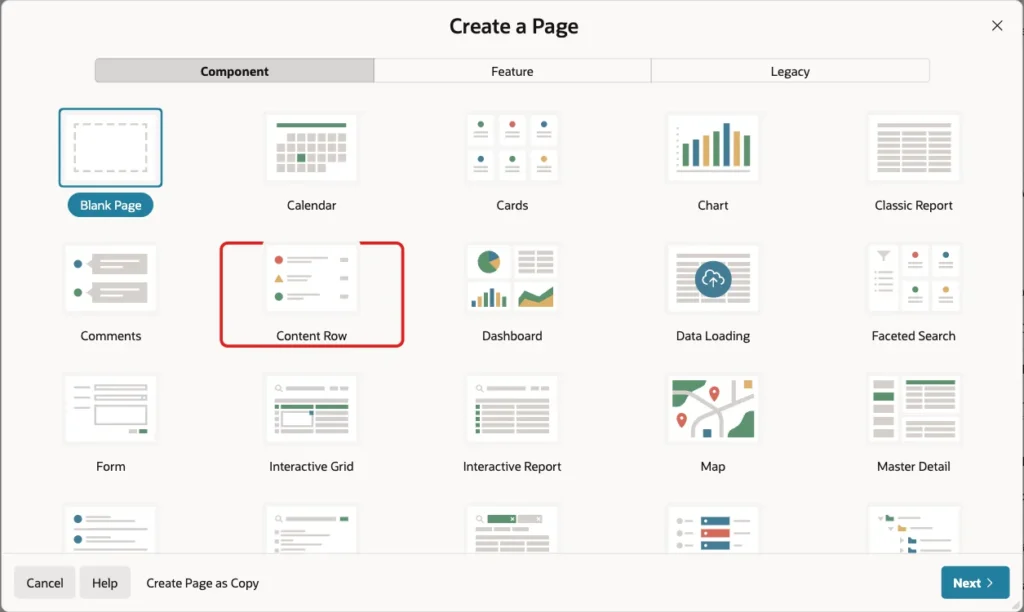
In Page Designer, click Create (the plus icon) and choose Page. Select the Content Row tile:
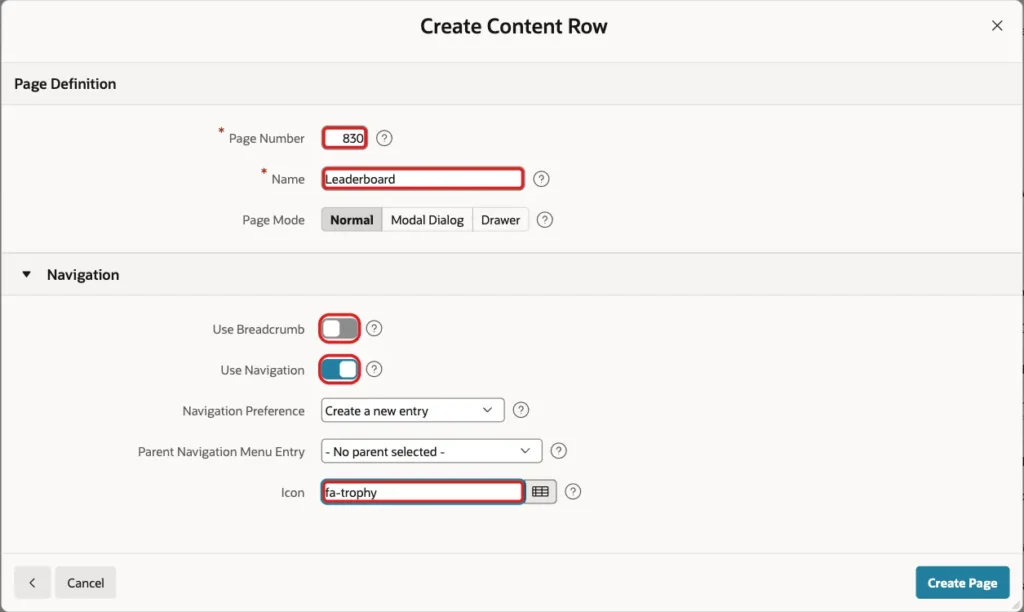
On the Create Content Row screen, enter Page Number 830 and Name Leaderboard. Turn off Use Breadcrumb, keep Use Navigation on with a new entry, set the icon to fa-trophy and click Create Page:
This wizard asks for no data source. It creates a Content Row region on the built-in EMPLOYEES sample data and a P830_ORDER_BY select list in the Sort Order slot:
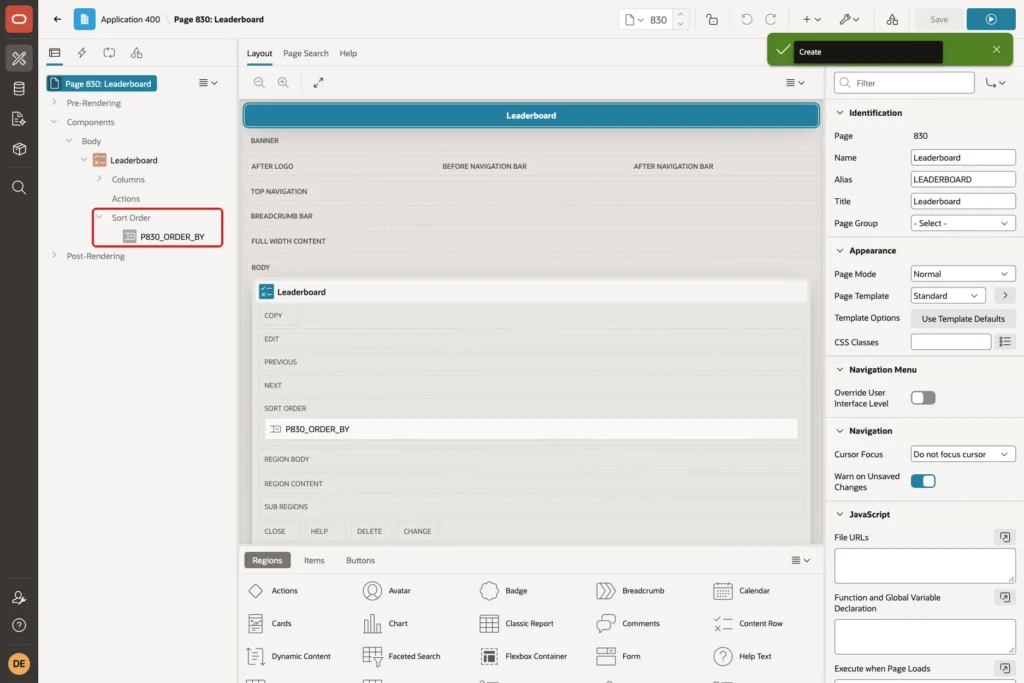
A leaderboard always sorts by rank, so the sort list is not needed. Delete P830_ORDER_BY.
Step 5: Set the Region Source
Select the Leaderboard region. On the Region tab, set:
- Identification > Name: Top 10 Leaderboard
- Source > Location: Local Database
- Source > Type: SQL Query
- Source > SQL Query: the query from Step 3
- Source > Page Items to Submit: P830_PERIOD (add it after you create the item in Step 7)

Page Items to Submit sends the current period to the server each time the region refreshes. Without it, the query would still see the old value.
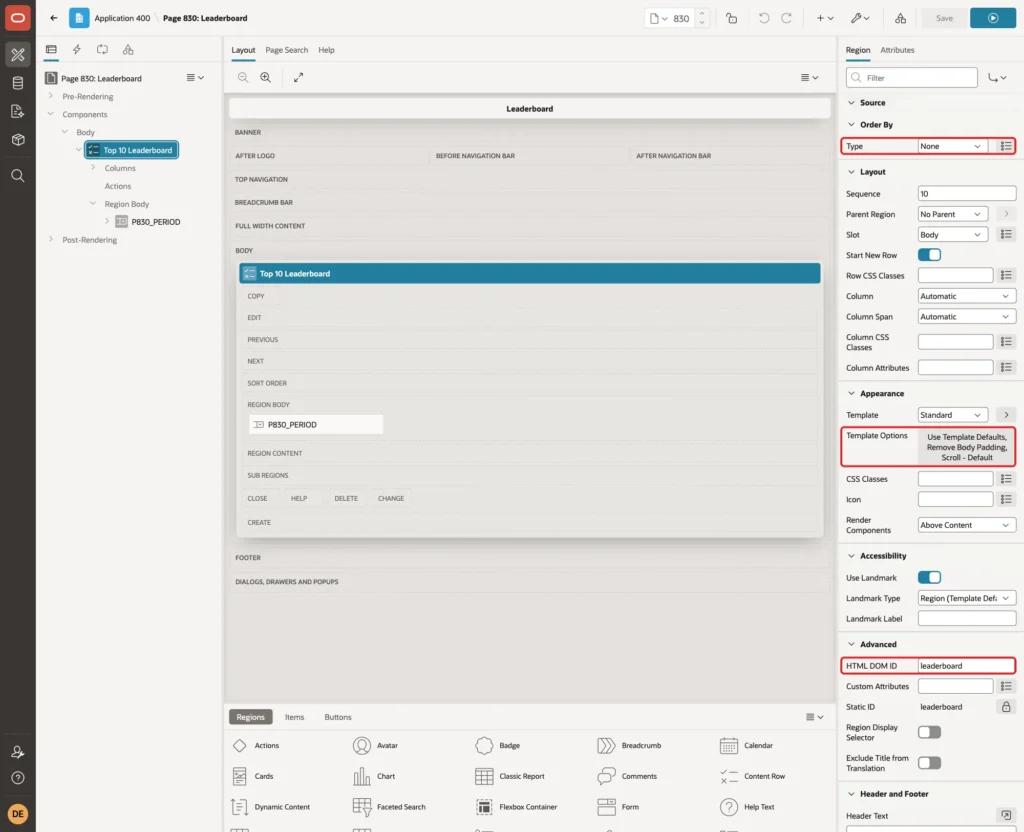
Further down, set Order By > Type to None, because the query already sorts by rank. Under Appearance > Template Options, keep Remove Body Padding and the Scroll - Default body height. The wizard also hid the region header and removed the region frame; turn both back to their defaults so the title Top 10 Leaderboard is shown.
Under Advanced, set HTML DOM ID to leaderboard. It gives the region a fixed id for CSS or JavaScript, as used in the test in Step 9:
Step 6: Map the Columns on the Attributes Tab
Open the Attributes tab of the region. Under Settings, set these values and clear Overline:
- Title: &FULL_NAME.
- Description: the HTML below
- Miscellaneous: &TOTAL_AMOUNT.
- Display Avatar: on
- Display Badge: on
The Description shows the region and the number of deals, and below them a bar whose width is the PCT_OF_LEADER value:
Example:
®ION. · Deals: &DEAL_COUNT. <div class="lb-bar"><span style="width: &PCT_OF_LEADER.%;"></span></div>
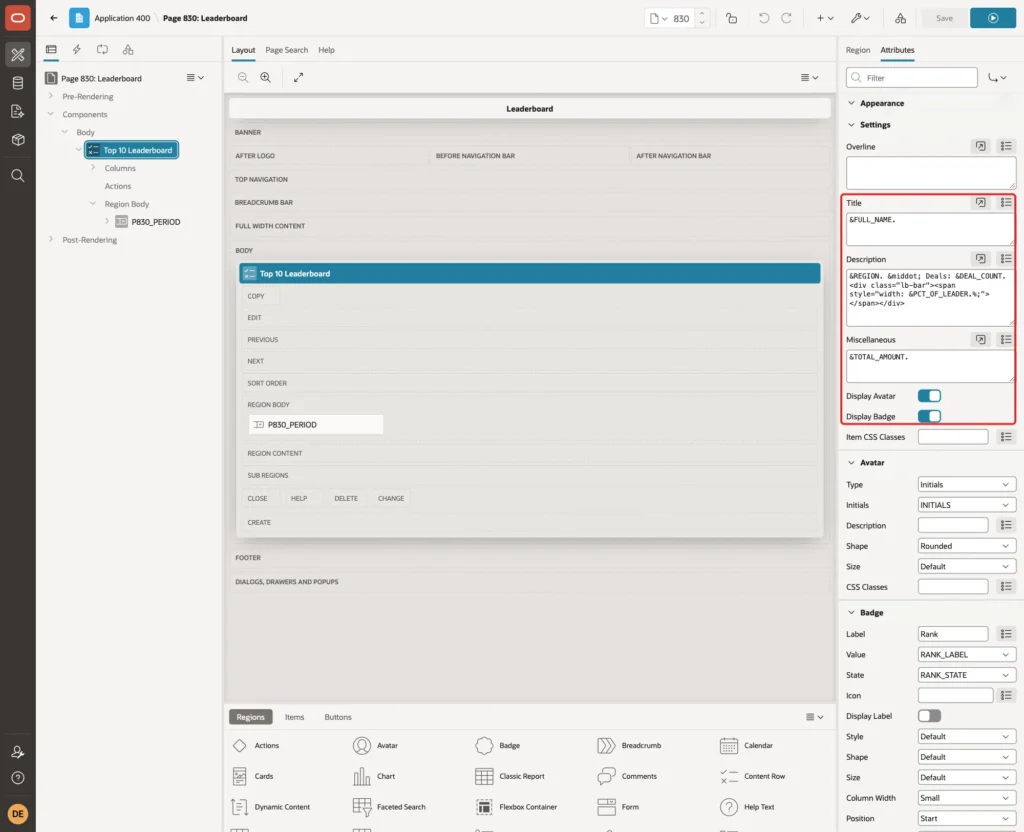
PCT_OF_LEADER is a number calculated by the query, so only digits go into the style attribute.
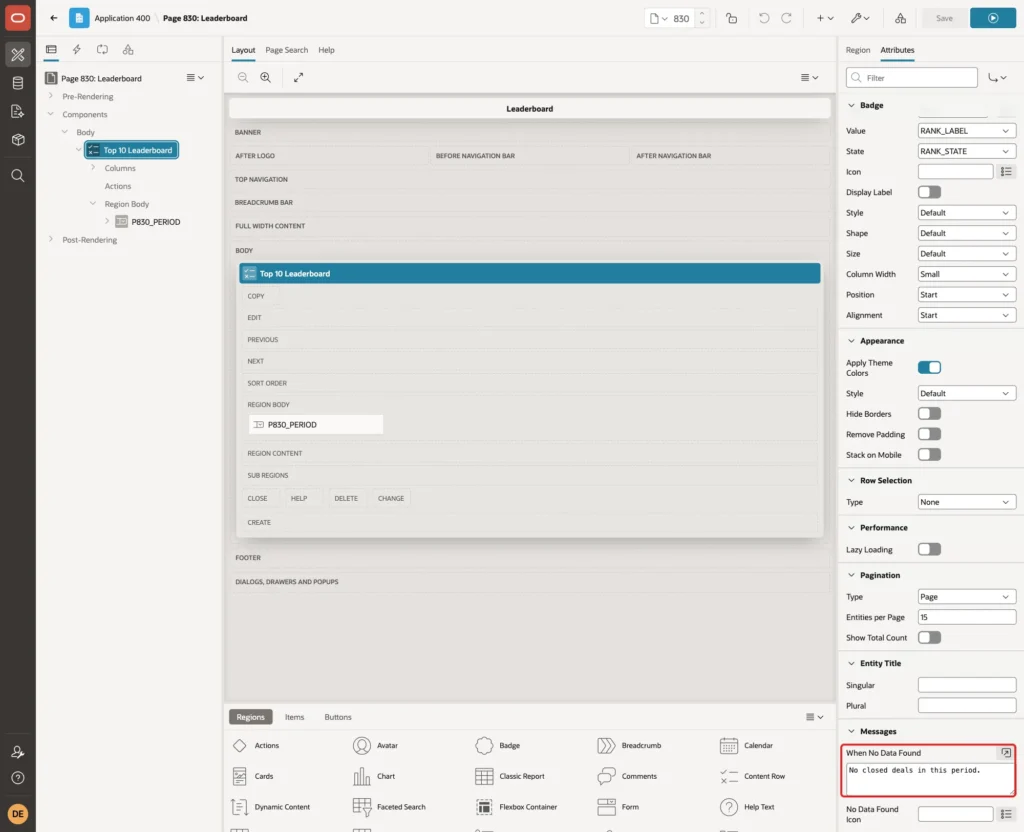
Under Avatar, set Type to Initials and Initials to INITIALS. Under Badge, set Label to Rank, Value to RANK_LABEL, State to RANK_STATE and Column Width to Small:

The Label is not shown on the page, but APEX adds it to the badge for screen readers: the badge of the leader is read as Rank #1. With the default column width, the badge column took a lot of space. Small keeps the badges close to the avatars.
Under Messages, set When No Data Found to No closed deals in this period.
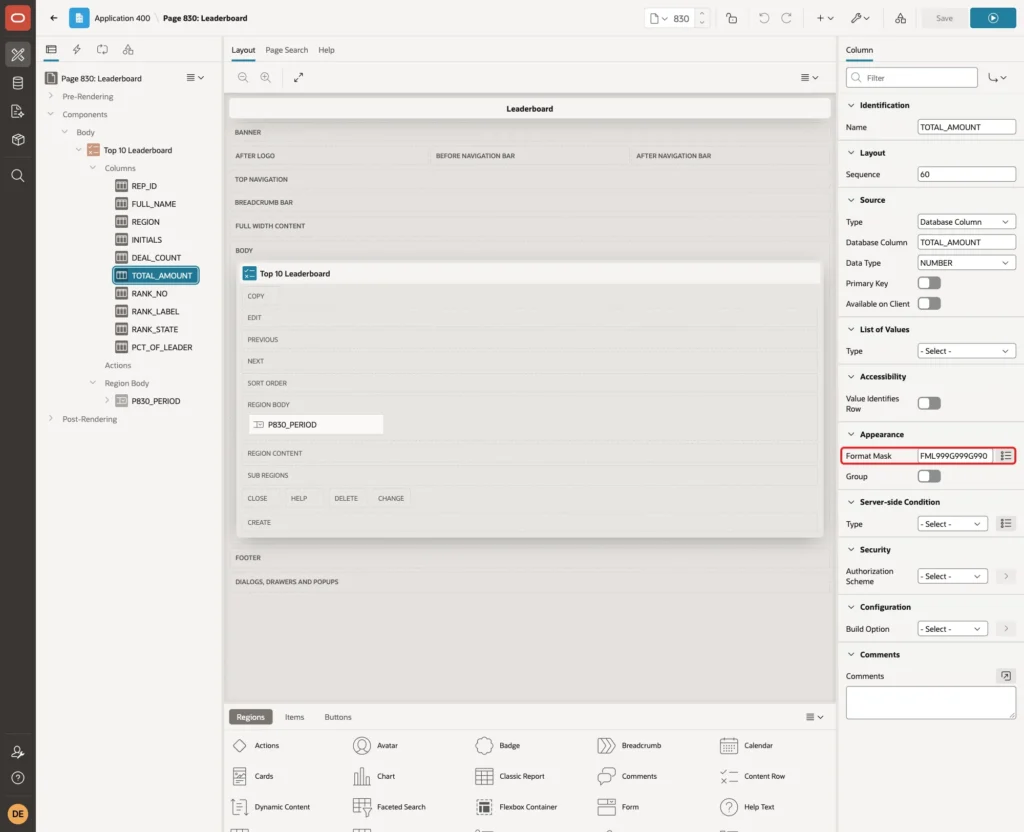
Expand Columns under the region and select TOTAL_AMOUNT. Set Appearance > Format Mask to FML999G999G990, which adds the currency symbol and group separators of the session:
Step 7: Add the Period Select List
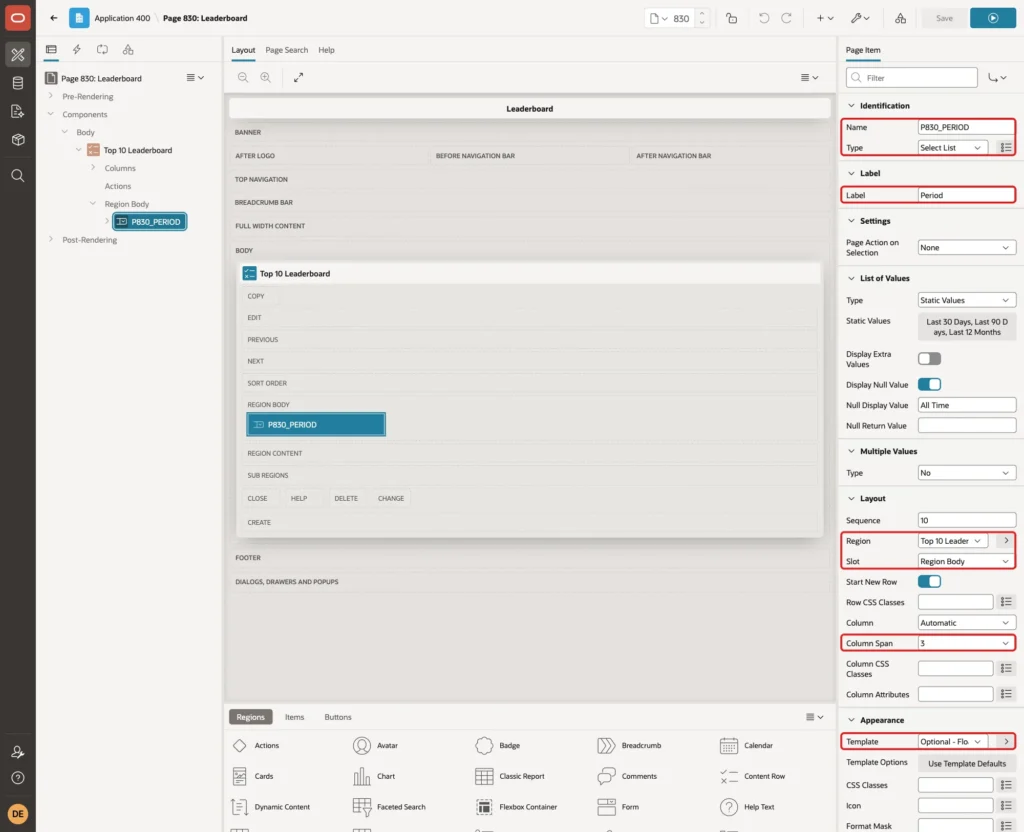
Right-click the Top 10 Leaderboard region, choose Create Page Item and set:
- Name: P830_PERIOD, Type: Select List
- Label: Period
- Layout: Region Top 10 Leaderboard, Slot Region Body, Column Span 3
- Appearance > Template: Optional - Floating
Under List of Values, set Type to Static Values, turn on Display Null Value and enter All Time as Null Display Value:
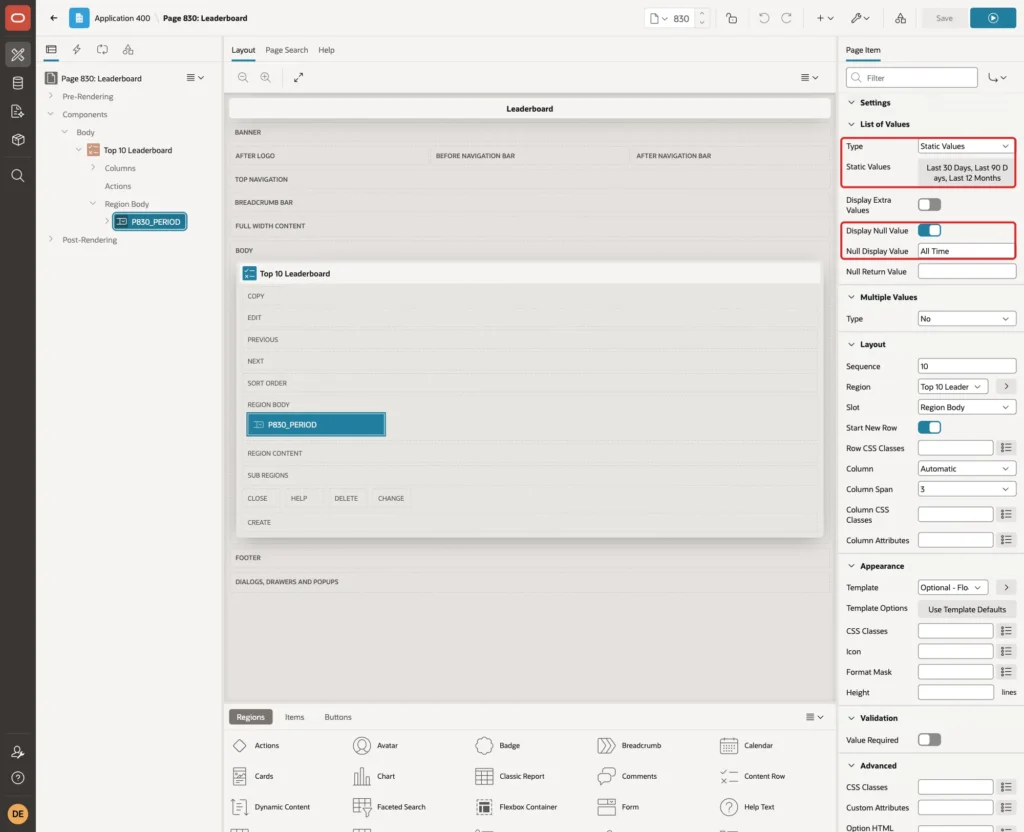
Click Static Values and enter three entries. The return value is the number of days:

Under Default, set Type to Static and Static Value to 90, so the page opens with the last 90 days:

Leave Page Action on Selection at None. A dynamic action refreshes only the region, without reloading the page.
Back in the region, under Region > Appearance, set Render Components to Above Content. The select list is then drawn above the rows.
Step 8: Refresh the Region When the Period Changes
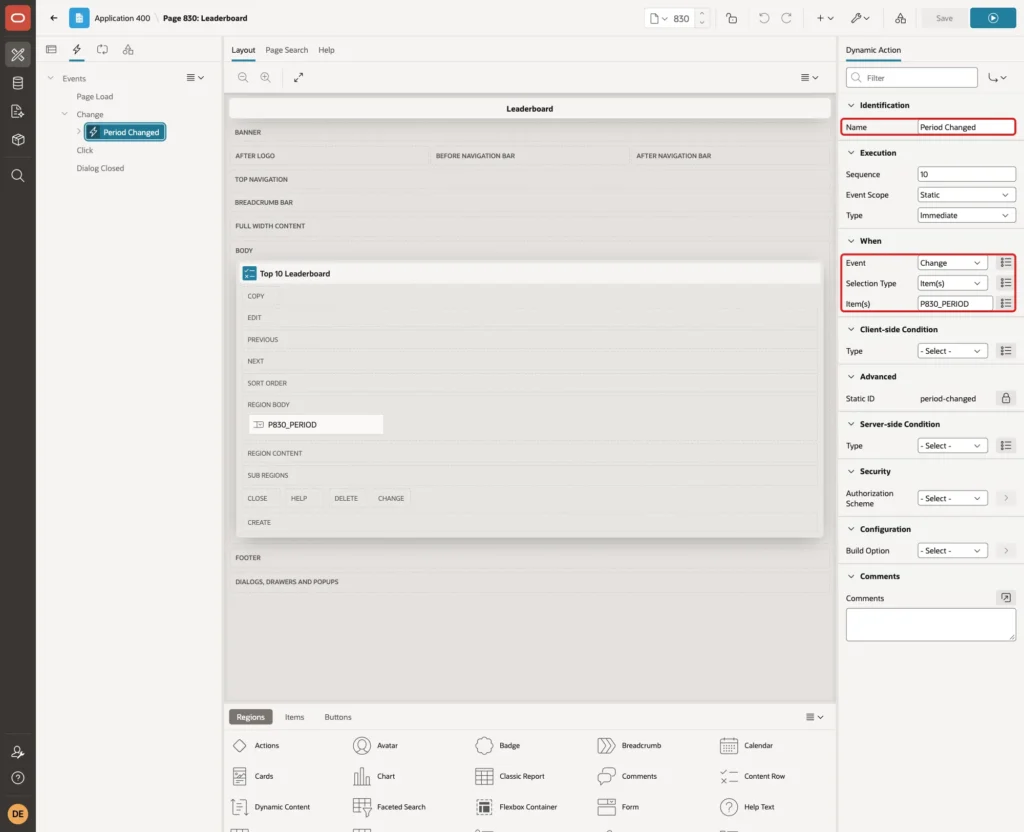
Right-click P830_PERIOD and choose Create Dynamic Action. Set Name to Period Changed. Under When, keep Event Change, Selection Type Item(s) and Item(s) P830_PERIOD:
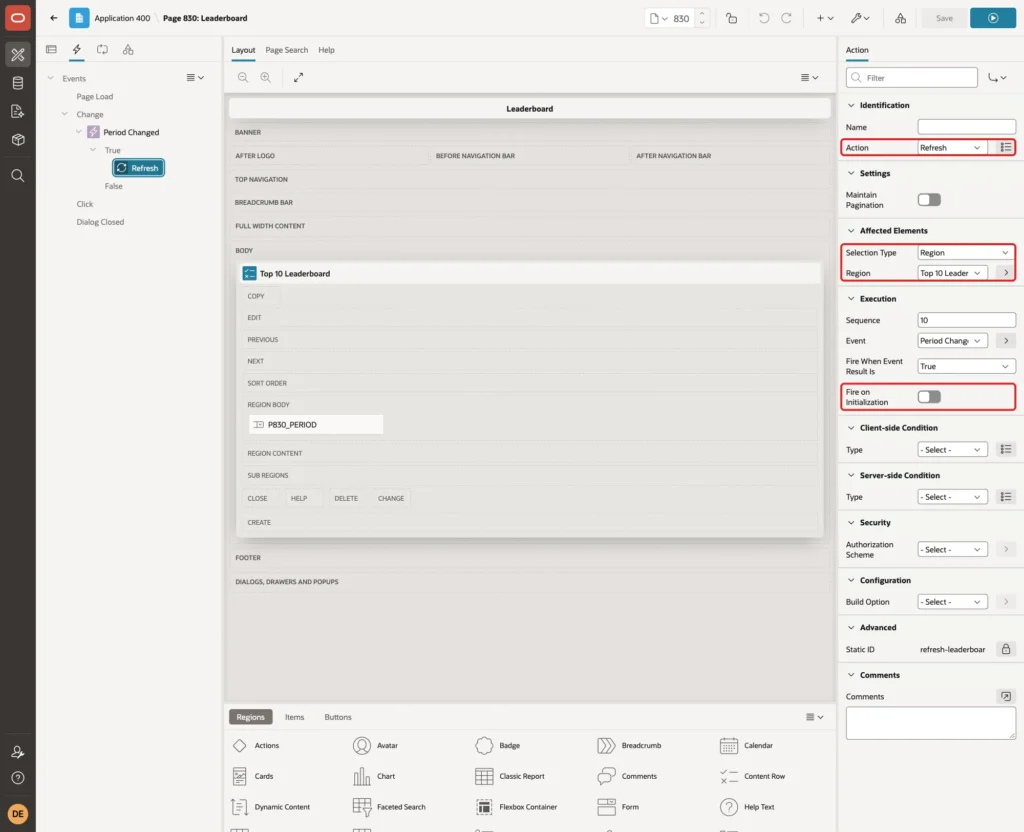
Select its True action and set Action to Refresh, Selection Type to Region and Region to Top 10 Leaderboard. Turn off Fire on Initialization, because the region already loads with the page:
Finally, select the page (Page 830: Leaderboard) and add the bar style to CSS > Inline:
Example:
.lb-bar { height: 8px; max-width: 360px; margin-top: 6px; border-radius: 4px; background-color: #e3e7ec; }
.lb-bar > span { display: block; height: 100%; border-radius: 4px; background-color: #2f7bbf; }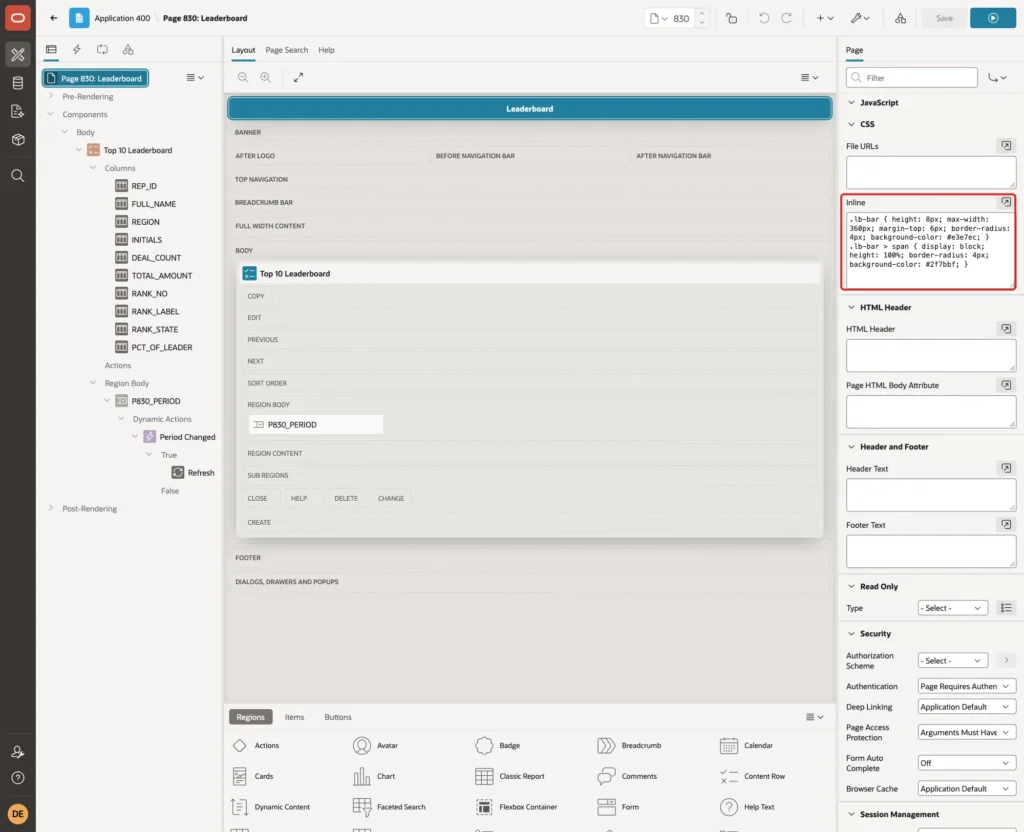
Click Save.
Step 9: Test the Leaderboard
Run the page as a user with read-only rights (SALES_USER in this example). The page opens with Last 90 Days:
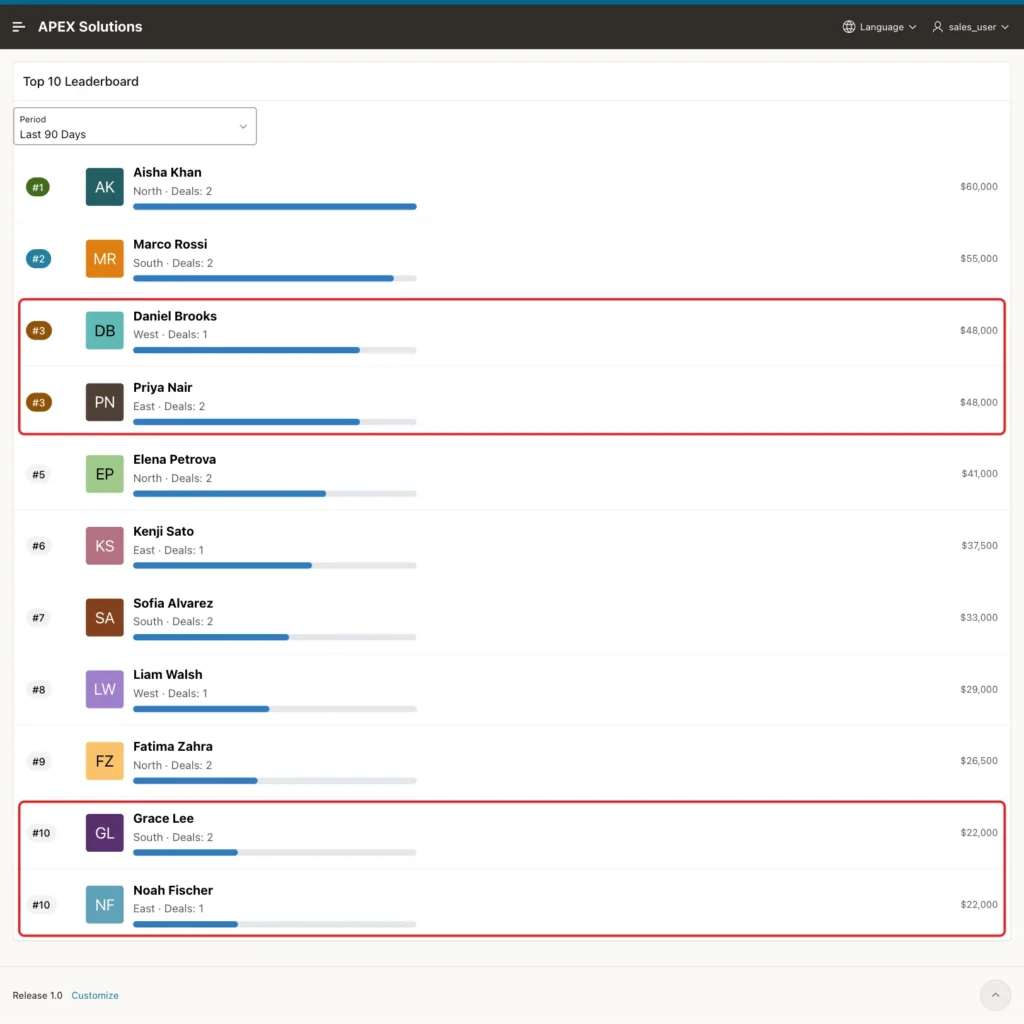
- Daniel Brooks and Priya Nair both show #3 with the warning badge, and the next rep is #5.
- Grace Lee and Noah Fischer share #10, so the list has 11 rows.
- The bars measured 100%, 92%, 80%, 80%, 68% and so on, the same values as PCT_OF_LEADER.
To check the page against SQL, run the region query with the bind variable set to 90 and then to abc:
Output:
PL/SQL procedure successfully completed.

FULL_NAME           TOTAL_AMOUNT    RANK_NO    PCT_OF_LEADER
________________ _______________ __________ ________________
Aisha Khan                 60000          1              100
Marco Rossi                55000          2               92
Daniel Brooks              48000          3               80
Priya Nair                 48000          3               80
Elena Petrova              41000          5               68
Kenji Sato                 37500          6               63
Sofia Alvarez              33000          7               55
Liam Walsh                 29000          8               48
Fatima Zahra               26500          9               44
Grace Lee                  22000         10               37
Noah Fischer               22000         10               37

11 rows selected.

PL/SQL procedure successfully completed.

no rows selected
The ranks, totals and bar values match the page row by row. The value abc returns no rows instead of an error.
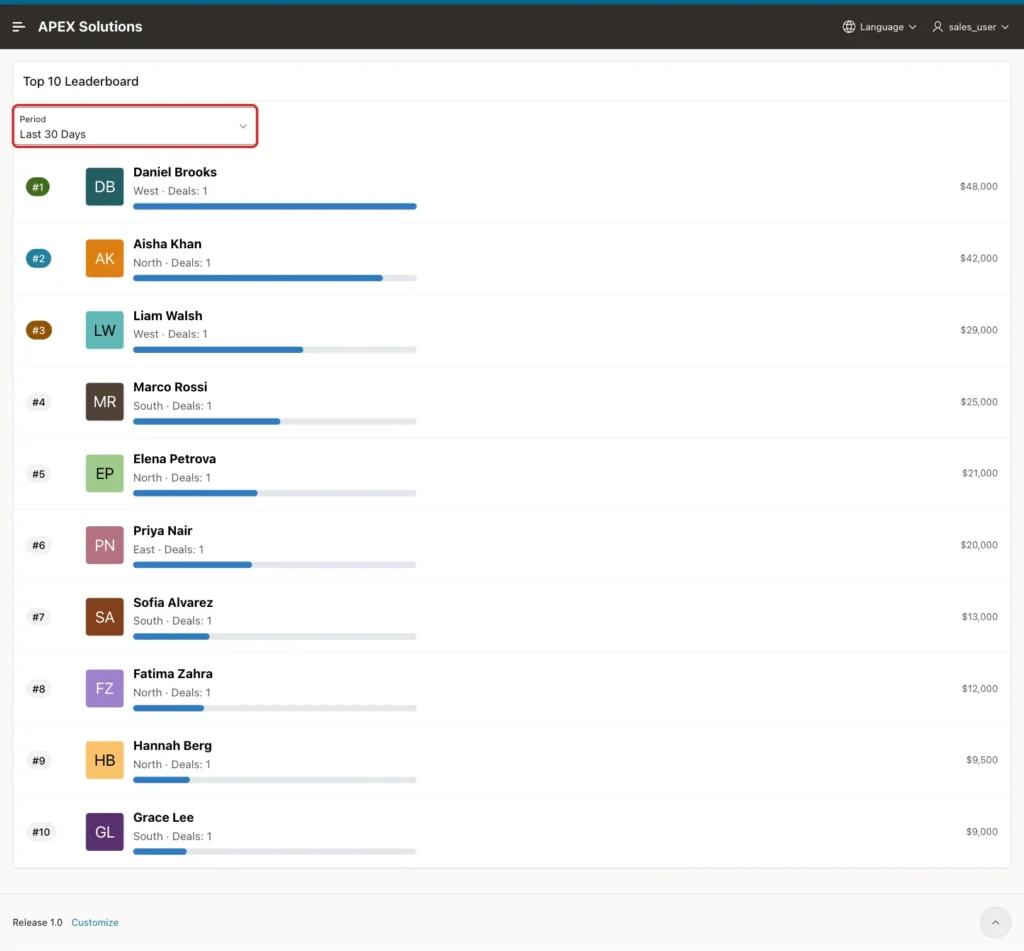
Change Period to Last 30 Days. The region refreshes without a page reload, and Daniel Brooks moves to the top:
Choose All Time. Victor Lima and Hannah Berg, who had no deals in the last 90 days, now rank #3 and #4:
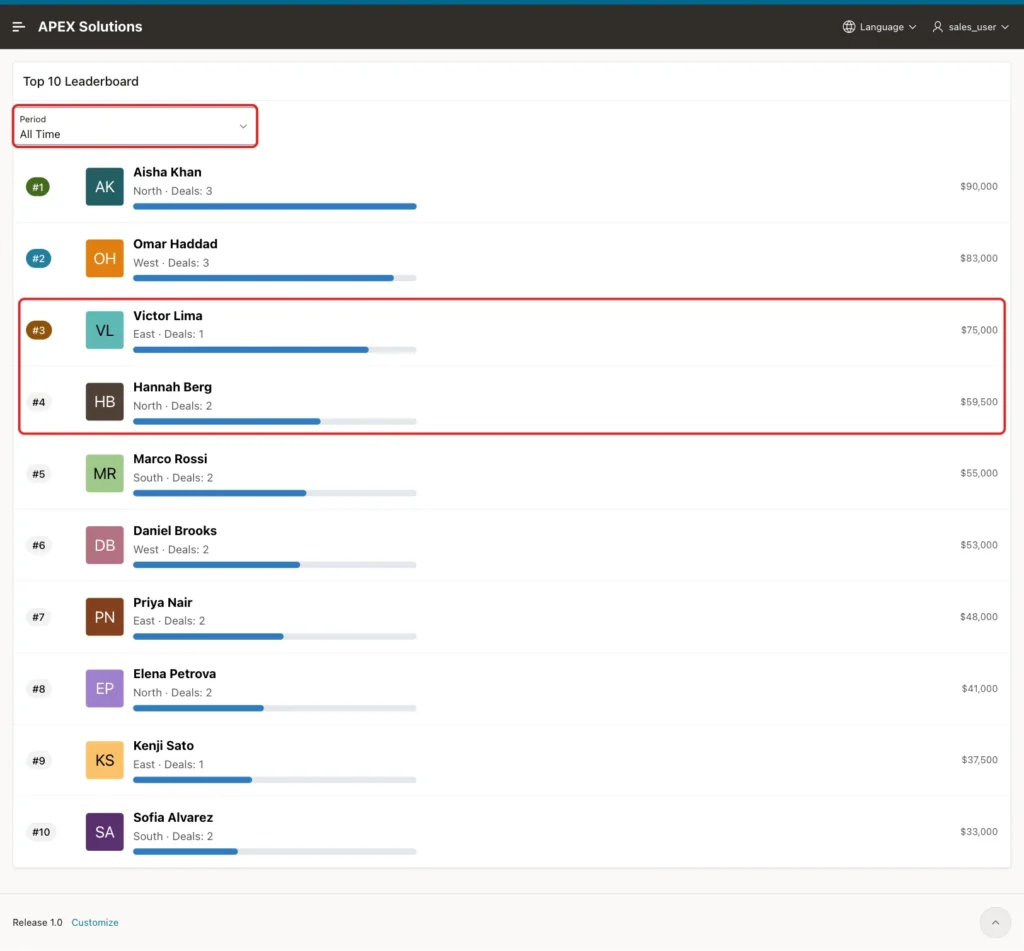
All four periods showed the same reps, ranks and amounts as the SQL query. Ravi Menon, who has no deals, was never listed.
Now a negative test. A select list only offers its three values, but a user can send any value from the browser console. In the first version of the query, the filter was to_number(:P830_PERIOD).
Adding a forged option abc to the select list and refreshing the region returned this error to the page:
Output:
Ajax call returned server error ORA-01722: unable to convert string value containing 'a' to a number: for Top 10 Leaderboard.
APEX did not check the value against the list of values before it ran the region query. The values -5 and 100000 were accepted too: -5 returned no rows, and 100000 returned the all-time list.
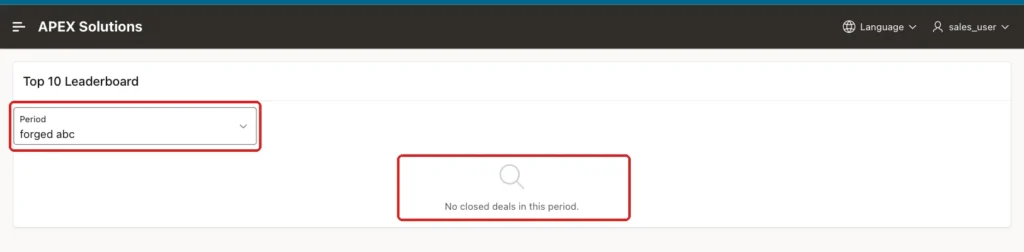
With the CASE expression from Step 3, every value outside 30, 90 and 365 matches no rows. The same forged value now shows the empty message and no error:
Things to Know
- Use RANK and filter rank <= 10 (or FETCH FIRST 10 ROWS WITH TIES). FETCH FIRST 10 ROWS ONLY cuts a tie at an arbitrary row.
- Because of ties, a top 10 can have more than ten rows. The Content Row pagination of this page shows 15 rows per page, which is enough for small ties.
- If your rules break ties, add a second column to the ORDER BY of RANK.
- Values of page items sent by a region refresh are not checked against the list of values. Never pass them to to_number or into dynamic SQL without a check.
- A rep without deals is not listed, because the query joins the deals. Use an outer join and nvl if everyone must appear.
- The format mask FML999G999G990 uses the currency symbol and separators of the session language.
Related Guides
Conclusion
A top 10 leaderboard in Oracle APEX needs one ranked query, a Content Row region and a period select list with a refresh action. RANK handles ties fairly, and the badge, avatar and bar come from columns of the query.
In this example, the ranks and bars matched SQL for all four periods, ties at rank 3 and rank 10 were shown correctly, and a forged period value returned an empty list instead of an error. The same steps work for any score you want to rank.
See my articles more often when you search Google.
