
A bill of materials (BOM) lists the parts that make up a product. A product contains assemblies, the assemblies contain smaller parts, and the same part can appear in several places. To build ten products, you need the quantity of every part at every level, multiplied all the way down.
This guide builds a bill of materials page in Oracle APEX. A recursive WITH query explodes the structure and multiplies the quantities. A tree shows the structure, one report lists every level, and another adds up the parts to order with their cost.
An editable grid maintains the lines, and the database refuses lines that would make a part contain itself.
The post How to Show Hierarchical Data (Manager and Employees) in a Tree in Oracle APEX shows a CONNECT BY tree where every row has one parent. Here a separate lines table links parts, a part can be used in many assemblies, and each level multiplies the quantity of the level above.
The guide uses office furniture as the example. The same steps work for any table where items are made of other items, such as recipes, kits or project work breakdowns.
Step 1: Create the Tables
The bill of materials needs two tables:
- BOM_PARTS holds every part: finished products, assemblies and purchased components, with the unit of measure and the unit cost.
- BOM_LINES holds one row per parent and child, with the quantity of the child needed for one parent.
Create the tables and the sample data. An Office Chair has three assemblies and four screws. The Base Assembly holds five Caster Wheels, and each Caster Wheel holds two Wheels. An Office Stool reuses the same Base Assembly:
Example:
create table bom_parts (
  part_id    number generated by default on null as identity,
  part_no    varchar2(20)   not null,
  part_name  varchar2(100)  not null,
  uom        varchar2(5)    default on null 'EA' not null,
  unit_cost  number(10,2),
  constraint bom_parts_pk primary key (part_id),
  constraint bom_parts_part_no_uk unique (part_no),
  constraint bom_parts_uom_ck check (uom in ('EA', 'M', 'KG', 'L')),
  constraint bom_parts_cost_ck check (unit_cost >= 0)
);

create table bom_lines (
  bom_line_id     number generated by default on null as identity,
  parent_part_id  number         not null,
  child_part_id   number         not null,
  quantity        number(10,3)   not null,
  constraint bom_lines_pk primary key (bom_line_id),
  constraint bom_lines_parent_fk foreign key (parent_part_id)
    references bom_parts (part_id),
  constraint bom_lines_child_fk foreign key (child_part_id)
    references bom_parts (part_id),
  constraint bom_lines_parent_child_uk unique (parent_part_id, child_part_id),
  constraint bom_lines_not_self_ck check (parent_part_id <> child_part_id),
  constraint bom_lines_qty_ck check (quantity > 0)
);

create index bom_lines_child_ix on bom_lines (child_part_id);

insert into bom_parts (part_no, part_name) values ('CH-100', 'Office Chair');
insert into bom_parts (part_no, part_name) values ('ST-600', 'Office Stool');
insert into bom_parts (part_no, part_name) values ('SA-200', 'Seat Assembly');
insert into bom_parts (part_no, part_name) values ('BR-300', 'Backrest Assembly');
insert into bom_parts (part_no, part_name) values ('BA-400', 'Base Assembly');
insert into bom_parts (part_no, part_name) values ('CW-420', 'Caster Wheel');
insert into bom_parts (part_no, part_name, unit_cost) values ('CU-210', 'Seat Cushion', 12.50);
insert into bom_parts (part_no, part_name, unit_cost) values ('SP-220', 'Seat Plate', 6.00);
insert into bom_parts (part_no, part_name, uom, unit_cost) values ('MF-310', 'Mesh Fabric', 'M', 9.00);
insert into bom_parts (part_no, part_name, unit_cost) values ('BF-320', 'Backrest Frame', 15.00);
insert into bom_parts (part_no, part_name, unit_cost) values ('SB-410', 'Star Base', 18.00);
insert into bom_parts (part_no, part_name, unit_cost) values ('GL-430', 'Gas Lift', 11.00);
insert into bom_parts (part_no, part_name, unit_cost) values ('WH-421', 'Wheel', 0.90);
insert into bom_parts (part_no, part_name, unit_cost) values ('AX-422', 'Axle Pin', 0.25);
insert into bom_parts (part_no, part_name, unit_cost) values ('SC-M6', 'Screw M6x20', 0.05);

insert into bom_lines (parent_part_id, child_part_id, quantity)
select p.part_id, c.part_id, l.quantity
  from (select 'CH-100' parent_no, 'SA-200' child_no, 1   quantity from dual union all
        select 'CH-100', 'BR-300', 1   from dual union all
        select 'CH-100', 'BA-400', 1   from dual union all
        select 'CH-100', 'SC-M6',  4   from dual union all
        select 'SA-200', 'CU-210', 1   from dual union all
        select 'SA-200', 'SP-220', 1   from dual union all
        select 'SA-200', 'SC-M6',  4   from dual union all
        select 'BR-300', 'MF-310', 0.8 from dual union all
        select 'BR-300', 'BF-320', 1   from dual union all
        select 'BR-300', 'SC-M6',  6   from dual union all
        select 'BA-400', 'SB-410', 1   from dual union all
        select 'BA-400', 'CW-420', 5   from dual union all
        select 'BA-400', 'GL-430', 1   from dual union all
        select 'CW-420', 'WH-421', 2   from dual union all
        select 'CW-420', 'AX-422', 1   from dual union all
        select 'ST-600', 'BA-400', 1   from dual union all
        select 'ST-600', 'CU-210', 1   from dual union all
        select 'ST-600', 'SC-M6',  3   from dual) l
  join bom_parts p on p.part_no = l.parent_no
  join bom_parts c on c.part_no = l.child_no;

commit;

select p.part_no as parent, c.part_no as child, c.part_name, l.quantity, c.uom
  from bom_lines l
  join bom_parts p on p.part_id = l.parent_part_id
  join bom_parts c on c.part_id = l.child_part_id
 order by p.part_no, c.part_no;
Output:
Table BOM_PARTS created.

Table BOM_LINES created.

Index BOM_LINES_CHILD_IX created.

1 row inserted.

1 row inserted.

1 row inserted.

1 row inserted.

1 row inserted.

1 row inserted.

1 row inserted.

1 row inserted.

1 row inserted.

1 row inserted.

1 row inserted.

1 row inserted.

1 row inserted.

1 row inserted.

1 row inserted.

18 rows inserted.

Commit complete.

PARENT    CHILD     PART_NAME               QUANTITY UOM
_________ _________ ____________________ ___________ ______
BA-400    CW-420    Caster Wheel                   5 EA
BA-400    GL-430    Gas Lift                       1 EA
BA-400    SB-410    Star Base                      1 EA
BR-300    BF-320    Backrest Frame                 1 EA
BR-300    MF-310    Mesh Fabric                  0.8 M
BR-300    SC-M6     Screw M6x20                    6 EA
CH-100    BA-400    Base Assembly                  1 EA
CH-100    BR-300    Backrest Assembly              1 EA
CH-100    SA-200    Seat Assembly                  1 EA
CH-100    SC-M6     Screw M6x20                    4 EA
CW-420    AX-422    Axle Pin                       1 EA
CW-420    WH-421    Wheel                          2 EA
SA-200    CU-210    Seat Cushion                   1 EA
SA-200    SC-M6     Screw M6x20                    4 EA
SA-200    SP-220    Seat Plate                     1 EA
ST-600    BA-400    Base Assembly                  1 EA
ST-600    CU-210    Seat Cushion                   1 EA
ST-600    SC-M6     Screw M6x20                    3 EA

18 rows selected.
The simple rules are declared in the tables:
- BOM_LINES_PARENT_CHILD_UK allows each child only once under the same parent. A second line for the same screw must change the quantity instead.
- BOM_LINES_NOT_SELF_CK stops a part from being its own component.
- BOM_LINES_QTY_CK requires a quantity greater than zero. NUMBER(10,3) allows decimals such as 0.8 meters of fabric.
- UOM uses DEFAULT ON NULL 'EA', so the inserts only name the unit when it is not "each".
- BOM_LINES_CHILD_IX indexes the child foreign key. The parent column is already the first column of the unique key.
Step 2: Explode the Structure with Recursive WITH
A recursive WITH query starts with the direct components of the product. Each next round joins the lines of the parts found so far and multiplies the running total by the line quantity:
Example:
with bom (lvl, part_id, part_no, qty_per, total_qty) as (
  select 1, c.part_id, c.part_no, l.quantity, l.quantity
    from bom_lines l
    join bom_parts p on p.part_id = l.parent_part_id
    join bom_parts c on c.part_id = l.child_part_id
   where p.part_no = 'CH-100'
  union all
  select b.lvl + 1, c.part_id, c.part_no, l.quantity, b.total_qty * l.quantity
    from bom b
    join bom_lines l on l.parent_part_id = b.part_id
    join bom_parts c on c.part_id = l.child_part_id
)
search depth first by part_no set seq
cycle part_id set is_cycle to 'Y' default 'N'
select b.lvl,
       lpad(' ', 2 * (b.lvl - 1)) || b.part_no as part_no,
       p.part_name,
       b.qty_per,
       b.total_qty,
       p.uom
  from bom b
  join bom_parts p on p.part_id = b.part_id
 order by b.seq;
Output:
   LVL PART_NO       PART_NAME               QTY_PER    TOTAL_QTY UOM
______ _____________ ____________________ __________ ____________ ______
     1 BA-400        Base Assembly                 1            1 EA
     2   CW-420      Caster Wheel                  5            5 EA
     3     AX-422    Axle Pin                      1            5 EA
     3     WH-421    Wheel                         2           10 EA
     2   GL-430      Gas Lift                      1            1 EA
     2   SB-410      Star Base                     1            1 EA
     1 BR-300        Backrest Assembly             1            1 EA
     2   BF-320      Backrest Frame                1            1 EA
     2   MF-310      Mesh Fabric                 0.8          0.8 M
     2   SC-M6       Screw M6x20                   6            6 EA
     1 SA-200        Seat Assembly                 1            1 EA
     2   CU-210      Seat Cushion                  1            1 EA
     2   SC-M6       Screw M6x20                   4            4 EA
     2   SP-220      Seat Plate                    1            1 EA
     1 SC-M6         Screw M6x20                   4            4 EA

15 rows selected.
Two clauses make the result usable:
- SEARCH DEPTH FIRST BY part_no SET seq numbers the rows so that every part is followed by its own components. Ordering by seq gives the tree order.
- CYCLE part_id SET is_cycle TO 'Y' DEFAULT 'N' stops the query if a part shows up again in its own path. Step 4 shows why that matters.
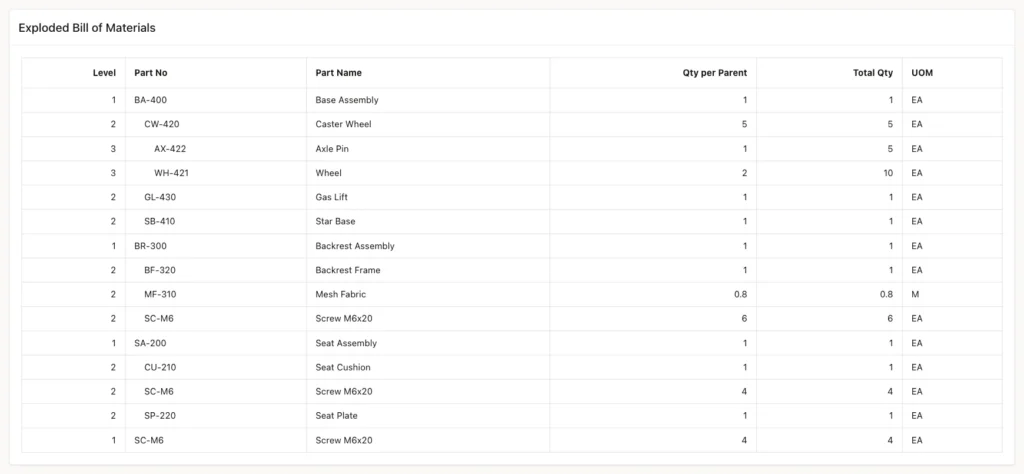
The Wheel appears with 2 per Caster Wheel, but 10 in total, because the chair has 5 Caster Wheels. The screw SC-M6 appears three times, at different levels.
Step 3: Add Up the Parts to Order
To order parts, add up the total quantity of each purchased part. Purchased parts are the ones that have no lines of their own. The cost is the total quantity times the unit cost:
Example:
with bom (part_id, total_qty) as (
  select l.child_part_id, l.quantity
    from bom_lines l
    join bom_parts p on p.part_id = l.parent_part_id
   where p.part_no = 'CH-100'
  union all
  select l.child_part_id, b.total_qty * l.quantity
    from bom b
    join bom_lines l on l.parent_part_id = b.part_id
)
cycle part_id set is_cycle to 'Y' default 'N'
select p.part_no,
       p.part_name,
       sum(b.total_qty) as total_qty,
       p.uom,
       p.unit_cost,
       sum(b.total_qty) * p.unit_cost as total_cost
  from bom b
  join bom_parts p on p.part_id = b.part_id
 where not exists (select 1 from bom_lines x where x.parent_part_id = b.part_id)
 group by p.part_no, p.part_name, p.uom, p.unit_cost
 order by p.part_no;
Output:
PART_NO    PART_NAME            TOTAL_QTY UOM       UNIT_COST    TOTAL_COST
__________ _________________ ____________ ______ ____________ _____________
AX-422     Axle Pin                     5 EA             0.25          1.25
BF-320     Backrest Frame               1 EA               15            15
CU-210     Seat Cushion                 1 EA             12.5          12.5
GL-430     Gas Lift                     1 EA               11            11
MF-310     Mesh Fabric                0.8 M                 9           7.2
SB-410     Star Base                    1 EA               18            18
SC-M6      Screw M6x20                 14 EA             0.05           0.7
SP-220     Seat Plate                   1 EA                6             6
WH-421     Wheel                       10 EA              0.9             9

9 rows selected.
The three screw lines add up to 14 (4 + 4 + 6). One chair needs parts for 80.65 in total.
Step 4: Test the Constraints and a Loop
This test tries a part as its own component, a duplicate line and a zero quantity:
Example:
insert into bom_lines (parent_part_id, child_part_id, quantity)
select part_id, part_id, 1 from bom_parts where part_no = 'SA-200';

insert into bom_lines (parent_part_id, child_part_id, quantity)
select p.part_id, c.part_id, 2
  from bom_parts p, bom_parts c
 where p.part_no = 'SA-200' and c.part_no = 'SC-M6';

insert into bom_lines (parent_part_id, child_part_id, quantity)
select p.part_id, c.part_id, 0
  from bom_parts p, bom_parts c
 where p.part_no = 'SA-200' and c.part_no = 'GL-430';
Output:
Error starting at line : 1 File @ b77/20-constraints.sql
In command -
insert into bom_lines (parent_part_id, child_part_id, quantity)
select part_id, part_id, 1 from bom_parts where part_no = 'SA-200'
Error report -
ORA-02290: check constraint (APXSOL.BOM_LINES_NOT_SELF_CK) violated
Help: https://docs.oracle.com/error-help/db/ora-02290/

Error starting at line : 4 File @ b77/20-constraints.sql
In command -
insert into bom_lines (parent_part_id, child_part_id, quantity)
select p.part_id, c.part_id, 2
  from bom_parts p, bom_parts c
 where p.part_no = 'SA-200' and c.part_no = 'SC-M6'
Error report -
ORA-00001: unique constraint (APXSOL.BOM_LINES_PARENT_CHILD_UK) violated on
table APXSOL.BOM_LINES columns (PARENT_PART_ID, CHILD_PART_ID)
ORA-03301: (ORA-00001 details) row with column values (PARENT_PART_ID:3,
CHILD_PART_ID:15) already exists
Help: https://docs.oracle.com/error-help/db/ora-00001/

Error starting at line : 9 File @ b77/20-constraints.sql
In command -
insert into bom_lines (parent_part_id, child_part_id, quantity)
select p.part_id, c.part_id, 0
  from bom_parts p, bom_parts c
 where p.part_no = 'SA-200' and c.part_no = 'GL-430'
Error report -
ORA-02290: check constraint (APXSOL.BOM_LINES_QTY_CK) violated
Help: https://docs.oracle.com/error-help/db/ora-02290/
The check constraint only stops the direct case. A longer loop is still accepted: the Caster Wheel is a component of the Base Assembly, and this test makes the Base Assembly a component of the Caster Wheel:
Example:
insert into bom_lines (parent_part_id, child_part_id, quantity)
select p.part_id, c.part_id, 1
  from bom_parts p, bom_parts c
 where p.part_no = 'CW-420' and c.part_no = 'BA-400';

with bom (part_id, total_qty) as (
  select l.child_part_id, l.quantity
    from bom_lines l
    join bom_parts p on p.part_id = l.parent_part_id
   where p.part_no = 'CH-100'
  union all
  select l.child_part_id, b.total_qty * l.quantity
    from bom b
    join bom_lines l on l.parent_part_id = b.part_id
)
select count(*) from bom;

with bom (part_id, part_no, total_qty) as (
  select c.part_id, c.part_no, l.quantity
    from bom_lines l
    join bom_parts p on p.part_id = l.parent_part_id
    join bom_parts c on c.part_id = l.child_part_id
   where p.part_no = 'CH-100'
  union all
  select c.part_id, c.part_no, b.total_qty * l.quantity
    from bom b
    join bom_lines l on l.parent_part_id = b.part_id
    join bom_parts c on c.part_id = l.child_part_id
)
cycle part_id set is_cycle to 'Y' default 'N'
select part_no, total_qty, is_cycle
  from bom
 where is_cycle = 'Y';

rollback;
Output:
1 row inserted.

Error starting at line : 6 File @ b77/21-loop.sql
In command -
with bom (part_id, total_qty) as (
  select l.child_part_id, l.quantity
    from bom_lines l
    join bom_parts p on p.part_id = l.parent_part_id
   where p.part_no = 'CH-100'
  union all
  select l.child_part_id, b.total_qty * l.quantity
    from bom b
    join bom_lines l on l.parent_part_id = b.part_id
)
select count(*) from bom
Error report -
ORA-32044: cycle detected while executing recursive WITH query
Help: https://docs.oracle.com/error-help/db/ora-32044/

PART_NO       TOTAL_QTY IS_CYCLE
__________ ____________ ___________
BA-400                5 Y

Rollback complete.
The insert was saved. Without the CYCLE clause, the explosion then fails with ORA-32044. With the CYCLE clause, the query runs and flags the repeated part. The test rolled back the loop.
Step 5: Stop Loops with a Trigger
A loop can run through any number of lines, so no constraint can express it. This is a case where a trigger is the right tool. After each insert or update on BOM_LINES, the trigger walks every line down to its leaves and counts paths that come back to their start:
Example:
create or replace trigger bom_lines_no_loop_trg
for insert or update of parent_part_id, child_part_id on bom_lines
compound trigger

  before statement is
  begin
    lock table bom_lines in exclusive mode;
  end before statement;

  after statement is
    l_loops pls_integer;
  begin
    with walk (top_part_id, part_id) as (
      select parent_part_id, child_part_id
        from bom_lines
      union all
      select w.top_part_id, l.child_part_id
        from walk w
        join bom_lines l on l.parent_part_id = w.part_id
    )
    cycle part_id set is_cycle to 'Y' default 'N'
    select count(*)
      into l_loops
      from walk
     where part_id = top_part_id;

    if l_loops > 0 then
      raise_application_error(-20001,
        'This line would make a part contain itself. Choose another component.');
    end if;
  end after statement;

end bom_lines_no_loop_trg;
/
Output:
Trigger BOM_LINES_NO_LOOP_TRG compiled
The trigger refuses a loop through an insert and through an update, and it still accepts a normal line:
Example:
insert into bom_lines (parent_part_id, child_part_id, quantity)
select p.part_id, c.part_id, 1
  from bom_parts p, bom_parts c
 where p.part_no = 'CW-420' and c.part_no = 'CH-100';

update bom_lines
   set child_part_id = (select part_id from bom_parts where part_no = 'BA-400')
 where parent_part_id = (select part_id from bom_parts where part_no = 'CW-420')
   and child_part_id = (select part_id from bom_parts where part_no = 'AX-422');

insert into bom_lines (parent_part_id, child_part_id, quantity)
select p.part_id, c.part_id, 2
  from bom_parts p, bom_parts c
 where p.part_no = 'CW-420' and c.part_no = 'SC-M6';

select count(*) as lines from bom_lines;

rollback;
Output:
Error starting at line : 1 File @ b77/31-loop-test.sql
In command -
insert into bom_lines (parent_part_id, child_part_id, quantity)
select p.part_id, c.part_id, 1
  from bom_parts p, bom_parts c
 where p.part_no = 'CW-420' and c.part_no = 'CH-100'
Error at Command Line : 1 Column : 13 File @ b77/31-loop-test.sql
Error report -
SQL Error: ORA-20001: This line would make a part contain itself. Choose another component.
ORA-06512: at "APXSOL.BOM_LINES_NO_LOOP_TRG", line 26
ORA-04088: error during execution of trigger 'APXSOL.BOM_LINES_NO_LOOP_TRG'
Help: https://docs.oracle.com/error-help/db/ora-20001/

Error starting at line : 6 File @ b77/31-loop-test.sql
In command -
update bom_lines
   set child_part_id = (select part_id from bom_parts where part_no = 'BA-400')
 where parent_part_id = (select part_id from bom_parts where part_no = 'CW-420')
   and child_part_id = (select part_id from bom_parts where part_no = 'AX-422')
Error at Command Line : 6 Column : 8 File @ b77/31-loop-test.sql
Error report -
SQL Error: ORA-20001: This line would make a part contain itself. Choose another component.
ORA-06512: at "APXSOL.BOM_LINES_NO_LOOP_TRG", line 26
ORA-04088: error during execution of trigger 'APXSOL.BOM_LINES_NO_LOOP_TRG'
Help: https://docs.oracle.com/error-help/db/ora-20001/

1 row inserted.

   LINES
________
      19

Rollback complete.
Why the Trigger Locks the Table
In a first version, the trigger had only the AFTER STATEMENT check, without the lock. Two sessions then added two lines that form a loop only together. Session A makes the Star Base a component of the Gas Lift and waits 6 seconds before it commits:
Example:
insert into bom_lines (parent_part_id, child_part_id, quantity)
select p.part_id, c.part_id, 1
  from bom_parts p, bom_parts c
 where p.part_no = 'GL-430' and c.part_no = 'SB-410';

exec dbms_session.sleep(6)

commit;
Output:
1 row inserted.

PL/SQL procedure successfully completed.

Commit complete.
Session B starts 2 seconds later and makes the Gas Lift a component of the Star Base:
Example:
insert into bom_lines (parent_part_id, child_part_id, quantity)
select p.part_id, c.part_id, 1
  from bom_parts p, bom_parts c
 where p.part_no = 'SB-410' and c.part_no = 'GL-430';

commit;
Output:
1 row inserted.

Commit complete.
Each session checked the data it could see, and neither saw the other's line. Both lines were saved, and the loop was in the table:
Example:
select p.part_no as parent, c.part_no as child
  from bom_lines l
  join bom_parts p on p.part_id = l.parent_part_id
  join bom_parts c on c.part_id = l.child_part_id
 where p.part_no in ('GL-430', 'SB-410');
Output:
PARENT    CHILD
_________ _________
GL-430    SB-410
SB-410    GL-430
The two rows were deleted. The BEFORE STATEMENT part of the compound trigger now locks BOM_LINES in exclusive mode, so changes to the structure run one after another. The same two sessions again; session A:
Output:
1 row inserted.

PL/SQL procedure successfully completed.

Commit complete.
Session B waited about 4 seconds for session A to commit, then saw its line and was refused:
Output:
Error starting at line : 1 File @ b77/32-race-b.sql
In command -
insert into bom_lines (parent_part_id, child_part_id, quantity)
select p.part_id, c.part_id, 1
  from bom_parts p, bom_parts c
 where p.part_no = 'SB-410' and c.part_no = 'GL-430'
Error at Command Line : 1 Column : 13 File @ b77/32-race-b.sql
Error report -
SQL Error: ORA-20001: This line would make a part contain itself. Choose another component.
ORA-06512: at "APXSOL.BOM_LINES_NO_LOOP_TRG", line 26
ORA-04088: error during execution of trigger 'APXSOL.BOM_LINES_NO_LOOP_TRG'
Help: https://docs.oracle.com/error-help/db/ora-20001/

Commit complete.
The lock lasts until the commit, so only one user can change the structure at a time. For BOM maintenance, where changes are rare, that is acceptable.
Step 6: Create the Error Handling Function
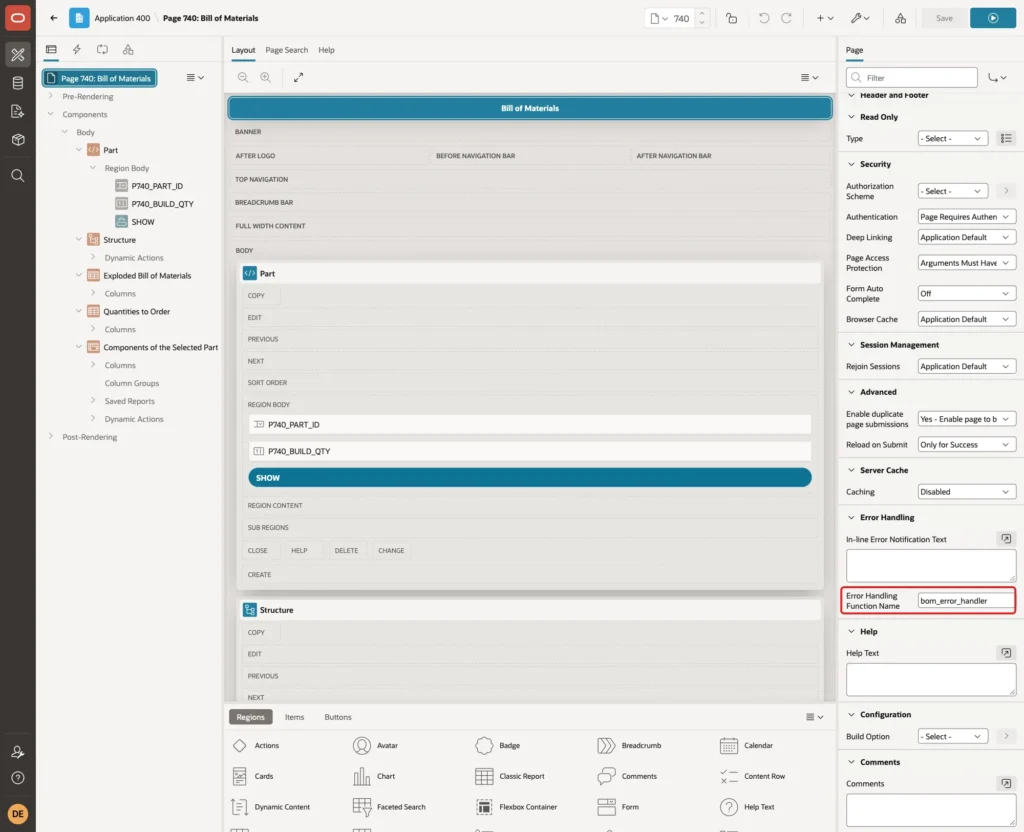
Without help, APEX shows ORA-00001 with the table and column names, or ORA-20001 in front of the trigger message. This page error handling function maps the constraints to plain messages and removes the ORA-20001 prefix:
Example:
create or replace function bom_error_handler (
  p_error in apex_error.t_error
) return apex_error.t_error_result
is
  l_result apex_error.t_error_result;
begin
  l_result := apex_error.init_error_result(p_error => p_error);

  if p_error.ora_sqlcode = -20001 then
    l_result.message := apex_error.get_first_ora_error_text(p_error => p_error);
    l_result.additional_info := null;
  elsif p_error.ora_sqlcode in (-1, -2290) then
    case apex_error.extract_constraint_name(p_error => p_error)
      when 'BOM_LINES_PARENT_CHILD_UK' then
        l_result.message := 'This component is already in the list. Change its quantity instead.';
      when 'BOM_LINES_NOT_SELF_CK' then
        l_result.message := 'A part cannot be a component of itself.';
      when 'BOM_LINES_QTY_CK' then
        l_result.message := 'Quantity must be greater than zero.';
      else
        null;
    end case;
    l_result.additional_info := null;
  end if;

  return l_result;
end bom_error_handler;
/

show errors
Output:
Function BOM_ERROR_HANDLER compiled

No errors.
APEX_ERROR.GET_FIRST_ORA_ERROR_TEXT returns the trigger message without the ORA-20001 prefix and without the ORA-06512 lines.
Step 7: Create the Bill of Materials Page
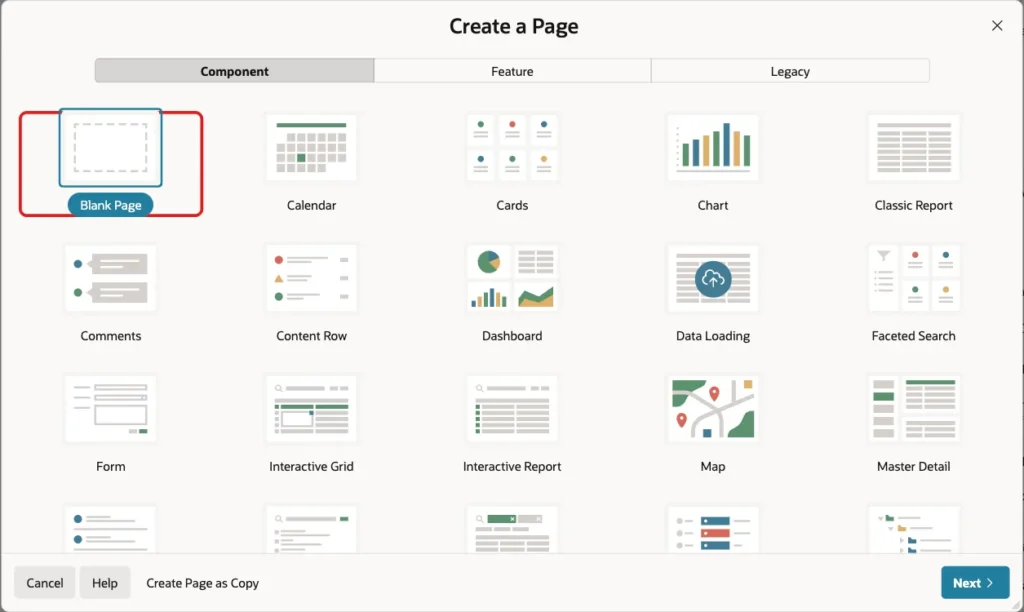
In App Builder, open the application and click Create Page. Select the Blank Page tile:
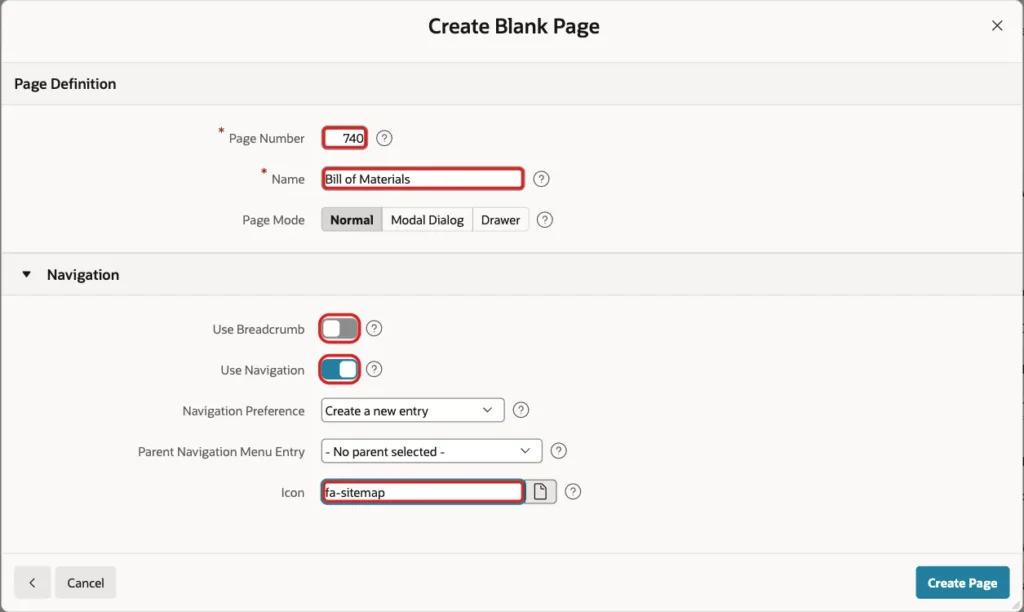
Enter 740 as the Page Number and Bill of Materials as the Name. Turn off Use Breadcrumb, keep Use Navigation on, enter fa-sitemap as the Icon and click Create Page:
In Page Designer, click the page node Page 740: Bill of Materials. In the Error Handling group, enter bom_error_handler as the Error Handling Function Name:
Step 8: Add the Part Region and Its Items
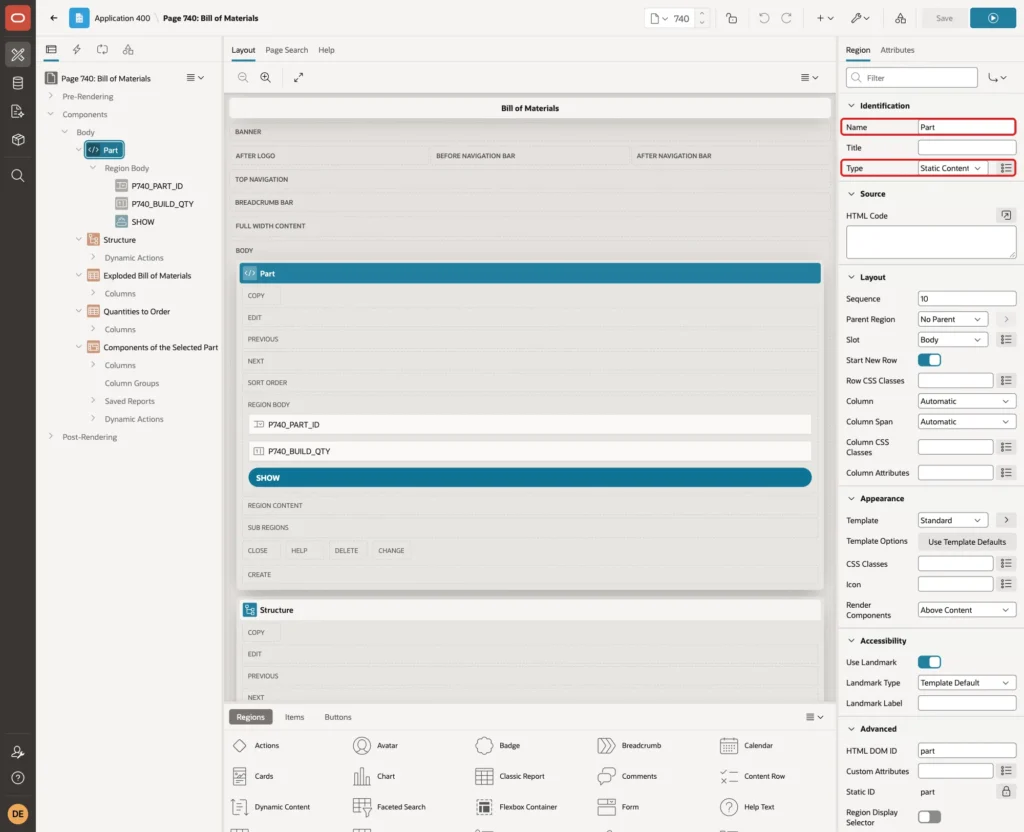
Create a region named Part with the Type Static Content:
Add a page item P740_PART_ID to the Part region with these settings:
- Type: Select List
- Label: Part
- Settings > Page Action on Selection: Submit Page
- List of Values > Type: SQL Query
- Display Null Value: off
The SQL Query lists all parts, so an assembly can be opened on its own too:
Example:
select part_no || ' - ' || part_name as display_value,
       part_id as return_value
  from bom_parts
 order by part_no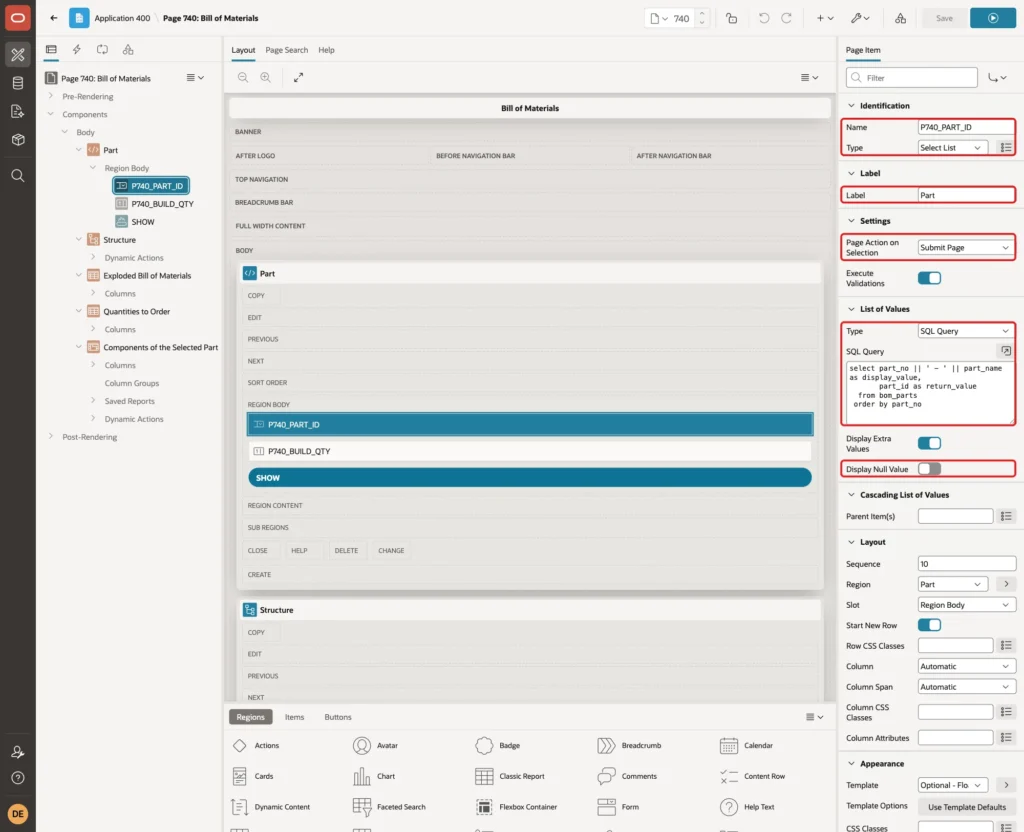
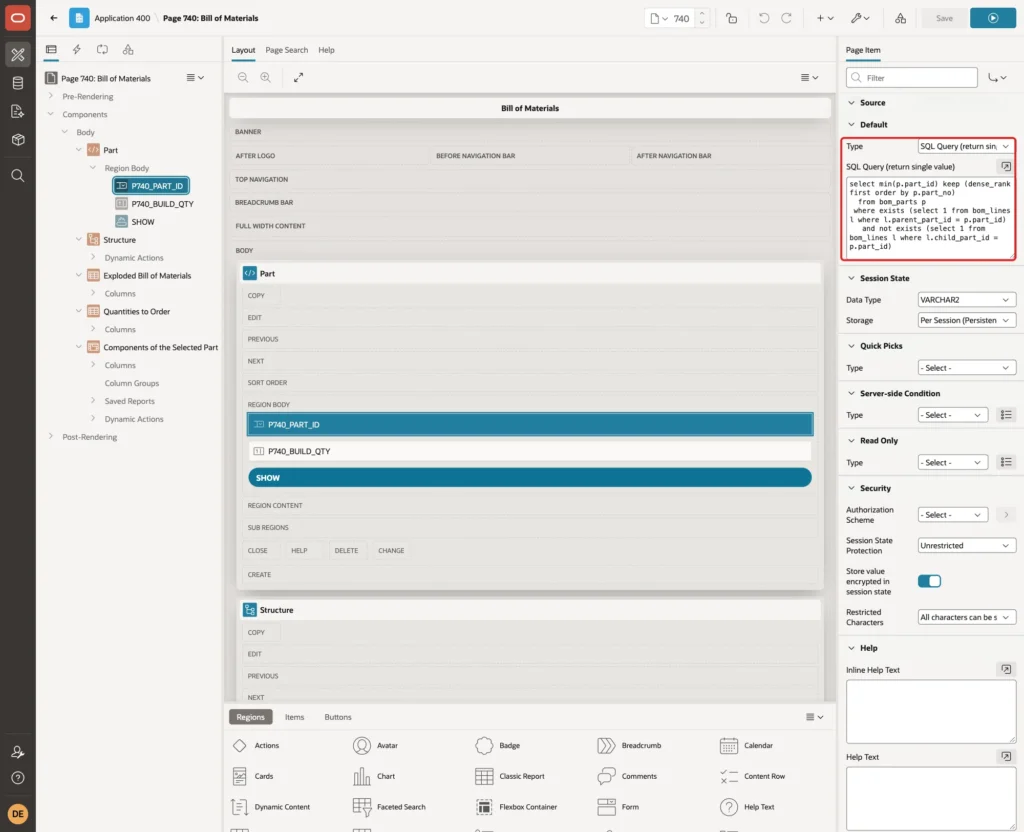
In the Default group, set the Type to SQL Query (return single value). The query picks the first finished product: a part that has lines but is not used in any other part:
Example:
select min(p.part_id) keep (dense_rank first order by p.part_no)
  from bom_parts p
 where exists (select 1 from bom_lines l where l.parent_part_id = p.part_id)
   and not exists (select 1 from bom_lines l where l.child_part_id = p.part_id)
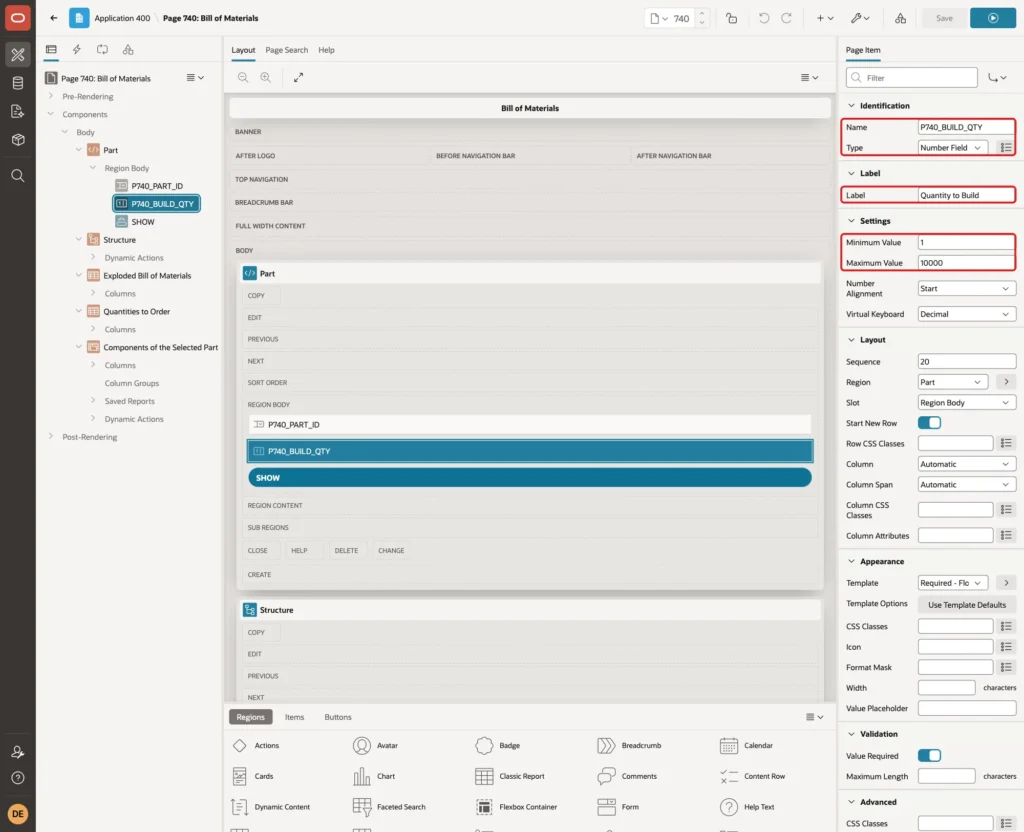
Add a page item P740_BUILD_QTY with the Type Number Field and the Label Quantity to Build. Set Minimum Value to 1 and Maximum Value to 10000:
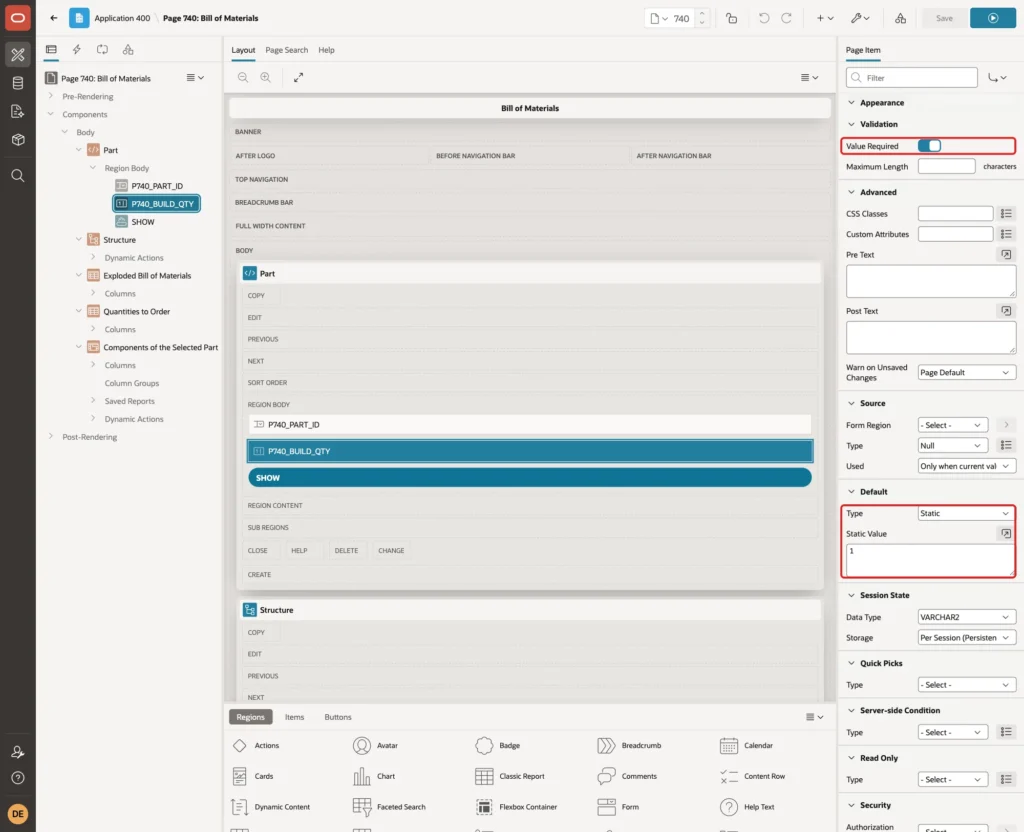
Turn on Value Required and set the Default to the Static value 1:
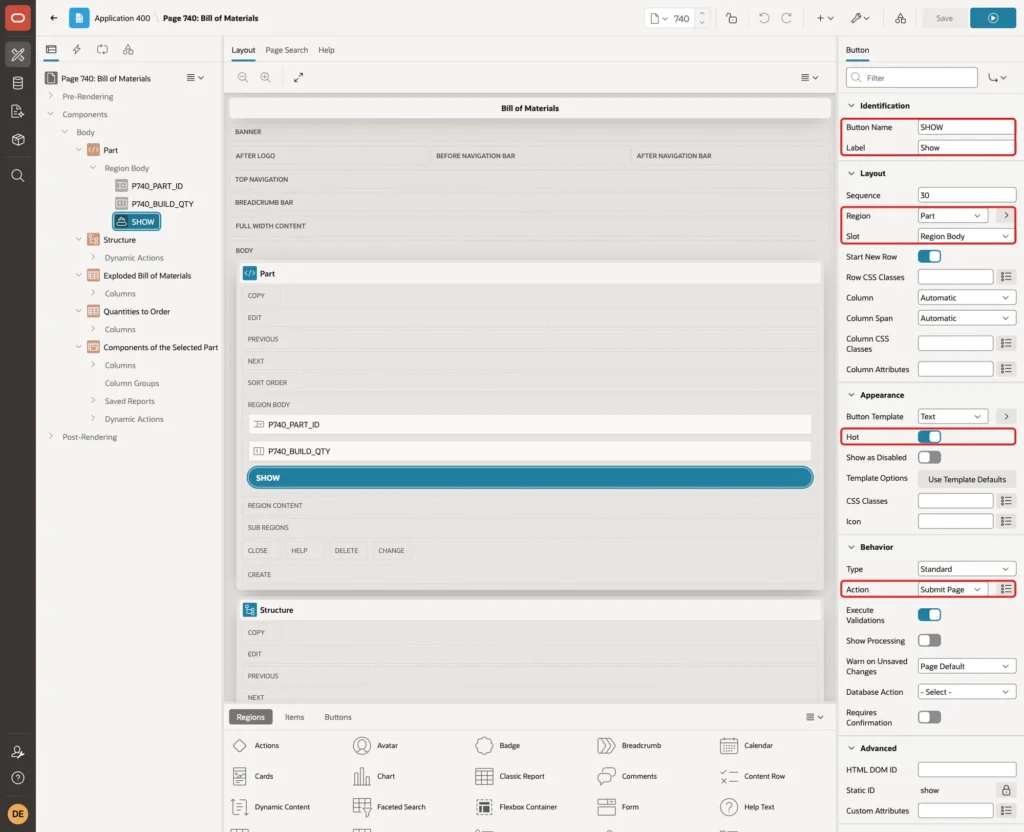
Add a button SHOW with the Label Show to the Part region, slot Region Body. Turn on Hot and keep the Action Submit Page:
Step 9: Add the Structure Tree
Create a region named Structure with the Type Tree. Set the Source Type to SQL Query and Page Items to Submit to P740_PART_ID,P740_BUILD_QTY. The query is the explosion from Step 2. It starts with the selected part itself as the root and returns the columns the tree needs:
Example:
with bom (lvl, part_id, part_no, qty_per, total_qty) as (
  select 1, part_id, part_no, 1, 1
    from bom_parts
   where part_id = :P740_PART_ID
  union all
  select b.lvl + 1, c.part_id, c.part_no, l.quantity, b.total_qty * l.quantity
    from bom b
    join bom_lines l on l.parent_part_id = b.part_id
    join bom_parts c on c.part_id = l.child_part_id
)
search depth first by part_no set seq
cycle part_id set is_cycle to 'Y' default 'N'
select case
         when exists (select 1 from bom_lines x where x.parent_part_id = b.part_id)
         then 1 else 0
       end as status,
       b.lvl,
       b.part_no || ' ' || p.part_name ||
         case
           when b.lvl = 1
           then ' - build ' || :P740_BUILD_QTY
           else ' - ' || rtrim(to_char(b.qty_per, 'FM999999990.999'), '.') || ' per parent, ' ||
                rtrim(to_char(b.total_qty * :P740_BUILD_QTY, 'FM999999990.999'), '.') ||
                ' ' || p.uom || ' in total'
         end as title,
       case
         when exists (select 1 from bom_lines x where x.parent_part_id = b.part_id)
         then 'fa-cubes' else 'fa-cube'
       end as icon,
       b.seq as value,
       null as tooltip,
       null as link
  from bom b
  join bom_parts p on p.part_id = b.part_id
 order by b.seq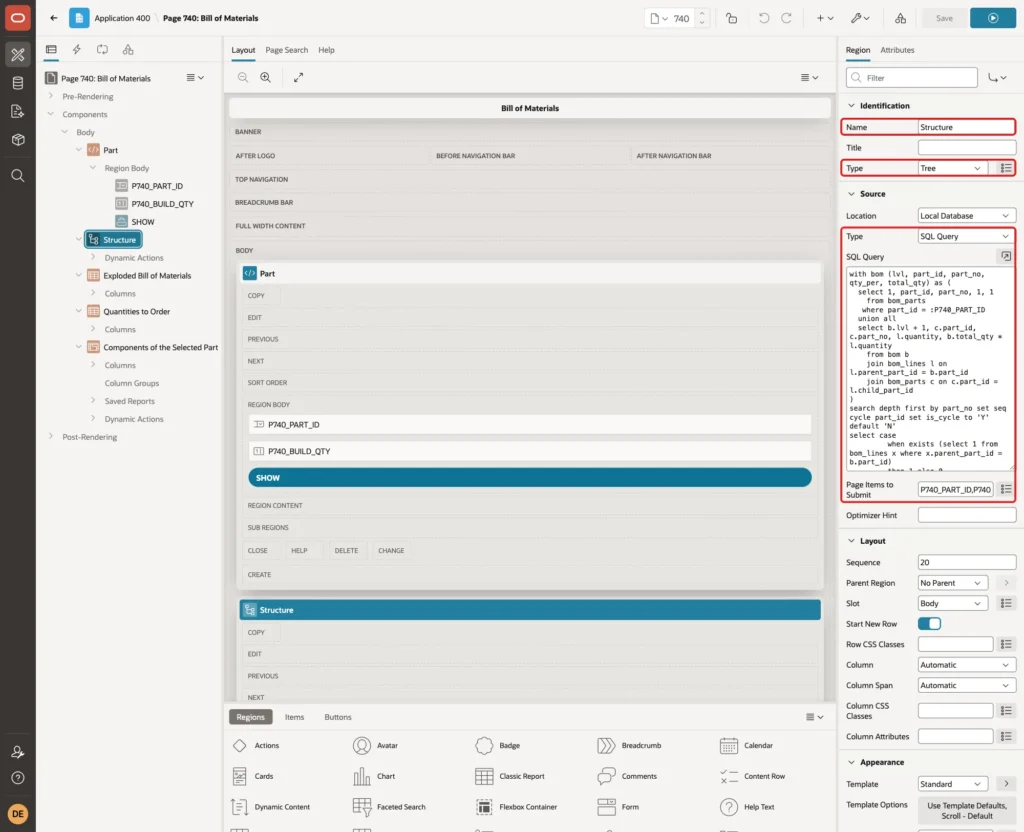
The columns follow the tree rules:
- STATUS is 1 (expanded) for parts with components and 0 for leaves.
- LVL is the level from the recursive query; the root is level 1.
- TITLE shows the quantity per parent and the total for the quantity to build.
- VALUE is the depth-first number SEQ. A part used twice gets two different values.
- ICON is fa-cubes for assemblies and fa-cube for leaves.
On the Attributes tab, set Node Label Column to TITLE, Node Value Column to VALUE, Hierarchy to Not Computed, Node Status Column to STATUS, Hierarchy Level Column to LVL, Link Column to LINK and Icon CSS Class Column to ICON:
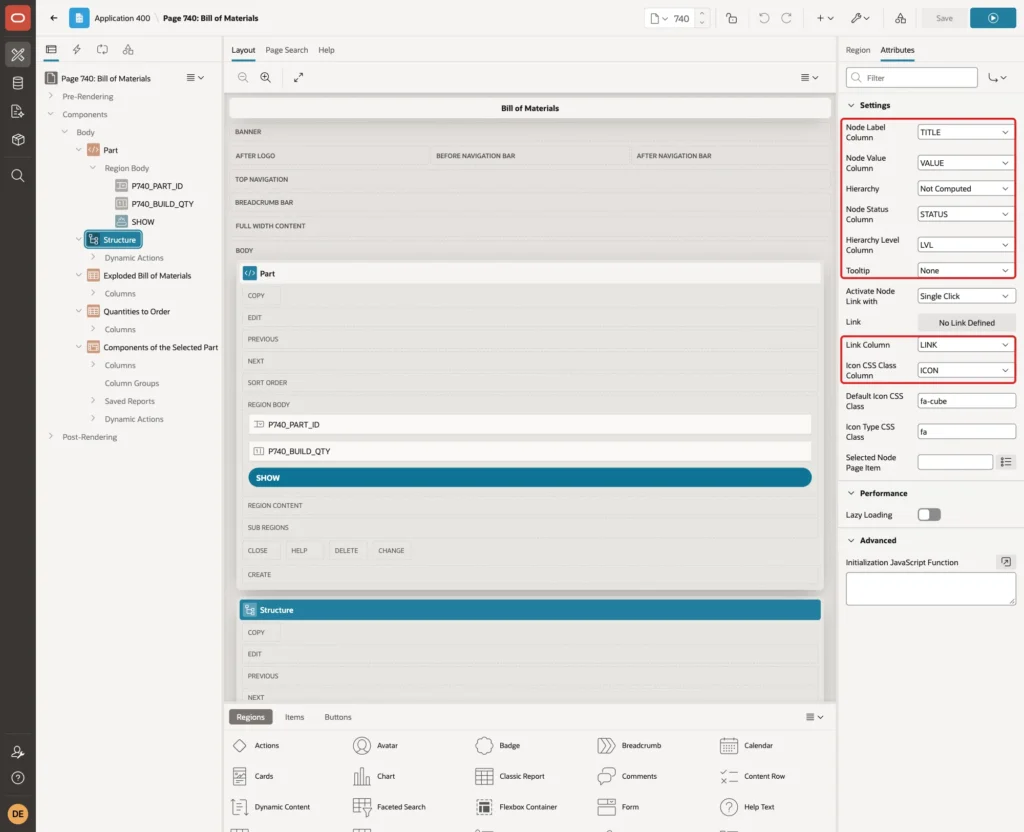
Not Computed tells APEX to use the order and levels of the query as they are. The recursive query already returns them, together with the multiplied quantities.
Step 10: Add the Exploded Report
Create a region named Exploded Bill of Materials with the Type Classic Report. Set Page Items to Submit to P740_PART_ID,P740_BUILD_QTY and use this query:
Example:
with bom (lvl, part_id, part_no, qty_per, total_qty) as (
  select 1, l.child_part_id, c.part_no, l.quantity, l.quantity
    from bom_lines l
    join bom_parts c on c.part_id = l.child_part_id
   where l.parent_part_id = :P740_PART_ID
  union all
  select b.lvl + 1, c.part_id, c.part_no, l.quantity, b.total_qty * l.quantity
    from bom b
    join bom_lines l on l.parent_part_id = b.part_id
    join bom_parts c on c.part_id = l.child_part_id
)
search depth first by part_no set seq
cycle part_id set is_cycle to 'Y' default 'N'
select b.lvl as lvl,
       lpad(b.part_no, length(b.part_no) + 4 * (b.lvl - 1), unistr('\00a0')) as part_no,
       p.part_name,
       rtrim(to_char(b.qty_per, 'FM999999990.999'), '.') as qty_per,
       rtrim(to_char(b.total_qty * :P740_BUILD_QTY, 'FM999999990.999'), '.') as total_qty,
       p.uom
  from bom b
  join bom_parts p on p.part_id = b.part_id
 order by b.seq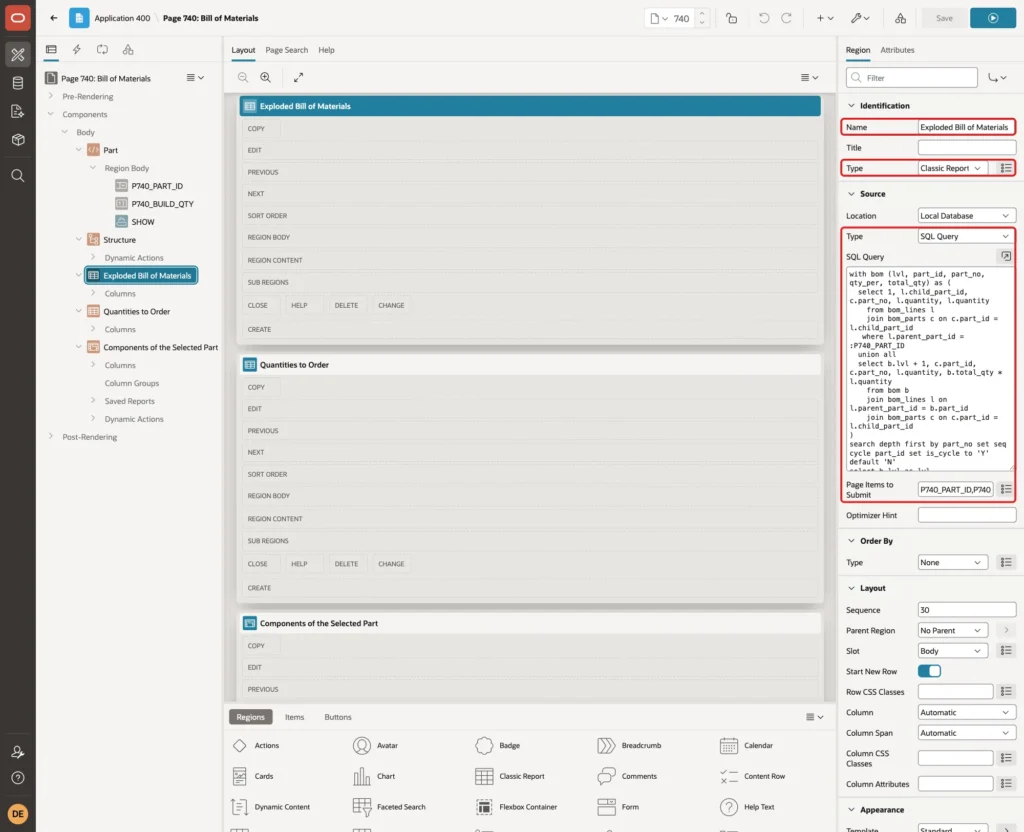
LPAD with the non-breaking space unistr('\00a0') indents each part number by its level. Normal spaces would be collapsed by the browser. TO_CHAR with the format FM999999990.999 shows 0.8 instead of .8, and RTRIM removes the trailing point of whole numbers.
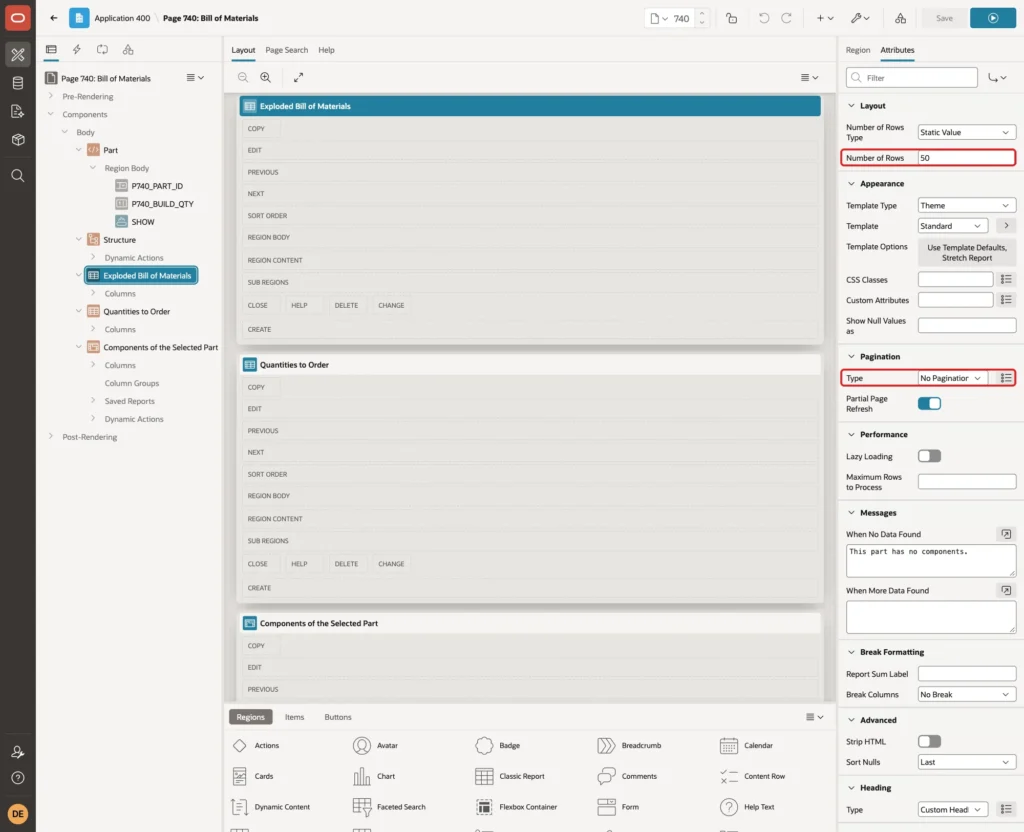
Set the column headings to Level, Part No, Part Name, Qty per Parent, Total Qty and UOM, and right-align the number columns. On the Attributes tab, set Number of Rows to 50 and keep Pagination at No Pagination. Enter This part has no components. as the When No Data Found message:
Step 11: Add the Quantities to Order Report
Create a classic report region named Quantities to Order with the same Page Items to Submit. The query is the total from Step 3, multiplied by the quantity to build. GROUPING SETS adds a Total row with the cost of everything:
Example:
with bom (part_id, total_qty) as (
  select l.child_part_id, l.quantity
    from bom_lines l
   where l.parent_part_id = :P740_PART_ID
  union all
  select l.child_part_id, b.total_qty * l.quantity
    from bom b
    join bom_lines l on l.parent_part_id = b.part_id
)
cycle part_id set is_cycle to 'Y' default 'N'
select case when grouping(p.part_no) = 1 then 'Total' else p.part_no end as part_no,
       p.part_name,
       case when grouping(p.part_no) = 0
            then rtrim(to_char(sum(b.total_qty) * :P740_BUILD_QTY, 'FM999999990.999'), '.')
       end as qty_to_order,
       p.uom,
       p.unit_cost,
       sum(b.total_qty * p.unit_cost) * :P740_BUILD_QTY as total_cost
  from bom b
  join bom_parts p on p.part_id = b.part_id
 where not exists (select 1 from bom_lines x where x.parent_part_id = b.part_id)
 group by grouping sets ((p.part_no, p.part_name, p.uom, p.unit_cost), ())
 order by grouping(p.part_no), p.part_no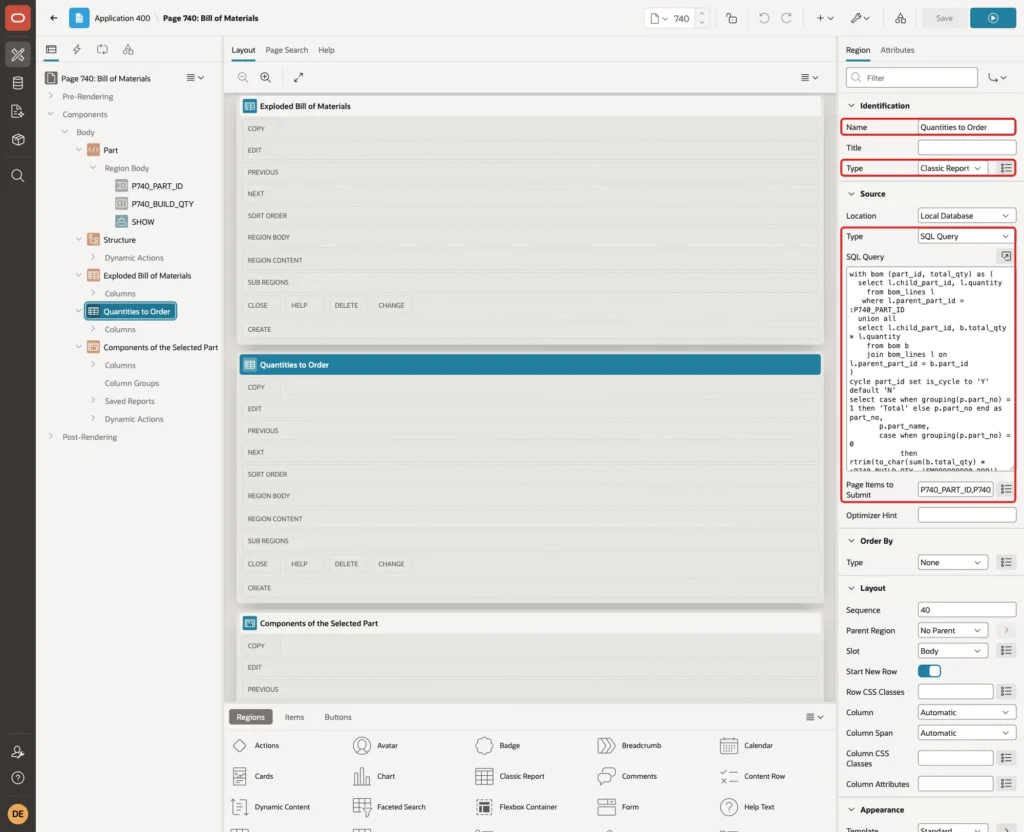
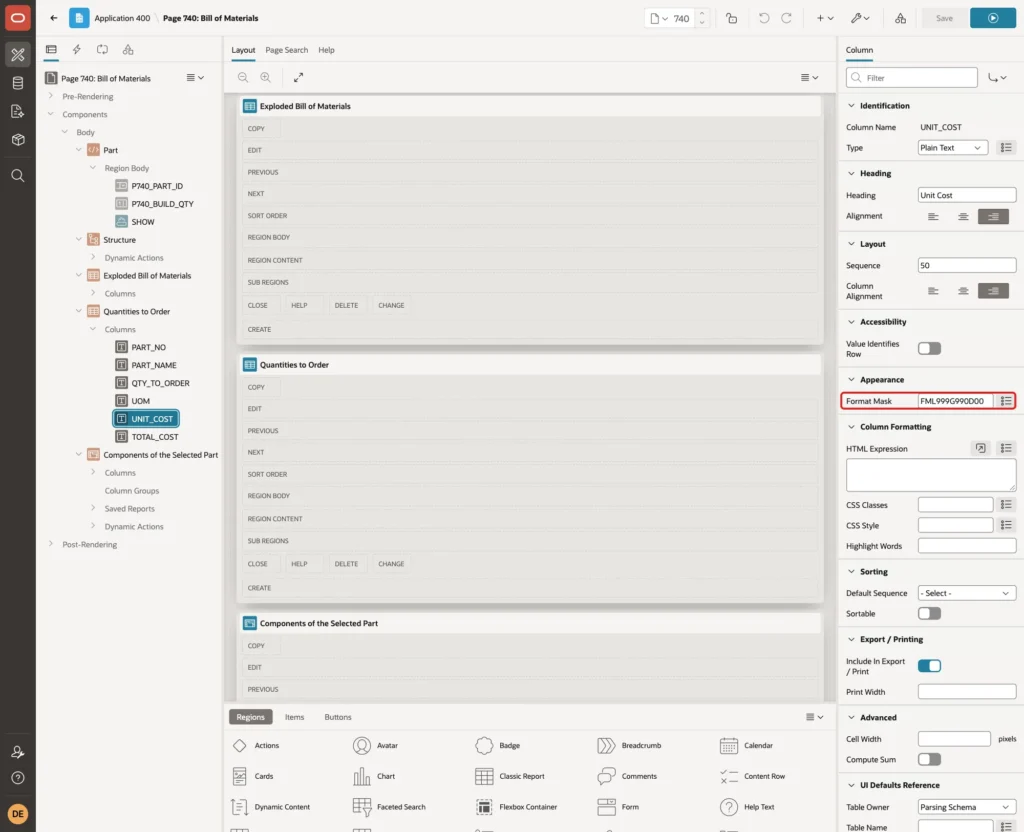
Set the Format Mask of the UNIT_COST and TOTAL_COST columns to FML999G990D00:
Step 12: Add the Components Grid
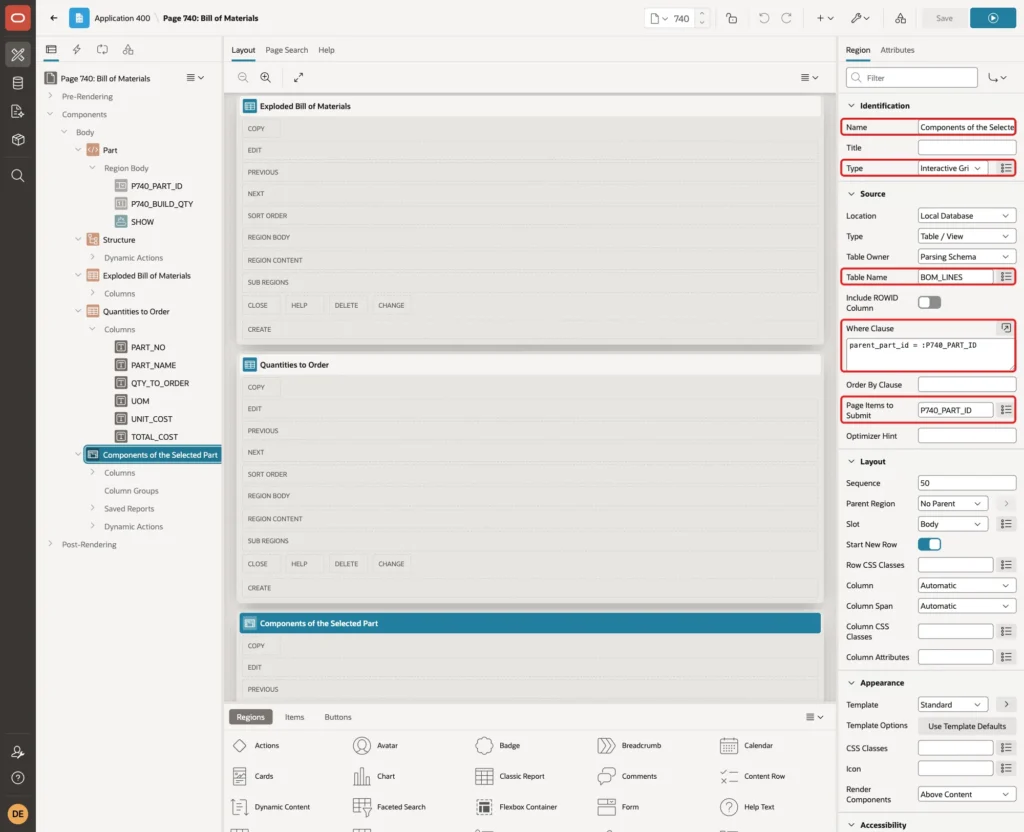
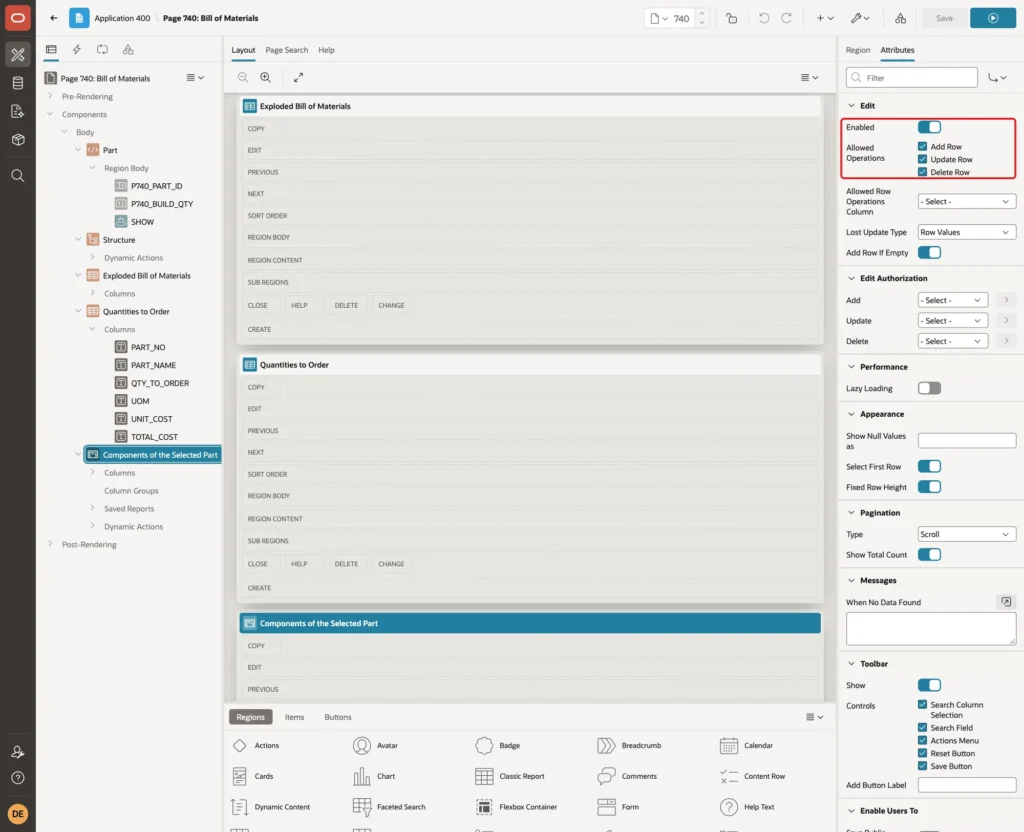
Create a region named Components of the Selected Part with the Type Interactive Grid. Set the Source Type to Table / View, Table Name to BOM_LINES, Where Clause to parent_part_id = :P740_PART_ID and Page Items to Submit to P740_PART_ID:
On the Attributes tab, turn on Edit and allow Add Row, Update Row and Delete Row:
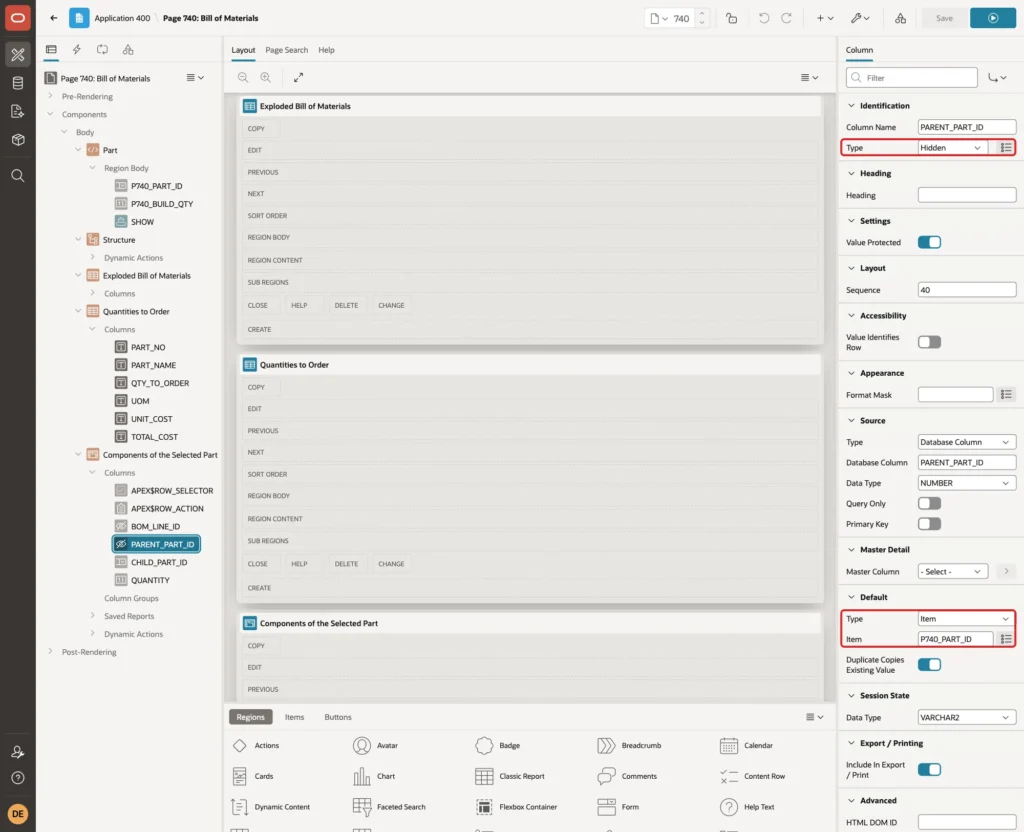
Set the PARENT_PART_ID column to Type Hidden with the Default Type Item and the Item P740_PART_ID. New lines then belong to the selected part:
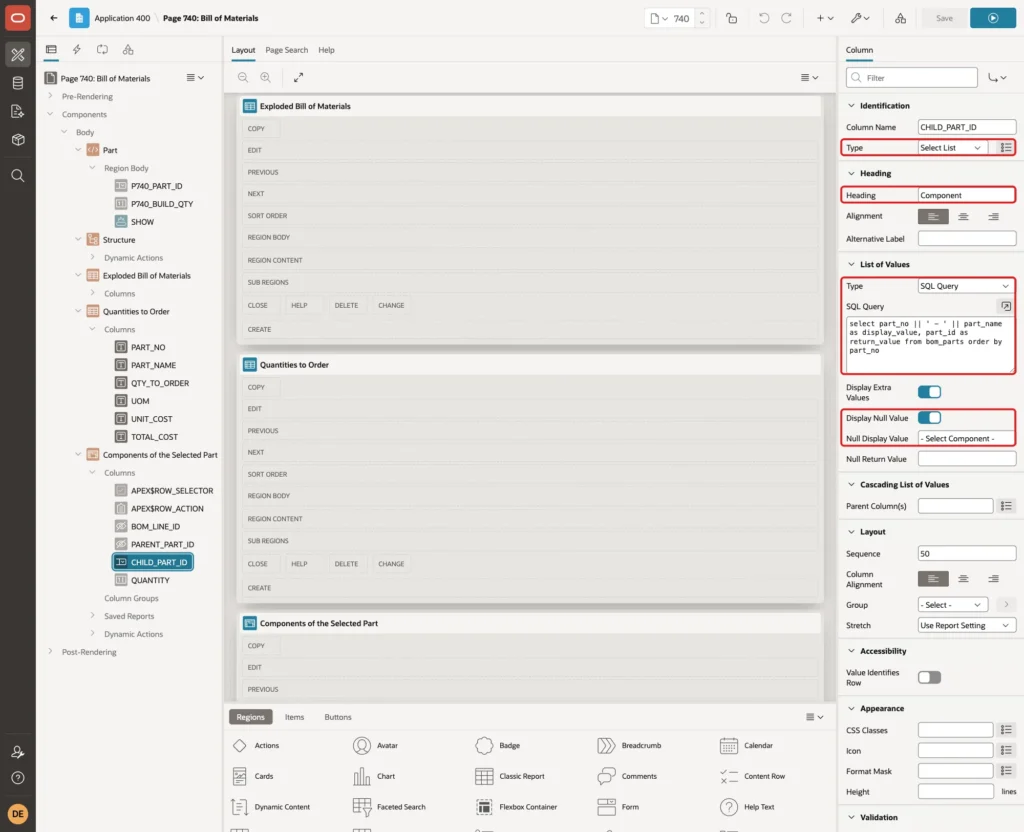
Set CHILD_PART_ID to Type Select List with the Heading Component. Use this SQL Query and the Null Display Value - Select Component -:
Example:
select part_no || ' - ' || part_name as display_value, part_id as return_value from bom_parts order by part_no
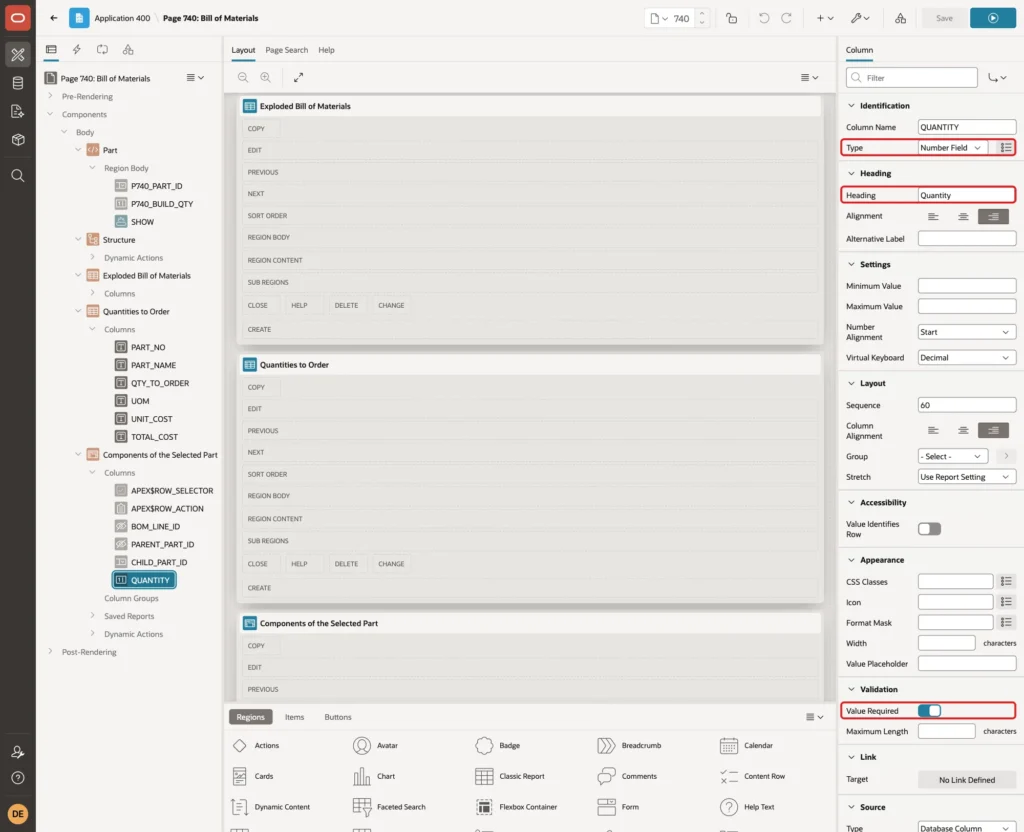
Set QUANTITY to Type Number Field with the Heading Quantity and turn on Value Required. The check constraint refuses zero and negative values:
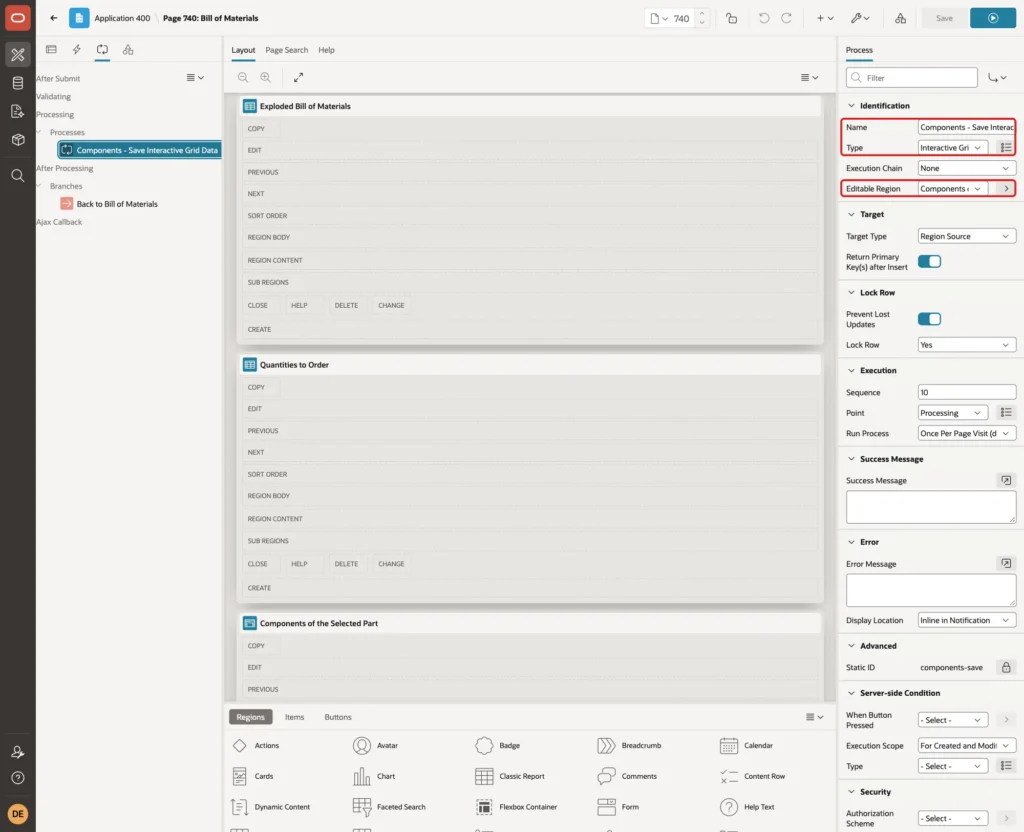
Creating the grid also added the process Components - Save Interactive Grid Data with the Type Interactive Grid - Automatic Row Processing (DML) and the grid as its Editable Region:
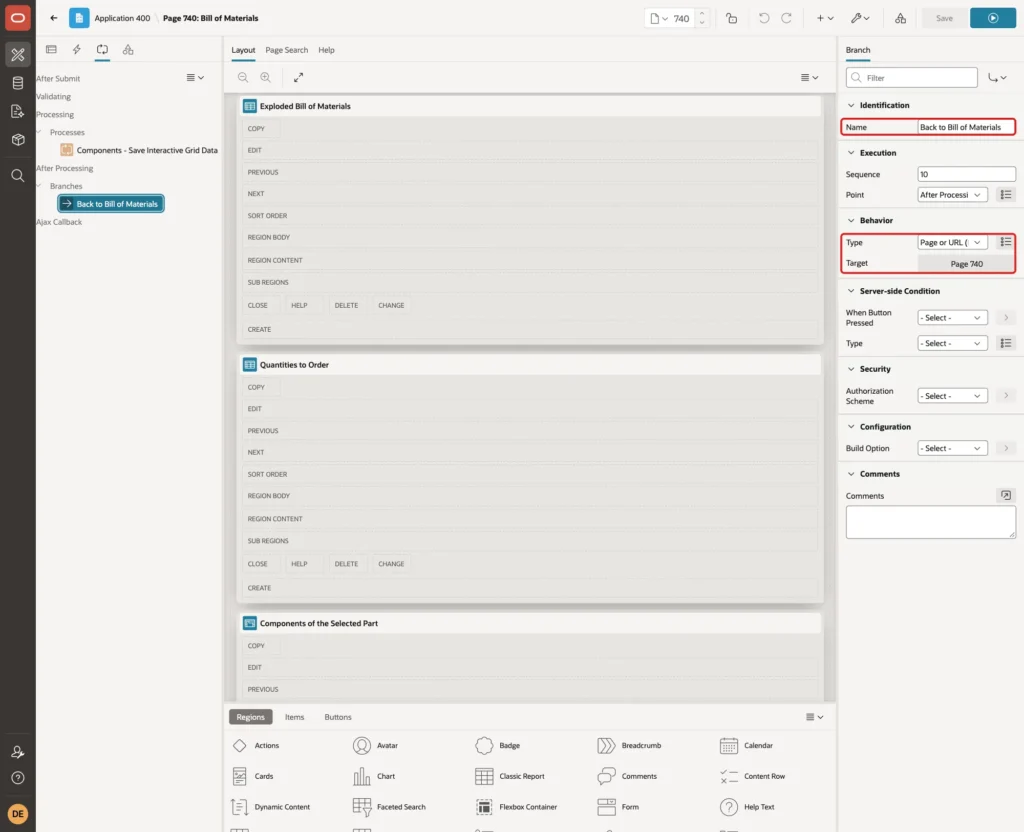
Add a branch named Back to Bill of Materials with the Target Page 740, so the Show button and the select list return to the same page:
Step 13: Add the Dynamic Actions
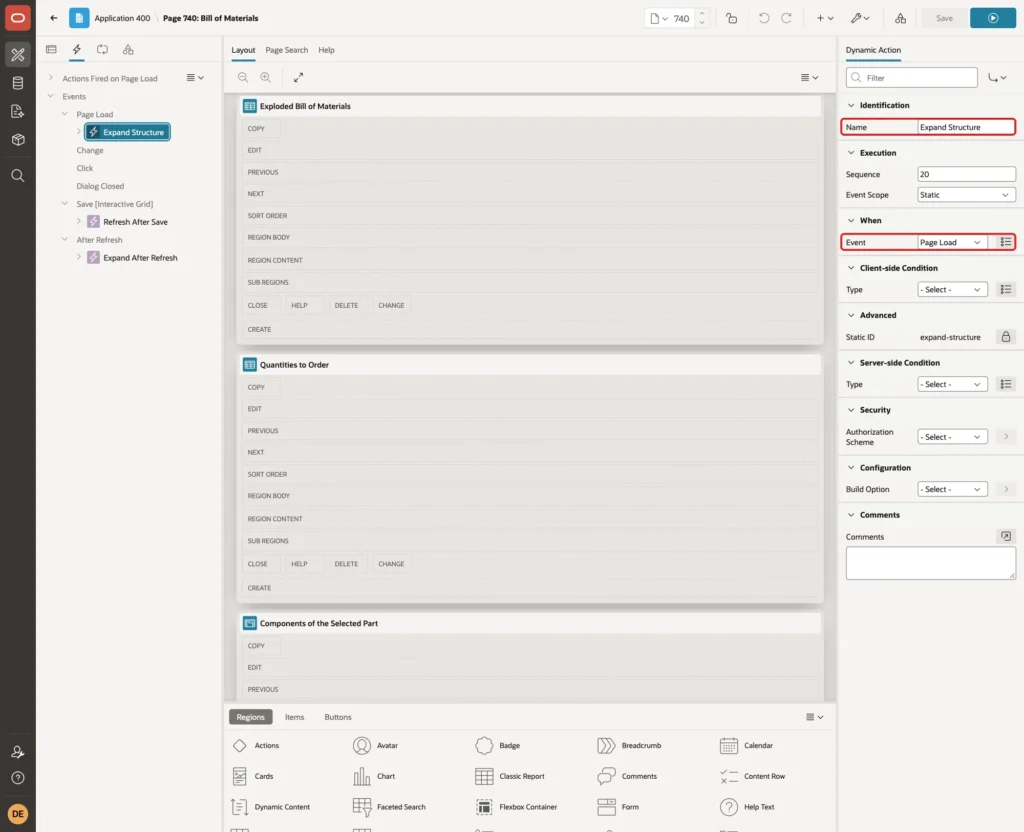
The tree opened with only the first level expanded in a first test, even with STATUS 1 on every assembly. Create a dynamic action named Expand Structure with the Event Page Load:
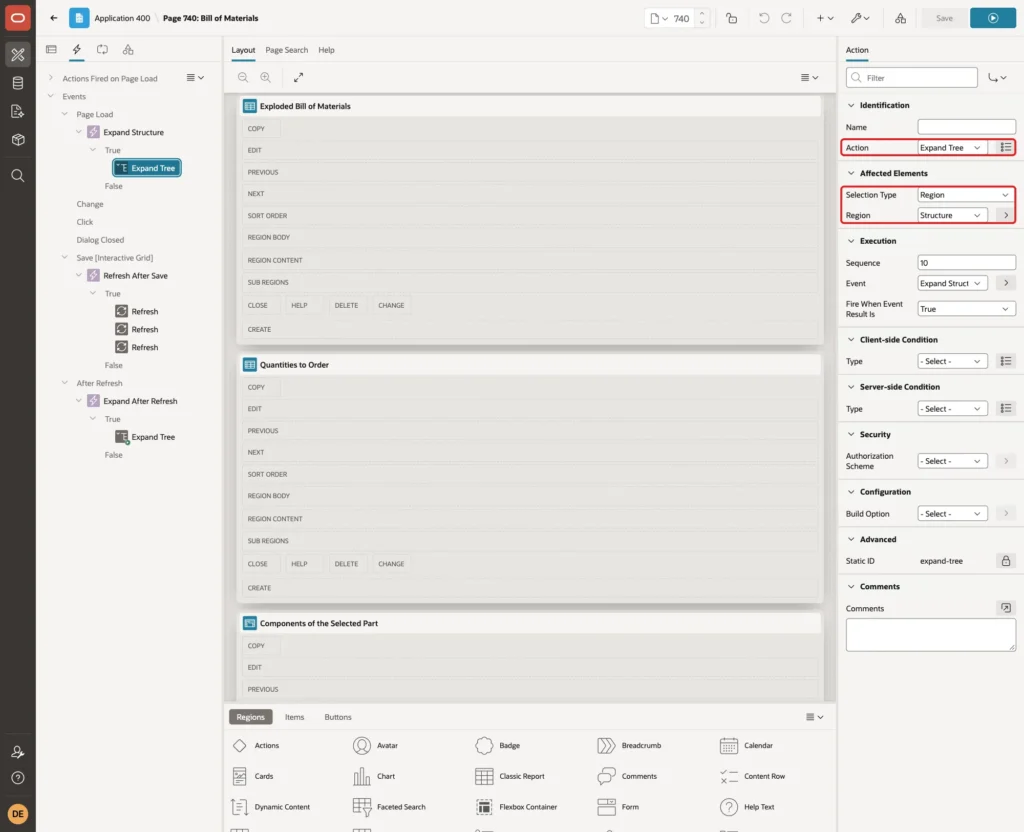
Set its True action to Expand Tree with the Selection Type Region and the Region Structure:
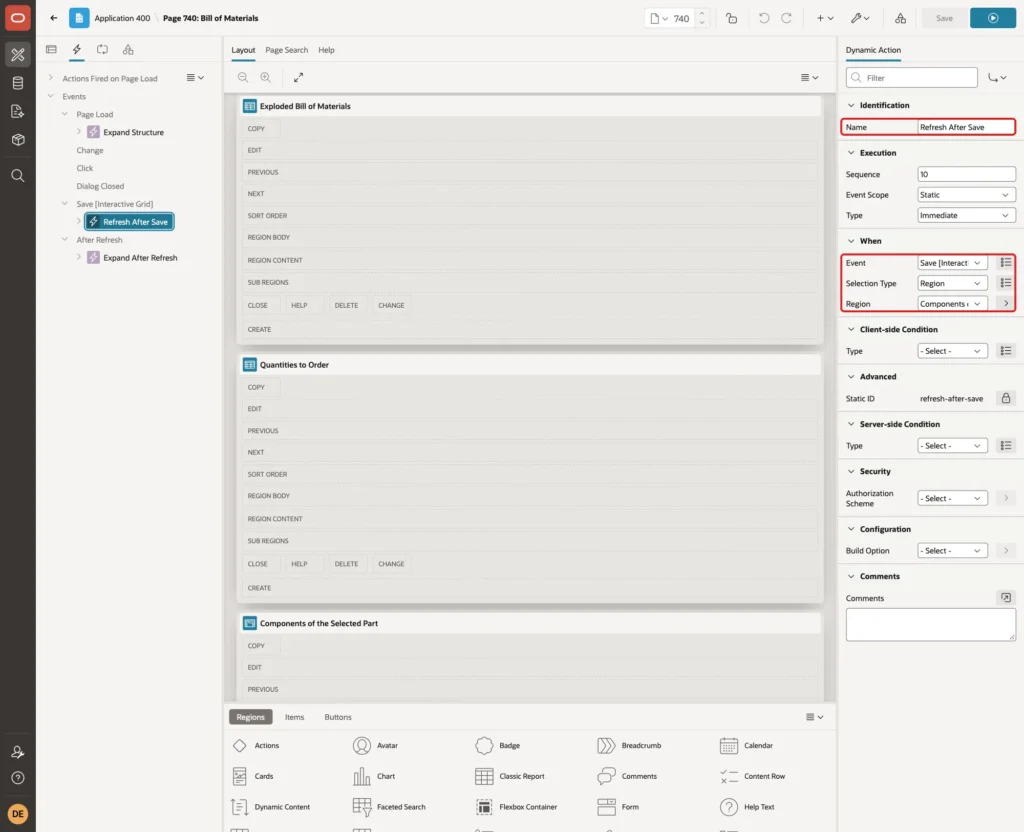
The grid saves through Ajax, so the tree and reports do not change by themselves. Create a dynamic action named Refresh After Save with the Event Save [Interactive Grid], the Selection Type Region and the Region Components of the Selected Part:
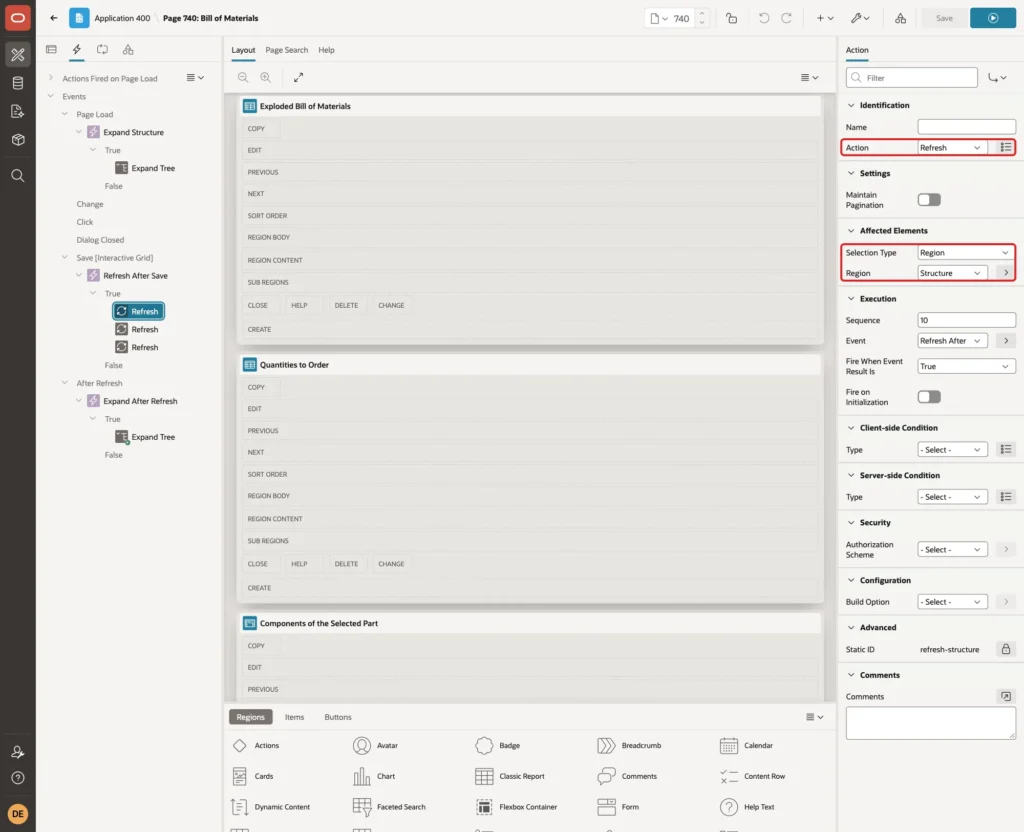
Add three True actions of the Type Refresh, for the regions Structure, Exploded Bill of Materials and Quantities to Order:
After a refresh, the tree was collapsed again. An Expand Tree action right after the Refresh actions did not help, because it ran before the new tree arrived. Create a dynamic action named Expand After Refresh with the Event After Refresh on the Region Structure instead:
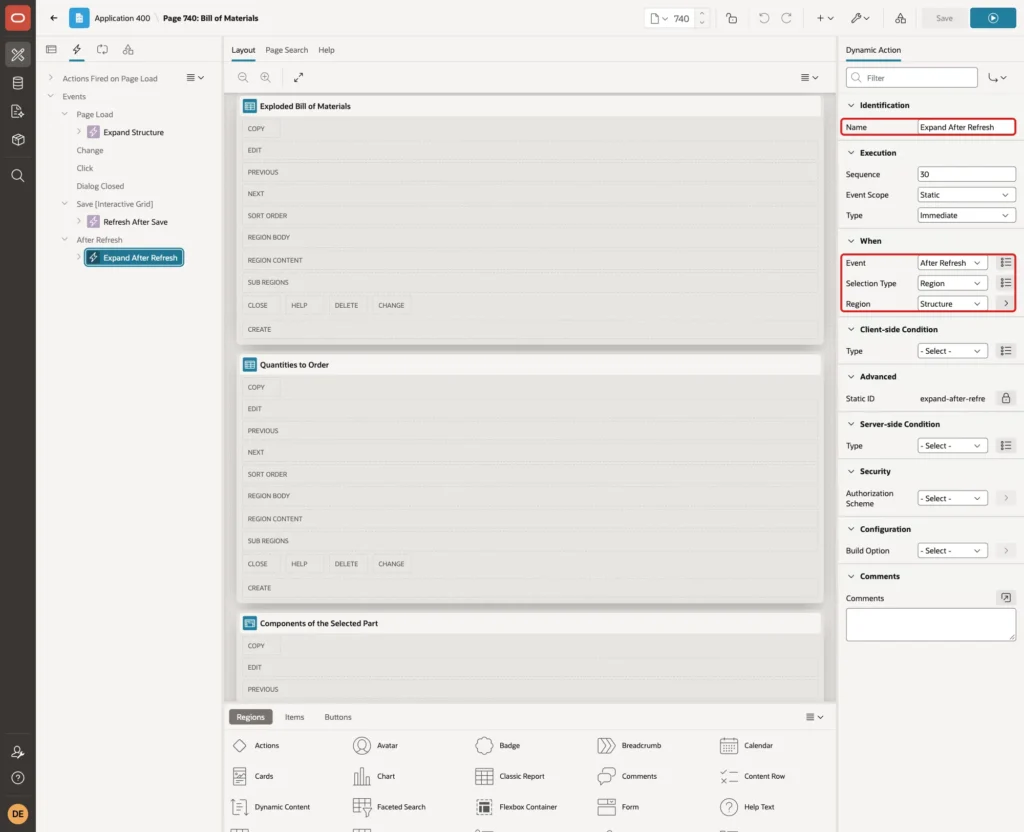
Give it a True action Expand Tree on the Region Structure, the same as in Expand Structure.
Test the Bill of Materials
The Office Chair
Sign in and open Bill of Materials. The page opens with the Office Chair, and the tree shows every level with the quantity per parent and in total:
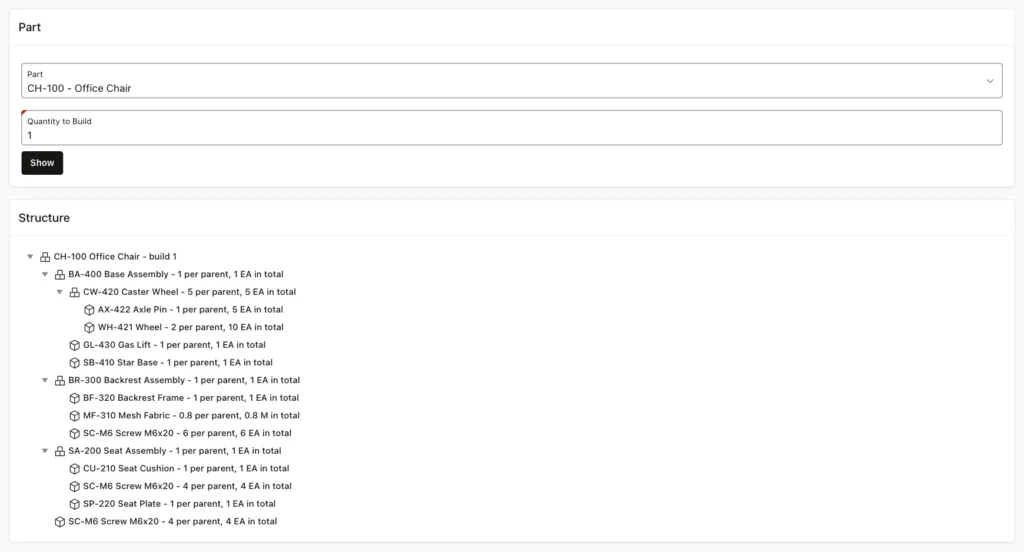
The exploded report lists the same rows with indented part numbers:
Ten Chairs
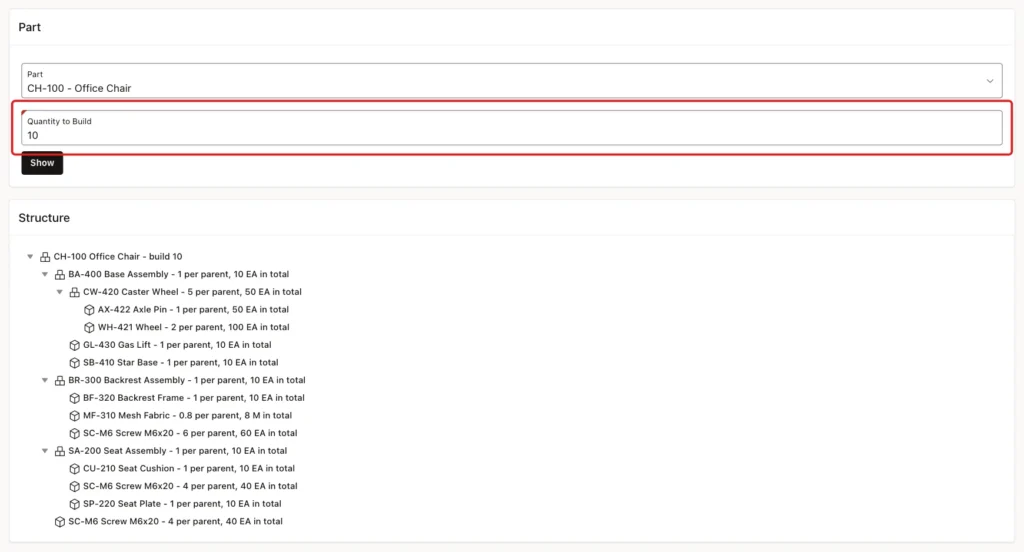
Enter 10 as the Quantity to Build and click Show. Every total is multiplied by 10:
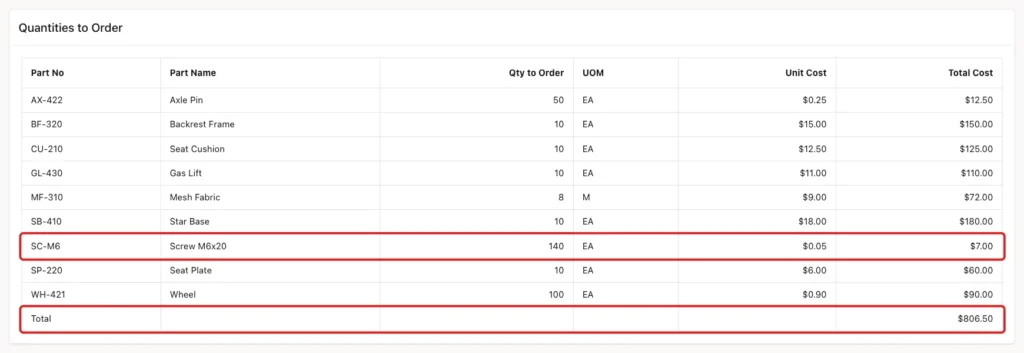
The Quantities to Order report adds the three screw lines to 140 and shows a total cost of 806.50, ten times the 80.65 from Step 3:
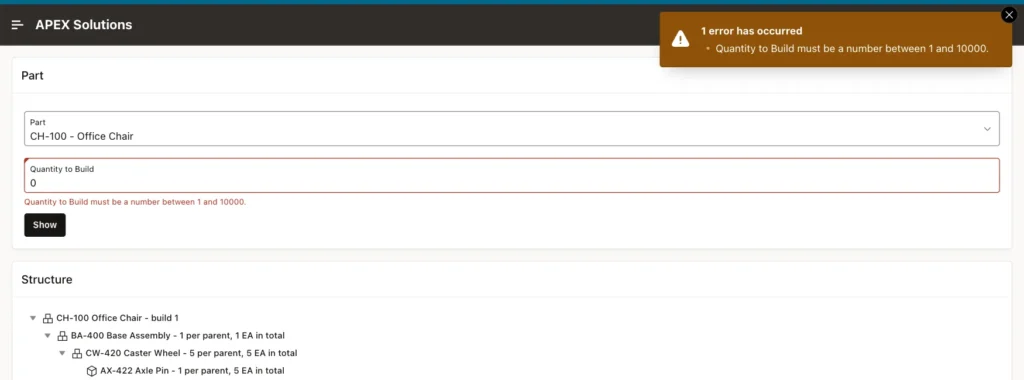
A Quantity to Build of 0 is refused by the number field settings:
A Shared Assembly
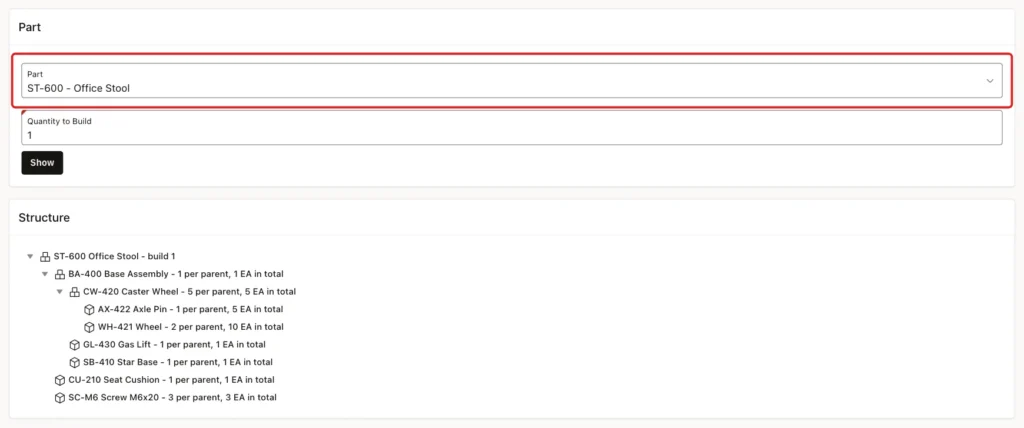
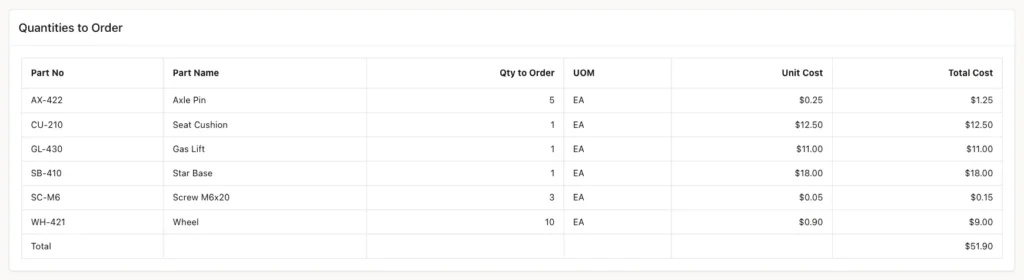
Select ST-600 - Office Stool. The stool uses the same Base Assembly as the chair, so the tree shows the same caster wheels and wheels under it:
Lines That Are Refused
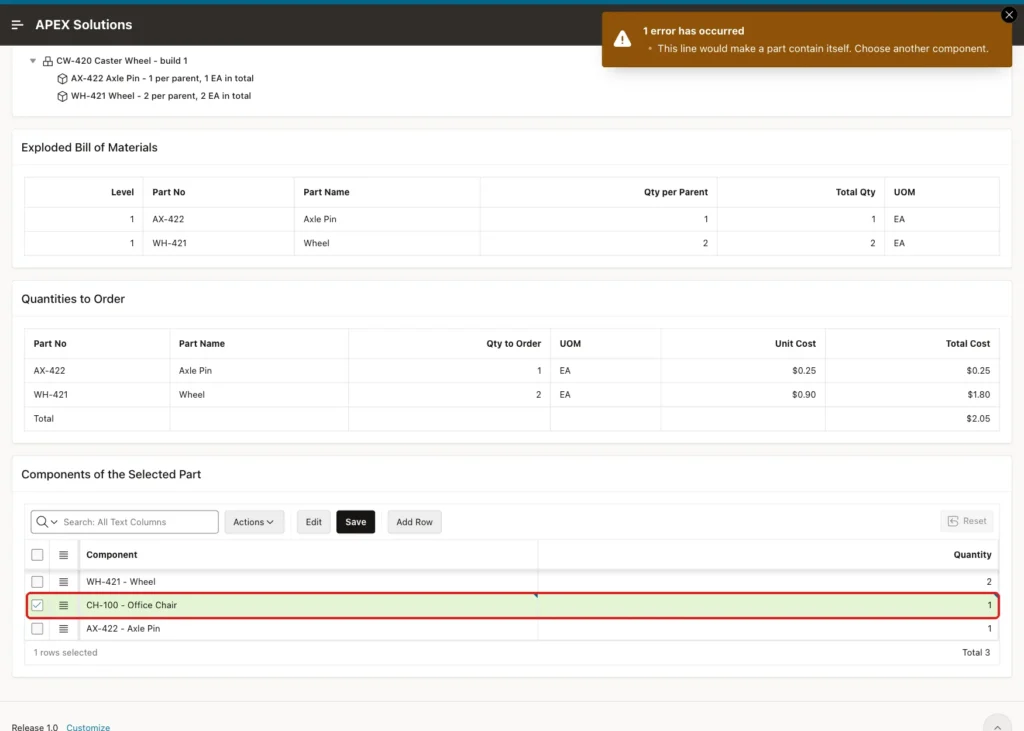
Select CW-420 - Caster Wheel. In the grid, click Add Row, choose CH-100 - Office Chair with the quantity 1 and click Save. The chair contains the caster wheel, so the trigger refuses the line:
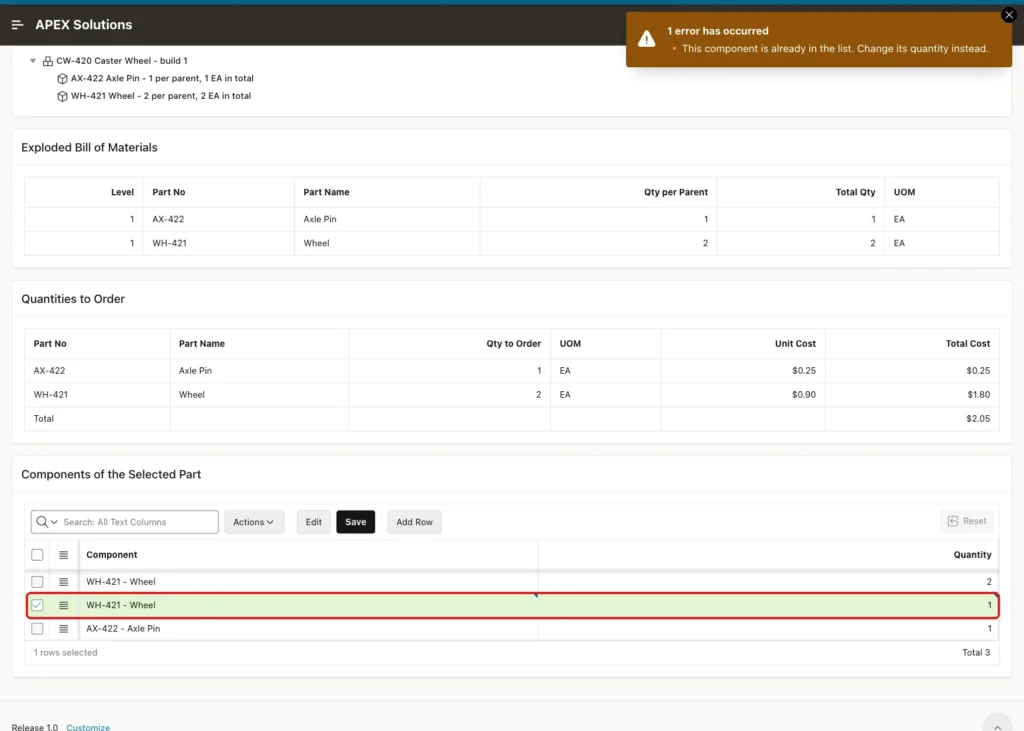
Adding WH-421 - Wheel a second time shows the message for the unique key:
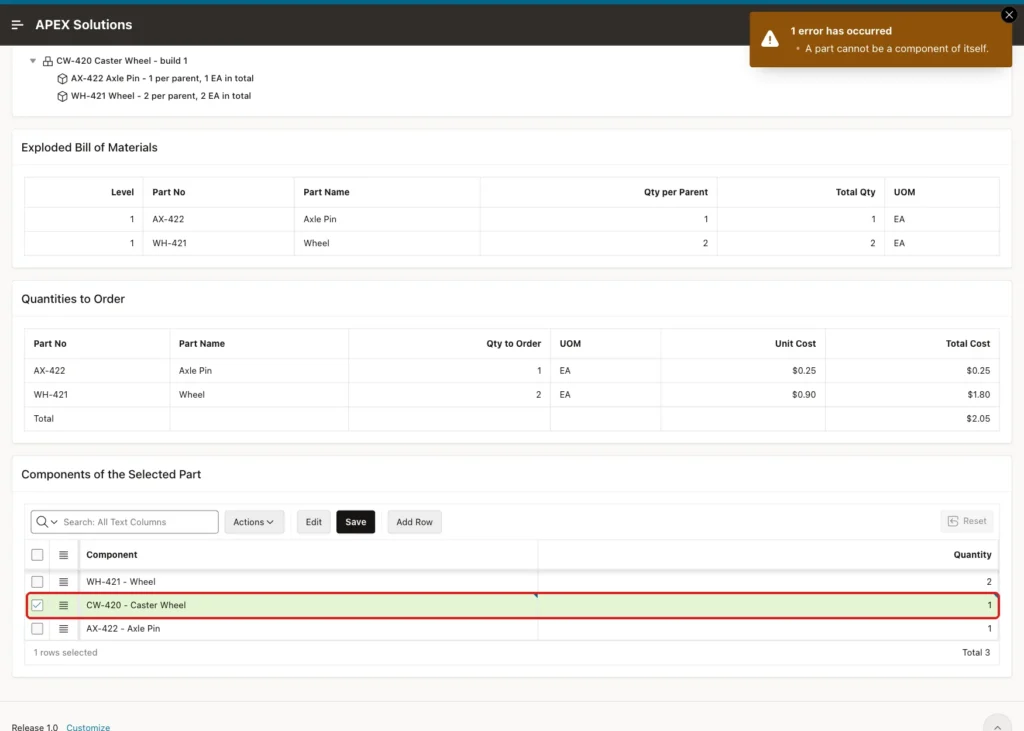
Adding CW-420 - Caster Wheel to itself shows the message for the check constraint:
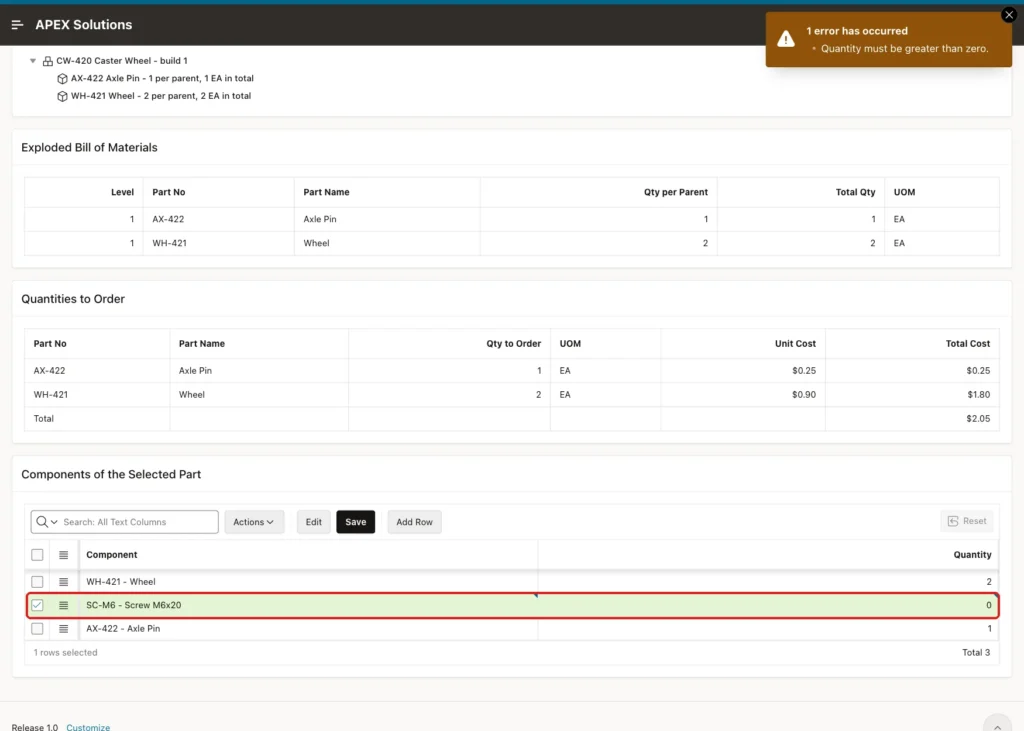
A quantity of 0 shows the message for the quantity check:
A Line That Is Saved
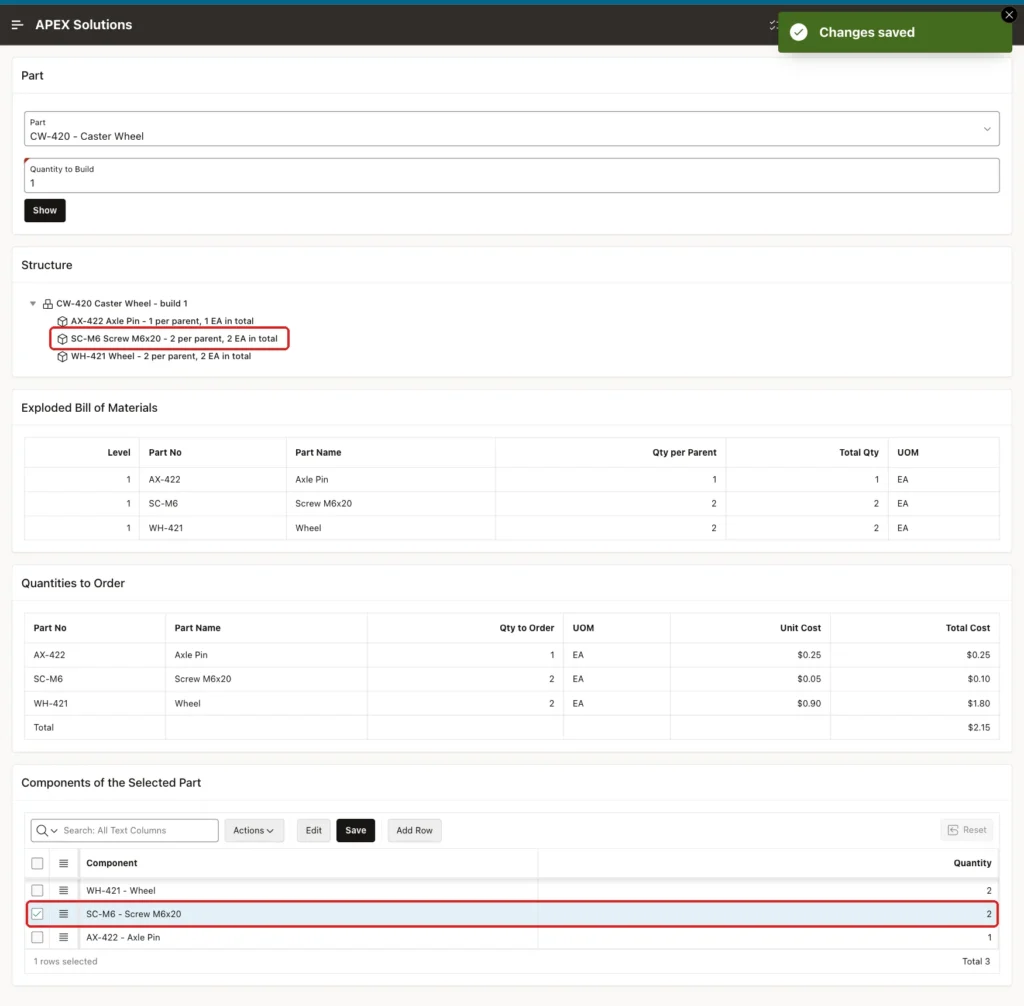
Add SC-M6 - Screw M6x20 with the quantity 2 to the Caster Wheel and click Save. The grid saves, and the tree and both reports refresh without a page reload:
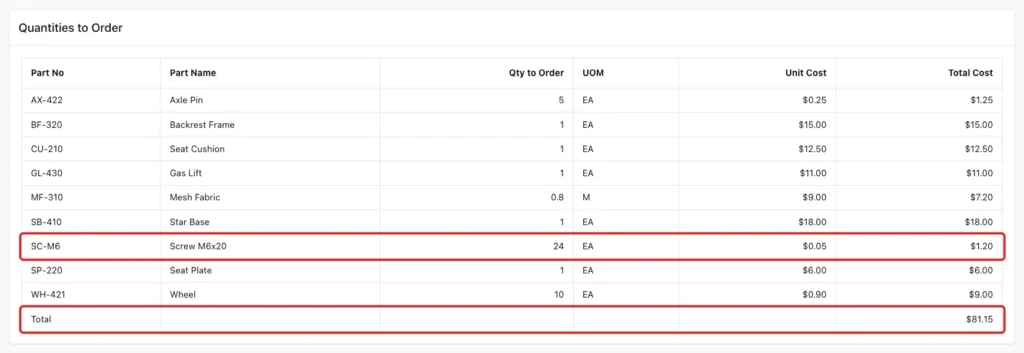
Back on the Office Chair, the screws to order went up from 14 to 24, because 5 caster wheels need 2 screws each. The total cost rose by 0.50 to 81.15:
The test line was deleted afterwards. A final check shows the 18 sample lines and no loops:
Example:
select count(*) as bom_lines from bom_lines;

with walk (top_part_id, part_id) as (
  select parent_part_id, child_part_id
    from bom_lines
  union all
  select w.top_part_id, l.child_part_id
    from walk w
    join bom_lines l on l.parent_part_id = w.part_id
)
cycle part_id set is_cycle to 'Y' default 'N'
select count(*) as loops
  from walk
 where part_id = top_part_id;
Output:
   BOM_LINES
____________
          18

   LOOPS
________
       0
Things to Know
- A recursive WITH query carries a running product of the quantities from level to level, so every row knows its total for one product.
- Keep the CYCLE clause in every BOM query. If a loop ever reaches the table, the page still opens instead of failing with ORA-32044.
- A loop check that only reads committed data is not enough. Two sessions saved a loop together until the trigger locked the table first.
- The trigger checks the whole table after each statement. With the 18 lines of this example there was no noticeable delay. For very large structures, check only the paths below the changed lines.
- Use Hierarchy Not Computed when the query already returns the tree order and levels. Give each node a unique value, because the same part can appear more than once.
- A tree region in APEX 26.1 opened with only the first level expanded. Expand Tree on Page Load and on After Refresh of the tree shows every level.
- The page has no authorization scheme in this example. In a real system, limit who can edit the grid, for example with the Edit Authorization settings of the grid.
Related Guides
- How to Show Hierarchical Data (Manager and Employees) in a Tree in Oracle APEX
- How to Write Recursive Queries with Recursive WITH in Oracle
Conclusion
A bill of materials in Oracle APEX is one lines table and one recursive WITH query. The query multiplies the quantities from level to level, SEARCH DEPTH FIRST gives the tree order, and the CYCLE clause protects every query from loops. The same query feeds a tree, an exploded report and the totals to order.
Constraints stop duplicates, self-references and zero quantities, and a compound trigger refuses longer loops, also when two users save at the same moment. An editable grid maintains the lines, a page error handling function shows clear messages, and dynamic actions refresh the tree and reports after each save.
