
Many applications let users sign up for something that has a fixed number of places: a training session, a webinar, a meeting room tour or a company event. The page must stop at the limit, refuse a second sign-up by the same person, and give a freed place to someone else when a person cancels.
This guide builds such a registration page in Oracle APEX. Users see the seats left, register with one click, land on a waitlist when the event is full, and move up automatically when someone cancels. A row lock makes sure two users who click at the same moment cannot both take the last seat.
The guide uses events and user registrations as the example; the same steps work for any table with a capacity, such as course places or equipment slots. The post How to Prevent Overlapping Bookings in Oracle APEX stops two bookings of the same thing at the same time. This one counts places against a capacity and keeps a waitlist.
Step 1: Create the Tables
The example needs two tables and a view. REG_EVENTS holds the events and their capacity. REG_REGISTRATIONS holds one row per sign-up with the status REGISTERED, WAITLISTED or CANCELLED. The view REG_EVENT_SEATS_V counts the seats taken and the waitlist per event.
Create the tables, the indexes, the sample data and the view:
Example:
set lines 200 pages 100 feedback on
create table reg_events (
  event_id    number generated by default on null as identity constraint reg_events_pk primary key,
  event_name  varchar2(100) not null,
  starts_on   date          not null,
  capacity    number(5)     not null,
  created_on  date          default on null sysdate not null,
  constraint reg_events_name_uk unique (event_name),
  constraint reg_events_capacity_ck check (capacity > 0)
);

create table reg_registrations (
  registration_id number generated by default on null as identity constraint reg_registrations_pk primary key,
  event_id        number        not null,
  user_name       varchar2(255) not null,
  status          varchar2(12)  default on null 'REGISTERED' not null,
  registered_on   timestamp     default on null systimestamp not null,
  promoted_on     timestamp,
  cancelled_on    timestamp,
  constraint reg_registrations_event_fk foreign key (event_id)
    references reg_events (event_id),
  constraint reg_registrations_status_ck check (status in ('REGISTERED', 'WAITLISTED', 'CANCELLED')),
  constraint reg_registrations_cancel_ck check (
    (status = 'CANCELLED' and cancelled_on is not null) or
    (status <> 'CANCELLED' and cancelled_on is null))
);

create index reg_registrations_event_ix on reg_registrations (event_id, status);

create unique index reg_registrations_active_uk on reg_registrations (
  case when status <> 'CANCELLED' then event_id end,
  case when status <> 'CANCELLED' then user_name end);

insert into reg_events (event_name, starts_on, capacity)
values ('APEX Page Designer Workshop', trunc(sysdate) + 14 + 10/24, 3);
insert into reg_events (event_name, starts_on, capacity)
values ('SQL Tuning Clinic', trunc(sysdate) + 21 + 14/24, 2);
insert into reg_events (event_name, starts_on, capacity)
values ('REST APIs with ORDS', trunc(sysdate) + 30 + 9/24, 25);
insert into reg_events (event_name, starts_on, capacity)
values ('Team Kickoff Meetup', trunc(sysdate) - 7 + 17/24, 10);

insert into reg_registrations (event_id, user_name, status, registered_on)
values (1, 'ANNA', 'REGISTERED', systimestamp - interval '5' day);
insert into reg_registrations (event_id, user_name, status, registered_on)
values (1, 'RAVI', 'REGISTERED', systimestamp - interval '4' day);
insert into reg_registrations (event_id, user_name, status, registered_on)
values (2, 'MARIA', 'REGISTERED', systimestamp - interval '6' day);
insert into reg_registrations (event_id, user_name, status, registered_on)
values (2, 'JOHN', 'REGISTERED', systimestamp - interval '5' day);
insert into reg_registrations (event_id, user_name, status, registered_on)
values (2, 'PETER', 'WAITLISTED', systimestamp - interval '3' day);
insert into reg_registrations (event_id, user_name, status, registered_on)
values (3, 'ANNA', 'REGISTERED', systimestamp - interval '2' day);
insert into reg_registrations (event_id, user_name, status, registered_on, cancelled_on)
values (3, 'PETER', 'CANCELLED', systimestamp - interval '2' day, systimestamp - interval '1' day);
insert into reg_registrations (event_id, user_name, status, registered_on)
values (4, 'RAVI', 'REGISTERED', systimestamp - interval '10' day);
commit;

create or replace view reg_event_seats_v as
select e.event_id,
       e.event_name,
       e.starts_on,
       e.capacity,
       count(case when r.status = 'REGISTERED' then 1 end) as registered,
       e.capacity - count(case when r.status = 'REGISTERED' then 1 end) as seats_left,
       count(case when r.status = 'WAITLISTED' then 1 end) as waitlisted
from   reg_events e
left   join reg_registrations r on r.event_id = e.event_id
group  by e.event_id, e.event_name, e.starts_on, e.capacity;

column event_name format a28
select event_id, event_name, to_char(starts_on, 'DD-MON-YYYY HH24:MI') as starts_on,
       capacity, registered, seats_left, waitlisted
from   reg_event_seats_v
order  by event_id;
Output:
Table REG_EVENTS created.

Table REG_REGISTRATIONS created.

Index REG_REGISTRATIONS_EVENT_IX created.

Index REG_REGISTRATIONS_ACTIVE_UK created.

1 row inserted.

1 row inserted.

1 row inserted.

1 row inserted.

1 row inserted.

1 row inserted.

1 row inserted.

1 row inserted.

1 row inserted.

1 row inserted.

1 row inserted.

1 row inserted.

Commit complete.

View REG_EVENT_SEATS_V created.

   EVENT_ID EVENT_NAME                     STARTS_ON               CAPACITY    REGISTERED    SEATS_LEFT    WAITLISTED
___________ ______________________________ ____________________ ___________ _____________ _____________ _____________
          1 APEX Page Designer Workshop    01-NOV-2026 10:00              3             2             1             0
          2 SQL Tuning Clinic              08-NOV-2026 14:00              2             2             0             1
          3 REST APIs with ORDS            17-NOV-2026 09:00             25             1            24             0
          4 Team Kickoff Meetup            11-OCT-2026 17:00             10             1             9             0

4 rows selected.- REG_EVENTS_CAPACITY_CK refuses a capacity of zero or less, and REG_EVENTS_NAME_UK keeps event names unique.
- REG_REGISTRATIONS_STATUS_CK allows only the three status values.
- REG_REGISTRATIONS_CANCEL_CK keeps STATUS and CANCELLED_ON in step: a cancelled row must have a cancel time, and an active row must not.
- REG_REGISTRATIONS_ACTIVE_UK is a function-based unique index. It allows only one active registration per user and event. Cancelled rows return NULL in both expressions, so they are not part of the check and stay as history.
- REG_REGISTRATIONS_EVENT_IX supports the foreign key and the seat counts per event and status.
STATUS, REGISTERED_ON and CREATED_ON use DEFAULT ON NULL, so no trigger fills them. The sample data has one seat left in the workshop, a full SQL Tuning Clinic with one person on the waitlist, and a meetup that started a week ago.
Step 2: Why the Seat Limit Needs Code
Most rules in this example are constraints. The seat limit is different: it compares a count of rows with a value in another table. Oracle Database 26ai has CREATE ASSERTION, so the first idea was to declare the limit:
Example:
create assertion reg_capacity_as check (
  not exists (
    select 'x'
    from   reg_events e
    where  e.capacity < (select count(*)
                         from   reg_registrations r
                         where  r.event_id = e.event_id
                         and    r.status = 'REGISTERED')));
Output:
Error starting at line : 6 File @ b71/30-assertion.sql
In command -
create assertion reg_capacity_as check (
  not exists (
    select 'x'
    from   reg_events e
    where  e.capacity < (select count(*)
                         from   reg_registrations r
                         where  r.event_id = e.event_id
                         and    r.status = 'REGISTERED')))
Error report -
ORA-08689: CREATE ASSERTION failed
ORA-08659: Subquery is not supported.
Help: https://docs.oracle.com/error-help/db/ora-08689/
The assertion was refused with ORA-08659, because a subquery with COUNT is not supported. So the limit goes into a PL/SQL package that locks the event row before it counts. The constraints from Step 1 still protect everything else.
Step 3: Create the Registration Package
The package has two procedures. REGISTER_USER adds a registration or a waitlist entry, and CANCEL_REGISTRATION cancels one and fills the free seat from the waitlist:
Example:
create or replace package reg_pkg as
  procedure register_user (
    p_event_id in  number,
    p_user     in  varchar2,
    p_status   out varchar2);

  procedure cancel_registration (
    p_registration_id in  number,
    p_user            in  varchar2,
    p_promoted        out number);
end reg_pkg;
/

create or replace package body reg_pkg as

  procedure lock_event (p_event_id in number, p_capacity out number, p_starts_on out date) is
  begin
    select capacity, starts_on
    into   p_capacity, p_starts_on
    from   reg_events
    where  event_id = p_event_id
    for update;
  exception
    when no_data_found then
      raise_application_error(-20001, 'This event does not exist.');
  end lock_event;

  function registered_count (p_event_id in number) return number is
    l_count number;
  begin
    select count(*)
    into   l_count
    from   reg_registrations
    where  event_id = p_event_id
    and    status = 'REGISTERED';
    return l_count;
  end registered_count;

  procedure register_user (
    p_event_id in  number,
    p_user     in  varchar2,
    p_status   out varchar2)
  is
    l_capacity  number;
    l_starts_on date;
    l_active    number;
  begin
    lock_event(p_event_id, l_capacity, l_starts_on);

    if l_starts_on <= sysdate then
      raise_application_error(-20002, 'Registration for this event is closed.');
    end if;

    select count(*)
    into   l_active
    from   reg_registrations
    where  event_id = p_event_id
    and    user_name = p_user
    and    status <> 'CANCELLED';

    if l_active > 0 then
      raise_application_error(-20003, 'You are already registered or on the waitlist for this event.');
    end if;

    p_status := case when registered_count(p_event_id) < l_capacity
                     then 'REGISTERED' else 'WAITLISTED' end;

    insert into reg_registrations (event_id, user_name, status)
    values (p_event_id, p_user, p_status);
  end register_user;

  procedure cancel_registration (
    p_registration_id in  number,
    p_user            in  varchar2,
    p_promoted        out number)
  is
    l_event_id  number;
    l_capacity  number;
    l_starts_on date;
  begin
    select event_id
    into   l_event_id
    from   reg_registrations
    where  registration_id = p_registration_id
    and    user_name = p_user
    and    status <> 'CANCELLED';

    lock_event(l_event_id, l_capacity, l_starts_on);

    update reg_registrations
    set    status = 'CANCELLED',
           cancelled_on = systimestamp
    where  registration_id = p_registration_id
    and    status <> 'CANCELLED';

    if sql%rowcount = 0 then
      raise_application_error(-20004, 'This registration was not found or is already cancelled.');
    end if;

    p_promoted := 0;
    while registered_count(l_event_id) < l_capacity loop
      update reg_registrations
      set    status = 'REGISTERED',
             promoted_on = systimestamp
      where  registration_id = (
               select registration_id
               from   reg_registrations
               where  event_id = l_event_id
               and    status = 'WAITLISTED'
               order  by registered_on, registration_id
               fetch  first 1 row only);
      exit when sql%rowcount = 0;
      p_promoted := p_promoted + 1;
    end loop;
  exception
    when no_data_found then
      raise_application_error(-20004, 'This registration was not found or is already cancelled.');
  end cancel_registration;

end reg_pkg;
/

show errors
Output:
Package REG_PKG compiled

Package Body REG_PKG compiled

No errors.
REGISTER_USER works in this order:
- It locks the event row with SELECT ... FOR UPDATE. A second registration for the same event waits here until the first one commits.
- It refuses an event that has already started (ORA-20002) and a user who is already registered or waitlisted (ORA-20003).
- It counts the REGISTERED rows. If a seat is free, the new row is REGISTERED; otherwise it is WAITLISTED.
CANCEL_REGISTRATION finds the registration of the given user, locks the event row and marks the registration as CANCELLED. Then, while seats are free and the waitlist is not empty, it promotes the oldest waitlist entry to REGISTERED and sets PROMOTED_ON. A registration of another user, or one that is already cancelled, is refused with ORA-20004.
Neither procedure commits. APEX commits at the end of the page request, so the cancel and the promotion are saved together.
Step 4: Test the Package in SQL
The SQL Tuning Clinic is full: MARIA and JOHN have the two seats and PETER is on the waitlist. Register LINDA, then cancel the seat of JOHN:
Example:
set serveroutput on feedback off
column user_name format a10
declare
  l_status varchar2(12);
begin
  reg_pkg.register_user(p_event_id => 2, p_user => 'LINDA', p_status => l_status);
  dbms_output.put_line('LINDA: ' || l_status);
end;
/

declare
  l_reg_id   number;
  l_promoted number;
begin
  select registration_id into l_reg_id
  from   reg_registrations
  where  event_id = 2 and user_name = 'JOHN' and status = 'REGISTERED';

  reg_pkg.cancel_registration(p_registration_id => l_reg_id, p_user => 'JOHN', p_promoted => l_promoted);
  dbms_output.put_line('JOHN cancelled, promoted from waitlist: ' || l_promoted);
end;
/
commit;

select registration_id, user_name, status,
       to_char(registered_on, 'DD-MON HH24:MI') as registered_on,
       to_char(promoted_on, 'DD-MON HH24:MI') as promoted_on,
       to_char(cancelled_on, 'DD-MON HH24:MI') as cancelled_on
from   reg_registrations
where  event_id = 2
order  by registered_on;
Output:
LINDA: WAITLISTED

JOHN cancelled, promoted from waitlist: 1

   REGISTRATION_ID USER_NAME    STATUS        REGISTERED_ON    PROMOTED_ON     CANCELLED_ON
__________________ ____________ _____________ ________________ _______________ _______________
                 3 MARIA        REGISTERED    12-OCT 08:56
                 4 JOHN         CANCELLED     13-OCT 08:56                     18-OCT 08:57
                 5 PETER        REGISTERED    15-OCT 08:56     18-OCT 08:57
                 9 LINDA        WAITLISTED    18-OCT 08:57
LINDA went to the waitlist. When JOHN cancelled, PETER, the first person on the waitlist, got the seat and a PROMOTED_ON time. LINDA is now first on the waitlist.
Now try four wrong calls: LINDA registers again, LINDA registers for the meetup that already started, LINDA cancels the registration of PETER (ID 5), and a direct INSERT of a second active row for LINDA:
Example:
set serveroutput on feedback off
declare
  l_status varchar2(12);
begin
  reg_pkg.register_user(p_event_id => 2, p_user => 'LINDA', p_status => l_status);
end;
/

declare
  l_status varchar2(12);
begin
  reg_pkg.register_user(p_event_id => 4, p_user => 'LINDA', p_status => l_status);
end;
/

declare
  l_promoted number;
begin
  reg_pkg.cancel_registration(p_registration_id => 5, p_user => 'LINDA', p_promoted => l_promoted);
end;
/

insert into reg_registrations (event_id, user_name, status)
values (2, 'LINDA', 'REGISTERED');
Output:
declare
*
ERROR at line 1:
ORA-20003: You are already registered or on the waitlist for this event.
ORA-06512: at "APXSOL.REG_PKG", line 49
ORA-06512: at line 4
Help: https://docs.oracle.com/error-help/db/ora-20003/

declare
*
ERROR at line 1:
ORA-20002: Registration for this event is closed.
ORA-06512: at "APXSOL.REG_PKG", line 38
ORA-06512: at line 4
Help: https://docs.oracle.com/error-help/db/ora-20002/

declare
*
ERROR at line 1:
ORA-20004: This registration was not found or is already cancelled.
ORA-06512: at "APXSOL.REG_PKG", line 104
ORA-06512: at line 4
Help: https://docs.oracle.com/error-help/db/ora-20004/

Error starting at line : 23 File @ b71/21-sql-errors.sql
In command -
insert into reg_registrations (event_id, user_name, status)
values (2, 'LINDA', 'REGISTERED')
Error report -
ORA-00001: unique constraint (APXSOL.REG_REGISTRATIONS_ACTIVE_UK) violated on
table APXSOL.REG_REGISTRATIONS columns (SYS_NC00008$, SYS_NC00009$)
ORA-03301: (ORA-00001 details) row with column values (SYS_NC00008$:2,
SYS_NC00009$:'LINDA') already exists
Help: https://docs.oracle.com/error-help/db/ora-00001/
The package refuses the first three calls with its own messages. The direct INSERT bypasses the package, and the unique index REG_REGISTRATIONS_ACTIVE_UK still stops it with ORA-00001.
Step 5: Create the Registration Page
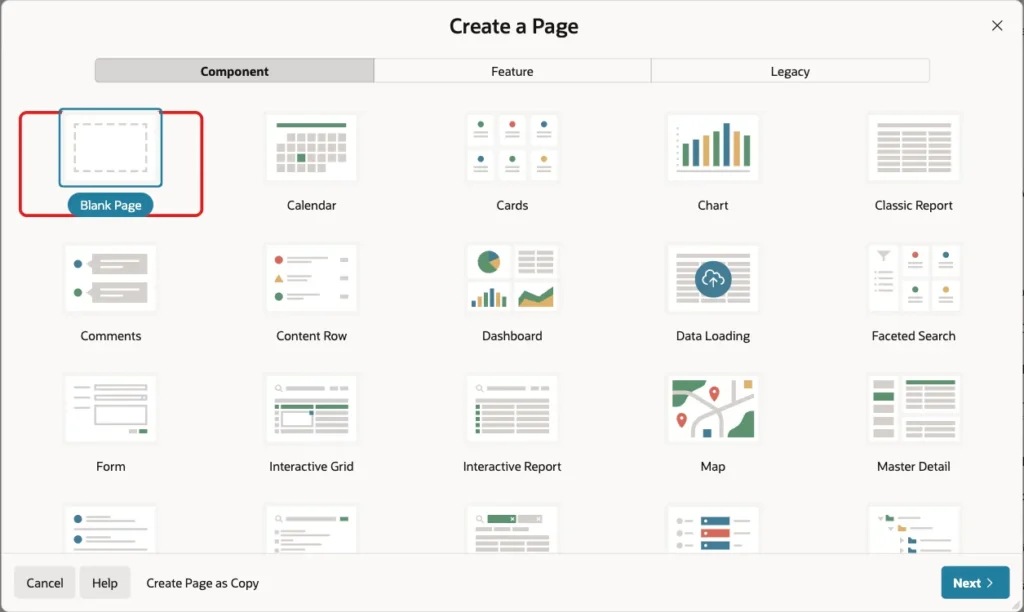
In App Builder, open the application, click Create Page and select Blank Page:
Enter page number 680 and the name Event Registration. Turn Use Breadcrumb off, keep Use Navigation on and enter the icon fa-calendar-check-o. Click Create Page:
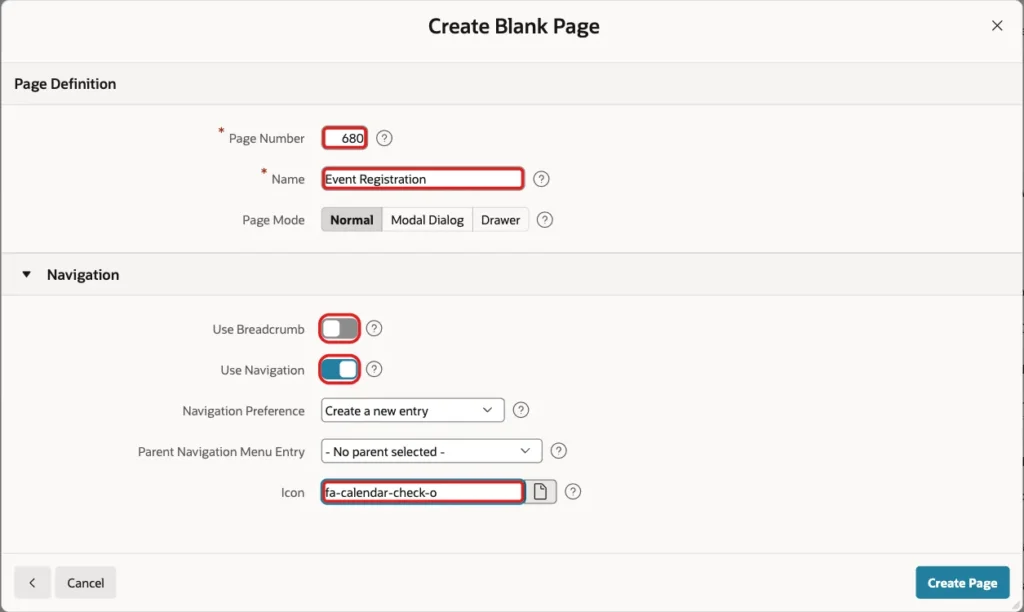
Every signed-in user may register, so the page needs no authorization scheme.
Step 6: Add the Upcoming Events Report
In Page Designer, right-click Body and select Create Region. Set Name to Upcoming Events, Type to Classic Report and enter this SQL Query:
Example:
select v.event_id,
       v.event_name,
       v.starts_on,
       v.registered || ' of ' || v.capacity as seats_taken,
       v.seats_left,
       v.waitlisted,
       initcap(my.status) as my_status,
       case
         when my.status is not null then null
         when v.seats_left > 0 then 'Register'
         else 'Join Waitlist'
       end as action
from   reg_event_seats_v v
left   join reg_registrations my
       on  my.event_id  = v.event_id
       and my.user_name = :APP_USER
       and my.status   <> 'CANCELLED'
where  v.starts_on > sysdate
order  by v.starts_on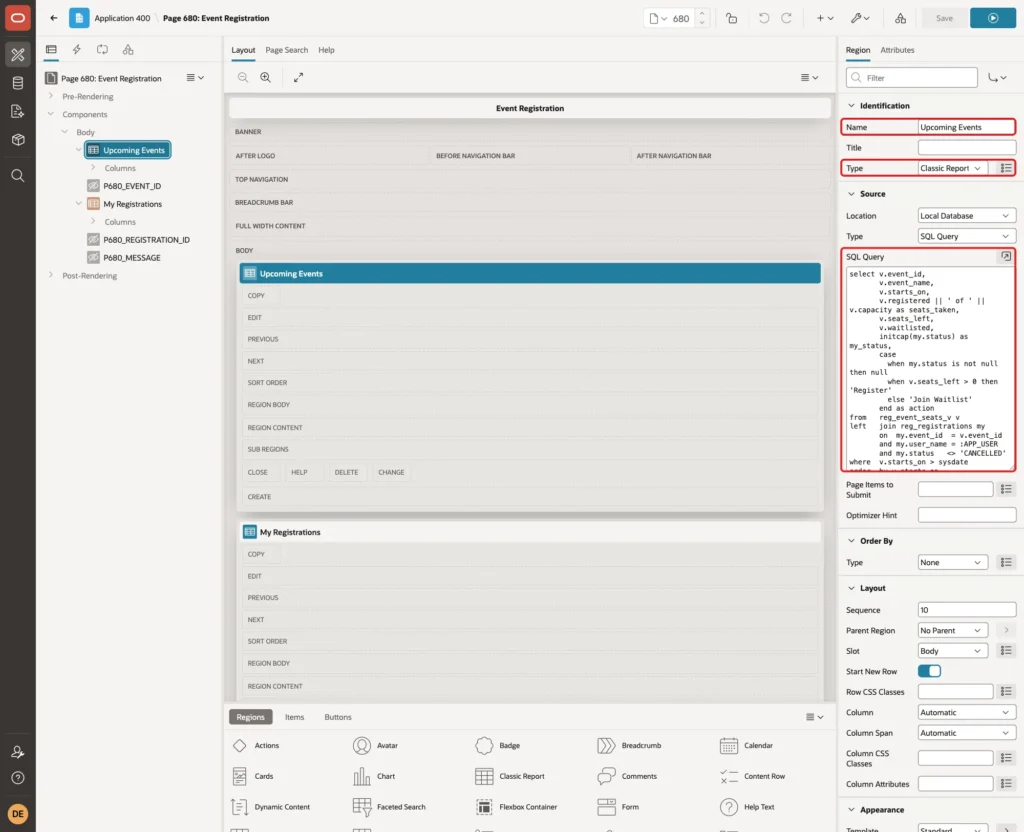
The query joins the seat counts from the view with the registration of the current user (:APP_USER). The ACTION column holds the link text: Register while seats are free, Join Waitlist when the event is full, and NULL when the user is already signed up.
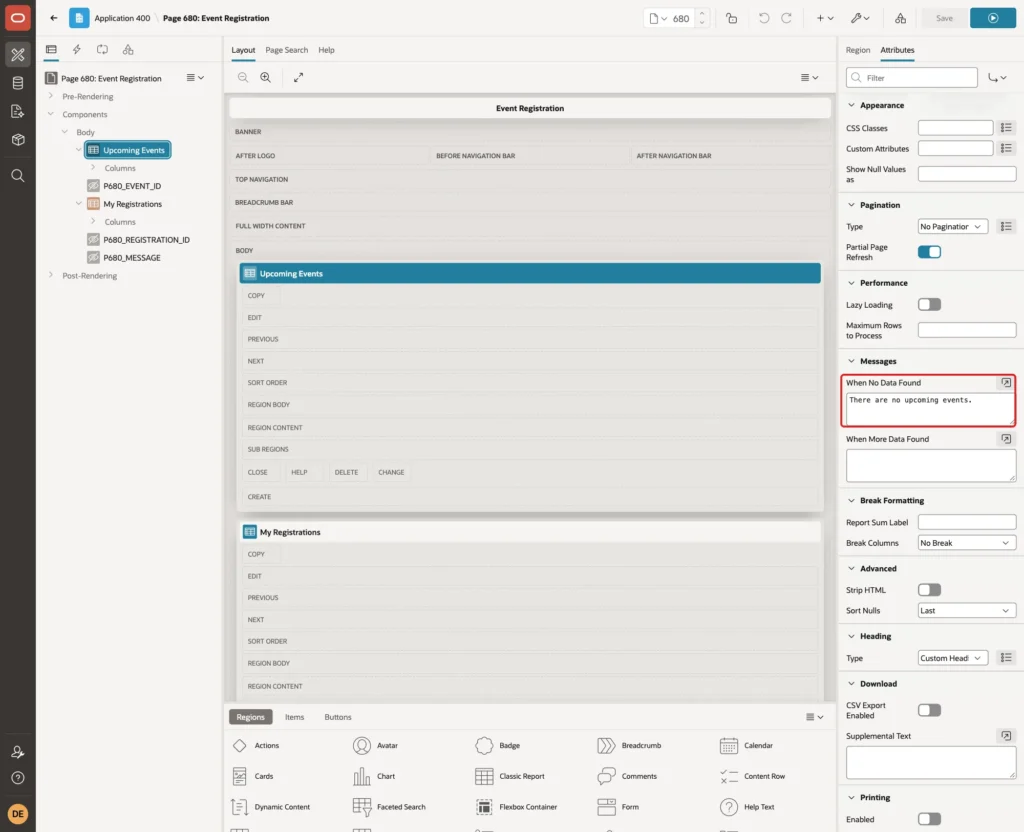
On the Attributes tab, set When No Data Found to "There are no upcoming events.":
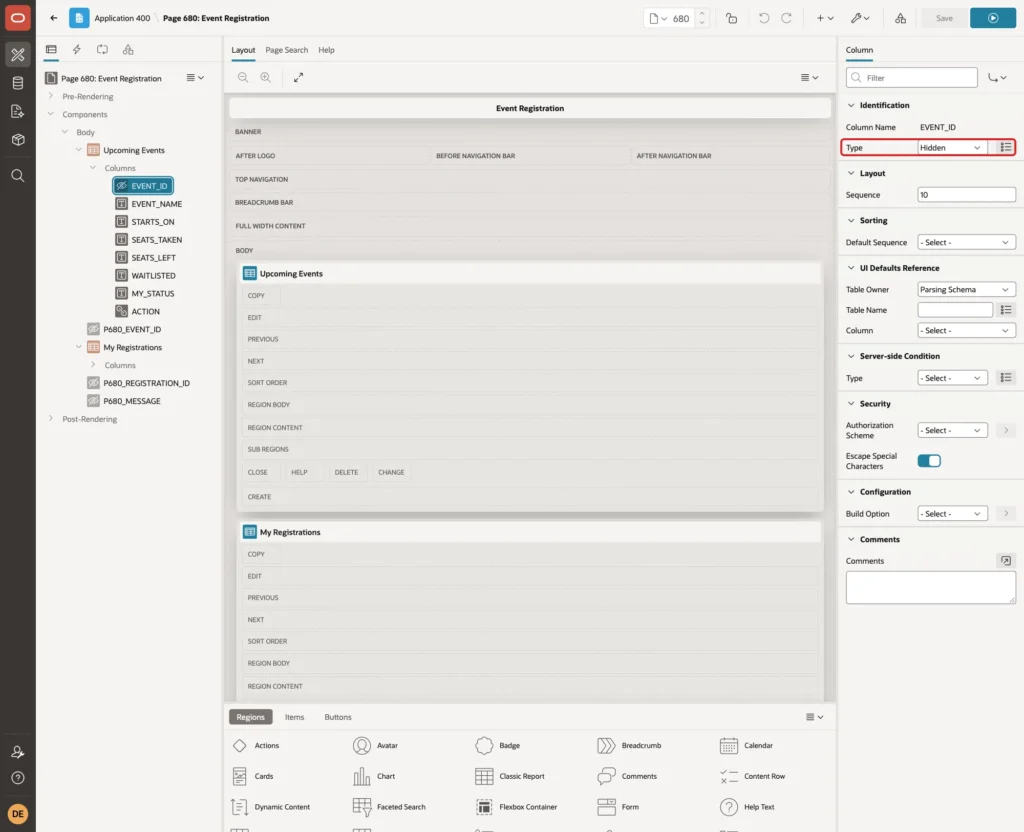
Expand Columns and select EVENT_ID. Set Type to Hidden Column. The ID is needed for the link but not shown:
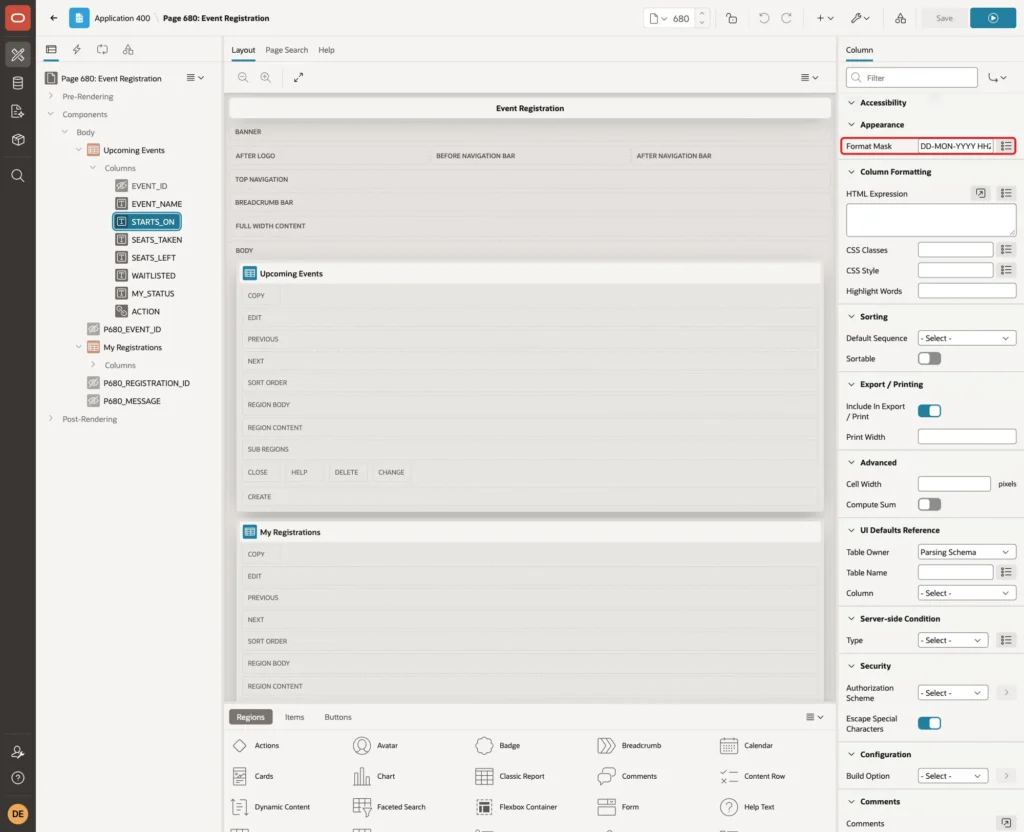
Select STARTS_ON and set Appearance, Format Mask to DD-MON-YYYY HH24:MI, so the start time is shown:
Set the column headings to Event, Starts, Seats Taken, Seats Left, Waitlist, My Status and Action, and align the three number columns to the right. Turn Sorting, Sortable off for each column so the report keeps the order of the query.
Step 7: Make the Action Column a Register Link
Select the column ACTION. Set Type to Link and Link Text to #ACTION#:
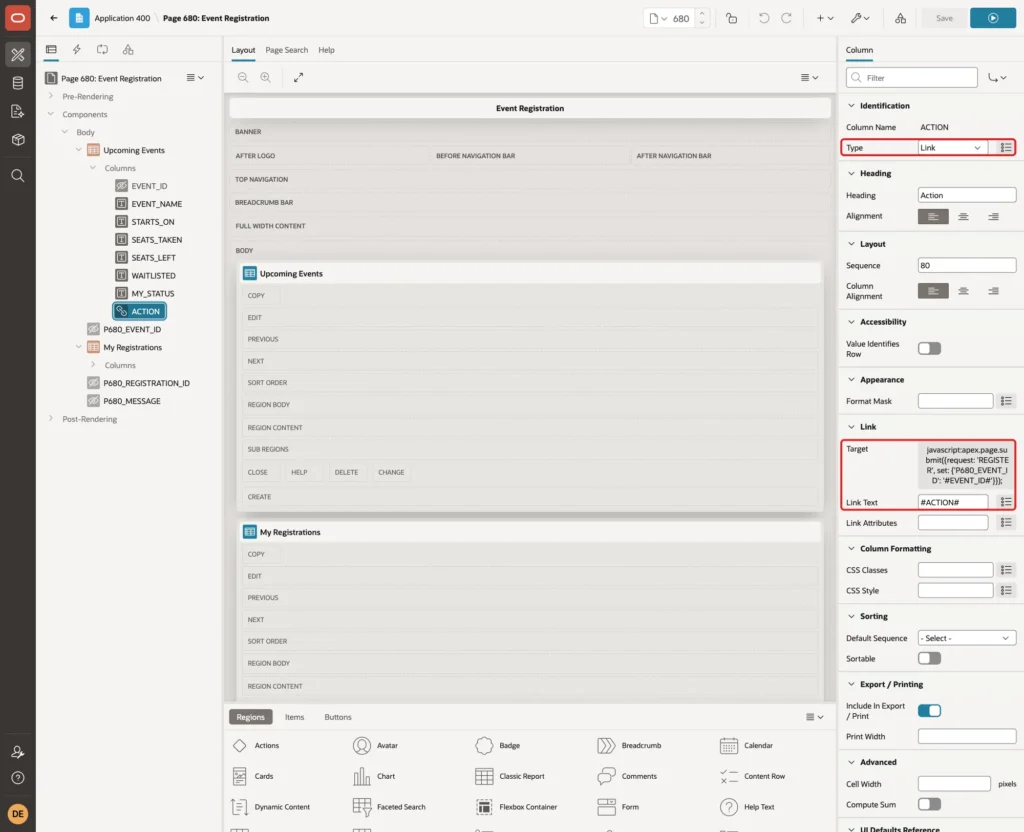
Click Target. In the Link Builder, set Type to URL and enter this URL:
Example:
javascript:apex.page.submit({request: 'REGISTER', set: {'P680_EVENT_ID': '#EVENT_ID#'}});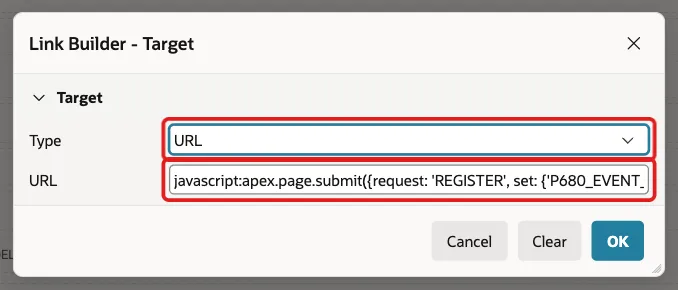
apex.page.submit sets the hidden item P680_EVENT_ID to the event of the row and submits the page with the request REGISTER. A registration changes data, so it is sent as a POST request and not as a GET link with the ID in the URL.
When ACTION is NULL, APEX shows no link in that row. A user who is already registered or waitlisted therefore sees no Register link for that event.
Step 8: Add the My Registrations Report
Create a second region below the first one. Set Name to My Registrations, Type to Classic Report and enter this SQL Query:
Example:
select r.registration_id,
       e.event_name,
       e.starts_on,
       initcap(r.status) as status,
       w.waitlist_position,
       r.registered_on,
       'Cancel' as cancel_action
from   reg_registrations r
join   reg_events e on e.event_id = r.event_id
left   join (
         select registration_id,
                row_number() over (partition by event_id
                                   order by registered_on, registration_id) as waitlist_position
         from   reg_registrations
         where  status = 'WAITLISTED'
       ) w on w.registration_id = r.registration_id
where  r.user_name = :APP_USER
and    r.status   <> 'CANCELLED'
and    e.starts_on > sysdate
order  by e.starts_on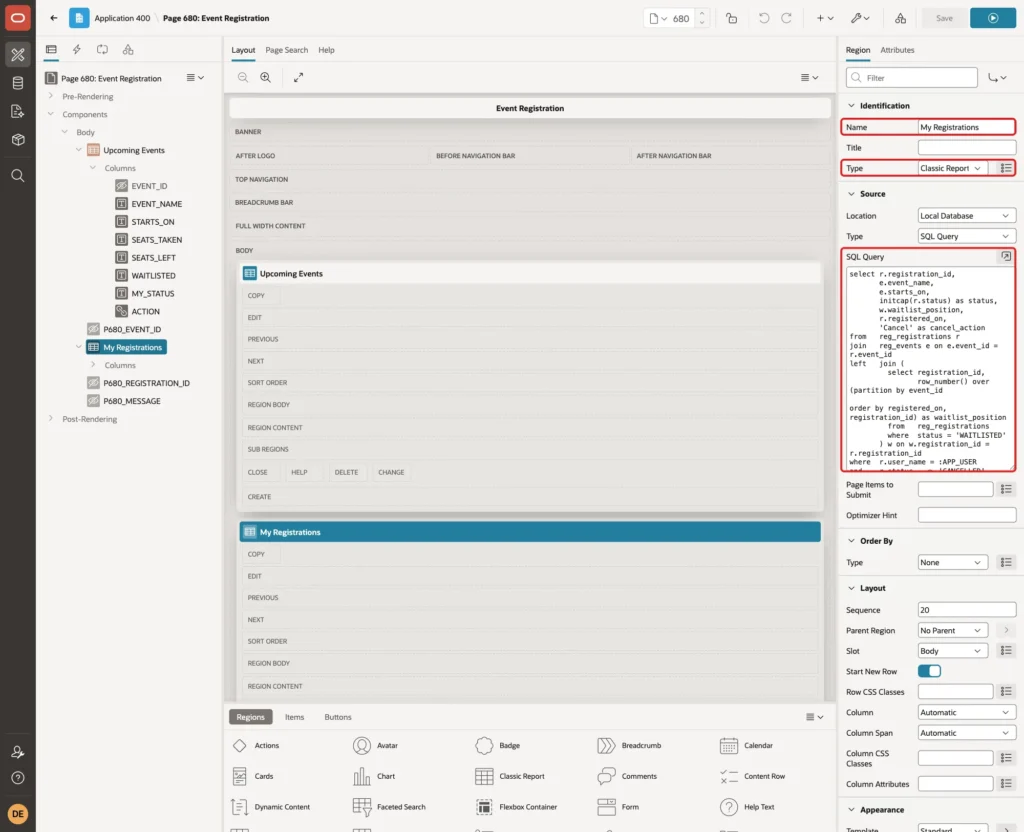
The inline view numbers the waitlist entries of each event in the order they were made, so a waitlisted user sees their position. Set When No Data Found to "You have not registered for any upcoming event."
Make REGISTRATION_ID a Hidden Column, set the Format Mask DD-MON-YYYY HH24:MI on STARTS_ON and REGISTERED_ON, and turn Sortable off for the columns, as in Step 6.
Select CANCEL_ACTION, set Type to Link and Link Text to #CANCEL_ACTION#:
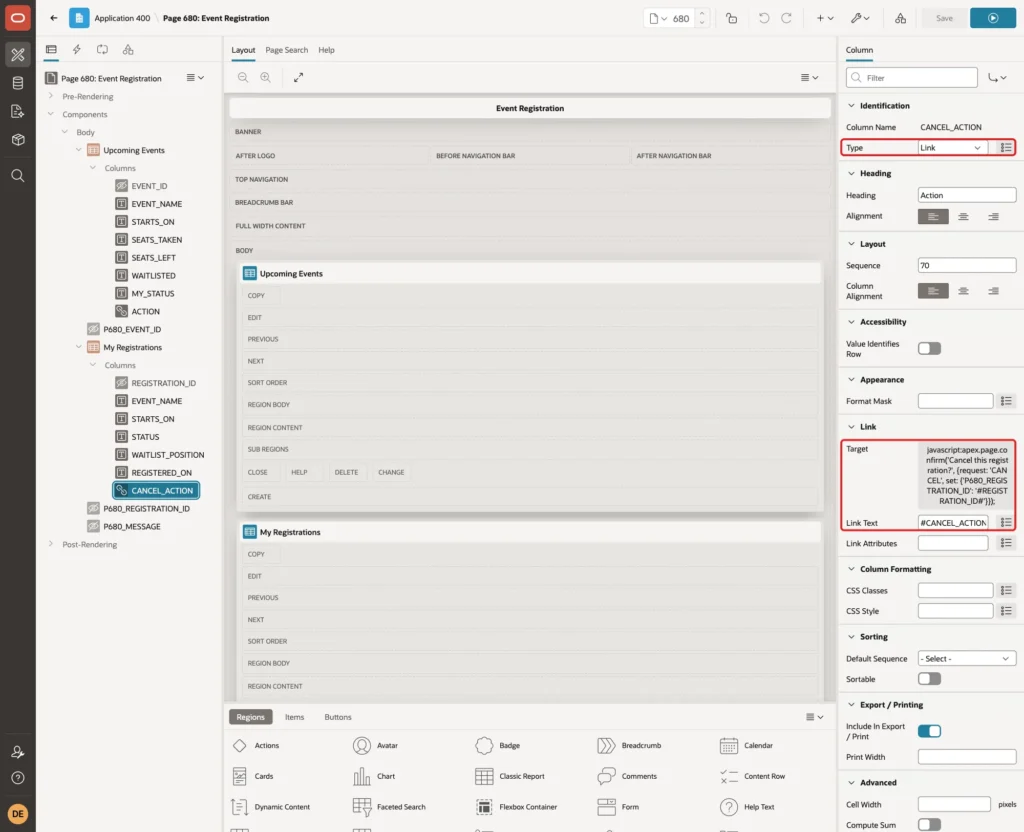
Click Target, set Type to URL and enter this URL:
Example:
javascript:apex.page.confirm('Cancel this registration?', {request: 'CANCEL', set: {'P680_REGISTRATION_ID': '#REGISTRATION_ID#'}});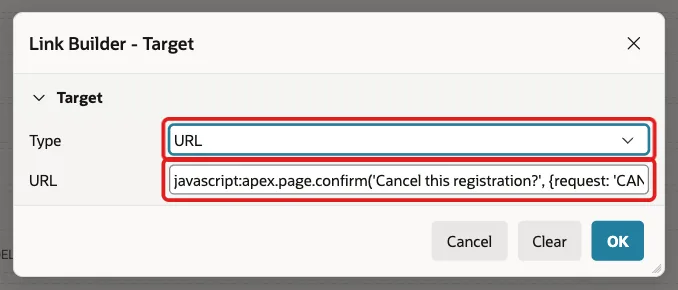
apex.page.confirm shows a confirmation dialog. Only when the user clicks OK does it set P680_REGISTRATION_ID and submit the page with the request CANCEL.
Step 9: Add the Hidden Items
Right-click Body, select Create Page Item and set these properties:
- Name: P680_EVENT_ID
- Type: Hidden
- Value Protected: off
- Session State, Storage: Per Request (Memory Only)
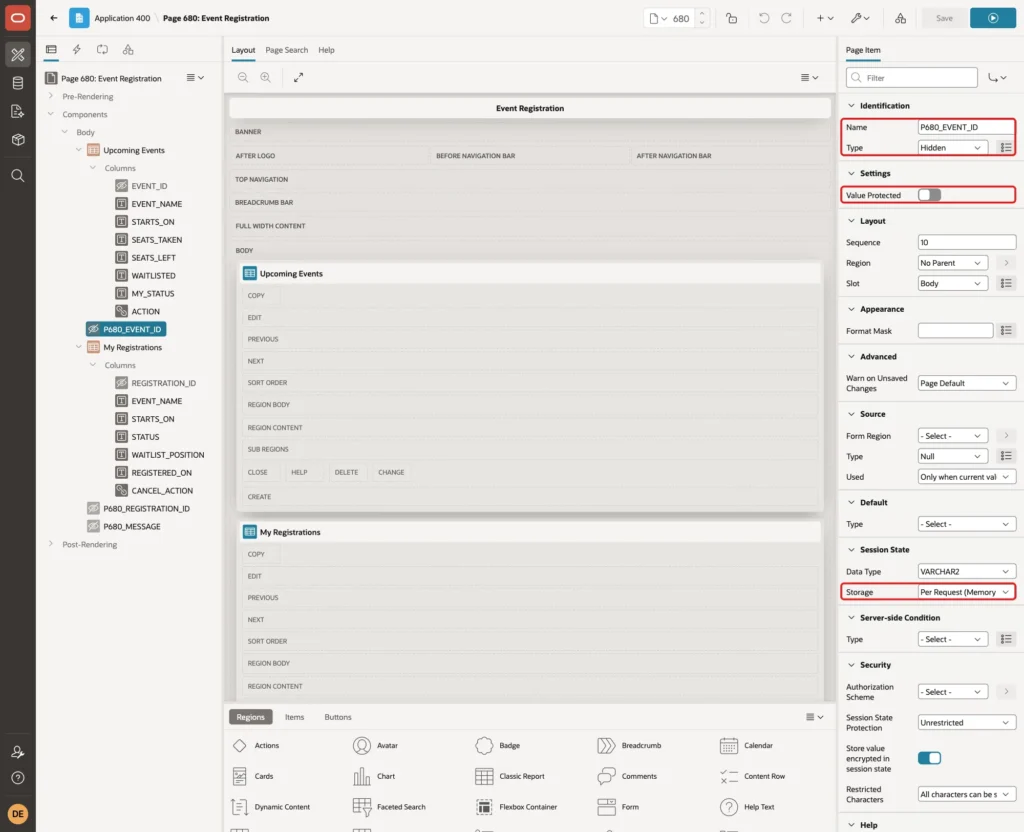
Value Protected must be off, because JavaScript sets the value in the browser. Per Request storage fits here, because the value is needed for this one request only.
Create P680_REGISTRATION_ID with the same settings. Create a third hidden item, P680_MESSAGE, with Storage Per Request (Memory Only) and Value Protected left on. The process fills it with the success message.
The browser can send any event or registration ID in these items. That is fine, because the package checks every value again: the event must exist and be open, and a user can only cancel their own registration.
Step 10: Add the Processes and the Branch
Open the Processing tab, right-click Processing and select Create Process. Set Name to Register for Event, Type to Execute Code and enter this PL/SQL Code:
Example:
declare
    l_status varchar2(12);
begin
    reg_pkg.register_user(
        p_event_id => :P680_EVENT_ID,
        p_user     => :APP_USER,
        p_status   => l_status);

    :P680_MESSAGE := case l_status
                       when 'REGISTERED' then 'You are registered. Your seat is confirmed.'
                       else 'The event is full. You are on the waitlist.'
                     end;
end;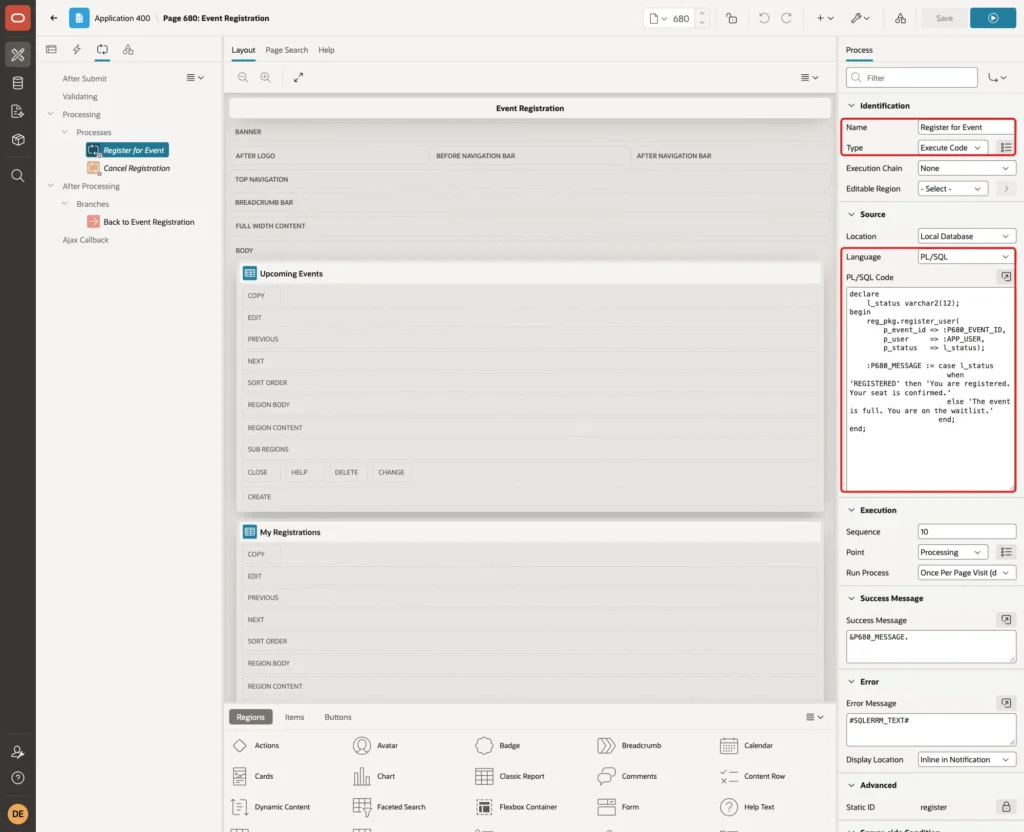
Set Success Message to &P680_MESSAGE. so the user sees whether they got a seat or a waitlist place. Set Error Message to #SQLERRM_TEXT#. Under Server-side Condition, set Type to Request = Value and Value to REGISTER:
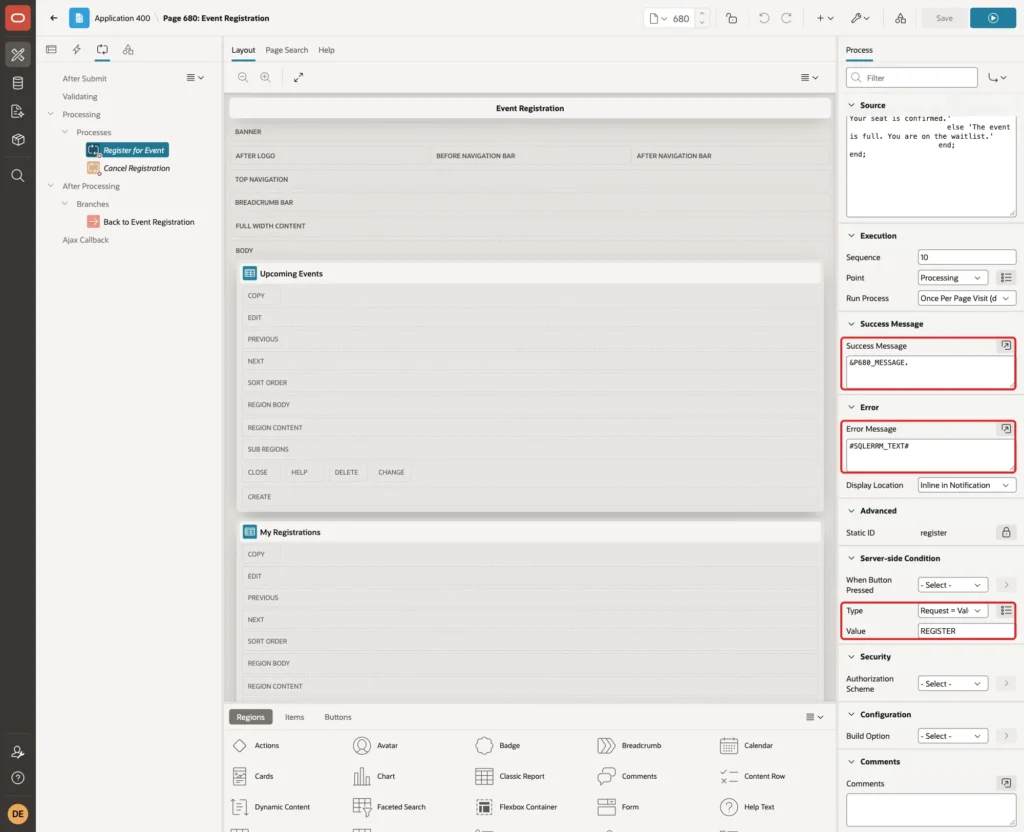
In a first test, a forced second registration showed "ORA-20003: You are already registered or on the waitlist for this event." The #SQLERRM_TEXT# substitution shows the message text without the ORA- number, which reads better for users.
Create a second process. Set Name to Cancel Registration, Type to Execute Code and enter this PL/SQL Code:
Example:
declare
    l_promoted number;
begin
    reg_pkg.cancel_registration(
        p_registration_id => :P680_REGISTRATION_ID,
        p_user            => :APP_USER,
        p_promoted        => l_promoted);
end;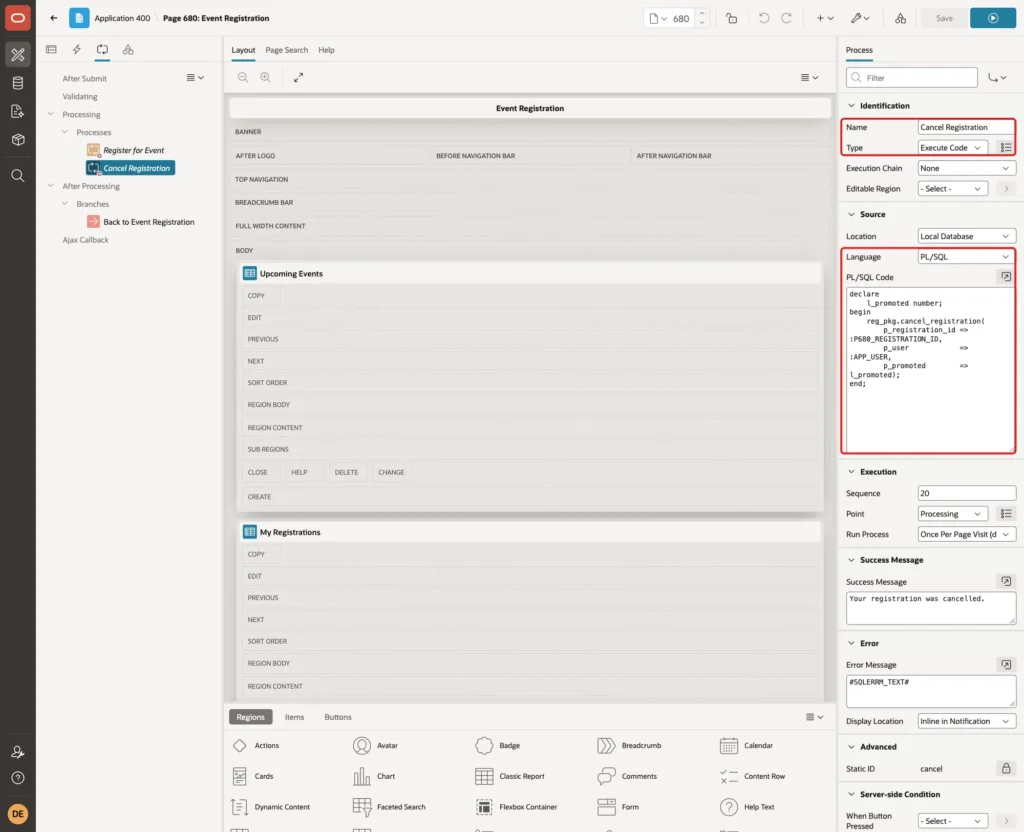
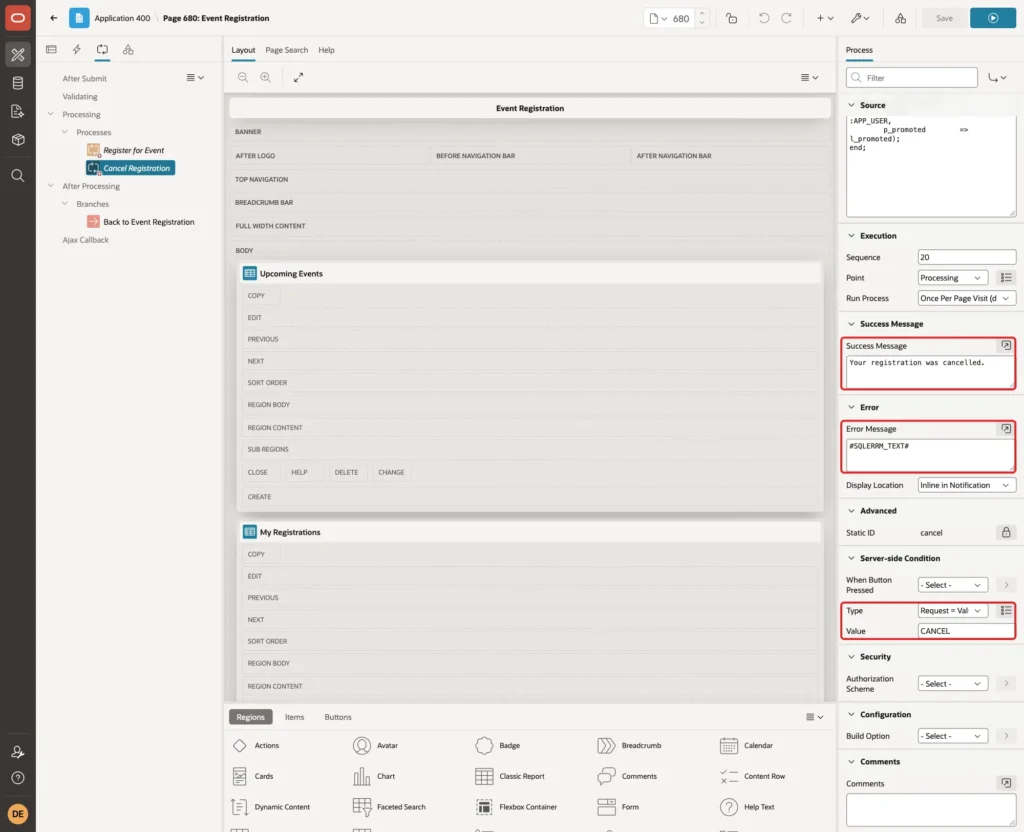
Set Success Message to "Your registration was cancelled.", Error Message to #SQLERRM_TEXT#, and the Server-side Condition to Request = Value with Value CANCEL:
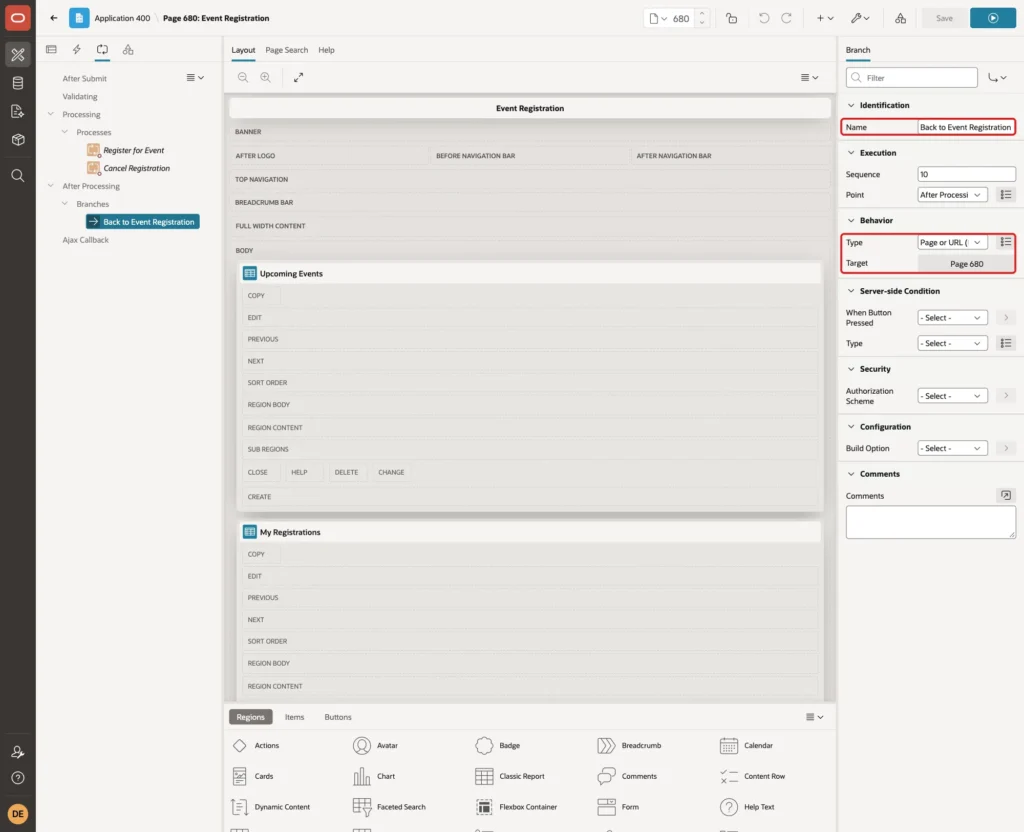
Right-click After Processing and select Create Branch. Set Name to Back to Event Registration, Type to Page or URL (Redirect) and Target to page 680:
Save the page.
Step 11: Test Registration and the Waitlist
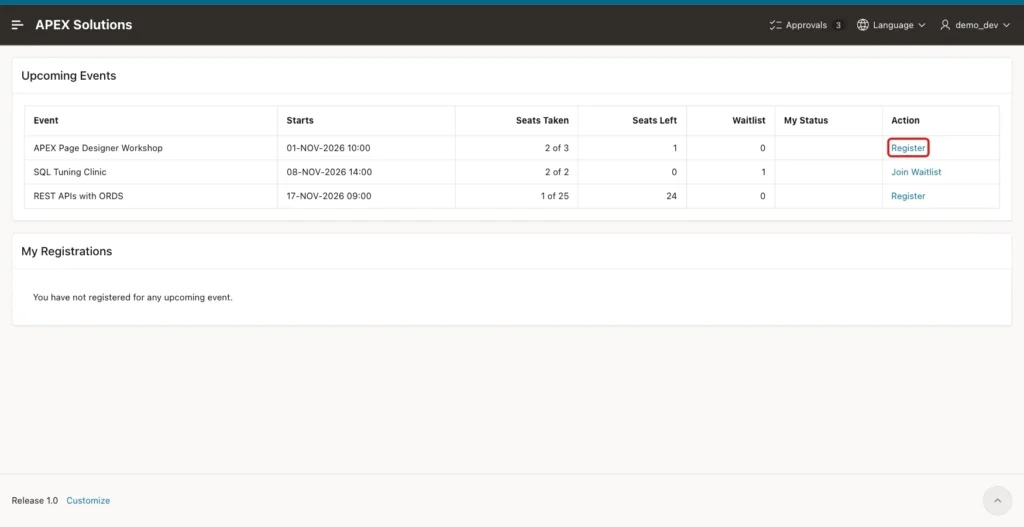
Run the page as DEMO_DEV. The workshop has 2 of 3 seats taken. Click Register in its row:
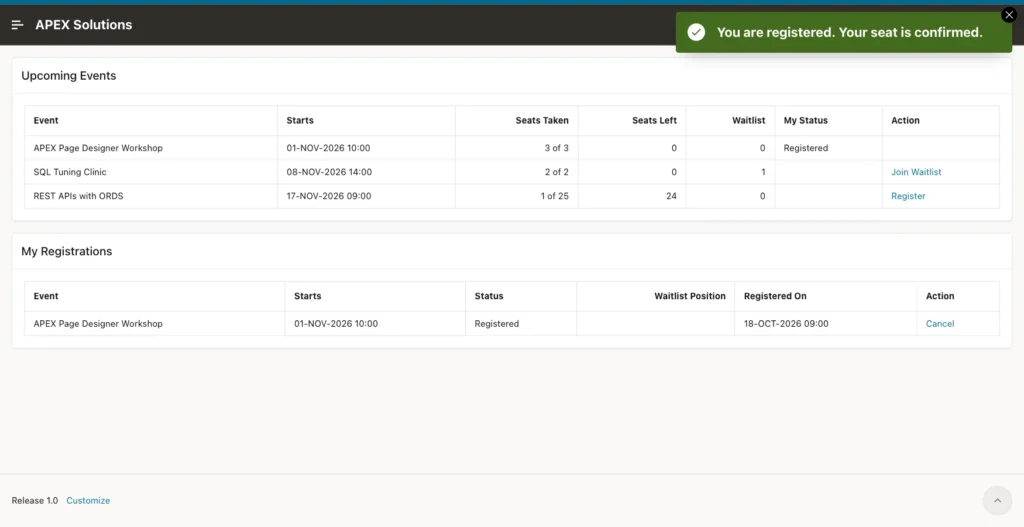
The page reloads with "You are registered. Your seat is confirmed." The workshop now shows 3 of 3, My Status is Registered and the link is gone. The registration also appears in My Registrations:
Now sign in as SALES_USER. The workshop is full, so its link reads Join Waitlist:
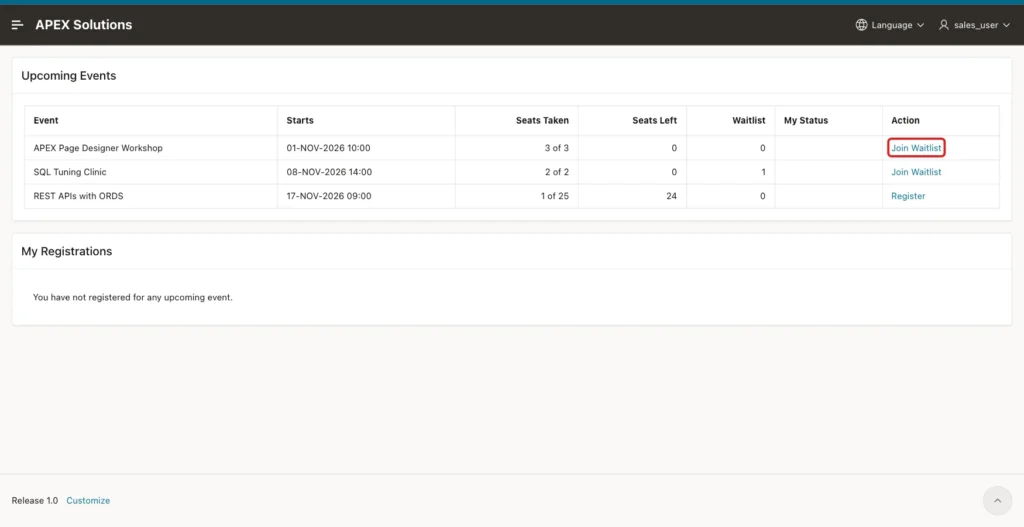
Click Join Waitlist. The message says "The event is full. You are on the waitlist." and My Registrations shows Waitlisted with position 1:
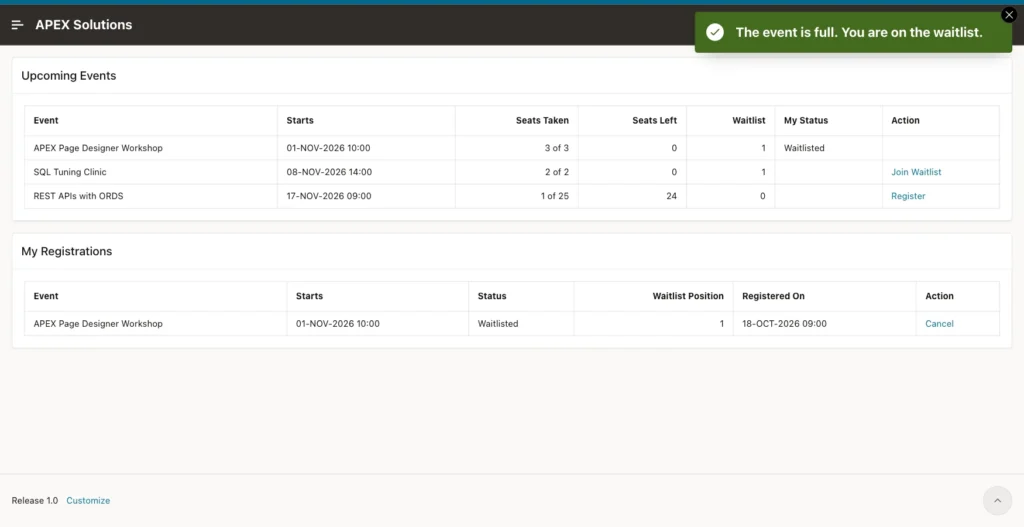
DEMO_DEV also joined the waitlist of the SQL Tuning Clinic in the same way and got position 2, behind LINDA from Step 4.
Step 12: Test Cancel and Promotion
Sign in as DEMO_DEV again and click Cancel in the workshop row of My Registrations. The confirmation dialog appears:
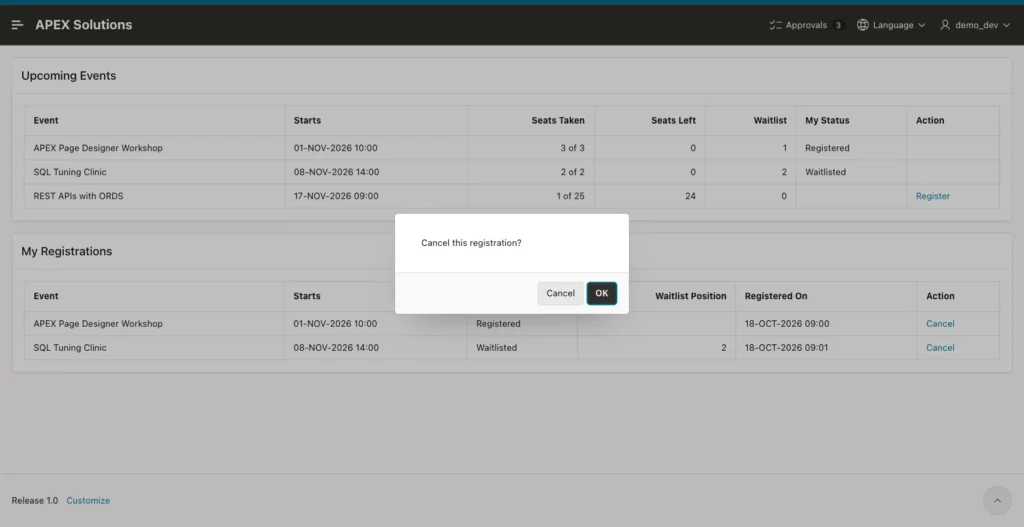
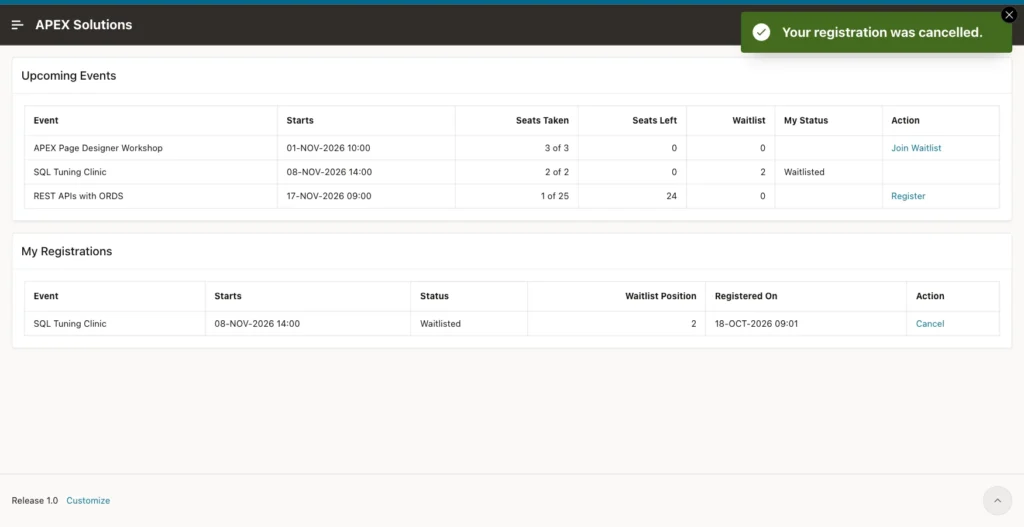
Click OK. The message "Your registration was cancelled." appears, and the workshop row shows Join Waitlist for DEMO_DEV. The seat count stays at 3 of 3 and the waitlist is 0, because the free seat went straight to SALES_USER:
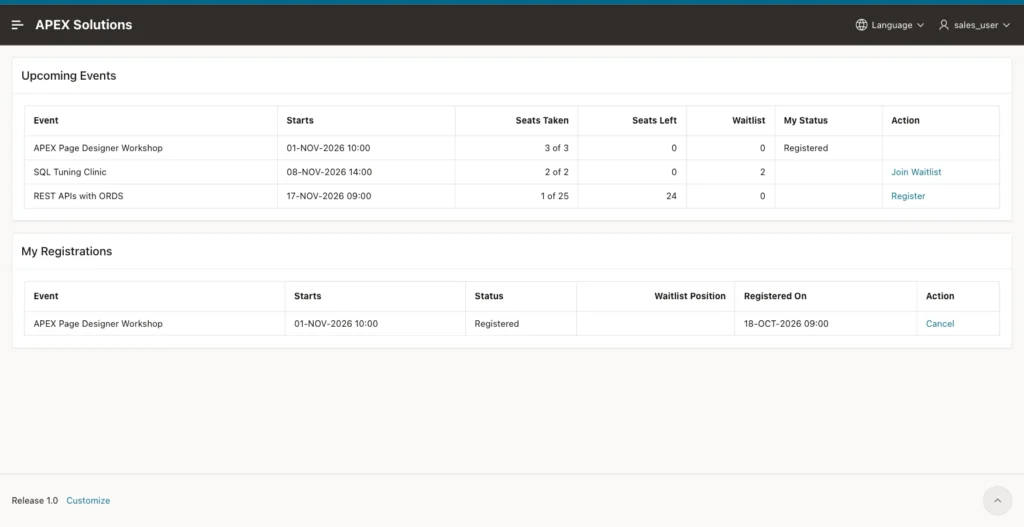
Sign in as SALES_USER. The workshop registration is now Registered:
Check the workshop registrations in SQL:
Example:
column event_name format a28
column user_name format a10
select e.event_name, r.user_name, r.status,
       to_char(r.registered_on, 'DD-MON HH24:MI') as registered_on,
       to_char(r.promoted_on, 'DD-MON HH24:MI') as promoted_on,
       to_char(r.cancelled_on, 'DD-MON HH24:MI') as cancelled_on
from   reg_registrations r
join   reg_events e on e.event_id = r.event_id
where  r.event_id = 1
order  by r.registered_on, r.registration_id;
Output:
EVENT_NAME                     USER_NAME     STATUS        REGISTERED_ON    PROMOTED_ON     CANCELLED_ON
______________________________ _____________ _____________ ________________ _______________ _______________
APEX Page Designer Workshop    ANNA          REGISTERED    13-OCT 08:56
APEX Page Designer Workshop    RAVI          REGISTERED    14-OCT 08:56
APEX Page Designer Workshop    DEMO_DEV      CANCELLED     18-OCT 09:00                     18-OCT 09:03
APEX Page Designer Workshop    SALES_USER    REGISTERED    18-OCT 09:00     18-OCT 09:03
The cancelled row of DEMO_DEV is kept with its cancel time. SALES_USER has the same PROMOTED_ON minute, because the promotion ran in the same request as the cancel.
Step 13: Test the Checks
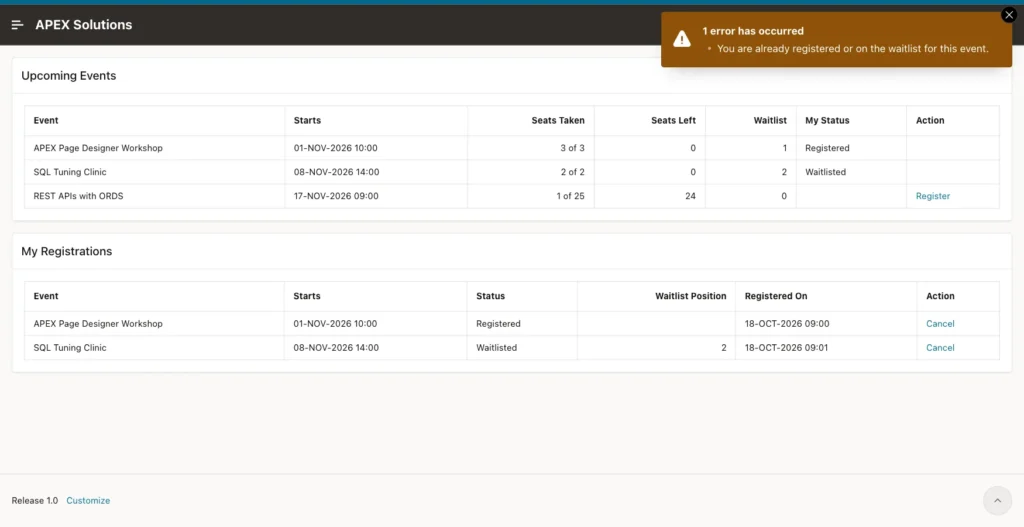
The Register link is hidden for events the user already signed up for, but a request can be changed in the browser. As DEMO_DEV, the test ran apex.page.submit in the browser console with the request REGISTER and event 1, the workshop where DEMO_DEV was registered:
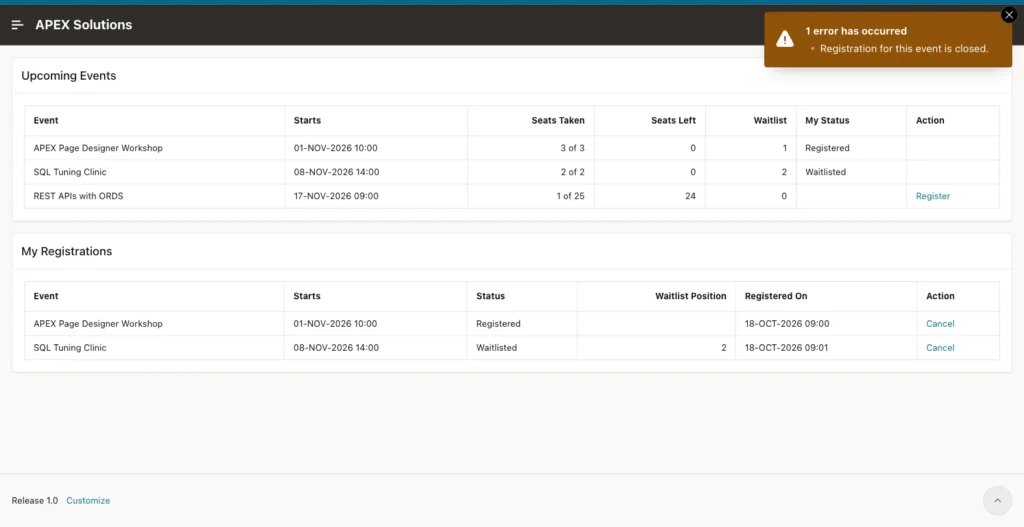
The same way, a request for event 4, the meetup that started a week ago, was refused with "Registration for this event is closed.":
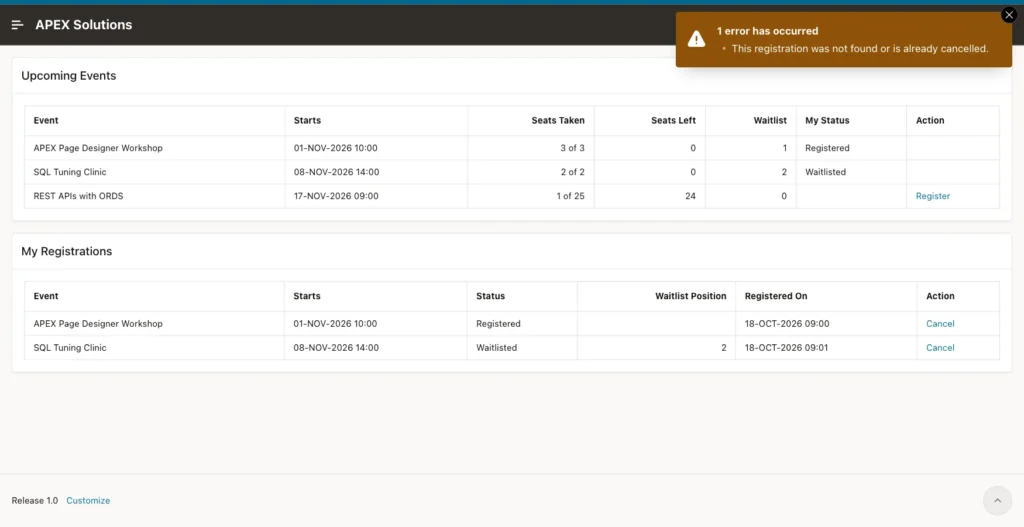
Then DEMO_DEV sent the request CANCEL with registration 22, which belongs to SALES_USER. The package looks for the registration of the current user only, so nothing was changed:
Step 14: Test Two Users and the Last Seat
The hardest case is two users who click Register for the last seat at the same moment. The test created a scratch event with capacity 1 and ran two SQL sessions.
First without a lock: two anonymous blocks counted the seats, waited 8 seconds and then inserted. Both counted 0 of 1, and both rows were saved as REGISTERED, so the event had 2 people on 1 seat.
Then the same test with the package. Session A took the seat and waited 10 seconds before COMMIT:
Example:
set serveroutput on feedback on timing on
declare
  l_status varchar2(12);
begin
  reg_pkg.register_user(p_event_id => 5, p_user => 'SESSION_A', p_status => l_status);
  dbms_output.put_line('Session A: ' || l_status);
  dbms_session.sleep(10);
end;
/
commit;
A few seconds later, session B ran this:
Example:
set serveroutput on feedback off timing on
declare
  l_status varchar2(12);
begin
  reg_pkg.register_user(p_event_id => 5, p_user => 'SESSION_B', p_status => l_status);
  dbms_output.put_line('Session B: ' || l_status);
end;
/
commit;
Output:
Session B: WAITLISTED

Elapsed: 00:00:04.047
Elapsed: 00:00:00.008
Session B waited about 4 seconds on the locked event row. After session A committed, B counted 1 of 1 seats taken and went to the waitlist. The scratch event and its two rows were removed afterwards.
Things to Know
- The seat count lives only in the rows of REG_REGISTRATIONS. There is no counter column that could drift out of step with the real registrations.
- Every registration and cancel for the same event waits for the event row lock. The lock is held only until the page request commits, so the wait is short.
- If you raise the capacity of an event, existing waitlist entries are not promoted until the next cancel. Call the same promotion loop after the update if you need that.
- The procedures take the user name as a parameter. In APEX it is :APP_USER; never take it from a page item, or users could register in the name of others.
- The registration times use SYSTIMESTAMP, which is the clock of the database server. The server in this example runs on UTC.
Related Guides
Conclusion
An event registration with seat limits in Oracle APEX needs one PL/SQL package and one page. The package locks the event row, counts the seats, puts users on a waitlist when the event is full and promotes the first waiting user when someone cancels. A function-based unique index blocks duplicate sign-ups even outside the package.
The page adds what users need: a list of events with the seats left, one-click Register and Join Waitlist links, their own registrations with the waitlist position, and a Cancel link with a confirmation. Forced requests and the last-seat race were tested and refused safely.
