
Any app that books a shared resource has to stop double bookings. A meeting room, a vehicle or a consultant can be used by only one booking at a time. If two bookings for the same room overlap by even a few minutes, someone arrives to find the room taken.
A check constraint cannot compare one row with the other rows of the table, so the rule needs a validation. This guide builds that validation in an Oracle APEX form.
It also closes the gap most overlap checks have: two users saving at the same moment. A row lock on the room makes the second save wait and then fail cleanly.
This guide uses meeting rooms as the example; the same steps work for any table with a start and an end time. How to Add a From/To Date Range with Validation in Oracle APEX covers search filters with a From and a To date. Here, a new record is checked against all saved records of the same room.
Step 1: Create the Tables
The example needs two tables. MEETING_ROOMS lists the rooms. MEETING_BOOKINGS holds the bookings, each with a room, a subject and a START_TIME and END_TIME. The DATE columns store the time of day as well.
Create the tables, the index and the sample data:
Example:
set lines 200 pages 100 feedback on
create table meeting_rooms (
  room_id      number generated by default on null as identity constraint meeting_rooms_pk primary key,
  room_name    varchar2(50) not null,
  capacity     number(3)    not null,
  constraint meeting_rooms_name_uk unique (room_name),
  constraint meeting_rooms_capacity_ck check (capacity > 0)
);

create table meeting_bookings (
  booking_id   number generated by default on null as identity constraint meeting_bookings_pk primary key,
  room_id      number        not null,
  subject      varchar2(100) not null,
  start_time   date          not null,
  end_time     date          not null,
  booked_by    varchar2(255) default on null
                 coalesce(sys_context('APEX$SESSION', 'APP_USER'), user) not null,
  constraint meeting_bookings_room_fk foreign key (room_id) references meeting_rooms (room_id),
  constraint meeting_bookings_times_ck check (end_time > start_time)
);

create index meeting_bookings_room_ix on meeting_bookings (room_id, start_time, end_time);

insert into meeting_rooms (room_name, capacity) values ('Atlas', 6);
insert into meeting_rooms (room_name, capacity) values ('Boreal', 10);
insert into meeting_rooms (room_name, capacity) values ('Cedar', 4);

insert into meeting_bookings (room_id, subject, start_time, end_time, booked_by)
values (1, 'Sprint Planning', to_date('2026-11-16 09:00', 'yyyy-mm-dd hh24:mi'), to_date('2026-11-16 10:30', 'yyyy-mm-dd hh24:mi'), 'DEMO_DEV');
insert into meeting_bookings (room_id, subject, start_time, end_time, booked_by)
values (1, 'Design Review', to_date('2026-11-16 13:00', 'yyyy-mm-dd hh24:mi'), to_date('2026-11-16 14:00', 'yyyy-mm-dd hh24:mi'), 'SALES_MANAGER');
insert into meeting_bookings (room_id, subject, start_time, end_time, booked_by)
values (2, 'Quarterly Review', to_date('2026-11-16 10:00', 'yyyy-mm-dd hh24:mi'), to_date('2026-11-16 12:00', 'yyyy-mm-dd hh24:mi'), 'SALES_MANAGER');
insert into meeting_bookings (room_id, subject, start_time, end_time, booked_by)
values (3, 'Interview', to_date('2026-11-17 11:00', 'yyyy-mm-dd hh24:mi'), to_date('2026-11-17 11:45', 'yyyy-mm-dd hh24:mi'), 'DEMO_DEV');

commit;

column room_name format a8
column subject format a18
column booked_by format a14
select b.booking_id, r.room_name, b.subject,
       to_char(b.start_time, 'DD-MON-YYYY HH24:MI') as start_time,
       to_char(b.end_time, 'HH24:MI') as end_time, b.booked_by
  from meeting_bookings b
  join meeting_rooms r on r.room_id = b.room_id
 order by b.booking_id;
Output:
Table MEETING_ROOMS created.

Table MEETING_BOOKINGS created.

Index MEETING_BOOKINGS_ROOM_IX created.

1 row inserted.

1 row inserted.

1 row inserted.

1 row inserted.

1 row inserted.

1 row inserted.

1 row inserted.

Commit complete.

   BOOKING_ID ROOM_NAME    SUBJECT             START_TIME           END_TIME    BOOKED_BY
_____________ ____________ ___________________ ____________________ ___________ ________________
            1 Atlas        Sprint Planning     16-NOV-2026 09:00    10:30       DEMO_DEV
            2 Atlas        Design Review       16-NOV-2026 13:00    14:00       SALES_MANAGER
            3 Boreal       Quarterly Review    16-NOV-2026 10:00    12:00       SALES_MANAGER
            4 Cedar        Interview           17-NOV-2026 11:00    11:45       DEMO_DEV

4 rows selected.- MEETING_BOOKINGS_ROOM_FK allows only rooms that exist in MEETING_ROOMS.
- MEETING_BOOKINGS_TIMES_CK makes sure a booking ends after it starts. This rule needs only the values of one row, so a check constraint can enforce it.
- MEETING_BOOKINGS_ROOM_IX on ROOM_ID, START_TIME and END_TIME indexes the foreign key and supports the overlap query of the next step.
- BOOKED_BY is filled by DEFAULT ON NULL with the APEX user, or the database user outside APEX, so no trigger is needed.
Step 2: Write the Overlap Rule
Two time ranges overlap when the existing booking starts before the new one ends, and ends after the new one starts. In SQL, that is two comparisons: START_TIME is less than the new end, and END_TIME is greater than the new start.
The comparisons are strict, so a booking may start at the exact minute the previous one ends. The query below tests four candidate slots against the sample data:
Example:
set lines 200 pages 100 feedback on
column slot format a24
with candidate (slot, room_id, start_time, end_time) as (
  select 'Atlas 10:00-11:00', 1, to_date('2026-11-16 10:00', 'yyyy-mm-dd hh24:mi'), to_date('2026-11-16 11:00', 'yyyy-mm-dd hh24:mi') from dual union all
  select 'Atlas 10:30-13:00', 1, to_date('2026-11-16 10:30', 'yyyy-mm-dd hh24:mi'), to_date('2026-11-16 13:00', 'yyyy-mm-dd hh24:mi') from dual union all
  select 'Atlas 08:00-15:00', 1, to_date('2026-11-16 08:00', 'yyyy-mm-dd hh24:mi'), to_date('2026-11-16 15:00', 'yyyy-mm-dd hh24:mi') from dual union all
  select 'Cedar 10:00-11:00', 3, to_date('2026-11-16 10:00', 'yyyy-mm-dd hh24:mi'), to_date('2026-11-16 11:00', 'yyyy-mm-dd hh24:mi') from dual
)
select c.slot,
       (select count(*)
          from meeting_bookings b
         where b.room_id = c.room_id
           and b.start_time < c.end_time
           and b.end_time > c.start_time) as clashes
  from candidate c;
Output:
SLOT                    CLASHES
____________________ __________
Atlas 10:00-11:00             1
Atlas 10:30-13:00             0
Atlas 08:00-15:00             2
Cedar 10:00-11:00             0

4 rows selected.
- Atlas 10:00-11:00 clashes with Sprint Planning (09:00-10:30).
- Atlas 10:30-13:00 has no clash. It starts when Sprint Planning ends and ends when Design Review starts.
- Atlas 08:00-15:00 covers both Atlas bookings, so it finds two clashes.
- Cedar 10:00-11:00 is free, because the room is different.
Step 3: See Why the Check Needs a Lock
A check-then-insert has a weak spot. If two sessions run it at the same moment, neither can see the other's uncommitted row. Both find no clash, and both insert. The block below checks room Boreal for 17 November, 09:00 to 10:00, inserts the booking, and waits 8 seconds before the commit:
Example:
set serveroutput on feedback off
declare
  l_room    number;
  l_clashes number;
begin

  select count(*) into l_clashes
    from meeting_bookings
   where room_id = 2
     and start_time < to_date('2026-11-17 10:00', 'yyyy-mm-dd hh24:mi')
     and end_time > to_date('2026-11-17 09:00', 'yyyy-mm-dd hh24:mi');
  dbms_output.put_line(to_char(systimestamp, 'HH24:MI:SS') || ' clashes found: ' || l_clashes);
  if l_clashes = 0 then
    insert into meeting_bookings (room_id, subject, start_time, end_time)
    values (2, 'Budget Call', to_date('2026-11-17 09:00', 'yyyy-mm-dd hh24:mi'), to_date('2026-11-17 10:00', 'yyyy-mm-dd hh24:mi'));
    dbms_output.put_line(to_char(systimestamp, 'HH24:MI:SS') || ' booking inserted');
    dbms_session.sleep(8);
  end if;
  commit;
  dbms_output.put_line(to_char(systimestamp, 'HH24:MI:SS') || ' committed');
end;
/
Session B ran the same block 5 seconds later, with the subject Vendor Demo and without the wait. The times come from the database clock.
Output (session A):
17:08:39 clashes found: 0
17:08:39 booking inserted
17:08:47 committed
Output (session B):
17:08:44 clashes found: 0
17:08:44 booking inserted
17:08:44 committed
Both sessions found 0 clashes. The room now has two bookings for the same hour:
Example:
set lines 200 pages 100 feedback on
column subject format a12
select booking_id, subject, to_char(start_time, 'DD-MON-YYYY HH24:MI') as start_time,
       to_char(end_time, 'HH24:MI') as end_time
  from meeting_bookings
 where room_id = 2
   and start_time >= date '2026-11-17'
 order by booking_id;
Output:
   BOOKING_ID SUBJECT        START_TIME           END_TIME
_____________ ______________ ____________________ ___________
           41 Budget Call    17-NOV-2026 09:00    10:00
           42 Vendor Demo    17-NOV-2026 09:00    10:00

2 rows selected.
Delete the two test rows:
Example:
set feedback on
delete from meeting_bookings where room_id = 2 and start_time >= date '2026-11-17';
commit;
Output:
1 row deleted.

Commit complete.
The fix is to lock the room row with SELECT ... FOR UPDATE before the check. Only one session can hold that lock, so the second session waits until the first one commits. Its check then runs after the wait and sees the committed booking:
Example:
set serveroutput on feedback off
declare
  l_room    number;
  l_clashes number;
begin
  dbms_output.put_line(to_char(systimestamp, 'HH24:MI:SS') || ' started');
  select room_id into l_room from meeting_rooms where room_id = 2 for update;
  dbms_output.put_line(to_char(systimestamp, 'HH24:MI:SS') || ' room locked');
  select count(*) into l_clashes
    from meeting_bookings
   where room_id = 2
     and start_time < to_date('2026-11-17 10:00', 'yyyy-mm-dd hh24:mi')
     and end_time > to_date('2026-11-17 09:00', 'yyyy-mm-dd hh24:mi');
  dbms_output.put_line(to_char(systimestamp, 'HH24:MI:SS') || ' clashes found: ' || l_clashes);
  if l_clashes = 0 then
    insert into meeting_bookings (room_id, subject, start_time, end_time)
    values (2, 'Budget Call', to_date('2026-11-17 09:00', 'yyyy-mm-dd hh24:mi'), to_date('2026-11-17 10:00', 'yyyy-mm-dd hh24:mi'));
    dbms_output.put_line(to_char(systimestamp, 'HH24:MI:SS') || ' booking inserted');
    dbms_session.sleep(8);
  end if;
  commit;
  dbms_output.put_line(to_char(systimestamp, 'HH24:MI:SS') || ' committed');
end;
/
Output (session A):
17:09:31 started
17:09:31 room locked
17:09:31 clashes found: 0
17:09:31 booking inserted
17:09:39 committed
Session B again ran the same block 5 seconds later, with the subject Vendor Demo and without the wait.
Output (session B):
17:09:36 started
17:09:39 room locked
17:09:39 clashes found: 1
17:09:39 committed
Session B started at 17:09:36 but got the lock only at 17:09:39, the moment session A committed. It then found 1 clash and inserted nothing:
Example:
set lines 200 pages 100 feedback on
column subject format a12
select booking_id, subject, to_char(start_time, 'DD-MON-YYYY HH24:MI') as start_time,
       to_char(end_time, 'HH24:MI') as end_time
  from meeting_bookings
 where room_id = 2
   and start_time >= date '2026-11-17'
 order by booking_id;
Output:
   BOOKING_ID SUBJECT        START_TIME           END_TIME
_____________ ______________ ____________________ ___________
           44 Budget Call    17-NOV-2026 09:00    10:00

1 row selected.
The lock covers one row of MEETING_ROOMS, so only saves for the same room wait for each other.
Step 4: Create the Report and Form Pages
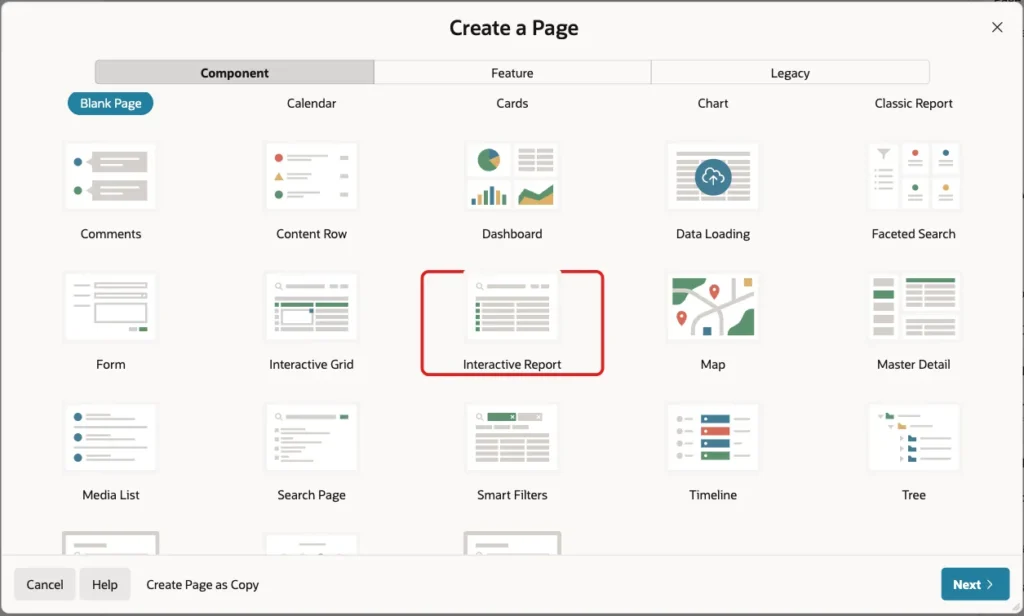
In App Builder, open the application and click Create Page. On the Component tab, click Interactive Report:
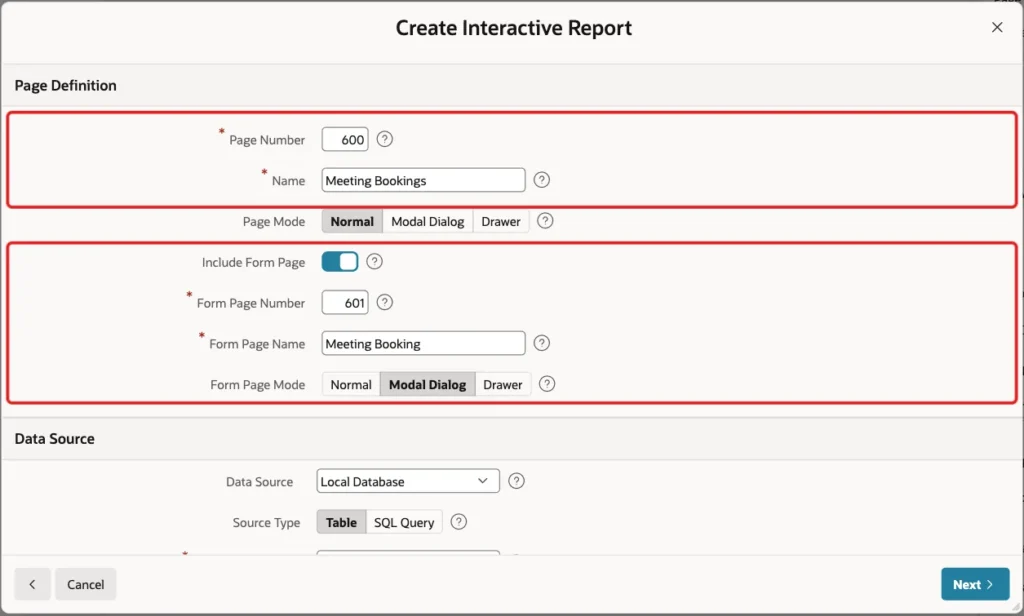
Enter Page Number 600 and Name Meeting Bookings. Turn on Include Form Page, enter Form Page Number 601 and Form Page Name Meeting Booking, and keep Form Page Mode Modal Dialog:
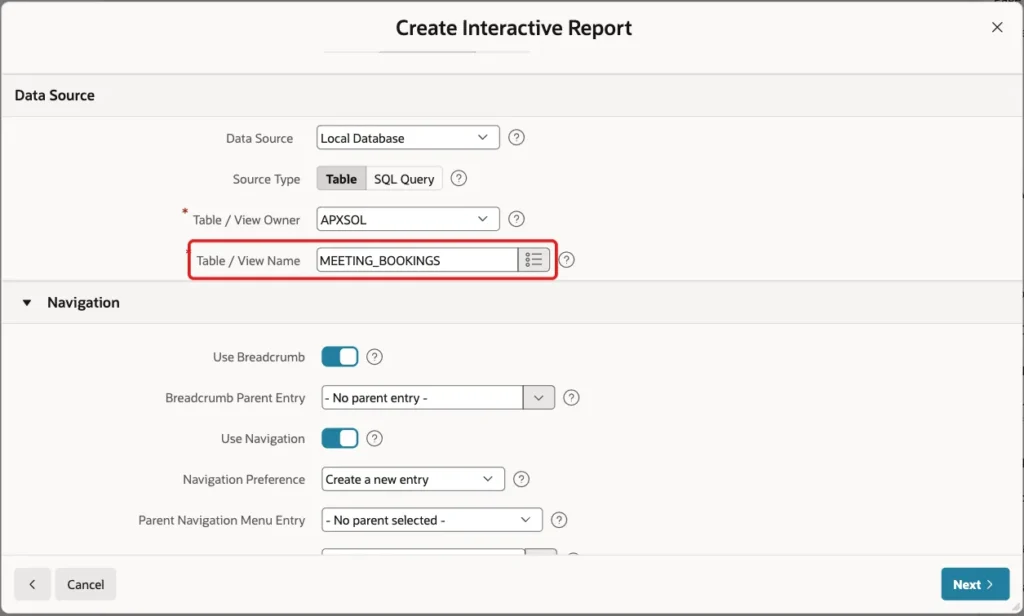
Under Data Source, keep Local Database and Source Type Table, and enter Table / View Name MEETING_BOOKINGS:
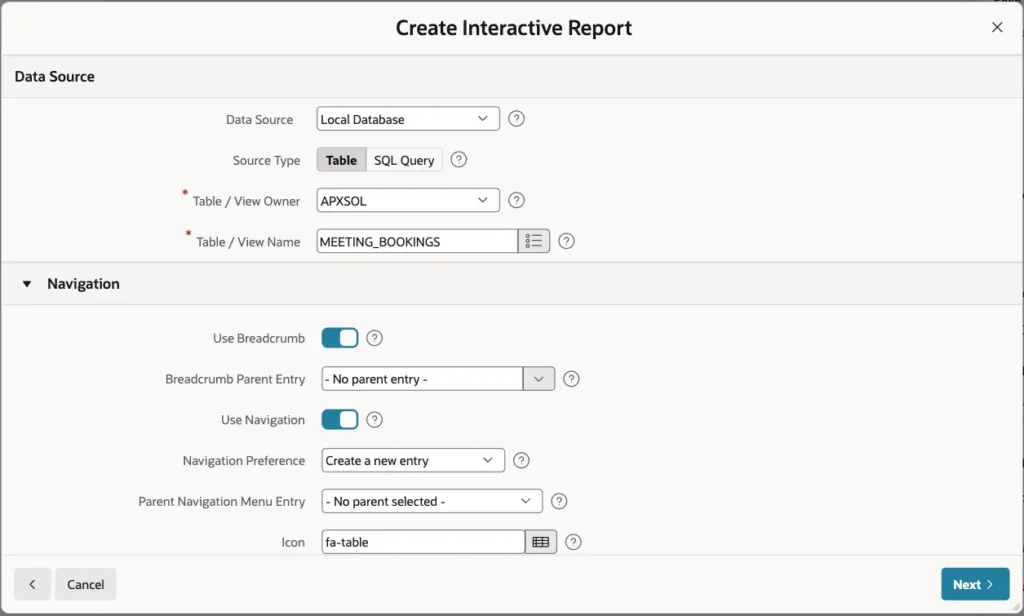
Keep Use Breadcrumb and Use Navigation on, so the report gets a menu entry, and click Next:
On the Primary Key screen, select BOOKING_ID (Number) as Primary Key Column 1 and click Create Page:
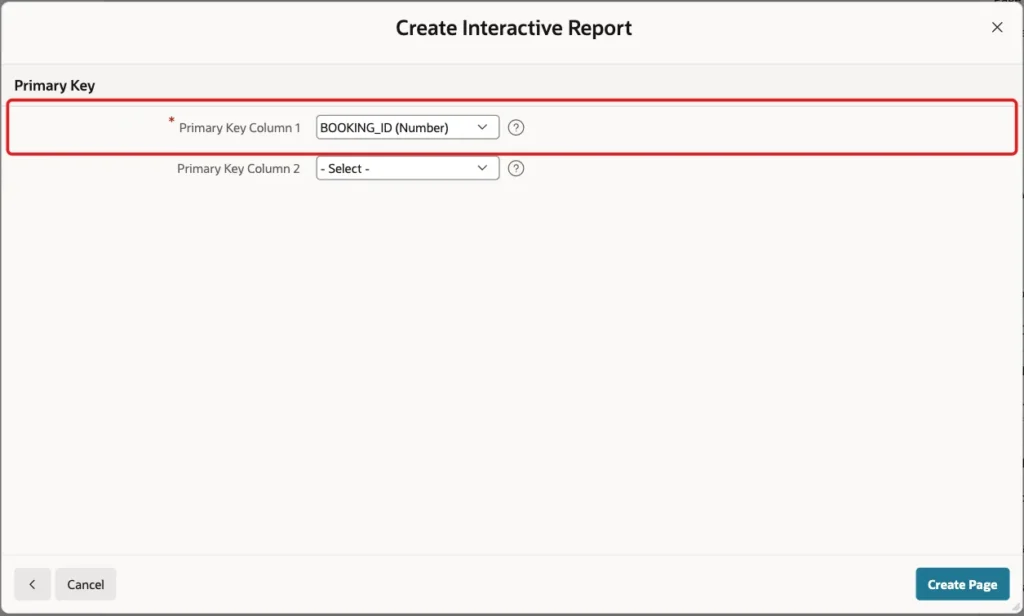
APEX creates page 600 with the report and page 601 with the modal form. Because ROOM_ID has a foreign key, the wizard also created a shared list of values named MEETING_ROOMS.ROOM_NAME. It shows the room name in the report and in the form instead of the ID.
Step 5: Show the Time in the Date Pickers
The wizard creates a Date Picker for START_TIME and END_TIME, but without a time part. Open page 601 in Page Designer and select P601_START_TIME. Set these properties:
- Settings > Show Time: On
- Appearance > Format Mask: DD-MON-YYYY HH24:MI
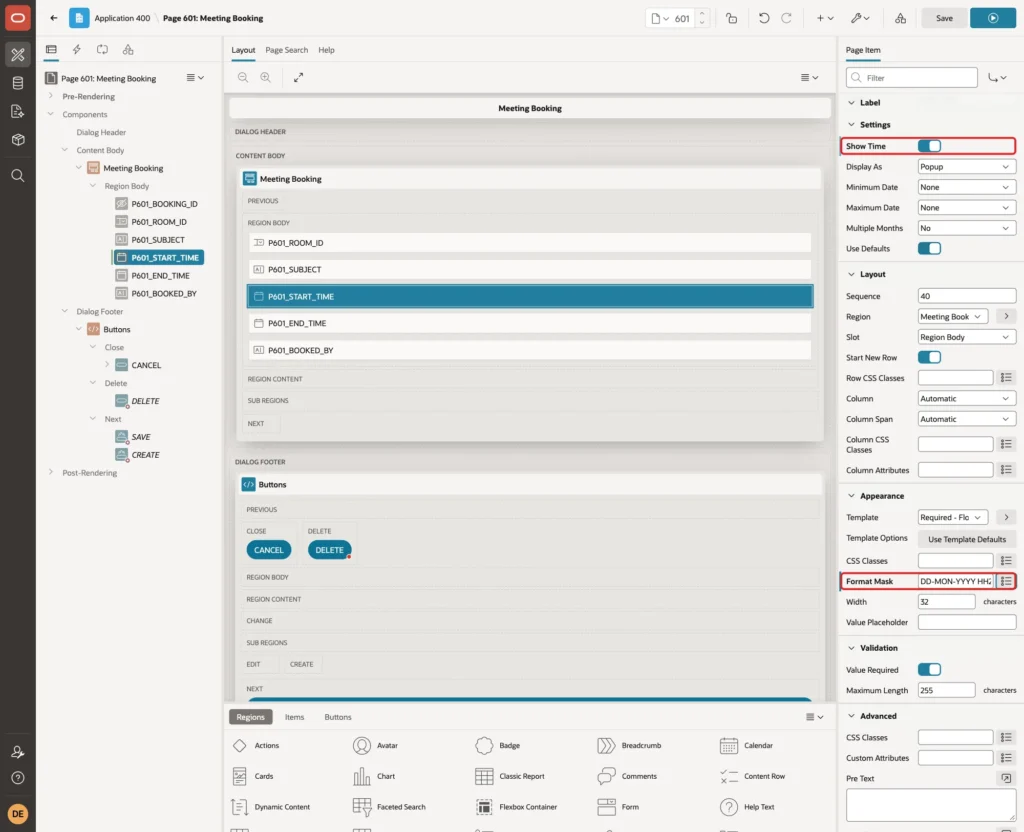
Select P601_END_TIME and set the same two properties:
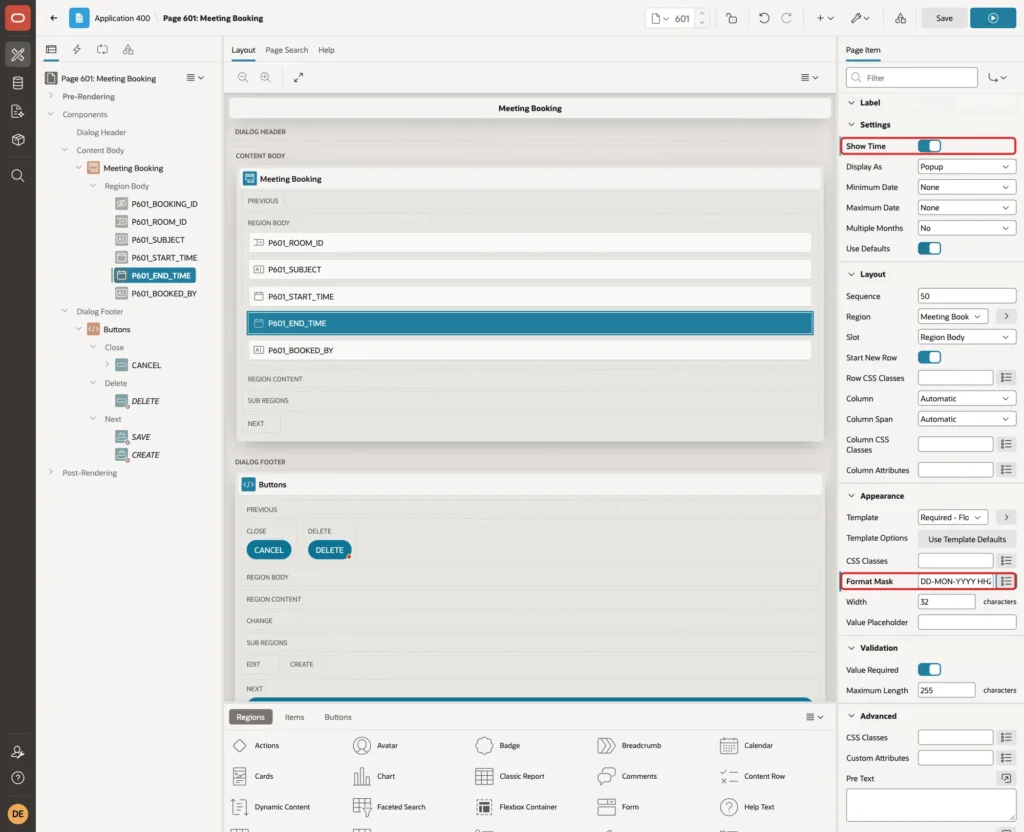
The validations of Step 8 convert the item values with this exact format mask, so keep the two in sync.
Step 6: Adjust the Room and Booked By Items
Select P601_ROOM_ID and change Label > Label to Room. The wizard already made it a Select List with List of Values Type Shared Component and the list MEETING_ROOMS.ROOM_NAME:
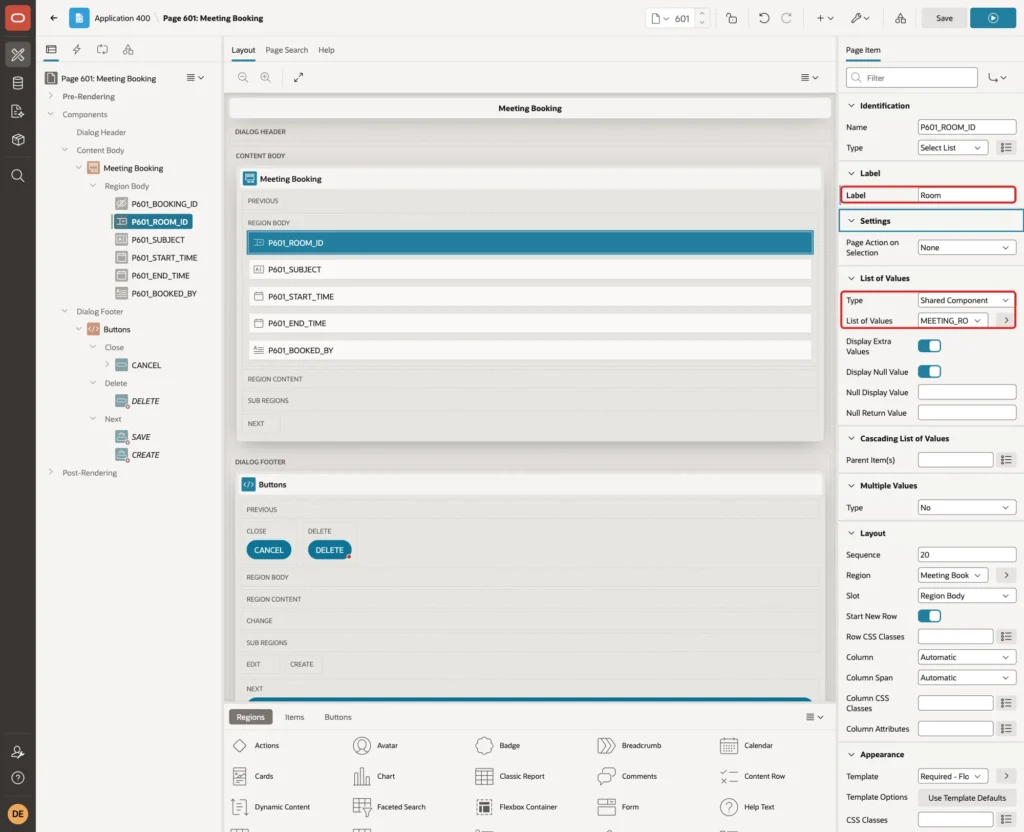
The wizard made P601_BOOKED_BY a required text field, because the column is NOT NULL. The column fills itself, so users should only see it. Select P601_BOOKED_BY and set:
- Identification > Type: Display Only
- Appearance > Template: Optional - Floating
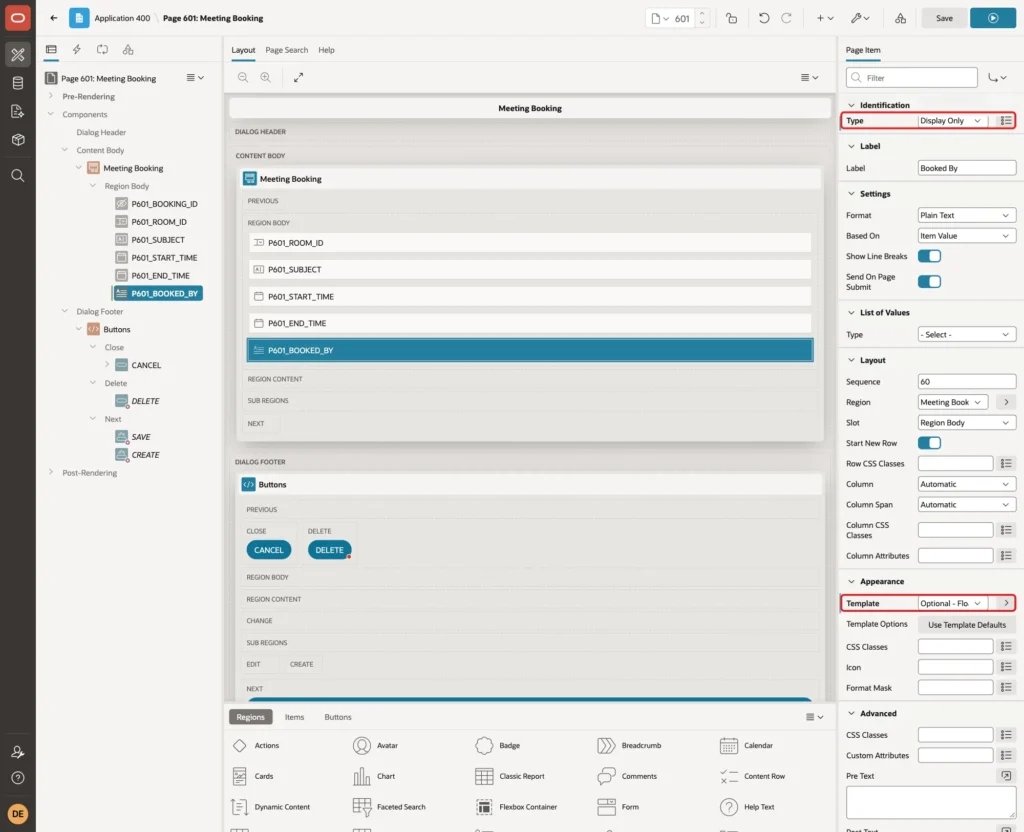
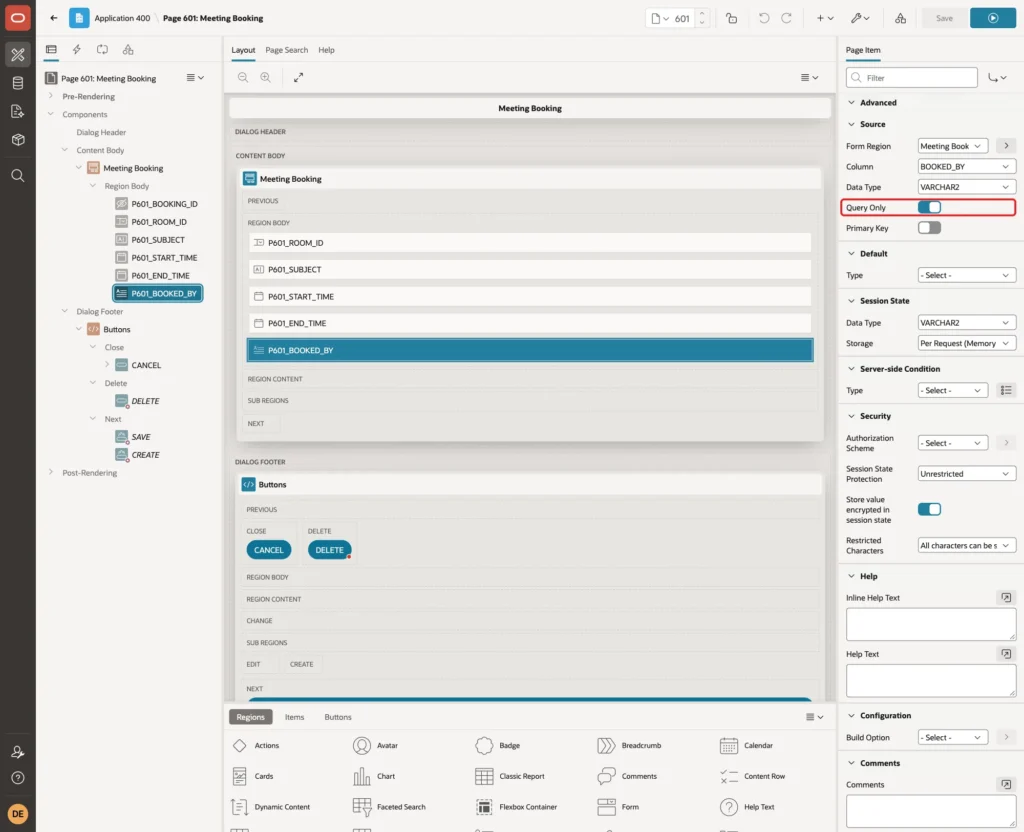
Scroll down to the Source group and turn on Query Only. The form then never writes the column, and DEFAULT ON NULL stores the APEX user on insert:
Step 7: Format the Report Columns
Open page 600. In the Rendering tree, expand Meeting Bookings > Columns and select START_TIME. Enter Appearance > Format Mask DD-MON-YYYY HH24:MI:
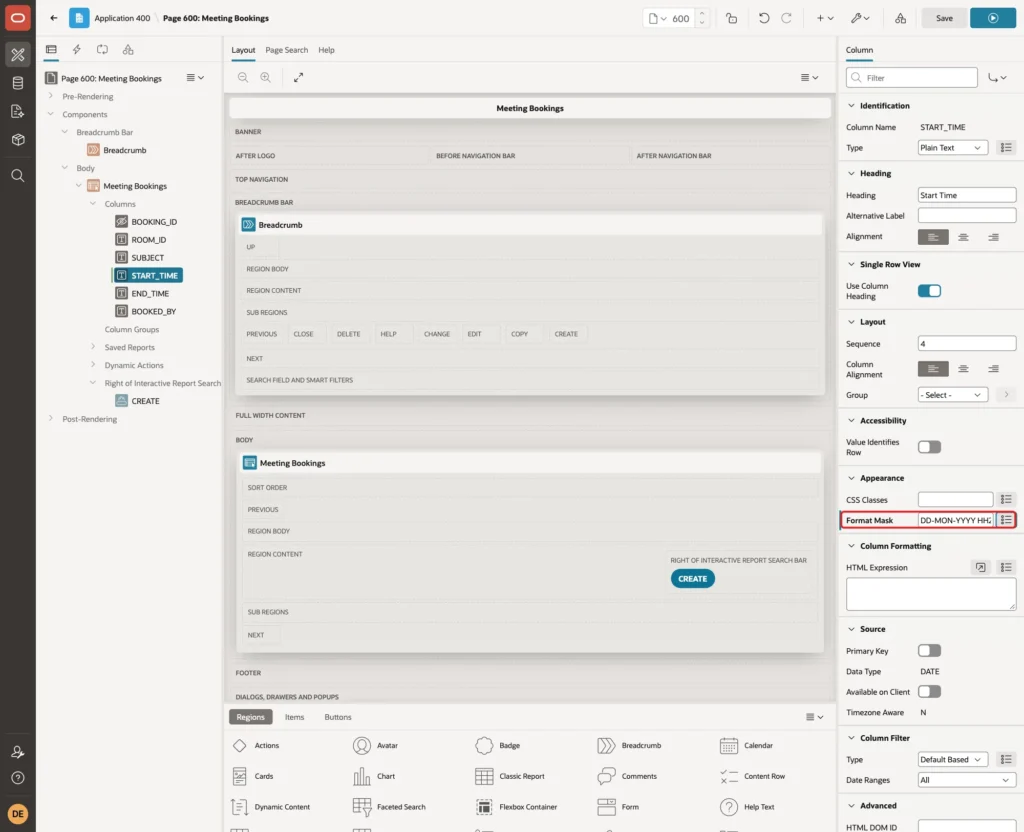
Select END_TIME and enter the same format mask. Click Save.
Step 8: Add the Validations
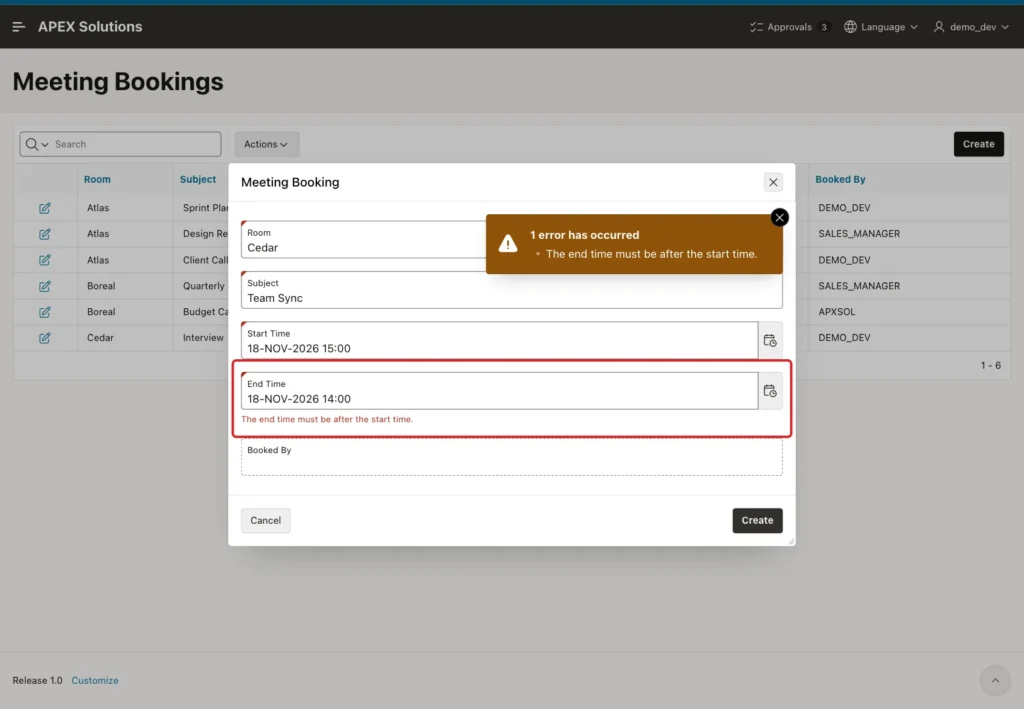
The first validation gives a friendly message for a reversed time range, before the check constraint would raise a raw error. Back on page 601, right-click P601_END_TIME and choose Create Validation. Set:
- Identification > Name: End After Start
- Validation > Type: Expression
- Validation > Language: PL/SQL
- Error > Error Message: The end time must be after the start time.
- Error > Associated Item: P601_END_TIME
Enter this PL/SQL Expression:
Example:
to_date(:P601_END_TIME, 'DD-MON-YYYY HH24:MI') > to_date(:P601_START_TIME, 'DD-MON-YYYY HH24:MI')
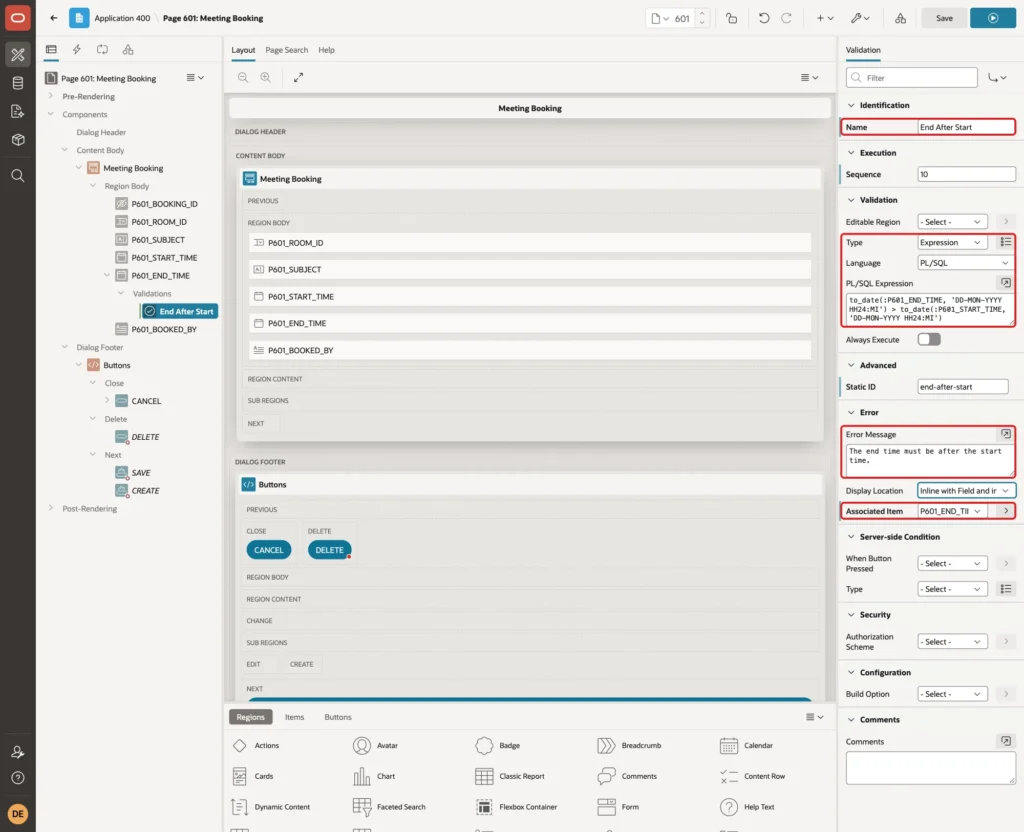
Item values reach PL/SQL as text, so the expression converts both with TO_DATE and the format mask of Step 5 before it compares them.
The second validation checks for clashes. Right-click P601_START_TIME and choose Create Validation:
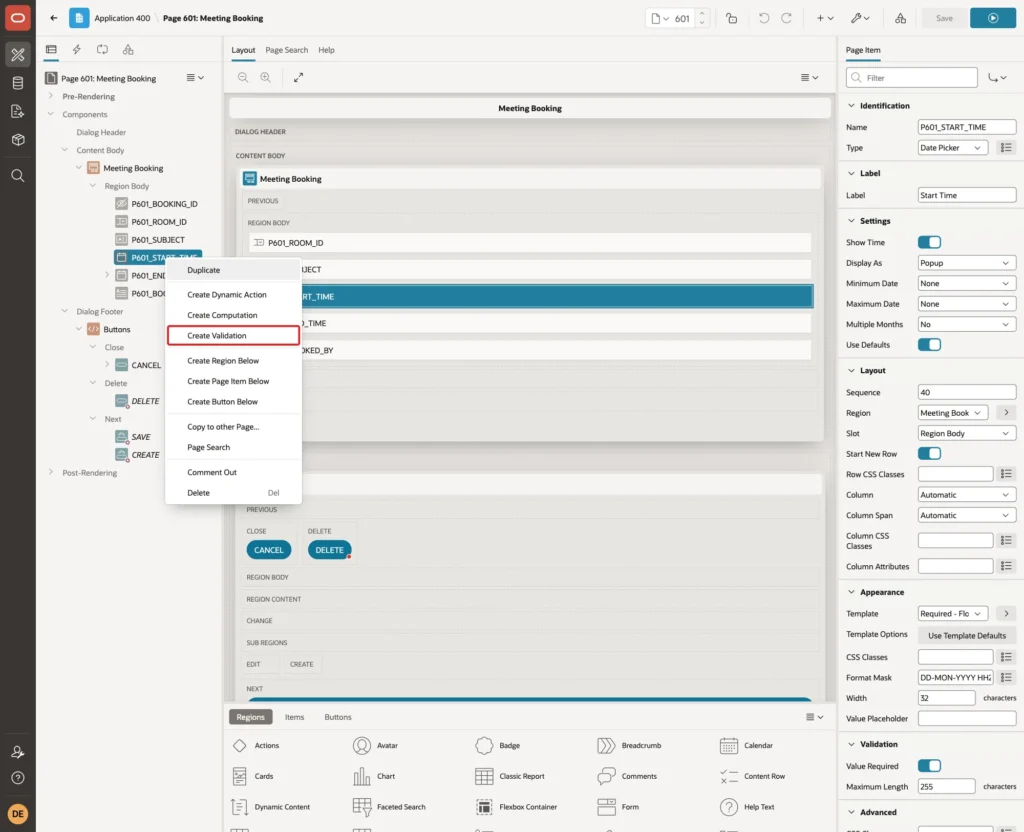
Set Name Room Is Free and Type Function Body (returning Error Text), keep Language PL/SQL, and enter this function body:
Example:
declare
  l_room_id meeting_rooms.room_id%type;
begin
  select room_id
    into l_room_id
    from meeting_rooms
   where room_id = :P601_ROOM_ID
     for update;

  for c in (select subject, start_time, end_time
              from meeting_bookings
             where room_id = :P601_ROOM_ID
               and (:P601_BOOKING_ID is null or booking_id <> :P601_BOOKING_ID)
               and start_time < to_date(:P601_END_TIME, 'DD-MON-YYYY HH24:MI')
               and end_time > to_date(:P601_START_TIME, 'DD-MON-YYYY HH24:MI')
             order by start_time
             fetch first 1 row only)
  loop
    return 'This room is already booked from '
        || to_char(c.start_time, 'DD-MON-YYYY HH24:MI') || ' to '
        || to_char(c.end_time, 'HH24:MI') || ' (' || c.subject || ').';
  end loop;

  return null;
end;
Check that Error > Associated Item is P601_START_TIME. This validation type has no Error Message property, because the function returns the message:
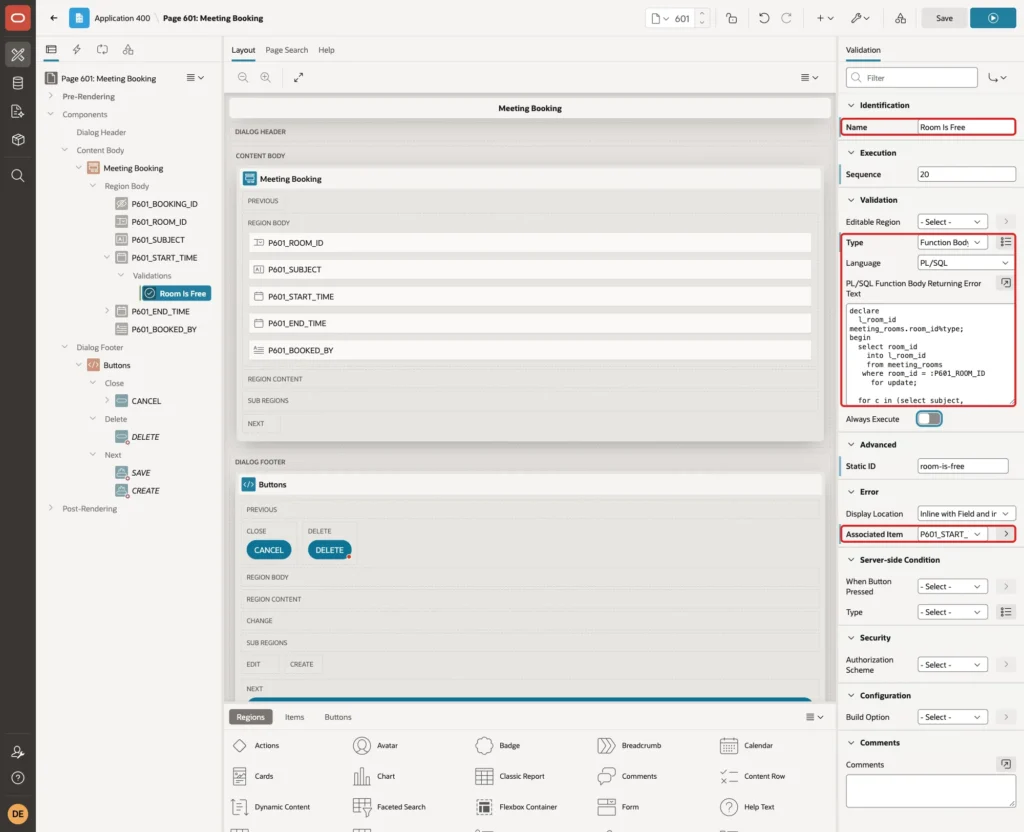
How the function works:
- SELECT ... FOR UPDATE locks the chosen room row, as in Step 3. APEX commits at the end of the page request, after the form process, so the booking is saved while the room is still locked.
- The loop reads the first booking of the same room that overlaps the entered times. The condition on P601_BOOKING_ID skips the booking itself when an existing record is edited.
- If a clash is found, the function returns a message with its times and subject. If nothing is found, it returns NULL and the validation passes.
Click Save. The Delete button created by the wizard has Execute Validations turned off, so deleting a booking does not run these checks.
Step 9: Test the Form
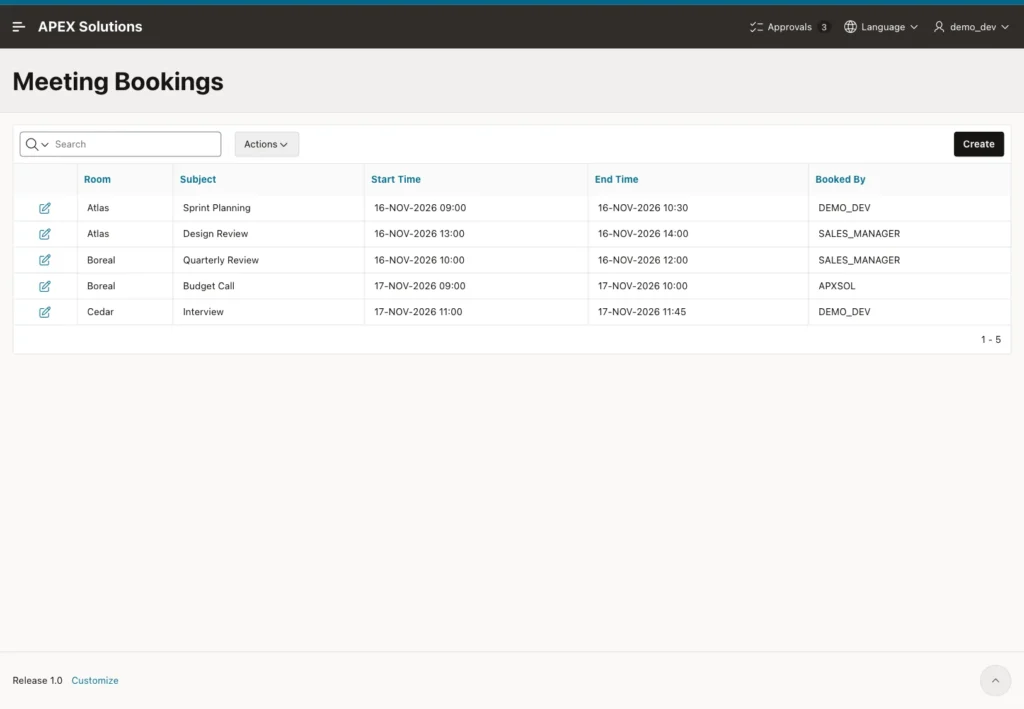
Run page 600. The report lists the sample bookings with their times:
Click Create. Choose Room Atlas, enter Subject Client Call, Start Time 16-NOV-2026 10:00 and End Time 16-NOV-2026 11:00, and click Create. The form stays open with the clash message:
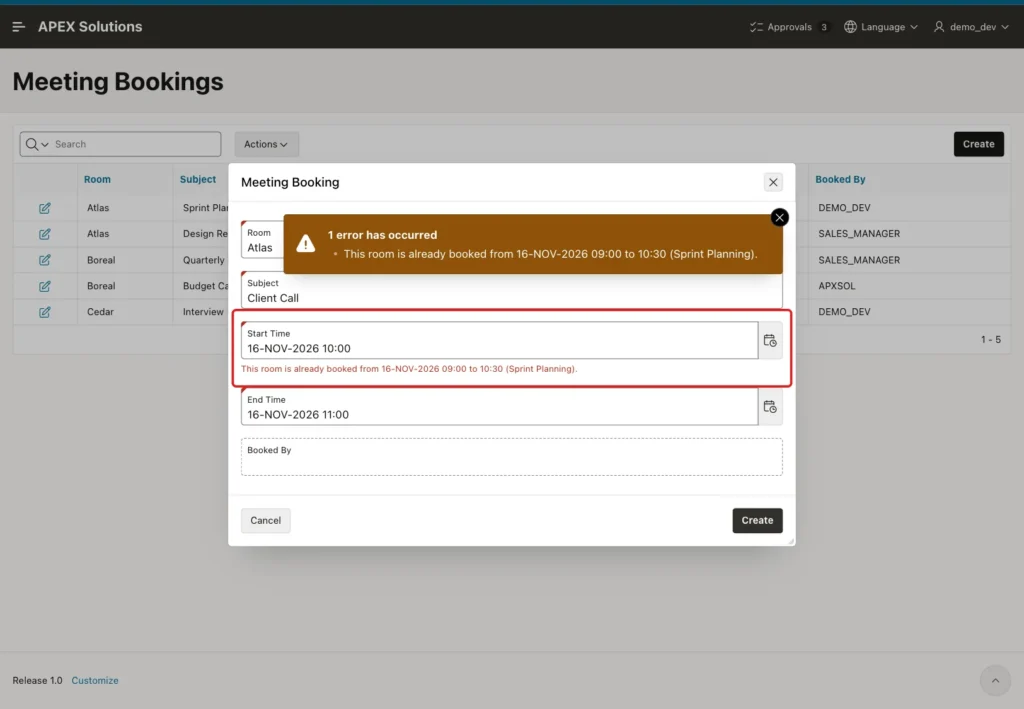
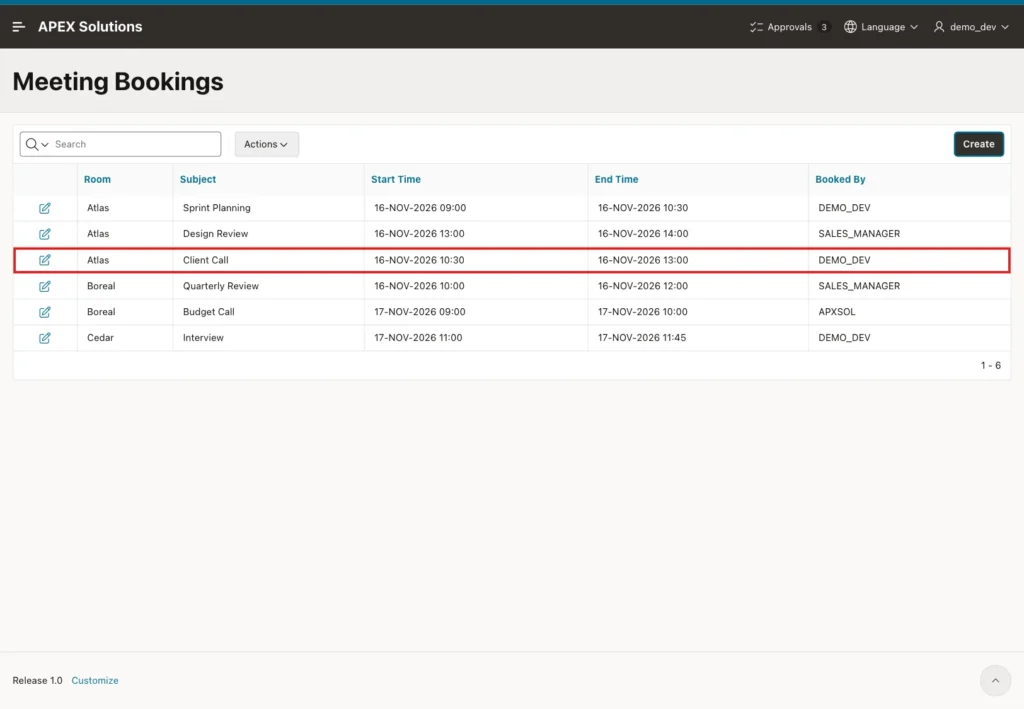
The message names the clashing booking, so the user knows which slot to avoid. Change the Start Time to 16-NOV-2026 10:30 and the End Time to 16-NOV-2026 13:00. This slot fits exactly between Sprint Planning and Design Review:
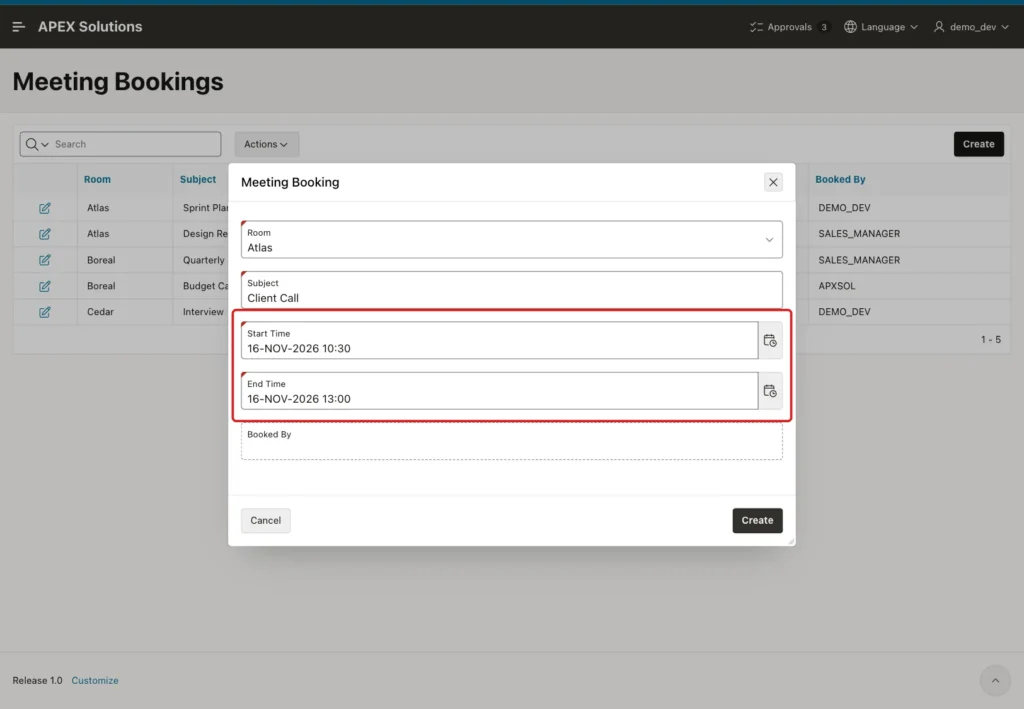
Click Create. The dialog closes and the new booking is in the report:
Next, test a reversed range. Click Create, choose Room Cedar, enter Subject Team Sync, Start Time 18-NOV-2026 15:00 and End Time 18-NOV-2026 14:00, and click Create:
Close the dialog with Cancel. Finally, edit an existing booking. Click the edit icon of Sprint Planning, change the Subject to Sprint Planning (Team A) and click Apply Changes:
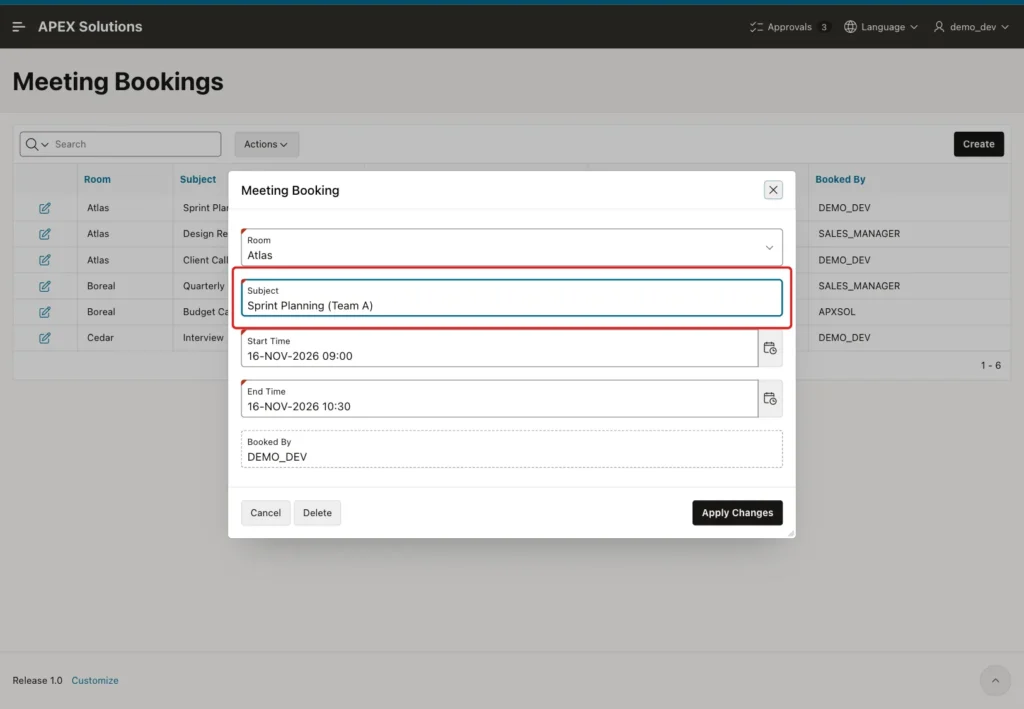
The change is saved. The booking still covers 09:00 to 10:30, but the validation skips its own row. Booked By shows DEMO_DEV, filled by the column default when the record was created.
Step 10: Test Two Saves at the Same Time
The last test repeats the race of Step 3 against the APEX form. A SQL session plays the second user. It locks room Cedar, inserts a booking for 18 November, 09:00 to 10:00, and waits 20 seconds before it commits:
Example:
set serveroutput on feedback off
declare
  l_room_id number;
begin
  select room_id into l_room_id from meeting_rooms where room_id = 3 for update;
  insert into meeting_bookings (room_id, subject, start_time, end_time)
  values (3, 'Phone Screen', to_date('2026-11-18 09:00', 'yyyy-mm-dd hh24:mi'), to_date('2026-11-18 10:00', 'yyyy-mm-dd hh24:mi'));
  dbms_output.put_line(to_char(systimestamp, 'HH24:MI:SS') || ' room locked, booking inserted');
  dbms_session.sleep(20);
  commit;
  dbms_output.put_line(to_char(systimestamp, 'HH24:MI:SS') || ' committed');
end;
/
Output:
17:15:32 room locked, booking inserted
17:15:52 committed
While that session waited, the form submitted a booking for Cedar from 09:30 to 10:30 with the subject Candidate Interview. The request did not fail at once. It waited 16 seconds, until the SQL session committed at 17:15:52, and then returned the clash message:
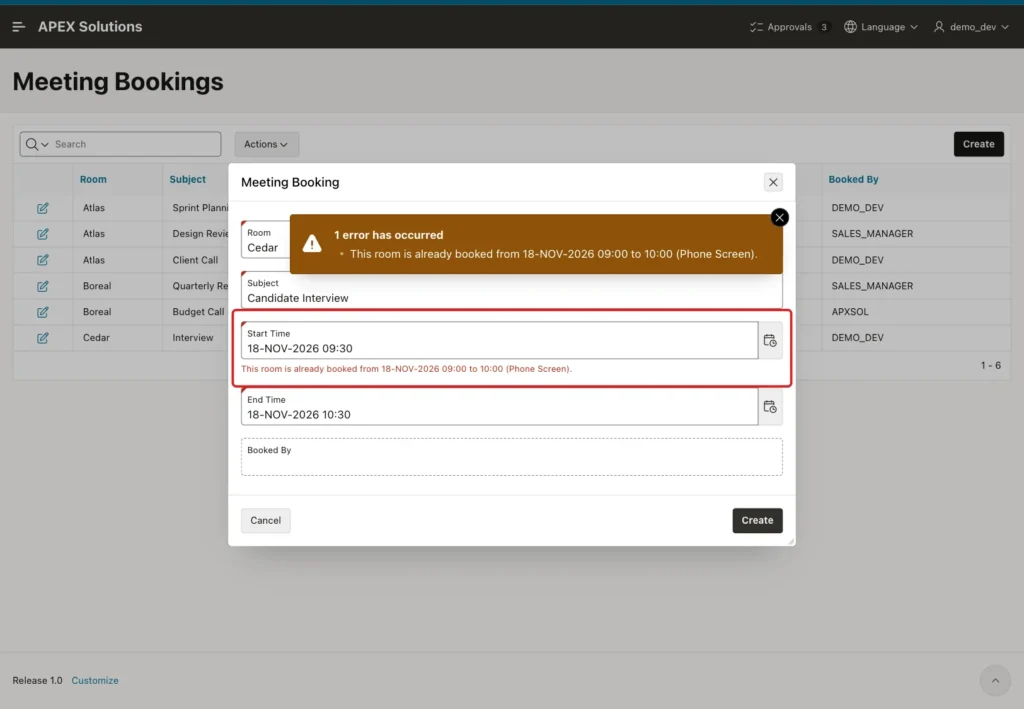
Without the lock, the validation would have run at once, missed the uncommitted Phone Screen row, and saved a second booking, as both sessions did in Step 3.
A rejected request must not keep the room locked. After the failed submit, a NOWAIT lock request on room Cedar succeeded at once:
Example:
set serveroutput on feedback off
declare
  l_room_id number;
begin
  select room_id into l_room_id from meeting_rooms where room_id = 3 for update nowait;
  dbms_output.put_line('Room 3 is not locked by any session.');
  rollback;
end;
/
Output:
Room 3 is not locked by any session.
The bookings after all tests, without any overlap in a room:
Example:
set lines 200 pages 100 feedback on
column room_name format a8
column subject format a26
column booked_by format a14
select r.room_name, b.subject,
       to_char(b.start_time, 'DD-MON-YYYY HH24:MI') as start_time,
       to_char(b.end_time, 'HH24:MI') as end_time, b.booked_by
  from meeting_bookings b
  join meeting_rooms r on r.room_id = b.room_id
 order by r.room_name, b.start_time;
Output:
ROOM_NAME    SUBJECT                     START_TIME           END_TIME    BOOKED_BY
____________ ___________________________ ____________________ ___________ ________________
Atlas        Sprint Planning (Team A)    16-NOV-2026 09:00    10:30       DEMO_DEV
Atlas        Client Call                 16-NOV-2026 10:30    13:00       DEMO_DEV
Atlas        Design Review               16-NOV-2026 13:00    14:00       SALES_MANAGER
Boreal       Quarterly Review            16-NOV-2026 10:00    12:00       SALES_MANAGER
Boreal       Budget Call                 17-NOV-2026 09:00    10:00       APXSOL
Cedar        Interview                   17-NOV-2026 11:00    11:45       DEMO_DEV
Cedar        Phone Screen                18-NOV-2026 09:00    10:00       APXSOL

7 rows selected.
Things to Know
- The overlap test uses strict comparisons (< and >), so back-to-back bookings are allowed. Use <= and >= if a gap between bookings is required.
- Lock a parent row that every booking of the resource shares, such as the room. Locking the clashing booking rows would not help, because a new booking has no row to lock yet.
- A second user waits only while the first request runs, which is usually a fraction of a second. The 16-second wait in Step 10 came from the SQL session's deliberate pause.
- The validation guards the APEX form only. Other programs that insert bookings must lock the room and check for clashes the same way, for example through a shared PL/SQL procedure.
- Keep the format mask of the date pickers and the TO_DATE calls in the validations identical, or the conversion fails.
- The check constraint MEETING_BOOKINGS_TIMES_CK still protects the table from reversed ranges entered outside the form.
Related Guides
- How to Add a From/To Date Range with Validation in Oracle APEX
- Oracle SQL Query to Find Overlapping Date Ranges
Conclusion
Preventing overlapping bookings in Oracle APEX takes one validation of the type Function Body (returning Error Text). It looks for a booking of the same room that starts before the new one ends and ends after it starts, and it names the clash in the error message.
The row lock on the room is what makes the check safe for many users. Parallel saves for the same room run one after the other, so the second one always sees the first. A simple expression validation and a check constraint keep the time range itself valid.
