
A dashboard is only useful while its numbers are current. When new orders arrive, the cards and charts should show them without the user pressing F5. A full page reload would do that, but it flickers, loses the scroll position, and reloads every region, even the ones that did not change.
Oracle APEX can refresh single regions in the background. Charts have a declarative Automatic Refresh interval, and every other region, such as a Cards region with key figures, can be refreshed with apex.region().refresh() from a dynamic action. This guide sets up both on a sales dashboard and tests them by adding orders while the page is open.
Step 1: The Tables
The dashboard reads orders, order lines, products, and customers. Here are the tables with their keys:
Example:
create table customers (
    customer_id number generated by default as identity
                constraint customers_pk primary key,
    name        varchar2(100) not null,
    email       varchar2(120) not null
);

create table products (
    product_id number generated by default as identity
               constraint products_pk primary key,
    name       varchar2(60)  not null,
    category   varchar2(30)  not null,
    price      number(10, 2) not null
);

create table orders (
    order_id    number generated by default as identity
                constraint orders_pk primary key,
    customer_id number not null
                constraint orders_customer_fk references customers,
    order_date  date default sysdate not null,
    status      varchar2(12) default 'NEW' not null
                constraint orders_status_ck
                check (status in ('NEW', 'APPROVED', 'SHIPPED', 'CANCELLED')),
    approved_by varchar2(60),
    approved_on date
);

create table order_lines (
    line_id    number generated by default as identity
               constraint order_lines_pk primary key,
    order_id   number not null
               constraint order_lines_order_fk references orders on delete cascade,
    product_id number not null
               constraint order_lines_product_fk references products,
    quantity   number not null
               constraint order_lines_qty_ck check (quantity > 0),
    unit_price number(10, 2) not null,
    constraint order_lines_product_uk unique (order_id, product_id)
);

create index order_lines_order_ix on order_lines (order_id);
create index order_lines_product_ix on order_lines (product_id);
The dashboard page, page 80 Sales Dashboard, comes from the guide How to Build a Dashboard Page with KPI Cards and Charts in Oracle APEX. It has:
- Key Figures: a Cards region with four cards, Orders, Revenue, Awaiting Approval, and Customers, from one SQL query.
- Revenue by Month: a bar chart.
- Orders by Status: a donut chart with this query:
Example:
select status, count(*) as orders
from   orders
group  by status
order  by status
- Top Products: a bar chart.
Step 2: Refresh the Charts Automatically
Open page 80 in Page Designer and select the region Orders by Status. In the Property Editor, open the Attributes tab, and in the Automatic Refresh group set Interval to 10:
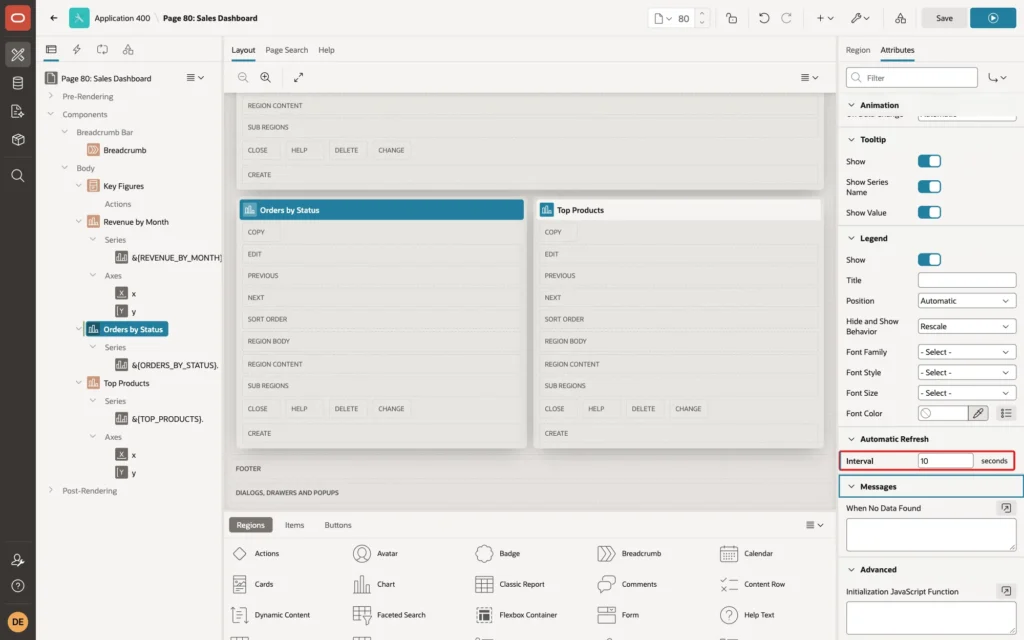
The interval is in seconds, with a minimum of 1. The help text warns that very small intervals, such as 2 seconds, can cause serious database load, because every open page runs the chart's query at that rate. Set the same interval for Revenue by Month, or for each chart that should stay current.
Step 3: Give the Cards Region an HTML DOM ID
Cards regions have no Automatic Refresh group, so the Key Figures region is refreshed from JavaScript. JavaScript finds a region by its HTML DOM ID. Select Key Figures, and in the Region tab's Advanced group set HTML DOM ID to key-figures:
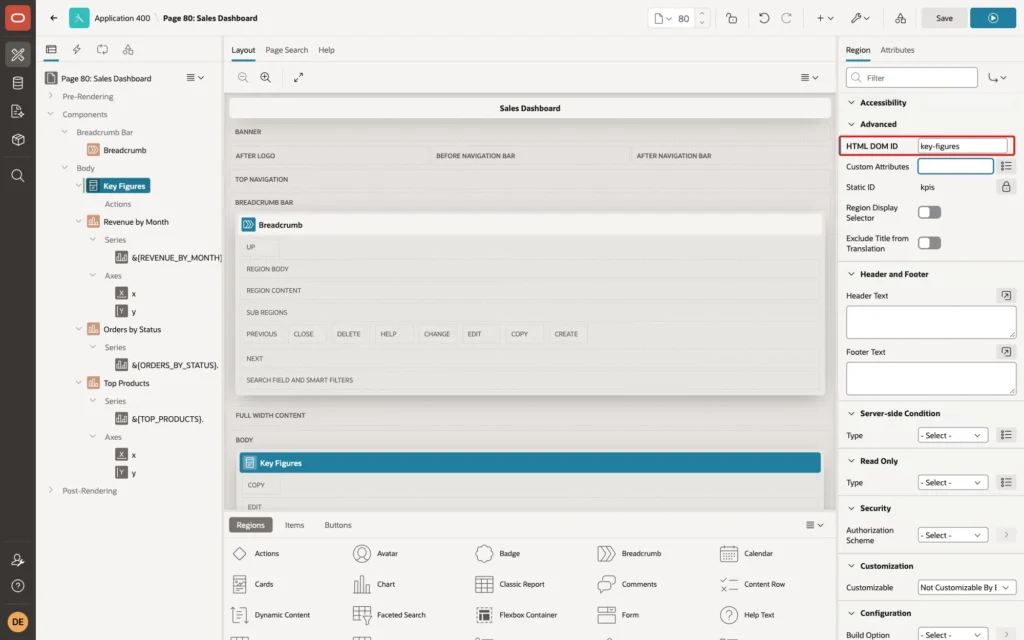
Without an HTML DOM ID, APEX generates an ID for the region, and the JavaScript in the next step would not find it.
Step 4: Add a Dynamic Action with a Timer
Open the Dynamic Actions tab in Page Designer, right-click Page Load, and click Create Dynamic Action. Set Name to Refresh key figures; the When Event is Page Load:
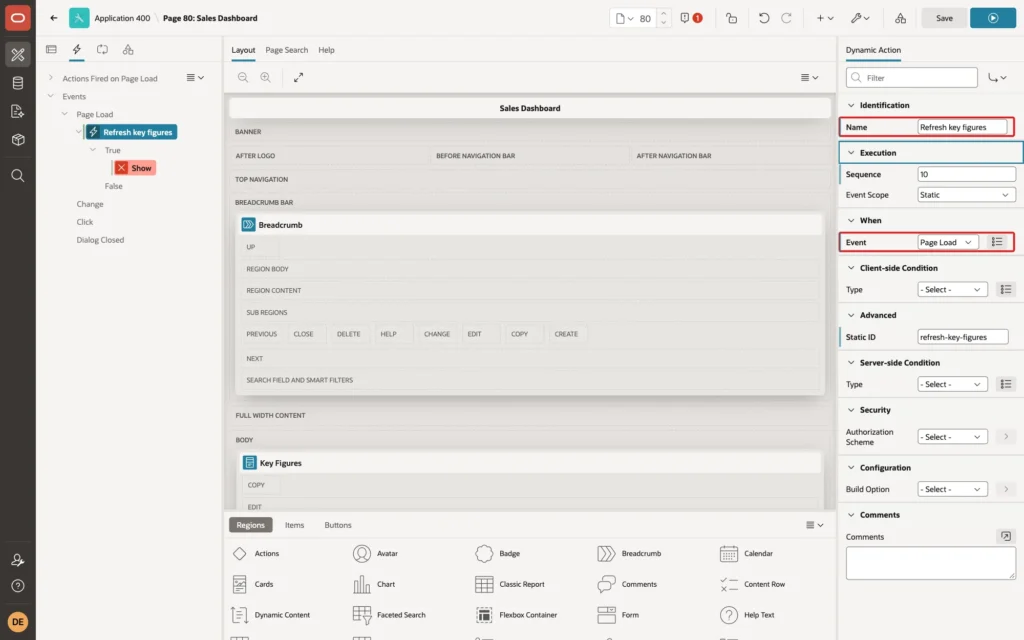
Select its True action, change Action to Execute JavaScript Code, and enter this Code:
Example:
setInterval(function () {
    if (!document.hidden) {
        apex.region("key-figures").refresh();
    }
}, 10000);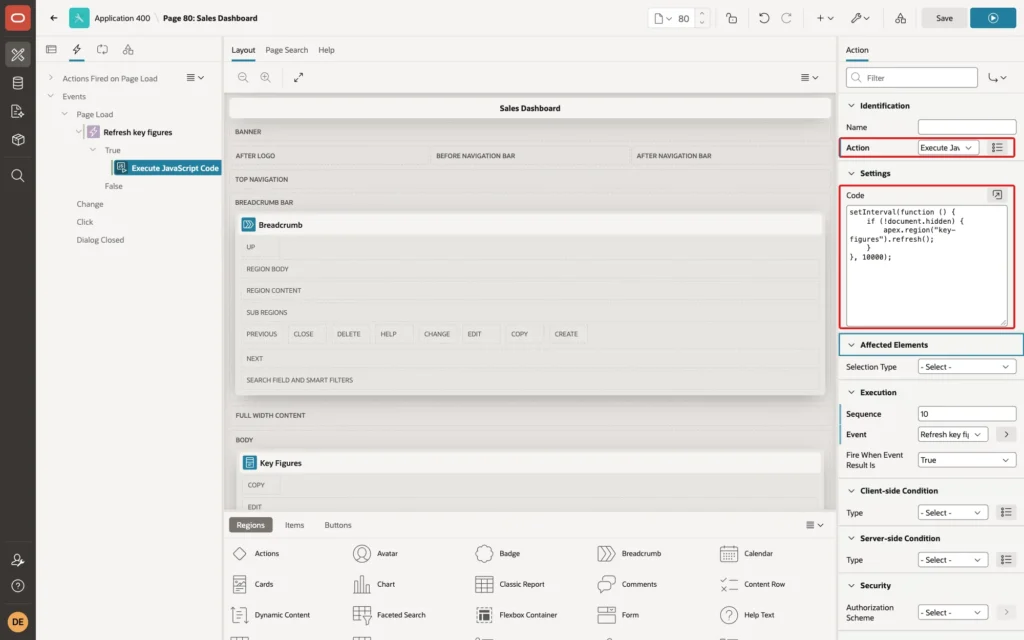
- setInterval runs the function every 10,000 milliseconds, as long as the page is open.
- apex.region("key-figures").refresh() reloads only that region's data with an Ajax request.
- document.hidden is true while the browser tab is in the background, so a dashboard nobody looks at does not query the database.
Click Save.
Step 5: Test It
DEMO_DEV opened the Sales Dashboard. It showed 150 orders, 38 awaiting approval, and 38 NEW orders in the donut:
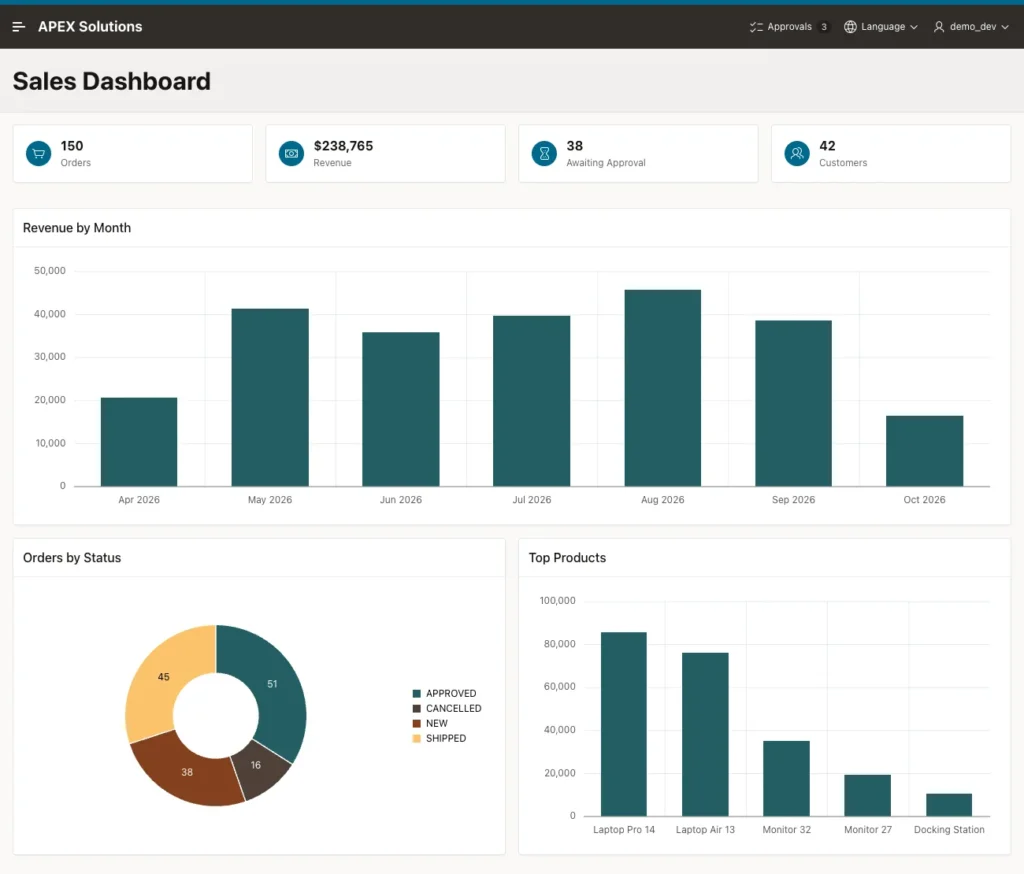
While the page stayed open, five new orders were added from SQL:
Example:
insert into orders (order_id, customer_id, order_date, status)
select 9000 + level, 1, sysdate, 'NEW'
from   dual
connect by level <= 5;

commit;

select status, count(*) as orders
from   orders
group by status
order by status;
Output:
5 rows inserted.

Commit complete.

STATUS          ORDERS
____________ _________
APPROVED            51
CANCELLED           16
NEW                 43
SHIPPED             45
Checked 12 seconds later, without any click, the cards showed 155 orders and 43 awaiting approval, and the donut's NEW slice showed 43:
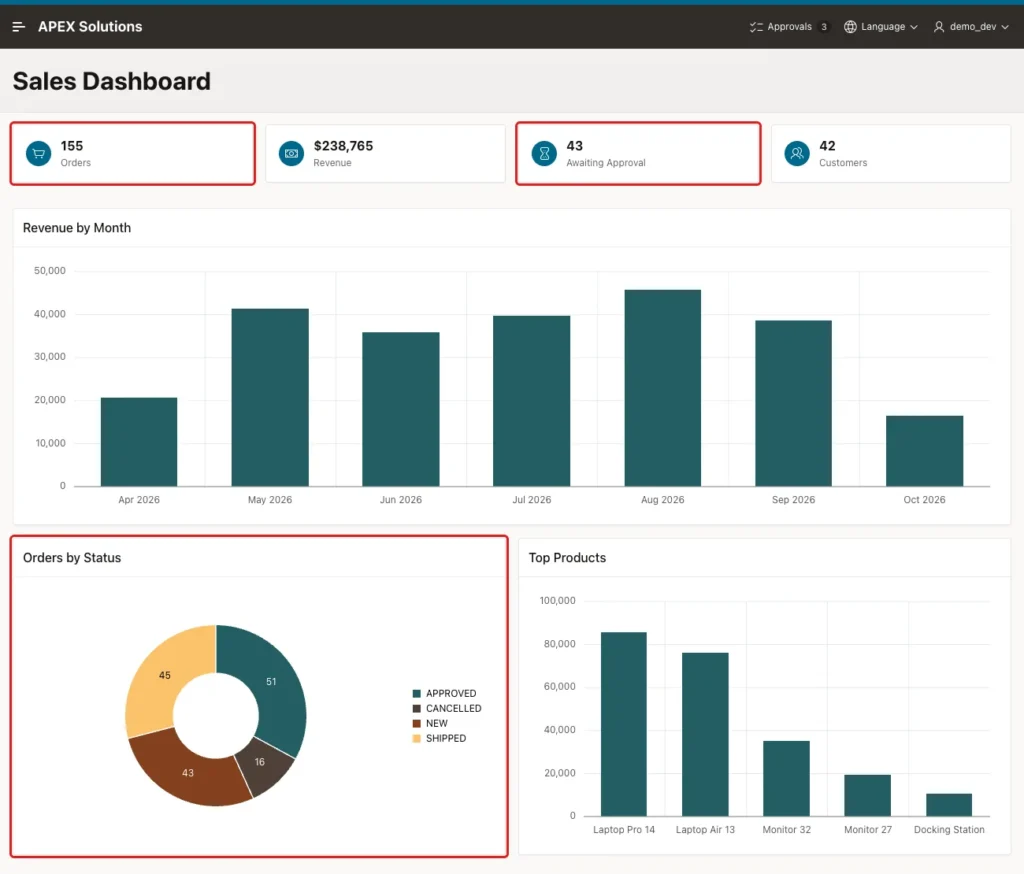
The page was not reloaded: a JavaScript variable set in the page before the test was still there afterwards, and the browser recorded a single page navigation. In 12 seconds, the browser sent three Ajax requests, one for each refreshing region: the cards and the two charts with an interval.
Things to Know
- Choose the interval by how fast the data changes and how many users keep the page open: each open page runs each refreshing query once per interval.
- The same apex.region().refresh() call works for other regions that support refreshing, such as Classic Reports, as long as they have an HTML DOM ID.
- To refresh only when something happens, use a dynamic action with the Refresh action on an event, such as after a dialog closes, instead of a timer.
Related Guides
- How to Build a Dashboard Page with KPI Cards and Charts in Oracle APEX
- How to Refresh and Control Regions Using apex.region in Oracle APEX
Conclusion
To auto-refresh a dashboard in Oracle APEX without reloading the page, set the Automatic Refresh Interval of each chart, and refresh other regions, such as Cards, with apex.region().refresh() in a Page Load dynamic action with setInterval.
Give those regions an HTML DOM ID, skip the refresh while the tab is hidden, and choose an interval the database can carry for all open pages. The numbers then stay current while users keep working.
See my articles more often when you search Google.
