
Notes, descriptions, and comments are easier to read with some formatting: bold text, bullet lists, numbered steps. Oracle APEX has a Rich Text Editor item that gives users a formatting toolbar and stores the result as HTML. Storing HTML that users wrote, and showing it to other users, is also the classic path for cross-site scripting: HTML can carry scripts. This guide adds the editor to a notes page, saves the HTML into a CLOB column, cleans it on the server, and shows it in a report in a way that cannot run scripts, with tests of each layer.
Step 1: The Rich Text Editor Item
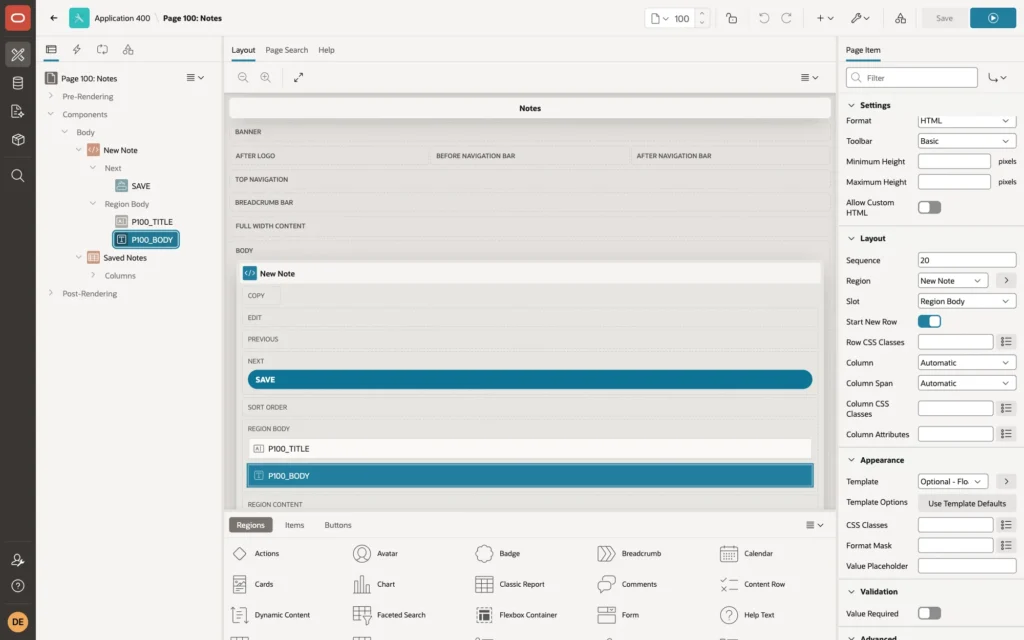
The page has a NOTES table with TITLE and a CLOB column BODY. Add a page item P100_BODY of type Rich Text Editor, and in its Settings set:
- Format: HTML. The other option, Markdown, stores Markdown text instead.
- Toolbar: Basic, with bold, italic, bulleted and numbered lists, undo, and redo. Intermediate and Full add headings, links, quotes, tables, and more.
- Allow Custom HTML: leave it off, the default.
The user writes the note with the toolbar or the usual shortcuts, such as Ctrl+B or Cmd+B for bold:
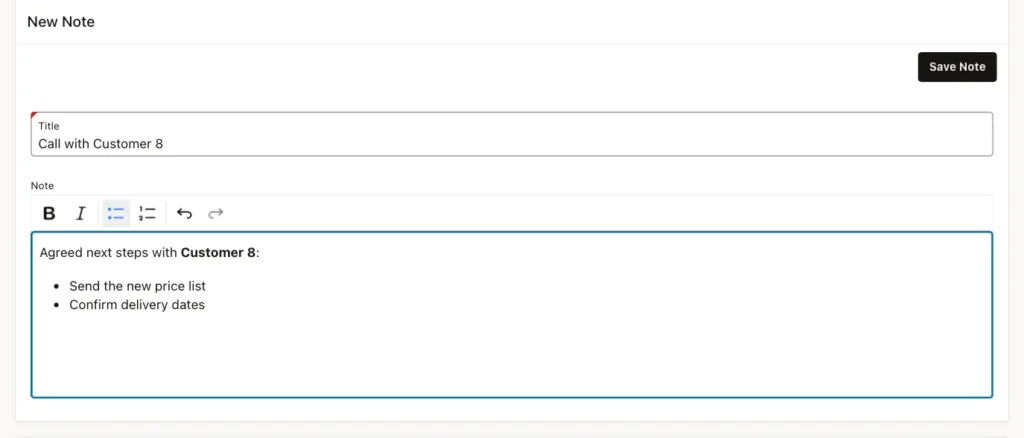
The item's value is HTML. For this note:
Example:
<p>Agreed next steps with <strong>Customer 8</strong>:</p><ul><li>Send the new price list</li><li>Confirm delivery dates</li></ul>
Step 2: Clean the HTML on the Server
The editor only produces safe markup, but the server receives whatever the browser sends, and a user can change the request. Clean the value in the process that saves it, with APEX_ESCAPE.HTML_ALLOWLIST_CLOB:
Example:
insert into notes (title, body)
values (:P100_TITLE, apex_escape.html_allowlist_clob(:P100_BODY));
The function keeps a list of allowed tags and HTML-escapes everything else, so other tags are stored as harmless text. The VARCHAR2 version, HTML_ALLOWLIST, shows the effect in SQL:
Example:
select apex_escape.html_allowlist(
         '<p>Call <strong>Customer 8</strong></p><ul><li>Prices</li></ul>'
      || '<img src=x onerror="alert(1)"><script>alert(2)</script><a href="javascript:alert(3)">link</a>') as cleaned
from   dual;
Output:
CLEANED ___________________________________________________________________________________________________________________________________________________________________________________________________________________________ <p>Call <strong>Customer 8</strong></p><ul><li>Prices</li></ul><img src=x onerror="alert(1)"><script>alert(2)</script><a href="javascript:alert(3)">link</a>
The paragraph, the strong text, and the list are kept; the image with its onerror handler, the script, and the javascript: link are escaped. In a test that changed the submitted value on its way to the server, replacing the typed text with <img src=x onerror=alert(1)>, the stored value was <p><img src=x onerror=alert(1)></p>: the tag was escaped before it reached the table.
Match the allowlist to the toolbar. The default list contains h1 to h4, p, b, strong, i, em, ul, ol, li, dl, dt, dd, pre, code, br, and hr, all without attributes. That covers the Basic toolbar. Links, tables, quotes, underline, and strikethrough from the larger toolbars are not in it: in a test, a link, a table, a quote, underline, and strikethrough were all escaped and would show as text. To allow more tags without attributes, pass your own list in p_allowlist_tags, for example apex_escape.c_html_allowlist_tags || ',<u>,</u>,<s>,</s>,<blockquote>,</blockquote>'.
Step 3: Show the HTML with a Rich Text Column
In the report of saved notes, set the BODY column's Type to Rich Text, with Format HTML:
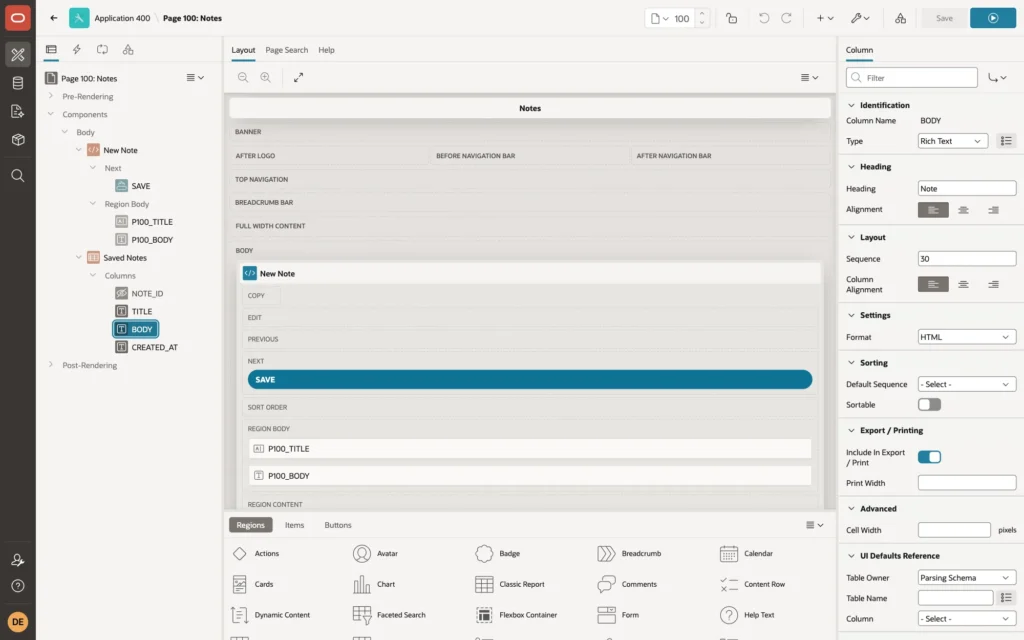
A Rich Text column sanitizes the HTML in the browser before it shows it. To test it, a row was inserted directly into the table, as an import or another program could do, bypassing the page and its cleaning:
Example:
insert into notes (title, body)
values ('Imported note',
        '<p>Looks normal.</p><img src="x" onerror="alert(''XSS'')"><script>alert(''XSS 2'')</script>');
commit;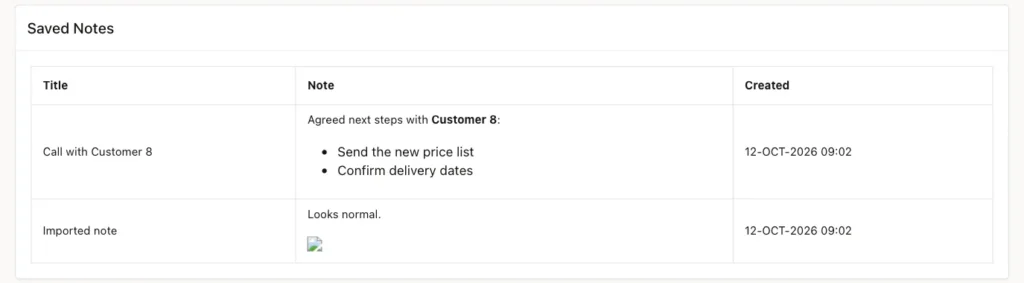
No alert appeared. The rendered cell contained <p>Looks normal.</p><img src="x">: the onerror attribute and the script element had been removed; only the image with its broken source remained.
What Not to Do
The tempting shortcut is a plain text column with Escape special characters turned off, so the HTML is rendered as it is. With that setting, the same imported row ran both scripts: the test browser showed two alerts, XSS 2 and XSS, as soon as the page opened. Any user who can save a note could run code in the browsers of everyone who reads it. Leave Escape special characters on for plain text columns, and use the Rich Text type for HTML.
Things to Know
- The cleaning on save and the sanitizing on display protect against different paths: cleaning protects every consumer of the table, such as emails and exports; sanitizing protects the page even from rows that came in another way. Use both.
- Markdown format avoids stored HTML altogether; render it for display with APEX_MARKDOWN or a Rich Text column with Format Markdown.
Related Guides
- How to Escape Output and Render Markdown Using APEX_ESCAPE and APEX_MARKDOWN
- Oracle APEX Authorization and Application Security
Conclusion
To add a rich text editor in Oracle APEX and store its HTML safely, use a Rich Text Editor item with a toolbar that fits your needs, clean the value on the server with APEX_ESCAPE.HTML_ALLOWLIST_CLOB and an allowlist that matches the toolbar, and display it with a Rich Text column, which removes scripts and event handlers. Never show stored HTML with escaping turned off.
