
Sooner or later, someone asks: "Who changed the credit limit of this customer, and what was it before?" If the application does not record changes, nobody can answer.
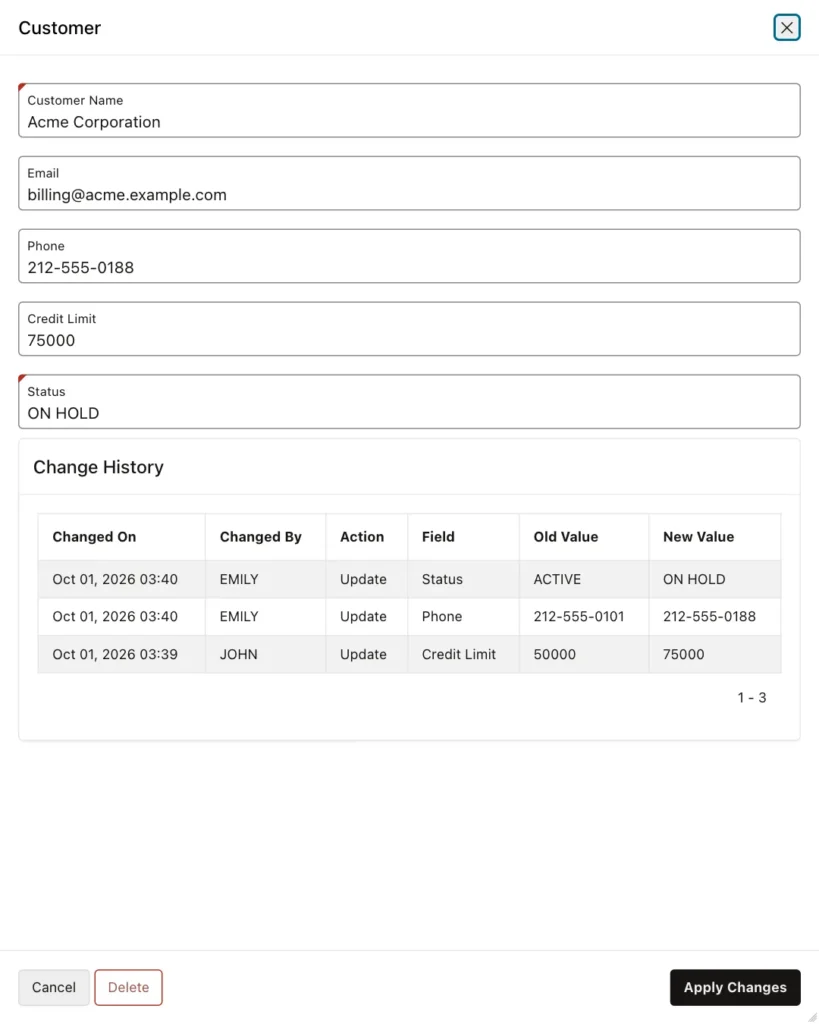
This article adds a change history that works for any table in your schema. One table stores every change, one column per row: who changed it, when, the old value, and the new value. A small package creates the history trigger for a table with one call, so you do not write a trigger by hand for each table. Finally, a Classic Report region shows the history of the current record on the APEX form.
Step 1: Create the History Table and Package
Run this script in your schema, in SQL*Plus, SQLcl, SQL Developer, or SQL Workshop:
create table change_history (
  history_id   number generated always as identity primary key,
  table_name   varchar2(128)  not null,
  pk_value     varchar2(200)  not null,
  action       varchar2(6)    not null,
  column_name  varchar2(128)  not null,
  old_value    varchar2(4000),
  new_value    varchar2(4000),
  changed_by   varchar2(255)  not null,
  changed_on   timestamp      default systimestamp not null
);

create index change_history_row_ix on change_history (table_name, pk_value);

create or replace package change_history_api authid definer as
  -- creates (or replaces) the history trigger of a table
  procedure enable_history (p_table_name in varchar2);
  -- drops the history trigger of a table
  procedure disable_history (p_table_name in varchar2);
  -- called by the history triggers: logs one column if its value changed
  procedure log_change (
    p_table_name in varchar2, p_pk_value in varchar2, p_action in varchar2,
    p_column_name in varchar2, p_old_value in varchar2, p_new_value in varchar2);
end change_history_api;
/

create or replace package body change_history_api as

  procedure log_change (
    p_table_name in varchar2, p_pk_value in varchar2, p_action in varchar2,
    p_column_name in varchar2, p_old_value in varchar2, p_new_value in varchar2) is
  begin
    if (p_old_value is null and p_new_value is null) or p_old_value = p_new_value then
      return;                                        -- this column did not change
    end if;
    insert into change_history
      (table_name, pk_value, action, column_name, old_value, new_value, changed_by)
    values
      (p_table_name, p_pk_value, p_action, p_column_name, p_old_value, p_new_value,
       -- the APEX user, or the database user outside APEX
       coalesce(sys_context('APEX$SESSION', 'APP_USER'), sys_context('USERENV', 'SESSION_USER')));
  end log_change;

  procedure enable_history (p_table_name in varchar2) is
    l_table  varchar2(128) := upper(p_table_name);
    l_pk     varchar2(128);
    l_sql    varchar2(32767);

    -- a column value as text: dates and numbers in a fixed format
    function as_text (p_ref in varchar2, p_type in varchar2) return varchar2 is
    begin
      return case
        when p_type = 'DATE'             then 'to_char(' || p_ref || ', ''YYYY-MM-DD HH24:MI:SS'')'
        when p_type like 'TIMESTAMP%'    then 'to_char(' || p_ref || ', ''YYYY-MM-DD HH24:MI:SS'')'
        when p_type in ('NUMBER', 'FLOAT') then 'to_char(' || p_ref || ')'
        else 'substr(' || p_ref || ', 1, 4000)'
      end;
    end as_text;
  begin
    -- the table must have a single-column primary key
    select cc.column_name into l_pk
    from user_constraints c
    join user_cons_columns cc on cc.constraint_name = c.constraint_name
    where c.table_name = l_table and c.constraint_type = 'P';

    l_sql := 'create or replace trigger ' || l_table || '_HIST' || chr(10)
      || 'after insert or update or delete on ' || l_table || chr(10)
      || 'for each row' || chr(10)
      || 'declare' || chr(10)
      || '  l_action varchar2(6) := case when inserting then ''INSERT'''
      || ' when updating then ''UPDATE'' else ''DELETE'' end;' || chr(10)
      || '  l_pk varchar2(200) := coalesce(to_char(:new.' || l_pk || '), to_char(:old.' || l_pk || '));' || chr(10)
      || 'begin' || chr(10);

    for c in (select column_name, data_type
              from user_tab_columns
              where table_name = l_table
              and column_name <> l_pk                -- the key is in PK_VALUE already
              and (data_type in ('VARCHAR2', 'NVARCHAR2', 'CHAR', 'NCHAR', 'NUMBER', 'FLOAT', 'DATE')
                   or data_type like 'TIMESTAMP%')
              order by column_id) loop
      l_sql := l_sql || '  change_history_api.log_change(''' || l_table || ''', l_pk, l_action, '''
        || c.column_name || ''', ' || as_text(':old.' || c.column_name, c.data_type)
        || ', ' || as_text(':new.' || c.column_name, c.data_type) || ');' || chr(10);
    end loop;

    execute immediate l_sql || 'end;';
  end enable_history;

  procedure disable_history (p_table_name in varchar2) is
  begin
    execute immediate 'drop trigger ' || upper(p_table_name) || '_HIST';
  end disable_history;

end change_history_api;
/
Here is what it creates:
- CHANGE_HISTORY stores one row per changed column: the table name, the primary key of the row (PK_VALUE), the action (INSERT, UPDATE, or DELETE), the column name, the old and new values as text, the user, and the time.
- LOG_CHANGE writes a history row, but only when the value really changed, so an update that saves a whole form records only the fields the user changed. The user is the APEX user from sys_context('APEX$SESSION', 'APP_USER'). Outside APEX, for example in SQL*Plus or a scheduler job, it is the database user.
- ENABLE_HISTORY reads the columns of a table from USER_TAB_COLUMNS and creates a trigger named TABLE_HIST that calls LOG_CHANGE for each column. Dates and numbers are stored in a fixed text format. Large columns such as CLOB and BLOB are skipped.
- DISABLE_HISTORY drops that trigger again.
Step 2: Turn On History for a Table
The demo uses a CUSTOMERS table with the columns CUSTOMER_ID (the primary key), CUSTOMER_NAME, EMAIL, PHONE, CREDIT_LIMIT, and STATUS. To record its changes, run:
begin
  change_history_api.enable_history('CUSTOMERS');
end;
/
That is all. The package has generated this trigger:
trigger CUSTOMERS_HIST
after insert or update or delete on CUSTOMERS
for each row
declare
  l_action varchar2(6) := case when inserting then 'INSERT' when updating then 'UPDATE' else 'DELETE' end;
  l_pk varchar2(200) := coalesce(to_char(:new.CUSTOMER_ID), to_char(:old.CUSTOMER_ID));
begin
  change_history_api.log_change('CUSTOMERS', l_pk, l_action, 'CUSTOMER_NAME', substr(:old.CUSTOMER_NAME, 1, 4000), substr(:new.CUSTOMER_NAME, 1, 4000));
  change_history_api.log_change('CUSTOMERS', l_pk, l_action, 'EMAIL', substr(:old.EMAIL, 1, 4000), substr(:new.EMAIL, 1, 4000));
  change_history_api.log_change('CUSTOMERS', l_pk, l_action, 'PHONE', substr(:old.PHONE, 1, 4000), substr(:new.PHONE, 1, 4000));
  change_history_api.log_change('CUSTOMERS', l_pk, l_action, 'CREDIT_LIMIT', to_char(:old.CREDIT_LIMIT), to_char(:new.CREDIT_LIMIT));
  change_history_api.log_change('CUSTOMERS', l_pk, l_action, 'STATUS', substr(:old.STATUS, 1, 4000), substr(:new.STATUS, 1, 4000));
end;
To record another table, call enable_history with its name. If you add columns to a table later, call enable_history again, and the trigger is created again with the new columns.
Step 3: Test It
Change a customer in SQL and read its history:
update customers
set credit_limit = 30000, email = 'ap@globex.example.com'
where customer_id = 2;
commit;

select action, column_name, old_value, new_value, changed_by
from change_history
where table_name = 'CUSTOMERS' and pk_value = '2'
order by history_id;
ACTION COLUMN_NAME   OLD_VALUE                    NEW_VALUE                CHANGED_BY
------ ------------- ---------------------------- ------------------------ ----------
UPDATE EMAIL         accounts@globex.example.com  ap@globex.example.com    FORMLAB
UPDATE CREDIT_LIMIT  25000                        30000                    FORMLAB
Two columns changed, so there are two rows. The other columns were not touched and are not logged. CHANGED_BY is FORMLAB, the database user, because this change was made in SQL, not in APEX.
Step 4: Show the History on the APEX Form
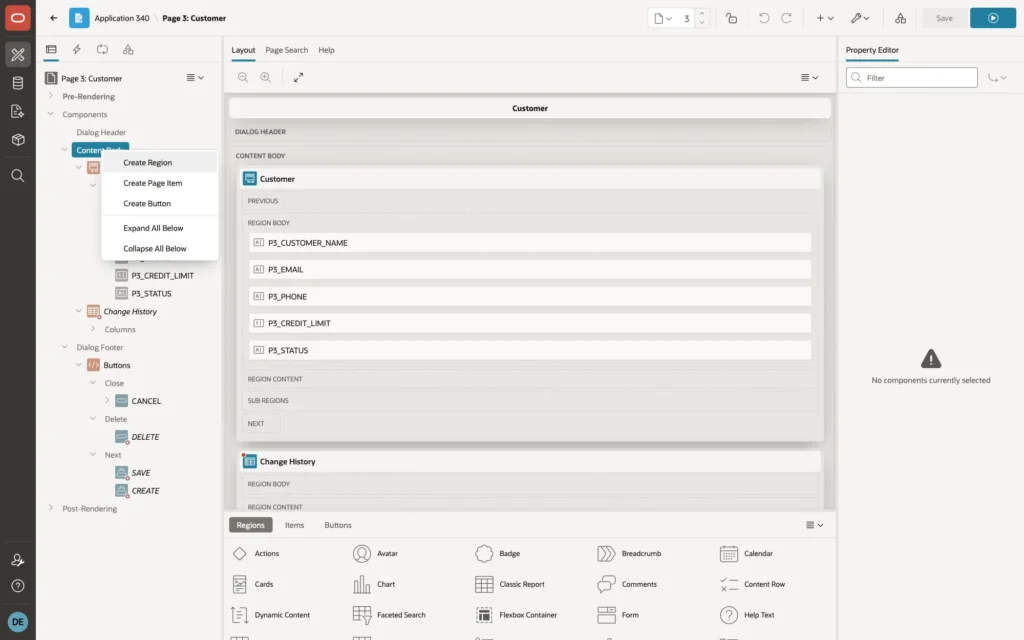
The demo application has a Customers report with a form (page 3), created with the Create App wizard. Open page 3 in Page Designer, right-click Content Body, and choose Create Region:
Select the new region and set:
- Identification, Name: Change History
- Identification, Type: Classic Report
- Source, Type: SQL Query
- Source, Page Items to Submit: P3_CUSTOMER_ID
As the SQL Query, enter:
select h.changed_on,
       h.changed_by,
       initcap(h.action) as action,
       initcap(replace(h.column_name, '_', ' ')) as field,
       h.old_value,
       h.new_value
from change_history h
where h.table_name = 'CUSTOMERS'
and h.pk_value = :P3_CUSTOMER_ID
order by h.history_id desc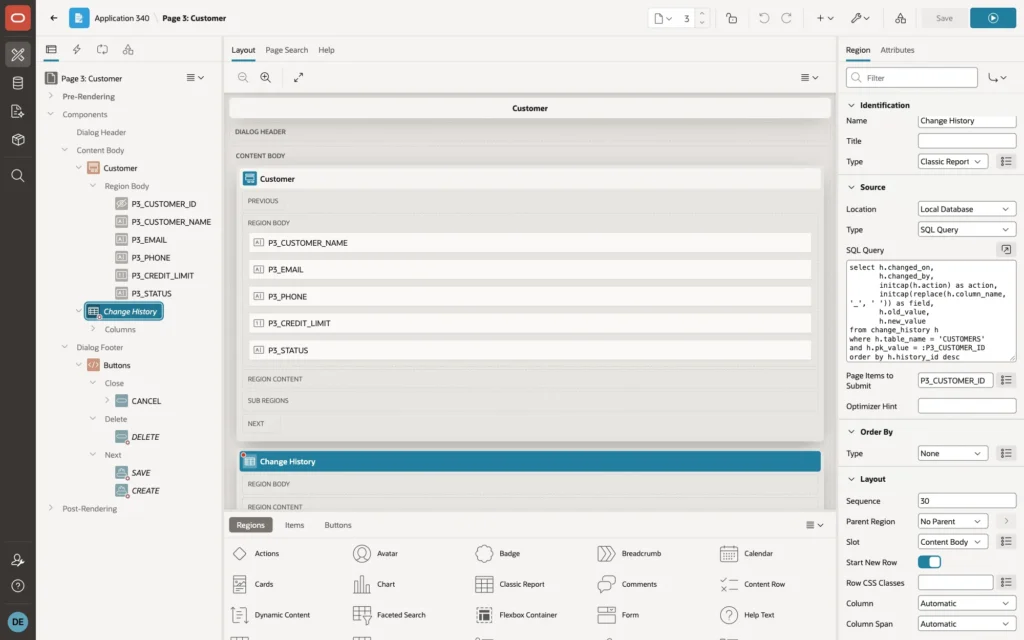
The query turns column names such as CREDIT_LIMIT into readable labels such as Credit Limit, and shows the newest change first. For another table, change the table name and the page item.
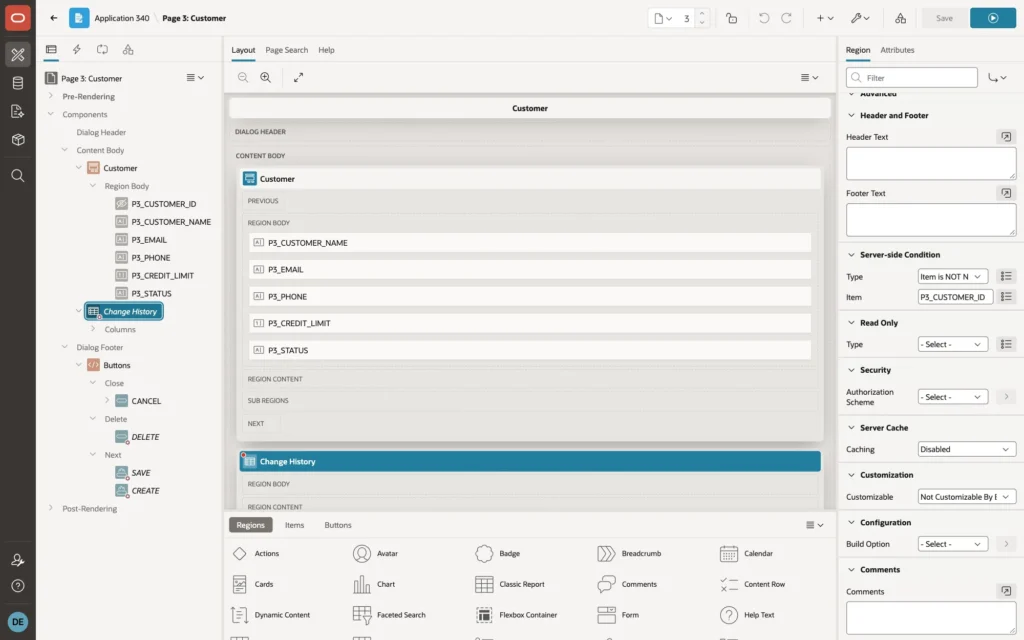
A new customer has no history yet, so show the region only for existing customers. In Server-side Condition, set Type to Item is NOT NULL and Item to P3_CUSTOMER_ID:
Optionally, under Columns, give CHANGED_ON the format mask Mon DD, YYYY HH24:MI and set readable headings. Click Save.
The Result
In the demo, JOHN raised the credit limit of Acme Corporation from 50000 to 75000. Later, EMILY changed its phone number and put it on hold. Each of them only saved the form. When anyone opens Acme Corporation now, the form shows the full story, newest first, as in the screenshot at the top of this article.
Good to Know
- The table needs a single-column primary key. ENABLE_HISTORY reads it from the table's primary key constraint.
- CLOB, BLOB, and other large columns are not recorded. Values longer than 4,000 characters are cut.
- Bulk changes create one history row per changed column and row, so a large data load also writes a large history. Turn history off for the load with change_history_api.disable_history('CUSTOMERS'), and on again with enable_history.
- The history table grows forever unless you clean it up. A scheduled job that deletes rows older than, for example, two years keeps it small.
- CHANGED_ON uses the database time zone, from SYSTIMESTAMP.
- To see all changes of all tables, create an Interactive Report page on CHANGE_HISTORY and protect it with an authorization scheme for administrators.
Summary
A history table, a package of about 100 lines, and one call to change_history_api.enable_history give any table a full record of who changed what. A Classic Report region with one SQL query shows that record right on the APEX form, so the answer to "who changed this?" is one click away.
