
Almost every business application stores data that most of its users should not see in full: Social Security numbers, bank accounts, dates of birth, salaries. The usual approach in Oracle APEX is to mask them page by page, with a CASE expression in one report, a substr in another, and a server-side condition on a form item. It works until someone adds a new page, an export, or a REST service and forgets the mask.
Oracle Data Redaction moves the rule into the database. You attach a redaction policy to a table, and the database masks the chosen columns in the result of every query, for every tool: APEX reports, forms, downloads, SQL Workshop, and SQL*Plus. The stored data does not change. The same row shows 537-13-0797 to an HR specialist and XXX-XX-0797 to everyone else.
This guide builds an employee directory in APEX, masks four kinds of personal data by role, and connects the policy to the signed-in APEX user. It also covers two traps that most redaction examples do not mention: a form can save the masked value back into the table, and an Interactive Report filter can reveal the value that the mask hides. Both are shown with real screenshots and fixed. All the code is in this article.
The Short Version
- Ask your DBA for three privileges: EXECUTE on DBMS_REDACT, ADMINISTER REDACTION POLICY on your schema, and CREATE ANY CONTEXT.
- Create an application context and a small package that sets it from the signed-in APEX user's role.
- Call the package from the application's Initialization PL/SQL Code, and clear the context in the Cleanup PL/SQL Code.
- Create one redaction policy on the table, with a masking method per column and a condition that reads the context.
- Stop masked values from being saved back with a trigger, and turn off filtering on masked Interactive Report columns.
What You Will Build
The demo application, People Directory, lists ten employees. Three users sign in to it, and each sees the same rows differently:
| Column | SARAH (HR) | MICHAEL (Manager) | EMILY (Staff) |
|---|---|---|---|
| SSN | 537-13-0797 | XXX-XX-0797 | XXX-XX-0797 |
| Phone | 212-555-0107 | 212-XXX-XXXX | 212-XXX-XXXX |
| Bank account | 4001048573 | ******8573 | ******8573 |
| Date of birth | 2/9/1986 | 1/1/1986 (year only) | 1/1/1986 (year only) |
| Salary | 69,500 | 69,500 | not shown |
Names, departments, job titles, and work e-mail addresses stay visible to everyone, because a directory needs them.
How Data Redaction Works
A redaction policy belongs to one table and lists the columns to mask. For each column you choose how to mask it:
- Full redaction replaces the value with a fixed one, such as 0 for numbers. Nullify, used here for the salary, returns an empty value instead.
- Partial redaction masks part of the value by position, such as the first five digits of an SSN or the day and month of a date.
- Regular expression redaction finds a pattern and replaces it, such as all but the last four characters of an account number.
- Random redaction returns a random value of the same type.
Each policy also has a condition, called the policy expression. The column is masked only when the expression is true for the current session. A table can have only one redaction policy, but each column can have its own named expression, which is how the salary and the personal data here follow different rules.
Two facts about redaction explain everything else in this guide. First, masking happens to the query result, just before the values are returned. The data on disk, and the values that WHERE clauses, sorting, and triggers work with, are the real ones. Second, the expression can only use a small set of functions, mainly SYS_CONTEXT. It cannot query a table or call your own PL/SQL function. So the policy cannot look up a user's role itself. You put the answer into an application context, and the policy reads the context.
Requirements
- Oracle Database Free, where Data Redaction is included, or Oracle Database Enterprise Edition with the Oracle Advanced Security option, which is an extra-cost option. Some Oracle Cloud database services include it. Standard Edition 2 does not have Data Redaction.
- Oracle APEX. This guide was built and tested with APEX 26.1 on Oracle AI Database 26ai Free.
- On Oracle Database 19c, the same approach works, with two differences: the ADMINISTER REDACTION POLICY privilege does not exist there (EXECUTE on DBMS_REDACT is enough), and the 19c documentation lists fewer operators for policy expressions, without IS NULL. Test the expressions in step 6 on 19c before you rely on them.
Everything is created in the schema your APEX workspace already uses. The tables start with HR_.
Step 1: Grant the Privileges
A DBA runs these once, with your schema name in place of your_schema:
grant execute on dbms_redact to your_schema;
grant administer redaction policy on schema your_schema to your_schema;
grant create any context to your_schema;
- EXECUTE on DBMS_REDACT gives access to the package that creates policies.
- ADMINISTER REDACTION POLICY is needed on 23ai and 26ai to create policies. Without it, DBMS_REDACT.ADD_POLICY fails with ORA-01031. Granted ON SCHEMA, it only covers your own schema.
- CREATE ANY CONTEXT is needed to create the application context in step 4. Some DBAs prefer to create the context for you instead.
Do not grant EXEMPT REDACTION POLICY to your schema: a user with that privilege, like SYS, never sees masked data, and APEX runs your pages with the privileges of the parsing schema.
Step 2: Create the Tables
HR_APP_USERS maps each APEX user to a role. HR_EMPLOYEES holds the directory, with five sensitive columns. Connect as your schema in SQL*Plus, SQLcl, or SQL Developer, or use SQL Workshop, SQL Scripts, and run:
create table hr_app_users (
  username   varchar2(255) primary key,
  full_name  varchar2(100) not null,
  role       varchar2(10)  not null check (role in ('HR', 'MANAGER', 'STAFF'))
);

create table hr_employees (
  emp_id         number generated by default as identity primary key,
  full_name      varchar2(100) not null,
  department     varchar2(50)  not null,
  job_title      varchar2(50)  not null,
  email          varchar2(255) not null,
  phone          varchar2(20),
  ssn            varchar2(11),
  bank_account   varchar2(20),
  date_of_birth  date,
  salary         number(10)
);

insert into hr_app_users values ('SARAH',   'Sarah Mitchell',  'HR');
insert into hr_app_users values ('MICHAEL', 'Michael Turner',  'MANAGER');
insert into hr_app_users values ('EMILY',   'Emily Parker',    'STAFF');

insert into hr_employees (full_name, department, job_title, email, phone, ssn, bank_account, date_of_birth, salary)
select name, dept, title,
       lower(replace(name, ' ', '.')) || '@example.com',
       '212-555-' || lpad(100 + rn * 7, 4, '0'),
       lpad(500 + rn * 37, 3, '0') || '-' || lpad(10 + rn * 3, 2, '0') || '-' || lpad(rn * 797, 4, '0'),
       '40' || lpad(rn * 1048573, 8, '0'),
       date '1985-01-15' + rn * 390,
       60000 + rn * 9500
from (
  select rownum rn, name, dept, title from (
    select 'James Carter'    name, 'Engineering' dept, 'Developer'        title from dual union all
    select 'Olivia Bennett',       'Engineering',      'Team Lead'              from dual union all
    select 'William Hayes',        'Engineering',      'Developer'              from dual union all
    select 'Sophia Reed',          'Sales',            'Sales Executive'        from dual union all
    select 'Benjamin Brooks',      'Sales',            'Sales Manager'          from dual union all
    select 'Ava Collins',          'Finance',          'Accountant'             from dual union all
    select 'Lucas Morgan',         'Finance',          'Finance Manager'        from dual union all
    select 'Grace Howard',         'HR',               'HR Specialist'          from dual union all
    select 'Henry Foster',         'Support',          'Support Engineer'       from dual union all
    select 'Chloe Ramirez',        'Support',          'Support Engineer'       from dual
  )
);

commit;
The user names in HR_APP_USERS must match the APEX user names in uppercase. The SSNs, phone numbers, and account numbers are made up; the phone numbers use the 555-01xx range reserved for fiction.
Step 3: Create the APEX Application
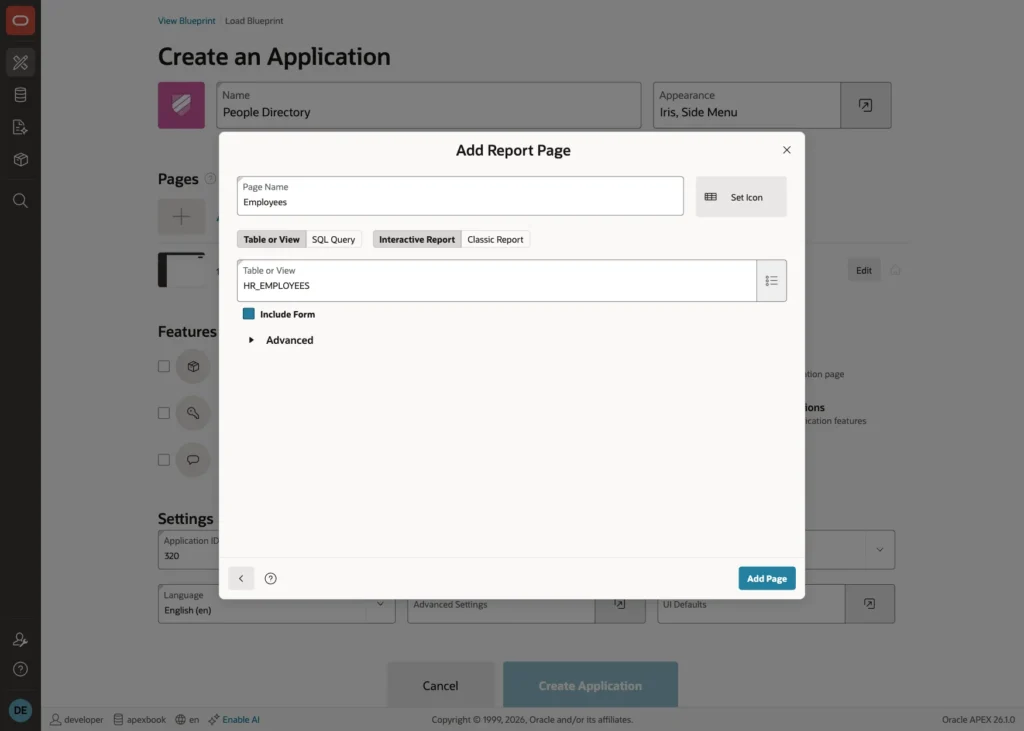
In App Builder, click Create, then Use Create App Wizard. Name the application People Directory. Click Add Page, choose Interactive Report, enter Employees as the page name, select the table HR_EMPLOYEES, and turn on Include Form.
Click Add Page, keep Authentication at Oracle APEX Accounts, and click Create Application.
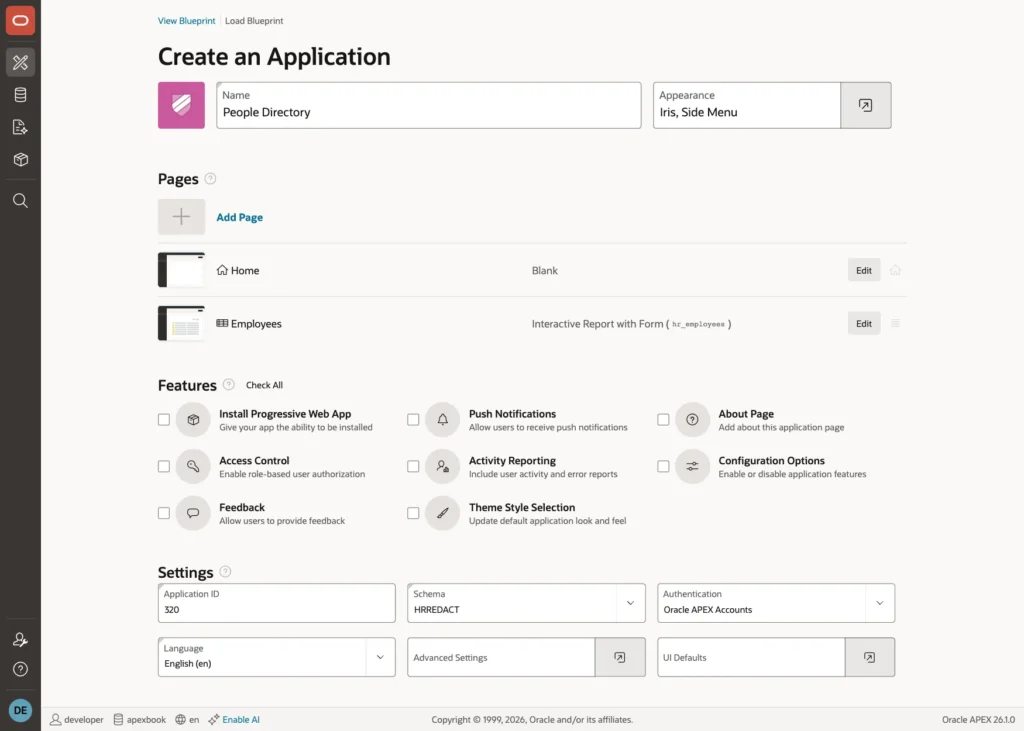
Then, in Workspace Administration, Manage Users and Groups, create three end users: SARAH, MICHAEL, and EMILY.
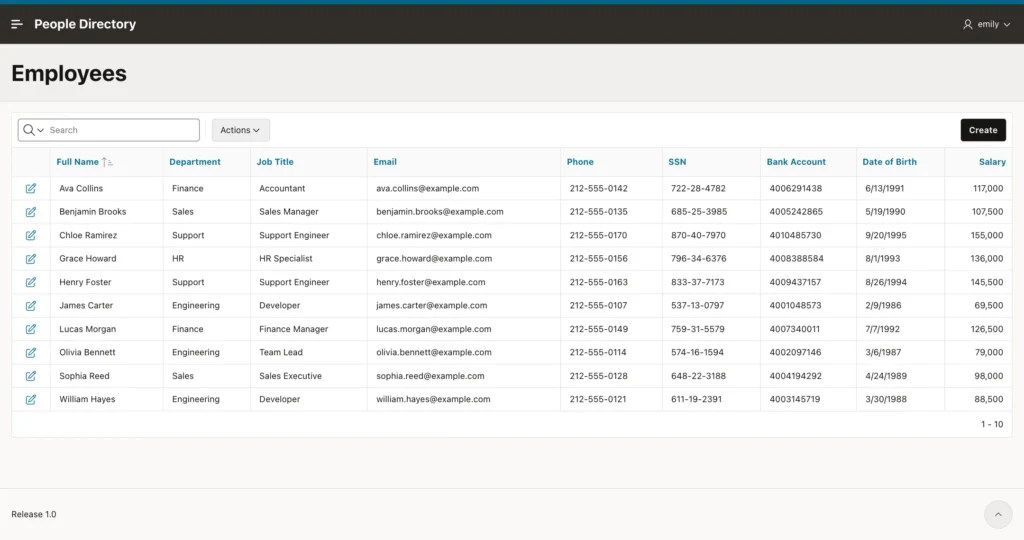
Run the application and sign in as EMILY, a staff member. Every SSN, account number, date of birth, and salary is on the screen:
Step 4: Create the Application Context
An application context is a set of name-value pairs that lives in the database session and can only be set by the package named in its definition. That makes it trustworthy: page code cannot set it directly. Create the context HR_CTX and the package HR_SECURITY that sets it:
create or replace context hr_ctx using hr_security;

create or replace package hr_security authid definer as
  -- called by APEX at the start and at the end of every page request
  procedure set_access;
  procedure clear_access;
end hr_security;
/

create or replace package body hr_security as

  procedure set_access is
    l_role hr_app_users.role%type;
  begin
    clear_access;

    -- the signed-in APEX user, set by APEX itself (null outside APEX)
    select max(role) into l_role
    from hr_app_users
    where username = sys_context('APEX$SESSION', 'APP_USER');

    dbms_session.set_context('HR_CTX', 'SEE_SALARY',
      case when l_role in ('HR', 'MANAGER') then 'Y' else 'N' end);
    dbms_session.set_context('HR_CTX', 'SEE_PII',
      case when l_role = 'HR' then 'Y' else 'N' end);
  end set_access;

  procedure clear_access is
  begin
    dbms_session.clear_all_context('HR_CTX');
  end clear_access;

end hr_security;
/
SET_ACCESS reads the signed-in user from the APEX$SESSION context, which APEX sets at the start of every request, looks up the role, and stores two flags: SEE_SALARY for HR and managers, SEE_PII for HR only. It does not take the user name as a parameter, so no caller can ask for another user's access. CLEAR_ACCESS removes both flags.
Step 5: Set the Context on Every Request
APEX runs your pages in a pool of database sessions. The next request for Emily may use a session that served Sarah a moment ago, so the context must be set at the start of every request and cleared at the end. APEX has a place for exactly this.
In App Builder, open the application, click Edit Application Definition, and open the Security tab. In the Database Session section, set:
- Initialization PL/SQL Code: hr_security.set_access;
- Cleanup PL/SQL Code: hr_security.clear_access;
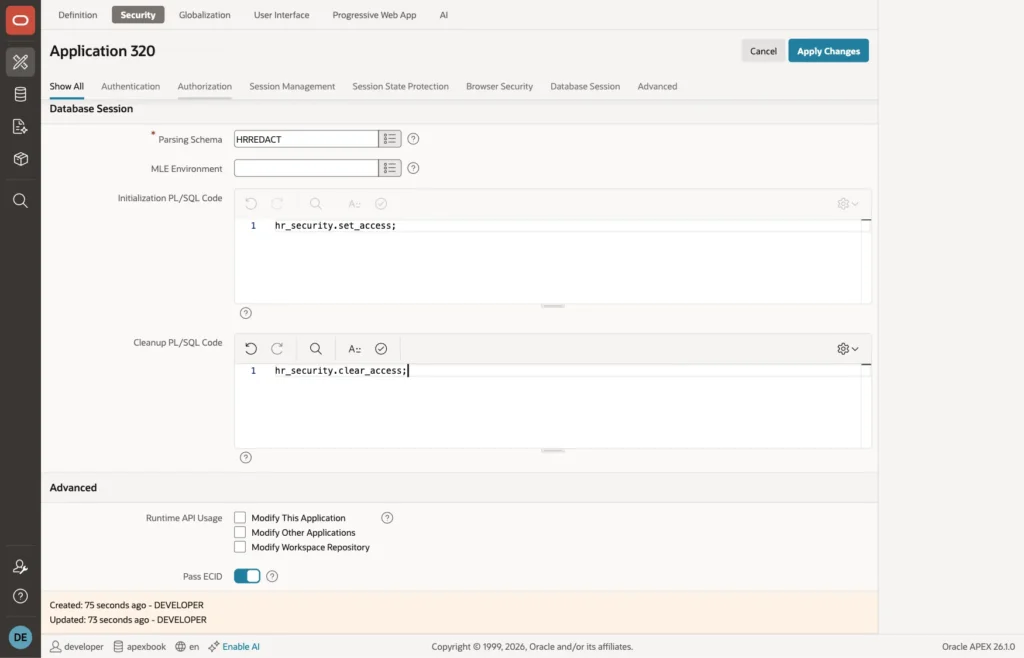
Click Apply Changes. The code now runs for every page, every Ajax call, and every download of this application.
Step 6: Create the Redaction Policy
Now the policy itself. Run this block in your schema:
begin
  -- 1. two named conditions: when is a column masked?
  --    masked unless the context says Y, so a missing context also masks
  dbms_redact.create_policy_expression(
    policy_expression_name => 'HR_MASK_SALARY',
    expression             => q'[sys_context('HR_CTX', 'SEE_SALARY') is null
                                 or sys_context('HR_CTX', 'SEE_SALARY') <> 'Y']');

  dbms_redact.create_policy_expression(
    policy_expression_name => 'HR_MASK_PII',
    expression             => q'[sys_context('HR_CTX', 'SEE_PII') is null
                                 or sys_context('HR_CTX', 'SEE_PII') <> 'Y']');

  -- 2. one redaction policy per table, created with its first column
  dbms_redact.add_policy(
    object_name   => 'HR_EMPLOYEES',
    policy_name   => 'HR_EMPLOYEES_REDACT',
    column_name   => 'SALARY',
    function_type => dbms_redact.nullify,           -- shown as empty
    expression    => '1 = 1');

  -- 3. more columns, each with its own way of masking
  dbms_redact.alter_policy(                          -- 123-45-6789 -> XXX-XX-6789
    object_name         => 'HR_EMPLOYEES',
    policy_name         => 'HR_EMPLOYEES_REDACT',
    action              => dbms_redact.add_column,
    column_name         => 'SSN',
    function_type       => dbms_redact.partial,
    function_parameters => dbms_redact.redact_us_ssn_f5);

  dbms_redact.alter_policy(                          -- 4001048573 -> ******8573
    object_name            => 'HR_EMPLOYEES',
    policy_name            => 'HR_EMPLOYEES_REDACT',
    action                 => dbms_redact.add_column,
    column_name            => 'BANK_ACCOUNT',
    function_type          => dbms_redact.regexp,
    regexp_pattern         => '^.*(.{4})$',
    regexp_replace_string  => '******\1',
    regexp_position        => 1,
    regexp_occurrence      => 0,
    regexp_match_parameter => 'i');

  dbms_redact.alter_policy(                          -- 212-555-0107 -> 212-XXX-XXXX
    object_name            => 'HR_EMPLOYEES',
    policy_name            => 'HR_EMPLOYEES_REDACT',
    action                 => dbms_redact.add_column,
    column_name            => 'PHONE',
    function_type          => dbms_redact.regexp,
    regexp_pattern         => dbms_redact.re_pattern_us_phone,
    regexp_replace_string  => dbms_redact.re_redact_us_phone_l7,
    regexp_position        => dbms_redact.re_beginning,
    regexp_occurrence      => dbms_redact.re_all);

  dbms_redact.alter_policy(                          -- 09-FEB-1986 -> 01-JAN-1986 (year only)
    object_name         => 'HR_EMPLOYEES',
    policy_name         => 'HR_EMPLOYEES_REDACT',
    action              => dbms_redact.add_column,
    column_name         => 'DATE_OF_BIRTH',
    function_type       => dbms_redact.partial,
    function_parameters => 'm1d1Y');

  -- 4. attach a condition to each column
  dbms_redact.apply_policy_expr_to_col(
    object_name => 'HR_EMPLOYEES', column_name => 'SALARY',
    policy_expression_name => 'HR_MASK_SALARY');

  for c in (select column_value col
            from sys.odcivarchar2list('SSN', 'BANK_ACCOUNT', 'PHONE', 'DATE_OF_BIRTH')) loop
    dbms_redact.apply_policy_expr_to_col(
      object_name => 'HR_EMPLOYEES', column_name => c.col,
      policy_expression_name => 'HR_MASK_PII');
  end loop;
end;
/
The block has four parts:
- Two named policy expressions. HR_MASK_SALARY is true, which means mask, when SEE_SALARY is not Y. HR_MASK_PII does the same for SEE_PII. Both also mask when the flag is missing. A comparison with a missing value is never true in SQL, so without the IS NULL check, a session without the context, such as a database user connecting from another tool, would see everything. Masking by default is the safe choice.
- ADD_POLICY creates the only policy on the table, with the salary as its first column. NULLIFY returns an empty value. The policy's own expression, 1 = 1, is replaced by the named expressions in part 4.
- ALTER_POLICY adds the other columns, each with its own method. The SSN uses a built-in partial format, REDACT_US_SSN_F5, that masks the first five digits. The phone uses the built-in US phone pattern and hides the last seven digits. The bank account uses a regular expression that keeps the last four characters. The date of birth uses the partial format m1d1Y, which sets the month and day to 1 and keeps the year.
- APPLY_POLICY_EXPR_TO_COL connects each column to its expression: the salary to HR_MASK_SALARY, the four personal columns to HR_MASK_PII.
Check the result as the schema owner in SQL*Plus. Outside APEX there is no context, so even the owner gets masked values:
select full_name, phone, ssn, bank_account, date_of_birth, salary
from hr_employees where emp_id <= 2;
FULL_NAME      PHONE           SSN         BANK_ACCOUNT   DATE_OF_B     SALARY
-------------- --------------- ----------- -------------- --------- ----------
James Carter   212-XXX-XXXX    XXX-XX-0797 ******8573     01-JAN-86
Olivia Bennett 212-XXX-XXXX    XXX-XX-1594 ******7146     01-JAN-87
Step 7: Test from SQL
APEX_SESSION.CREATE_SESSION starts an APEX session for any user from SQL, and calling HR_SECURITY.SET_ACCESS afterwards does what the Initialization PL/SQL Code does. Replace 320 with your application ID and run:
set serveroutput on
declare
  procedure show (p_user in varchar2) is
  begin
    apex_session.create_session(p_app_id => 320, p_page_id => 1, p_username => p_user);
    hr_security.set_access;                 -- what APEX runs at the start of each request

    dbms_output.put_line('--- ' || p_user);
    for r in (select full_name, phone, ssn, bank_account, date_of_birth, salary
              from hr_employees where emp_id <= 2 order by emp_id) loop
      dbms_output.put_line(rpad(r.full_name, 15) || rpad(nvl(r.phone, '-'), 16)
        || rpad(nvl(r.ssn, '-'), 12) || rpad(nvl(r.bank_account, '-'), 14)
        || rpad(to_char(r.date_of_birth, 'DD-MON-YYYY'), 13) || nvl(to_char(r.salary), '(empty)'));
    end loop;

    hr_security.clear_access;               -- what APEX runs at the end
    apex_session.delete_session;
  end;
begin
  show('SARAH');
  show('MICHAEL');
  show('EMILY');
end;
/
--- SARAH James Carter 212-555-0107 537-13-0797 4001048573 09-FEB-1986 69500 Olivia Bennett 212-555-0114 574-16-1594 4002097146 06-MAR-1987 79000 --- MICHAEL James Carter 212-XXX-XXXX XXX-XX-0797 ******8573 01-JAN-1986 69500 Olivia Bennett 212-XXX-XXXX XXX-XX-1594 ******7146 01-JAN-1987 79000 --- EMILY James Carter 212-XXX-XXXX XXX-XX-0797 ******8573 01-JAN-1986 (empty) Olivia Bennett 212-XXX-XXXX XXX-XX-1594 ******7146 01-JAN-1987 (empty)
One query, three results, and the table was not touched.
Step 8: Run the Application as Each User
Sign in as SARAH. HR sees the real values:
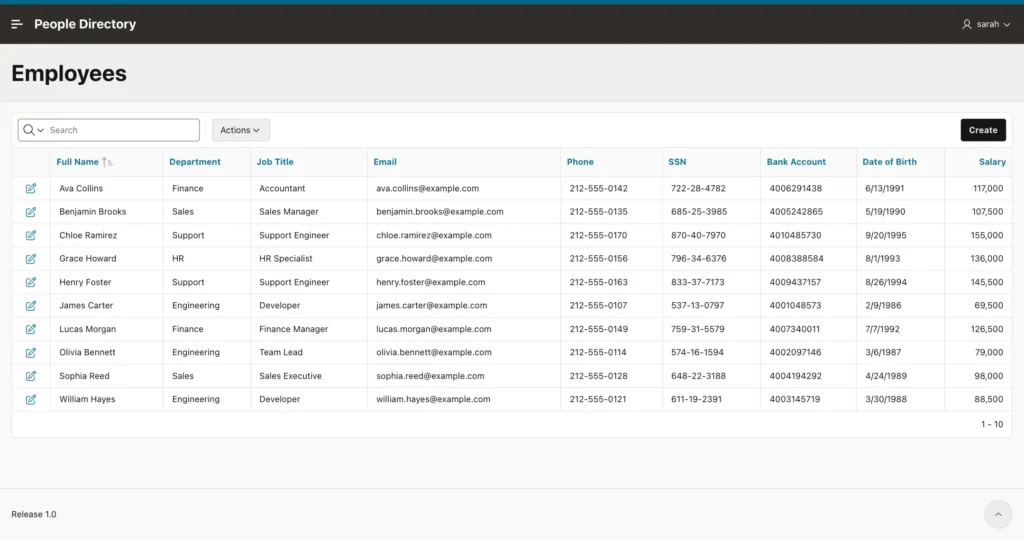
Sign in as MICHAEL. The personal data is masked, the salaries are not:
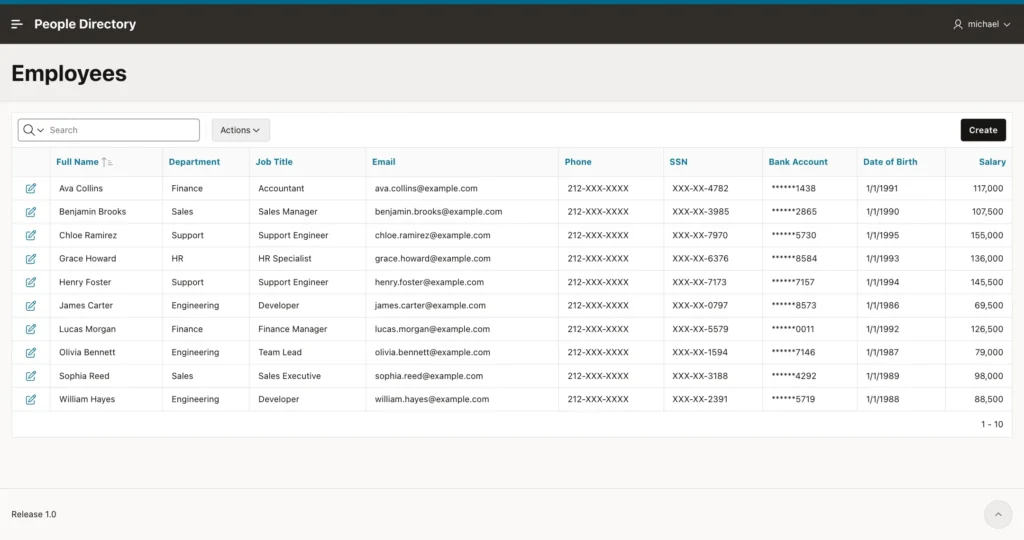
Nothing in the APEX pages was changed for this. The report query is still select * from hr_employees, as the wizard created it. The next two steps deal with what happens when a user starts to work with masked data.
Step 9: Trap 1, Saving Masked Values Back
Sign in as EMILY, open Ava Collins in the form, change her job title to Senior Accountant, and click Apply Changes. The form shows the masked values, because that is what the query returned:
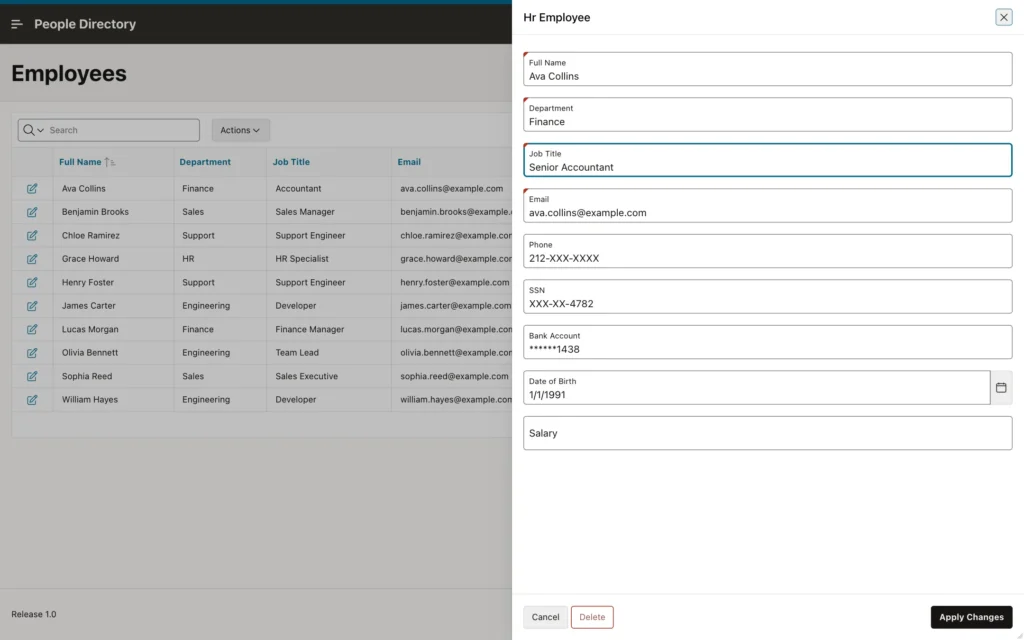
An APEX form updates every column it has an item for. So the update sends the masked values back, and the database, which masks on the way out but not on the way in, stores them. Without a fix, a DBA who checks the row after Emily's save finds this:
FULL_NAME      JOB_TITLE          PHONE         SSN         BANK_ACCOUNT DATE_OF_B     SALARY
-------------- ------------------ ------------- ----------- ------------ --------- ----------
Ava Collins    Senior Accountant  212-XXX-XXXX  XXX-XX-4782 ******1438   01-JAN-91
The real SSN, phone, account number, date of birth, and salary are gone. The same risk applies to any page or process that reads the row and writes its values back, such as an Interactive Grid or a custom PL/SQL process.
The fix belongs in the database too: a trigger that keeps the real value of every column the user sees masked. Create it in your schema:
create or replace trigger hr_employees_keep_real
before update on hr_employees
for each row
begin
  -- In APEX, a user who sees a column masked cannot change it:
  -- keep the real value, so a masked value is never written back.
  if sys_context('APEX$SESSION', 'APP_USER') is not null then

    if nvl(sys_context('HR_CTX', 'SEE_PII'), 'N') <> 'Y' then
      :new.ssn           := :old.ssn;
      :new.phone         := :old.phone;
      :new.bank_account  := :old.bank_account;
      :new.date_of_birth := :old.date_of_birth;
    end if;

    if nvl(sys_context('HR_CTX', 'SEE_SALARY'), 'N') <> 'Y' then
      :new.salary := :old.salary;
    end if;

  end if;
end;
/
The trigger reads the same context flags as the policy. For a user who sees the personal data masked, the new SSN, phone, account, and date of birth are replaced by the old, real values, whatever the form sends. The same for the salary. HR users are not affected and can still correct the data. The check on APEX$SESSION limits the rule to APEX requests, so data loads and fixes that a DBA runs outside APEX work as before.
Test it from SQL, with the same write-back a form does:
set serveroutput on
declare
  procedure update_as (p_user in varchar2) is
  begin
    apex_session.create_session(p_app_id => 320, p_page_id => 1, p_username => p_user);
    hr_security.set_access;

    -- what a form does: write back every column it has shown
    update hr_employees
    set    phone = '212-555-9999', ssn = 'XXX-XX-0797', salary = null
    where  emp_id = 1;

    hr_security.clear_access;
    apex_session.delete_session;
  end;

  procedure show (p_label in varchar2) is
    l_phone hr_employees.phone%type;
    l_ssn   hr_employees.ssn%type;
    l_sal   hr_employees.salary%type;
  begin
    apex_session.create_session(p_app_id => 320, p_page_id => 1, p_username => 'SARAH');
    hr_security.set_access;
    select phone, ssn, salary into l_phone, l_ssn, l_sal from hr_employees where emp_id = 1;
    dbms_output.put_line(rpad(p_label, 22) || rpad(l_phone, 14) || rpad(l_ssn, 13) || l_sal);
    hr_security.clear_access;
    apex_session.delete_session;
  end;
begin
  show('Before:');
  update_as('EMILY');
  show('After EMILY saved:');
end;
/
Before: 212-555-0107 537-13-0797 69500 After EMILY saved: 212-555-0107 537-13-0797 69500
With the trigger in place, Emily's change of the job title is saved and the personal data stays intact. You can also make these form items read only for users without access, which is clearer for the user, but the trigger is what protects the data, from every page and every tool.
Step 10: Trap 2, Filters See the Real Values
Because the WHERE clause works with real values, a user who cannot see a value can still test it. In the Employees report, Emily opens Actions, Filter, and filters on Salary greater than 110000:
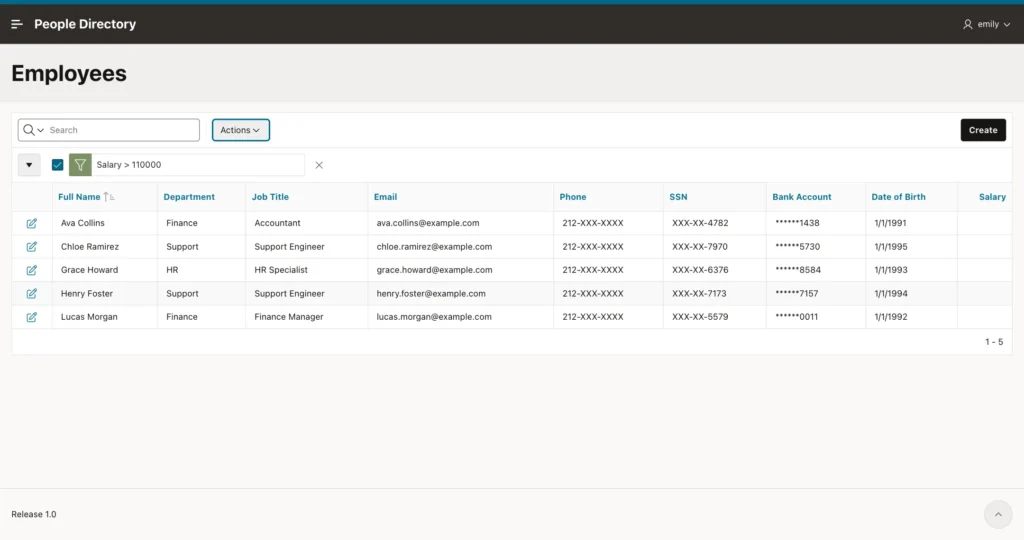
The same works for masked text. A filter SSN = '722-28-4782', or simply typing 722-28 into the report's search field, returns Ava Collins, which confirms her full SSN although the screen shows only XXX-XX-4782:
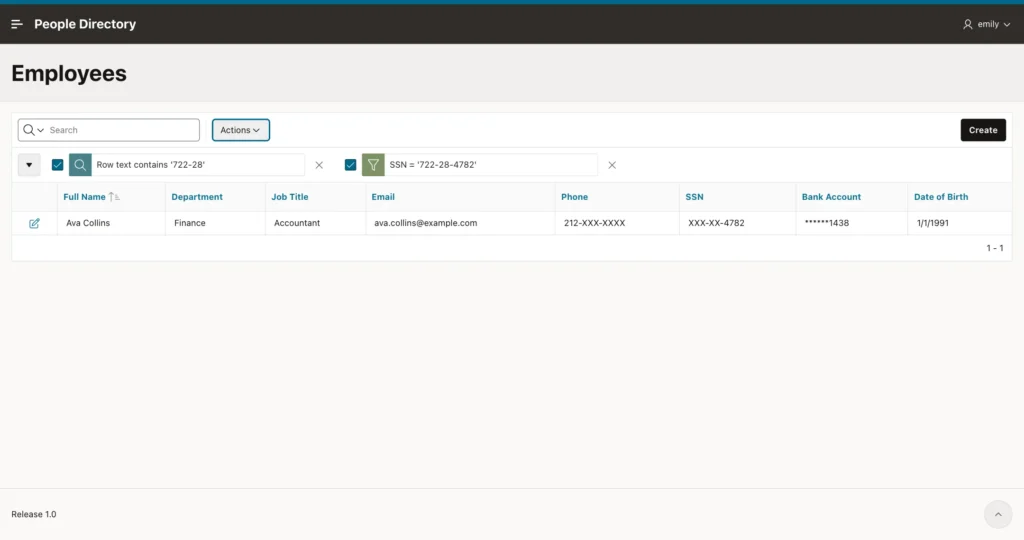
Data Redaction masks what is displayed. It does not stop anyone from asking questions about the real data. Interactive Reports and Interactive Grids are ad hoc query tools, so they need two changes.
Remove the salary column for staff
Staff do not need the salary column at all, so remove it for them with an authorization scheme. In Shared Components, Authorization Schemes, create a scheme from scratch:
- Name: Can See Salary
- Scheme Type: PL/SQL Function Returning Boolean
- PL/SQL Function Body: return sys_context('HR_CTX', 'SEE_SALARY') = 'Y';
- Error Message: You are not allowed to see salaries.
- Validate authorization scheme: Once per page view
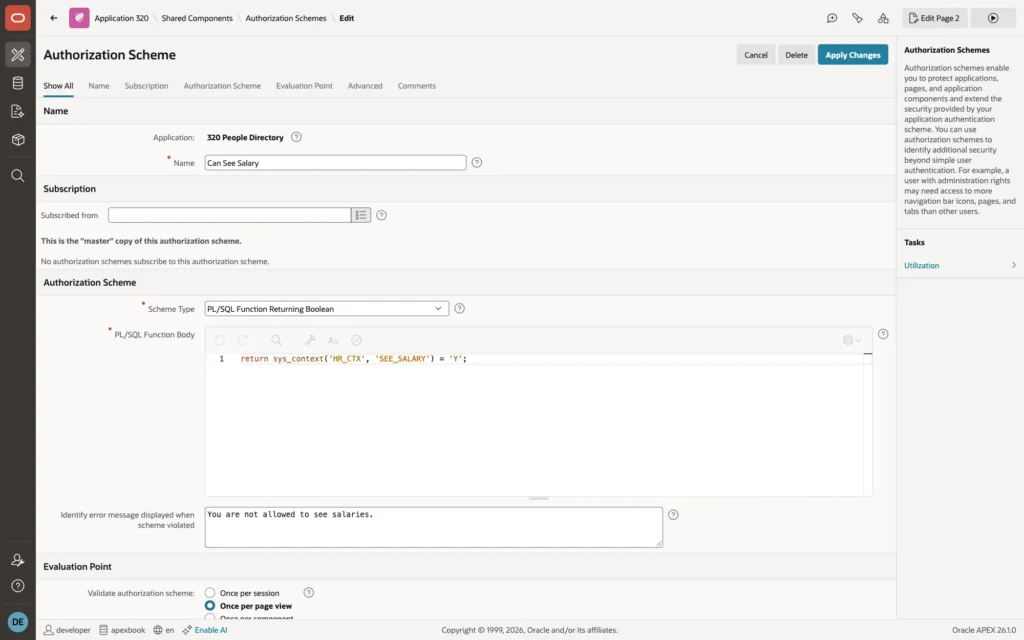
Once per page view means a change of role in HR_APP_USERS takes effect on the next page, not only after the user signs in again.
In Page Designer, open the Employees page, select the SALARY column of the report, and set Security, Authorization Scheme to Can See Salary. Do the same for the P3_SALARY item on the form page.
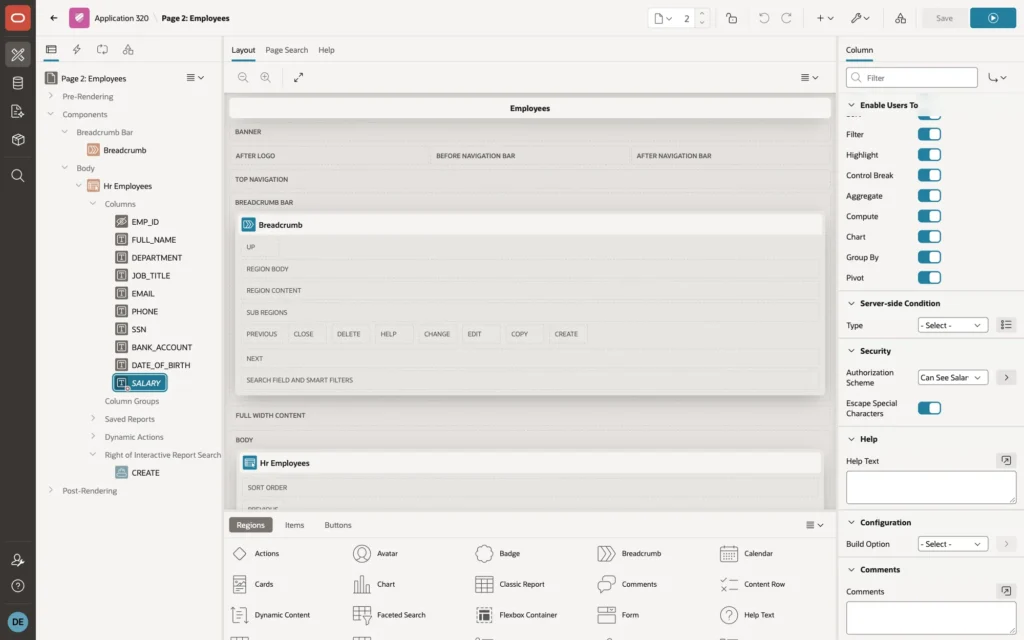
Turn off filtering on masked columns
The personal columns stay visible in masked form, so switch off the report features that compare their values. In Page Designer, select the SSN column and, under Enable Users To, turn off everything except Hide: Sort, Filter, Highlight, Control Break, Aggregate, Compute, Chart, Group By, and Pivot. Repeat for PHONE, BANK_ACCOUNT, and DATE_OF_BIRTH.
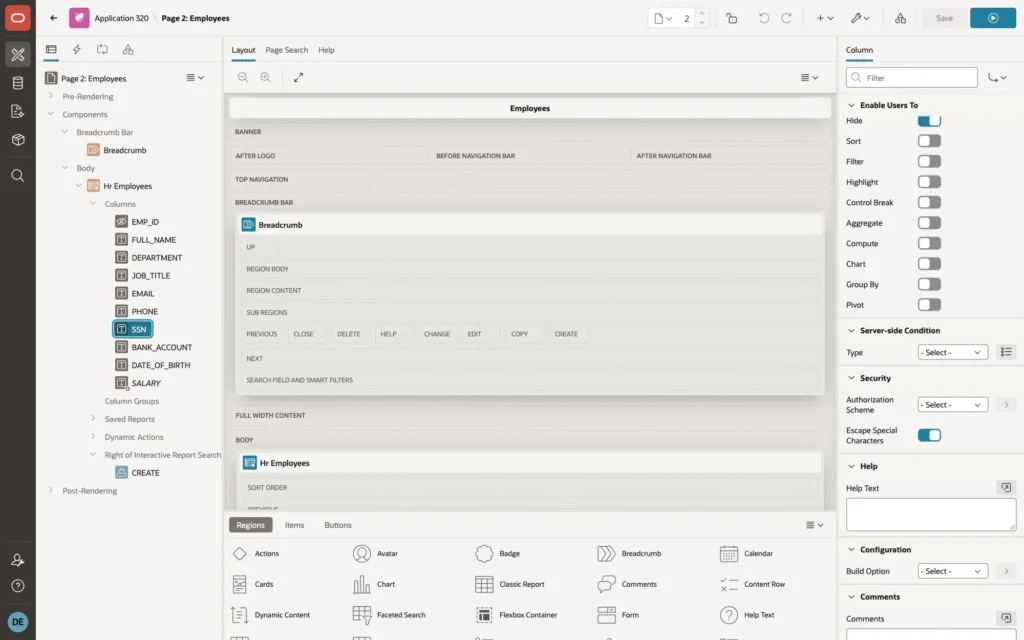
With Filter turned off, the column is also left out of the report's search. In the test for this article, Emily's search for 722-28 then returned No data found, and the Filter dialog listed only Full Name, Department, Job Title, and Email. This applies to all users of the report, including HR. If HR needs to search by SSN, give them a separate page that only HR can open.
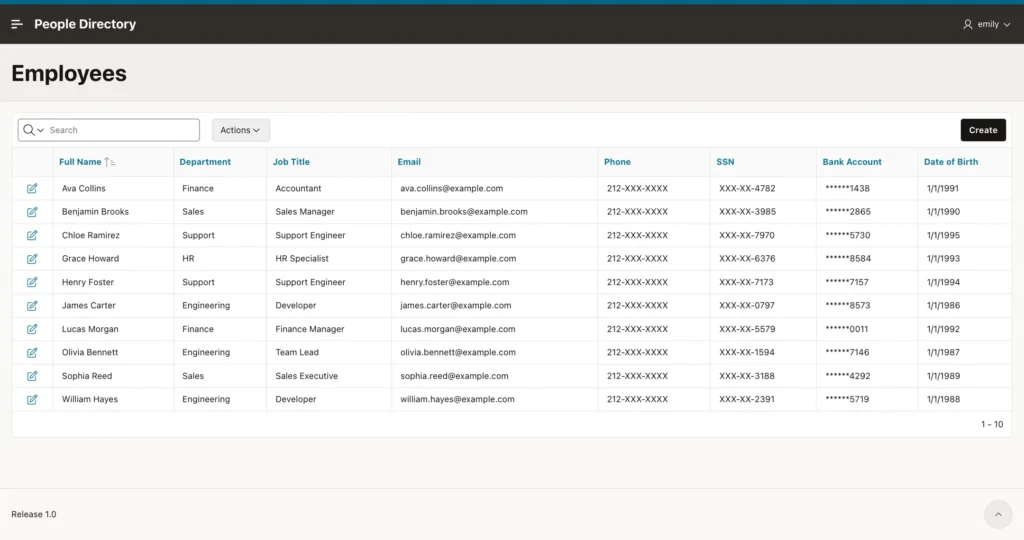
Sign in as EMILY once more:
Managing the Policy
The data dictionary views REDACTION_POLICIES, REDACTION_COLUMNS, and REDACTION_EXPRESSIONS describe the policies. A normal schema cannot read them; a DBA, or a user with SELECT_CATALOG_ROLE, can:
select c.object_name, c.column_name, c.function_type, e.policy_expression_name
from   redaction_columns c
left join redaction_expressions e
  on  e.object_owner = c.object_owner
  and e.object_name  = c.object_name
  and e.column_name  = c.column_name
where  c.object_owner = 'YOUR_SCHEMA'
order  by c.column_name;
OBJECT_NAME   COLUMN_NAME    FUNCTION_TYPE          POLICY_EXPRESSI
------------- -------------- ---------------------- ---------------
HR_EMPLOYEES  BANK_ACCOUNT   REGEXP REDACTION       HR_MASK_PII
HR_EMPLOYEES  DATE_OF_BIRTH  PARTIAL REDACTION      HR_MASK_PII
HR_EMPLOYEES  PHONE          REGEXP REDACTION       HR_MASK_PII
HR_EMPLOYEES  SALARY         NULLIFY REDACTION      HR_MASK_SALARY
HR_EMPLOYEES  SSN            PARTIAL REDACTION      HR_MASK_PII
To switch the policy off and on, or to remove it before you run the policy script again:
-- switch the policy off and on again
begin
  dbms_redact.disable_policy(object_name => 'HR_EMPLOYEES', policy_name => 'HR_EMPLOYEES_REDACT');
  dbms_redact.enable_policy(object_name => 'HR_EMPLOYEES', policy_name => 'HR_EMPLOYEES_REDACT');
end;
/

-- remove everything, for example to run the policy script again
begin
  dbms_redact.drop_policy(object_name => 'HR_EMPLOYEES', policy_name => 'HR_EMPLOYEES_REDACT');
  dbms_redact.drop_policy_expression(policy_expression_name => 'HR_MASK_SALARY');
  dbms_redact.drop_policy_expression(policy_expression_name => 'HR_MASK_PII');
end;
/
Access itself is data. To let Michael see personal data, change his role in HR_APP_USERS to HR. His next page view shows the real values.
Troubleshooting
SQL Workshop and SQL*Plus show masked data
That is the policy working. The context is only set by the People Directory application, so SQL Workshop, SQL*Plus, and any other tool get the masked values, even for the schema owner:
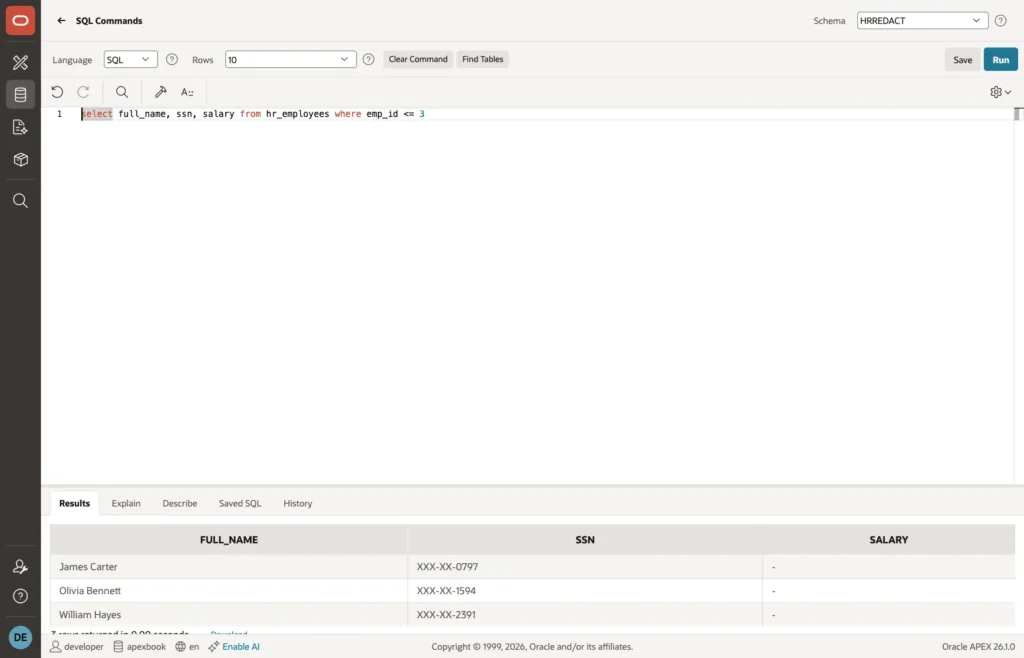
To work with real values outside the application, connect as a user that a DBA has given the EXEMPT REDACTION POLICY privilege for maintenance work.
ORA-01031 when creating the policy
On 23ai and 26ai, EXECUTE on DBMS_REDACT alone is not enough. Ask for ADMINISTER REDACTION POLICY on your schema, as in step 1.
ORA-28081 when copying the table
CREATE TABLE ... AS SELECT from a redacted table fails with ORA-28081 for users who see masked data, so that nobody can copy the real values into an unprotected table. Copy data as a user with EXEMPT REDACTION POLICY, or not at all.
Everyone sees masked data in the application
Check that the Initialization PL/SQL Code is saved and that the user names in HR_APP_USERS match the APEX user names in uppercase. The test block in step 7 shows quickly whether the package sets the right flags for a user.
Everyone sees real data
Check whether the parsing schema has EXEMPT REDACTION POLICY, directly or through a role, and whether the policy is enabled. Also check any expression you wrote yourself for comparisons with a missing value: a condition such as sys_context('HR_CTX', 'SEE_PII') <> 'Y' is not true when the flag is missing, so it does not mask.
Data Redaction, VPD, or APEX Conditions?
- Data Redaction masks values that users may see in part, such as the last four digits of an SSN. The rows stay visible, and the rule protects every tool that queries the table.
- Virtual Private Database hides whole rows, or empties a column completely, and it also filters the WHERE clause, so it does not have the filter trap. It is the better choice when a user must not know that a value exists at all. See Row-Level Security in Oracle APEX with VPD.
- APEX authorization schemes and server-side conditions control which pages, regions, columns, and items appear. They protect the application, not the data.
In practice they work together, as in this guide: redaction for the masked display, an authorization scheme to remove what a user must not see at all, and a trigger to protect the stored data.
Summary
The People Directory application shows Sarah the real personal data, Michael masked personal data with salaries, and Emily a masked directory without salaries, from the same unchanged report query. An application context, set by APEX on every request, tells the redaction policy who is asking. A trigger stops masked values from being saved back, and switching off filtering on masked columns stops users from testing the real values. With those two traps closed, Data Redaction is a strong, central way to keep sensitive data out of sight in every APEX page.
