
Most Oracle APEX applications reach a point where different users must see different rows. A branch employee should see the orders of their own branch, a regional manager the orders of their region, and head office everything. The usual first answer is a WHERE clause on every page: where branch_id = :P0_BRANCH_ID on the report, the same on the form, the chart, the list of values, the download, and the REST call. It works until someone adds a new page and forgets the WHERE clause. Then one user can read another branch's data, and nothing warns you.
Oracle Database has a better place for this rule: the table itself. Virtual Private Database (VPD), also called row-level security or fine-grained access control, lets you attach a small PL/SQL function to a table. Every time any SQL touches the table, Oracle calls the function, takes the condition it returns, and adds it to the statement. The rule is written once, and every page, report, chart, list of values, and REST service of your APEX application follows it automatically, including pages that do not exist yet.
This guide builds that step by step in a small sales application for a company with four branches. You will create the tables, generate the APEX pages with the wizards, see the problem, and then fix it for the whole application with one package and one call to DBMS_RLS. You will also hide a sensitive column from some users, stop users from saving rows for other branches, show a friendly error message, and test everything from SQL without opening a browser. All the code is in this article.
The Short Version
- Ask your DBA to grant EXECUTE on DBMS_RLS to your schema.
- Keep a table that maps APEX user names to the rows they may see (here, user to branch).
- Write a policy function that reads the signed-in APEX user from sys_context('APEX$SESSION', 'APP_USER') and returns a WHERE condition.
- Attach the function to your tables with dbms_rls.add_policy.
- Run the application as different users: every region on every page now shows only the rows each user may see.
What You Will Build
The demo application, Branch Sales, has orders and customers for four branches: Delhi, Mumbai, Bengaluru, and Kolkata. Four users sign in to it:
| User | Role | Sees |
|---|---|---|
| SUNITA | Administrator (head office) | All branches, including the cost of each order |
| RAVI | Manager | Delhi and Mumbai, including the cost of each order |
| AMIT | Staff | Delhi only, without the cost |
| NEHA | Staff | Bengaluru only, without the cost |
None of the APEX pages contain a WHERE clause for this. The reports, forms, chart, and select lists are exactly what the wizards generate.
How VPD Works
A VPD policy connects a table to a policy function. The function receives the schema and table name and returns a piece of SQL text: a condition, like the part after WHERE. When a user runs this query:
select * from sales_orders
and the policy function returns branch_id in (1, 2), the database actually runs:
select * from (select * from sales_orders where branch_id in (1, 2))
The rewrite happens inside the database, after APEX has sent the query, so the application cannot skip it. If the function returns null, no condition is added and the user sees all rows. If it returns 1 = 0, the user sees none.
For APEX, the important question is: who is the user? All APEX pages run in the database as the same parsing schema, so the database user name does not help. But APEX puts the signed-in user into an application context called APEX$SESSION at the start of every request. The policy function reads it with:
sys_context('APEX$SESSION', 'APP_USER')This value is set by APEX itself, not by the browser, so a user cannot change it.
Requirements
- Oracle Database Enterprise Edition, Oracle Database Free, or Oracle Autonomous Database. VPD is included in Enterprise Edition at no extra cost, but it is not available in Standard Edition 2.
- Oracle APEX. This guide was built and tested with APEX 26.1 on Oracle AI Database 26ai Free. The same code works on Oracle Database 19c and on any supported APEX release.
- The EXECUTE privilege on DBMS_RLS for your schema, granted by a DBA in the next section.
Everything is created in the schema your APEX workspace already uses. All table names start with SALES_, so they will not clash with your own tables.
Step 1: Grant DBMS_RLS to Your Schema
DBMS_RLS is the package that adds and removes VPD policies. It is not granted to PUBLIC, so a DBA must run this once, with your schema name in place of your_schema:
grant execute on dbms_rls to your_schema;
Your schema also needs the usual privileges to create tables and packages, which an APEX parsing schema normally has.
Step 2: Create the Tables
Connect as your schema in SQL*Plus, SQLcl, or SQL Developer, or open SQL Workshop, SQL Scripts in APEX. The first three tables hold the access rules: the branches, the application users with their role, and which branches each user may see. The last two hold the business data, and both carry a BRANCH_ID column, which the policy will use.
Run this script:
create table sales_branches (
  branch_id    number        primary key,
  branch_name  varchar2(50)  not null,
  region       varchar2(20)  not null
);

create table sales_users (
  username     varchar2(255) primary key,
  full_name    varchar2(100) not null,
  role         varchar2(10)  not null check (role in ('ADMIN', 'MANAGER', 'STAFF'))
);

create table sales_user_branches (
  username     varchar2(255) references sales_users,
  branch_id    number        references sales_branches,
  primary key (username, branch_id)
);

create table sales_customers (
  customer_id    number generated by default as identity primary key,
  branch_id      number        not null references sales_branches,
  customer_name  varchar2(100) not null,
  email          varchar2(255),
  phone          varchar2(30)
);

create table sales_orders (
  order_id     number generated by default as identity primary key,
  branch_id    number        not null references sales_branches,
  customer_id  number        not null references sales_customers,
  order_date   date          default sysdate not null,
  status       varchar2(10)  default 'NEW' not null check (status in ('NEW', 'SHIPPED', 'PAID')),
  amount       number(12,2)  not null,
  cost_amount  number(12,2)
);

create index sales_customers_branch_ix on sales_customers (branch_id);
create index sales_orders_branch_ix on sales_orders (branch_id);
create index sales_orders_customer_ix on sales_orders (customer_id);
The indexes on BRANCH_ID matter: the policy adds a condition on this column to every query, so it must be fast.
Now add the sample data. The user names in SALES_USERS must match the APEX user names exactly, in uppercase, because that is how APEX reports APP_USER.
insert into sales_branches values (1, 'Delhi',     'North');
insert into sales_branches values (2, 'Mumbai',    'West');
insert into sales_branches values (3, 'Bengaluru', 'South');
insert into sales_branches values (4, 'Kolkata',   'East');

insert into sales_users values ('SUNITA', 'Sunita Rao',   'ADMIN');
insert into sales_users values ('RAVI',   'Ravi Kumar',   'MANAGER');
insert into sales_users values ('AMIT',   'Amit Shah',    'STAFF');
insert into sales_users values ('NEHA',   'Neha Iyer',    'STAFF');

insert into sales_user_branches values ('RAVI', 1);
insert into sales_user_branches values ('RAVI', 2);
insert into sales_user_branches values ('AMIT', 1);
insert into sales_user_branches values ('NEHA', 3);

-- 3 customers per branch
insert into sales_customers (branch_id, customer_name, email, phone)
select b.branch_id,
       b.branch_name || ' ' || c.suffix,
       lower(b.branch_name) || '.' || lower(c.suffix) || '@example.com',
       '+91 98' || lpad(b.branch_id * 100 + c.n, 8, '0')
from sales_branches b
cross join (select level n, decode(level, 1, 'Traders', 2, 'Retail', 3, 'Foods') suffix
            from dual connect by level <= 3) c;

-- 60 orders spread over the customers and the last 90 days
insert into sales_orders (branch_id, customer_id, order_date, status, amount, cost_amount)
select c.branch_id, c.customer_id,
       trunc(sysdate) - mod(o.n * 7, 90),
       decode(mod(o.n, 3), 0, 'NEW', 1, 'SHIPPED', 'PAID'),
       1000 + mod(o.n * 7919, 49000),
       round((1000 + mod(o.n * 7919, 49000)) * 0.7, 2)
from (select level n from dual connect by level <= 60) o
join (select customer_id, branch_id, row_number() over (order by customer_id) rn
      from sales_customers) c
  on c.rn = mod(o.n, 12) + 1;

commit;
This creates 4 branches, 12 customers, and 60 orders, 15 per branch.
Step 3: Create the APEX Application
In App Builder, click Create, then Use Create App Wizard. Enter Branch Sales as the name. Under Pages, click Add Page, choose Interactive Report, enter Orders as the page name, select the table SALES_ORDERS, and turn on Include Form.
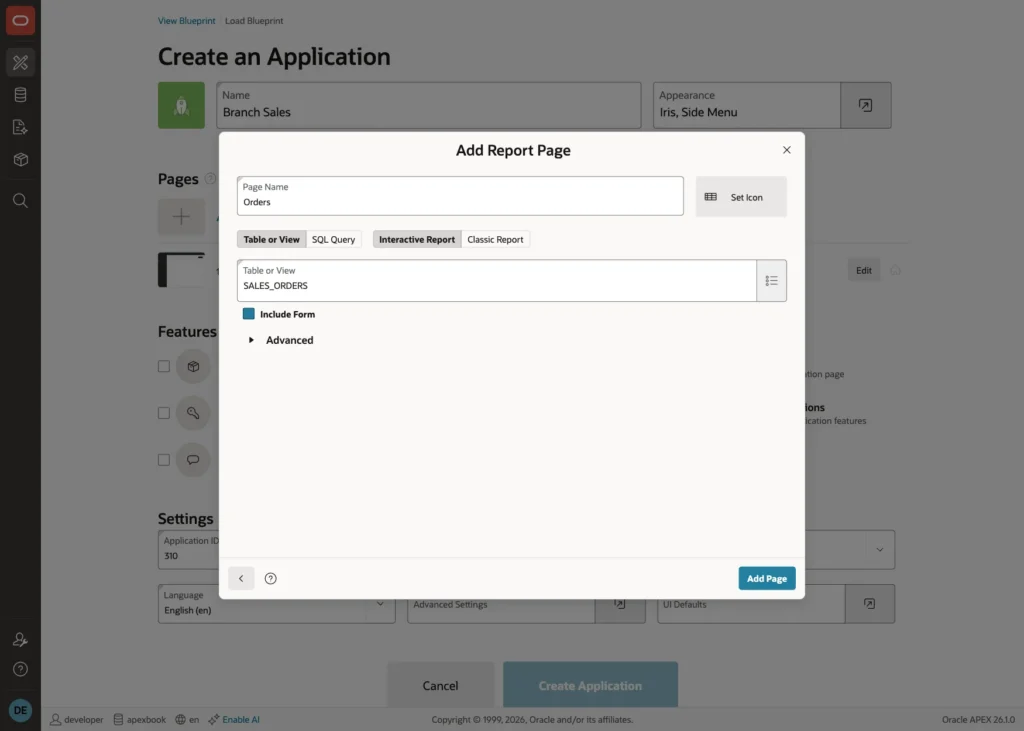
Click Add Page, then do the same for a Customers page on SALES_CUSTOMERS. Leave Authentication at Oracle APEX Accounts, and click Create Application.
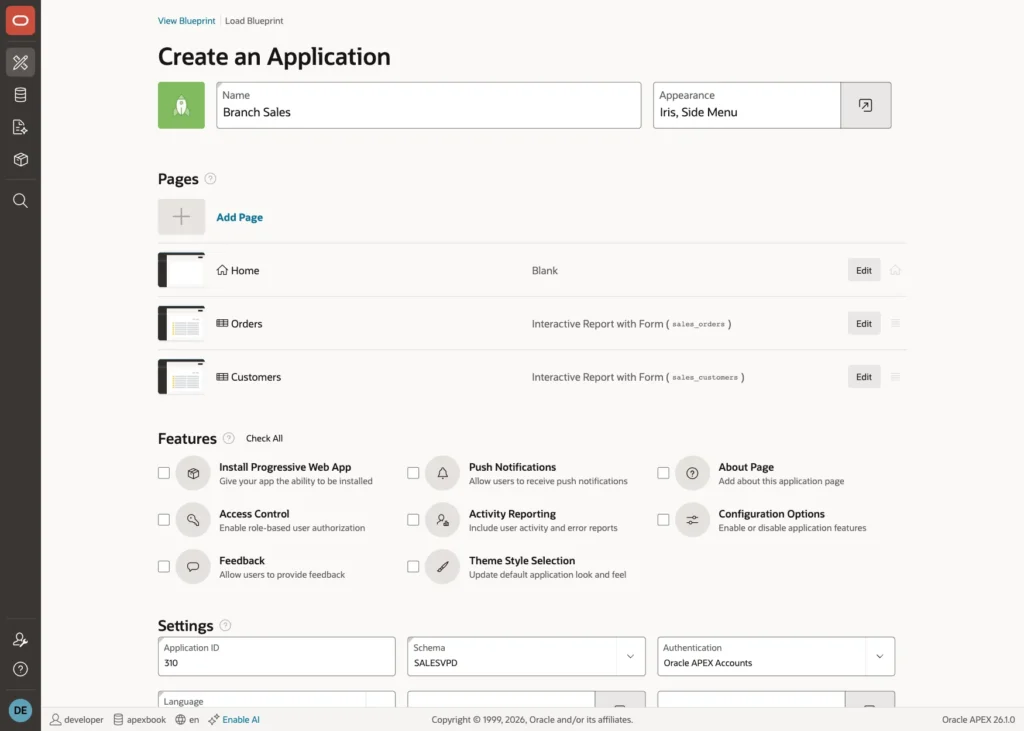
Because the tables have foreign keys, the wizard creates select lists for Branch and Customer on the forms, and shows branch and customer names in the reports.
Now add a chart. On the application home page, click Create Page, choose Chart, and choose Bar. Enter Sales by Branch as the name, set Data Source to Local Database and Source Type to SQL Query, and enter this query:
select b.branch_name, sum(o.amount) as total_sales
from sales_orders o
join sales_branches b on b.branch_id = o.branch_id
group by b.branch_name
order by b.branch_name
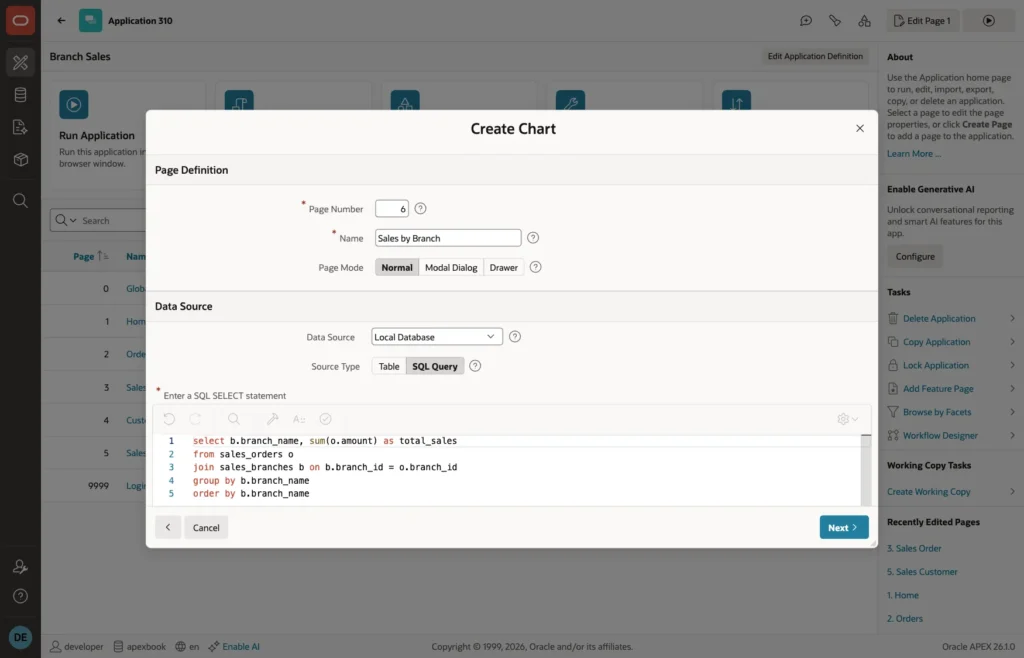
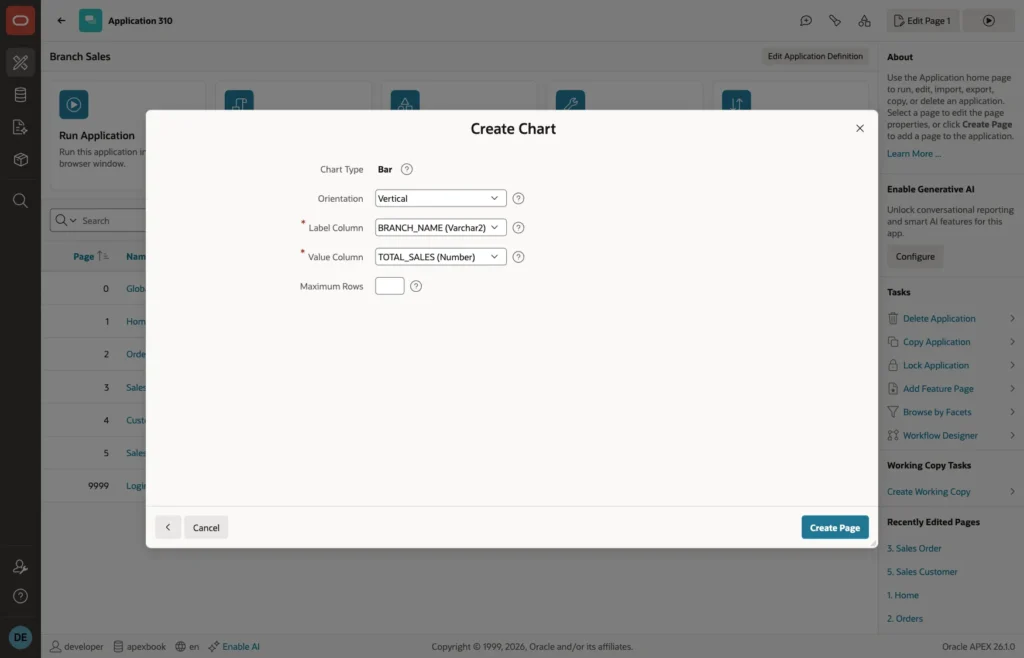
Click Next, choose BRANCH_NAME as the label column and TOTAL_SALES as the value column, and click Create Page.
Step 4: Create the APEX Users
Go to Workspace Administration, open Manage Users and Groups, and click Create User. Create four users named SUNITA, RAVI, AMIT, and NEHA, with a password each. They are end users, so leave the developer and administrator options off.
If your application uses another authentication scheme, such as Microsoft Entra ID, Google, or a custom table, nothing changes in this guide: APP_USER is whatever user name your scheme sets, and those are the names you put into SALES_USERS.
Step 5: See the Problem
Run the application and sign in as AMIT, who works in Delhi. Open Orders.
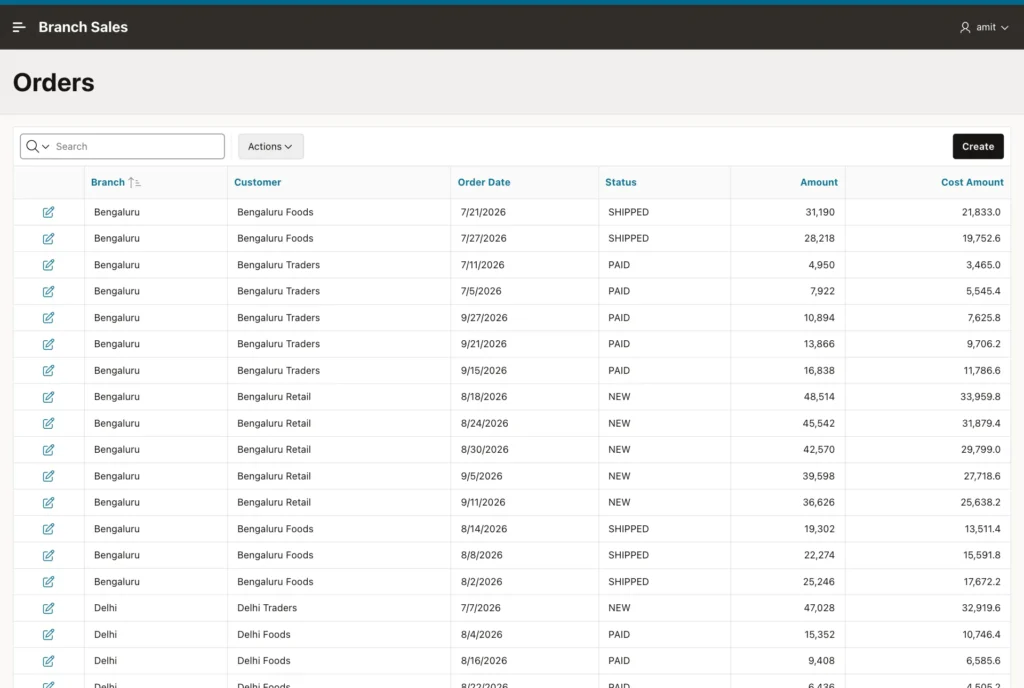
Amit sees all 60 orders of all four branches, including the cost column. The chart shows the same:
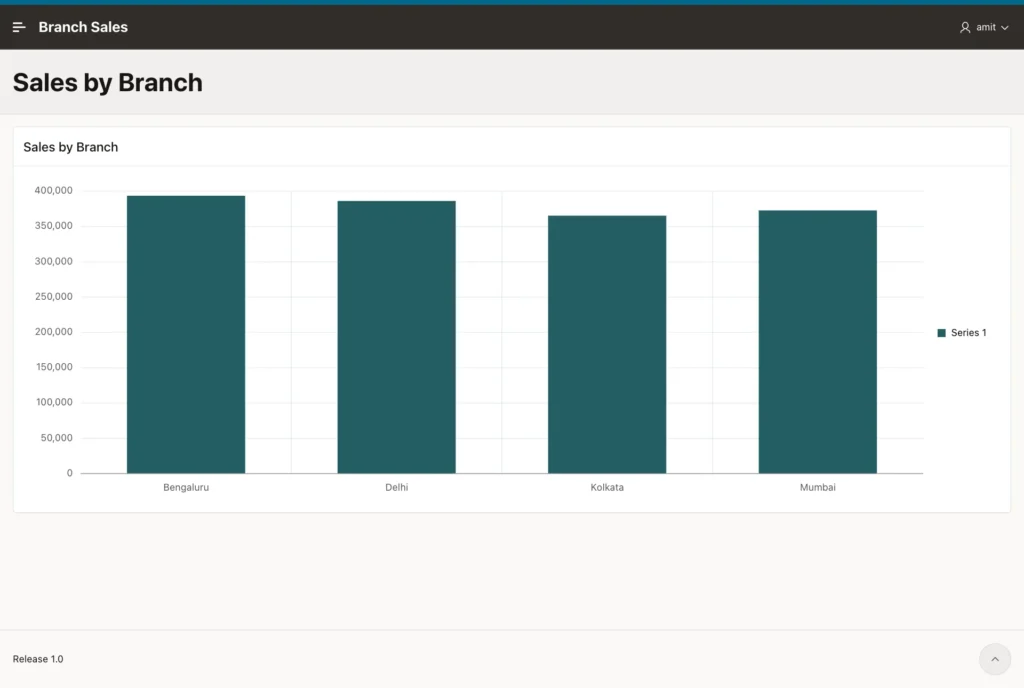
You could fix this page by page with WHERE clauses. Instead, you will fix it once, in the database.
Step 6: Write the Policy Function
The policy functions go into a package, SALES_SECURITY. BRANCH_FILTER returns the row condition for all three tables, and COST_FILTER decides who may see the COST_AMOUNT column. Run this in your schema:
create or replace package sales_security authid definer as
  -- VPD policy functions: they return the WHERE condition that Oracle adds to every query
  function branch_filter (p_schema in varchar2, p_object in varchar2) return varchar2;
  function cost_filter   (p_schema in varchar2, p_object in varchar2) return varchar2;
end sales_security;
/

create or replace package body sales_security as

  -- the branches of the signed-in user
  c_my_branches constant varchar2(200) :=
    q'[branch_id in (select ub.branch_id from sales_user_branches ub
                     where ub.username = sys_context('APEX$SESSION', 'APP_USER'))]';

  function user_role return varchar2 is
    l_role sales_users.role%type;
  begin
    select max(role) into l_role
    from sales_users
    where username = sys_context('APEX$SESSION', 'APP_USER');
    return l_role;
  end user_role;

  function branch_filter (p_schema in varchar2, p_object in varchar2) return varchar2 is
  begin
    -- not an APEX request (SQL*Plus, SQLcl, scheduler jobs):
    -- the schema owner sees all rows, any other database user sees none
    if sys_context('APEX$SESSION', 'APP_USER') is null then
      return case when sys_context('USERENV', 'SESSION_USER') = $$PLSQL_UNIT_OWNER
                  then null else '1 = 0' end;
    end if;

    case user_role
      when 'ADMIN' then
        return null;                                   -- no filter: all branches
      when 'MANAGER' then
        return c_my_branches;
      when 'STAFF' then
        return c_my_branches;
      else
        return '1 = 0';                                -- not in SALES_USERS: no rows
    end case;
  end branch_filter;

  function cost_filter (p_schema in varchar2, p_object in varchar2) return varchar2 is
  begin
    if sys_context('APEX$SESSION', 'APP_USER') is null then
      return case when sys_context('USERENV', 'SESSION_USER') = $$PLSQL_UNIT_OWNER
                  then null else '1 = 0' end;
    end if;
    -- rows that match this condition show COST_AMOUNT, all other rows show it as null
    return case when user_role in ('ADMIN', 'MANAGER') then null else '1 = 0' end;
  end cost_filter;

end sales_security;
/
Here is what the package does, from top to bottom:
- c_my_branches is the condition for managers and staff. It keeps the rows whose BRANCH_ID is one of the user's branches in SALES_USER_BRANCHES.
- The condition contains the call to sys_context itself, not the user name. The SQL text is the same for every user, so the database parses it once and shares it, and a user name can never change the SQL (no SQL injection). The database evaluates sys_context for each query, so each user still gets their own rows.
- USER_ROLE looks up the role of the signed-in user in SALES_USERS.
- When APP_USER is null, the query does not come from APEX: it comes from SQL*Plus, SQLcl, or a scheduler job. In that case the schema owner sees all rows, so your scripts, data loads, and jobs keep working, and any other database user sees no rows. $$PLSQL_UNIT_OWNER is the owner of the package, which is your schema.
- ADMIN returns null, which means no filter. MANAGER and STAFF get the branch condition. Anyone else, for example a user who can sign in to APEX but is not in SALES_USERS, gets 1 = 0 and sees nothing. Denying by default is the safe choice.
- COST_FILTER returns null for administrators and managers, so they see the cost, and 1 = 0 for staff.
The policy function must never query a table that has the same policy, or it would call itself in a loop. SALES_USERS and SALES_USER_BRANCHES have no policy, so they are safe to read here.
Step 7: Attach the Policies
A policy is added once with dbms_rls.add_policy. Run this block in your schema:
begin
  -- rows: the same branch rule on all three tables
  dbms_rls.add_policy(
    object_name     => 'SALES_ORDERS',
    policy_name     => 'SALES_ORDERS_BRANCH',
    policy_function => 'SALES_SECURITY.BRANCH_FILTER',
    statement_types => 'SELECT, INSERT, UPDATE, DELETE',
    update_check    => true);

  dbms_rls.add_policy(
    object_name     => 'SALES_CUSTOMERS',
    policy_name     => 'SALES_CUSTOMERS_BRANCH',
    policy_function => 'SALES_SECURITY.BRANCH_FILTER',
    statement_types => 'SELECT, INSERT, UPDATE, DELETE',
    update_check    => true);

  dbms_rls.add_policy(
    object_name     => 'SALES_BRANCHES',
    policy_name     => 'SALES_BRANCHES_BRANCH',
    policy_function => 'SALES_SECURITY.BRANCH_FILTER',
    statement_types => 'SELECT');

  -- column: COST_AMOUNT is empty for users who may not see it
  dbms_rls.add_policy(
    object_name           => 'SALES_ORDERS',
    policy_name           => 'SALES_ORDERS_COST',
    policy_function       => 'SALES_SECURITY.COST_FILTER',
    statement_types       => 'SELECT',
    sec_relevant_cols     => 'COST_AMOUNT',
    sec_relevant_cols_opt => dbms_rls.all_rows);
end;
/
The parameters mean:
- object_name: the table to protect. With no object_schema, it is a table in your schema.
- policy_function: the package and function that return the condition.
- statement_types: which statements the policy applies to. For orders and customers, SELECT, INSERT, UPDATE, and DELETE all use it, so a user can only change rows they can see.
- update_check => true: after an INSERT or UPDATE, the new row must also satisfy the condition. Without it, Amit could insert an order for Bengaluru or move a Delhi order to Bengaluru. With it, the database refuses with ORA-28115.
- SALES_BRANCHES only needs SELECT. This is what makes the Branch select list on the order form show only the user's branches.
- The second policy on SALES_ORDERS is a column policy. sec_relevant_cols names the sensitive column, and sec_relevant_cols_opt => dbms_rls.all_rows means: return all rows, but show COST_AMOUNT as empty where the condition is not met. Without all_rows, a query that selects COST_AMOUNT would return no rows at all for staff.
To check the policies, query USER_POLICIES:
select object_name, policy_name, function, sel, ins, upd, del, chk_option
from user_policies
order by object_name, policy_name;
OBJECT_NAME      POLICY_NAME              FUNCTION         SEL INS UPD DEL CHK
---------------- ------------------------ ---------------- --- --- --- --- ---
SALES_BRANCHES   SALES_BRANCHES_BRANCH    BRANCH_FILTER    YES NO  NO  NO  NO
SALES_CUSTOMERS  SALES_CUSTOMERS_BRANCH   BRANCH_FILTER    YES YES YES YES YES
SALES_ORDERS     SALES_ORDERS_BRANCH      BRANCH_FILTER    YES YES YES YES YES
SALES_ORDERS     SALES_ORDERS_COST        COST_FILTER      YES NO  NO  NO  NO
Step 8: Test from SQL Without a Browser
You do not need to sign in four times to test a policy. APEX_SESSION.CREATE_SESSION starts an APEX session for any user of the application, from SQL*Plus or SQLcl, and sets APEX$SESSION exactly as a page request does. Replace 310 with the ID of your Branch Sales application and run:
set serveroutput on
declare
  procedure show (p_user in varchar2) is
    l_orders   number;
    l_branches varchar2(200);
    l_cost     number;
  begin
    apex_session.create_session(p_app_id => 310, p_page_id => 1, p_username => p_user);

    select count(*), count(cost_amount) into l_orders, l_cost from sales_orders;
    select listagg(branch_name, ', ') within group (order by branch_name)
      into l_branches from sales_branches;

    dbms_output.put_line(rpad(p_user, 8) || lpad(l_orders, 3) || ' orders, '
      || lpad(l_cost, 2) || ' with cost | ' || l_branches);
    apex_session.delete_session;
  end;
begin
  show('SUNITA');
  show('RAVI');
  show('AMIT');
  show('NEHA');
  show('GUEST');
end;
/
The output:
SUNITA   60 orders, 60 with cost | Bengaluru, Delhi, Kolkata, Mumbai
RAVI     30 orders, 30 with cost | Delhi, Mumbai
AMIT     15 orders,  0 with cost | Delhi
NEHA     15 orders,  0 with cost | Bengaluru
GUEST     0 orders,  0 with cost |
The same query, SELECT COUNT(*) FROM SALES_ORDERS, returns a different answer for each user. GUEST is not in SALES_USERS, so it sees nothing. And outside an APEX session, the schema owner still sees all 60 orders.
Now test changes. Amit tries to update, delete, and insert Bengaluru orders:
set serveroutput on
begin
  apex_session.create_session(p_app_id => 310, p_page_id => 1, p_username => 'AMIT');

  update sales_orders set status = 'PAID' where branch_id = 3;    -- Bengaluru
  dbms_output.put_line('Bengaluru orders updated by Amit: ' || sql%rowcount);

  delete sales_orders where branch_id = 3;
  dbms_output.put_line('Bengaluru orders deleted by Amit: ' || sql%rowcount);

  begin
    insert into sales_orders (branch_id, customer_id, amount) values (3, 7, 5000);
  exception
    when others then dbms_output.put_line('Insert for Bengaluru: ' || sqlerrm);
  end;

  apex_session.delete_session;
  rollback;
end;
/
Bengaluru orders updated by Amit: 0 Bengaluru orders deleted by Amit: 0 Insert for Bengaluru: ORA-28115: policy with check option violation
UPDATE and DELETE do not fail: for Amit, the Bengaluru rows simply do not exist, so nothing is changed. The INSERT fails because of update_check. The block ends with a rollback, so the test leaves the data unchanged.
Step 9: Run the Application as Each User
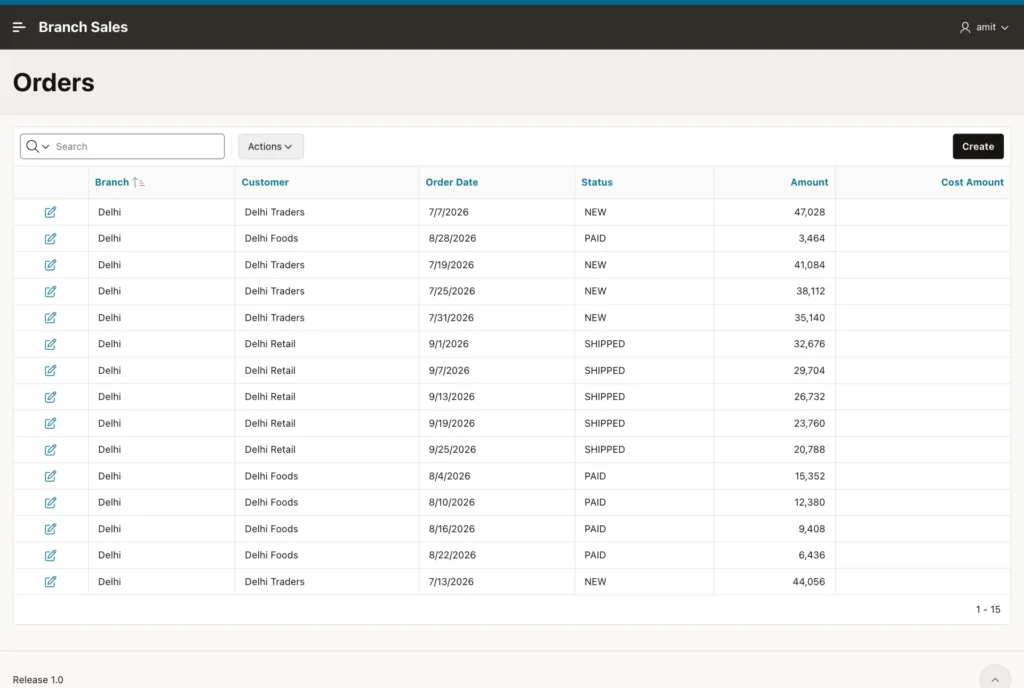
Nothing was changed in the APEX application. Sign in as AMIT again and open Orders:
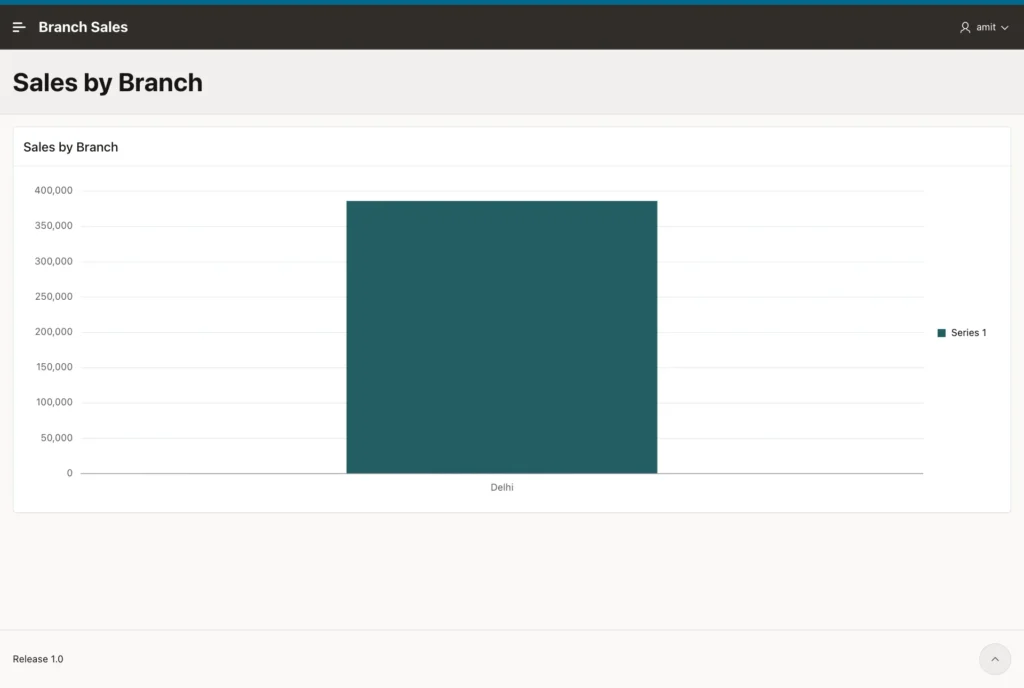
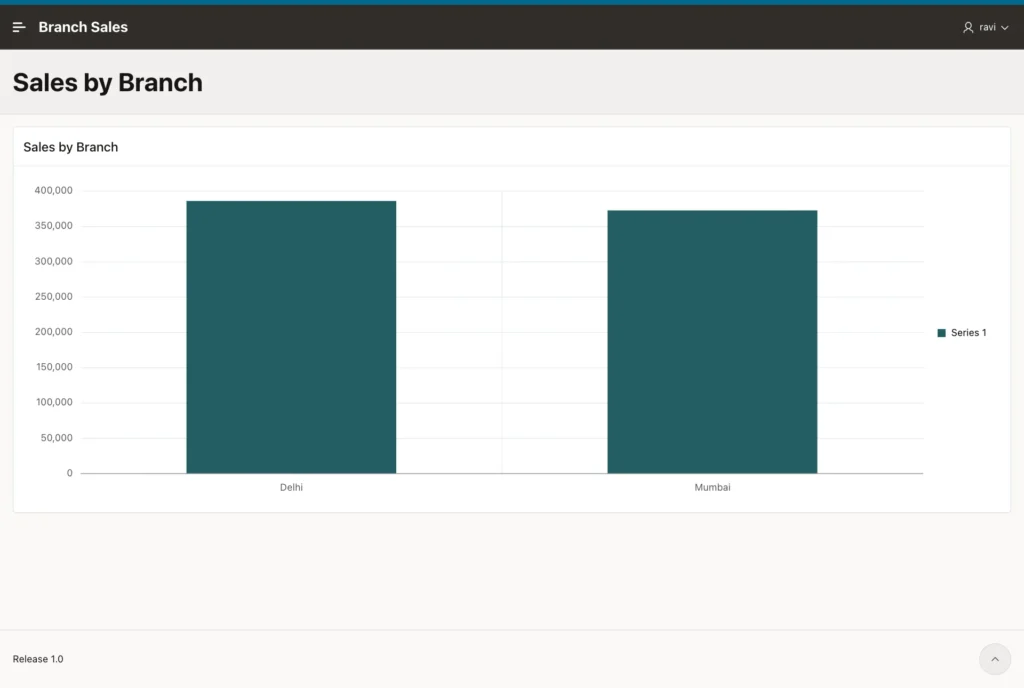
The chart query has no WHERE clause, yet it now shows one bar:
Sign in as RAVI, the manager of Delhi and Mumbai:
And as SUNITA, the administrator, who sees every branch and the cost of every order:
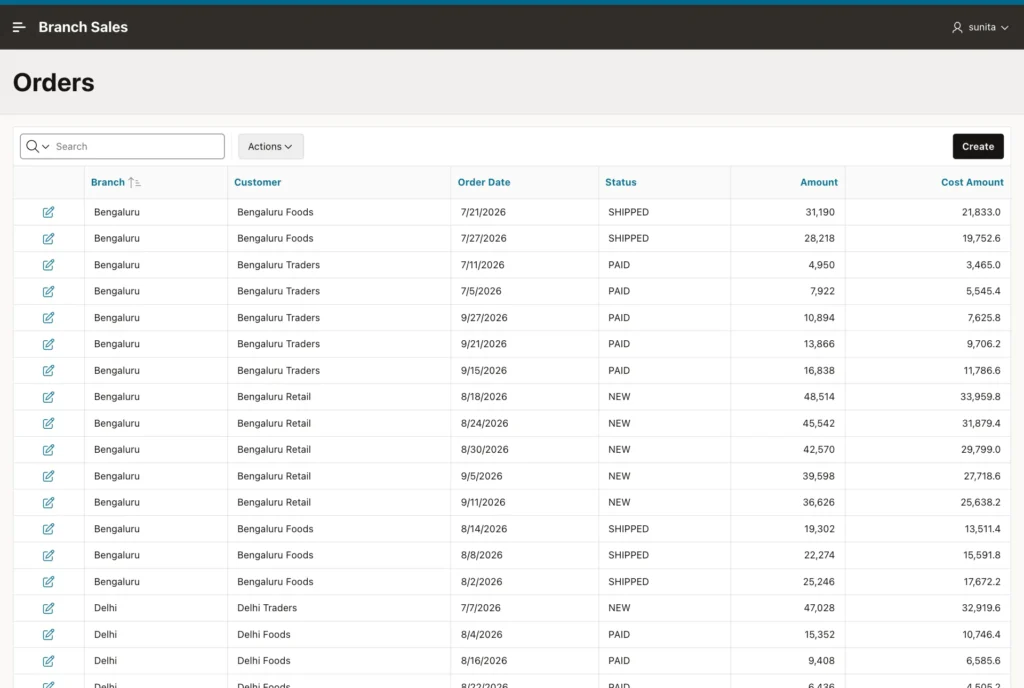
The same happens everywhere the tables are used: the Customers report, the forms, the select lists, an Interactive Report download to CSV, and any page you add later. When Amit clicks Create on the Orders page, the Branch select list contains only Delhi and the Customer select list only Delhi customers, because their lists of values are queries on SALES_BRANCHES and SALES_CUSTOMERS.
Step 10: Show a Friendly Message
The select lists already stop honest users from choosing another branch. But a request can be changed in the browser's developer tools before it is sent, and APEX does not check a select list value against its list of values by default. VPD still stops the insert, but the user sees the raw ORA-28115 error. An APEX error handling function turns it into a clear message. Create it in your schema:
create or replace function sales_error_handler (
  p_error in apex_error.t_error
) return apex_error.t_error_result is
  l_result apex_error.t_error_result;
begin
  l_result := apex_error.init_error_result(p_error => p_error);

  -- ORA-28115: a VPD policy with update_check blocked the insert or update
  if p_error.ora_sqlcode = -28115 then
    l_result.message         := 'You can only save records for your own branch.';
    l_result.additional_info := null;
  end if;

  return l_result;
end sales_error_handler;
/
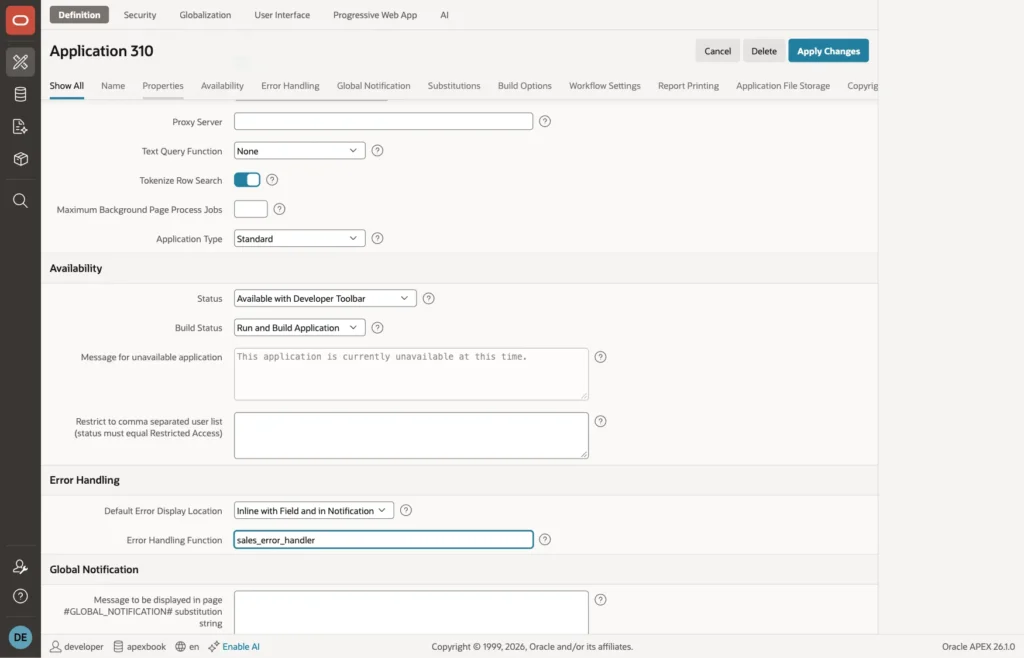
In App Builder, open the application, click Edit Application Definition, and in the Error Handling section, set Error Handling Function to sales_error_handler. Click Apply Changes.
To try it, sign in as AMIT, open the new order form, and change the value of the Branch select list to 3 (Bengaluru) with the browser's developer tools before clicking Create:
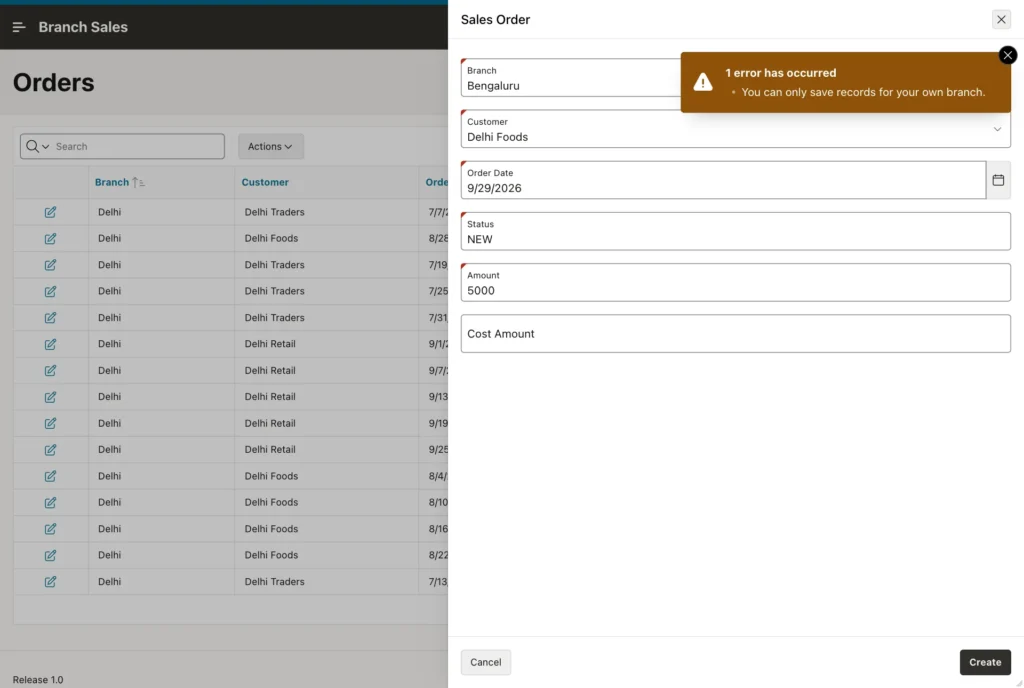
The order was not saved. The protection does not depend on the page at all: a new page, an Interactive Grid, or a PL/SQL process gets the same answer from the database.
Managing Access
Access is now data, not code. To give Neha access to Kolkata as well, insert a row:
insert into sales_user_branches (username, branch_id) values ('NEHA', 4);
commit;
Her next page view shows both branches. To make Amit a manager, update his role in SALES_USERS. In a real application, you would build an administration page on SALES_USERS and SALES_USER_BRANCHES and protect it with an authorization scheme that allows only administrators.
To switch a policy off for a while, for example while you load data:
begin
  dbms_rls.enable_policy(
    object_name => 'SALES_ORDERS',
    policy_name => 'SALES_ORDERS_BRANCH',
    enable      => false);    -- true to switch it on again
end;
/
To remove a policy completely:
begin
  dbms_rls.drop_policy(
    object_name => 'SALES_ORDERS',
    policy_name => 'SALES_ORDERS_BRANCH');
end;
/
If you change the package SALES_SECURITY, you do not need to add the policies again. They call the function by name, and the new version is used at once.
Performance
- Index the column the policy filters on. Here that is BRANCH_ID on SALES_ORDERS and SALES_CUSTOMERS, and the primary key of SALES_USER_BRANCHES, which starts with USERNAME.
- Keep the returned text constant and put sys_context inside it, as in c_my_branches. If you concatenate the user name into the condition instead, every user gets a different SQL statement, which fills the shared pool and forces a hard parse for each user.
- Keep the function small. By default (policy_type DYNAMIC), the database calls it every time a statement runs. Here it does one primary key lookup, which costs almost nothing.
- Look at the real plan. In SQL Developer or SQLcl, run a query inside an APEX session created with APEX_SESSION.CREATE_SESSION and display its plan: the policy condition appears in it as a normal filter or join.
Troubleshooting
SQL Workshop shows no rows
SQL Workshop is itself an APEX application, so when you run a query there, APP_USER is your developer user name. That user is not in SALES_USERS, so the policy returns 1 = 0:
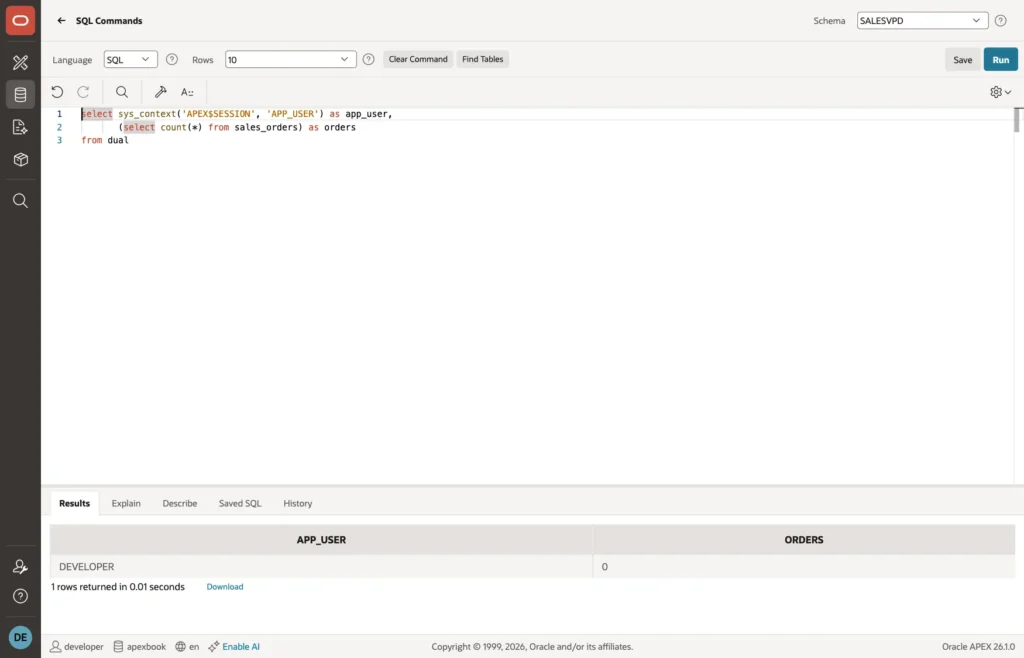
This is the policy working, not a bug. Use SQL*Plus, SQLcl, or SQL Developer connected as the schema owner to see all rows, or add your developer user to SALES_USERS with the role ADMIN in development databases.
The policy has no effect in APEX
Check that the parsing schema does not have the EXEMPT ACCESS POLICY system privilege, directly or through a role. APEX runs your SQL with the privileges of the parsing schema, so with this privilege every policy is skipped. In the test for this article, granting it to the schema made Amit see all orders again, and revoking it restored the filter. Users connected as SYS, and SYSDBA sessions, are never filtered either.
ORA-28110 or ORA-28113
ORA-28110 means the policy function is invalid or raised an error: recompile the package and check USER_ERRORS. ORA-28113 means the text the function returned is not valid SQL for this table: run the function in SQL*Plus, print what it returns, and try that condition in a WHERE clause on the table.
Rows appear for the wrong user
- Region caching: if a region has Server Cache set to cache for all users, the first user's rows are shown to everyone. Use Cache by User, or turn caching off for protected data.
- Background work: APEX automations, background page processes, and scheduler jobs may run with a different APP_USER, or none. Test them with the user they really run as.
- REST services: ORDS modules that are not called through an APEX session run as the schema, which our function lets see everything. Protect them with ORDS privileges, or make the function stricter for them.
When to Use VPD and When Not To
VPD is the right tool when the same tables are shared by users who must not see each other's rows: branches, regions, departments, customers of a portal, or tenants of a multi-tenant application. It keeps the rule in one place and protects every access path of the application.
It is not a replacement for APEX authorization schemes. Authorization decides which pages, regions, and buttons a user may use. VPD decides which rows those pages show. Most applications need both. And if your database is Standard Edition 2, where VPD is not available, the closest alternative is a view per protected table with the same sys_context condition, used by all pages instead of the table.
Summary
With one package and one DBMS_RLS block, the Branch Sales application gives each user their own view of the data. The reports, forms, chart, and select lists were generated by the wizards without any filter, and they still show Amit only Delhi, Ravi Delhi and Mumbai, and Sunita everything. Staff do not see the cost of orders, nobody can save a row for another branch, and the rule protects pages that have not been written yet. The key pieces are the APEX$SESSION application context, which tells the database who the APEX user is, and a policy function that turns that user into a WHERE condition.
