
Users of any modern application expect to click a column heading to sort by that column, and to click it again to reverse the order. An Oracle Forms block can do the same with a few buttons and one procedure.
This guide shows how to make sortable column headings in Oracle Forms 14.1.2, with an arrow that shows the current column and direction, and how to sort records that must not be queried again.
Sample Form for This Guide
The examples and screenshots use the sample form CH39_FIND from the Oracle Forms code repository on GitHub. Download it, open it in Forms Builder, and connect as CAREWELL to follow along.
| Form | File | What it shows |
|---|---|---|
| CH39_FIND | forms/ch39/ch39_find.fmb | Column headings that sort the patients |
The forms run against the CareWell Clinic sample schema, which you install first.
Make the Headings Buttons
Replace the text headings above the multi-record block with push buttons, placed in a control block of their own (HEAD in the sample). Set two properties on each button:
| Property | Value | Why |
|---|---|---|
| Mouse Navigate | No | Clicking a heading does not move the cursor out of the data block. |
| Keyboard Navigable | No | Tab never stops on a heading. |
Buttons and their properties are covered in how to create push buttons in Oracle Forms.
Write One Sort Procedure
Every heading calls the same procedure with three arguments: the column to sort by, the button's name, and its label.
Example (program unit SORT_BY):
procedure sort_by(p_column varchar2, p_heading varchar2, p_label varchar2) is
begin
  if :ctl.sort_column = p_column and :ctl.sort_dir = 'ASC' then
    :ctl.sort_dir := 'DESC';                -- a second click turns the order around
  else
    :ctl.sort_dir := 'ASC';
  end if;
  -- the previous heading loses its arrow, the new one gets it
  if :ctl.sort_heading is not null then
    set_item_property(:ctl.sort_heading, LABEL, :ctl.sort_label);
  end if;
  :ctl.sort_column  := p_column;
  :ctl.sort_heading := p_heading;
  :ctl.sort_label   := p_label;
  set_item_property(p_heading, LABEL,                 -- an up or down triangle after the label
                    p_label || ' ' || case :ctl.sort_dir when 'ASC' then unistr('\25B2') else unistr('\25BC') end);
  set_block_property('PATIENTS', ORDER_BY, p_column || ' ' || :ctl.sort_dir);
  go_block('PATIENTS');
  execute_query;
end;
The procedure does four things:
- It turns the order around when the same column is clicked twice in a row.
- It restores the label of the previous heading and adds an up or down triangle to the new one, with SET_ITEM_PROPERTY and LABEL.
- It sets the block's ORDER BY clause with SET_BLOCK_PROPERTY and ORDER_BY.
- It runs the query again with EXECUTE_QUERY.
The current column, direction, heading, and label live in items of the control block that sit on no canvas. Package variables would work just as well.
Call It from Each Heading
Each heading's trigger is one line. The Name heading sorts by two columns, because the column argument can be any ORDER BY expression.
Example (WHEN-BUTTON-PRESSED trigger on HEAD.H_NAME):
sort_by('last_name, first_name', 'HEAD.H_NAME', 'Name');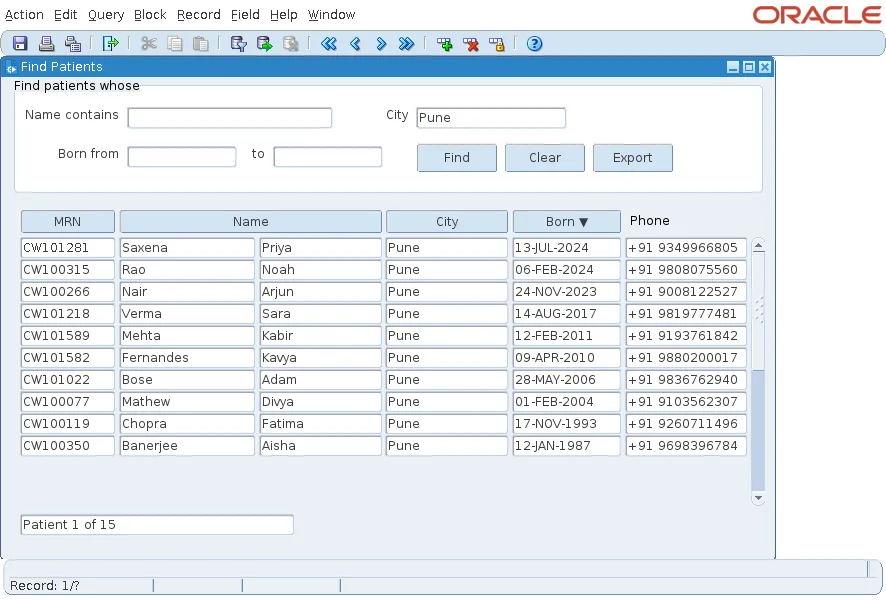
The Search Criteria Stay in Place
ORDER_BY changes only the ORDER BY clause. The block's WHERE clause, set by a search panel through DEFAULT_WHERE, stays as it was, so sorting shows the same records in a new order. In the screenshot, the patients of Pune are still the only ones listed.
The search panel itself is built in how to build a search panel in Oracle Forms.
Sort Without Querying Again
Querying again is not always right. A block may hold changed records that are not saved yet, or it may not be based on the database at all. For those blocks, SORT_BLOCK, new in Forms 14.1.2, sorts the records the block already holds by one item, on the Forms server, without a new query.
Its options set the direction (ASCENDING or DESCENDING), where nulls go (NULLS_FIRST or NULLS_LAST), and whether case matters (CASE_SENSITIVE or CASE_INSENSITIVE), in any order.
Conclusion
Sortable headings are buttons that are neither mouse- nor keyboard-navigable, each calling one procedure. The procedure flips the direction on a second click, moves the arrow with SET_ITEM_PROPERTY and LABEL, sets ORDER_BY, and queries again, while DEFAULT_WHERE keeps the user's criteria. Use SORT_BLOCK when the records must not be queried again.
