
Some rows depend on others. When a payment is added to an invoice, the invoice's status must change: PAID once its payments reach the total, PARTIAL while only some has been paid. The payment and the new status must be saved together, or not at all.
This guide shows how to update a parent record from a POST-INSERT trigger in Oracle Forms 14.1.2, in the same transaction as the new record, and how to show the change afterwards without running into FRM-41050 or FRM-40654.
Sample Form for This Guide
The examples and screenshots use the sample form CW_BILLING from the Oracle Forms code repository on GitHub, with the PL/SQL library cw_lib.pll attached. Download it, open it in Forms Builder, and connect as CAREWELL to follow along.
| Form | File | What it shows |
|---|---|---|
| CW_BILLING | forms/ch40/cw_billing.fmb | Invoices, their lines, and payments |
The forms run against the CareWell Clinic sample schema, which you install first.
The Billing Form
The form has three blocks, joined by relations: INVOICES, the INVOICE_LINES of the current invoice, and its PAYMENTS. The user may add payments and nothing else:
| Block | Insert | Update | Delete |
|---|---|---|---|
| INVOICES | No | Refused on each item | No |
| INVOICE_LINES | No | No | No |
| PAYMENTS | Yes | No | No |
POST-QUERY on INVOICES fills two non-database items: the patient's name and the amount paid so far.
Example (POST-QUERY trigger on block INVOICES):
select first_name || ' ' || last_name into :invoices.patient_name
  from patients where patient_id = :invoices.patient_id;
select nvl(sum(amount), 0) into :invoices.paid
  from payments where invoice_id = :invoices.invoice_id;
Update the Parent in POST-INSERT
POST-INSERT fires after Forms inserts each record and before the commit. Code there runs in the same transaction as the insert: if the save fails later, both the payment and the status change are rolled back.
Example (POST-INSERT trigger on block PAYMENTS):
-- the invoice's status follows its payments, in the same transaction as the payment
declare
  v_paid  number;
begin
  select nvl(sum(amount), 0) into v_paid from payments where invoice_id = :payments.invoice_id;
  update invoices
     set status = case when v_paid >= total_amount then 'PAID' else 'PARTIAL' end
   where invoice_id = :payments.invoice_id;
end;
The SUM already includes the new payment, because Forms has just inserted it. Where POST-INSERT falls in a save is described in how to save changes using commit processing in Oracle Forms.
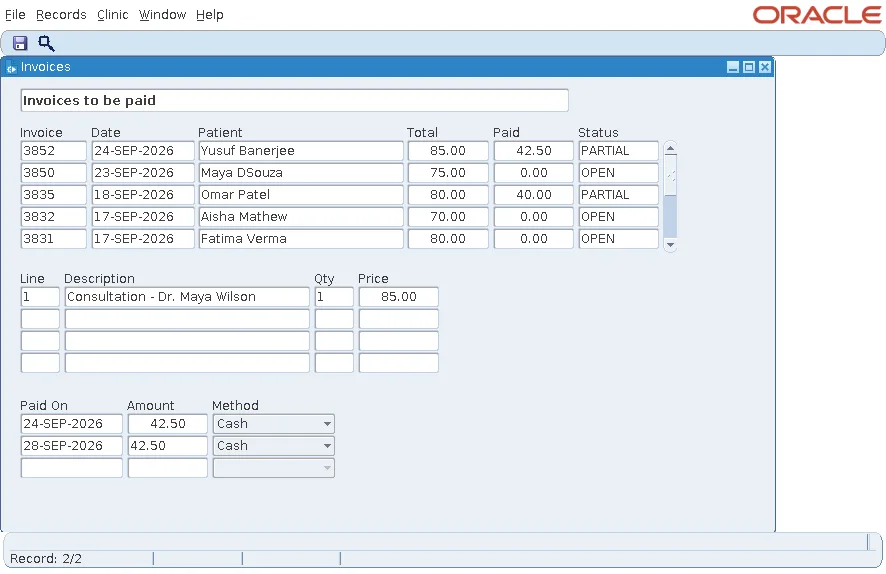
Invoice 3852, for 85.00, had one payment of 42.50 and was PARTIAL. The user added a second payment of 42.50 and saved.
Showing the New Status: Two Attempts That Failed
After the save, the database says PAID, but the block still shows PARTIAL. A test tried two ways to fix that before finding the right one.
The first version assigned the new status to :INVOICES.STATUS after COMMIT_FORM. The block did not allow updates at that point.
Output:
FRM-41050: You cannot update this record
The second version allowed updates on the block and refused them on each item instead, so code could assign the status while users could not type it. The assignment ran, but changing a database item of a queried record makes Forms lock the row, and Forms found that the row had changed since it was queried, changed by POST-INSERT itself.
Output:
FRM-40654: Record has been updated by another user. Re-query to see change.
The message usually means another session changed the row. Here, the change came from the same user's own trigger. Locking is explained in how to handle record locking in Oracle Forms.
Query Again Instead
The lesson is general: when the database changes rows that a block shows, query them again rather than copying values into database items. A KEY-COMMIT trigger at form level saves, reads the new status, queries the invoices again, and returns to the invoice just paid.
Example (KEY-COMMIT trigger at form level):
-- after the save, query the invoices again: POST-INSERT changed an invoice's status in the database
declare
  v_id     invoices.invoice_id%type := :invoices.invoice_id;
  v_status invoices.status%type;
begin
  :system.message_level := '5';          -- the message below replaces FRM-40400
  commit_form;
  :system.message_level := '0';
  if :system.form_status = 'QUERY' then
    select status into v_status from invoices where invoice_id = v_id;
    go_block('INVOICES');
    execute_query;
    -- a patient's invoices: back to the one just paid (in the list to be paid, it is gone)
    if :ctl.patient_id is not null then
      loop
        exit when :invoices.invoice_id = v_id or :system.last_record = 'TRUE';
        next_record;
      end loop;
    end if;
    message('Saved. Invoice ' || v_id || ' is ' || v_status || '.');
  end if;
end;
Details worth noting:
- The invoice ID is saved in a variable before COMMIT_FORM, because the query replaces the records.
- :SYSTEM.MESSAGE_LEVEL 5 hides FRM-40400 so the trigger's own message is the only one.
- :SYSTEM.FORM_STATUS is QUERY only after a successful save, so a failed save shows no success message.
The save now ends with one message.
Output:
Saved. Invoice 3852 is PAID.
In the list of invoices to be paid, invoice 3852 then disappears, since it is paid. In a patient's list of invoices, it stays, with its new status.
Conclusion
Put rules that change other rows in POST-INSERT (or POST-UPDATE), so they run in the same transaction as the record that caused them. Afterwards, do not copy the new values into database items of queried records: that fails with FRM-41050 when the block refuses updates, or FRM-40654 when Forms locks a row that the trigger already changed. Query the block again in KEY-COMMIT after a successful COMMIT_FORM instead.
