
The first screen after sign-in sets the tone of an application. A home form that shows the day at a glance, today's appointments, unpaid invoices, and how much has been collected, is more useful than an empty window with a menu.
This guide builds a dashboard form in Oracle Forms 14.1.2: figures computed in one procedure, a half-gauge display item, buttons enabled by the user's role, figures that refresh when the user comes back, and a button that prints a report.
Sample Form for This Guide
The examples and screenshots use the sample form CW_MAIN from the Oracle Forms code repository on GitHub, with the PL/SQL library cw_lib.pll attached. Download it, open it in Forms Builder, and connect as CAREWELL to follow along.
| Form | File | What it shows |
|---|---|---|
| CW_MAIN | forms/ch40/cw_main.fmb | The home form with the day's figures |
The forms run against the CareWell Clinic sample schema, which you install first.
Lay Out the Dashboard
The form has one control block, HOME, with no table behind it. Its items are grouped in two frames.
| Item | Type | Shows |
|---|---|---|
| WELCOME | Display item, bold | A greeting with the user's name |
| TODAY_TOTAL, CHECKED_IN | Display items | Today's appointments, and how many patients have checked in |
| OPEN_INVOICES, OPEN_AMOUNT | Display items | Invoices still to be paid, and their amount |
| COLLECTED | Display item, Half-Gauge style | The share of all invoiced amounts collected, 0 to 100 |
| PATIENTS, INVOICES | Buttons | Open the other modules |
| SCHEDULE | Button | Prints today's schedule |
COLLECTED is a number display item with the Display Item UI Style Half-Gauge, new in Forms 14.1.2, with Minimum UI Value 0 and Maximum UI Value 100. The code only assigns a number, and Forms draws the gauge. The same property draws a progress bar or a full gauge.
Compute the Figures in One Procedure
All figures come from one program unit, so the form can refresh them from anywhere with one call.
Example (program unit REFRESH_HOME):
procedure refresh_home is
  v_paid  number;
  v_total number;
begin
  :home.welcome := 'Welcome, ' || cw_sec.full_name;
  select count(*), count(case when status = 'CHECKED_IN' then 1 end)
    into :home.today_total, :home.checked_in
    from appointments
   where appt_start >= trunc(sysdate) and appt_start < trunc(sysdate) + 1
     and status <> 'CANCELLED';
  select count(*), nvl(sum(total_amount), 0) into :home.open_invoices, :home.open_amount
    from invoices where status in ('OPEN', 'PARTIAL');
  select nvl(sum(p.amount), 0) into v_paid from payments p;
  select nvl(sum(total_amount), 0) into v_total from invoices where status <> 'VOID';
  :home.collected := round(100 * v_paid / greatest(v_total, 1));
  -- the modules the user's role may use
  set_item_property('HOME.INVOICES', ENABLED,
                    case when cw_sec.has_role('ADMIN,BILLING') then PROPERTY_TRUE else PROPERTY_FALSE end);
end;
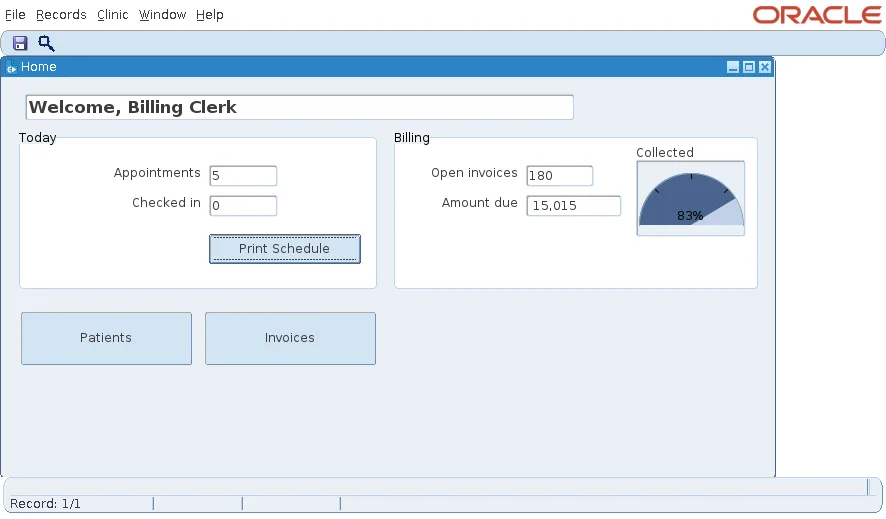
The last statement enables the Invoices button only for the ADMIN and BILLING roles. The menu disables its Invoices item with the same function, CW_SEC.HAS_ROLE, so the menu and the button always agree.
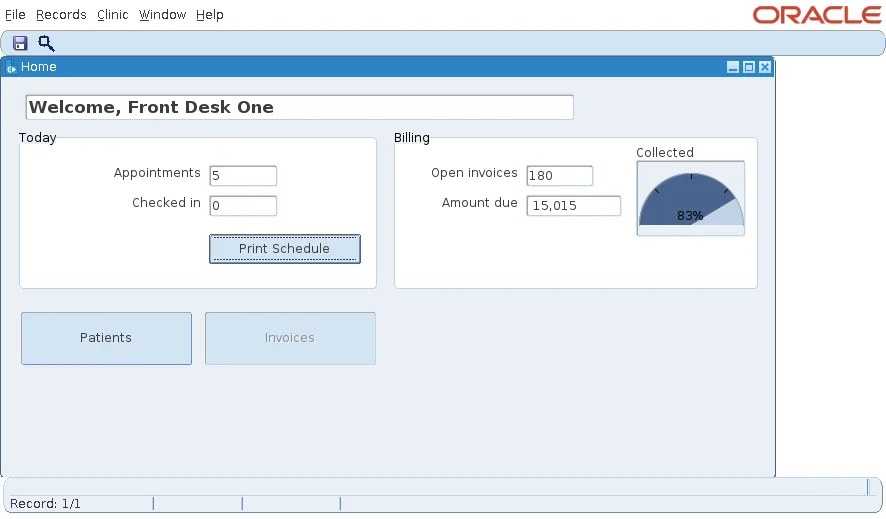
Signed in with the BILLING role, the same form enables Invoices.
Refresh the Figures When the User Comes Back
A dashboard that shows the morning's numbers all day is misleading. The form refreshes in two triggers.
Example (WHEN-NEW-FORM-INSTANCE trigger):
cw_nav.start_form(:parameter.p_user);
refresh_home;
Example (WHEN-FORM-NAVIGATE trigger):
refresh_home; -- back on the home form: fresh numbers
WHEN-FORM-NAVIGATE fires whenever the user returns to this form from another open form, for example after taking a payment in the billing form, so the figures are always current. The first line of WHEN-NEW-FORM-INSTANCE loads the signed-in user; see how to build a sign-in form in Oracle Forms.
Print a Report from the Dashboard
The Print Schedule button runs today's appointment schedule as a PDF through a report object in the form, APPT_SCHEDULE.
Example (program unit PRINT_SCHEDULE):
-- today's schedule as a PDF
procedure print_schedule is
  v_params paramlist := get_parameter_list('CW_REPORT');
  v_job    varchar2(100);
begin
  if not id_null(v_params) then
    destroy_parameter_list(v_params);
  end if;
  v_params := create_parameter_list('CW_REPORT');
  add_parameter(v_params, 'P_FROM', text_parameter, to_char(sysdate, 'YYYY-MM-DD'));
  add_parameter(v_params, 'P_TO', text_parameter, to_char(sysdate, 'YYYY-MM-DD'));
  add_parameter(v_params, 'PARAMFORM', text_parameter, 'NO');
  v_job := run_report_object(find_report_object('APPT_SCHEDULE'), v_params);
  if report_object_status(v_job) = 'FINISHED' then
    message('Schedule ready: job ' || substr(v_job, instr(v_job, '_', -1) + 1)
            || ' of ' || substr(v_job, 1, instr(v_job, '_', -1) - 1));
    -- web.show_document(<the job's getjobid URL>, '_blank') opens it in the user's browser
  else
    message('The schedule could not be printed: ' || report_object_status(v_job));
  end if;
end;
The report object is set to run synchronously, in batch mode, with the destination type Cache and the format PDF, on the Reports server named in the form. In a test, the report ran as job 10 of the in-process Reports server.
Output:
Schedule ready: job 10 of rep_wls_reports_formslab
On a desktop, WEB.SHOW_DOCUMENT with the job's URL opens the PDF in the user's browser. The test client had no browser, so the form shows the job's number instead. Report objects are covered in how to run Oracle Reports from a form using RUN_REPORT_OBJECT.
Conclusion
A dashboard form is a control block of display items filled by one procedure, with a Half-Gauge display item for a percentage. Call the procedure in WHEN-NEW-FORM-INSTANCE and again in WHEN-FORM-NAVIGATE so the figures refresh whenever the user returns, enable buttons with the same role function the menu uses, and add a report button with RUN_REPORT_OBJECT.
