
Some fields matter only in certain cases. An appointment needs a reason when it is cancelled, and only then. Setting Required in the Property Palette makes the reason required for every appointment, which is wrong for the booked ones.
This guide shows how to make an item required in some records only, in Oracle Forms 14.1.2, with SET_ITEM_INSTANCE_PROPERTY, so that Forms' own validation does the checking.
Sample Form for This Guide
The examples and screenshots use the sample form CH39_BOOKING from the Oracle Forms code repository on GitHub. Download it, open it in Forms Builder, and connect as CAREWELL to follow along.
| Form | File | What it shows |
|---|---|---|
| CH39_BOOKING | forms/ch39/ch39_booking.fmb | A reason required for cancelled appointments |
The forms run against the CareWell Clinic sample schema, which you install first.
Set Required for One Record
A small procedure sets the Required property of the reason in one record, the one that fired the trigger, depending on the status.
Example (program unit SET_REASON_REQUIRED):
-- a cancelled appointment needs a reason: Required for this record only
procedure set_reason_required is
begin
  set_item_instance_property('APPOINTMENTS.REASON', to_number(:system.trigger_record), REQUIRED,
    case :appointments.status when 'CANCELLED' then PROPERTY_TRUE else PROPERTY_FALSE end);
end;
Two details make it work:
| Detail | Why |
|---|---|
| SET_ITEM_INSTANCE_PROPERTY | Changes the item in one record. SET_ITEM_PROPERTY with REQUIRED would change it in every record of the block. |
| :SYSTEM.TRIGGER_RECORD | The number of the record that fired the trigger: the fetched record in POST-QUERY, the current one in WHEN-LIST-CHANGED. |
The difference between the two built-ins is covered in how to change items at run time using SET_ITEM_PROPERTY.
Call It When the Status Changes
The status is a poplist, so WHEN-LIST-CHANGED fires when the user picks another status.
Example (WHEN-LIST-CHANGED trigger on APPOINTMENTS.STATUS):
set_reason_required;
Call It When a Record Is Fetched
Records that come from the database need the same setting: a cancelled appointment that is queried and then edited must still require its reason. POST-QUERY calls the procedure for every fetched record, after filling the record's other display items.
Example (POST-QUERY trigger on block APPOINTMENTS):
select d.dept_id, d.first_name || ' ' || d.last_name
  into :appointments.dept_id, :appointments.doctor_name
  from doctors d
 where d.doctor_id = :appointments.doctor_id;
set_reason_required;
Let Forms Do the Checking
Once Required is set, no validation code is needed. Forms checks required items with its own validation, when the user leaves the item or when the record is validated, and shows its own message. A cancelled appointment without a reason could not be saved.
Output:
FRM-40202: Field must be entered.
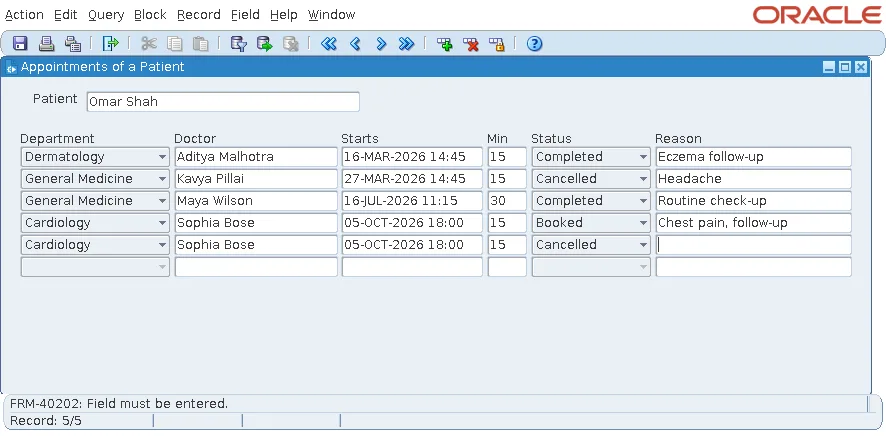
When Forms validates items and records is explained in how to validate data in Oracle Forms.
Use the Same Pattern for Other Properties
SET_ITEM_INSTANCE_PROPERTY changes other properties per record too, with the same two calls from WHEN-LIST-CHANGED (or WHEN-VALIDATE-ITEM) and POST-QUERY:
- UPDATE_ALLOWED, to lock an item in closed records.
- VISUAL_ATTRIBUTE, to color an item in some records.
- NAVIGABLE, to skip an item where it does not apply.
Conclusion
To make an item required only in some records, call SET_ITEM_INSTANCE_PROPERTY with REQUIRED and :SYSTEM.TRIGGER_RECORD from two places: the trigger that fires when the deciding value changes, and POST-QUERY for fetched records. Forms then enforces the rule with its own validation and its own FRM-40202 message, and the same pattern works for other per-record properties.
