
Everything you build in Forms Builder belongs to a module, the unit Forms Builder opens, saves, and compiles as one file. A form is a module, and so are a menu, a PL/SQL library, and an object library.
This guide explains the four kinds of modules in Oracle Forms 14.1.2, how to create, open, save, and close them, and how to turn a binary module into text, XML, or a full property listing you can search and compare.
Sample Form for This Guide
The examples and screenshots use the sample form CH06_MODULE from the Oracle Forms code repository on GitHub. Download it, open it in Forms Builder, and connect as CAREWELL to follow along.
| Form | File | What it shows |
|---|---|---|
| CH06_MODULE | forms/ch06/ch06_module.fmb | A form with its module properties set, used for the property listing |
The forms run against the CareWell Clinic sample schema, which you install first.
The Four Kinds of Oracle Forms Modules
| Module | What it holds | Design file | Runnable file |
|---|---|---|---|
| Form | Blocks, items, canvases, windows, triggers, and the other objects of one screen or a set of screens | .fmb | .fmx |
| Menu | The menus and menu items of an application's menu bar, and the PL/SQL they run | .mmb | .mmx |
| PL/SQL library | Program units that many forms and menus share | .pll | .plx |
| Object library | Objects (blocks, items, visual attributes, whole object groups) that forms copy or subclass | .olb | None |
A form is what the user runs. It can attach PL/SQL libraries and name a menu module to show in place of the default menu.
An object library is used only at design time. A form takes objects from it while you build the form, so it has no runnable version.
In the Object Navigator, each kind has its own top-level node: Forms, Menus, PL/SQL Libraries, and Object Libraries. Forms Builder can hold several modules of each kind open at once. Most commands act on the current module, the one that holds the object selected in the navigator, and the status bar names it.
Create a New Module
File, New creates a module of each kind:
- Form (Ctrl+N)
- Form Using Template, which creates a form from an existing form and copies all its objects
- Menu
- PL/SQL Library
- Object Library
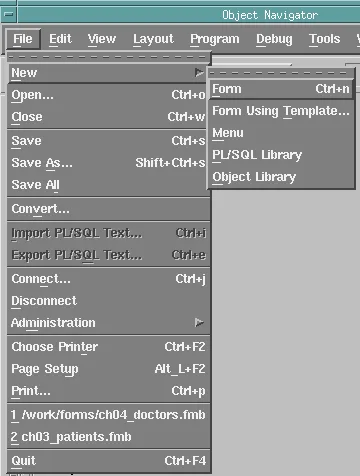
Form Using Template is a quick way to start every form of an application with the same windows, toolbar, and visual attributes. You can also select the node of a module type in the navigator and click Create.
Open, Save, and Close Modules
| Command | Shortcut | What it does |
|---|---|---|
| File, Open | Ctrl+O | Opens modules of any kind. The file type list limits the files shown, and you can open several files together. |
| File, Save | Ctrl+S | Saves the current module. |
| File, Save As | None | Saves the current module to a new file. |
| File, Save All | None | Saves every changed module. |
| File, Close | Ctrl+W | Closes the current module and offers to save it if it has changes. |
| Program, Revert Module | None | Discards the changes made since the last save by reading the file again. |
The bottom of the File menu lists the modules you opened last, so you can reopen them quickly.
Module Name vs. File Name
A module has two names. The module name is a property of the module, which the running application uses. The file name is what Forms uses to find the module on disk.
They do not have to match, but keeping them the same, with the file name in lowercase, avoids confusion. CALL_FORM, OPEN_FORM, and NEW_FORM take a file name, while GET_FORM_PROPERTY and FIND_FORM take a module name.
Convert a Module to Text or XML
A design file is binary. That is fine for Forms Builder, but not for comparing versions in source control or searching across forms. Forms offers three text representations:
| Format | How to make it | Read back? | Best for |
|---|---|---|---|
| Text files (.fmt, .mmt, .pld) | Form Compiler with script=yes | Yes, with parse=yes | Libraries, where the .pld file is plain PL/SQL |
| XML files | The frmf2xml tool | Yes, with frmxml2f | Comparing and changing forms with outside tools |
| Documentation files | Form Compiler with forms_doc=yes | No | Seeing every property of every object |
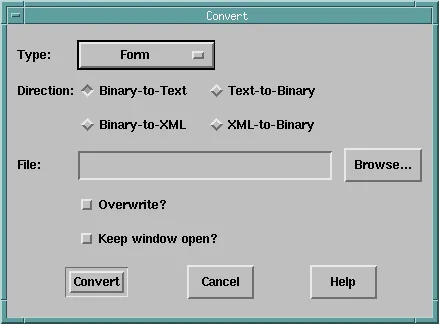
File, Convert does the first two conversions inside Forms Builder. Choose the Type of module, the Direction (Binary-to-Text, Text-to-Binary, Binary-to-XML, or XML-to-Binary), and the file.
List Every Property with forms_doc
The documentation file is the quickest way to see everything a module sets. It lists every property of every object in the same order as the Property Palette, and it needs no database connection.
Write the documentation file of a form:
frmcmp_batch.sh module=ch06_module.fmb forms_doc=yes logon=no
Here are the first lines for the sample form CH06_MODULE. An asterisk marks a property with a value of its own, and a dash one that still has its default.
Output:
 * Name                                              CH06_MODULE
 - Subclass Information
 - Comments
 - Application Name
 - Help Book Title
 * Title                                             CareWell Clinic
 * Console Window                                    MAIN_WIN
 * Menu Module                                       DEFAULT&SMARTBAR
 - Initial Menu
 - Defer Required Enforcement                        No
 - Menu Role
 - Mouse Navigation Limit                            Form
 - First Navigation Data Block
 - Current Record Visual Attribute Group
 * Validation Unit                                   Record
 * Interaction Mode                                  Non-Blocking
 * Maximum Query Time                                10
 * Maximum Records Fetched                           500
 - Isolation Mode                                    Read Committed
Scanning for the asterisks shows at a glance which settings someone changed on purpose.
To learn the tools around modules, see how to use Forms Builder in Oracle Forms 14.1.2, and for a first form module built with the wizards, how to create your first form using the Data Block Wizard.
Conclusion
Oracle Forms has four kinds of modules: forms (.fmb and .fmx), menus (.mmb and .mmx), PL/SQL libraries (.pll and .plx), and object libraries (.olb), which have no runnable file. Create them with File, New or the navigator's Create button, manage them with Open, Save, Save As, Save All, and Close, and keep each module name matching its lowercase file name. When you need to compare or search modules, convert them to text with script=yes, to XML with frmf2xml or File, Convert, or list every property with forms_doc=yes.
