
Order confirmations with an attached invoice, approval reminders from a template, a PDF generated from a Word template, and a QR code on a packing slip are all a few PL/SQL calls away in Oracle APEX. APEX_MAIL queues emails with HTML, attachments, inline images, and templates. APEX_PRINT merges JSON data into document templates. APEX_BARCODE draws QR codes, Code 128, and EAN-8 barcodes as SVG or PNG.
This guide covers all three with tested examples and their real output, including how the mail queue and transactions interact, which is the most common reason "APEX_MAIL does not send".
Quick Reference
| Task | Subprogram |
|---|---|
| Queue an email, plain or HTML | APEX_MAIL.SEND |
| Queue an email from a template | APEX_MAIL.SEND with p_template_static_id |
| Attach files and inline images | APEX_MAIL.ADD_ATTACHMENT |
| Render a template without sending | APEX_MAIL.PREPARE_TEMPLATE |
| Send the queue now, get absolute URLs | APEX_MAIL.PUSH_QUEUE, GET_INSTANCE_URL, GET_IMAGES_URL |
| Generate a document from a template | APEX_PRINT.GENERATE_DOCUMENT, UPLOAD_TEMPLATE, REMOVE_TEMPLATE |
| Draw QR codes and barcodes | APEX_BARCODE.GET_QRCODE_SVG, GET_QRCODE_PNG, GET_CODE128_SVG, GET_CODE128_PNG, GET_EAN8_SVG, GET_EAN8_PNG |
How to Run These Examples
The examples ran in Oracle APEX 26.1 against a test application with ID 200 that has an email template with the static ID approval-reminder. The mail and print examples need an APEX session of that application, created with APEX_SESSION.CREATE_SESSION as shown in the guide to creating APEX sessions and managing session state from PL/SQL. Run them as your workspace schema with server output switched on. The output under each example is exactly what the database printed.
Email: APEX_MAIL
APEX_MAIL does not talk to the mail server itself. SEND writes the message into the mail queue, and a database job, ORACLE_APEX_MAIL_QUEUE, sends the queue every few minutes through the SMTP server configured in the instance settings. The message only leaves the queue if the transaction that queued it commits; a rollback takes it back. The views APEX_MAIL_QUEUE, APEX_MAIL_ATTACHMENTS, and APEX_MAIL_LOG show the queue, its attachments, and what was sent or failed.
SEND needs the workspace, which an APEX session sets. Outside a session, call apex_util.set_workspace first. Setting up the mail server and automations is covered in the guide to automations, email, and push notifications.
SEND
Queues a message and returns its ID when called as a function. p_to, p_cc, and p_bcc take comma-separated addresses, and p_from must be an address the mail server accepts. p_body is the plain-text part and p_body_html the HTML part; mail clients show the HTML part when they can. The template signatures take the static ID of one of the application's email templates, from Shared Components, E-Mail Templates, plus a JSON object of placeholder values; the subject and both parts then come from the template.
Syntax:
apex_mail.send(p_to in varchar2, p_from in varchar2, p_body in varchar2 | clob, p_body_html in varchar2 | clob default null,
    p_subj in varchar2 default null, p_cc in varchar2 default null, p_bcc in varchar2 default null,
    p_replyto in varchar2 default null) [return number]
apex_mail.send(p_template_static_id in varchar2, p_placeholders in clob, p_to in varchar2, p_cc in varchar2 default null,
    p_bcc in varchar2 default null, p_from in varchar2 default null, p_replyto in varchar2 default null,
    p_application_id in number default apex_application.g_flow_id, p_language_override in varchar2 default null)
  [return number]
ADD_ATTACHMENT
Attaches a BLOB or CLOB to a queued message, identified by the ID SEND returned. p_content_id turns a BLOB attachment into an inline image, which the HTML part shows with an img tag whose src is cid: followed by that ID.
Syntax:
apex_mail.add_attachment(p_mail_id in number, p_attachment in blob, p_filename in varchar2, p_mime_type in varchar2,
                         p_content_id in varchar2 default null)
apex_mail.add_attachment(p_mail_id in number, p_attachment in clob, p_filename in varchar2, p_mime_type in varchar2)
This example needs a session of application 200, page 1. It queues two messages, reads them back from the queue views, and rolls back so nothing is actually sent.
Example:
declare
    l_id number;
begin
    -- queue a message; the APEX mail job sends it (the lab has no mail server)
    l_id := apex_mail.send(
                p_to        => 'kim.lee@orbit.example',
                p_cc        => 'sales@orbit.example',
                p_from      => 'no-reply@orbit.example',
                p_subj      => 'Your order ORD-10042',
                p_body      => 'Thank you for your order. The invoice is attached.',
                p_body_html => '<p>Thank you for your order.</p><p><img src="cid:logo"></p>');
    apex_mail.add_attachment(p_mail_id => l_id, p_attachment => to_clob('sku,qty' || chr(10) || 'TNT-1002,2'),
                             p_filename => 'ORD-10042.csv', p_mime_type => 'text/csv');
    apex_mail.add_attachment(p_mail_id => l_id, p_attachment => apex_barcode.get_qrcode_png('ORD-10042'),
                             p_filename => 'logo.png', p_mime_type => 'image/png',
                             p_content_id => 'logo');                    -- shown inline by cid:logo

    for m in (select q.mail_to, q.mail_cc, q.mail_subj,
                     (select listagg(a.filename || ' (' || a.mime_type || ')', ', ')
                        from apex_mail_attachments a where a.mail_id = q.id) as files
                from apex_mail_queue q where q.id = l_id) loop
        dbms_output.put_line('to:      ' || m.mail_to || ', cc: ' || m.mail_cc);
        dbms_output.put_line('subject: ' || m.mail_subj);
        dbms_output.put_line('files:   ' || m.files);
    end loop;

    -- from a template: the subject and bodies come from "approval-reminder"
    l_id := apex_mail.send(
                p_template_static_id => 'approval-reminder',
                p_placeholders       => '{"ORDER_NUMBER":"ORD-10042","CUSTOMER_NAME":"Alpine Outfitters",'
                                     || '"ORDER_TOTAL":"$1,047.30","DISCOUNT_PCT":"5"}',
                p_to                 => 'approver@orbit.example');
    for m in (select mail_subj from apex_mail_queue where id = l_id) loop
        dbms_output.put_line('template: ' || m.mail_subj);
    end loop;

    rollback;   -- the messages leave the queue again: nothing is sent
end;
/
Output:
to:      kim.lee@orbit.example, cc: sales@orbit.example
subject: Your order ORD-10042
files:   ORD-10042.csv (text/csv), logo.png (image/png)
template: Reminder: order ORD-10042 is waiting for approval
The inline image here is a QR code generated on the fly by APEX_BARCODE, attached with a content ID and referenced from the HTML body. The rollback at the end removed both messages from the queue, which shows why a process that queues mail and then fails leaves nothing behind, and also why mail queued in code that never commits never goes out. For UTL_SMTP-based alternatives, see the PL/SQL mail client API examples.
PREPARE_TEMPLATE
Renders an email template without sending it, to preview a message or send it some other way. The template's #NAME# placeholders are replaced with the members of the JSON object, HTML-escaped in the HTML part and left as they are in the text part. The HTML part is the template's body wrapped in the layout the application defines for emails.
Syntax:
apex_mail.prepare_template(p_static_id in varchar2, p_placeholders in clob,
    p_application_id in number default apex_application.g_flow_id, p_subject out varchar2,
    p_html out clob, p_text out clob, p_language_override in varchar2 default null)
This example needs a session of application 200, page 1, and the approval-reminder template.
Example:
declare
    l_subject varchar2(4000);
    l_html    clob;
    l_text    clob;
begin
    -- render the lab's e-mail template "approval-reminder" without sending it
    apex_mail.prepare_template(
        p_static_id    => 'approval-reminder',
        p_placeholders => json_object('ORDER_NUMBER'  value 'ORD-10042',
                                      'CUSTOMER_NAME' value 'Alpine Outfitters & Co.',
                                      'ORDER_TOTAL'   value '$1,047.30',
                                      'DISCOUNT_PCT'  value '5'),
        p_subject      => l_subject,
        p_html         => l_html,
        p_text         => l_text);
    dbms_output.put_line('subject: ' || l_subject);
    -- the HTML is the template's body inside the application's e-mail layout; show the body
    dbms_output.put_line(regexp_substr(l_html, '<p>Order.*Sales\.</p>', 1, 1, 'n'));
    dbms_output.put_line('text:');
    dbms_output.put_line(l_text);
end;
/
Output:
subject: Reminder: order ORD-10042 is waiting for approval <p>Order <strong>ORD-10042</strong> for Alpine Outfitters & Co. is waiting for approval.</p> <p>Order total: $1,047.30 · Discount: 5%</p> <p>Please review it in <strong>My Approvals</strong> in Orbit Sales.</p> text: Order ORD-10042 for Alpine Outfitters & Co. is waiting for approval. Order total: $1,047.30, discount: 5% Please review it in My Approvals in Orbit Sales.
The ampersand in the customer name became & in the HTML part but stayed as-is in the text part, so placeholder values are safe to fill from user data.
PUSH_QUEUE, GET_INSTANCE_URL, and GET_IMAGES_URL
PUSH_QUEUE sends the queue immediately instead of waiting for the job, which is useful in scripts and tests; p_smtp_hostname and p_smtp_portno override the instance settings. GET_INSTANCE_URL and GET_IMAGES_URL return the absolute URLs of the instance and its static files, from the instance setting Application Express Instance URL, for links and images in messages. The mail job runs outside any web request, so relative URLs do not work in emails.
Syntax:
apex_mail.push_queue(p_smtp_hostname in varchar2 default null, p_smtp_portno in varchar2 default null)
apex_mail.get_instance_url return varchar2
apex_mail.get_images_url return varchar2
This example needs a session of application 200, page 1.
Example:
begin
    -- for links and images in e-mails, which need absolute URLs
    -- (from the instance setting "Application Express Instance URL")
    dbms_output.put_line('instance: [' || apex_mail.get_instance_url || ']');
    dbms_output.put_line('images:   [' || apex_mail.get_images_url || ']');
end;
/
Output:
instance: []
images:   []
Both came back empty because the test instance has no Instance URL setting. If links in your emails are broken, check that setting first.
Documents: APEX_PRINT
APEX_PRINT merges JSON data into a template, which can be Word, Excel, PowerPoint, HTML, Markdown, text, OpenDocument, RTF, or XSL-FO (apex_print.c_template_docx, c_template_xlsx, and so on), and returns the document as PDF, Word, Excel, HTML, or another format (c_output_pdf, c_output_docx, and so on). It needs the Oracle Document Generator Pre-built Function of OCI configured as the instance's print server. With another print server, use report queries and APEX_UTIL.GET_PRINT_DOCUMENT instead.
| Subprogram | Generates or does |
|---|---|
| GENERATE_DOCUMENT(p_data, p_template, p_template_type, p_output_type, p_output_password) | A document from data and a template BLOB. |
| GENERATE_DOCUMENT(p_application_id, p_report_query_static_id, p_report_layout_static_id, p_output_type, ...) | A document from an application's report query and report layout. |
| GENERATE_DOCUMENT(p_application_id, p_data, p_report_layout_static_id, ...) | Data with a report layout. |
| GENERATE_DOCUMENT(p_data, p_template_id, ...) | Data with a template uploaded by UPLOAD_TEMPLATE. |
| GENERATE_DOCUMENT(... p_template_bucket, p_template_namespace, p_template_object ...) | Data, or a report query, with a template in OCI Object Storage. |
| UPLOAD_TEMPLATE(p_template, p_template_type) | Uploads a template to Object Storage and returns its ID, for generating many documents from it. |
| REMOVE_TEMPLATE(p_template_id) | Removes an uploaded template. |
p_output_password protects a generated PDF with a password.
This example needs a session of application 200, page 1. The test instance has no document generator, so it fails on purpose and prints the message.
Example:
declare
    l_pdf blob;
begin
    l_pdf := apex_print.generate_document(
                 p_data          => json_object('orderNumber' value 'ORD-10042',
                                                'lines' value json_array(json_object('sku' value 'TNT-1002', 'qty' value 2))),
                 p_template      => apex_util.clob_to_blob('Order {orderNumber}: {#lines}{sku} x {qty} {/lines}'),
                 p_template_type => apex_print.c_template_txt,
                 p_output_type   => apex_print.c_output_pdf);
    dbms_output.put_line(dbms_lob.getlength(l_pdf) || ' bytes');
exception when others then
    -- the lab's instance has no document generator configured
    dbms_output.put_line(regexp_replace(sqlerrm, 'ORA-\d+: '));
end;
/
Output:
APEX - Requires Oracle Document Generator Pre-built Function. - Contact your application administrator.
The error message names exactly what is missing. Without an OCI document generator, other routes are covered in the guides to files, PDF export, and printing and creating PDF reports in Oracle APEX, and VinAura, a free visual PDF report designer for Oracle APEX, needs no print server at all.
Barcodes: APEX_BARCODE
APEX_BARCODE draws QR codes, Code 128 barcodes for any text, and EAN-8 barcodes, seven digits plus a check digit it computes for you. Each comes as SVG, a CLOB to put into HTML or a PDF, or as PNG, a BLOB for downloads, emails, and documents. The QR Code page item uses the same package.
| Functions | Parameters |
|---|---|
| GET_QRCODE_SVG, GET_QRCODE_PNG | p_value; p_size (SVG, pixels) or p_scale (PNG, pixels per module); p_quiet, the margin in modules; p_eclevel, the error correction level L (7%), M (15%), Q (25%), or H (30%); p_foreground_color and p_background_color. |
| GET_CODE128_SVG, GET_CODE128_PNG | p_value; p_size or p_scale; the colors. |
| GET_EAN8_SVG, GET_EAN8_PNG | p_value, digits only; p_size or p_scale; the colors. |
Example:
declare
    l_svg clob;
    l_png blob;
begin
    l_svg := apex_barcode.get_qrcode_svg(p_value => 'https://orbit.example/o/ORD-10042',
                                         p_size => 120, p_eclevel => 'M');      -- L, M, Q, or H
    dbms_output.put_line('QR SVG:       ' || dbms_lob.getlength(l_svg) || ' chars, ' || substr(l_svg, 1, 60) || '...');

    l_png := apex_barcode.get_qrcode_png(p_value => 'https://orbit.example/o/ORD-10042',
                                         p_scale => 4, p_quiet => 2,
                                         p_foreground_color => '#1F3A5F');
    dbms_output.put_line('QR PNG:       ' || dbms_lob.getlength(l_png) || ' bytes');

    l_png := apex_barcode.get_code128_png(p_value => 'TNT-1002', p_scale => 2);
    dbms_output.put_line('Code 128 PNG: ' || dbms_lob.getlength(l_png) || ' bytes');
    l_svg := apex_barcode.get_code128_svg(p_value => 'TNT-1002', p_size => 60);
    dbms_output.put_line('Code 128 SVG: ' || dbms_lob.getlength(l_svg) || ' chars');

    l_svg := apex_barcode.get_ean8_svg(p_value => '9638507');                -- 7 digits + check digit
    dbms_output.put_line('EAN-8 SVG:    ' || dbms_lob.getlength(l_svg) || ' chars');
    begin
        l_png := apex_barcode.get_ean8_png(p_value => 'TNT-1002');
    exception when others then
        dbms_output.put_line('EAN-8 of TNT-1002: ' || regexp_replace(sqlerrm, 'ORA-\d+: '));
    end;
end;
/
Output:
QR SVG:       17945 chars, <svg xmlns="http://www.w3.org/2000/svg" width="120" height="...
QR PNG:       571 bytes
Code 128 PNG: 415 bytes
Code 128 SVG: 1893 chars
EAN-8 SVG:    2456 chars
EAN-8 of TNT-1002: TNT-1002 is not a valid number.
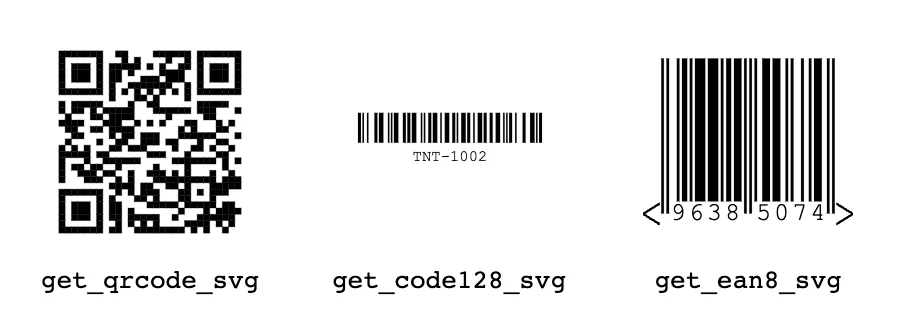
p_size sets the width and height of the SVG's box, and the drawing keeps its proportions inside it, which is why the wide Code 128 barcode looks short beside the square QR code. EAN-8 only accepts digits, so the product code TNT-1002 was rejected; use Code 128 for codes with letters. Higher QR error correction levels survive more damage at the cost of a denser code. More examples are in QR codes in Oracle APEX and generating Code 128 PNG barcodes.
Conclusion
APEX_MAIL queues email with text and HTML parts, attachments, inline images referenced by content ID, and application templates whose placeholders are escaped safely, and PREPARE_TEMPLATE renders a template without sending it. Remember that queued mail only goes out after a commit and a run of the mail job, or PUSH_QUEUE, and that emails need the instance URL setting for absolute links. APEX_PRINT generates documents from JSON and Word, Excel, or other templates through the OCI document generator. APEX_BARCODE returns QR codes, Code 128, and EAN-8 barcodes as SVG for pages and PDFs, or PNG for emails and downloads.
