
Everything an Oracle APEX application does normally starts with somebody clicking. Some work should not wait for that: a reminder every morning about approvals still outstanding, a nightly cleanup, an alert when stock runs low.
Automations run that work in the background, and email and push notifications tell people about it. This guide builds a daily reminder end to end, then covers how APEX actually sends mail and what push notifications require.
Every query, trigger, and snippet in this article runs against the Orbit Outfitters sample schema: customers, products, orders, stores, and about 2,300 orders of sample data. Install it once and you can follow along in your own workspace.
git clone https://github.com/devvinish/orb_tables.git
-- then, as your schema:
@orbit/install.sql
Automations
An automation is a shared component that runs a query and executes actions for its rows, either on a schedule or when code asks it to. It runs as a database scheduler job in the application's context, so it can use the application's packages, settings, and APIs.
What it does not have is a browser or a signed-in user, and that shapes what you can write in it. Anything depending on session state or page items belongs somewhere else.
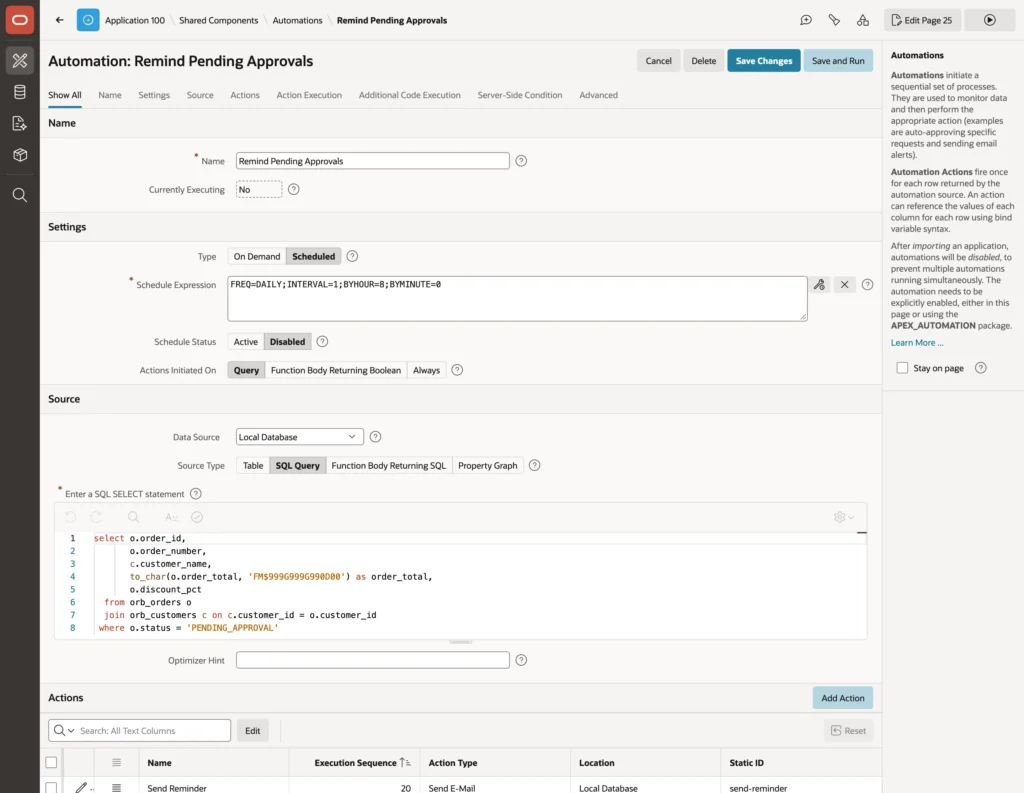
select o.order_id,
       o.order_number,
       c.customer_name,
       to_char(o.order_total, 'FM$999G999G990D00') as order_total,
       o.discount_pct
  from orb_orders o
  join orb_customers c on c.customer_id = o.customer_id
where o.status = 'PENDING_APPROVAL'| Setting | Decides |
|---|---|
| Type | Scheduled runs on its schedule, On Demand only when code starts it |
| Schedule Expression | When it runs, in the database scheduler's calendaring syntax, with a builder beside the field |
| Schedule Status | Active or Disabled |
| Actions Initiated On | Query runs actions once per row, a Boolean function runs them once when true, Always runs them once regardless |
| Source | The query, from the local database or any remote source a region could use |
New automations start disabled, and so do automations in an imported application. That is deliberate and worth appreciating: importing an application into production does not immediately start sending mail to customers because somebody forgot a schedule was active.
Action Execution
The Action Execution settings are where an automation becomes safe to leave running unattended.
- Primary Key Column identifies each row in the run log, so a failure names the record that caused it.
- Commit once at the end, or after each row so completed work survives a later failure.
- Maximum Rows to Process caps a run that would otherwise be enormous.
- Action Error Handling decides whether one bad row is ignored, ends the run, or disables the automation until somebody looks at it.
That last choice deserves thought rather than a default. Ignore suits a reminder where one missing address should not stop the others. Disable suits anything where repeated failure means something is genuinely wrong and running again would make it worse.
Additional Code Execution then runs PL/SQL before the first row, before each row, and after the last, which is where preparation and summary logging go.
Actions
Actions come in three types: Execute Code, Send E-Mail, and Send Push Notification. Each one can read the current row's columns as bind variables and substitution strings, and each can carry its own server-side condition.
The wizard creates an empty Execute Code action that does nothing. Delete it rather than leaving it in place, because an action with no code still counts as an action.
Email Templates
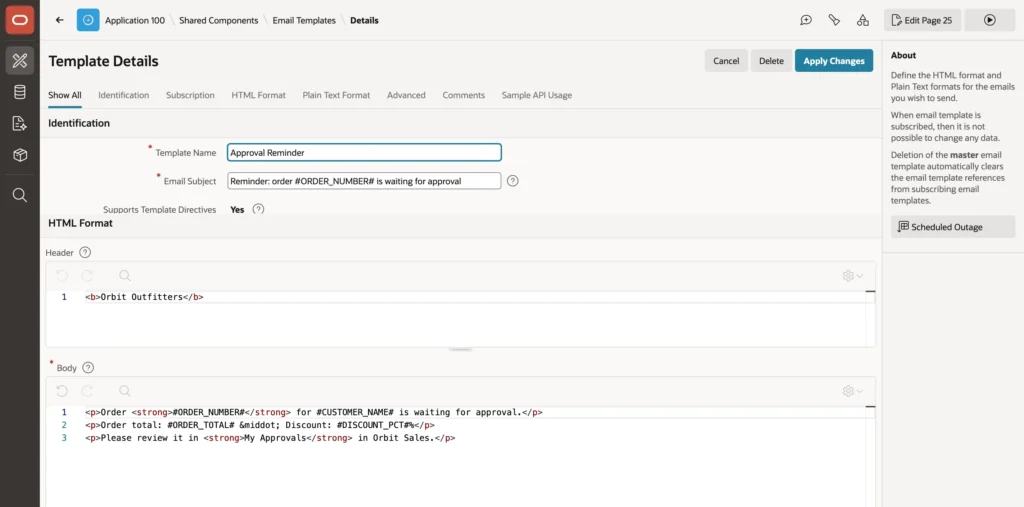
An email template separates the design of a message from the code that sends it, which means the wording can be changed without touching an automation. Sample templates for order details, event reminders, and outage notices load complete examples to start from.
<p>Order <strong>#ORDER_NUMBER#</strong> for #CUSTOMER_NAME# is waiting for approval.</p> <p>Order total: #ORDER_TOTAL# · Discount: #DISCOUNT_PCT#%</p> <p>Please review it in <strong>My Approvals</strong> in Orbit Sales.</p>
Names between hash signs are placeholders, filled in when the mail is sent. Templates also accept the same directives as other APEX templates, so parts of a message can depend on the data.
Order #ORDER_NUMBER# for #CUSTOMER_NAME# is waiting for approval.
Order total: #ORDER_TOTAL#, discount: #DISCOUNT_PCT#%
Please review it in My Approvals in Orbit Sales.
Fill in the plain text version too. Some mail clients and most notification previews show it, and a message that arrives as an empty body looks broken in exactly the situations where you want it to look competent.
Sending from the Automation
Add a Send E-Mail action, give it from and to addresses, choose the template, and set the placeholder values to the matching columns of the query.
Notice that the query formats the total with to_char rather than leaving it as a number. Placeholders receive text, so without that the reminder would read 27662.56 instead of a properly formatted amount. Formatting in the query is the same habit that keeps report templates simple.
Save and Run executes the automation immediately, whatever its schedule and status, which is how you test it. Be sure the query returns what you expect first, because a run with five matching rows sends five emails.
Monitoring
Every run is logged, with its status and its successful and failed row counts, visible both in a dictionary view and in the Automations Log page that the Activity Reporting feature adds to an application.
Code inside actions can add to that: write info, warning, and error entries to the log, skip the current row, or end the run early. From elsewhere, an on-demand automation can be started in PL/SQL, and scheduled ones enabled and disabled, which is how you pause automations during a data migration rather than hoping nothing fires mid-load.
How APEX Sends Email
APEX never sends mail directly. Everything, whether from an automation, a page process, a workflow activity, or the mail API, goes into a mail queue, and a database job sends the queued messages every five minutes through an SMTP server.
Two benefits follow from that design. Pages stay fast, because nothing waits on a mail server. And a mail server that is briefly unavailable does not lose messages, since failures stay queued and are retried.
The SMTP server itself is configured by an instance administrator, and in APEX 26.1 it can also be set for a single workspace. Until it exists, messages simply accumulate in the queue, which a dictionary view lets you inspect with recipients and subjects. That is genuinely useful in development: you can confirm exactly what would have been sent without sending anything.
begin
    apex_mail.send (
        p_to                 => email_address_of_user,
        p_template_static_id => 'approval-reminder',
        p_placeholders       => '{' ||
        '    "ORDER_NUMBER":'  || apex_json.stringify( some_value ) ||
        '   ,"CUSTOMER_NAME":' || apex_json.stringify( some_value ) ||
        '   ,"ORDER_TOTAL":'   || apex_json.stringify( some_value ) ||
        '   ,"DISCOUNT_PCT":'  || apex_json.stringify( some_value ) ||
        '}' );
end;
The same template can be used from PL/SQL by its static ID, with placeholder values as JSON, and the template's own Sample API Usage tab generates that call for you. Without a template, the send call takes a subject and bodies directly, attachments can be added to a message, and the queue can be pushed immediately instead of waiting for the job. One thing to remember outside an APEX session, such as in your own scheduler job: set the workspace first, or the call has no context to run in.
While developing, send only to addresses you own or to a test mail server that swallows everything. An automation scheduled every morning against a slightly wrong query can send hundreds of real emails before anybody notices, and those cannot be recalled.
Push Notifications
A push notification appears on a phone or desktop even when the application is closed. APEX sends them to users of an installed progressive web app, which means the PWA settings come first.
- Switch on push notifications in the Progressive Web App settings, where APEX generates the credentials identifying your application to the browsers' push services.
- Add the Push Notifications feature page, where users subscribe on each of their devices.
- Send from a page process, a workflow activity, an automation action, or PL/SQL, with a title, a body, an icon, and a link target that opens a page when tapped.
Notifications are addressed to a user, not a device, and reach every device where that user subscribed. Like email they are queued and sent by a job, and the queue can be pushed immediately.
Two infrastructure requirements catch people out. Push requires HTTPS, with browsers making an exception only for localhost, and the database itself must be able to reach the push services of Google, Apple, Microsoft, and Mozilla over the internet. A database with no outbound access will accept everything you configure and deliver nothing.
The natural pairing is with approval tasks: an action on a task's create event can notify the approvers the moment an order arrives, which beats a morning reminder and costs nobody an email.
Conclusion
Automations are how an APEX application does useful work while nobody is watching, and they are built from a query plus actions that run once per row, on a schedule written in the database scheduler's syntax or on demand from code. The settings that matter most are not the schedule but the ones governing failure: commit per row so completed work survives, a row limit so one bad day does not produce an enormous run, and error handling that either ignores a row or disables the automation depending on whether repetition would make things worse. New and imported automations start disabled, which is a safety feature worth keeping. Email templates hold the design and the placeholders while the automation supplies the values, formatted in the query because placeholders take text, and everything goes through a queue that keeps pages fast and survives an unreachable mail server. Push notifications reach installed progressive web apps on every device a user subscribed from, provided you have HTTPS and a database that can actually reach the push services. And throughout development, send only to addresses you own.
