
Oracle REST Data Services (ORDS) can turn a table into a complete REST API without a single line of handler code. This feature is called AutoREST: you enable the schema once, enable the table, and ORDS answers GET, POST, PUT, and DELETE requests on it, with paging, links, and JSON in and out. This guide builds such an API for a small table of airport lounge offers and calls every operation with curl, showing the real responses.
Before You Start
You need ORDS installed and running against your database, and a schema to work in. The examples use NIMBUS, the sample schema of a fictional airline, which you can install with the scripts in the setup/nimbus folder of the Oracle Database 26ai code repository on GitHub. The schema comes from Oracle Database 26ai SQL and PL/SQL Book.
ORDS in the examples answers at https://localhost:8443/ords/, and NIMBUS is REST-enabled with the URL alias nimbus. Replace the host and port with your own ORDS address. The curl commands use -k because the test server has a self-signed certificate; leave it out when your certificate is trusted. JSON responses are formatted for reading; ORDS returns them on one line.
Syntax
ords.enable_schema(p_enabled             => true,
                   p_schema              => 'SCHEMA',
                   p_url_mapping_type    => 'BASE_PATH',
                   p_url_mapping_pattern => 'alias_in_the_url',
                   p_auto_rest_auth      => false);

ords.enable_object(p_enabled        => true,
                   p_schema         => 'SCHEMA',
                   p_object         => 'TABLE_NAME',
                   p_object_type    => 'TABLE',          -- or VIEW, PACKAGE, PROCEDURE, FUNCTION
                   p_object_alias   => 'alias_in_the_url',
                   p_auto_rest_auth => false);           -- true: callers need a privilege
Run both as the schema owner, and commit afterward. The table then answers at https://host:port/ords/schema_alias/object_alias/.
Step 1: REST-Enable the Schema
The schema gets the alias nimbus, so its URLs start with /ords/nimbus/.
Example:
begin
  ords.enable_schema(p_enabled             => true,
                     p_schema              => 'NIMBUS',
                     p_url_mapping_type    => 'BASE_PATH',
                     p_url_mapping_pattern => 'nimbus',
                     p_auto_rest_auth      => false);
  commit;
end;
/
select parsing_schema, pattern, status from user_ords_schemas;
Output:
PL/SQL procedure successfully completed.

PARSING_SCHEMA    PATTERN    STATUS
_________________ __________ __________
NIMBUS            nimbus     ENABLED
Step 2: Create a Table
LOUNGE_OFFERS holds a few lounge offers, with an identity primary key and a foreign key to AIRPORTS. AutoREST uses the primary key to address single rows.
Example:
create table lounge_offers (
  offer_id     number generated always as identity primary key,
  airport_code char(3)      not null references airports,
  title        varchar2(80) not null,
  price_usd    number(7,2),
  valid_until  date
);
insert into lounge_offers (airport_code, title, price_usd, valid_until)
values ('DXB', 'Day pass, Terminal 3 lounge', 59, date '2026-12-31');
insert into lounge_offers (airport_code, title, price_usd, valid_until)
values ('SIN', 'Shower and snack', 25, date '2026-11-30');
insert into lounge_offers (airport_code, title, price_usd, valid_until)
values ('LHR', 'Spa treatment, 30 minutes', 75, date '2026-12-15');
commit;
Step 3: REST-Enable the Table
The table is published under the alias offers, open to any caller for now.
Example:
begin
  ords.enable_object(p_enabled      => true,
                     p_schema       => 'NIMBUS',
                     p_object       => 'LOUNGE_OFFERS',
                     p_object_type  => 'TABLE',
                     p_object_alias => 'offers',
                     p_auto_rest_auth => false);
  commit;
end;
/
select parsing_object, object_alias, type, status, auto_rest_auth
from   user_ords_enabled_objects;
Output:
PL/SQL procedure successfully completed.

PARSING_OBJECT    OBJECT_ALIAS    TYPE     STATUS     AUTO_REST_AUTH
_________________ _______________ ________ __________ _________________
LOUNGE_OFFERS     offers          TABLE    ENABLED    DISABLED
USER_ORDS_ENABLED_OBJECTS confirms the table is enabled, with AUTO_REST_AUTH disabled.
Read All Rows with GET
A GET on the collection URL returns the rows as items, with paging information and links.
Example:
curl -k https://localhost:8443/ords/nimbus/offers/
Output:
{
    "items": [
        {
            "offer_id": 1,
            "airport_code": "DXB",
            "title": "Day pass, Terminal 3 lounge",
            "price_usd": 59,
            "valid_until": "2026-12-31T00:00:00Z",
            "links": [
                {
                    "rel": "self",
                    "href": "https://localhost:8443/ords/nimbus/offers/1"
                }
            ]
        },
        {
            "offer_id": 2,
            "airport_code": "SIN",
            "title": "Shower and snack",
            "price_usd": 25,
            "valid_until": "2026-11-30T00:00:00Z",
            "links": [
                {
                    "rel": "self",
                    "href": "https://localhost:8443/ords/nimbus/offers/2"
                }
            ]
        },
        {
            "offer_id": 3,
            "airport_code": "LHR",
            "title": "Spa treatment, 30 minutes",
            "price_usd": 75,
            "valid_until": "2026-12-15T00:00:00Z",
            "links": [
                {
                    "rel": "self",
                    "href": "https://localhost:8443/ords/nimbus/offers/3"
                }
            ]
        }
    ],
    "hasMore": false,
    "limit": 25,
    "offset": 0,
    "count": 3,
    "links": [
        {
            "rel": "self",
            "href": "https://localhost:8443/ords/nimbus/offers/"
        },
        {
            "rel": "edit",
            "href": "https://localhost:8443/ords/nimbus/offers/"
        },
        {
            "rel": "describedby",
            "href": "https://localhost:8443/ords/nimbus/metadata-catalog/offers/"
        },
        {
            "rel": "first",
            "href": "https://localhost:8443/ords/nimbus/offers/"
        }
    ]
}- Each item carries its own self link, built from the primary key.
- Dates come back in ISO 8601 format, in UTC.
- limit, offset, hasMore, and count describe the page: 25 rows per page by default, here all 3 on the first page.
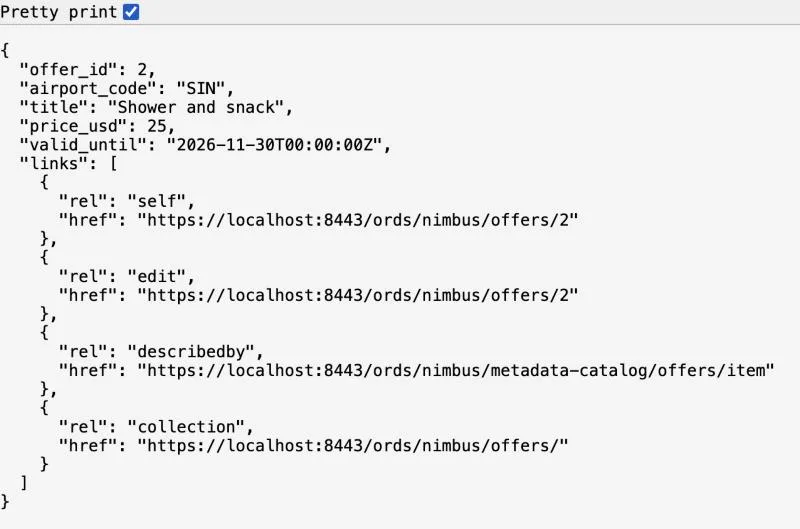
Read One Row
Add the primary key value to the URL to get a single row. A browser shows the same JSON:
Example:
curl -k https://localhost:8443/ords/nimbus/offers/2
Output:
{
    "offer_id": 2,
    "airport_code": "SIN",
    "title": "Shower and snack",
    "price_usd": 25,
    "valid_until": "2026-11-30T00:00:00Z",
    "links": [
        {
            "rel": "self",
            "href": "https://localhost:8443/ords/nimbus/offers/2"
        },
        {
            "rel": "edit",
            "href": "https://localhost:8443/ords/nimbus/offers/2"
        },
        {
            "rel": "describedby",
            "href": "https://localhost:8443/ords/nimbus/metadata-catalog/offers/item"
        },
        {
            "rel": "collection",
            "href": "https://localhost:8443/ords/nimbus/offers/"
        }
    ]
}
Insert a Row with POST
POST a JSON document to the collection URL. Column names are the JSON keys, in lowercase, and the identity column is filled by the database.
Example:
curl -k -X POST https://localhost:8443/ords/nimbus/offers/ \
  -H "Content-Type: application/json" \
  -d '{"airport_code":"BOM","title":"Breakfast buffet","price_usd":18,"valid_until":"2026-10-31T00:00:00Z"}'
Output (HTTP 201 Created):
{
    "offer_id": 4,
    "airport_code": "BOM",
    "title": "Breakfast buffet",
    "price_usd": 18,
    "valid_until": "2026-10-31T00:00:00Z",
    "links": [
        {
            "rel": "self",
            "href": "https://localhost:8443/ords/nimbus/offers/4"
        },
        {
            "rel": "edit",
            "href": "https://localhost:8443/ords/nimbus/offers/4"
        },
        {
            "rel": "describedby",
            "href": "https://localhost:8443/ords/nimbus/metadata-catalog/offers/item"
        },
        {
            "rel": "collection",
            "href": "https://localhost:8443/ords/nimbus/offers/"
        }
    ]
}
The response is the new row, with the generated offer_id 4 and its links.
Update a Row with PUT
PUT replaces the row at an item URL with the document you send.
Example:
curl -k -X PUT https://localhost:8443/ords/nimbus/offers/4 \
  -H "Content-Type: application/json" \
  -d '{"airport_code":"BOM","title":"Breakfast buffet","price_usd":15,"valid_until":"2026-10-31T00:00:00Z"}'
Output (HTTP 200 OK):
{
    "offer_id": 4,
    "airport_code": "BOM",
    "title": "Breakfast buffet",
    "price_usd": 15,
    "valid_until": "2026-10-31T00:00:00Z",
    "links": [
        {
            "rel": "self",
            "href": "https://localhost:8443/ords/nimbus/offers/4"
        },
        {
            "rel": "edit",
            "href": "https://localhost:8443/ords/nimbus/offers/4"
        },
        {
            "rel": "describedby",
            "href": "https://localhost:8443/ords/nimbus/metadata-catalog/offers/item"
        },
        {
            "rel": "collection",
            "href": "https://localhost:8443/ords/nimbus/offers/"
        }
    ]
}
Delete a Row
Example:
curl -k -X DELETE https://localhost:8443/ords/nimbus/offers/4
Output (HTTP 200 OK):
{"rowsDeleted":1}Reading the deleted row again returns 404 Not Found:
Output:
{
    "code": "NotFound",
    "message": "Not Found",
    "type": "tag:oracle.com,2020:error/NotFound",
    "instance": "tag:oracle.com,2020:ecid/av7GJJ9ZJSvohRDzhVIPAw"
}
Database Errors Become HTTP Errors
A row that breaks a constraint is rejected with 400 Bad Request, and the message carries the Oracle error. Here the airport code XXX does not exist in AIRPORTS:
Example:
curl -k -X POST https://localhost:8443/ords/nimbus/offers/ \
  -H "Content-Type: application/json" \
  -d '{"airport_code":"XXX","title":"Test","price_usd":1}'
Output (HTTP 400 Bad Request):
{
    "code": "BadRequest",
    "title": "Bad Request",
    "message": "The request was rejected because it violates a data integrity constraint: ORA-02291: integrity constraint (NIMBUS.SYS_C0018393) violated - parent key not found\nORA-06512: at line 4\n\nhttps://docs.oracle.com/error-help/db/ora-02291/",
    "type": "tag:oracle.com,2020:error/BadRequest",
    "instance": "tag:oracle.com,2020:ecid/dF-3m2XDr5MxrJxsbmogow"
}
Give constraints names when you create them, so messages such as this one say which rule was broken instead of a system name like SYS_C0018393.
Filter Rows with the q Parameter
AutoREST collections accept a filter in JSON, passed in the q query parameter. This one returns the offers that cost more than 30 dollars:
Example:
curl -k -G https://localhost:8443/ords/nimbus/offers/ \
  --data-urlencode 'q={"price_usd":{"$gt":30}}'
The response lists offers 1 and 3, with a count of 2. The filter language also has operators such as $eq, $lt, $like, $between, and $orderby.
Require Authorization
An open table API is fine for testing, but not for real data. Enabling the object again with p_auto_rest_auth set to TRUE protects it with an ORDS privilege:
Example:
begin
  ords.enable_object(p_enabled        => true,
                     p_schema         => 'NIMBUS',
                     p_object         => 'LOUNGE_OFFERS',
                     p_object_type    => 'TABLE',
                     p_object_alias   => 'offers',
                     p_auto_rest_auth => true);     -- callers must now be authorized
  commit;
end;
/
A call without credentials now fails:
Output (HTTP 401 Unauthorized):
{
    "code": "Unauthorized",
    "message": "Unauthorized",
    "type": "tag:oracle.com,2020:error/Unauthorized",
    "instance": "tag:oracle.com,2020:ecid/nqCMtW_CmJRXMnyNTzbOIg"
}
Clients then authenticate with OAuth2 or as a user that has the privilege's role.
Things to Know
- AutoREST exposes every column of the table. To publish only some columns, enable a view instead, or write your own handlers in a REST module.
- Tables need a primary key for item URLs; without one, ORDS uses the ROWID.
- Each call commits its own change: there is no transaction across several calls.
- To remove the API, run ORDS.ENABLE_OBJECT with p_enabled set to FALSE.
Related Guides
- How to REST-Enable a Schema with ORDS.ENABLE_SCHEMA
- Publishing REST Services with ORDS and Oracle APEX
Conclusion
ORDS AutoREST turns a table into a full REST API with two calls: ORDS.ENABLE_SCHEMA and ORDS.ENABLE_OBJECT. Clients read rows with GET, insert with POST, update with PUT, and delete with DELETE, and database errors arrive as HTTP errors. Turn on authorization before the API holds real data.
See my articles more often when you search Google.
