
Real-Time SQL Monitoring records what a statement does while it runs, step by step through its execution plan: rows produced, time spent, reads and writes, memory, and temporary space used by each operation. Its report shows where a long statement spends its time far more directly than the plan alone, and it can be produced while the statement is still running. This guide monitors a query that spills a sort to disk, lists it in V$SQL_MONITOR, and creates the report as text and as an HTML page.
Licensing
SQL Monitoring is part of the Oracle Tuning Pack. On Enterprise Edition, use it only when the database is licensed for the Tuning Pack and the parameter CONTROL_MANAGEMENT_PACK_ACCESS includes TUNING. The examples run on Oracle AI Database 26ai Free, as a user with the SELECT_CATALOG_ROLE role.
Syntax
select dbms_sql_monitor.report_sql_monitor(sql_id => 'sql_id', type => 'TEXT')
from   dual;
TYPE can be TEXT, HTML, XML, or ACTIVE. Without a SQL_ID, the report covers the most recently monitored statement.
Sample Tables
Example:
create table demo_customers as
select level as customer_id, 'Customer ' || level as name,
       decode(mod(level, 4), 0, 'India', 1, 'Germany', 2, 'Brazil', 'Japan') as country
from   dual connect by level <= 50000;

create table demo_orders as
select level as order_id, mod(level * 7, 50000) + 1 as customer_id,
       date '2025-01-01' + mod(level, 600) as order_date, mod(level * 13, 500) + 10 as amount
from   dual connect by level <= 2000000;
Output:
Table DEMO_CUSTOMERS created.

Table DEMO_ORDERS created.
Run a Monitored Statement
Oracle monitors a statement automatically once it has used 5 seconds of CPU or I/O time, or when it runs in parallel. The MONITOR hint monitors it from the start. A small sort area makes the sort of 2 million rows spill to the temporary tablespace, which the report will show:
Example:
-- a small sort area, so the sort spills to the temporary tablespace
alter session set workarea_size_policy = manual;
alter session set sort_area_size = 1048576;

-- the three largest orders of every customer
select /*+ monitor */ /* demo_top3 */ count(*) as orders, sum(amount) as total
from  (select o.amount,
              row_number() over (partition by o.customer_id
                                 order by o.amount desc, o.order_date) as rn
       from   demo_orders o
       join   demo_customers c on c.customer_id = o.customer_id)
where  rn <= 3;
Output:
Session altered.

Session altered.

   ORDERS       TOTAL
_________ ___________
   150000    38925000
Find Monitored Statements
V$SQL_MONITOR has one row per monitored execution, while it runs and for a while afterward:
Example:
select sql_id, status, round(elapsed_time / 1e6, 2) as elapsed_s,
       round(cpu_time / 1e6, 2) as cpu_s, buffer_gets
from   v$sql_monitor
where  sql_text like '%demo_top3%'
order  by sql_exec_start desc;
Output:
SQL_ID           STATUS                ELAPSED_S    CPU_S    BUFFER_GETS
________________ __________________ ____________ ________ ______________
g81aruw3qhprt    DONE (ALL ROWS)            1.75     1.54           7919
STATUS shows EXECUTING while the statement runs, and DONE afterward. Without the WHERE clause, the query lists every monitored statement, which is a quick way to find long-running ones.
The Text Report
Example:
set define on long 200000 longchunksize 200000 linesize 200 pagesize 0 heading off
column sql_id new_value mon_sql_id noprint
select sql_id from v$sql_monitor
where  sql_text like '%demo_top3%'
order  by sql_exec_start desc
fetch  first 1 row only;

select dbms_sql_monitor.report_sql_monitor(sql_id => '&mon_sql_id', type => 'TEXT')
from   dual;
Output:
SQL Monitoring Report

SQL Text
------------------------------
select /*+ monitor */ /* demo_top3 */ count(*) as orders, sum(amount) as total from (select o.amount, row_number() over (partition by o.customer_id order by o.amount desc, o.order_date) as rn from dem
o_orders o join demo_customers c on c.customer_id = o.customer_id) where rn <= 3

Global Information
------------------------------
 Status              :  DONE (ALL ROWS)
 Instance ID         :  1
 Session             :  NIMBUS (22:58642)
 SQL ID              :  g81aruw3qhprt
 SQL Execution ID    :  16777216
 Execution Started   :  10/12/2026 04:26:58
 First Refresh Time  :  10/12/2026 04:26:58
 Last Refresh Time   :  10/12/2026 04:27:00
 Duration            :  2s
 Module/Action       :  SQLcl/-
 Service             :  freepdb1
 Program             :  SQLcl
 Fetch Calls         :  1

Global Stats
==============================================================================================
| Elapsed |   Cpu   |    IO    | Application | Fetch | Buffer | Read | Read  | Write | Write |
| Time(s) | Time(s) | Waits(s) |  Waits(s)   | Calls |  Gets  | Reqs | Bytes | Reqs  | Bytes |
==============================================================================================
|    1.79 |    1.54 |     0.25 |        0.00 |     1 |   7919 | 7027 | 189MB |  2863 | 129MB |
==============================================================================================

SQL Plan Monitoring Details (Plan Hash Value=548438158)
===========================================================================================================================================================================================
| Id |          Operation          |      Name      |  Rows   | Cost  |   Time    | Start  | Execs |   Rows   | Read | Read  | Write | Write |  Mem  | Temp  | Activity | Activity Detail |
|    |                             |                | (Estim) |       | Active(s) | Active |       | (Actual) | Reqs | Bytes | Reqs  | Bytes | (Max) | (Max) |   (%)    |   (# samples)   |
===========================================================================================================================================================================================
|  0 | SELECT STATEMENT            |                |         |       |         1 |     +2 |     1 |        1 |      |       |       |       |     . |     . |          |                 |
|  1 |   SORT AGGREGATE            |                |       1 |       |         1 |     +2 |     1 |        1 |      |       |       |       |     . |     . |          |                 |
|  2 |    VIEW                     |                |    152K | 19846 |         1 |     +2 |     1 |     150K |      |       |       |       |     . |     . |          |                 |
|  3 |     WINDOW SORT PUSHED RANK |                |      2M | 19846 |         1 |     +2 |     1 |     150K | 6248 |  96MB |  2169 |  96MB |   1MB |  67MB |          |                 |
|  4 |      HASH JOIN              |                |      2M |  2141 |         2 |     +1 |     1 |       2M |  694 |  33MB |   694 |  33MB |   2MB |  34MB |          |                 |
|  5 |       TABLE ACCESS FULL     | DEMO_CUSTOMERS |   50000 |    64 |         1 |     +2 |     1 |    50000 |   17 |   2MB |       |       |     . |     . |          |                 |
|  6 |       TABLE ACCESS FULL     | DEMO_ORDERS    |      2M |  2074 |         1 |     +2 |     1 |       2M |   68 |  59MB |       |       |     . |     . |          |                 |
===========================================================================================================================================================================================
- Global Stats shows the totals: 1.75 seconds, almost all of it CPU, 7,919 buffer gets, and the read and write requests.
- The plan section shows each operation's estimated and actual rows, side by side: 2M estimated and 2M actual for the join, so the estimates are fine.
- WINDOW SORT PUSHED RANK, the ranking, used 1 MB of memory and 67 MB of temporary space, and did most of the reads and writes: the sort spilled to disk. That is the step to improve, for example with more PGA memory.
- Activity columns fill with samples for statements that run longer, about one sample per second.
The HTML Report
The HTML version is a self-contained page. SQLcl's SPOOL writes it to a file, which any browser opens:
Example:
set define on long 2000000 longchunksize 2000000 linesize 32767 pagesize 0 heading off trimspool on
column sql_id new_value mon_sql_id noprint
select sql_id from v$sql_monitor
where  sql_text like '%demo_top3%'
order  by sql_exec_start desc
fetch  first 1 row only;

spool /tmp/sqlmon-report.html
select dbms_sql_monitor.report_sql_monitor(sql_id => '&mon_sql_id', type => 'HTML')
from   dual;
spool off
The spooled file, opened in a browser:
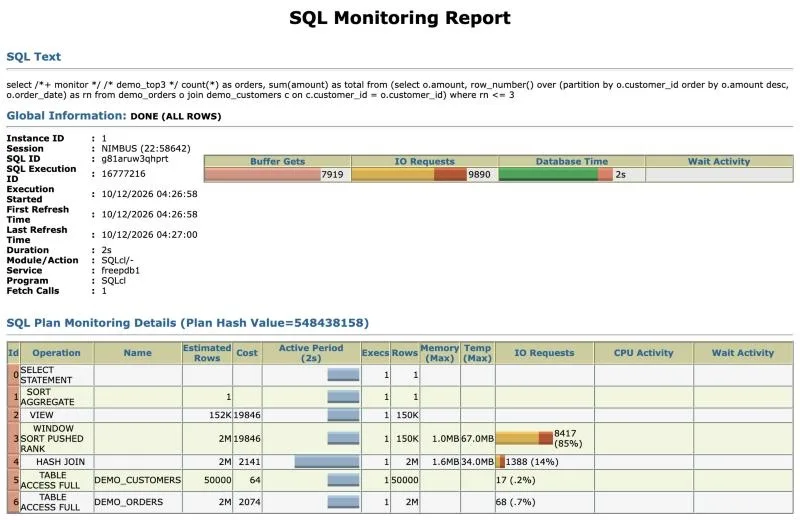
The bars make the busy step obvious at a glance: the window sort has 85% of the IO requests and 67 MB of temp. The ACTIVE type produces an interactive version of this page, which loads its scripts from Oracle's website when opened.
Things to Know
- Run the report while a statement is still executing to see which step it is working on and how far it has come.
- The NO_MONITOR hint excludes a statement from monitoring.
- Monitoring data is kept in memory and ages out; for statements that ran hours ago, use the report soon or the Automatic Workload Repository, where licensed.
Related Guides
Conclusion
Run long statements with monitoring, automatic after 5 seconds or forced with the MONITOR hint, find them in V$SQL_MONITOR, and create the report with DBMS_SQL_MONITOR.REPORT_SQL_MONITOR. The per-operation time, rows, memory, and temp show exactly which step to tune.
