
Business forms rarely talk only to their own database. Insurers, laboratories, and payment providers offer REST services: web addresses a program calls with an HTTP method (GET to read, POST to create, PUT or PATCH to change, DELETE to remove) that answer with a status code and, usually, JSON.
Oracle Forms 14.1.2 adds built-in packages for them: FHTTP sends the request, FJSON builds and reads JSON, and FSCRATCHPAD buffers responses that are not JSON. This guide calls a claims service from a form: reading a plan, posting a claim, listing claims, handling status codes, and authorization.
Sample Form for This Guide
The examples and screenshots use the sample form CH32_CLAIMS from the Oracle Forms code repository on GitHub. Download it, open it in Forms Builder, and connect as CAREWELL to follow along.
| Form | File | What it shows |
|---|---|---|
| CH32_CLAIMS | forms/ch32/ch32_claims.fmb | Invoices with coverage, claims, and claim lists from a REST service |
The forms run against the CareWell Clinic sample schema, which you install first.
REST in Oracle Forms at a Glance
| Package | What it does |
|---|---|
| FHTTP | ISSUE_REQUEST sends an HTTP request and returns the status code. |
| FJSON | Creates, reads, and changes JSON elements, and generates JSON text. |
| FSCRATCHPAD | A buffer for responses that are not JSON. |
The requests are sent by the Forms server, not by the user's computer. The built-in packages are listed in how to write PL/SQL in Oracle Forms.
The Sample Service
A small test service of an insurance administrator runs at http://localhost:8098/api/v1, with three operations:
- GET /plans/{id} returns an insurance plan.
- POST /claims submits a claim.
- GET /claims?patient={mrn} lists a patient's claims.
The last two require a bearer token in the Authorization header. The sample claims form uses all three for the clinic's invoices.
Call a Service with FHTTP.ISSUE_REQUEST
Syntax:
fhttp.issue_request(method varchar2, server_url_or_id varchar2, uri_template varchar2,
                    url_parameters fjson.element_t, request_headers fjson.element_t,
                    request_body fjson.element_t, accept varchar2, parse varchar2,
                    authorization_info varchar2, connect_timeout pls_integer,
                    read_timeout pls_integer,
                    response_headers out fjson.element_t,
                    response_body out fjson.element_t) return pls_integer
The function returns the HTTP status code. Its main parameters:
| Parameter | Meaning |
|---|---|
| method | GET, POST, PUT, PATCH, DELETE, and the other HTTP methods. |
| server_url_or_id, uri_template | The address, in two parts. The template may contain variables in braces, such as /api/v1/plans/{id}, whose values come from url_parameters, a JSON object. Forms encodes the values for the URL, so a value cannot change the address's structure. |
| request_headers, request_body | A JSON object of headers, and the JSON to send with POST, PUT, and PATCH. |
| accept | Status codes the code will handle, besides 200, 204, and 201 for POST and PUT, which are always accepted. Any other status raises an exception. |
| parse | When to parse the response as JSON; by default (*), when its content type is JSON. The parsed response comes back in response_body, the headers in response_headers. |
| connect_timeout, read_timeout | Milliseconds, 60,000 by default. |
The parameters after uri_template are optional; the examples name them all, to show them.
Example: Read a Plan with GET
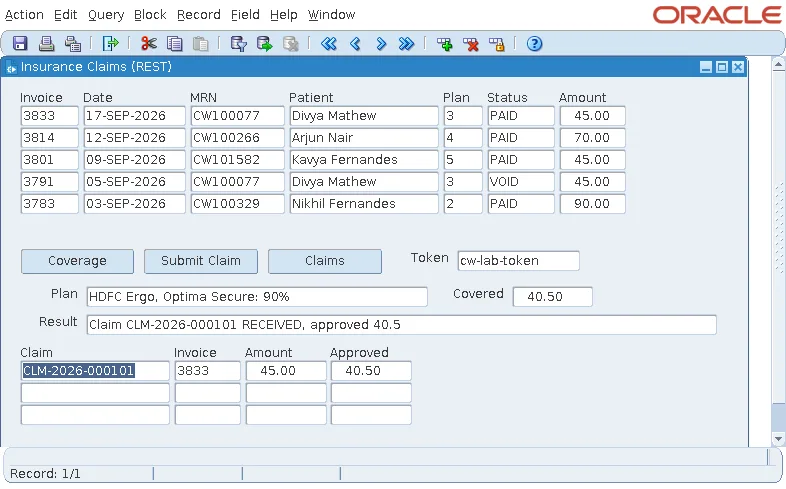
The Coverage button reads the plan of the current invoice's patient and computes the part the insurer pays.
Example (WHEN-BUTTON-PRESSED trigger on CTL.COVERAGE):
declare
  v_params  fjson.element_t := fjson.new_object(1);
  v_headers fjson.element_t;
  v_plan    fjson.element_t;
  v_status  pls_integer;
begin
  fjson.put_string(v_params, 'id', to_char(:invoices.plan_id));
  v_status := fhttp.issue_request(
                method             => 'GET',
                server_url_or_id   => 'http://localhost:8098',
                uri_template       => '/api/v1/plans/{id}',
                url_parameters     => v_params,
                request_headers    => null,
                request_body       => null,
                accept             => null,
                parse              => '*',
                authorization_info => null,
                connect_timeout    => 5000,
                read_timeout       => 5000,
                response_headers   => v_headers,
                response_body      => v_plan);
  :ctl.plan := fjson.get_string_value(v_plan, 'provider') || ', '
               || fjson.get_string_value(v_plan, 'planName') || ': '
               || fjson.get_number_value(v_plan, 'coveragePct') || '%';
  :ctl.covered := round(:invoices.total_amount
                        * fjson.get_number_value(v_plan, 'coveragePct') / 100, 2);
  fjson.free_all;                                         -- release the parsed JSON
end;
For plan 3, the service answered this.
Output:
{"planId": 3, "provider": "HDFC Ergo", "planName": "Optima Secure", "coveragePct": 90, "annualLimit": 1000000}The form showed HDFC Ergo, Optima Secure: 90% and a covered amount of 40.50 on an invoice of 45.00.
Build and Read JSON with FJSON
A parsed JSON value is an element, of type FJSON.ELEMENT_T: an object, an array, a string, a number, a Boolean, or null. FJSON's functions create elements, read them, and change them:
| Task | Functions |
|---|---|
| Create | NEW_OBJECT(expected_size), NEW_ARRAY, NEW_STRING, NEW_NUMBER; PARSE(text) makes an element from JSON text. |
| Fill an object | PUT_STRING(object, key, value), PUT_NUMBER, PUT_BOOLEAN, PUT_NULL, PUT(object, key, element). |
| Fill an array | ADD_STRING, ADD_NUMBER, ADD. |
| Read an object | GET_STRING_VALUE(object, key), GET_NUMBER_VALUE, GET_BOOLEAN_VALUE, GET_OBJECT, GET_ARRAY, and GET, which returns null for a missing key. |
| Read an array | NUM_ELEMENTS(array) and FIND(array, position), 1-based. |
| Text | GENERATE(element) returns the JSON text. |
| Memory | Elements live until FREE_ALL releases every element the form has created. Call it when a request's data is no longer needed. |
The values in the request above were built with NEW_OBJECT and PUT_STRING, not by concatenating text, so a value with a quote or a brace in it stays a value.
Example: Send JSON with POST
Submit Claim builds the claim as a JSON object and posts it, with the token in a header.
Example (WHEN-BUTTON-PRESSED trigger on CTL.SUBMIT):
declare
  v_headers  fjson.element_t := fjson.new_object(1);
  v_body     fjson.element_t := fjson.new_object(4);
  v_response fjson.element_t;
  v_rheaders fjson.element_t;
  v_status   pls_integer;
begin
  fjson.put_string(v_headers, 'Authorization', 'Bearer ' || :ctl.token);
  fjson.put_string(v_body, 'patientMrn', :invoices.mrn);
  fjson.put_number(v_body, 'invoiceId', :invoices.invoice_id);
  fjson.put_number(v_body, 'planId', :invoices.plan_id);
  fjson.put_number(v_body, 'amount', :invoices.total_amount);
  v_status := fhttp.issue_request(
                method             => 'POST',
                server_url_or_id   => 'http://localhost:8098',
                uri_template       => '/api/v1/claims',
                url_parameters     => null,
                request_headers    => v_headers,
                request_body       => v_body,
                accept             => '401,422',             -- handled below
                parse              => '*',
                authorization_info => null,
                connect_timeout    => 5000,
                read_timeout       => 5000,
                response_headers   => v_rheaders,
                response_body      => v_response);
  if v_status = 201 then
    :ctl.result := 'Claim ' || fjson.get_string_value(v_response, 'claimId') || ' '
                   || fjson.get_string_value(v_response, 'status') || ', approved '
                   || fjson.get_number_value(v_response, 'approvedAmount');
  else
    :ctl.result := 'HTTP ' || v_status || ': '
                   || fjson.get_string_value(v_response, 'error');
  end if;
  fjson.free_all;
end;
The service created the claim and answered 201.
Output:
{"claimId": "CLM-2026-000101", "status": "RECEIVED", "patientMrn": "CW100077", "invoiceId": 3833, "amount": 45, "approvedAmount": 40.5}What Forms Actually Sends
The test service logged what Forms sent: the body as the JSON text of the object, {"patientMrn":"CW100077","invoiceId":3833,"planId":3,"amount":45}, in chunked transfer encoding, with an offer to upgrade to HTTP/2, and no Content-Type header.
- Add content-type: application/json to the headers for services that check it.
- For a server that mishandles the HTTP/2 offer, FHTTP.SET_SERVER_OPTION(url, FORCE_HTTP_1_1) keeps requests to that server in HTTP/1.1.
Example: Read an Array
Claims lists the patient's claims. The response is a JSON array of objects: NUM_ELEMENTS and FIND visit them, and each becomes a record of the control block CLAIMS.
Example (WHEN-BUTTON-PRESSED trigger on CTL.LIST):
declare
  v_params  fjson.element_t := fjson.new_object(1);
  v_headers fjson.element_t := fjson.new_object(1);
  v_rheads  fjson.element_t;
  v_claims  fjson.element_t;
  v_claim   fjson.element_t;
  v_status  pls_integer;
begin
  fjson.put_string(v_params, 'mrn', :invoices.mrn);
  fjson.put_string(v_headers, 'Authorization', 'Bearer ' || :ctl.token);
  v_status := fhttp.issue_request('GET', 'http://localhost:8098',
                                  '/api/v1/claims?patient={mrn}', v_params, v_headers,
                                  null, null, '*', null, 5000, 5000, v_rheads, v_claims);
  go_block('CLAIMS');
  clear_block(no_validate);
  for i in 1 .. fjson.num_elements(v_claims) loop       -- the response is a JSON array
    v_claim := fjson.find(v_claims, i);
    :claims.claim_id := fjson.get_string_value(v_claim, 'claimId');
    :claims.invoice_id := fjson.get_number_value(v_claim, 'invoiceId');
    :claims.amount := fjson.get_number_value(v_claim, 'amount');
    :claims.approved := fjson.get_number_value(v_claim, 'approvedAmount');
    next_record;
  end loop;
  first_record;
  fjson.free_all;
end;
Handle Status Codes and Errors
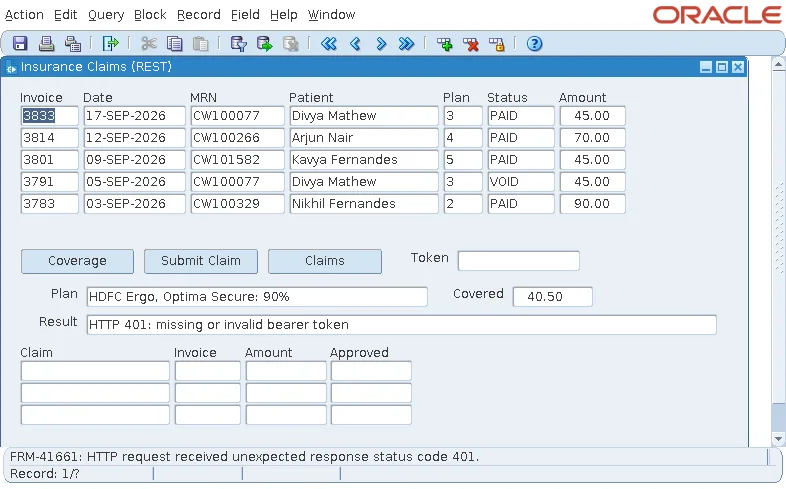
The service answers errors with a status code and a JSON object explaining them: 401 without a valid token, 404 for an unknown plan, 422 for a claim without an amount. What reaches the form depends on accept:
- A status listed in accept is returned to the code, with the body parsed. Submit Claim accepts 401 and 422, and shows the service's message.
- Any other unexpected status raises FHTTP.BAD_RESPONSE, and Forms reports it.
Output:
FRM-41661: HTTP request received unexpected response status code 401.
In a session where the token was empty, Submit Claim displayed HTTP 401: missing or invalid bearer token, while Claims, which accepts no error code, stopped with FRM-41661. The full error is also written to the Forms diagnostic log, formsapp-diagnostic.log, with the URL.
A timeout, or a server that cannot be reached, raises FHTTP.BAD_RESPONSE too. A handler for it, or for all errors in ON-ERROR, turns these into messages the user can act on, such as The insurer's service does not answer; try again later. See how to handle errors using ON-ERROR.
Authorization
Submit Claim sends its bearer token in a header, from an item: simple, and enough for a test. In production, a token or password must not live in a form or be typed by users.
Forms 14.1.2 stores such credentials on the server, in the domain's credential store (Oracle Platform Security Services), in the credential map FormsREST, each under a key called the Credential ID. The code passes the Credential ID in authorization_info, and Forms adds the credential to the request as a bearer token, an API key, basic authentication, or OAuth 2 client credentials. Oracle's documentation describes creating the key in Fusion Middleware Control, under Security, Credentials.
A Setup That Needs a Full Domain
In testing, this setup could not be completed. The test domain, created without a repository database, runs Oracle's middleware in restricted mode, and its credential store has no management interface: the WebLogic scripting tool failed with InstanceNotFoundException: com.oracle.jps:type=JpsCredentialStore. A key written by other means, with a matching permission, was still reported as missing when the form ran.
Output:
FRM-41700: HTTP request authorization failed
The diagnostic log gave the reason: authorization failed due to missing credential for CW_CLAIMS. Plan server credentials with the domain's administrator. On a domain like the test one, send tokens in headers taken from a secure place, such as a database table readable only by the application, rather than from items.
Conclusion
FHTTP.ISSUE_REQUEST sends a REST request from the Forms server and returns the status code, with URI templates and JSON parameters building the address safely. FJSON builds request bodies and reads responses, objects with GET_*_VALUE and arrays with NUM_ELEMENTS and FIND, and FREE_ALL releases their memory. List the statuses your code handles in accept, because others raise FRM-41661, add a Content-Type header for strict services, and keep credentials on the server under a Credential ID when your domain supports it.
