
Writing FHTTP.ISSUE_REQUEST calls by hand for every operation of a REST service is repetitive. Many services publish an OpenAPI document, formerly called Swagger, that describes their operations, parameters, and data, and Oracle Forms 14.1.2 can turn it into PL/SQL for you.
This guide uses the REST Package Designer, new in Forms Builder 14.1.2, to generate packages for a claims service, looks at the generated code, calls it from a form, and covers the authorization packages it creates.
Sample Form for This Guide
The examples and screenshots use the sample form CH32_REST_PACKAGES from the Oracle Forms code repository on GitHub. Download it, open it in Forms Builder, and connect as CAREWELL to follow along.
| Form | File | What it shows |
|---|---|---|
| CH32_REST_PACKAGES | forms/ch32/ch32_rest_packages.fmb | The packages generated by the REST Package Designer, and a call to one |
The forms run against the CareWell Clinic sample schema, which you install first.
The REST Package Designer at a Glance
| What it generates | Contents |
|---|---|
| Operation packages | One per operation, named after its operationId, with an ACCESS function whose parameters are the operation's parameters and whose result is the status code. |
| Authorization packages | One per security scheme of the document, with an ENCODE function that returns the authorization_info for its Credential ID. |
The generated code calls FHTTP.ISSUE_REQUEST, covered in how to call REST services from Oracle Forms.
Read an OpenAPI Document
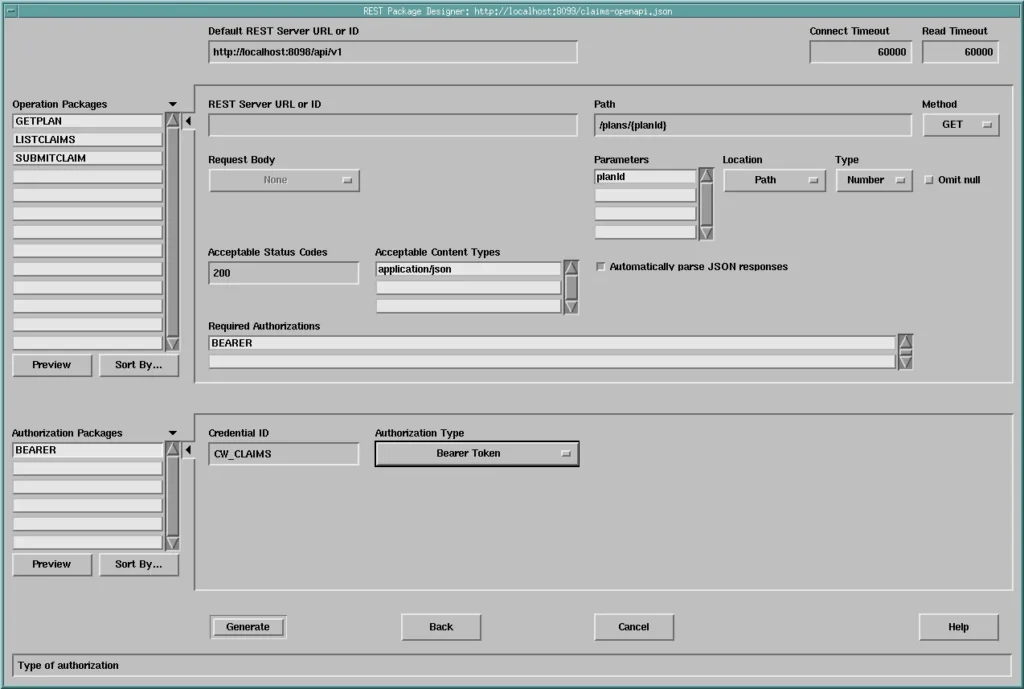
Choose Tools, REST Package Designer. The designer asks for the URL of the OpenAPI document; the test service publishes one at http://localhost:8099/claims-openapi.json. It then shows what it found.
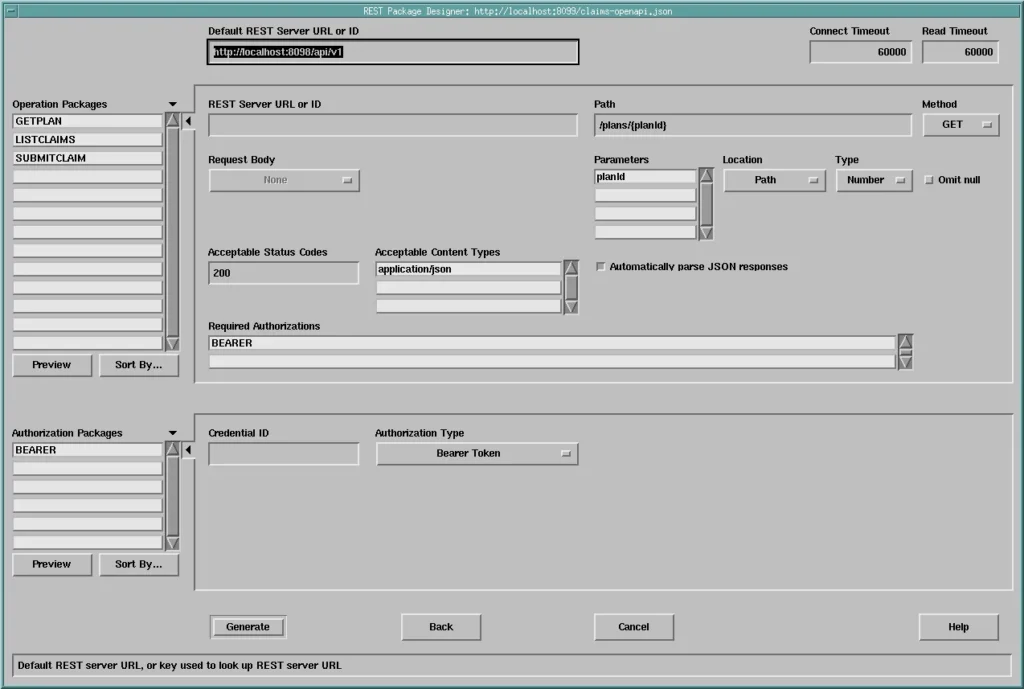
- Operation Packages: one for each operation, named after its operationId, here GETPLAN, LISTCLAIMS, and SUBMITCLAIM. For the one selected, it shows the server, path, and method, the parameters and where they go (path, query, or header), the request body, the acceptable status codes, and the Required Authorizations.
- Authorization Packages: one for each security scheme of the document, here BEARER, with its Credential ID and Authorization Type.
Preview and Generate
Preview shows a package's code before it is generated.
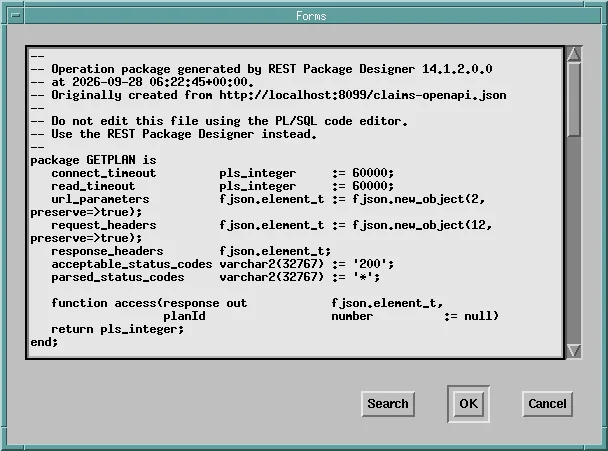
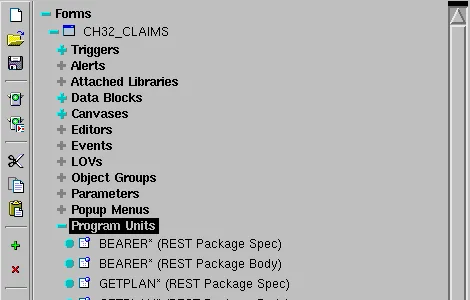
Generate adds the packages to the current form, as program units of the new types REST Package Spec and REST Package Body.
The Generated Code
The package of an operation has a function ACCESS, whose parameters are the operation's parameters and whose result is the status code. Package variables hold the timeouts, the headers, and the acceptable codes, which your code can change before calling it. Here is the generated GETPLAN; its required authorization was cleared in the designer, because the plans need none.
Program units GETPLAN (REST Package Spec and Body), as generated:
--
-- Operation package generated by REST Package Designer 14.1.2.0.0
-- at 2026-09-28 06:49:28+00:00.
-- Originally created from http://localhost:8099/claims-openapi.json
--
-- Do not edit this file using the PL/SQL code editor.
-- Use the REST Package Designer instead.
--
package GETPLAN is
   connect_timeout         pls_integer     := 60000;
   read_timeout            pls_integer     := 60000;
   url_parameters          fjson.element_t := fjson.new_object(2, preserve=>true);
   request_headers         fjson.element_t := fjson.new_object(12, preserve=>true);
   response_headers        fjson.element_t;
   acceptable_status_codes varchar2(32767) := '200';
   parsed_status_codes     varchar2(32767) := '*';

   function access(response out            fjson.element_t,
                   planId                  number          := null)
   return pls_integer;
end;

-- (the same header comment)
package body GETPLAN is
   function access(response out            fjson.element_t,
                   planId                  number          := null)
   return pls_integer is
      http_status     pls_integer;
   begin
      fjson.put_string(url_parameters, 'planId', planId);
      http_status :=
      fhttp.issue_request(
            method             => 'GET',
            server_url_or_id   => 'http://localhost:8098/api/v1',
            uri_template       => '/plans/{planId}',
            url_parameters     => url_parameters,
            request_headers    => request_headers,
            accept             => acceptable_status_codes,
            parse              => parsed_status_codes,
            connect_timeout    => connect_timeout,
            read_timeout       => read_timeout,
            response_headers   => response_headers,
            response_body      => response
      );
      return http_status;
   end;
begin
   fjson.put_string(request_headers, 'accept', 'application/json');
end;
The header comment says it plainly: do not edit the generated code. Run the designer again when the service changes, from the same document. Notice that the package sets an accept header in its initialization section, one of the details it handles for you.
Call the Generated Package
Code calls the package like any other. The By Package button of the sample form computes an insurance coverage through it.
Example (WHEN-BUTTON-PRESSED trigger on CTL.COVERAGE2):
declare
  v_plan   fjson.element_t;
  v_status pls_integer;
begin
  v_status := getplan.access(v_plan, :invoices.plan_id);   -- generated by the designer
  :ctl.plan := fjson.get_string_value(v_plan, 'provider') || ', '
               || fjson.get_string_value(v_plan, 'planName')
               || ' (HTTP ' || v_status || ')';
  :ctl.covered := round(:invoices.total_amount
                        * fjson.get_number_value(v_plan, 'coveragePct') / 100, 2);
  fjson.free_all;
end;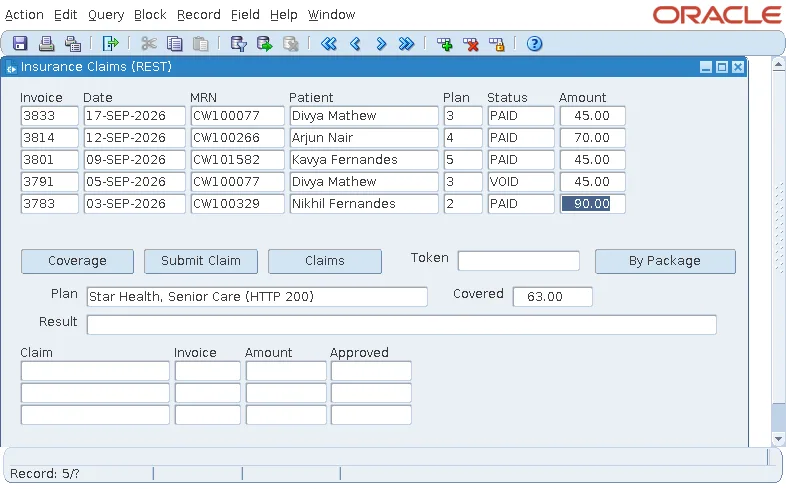
Compared with calling FHTTP.ISSUE_REQUEST directly, the call shrinks to one line with named, typed parameters. FJSON still reads the response, and FJSON.FREE_ALL still releases it.
Authorization Packages
The authorization package BEARER has a single function, ENCODE, which returns the authorization_info for the Credential ID set in the designer. The operations that require it pass BEARER.encode to ISSUE_REQUEST.
- With no Credential ID, a call fails with FRM-41600: invalid 'authorization_info' parameter passed to FHTTP.ISSUE_REQUEST.
- With one, the credential must exist in the server's credential store under that ID, which needs a domain whose credential store can be managed.
Conclusion
The REST Package Designer in Oracle Forms 14.1.2 reads an OpenAPI document and generates an operation package, with an ACCESS function, for each operation, plus an authorization package for each security scheme. Preview the code, generate it into the form as REST Package Spec and Body units, and never edit it by hand: regenerate from the document when the service changes. Your code then calls ACCESS in one line and reads the result with FJSON, while server-side credentials handle authorization.
