
Every Oracle Forms application reaches its users through one file: formsweb.cfg. It decides which form starts, which JAR files the client loads, how the window looks, which database account is used, and which parameters a URL may change.
This guide explains how a form reaches the user in Oracle Forms 14.1.2, step by step, then covers formsweb.cfg's sections and substitutions, the parameters to restrict for security, passwords, managing the file in Fusion Middleware Control, the clients, and a reference of every parameter by purpose.
How a Form Reaches the User
Three programs run a form: the Forms client on the user's computer, the Forms and Listener servlets on the Forms server, and a runtime process per session.
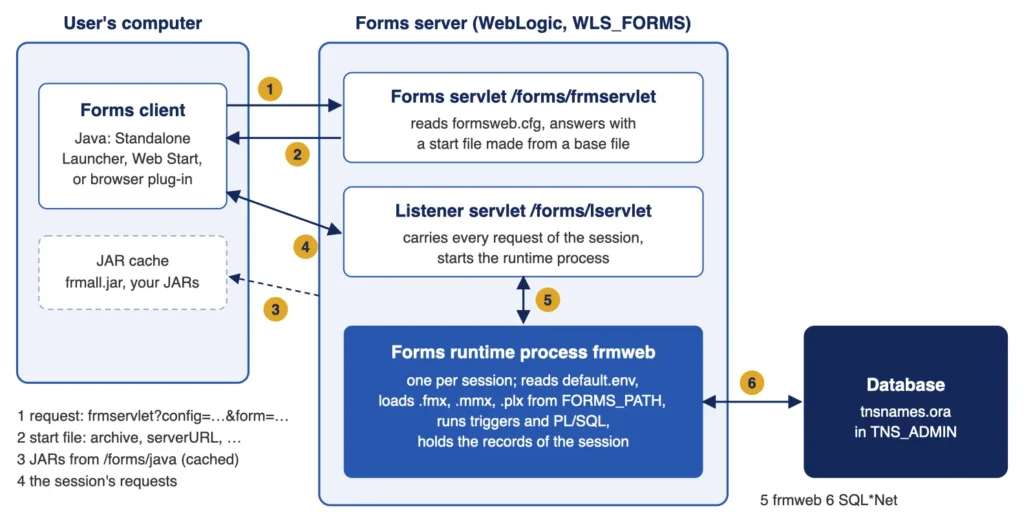
- The request. The client asks the Forms servlet, /forms/frmservlet, for an application, such as frmservlet?config=book&form=ch20_search.fmx. The Standalone Launcher sends the URL given with -url; a browser, the URL of a link.
- The start file. The servlet reads the configuration section named by config from formsweb.cfg, merges the URL's parameters into it, and answers with a start file made from a base file: an HTML page for a browser (baseHTML, baseHTMLjpi), a JNLP file for Java Web Start (basejnlp), or a text file for the Standalone Launcher (baseSAAfile).
- The JAR files. The client downloads the JARs of the archive from /forms/java, or takes them from its cache when they have not changed.
- The session. The client connects to the Listener servlet, /forms/lservlet, which carries every request of the session from then on.
- The runtime process. The Listener servlet starts a Forms runtime process, frmweb, for the session.
- The database. The runtime process loads the form from the directories of FORMS_PATH, connects to the database named in the userid, and runs the form until the user leaves, when the process ends.
The Start File
The start file tells the client which JAR files to load, and where to connect next.
Part of a start file:
<PARAM NAME="ARCHIVE" VALUE="frmall.jar,carewell_icons.jar,carewell_beans.jar" > <PARAM NAME="serverURL" VALUE="/forms/lservlet?ifcfs=/forms/frmservlet?config=book&form=ch20_search.fmx..."> <PARAM NAME="lookAndFeel" VALUE="Oracle"> <PARAM NAME="colorScheme" VALUE="swan">
The serverURL hands the Listener servlet the original request, ifcfs=.... The Listener servlet reads the section again on the server, so the user name, password, and form it uses never travel in the start file.
The Runtime Process
The Listener servlet builds the process's command line from the section's serverArgs parameter, module=%form% userid=%userid% ... %otherparams%, and its environment from the section's environment file. In a test, the process of a session ran as a child of the Forms server's own process, with the section in its arguments.
Output:
  PID  PPID COMMAND  ARGS
18029  8064 frmweb   /u01/oracle/fmw/bin/frmweb webfile=HTTP-0,book
The client draws, and the runtime process does everything else. When the client stops calling, closed or crashed, the runtime process ends after FORMS_TIMEOUT minutes. The runtime environment is covered in how to set the Oracle Forms runtime environment.
Where formsweb.cfg Lives
formsweb.cfg is a text file of configuration sections, each a list of name=value parameters. It is in the Forms application's configuration directory: config/fmwconfig/servers/WLS_FORMS/applications/formsapp_14.1.2/config in a full domain, with AdminServer instead of WLS_FORMS in a development domain, which runs Forms in the Administration Server.
Sections and Their Order
The section [default] holds a value for every parameter an application needs. Oracle's copy starts like this.
The start of the [default] section:
[default]
baseSAAfile=basesaa.txt
envFile=default.env
serverArgs=%escapeparams% module=%form% userid=%userid% debug=%debug% host=%host% port=%port% %otherparams%
form=test.fmx
otherparams=obr=%obr% record=%record% tracegroup=%tracegroup% log=%log% term=%term% ...
width=750
height=600
archive=frmall.jar
restrictedURLparams=pageTitle,HTMLbodyAttrs,HTMLbeforeForm,HTMLafterForm,log
A named section, such as [book], lists only what differs from [default]. A value is looked up in three places, and the first that has it wins:
- The URL, for parameters that may be given there.
- The section named by config in the URL.
- [default].
Substitution with %name%
%name% inside a value is replaced by the value of the parameter name: serverArgs and otherparams are built this way, and so is webFormsTitle=%pageTitle%. A value from the URL takes part in the substitution; in a test, &width=333 came back in the start file as WIDTH="333". That is how otherparams=P_USER=BILLING1 in a URL passes a parameter to a form, as in how to pass parameters to a form.
The servlet reads formsweb.cfg on each request, so a changed section applies to the next session, without a restart.
What the URL May Change
Oracle's documentation classifies each parameter by who may set it:
| Class | Set by | Examples |
|---|---|---|
| Application user parameters | The section, or the URL | Most parameters. |
| Application system parameters | The section only; a URL value is ignored | envFile, baseSAAfile, serverURL, the single sign-on parameters, and others. |
| Global system parameters | [default] or the section they name, for the whole installation | allowNewConnections, maxRuntimeProcesses, the prestart parameters. |
Restrict URL Parameters
restrictedURLparams lists more parameters a URL may not give. A URL that tried to set a restricted parameter was refused.
Output:
FRM-93150: The following restricted parameters cannot be specified in the URL:
    pageTitle
The default list does not include userid. In a test, a URL with a made-up userid=nobody/fake@nowhere had it carried back in the start file: a password in a URL travels to the server and back, and any user can choose another account.
Add userid, and form, config, or otherparams when users must not choose them, to restrictedURLparams in production sections, and give each application a section of its own. restrictedURLchars refuses characters in the URL's query string.
Passwords in formsweb.cfg
A section's userid holds a password. Fusion Middleware Control stores it encrypted, as userid={AES}..., with a key of the domain. A value copied to another domain failed there, with error decrypting userid in the Forms server's diagnostic log, and had to be entered again.
Where users log on themselves, leave userid empty, and Forms shows its logon dialog; with single sign-on, no password is stored at all.
Manage formsweb.cfg in Fusion Middleware Control
A full domain manages these files in Fusion Middleware Control, at /em on the Administration Server. Under Forms in the target navigation, the Forms instance's home page lists its deployments, with a page for each kind of file:
- Web Configuration edits formsweb.cfg: the list of sections, with Create, Create Like, Edit, and Delete, and below, the parameters of the selected section, filtered by the Show list (basic, sso, trace, plugin, html, applet, advanced, all), with Add, Delete, Override of an inherited value, and Apply to save. A password entered as userid is stored encrypted.
- Environment Configuration edits default.env and the other environment files; Duplicate File creates a new one.
- Font and Icon Mapping edits Registry.dat.
- Advanced Configuration edits the other files as text.
Use One Tool at a Time
Fusion Middleware Control keeps its own copy of the files and writes them back whole. In a test, a change made to formsweb.cfg with an editor, followed by an Apply in Fusion Middleware Control, left the file empty, every section gone, until the next Apply wrote it again from Fusion Middleware Control's copy. A development domain without Fusion Middleware Control is configured with an editor alone.
The Clients
- The Forms Standalone Launcher is the client for Forms 14.1.2: java -jar frmsal.jar -url "...", with -t for the time to wait for the server (in milliseconds), -showConfig to print the configuration received, and -showDetails for details of the start. The section's baseSAAfile is its template, and fsalJavaVersion and fsalEnableAutoUpdate control its version checks. See how to install Oracle Forms 14.1.2.
- Java Web Start starts the client from a JNLP file (basejnlp, webstart): a link in a browser downloads it, and Java runs it.
- The Java plug-in in a browser (baseHTML, baseHTMLjpi, the jpi_ parameters) is the historic client, which current browsers no longer support.
formsweb.cfg Parameter Reference
The parameters of formsweb.cfg, by purpose. Parameters marked system cannot be given in the URL.
Starting the Application
| Parameter | Description |
|---|---|
| form | The first module to run (.fmx). |
| userid | User, password, and database alias; empty for the logon dialog. |
| otherparams | More runtime parameters, as name=value pairs; %name% takes values from the section. |
| serverArgs | The command line of the runtime process, built from the parameters above. |
| envFile | The environment file of the runtime (system). |
| escapeparams | Whether special characters in runtime parameters are escaped (default TRUE). |
| query_only, quiet, array | Runtime options: no changes to data; no beep; array processing on or off. |
| debug_messages | Messages about each trigger as it runs. |
| term | A key mapping file other than fmrweb.res. |
| HTMLdelimiter | The character around variables in base files (%). |
| obr | For Oracle's internal use. |
The Client's Window and Look
| Parameter | Description |
|---|---|
| width, height | The size of the client window, in pixels. |
| separateFrame | Whether the application runs in a window of its own (browser client). |
| alwaysOnTop, centerOnStartup, isResizable | The separate window: on top, centered, resizable. |
| showMDITitleBar, guiMode | The title bar and menu bar of the main window. |
| hideWindowMenuItem, disableMDIScrollbars | Hide the Window menu; remove the main window's scroll bars. |
| lookAndFeel, colorScheme, customColorScheme | Oracle or Generic look; a color scheme, or one defined in Registry.dat. |
| background, splashScreen, logo, logoClickURL, scaleLogo | Images of the client, and the link of the logo. |
| hideActivityBar | Hide the activity bar that shows the client is busy. |
| dynamicLayout | Whether the window is redrawn while it is resized. |
| clientDPI, clientDPIRatio | Scaling of the application for the display. |
| digitSubstitution | The shape of digits in bidirectional languages. |
| highContrast, darkLook, darkMode | Adjust colors for readability. |
| honorLineWidth, useAntiAlias | Drawing of lines and shapes. |
| cursorBlinkRate, tabstop | The text cursor; tab stops in multi-line items. |
| smartBarHeight, smartbarIconScaling | The size of the toolbar (SmartBar) and its icons. |
| treeIconHeight, treeIconScaling | Icons of hierarchical trees. |
| smoothScalingMaxZoom | Smooth scaling of images below a zoom factor. |
| consoleUseRegistryFont | The font of the message line, from Registry.dat. |
| serverApp | The application-specific entries of Registry.dat to use. |
| allowAlertClipboard, disableValidateClipboard | The clipboard: alert when unavailable; validation on focus changes. |
| hideAppletVersion, hideClientExceptions | What the client shows in its console and error dialogs. |
Start Files and Pages
| Parameter | Description |
|---|---|
| baseHTML, baseHTMLjpi | Templates of the browser page (system). |
| basejnlp | Template of the Java Web Start file (system). |
| baseSAAfile | Template of the Standalone Launcher's start file (system). |
| pageTitle, HTMLbodyAttrs, HTMLbeforeForm, HTMLafterForm | The browser page's title, body attributes, and content around the application (restricted). |
| gzipCompressApplet, removeCommentLinesFromApplet | Make the start file smaller (system). |
JAR Files and Clients
| Parameter | Description |
|---|---|
| archive | The JAR files of the client. |
| codebase, imageBase | Where JARs and images are downloaded from (/forms/java). |
| java_version, fsalJavaVersion | The Java version the client requires. |
| fsalcheck, fsalEnableAutoUpdate, fsalUpdateDialogText | The Standalone Launcher's version check and automatic update. |
| ignoreSaaCache, ignoreMissingSaaArchives | Download JARs again; continue when a JAR is missing. |
| webstart, webstart_codebase | Java Web Start (system). |
| jnlpMatchIP, jnlpTimeout, jnlp2FA | Restrictions on JNLP files: same address, validity, verification code. |
| jpi_classid, jpi_codebase, jpi_download_page, jpi_mimetype, legacy_lifecycle, separate_jvm | The Java plug-in of browsers. |
| applet_name | The applet's name, for JavaScript integration in a browser page. |
Sessions, Network, and Capacity
| Parameter | Description |
|---|---|
| serverURL | The Listener servlet (system). |
| heartBeat | Minutes between the client's signs of life (default 2). |
| maxeventwait | Milliseconds between the client's checks for server events. |
| idleTimeout | Seconds without activity before the client-idle event. |
| networkRetries | Times the client retries after a network failure. |
| JavaScriptBlocksHeartBeat, sendHeartBeatBean | Keep the heartbeat going during blocking JavaScript calls and modal bean dialogs. |
| networkStats, pingStats, pingWait | Round-trip statistics of the client. |
| sessionCookieName, sessionCookiePath, preserveHttpSessionId | The HTTP session cookie. |
| defaultcharset | The character set of servlet requests and responses. |
| allowNewConnections, connectionDisallowedURL | Accept new sessions, or redirect them — for maintenance (global). |
| maxRuntimeProcesses | The most runtime processes at a time (global). |
| prestartRuntimes, prestartInit, prestartMin, prestartIncrement, prestartTimeout | Runtime processes started in advance (global). |
Security and Single Sign-On
| Parameter | Description |
|---|---|
| restrictedURLparams, restrictedURLchars | Parameters and characters refused in URLs (system). |
| ssoMode | Single sign-on for the section (system). |
| ssoProxyConnect | Connect to the database as a proxy user for the signed-on user. |
| ssoDynamicResourceCreate, ssoCancelUrl, ssoErrorUrl | Creating the user's database resource on first sign-on. |
| ssoLogout, ssoLogoutRedirect, logoutTargetURLParamName | Sign-off when the application ends. |
| ssoSaaBrowserLaunchTimeout, ssoSaaBrowserPageTimeout, ssoSaaWaitInterval, ssoSuccessLogonUrl | Single sign-on for the Standalone Launcher, in a browser it opens. |
| OAuth2AuthorizationTimeout | Seconds to wait for OAuth2 authorization. |
Diagnostics
| Parameter | Description |
|---|---|
| debug, host, port | Debug mode, and the host and port of the debugger. |
| record, tracegroup, log | Forms Trace: record=forms, the events to trace, the file. |
| recordFileName, formsMessageListener | Recording of Forms messages for testing tools. |
| allow_debug, allowLservletDebug | Debug messages of the servlets in the diagnostic log; test commands. |
| EndUserMonitoringEnabled, EndUserMonitoringURL | Integration with Oracle End User Monitoring. |
WebUtil and JavaScript
| Parameter | Description |
|---|---|
| WebUtilArchive | WebUtil's JAR files. |
| WebUtilErrorMode, WebUtilLogging, WebUtilLoggingDetail, WebUtilVersion | Where WebUtil reports errors; its logging; its version in the console. |
| WebUtilMaxTransferSize, WebUtilDispatchMonitorInterval | Segment size of file transfers; how often the session is checked. |
| WebUtilTrustInternal, WebUtilNextGenHost | Trust of intranet computers; the security model of CLIENT_HOST. |
| enableJavaScriptEvent | JavaScript events and evaluation. |
| websocketJSILogging, websocketJSIServerTimeout, websocketJSISessionTimeout | WebSocket JavaScript integration: logging and idle timeouts. |
Conclusion
The Forms client asks the Forms servlet for an application, loads the JARs of the start file, and works through the Listener servlet, which starts one frmweb runtime process per session. formsweb.cfg holds sections: a named section adds to [default], and the URL overrides both, except for system and restricted parameters, with %name% substituting values. Restrict userid and the other parameters users must not choose, let Fusion Middleware Control encrypt passwords, and never edit a file it manages with another tool at the same time.
