
Oracle APEX 26.1 uses AI for its own users too, the developers. In SQL Workshop, the APEX Assistant writes queries over the tables of your schema from a question in plain language, and answers general PL/SQL questions. It saves typing, and it gets things wrong in ways worth knowing before you trust it.
This guide turns on the builder's AI service, uses the assistant's Query Builder and General Assistance modes, shows where each answer needed a correction, measures which model suits the builder, and notes what Data Reporter needs.
Code for This Guide
The query that measures the builder's AI calls is in the examples/ch22 folder of the Oracle AI code repository on GitHub, with its output.
These examples come from AI Applications with Oracle Database 26ai and APEX 26.1, a book of 237 tested examples of AI in Oracle Database and APEX.
The questions run against the help desk tables of the sample schema from setup/atlas. Generative AI services are covered in how to configure Generative AI services in Oracle APEX.
Turn On the Builder's AI Service
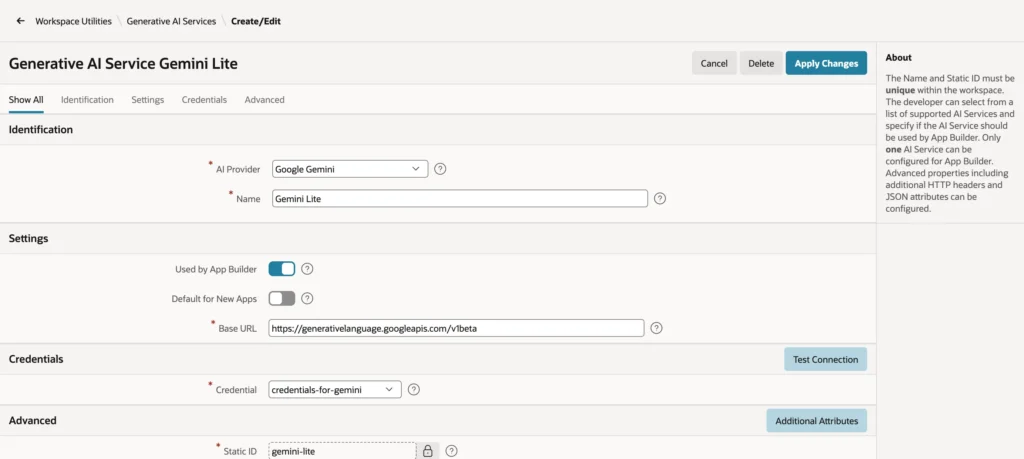
The development environment uses the one workspace AI service that has Used by App Builder turned on. In Workspace Utilities, Generative AI, open the service, turn the setting on, and apply the changes. Only one service can have it; turning it on for a second one fails with "Only one Generative AI Service can be configured to be used by App Builder."
The footer of every builder page then names the model. The first time you use an AI feature, APEX asks you to accept Oracle's terms for third-party generative AI services; choose Accept to go on, or Deny to leave the features off.
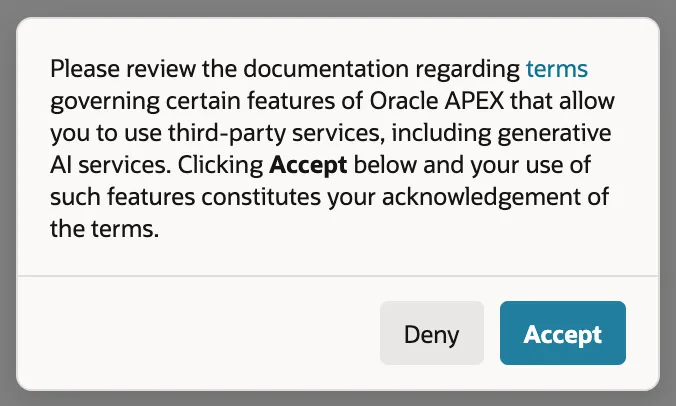
What the builder sends goes to the provider like any other prompt: your questions, and the names of the tables and columns the assistant needs. For a schema whose structure is itself confidential, choose the provider and its terms accordingly, or run a local model.
Write Queries in Query Builder Mode
In SQL Workshop, SQL Commands, choose APEX Assistant in the editor toolbar. A chat panel opens beside the editor. The menu at its top chooses the mode: Query Builder, which writes queries over the tables and views of the schema shown, or General Assistance.
In Query Builder mode, ask: "Which five companies have the most open tickets, and how many does each have?"
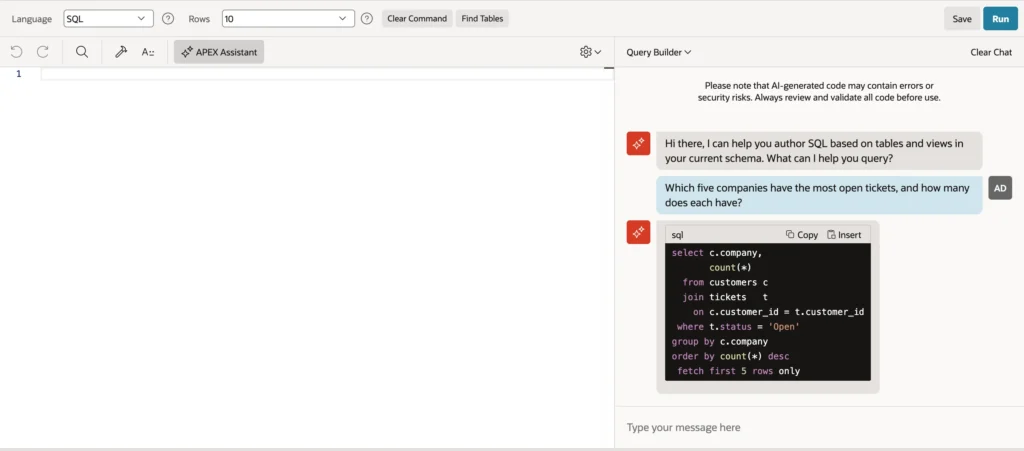
The query joins CUSTOMERS and TICKETS on the right column, counts, sorts, and keeps five rows, and counts only tickets whose status is Open. That is a fair reading of "open" but not the business's: tickets In Progress or Waiting are open too. The assistant knows the columns of the schema, not what their values mean to the business.
Say so in a follow-up: "Count tickets that are In Progress or Waiting as open too." The conversation keeps its context, and the answer changes only the condition. Choose Insert to put the query into the editor, then Run.
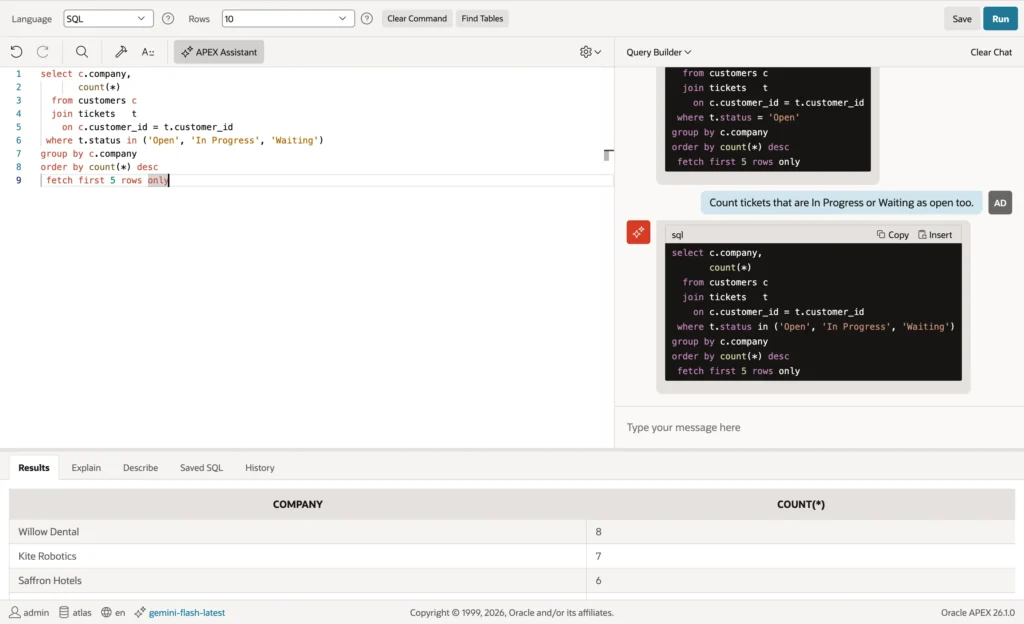
Copy copies the query instead, for use elsewhere. The same assistant appears in the SQL code editors of the builder, such as the query of a report page in the Create App wizard, with the same two modes.
Ask General Questions in General Assistance Mode
General Assistance is a general coding assistant. Clear the chat, switch the mode, and ask: "Write a PL/SQL procedure that closes the tickets of the TICKETS table that have been Waiting for more than 14 days."
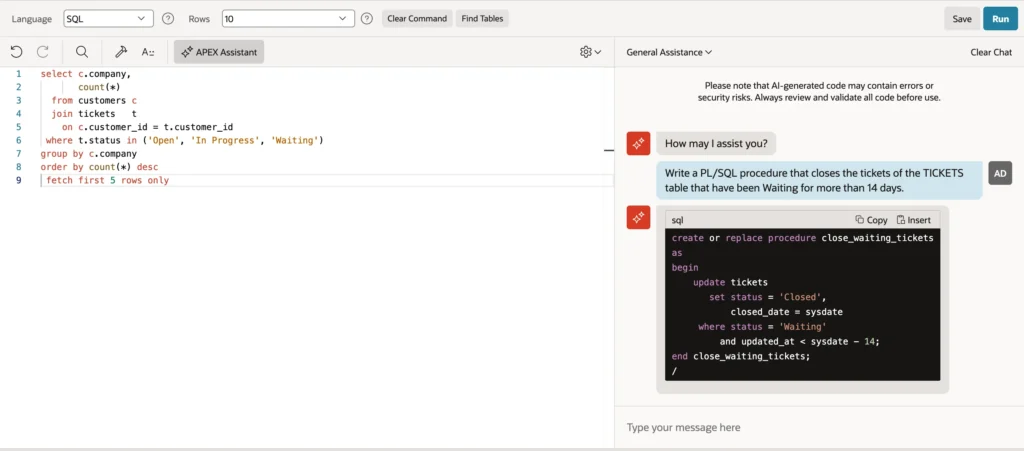
The procedure is well formed, and wrong for this schema: it sets CLOSED_DATE and compares UPDATED_AT, and TICKETS has neither column. The model wrote the procedure such a table usually has. Worse, the request cannot be met at all, because nothing records when a ticket became Waiting, and the answer does not say so. Compiling would show the missing columns at once; the missing information is something only a developer who knows the data notices. As the panel itself warns, AI-generated code may contain errors or security risks: review and validate it before use.
Choose a Model for the Builder
The builder's tasks are short and structured, and do not need a model that thinks at length. APEX_WEBSERVICE_LOG records every call APEX makes to a web service, including the builder's AI calls, with time and tokens. After the questions above, Used by App Builder was moved to a second service using the Lite model, and the first question was asked again.
Example:
-- the last four calls to Gemini: three from SQL Commands with Gemini, one with Gemini Lite
select to_char(request_date, 'HH24:MI:SS') as at,
       regexp_substr(url, 'models/([^:]+)', 1, 1, null, 1) as model,
       round(elapsed_sec, 1) as seconds,
       ai_tokens_consumed as tokens
from   apex_webservice_log
where  request_date > sysdate - 1/24
and    url like '%generativelanguage%'
order  by request_date desc
fetch  first 4 rows only;
Output:
AT          MODEL                          SECONDS    TOKENS
___________ ___________________________ __________ _________
11:57:11    gemini-flash-lite-latest           1.4      1429
11:55:55    gemini-flash-latest                9.3      3093
11:55:38    gemini-flash-latest                4.6      7831
11:55:31    gemini-flash-latest               24.6      6750
The thinking model took 24.6 seconds and 6,750 tokens to write the first query; the Lite model took 1.4 seconds and 1,429 tokens, and wrote the same query. Most of the difference is hidden thinking that a query over two tables does not need. For the builder, a fast, inexpensive model is the better choice; keep larger models for application features where their reasoning pays.
Data Reporter
Data Reporter, in the top menu of APEX 26.1, lets users create reporting applications on a schema's data without building a full application. It uses the same AI service as App Builder. Before anyone can use it, the instance administrator must choose how its applications sign users in, with HTTP header variable, SAML, or social sign-in, in Administration Services; until then, Data Reporter shows only a welcome page asking for this.
Conclusion
The APEX Assistant in SQL Commands uses the one AI service marked Used by App Builder. In Query Builder mode it writes correct joins over your schema but not your business meanings, so correct it with follow-ups; in General Assistance mode it can invent columns, so compile and review everything. Measure the builder's calls in APEX_WEBSERVICE_LOG and give it a fast Lite model: the same query came back in 1.4 seconds instead of 24.6.
See my articles more often when you search Google.
