
Anyone can guess passwords on a sign-in page, so an application should stop a user name after a few wrong attempts. In Oracle APEX there are two ways to do this.
Oracle APEX accounts have a built-in lockout that the instance administrator controls. For your own user table, you add the counter and the lock yourself in the authentication function.
This guide first shows what the built-in lockout does, then builds a lockout for a custom user table with a failed counter and a lock time. It ends with an unlock page for administrators. The tables and steps do not depend on any business data.
The guide Create Custom Authentication in 5 Easy Steps in Oracle Apex explains how a custom scheme signs users in. This guide adds the lockout on top of it. How to Show Login History and Active Users in Oracle APEX only reports who signed in, and this one blocks the attacker.
Step 1: See What Oracle APEX Already Does
Before you write code, look at the built-in lockout for Oracle APEX accounts. Two instance settings control it. MAX_LOGIN_FAILURES is the number of failed sign-ins before the account is locked. LOGIN_THROTTLE_DELAY is the base wait time in seconds between attempts. An instance administrator changes them in Manage Instance, or with APEX_INSTANCE_ADMIN.SET_PARAMETER.
This is how the settings looked in the sample data of this guide:
Example:
select apex_instance_admin.get_parameter('MAX_LOGIN_FAILURES')    as max_login_failures,
       apex_instance_admin.get_parameter('LOGIN_THROTTLE_DELAY')   as login_throttle_delay,
       apex_instance_admin.get_parameter('LOGIN_THROTTLE_METHODS') as login_throttle_methods
from   dual;
Output:
MAX_LOGIN_FAILURES LOGIN_THROTTLE_DELAY LOGIN_THROTTLE_METHODS
------------------ -------------------- ------------------------
4		   5			USERNAME_IP
The test user PW_TEST_USER was signed in with a wrong password six times in a row. The sign-in page did not accept all six. The first wrong password showed Invalid Login Credentials with a wait time of 5 seconds. The next attempts, made inside the wait time, showed The login attempt has been blocked.
Blocked attempts are not counted. After the six tries, the user still had only two failed attempts. A second test waited out each delay. The wait grew with every failure, and after the fourth counted failure the account was locked. The next sign-in showed The account is locked.
This query shows the state of every Oracle APEX account of the workspace:
Example:
exec apex_util.set_workspace('SOLUTIONS')
select user_name, account_locked, failed_access_attempts
from   apex_workspace_apex_users
order  by user_name;
Output:
PL/SQL procedure successfully completed.

USER_NAME        ACCOUNT_LOCKED       FAILED_ACCESS_ATTEMPTS
________________ _________________ _________________________
DEMO_DEV         No                                        0
ORDER_EDITOR     No                                        0
PW_TEST_USER     No                                        1
SALES_MANAGER    No                                        0
SALES_USER       No                                        0
The built-in lockout needs no code, but it has no lock time, no message you can change and no list of attempts. It also works only for Oracle APEX accounts. The next steps build a lockout that you control for your own user table.
Step 2: Create the Tables
The custom scheme needs a user table and a log. APP_ACCOUNTS holds one row per user with a salt, the password hash, a failed counter and the time until which the account is locked. LOGIN_ATTEMPTS records every attempt with its outcome. The sample data has two accounts.
Example:
create table app_accounts (
  account_id     number generated by default on null as identity,
  username       varchar2(50 char)  not null,
  password_salt  raw(16)            default on null sys_guid() not null,
  password_hash  varchar2(128 char) not null,
  failed_count   number(3)          default on null 0 not null,
  locked_until   timestamp with time zone,
  created_on     date               default on null sysdate not null,
  constraint app_accounts_pk primary key (account_id),
  constraint app_accounts_uk unique (username),
  constraint app_accounts_user_ck check (username = upper(username)),
  constraint app_accounts_failed_ck check (failed_count >= 0)
);

create table login_attempts (
  attempt_id    number generated by default on null as identity,
  account_id    number,
  username      varchar2(50 char) not null,
  attempted_on  timestamp with time zone default on null systimestamp not null,
  outcome       varchar2(10 char) not null,
  constraint login_attempts_pk primary key (attempt_id),
  constraint login_attempts_acct_fk foreign key (account_id)
    references app_accounts (account_id) on delete cascade,
  constraint login_attempts_outcome_ck check (outcome in ('SUCCESS', 'FAILED', 'LOCKED'))
);

create index login_attempts_acct_ix on login_attempts (account_id, attempted_on);
Output:
Table APP_ACCOUNTS created.

Table LOGIN_ATTEMPTS created.

Index LOGIN_ATTEMPTS_ACCT_IX created.
A few details in the tables:
- USERNAME is unique and must be in upper case, so ADMIN and admin cannot be two accounts.
- FAILED_COUNT, CREATED_ON and the salt use DEFAULT ON NULL, so the inserts never set them.
- LOCKED_UNTIL is a timestamp with time zone. An empty value means the account is not locked.
- LOGIN_ATTEMPTS has a foreign key to APP_ACCOUNTS with ON DELETE CASCADE, and a check constraint that allows only SUCCESS, FAILED and LOCKED.
The two sample accounts are created with a procedure of the package from the next step. The passwords are not shown here. Replace the placeholders with your own test passwords:
Example:
begin
  account_lockout.create_account('LOCK_TEST',  '<password for LOCK_TEST>');
  account_lockout.create_account('LOCK_OTHER', '<password for LOCK_OTHER>');
  commit;
end;
/

select account_id, username, failed_count, locked_until
from   app_accounts
order  by account_id;
Output:
PL/SQL procedure successfully completed.

PL/SQL procedure successfully completed.

   ACCOUNT_ID USERNAME         FAILED_COUNT LOCKED_UNTIL
_____________ _____________ _______________ _______________
            1 LOCK_TEST                   0
            2 LOCK_OTHER                  0
Step 3: Create the Authentication Package
An authentication function receives the user name and the password and returns TRUE or FALSE. The package below holds the two settings, the function and a procedure that unlocks an account. The limit is three failed attempts and the lock lasts 15 minutes.
Example:
create or replace package account_lockout as
  c_max_failures constant pls_integer := 3;
  c_lock_minutes constant pls_integer := 15;

  procedure create_account (p_username in varchar2, p_password in varchar2);
  function  authenticate (p_username in varchar2, p_password in varchar2) return boolean;
  procedure unlock (p_username in varchar2);
end account_lockout;
/
create or replace package body account_lockout as

  function hash_password (p_salt in raw, p_password in varchar2) return varchar2 is
    l_hash varchar2(128 char);
  begin
    select standard_hash(utl_raw.cast_to_raw(p_password) || p_salt, 'SHA512')
    into   l_hash
    from   dual;
    return l_hash;
  end hash_password;

  procedure create_account (p_username in varchar2, p_password in varchar2) is
    l_salt app_accounts.password_salt%type := sys_guid();
    l_hash app_accounts.password_hash%type := hash_password(l_salt, p_password);
  begin
    insert into app_accounts (username, password_salt, password_hash)
    values (upper(p_username), l_salt, l_hash);
  end create_account;

  function authenticate (p_username in varchar2, p_password in varchar2) return boolean is
    pragma autonomous_transaction;
    l_account app_accounts%rowtype;
    l_ok      boolean;
    l_wait    number;
    l_hash    app_accounts.password_hash%type;
  begin
    select * into l_account
    from   app_accounts
    where  username = upper(p_username)
    for update;

    if l_account.locked_until is not null and l_account.locked_until > systimestamp then
      l_wait := ceil((cast(l_account.locked_until as date) - cast(systimestamp as date)) * 1440);
      insert into login_attempts (account_id, username, outcome)
      values (l_account.account_id, upper(p_username), 'LOCKED');
      apex_util.set_custom_auth_status(
        'This account is locked. Try again in ' || l_wait || ' minute(s) or ask an administrator to unlock it.');
      commit;
      return false;
    end if;

    l_hash := hash_password(l_account.password_salt, p_password);
    l_ok   := l_account.password_hash = l_hash;

    if l_ok then
      update app_accounts set failed_count = 0, locked_until = null
      where  account_id = l_account.account_id;
      insert into login_attempts (account_id, username, outcome)
      values (l_account.account_id, upper(p_username), 'SUCCESS');
    else
      update app_accounts
      set    failed_count = failed_count + 1,
             locked_until = case when failed_count + 1 >= c_max_failures
                                 then systimestamp + numtodsinterval(c_lock_minutes, 'MINUTE') end
      where  account_id = l_account.account_id;
      insert into login_attempts (account_id, username, outcome)
      values (l_account.account_id, upper(p_username), 'FAILED');
    end if;
    commit;
    return l_ok;
  exception
    when no_data_found then
      rollback;
      return false;
  end authenticate;

  procedure unlock (p_username in varchar2) is
  begin
    update app_accounts set failed_count = 0, locked_until = null
    where  username = upper(p_username);
  end unlock;

end account_lockout;
/
show errors
Output:
Package ACCOUNT_LOCKOUT compiled

Package Body ACCOUNT_LOCKOUT compiled

No errors.
How the function works:
- It reads the account row with FOR UPDATE, so two sign-ins for the same user cannot update the counter at the same time.
- If LOCKED_UNTIL is in the future, it logs LOCKED, sets a message with APEX_UTIL.SET_CUSTOM_AUTH_STATUS and returns FALSE, even if the password is right.
- A right password sets FAILED_COUNT to 0 and clears the lock. A wrong password adds 1, and the third wrong password sets LOCKED_UNTIL.
- It is an autonomous transaction, so the counter and the log are saved even though the sign-in fails.
- An unknown user name returns FALSE and writes nothing, so the table cannot be filled with invented names.
The password is stored as a SHA-512 hash of the password and a random salt. This is enough to explain the lockout. For a real application, use a slow hashing method or keep the users in Oracle APEX accounts or an identity provider.
Step 4: Test the Package in SQL
The first test calls the function four times with a wrong password for LOCK_TEST, then shows the table and the log. The first three attempts count as FAILED. The fourth finds the lock and is logged as LOCKED. The last statements unlock the account:
Example:
set serveroutput on
exec apex_util.set_workspace('SOLUTIONS')
declare
  l_ok boolean;
begin
  for i in 1 .. 4 loop
    l_ok := account_lockout.authenticate('lock_test', 'not-the-password');
    dbms_output.put_line('Wrong password attempt ' || i || ': ' || case when l_ok then 'accepted' else 'rejected' end);
  end loop;
end;
/
select username, failed_count, locked_until > systimestamp as is_locked from app_accounts order by account_id;
select a.username, l.outcome from login_attempts l join app_accounts a on a.account_id = l.account_id order by l.attempt_id;
exec account_lockout.unlock('LOCK_TEST')
commit;
select username, failed_count, locked_until from app_accounts order by account_id;
Output:
PL/SQL procedure successfully completed.

Wrong password attempt 1: rejected
Wrong password attempt 2: rejected
Wrong password attempt 3: rejected
Wrong password attempt 4: rejected

PL/SQL procedure successfully completed.

USERNAME         FAILED_COUNT IS_LOCKED
_____________ _______________ ____________
LOCK_TEST                   3 true
LOCK_OTHER                  0

USERNAME     OUTCOME
____________ __________
LOCK_TEST    FAILED
LOCK_TEST    FAILED
LOCK_TEST    FAILED
LOCK_TEST    LOCKED

PL/SQL procedure successfully completed.

Commit complete.

USERNAME         FAILED_COUNT LOCKED_UNTIL
_____________ _______________ _______________
LOCK_TEST                   0
LOCK_OTHER                  0
LOCK_OTHER stayed at 0, so one user cannot lock another. A third test calls the function with a user name that does not exist. It returns FALSE and writes nothing:
Example:
set serveroutput on
exec apex_util.set_workspace('SOLUTIONS')
declare
  l_ok boolean;
begin
  l_ok := account_lockout.authenticate('NO_SUCH_USER', 'any-password');
  dbms_output.put_line('Unknown user: ' || case when l_ok then 'accepted' else 'rejected' end);
end;
/
select (select count(*) from app_accounts) as accounts,
       (select count(*) from login_attempts where username = 'NO_SUCH_USER') as attempts_for_unknown
from   dual;
Output:
PL/SQL procedure successfully completed.

Unknown user: rejected

PL/SQL procedure successfully completed.

   ACCOUNTS    ATTEMPTS_FOR_UNKNOWN
___________ _______________________
          2                       0
The last test moves LOCKED_UNTIL into the past, as if the 15 minutes had gone. The password placeholder stands for the real test password:
Example:
set serveroutput on
exec apex_util.set_workspace('SOLUTIONS')
update app_accounts set failed_count = 3, locked_until = systimestamp - interval '1' minute where username = 'LOCK_TEST';
commit;
declare l boolean; begin
  l := account_lockout.authenticate('LOCK_TEST','wrong-after-expiry');
  dbms_output.put_line('Wrong password after the lock expired: ' || case when l then 'accepted' else 'rejected' end);
end;
/
select username, failed_count, locked_until > systimestamp as is_locked from app_accounts where username = 'LOCK_TEST';
update app_accounts set locked_until = systimestamp - interval '1' minute where username = 'LOCK_TEST';
commit;
declare l boolean; begin
  l := account_lockout.authenticate('LOCK_TEST','<password for LOCK_TEST>');
  dbms_output.put_line('Right password after the lock expired: ' || case when l then 'accepted' else 'rejected' end);
end;
/
select username, failed_count, locked_until from app_accounts where username = 'LOCK_TEST';
Output:
PL/SQL procedure successfully completed.

1 row updated.

Commit complete.

Wrong password after the lock expired: rejected

PL/SQL procedure successfully completed.

USERNAME        FAILED_COUNT IS_LOCKED
____________ _______________ ____________
LOCK_TEST                  4 true

1 row updated.

Commit complete.

Right password after the lock expired: accepted

PL/SQL procedure successfully completed.

USERNAME        FAILED_COUNT LOCKED_UNTIL
____________ _______________ _______________
LOCK_TEST                  0
Two results are worth noting. After the lock expired, a wrong password was rejected and the counter went to 4, so the account was locked again at once. A right password was accepted, and it reset the counter and cleared the lock.
Step 5: Create the Authentication Scheme
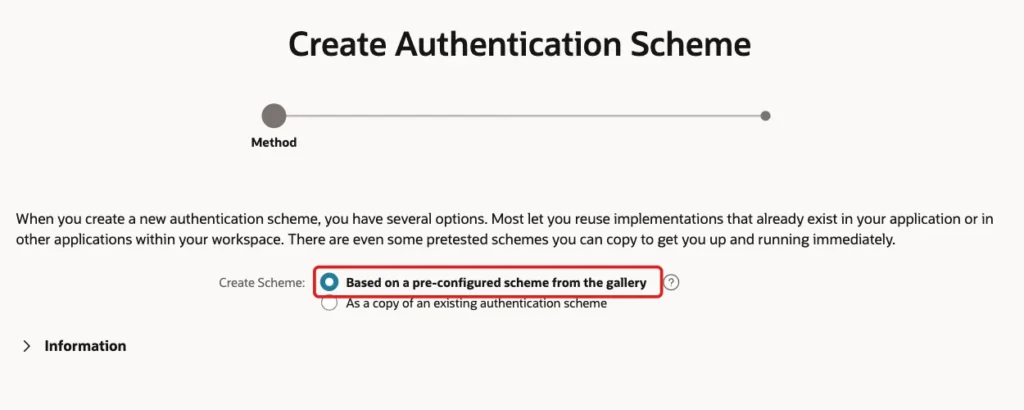
Open the application, click Shared Components, and under Security click Authentication Schemes. Click Create. Keep the first option, Based on a pre-configured scheme from the gallery, and click Next:
Enter the Name Account Lockout and select Custom as the Scheme Type. In Authentication Function Name, enter the function of the package. APEX calls it with the user name and the password. Then click Create Authentication Scheme:
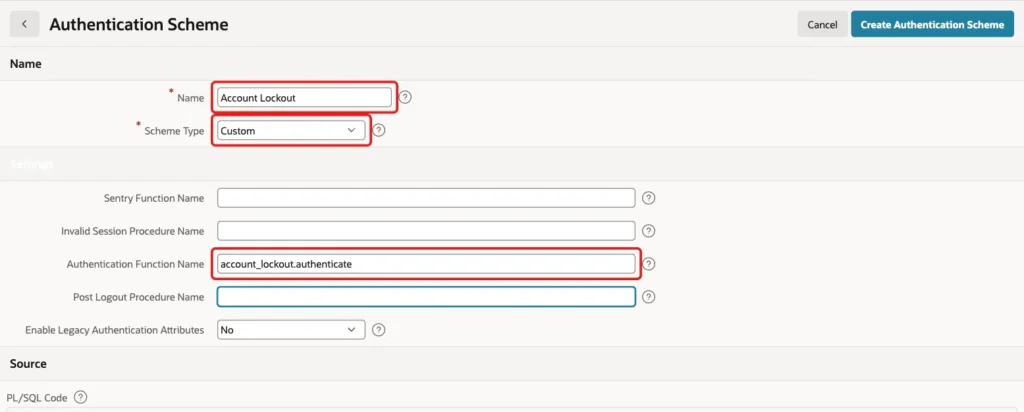
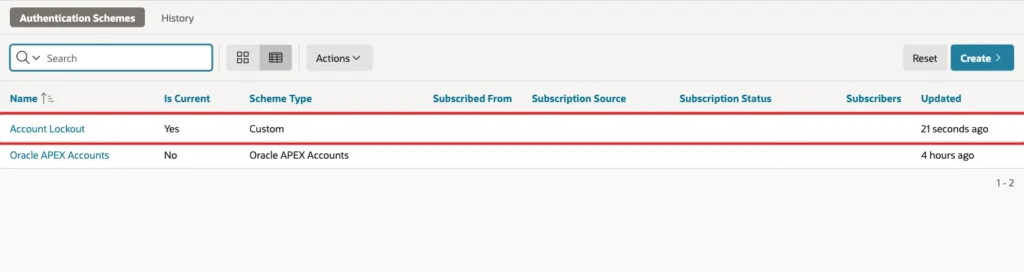
The function name needs no parentheses and no PL/SQL code in the Source box. The new scheme is listed, but the application still uses Oracle APEX Accounts. Open Account Lockout and click Make Current Scheme:

Confirm the question with OK. The list now shows Yes in the Is Current column for Account Lockout:
Step 6: Test Signing In
The test used the sign-in page of the application. LOCK_TEST signed in with two wrong passwords, and both showed Invalid Login Credentials. A right password then signed the user in and reset the counter to 0. The log shows FAILED, FAILED and SUCCESS:
Example:
exec apex_util.set_workspace('SOLUTIONS')
select username, failed_count, locked_until from app_accounts order by account_id;
select a.username, l.outcome from login_attempts l join app_accounts a on a.account_id = l.account_id order by l.attempt_id;
Output:
PL/SQL procedure successfully completed.

USERNAME         FAILED_COUNT LOCKED_UNTIL
_____________ _______________ _______________
LOCK_TEST                   0
LOCK_OTHER                  0

USERNAME     OUTCOME
____________ __________
LOCK_TEST    FAILED
LOCK_TEST    FAILED
LOCK_TEST    FAILED
LOCK_TEST    LOCKED
LOCK_TEST    SUCCESS
LOCK_TEST    FAILED
LOCK_TEST    FAILED
LOCK_TEST    SUCCESS

8 rows selected.
Next, wrong passwords were entered for LOCK_TEST until the account was locked, and then the right password. The right password was refused with the message of the package, which shows the time left. The text Please wait 25 seconds comes from the login throttle of Oracle APEX, which also works with a custom scheme:
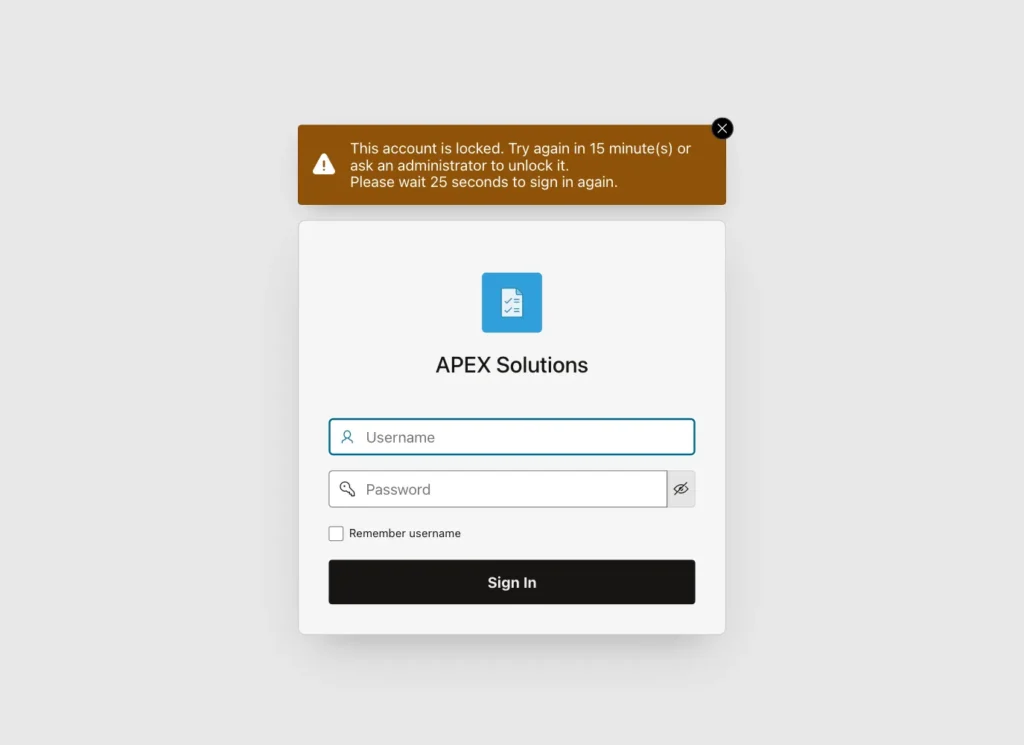
The throttle and the lock work together. Attempts inside the wait time never reach the function, so they do not count. In the test, six quick wrong attempts changed the counter by only two.
Step 7: Create the Unlock Page
A locked user needs a way back that does not mean waiting for 15 minutes or running SQL. This page lets an administrator see both kinds of accounts and unlock them.
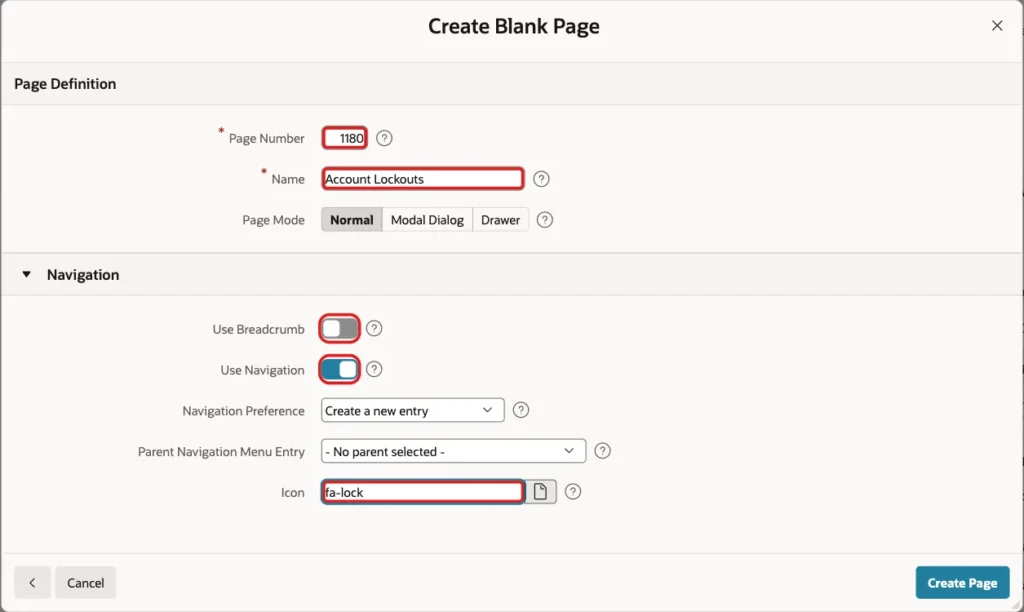
In App Builder, click Create Page and select Blank Page. Enter Page Number 1180 and Name Account Lockouts. Turn off Use Breadcrumb, keep Use Navigation on and enter the Icon fa-lock:
In Page Designer, drag a Classic Report region into the Body. Set Name to Oracle APEX Accounts, Type to Classic Report, Location to Local Database and Type to SQL Query. The query reads the workspace view and shows the text Unlock only for locked accounts:
Example:
select u.user_name,
       case when u.account_locked = 'Yes' then 'Locked' else 'Active' end as status,
       u.failed_access_attempts,
       case when u.account_locked = 'Yes' then 'Unlock' end as unlock_action
from   apex_workspace_apex_users u
order  by u.user_name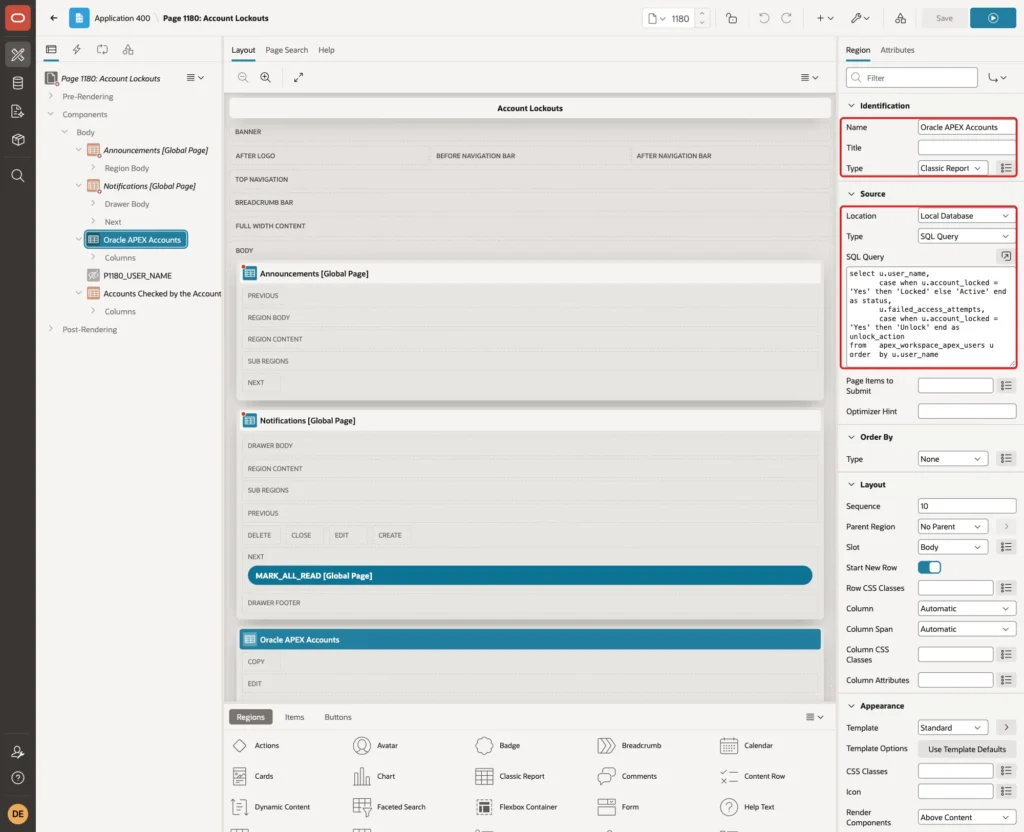
Select the column UNLOCK_ACTION. Set Type to Link and Link Text to #UNLOCK_ACTION#. In Target, enter the URL below. It asks for a confirmation, then submits the page with the request UNLOCK_APEX and the user name:
Example:
javascript:apex.page.confirm('Unlock #USER_NAME#?', {request: 'UNLOCK_APEX', set: {'P1180_USER_NAME': '#USER_NAME#'}});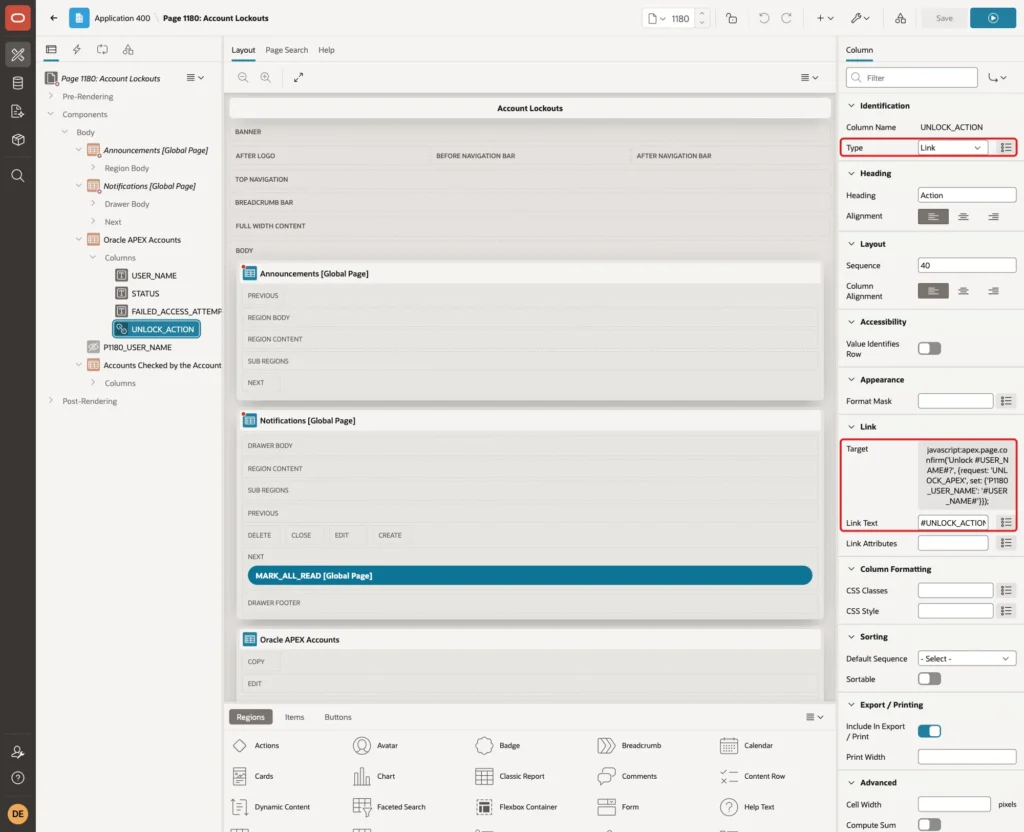
Create a Hidden page item P1180_USER_NAME and set Value Protected to No, because the link sets it in the browser. Then add a second Classic Report region named Accounts Checked by the Account Lockout Scheme. It reads APP_ACCOUNTS and has the same kind of link column with the request UNLOCK_CUSTOM:
Example:
select a.username,
       case when a.locked_until > systimestamp then 'Locked' else 'Active' end as status,
       a.failed_count,
       to_char(a.locked_until, 'YYYY-MM-DD HH24:MI') as locked_until,
       case when a.failed_count > 0 or a.locked_until is not null then 'Unlock' end as unlock_action
from   app_accounts a
order  by a.username
Open the Processing tab and create two processes of type Execute Code. The first is named Unlock Oracle APEX Account, has the code below and a Server-side Condition of type Request = Value with the value UNLOCK_APEX:
Example:
apex_util.unlock_account(p_user_name => :P1180_USER_NAME);
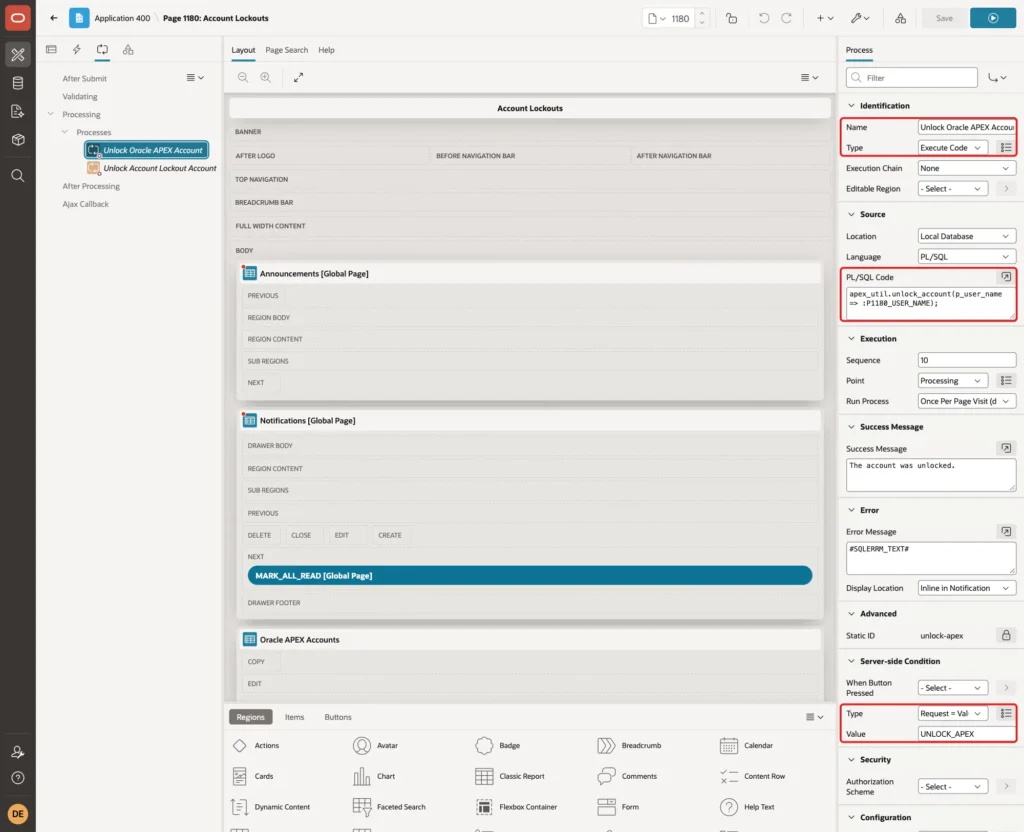
The second process is named Unlock Account Lockout Account. It calls the procedure of the package and runs for the request UNLOCK_CUSTOM. Set the Success Message of both processes to The account was unlocked.
Example:
account_lockout.unlock(:P1180_USER_NAME);
The page changes accounts, so only administrators may open it. In the Security group of the page, set Authorization Scheme to Is Administrator. Click Save:
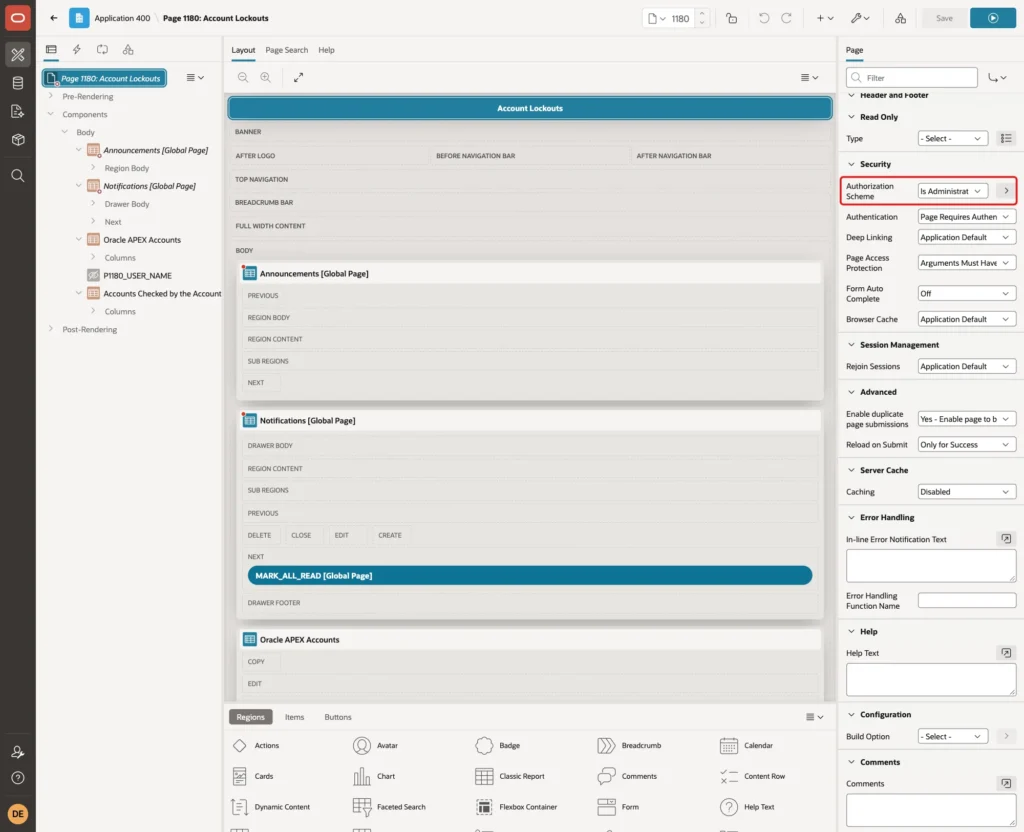
Step 8: Allow the Application to Unlock Oracle APEX Accounts
In a first test, DEMO_DEV opened the page and clicked Unlock for PW_TEST_USER, which was locked by failed sign-ins. The process failed with An API call has been prohibited:
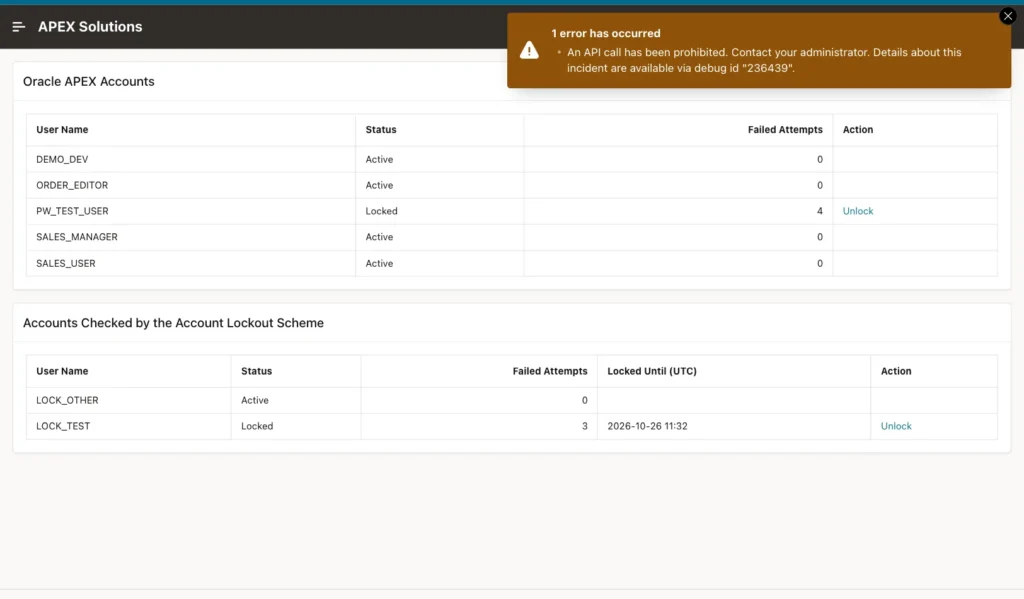
The debug log named the cause: workspace modification through this application is prohibited. An application may change workspace users only when the attribute Runtime API Usage allows it. In Shared Components, open Security Attributes, go to the Advanced group and select Modify Workspace Repository:

In this example, Apply Changes on that page did not keep the check box, and the page showed it cleared after a reload. The same value was set in the application source instead, with runtimeApiUsage: modifyWorkspaceRepository, and imported. After that the unlock worked, so verify the box after you apply it.
Turn this setting on only for an application that needs it. It lets code in the application change workspace users, which is why the page is limited to administrators. The custom accounts do not need it, because they are normal tables.
Step 9: Test the Unlock Page
PW_TEST_USER was locked with real wrong passwords. LOCK_TEST was locked with three wrong attempts. Signed in as DEMO_DEV, the page shows both accounts as Locked with an Unlock link. The red boxes mark the two links:
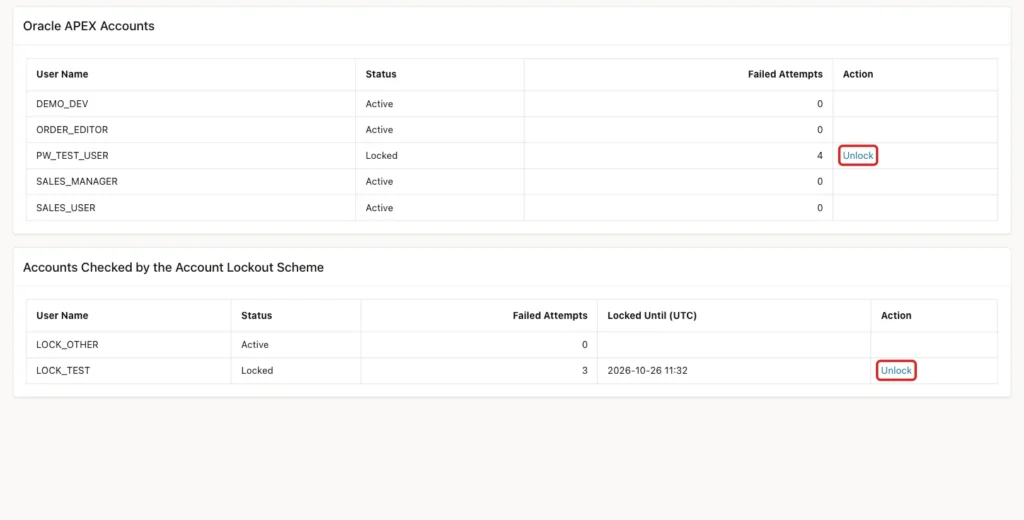
Clicking Unlock asks for a confirmation with the user name:
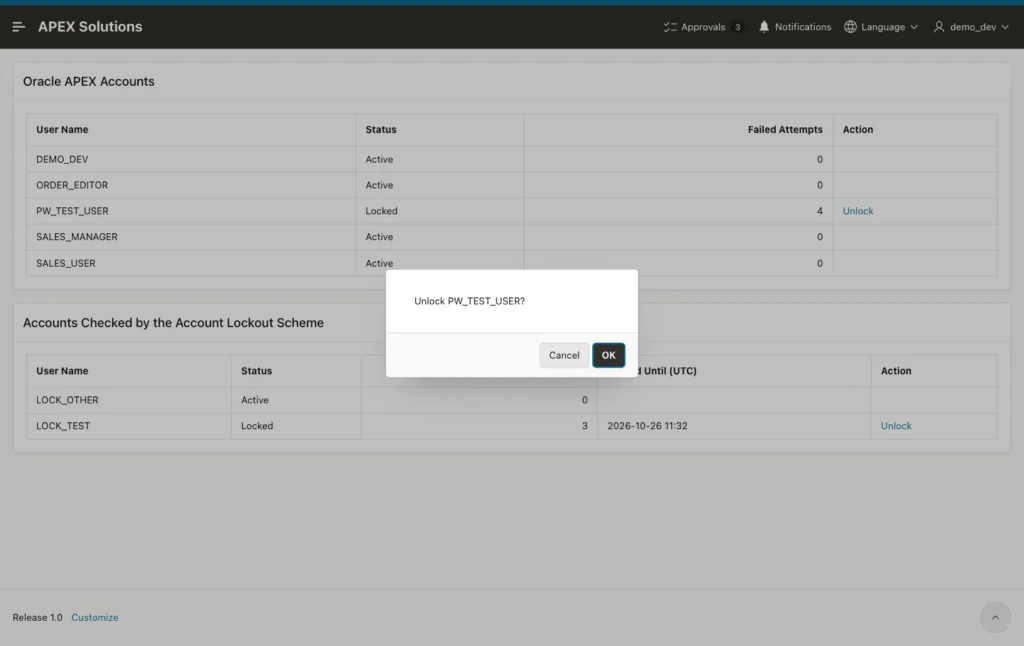
After OK, the page shows the success message, the account is Active and the Unlock link is gone:
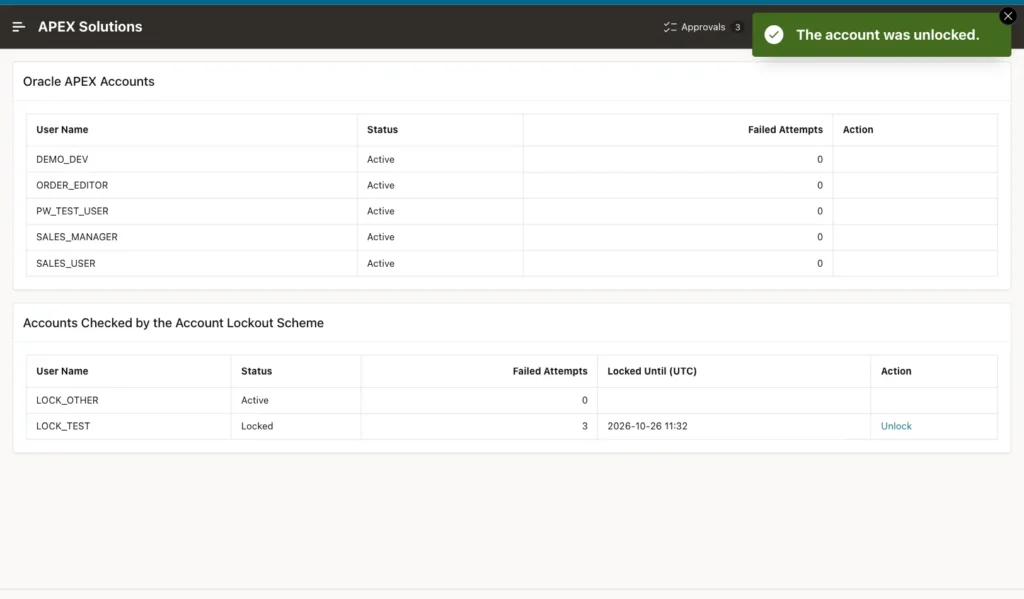
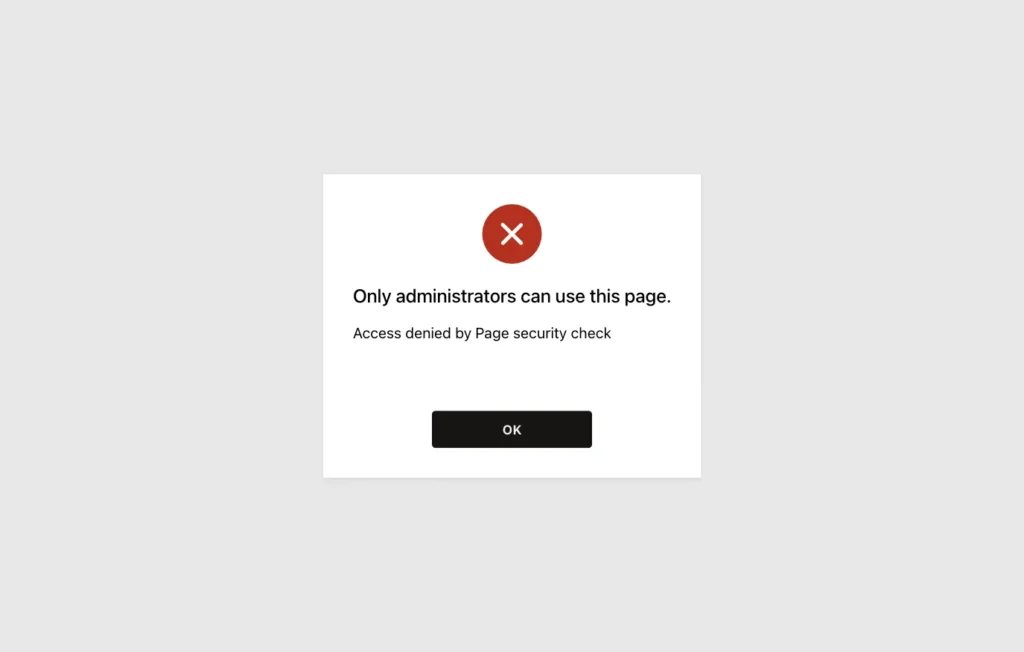
The same steps unlocked LOCK_TEST, and its counter went back to 0. ORDER_EDITOR is not an administrator. Opening the page as that user gave an access denied message from the page security check:
After the tests, Oracle APEX Accounts was made the current scheme again, because the other users of this application live there. The custom scheme stays in Shared Components for the next application that needs it.
Things to Know
- The built-in lockout of Oracle APEX accounts is controlled by MAX_LOGIN_FAILURES at instance level. It counts only attempts that reach the check, because attempts inside the throttle wait time are blocked first.
- The login throttle works for custom schemes too. Attempts made during the wait never call your function, so they do not raise the counter.
- The counter in this guide has no time window. Failures from last week still count until a right password or an unlock resets it. Add a column with the time of the last failure if you want old failures to expire.
- After the lock expires, one wrong password locks the account again, because the counter is still at the limit. Reset the counter when the lock ends if you want a fresh start.
- Show the same message for a wrong password and an unknown user, as this guide does, so attackers cannot learn which user names exist. The locked message does reveal a real account, so decide if that is acceptable.
- A lockout lets anyone block a known user name on purpose. The throttle and an administrator unlock page reduce the harm.
Related Guides
- Create Custom Authentication in 5 Easy Steps in Oracle Apex
- How to Show Login History and Active Users in Oracle APEX
Conclusion
Oracle APEX accounts lock after a number of failed sign-ins, and the login throttle slows down guessing. For your own user table, a failed counter, a lock time and an authentication function give the same protection, plus a log of every attempt.
The tests showed that three wrong passwords lock the account, that a right password is refused while the lock lasts, that a lock expires on time, and that only administrators can unlock accounts from the page. Keep the limit and the lock time in one place, so you can tune them later.
See my articles more often when you search Google.
