
A native Linux installation is the right layout for a shared development server, a test server for your team, or a small internal production system. No containers are involved: the database comes from Oracle's RPM packages, ORDS comes from Oracle's yum repository, and both run as systemd services that start by themselves when the server boots.
This guide installs the complete stack on Oracle Linux 8 or 9. Red Hat Enterprise Linux 8 and 9 work the same way, with one or two extra commands noted where they apply.
These steps come from Oracle APEX 26.1 Book: The Complete Guide.
Who Runs Each Command
Some commands run as root and others as the oracle operating-system user that owns the database software. Commands that start with sudo run from your own administrator account. For the rest, open a shell as oracle with sudo -iu oracle, and type exit to return. Each step says which account to use.
The Layout
Everything runs on one server. The database listens on port 1521 and ORDS reaches it through localhost. ORDS runs in standalone mode as a system service on port 8080 and serves the APEX static files from a folder on the server. Browsers on other computers reach ORDS through the firewall; the database port stays closed to the outside.
| What | Location |
|---|---|
| Oracle base | /opt/oracle |
| Oracle home (database software) | /opt/oracle/product/26ai/dbhomeFree |
| Database files | /opt/oracle/oradata/FREE |
| Database alert log | /opt/oracle/diag/rdbms/free/FREE/trace/alert_FREE.log |
| Database configuration parameters | /etc/sysconfig/oracle-free-26ai.conf |
| Database configuration and service script | /etc/init.d/oracle-free-26ai |
| ORDS software | /opt/oracle/ords, with the command at /usr/local/bin/ords |
| ORDS configuration folder | /etc/ords/config |
| ORDS service settings | /etc/ords.conf |
| ORDS log | /var/log/ords/ords.log |
| APEX installation files and static files | /opt/oracle/apex and /opt/oracle/apex/images |
Requirements
Oracle AI Database 26ai Free is distributed as RPM packages for Linux x86-64 and Linux on Arm (aarch64).
| Requirement | Value |
|---|---|
| Operating system, x86-64 | Oracle Linux 8 or 9, or Red Hat Enterprise Linux 8 or 9 (release 10 of both is also supported) |
| Operating system, aarch64 | Oracle Linux 8 (8.6 or later) or 9 (9.4 or later), with the Unbreakable Enterprise Kernel 7, on a CPU capable of Neoverse N1 |
| Privileges | root, or an account that can use sudo |
| Memory | 2 GB recommended for the database alone; plan on 4 GB or more with ORDS and APEX |
| Swap | 2 GB, or twice the memory, whichever is less |
| Disk | About 9 GB under /opt for the database; allow 25 GB free for the whole stack and your data |
However large the server, Oracle AI Database Free uses at most 2 GB of memory and two processor cores, and limits user data to 12 GB. Three more rules matter:
- One Free database per host. A second Free database on the same server, virtual machine, or container refuses to start with ORA-00442. Remove any older XE or Free installation, and any database whose SID is XE or FREE.
- /opt/oracle must be a real directory, not a symbolic link. If /opt is too small, mount a separate file system at /opt/oracle.
- The host name must resolve to an IP address other than the loopback address, or the configuration script fails.
Step 1: Prepare the Server
As your administrator account, update the system and install unzip for the APEX download.
Example:
sudo dnf -y update
sudo dnf -y install unzip
Check that the host name resolves.
Example:
hostname -f
getent hosts "$(hostname -f)"
If the second command prints the server's IP address and host name, you are ready. If it prints nothing, or only 127.0.0.1, add a line with the real address and host name to /etc/hosts, for example 192.168.1.50 apexsrv.example.com apexsrv, and try again.
Install the Preinstallation RPM
The Oracle AI Database Preinstallation RPM installs the packages the database needs, creates the oracle user and the oinstall and dba groups, and sets kernel parameters and resource limits. On Oracle Linux 8 or 9 it is in the standard repositories.
Example:
sudo dnf -y install oracle-ai-database-preinstall-26ai
On Red Hat Enterprise Linux, download the latest oracle-ai-database-preinstall-26ai file from Oracle's yum server (for RHEL 9, https://yum.oracle.com/repo/OracleLinux/OL9/appstream/x86_64/; for RHEL 8, the OL8 folder and the el8 file) and install it.
Example (RHEL 9):
sudo dnf -y install \
  ./oracle-ai-database-preinstall-26ai-1.0-1.el9.x86_64.rpm
The kernel settings it changed are logged in orakernel.log under /var/log/oracle-ai-database-preinstall-26ai/results/ and stored in /etc/sysctl.d/97-oracle-database-sysctl.conf. The oracle user has no password, so nobody can sign in as oracle directly; keep it that way and use sudo -iu oracle.
Step 2: Install Oracle AI Database 26ai Free
Get the RPM that matches your release and processor from Oracle's Oracle AI Database Free download page. At the time of writing, the release is 23.26.3.
| Platform | File |
|---|---|
| Oracle Linux 8 / RHEL 8, x86-64 | oracle-ai-database-free-26ai-23.26.3-1.el8.x86_64.rpm |
| Oracle Linux 9 / RHEL 9, x86-64 | oracle-ai-database-free-26ai-23.26.3-1.el9.x86_64.rpm |
| Oracle Linux 8, aarch64 | oracle-ai-database-free-26ai-23.26.3-1.el8.aarch64.rpm |
| Oracle Linux 9, aarch64 | oracle-ai-database-free-26ai-23.26.3-1.el9.aarch64.rpm |
Each file is about 1.5 GB and can be downloaded on the server itself. For Oracle Linux 9 on x86-64:
Example:
cd /tmp
BASE=https://download.oracle.com/otn-pub/otn_software/db-free
RPM=oracle-ai-database-free-26ai-23.26.3-1.el9.x86_64.rpm
curl -LO "$BASE/$RPM"
If a newer release is out, copy the current file name from the download page. Then install it in the same shell, so $RPM still holds the name.
Example:
sudo dnf -y install "./$RPM"
The package installs the software into /opt/oracle/product/26ai/dbhomeFree and runs the root actions, but does not create a database yet.
Create the Database
A configuration script creates the database. Its defaults (listener port 1521, character set AL32UTF8, files under /opt/oracle/oradata) suit APEX. To change them, copy and edit /etc/sysconfig/oracle-free-26ai.conf before running the script.
| Setting | Meaning |
|---|---|
| LISTENER_PORT | The listener port; leave it at 1521 unless the port is taken |
| CHARSET | The database character set; keep AL32UTF8 |
| DBFILE_DEST | The folder for the database files; it must belong to oracle |
| SKIP_VALIDATIONS | true skips the memory and disk checks; leave it false |
| CONFIGURE_TDE, ENCRYPT_TABLESPACES | Transparent Data Encryption, off by default |
Example:
sudo /etc/init.d/oracle-free-26ai configure
The script asks for one password, twice, for SYS, SYSTEM, and PDBADMIN. Use at least eight characters with an uppercase letter, a lowercase letter, a digit, and a punctuation character, which also satisfies APEX. The examples use Welcome_2026#; choose your own.
It creates the container database FREE with the pluggable database FREEPDB1 and a listener on port 1521, which takes several minutes. If it fails, check FREE.log in /opt/oracle/cfgtoollogs/dbca/FREE.
Start the Database at Boot
Example:
sudo systemctl daemon-reload
sudo systemctl enable oracle-free-26ai
sudo /etc/init.d/oracle-free-26ai status
systemd now starts the listener and database at boot and shuts the database down cleanly at shutdown. The status command should report both as RUNNING.
Step 3: Set Up the oracle User's Environment
SQL*Plus and lsnrctl need ORACLE_HOME, ORACLE_SID, and PATH, which Oracle's oraenv script sets. Add the settings to the oracle user's ~/.bash_profile.
Example:
sudo -iu oracle
cat >> ~/.bash_profile <<'EOF'

# Oracle AI Database 26ai Free
export ORACLE_SID=FREE
export ORAENV_ASK=NO
export ORACLE_HOME=/opt/oracle/product/26ai/dbhomeFree
. /opt/oracle/product/26ai/dbhomeFree/bin/oraenv > /dev/null
EOF
ORAENV_ASK=NO stops oraenv from asking questions. Load the profile and check it.
Example:
. ~/.bash_profile
echo $ORACLE_HOME
which sqlplus
The last command prints /opt/oracle/product/26ai/dbhomeFree/bin/sqlplus.
Connect with SQL*Plus
The oracle user belongs to the group allowed to administer the database, so it connects as SYS without a password. This operating-system authentication works even when the listener is down, which makes it the tool for maintenance. It lands in CDB$ROOT, so switch to the PDB.
Example:
sqlplus / as sysdba
Example:
alter session set container = FREEPDB1;
show con_name
Output:
CON_NAME
------------------------------
FREEPDB1
Type exit. lsnrctl status should list the services FREE and freepdb1 at the end of its output.
Step 4: Install Java, SQLcl, and ORDS
ORDS needs Java 17 or 21. Return to your administrator account (exit) and install OpenJDK 21.
Example:
sudo dnf -y install java-21-openjdk
java -version
If an older Java is still the default, choose version 21 with sudo alternatives --config java.
Enable Oracle's Software Repository
Oracle publishes ORDS and SQLcl as RPMs in its Oracle Software yum repository. Installing ORDS this way gives you a service definition, a standard folder layout, and updates through dnf. On Oracle Linux 8, a release package enables the repository.
Example (Oracle Linux 8):
sudo dnf -y install oracle-software-release-el8
On Oracle Linux 9 there is no release package at the time of writing, so define the repository in a file.
Example (Oracle Linux 9):
sudo tee /etc/yum.repos.d/oracle-software-ol9.repo > /dev/null <<'EOF'
[ol9_oracle_software]
name=Oracle Software for Oracle Linux 9 ($basearch)
baseurl=https://yum.oracle.com/repo/OracleLinux/OL9/oracle/software/$basearch/
gpgkey=file:///etc/pki/rpm-gpg/RPM-GPG-KEY-oracle
gpgcheck=1
enabled=1
EOF
On Red Hat Enterprise Linux, create the same file (with OL8 in place of OL9 on release 8), but set gpgkey to https://yum.oracle.com/RPM-GPG-KEY-oracle-ol9 (or -ol8), because Oracle's signing key is not installed there.
Install the Packages
Example:
sudo dnf -y install ords sqlcl
ords --version
sql -version
The ords package looks for Java 17 and may warn "ORDS requires Java 17" when it finds only Java 21; ignore it, since ORDS 26 runs on either. Here is what the packages install:
| Path | Contents |
|---|---|
| /opt/oracle/ords | The ORDS software, owned by oracle |
| /usr/local/bin/ords | A link to /opt/oracle/ords/bin/ords |
| /etc/ords/config | An empty ORDS configuration folder, owned by oracle |
| /etc/ords.conf | Settings for the service: ORDS_BASE, ORDS_CONFIG, and optional extra arguments |
| /etc/systemd/system/ords.service and /etc/init.d/ords | The systemd unit and the script it uses to start and stop ORDS |
| /opt/oracle/sqlcl | SQLcl, with the sql command linked into /usr/bin |
You can instead unzip ords-latest.zip into /opt/oracle/ords; its linux-support/README.md explains how to install the same service files by hand. Use one method, never both.
Step 5: Install ORDS into the Database
ORDS goes into the database before APEX. Run the installer as oracle, so the configuration files belong to the account that runs the service. The read line takes the SYS password without showing it or saving it in the shell history.
Example:
sudo -iu oracle
read -rsp 'SYS password: ' SYS_PWD; echo
echo "$SYS_PWD" | ords --config /etc/ords/config install \
  --admin-user SYS \
  --db-hostname localhost --db-port 1521 \
  --db-servicename FREEPDB1 \
  --feature-db-api true \
  --feature-rest-enabled-sql true \
  --feature-sdw true \
  --gateway-mode proxied --gateway-user APEX_PUBLIC_USER \
  --password-stdin
The options set the database location, enable the Database API, REST-Enabled SQL, and SQL Developer Web, and request the PL/SQL gateway in proxied mode for APEX_PUBLIC_USER. /etc/ords/config is the folder the service reads.
Output (excerpt):
Oracle REST Data Services - Non-Interactive Install

Retrieving information.
Cannot configure PL/SQL gateway user APEX_PUBLIC_USER with ORDS because APEX is not installed in the FREEPDB1 database.
The setting named: db.connectionType was set to: basic in configuration: default
...
The setting named: plsql.gateway.mode was set to: disabled in configuration: default
...
INFO        Completed installation for Oracle REST Data Services version 26.2.3.r2371104. Elapsed time: 00:00:07.156
The gateway is disabled because APEX is not there yet; Step 8 switches it on. Stay in this oracle shell for Steps 6 to 9, since SYS_PWD is needed again.
Step 6: Install Oracle APEX
Still as oracle, download APEX (about 325 MB) into /opt/oracle and unzip it. /opt/oracle/apex holds the installation scripts and, in images, the static files ORDS will serve.
Example:
cd /opt/oracle
curl -LO https://download.oracle.com/otn_software/apex/apex-latest.zip
unzip -q apex-latest.zip
rm apex-latest.zip
ls /opt/oracle/apex/apexins.sql
Run SQL*Plus from the apex folder, so apexins.sql finds the scripts it calls.
Example:
cd /opt/oracle/apex
sqlplus / as sysdba
Example:
alter session set container = FREEPDB1;
@apexins.sql SYSAUX SYSAUX TEMP /i/
The arguments are the tablespace for the APEX engine, the tablespace for uploaded files, the temporary tablespace, and the image prefix /i/. The installer takes a few minutes, up to twenty on older machines.
Output (the end):
    ok 16 - Installing APEX REST Config                 |   0.02
    ok 17 - Set Loaded/Upgraded in Registry             |   0.00
    ok 18 - Setting Patch Status: APPLIED               |   0.00
    ok 19 - Removing Unused SYS Objects and Public Privs|   0.00
    ok 20 - Validating Installation                     |   0.02
ok 3 - 20 actions passed, 0 actions failed              |   0.10

Thank you for installing Oracle APEX 26.1.0

Oracle APEX is installed in the APEX_260100 schema.
Example:
select comp_id, version, status
  from dba_registry
 where comp_id = 'APEX';
Output:
COMP_ID    VERSION     STATUS
---------- ----------- -----------
APEX       26.1.0      VALID
A dropped SSH connection interrupts a running installer. On a remote server, run long scripts inside tmux (sudo dnf -y install tmux). If an installation is interrupted, fix the cause and run @apexins.sql again; the log in the apex folder shows where it stopped.
Step 7: Create the Instance Administrator
Still in SQL*Plus in FREEPDB1, run apxchpwd.sql, press Enter to accept ADMIN, and type an email address and a password with an uppercase letter, a lowercase letter, a digit, and a punctuation character.
Example:
@apxchpwd.sql
Output:
Enter the administrator's username [ADMIN]
User "ADMIN" does not yet exist and will be created.
Enter ADMIN's email [ADMIN] admin@example.com
Enter ADMIN's password []
Created instance administrator ADMIN.
A weak password stops it with ORA-20001: Invalid password.; run it again. Type exit to leave SQL*Plus, but stay in the oracle shell.
Step 8: Enable the ORDS Gateway
Run the echo "$SYS_PWD" | ords ... install command from Step 5 once more (repeat the read line first if you left the oracle shell). ORDS detects APEX and switches the gateway on.
Output (excerpt):
Connecting to database user: ORDS_PUBLIC_USER url: jdbc:oracle:thin:@//localhost:1521/FREEPDB1
The setting named: plsql.gateway.mode was set to: proxied in configuration: default
INFO        Oracle REST Data Services schema version 26.2.3.r2371104 is installed.
Then clear the password from the shell's memory.
Example:
unset SYS_PWD
Step 9: Run ORDS as a Service
The service needs to know where the APEX images are. Store the location in the ORDS configuration setting standalone.static.path, still as oracle.
Example:
ords --config /etc/ords/config config set \
  standalone.static.path /opt/oracle/apex/images
This has the same effect as --apex-images: ORDS serves the folder at /i/. It also applies when you run ords serve by hand. Type exit to return to your administrator account.
Service Settings in /etc/ords.conf
The service reads /etc/ords.conf at each start. The package has already set the two values it needs.
Contents of /etc/ords.conf:
ORDS_BASE=/opt/oracle
ORDS_CONFIG=/etc/ords/config
ORDS_BASE is the folder containing the ords software folder, and ORDS_CONFIG is the configuration folder. An optional SERVE_EXTRA_ARGS passes extra options to ords serve. ORDS listens on port 8080 on all interfaces by default; to use another port, add a line.
Example:
SERVE_EXTRA_ARGS=--port 8081
You could pass --apex-images in the same line instead of setting standalone.static.path, but use only one, so there is one place to change.
Start the Service
Example:
sudo systemctl enable --now ords
sudo systemctl status ords
sudo tail -n 40 /var/log/ords/ords.log
The status should be active (running). The service runs ORDS as oracle and writes its output to /var/log/ords/ords.log.
Output (excerpt of ords.log):
INFO        HTTP and HTTP/2 cleartext listening on host: 0.0.0.0 port: 8080
...
INFO        Oracle REST Data Services initialized
Check from the server that ORDS answers. Any HTTP status line, a redirect or 200, means it is serving; 404 means the gateway is not enabled.
Example:
curl -sI http://localhost:8080/ords/apex | head -n 1
Start ORDS after the Database
The ords unit waits for the network at boot but not for the database. To avoid a burst of connection errors in the log, run sudo systemctl edit ords and add these lines in the space the editor provides. systemd reloads the unit when you save.
Example:
[Unit]
After=oracle-free-26ai.service
Wants=oracle-free-26ai.service
Step 10: Open the Firewall and Sign In
Oracle Linux runs firewalld, which blocks incoming connections to port 8080 by default.
Example:
sudo firewall-cmd --permanent --add-port=8080/tcp
sudo firewall-cmd --reload
sudo firewall-cmd --list-ports
On your own computer, open http://apexsrv.example.com:8080/ords/apex, replacing the host with your server's name or IP address. The workspace sign-in page appears.
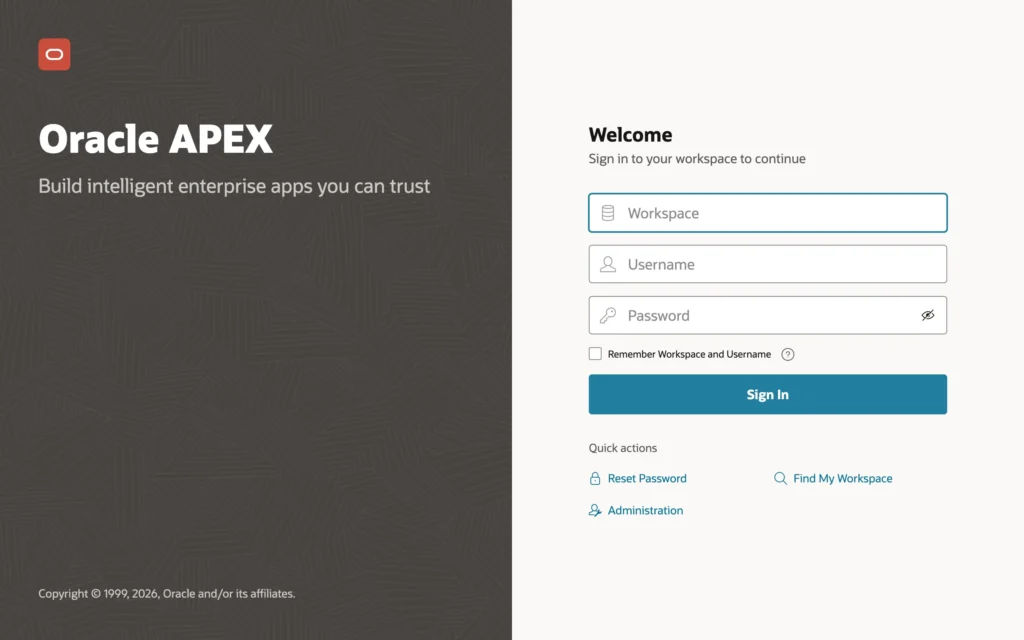
Open /ords/apex_admin and sign in as ADMIN to reach Administration Services.
Do not open port 1521 to connect SQLcl or VS Code from your desktop. Use an SSH tunnel instead: while it is open, sql sys@localhost:1521/FREEPDB1 as sysdba on your desktop reaches the server's database. This server also speaks plain HTTP, so add HTTPS before real users arrive.
Example:
ssh -L 1521:localhost:1521 you@apexsrv.example.com
SELinux
Oracle Linux and RHEL run SELinux in enforcing mode by default; leave it that way. In this setup it should not stop ORDS from listening on 8080 or reading /opt/oracle/apex/images. If something fails with nothing in the ORDS log, check for denials with sudo ausearch -m avc -ts recent and fix them by labeling files or ports correctly, never by disabling SELinux.
Step 11: Allow Outbound Network Calls
APEX needs permission to send email, call REST and AI services, and use print servers. Open a shell with sudo -iu oracle, connect with sqlplus / as sysdba, run alter session set container = FREEPDB1;, and grant the APEX engine access to any host.
Example:
begin
    dbms_network_acl_admin.append_host_ace(
        host => '*',
        ace  => xs$ace_type(
                    privilege_list => xs$name_list('connect'),
                    principal_name => 'APEX_260100',
                    principal_type => xs_acl.ptype_db));
end;
/
On a shared or production server, restrict the grant to the hosts and ports your applications use.
Day-to-Day Management
systemctl status oracle-free-26ai and systemctl status ords show whether each service runs. Stop ORDS before the database, and start the database before ORDS; systemd does this at shutdown and boot.
Example:
sudo systemctl stop ords
sudo systemctl stop oracle-free-26ai

sudo systemctl start oracle-free-26ai
sudo systemctl start ords
sudo systemctl restart ords applies an ORDS configuration change. As oracle, shutdown immediate in SQL*Plus stops the database, and startup followed by alter pluggable database all open; starts it.
| Log | How to read it |
|---|---|
| ORDS log (requests, connection pools) | sudo tail -f /var/log/ords/ords.log |
| ORDS service events | journalctl -u ords |
| Database service events | journalctl -u oracle-free-26ai |
| Database alert log | tail -f /opt/oracle/diag/rdbms/free/FREE/trace/alert_FREE.log (as oracle) |
| Database creation | /opt/oracle/cfgtoollogs/dbca/FREE/FREE.log |
To update ORDS, run sudo dnf upgrade ords, run the ords install command from Step 5 again as oracle to upgrade its schema if needed, and restart the service.
To remove everything, sudo /etc/init.d/oracle-free-26ai delete deletes the database and listener configuration, and sudo dnf remove oracle-ai-database-free-26ai ords sqlcl removes the software. Delete what remains under /opt/oracle, including the apex folder, by hand.
Troubleshooting
| Problem | Fix |
|---|---|
| ORA-00442: Oracle Database Free single instance violation | Another Free or XE installation is running on this host. Remove it. |
| Configuration fails with "No valid IP Address returned for the host" | Fix /etc/hosts as in Step 1, run sudo /etc/init.d/oracle-free-26ai delete, and configure again. |
| ORA-12541: No listener at host localhost port 1521. | Check with sudo /etc/init.d/oracle-free-26ai status and start everything with sudo systemctl start oracle-free-26ai. |
| ORA-12514: Service FREEPDB1 is not registered with the listener. | Wait a minute. If it persists, run alter pluggable database all open; then alter pluggable database freepdb1 save state; as SYS. |
| ORA-01017: invalid credential or not authorized | As oracle, connect with sqlplus / as sysdba and run alter user system identified by "New_Password_1" container = all;, and the same for SYS. |
| sqlplus: command not found, or ORA-12162 with / as sysdba | The oracle user's environment is not set. Check ~/.bash_profile from Step 3 and open a new shell with sudo -iu oracle. |
| The ords service fails to start or stops soon after | Read /var/log/ords/ords.log, check java -version (17 or 21; change with sudo alternatives --config java), and check that /etc/ords/config belongs to oracle. |
| Address already in use on 8080 | sudo ss -ltnp | grep 8080 shows the program. Stop it, or set SERVE_EXTRA_ARGS=--port 8081 and open that port instead. |
| Works with curl on the server but not from your computer | Check sudo firewall-cmd --list-ports and repeat Step 10; a network firewall can also block the port. |
| 404 Not Found at /ords/apex | The gateway is disabled. Run ords install again as oracle, then sudo systemctl restart ords. |
| APEX pages without styles, or missing images warnings | Check ords --config /etc/ords/config config get standalone.static.path, check folder access with namei -l /opt/oracle/apex/images, and match the images to the APEX version in the database. |
Related Guides
- How to Prepare Your Computer for Oracle APEX 26.1
- How to Install Oracle APEX 26.1 with Docker
- How to Install Oracle APEX 26.1 on Windows
Conclusion
To install Oracle APEX 26.1 on Oracle Linux, install the preinstallation RPM and the database RPM, create the FREE database with /etc/init.d/oracle-free-26ai configure, and enable its service. Set up the oracle user's environment, install Java 21, ORDS, and SQLcl from Oracle's repository, then install ORDS, APEX, and the ADMIN account, and run ords install again to enable the gateway. Store the images path in standalone.static.path, enable the ords service, open port 8080 in firewalld, and grant APEX outbound network access.
See my articles more often when you search Google.
