
Any APEX installation used by more than one person should run over HTTPS, so passwords and session cookies cannot be read on the network. Several APEX features also work only over HTTPS, including the clipboard in Interactive Grids, Progressive Web App installation, and some browser APIs.
There are three ways to serve APEX over HTTPS with ORDS, in increasing order of preference for production: a self-signed certificate, your own certificate in ORDS, and a reverse proxy that terminates HTTPS in front of ORDS. This guide covers all three.
These steps come from Oracle APEX 26.1 Book: The Complete Guide.
Before You Start
You need a working ORDS installation serving APEX in standalone mode (ords serve). The examples use the configuration folder ~/apex-lab/ords-config on a development computer and /etc/ords/config on a Linux server. For how the configuration folder and the ords config command work, see how to configure ORDS for Oracle APEX.
Option 1: A Self-Signed Certificate
For testing, let ORDS create a certificate for you. Start it with --secure and a port.
Example:
ords --config ~/apex-lab/ords-config serve --secure --port 8443
Output (excerpt):
INFO        HTTP and HTTP/2 cleartext listening on host: 0.0.0.0 port: 8080
INFO        HTTPS listening on host: 0.0.0.0 port: 8443
On first use, ORDS generates a key and a certificate for the host name localhost, valid for one year, and saves them as self-signed.key and self-signed.pem in the global/standalone folder of the configuration. Because standalone.http.port is set to 8080 in this configuration, ORDS also keeps listening for plain HTTP on 8080.
Browse to https://localhost:8443/ords/apex. The browser warns that the certificate is not trusted, because no certificate authority it knows issued it, and you must accept the risk to continue. That warning is why self-signed certificates are for testing only.
Option 2: Your Own Certificate
With a certificate issued by your organization's certificate authority or a public one such as Let's Encrypt, point ORDS at the certificate and its private key. Both must be in PEM format.
Example:
ords --config /etc/ords/config config set \
  standalone.https.cert /etc/ords/tls/apex.example.com.crt
ords --config /etc/ords/config config set \
  standalone.https.cert.key /etc/ords/tls/apex.example.com.key
ords --config /etc/ords/config config set standalone.https.port 443
These settings match the --certificate, --key, and --port options of ords serve, so they apply every time ORDS starts, including as a service. Restart ORDS after setting them.
Keep the private key readable only by the account that runs ORDS. Ports below 1024, such as 443, need administrator privileges on Linux and macOS, which is one reason many sites prefer the next option.
Option 3: Behind a Reverse Proxy
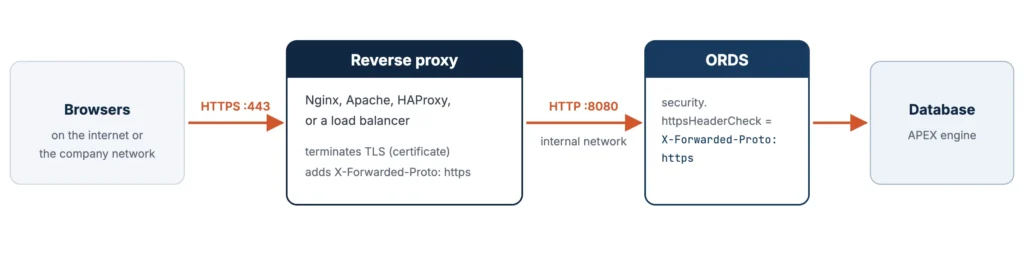
In many organizations, a reverse proxy or load balancer, such as Nginx, Apache HTTP Server, HAProxy, or a cloud load balancer, already terminates HTTPS for every web application. ORDS then runs on plain HTTP on the internal network, and the proxy forwards requests to it.
An Nginx Server Block for APEX
A minimal Nginx configuration terminates HTTPS on 443, forwards everything to ORDS on 127.0.0.1:8080, and redirects plain HTTP to HTTPS.
Example (Nginx configuration):
server {
    listen 443 ssl;
    server_name apex.example.com;

    ssl_certificate     /etc/nginx/tls/apex.example.com.crt;
    ssl_certificate_key /etc/nginx/tls/apex.example.com.key;

    client_max_body_size 200m;          # file uploads

    location / {
        proxy_pass http://127.0.0.1:8080;
        proxy_set_header Host              $host;
        proxy_set_header X-Real-IP         $remote_addr;
        proxy_set_header X-Forwarded-For   $proxy_add_x_forwarded_for;
        proxy_set_header X-Forwarded-Proto $scheme;
        proxy_read_timeout 300s;        # long-running pages and reports
    }
}

server {
    listen 80;
    server_name apex.example.com;
    return 301 https://$host$request_uri;   # HTTP to HTTPS
}
client_max_body_size lets users upload larger files through APEX, and proxy_read_timeout keeps long-running pages and reports from being cut off. The X-Forwarded headers tell ORDS who the client is and which scheme the browser used.
Tell ORDS the Request Arrived over HTTPS
ORDS receives plain HTTP from Nginx, so it must be told that the original request arrived over HTTPS. Otherwise APEX generates http:// links and refuses to set secure cookies. The setting security.httpsHeaderCheck names the header the proxy uses to say so.
Example:
ords --config ~/apex-lab/ords-config config set \
  security.httpsHeaderCheck "X-Forwarded-Proto: https"
Restart ORDS. Then make sure ORDS listens only on the internal interface, or that a firewall blocks port 8080 from outside, so nobody can bypass the proxy.
Which Option to Choose
| Option | Use it when |
|---|---|
| Self-signed certificate | Testing HTTPS-only features on your own computer; browsers will warn |
| Your own certificate in ORDS | A single server with no proxy, where ORDS may bind to port 443 |
| Reverse proxy | Production, or wherever a proxy or load balancer already handles certificates |
Troubleshooting
| Symptom | Likely cause and fix |
|---|---|
| Browser warns the certificate is not trusted | Expected with a self-signed certificate. Use a certificate from a trusted authority for real users. |
| ORDS cannot listen on port 443 | Ports below 1024 need administrator privileges. Use a higher port, or put a reverse proxy in front. |
| Links point to http:// behind an HTTPS proxy, or sign-in loops | Set security.httpsHeaderCheck and make the proxy send X-Forwarded-Proto. |
| Large file uploads fail through the proxy | Raise client_max_body_size in Nginx. |
| Long reports fail with a gateway timeout | Raise proxy_read_timeout in Nginx. |
Related Guides
Conclusion
To enable HTTPS in ORDS, start ords serve with --secure for a self-signed test certificate, set standalone.https.cert, standalone.https.cert.key, and standalone.https.port to use your own PEM certificate, or, preferably in production, terminate HTTPS at a reverse proxy such as Nginx, forward to ORDS on HTTP, and set security.httpsHeaderCheck to X-Forwarded-Proto: https so APEX builds secure links and cookies.
See my articles more often when you search Google.
