
Usually, we display notifications on the navigation bar. But sometimes, you may require to show the notification on a particular region. Especially on report or chart regions, to show the newly added rows. In this Oracle APEX tutorial, I am giving an example to show the notification on the regions in a page.
To show the notifications on a region in Oracle APEX as shown in the below image, follow these steps:
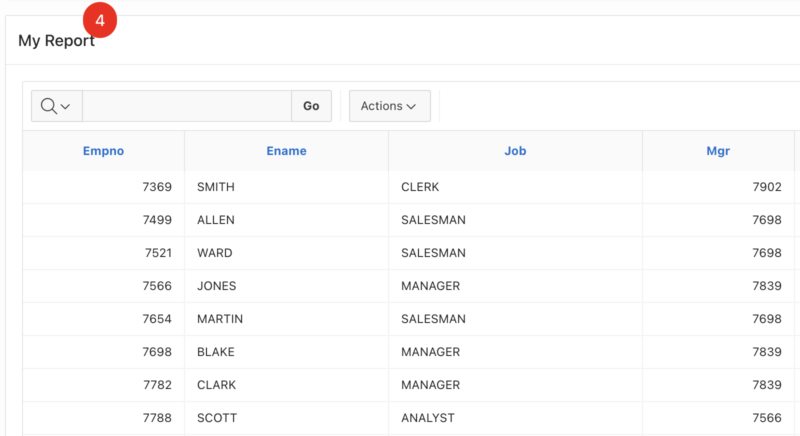 a region in Oracle Apex." class="wp-image-6634"/>
Show Notification on a Report Region in Oracle APEX
- Open the page and select the region on which you want to show the notification.
- Select template type as Standard.
- Create a hidden page item in that region. For example, the name of the item is P1_NOTI.
- Set the default value for that item and set the type as SQL query, and specify the following SQL query, for example,
select count(1) from emp where hiredate = sysdate; - Now specify the region title as follows:
My Report <span class="notification" data-count="&P1_NOTI.">&P1_NOTI.</span>. - Specify a static ID to the region—for example, myReport.
- You are almost done, now add the below CSS in the page's Inline CSS section:
#myReport .notification {
position: absolute;
top: -13px;
left: 86px;
padding: 6px 12px;
border-radius: 90%;
background: red;
color: white;
}
.notification[data-count="0"]{display:none;}
Save the changes and run the page. You will see the notification as per your data configuration.
You may need to set the CSS part left:86px; according to your title length.
The notification will display if the value is greater than 0; for the 0 value, it will not show the notification.
Get more Vinish.dev tutorials on Google
See my articles more often when you search Google.
