
An FAQ page lists the questions users ask most often. Each answer stays hidden until the user clicks its question. A long list stays short and easy to scan, and users open only the answer they need.
When the questions live in a table, the help team can add and change them without a new release of the application.
Oracle APEX has no FAQ region, but a classic report can build one with a few settings. This guide shows each question as an HTML details element that opens and closes, groups the questions by category, and adds a search field that filters questions and answers.
The answers are stored as HTML, so the guide also tests that unsafe HTML in an answer cannot run in the browser.
How to write and clean that HTML with a Rich Text Editor item is covered in How to Add a Rich Text Editor and Store the HTML Safely in Oracle APEX. This guide is about displaying the answers as a collapsible FAQ.
Step 1: Create the Tables
The example needs two tables. FAQ_CATEGORIES holds the categories and their display order, and FAQS holds the questions with their HTML answers:
Example:
create table faq_categories (
    category_id   number generated by default on null as identity,
    category_name varchar2(100) not null,
    display_seq   number        not null,
    constraint faq_categories_pk primary key (category_id),
    constraint faq_categories_name_uk unique (category_name),
    constraint faq_categories_seq_uk unique (display_seq)
);

create table faqs (
    faq_id       number generated by default on null as identity,
    category_id  number         not null,
    question     varchar2(300)  not null,
    answer       varchar2(4000) not null,
    display_seq  number         not null,
    is_published varchar2(1)    default on null 'Y' not null,
    updated_on   date           default on null sysdate not null,
    constraint faqs_pk primary key (faq_id),
    constraint faqs_category_fk foreign key (category_id)
        references faq_categories (category_id),
    constraint faqs_question_uk unique (question),
    constraint faqs_seq_uk unique (category_id, display_seq),
    constraint faqs_published_ck check (is_published in ('Y', 'N'))
);

create index faqs_category_ix on faqs (category_id);

insert into faq_categories (category_name, display_seq) values ('Account and Sign-In', 10);
insert into faq_categories (category_name, display_seq) values ('Billing and Payments', 20);
insert into faq_categories (category_name, display_seq) values ('Shipping and Returns', 30);

insert into faqs (category_id, question, answer, display_seq)
values (1, 'How do I reset my password?',
        '<p>Click <strong>Forgot Password</strong> on the sign-in page and enter your email address.</p><p>The reset link is valid for 30 minutes.</p>',
        10);

insert into faqs (category_id, question, answer, display_seq)
values (1, 'Can I change the email address on my account?',
        '<p>Yes. Open <strong>My Profile</strong>, enter the new address and confirm it from the email we send you.</p>',
        20);

insert into faqs (category_id, question, answer, display_seq)
values (2, 'Which payment methods do you accept?',
        '<p>We accept:</p><ul><li>Credit and debit cards</li><li>Bank transfer</li><li>Purchase orders for business accounts</li></ul>',
        10);

insert into faqs (category_id, question, answer, display_seq)
values (2, 'When will I receive my invoice?',
        '<p>The invoice is emailed as a PDF on the day your order ships.</p>',
        20);

insert into faqs (category_id, question, answer, display_seq)
values (3, 'How long does delivery take?',
        '<p>Standard delivery takes <strong>3 to 5 working days</strong>. Express delivery arrives the next working day.</p>',
        10);

insert into faqs (category_id, question, answer, display_seq)
values (3, 'How do I return an item?',
        '<ol><li>Open <em>My Orders</em> and choose <strong>Return Item</strong>.</li><li>Print the return label.</li><li>Drop the parcel at any post office within 30 days.</li></ol>',
        20);

insert into faqs (category_id, question, answer, display_seq, is_published)
values (3, 'Do you ship to other countries?',
        '<p>International shipping starts next quarter.</p>',
        30, 'N');

commit;

select c.category_name, f.display_seq, f.question, f.is_published
from   faqs f
       join faq_categories c on c.category_id = f.category_id
order  by c.display_seq, f.display_seq;
Output:
Table FAQ_CATEGORIES created.

Table FAQS created.

Index FAQS_CATEGORY_IX created.

1 row inserted.

1 row inserted.

1 row inserted.

1 row inserted.

1 row inserted.

1 row inserted.

1 row inserted.

1 row inserted.

1 row inserted.

1 row inserted.

Commit complete.

CATEGORY_NAME              DISPLAY_SEQ QUESTION                                         IS_PUBLISHED
_______________________ ______________ ________________________________________________ _______________
Account and Sign-In                 10 How do I reset my password?                      Y
Account and Sign-In                 20 Can I change the email address on my account?    Y
Billing and Payments                10 Which payment methods do you accept?             Y
Billing and Payments                20 When will I receive my invoice?                  Y
Shipping and Returns                10 How long does delivery take?                     Y
Shipping and Returns                20 How do I return an item?                         Y
Shipping and Returns                30 Do you ship to other countries?                  N

7 rows selected.
A few details in the tables:
- DISPLAY_SEQ sets the order of the categories and of the questions inside each category. The unique constraint FAQS_SEQ_UK stops two questions of one category from sharing a position.
- IS_PUBLISHED lets the help team prepare a question before it goes live. DEFAULT ON NULL 'Y' publishes new questions unless they say otherwise, and the check constraint allows only Y and N.
- The answer is HTML, so it can use bold text, lists and links. The last question is not published, so the FAQ page must not show it.
Step 2: Create the Help Center FAQ Page
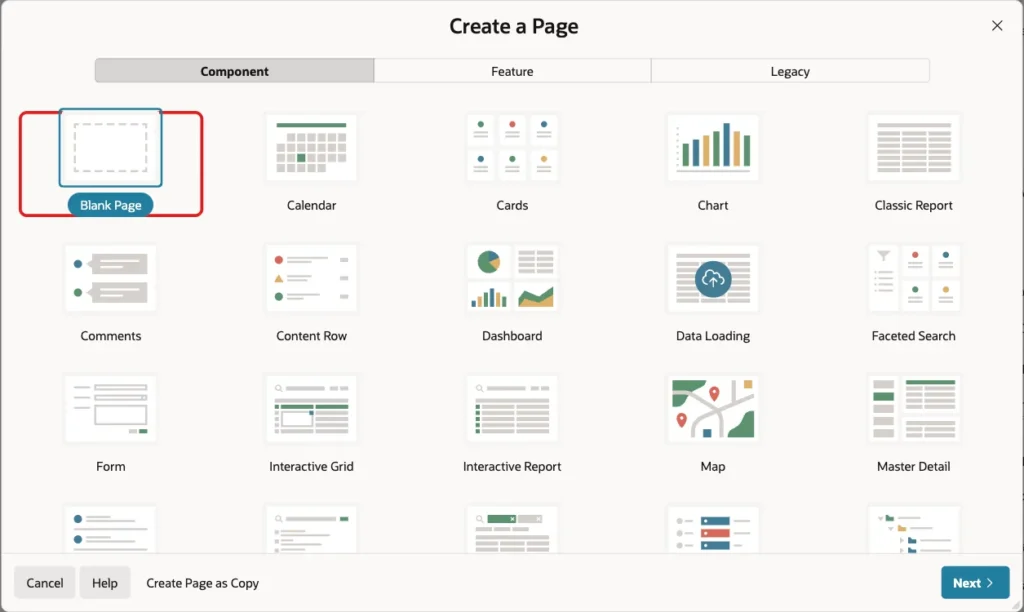
In App Builder, open the application and click Create Page. On the Component tab, select Blank Page:
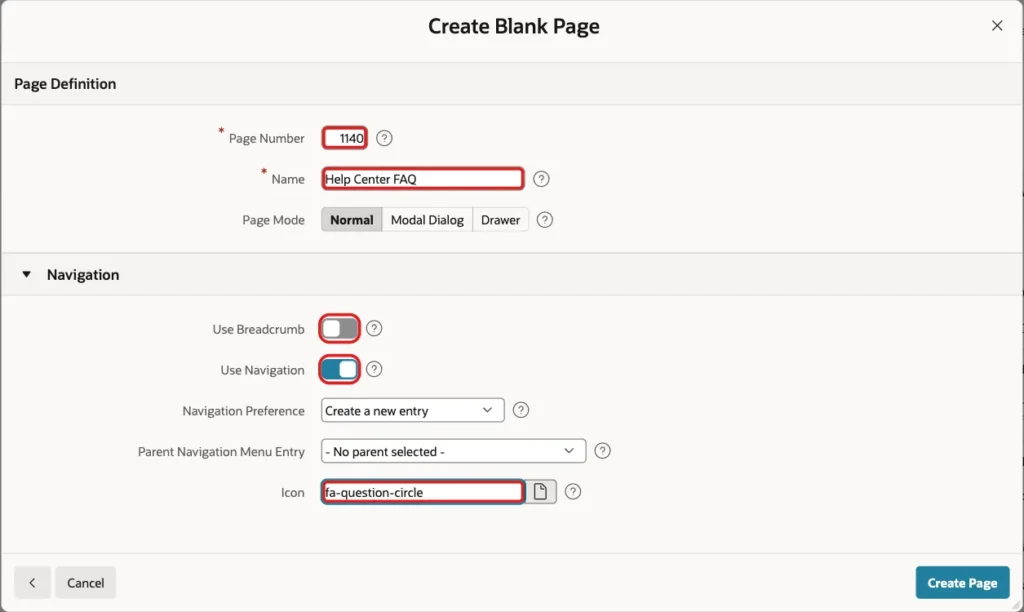
On the next screen, enter Page Number 1140 and Name Help Center FAQ. Turn off Use Breadcrumb, keep Use Navigation on and enter the Icon fa-question-circle. Then click Create Page:
Step 3: Add the FAQ Report Region
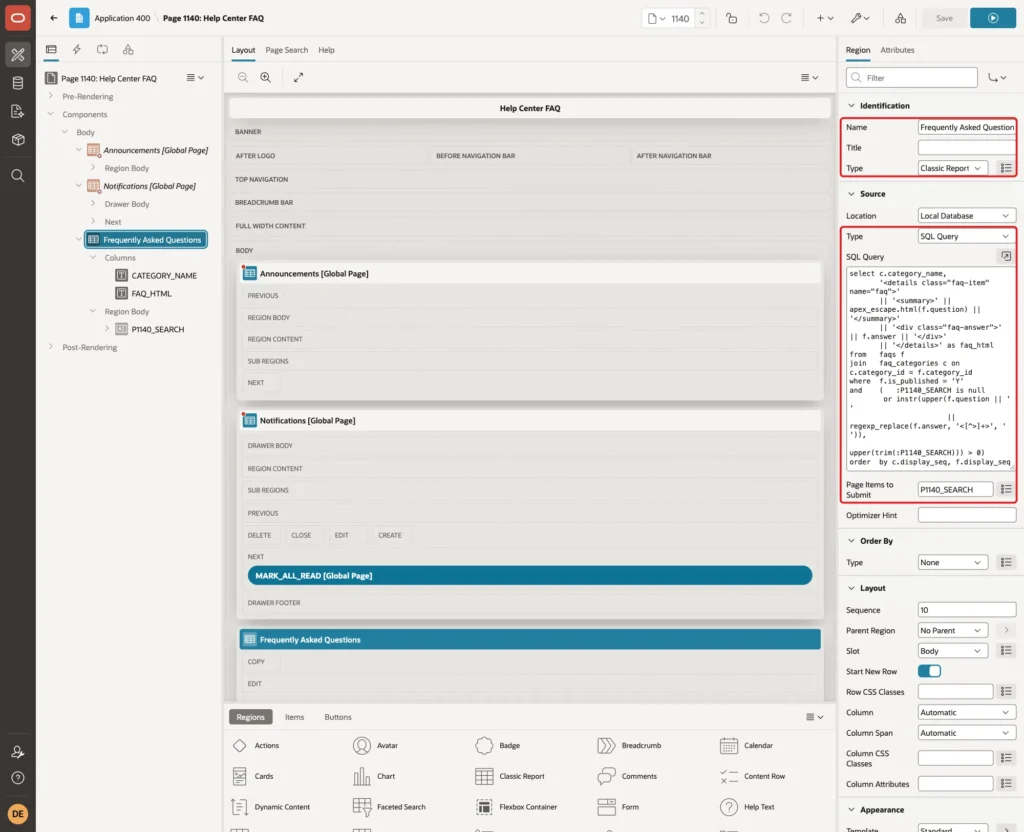
In Page Designer, drag a Classic Report region into the Body. Set its Name to Frequently Asked Questions, set Source Type to SQL Query, and enter this query:
Example:
select c.category_name,
       '<details class="faq-item" name="faq">'
       || '<summary>' || apex_escape.html(f.question) || '</summary>'
       || '<div class="faq-answer">' || f.answer || '</div>'
       || '</details>' as faq_html
from   faqs f
join   faq_categories c on c.category_id = f.category_id
where  f.is_published = 'Y'
and    (   :P1140_SEARCH is null
        or instr(upper(f.question || ' '
                       || regexp_replace(f.answer, '<[^>]+>', ' ')),
                 upper(trim(:P1140_SEARCH))) > 0)
order  by c.display_seq, f.display_seq
Set Page Items to Submit to P1140_SEARCH. You create this item in Step 6; the region sends its value with every refresh:
The query does the main work:
- FAQ_HTML builds one details element per question. The browser shows only the summary (the question) until the user clicks it, then shows the rest (the answer). No JavaScript is needed to open and close it.
- All details elements share the attribute name="faq". Browsers then keep only one answer of the group open: opening a second question closes the first one. Remove the name attribute if users should be able to open several answers at once.
- APEX_ESCAPE.HTML escapes the question, because it is plain text. The answer is not escaped here, because it is HTML; the next step makes it safe.
- The search compares the text with the question and with the answer after REGEXP_REPLACE removes the HTML tags. A search for a word such as "strong" does not match the <strong> tag inside an answer.
In the Advanced group, set HTML DOM ID to faqs. The CSS in Step 8 uses this ID:

Step 4: Show Each Question as a Collapsible Item
Expand Columns under the region and select FAQ_HTML. Set its Type to Rich Text, and in Settings set Format to HTML:
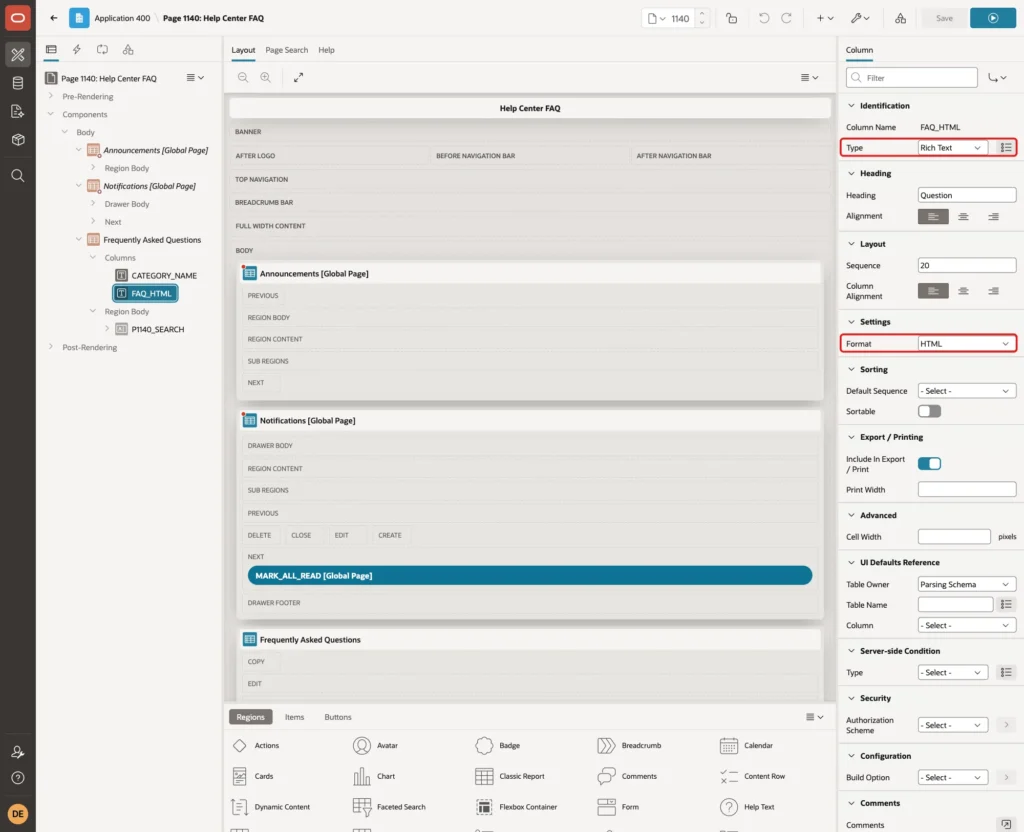
A Rich Text column sends the HTML to the browser escaped and sanitizes it there before it shows it. Scripts, event handlers such as onclick, and javascript: links are removed, while safe tags such as lists, bold text, links and the details element stay. The test section shows this.
In a first test, the details element was built in an HTML Expression on another column instead:
Example:
<details><summary>#QUESTION#</summary>#ANSWER#</details>
With ANSWER as a hidden column, APEX escaped the substitution and the answers showed raw tags such as <p> as text. With Escape special characters turned off on ANSWER, the HTML appeared, but so did the danger.
The test answer from the test section then opened alert boxes for its script tag, its onerror attribute and its onclick attribute.
When #ANSWER# pointed to a Rich Text column, the script and the onerror code ran as well: the substitution used the raw value, not the sanitized one. Build the whole details element in the query and show it with a Rich Text column instead.
Step 5: Group the Questions by Category
Select the region and open the Attributes tab. In Break Formatting, set Break Columns to First Column and Style to Repeat Headings on Break. Then enter this Repeat Heading Format:
Example:
<h3 class="faq-category">#COLUMN_VALUE#</h3>
CATEGORY_NAME is the first column, so APEX now writes a heading row with the category name before the questions of each category. In the Heading group, set Type to None:
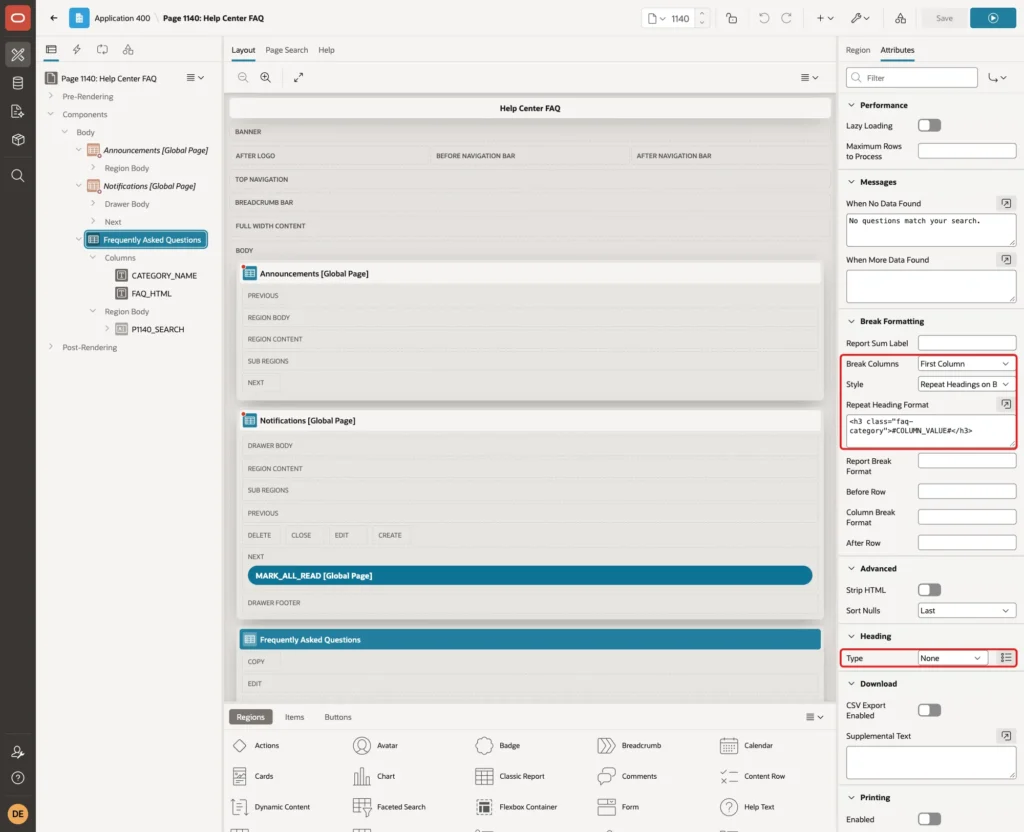
Heading Type None did not remove all column headings in this break style. The first category had no heading, but a "Question" heading still appeared above the second and third categories. The CSS in Step 8 hides these repeated headings.
APEX escapes #COLUMN_VALUE#. A test category named "ZZ <b>Bold</b> Category" appeared with its tags as plain text, not in bold.
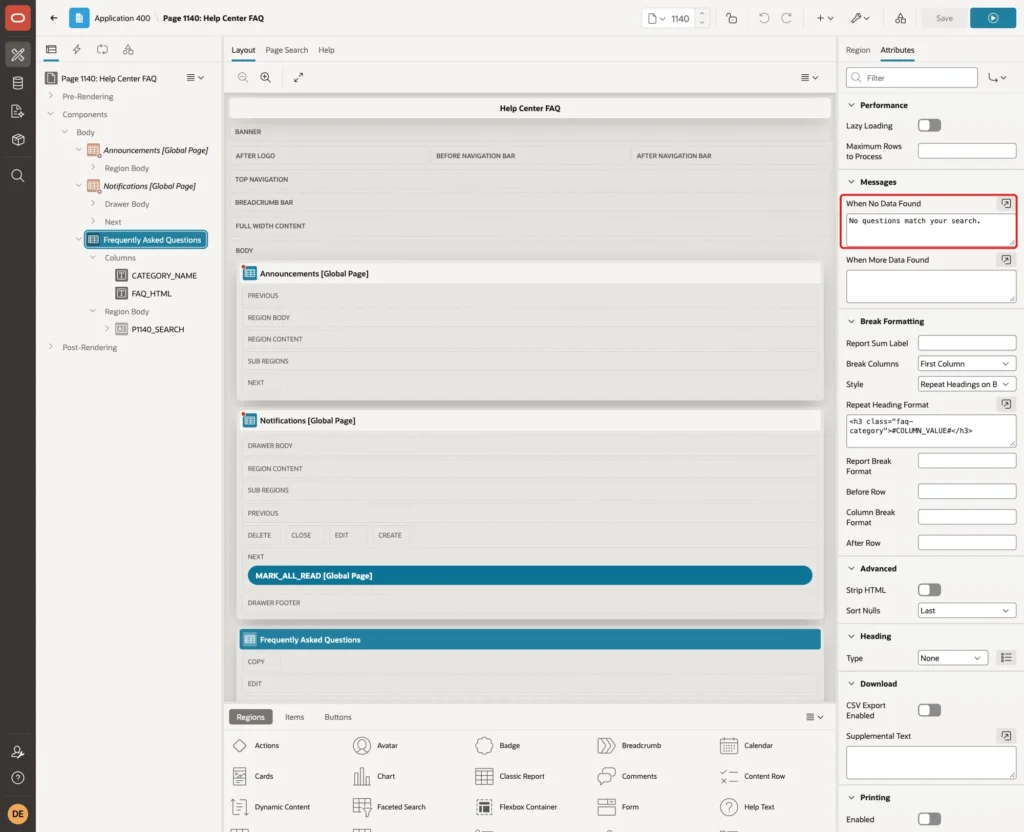
In Messages, set When No Data Found to No questions match your search.:
Step 6: Add the Search Field
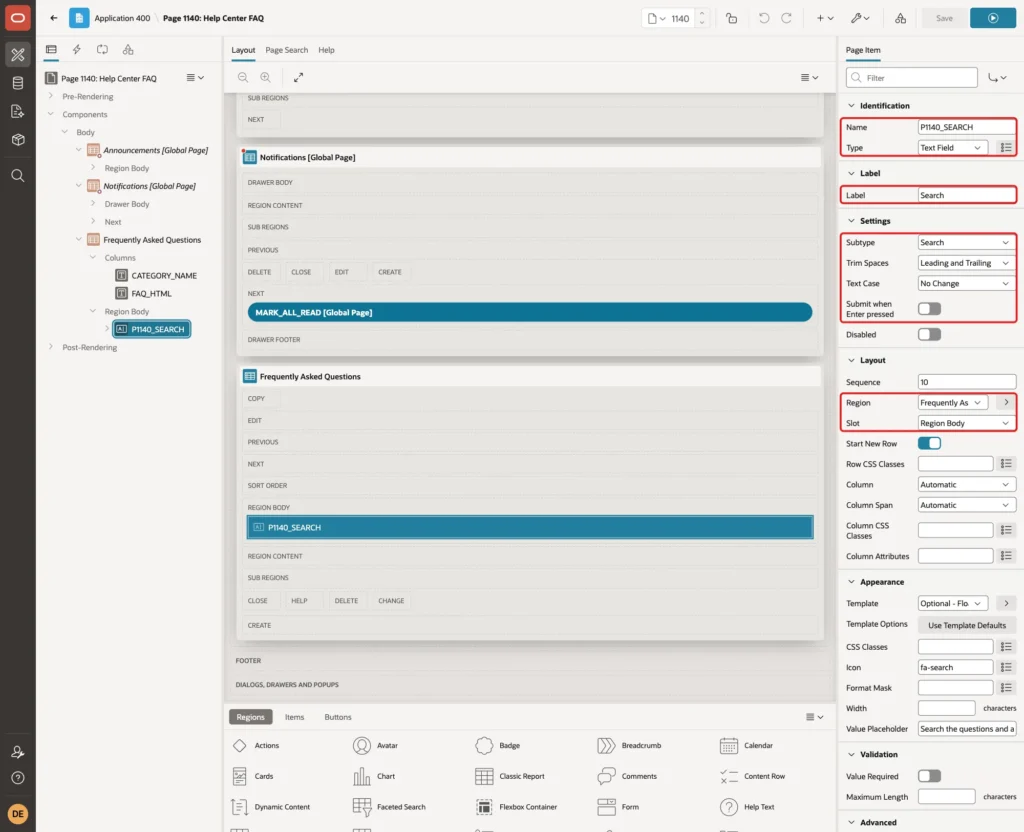
Right-click the region and add a page item. Set:
- Name: P1140_SEARCH, Type: Text Field and Label: Search.
- Settings: Subtype Search, and Submit when Enter pressed off. The report refreshes without submitting the page.
- Layout: Region Frequently Asked Questions and Slot Region Body, so the field appears above the questions.
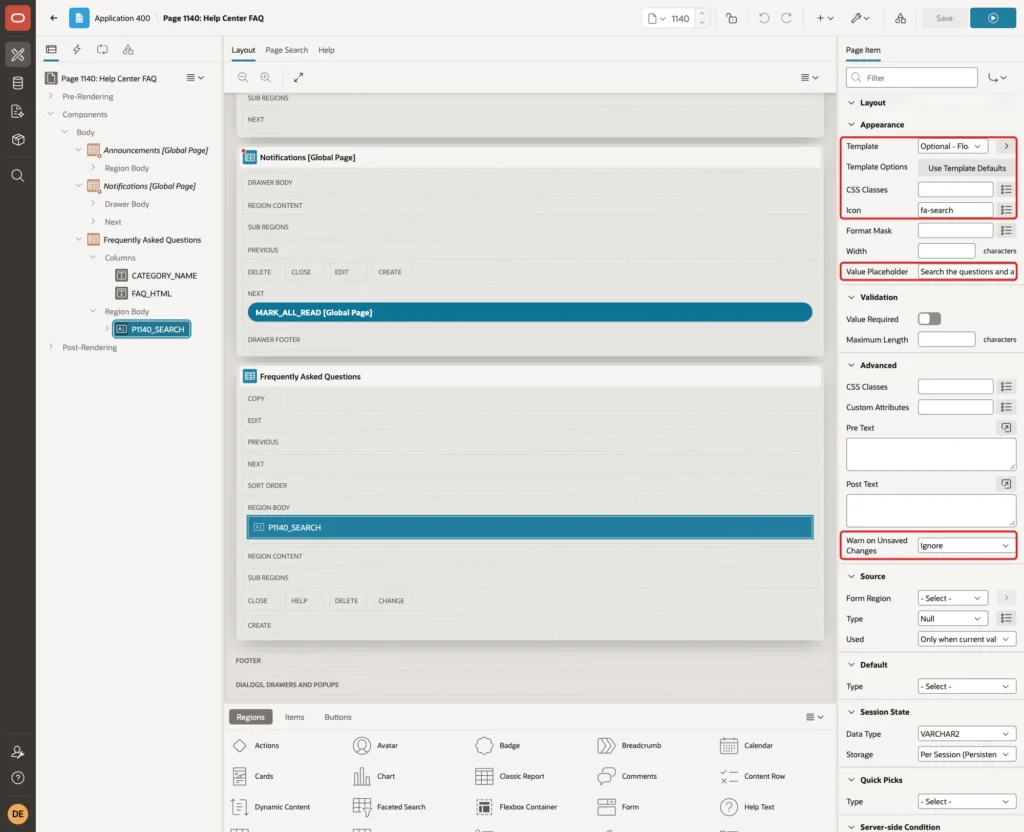
In Appearance, set Template to Optional - Floating, Icon to fa-search and Value Placeholder to Search the questions and answers. In Advanced, set Warn on Unsaved Changes to Ignore, because a search term is not data the user can lose:
Step 7: Refresh the Report When the Search Changes
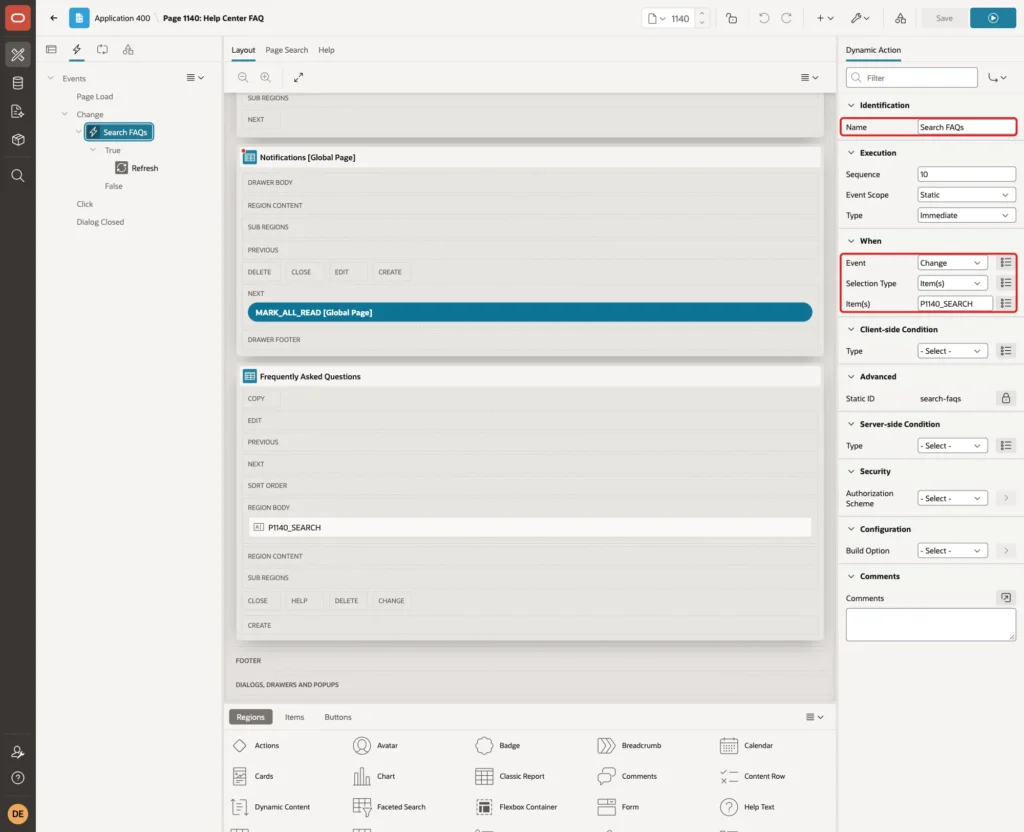
Right-click P1140_SEARCH and select Create Dynamic Action. Set Name to Search FAQs. In When, keep Event Change, Selection Type Item(s) and Item(s) P1140_SEARCH:
Select the True action, set Action to Refresh, Selection Type to Region and Region to Frequently Asked Questions. Turn off Fire on Initialization, because the report already shows all questions when the page opens:
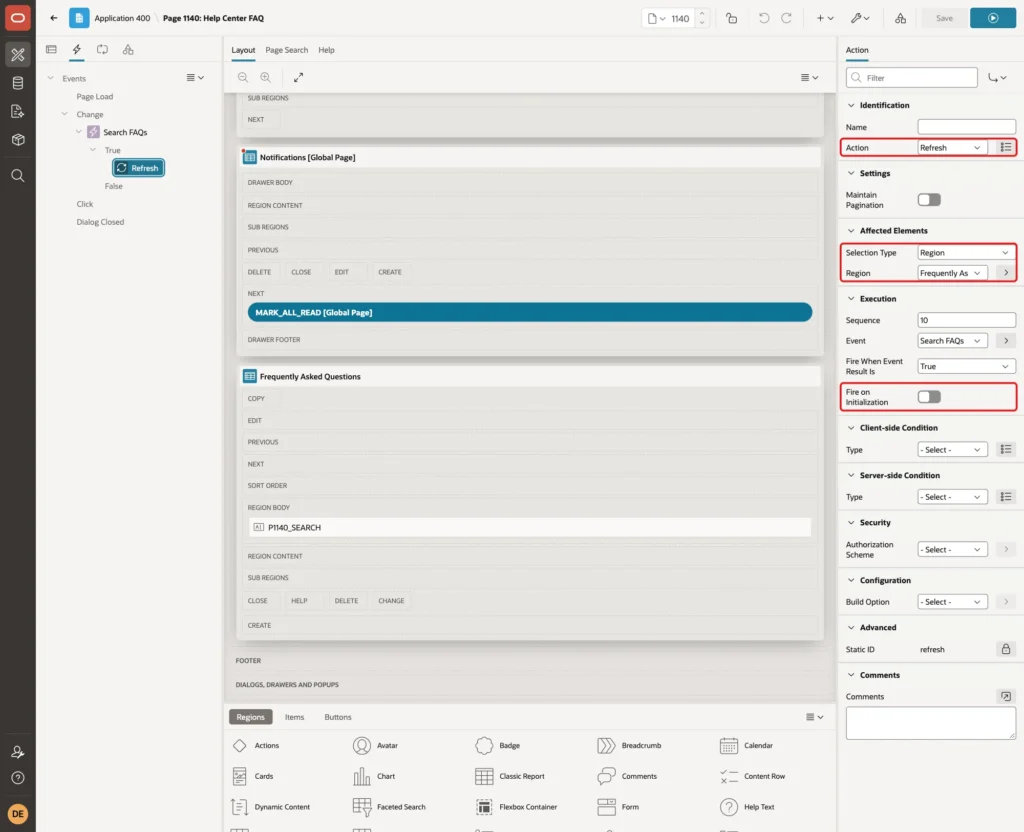
The Change event fires when the user presses Enter or leaves the field. Typing alone does not send a request, so the database is not queried for every letter.
Step 8: Style the FAQ with CSS
Select the page (the root node of the tree) and enter this CSS in CSS > Inline:
Example:
.faq-item {
    border: 1px solid var(--ut-component-border-color, #ddd);
    border-radius: 6px;
    margin: 4px 0;
}
.faq-item summary {
    cursor: pointer;
    padding: 10px 12px;
    font-weight: 600;
}
.faq-item[open] summary {
    border-bottom: 1px solid var(--ut-component-border-color, #ddd);
}
.faq-answer {
    padding: 4px 12px;
}
#faqs .t-Report-report thead {
    display: none;
}
#faqs .faq-category {
    margin: 16px 0 4px;
    font-size: 1.25rem;
}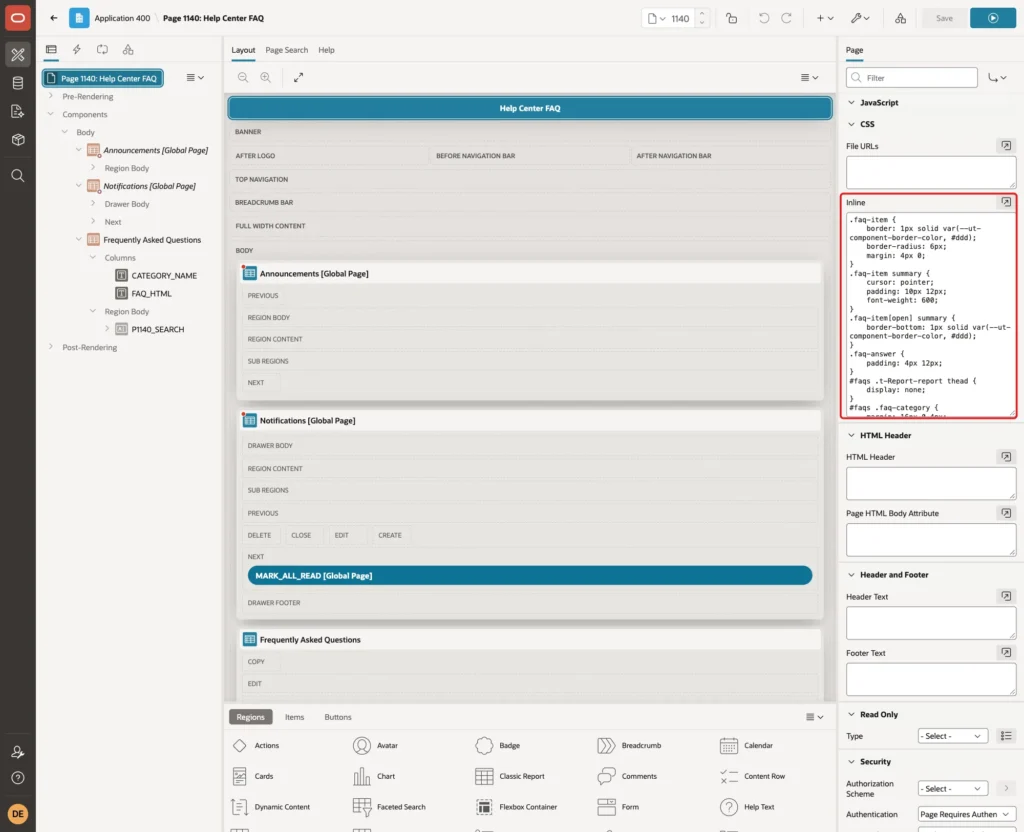
The first rules draw each question as a bordered box with a bold, clickable summary and a line under an open question. The rule on #faqs thead hides the repeated column headings from Step 5. The last rule sizes the category headings.
Save the page.
Test the FAQ Page
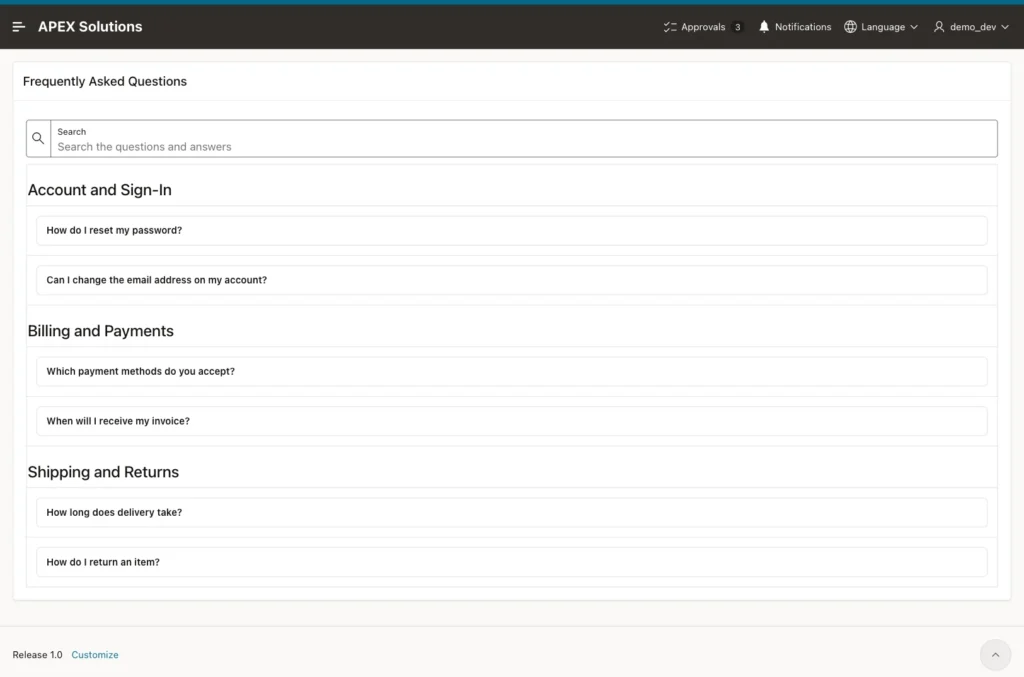
Run the page. The questions appear under their categories, all closed. The unpublished question "Do you ship to other countries?" does not appear:
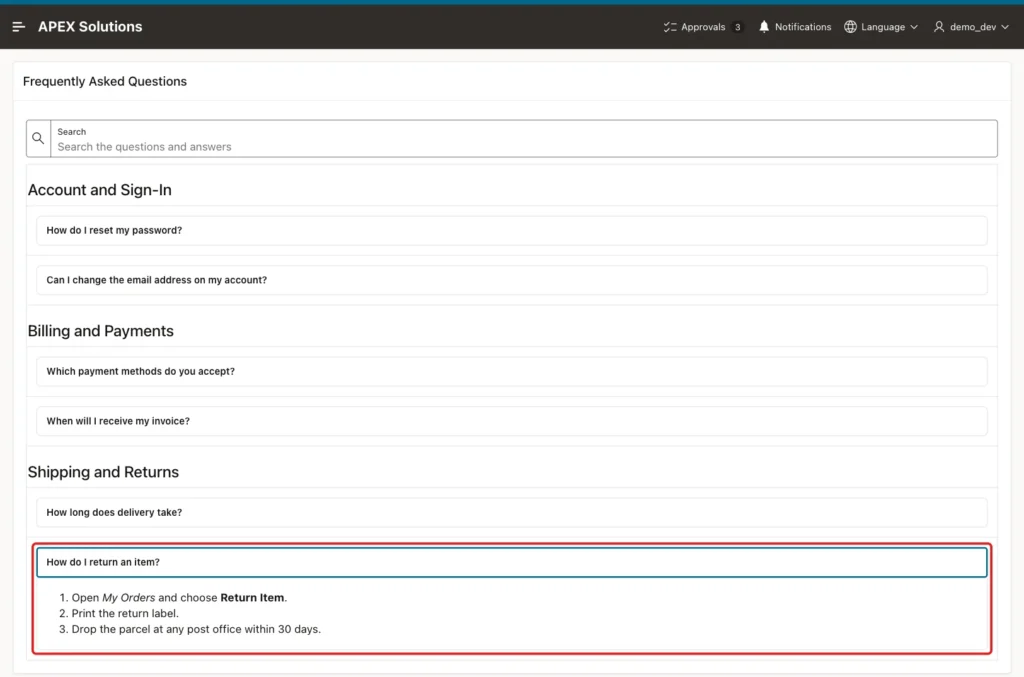
Click "How do I return an item?". The answer opens below the question, with its numbered list and bold text:
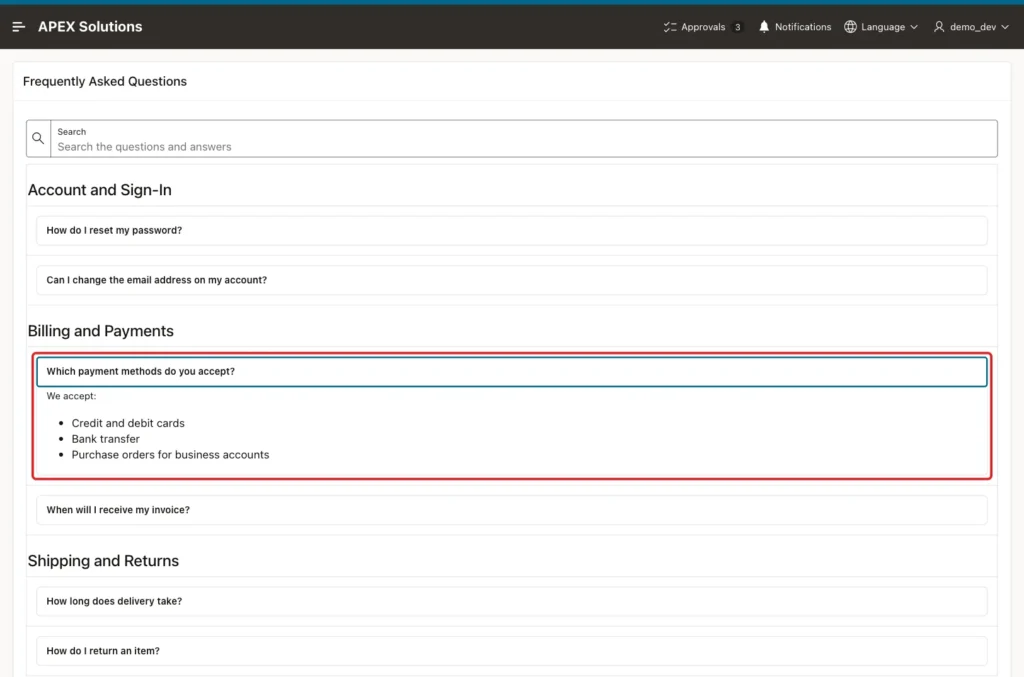
Now click "Which payment methods do you accept?". Its answer opens, and the return answer closes, because both share name="faq". Clicking the open question again closes it:
The questions also work with the keyboard. With the focus on "How do I reset my password?", Enter opened the answer and Space closed it again.
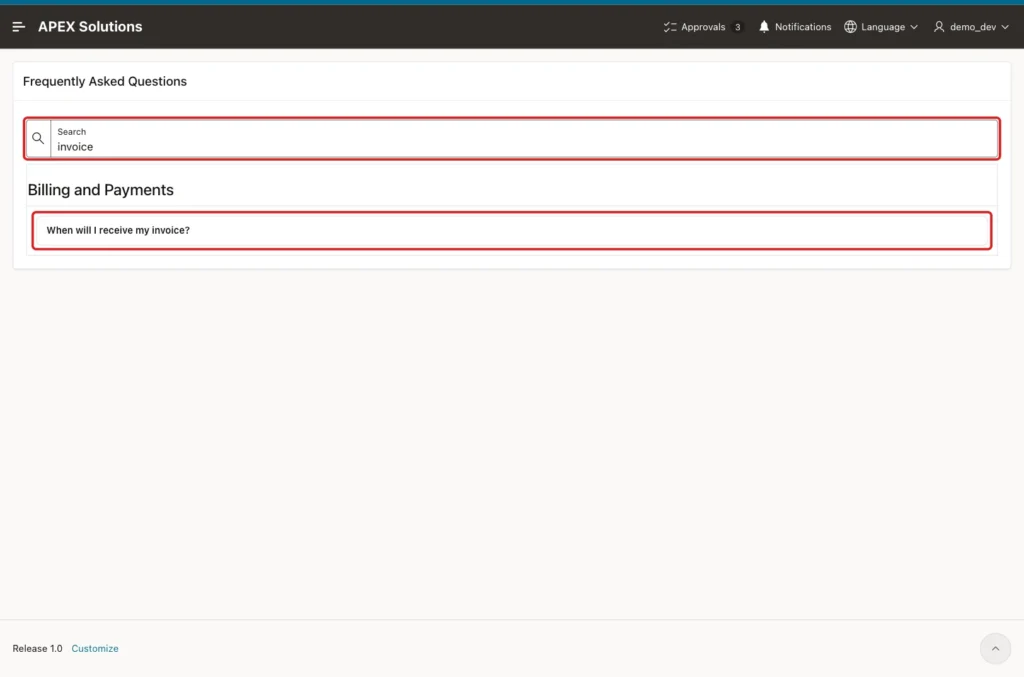
Type invoice in the search field and press Enter. The report refreshes without a page submit, with one request to the server, and shows only the matching question under its category:
More searches in the same session:
- 30 days found "How do I return an item?". The phrase is only in the answer, inside a list item.
- PASSWORD found "How do I reset my password?", because the search ignores upper and lower case.
- countries found nothing: the matching question is not published.
- ' or 1=1 -- found nothing. The search term is a bind variable, so it is compared as text and never runs as SQL.
- Clearing the field and pressing Tab showed all six questions again.
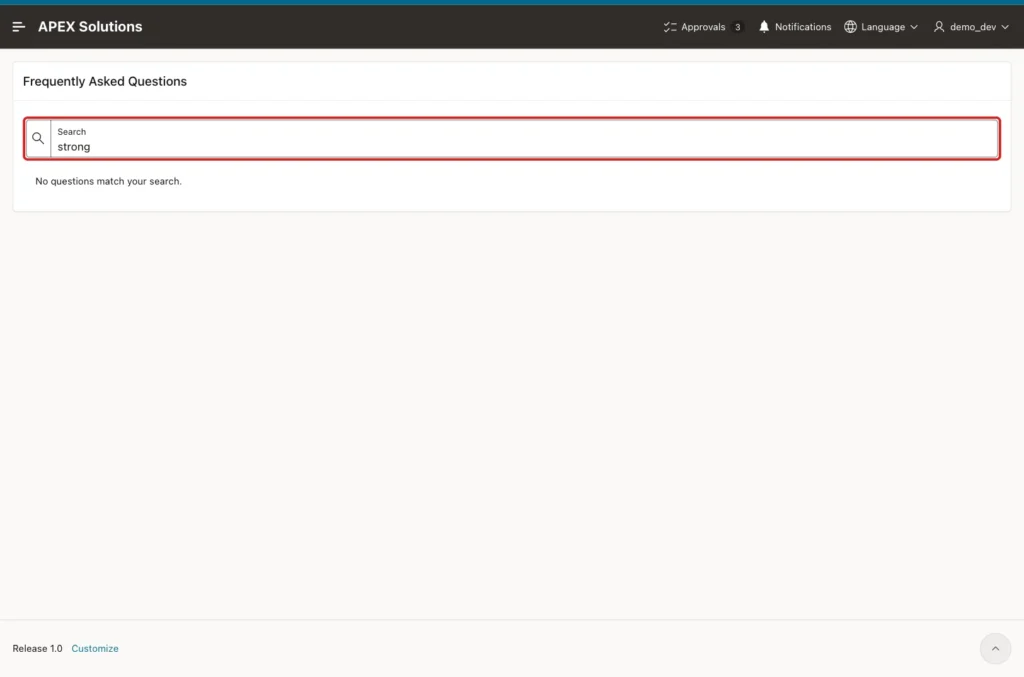
A search for strong shows the message from Step 5, although several answers contain <strong> tags:
The same search in SQL, with the bind variable set by hand, shows the result and the text that the search sees for one answer:
Example:
set lines 200 pages 100
column category_name format a22
column question format a48
column search_text format a90

variable P1140_SEARCH varchar2(100)

exec :P1140_SEARCH := 'invoice'

select c.category_name, f.question
from   faqs f
join   faq_categories c on c.category_id = f.category_id
where  f.is_published = 'Y'
and    (   :P1140_SEARCH is null
        or instr(upper(f.question || ' '
                       || regexp_replace(f.answer, '<[^>]+>', ' ')),
                 upper(trim(:P1140_SEARCH))) > 0)
order  by c.display_seq, f.display_seq;

exec :P1140_SEARCH := 'strong'

select count(*) as matches
from   faqs f
where  f.is_published = 'Y'
and    instr(upper(f.question || ' '
                   || regexp_replace(f.answer, '<[^>]+>', ' ')),
             upper(trim(:P1140_SEARCH))) > 0;

select regexp_replace(answer, '<[^>]+>', ' ') as search_text
from   faqs
where  question = 'How long does delivery take?';
Output:
PL/SQL procedure successfully completed.

CATEGORY_NAME           QUESTION
_______________________ __________________________________
Billing and Payments    When will I receive my invoice?

PL/SQL procedure successfully completed.

   MATCHES
__________
         0

SEARCH_TEXT
__________________________________________________________________________________________________
 Standard delivery takes  3 to 5 working days . Express delivery arrives the next working day.
Finally, test what happens when an answer contains unsafe HTML, for example after an import from another system. This UPDATE gives a test question an answer with a safe link, a script tag, an onerror and an onclick attribute and a javascript: link, and publishes it:
Example:
update faqs
set    answer = '<p>Read <a href="https://vinish.dev/" target="_blank">this guide</a>.</p>'
             || '<script>alert(''script ran'')</script>'
             || '<img src="x" onerror="alert(''onerror ran'')">'
             || '<p onclick="alert(''onclick ran'')">Click this text</p>'
             || '<a href="javascript:alert(''link ran'')">Bad link</a>',
       is_published = 'Y'
where  question = 'Test: unsafe HTML in an answer';

commit;

select question, answer
from   faqs
where  question = 'Test: unsafe HTML in an answer';
Output:
1 row updated.

Commit complete.

QUESTION                          ANSWER
_________________________________ ____________________________________________________________________________________________________________________________________________________________________________________________________________________________________________________________________
Test: unsafe HTML in an answer    <p>Read <a href="https://vinish.dev/" target="_blank">this guide</a>.</p><script>alert('script ran')</script><img src="x" onerror="alert('onerror ran')"><p onclick="alert('onclick ran')">Click this text</p><a href="javascript:alert('link ran')">Bad link</a>
Reload the page and open the test question. No alert box appeared, not when the page loaded, not when the question opened, and not after clicking "Click this text" and "Bad link". The safe link to vinish.dev stayed. The script tag was removed, and the image, the paragraph and the bad link lost their onerror, onclick and href attributes:
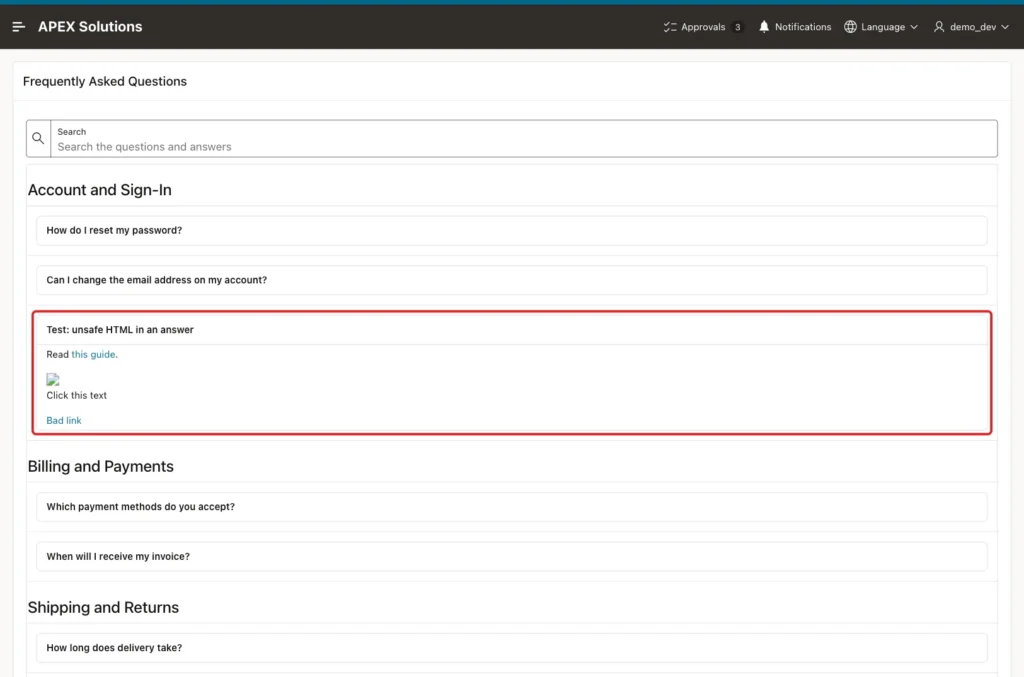
The broken image icon comes from src="x", which the sanitizer keeps because it is not code. Remove the test question when you are done:
Example:
delete from faqs
where  question = 'Test: unsafe HTML in an answer';

commit;
Output:
1 row deleted.

Commit complete.
Things to Know
- The one-open-answer behavior of the shared name attribute comes from the browser, not from APEX. It was tested here in a Chromium browser; check it in the browsers your users have.
- FAQ_HTML is built with VARCHAR2 concatenation. In a test with a 4000-character value in place of the answer, the concatenation failed with ORA-01489: result of string concatenation is too long. With TO_CLOB around the first part, the same expression returned a 4039-character CLOB. Keep answers short, or plan for CLOB answers from the start.
- The Rich Text column cleans the HTML only in the browser. Clean the HTML when it is saved as well, as shown in the Rich Text Editor guide linked above, because emails and exports do not pass through this report.
- The questions of a category follow DISPLAY_SEQ, and the categories follow their own DISPLAY_SEQ. To move a question, change its number; no page change is needed.
Related Guides
- How to Add a Rich Text Editor and Store the HTML Safely in Oracle APEX
- How to Escape Output and Render Markdown Using APEX_ESCAPE and APEX_MARKDOWN
Conclusion
An FAQ page in Oracle APEX needs only a classic report and some CSS. The query builds one details element per question, a Rich Text column shows it safely, break formatting adds a heading for each category, and a search item with a Refresh dynamic action filters the list.
The tests showed answers that open and close with the mouse and the keyboard, one open answer at a time, a search that ignores HTML tags and unpublished questions, and an unsafe answer that could not run any code. Keep the HTML in a Rich Text column, never in an HTML Expression with escaping turned off.
See my articles more often when you search Google.
