
An aging report groups open balances by how long they are past due: not yet due, 0-30 days, 31-60 days, 61-90 days and over 90 days. Finance teams use it every week to see which amounts need a reminder and which are turning into bad debt.
This guide builds an aging page in Oracle APEX with one SQL macro that puts every open invoice into its bucket. A Classic Report shows the buckets per client with column totals, a stacked bar chart shows the same amounts, and an As Of Date item recalculates everything for any past date.
The example uses invoices and payments of a few clients. The same steps work for any table with a due date and an open amount, such as rentals, loans or support tickets.
Step 1: Create the Tables
Three tables hold the data:
- AR_CLIENTS has one row per client with a unique name.
- AR_INVOICES has one row per invoice: a unique invoice number, the client, the invoice date, the due date and the amount.
- AR_PAYMENTS has one row per payment with its date and amount. An invoice can have several payments.
The sample data uses dates relative to today, so the buckets look the same whenever you run it. Create the tables with 6 clients, 18 invoices and 4 payments:
Example:
set pages 100 lines 200 feedback on
alter session set nls_date_format = 'DD-MON-YYYY';
create table ar_clients (
  client_id    number generated by default on null as identity,
  client_name  varchar2(100) not null,
  constraint ar_clients_pk primary key (client_id),
  constraint ar_clients_name_uk unique (client_name)
);

create table ar_invoices (
  invoice_id    number generated by default on null as identity,
  invoice_no    varchar2(20) not null,
  client_id     number not null,
  invoice_date  date not null,
  due_date      date not null,
  amount        number(12,2) not null,
  constraint ar_invoices_pk primary key (invoice_id),
  constraint ar_invoices_no_uk unique (invoice_no),
  constraint ar_invoices_client_fk foreign key (client_id) references ar_clients (client_id),
  constraint ar_invoices_amount_ck check (amount > 0),
  constraint ar_invoices_due_ck check (due_date >= invoice_date)
);

create index ar_invoices_client_ix on ar_invoices (client_id);

create table ar_payments (
  payment_id    number generated by default on null as identity,
  invoice_id    number not null,
  payment_date  date not null,
  amount        number(12,2) not null,
  constraint ar_payments_pk primary key (payment_id),
  constraint ar_payments_invoice_fk foreign key (invoice_id) references ar_invoices (invoice_id),
  constraint ar_payments_amount_ck check (amount > 0)
);

create index ar_payments_invoice_ix on ar_payments (invoice_id);

insert into ar_clients (client_name)
select client_name
  from (values ('Northwind Traders'), ('Bluebird Studio'), ('Cedar Hardware'),
               ('Delta Logistics'), ('Evergreen Foods'), ('Fjord Marine')) v (client_name);

insert into ar_invoices (invoice_no, client_id, invoice_date, due_date, amount)
select v.invoice_no, c.client_id, trunc(sysdate) - v.days_ago, trunc(sysdate) - v.days_ago + v.terms, v.amount
  from (values ('INV-1001', 'Northwind Traders',  15, 30, 4200),
               ('INV-1002', 'Northwind Traders',  50, 30, 3100),
               ('INV-1003', 'Northwind Traders', 110, 30, 2500),
               ('INV-1004', 'Bluebird Studio',    10, 30, 1800),
               ('INV-1005', 'Bluebird Studio',    75, 30, 2600),
               ('INV-1006', 'Bluebird Studio',   140, 30,  900),
               ('INV-1007', 'Cedar Hardware',     35, 30, 5400),
               ('INV-1008', 'Cedar Hardware',     62, 30, 3300),
               ('INV-1009', 'Cedar Hardware',     95, 30, 1500),
               ('INV-1010', 'Delta Logistics',    20, 15, 2750),
               ('INV-1011', 'Delta Logistics',   125, 30, 6100),
               ('INV-1012', 'Delta Logistics',    45, 30, 1200),
               ('INV-1013', 'Evergreen Foods',     5, 30, 3900),
               ('INV-1014', 'Evergreen Foods',    80, 30, 2200),
               ('INV-1015', 'Evergreen Foods',   160, 30, 4800),
               ('INV-1016', 'Fjord Marine',       40, 30, 3500),
               ('INV-1017', 'Fjord Marine',      100, 30, 2900),
               ('INV-1018', 'Fjord Marine',        2, 30, 1600)) v (invoice_no, client_name, days_ago, terms, amount)
  join ar_clients c on c.client_name = v.client_name;

insert into ar_payments (invoice_id, payment_date, amount)
select i.invoice_id, trunc(sysdate) - v.days_ago, v.amount
  from (values ('INV-1012', 10, 1200),
               ('INV-1014', 30, 1000),
               ('INV-1015', 60, 2000),
               ('INV-1016',  3, 3500)) v (invoice_no, days_ago, amount)
  join ar_invoices i on i.invoice_no = v.invoice_no;

commit;

select i.invoice_no, c.client_name, i.invoice_date, i.due_date, i.amount,
       (select nvl(sum(p.amount), 0) from ar_payments p where p.invoice_id = i.invoice_id) as paid
  from ar_invoices i
  join ar_clients c on c.client_id = i.client_id
 order by i.invoice_no;
Output:
Session altered.

Table AR_CLIENTS created.

Table AR_INVOICES created.

Index AR_INVOICES_CLIENT_IX created.

Table AR_PAYMENTS created.

Index AR_PAYMENTS_INVOICE_IX created.

6 rows inserted.

18 rows inserted.

4 rows inserted.

Commit complete.

INVOICE_NO    CLIENT_NAME          INVOICE_DATE    DUE_DATE          AMOUNT    PAID
_____________ ____________________ _______________ ______________ _________ _______
INV-1001      Northwind Traders    05-OCT-2026     04-NOV-2026         4200       0
INV-1002      Northwind Traders    31-AUG-2026     30-SEP-2026         3100       0
INV-1003      Northwind Traders    02-JUL-2026     01-AUG-2026         2500       0
INV-1004      Bluebird Studio      10-OCT-2026     09-NOV-2026         1800       0
INV-1005      Bluebird Studio      06-AUG-2026     05-SEP-2026         2600       0
INV-1006      Bluebird Studio      02-JUN-2026     02-JUL-2026          900       0
INV-1007      Cedar Hardware       15-SEP-2026     15-OCT-2026         5400       0
INV-1008      Cedar Hardware       19-AUG-2026     18-SEP-2026         3300       0
INV-1009      Cedar Hardware       17-JUL-2026     16-AUG-2026         1500       0
INV-1010      Delta Logistics      30-SEP-2026     15-OCT-2026         2750       0
INV-1011      Delta Logistics      17-JUN-2026     17-JUL-2026         6100       0
INV-1012      Delta Logistics      05-SEP-2026     05-OCT-2026         1200    1200
INV-1013      Evergreen Foods      15-OCT-2026     14-NOV-2026         3900       0
INV-1014      Evergreen Foods      01-AUG-2026     31-AUG-2026         2200    1000
INV-1015      Evergreen Foods      13-MAY-2026     12-JUN-2026         4800    2000
INV-1016      Fjord Marine         10-SEP-2026     10-OCT-2026         3500    3500
INV-1017      Fjord Marine         12-JUL-2026     11-AUG-2026         2900       0
INV-1018      Fjord Marine         18-OCT-2026     17-NOV-2026         1600       0

18 rows selected.
- AR_INVOICES_CLIENT_FK and AR_PAYMENTS_INVOICE_FK link the rows. Both foreign keys have an index, which the aging query uses for its joins.
- AR_INVOICES_DUE_CK makes sure that no invoice is due before its invoice date. AR_INVOICES_AMOUNT_CK and AR_PAYMENTS_AMOUNT_CK allow only positive amounts.
- The open balance is not stored. It is calculated from the payments, so it can be calculated for any date.
In this example, INV-1012 is fully paid, INV-1014 and INV-1015 are partly paid, and INV-1016 was paid three days ago.
Step 2: Create the Aging Function
The bucket rules are needed in three places on the page: the summary report, the chart and the invoice list. Writing them once keeps them the same everywhere.
A table SQL macro does this well. It is a function that returns the text of a query. Oracle puts that text into the calling SQL statement, so the macro is used like a view that takes a parameter, here the as-of date:
Example:
create or replace function ar_aging_items (p_as_of in date)
return varchar2 sql_macro(table)
is
begin
  return q'{
    select i.invoice_id,
           i.invoice_no,
           c.client_name,
           i.invoice_date,
           i.due_date,
           i.amount,
           i.amount - nvl(p.paid_amount, 0) as balance,
           p_as_of - i.due_date as days_overdue,
           case
             when p_as_of < i.due_date then 'Not Due'
             when p_as_of - i.due_date <= 30 then '0-30'
             when p_as_of - i.due_date <= 60 then '31-60'
             when p_as_of - i.due_date <= 90 then '61-90'
             else 'Over 90'
           end as bucket,
           case
             when p_as_of < i.due_date then 1
             when p_as_of - i.due_date <= 30 then 2
             when p_as_of - i.due_date <= 60 then 3
             when p_as_of - i.due_date <= 90 then 4
             else 5
           end as bucket_seq
      from ar_invoices i
      join ar_clients c on c.client_id = i.client_id
      left join (select invoice_id, sum(amount) as paid_amount
                   from ar_payments
                  where payment_date <= p_as_of
                  group by invoice_id) p on p.invoice_id = i.invoice_id
     where i.invoice_date <= p_as_of
       and i.amount - nvl(p.paid_amount, 0) > 0
  }';
end;
/
Output:
Function AR_AGING_ITEMS compiled
How the macro works:
- The inline view adds up only the payments made on or before the as-of date. BALANCE is the amount minus those payments.
- DAYS_OVERDUE is the as-of date minus the due date. A negative number means the invoice is not due yet.
- The CASE expression gives the bucket name, and a second CASE gives BUCKET_SEQ, a number that sorts the buckets in their natural order.
- Invoices dated after the as-of date and invoices without an open balance are left out.
An invoice due today has 0 days overdue and lands in 0-30. If your rules count it as not due, change the first condition from < to <=.
Query the macro for today to see each open invoice and its bucket:
Example:
set pages 100 lines 200 feedback on
alter session set nls_date_format = 'DD-MON-YYYY';
select invoice_no, client_name, due_date, balance, days_overdue, bucket
  from ar_aging_items(trunc(sysdate))
 order by bucket_seq, days_overdue, invoice_no;
Output:
Session altered.

INVOICE_NO    CLIENT_NAME          DUE_DATE          BALANCE    DAYS_OVERDUE BUCKET
_____________ ____________________ ______________ __________ _______________ __________
INV-1018      Fjord Marine         17-NOV-2026          1600             -28 Not Due
INV-1013      Evergreen Foods      14-NOV-2026          3900             -25 Not Due
INV-1004      Bluebird Studio      09-NOV-2026          1800             -20 Not Due
INV-1001      Northwind Traders    04-NOV-2026          4200             -15 Not Due
INV-1007      Cedar Hardware       15-OCT-2026          5400               5 0-30
INV-1010      Delta Logistics      15-OCT-2026          2750               5 0-30
INV-1002      Northwind Traders    30-SEP-2026          3100              20 0-30
INV-1008      Cedar Hardware       18-SEP-2026          3300              32 31-60
INV-1005      Bluebird Studio      05-SEP-2026          2600              45 31-60
INV-1014      Evergreen Foods      31-AUG-2026          1200              50 31-60
INV-1009      Cedar Hardware       16-AUG-2026          1500              65 61-90
INV-1017      Fjord Marine         11-AUG-2026          2900              70 61-90
INV-1003      Northwind Traders    01-AUG-2026          2500              80 61-90
INV-1011      Delta Logistics      17-JUL-2026          6100              95 Over 90
INV-1006      Bluebird Studio      02-JUL-2026           900             110 Over 90
INV-1015      Evergreen Foods      12-JUN-2026          2800             130 Over 90

16 rows selected.
Sixteen invoices are open. INV-1012 and INV-1016 are missing because they are paid. The totals per bucket are the numbers the APEX page must show:
Example:
set pages 100 lines 200 feedback on
select bucket, count(*) as invoices, sum(balance) as balance
  from ar_aging_items(trunc(sysdate))
 group by bucket, bucket_seq
 order by bucket_seq;
Output:
BUCKET        INVOICES    BALANCE
__________ ___________ __________
Not Due              4      11500
0-30                 3      11250
31-60                3       7100
61-90                3       6900
Over 90              3       9800

5 rows selected.
Step 3: Create the Classic Report Page
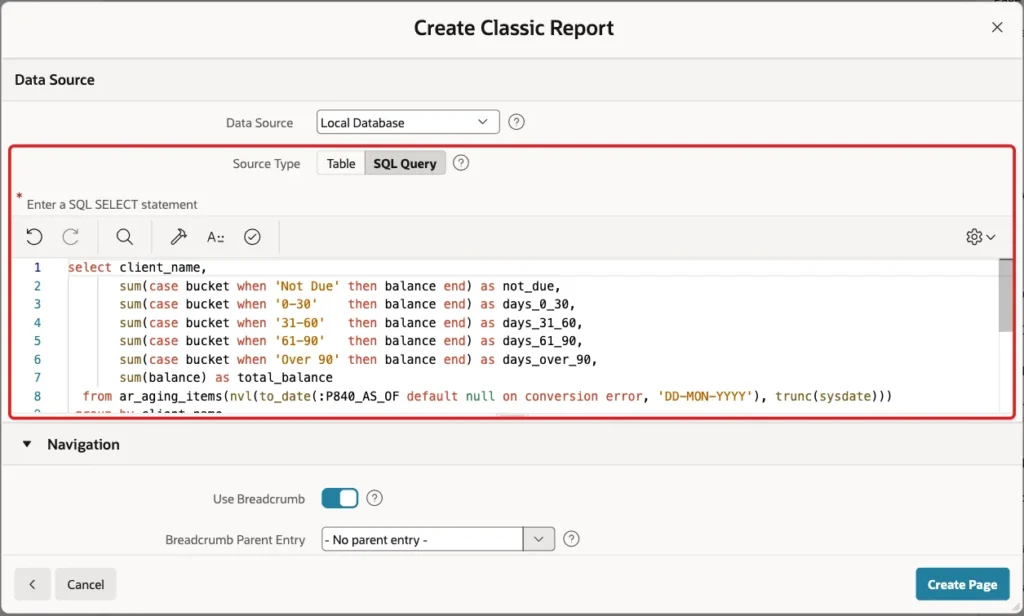
The summary report has one row per client and one column per bucket. Each column adds up only the balances of its bucket:
Example:
select client_name,
       sum(case bucket when 'Not Due' then balance end) as not_due,
       sum(case bucket when '0-30'    then balance end) as days_0_30,
       sum(case bucket when '31-60'   then balance end) as days_31_60,
       sum(case bucket when '61-90'   then balance end) as days_61_90,
       sum(case bucket when 'Over 90' then balance end) as days_over_90,
       sum(balance) as total_balance
  from ar_aging_items(nvl(to_date(:P840_AS_OF default null on conversion error, 'YYYY-MM-DD'), trunc(sysdate)))
 group by client_name
 order by client_name
The page item P840_AS_OF is created in Step 4. The query reads it with the format YYYY-MM-DD. DEFAULT NULL ON CONVERSION ERROR turns a value that is not a valid date into NULL, and NVL then uses today. A bad value can never break the query with an ORA- error.
In Page Designer, click Create (the plus icon) and choose Page. Select the Classic Report tile:

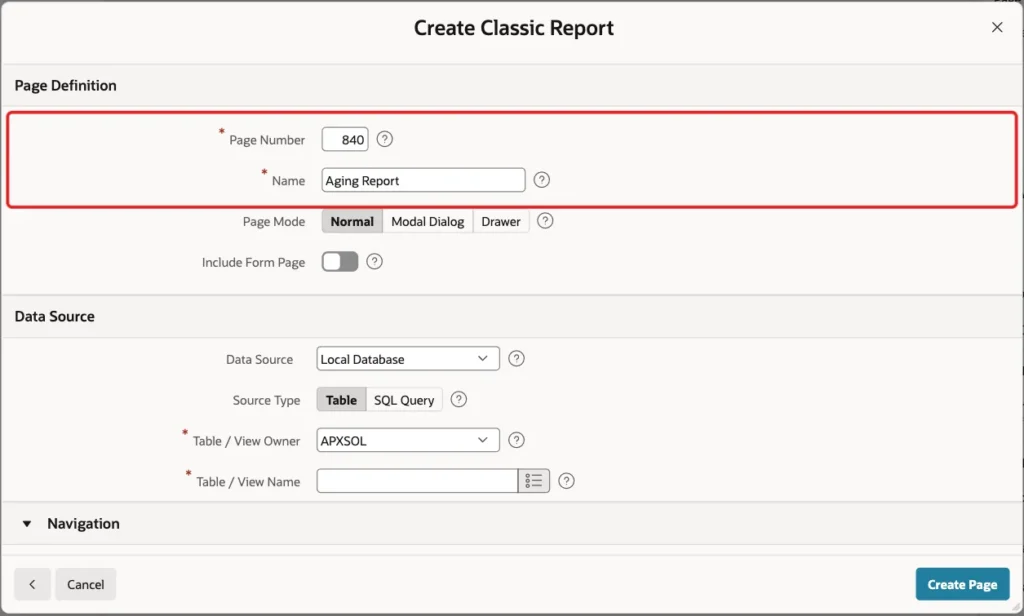
On the Create Classic Report screen, enter Page Number 840 and Name Aging Report. Leave Page Mode Normal and Include Form Page off:
Under Data Source, keep Local Database, set Source Type to SQL Query and paste the query above into the editor:
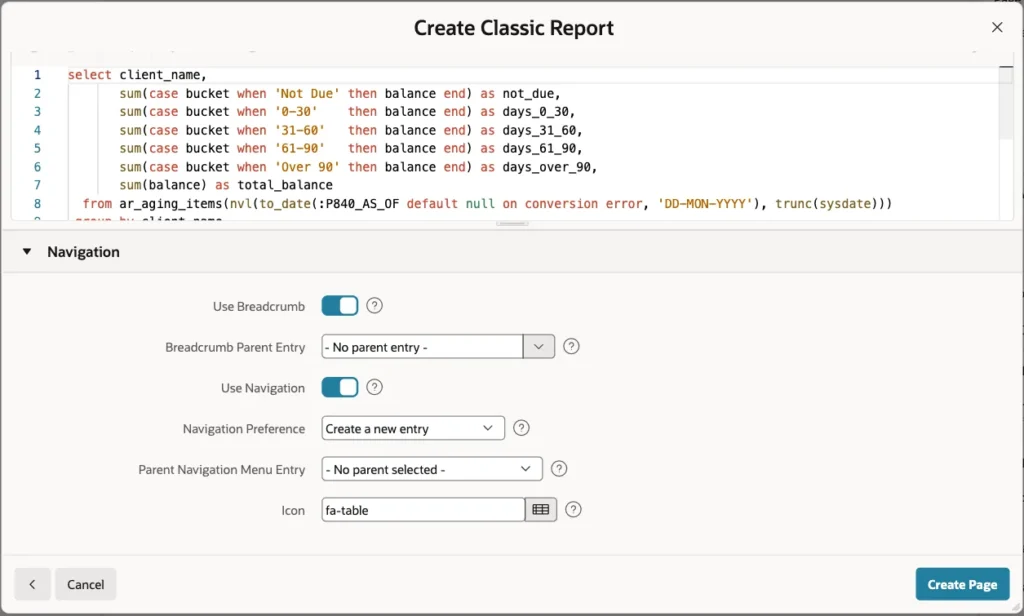
Under Navigation, keep the defaults: a breadcrumb and a new navigation menu entry with the icon fa-table. Click Create Page:
The wizard creates page 840 with the region Aging Report. In this test it turned Sortable off for every column. Keep it off: the clients are sorted by the query, and the total row must stay at the bottom.
Step 4: Add the As Of Date Item
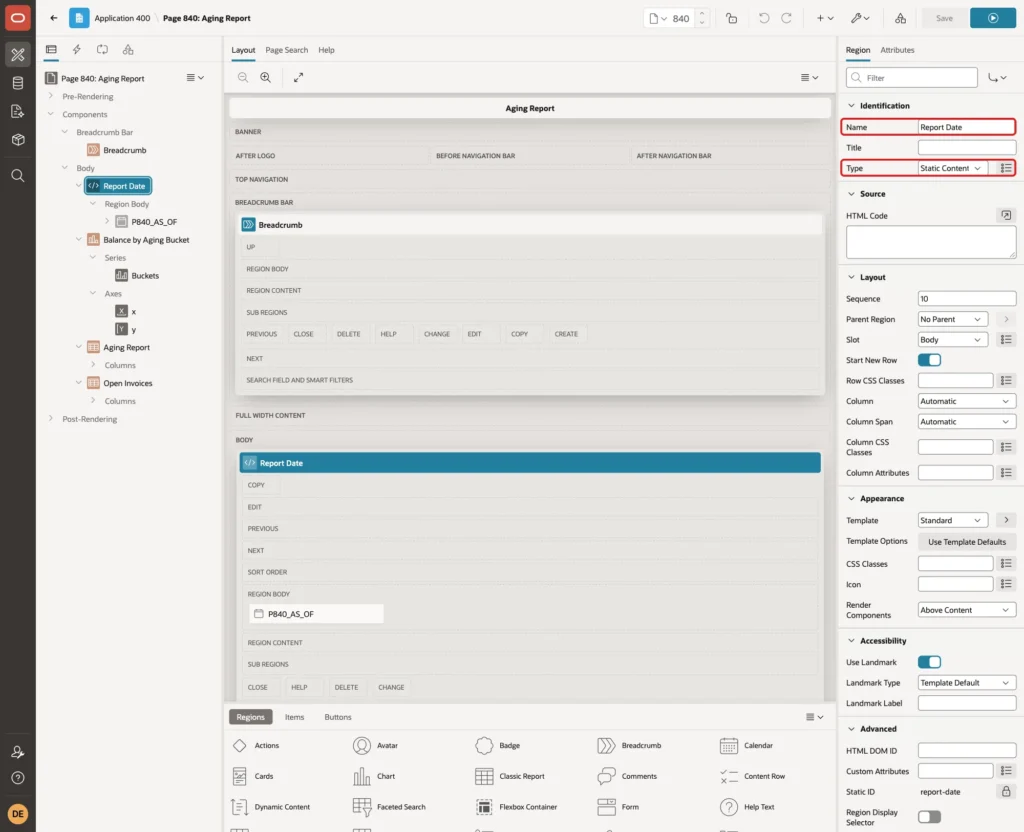
Right-click Body in the Rendering tree and choose Create Region. Set Name to Report Date and keep Type Static Content. Drag it above the Aging Report region, or give it Sequence 10 and the report Sequence 30:
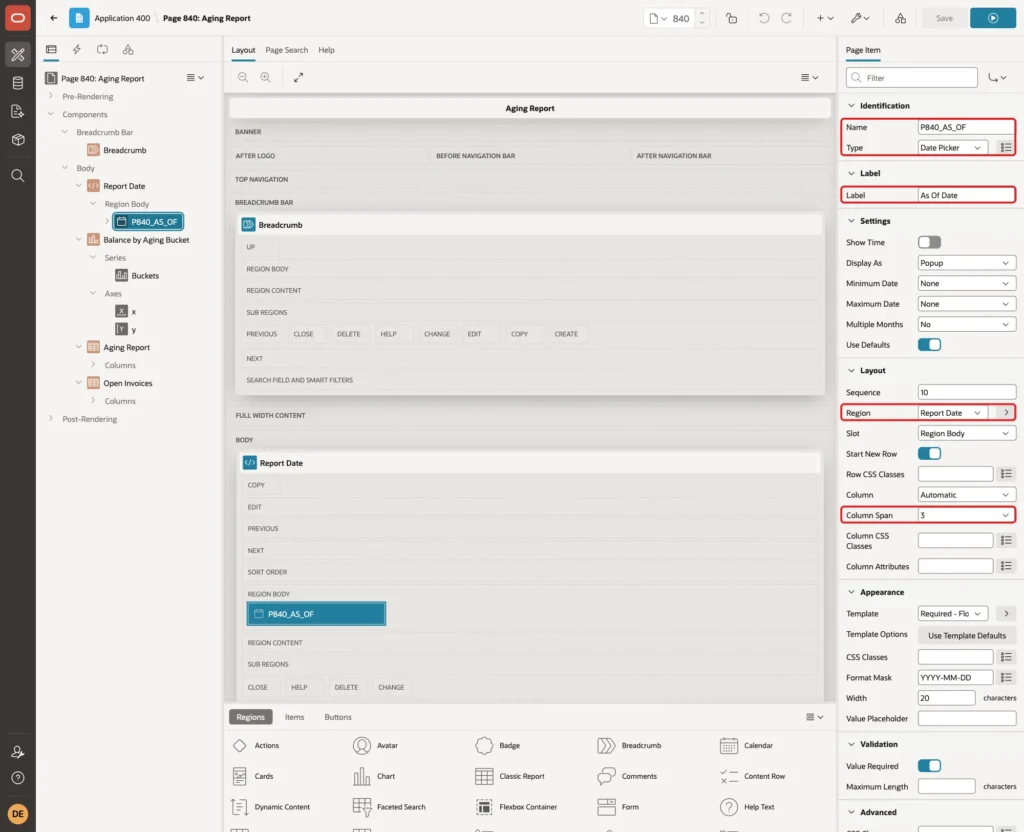
Right-click the Report Date region, choose Create Page Item and set:
- Name: P840_AS_OF, Type: Date Picker
- Label: As Of Date
- Layout: Region Report Date, Column Span 3
Under Appearance, set Template to Required - Floating and Format Mask to YYYY-MM-DD. Under Validation, turn on Value Required:
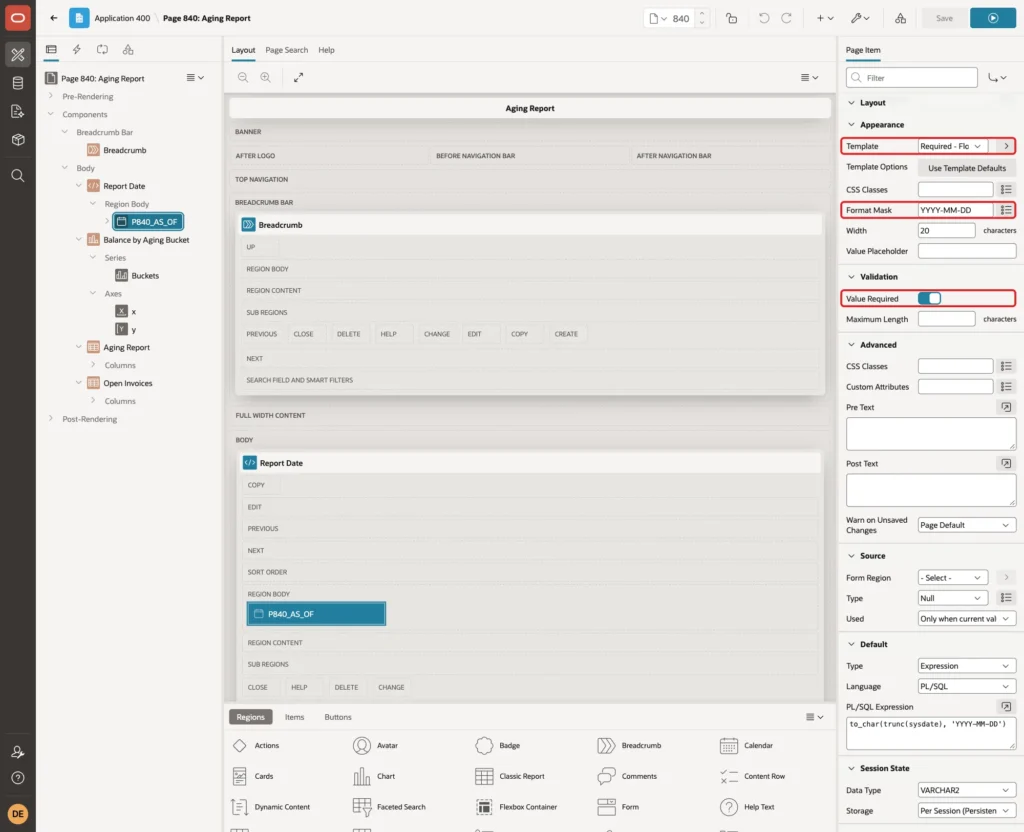
The format mask is the same one the queries use in TO_DATE. YYYY-MM-DD has no month names, so it also works when the application runs in another language.
Under Default, set Type to Expression, Language to PL/SQL and PL/SQL Expression to:
Example:
to_char(trunc(sysdate), 'YYYY-MM-DD')
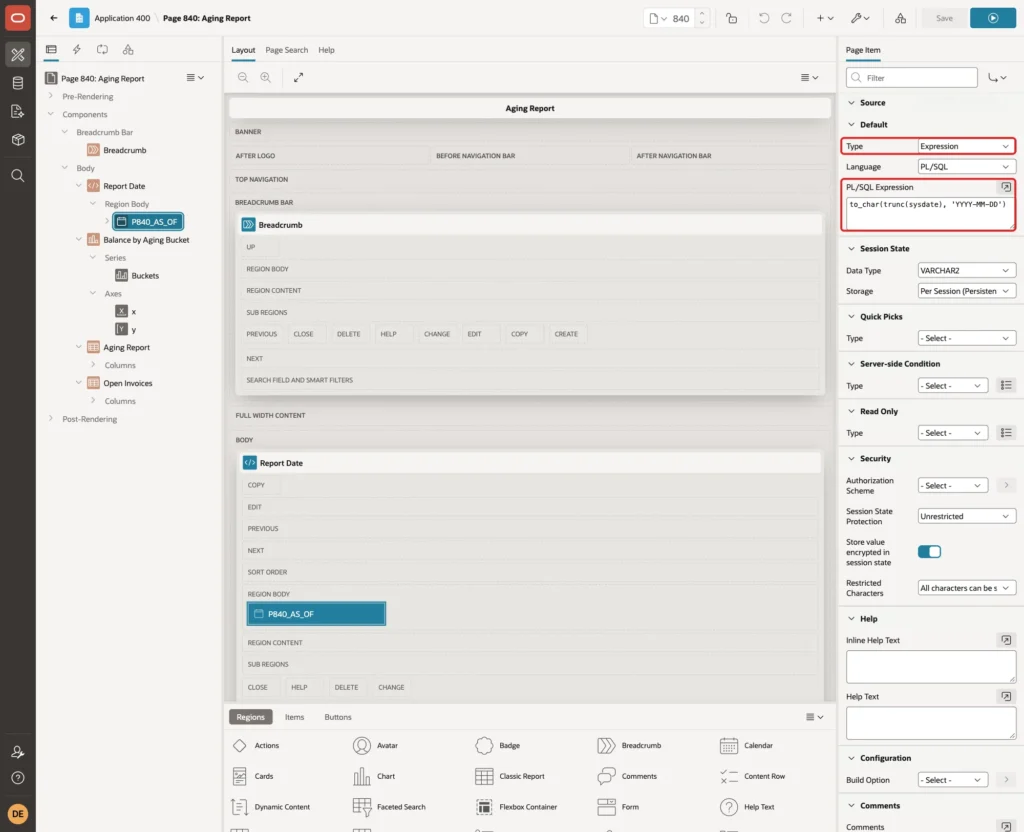
Step 5: Format the Report Columns and Add Totals
Select the Aging Report region. Under Source, set Page Items to Submit to P840_AS_OF. Each refresh then sends the current date to the server. Under Advanced, set HTML DOM ID to aging-report:

Under Messages, set When No Data Found to No open invoices on this date.
Expand Columns under the region and set these headings:
- CLIENT_NAME: Client
- NOT_DUE: Not Due
- DAYS_0_30: 0-30 Days
- DAYS_31_60: 31-60 Days
- DAYS_61_90: 61-90 Days
- DAYS_OVER_90: Over 90 Days
- TOTAL_BALANCE: Total
For each of the six number columns, set Appearance > Format Mask to FM999G999G990D00. The screenshot shows NOT_DUE:

Then turn on Advanced > Compute Sum for the same six columns:
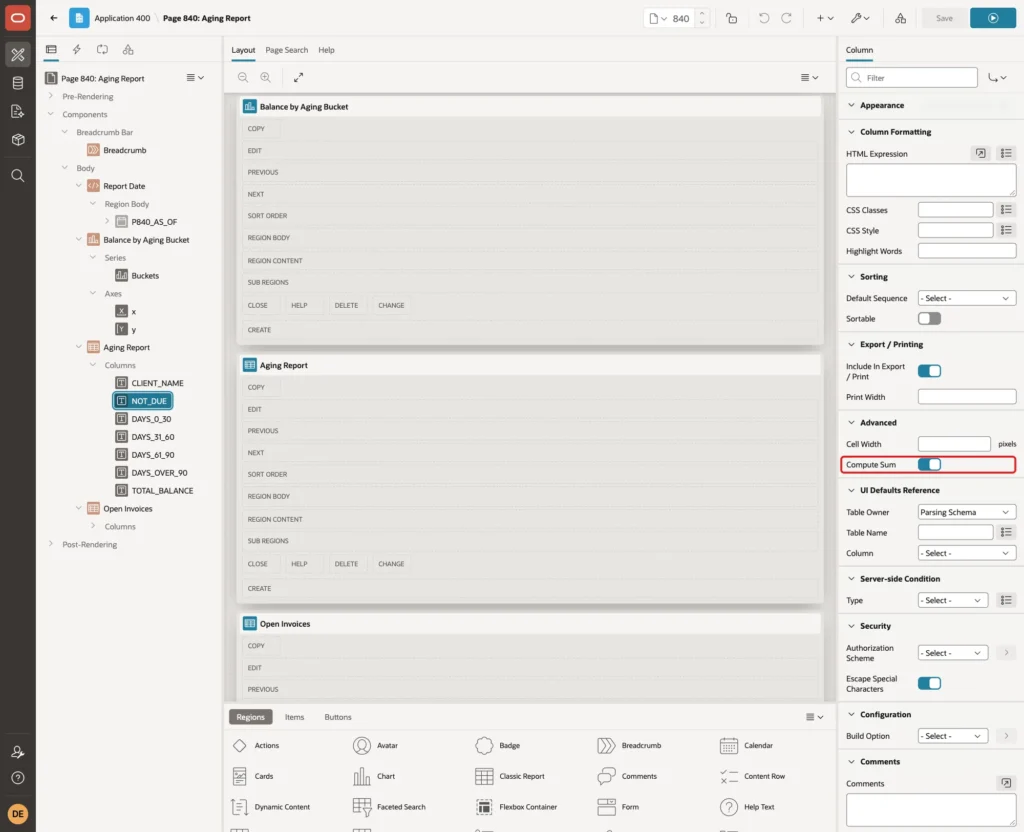
Compute Sum is a declarative feature of the Classic Report. APEX adds a Report Total row at the bottom, so the query needs no ROLLUP and no union for the totals.
Step 6: Add the Stacked Bar Chart
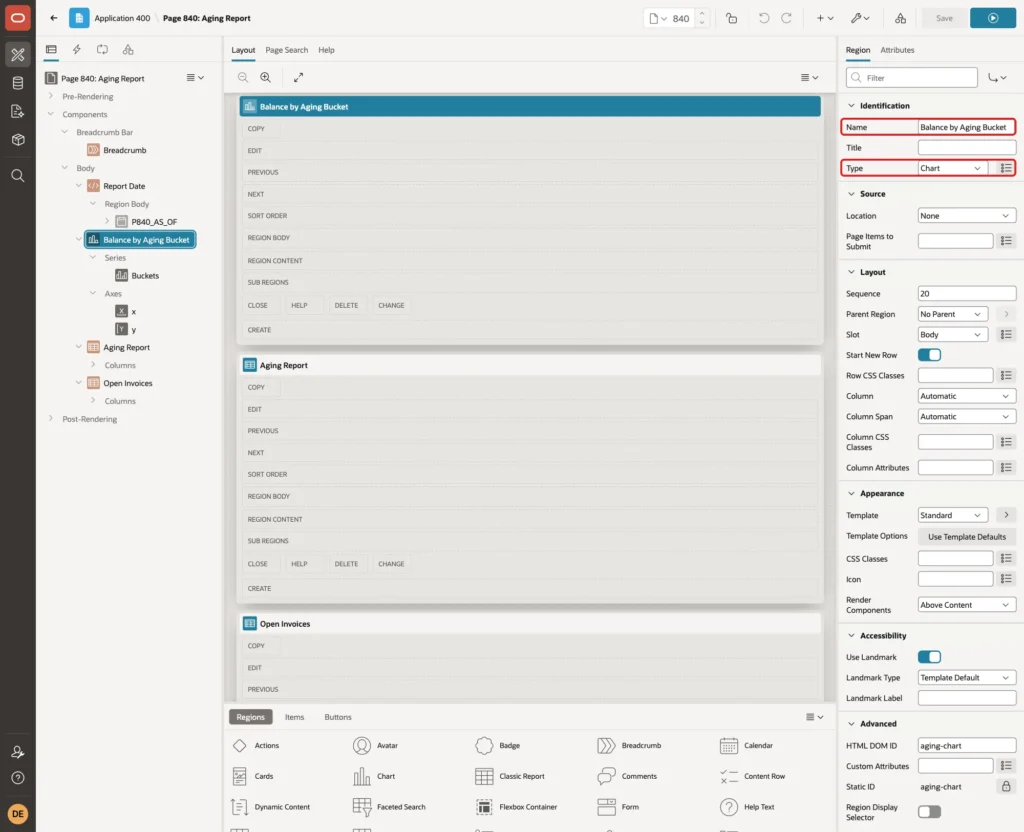
Right-click Body and choose Create Region. Set Name to Balance by Aging Bucket and Type to Chart. Give it Sequence 20, so it sits between the date field and the report:
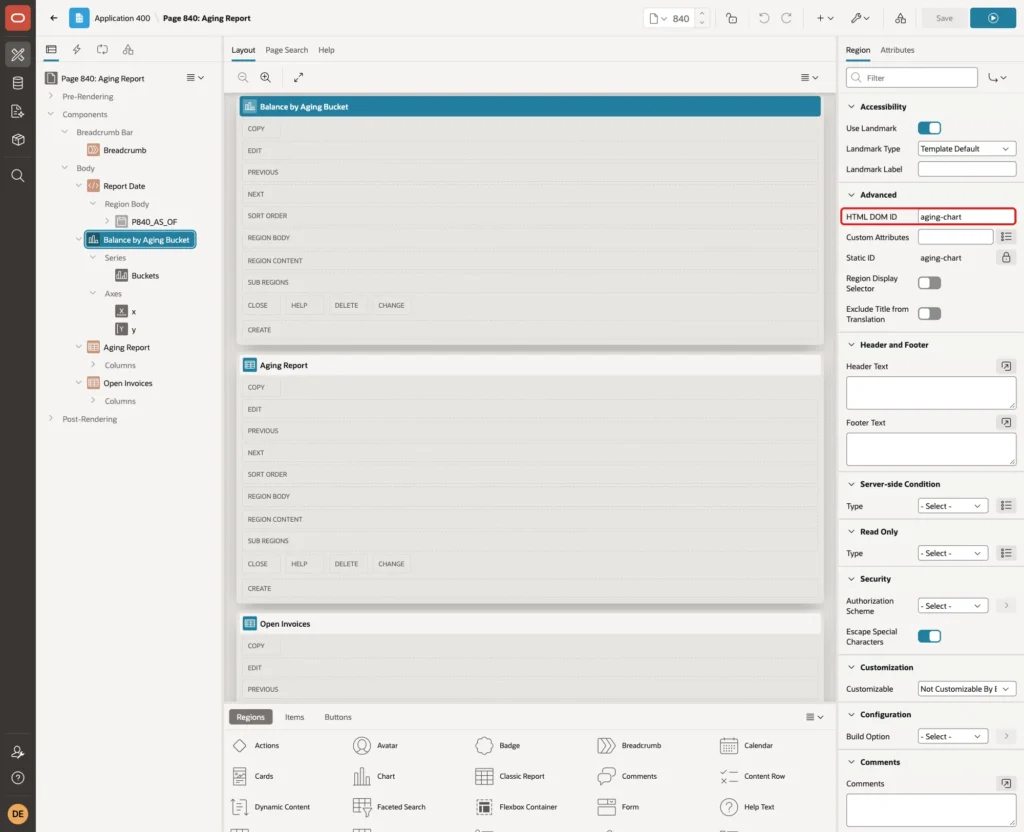
Under Advanced, set HTML DOM ID to aging-chart:
Expand the region, select its series under Series and rename it Buckets. Set Source > Type to SQL Query, enter the query below and set Page Items to Submit to P840_AS_OF:
Example:
select client_name,
       bucket,
       bucket_seq,
       sum(balance) as balance
  from ar_aging_items(nvl(to_date(:P840_AS_OF default null on conversion error, 'YYYY-MM-DD'), trunc(sysdate)))
 group by client_name, bucket, bucket_seq
 order by bucket_seq, client_name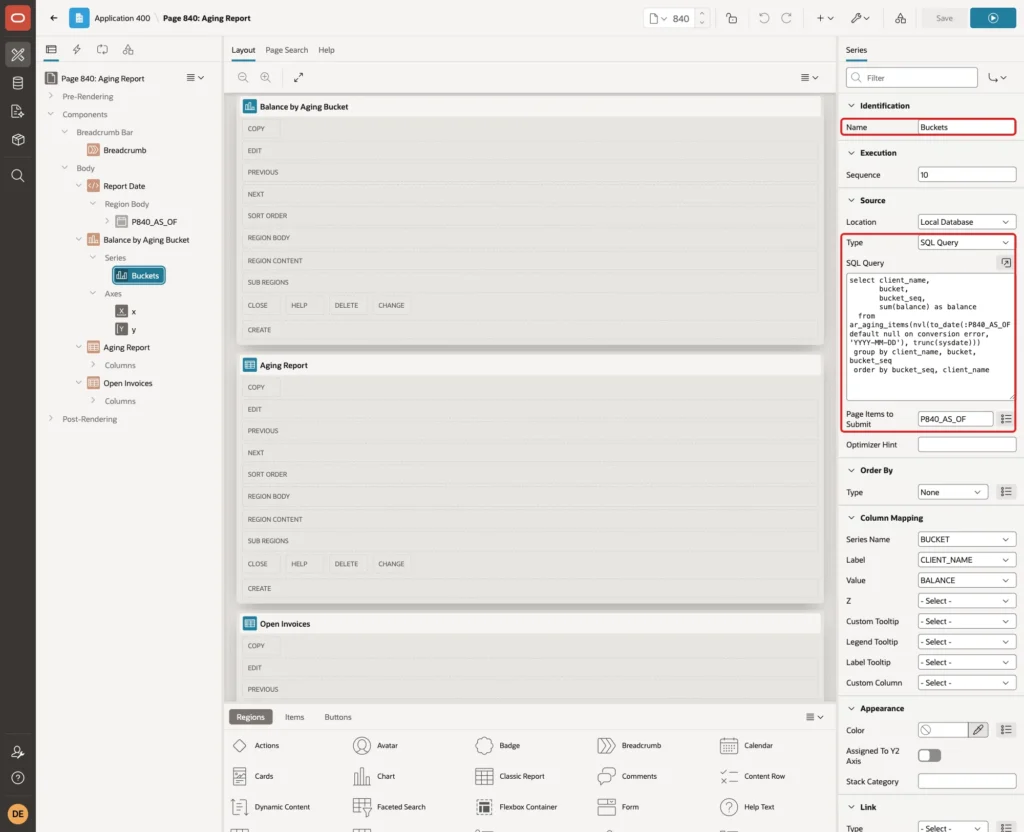
The query returns one row per client and bucket. Under Column Mapping, set Series Name to BUCKET, Label to CLIENT_NAME and Value to BALANCE:
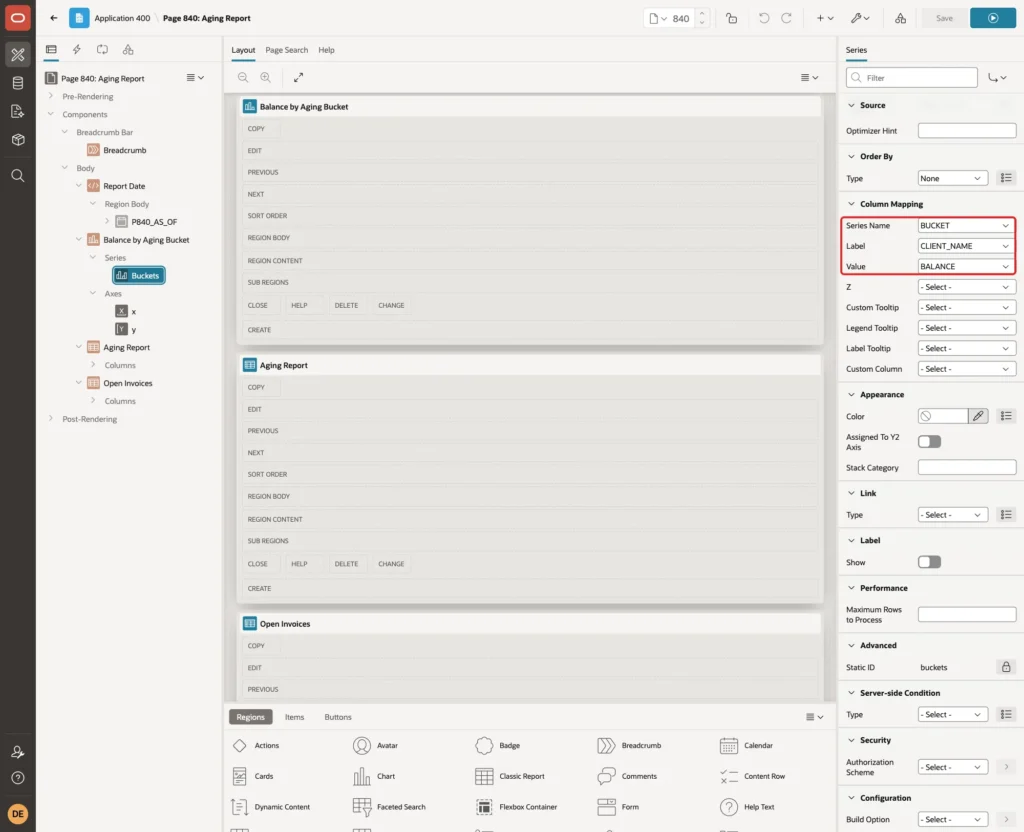
Series Name is the key setting. APEX creates one chart series for each distinct BUCKET value, so a single SQL query draws all five buckets. Because the query sorts by BUCKET_SEQ first, the series appear in bucket order, from Not Due to Over 90.
Select the chart region again and open the Attributes tab. Keep Chart > Type Bar, set Appearance > Orientation to Horizontal, turn on Stack and set Layout > Height to 360:
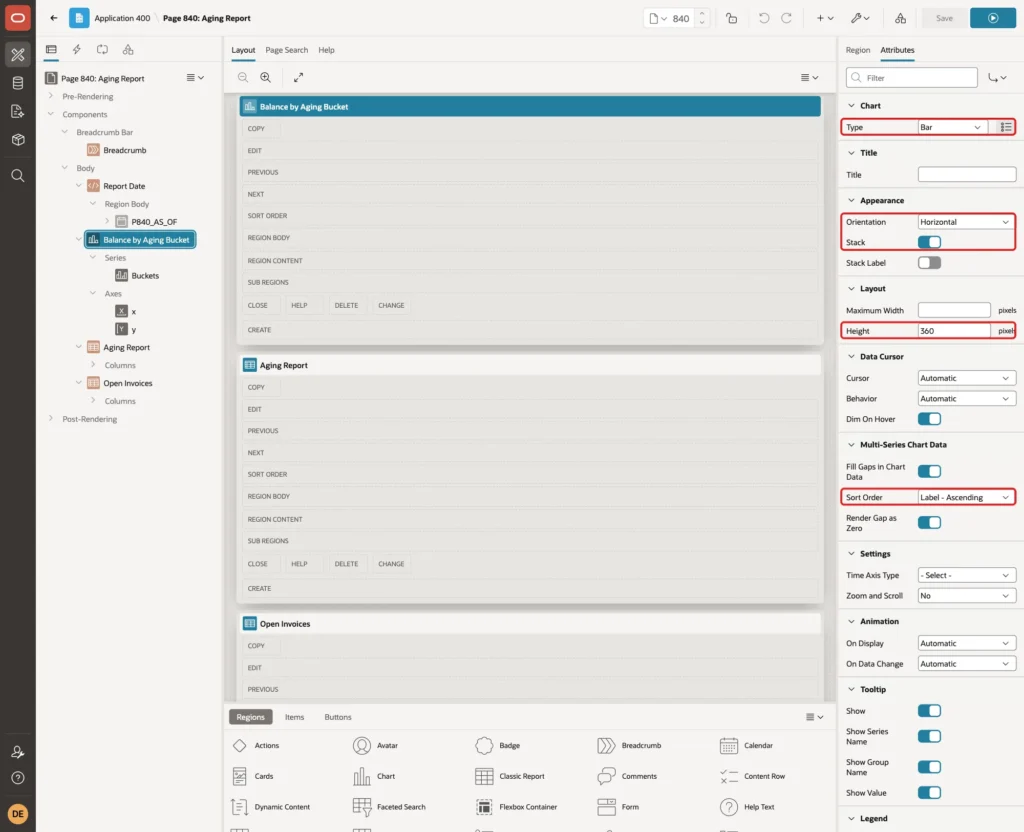
Keep Multi-Series Chart Data > Sort Order at its default, Label - Ascending. It sorts the clients by name on the chart.
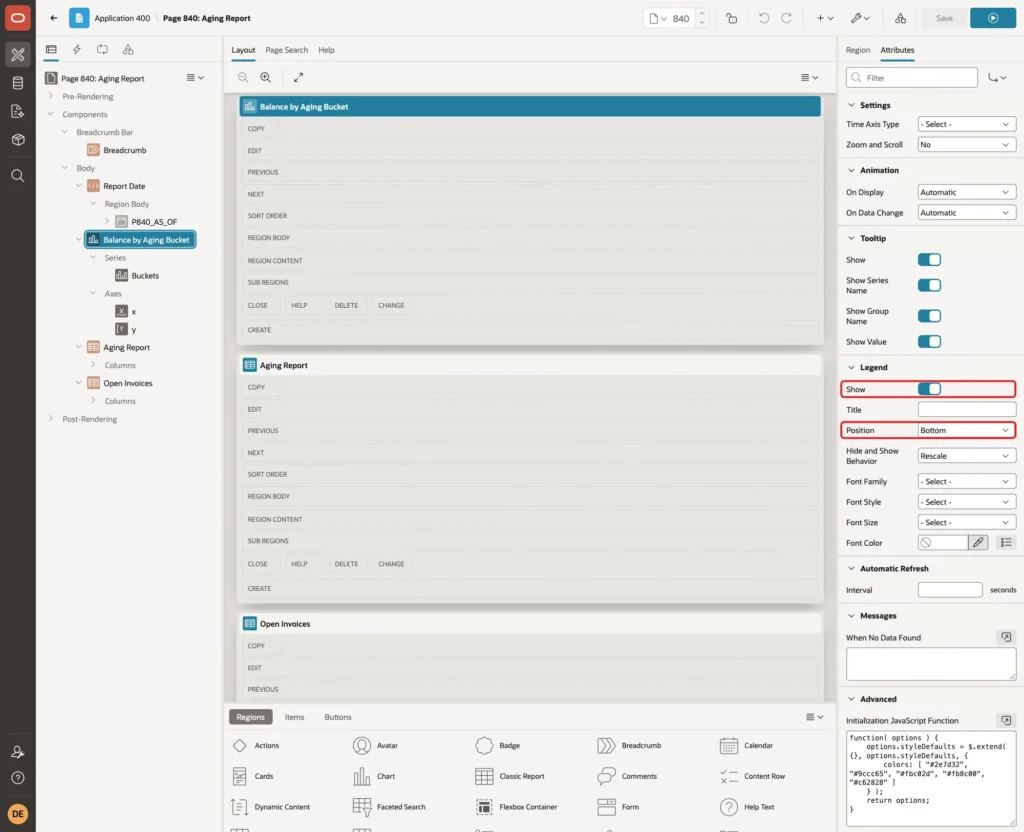
Under Legend, turn on Show and set Position to Bottom:
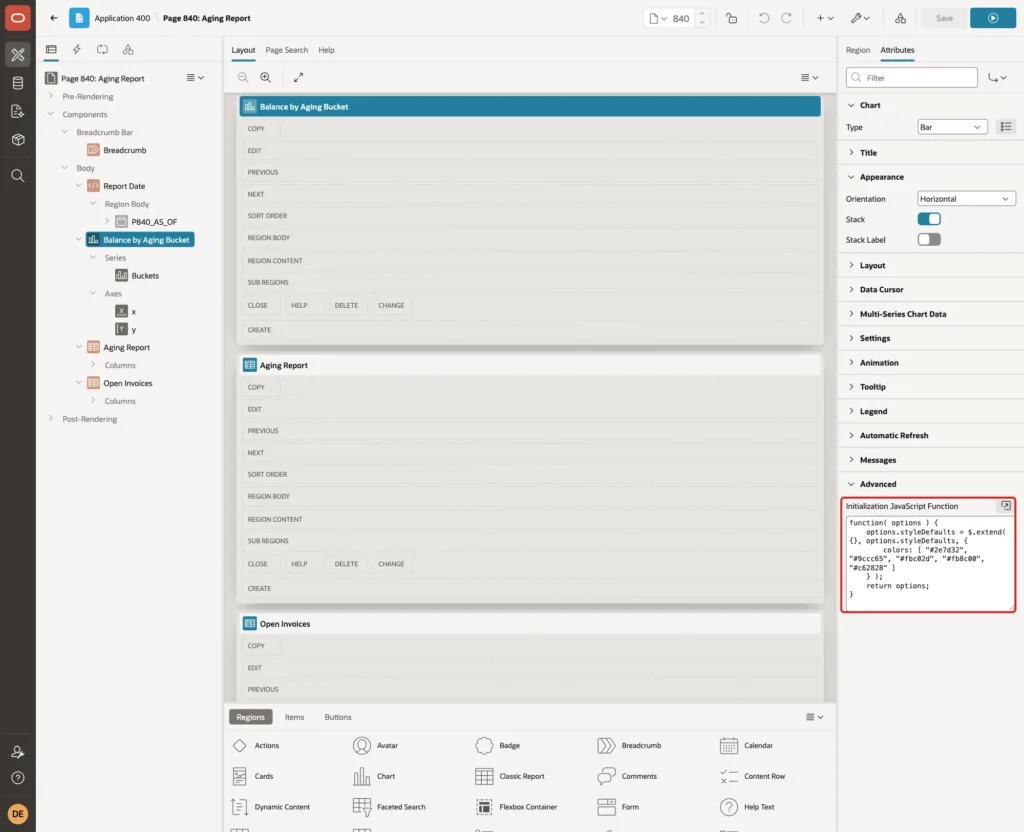
The default chart colors do not say anything about risk. Under Advanced, enter this Initialization JavaScript Function. It gives the five series colors from green to red, in the same order as the buckets:
Example:
function( options ) {
    options.styleDefaults = $.extend( {}, options.styleDefaults, {
        colors: [ "#2e7d32", "#9ccc65", "#fbc02d", "#fb8c00", "#c62828" ]
    } );
    return options;
}
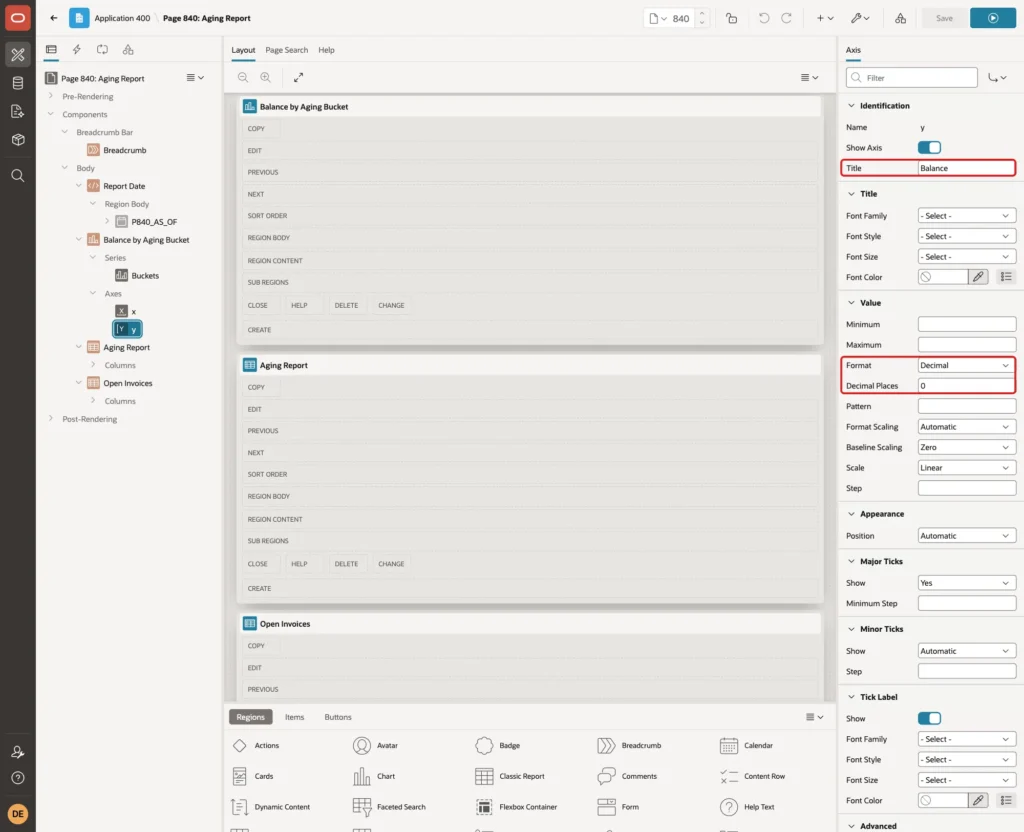
Expand Axes and select y. Set Title to Balance, Value > Format to Decimal and Decimal Places to 0. With a horizontal chart, the y axis is the value axis at the bottom:
Step 7: Add the Open Invoices Report
The summary shows the amounts, but users also want to see which invoices are behind them. Right-click Body, choose Create Region and set Name to Open Invoices, Type to Classic Report and Sequence to 40. Set Source > Type to SQL Query with this query and Page Items to Submit to P840_AS_OF:
Example:
select invoice_no,
       client_name,
       invoice_date,
       due_date,
       days_overdue,
       bucket,
       amount,
       balance
  from ar_aging_items(nvl(to_date(:P840_AS_OF default null on conversion error, 'YYYY-MM-DD'), trunc(sysdate)))
 order by bucket_seq, days_overdue desc, invoice_no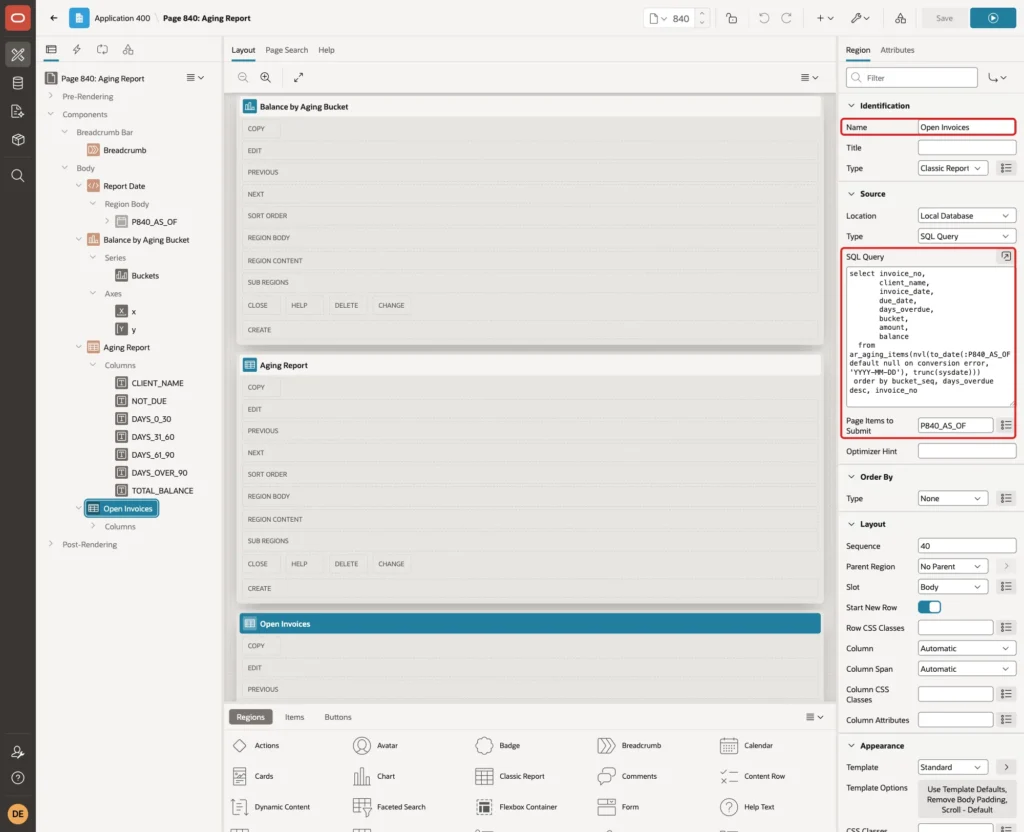
Set HTML DOM ID to open-invoices and When No Data Found to No open invoices on this date. In the columns, set Format Mask YYYY-MM-DD for INVOICE_DATE and DUE_DATE, FM999G999G990D00 for AMOUNT and BALANCE, and turn off Sortable for all columns, as in the summary report.
Step 8: Refresh the Page When the Date Changes
Right-click P840_AS_OF and choose Create Dynamic Action. Set Name to As Of Date Changed and keep Event Change, Selection Type Item(s) and Item(s) P840_AS_OF.
Under Client-side Condition, set Type to JavaScript expression and JavaScript Expression to:
Example:
apex.item( "P840_AS_OF" ).getValidity().valid

Why the condition? The first version of the page had no condition. Typing abc into the date field refreshed the regions, and the server used today because of the NVL fallback. The page showed today's numbers while the field said abc, which is misleading.
The date picker already knows when its value is not a date. getValidity().valid is false for abc, for 2026-13-45, for 2026-02-30 and for an empty field, so the True actions run only for real dates.
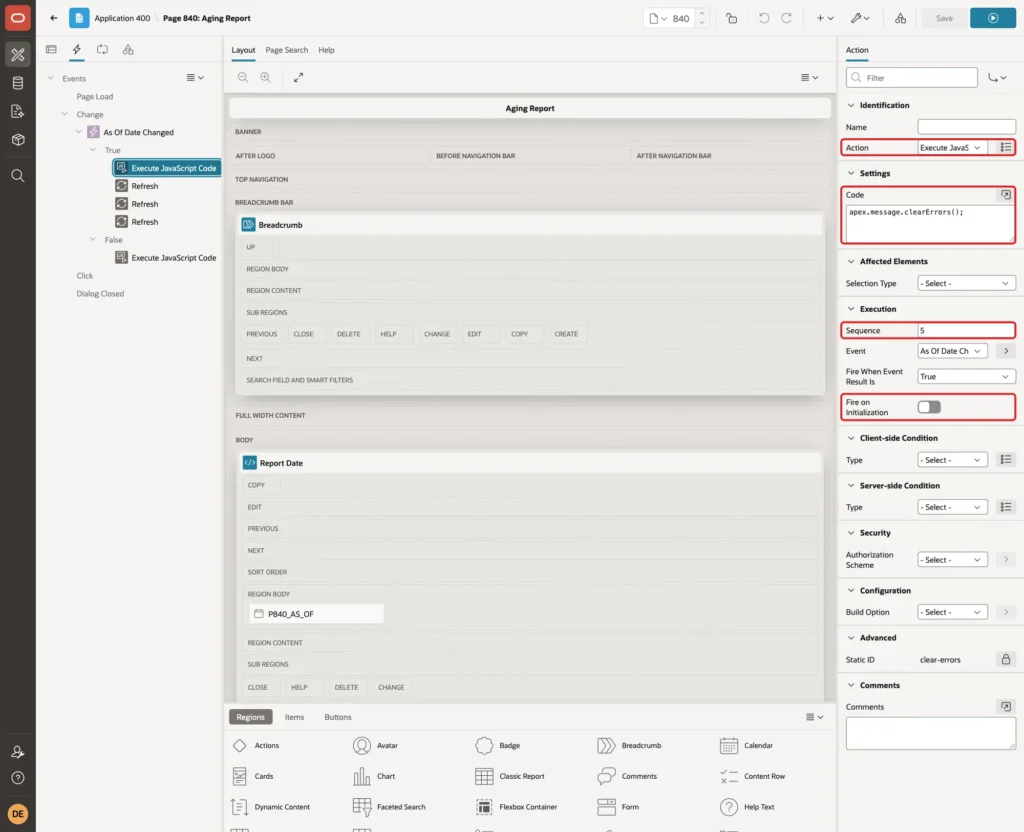
Select the True action and set Action to Execute JavaScript Code with this code. It removes an error message from an earlier invalid date. Turn off Fire on Initialization:
Example:
apex.message.clearErrors();
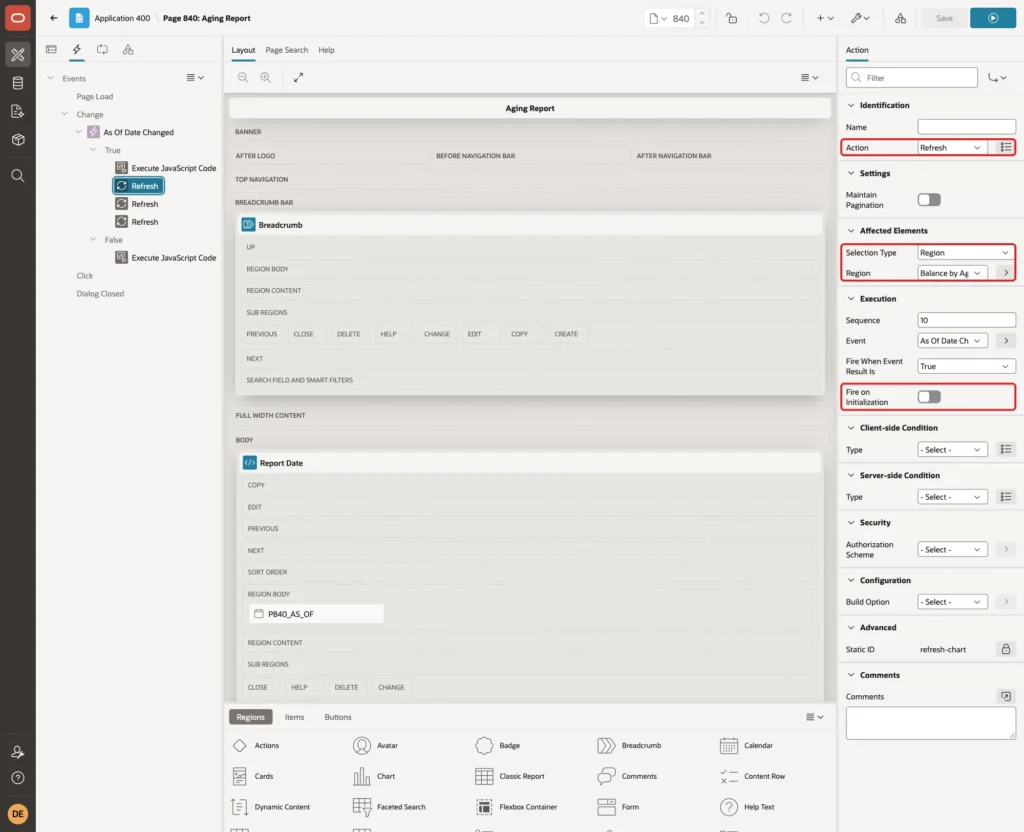
Right-click True and choose Create Action three times. Set each to Action Refresh, Selection Type Region, with the regions Balance by Aging Bucket, Aging Report and Open Invoices. Turn off Fire on Initialization for all three, because the regions already load with the page:
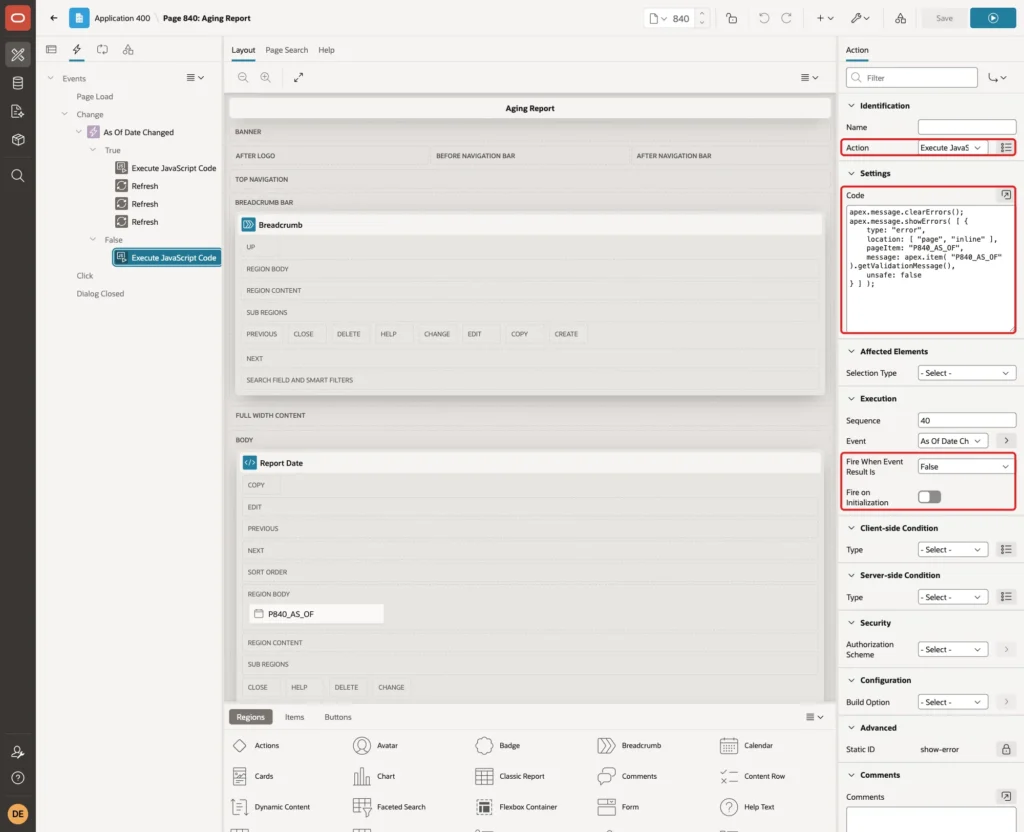
Right-click False, choose Create Action and set Action to Execute JavaScript Code with this code. Keep Fire When Event Result Is False and turn off Fire on Initialization:
Example:
apex.message.clearErrors();
apex.message.showErrors( [ {
    type: "error",
    location: [ "page", "inline" ],
    pageItem: "P840_AS_OF",
    message: apex.item( "P840_AS_OF" ).getValidationMessage(),
    unsafe: false
} ] );
getValidationMessage returns the message of the date picker, for example "As Of Date must be a valid date". The regions keep the numbers of the last valid date. Save the page.
Step 9: Test the Aging Report
Sign in as a normal user and open Aging Report from the navigation menu. The page opens with today's date:
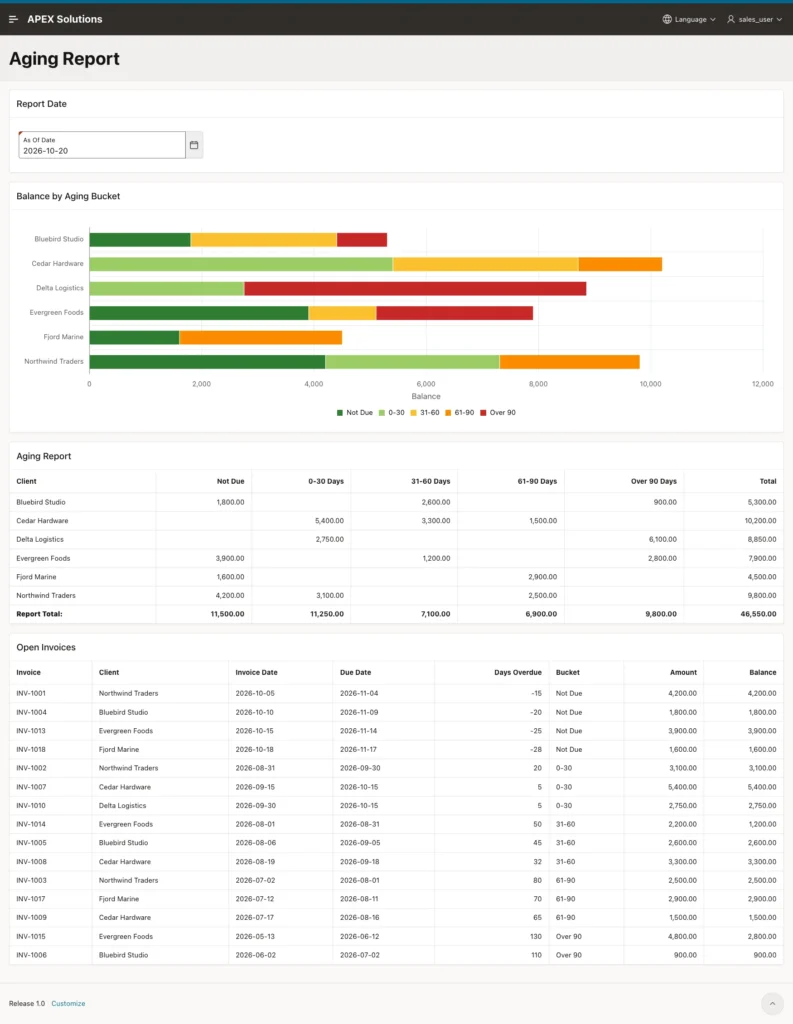
The Report Total row shows 11,500.00, 11,250.00, 7,100.00, 6,900.00 and 9,800.00, exactly the bucket totals from Step 2, and a grand total of 46,550.00. The Open Invoices list has the same 16 invoices, and every bar segment in the chart matches a cell of the summary.
Now change the As Of Date to the date seven days earlier (2026-10-13 in this test). All three regions refresh without reloading the page:
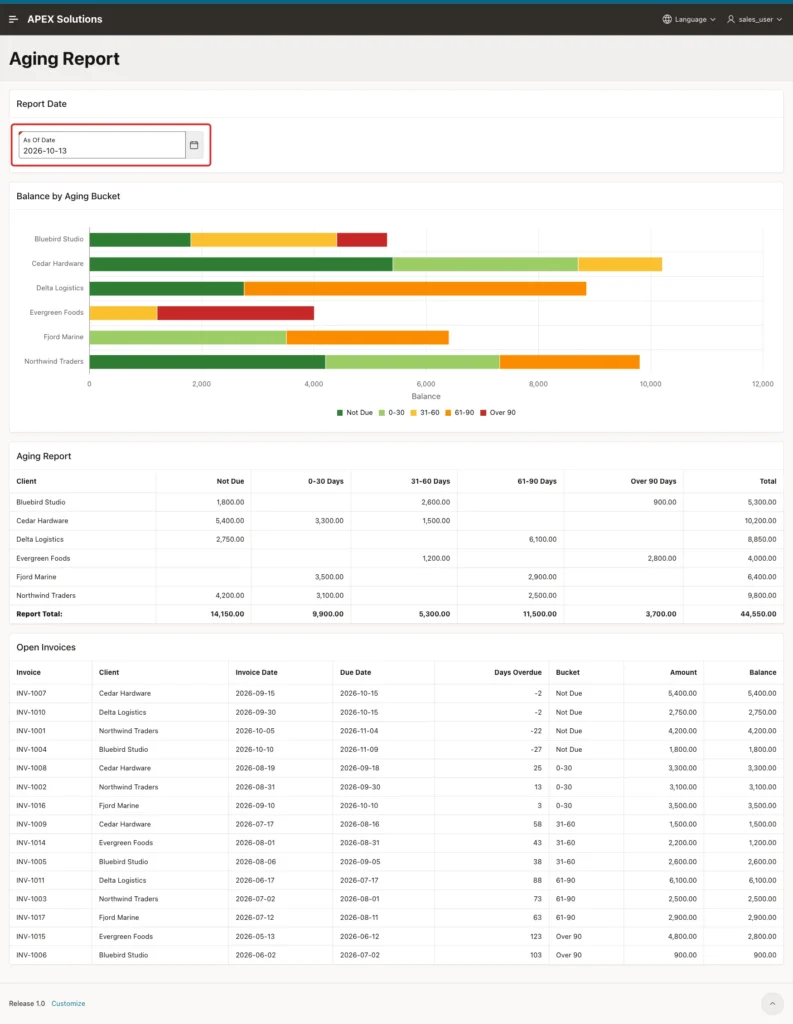
The totals are now 14,150.00, 9,900.00, 5,300.00, 11,500.00 and 3,700.00. Check them in SQL and list every invoice that has a different bucket or balance between the two dates:
Example:
set pages 100 lines 200 feedback on
select bucket, count(*) as invoices, sum(balance) as balance
  from ar_aging_items(trunc(sysdate) - 7)
 group by bucket, bucket_seq
 order by bucket_seq;

select coalesce(t.invoice_no, w.invoice_no) as invoice_no,
       w.bucket  as week_ago_bucket,
       w.balance as week_ago_balance,
       t.bucket  as today_bucket,
       t.balance as today_balance
  from ar_aging_items(trunc(sysdate)) t
  full join ar_aging_items(trunc(sysdate) - 7) w on w.invoice_id = t.invoice_id
 where decode(t.bucket, w.bucket, 0, 1) = 1
    or decode(t.balance, w.balance, 0, 1) = 1
 order by 1;
Output:
BUCKET        INVOICES    BALANCE
__________ ___________ __________
Not Due              4      14150
0-30                 3       9900
31-60                3       5300
61-90                3      11500
Over 90              2       3700

5 rows selected.

INVOICE_NO    WEEK_AGO_BUCKET       WEEK_AGO_BALANCE TODAY_BUCKET       TODAY_BALANCE
_____________ __________________ ___________________ _______________ ________________
INV-1007      Not Due                           5400 0-30                        5400
INV-1008      0-30                              3300 31-60                       3300
INV-1009      31-60                             1500 61-90                       1500
INV-1010      Not Due                           2750 0-30                        2750
INV-1011      61-90                             6100 Over 90                     6100
INV-1013                                             Not Due                     3900
INV-1016      0-30                              3500
INV-1018                                             Not Due                     1600

8 rows selected.
The bucket totals match the page. The second query shows why they moved:
- INV-1007 and INV-1010 were not due a week ago and are now in 0-30.
- INV-1008, INV-1009 and INV-1011 each moved one bucket up as they got older.
- INV-1016 was still open a week ago. Its payment came three days ago, so it is gone today.
- INV-1013 and INV-1018 did not exist a week ago.
This works because the balance is calculated from payment dates. A stored balance column holds only today's value, so INV-1016 would be missing from the week-ago view.
Next, a negative test. Type abc into the As Of Date field and leave it:
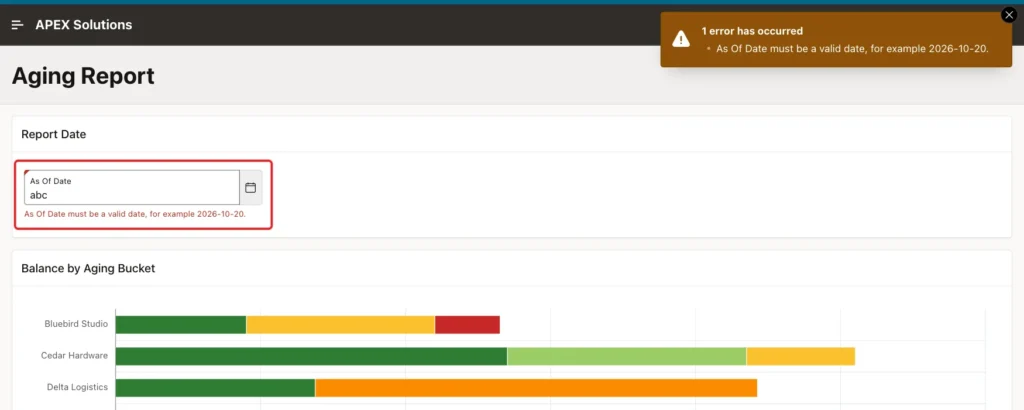
The error appears in the notification and below the field, and the regions keep the numbers of 2026-10-13. Setting 2026-13-45 from the browser console with apex.item("P840_AS_OF").setValue gave the same error. Entering a valid date again removed the error and refreshed the regions.
Last, the server side. In the browser console, the value abc was set without a change event and the Aging Report region was refreshed directly, which skips the dynamic action. The region showed today's totals, 46,550.00, and no ORA- error. DEFAULT NULL ON CONVERSION ERROR and NVL caught the forged value.
Things to Know
- Keep the bucket rules in one place, like the SQL macro of this guide. A report and a chart with their own CASE expressions drift apart sooner or later.
- Age by days past due, as here, or by days since the invoice date. Change the macro, not the pages, if your rules differ.
- Calculate the open balance from dated payments if you need past as-of dates. A stored balance column only works for today.
- Compute Sum gives the total row without SQL. Turn it on only for number columns.
- A chart series with a Series Name column creates one series per value. In this test, the series followed the order of the query rows, so sort the query by the bucket number.
- trunc(sysdate) uses the clock of the database server. Here the server ran on UTC, so the page defaulted to 2026-10-20 while it was already 21 October in India. Use a date in the user's time zone if that matters.
- For large tables, index the due date and filter early. The macro reads all open invoices for every refresh of the three regions.
Related Guides
Conclusion
Aging buckets in Oracle APEX need one SQL macro with the bucket rules, a Classic Report with Compute Sum for the totals, a stacked bar chart with a Series Name column and an As Of Date item that refreshes all regions.
In this example, the totals on the page matched SQL for today and for a week earlier, invoices moved between buckets as expected, and invalid dates showed an error instead of wrong numbers. The same steps work for any table with a due date and an open amount.
See my articles more often when you search Google.
