
A poll asks one question and lets every user pick one answer. It is a quick way to agree on a meeting day, choose the next feature or check what a team thinks.
Two rules make a poll fair. Each user can vote only once, even with two browser tabs open. The results stay hidden until the user has voted, so earlier votes do not steer the choice.
This guide builds a poll page in Oracle APEX. A unique key allows one vote per user, a page error handling function turns the database error into a clear message, and a bar chart shows the share of each option after voting or when the poll has closed.
The post How to Build a Survey Form from Question Tables in Oracle APEX builds a questionnaire with many questions and an administrator results page. This poll has one question on one page, and every voter sees the results right after voting.
The post How to Enforce Case-Insensitive Unique Names with a Friendly Message in Oracle APEX explains page error handling functions in detail. Here the same idea maps two constraints of the poll tables to messages.
Step 1: Create the Tables
The poll needs three tables and one view:
- POLLS holds the question with the date and time it opens and closes.
- POLL_OPTIONS holds the answers of each poll in display order.
- POLL_VOTES holds one row per vote, with the user and the time.
- POLL_RESULTS_V counts the votes per option and computes the percentage.
Create the tables, the view and the sample data:
Example:
create table polls (
  poll_id     number generated by default on null as identity,
  question    varchar2(200)  not null,
  opens_on    date           default on null sysdate not null,
  closes_on   date           not null,
  created_by  varchar2(128)  default on null
                coalesce(sys_context('APEX$SESSION', 'APP_USER'), user) not null,
  constraint polls_pk primary key (poll_id),
  constraint polls_question_uk unique (question),
  constraint polls_dates_ck check (closes_on > opens_on)
);

create table poll_options (
  option_id    number generated by default on null as identity,
  poll_id      number         not null,
  option_text  varchar2(100)  not null,
  display_seq  number(3)      not null,
  constraint poll_options_pk primary key (option_id),
  constraint poll_options_poll_fk foreign key (poll_id)
    references polls (poll_id) on delete cascade,
  constraint poll_options_text_uk unique (poll_id, option_text),
  constraint poll_options_poll_option_uk unique (poll_id, option_id)
);

create table poll_votes (
  vote_id    number generated by default on null as identity,
  poll_id    number         not null,
  option_id  number         not null,
  voted_by   varchar2(128)  default on null
               coalesce(sys_context('APEX$SESSION', 'APP_USER'), user) not null,
  voted_on   date           default on null sysdate not null,
  constraint poll_votes_pk primary key (vote_id),
  constraint poll_votes_one_per_user_uk unique (poll_id, voted_by),
  constraint poll_votes_option_fk foreign key (poll_id, option_id)
    references poll_options (poll_id, option_id) on delete cascade
);

create index poll_votes_option_ix on poll_votes (poll_id, option_id);

create or replace view poll_results_v as
select o.poll_id,
       o.option_id,
       o.option_text,
       o.display_seq,
       count(v.vote_id) as votes,
       nvl(round(100 * ratio_to_report(count(v.vote_id))
             over (partition by o.poll_id), 1), 0) as pct
  from poll_options o
  left join poll_votes v
    on v.poll_id = o.poll_id
   and v.option_id = o.option_id
 group by o.poll_id, o.option_id, o.option_text, o.display_seq;

insert into polls (poll_id, question, opens_on, closes_on)
values (1, 'Which day works best for the team training?',
        trunc(sysdate) - 1, trunc(sysdate) + 7);

insert into polls (poll_id, question, opens_on, closes_on)
values (2, 'Which feature should we build next?',
        trunc(sysdate) - 10, trunc(sysdate) - 2);

alter table polls modify poll_id generated by default on null as identity (start with limit value);

insert into poll_options (poll_id, option_text, display_seq) values (1, 'Tuesday', 10);
insert into poll_options (poll_id, option_text, display_seq) values (1, 'Wednesday', 20);
insert into poll_options (poll_id, option_text, display_seq) values (1, 'Thursday', 30);
insert into poll_options (poll_id, option_text, display_seq) values (1, 'Friday', 40);
insert into poll_options (poll_id, option_text, display_seq) values (2, 'Dark mode', 10);
insert into poll_options (poll_id, option_text, display_seq) values (2, 'Mobile app', 20);
insert into poll_options (poll_id, option_text, display_seq) values (2, 'Excel export', 30);

insert into poll_votes (poll_id, option_id, voted_by)
select 2, option_id, 'ANNA' from poll_options where poll_id = 2 and option_text = 'Mobile app';
insert into poll_votes (poll_id, option_id, voted_by)
select 2, option_id, 'RAVI' from poll_options where poll_id = 2 and option_text = 'Mobile app';
insert into poll_votes (poll_id, option_id, voted_by)
select 2, option_id, 'LINDA' from poll_options where poll_id = 2 and option_text = 'Dark mode';
insert into poll_votes (poll_id, option_id, voted_by)
select 2, option_id, 'JOHN' from poll_options where poll_id = 2 and option_text = 'Mobile app';
insert into poll_votes (poll_id, option_id, voted_by)
select 2, option_id, 'MARIA' from poll_options where poll_id = 2 and option_text = 'Excel export';

commit;

column question format a45
column option_text format a14
select p.question, r.option_text, r.votes, r.pct
  from poll_results_v r
  join polls p on p.poll_id = r.poll_id
 order by r.poll_id, r.display_seq;
Output:
Table POLLS created.

Table POLL_OPTIONS created.

Table POLL_VOTES created.

Index POLL_VOTES_OPTION_IX created.

View POLL_RESULTS_V created.

1 row inserted.

1 row inserted.

Table POLLS altered.

1 row inserted.

1 row inserted.

1 row inserted.

1 row inserted.

1 row inserted.

1 row inserted.

1 row inserted.

1 row inserted.

1 row inserted.

1 row inserted.

1 row inserted.

1 row inserted.

Commit complete.

QUESTION                                       OPTION_TEXT        VOTES    PCT
______________________________________________ _______________ ________ ______
Which day works best for the team training?    Tuesday                0      0
Which day works best for the team training?    Wednesday              0      0
Which day works best for the team training?    Thursday               0      0
Which day works best for the team training?    Friday                 0      0
Which feature should we build next?            Dark mode              1     20
Which feature should we build next?            Mobile app             3     60
Which feature should we build next?            Excel export           1     20

7 rows selected.
The rules are declared in the tables, so no trigger is needed:
- POLL_VOTES_ONE_PER_USER_UK on POLL_ID and VOTED_BY allows one vote per user and poll.
- VOTED_BY and VOTED_ON use DEFAULT ON NULL. The insert only passes the poll and the option; the APEX user and the time are filled in by the database.
- POLL_VOTES_OPTION_FK references POLL_ID and OPTION_ID together. A vote can only point to an option of the same poll.
- POLL_OPTIONS_POLL_OPTION_UK exists only so this two-column foreign key has a key to reference.
- POLLS_DATES_CK makes sure a poll closes after it opens.
The view uses a LEFT JOIN, so options without votes still show 0. RATIO_TO_REPORT divides each count by the total of the poll, and NVL returns 0 while a poll has no votes.
Poll 1 is open for a week and has no votes yet. Poll 2 closed two days ago with five votes.
Step 2: Test the Constraints in SQL
Before building the page, check what the database does with bad data. The first insert repeats the vote of SALES_MANAGER, who had already voted for Tuesday on the page. The second uses an option of poll 2 for poll 1. The third closes a poll before it opens:
Example:
insert into poll_votes (poll_id, option_id, voted_by)
select 1, option_id, 'SALES_MANAGER'
  from poll_options
 where poll_id = 1
   and option_text = 'Friday';

insert into poll_votes (poll_id, option_id, voted_by)
select 1, option_id, 'ANNA'
  from poll_options
 where poll_id = 2
   and option_text = 'Dark mode';

insert into polls (question, opens_on, closes_on)
values ('Lunch place for Friday?', sysdate, sysdate - 1);

rollback;
Output:
Error starting at line : 1 File @ b76/20-constraints.sql
In command -
insert into poll_votes (poll_id, option_id, voted_by)
select 1, option_id, 'SALES_MANAGER'
  from poll_options
 where poll_id = 1
   and option_text = 'Friday'
Error report -
ORA-00001: unique constraint (APXSOL.POLL_VOTES_ONE_PER_USER_UK) violated on
table APXSOL.POLL_VOTES columns (POLL_ID, VOTED_BY)
ORA-03301: (ORA-00001 details) row with column values (POLL_ID:1,
VOTED_BY:'SALES_MANAGER') already exists
Help: https://docs.oracle.com/error-help/db/ora-00001/

Error starting at line : 7 File @ b76/20-constraints.sql
In command -
insert into poll_votes (poll_id, option_id, voted_by)
select 1, option_id, 'ANNA'
  from poll_options
 where poll_id = 2
   and option_text = 'Dark mode'
Error report -
ORA-02291: integrity constraint (APXSOL.POLL_VOTES_OPTION_FK) violated - parent
key not found
Help: https://docs.oracle.com/error-help/db/ora-02291/

Error starting at line : 13 File @ b76/20-constraints.sql
In command -
insert into polls (question, opens_on, closes_on)
values ('Lunch place for Friday?', sysdate, sysdate - 1)
Error report -
ORA-02290: check constraint (APXSOL.POLLS_DATES_CK) violated
Help: https://docs.oracle.com/error-help/db/ora-02290/

Rollback complete.
All three are rejected. In Oracle Database 26ai, ORA-00001 also lists the table, the columns and, in ORA-03301, the values of the duplicate row. That is useful in SQL but not a message for poll users.
Step 3: See Why a Check Before the Insert Is Not Enough
A common approach is a validation that counts the user's votes before the insert. Two sessions show why the unique key is still needed. Session A inserts a vote for RACE_USER and waits six seconds before the commit:
Example:
insert into poll_votes (poll_id, option_id, voted_by)
select 1, option_id, 'RACE_USER'
  from poll_options
 where poll_id = 1
   and option_text = 'Tuesday';

exec dbms_session.sleep(6)

commit;
Output:
1 row inserted.

PL/SQL procedure successfully completed.

Commit complete.
Session B starts two seconds later. It counts the votes of RACE_USER and then inserts another one:
Example:
set timing on
select count(*) as votes_seen
  from poll_votes
 where poll_id = 1
   and voted_by = 'RACE_USER';

insert into poll_votes (poll_id, option_id, voted_by)
select 1, option_id, 'RACE_USER'
  from poll_options
 where poll_id = 1
   and option_text = 'Friday';
Output:
   VOTES_SEEN
_____________
            0

Elapsed: 00:00:00.039

Error starting at line : 7 File @ b76/21-race-b.sql
In command -
insert into poll_votes (poll_id, option_id, voted_by)
select 1, option_id, 'RACE_USER'
  from poll_options
 where poll_id = 1
   and option_text = 'Friday'
Error report -
ORA-00001: unique constraint (APXSOL.POLL_VOTES_ONE_PER_USER_UK) violated on
table APXSOL.POLL_VOTES columns (POLL_ID, VOTED_BY)
ORA-03301: (ORA-00001 details) row with column values (POLL_ID:1,
VOTED_BY:'RACE_USER') already exists
Help: https://docs.oracle.com/error-help/db/ora-00001/
Elapsed: 00:00:04.006
Session B saw 0 votes, because the vote of session A was not committed yet. A pre-check would have passed. The insert then waited about four seconds on the unique key and failed with ORA-00001 once session A committed.
So the unique key is the rule that always holds. The page only has to show its error in plain words. The RACE_USER row was deleted after this test.
Step 4: Create the Error Handling Function
An error handling function receives every error of a page before APEX shows it. This one looks for the two constraint names and replaces the message:
Example:
create or replace function poll_error_handler (
  p_error in apex_error.t_error
) return apex_error.t_error_result
is
  l_result apex_error.t_error_result;
begin
  l_result := apex_error.init_error_result(p_error => p_error);

  if p_error.ora_sqlcode in (-1, -2291) then
    case apex_error.extract_constraint_name(p_error => p_error)
      when 'POLL_VOTES_ONE_PER_USER_UK' then
        l_result.message := 'You have already voted in this poll. Each user can vote only once.';
      when 'POLL_VOTES_OPTION_FK' then
        l_result.message := 'Choose one of the options of this poll.';
      else
        null;
    end case;

    l_result.additional_info  := null;
    l_result.display_location := apex_error.c_inline_in_notification;
  end if;

  return l_result;
end poll_error_handler;
/

show errors
Output:
Function POLL_ERROR_HANDLER compiled

No errors.
- APEX_ERROR.INIT_ERROR_RESULT copies the original error, so all other errors stay as they are.
- APEX_ERROR.EXTRACT_CONSTRAINT_NAME returns the constraint name from ORA-00001 and ORA-02291 without the schema.
- ADDITIONAL_INFO is cleared, so the technical details are not shown below the message.
Step 5: Create the Poll Page
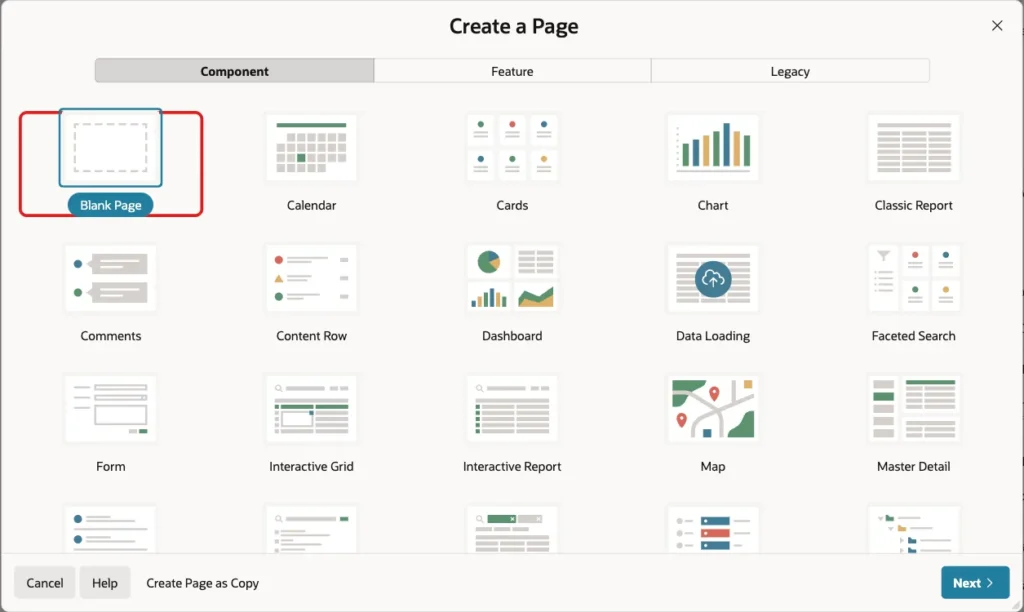
In App Builder, open the application and click Create Page. Select the Blank Page tile:
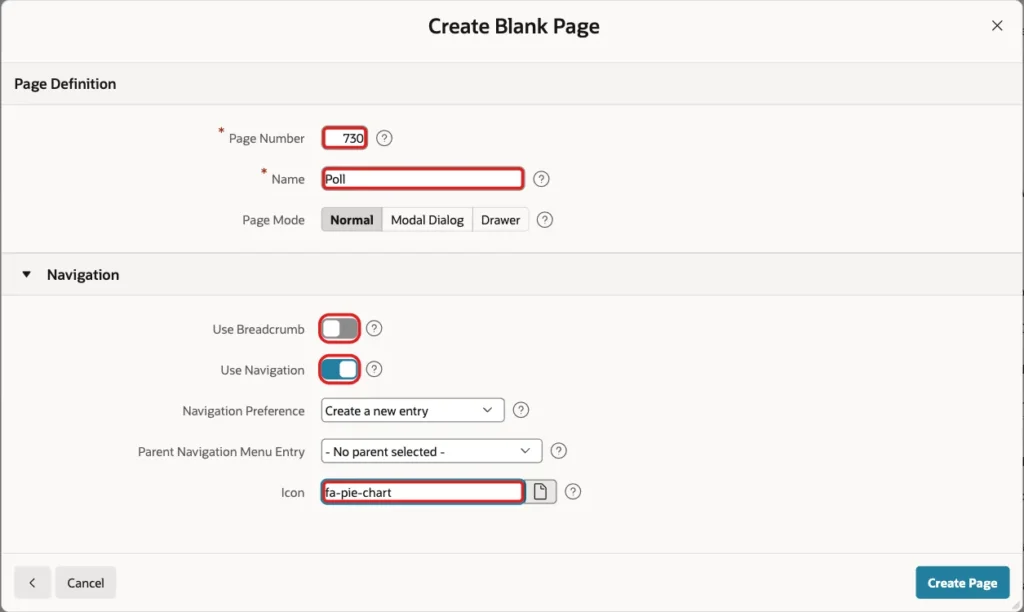
Enter 730 as the Page Number and Poll as the Name. Turn off Use Breadcrumb, keep Use Navigation on, enter fa-pie-chart as the Icon and click Create Page:
Every signed-in user may vote, so the page needs no authorization scheme.
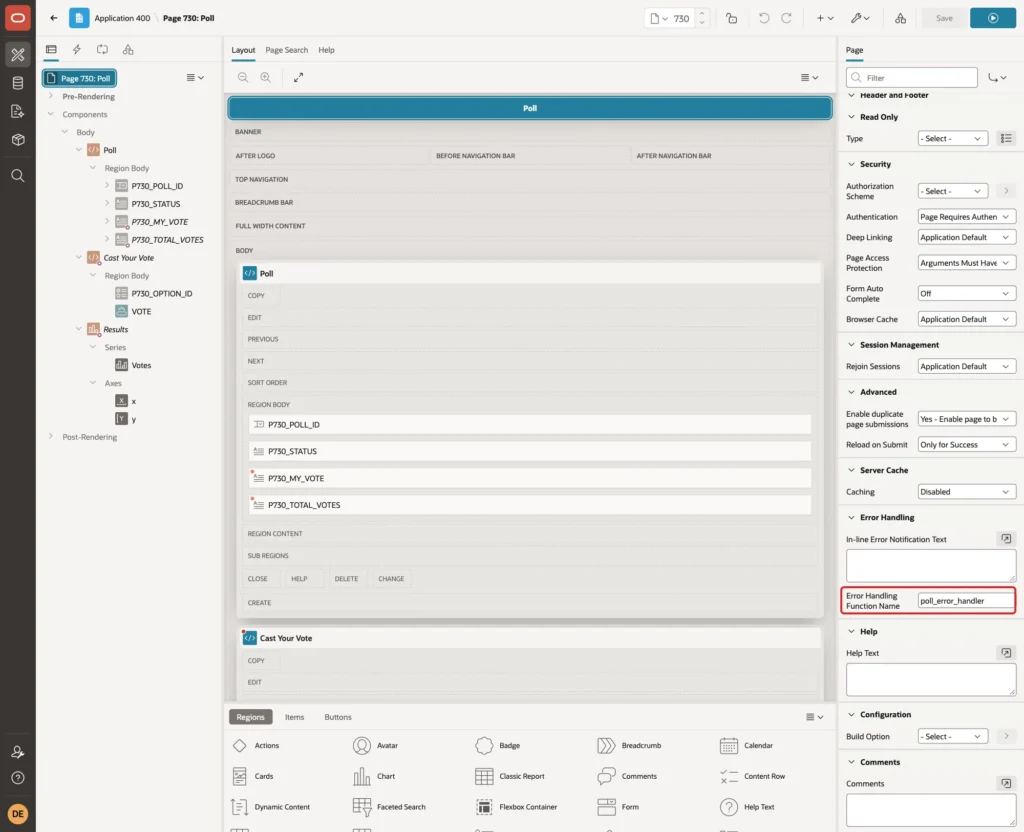
In Page Designer, click the page node Page 730: Poll. In the Error Handling group, enter poll_error_handler as the Error Handling Function Name:
Step 6: Add the Poll Region and Its Items
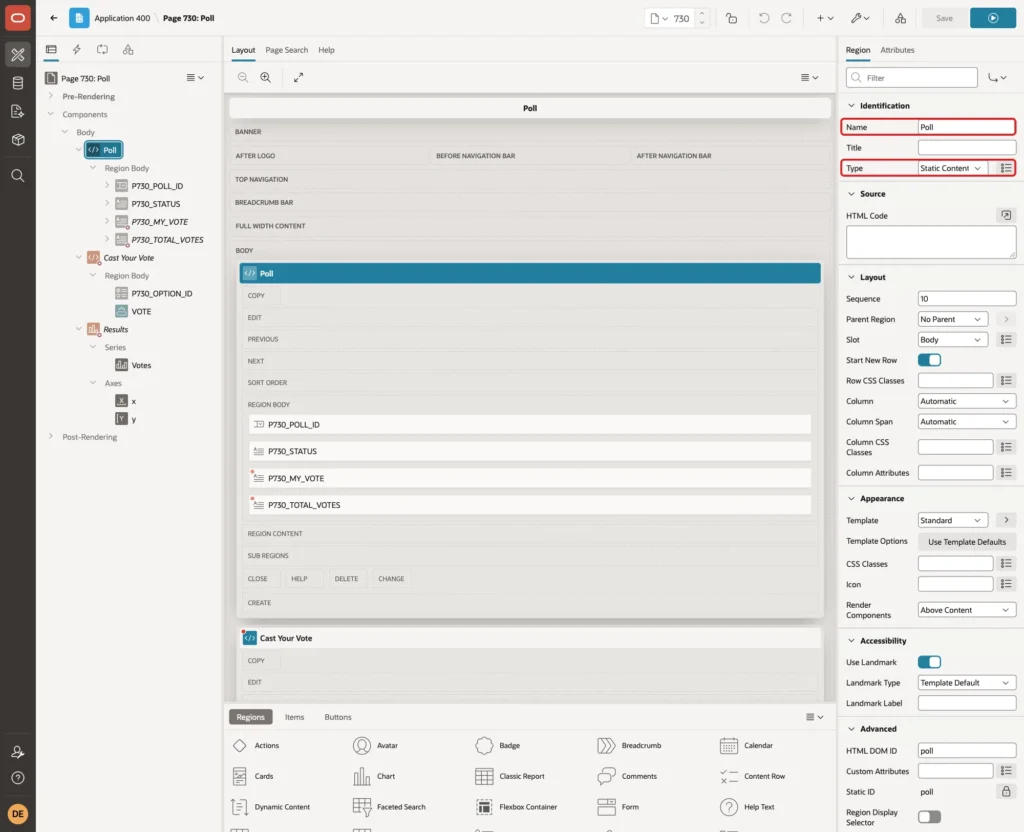
Create a region named Poll with the Type Static Content:
Add a page item P730_POLL_ID to the Poll region with these settings:
- Type: Select List
- Label: Poll
- Settings > Page Action on Selection: Submit Page
- List of Values > Type: SQL Query
- Display Null Value: off
The SQL Query lists the newest polls first and marks closed ones:
Example:
select question
       || case when sysdate >= closes_on then ' (closed)' end as display_value,
       poll_id as return_value
  from polls
 order by closes_on desc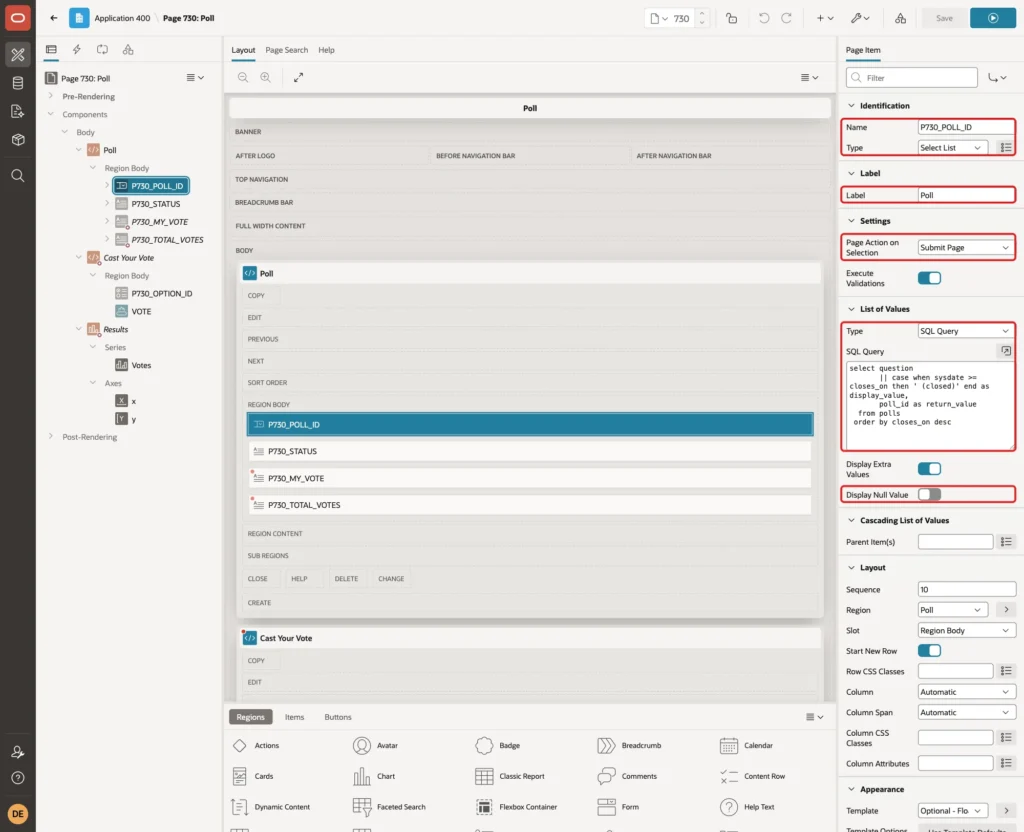
In a first version, the select list used Redirect and Set Value. It worked until an error was shown on the page. After a rejected vote, the redirect URL carried the request VOTE, and APEX stopped with a session state protection violation. Submit Page has no such problem.
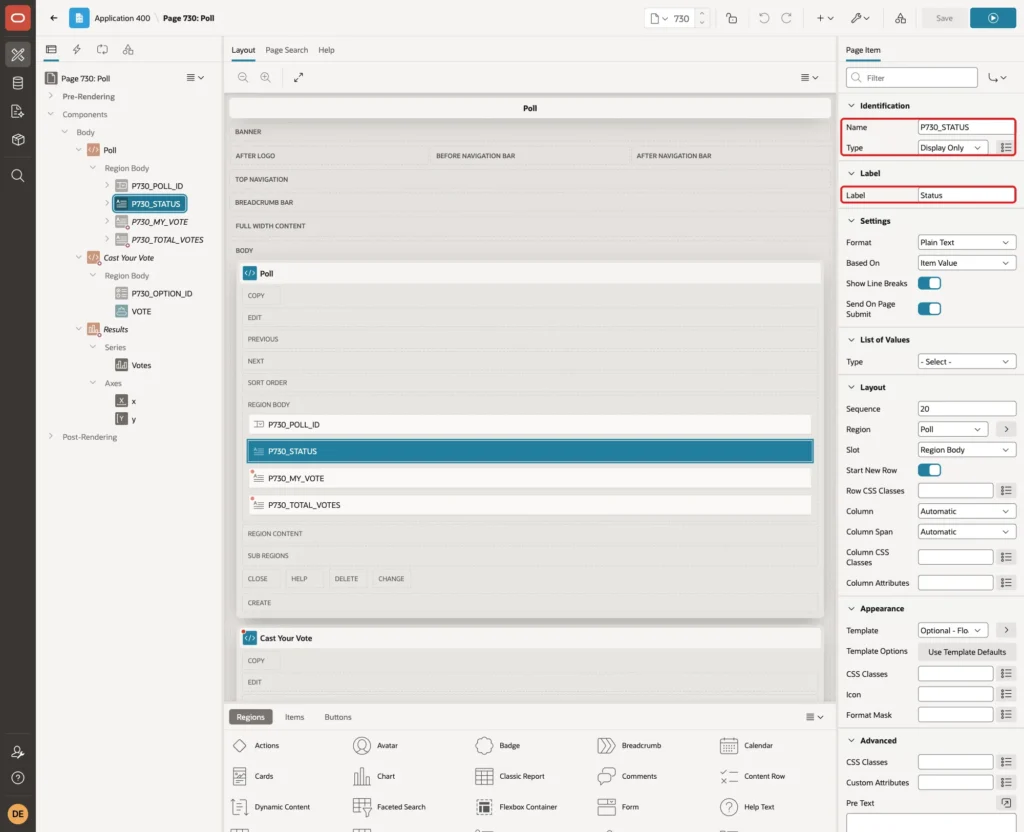
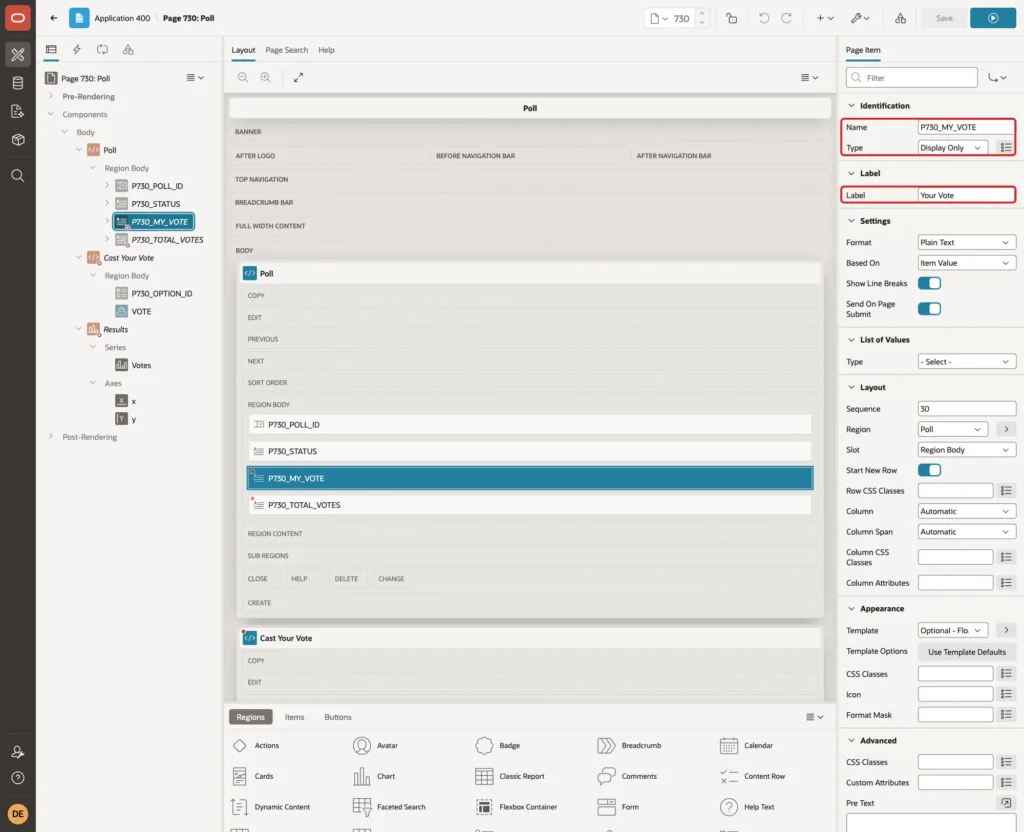
Add three Display Only items to the Poll region: P730_STATUS with the label Status, P730_MY_VOTE with the label Your Vote, and P730_TOTAL_VOTES with the label Total Votes:
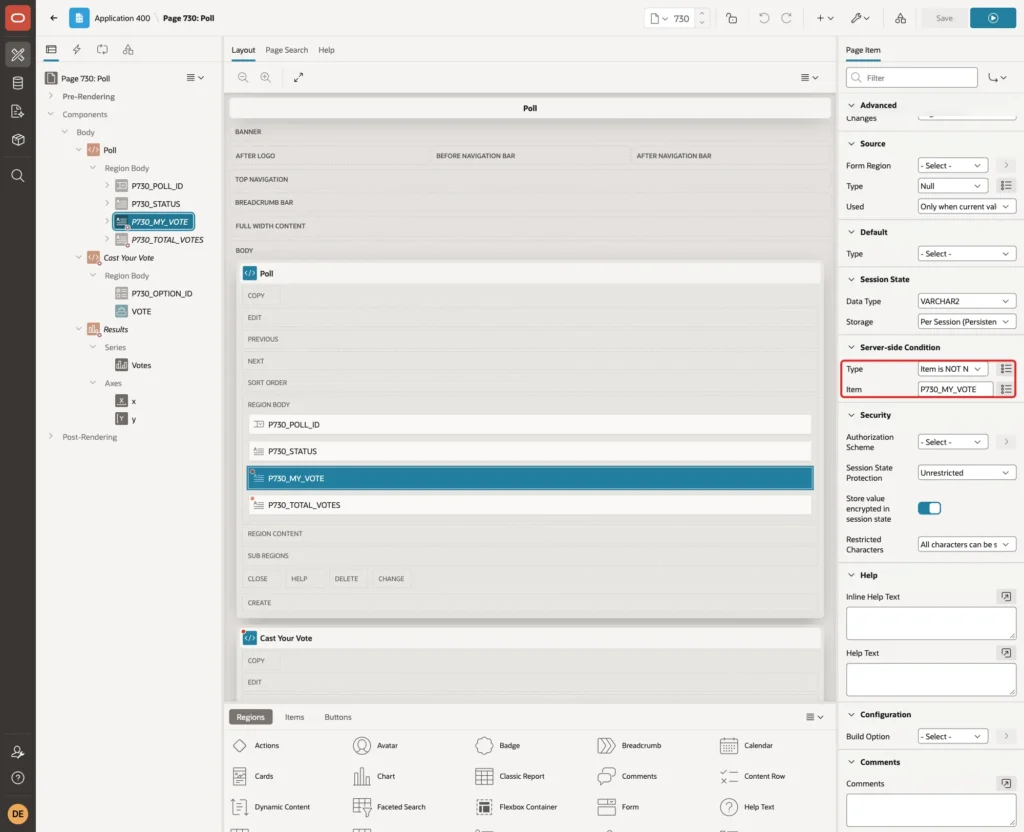
Set the Server-side Condition of P730_MY_VOTE to Item is NOT NULL with the Item P730_MY_VOTE, so it only shows after voting:
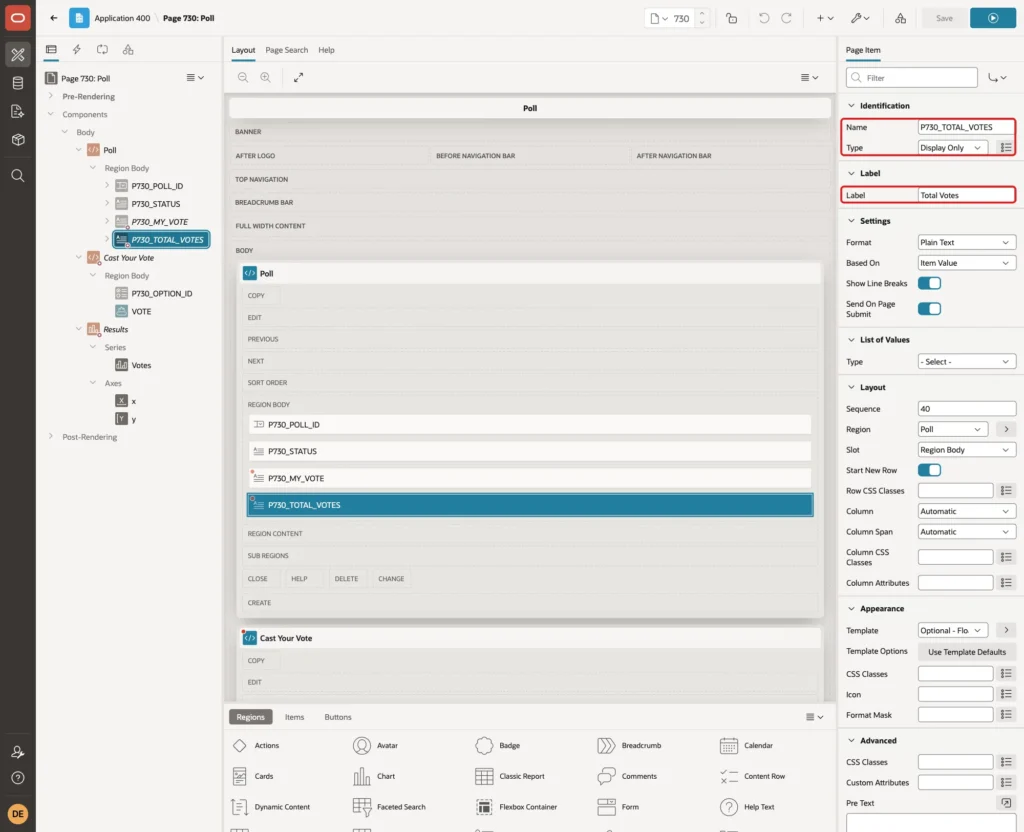
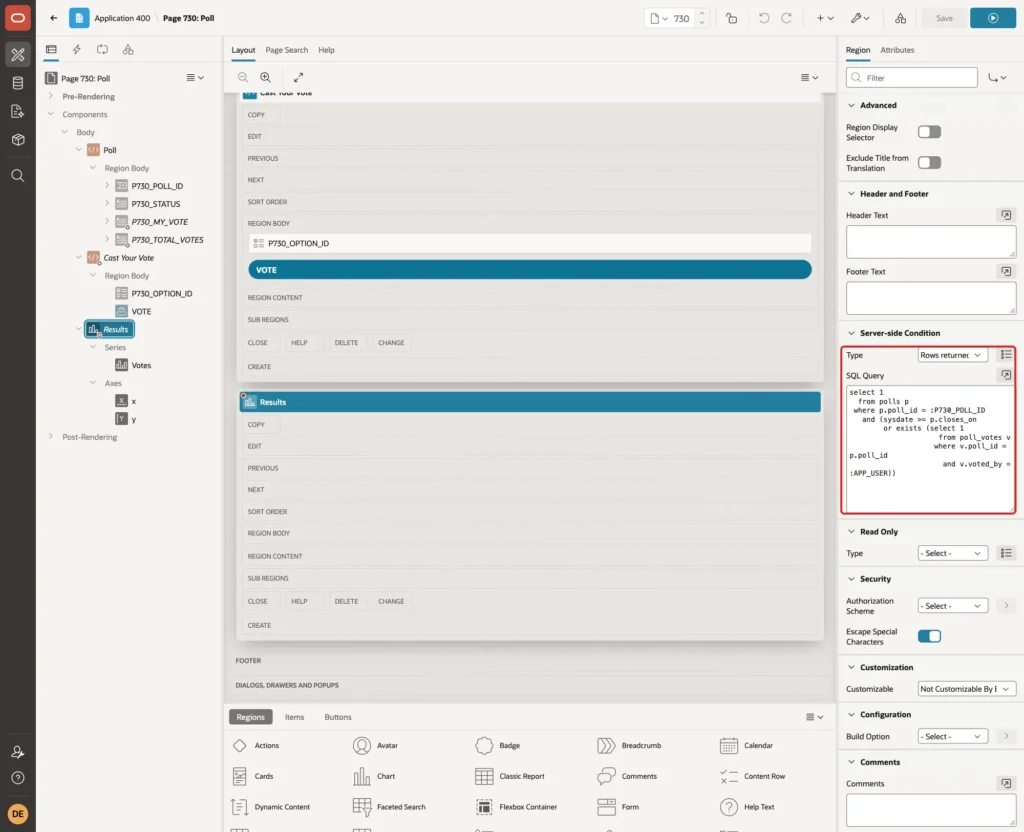
The total is part of the results, so P730_TOTAL_VOTES gets the Server-side Condition Rows returned with this query:
Example:
select 1
  from polls p
 where p.poll_id = :P730_POLL_ID
   and (sysdate >= p.closes_on
        or exists (select 1
                     from poll_votes v
                    where v.poll_id = p.poll_id
                      and v.voted_by = :APP_USER))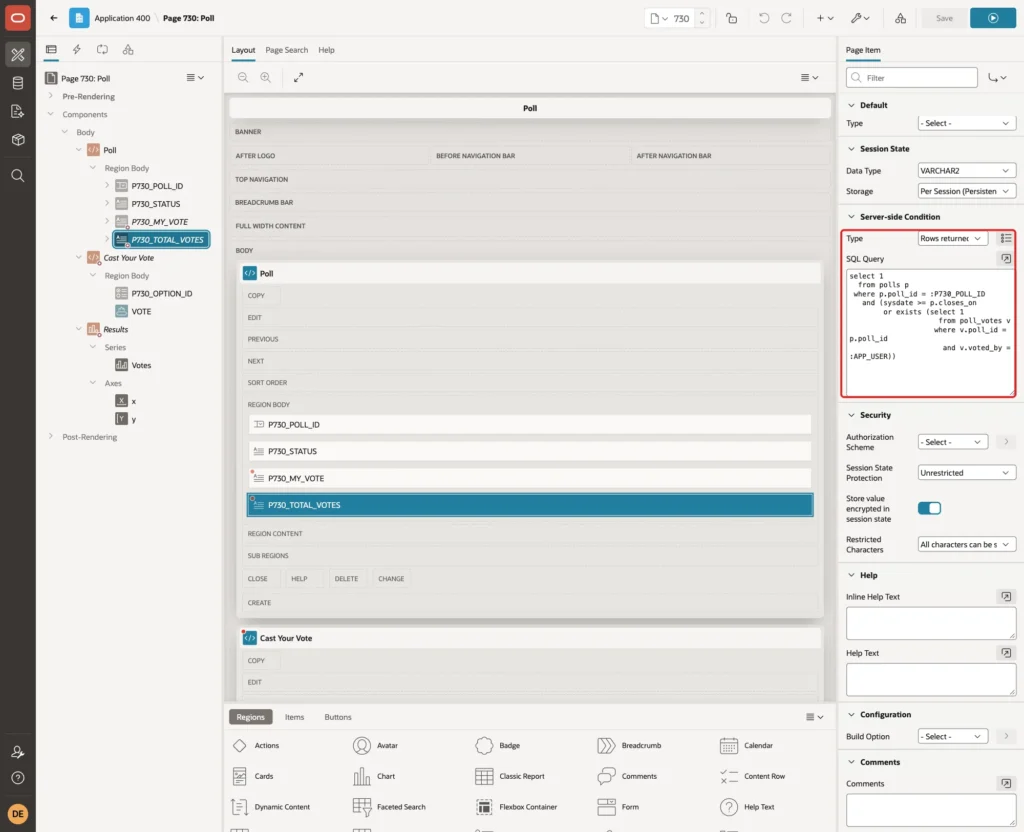
Step 7: Add the Cast Your Vote Region
Create a second Static Content region named Cast Your Vote:
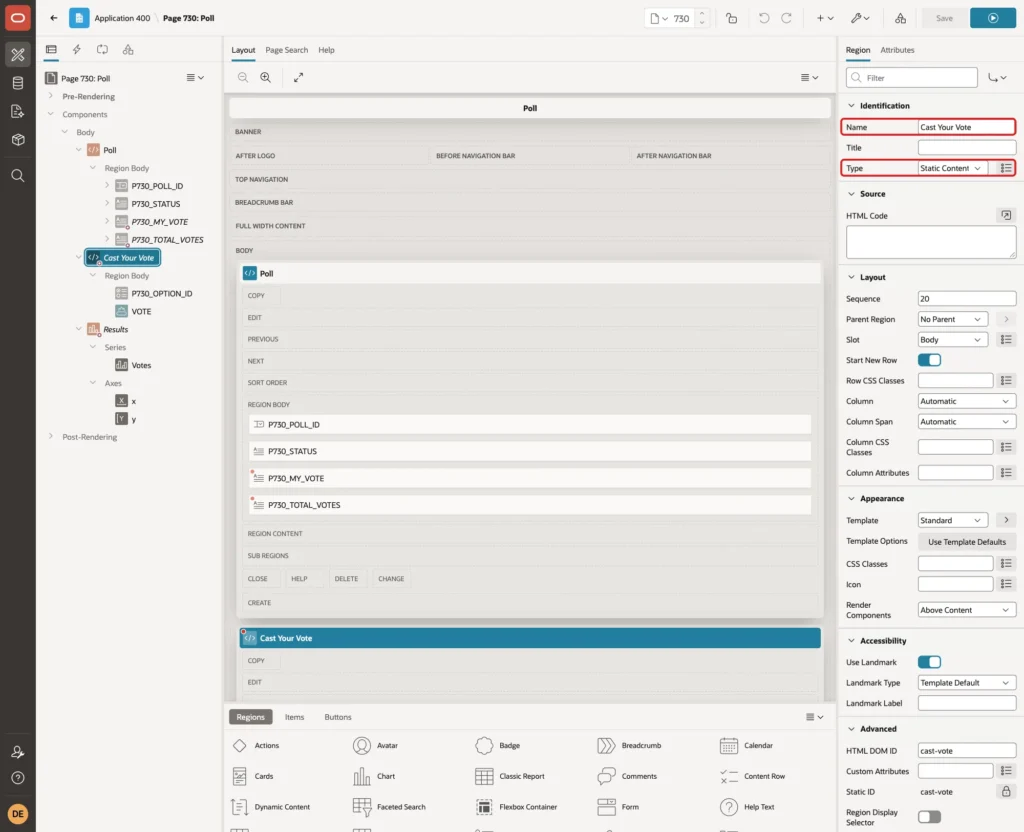
Set its Server-side Condition to Rows returned with this query. The region only shows while the poll is open and the user has not voted:
Example:
select 1
  from polls p
 where p.poll_id = :P730_POLL_ID
   and sysdate >= p.opens_on
   and sysdate < p.closes_on
   and not exists (select 1
                     from poll_votes v
                    where v.poll_id = p.poll_id
                      and v.voted_by = :APP_USER)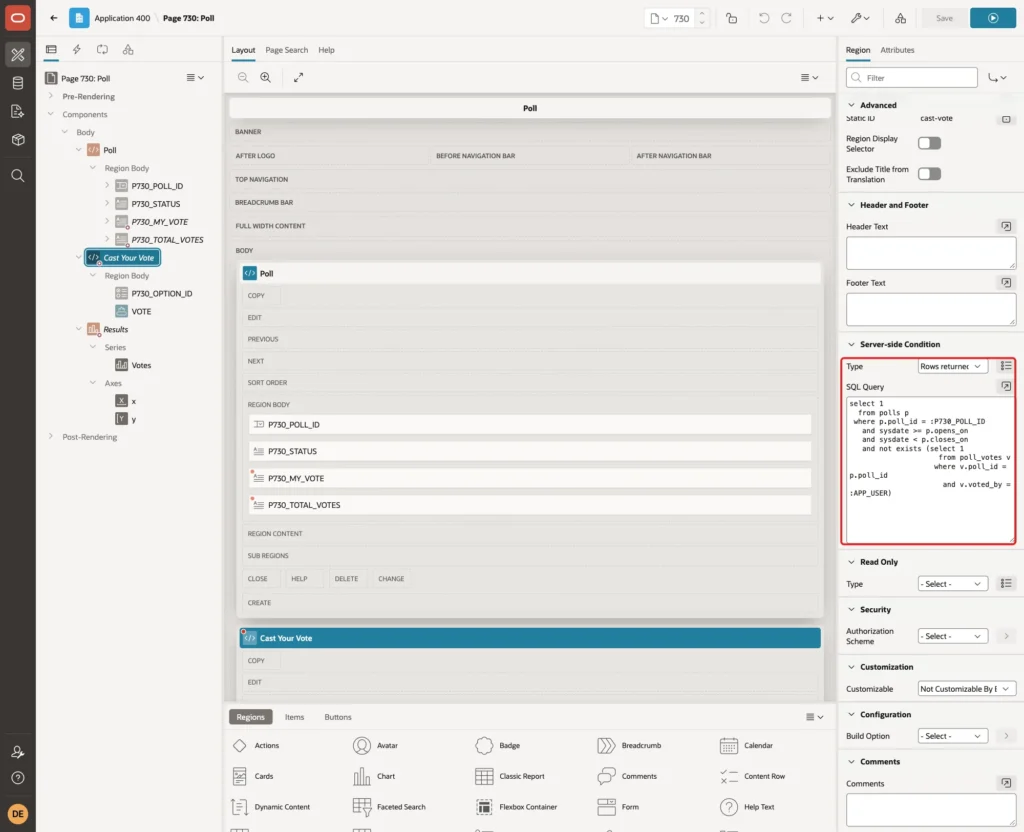
Add a page item P730_OPTION_ID to this region:
- Type: Radio Group
- Label: Your Choice
- Settings > Number of Columns: 1
- List of Values > Type: SQL Query
- Display Null Value: off
The SQL Query reads the options of the chosen poll:
Example:
select option_text as display_value,
       option_id as return_value
  from poll_options
 where poll_id = :P730_POLL_ID
 order by display_seq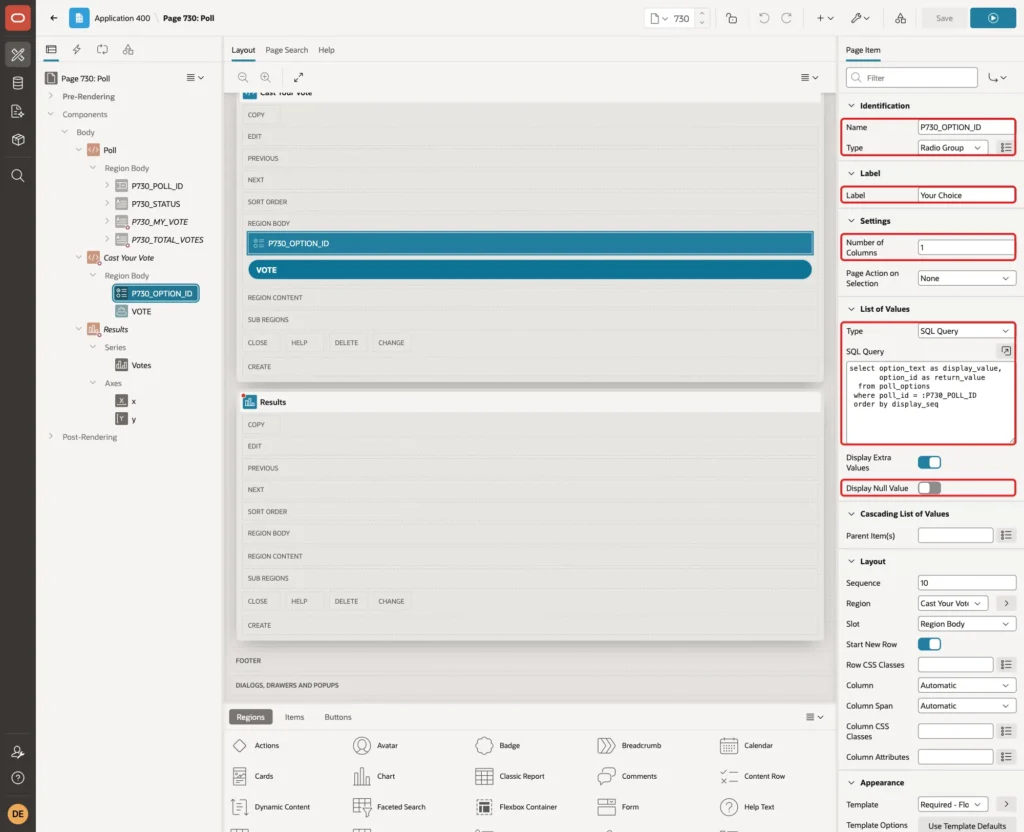
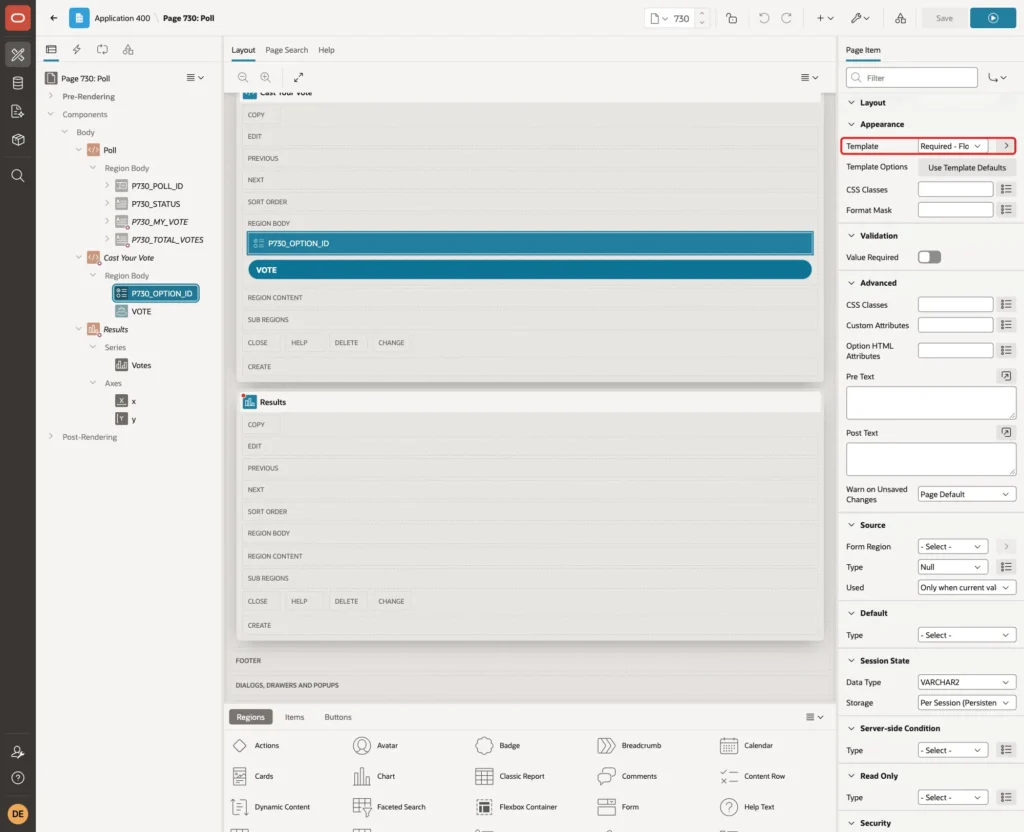
Set Appearance > Template to Required - Floating. It shows the red asterisk. Leave Value Required off; Step 10 explains why:
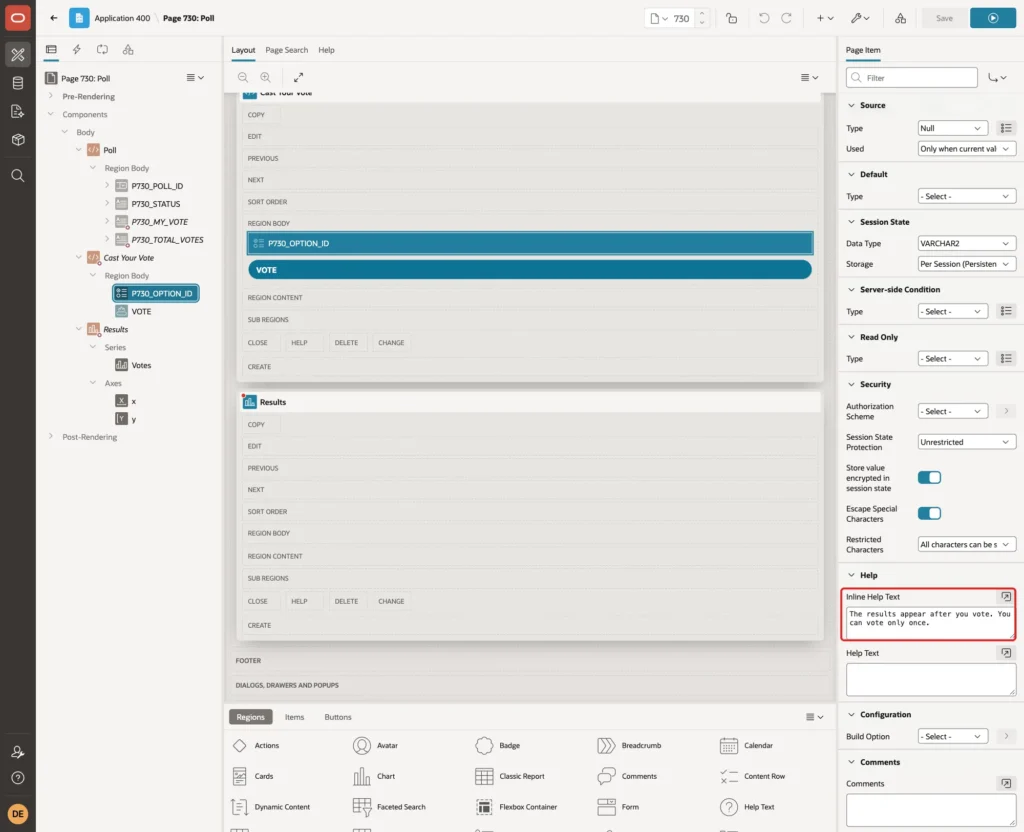
Enter the Inline Help Text The results appear after you vote. You can vote only once.
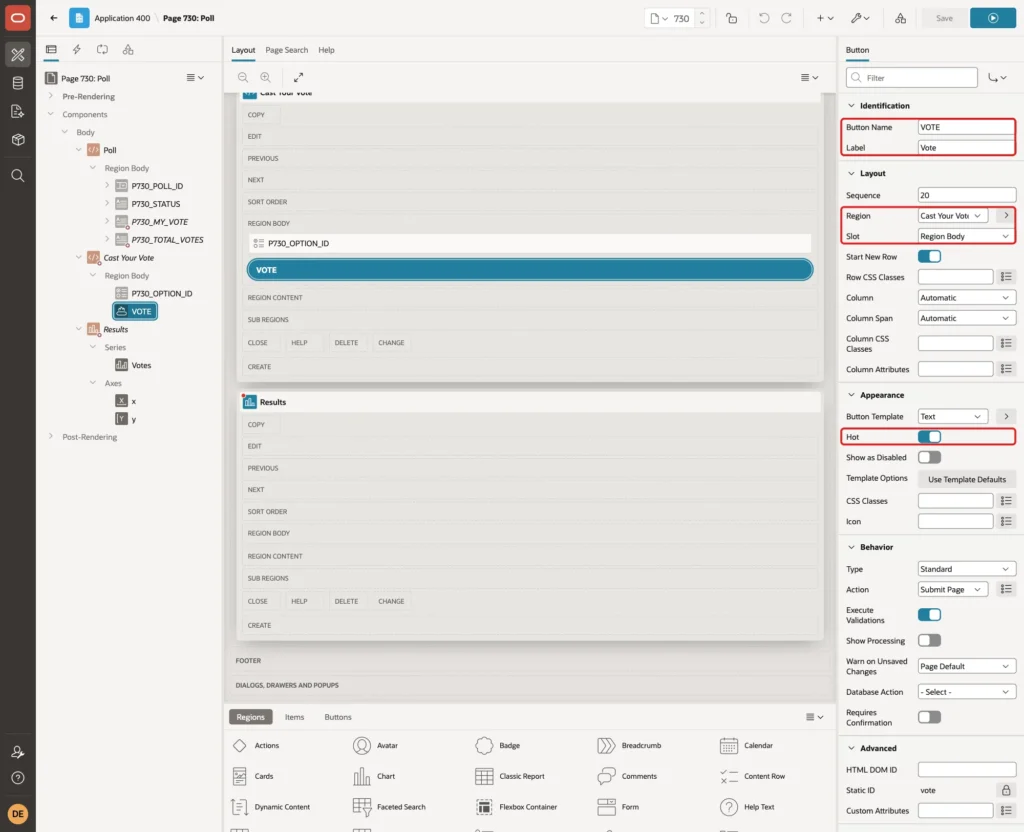
Add a button VOTE with the Label Vote to the Cast Your Vote region, in the Slot Region Body, and turn Hot on:
Step 8: Add the Results Chart
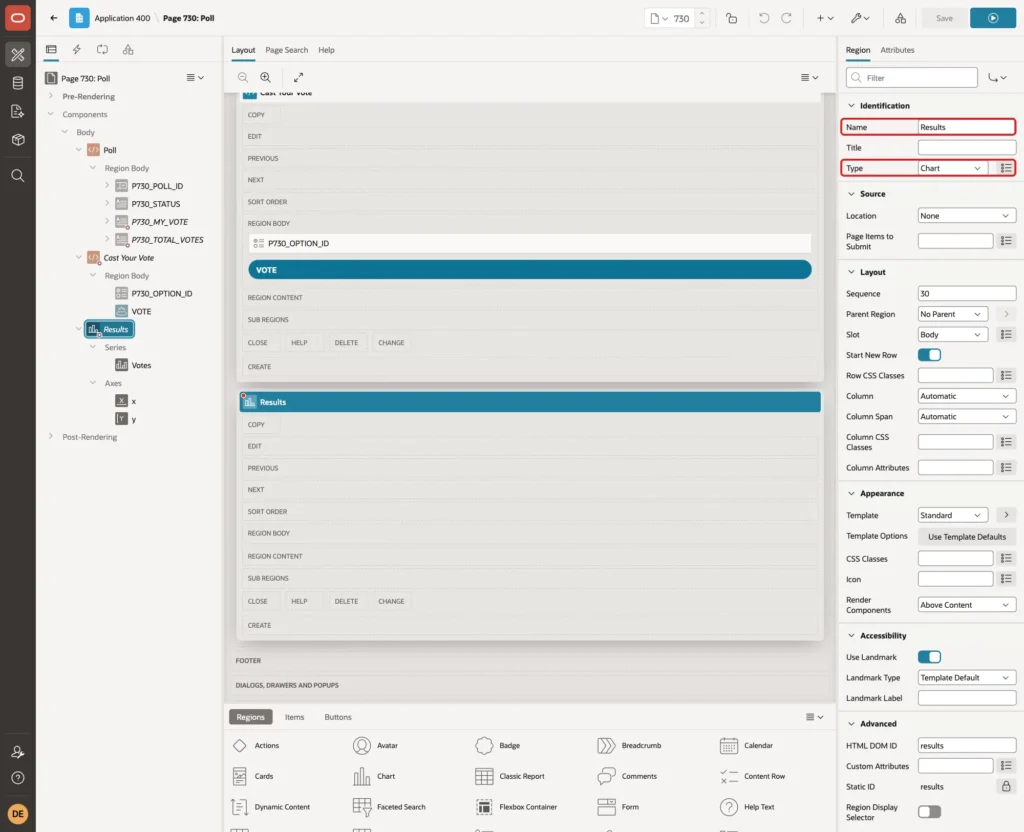
Create a region named Results and set its Type to Chart:
Give it the same Server-side Condition as P730_TOTAL_VOTES: Rows returned with the query from Step 6. Users who have not voted do not get the chart at all, not even in the page source:
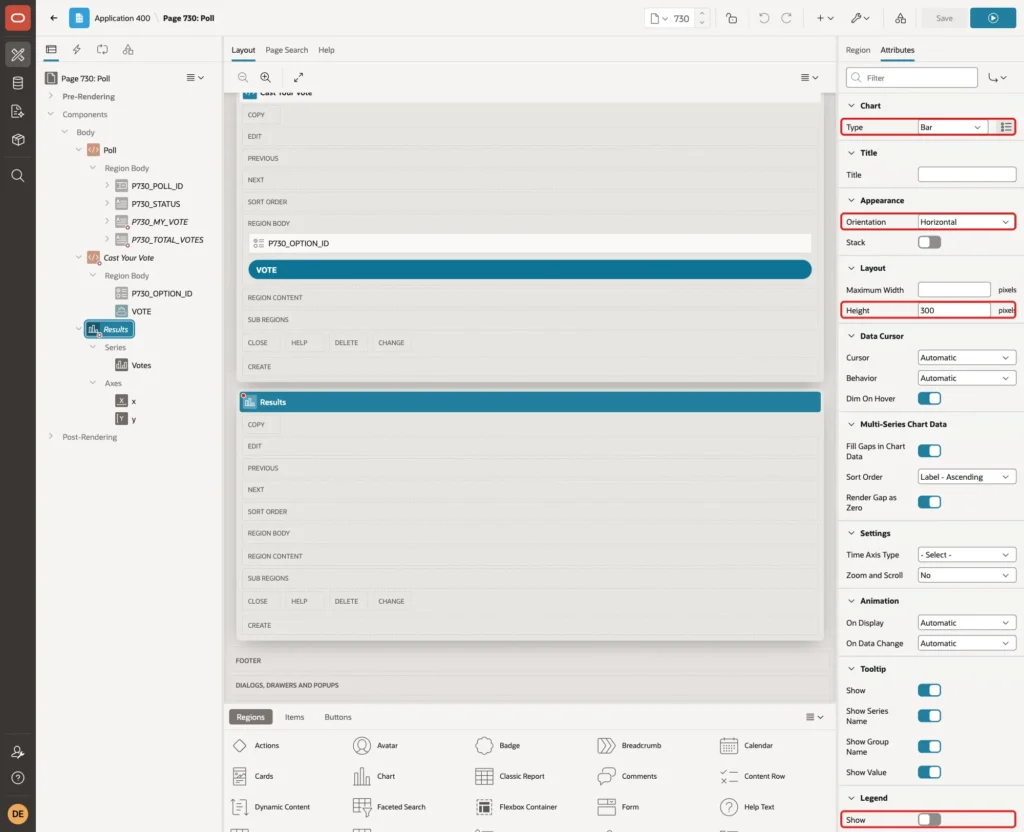
Open the Attributes tab of the region. Keep the Type Bar, set Orientation to Horizontal and Height to 300, and turn the Legend off:
Click the series under Results, name it Votes, and enter this SQL Query:
Example:
select option_text || ' (' || votes || ')' as option_label,
       pct / 100 as vote_share,
       display_seq
  from poll_results_v
 where poll_id = :P730_POLL_ID
 order by display_seq
Set Column Mapping > Label to OPTION_LABEL and Value to VOTE_SHARE:
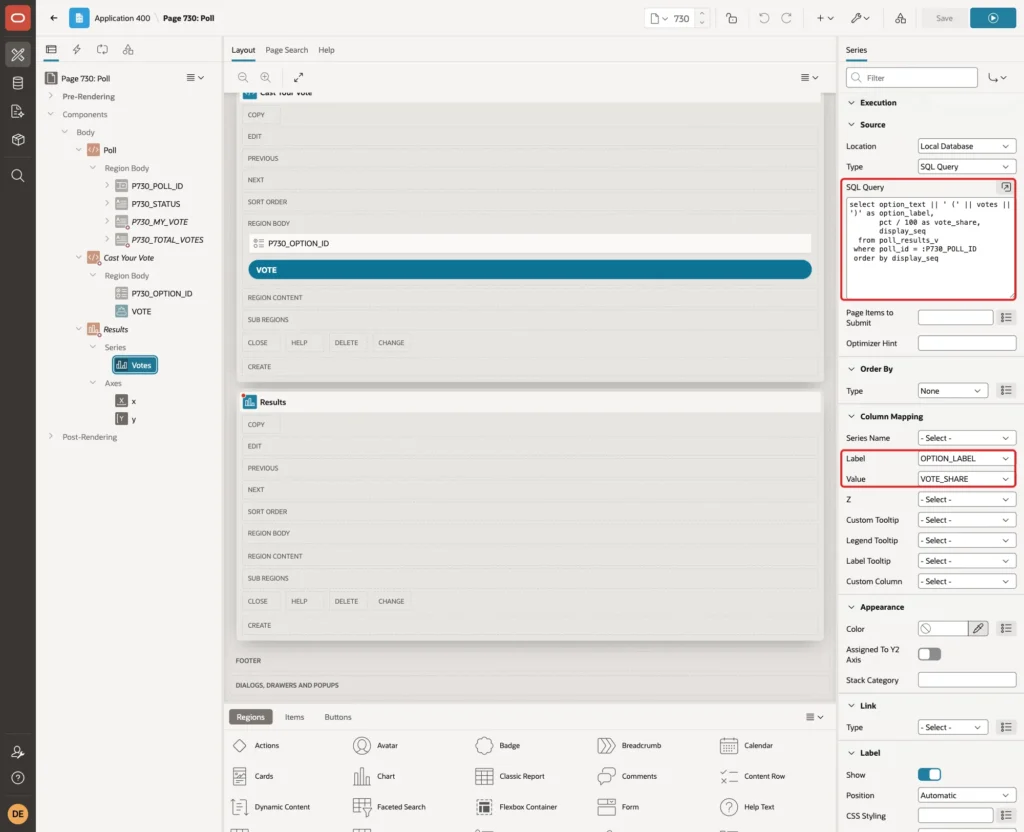
VOTE_SHARE is a fraction from 0 to 1, because the chart's percent format multiplies by 100. The vote count goes into the label, so each bar shows both numbers.
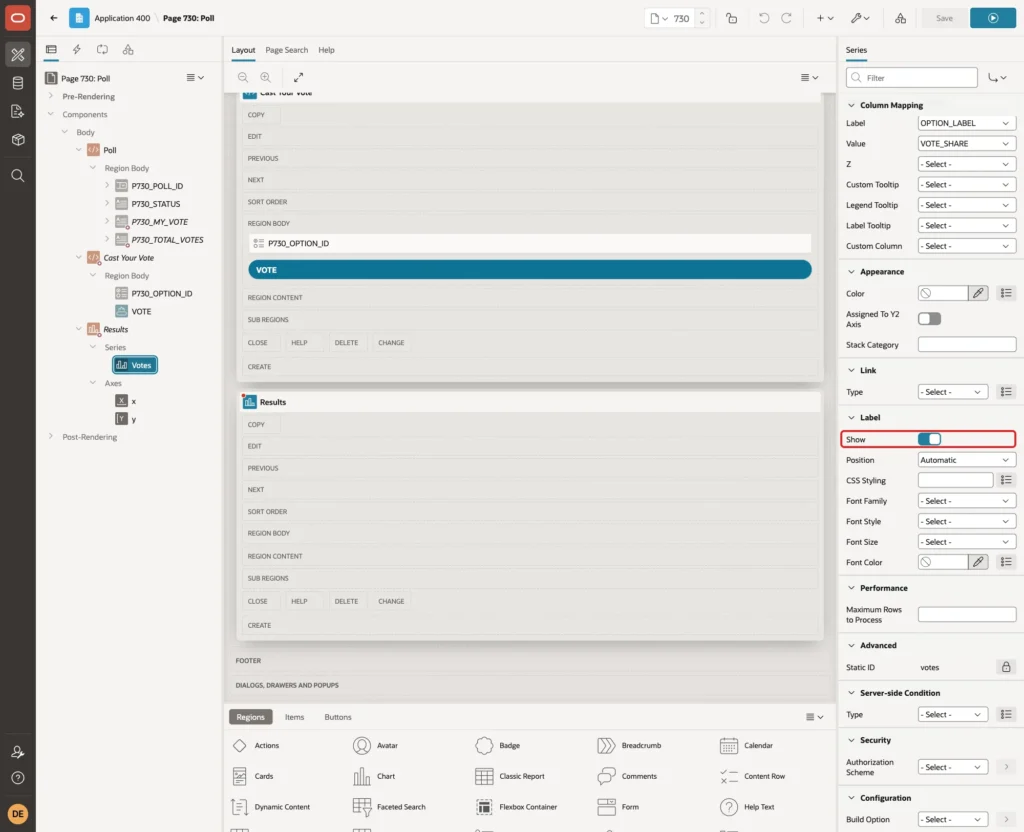
Turn Label > Show on to print the value on each bar:
Click the y axis and set Minimum 0, Maximum 1, Format Percent and Decimal Places 0:
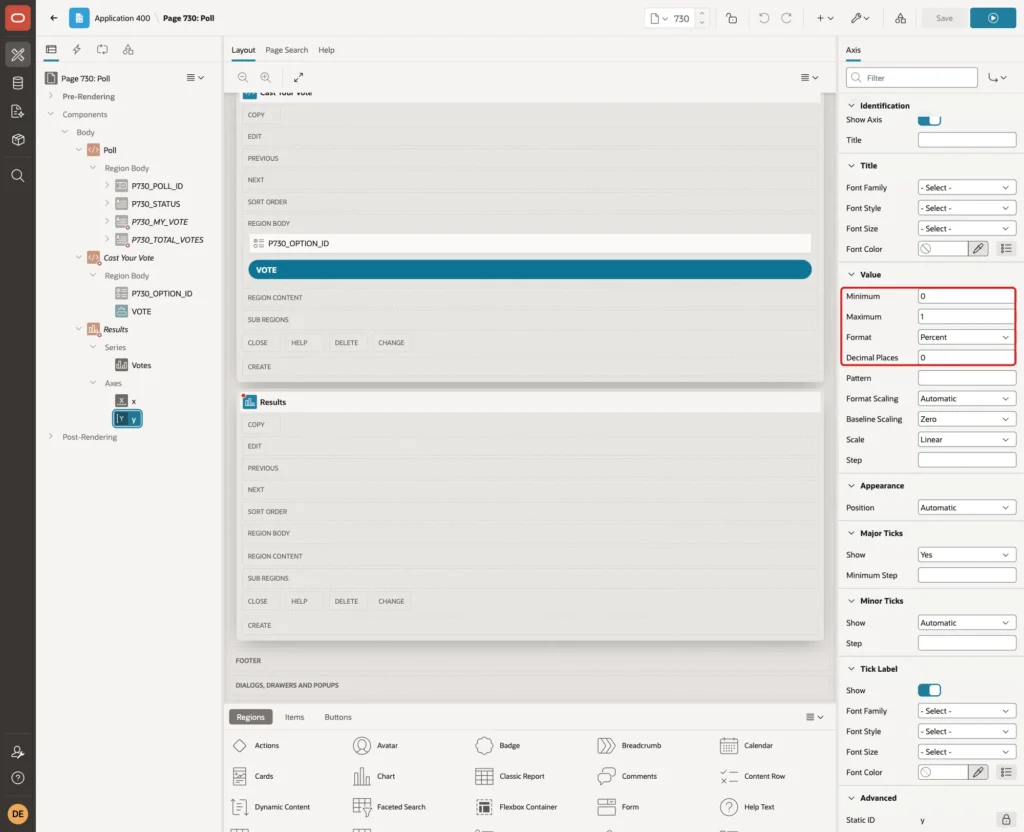
A fixed maximum keeps the bars comparable. A poll where one option has all votes fills the whole width.
Step 9: Add the Computations
Four Before Header computations fill the items. Right-click Pre-Rendering > Before Header and select Create Computation for each.
The first sets P730_POLL_ID to the open poll that closes first, or the latest poll when none is open:
Example:
select coalesce(
         (select min(poll_id) keep (dense_rank first order by closes_on)
            from polls
           where sysdate >= opens_on
             and sysdate < closes_on),
         (select max(poll_id) keep (dense_rank last order by closes_on)
            from polls))
  from dual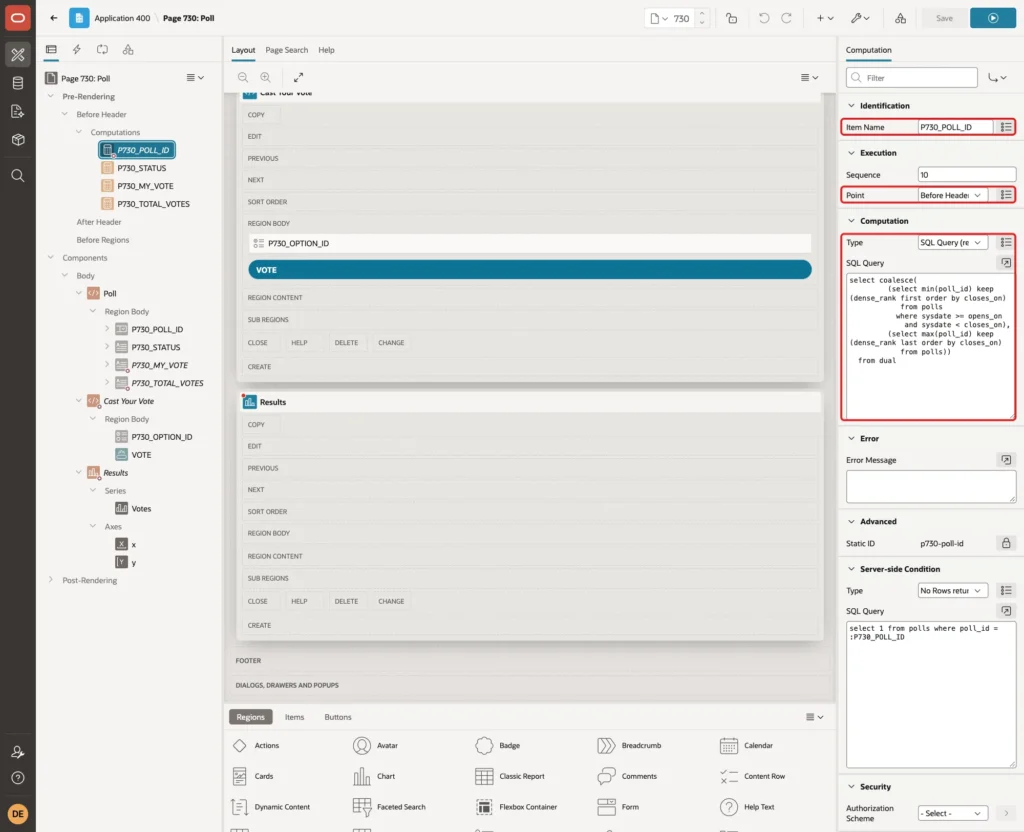
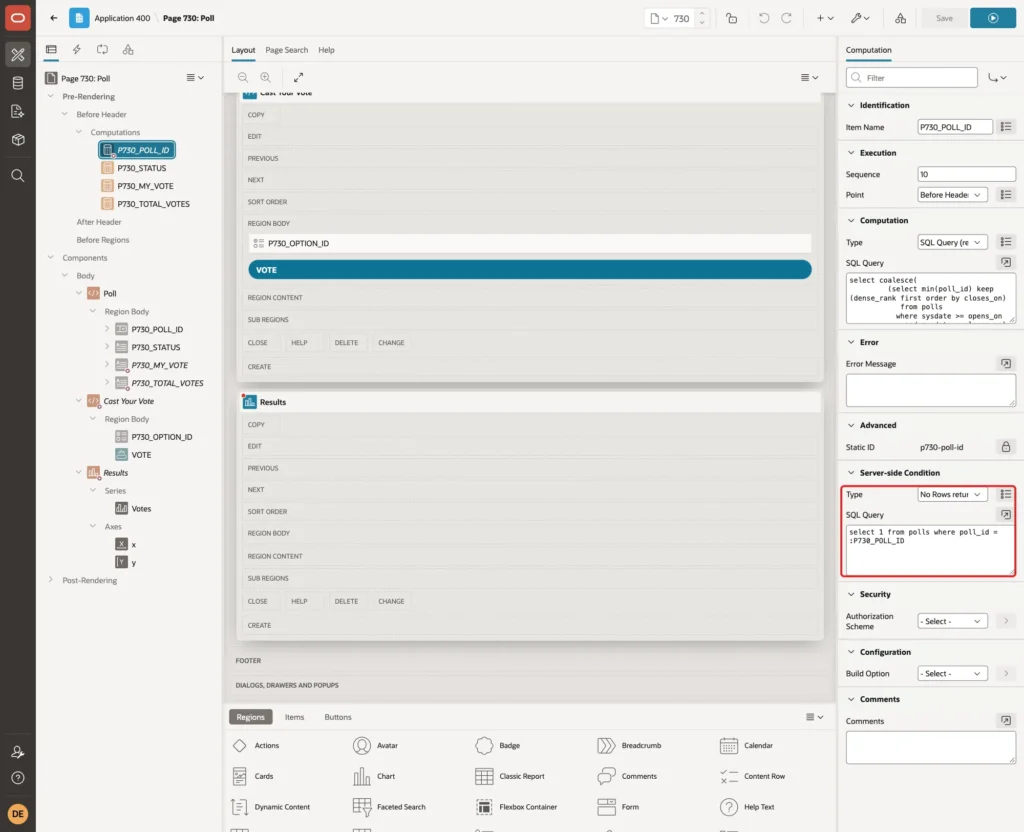
Its Server-side Condition is No Rows returned with select 1 from polls where poll_id = :P730_POLL_ID. The computation only runs when no valid poll is chosen yet:
The second sets P730_STATUS:
Example:
select case
         when sysdate < opens_on then 'Opens on ' || to_char(opens_on, 'DD-MON-YYYY HH24:MI')
         when sysdate < closes_on then 'Open until ' || to_char(closes_on, 'DD-MON-YYYY HH24:MI')
         else 'Closed on ' || to_char(closes_on, 'DD-MON-YYYY HH24:MI')
       end
  from polls
 where poll_id = :P730_POLL_ID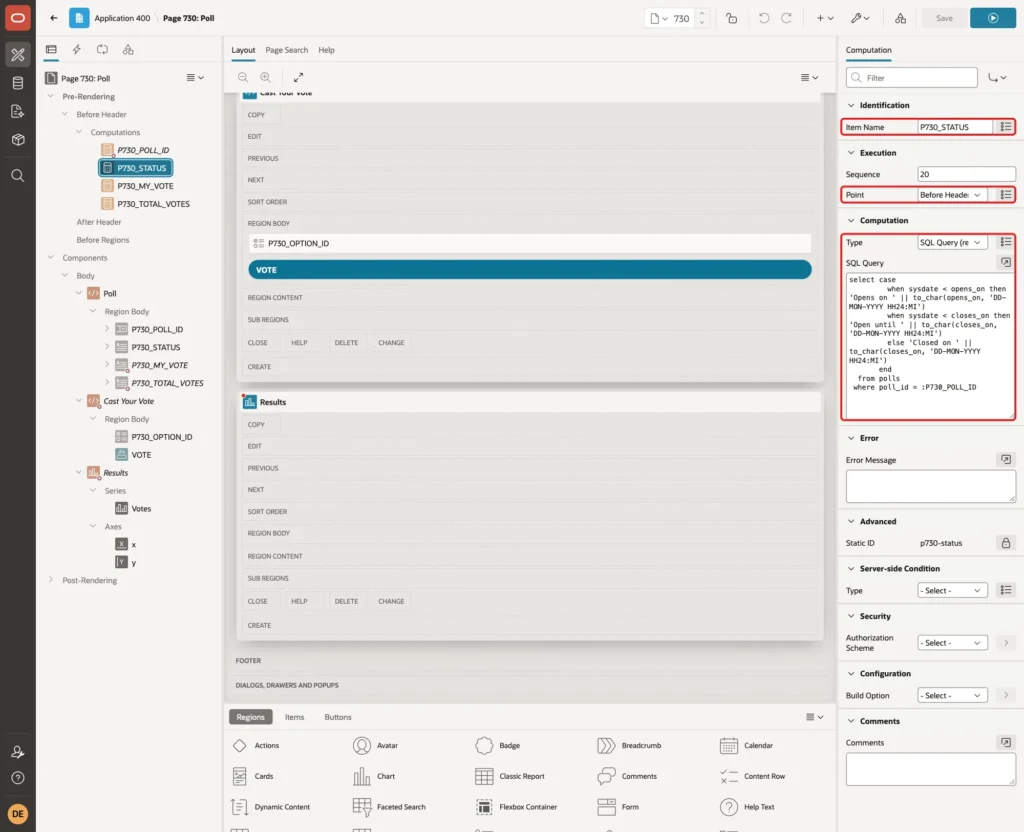
The third sets P730_MY_VOTE. When the user has not voted, the query returns no row and the item stays empty:
Example:
select o.option_text || ' on ' || to_char(v.voted_on, 'DD-MON-YYYY HH24:MI')
  from poll_votes v
  join poll_options o
    on o.option_id = v.option_id
 where v.poll_id = :P730_POLL_ID
   and v.voted_by = :APP_USER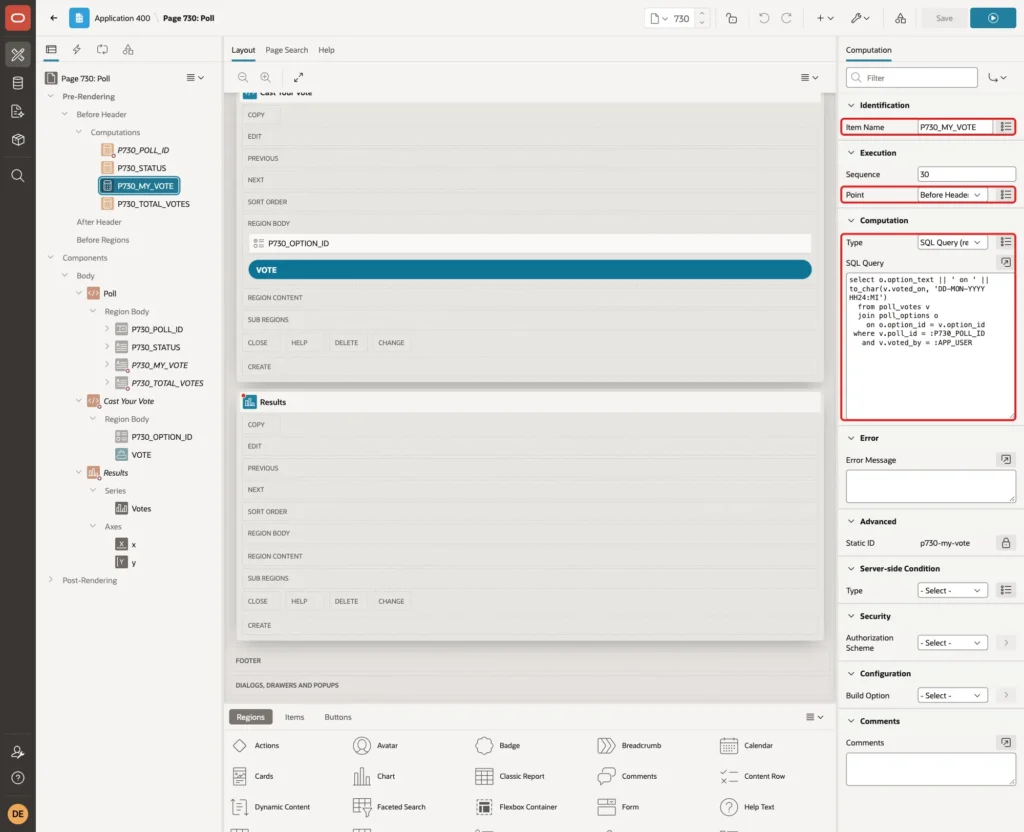
The fourth sets P730_TOTAL_VOTES:
Example:
select count(*)
  from poll_votes
 where poll_id = :P730_POLL_ID
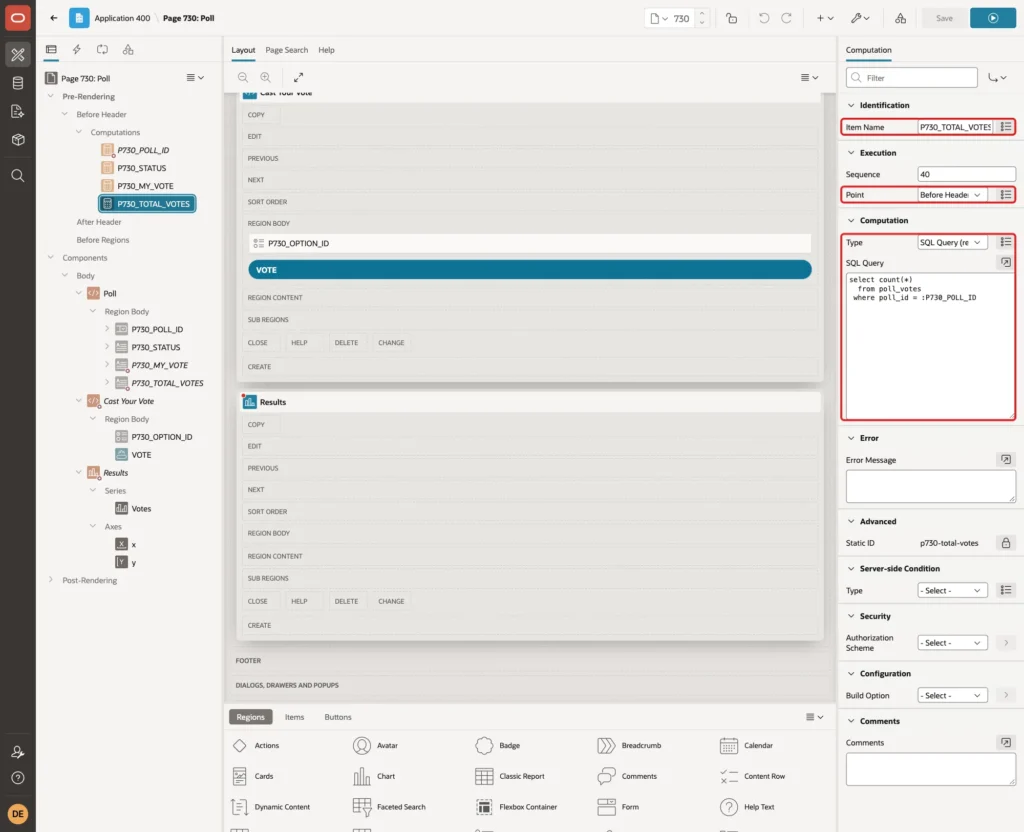
Step 10: Add the Validations
Open the Processing tab. Right-click Validating and select Create Validation. Name it Choice Is Required, set Type to Expression, Language PL/SQL, and enter the PL/SQL Expression :P730_OPTION_ID is not null with the Error Message Choose one of the options.
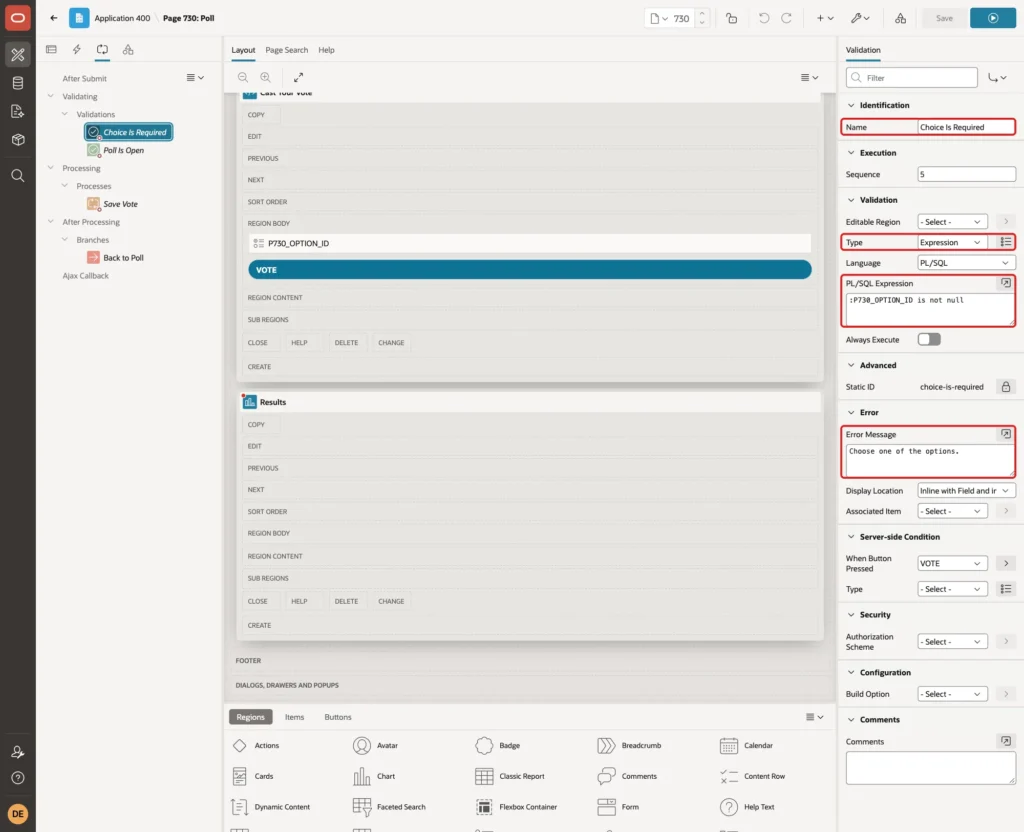
Set When Button Pressed to VOTE:
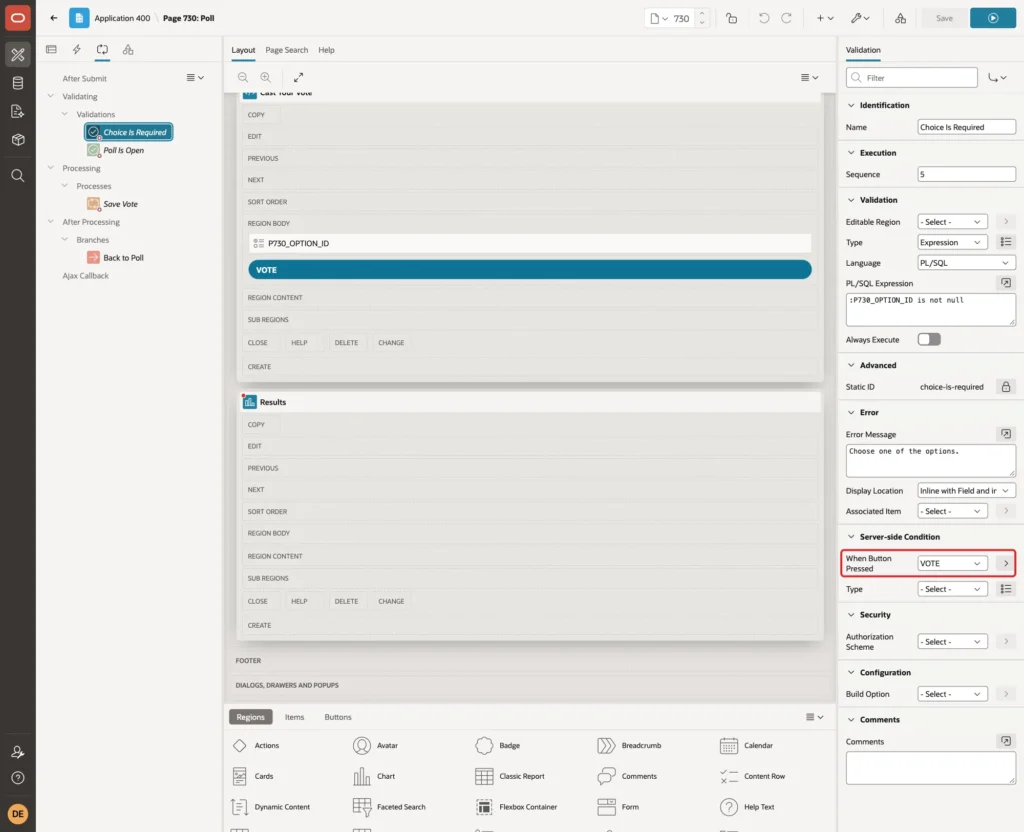
Why not Value Required on the radio group? APEX checks Value Required only for items that were rendered. A forced VOTE request from a user who had already voted skipped that check and failed with ORA-01400: cannot insert NULL into OPTION_ID. A validation runs whether the region is shown or not.
The first test used the Type Item is NOT NULL. APEX then tied the error to P730_OPTION_ID, and when that item was not on the page, the browser stopped with a JavaScript error and showed no message. The Expression type has no associated item.
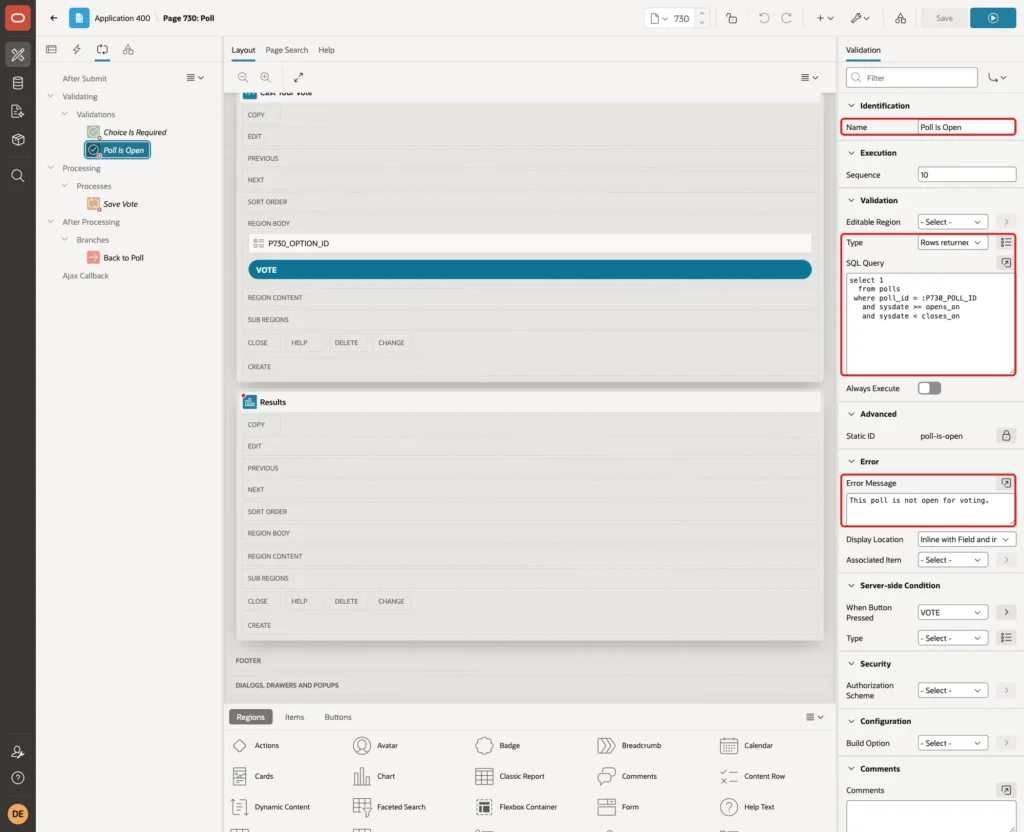
Create a second validation named Poll Is Open with the Type Rows returned, this query and the Error Message This poll is not open for voting.
Example:
select 1
  from polls
 where poll_id = :P730_POLL_ID
   and sysdate >= opens_on
   and sysdate < closes_on
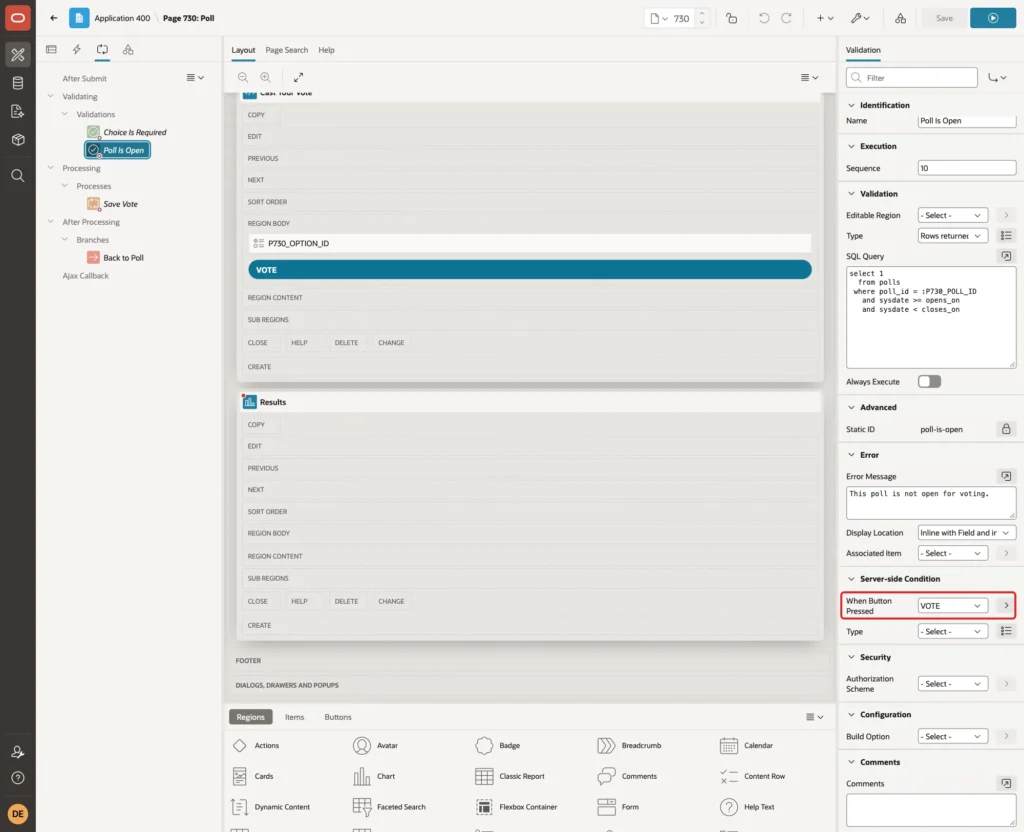
Set its When Button Pressed to VOTE as well:
Step 11: Add the Save Process and the Branch
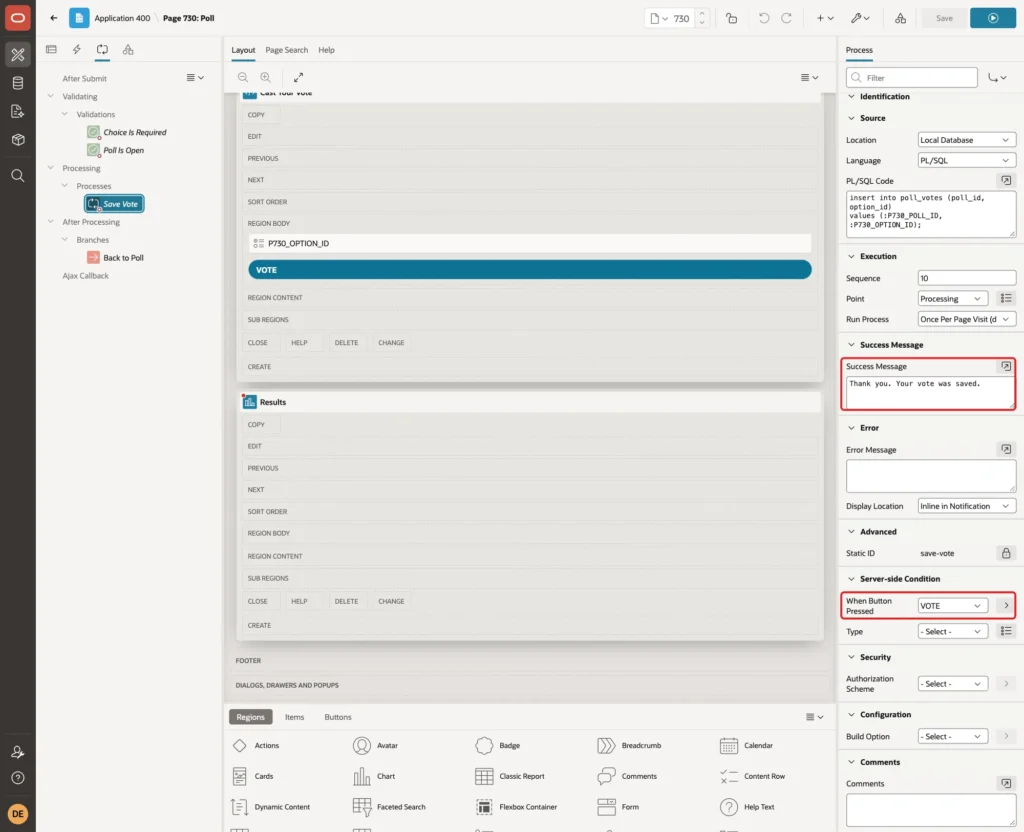
Right-click Processing and select Create Process. Name it Save Vote, keep the Type Execute Code and enter the PL/SQL Code:
Example:
insert into poll_votes (poll_id, option_id)
values (:P730_POLL_ID, :P730_OPTION_ID);
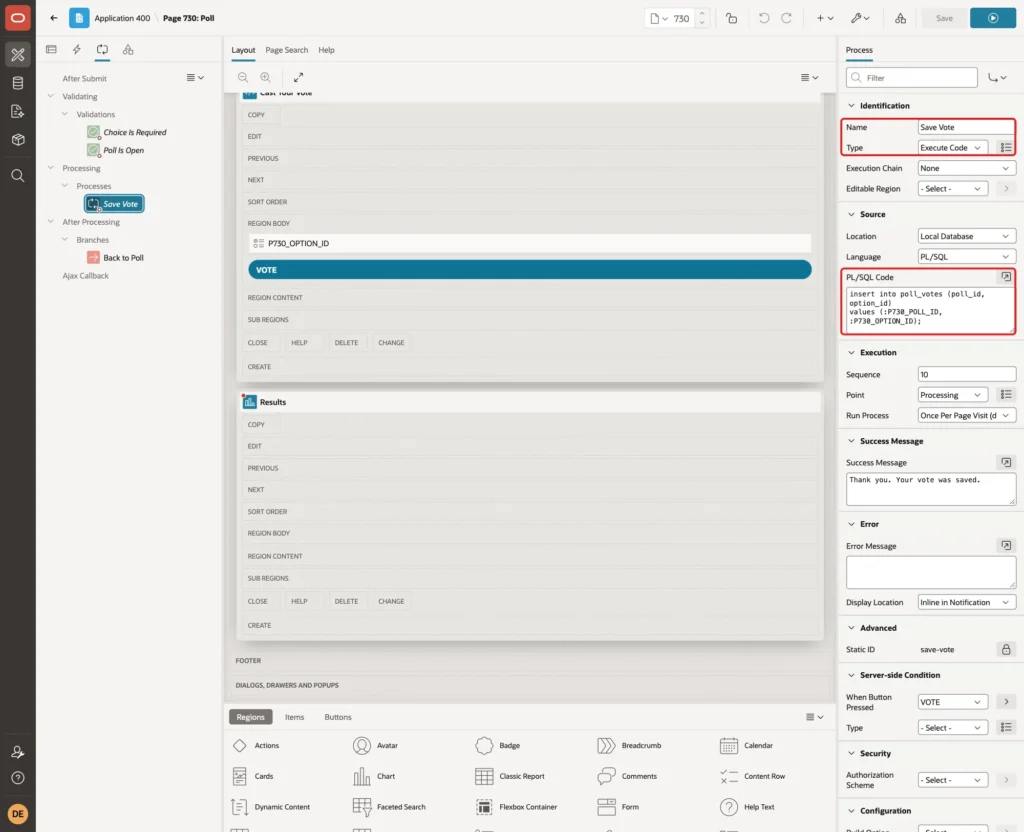
Enter the Success Message Thank you. Your vote was saved. and set When Button Pressed to VOTE. Leave the Error Message empty, so the error handling function can replace the database message:
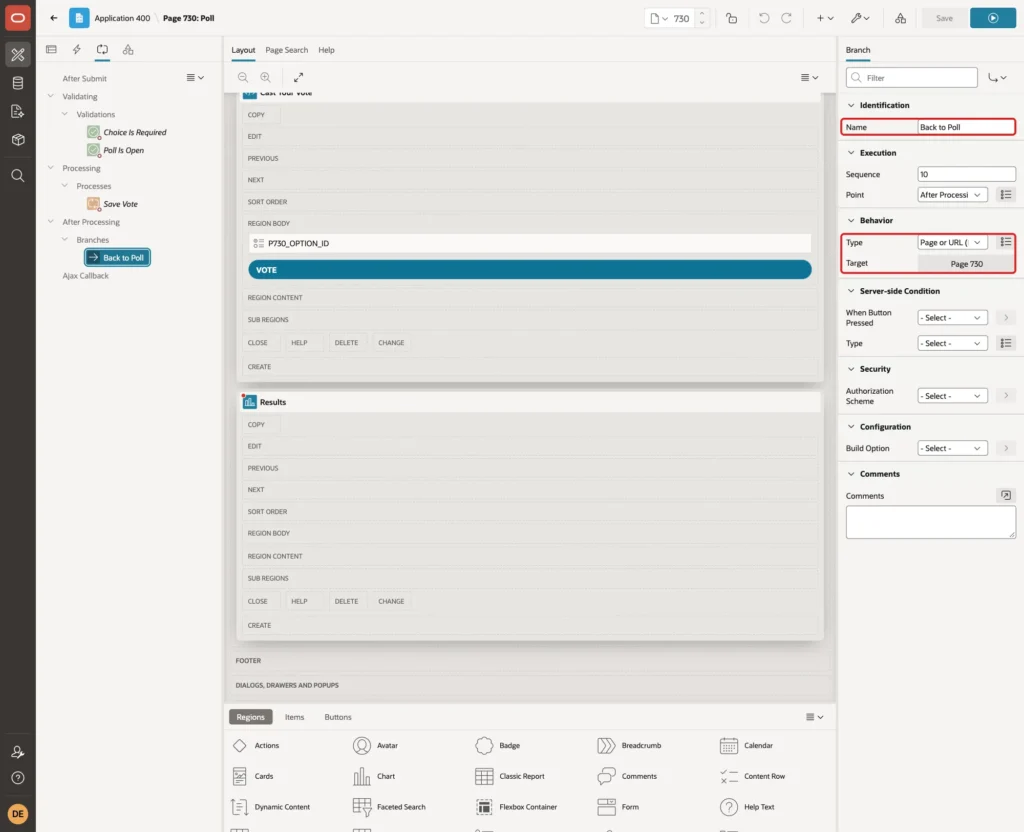
Right-click After Processing and select Create Branch. Name it Back to Poll, keep the Type Page or URL (Redirect) and click Target:
Enter 730 as the Page and P730_OPTION_ID in Clear Cache, then click OK and Save:
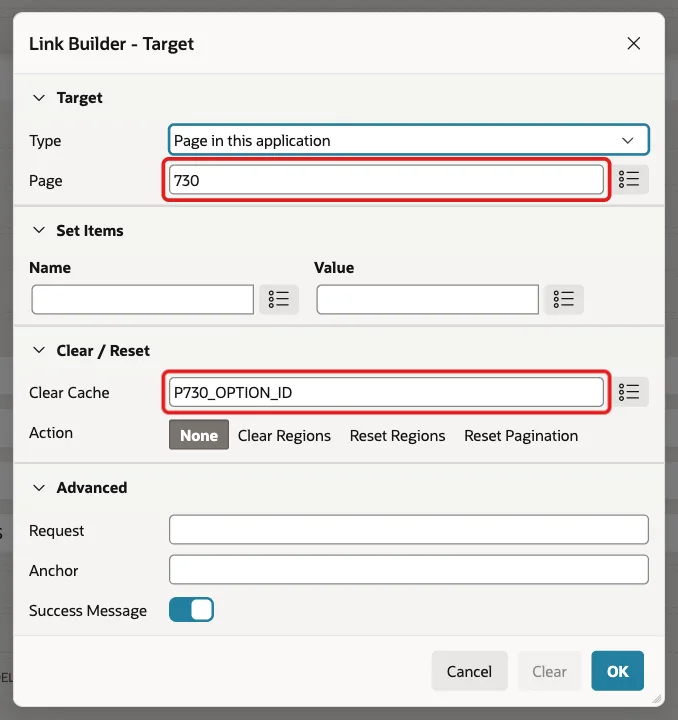
Clear Cache keeps a choice made for one poll from being sent with the next poll.
Test the Poll
The tests use four users of the sample application: SALES_MANAGER, ORDER_EDITOR, SALES_USER and DEMO_DEV.
Before Voting
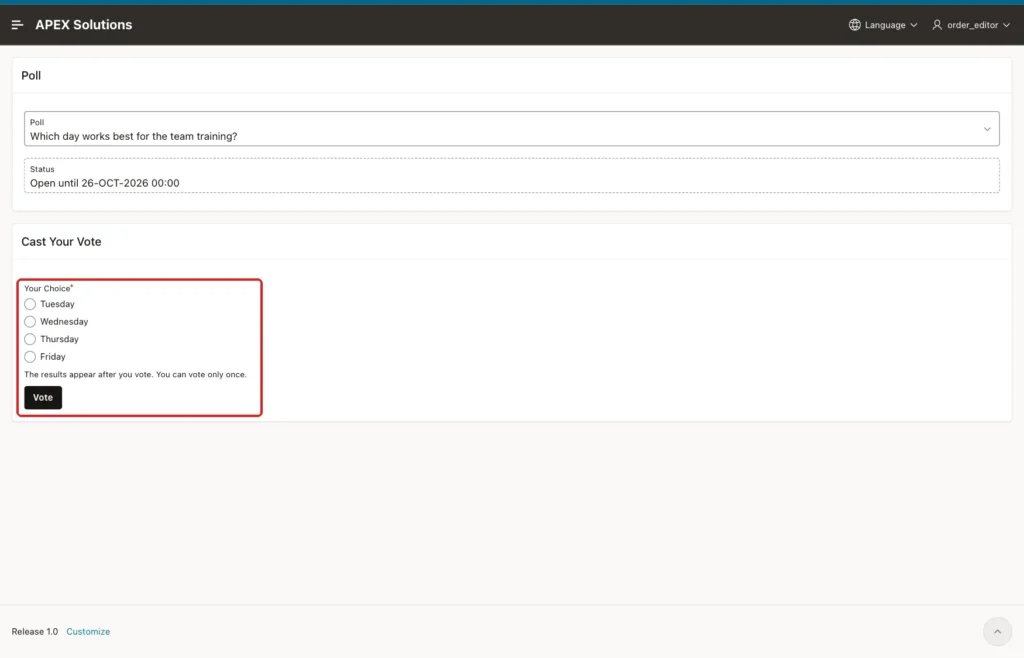
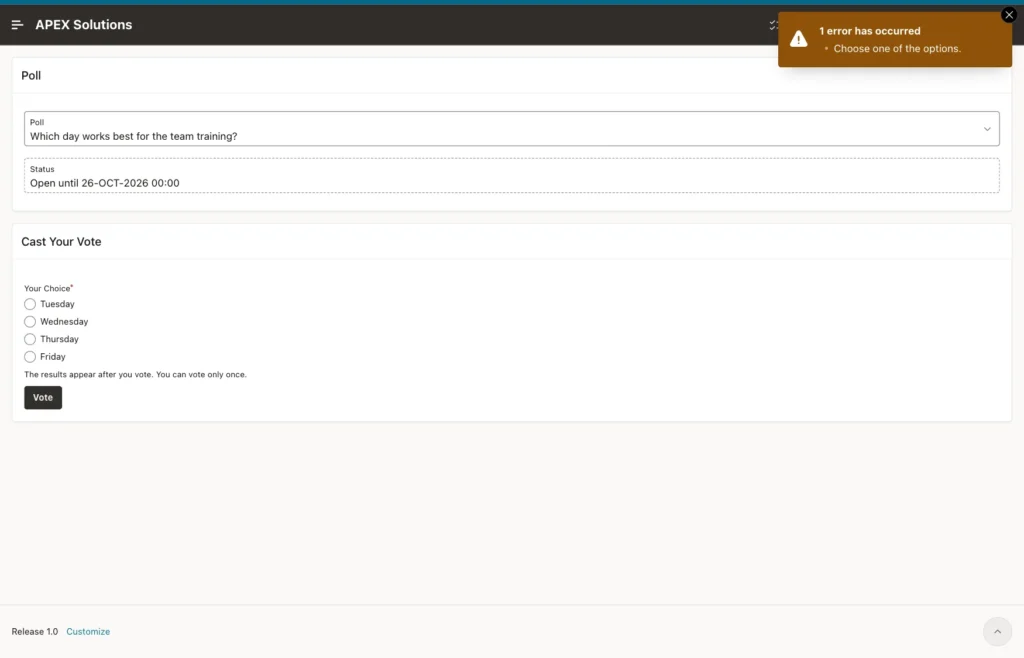
SALES_MANAGER voted for Tuesday first. Then sign in as ORDER_EDITOR and open the Poll page. The open poll is chosen by default. The page shows the options and the Vote button, but no results:
Clicking Vote without a choice shows the validation message:
An Option from Another Poll
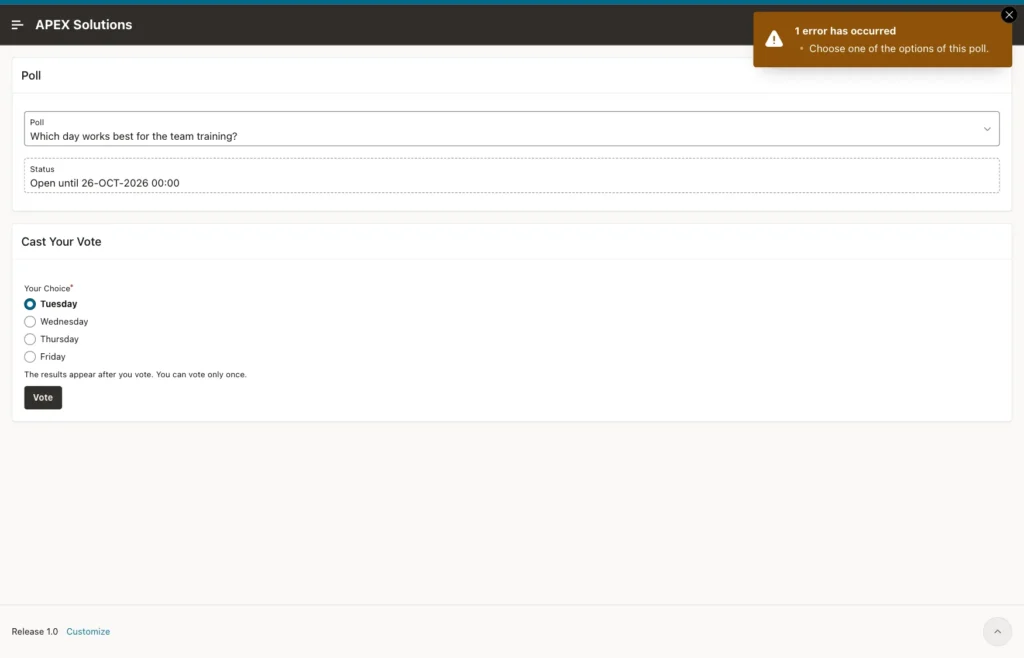
A user can change the value of a radio button in the browser. In the browser console, the value of the Tuesday button was changed to 5, the Dark mode option of poll 2, before clicking Vote.
APEX accepted the value, but the two-column foreign key rejected the insert. The error handling function showed this message:
ORDER_EDITOR then reloaded the page and voted for Wednesday.
Two Clicks at the Same Moment
SALES_USER opened the page in two tabs, picked Wednesday in one and Thursday in the other, and both tabs clicked Vote at the same moment. One tab showed Thank you. Your vote was saved. The other showed You have already voted in this poll. Each user can vote only once. Only one row was saved.
Vote and See the Results
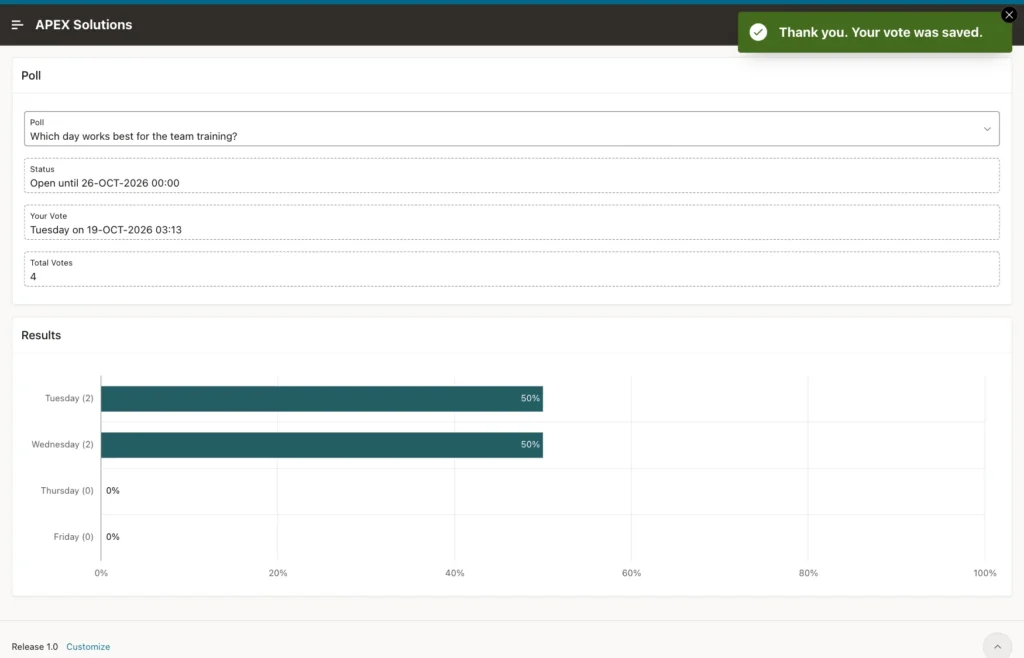
Sign in as DEMO_DEV, open the page in two tabs, pick Tuesday in the first tab and click Vote. The vote form is replaced by the results:
A Second Vote from Another Tab
The second tab still shows the vote form. Pick Friday there and click Vote. The unique key rejects the insert, and the page shows the friendly message:
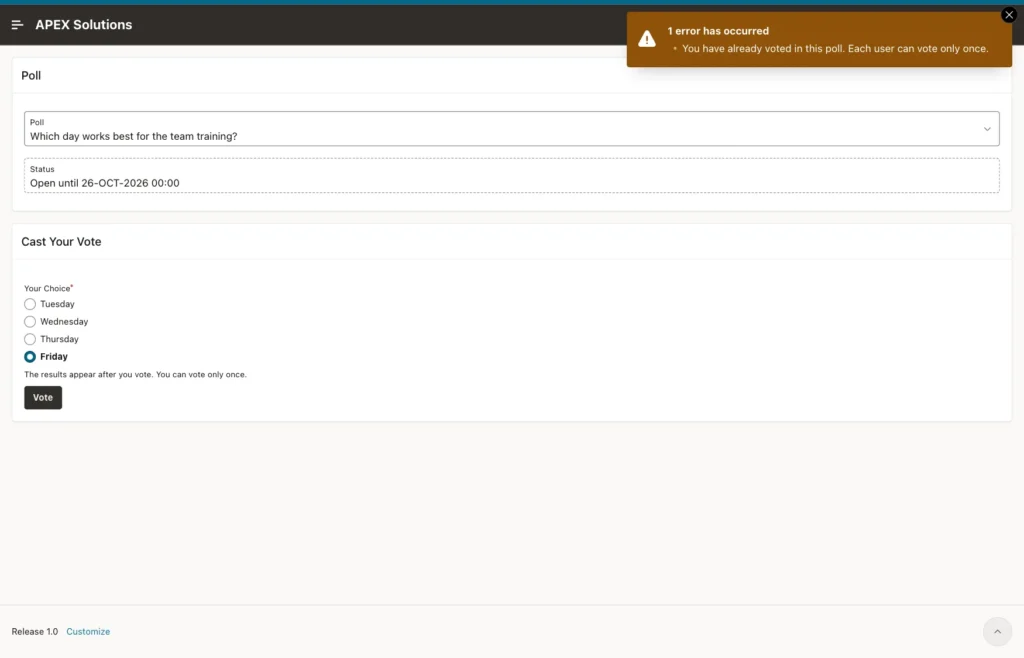
The tab keeps the form because APEX shows errors without reloading the page. After a reload, it shows the results.
For comparison, the same test was run once with the Error Handling Function Name removed from the page. APEX then showed the raw database error with the schema, table and column names:
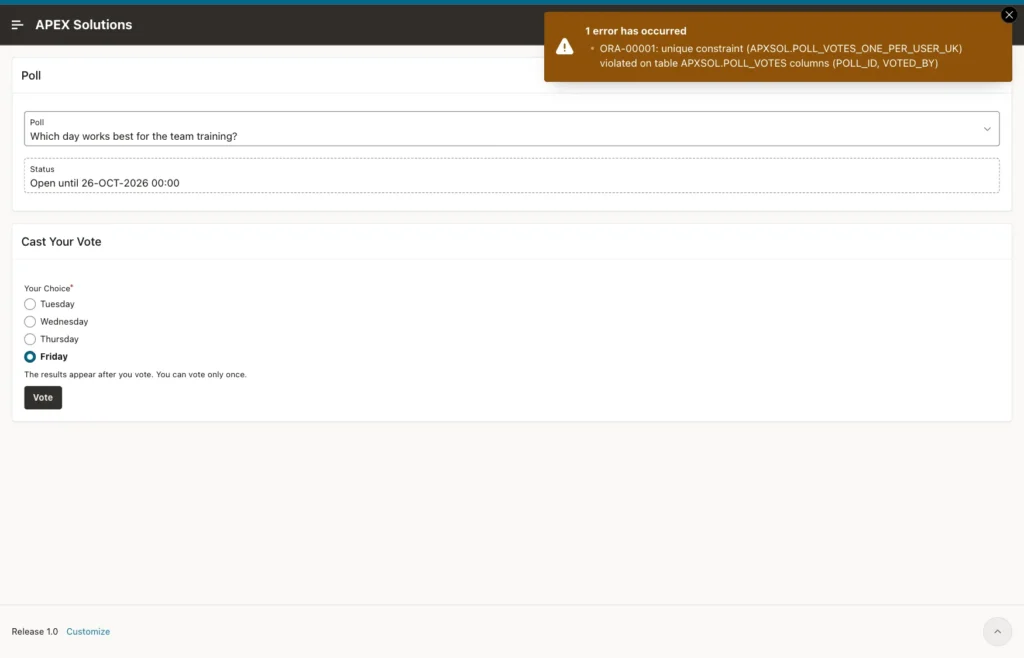
That test vote was deleted and the handler was put back before the other tests.
A Closed Poll
Sign in as SALES_USER and choose Which feature should we build next? (closed). The poll is closed, so the results show without a vote and the vote form is gone:
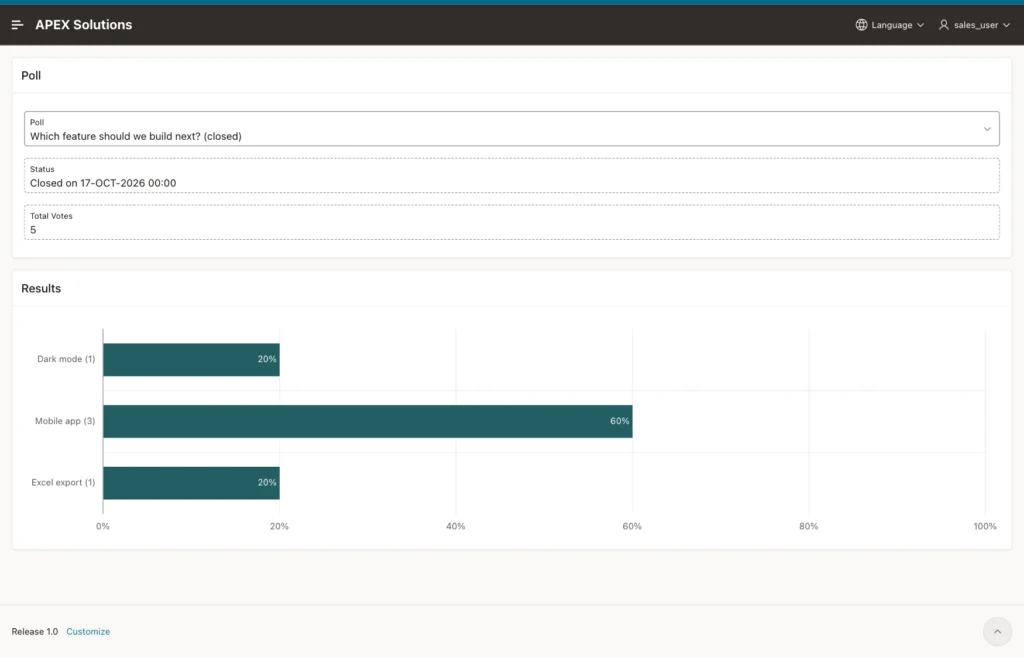
Forced Requests
Two forced requests were sent from the browser console with apex.submit. SALES_USER set the poll select list to the closed poll without reloading and submitted the request VOTE. The page answered This poll is not open for voting.
DEMO_DEV, who had already voted and had no vote form on the page, submitted the request VOTE. The page answered Choose one of the options. No row was saved in either case.
The Saved Votes
The view and the table agree with the chart:
Example:
column option_text format a14
select r.option_text, r.votes, r.pct
  from poll_results_v r
 where r.poll_id = 1
 order by r.display_seq;

column voted_by format a14
select v.voted_by, o.option_text
  from poll_votes v
  join poll_options o
    on o.option_id = v.option_id
 where v.poll_id = 1
 order by v.vote_id;
Output:
OPTION_TEXT       VOTES    PCT
______________ ________ ______
Tuesday               2     50
Wednesday             2     50
Thursday              0      0
Friday                0      0

VOTED_BY         OPTION_TEXT
________________ ______________
SALES_MANAGER    Tuesday
ORDER_EDITOR     Wednesday
SALES_USER       Wednesday
DEMO_DEV         Tuesday
Things to Know
- A count before the insert cannot stop two votes at the same moment. Only a unique key can; the SQL test showed the second session seeing 0 votes and then failing on the key.
- A page error handling function with APEX_ERROR.EXTRACT_CONSTRAINT_NAME turns constraint errors into plain messages without extra validations.
- A two-column foreign key (POLL_ID, OPTION_ID) keeps a vote inside its own poll. The parent needs a unique key on the same two columns.
- Value Required is skipped for items that are not rendered. Use a validation for rules that must hold on forced requests.
- A validation of Type Item is NOT NULL is tied to that item. If the item is not on the page, the error cannot be displayed; use an Expression.
- Redirect and Set Value on a select list failed with a session state protection violation after an error on the page. Submit Page did not.
- Hide the results with a server-side condition, not with CSS or JavaScript, so users who have not voted never receive the numbers.
- For a percent axis, pass a fraction from 0 to 1 and set the axis Format to Percent.
Related Guides
- How to Build a Survey Form from Question Tables in Oracle APEX
- How to Enforce Case-Insensitive Unique Names with a Friendly Message in Oracle APEX
Conclusion
A fair poll in Oracle APEX rests on the tables. A unique key allows one vote per user, a two-column foreign key keeps each vote inside its poll, and DEFAULT ON NULL fills in the user and the time. A page error handling function shows clear messages for these constraints.
On the page, server-side conditions hide the results until the user has voted or the poll has closed, and a horizontal bar chart shows the share of each option. Duplicate votes from two tabs, options from another poll, closed polls and forced requests were all tested, and none of them saved a wrong vote.
