
Duplicate records are a common data quality problem. The same company is entered twice under slightly different names, and its orders, notes and other history end up split over two rows. Reports then count one company as two, and users never see the full picture.
Merging fixes this. You pick the record to keep and the duplicate, the child rows of the duplicate move to the record you keep, and the duplicate is marked as merged in the same transaction. This guide builds such a merge page in Oracle APEX, with a side-by-side compare, safe checks and a merge history.
This guide uses customers with orders and notes as the example; the same steps work for any table whose rows are referenced by child tables. The post How to Warn About Possible Duplicate Records While Typing in Oracle APEX stops new duplicates while the user types. This one cleans up the duplicates that already exist.
Step 1: Create the Tables
The example needs four tables. CRM_CUSTOMERS holds the customers. CRM_ORDERS and CRM_NOTES are the child tables whose rows must move during a merge. CRM_MERGE_LOG records every merge: who merged which duplicate into which customer, and how many rows moved.
Create the tables, the indexes and the sample data:
Example:
set lines 200 pages 100 feedback on
create table crm_customers (
  customer_id    number generated by default on null as identity constraint crm_customers_pk primary key,
  customer_name  varchar2(100) not null,
  email          varchar2(255),
  phone          varchar2(30),
  city           varchar2(60),
  status         varchar2(10)  default on null 'ACTIVE' not null,
  merged_into_id number,
  created_on     date          default on null sysdate not null,
  constraint crm_customers_merged_fk foreign key (merged_into_id)
    references crm_customers (customer_id),
  constraint crm_customers_status_ck check (
    (status = 'ACTIVE' and merged_into_id is null) or
    (status = 'MERGED' and merged_into_id is not null and merged_into_id <> customer_id))
);

create index crm_customers_merged_ix on crm_customers (merged_into_id);

create table crm_orders (
  order_id    number generated by default on null as identity constraint crm_orders_pk primary key,
  order_no    varchar2(20)  not null,
  customer_id number        not null,
  order_date  date          default on null trunc(sysdate) not null,
  amount      number(12,2)  not null,
  constraint crm_orders_no_uk unique (order_no),
  constraint crm_orders_customer_fk foreign key (customer_id)
    references crm_customers (customer_id),
  constraint crm_orders_amount_ck check (amount >= 0)
);

create index crm_orders_customer_ix on crm_orders (customer_id);

create table crm_notes (
  note_id     number generated by default on null as identity constraint crm_notes_pk primary key,
  customer_id number         not null,
  note_text   varchar2(1000) not null,
  created_on  date           default on null sysdate not null,
  constraint crm_notes_customer_fk foreign key (customer_id)
    references crm_customers (customer_id)
);

create index crm_notes_customer_ix on crm_notes (customer_id);

create table crm_merge_log (
  merge_id     number generated by default on null as identity constraint crm_merge_log_pk primary key,
  survivor_id  number        not null,
  duplicate_id number        not null,
  orders_moved number        not null,
  notes_moved  number        not null,
  merged_by    varchar2(255) default on null coalesce(sys_context('APEX$SESSION', 'APP_USER'), user) not null,
  merged_on    date          default on null sysdate not null,
  constraint crm_merge_log_survivor_fk foreign key (survivor_id)
    references crm_customers (customer_id),
  constraint crm_merge_log_duplicate_fk foreign key (duplicate_id)
    references crm_customers (customer_id),
  constraint crm_merge_log_diff_ck check (survivor_id <> duplicate_id)
);

create index crm_merge_log_survivor_ix on crm_merge_log (survivor_id);
create index crm_merge_log_duplicate_ix on crm_merge_log (duplicate_id);

insert into crm_customers (customer_name, email, phone, city) values ('Northwind Traders', 'sales@northwind.example.com', null, 'London');
insert into crm_customers (customer_name, email, phone, city) values ('North Wind Traders Ltd', null, '+44 20 7946 0101', 'London');
insert into crm_customers (customer_name, email, phone, city) values ('Contoso Retail', 'info@contoso.example.com', '+44 113 496 0202', 'Leeds');
insert into crm_customers (customer_name, email, phone, city) values ('Contoso Retail Ltd', 'accounts@contoso.example.com', null, null);
insert into crm_customers (customer_name, email, phone, city) values ('Fabrikam Inc', 'hello@fabrikam.example.com', '+44 161 496 0303', 'Manchester');

insert into crm_orders (order_no, customer_id, order_date, amount) values ('SO-1001', 1, date '2026-09-02', 1250);
insert into crm_orders (order_no, customer_id, order_date, amount) values ('SO-1002', 1, date '2026-09-15',  480);
insert into crm_orders (order_no, customer_id, order_date, amount) values ('SO-1003', 2, date '2026-09-21',  760);
insert into crm_orders (order_no, customer_id, order_date, amount) values ('SO-1004', 2, date '2026-10-03',  310);
insert into crm_orders (order_no, customer_id, order_date, amount) values ('SO-1005', 3, date '2026-10-05', 2200);
insert into crm_orders (order_no, customer_id, order_date, amount) values ('SO-1006', 4, date '2026-10-08',  990);
insert into crm_orders (order_no, customer_id, order_date, amount) values ('SO-1007', 5, date '2026-10-09',  640);

insert into crm_notes (customer_id, note_text) values (1, 'Prefers delivery on Mondays.');
insert into crm_notes (customer_id, note_text) values (2, 'Asked for a quote for 50 desks.');
insert into crm_notes (customer_id, note_text) values (2, 'New buyer: Anna Weber.');
insert into crm_notes (customer_id, note_text) values (4, 'Invoices go to the accounts mailbox.');
commit;

select c.customer_id,
       c.customer_name,
       c.email,
       c.phone,
       c.city,
       c.status,
       (select count(*) from crm_orders o where o.customer_id = c.customer_id) as orders,
       (select count(*) from crm_notes n where n.customer_id = c.customer_id)  as notes
from   crm_customers c
order  by c.customer_id;
Output:
Table CRM_CUSTOMERS created.

Index CRM_CUSTOMERS_MERGED_IX created.

Table CRM_ORDERS created.

Index CRM_ORDERS_CUSTOMER_IX created.

Table CRM_NOTES created.

Index CRM_NOTES_CUSTOMER_IX created.

Table CRM_MERGE_LOG created.

Index CRM_MERGE_LOG_SURVIVOR_IX created.

Index CRM_MERGE_LOG_DUPLICATE_IX created.

1 row inserted.

1 row inserted.

1 row inserted.

1 row inserted.

1 row inserted.

1 row inserted.

1 row inserted.

1 row inserted.

1 row inserted.

1 row inserted.

1 row inserted.

1 row inserted.

1 row inserted.

1 row inserted.

1 row inserted.

1 row inserted.

Commit complete.

   CUSTOMER_ID CUSTOMER_NAME             EMAIL                           PHONE               CITY          STATUS       ORDERS    NOTES
______________ _________________________ _______________________________ ___________________ _____________ _________ _________ ________
             1 Northwind Traders         sales@northwind.example.com                         London        ACTIVE            2        1
             2 North Wind Traders Ltd                                    +44 20 7946 0101    London        ACTIVE            2        2
             3 Contoso Retail            info@contoso.example.com        +44 113 496 0202    Leeds         ACTIVE            1        0
             4 Contoso Retail Ltd        accounts@contoso.example.com                                      ACTIVE            1        1
             5 Fabrikam Inc              hello@fabrikam.example.com      +44 161 496 0303    Manchester    ACTIVE            1        0

5 rows selected.- A merged customer is not deleted. STATUS changes to MERGED, and MERGED_INTO_ID points to the customer that was kept. Old links and the merge log still find the row.
- CRM_CUSTOMERS_STATUS_CK keeps STATUS and MERGED_INTO_ID in step: an active customer has no MERGED_INTO_ID, and a merged one must have one that is not its own ID.
- CRM_CUSTOMERS_MERGED_FK makes sure MERGED_INTO_ID points to a real customer.
- CRM_ORDERS_CUSTOMER_FK and CRM_NOTES_CUSTOMER_FK link the child rows to a customer. Each foreign key has an index, which the merge UPDATE statements use.
- CRM_MERGE_LOG_DIFF_CK refuses a log row where the kept customer and the duplicate are the same.
STATUS, CREATED_ON, MERGED_BY and MERGED_ON use DEFAULT ON NULL, so no trigger is needed. MERGED_BY takes the APEX user from the APEX$SESSION context, and the database user when the merge runs outside APEX.
The sample data has two pairs of duplicates. Customers 1 and 2 are both Northwind Traders, and customers 3 and 4 are both Contoso Retail. Each copy has its own orders and notes.
Step 2: Create the Merge Procedure
A merge changes several tables, so it belongs in one PL/SQL procedure. The APEX page only calls it. Other programs, or a DBA in SQL, can call the same procedure and get the same checks.
Example:
create or replace procedure crm_merge_customers (
  p_survivor_id  in crm_customers.customer_id%type,
  p_duplicate_id in crm_customers.customer_id%type
) as
  l_active   pls_integer := 0;
  l_orders   pls_integer;
  l_notes    pls_integer;
  l_dup      crm_customers%rowtype;
begin
  if p_survivor_id is null or p_duplicate_id is null or p_survivor_id = p_duplicate_id then
    raise_application_error(-20001, 'Pick two different customers.');
  end if;

  for c in (select *
            from   crm_customers
            where  customer_id in (p_survivor_id, p_duplicate_id)
            order  by customer_id
            for update)
  loop
    if c.status = 'ACTIVE' then
      l_active := l_active + 1;
    end if;
    if c.customer_id = p_duplicate_id then
      l_dup := c;
    end if;
  end loop;

  if l_active <> 2 then
    raise_application_error(-20002, 'Both customers must exist and still be active.');
  end if;

  update crm_orders set customer_id = p_survivor_id where customer_id = p_duplicate_id;
  l_orders := sql%rowcount;

  update crm_notes set customer_id = p_survivor_id where customer_id = p_duplicate_id;
  l_notes := sql%rowcount;

  update crm_customers
  set    email = nvl(email, l_dup.email),
         phone = nvl(phone, l_dup.phone),
         city  = nvl(city,  l_dup.city)
  where  customer_id = p_survivor_id;

  update crm_customers
  set    status         = 'MERGED',
         merged_into_id = p_survivor_id
  where  customer_id = p_duplicate_id;

  insert into crm_merge_log (survivor_id, duplicate_id, orders_moved, notes_moved)
  values (p_survivor_id, p_duplicate_id, l_orders, l_notes);
end crm_merge_customers;
/

show errors
Output:
Procedure CRM_MERGE_CUSTOMERS compiled

No errors.
The procedure works in this order:
- It refuses a missing ID or the same ID twice with ORA-20001.
- It locks both customer rows with SELECT ... FOR UPDATE, in customer ID order, and counts how many are still active. If it is not two, it stops with ORA-20002.
- It moves the orders and the notes of the duplicate to the customer you keep, and keeps the row counts from SQL%ROWCOUNT.
- It fills empty email, phone and city values of the kept customer from the duplicate. Values that are already filled stay as they are.
- It marks the duplicate as MERGED and writes a row to CRM_MERGE_LOG.
The procedure does not commit. APEX commits at the end of the page request, so all the updates are saved together or not at all.
Moving child rows cannot be declared with a constraint or a default, so this is a case where code is needed. The constraints from Step 1 still protect the data if the code has a bug.
Step 3: Test the Merge in SQL
Merge Contoso Retail Ltd (4) into Contoso Retail (3) and check the result:
Example:
set lines 200 pages 100 feedback on
exec crm_merge_customers(p_survivor_id => 3, p_duplicate_id => 4)
commit;

select customer_id, customer_name, email, phone, city, status, merged_into_id
from   crm_customers
where  customer_id in (3, 4)
order  by customer_id;

select order_no, customer_id from crm_orders where order_no in ('SO-1005', 'SO-1006') order by order_no;

select note_text, customer_id from crm_notes where customer_id in (3, 4);

select survivor_id, duplicate_id, orders_moved, notes_moved, merged_by from crm_merge_log;
Output:
PL/SQL procedure successfully completed.

Commit complete.

   CUSTOMER_ID CUSTOMER_NAME         EMAIL                           PHONE               CITY     STATUS       MERGED_INTO_ID
______________ _____________________ _______________________________ ___________________ ________ _________ _________________
             3 Contoso Retail        info@contoso.example.com        +44 113 496 0202    Leeds    ACTIVE
             4 Contoso Retail Ltd    accounts@contoso.example.com                                 MERGED                    3

2 rows selected.

ORDER_NO       CUSTOMER_ID
___________ ______________
SO-1005                  3
SO-1006                  3

2 rows selected.

NOTE_TEXT                                  CUSTOMER_ID
_______________________________________ ______________
Invoices go to the accounts mailbox.                 3

1 row selected.

   SURVIVOR_ID    DUPLICATE_ID    ORDERS_MOVED    NOTES_MOVED MERGED_BY
______________ _______________ _______________ ______________ ____________
             3               4               1              1 APXSOL

1 row selected.
The order SO-1006 and the note of customer 4 now belong to customer 3. Customer 4 is MERGED and points to 3. Customer 3 already had an email, so it kept its own email; the accounts mailbox of the duplicate was not copied.
Now try two wrong calls: the same customer twice, and the duplicate that was just merged:
Example:
set lines 200 pages 100 feedback on
exec crm_merge_customers(p_survivor_id => 5, p_duplicate_id => 5)
exec crm_merge_customers(p_survivor_id => 5, p_duplicate_id => 4)
Output:
BEGIN crm_merge_customers(p_survivor_id => 5, p_duplicate_id => 5); END;
*
ERROR at line 1:
ORA-20001: Pick two different customers.
ORA-06512: at "APXSOL.CRM_MERGE_CUSTOMERS", line 11
ORA-06512: at line 1
Help: https://docs.oracle.com/error-help/db/ora-20001/

BEGIN crm_merge_customers(p_survivor_id => 5, p_duplicate_id => 4); END;
*
ERROR at line 1:
ORA-20002: Both customers must exist and still be active.
ORA-06512: at "APXSOL.CRM_MERGE_CUSTOMERS", line 29
ORA-06512: at line 1
Help: https://docs.oracle.com/error-help/db/ora-20002/
Both calls are refused before anything is changed.
Step 4: Create the Merge Page
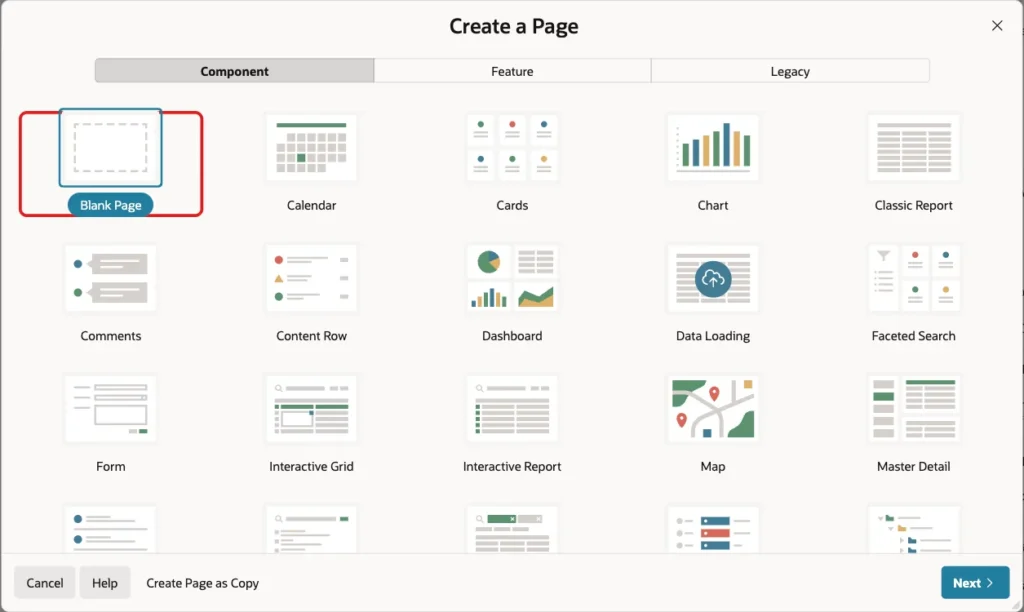
In App Builder, open the application, click Create Page and select Blank Page:
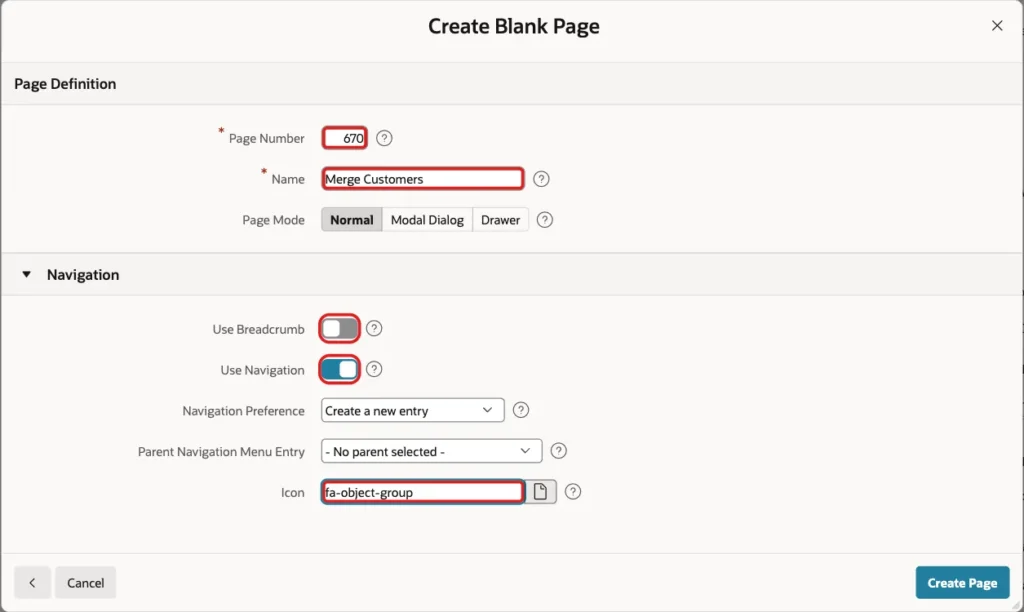
Enter page number 670 and the name Merge Customers. Turn Use Breadcrumb off, keep Use Navigation on and enter the icon fa-object-group. Click Create Page:
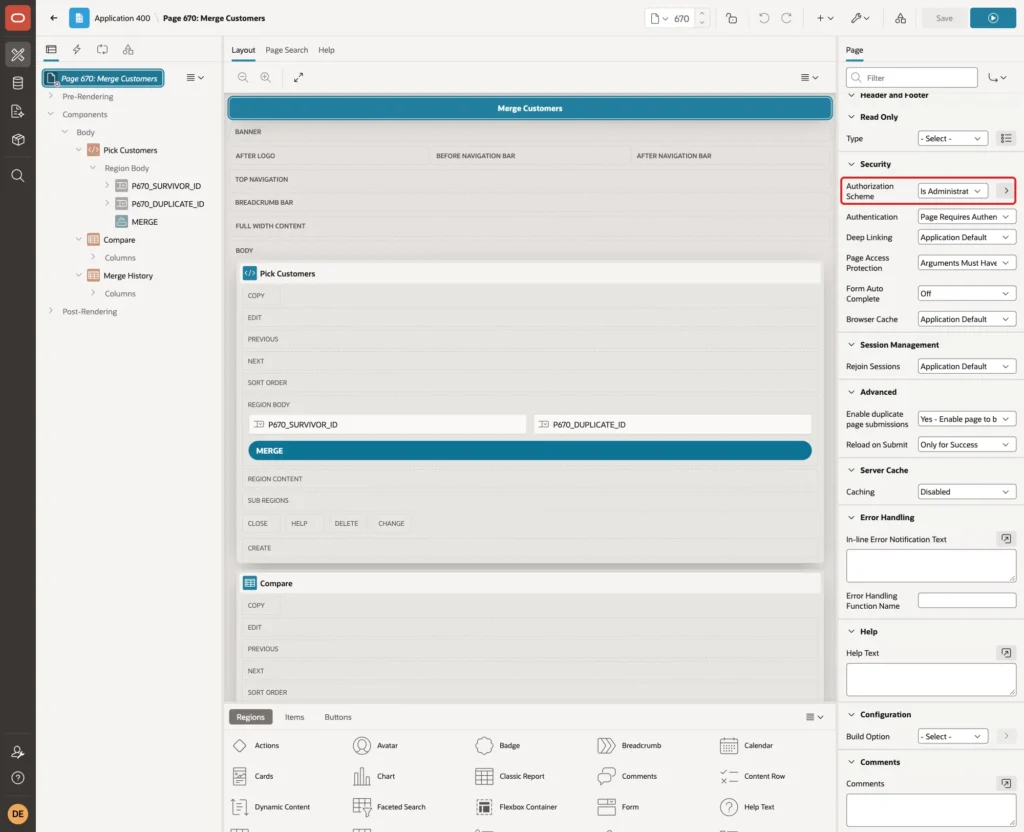
A merge cannot be undone from the page, so only administrators should open it. Select the page in Page Designer and set Security, Authorization Scheme to Is Administrator. Use the authorization scheme of your own application here:
Step 5: Add the Pick Customers Region and Items
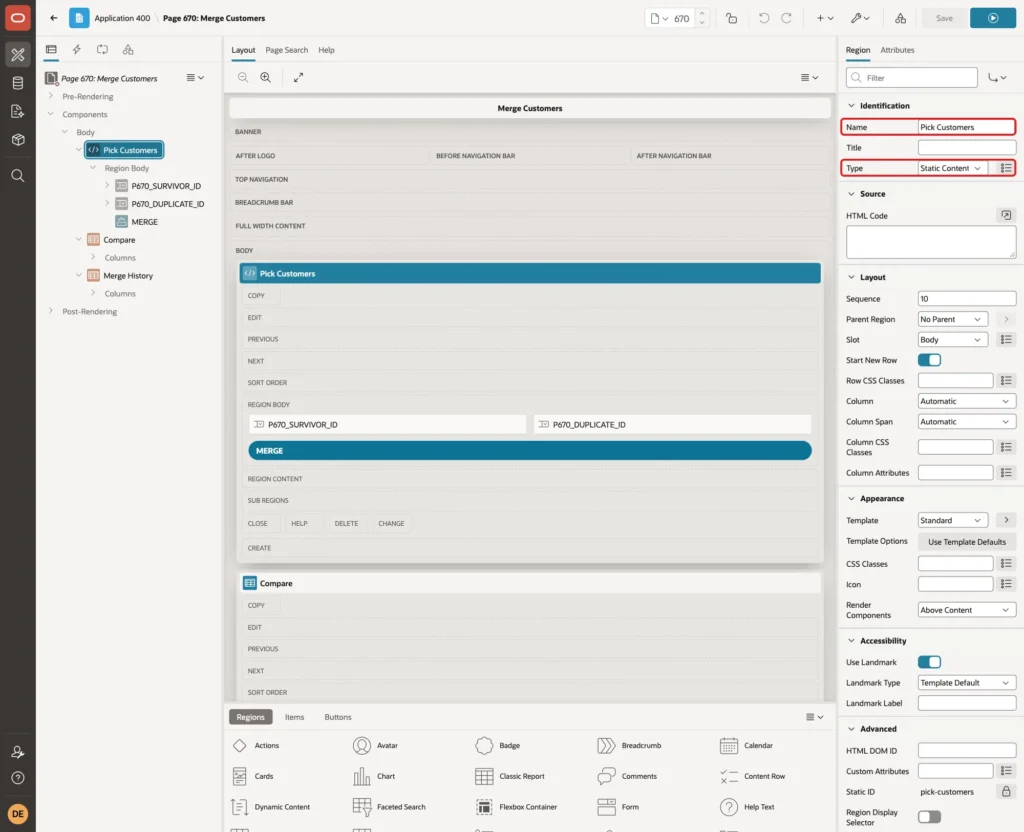
Right-click Body, select Create Region and set Name to Pick Customers. Keep Type Static Content:
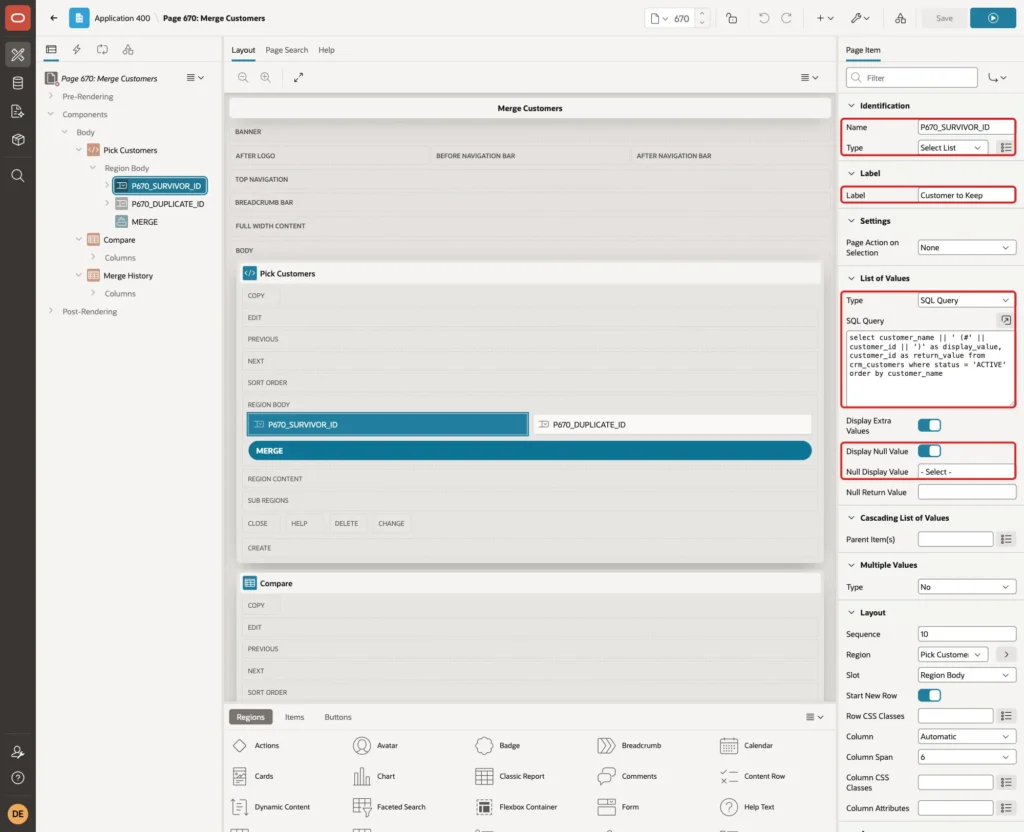
Right-click the Pick Customers region and select Create Page Item. Set these properties:
- Name: P670_SURVIVOR_ID
- Type: Select List
- Label: Customer to Keep
- List of Values, Type: SQL Query
- Display Null Value: on, with Null Display Value - Select -
Enter this SQL Query for the list of values:
Example:
select customer_name || ' (#' || customer_id || ')' as display_value,
       customer_id as return_value
from   crm_customers
where  status = 'ACTIVE'
order  by customer_name
Only active customers are listed. The customer ID is added to the name, because duplicates often have nearly the same name.
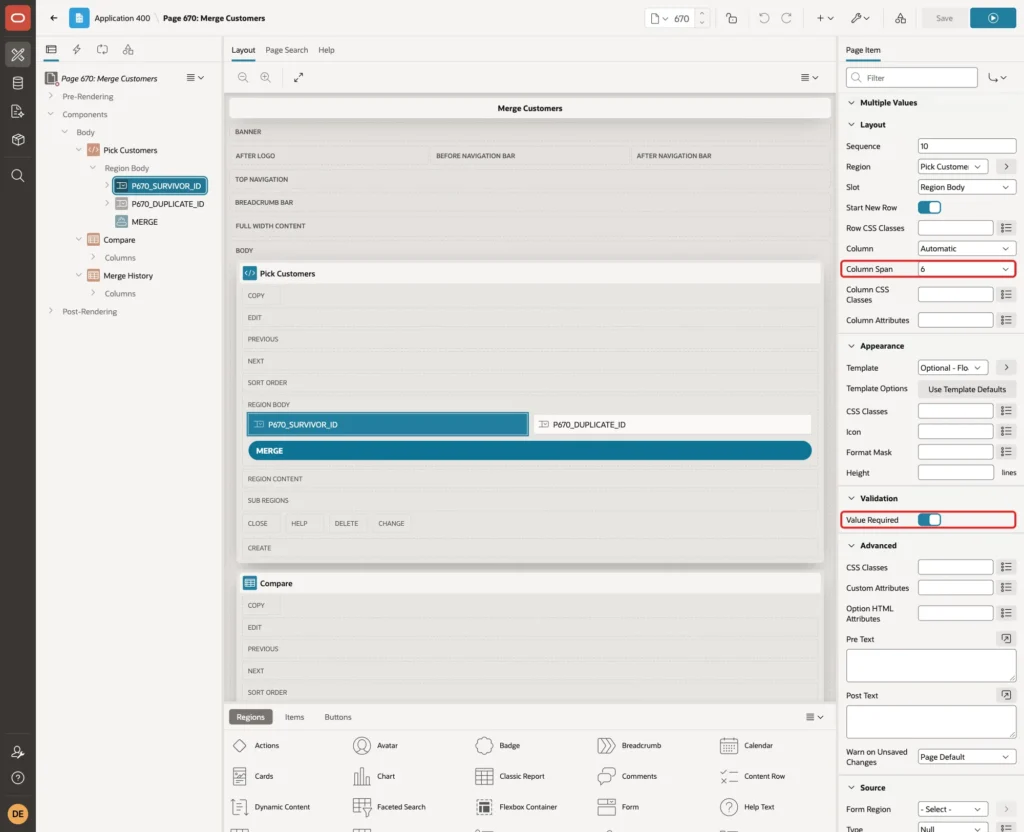
Under Layout, set Column Span to 6. Under Validation, turn Value Required on:
Create a second page item in the same region:
- Name: P670_DUPLICATE_ID
- Type: Select List
- Label: Duplicate to Merge
- List of Values, Type: SQL Query
- Display Null Value: on, with Null Display Value - Select -
- Cascading List of Values, Parent Item(s): P670_SURVIVOR_ID
Its query leaves out the customer picked in the first list:
Example:
select customer_name || ' (#' || customer_id || ')' as display_value,
       customer_id as return_value
from   crm_customers
where  status = 'ACTIVE'
and    customer_id <> :P670_SURVIVOR_ID
order  by customer_name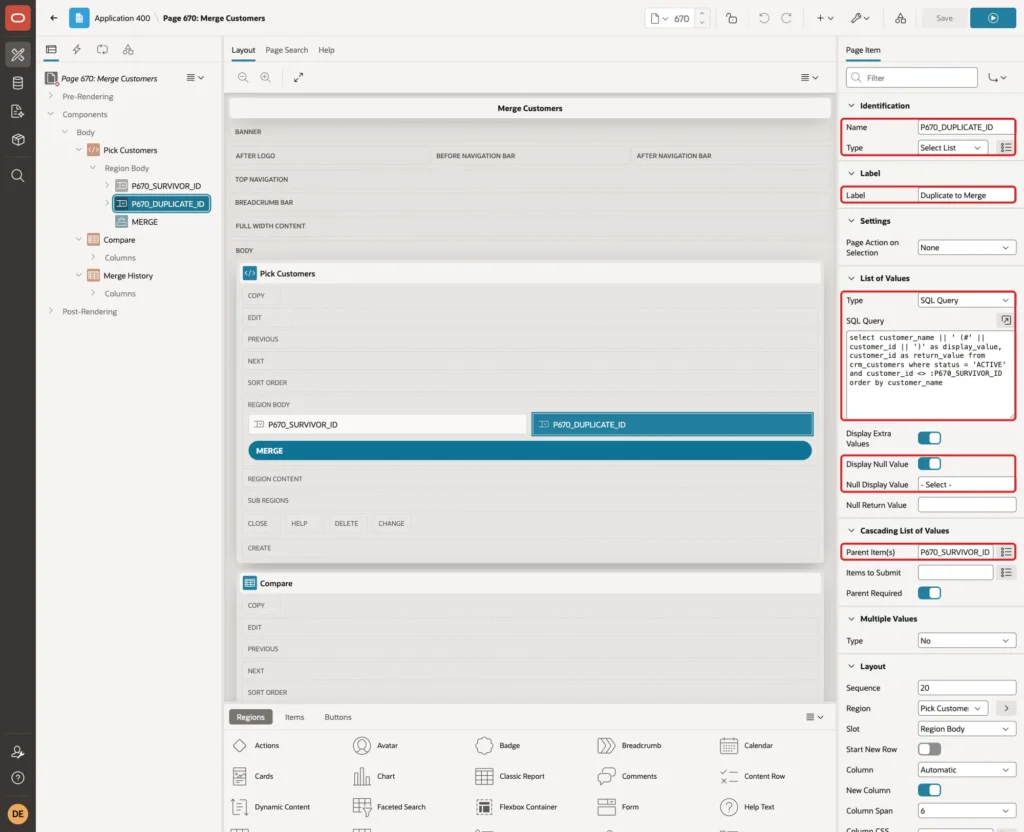
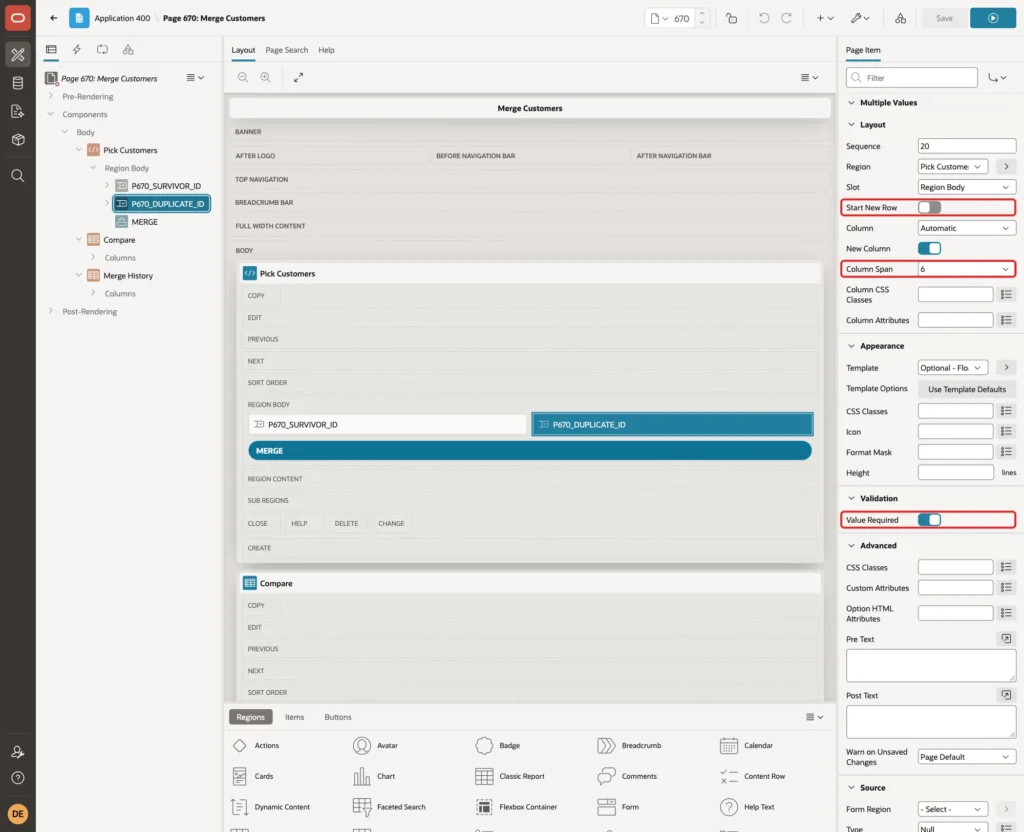
Because of the parent item, the list stays empty until a customer to keep is picked, and it reloads each time that choice changes. Under Layout, turn Start New Row off and set Column Span to 6. Turn Value Required on:
Step 6: Add the Merge Button
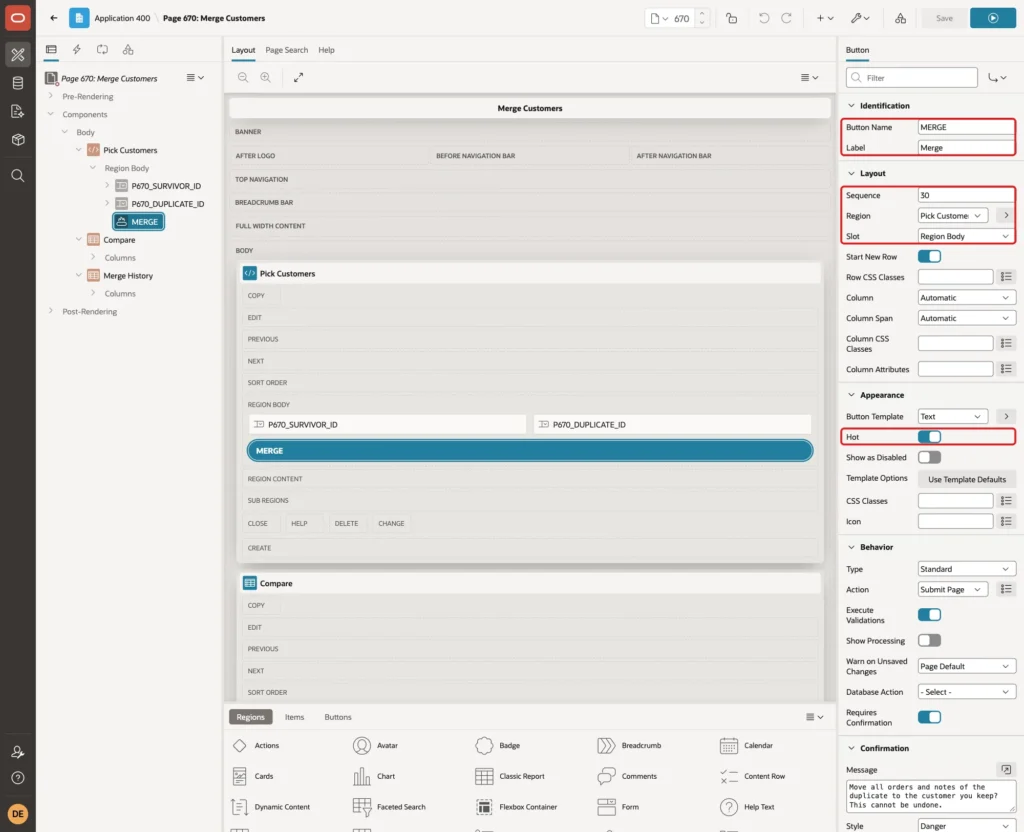
Right-click the Pick Customers region and select Create Button. Set Button Name to MERGE, Label to Merge, Sequence to 30 (after the two items), Slot to Region Body and turn Hot on:
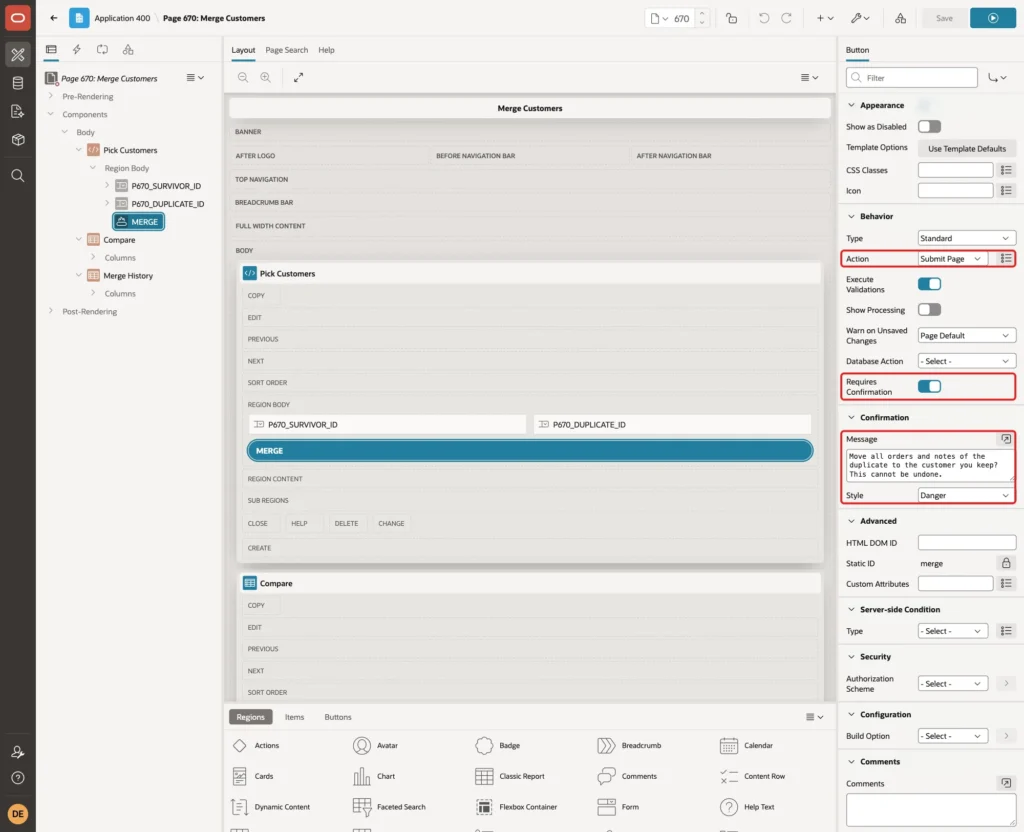
Keep Action Submit Page. Turn Requires Confirmation on, enter the message "Move all orders and notes of the duplicate to the customer you keep? This cannot be undone." and set Style to Danger:
Step 7: Add the Side-by-Side Compare
Before a user merges two records, they should see both side by side. Right-click Body, select Create Region, set Name to Compare and Type to Classic Report. Enter this SQL Query and set Page Items to Submit to P670_SURVIVOR_ID,P670_DUPLICATE_ID:
Example:
with c as (
  select c.customer_id, c.customer_name, c.email, c.phone, c.city,
         (select count(*) from crm_orders o where o.customer_id = c.customer_id) as orders,
         (select count(*) from crm_notes n where n.customer_id = c.customer_id)  as notes
  from   crm_customers c
  where  c.customer_id in (:P670_SURVIVOR_ID, :P670_DUPLICATE_ID)
)
select f.field_name,
       f.keep_value,
       f.duplicate_value,
       f.after_merge
from   c s
join   c d on d.customer_id = :P670_DUPLICATE_ID
cross  apply (
         select 1 as seq, 'Name' as field_name, s.customer_name as keep_value,
                d.customer_name as duplicate_value, s.customer_name as after_merge from dual
         union all
         select 2, 'Email', s.email, d.email, nvl(s.email, d.email) from dual
         union all
         select 3, 'Phone', s.phone, d.phone, nvl(s.phone, d.phone) from dual
         union all
         select 4, 'City', s.city, d.city, nvl(s.city, d.city) from dual
         union all
         select 5, 'Orders', to_char(s.orders), to_char(d.orders), to_char(s.orders + d.orders) from dual
         union all
         select 6, 'Notes', to_char(s.notes), to_char(d.notes), to_char(s.notes + d.notes) from dual
       ) f
where  s.customer_id = :P670_SURVIVOR_ID
order  by f.seq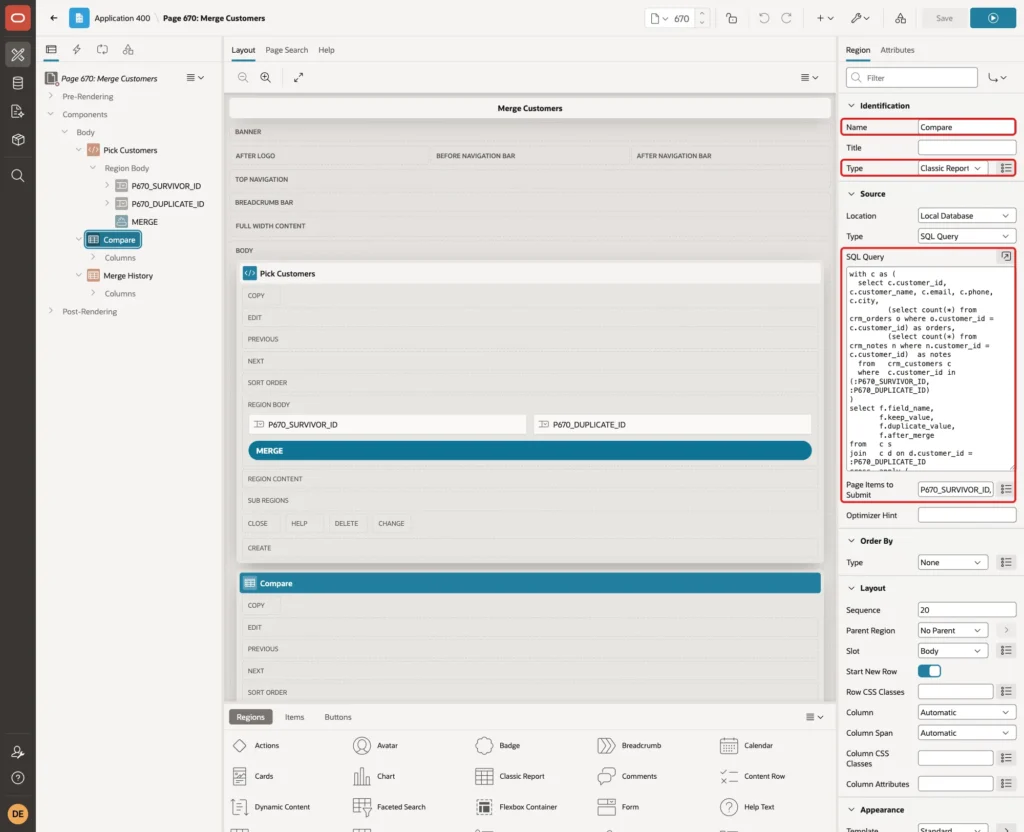
The WITH clause reads the two customers and counts their orders and notes. CROSS APPLY turns each customer into six rows, one per field. The After Merge column uses NVL in the same way as the procedure, so the user sees the result before clicking Merge.
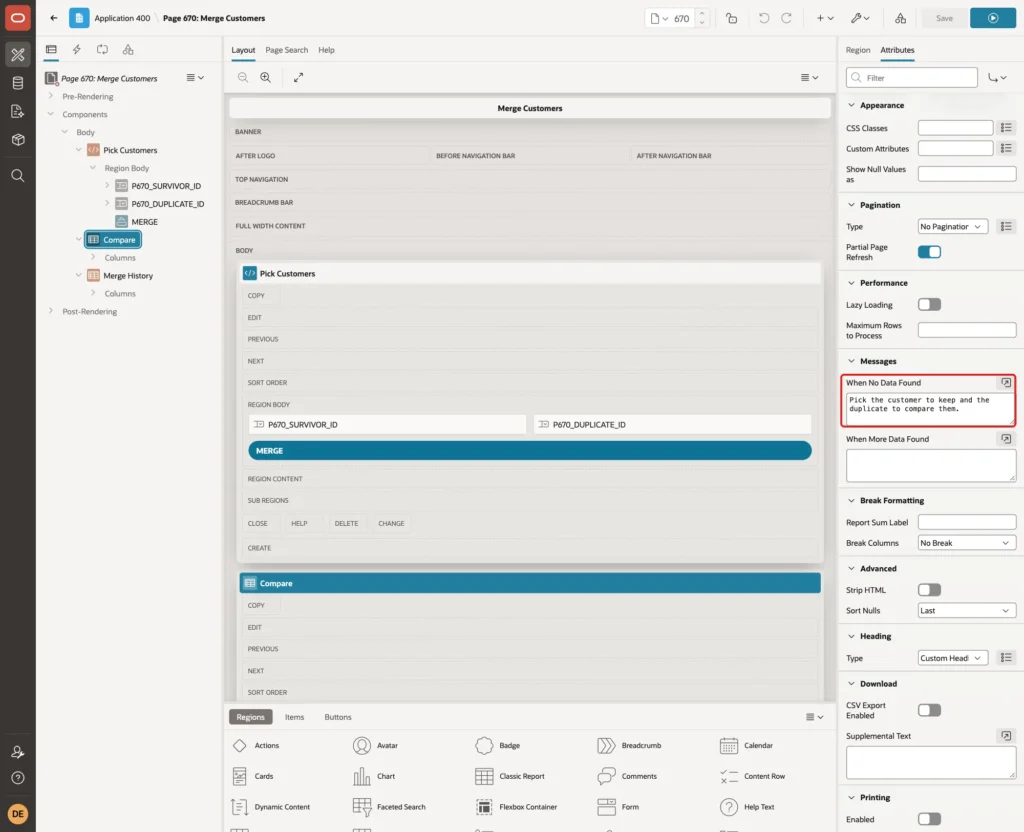
When no customers are picked, the query returns no rows. On the Attributes tab, set When No Data Found to "Pick the customer to keep and the duplicate to compare them.":
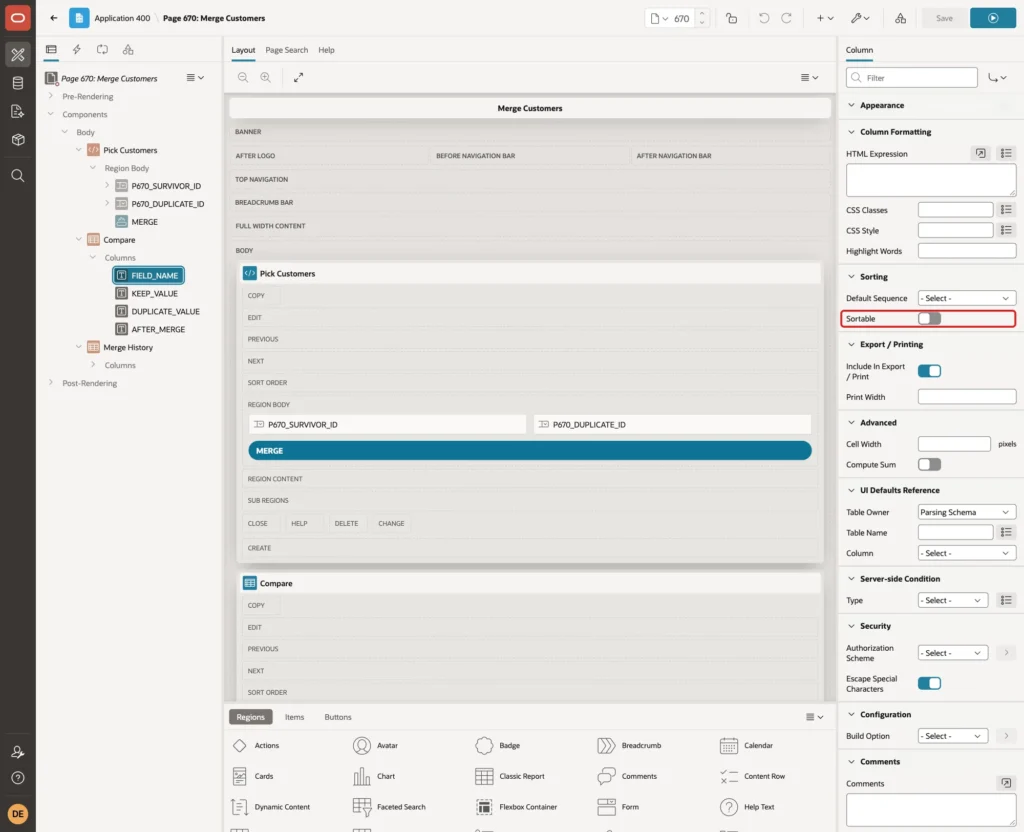
In a first test, the rows came out in the order City, Email, Name, Notes, Orders, Phone. The column headings of a classic report are sortable by default, and the report was sorted by the first column instead of the ORDER BY of the query.
Open Columns, select FIELD_NAME and turn Sorting, Sortable off. Do the same for the other three columns:
Set the column headings to Field, Customer to Keep, Duplicate and After Merge.
Step 8: Refresh the Compare When a Customer Changes
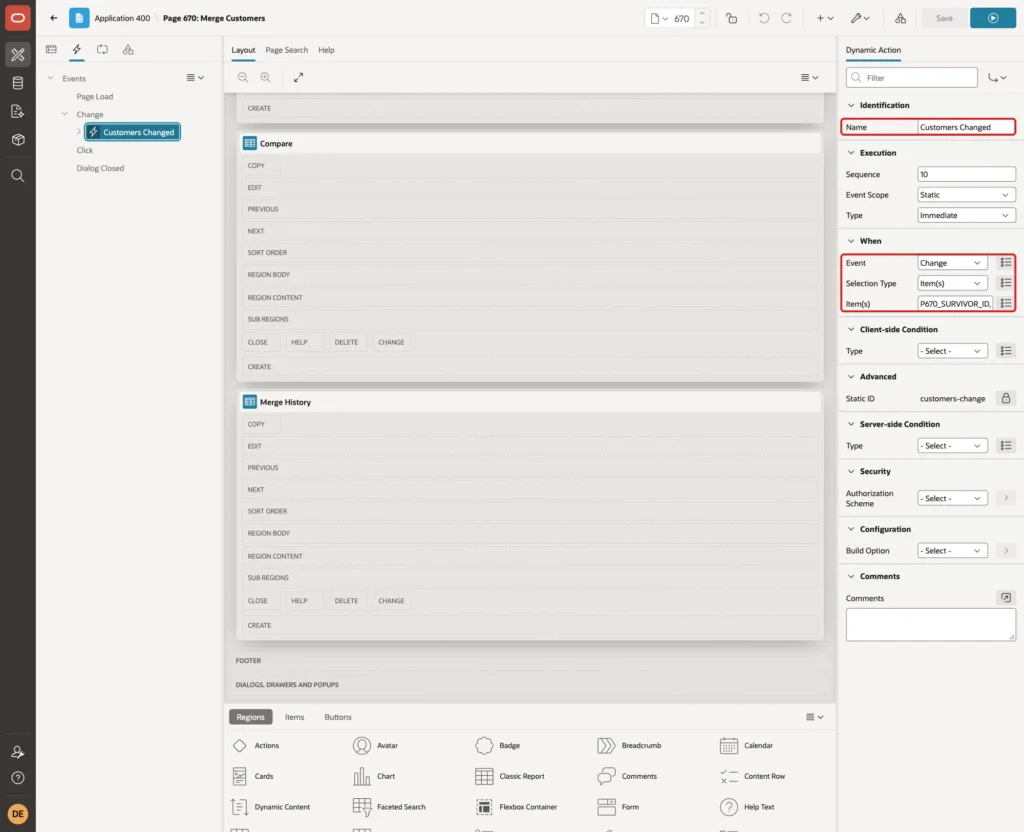
Open the Dynamic Actions tab, right-click Events and select Create Dynamic Action. Set Name to Customers Changed, Event to Change, Selection Type to Item(s) and Item(s) to P670_SURVIVOR_ID,P670_DUPLICATE_ID:
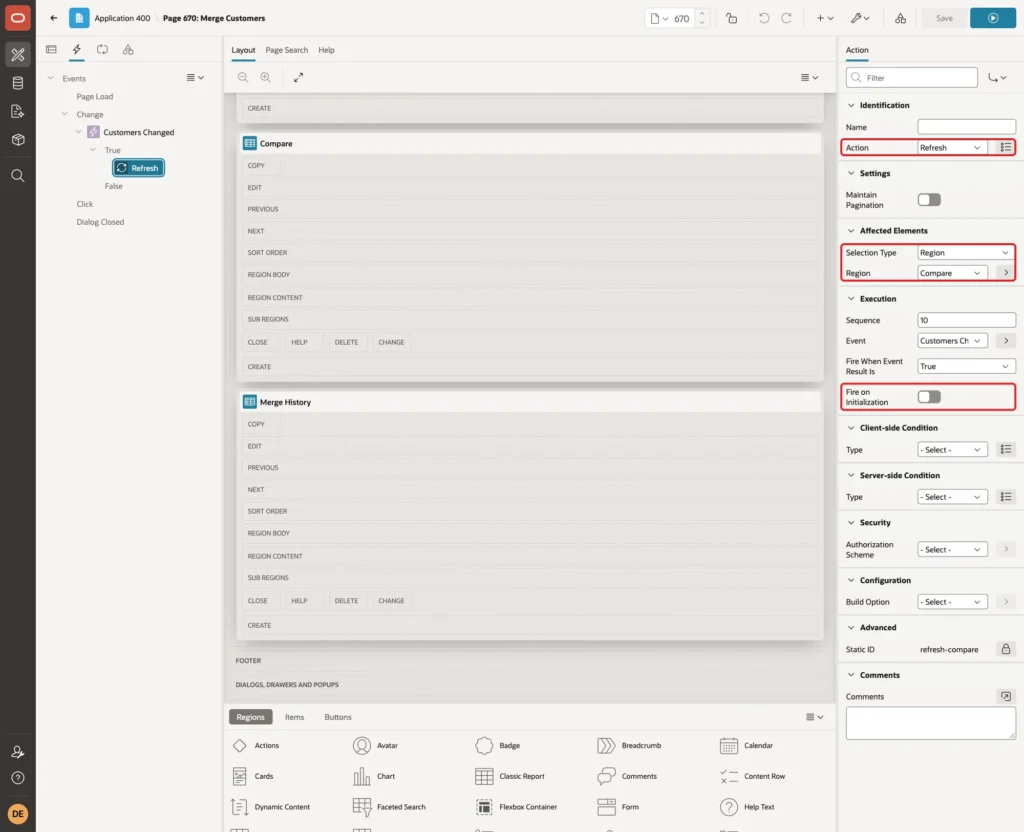
Select the True action. Set Action to Refresh, Selection Type to Region and Region to Compare. Turn Fire on Initialization off:
Step 9: Add the Merge History Report
Create one more region below Compare. Set Name to Merge History, Type to Classic Report and enter this SQL Query:
Example:
select l.merged_on,
       s.customer_name as kept_customer,
       d.customer_name as merged_duplicate,
       l.orders_moved,
       l.notes_moved,
       l.merged_by
from   crm_merge_log l
join   crm_customers s on s.customer_id = l.survivor_id
join   crm_customers d on d.customer_id = l.duplicate_id
order  by l.merge_id desc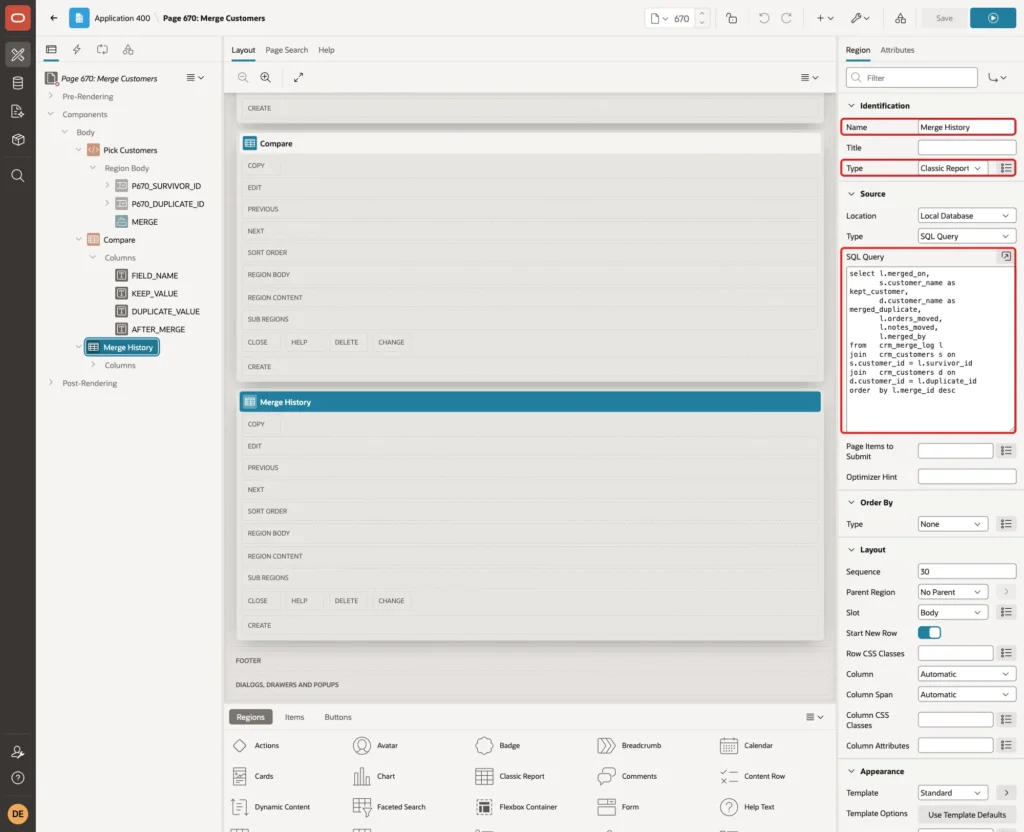
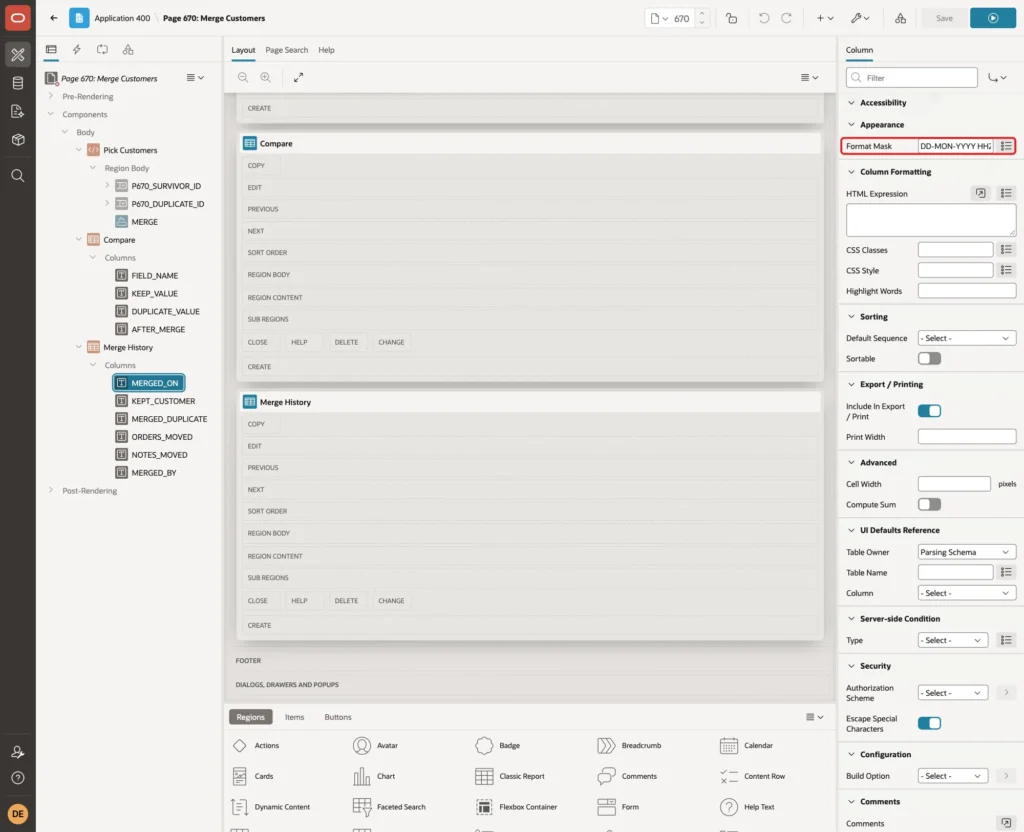
Select the column MERGED_ON and set Appearance, Format Mask to DD-MON-YYYY HH24:MI. Turn Sortable off for the columns here too, so the newest merge stays on top. Set the heading of each column; numbers are aligned right:
Step 10: Add the Validations
Open the Processing tab, right-click Validations and select Create Validation. Set Name to Different Customers, Type to Expression, Language PL/SQL and PL/SQL Expression to:
Example:
:P670_SURVIVOR_ID <> :P670_DUPLICATE_ID
Set Error Message to "Pick two different customers." and Associated Item to P670_DUPLICATE_ID:
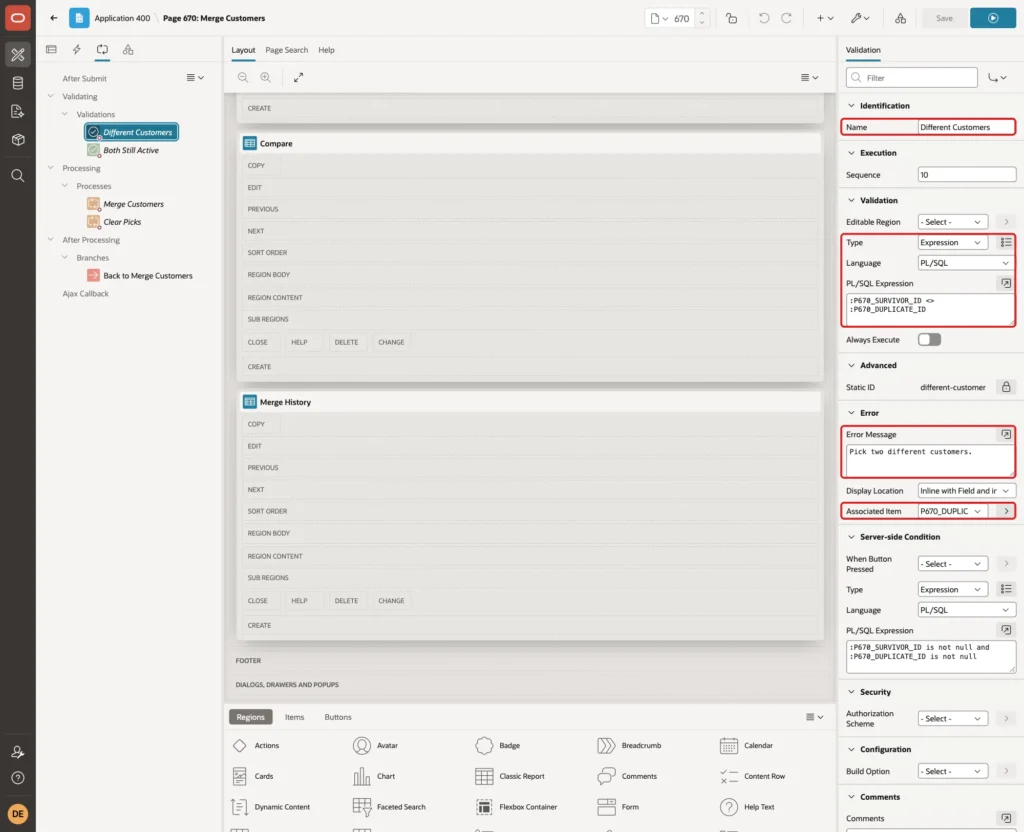
The cascading list already hides the first customer, but a browser request can be changed. This validation makes the server check it too.
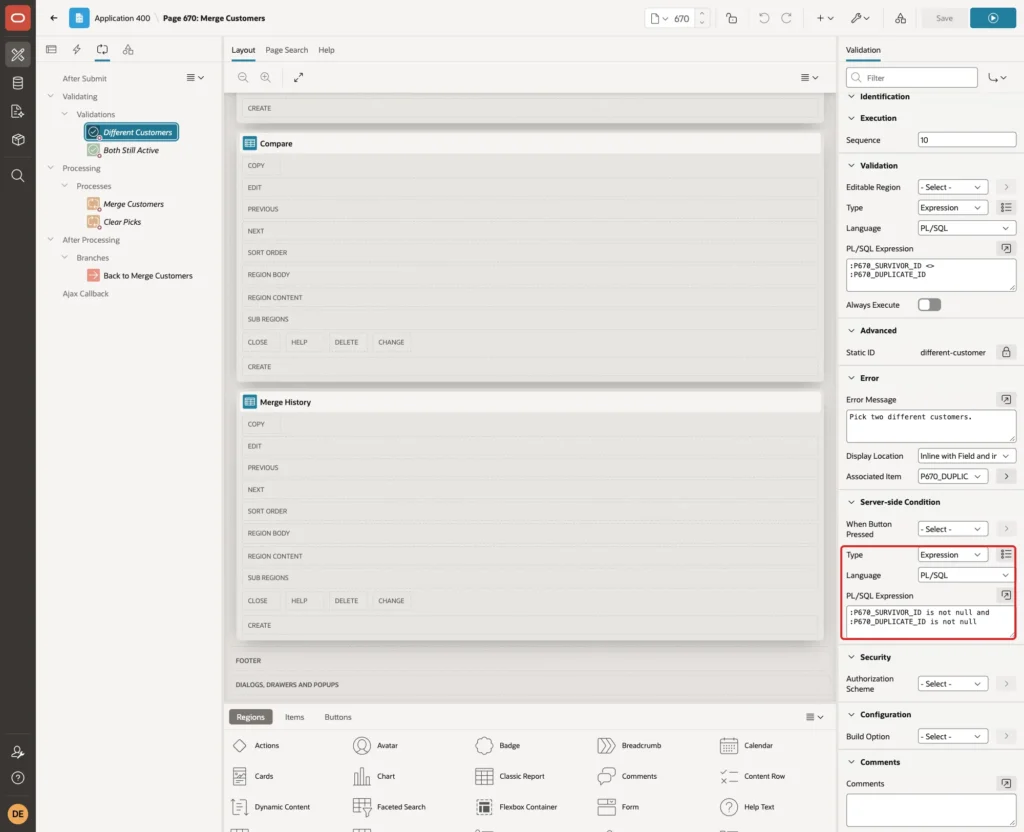
If an item is empty, the expression is NULL and the validation would fail with a second message next to "must have some value". Set Server-side Condition, Type to Expression and PL/SQL Expression to:
Example:
:P670_SURVIVOR_ID is not null and :P670_DUPLICATE_ID is not null
Create a second validation. Set Name to Both Still Active, Type to Rows returned and enter this SQL Query:
Example:
select null
from   crm_customers s
join   crm_customers d on d.customer_id = :P670_DUPLICATE_ID
where  s.customer_id = :P670_SURVIVOR_ID
and    s.status = 'ACTIVE'
and    d.status = 'ACTIVE'
Set Error Message to "Both customers must still be active. Reload the page and pick again." Give it the same Server-side Condition as the first validation:
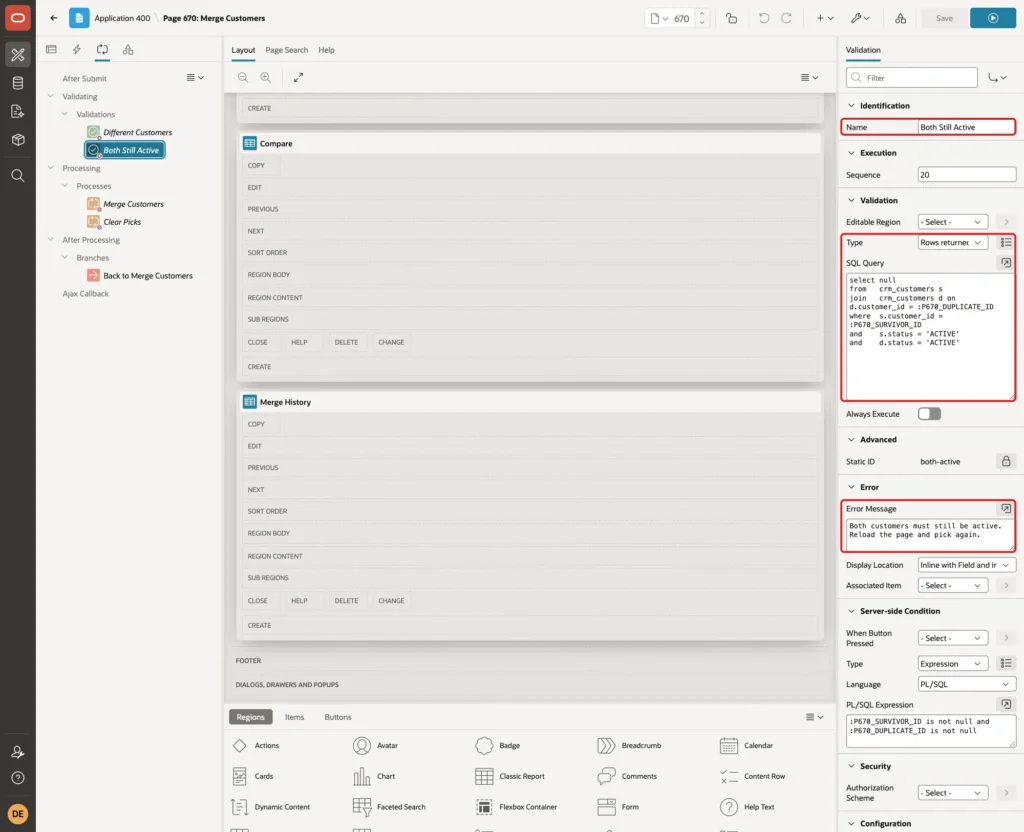
This catches a page that was open while another administrator merged one of the two customers.
Step 11: Add the Processes and the Branch
Right-click Processing and select Create Process. Set Name to Merge Customers, Type to Execute Code and enter this PL/SQL Code:
Example:
begin
    crm_merge_customers(
        p_survivor_id  => :P670_SURVIVOR_ID,
        p_duplicate_id => :P670_DUPLICATE_ID);
end;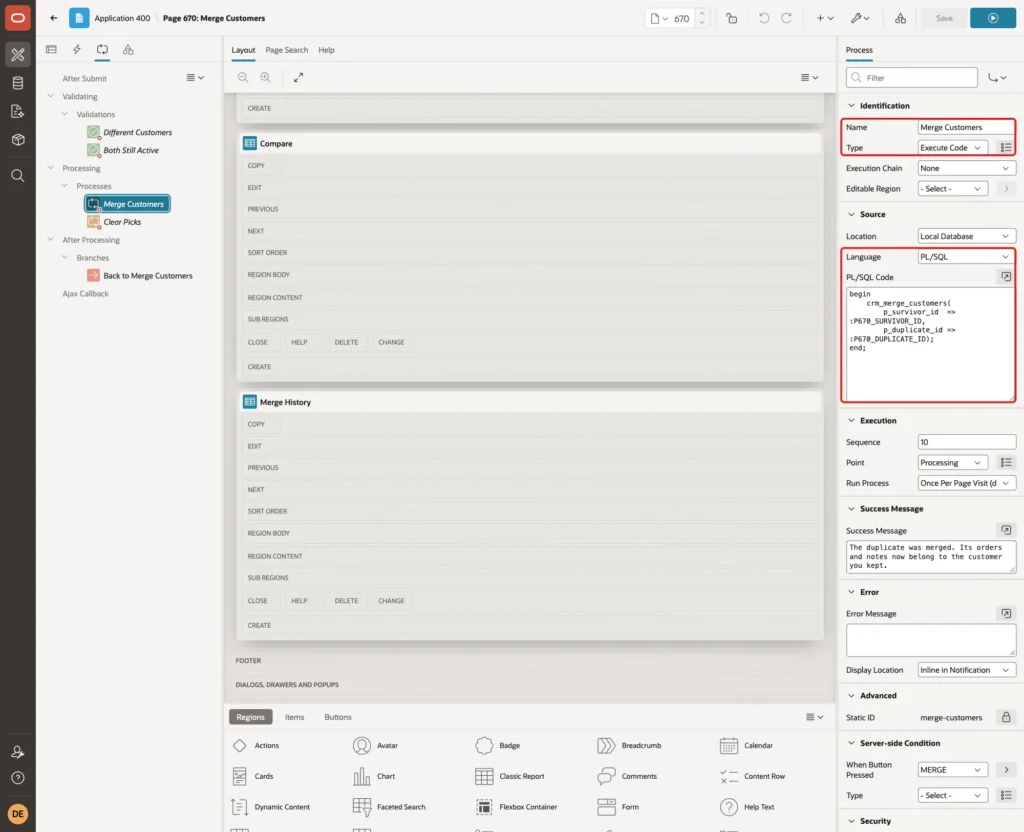
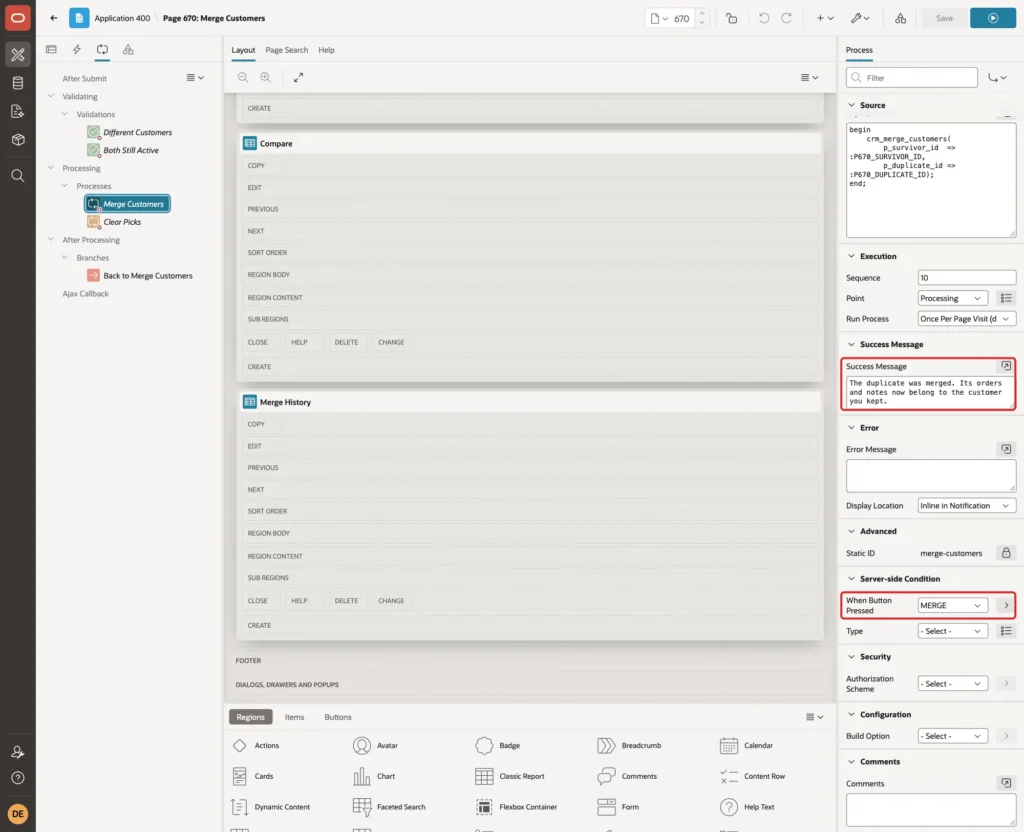
Set Success Message to "The duplicate was merged. Its orders and notes now belong to the customer you kept." and Server-side Condition, When Button Pressed to MERGE:
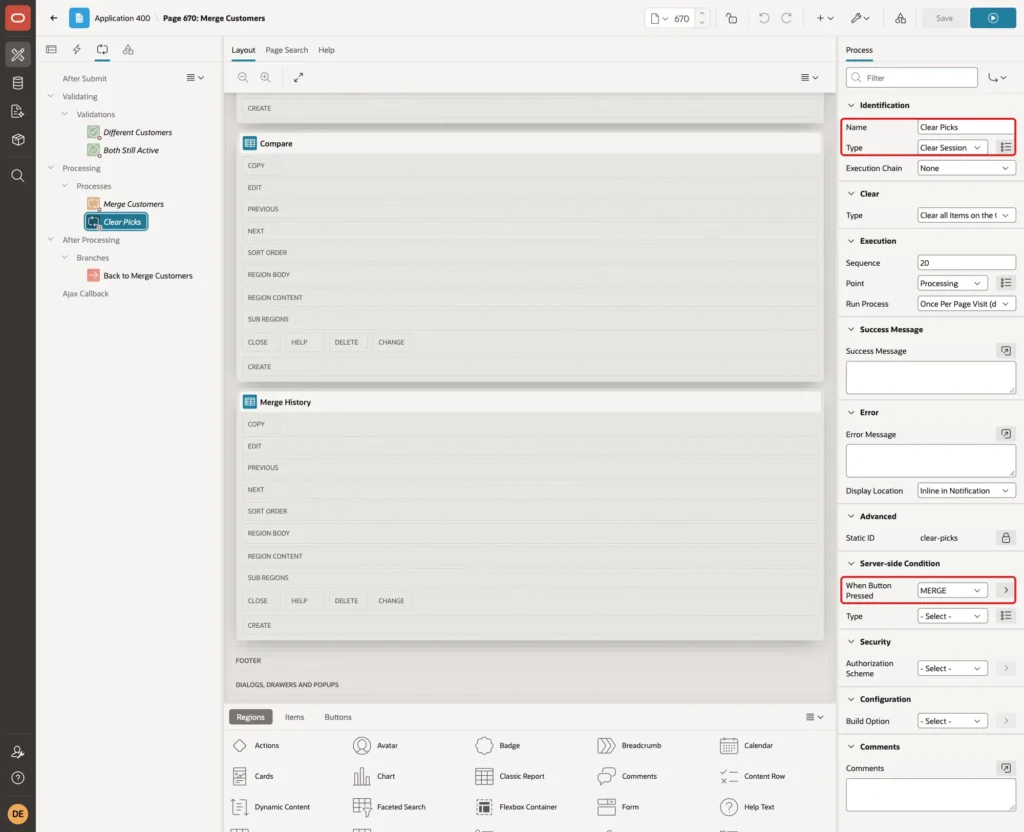
Create a second process named Clear Picks with Type Clear Session State, Sequence 20 and When Button Pressed MERGE. Its default Clear Type clears all items of the current page, so both select lists are empty again after a merge:
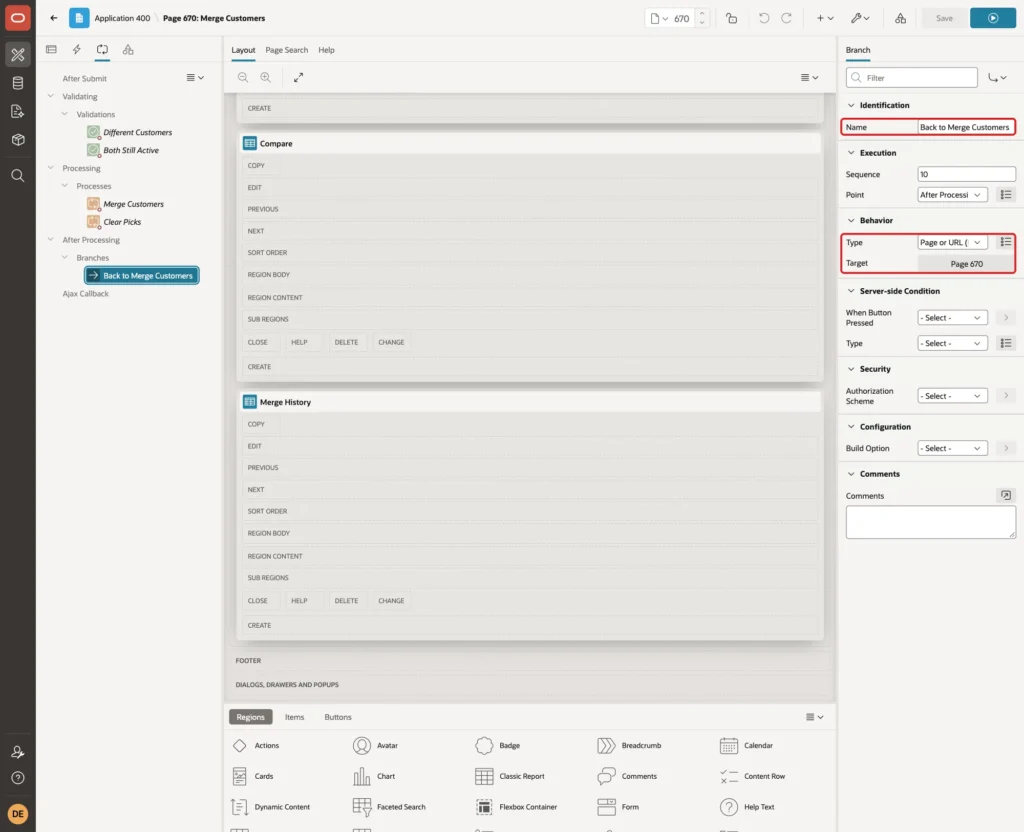
Right-click After Processing and select Create Branch. Set Name to Back to Merge Customers, Type to Page or URL (Redirect) and Target to page 670:
Save the page.
Step 12: Test the Merge Page
Run the page as an administrator. Pick Northwind Traders (#1) as the customer to keep and North Wind Traders Ltd (#2) as the duplicate. The Compare region fills at once:
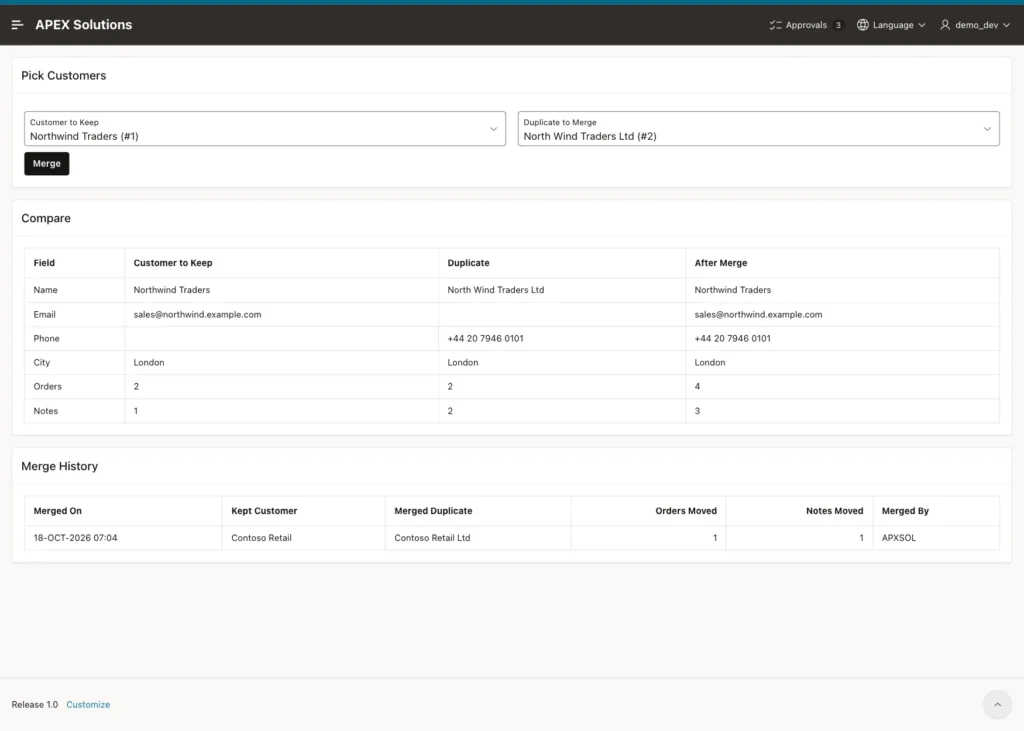
The kept customer has no phone number, so the After Merge column takes it from the duplicate. Together the two have 4 orders and 3 notes. The Merge History already shows the Contoso merge from Step 3.
Click Merge. The confirmation dialog appears:
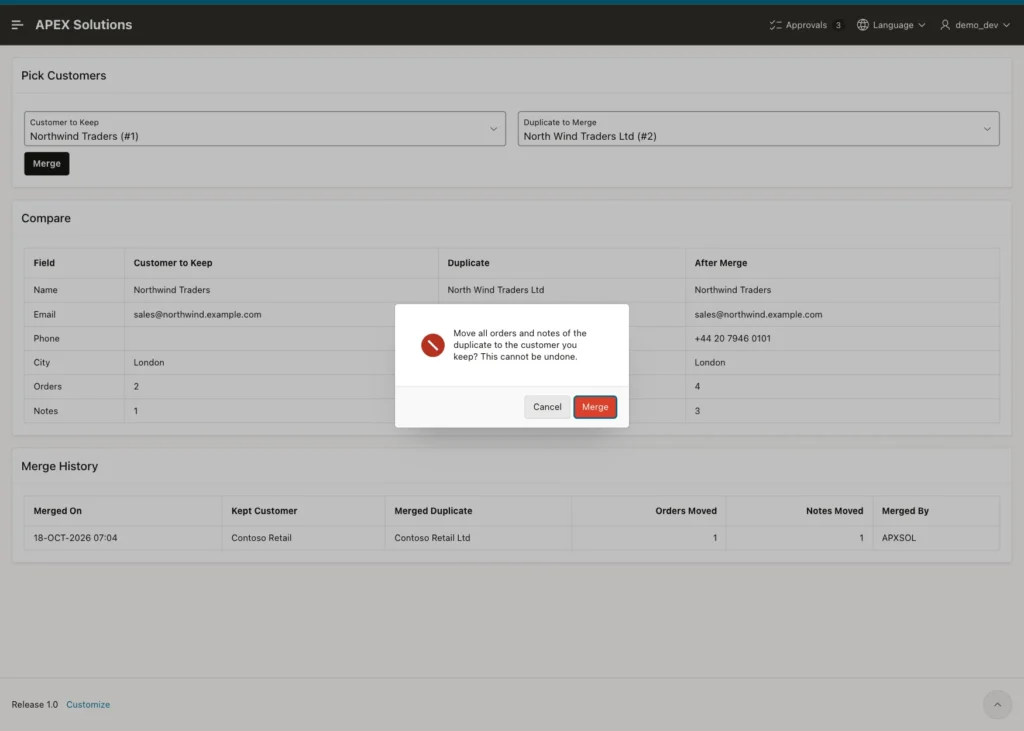
Click Merge in the dialog. The success message appears, the select lists are cleared and the new merge is on top of the history:
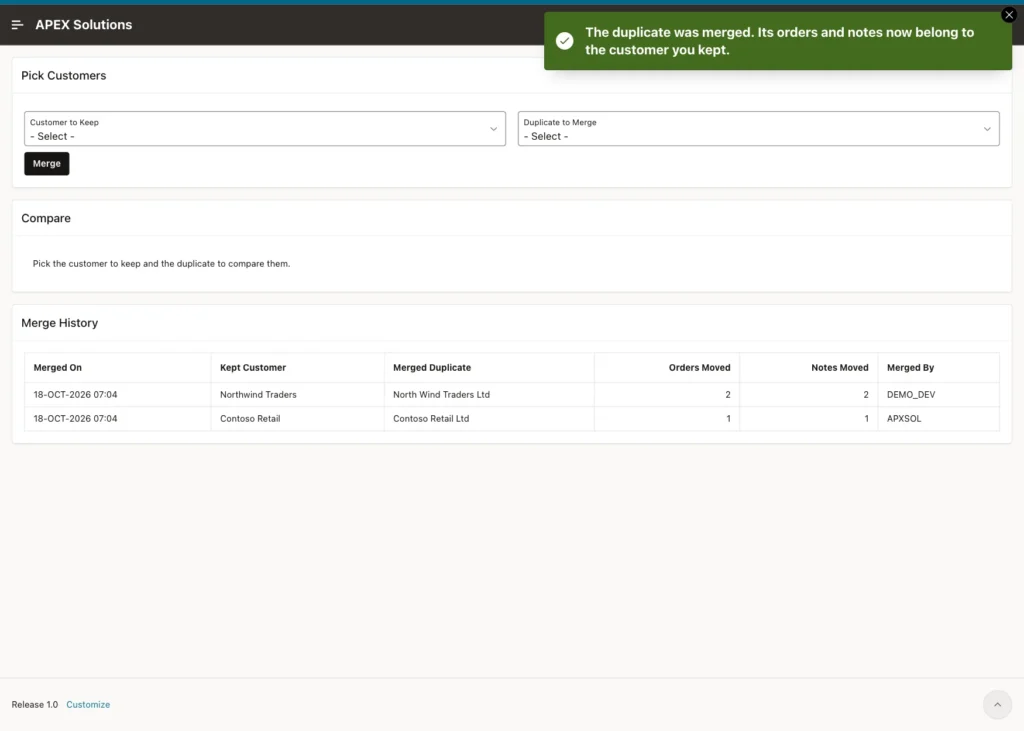
North Wind Traders Ltd is no longer in the Customer to Keep list, because it is not active any more. Check the tables in SQL:
Example:
set lines 200 pages 100 feedback on
select customer_id, customer_name, email, phone, city, status, merged_into_id
from   crm_customers
where  customer_id in (1, 2)
order  by customer_id;

select order_no, customer_id from crm_orders where order_no in ('SO-1001', 'SO-1002', 'SO-1003', 'SO-1004') order by order_no;

select note_text, customer_id from crm_notes where customer_id in (1, 2) order by note_id;

select survivor_id, duplicate_id, orders_moved, notes_moved, merged_by
from   crm_merge_log
order  by merge_id;
Output:
   CUSTOMER_ID CUSTOMER_NAME             EMAIL                          PHONE               CITY      STATUS       MERGED_INTO_ID
______________ _________________________ ______________________________ ___________________ _________ _________ _________________
             1 Northwind Traders         sales@northwind.example.com    +44 20 7946 0101    London    ACTIVE
             2 North Wind Traders Ltd                                   +44 20 7946 0101    London    MERGED                    1

2 rows selected.

ORDER_NO       CUSTOMER_ID
___________ ______________
SO-1001                  1
SO-1002                  1
SO-1003                  1
SO-1004                  1

4 rows selected.

NOTE_TEXT                             CUSTOMER_ID
__________________________________ ______________
Prefers delivery on Mondays.                    1
Asked for a quote for 50 desks.                 1
New buyer: Anna Weber.                          1

3 rows selected.

   SURVIVOR_ID    DUPLICATE_ID    ORDERS_MOVED    NOTES_MOVED MERGED_BY
______________ _______________ _______________ ______________ ____________
             3               4               1              1 APXSOL
             1               2               2              2 DEMO_DEV

2 rows selected.
All four orders and three notes belong to customer 1, which now also has the phone number. Customer 2 is MERGED into 1, and the log shows DEMO_DEV as the APEX user who merged it.
Step 13: Test the Checks
Click Merge without picking anything. After the confirmation, the page shows "Customer to Keep must have some value." and "Duplicate to Merge must have some value." Only these two messages appear, thanks to the server-side conditions.
Next, a forced request. The duplicate list never offers the customer to keep, so the test picked Fabrikam Inc (#5) as the customer to keep, added the same customer to the duplicate list with the browser console and submitted the page:
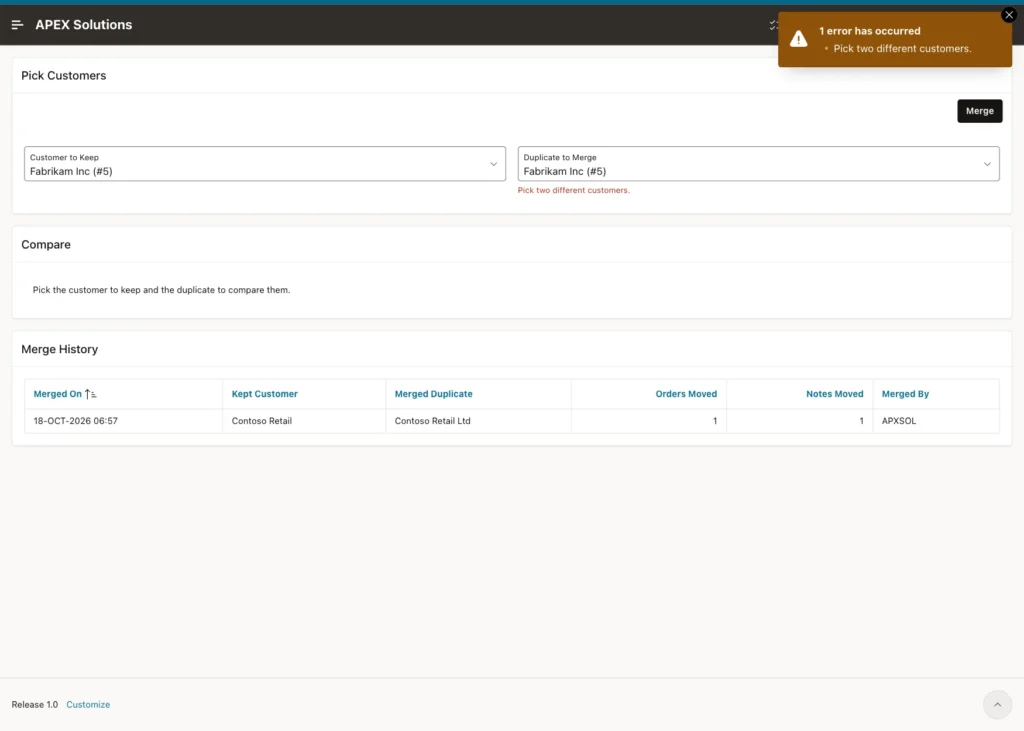
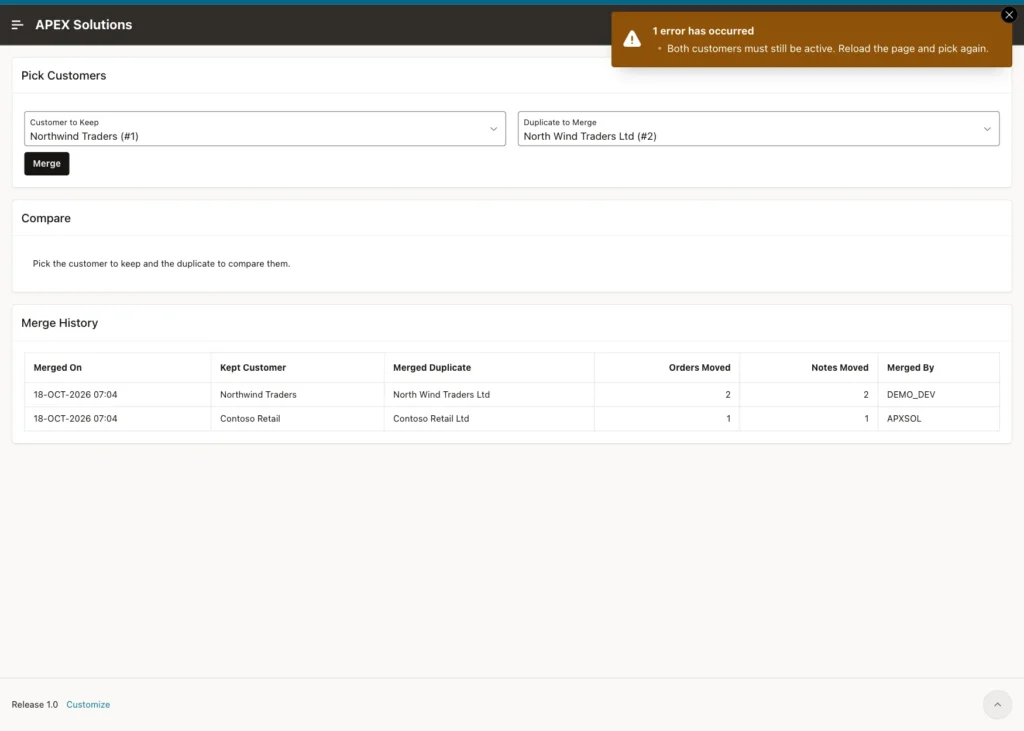
Then a stale page. The test submitted Northwind Traders (#1) and the already merged North Wind Traders Ltd (#2) in the same way. The Both Still Active validation stopped it:
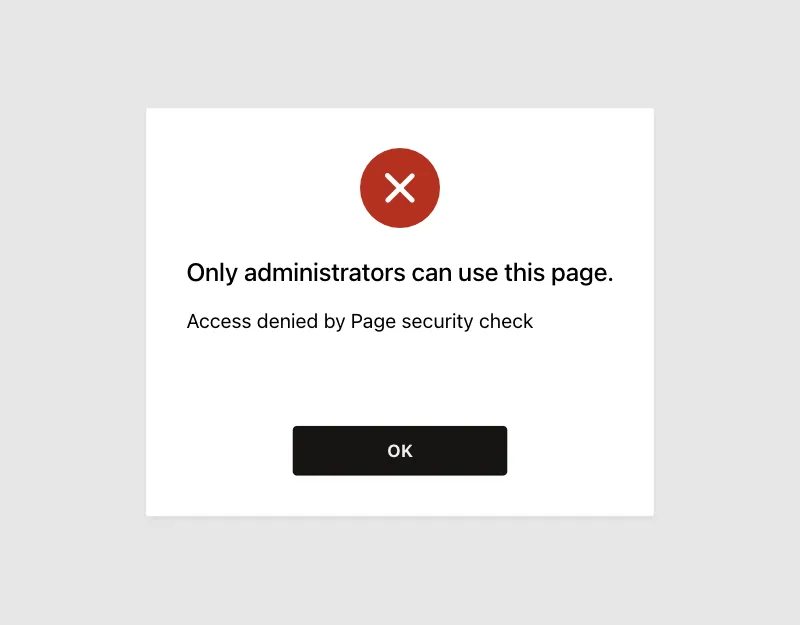
A user with the Reader role, SALES_USER in this example, cannot open the page at all:
Finally, two merges at the same time. The validation runs before the process, so two administrators who click Merge at the same moment could both pass it. The lock in the procedure handles this case.
The test used three extra customers (6 and 7 to keep, 8 as the duplicate). Session A merged 8 into 6 and waited 10 seconds before COMMIT. Four seconds later, session B ran this:
Example:
set feedback on timing on
exec crm_merge_customers(p_survivor_id => 7, p_duplicate_id => 8)
Output:
BEGIN crm_merge_customers(p_survivor_id => 7, p_duplicate_id => 8); END;
*
ERROR at line 1:
ORA-20002: Both customers must exist and still be active.
ORA-06512: at "APXSOL.CRM_MERGE_CUSTOMERS", line 29
ORA-06512: at line 1
Help: https://docs.oracle.com/error-help/db/ora-20002/

Elapsed: 00:00:06.090
Session B waited about 6 seconds on the locked row. When session A committed, B saw that customer 8 was merged and stopped with ORA-20002, so the duplicate was not merged twice. The three test customers were removed afterwards.
Find All Child Tables Before You Merge
Every table that references the merged table needs an UPDATE in the procedure. If one is missing, the merge leaves its rows behind on the duplicate. This query lists the foreign keys that point to the primary key of CRM_CUSTOMERS:
Example:
set lines 200 pages 100 feedback on
select c.table_name, c.constraint_name
from   user_constraints c
join   user_constraints p on p.constraint_name = c.r_constraint_name
where  c.constraint_type = 'R'
and    p.table_name = 'CRM_CUSTOMERS'
and    p.constraint_type = 'P'
order  by c.table_name, c.constraint_name;
Output:
TABLE_NAME       CONSTRAINT_NAME
________________ _____________________________
CRM_CUSTOMERS    CRM_CUSTOMERS_MERGED_FK
CRM_MERGE_LOG    CRM_MERGE_LOG_DUPLICATE_FK
CRM_MERGE_LOG    CRM_MERGE_LOG_SURVIVOR_FK
CRM_NOTES        CRM_NOTES_CUSTOMER_FK
CRM_ORDERS       CRM_ORDERS_CUSTOMER_FK

5 rows selected.
CRM_ORDERS and CRM_NOTES are the child rows to move. CRM_CUSTOMERS_MERGED_FK and the two CRM_MERGE_LOG keys belong to the merge itself and must not be moved. Run the query again whenever a new table gets a foreign key to the customers.
Things to Know
- The duplicate is kept as a MERGED row. A DELETE of customer 2 fails with ORA-02292 on CRM_MERGE_LOG_DUPLICATE_FK, so the merge log can never point to a missing customer.
- Reports and lists of values must filter on STATUS = 'ACTIVE', or merged customers show up again.
- The page validations give friendly messages, and the procedure repeats the checks under a row lock. Keep both: the validations cannot stop two merges that run at the same moment.
- The procedure fills only empty fields of the kept customer. A field that has a value in both records keeps the value of the kept customer, as the Contoso email showed. Copy such values by hand before the merge if you need them.
- MERGED_ON uses SYSDATE, which is the clock of the database server. The server in this example runs on UTC, so the merge history shows UTC times.
Related Guides
- How to Warn About Possible Duplicate Records While Typing in Oracle APEX
- How to Add a Recycle Bin with Soft Delete and Restore in Oracle APEX
Conclusion
Merging duplicates in Oracle APEX takes one PL/SQL procedure and one page. The procedure locks both rows, moves the child rows, fills empty fields, marks the duplicate as merged and writes a log row, all in one transaction. Constraints keep the status and the log consistent.
The page adds what users need to merge safely: two select lists that cannot pick the same record, a side-by-side compare with the result after the merge, a confirmation, validations for forced or stale requests, and a merge history that shows who merged what.
