
Many applications record amounts in more than one currency: travel expenses, supplier bills, payments from abroad. Each amount must stay in the currency it was paid in, but reports and totals need one common currency. Adding up euros, yen and dinars directly gives a meaningless number.
This guide stores exchange rates by date and converts every amount with the rate that was valid on the day of the transaction. An Oracle APEX form shows the converted amount while the user types, a validation stops amounts without a rate, and an interactive report shows the totals in the base currency.
This guide uses expense claims as the example; the same steps work for any table with an amount and a currency. The guide How to Calculate Due Dates in Business Days, Skipping Holidays in Oracle APEX uses a similar live preview for a date; here the preview converts money, and nothing is stored that can be calculated.
Step 1: Create the Tables
The example needs three tables. CURRENCIES lists the currencies and marks one of them as the base currency. EXCHANGE_RATES holds the rates, each valid from its RATE_DATE until the next rate of the same currency. EXPENSE_CLAIMS holds the amounts in their original currency.
Create the tables, the indexes, the currencies and the rates:
Example:
set lines 200 pages 100 feedback on
create table currencies (
  currency_code  varchar2(3)  constraint currencies_pk primary key,
  currency_name  varchar2(50) not null,
  decimal_places number(1)    not null,
  is_base        varchar2(1)  default on null 'N' not null,
  format_mask    varchar2(40) generated always as (
                   case decimal_places
                     when 0 then 'FM999G999G999G990'
                     when 1 then 'FM999G999G999G990D0'
                     when 2 then 'FM999G999G999G990D00'
                     when 3 then 'FM999G999G999G990D000'
                   end) virtual,
  constraint currencies_code_ck check (currency_code = upper(currency_code) and length(currency_code) = 3),
  constraint currencies_dec_ck check (decimal_places between 0 and 3),
  constraint currencies_base_ck check (is_base in ('Y', 'N'))
);

create unique index currencies_one_base_ux on currencies (case is_base when 'Y' then 'Y' end);

create table exchange_rates (
  rate_id       number generated by default on null as identity constraint exchange_rates_pk primary key,
  currency_code varchar2(3) not null,
  rate_date     date        not null,
  rate_to_base  number(18,8) not null,
  constraint exchange_rates_currency_fk foreign key (currency_code)
    references currencies (currency_code),
  constraint exchange_rates_uk unique (currency_code, rate_date),
  constraint exchange_rates_date_ck check (rate_date = trunc(rate_date)),
  constraint exchange_rates_rate_ck check (rate_to_base > 0)
);

create table expense_claims (
  claim_id      number generated by default on null as identity constraint expense_claims_pk primary key,
  description   varchar2(200) not null,
  spent_on      date          default on null trunc(sysdate) not null,
  currency_code varchar2(3)   not null,
  amount        number(14,3)  not null,
  created_by    varchar2(255) default on null
                  coalesce(sys_context('APEX$SESSION', 'APP_USER'), user) not null,
  constraint expense_claims_currency_fk foreign key (currency_code)
    references currencies (currency_code),
  constraint expense_claims_spent_ck check (spent_on = trunc(spent_on)),
  constraint expense_claims_amount_ck check (amount > 0)
);

create index expense_claims_currency_ix on expense_claims (currency_code, spent_on);

insert into currencies (currency_code, currency_name, decimal_places, is_base) values ('USD', 'US Dollar', 2, 'Y');
insert into currencies (currency_code, currency_name, decimal_places) values ('EUR', 'Euro', 2);
insert into currencies (currency_code, currency_name, decimal_places) values ('GBP', 'Pound Sterling', 2);
insert into currencies (currency_code, currency_name, decimal_places) values ('JPY', 'Japanese Yen', 0);
insert into currencies (currency_code, currency_name, decimal_places) values ('KWD', 'Kuwaiti Dinar', 3);

insert into exchange_rates (currency_code, rate_date, rate_to_base) values ('EUR', date '2026-09-01', 1.0820);
insert into exchange_rates (currency_code, rate_date, rate_to_base) values ('EUR', date '2026-10-01', 1.0950);
insert into exchange_rates (currency_code, rate_date, rate_to_base) values ('EUR', date '2026-10-15', 1.1010);
insert into exchange_rates (currency_code, rate_date, rate_to_base) values ('GBP', date '2026-10-01', 1.2710);
insert into exchange_rates (currency_code, rate_date, rate_to_base) values ('JPY', date '2026-10-01', 0.00668);
insert into exchange_rates (currency_code, rate_date, rate_to_base) values ('KWD', date '2026-10-01', 3.2560);
commit;

select currency_code, currency_name, decimal_places, is_base, format_mask
  from currencies order by is_base desc, currency_code;

select rate_id, currency_code, to_char(rate_date, 'DD-MON-YYYY') rate_date, rate_to_base
  from exchange_rates e order by e.currency_code, e.rate_date;
Output:
Table CURRENCIES created.

Index CURRENCIES_ONE_BASE_UX created.

Table EXCHANGE_RATES created.

Table EXPENSE_CLAIMS created.

Index EXPENSE_CLAIMS_CURRENCY_IX created.

1 row inserted.

1 row inserted.

1 row inserted.

1 row inserted.

1 row inserted.

1 row inserted.

1 row inserted.

1 row inserted.

1 row inserted.

1 row inserted.

1 row inserted.

Commit complete.

CURRENCY_CODE    CURRENCY_NAME        DECIMAL_PLACES IS_BASE    FORMAT_MASK
________________ _________________ _________________ __________ ________________________
USD              US Dollar                         2 Y          FM999G999G999G990D00
EUR              Euro                              2 N          FM999G999G999G990D00
GBP              Pound Sterling                    2 N          FM999G999G999G990D00
JPY              Japanese Yen                      0 N          FM999G999G999G990
KWD              Kuwaiti Dinar                     3 N          FM999G999G999G990D000

5 rows selected.

   RATE_ID CURRENCY_CODE    RATE_DATE         RATE_TO_BASE
__________ ________________ ______________ _______________
         1 EUR              01-SEP-2026              1.082
         2 EUR              01-OCT-2026              1.095
         3 EUR              15-OCT-2026              1.101
         4 GBP              01-OCT-2026              1.271
         5 JPY              01-OCT-2026            0.00668
         6 KWD              01-OCT-2026              3.256

6 rows selected.- RATE_TO_BASE is the value of one unit of the currency in the base currency. One euro was worth 1.082 US dollars from 1 September and 1.095 from 1 October.
- EXCHANGE_RATES_UK allows one rate per currency and day, EXCHANGE_RATES_DATE_CK keeps the time part out of RATE_DATE, and EXCHANGE_RATES_RATE_CK rejects zero and negative rates.
- CURRENCIES_ONE_BASE_UX is a unique function-based index. It indexes only the rows with IS_BASE = 'Y', so a second base currency is rejected, while any number of rows can have N.
- EXPENSE_CLAIMS_CURRENCY_FK allows only known currencies, and EXPENSE_CLAIMS_CURRENCY_IX supports both the foreign key and the rate lookups by currency and date.
FORMAT_MASK is a virtual column, so no trigger is needed to keep it in step with DECIMAL_PLACES. The yen has no decimals, the dinar has three. The group separator G and decimal character D follow the session language.
In a first version, FORMAT_MASK was built with RPAD('0', decimal_places, '0'). CREATE TABLE failed with ORA-12899, because RPAD with a column length returns VARCHAR2(4000), which does not fit VARCHAR2(40). The CASE expression with fixed masks avoids that.
Step 2: Create the Conversion View
The view EXPENSE_CLAIMS_V converts each claim. A LATERAL inline view picks the latest rate of the claim's currency on or before the day the money was spent. The base currency needs no rate, so it gets the rate 1.
Example:
set lines 200 pages 100 feedback on
create or replace view expense_claims_v as
select e.claim_id,
       e.description,
       e.spent_on,
       e.currency_code,
       e.amount,
       to_char(e.amount, c.format_mask) || ' ' || e.currency_code as amount_text,
       case when c.is_base = 'Y' then 1 else r.rate_to_base end as rate_to_base,
       case when c.is_base = 'Y' then e.spent_on else r.rate_date end as rate_date,
       round(e.amount * case when c.is_base = 'Y' then 1 else r.rate_to_base end,
             b.decimal_places) as base_amount,
       b.currency_code as base_currency,
       case when c.is_base = 'N' and r.rate_to_base is null then 'Y' else 'N' end as rate_missing,
       e.created_by
  from expense_claims e
  join currencies c on c.currency_code = e.currency_code
 cross join (select currency_code, decimal_places from currencies where is_base = 'Y') b
  left join lateral (
         select x.rate_to_base, x.rate_date
           from exchange_rates x
          where x.currency_code = e.currency_code
            and x.rate_date <= e.spent_on
          order by x.rate_date desc
          fetch first 1 row only) r on 1 = 1;
Output:
View EXPENSE_CLAIMS_V created.
- ORDER BY x.rate_date DESC with FETCH FIRST 1 ROW ONLY returns the newest rate that is not after SPENT_ON. The condition rate_date <= spent_on makes a rate valid from its own day.
- LEFT JOIN LATERAL ... ON 1 = 1 keeps the claim when no rate exists. RATE_TO_BASE and BASE_AMOUNT are then NULL, and RATE_MISSING is Y.
- BASE_AMOUNT is rounded to the decimal places of the base currency, and AMOUNT_TEXT formats the original amount with the mask of its own currency.
Step 3: Add Sample Claims and Test the View
Insert seven claims in five currencies. The train ticket in pounds is dated 20 September, before the first pound rate of 1 October:
Example:
set lines 200 pages 100 feedback on
insert into expense_claims (description, spent_on, currency_code, amount) values ('Hotel Berlin, 2 nights', date '2026-09-28', 'EUR', 412.80);
insert into expense_claims (description, spent_on, currency_code, amount) values ('Conference fee Paris', date '2026-10-10', 'EUR', 950.00);
insert into expense_claims (description, spent_on, currency_code, amount) values ('Taxi Amsterdam', date '2026-10-15', 'EUR', 46.50);
insert into expense_claims (description, spent_on, currency_code, amount) values ('Train London - Leeds', date '2026-09-20', 'GBP', 128.40);
insert into expense_claims (description, spent_on, currency_code, amount) values ('Client dinner Tokyo', date '2026-10-05', 'JPY', 48500);
insert into expense_claims (description, spent_on, currency_code, amount) values ('Office supplies', date '2026-10-12', 'USD', 86.40);
insert into expense_claims (description, spent_on, currency_code, amount) values ('Hotel Kuwait City', date '2026-10-08', 'KWD', 95.250);
commit;

select claim_id, to_char(spent_on, 'DD-MON-YYYY') spent_on, amount_text,
       rate_to_base, to_char(rate_date, 'DD-MON-YYYY') rate_date, base_amount, rate_missing
  from expense_claims_v
 order by claim_id;
Output:
1 row inserted.

1 row inserted.

1 row inserted.

1 row inserted.

1 row inserted.

1 row inserted.

1 row inserted.

Commit complete.

   CLAIM_ID SPENT_ON       AMOUNT_TEXT       RATE_TO_BASE RATE_DATE         BASE_AMOUNT RATE_MISSING
___________ ______________ ______________ _______________ ______________ ______________ _______________
          1 28-SEP-2026    412.80 EUR               1.082 01-SEP-2026            446.65 N
          2 10-OCT-2026    950.00 EUR               1.095 01-OCT-2026           1040.25 N
          3 15-OCT-2026    46.50 EUR                1.101 15-OCT-2026              51.2 N
          4 20-SEP-2026    128.40 GBP                                                   Y
          5 05-OCT-2026    48,500 JPY             0.00668 01-OCT-2026            323.98 N
          6 12-OCT-2026    86.40 USD                    1 12-OCT-2026              86.4 N
          7 08-OCT-2026    95.250 KWD               3.256 01-OCT-2026            310.13 N

7 rows selected.- The Berlin hotel was paid on 28 September, so it uses the 1 September rate 1.082: 412.80 x 1.082 = 446.65.
- The Paris fee of 10 October uses the 1 October rate, and the Amsterdam taxi of 15 October uses the rate of the same day, 1.101.
- The yen amount has no decimals and the dinar amount has three, each shown with the mask of its currency.
- The London train has no rate yet. Its base amount is empty and RATE_MISSING is Y, instead of a wrong conversion.
Step 4: Test the Totals and the Constraints in SQL
Totals in the base currency can be summed across all currencies. Original amounts can only be summed per currency, so the query shows them only on the currency rows:
Example:
set lines 200 pages 100 feedback on
select nvl(currency_code, 'All') currency,
       count(*) claims,
       case when grouping(currency_code) = 0 then sum(amount) end original_total,
       sum(base_amount) usd_total,
       sum(case rate_missing when 'Y' then 1 else 0 end) missing_rates
  from expense_claims_v
 group by rollup (currency_code)
 order by grouping(currency_code), currency_code;
Output:
CURRENCY       CLAIMS    ORIGINAL_TOTAL    USD_TOTAL    MISSING_RATES
___________ _________ _________________ ____________ ________________
EUR                 3            1409.3       1538.1                0
GBP                 1             128.4                             1
JPY                 1             48500       323.98                0
KWD                 1             95.25       310.13                0
USD                 1              86.4         86.4                0
All                 7                        2258.61                1

6 rows selected.
The total of 2258.61 USD leaves out the pound claim, and MISSING_RATES shows that one claim is not included. A report should always show that a total is incomplete.
Now try data that the constraints must reject: a second base currency, a lowercase code, a second rate for the same day, a zero rate and an unknown currency:
Example:
set lines 200 pages 100 feedback on
insert into currencies (currency_code, currency_name, decimal_places, is_base) values ('CHF', 'Swiss Franc', 2, 'Y');
insert into currencies (currency_code, currency_name, decimal_places) values ('chf', 'Swiss Franc', 2);
insert into exchange_rates (currency_code, rate_date, rate_to_base) values ('EUR', date '2026-10-01', 1.0960);
insert into exchange_rates (currency_code, rate_date, rate_to_base) values ('GBP', date '2026-09-01', 0);
insert into expense_claims (description, spent_on, currency_code, amount) values ('Parking', date '2026-10-12', 'XYZ', 12);
rollback;
Output:
Error starting at line : 2 File @ b66/04-checks.sql
In command -
insert into currencies (currency_code, currency_name, decimal_places, is_base) values ('CHF', 'Swiss Franc', 2, 'Y')
Error report -
ORA-00001: unique constraint (APXSOL.CURRENCIES_ONE_BASE_UX) violated on table APXSOL.CURRENCIES columns (SYS_NC00006$)
ORA-03301: (ORA-00001 details) row with column values (SYS_NC00006$:'Y') already exists
Help: https://docs.oracle.com/error-help/db/ora-00001/

Error starting at line : 3 File @ b66/04-checks.sql
In command -
insert into currencies (currency_code, currency_name, decimal_places) values ('chf', 'Swiss Franc', 2)
Error report -
ORA-02290: check constraint (APXSOL.CURRENCIES_CODE_CK) violated
Help: https://docs.oracle.com/error-help/db/ora-02290/

Error starting at line : 4 File @ b66/04-checks.sql
In command -
insert into exchange_rates (currency_code, rate_date, rate_to_base) values ('EUR', date '2026-10-01', 1.0960)
Error report -
ORA-00001: unique constraint (APXSOL.EXCHANGE_RATES_UK) violated on table APXSOL.EXCHANGE_RATES columns (CURRENCY_CODE, RATE_DATE)
ORA-03301: (ORA-00001 details) row with column values (CURRENCY_CODE:'EUR', RATE_DATE:01-10-26) already exists
Help: https://docs.oracle.com/error-help/db/ora-00001/

Error starting at line : 5 File @ b66/04-checks.sql
In command -
insert into exchange_rates (currency_code, rate_date, rate_to_base) values ('GBP', date '2026-09-01', 0)
Error report -
ORA-02290: check constraint (APXSOL.EXCHANGE_RATES_RATE_CK) violated
Help: https://docs.oracle.com/error-help/db/ora-02290/

Error starting at line : 6 File @ b66/04-checks.sql
In command -
insert into expense_claims (description, spent_on, currency_code, amount) values ('Parking', date '2026-10-12', 'XYZ', 12)
Error report -
ORA-02291: integrity constraint (APXSOL.EXPENSE_CLAIMS_CURRENCY_FK) violated - parent key not found
Help: https://docs.oracle.com/error-help/db/ora-02291/

Rollback complete.
Each wrong row is rejected by the database itself, so the rules hold for APEX pages, data loads and any other program.
Step 5: Create the Report and Form Pages
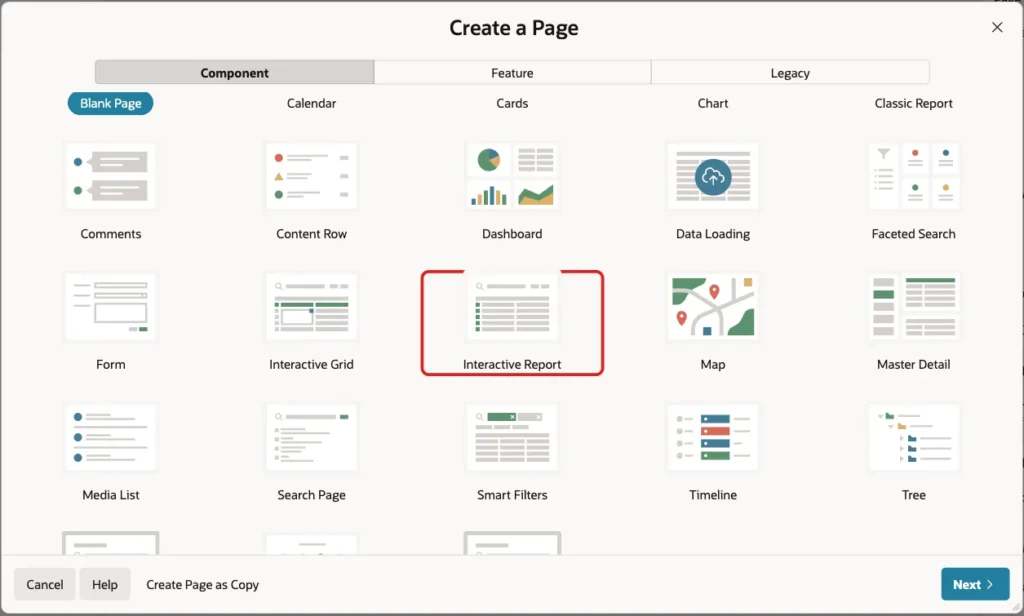
In App Builder, open the application and click Create Page. On the Component tab, click Interactive Report:
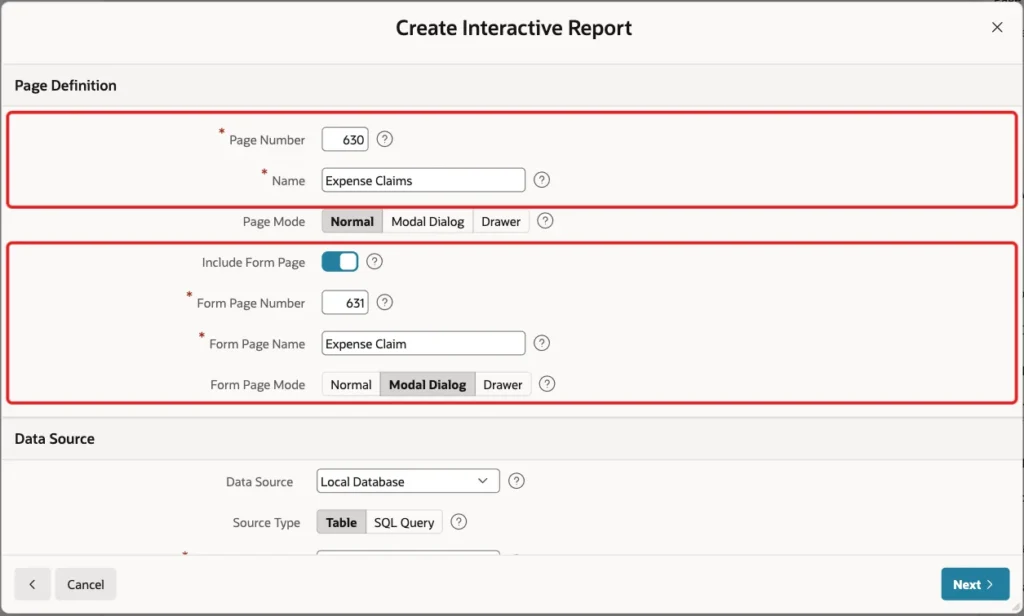
Enter Page Number 630 and Name Expense Claims. Turn on Include Form Page, enter Form Page Number 631 and Form Page Name Expense Claim, and keep Form Page Mode Modal Dialog:
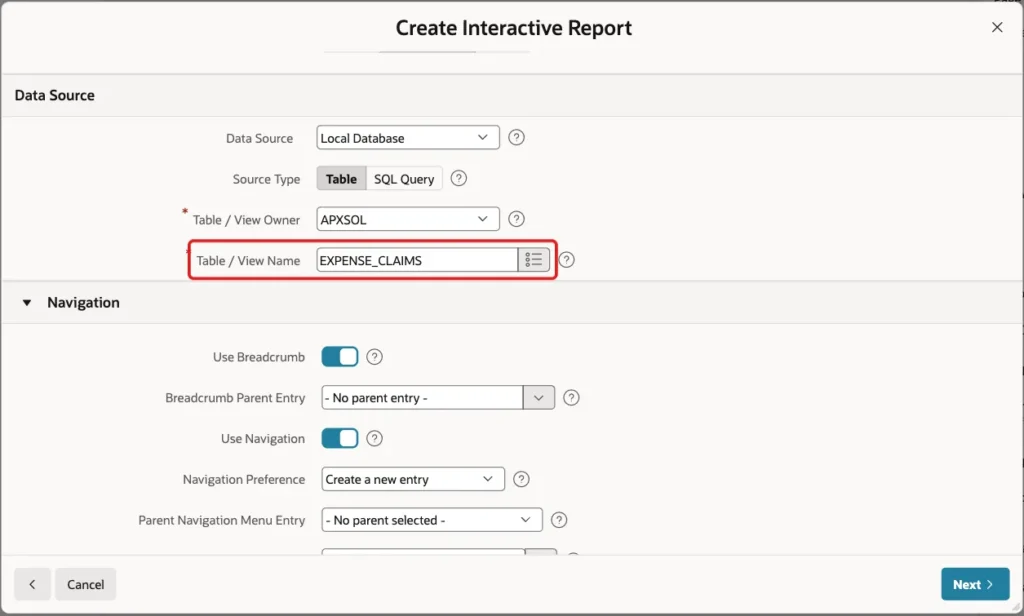
Under Data Source, keep Source Type Table and select the table EXPENSE_CLAIMS. The form must be based on the table, not on the view:
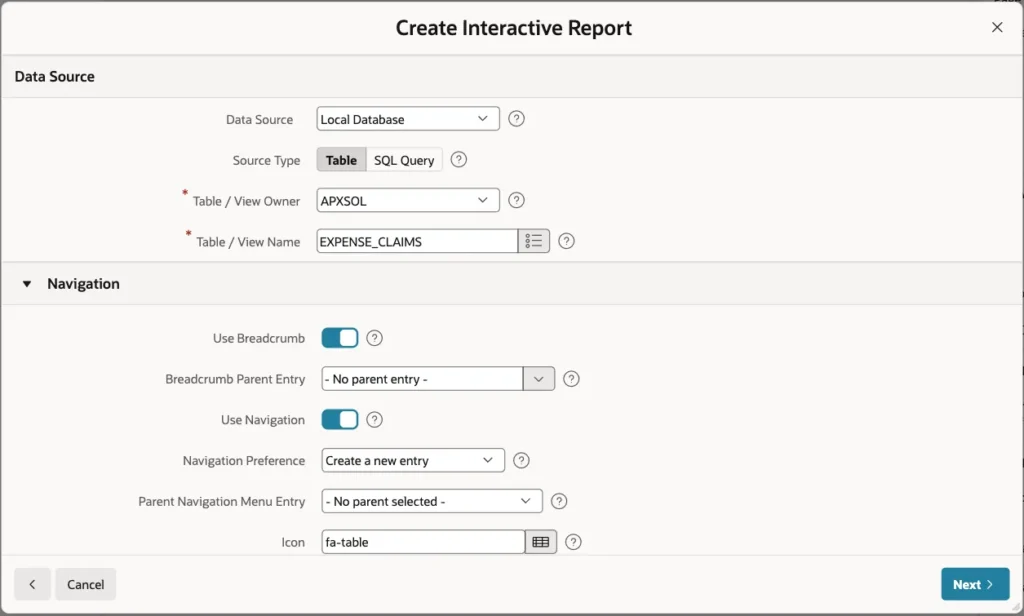
Keep the Navigation settings as they are, so the wizard adds a breadcrumb and a navigation menu entry. Click Next:
On the Primary Key screen, select CLAIM_ID (Number) for Primary Key Column 1 and click Create Page:
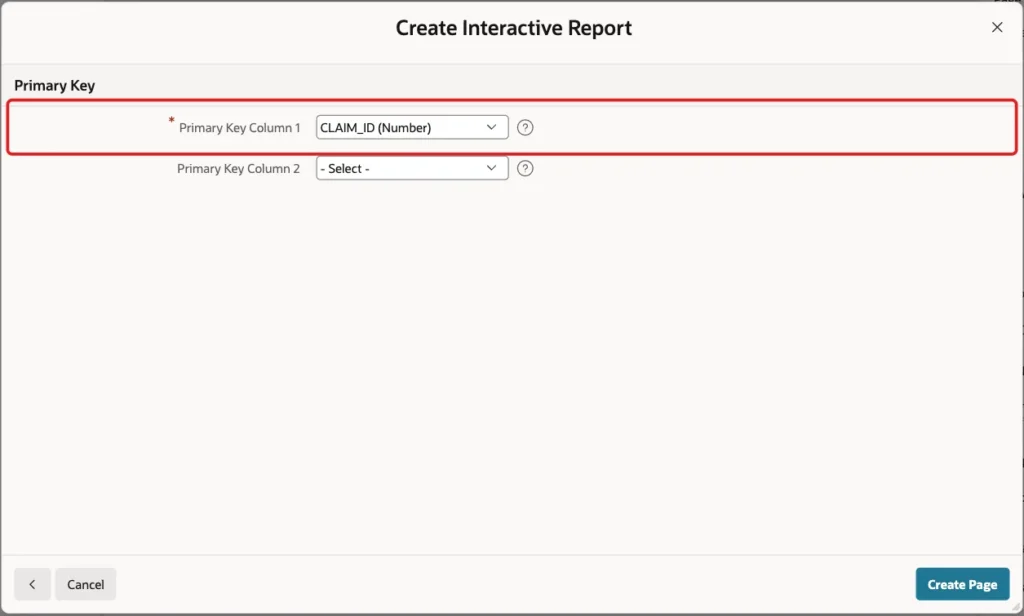
The wizard creates page 630 with the report and page 631 with the form. It turns the foreign key CURRENCY_CODE into a select list with a new shared list of values CURRENCIES.CURRENCY_NAME.
Step 6: Base the Report on the View
Open page 630 in Page Designer and select the Expense Claims region. Under Source, set Type to SQL Query and enter this query:
Example:
select claim_id,
       description,
       spent_on,
       currency_code,
       amount_text,
       rate_to_base,
       rate_date,
       base_amount,
       rate_missing,
       created_by
  from expense_claims_v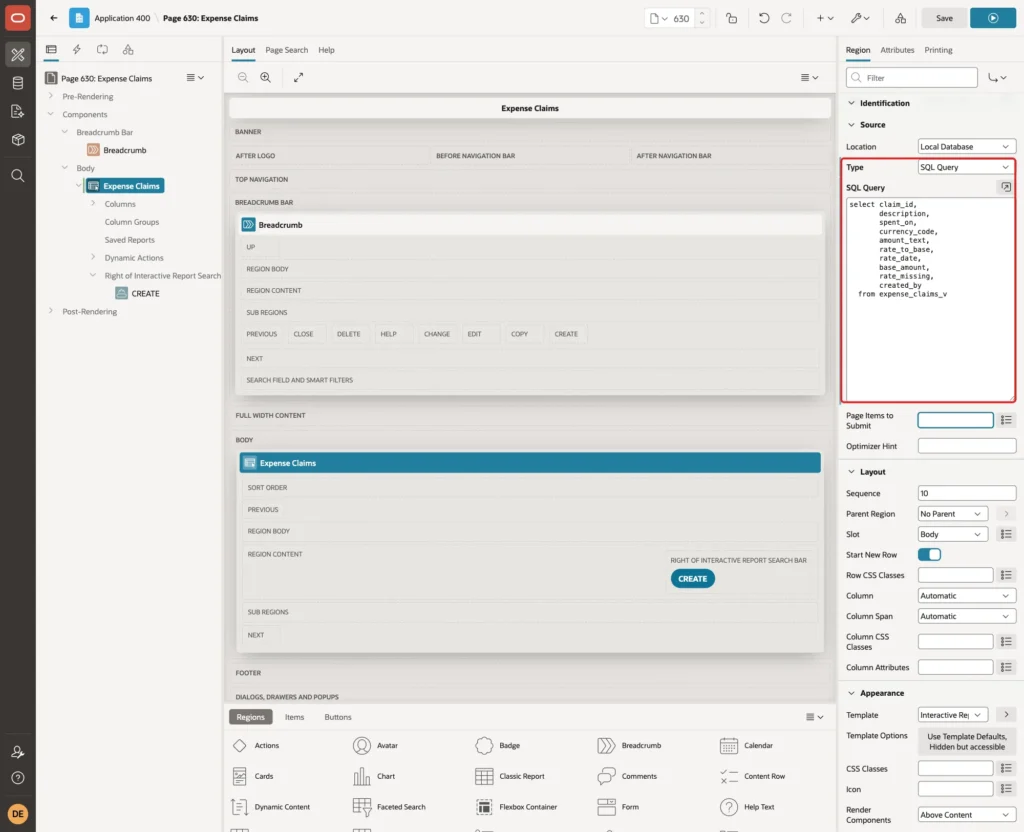
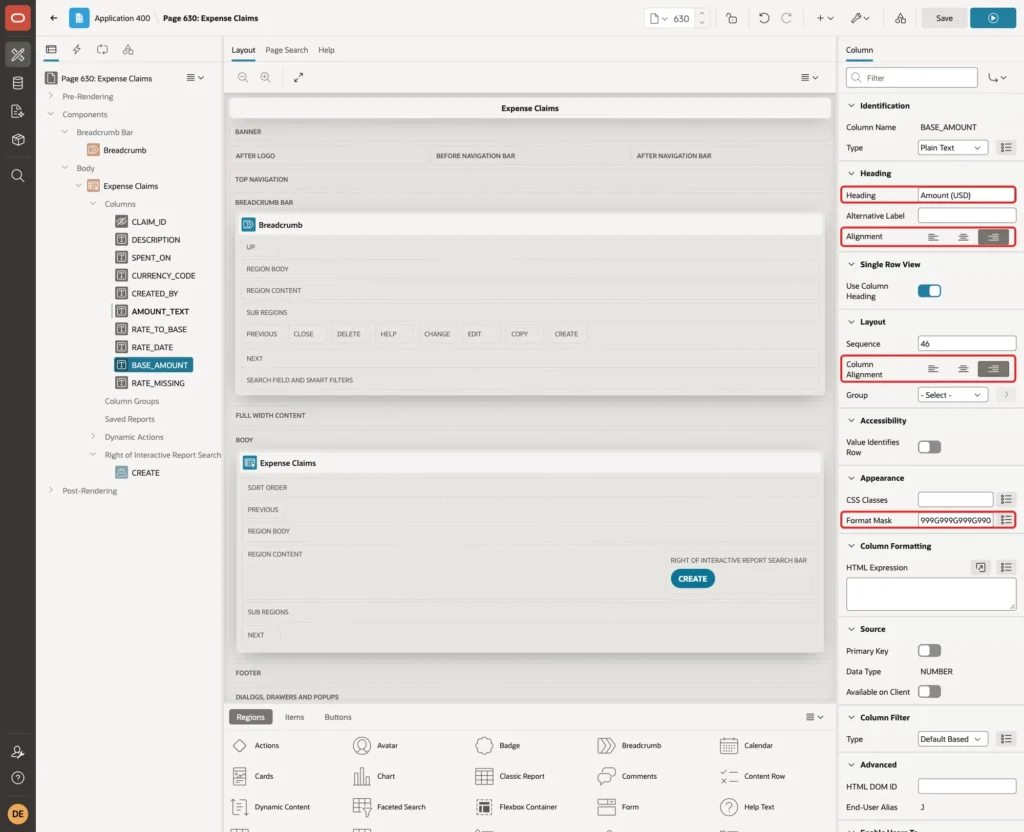
Expand Columns. Select SPENT_ON and RATE_DATE and set their Format Mask to DD-MON-YYYY. Set the Heading of CURRENCY_CODE to Currency and of RATE_DATE to Rate Date.
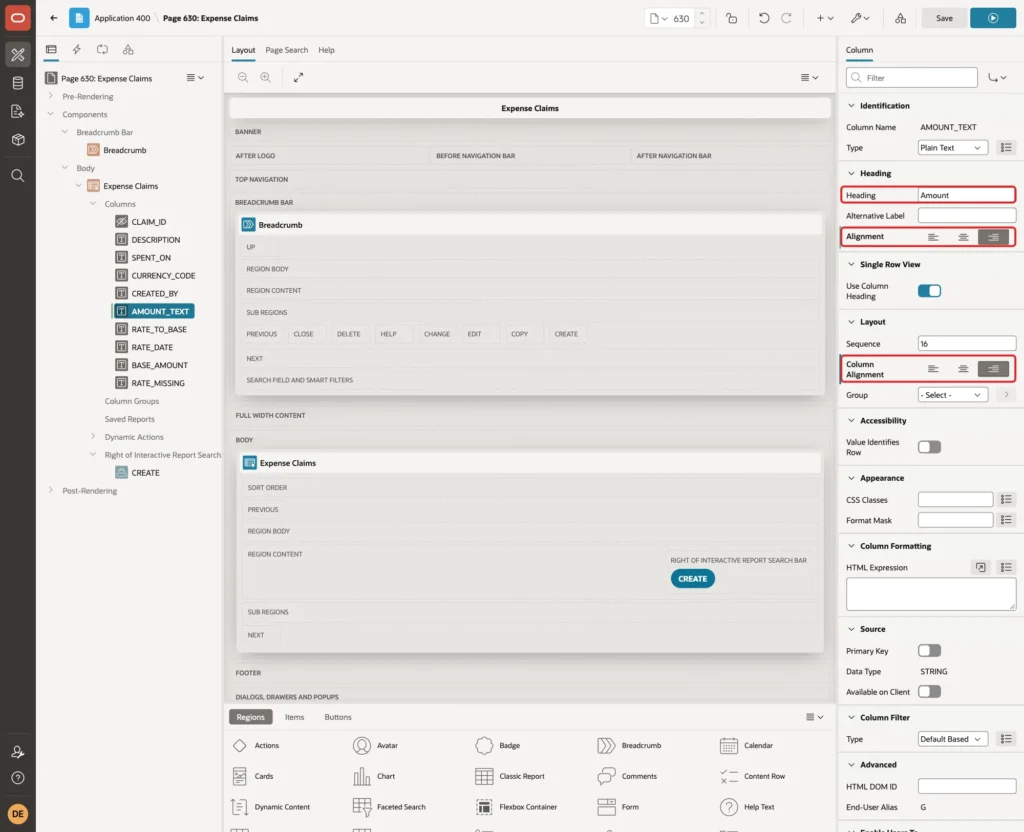
Select AMOUNT_TEXT, set Heading to Amount and set both Heading Alignment and Column Alignment to the right, so the amounts line up:
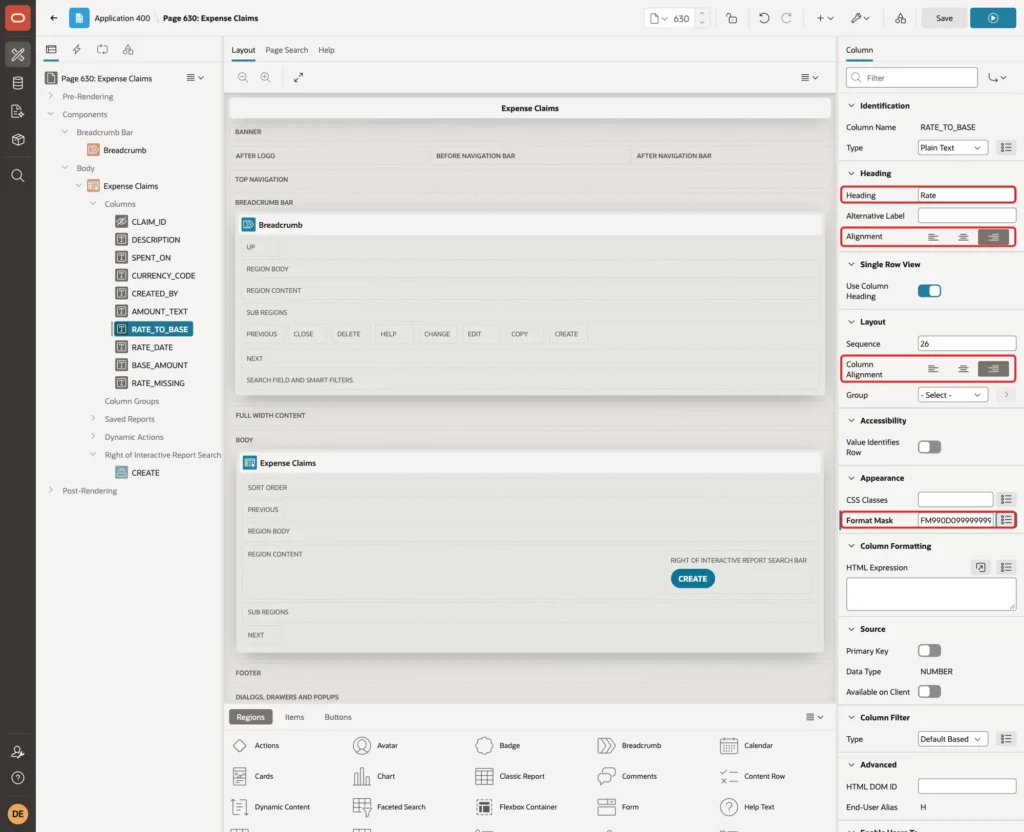
Select RATE_TO_BASE, set Heading to Rate, align it to the right and set Format Mask to FM990D099999999. Without the mask, the yen rate was shown as .00668:
Select BASE_AMOUNT, set Heading to Amount (USD), align it to the right and set Format Mask to 999G999G999G990D00. Set the Heading of RATE_MISSING to Rate Missing and click Save:
Step 7: Set Up the Form Items
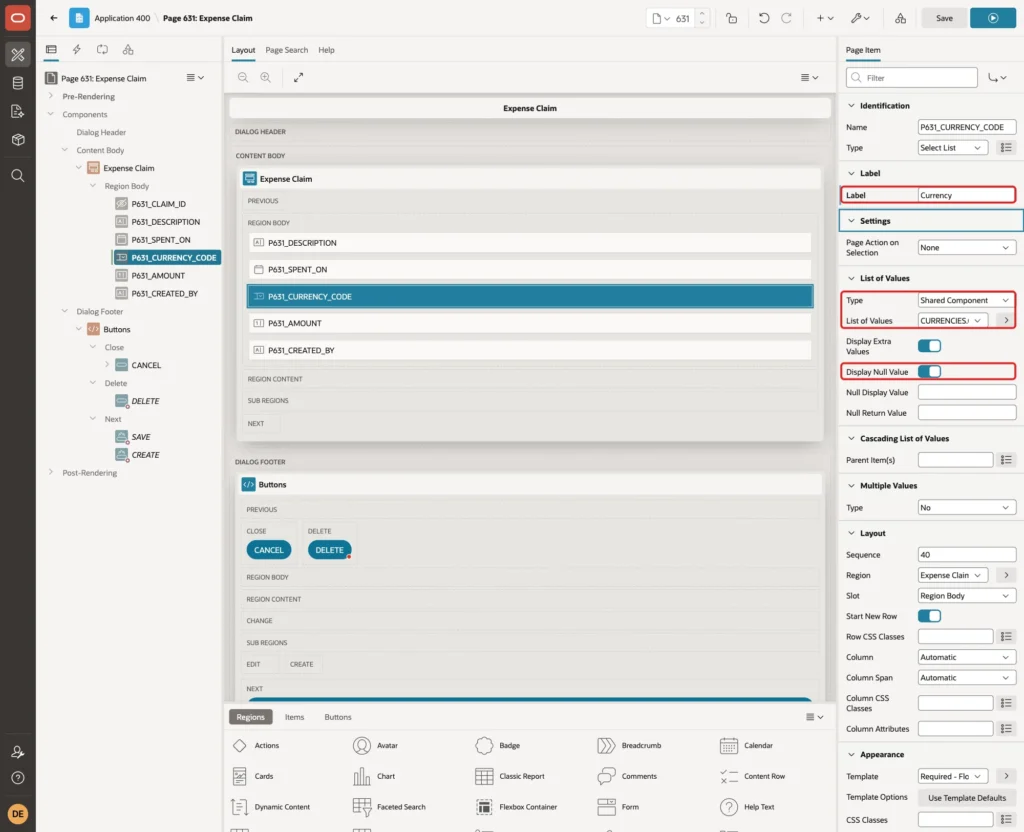
Open page 631 in Page Designer. Select P631_CURRENCY_CODE, set Label to Currency and turn on Display Null Value, so a new claim starts without a currency instead of the first one in the list:
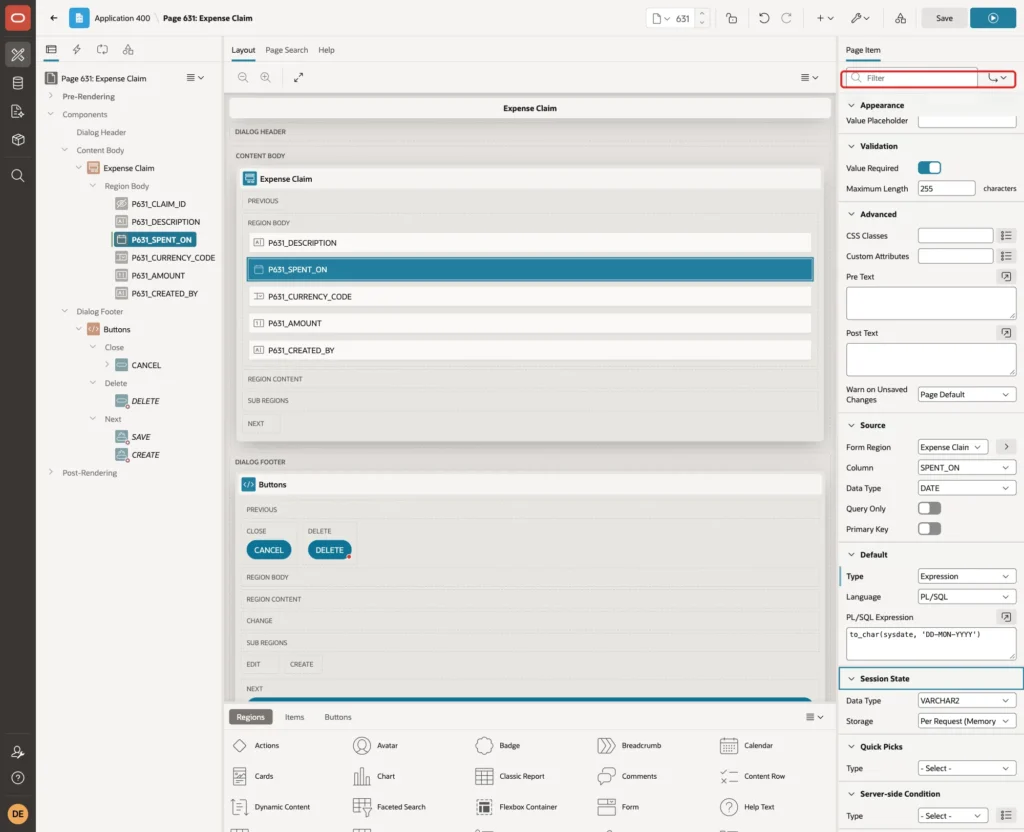
Select P631_SPENT_ON and set Appearance > Format Mask to DD-MON-YYYY. The SQL of the next steps converts the item with the same mask:
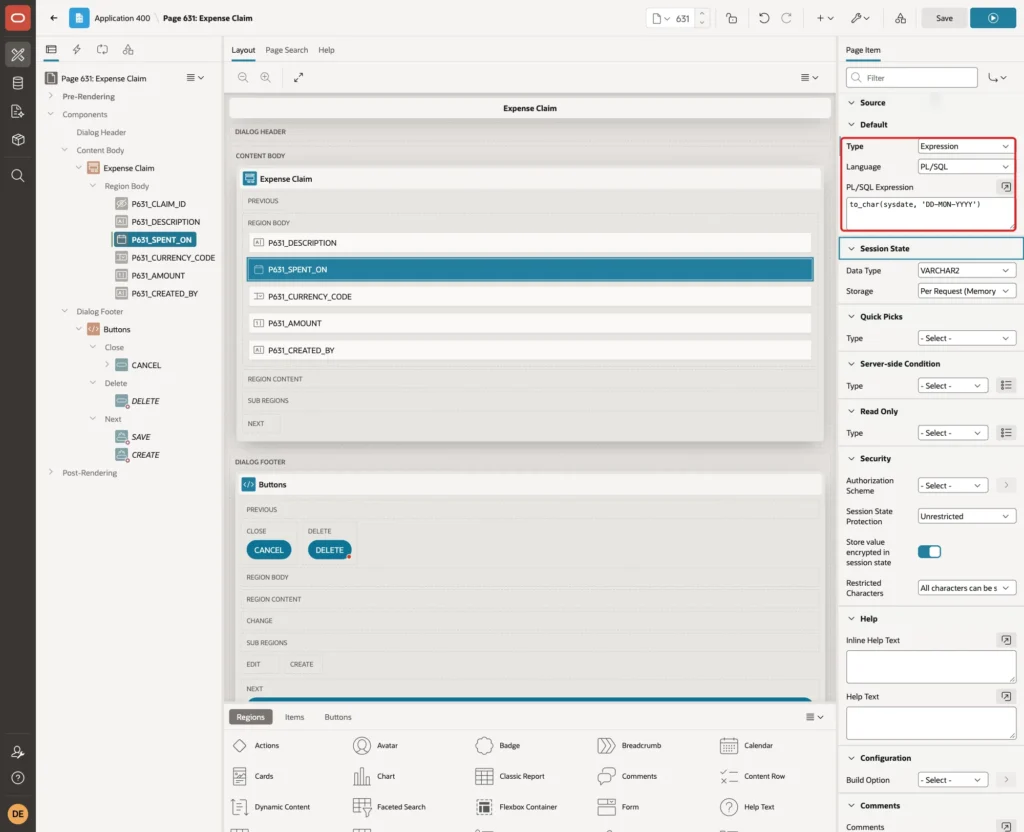
Under Default, set Type to Expression, Language PL/SQL and PL/SQL Expression to to_char(sysdate, 'DD-MON-YYYY'), so a new claim starts with the current date:
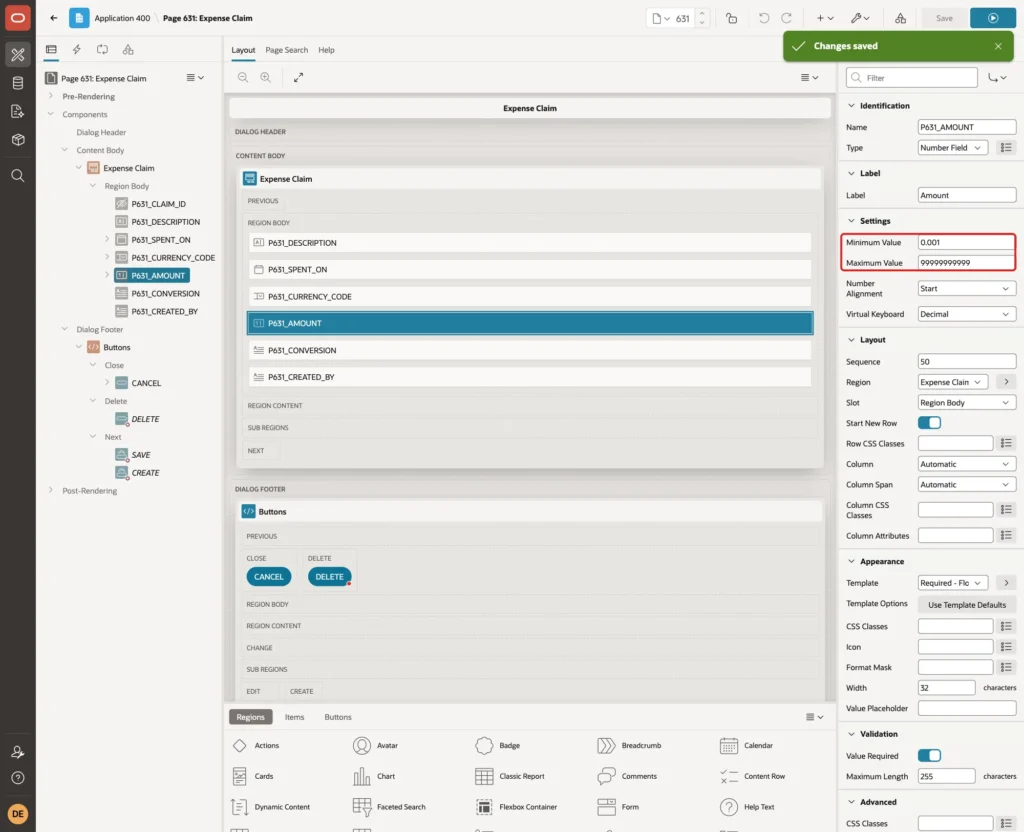
Select P631_AMOUNT and set Minimum Value to 0.001 and Maximum Value to 99999999999. In a first test without these settings, an amount of -5 reached the table and the user saw the raw message ORA-02290 for EXPENSE_CLAIMS_AMOUNT_CK:
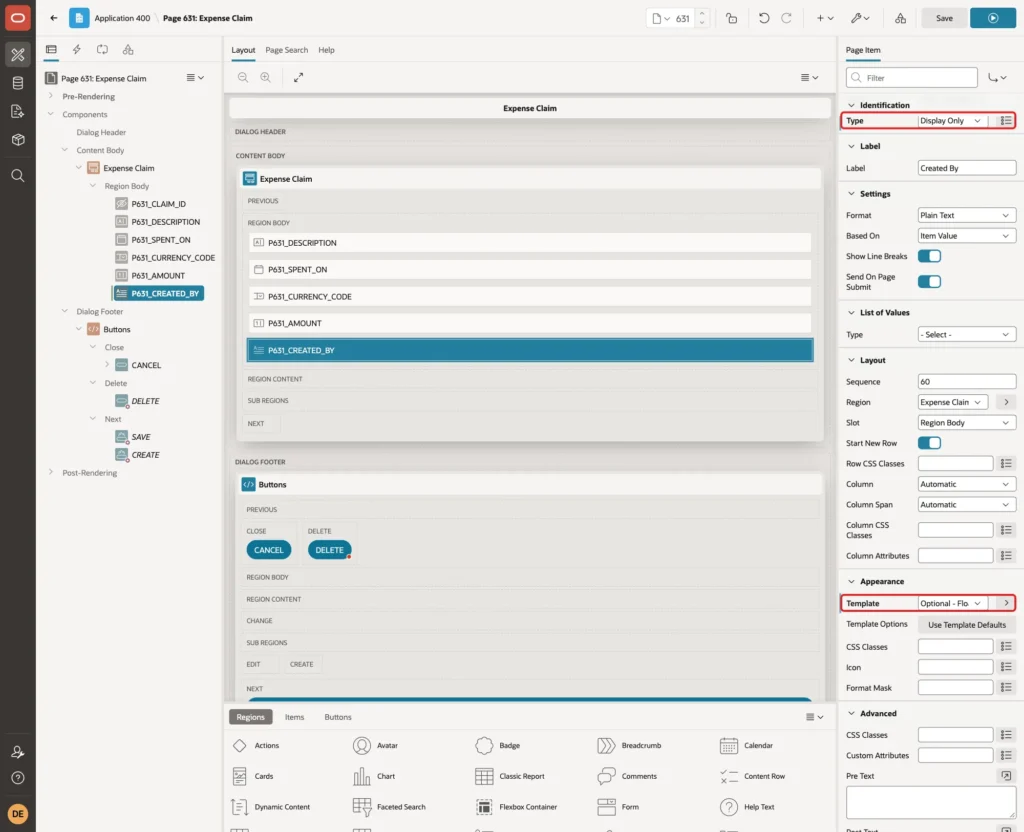
Select P631_CREATED_BY, set Type to Display Only and Template to Optional - Floating:
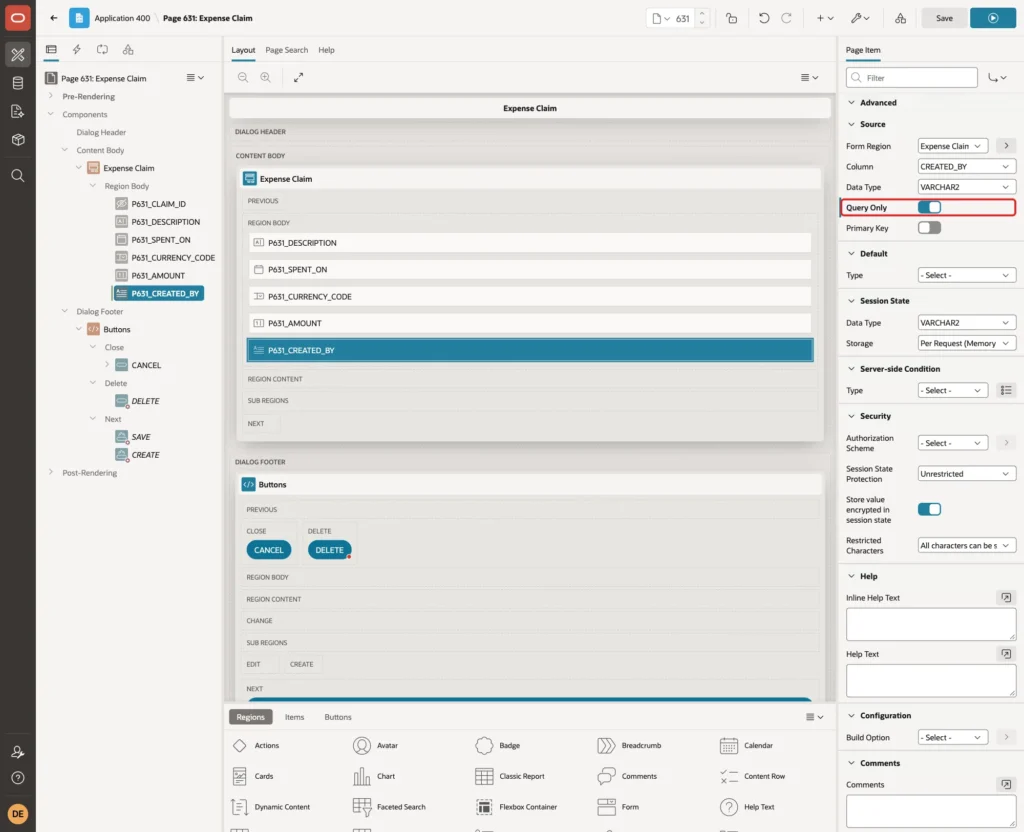
Under Source, turn on Query Only, so the form never writes this column and the DEFAULT ON NULL of the table fills it. Click Save:
Step 8: Add the Conversion Preview Item
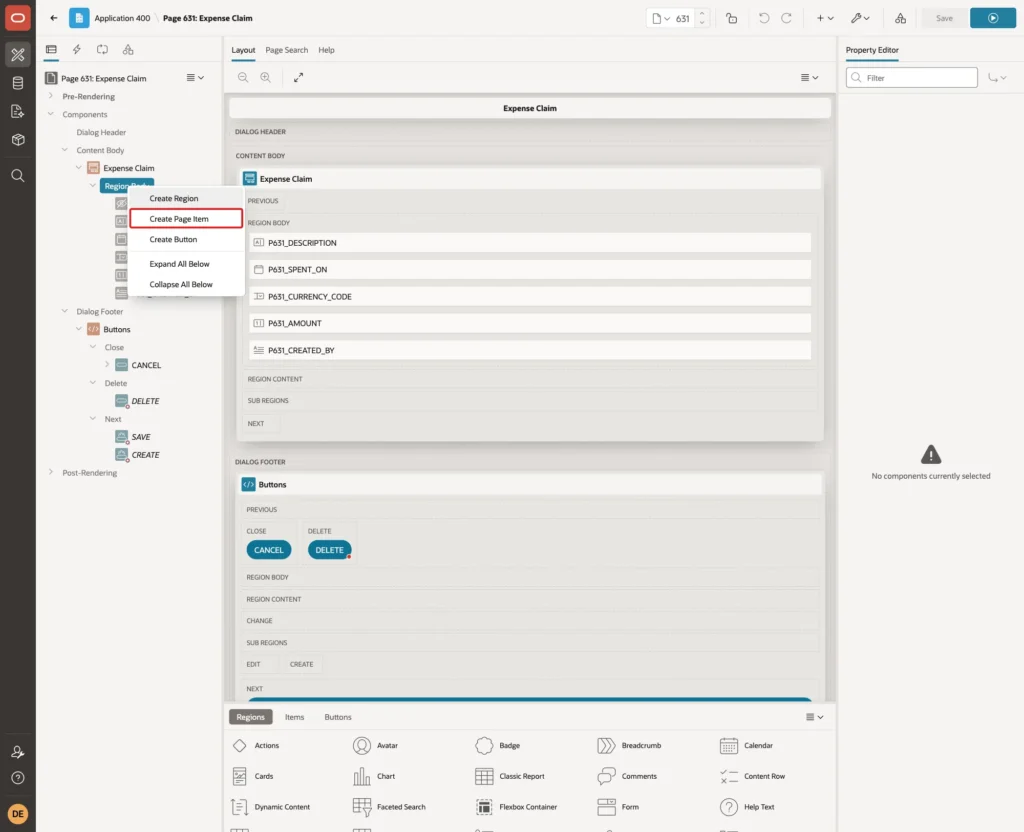
The form gets one more item that shows the rate and the converted amount. It is not a table column. Right-click Region Body under the Expense Claim region and click Create Page Item:
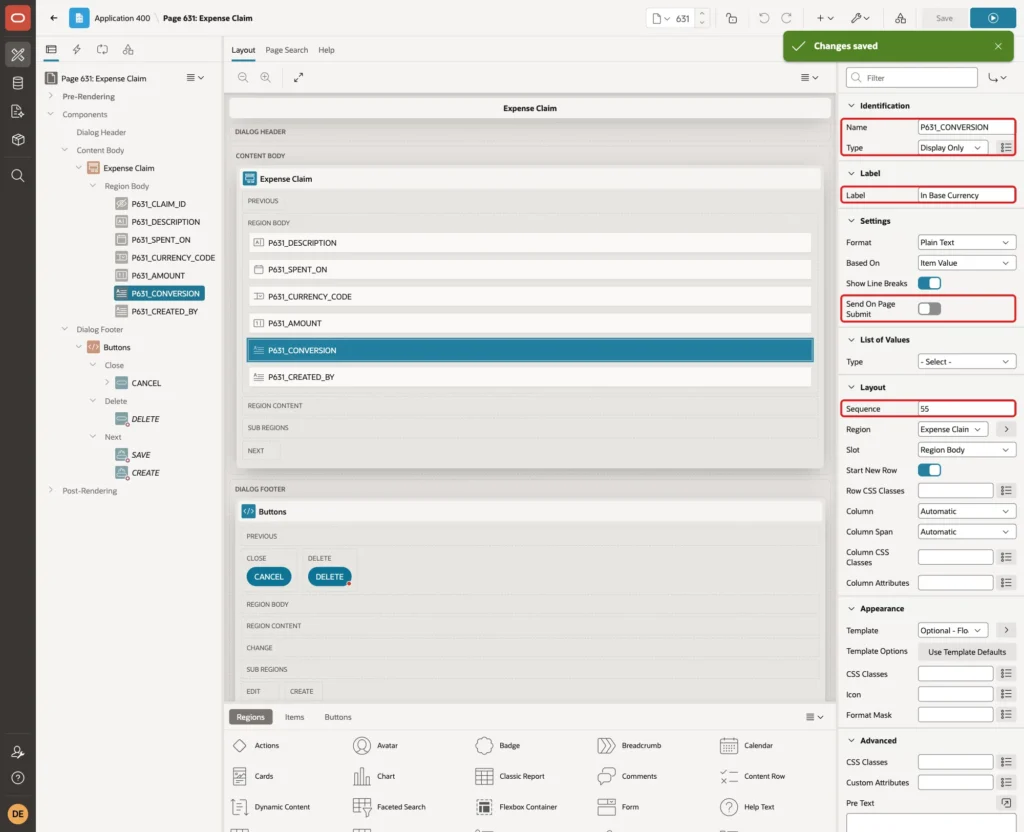
Set Name to P631_CONVERSION, Type to Display Only and Label to In Base Currency. Turn off Send On Page Submit, because the value is for display only. Set Sequence to 55, so the item appears below Amount:
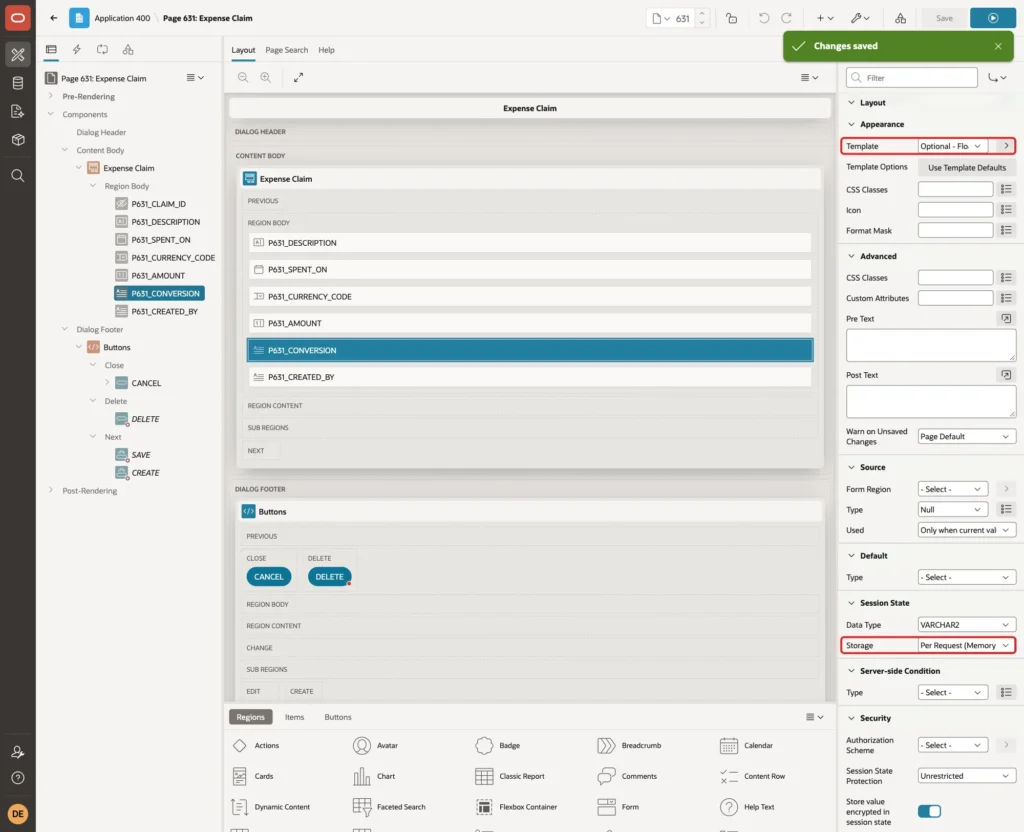
Set Template to Optional - Floating and Session State Storage to Per Request (Memory Only). Click Save:
Step 9: Show the Conversion with a Dynamic Action
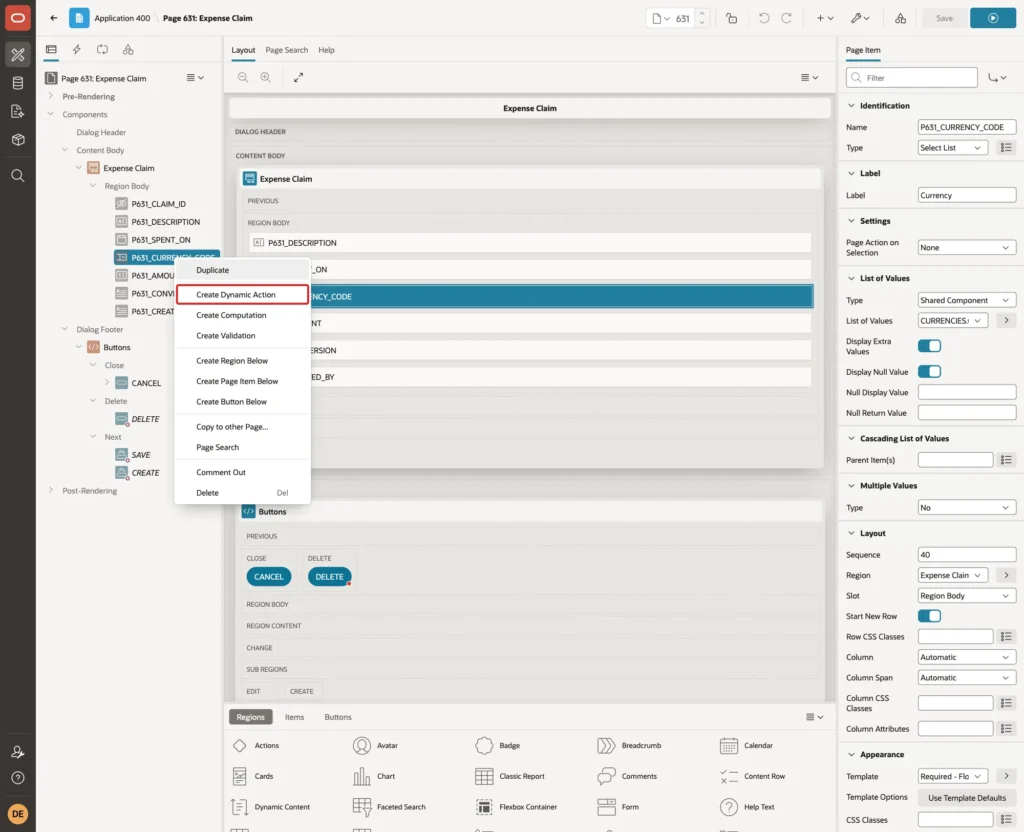
Right-click P631_CURRENCY_CODE and click Create Dynamic Action:
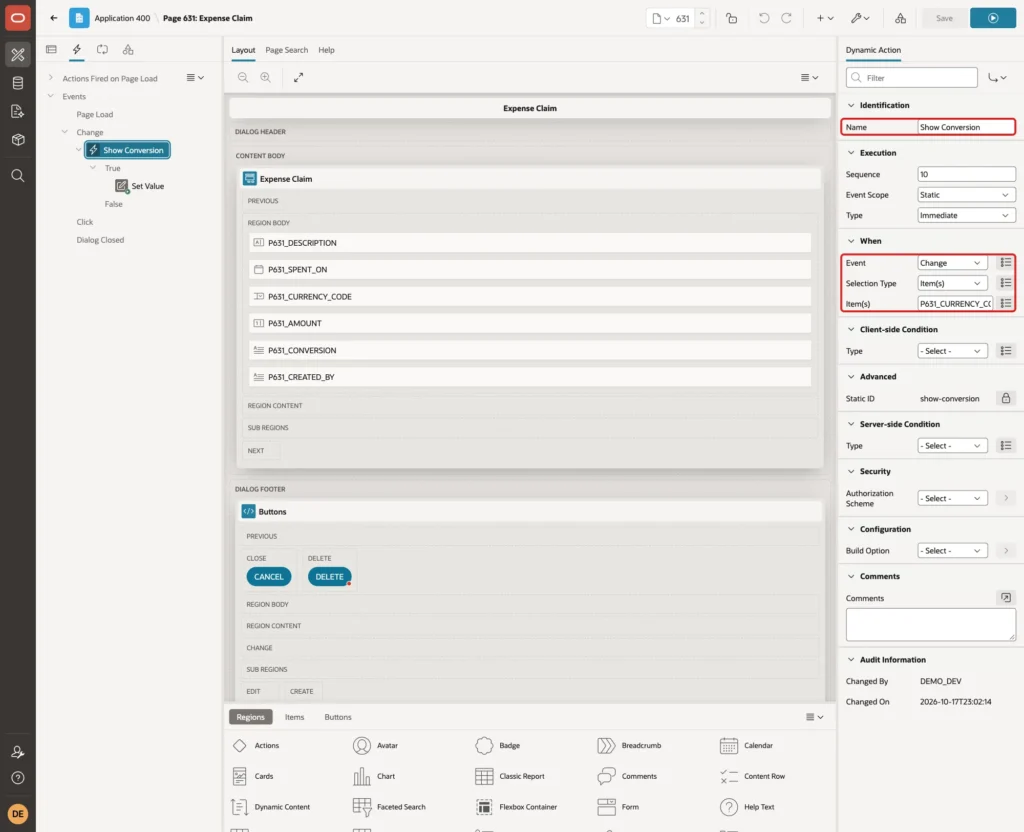
Set Name to Show Conversion. Keep Event Change and Selection Type Item(s), and set Item(s) to P631_CURRENCY_CODE,P631_SPENT_ON,P631_AMOUNT, so a change of any of the three fields updates the preview:
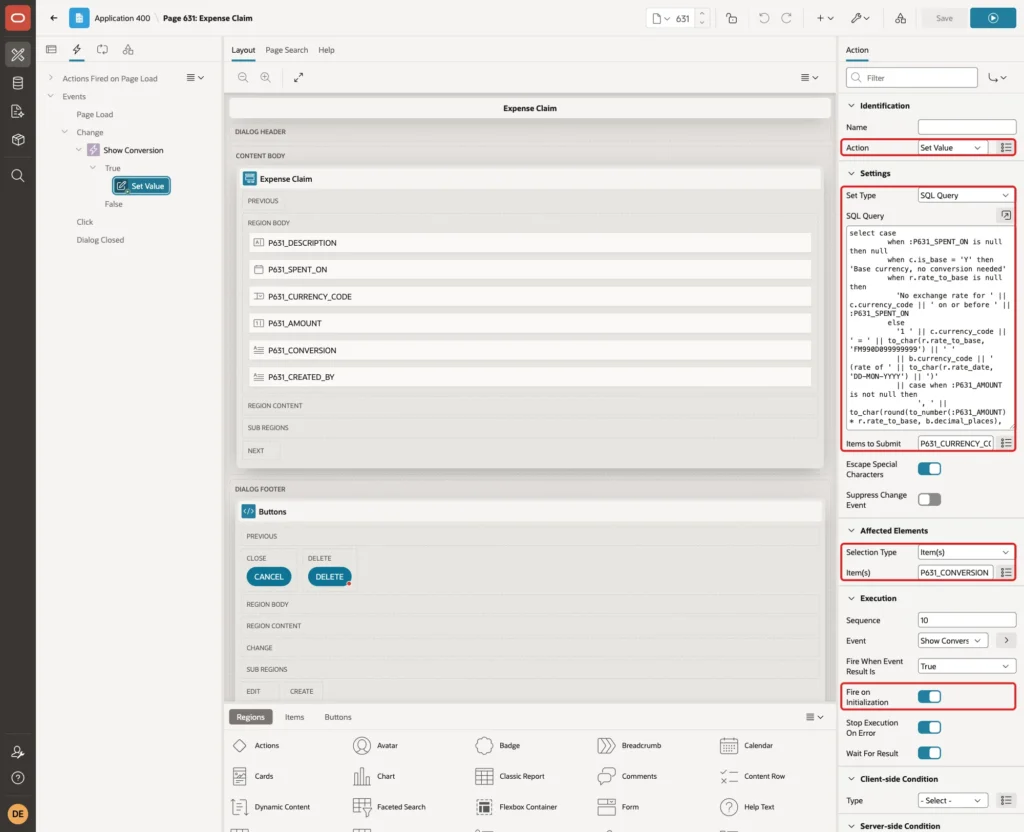
Select the action under True. Set Action to Set Value and Set Type to SQL Query, and enter this query:
Example:
select case
         when :P631_SPENT_ON is null then null
         when c.is_base = 'Y' then 'Base currency, no conversion needed'
         when r.rate_to_base is null then
           'No exchange rate for ' || c.currency_code || ' on or before ' || :P631_SPENT_ON
         else
           '1 ' || c.currency_code || ' = ' || to_char(r.rate_to_base, 'FM990D099999999') || ' '
           || b.currency_code || ' (rate of ' || to_char(r.rate_date, 'DD-MON-YYYY') || ')'
           || case when :P631_AMOUNT is not null then
                ', ' || to_char(round(to_number(:P631_AMOUNT) * r.rate_to_base, b.decimal_places),
                                b.format_mask) || ' ' || b.currency_code
              end
       end
  from currencies c
 cross join (select currency_code, decimal_places, format_mask
               from currencies where is_base = 'Y') b
  left join lateral (
         select x.rate_to_base, x.rate_date
           from exchange_rates x
          where x.currency_code = c.currency_code
            and x.rate_date <= to_date(:P631_SPENT_ON, 'DD-MON-YYYY')
          order by x.rate_date desc
          fetch first 1 row only) r on 1 = 1
 where c.currency_code = :P631_CURRENCY_CODE
The query uses the same LATERAL rate lookup as the view, but for the values on the screen. It returns a short text for the base currency and for a missing rate.
Set Items to Submit to P631_CURRENCY_CODE,P631_SPENT_ON,P631_AMOUNT. Under Affected Elements, set Selection Type to Item(s) and Item(s) to P631_CONVERSION. Keep Fire on Initialization on, so an existing claim shows its conversion when the dialog opens. Click Save:
Step 10: Block Claims Without an Exchange Rate
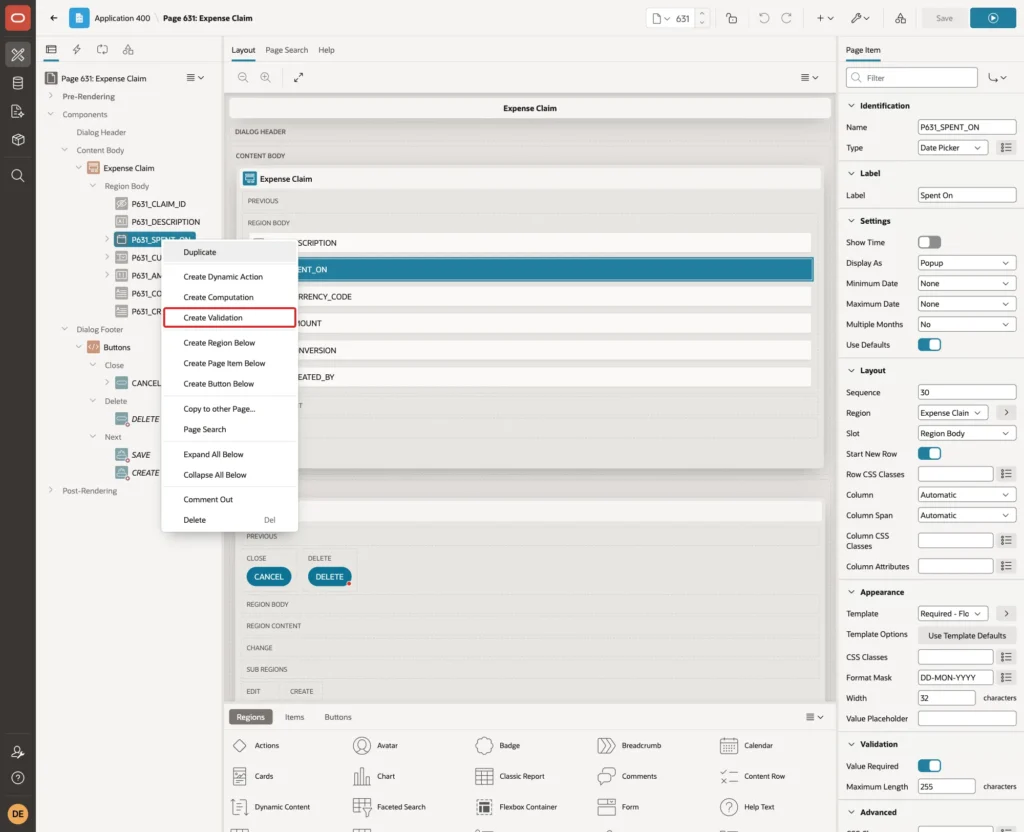
The preview only informs the user. A validation makes sure that a claim in a foreign currency cannot be saved without a rate. Right-click P631_SPENT_ON and click Create Validation:
Set Name to Exchange Rate Exists, Type to Rows returned, and enter this SQL Query:
Example:
select 1
  from currencies c
 where c.currency_code = :P631_CURRENCY_CODE
   and (c.is_base = 'Y'
        or exists (select 1
                     from exchange_rates r
                    where r.currency_code = c.currency_code
                      and r.rate_date <= to_date(:P631_SPENT_ON, 'DD-MON-YYYY')))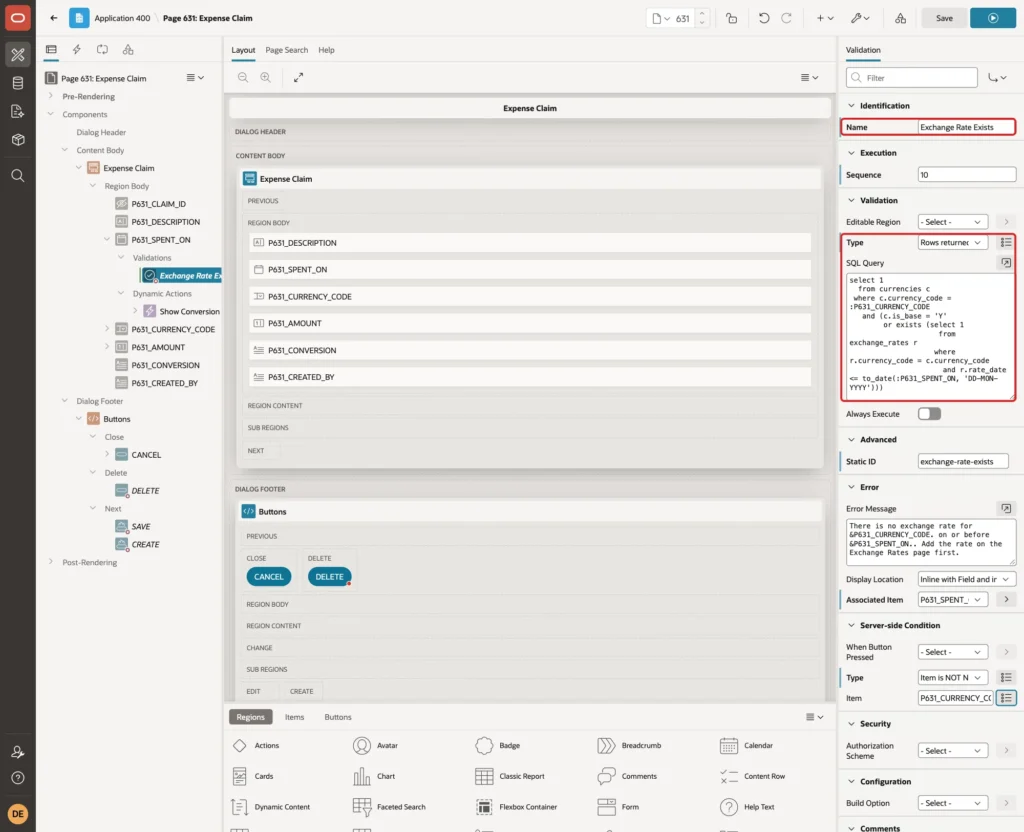
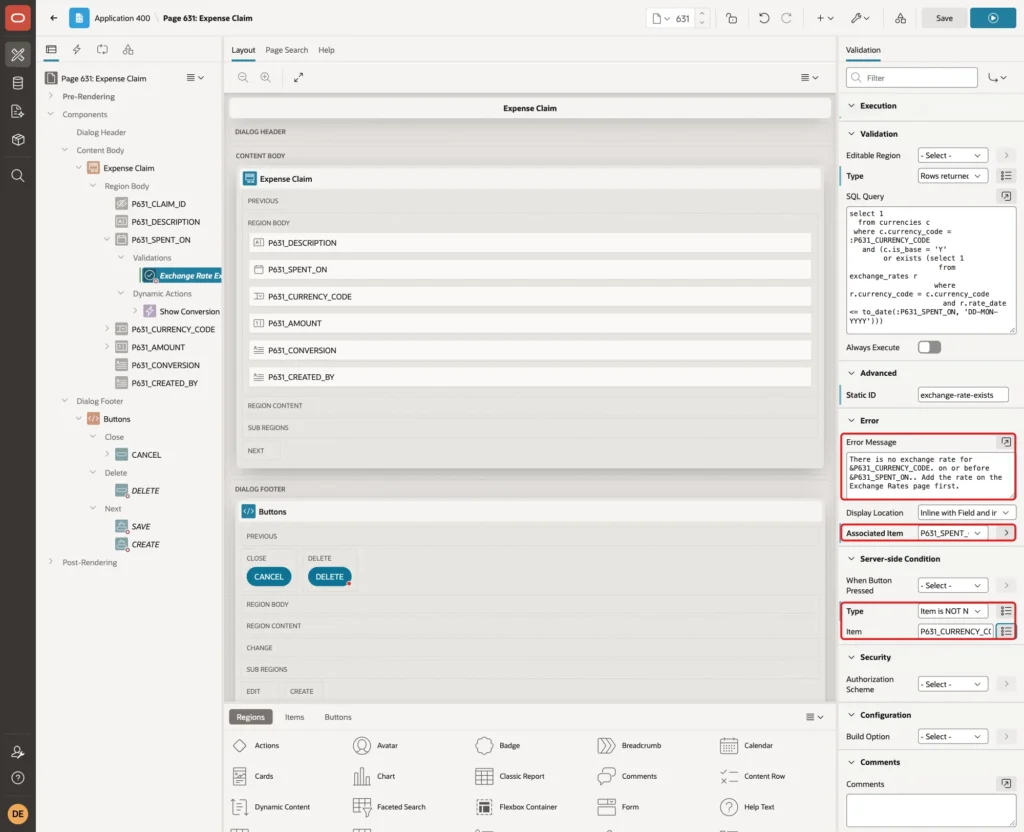
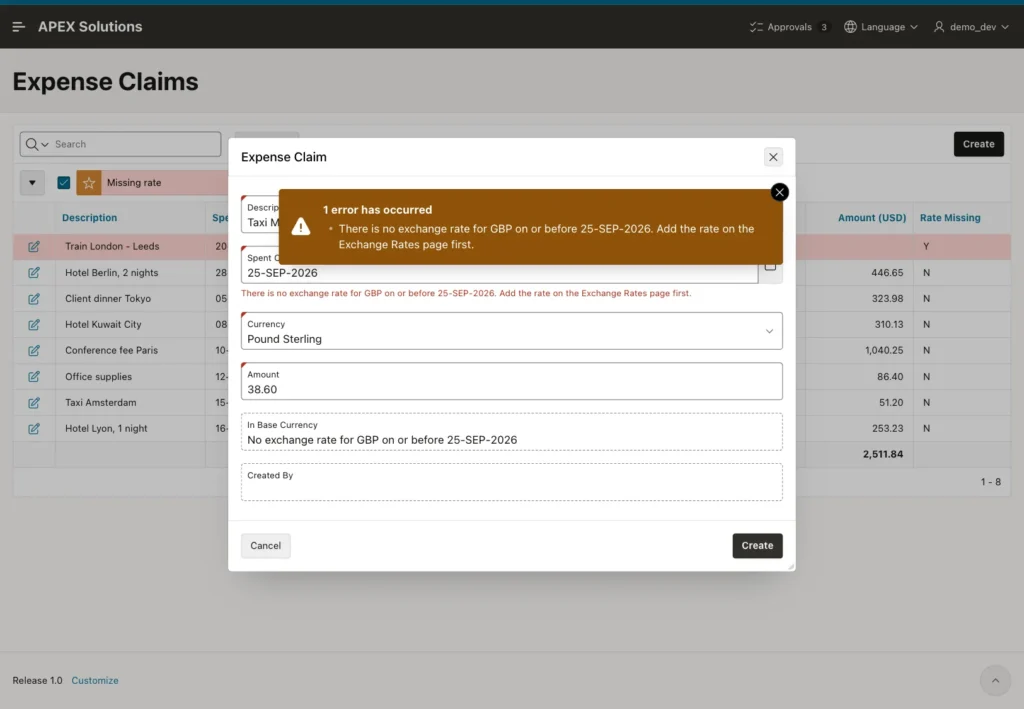
Set Error Message to: There is no exchange rate for &P631_CURRENCY_CODE. on or before &P631_SPENT_ON.. Add the rate on the Exchange Rates page first. Keep Associated Item P631_SPENT_ON.
Under Server-side Condition, set Type to Item is NOT NULL and Item to P631_CURRENCY_CODE. An empty currency is already reported as a required field, so the rate message is not added on top. Click Save:
The Delete button that the wizard created has Execute Validations turned off, so this validation never blocks deleting a claim.
Step 11: Create the Exchange Rates Page
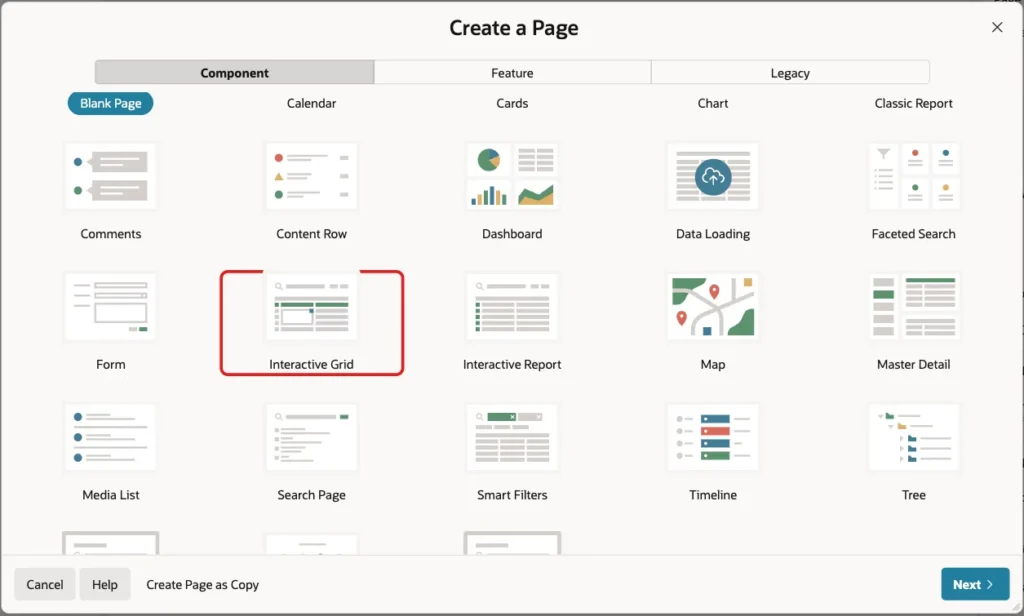
Rates are maintained in an editable interactive grid. Click Create Page and, on the Component tab, click Interactive Grid:
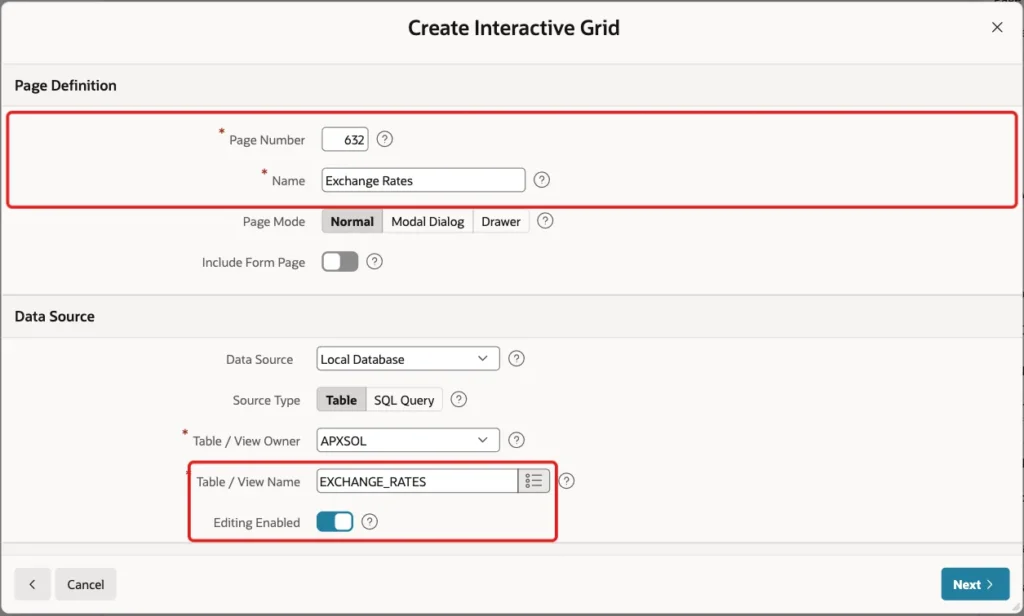
Enter Page Number 632 and Name Exchange Rates. Select the table EXCHANGE_RATES and turn on Editing Enabled:
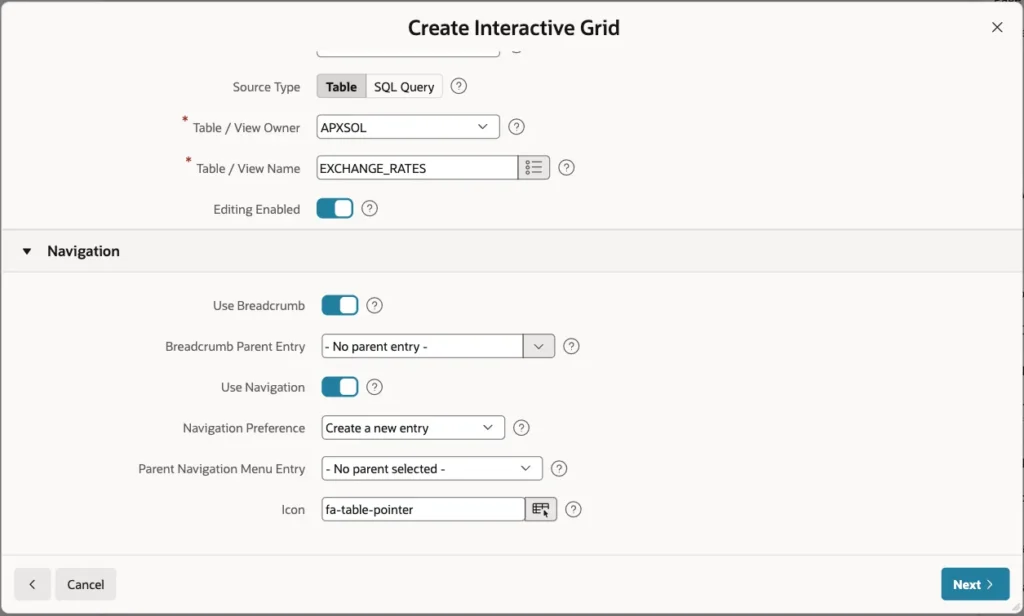
Keep the Navigation settings and click Next:
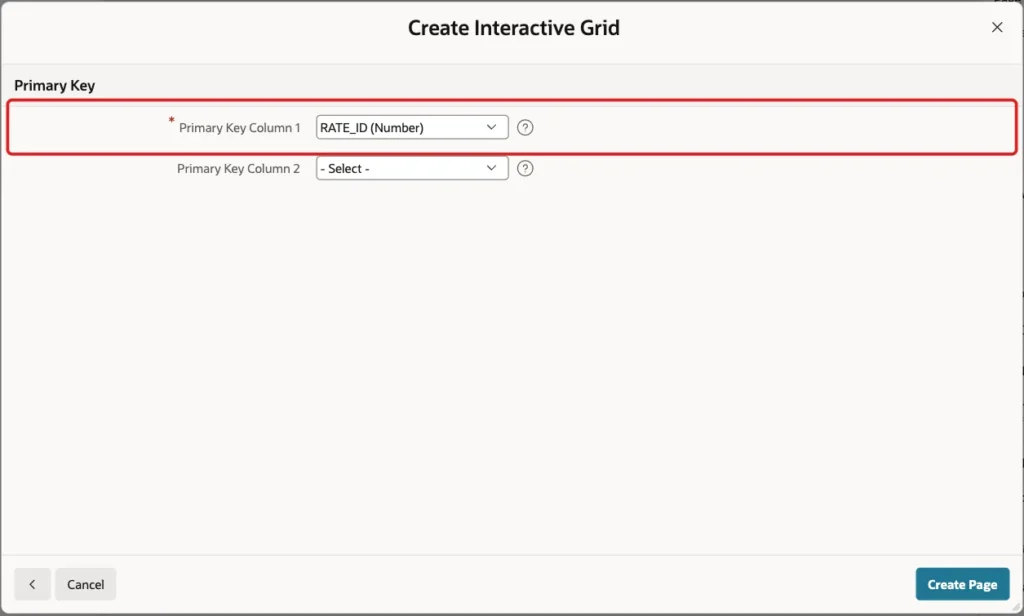
Select RATE_ID (Number) as Primary Key Column 1 and click Create Page:
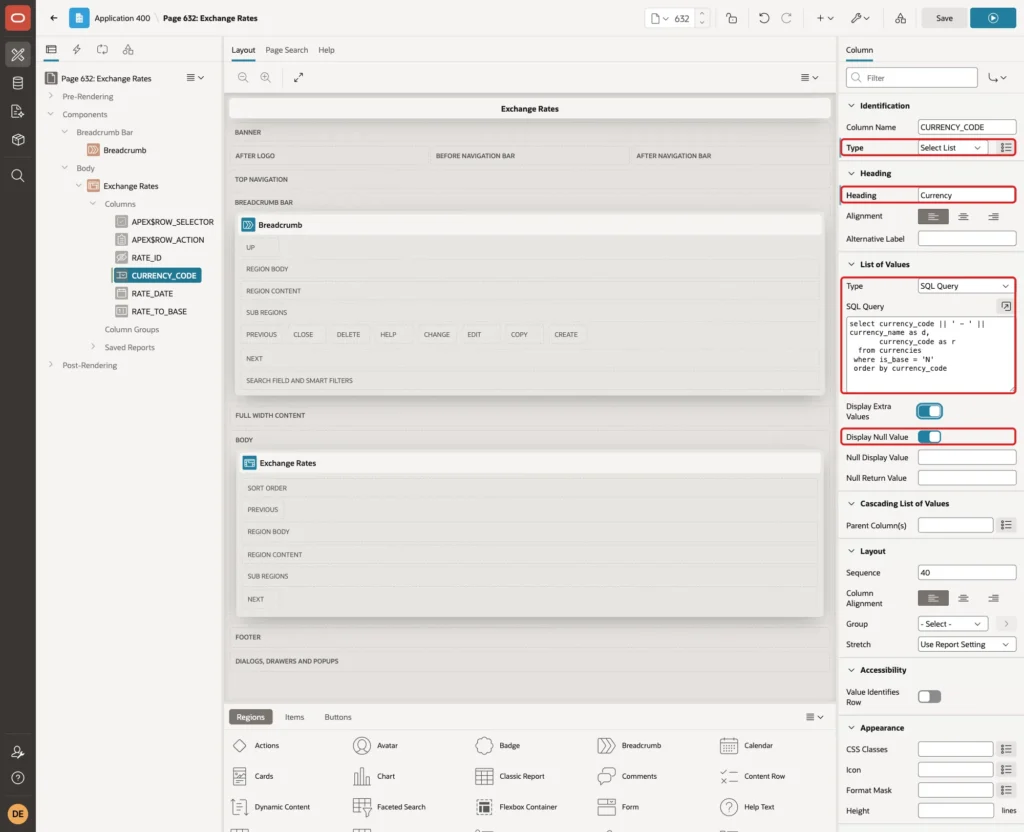
The grid wizard creates CURRENCY_CODE as a plain text field. In Page Designer, expand the Columns of the Exchange Rates region and select CURRENCY_CODE. Set Type to Select List, Heading to Currency, List of Values Type to SQL Query, and enter this query:
Example:
select currency_code || ' - ' || currency_name as d,
       currency_code as r
  from currencies
 where is_base = 'N'
 order by currency_code
Turn on Display Null Value. The list leaves out the base currency, because it never needs a rate:
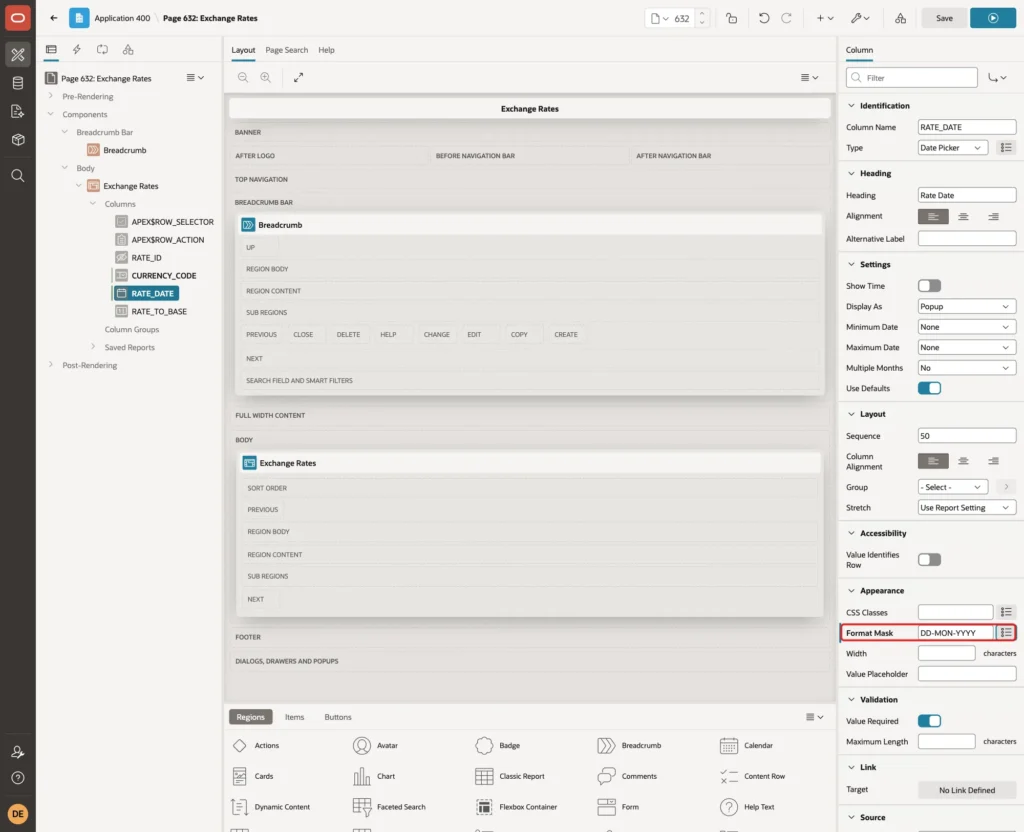
Select RATE_DATE and set Format Mask to DD-MON-YYYY:
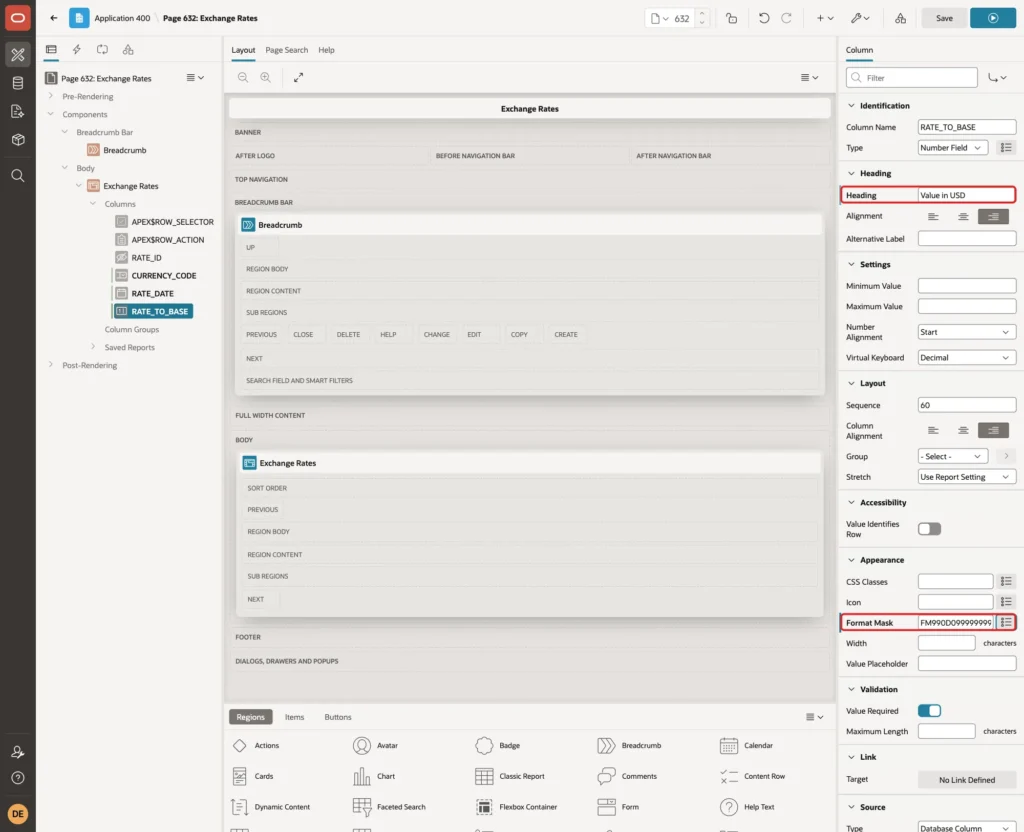
Select RATE_TO_BASE, set Heading to Value in USD and Format Mask to FM990D099999999, and click Save:
Step 12: Add the Total and Highlight Missing Rates
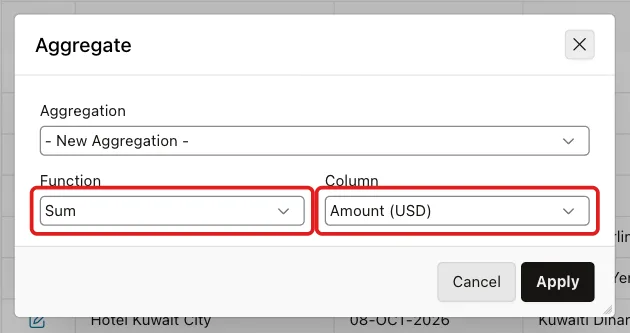
Run page 630. Click Actions, Data, Aggregate. Select Function Sum and Column Amount (USD), and click Apply:
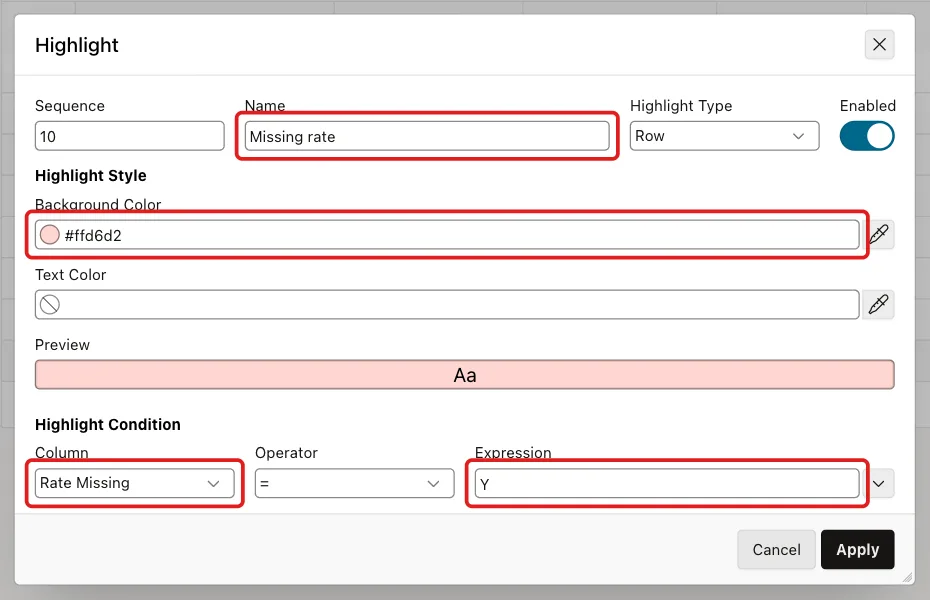
Click Actions, Format, Highlight. Enter Name Missing rate, keep Highlight Type Row, enter Background Color #FFD6D2, select Column Rate Missing, keep the operator = and enter Expression Y. Click Apply:
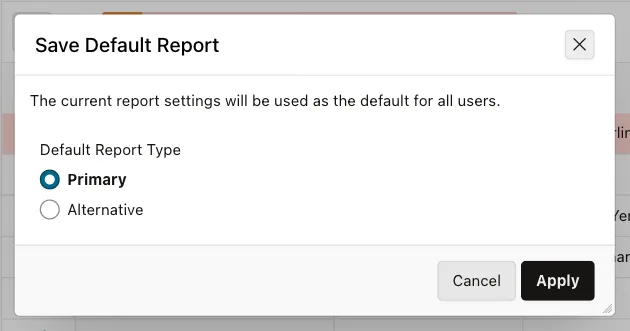
Click the Spent On heading and sort ascending. Then click Actions, Report, Save Report, select As Default Report Settings, keep Primary and click Apply:
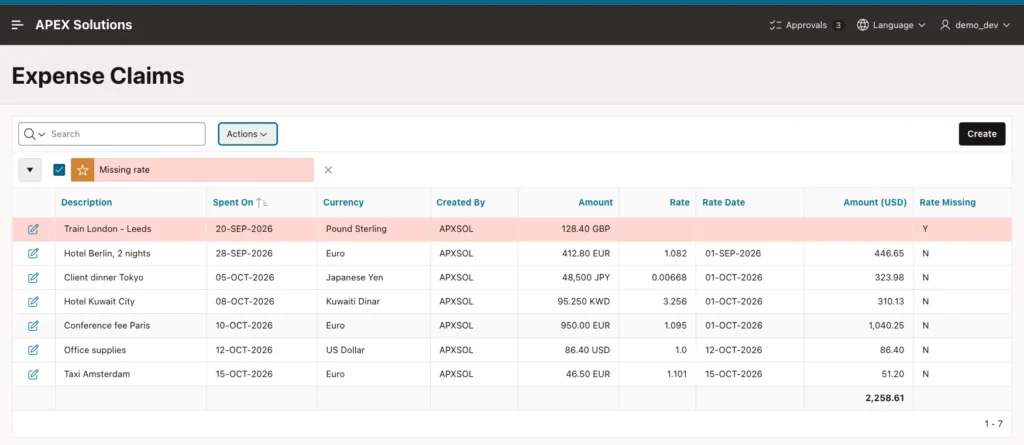
The report now shows every claim in its own currency, the rate used, the date of that rate and the amount in US dollars. The London train is highlighted, and the total of 2,258.61 does not include it:
Step 13: Test the Pages
Click Create. Enter Hotel Lyon, 1 night, Spent On 16-OCT-2026, Currency Euro and Amount 230. The preview uses the euro rate of 15 October:
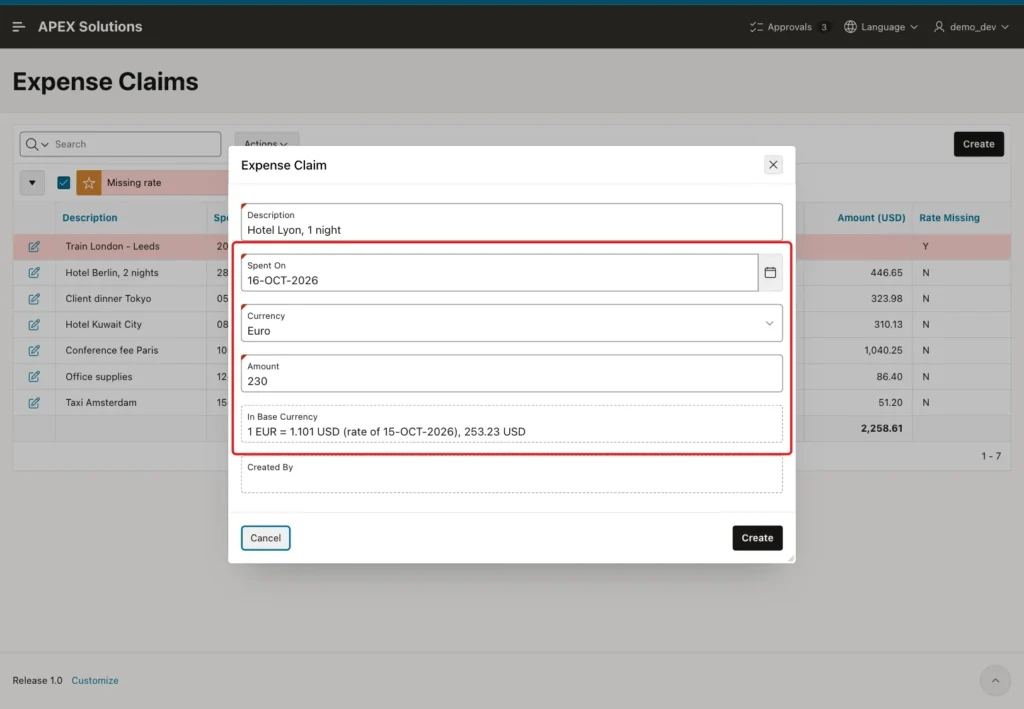
Changing Spent On to 14-OCT-2026 switched the preview to the rate of 1 October: 1 EUR = 1.095 USD, 251.85 USD. With the date set back to 16 October, Create saved the claim.
Choosing US Dollar showed "Base currency, no conversion needed". For 24 Japanese yen the preview showed 0.16 USD, and for 24 Kuwaiti dinars 78.14 USD, each rounded to the two decimals of the base currency.
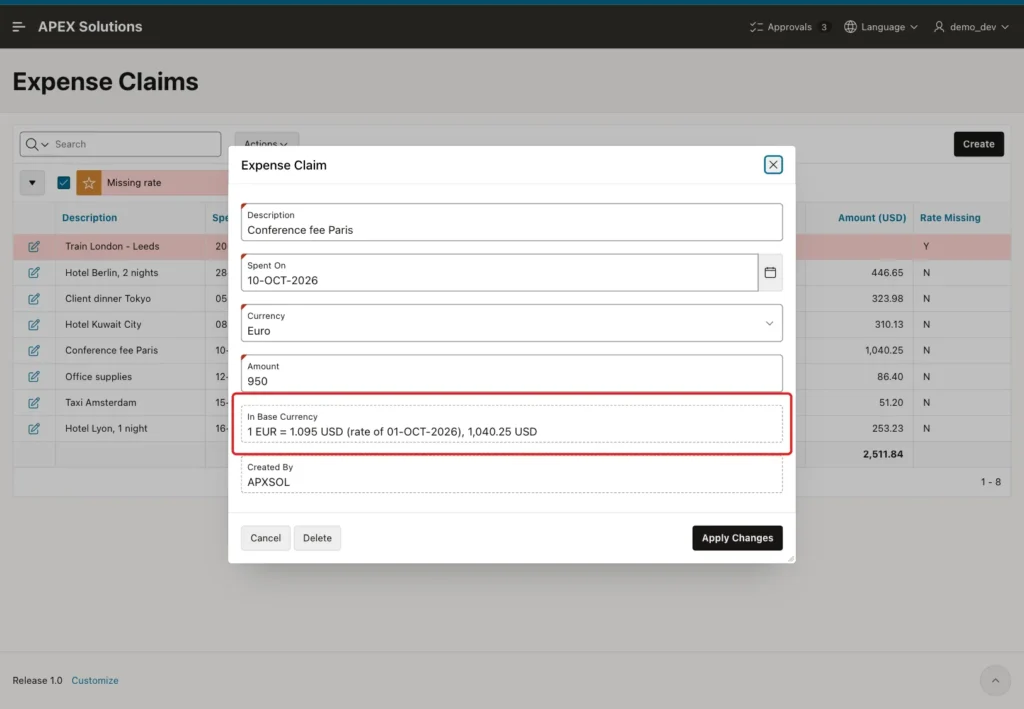
Open the Conference fee Paris claim. Because the dynamic action fires on initialization, the dialog shows the conversion of the saved claim:
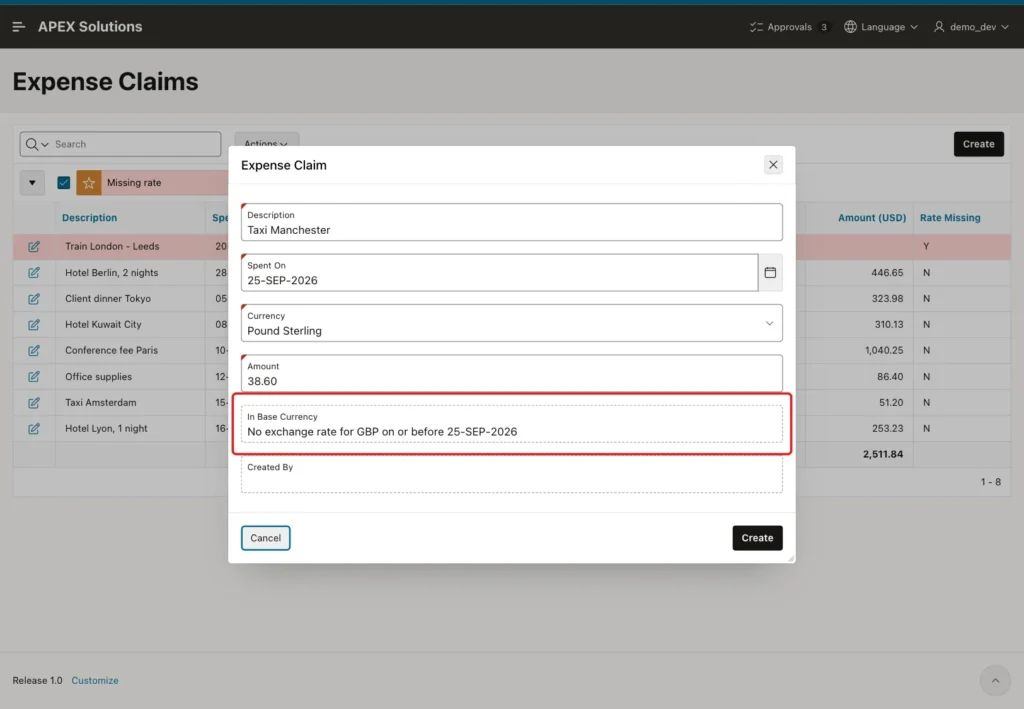
Now the negative test. Create a claim Taxi Manchester on 25-SEP-2026 for 38.60 Pound Sterling. The preview already warns that there is no rate:
Click Create. The validation stops the claim, and nothing is saved:
An amount of -5 was rejected by APEX with "Amount must be a number between 0.001 and 99999999999." before it reached the database.
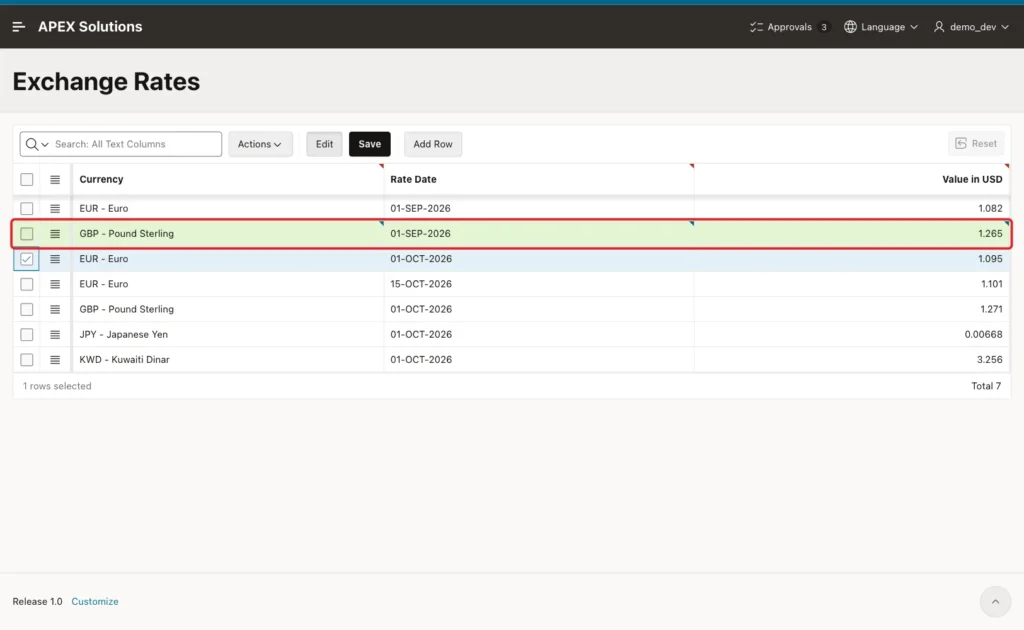
Open page 632, click Add Row, select GBP - Pound Sterling, enter 01-SEP-2026 and 1.265, and click Save:
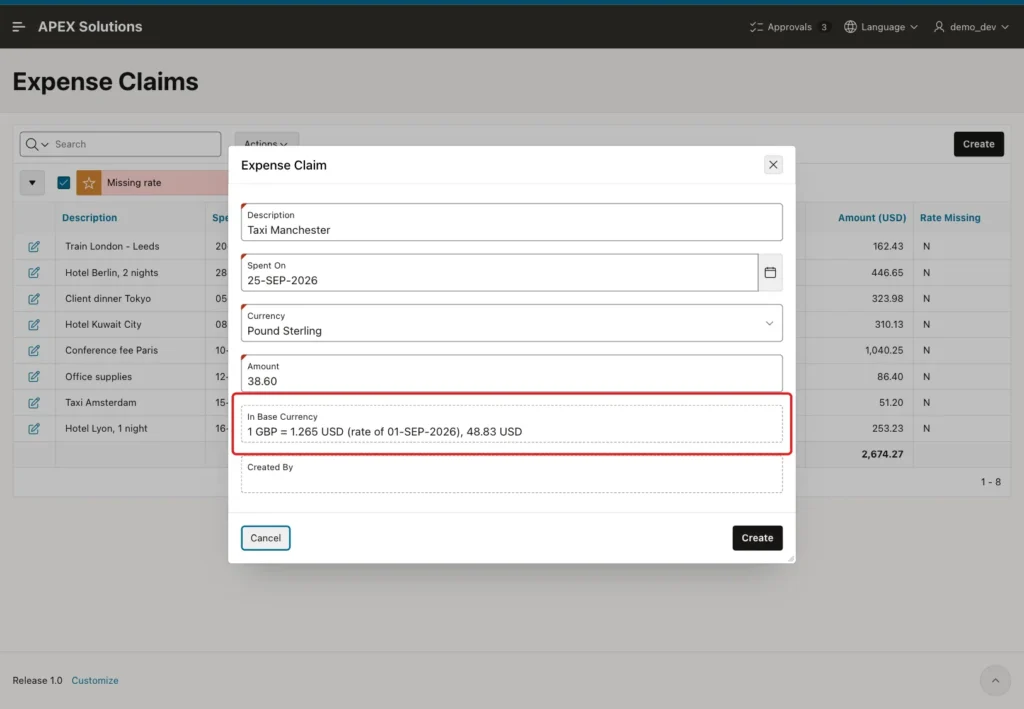
Back on the claim form, the same Manchester taxi now converts with the new rate and can be created:
The report converts the London train too, because the view looks up the rate each time it runs. Signed in as another user, SALES_USER, the report shows the default sort, the highlight and the total of 2,723.10:
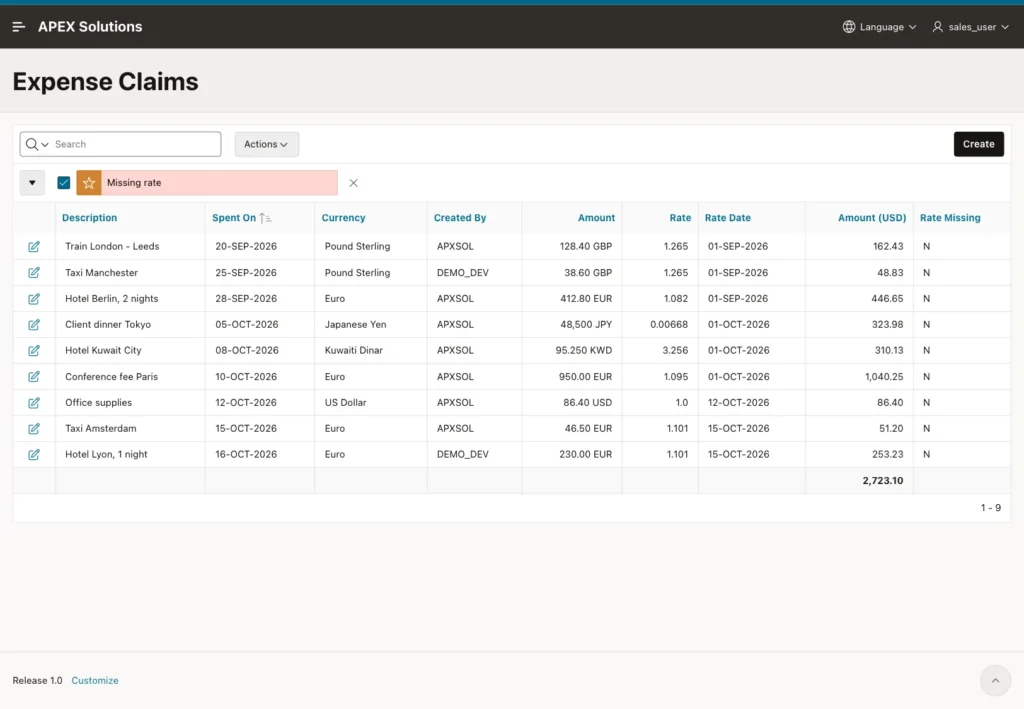
The same result in SQL:
Example:
set lines 200 pages 100 feedback on
select claim_id, to_char(spent_on, 'DD-MON-YYYY') spent_on, amount_text,
       rate_to_base, to_char(rate_date, 'DD-MON-YYYY') rate_date, base_amount, rate_missing, created_by
  from expense_claims_v
 where currency_code = 'GBP' or claim_id > 7
 order by claim_id;

select nvl(currency_code, 'All') currency,
       count(*) claims,
       case when grouping(currency_code) = 0 then sum(amount) end original_total,
       sum(base_amount) usd_total,
       sum(case rate_missing when 'Y' then 1 else 0 end) missing_rates
  from expense_claims_v
 group by rollup (currency_code)
 order by grouping(currency_code), currency_code;
Output:
   CLAIM_ID SPENT_ON       AMOUNT_TEXT       RATE_TO_BASE RATE_DATE         BASE_AMOUNT RATE_MISSING    CREATED_BY
___________ ______________ ______________ _______________ ______________ ______________ _______________ _____________
          4 20-SEP-2026    128.40 GBP               1.265 01-SEP-2026            162.43 N               APXSOL
         21 16-OCT-2026    230.00 EUR               1.101 15-OCT-2026            253.23 N               DEMO_DEV
         23 25-SEP-2026    38.60 GBP                1.265 01-SEP-2026             48.83 N               DEMO_DEV

3 rows selected.

CURRENCY       CLAIMS    ORIGINAL_TOTAL    USD_TOTAL    MISSING_RATES
___________ _________ _________________ ____________ ________________
EUR                 4            1639.3      1791.33                0
GBP                 2               167       211.26                0
JPY                 1             48500       323.98                0
KWD                 1             95.25       310.13                0
USD                 1              86.4         86.4                0
All                 9                         2723.1                0

6 rows selected.
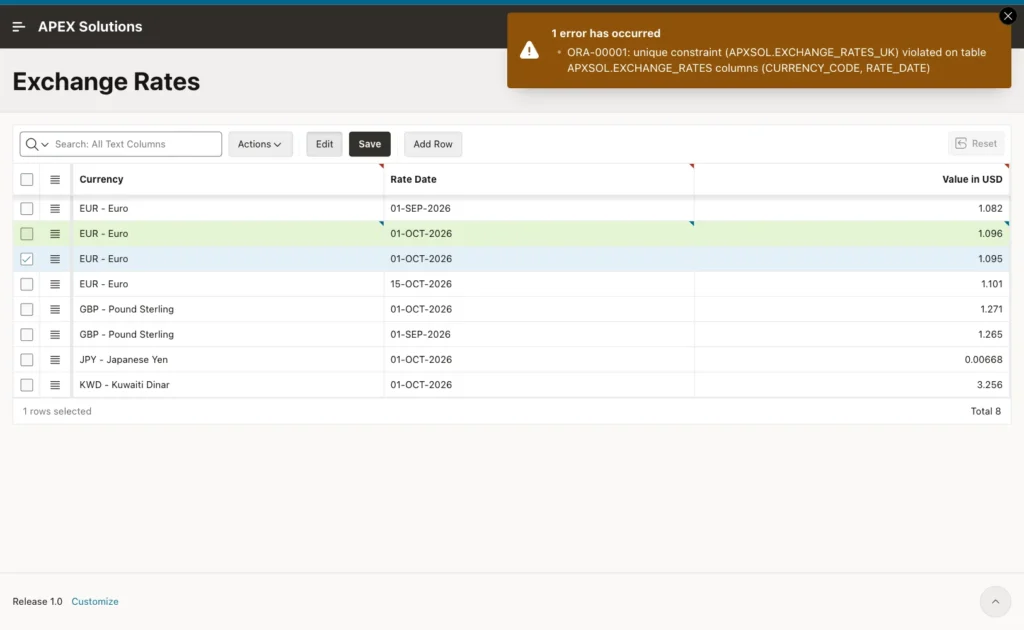
A second euro rate for 01-OCT-2026 was rejected by EXCHANGE_RATES_UK, and the grid kept the row unsaved:
Things to Know
- The view converts with the current rate table every time. If a past rate is corrected, the converted amounts of that period change too. If converted amounts must never change, store RATE_TO_BASE and BASE_AMOUNT in the claim when it is approved.
- A rate is valid from its RATE_DATE until the next rate of the same currency. A claim before the first rate of its currency gets no conversion, never a guessed one.
- Sum only the base currency amounts across currencies. Original amounts can be added per currency only.
- When a total leaves out rows without a rate, show it, as the highlight and the MISSING_RATES column do here.
- The masks with G and D follow the NLS settings of the session, so the group and decimal characters can differ by language.
- The validation protects the APEX form only. A data load that inserts claims without rates is still possible, and the report then shows those claims as missing.
Related Guides
- How to Calculate Due Dates in Business Days, Skipping Holidays in Oracle APEX
- Oracle APEX Interactive Reports: The Complete Guide
Conclusion
Multi-currency amounts in Oracle APEX need a currency table, exchange rates by date, and one rule: convert with the latest rate on or before the transaction date. A view with a LATERAL lookup applies that rule for the report, and the same query feeds a Set Value preview in the form.
A Rows returned validation stops amounts without a rate, constraints keep the rate table clean, and an interactive report aggregate gives the total in the base currency. Test the edge cases in SQL first: a rate on the same day, a date before the first rate, and currencies with zero or three decimals.
