
A normal unique constraint compares names exactly. To Oracle, "Laptop", "laptop" and "Laptop " with a trailing space are three different values. Users see them as the same name, so a table slowly fills with near duplicates that break searches, reports and lookups.
The fix has two parts. The database must reject the duplicate, whatever program inserts it. The APEX form must catch it first and show a clear message, not an ORA-00001 error with a system column name in it.
This guide builds both parts: a function-based unique index, a declarative APEX validation, and a page error handling function for the rare case when two users save the same name at the same moment. It uses stock items as the example; the same steps work for any table with a name or code column.
How to Fix ORA-00001: Unique Constraint Violated in Oracle explains the error itself in SQL. Handle All Errors in One Place in Oracle APEX: Error Handling Function and Error Log builds one handler for the whole application. Here the focus is case-insensitive uniqueness, with a small handler on one page.
Step 1: Create the Tables
The example needs two tables. STOCK_CATEGORIES holds the categories. STOCK_ITEMS holds the items, and each item name must be unique without regard to case or outer spaces.
Create the tables, the indexes and the sample data:
Example:
create table stock_categories (
  category_id    number generated by default on null as identity,
  category_name  varchar2(60 char) not null,
  constraint stock_categories_pk primary key (category_id),
  constraint stock_categories_name_uk unique (category_name)
);

create table stock_items (
  item_id      number generated by default on null as identity,
  item_name    varchar2(100 char) not null,
  category_id  number not null,
  unit_price   number(10,2) not null,
  created_on   date default on null sysdate not null,
  constraint stock_items_pk primary key (item_id),
  constraint stock_items_category_fk foreign key (category_id)
    references stock_categories (category_id),
  constraint stock_items_price_ck check (unit_price >= 0)
);

create unique index stock_items_name_uk on stock_items (upper(trim(item_name)));

create index stock_items_category_ix on stock_items (category_id);

insert into stock_categories (category_id, category_name) values (1, 'Computers');
insert into stock_categories (category_id, category_name) values (2, 'Accessories');
insert into stock_categories (category_id, category_name) values (3, 'Furniture');

insert into stock_items (item_id, item_name, category_id, unit_price) values (1, 'Laptop', 1, 950);
insert into stock_items (item_id, item_name, category_id, unit_price) values (2, 'Docking Station', 1, 180);
insert into stock_items (item_id, item_name, category_id, unit_price) values (3, 'Wireless Mouse', 2, 25);
insert into stock_items (item_id, item_name, category_id, unit_price) values (4, 'USB-C Cable', 2, 12);
insert into stock_items (item_id, item_name, category_id, unit_price) values (5, 'Standing Desk', 3, 420);

commit;

alter table stock_categories modify category_id generated by default on null as identity (start with limit value);
alter table stock_items modify item_id generated by default on null as identity (start with limit value);

column item_name format a16
column category_name format a13
select i.item_id, i.item_name, c.category_name, i.unit_price
from   stock_items i
join   stock_categories c on c.category_id = i.category_id
order by i.item_id;
Output:
Table STOCK_CATEGORIES created.

Table STOCK_ITEMS created.

Index STOCK_ITEMS_NAME_UK created.

Index STOCK_ITEMS_CATEGORY_IX created.

1 row inserted.

1 row inserted.

1 row inserted.

1 row inserted.

1 row inserted.

1 row inserted.

1 row inserted.

1 row inserted.

Commit complete.

Table STOCK_CATEGORIES altered.

Table STOCK_ITEMS altered.

   ITEM_ID ITEM_NAME          CATEGORY_NAME       UNIT_PRICE
__________ __________________ ________________ _____________
         1 Laptop             Computers                  950
         2 Docking Station    Computers                  180
         3 Wireless Mouse     Accessories                 25
         4 USB-C Cable        Accessories                 12
5 Standing Desk Furniture 420- STOCK_ITEMS_NAME_UK is a unique index on the expression upper(trim(item_name)). Oracle stores "LAPTOP" for "Laptop", "laptop" and " laptop ", so only one of them can exist.
- STOCK_ITEMS_CATEGORY_FK links each item to a category, and STOCK_ITEMS_CATEGORY_IX indexes that foreign key.
- STOCK_ITEMS_PRICE_CK rejects a negative price, and DEFAULT ON NULL fills CREATED_ON when a program inserts a row without it.
The rule lives in the table, not in a trigger. A unique index on an expression is declarative, and it also protects data loaded by scripts, REST services or SQL Developer.
Step 2: Test the Rule in SQL
Before building any page, check that the index really blocks a near duplicate. The first insert uses "laptop " in lower case with a trailing space. The second insert uses a new name:
Example:
insert into stock_items (item_name, category_id, unit_price) values ('laptop ', 1, 899);

insert into stock_items (item_name, category_id, unit_price) values ('Laptop Stand', 2, 45);

rollback;

select index_name, uniqueness, column_expression
from   user_ind_expressions e
join   user_indexes i using (index_name)
where  index_name = 'STOCK_ITEMS_NAME_UK';
Output:
Error starting at line : 1 File @ b60/01-sql-test.sql
In command -
insert into stock_items (item_name, category_id, unit_price) values ('laptop ', 1, 899)
Error report -
ORA-00001: unique constraint (APXSOL.STOCK_ITEMS_NAME_UK) violated on table
APXSOL.STOCK_ITEMS columns (SYS_NC00006$)
ORA-03301: (ORA-00001 details) row with column values (SYS_NC00006$:'LAPTOP')
already exists
Help: https://docs.oracle.com/error-help/db/ora-00001/

1 row inserted.

Rollback complete.

INDEX_NAME             UNIQUENESS    COLUMN_EXPRESSION
______________________ _____________ ___________________________
STOCK_ITEMS_NAME_UK    UNIQUE        UPPER(TRIM("ITEM_NAME"))
Oracle rejects "laptop " with ORA-00001 and names the index STOCK_ITEMS_NAME_UK. The column in the message is SYS_NC00006$, a hidden column that Oracle created for the index expression. That is exactly the kind of text a form user should never see.
Step 3: Create the Report and Form Pages
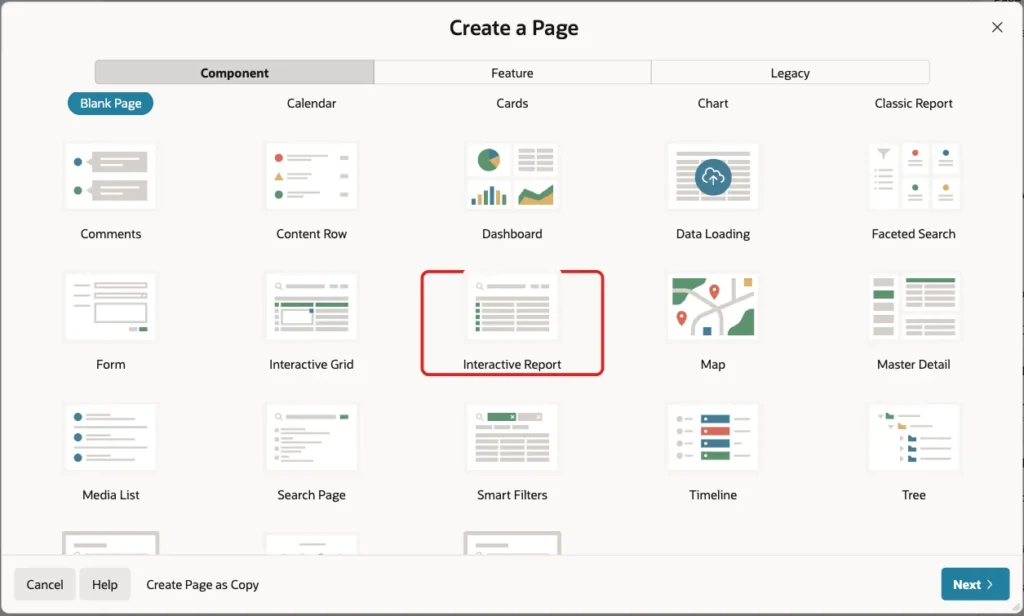
In App Builder, open the application and click Create Page. On the Component tab, click Interactive Report:
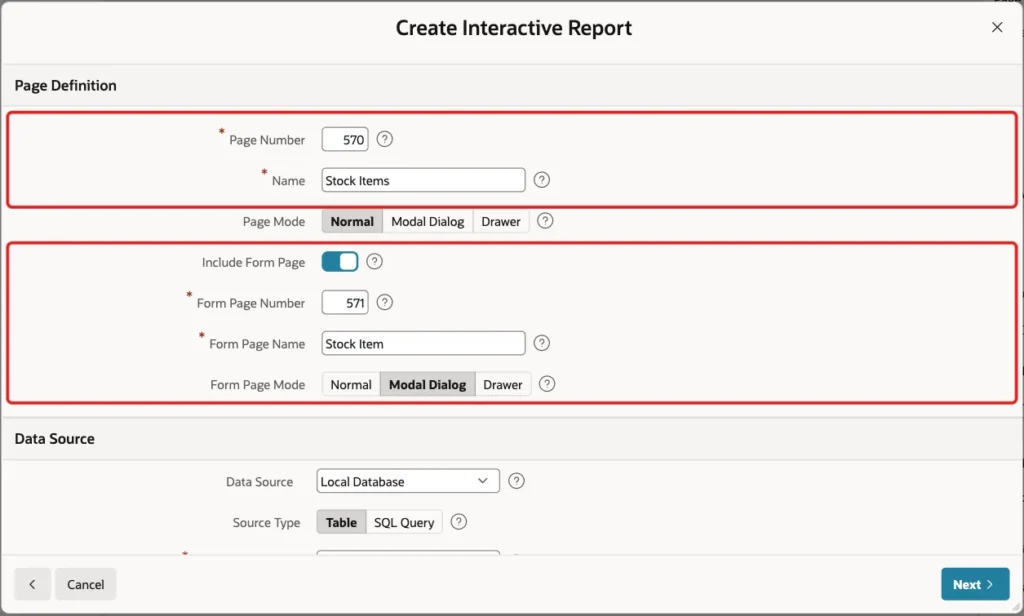
Enter Page Number 570 and Name Stock Items. Turn on Include Form Page, enter Form Page Number 571 and Form Page Name Stock Item, and keep Form Page Mode Modal Dialog:
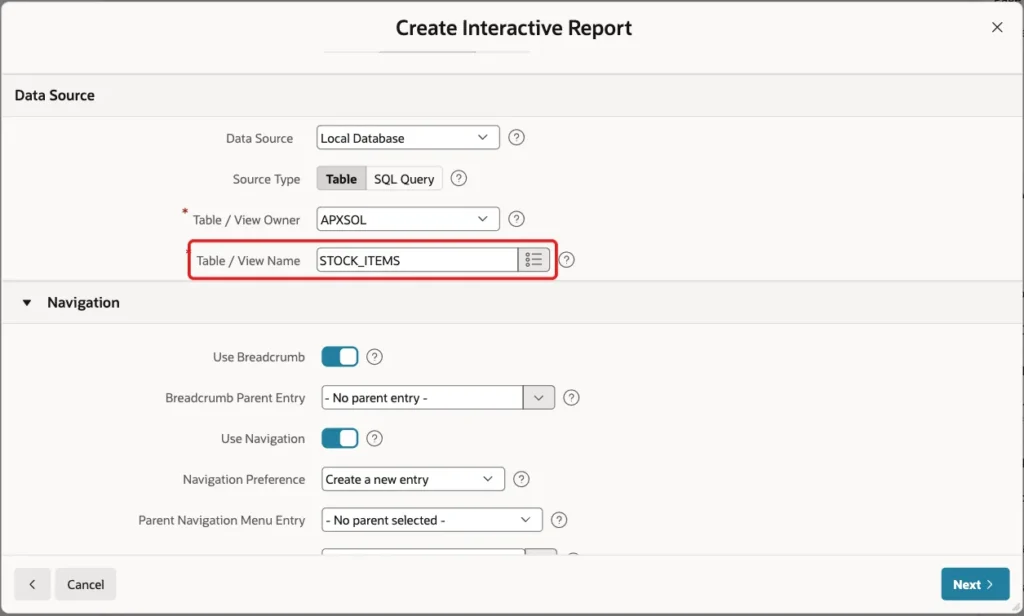
Under Data Source, keep Local Database and Source Type Table, and enter Table / View Name STOCK_ITEMS:
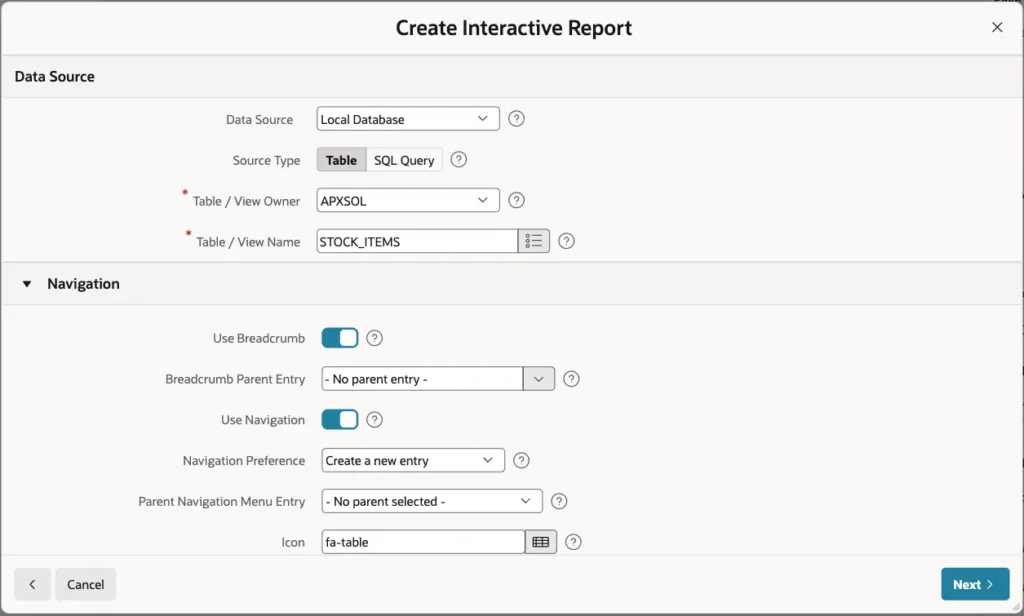
Keep Use Breadcrumb and Use Navigation on, so the report gets a menu entry, and click Next:
On the Primary Key screen, select ITEM_ID (Number) as Primary Key Column 1 and click Create Page:
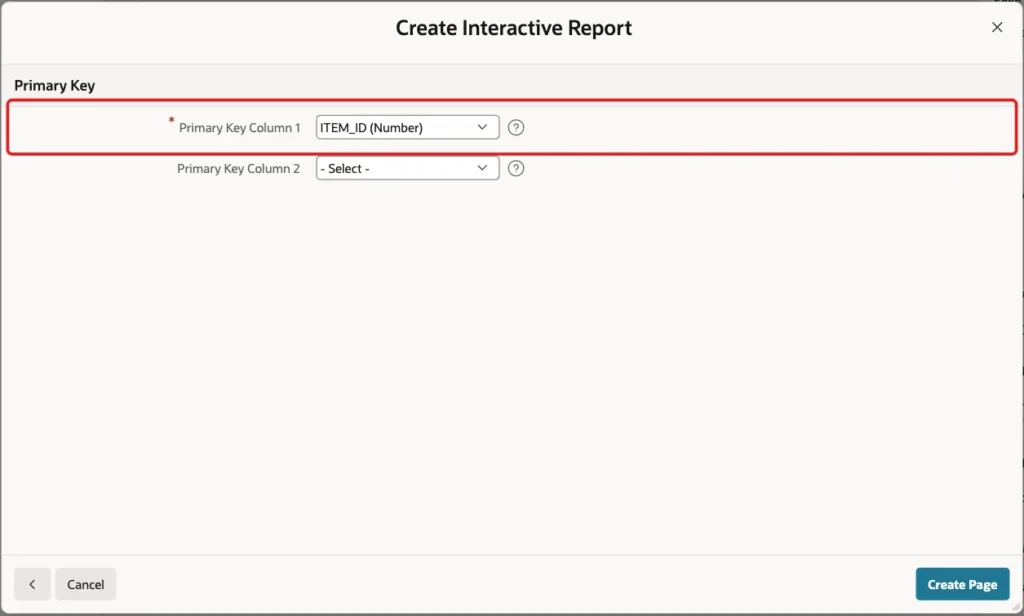
APEX creates the Stock Items report on page 570 and the Stock Item modal form on page 571. It also creates a select list for CATEGORY_ID with a shared list of values that shows the category names.
Step 4: Set Up the Form Items
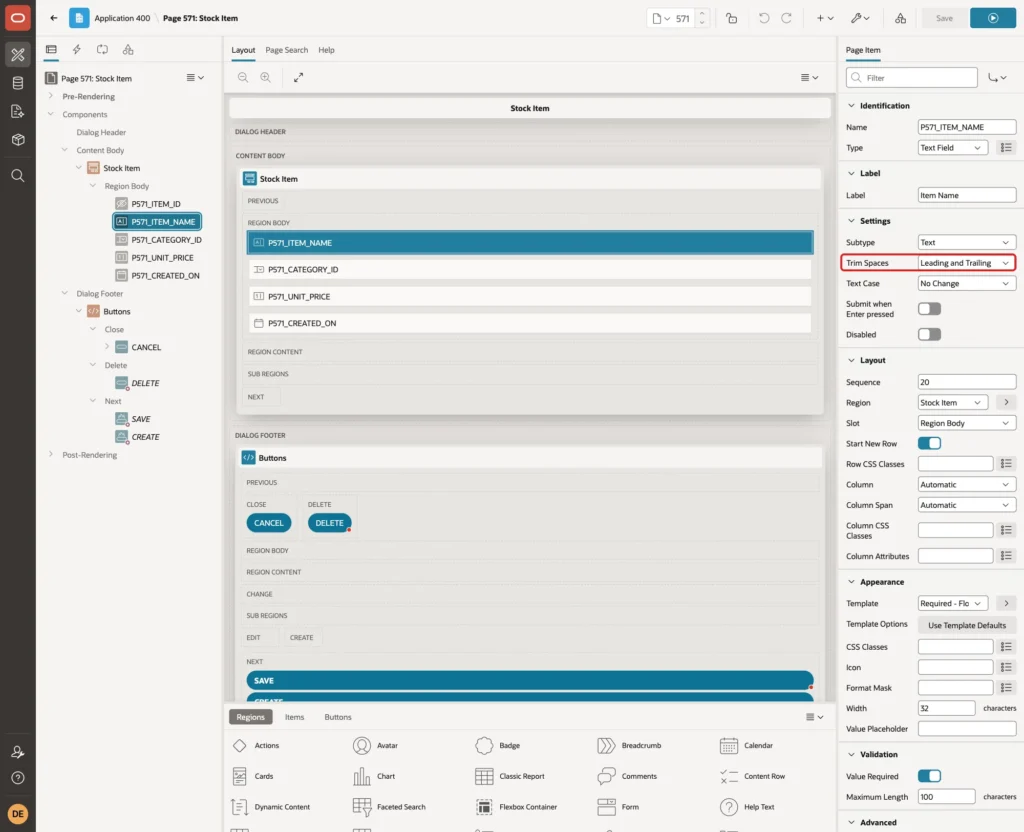
Open page 571 in Page Designer and select P571_ITEM_NAME. Check that Trim Spaces is Leading and Trailing. This is the default for a text field, and it removes outer spaces before the value reaches the validation and the table:
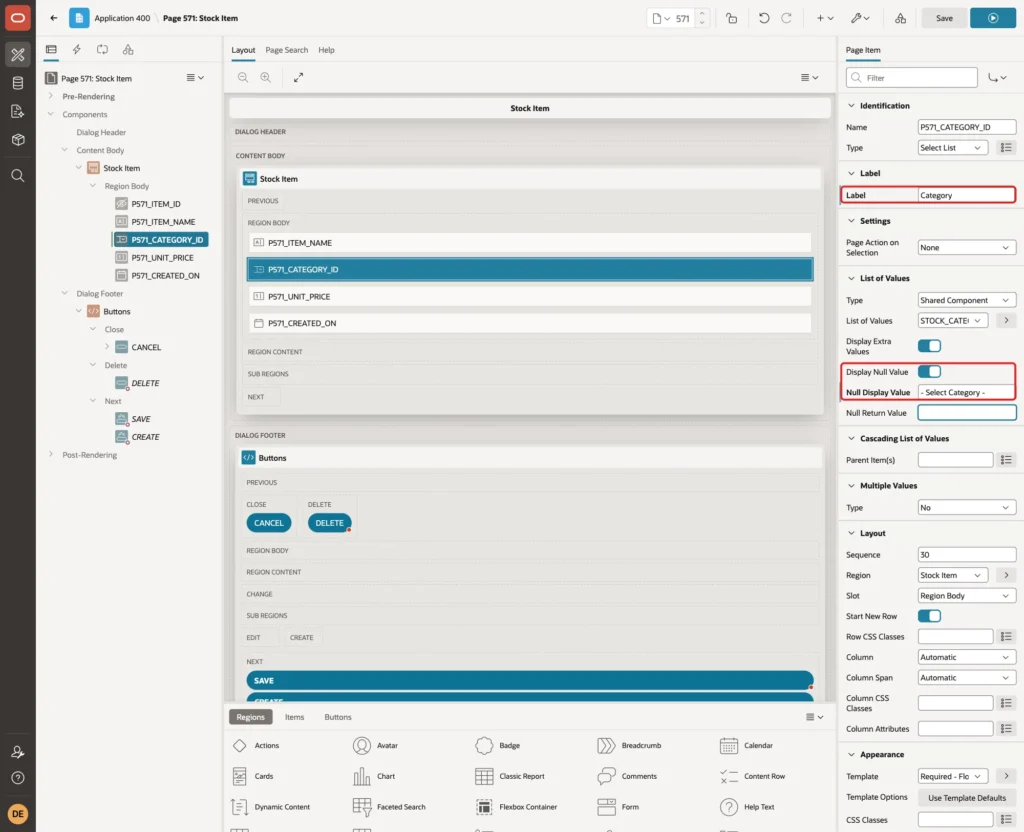
Select P571_CATEGORY_ID. Change Label to Category, turn on Display Null Value and enter Null Display Value - Select Category -:
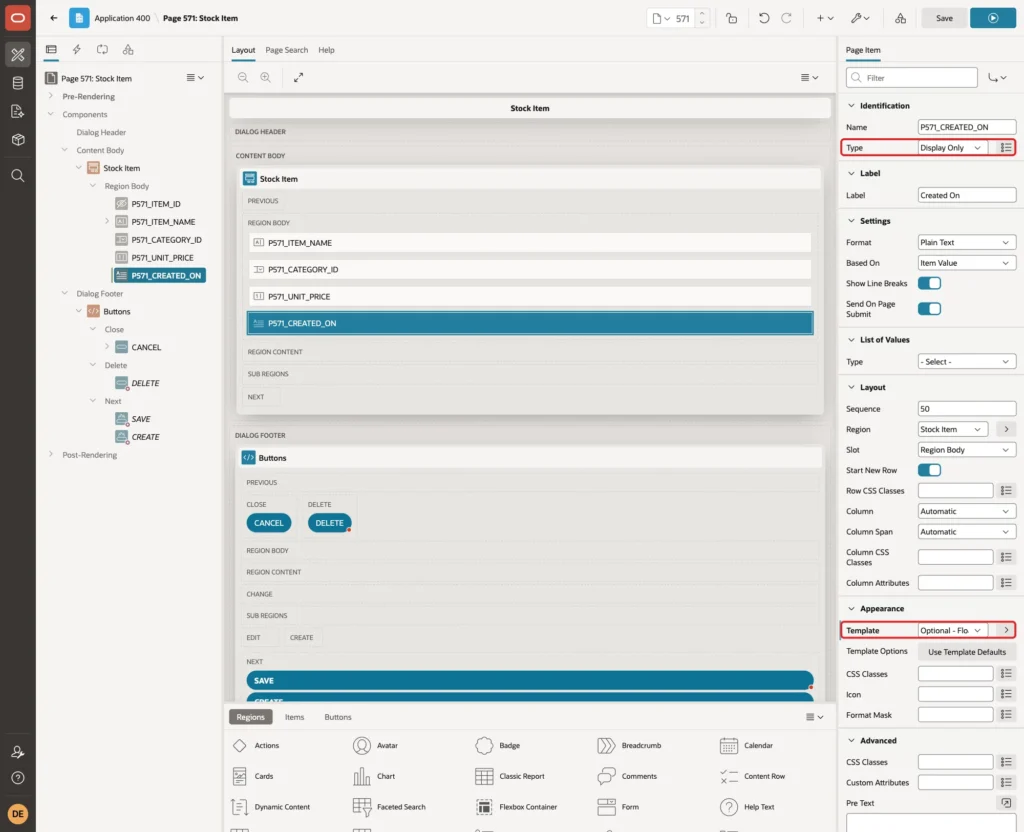
Select P571_CREATED_ON. Change Type to Display Only and Template to Optional - Floating:
In the Source group of the same item, turn on Query Only:
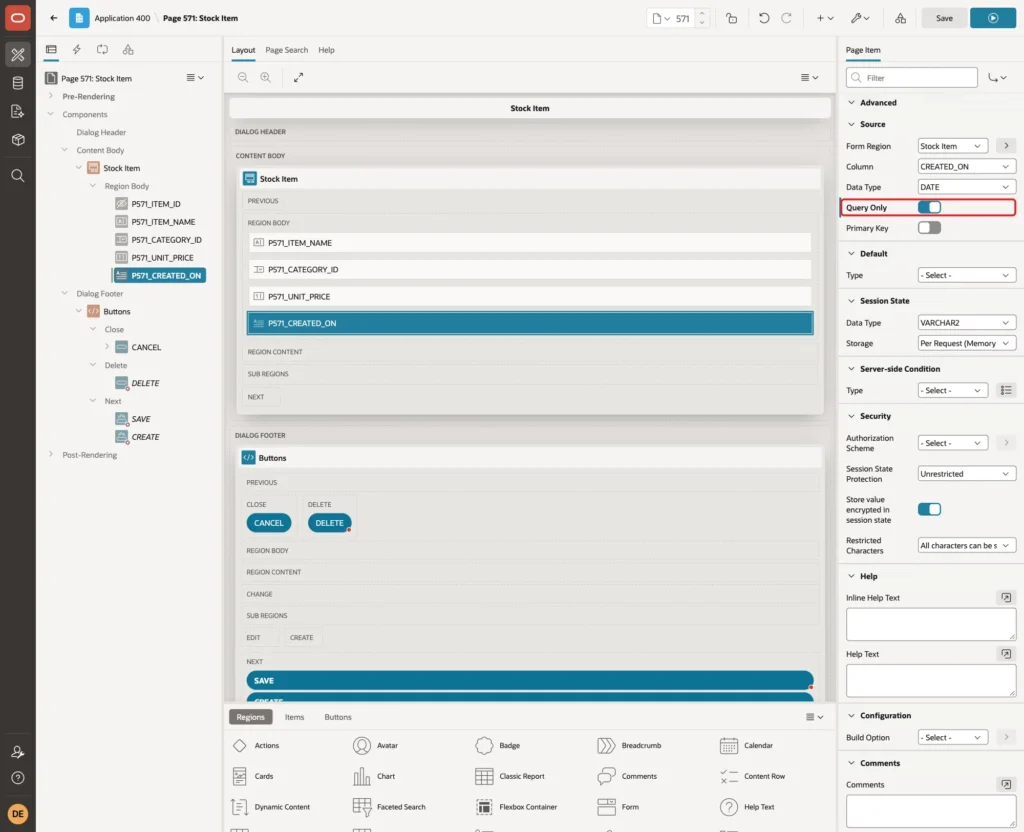
In a first test, the wizard's date picker was required, and a new item failed with "Created On must have some value." With Display Only and Query Only, the column is left out of the insert and DEFAULT ON NULL fills it.
Step 5: Add the Unique Name Validation
The index stops a duplicate, but its error is technical. A validation checks the same rule first and shows a message next to the field.
Right-click P571_ITEM_NAME in the Rendering tree and choose Create Validation:
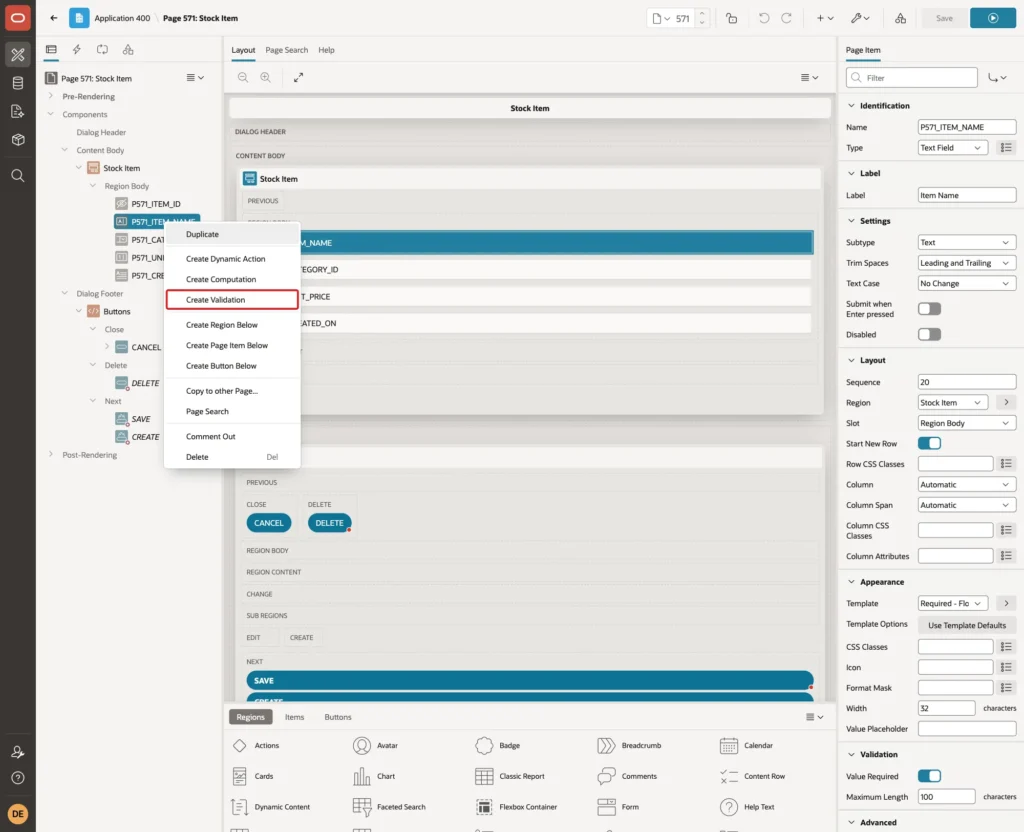
Enter Name Item Name Is Unique and select Type No Rows returned. Enter this SQL Query:
Example:
select 1
from   stock_items
where  upper(trim(item_name)) = upper(trim(:P571_ITEM_NAME))
and    (:P571_ITEM_ID is null or item_id <> :P571_ITEM_ID)
Enter this Error Message, and keep Associated Item P571_ITEM_NAME, which APEX fills in because the validation was created on that item:
Example:
Another item already uses this name. Upper and lower case do not make a name different.
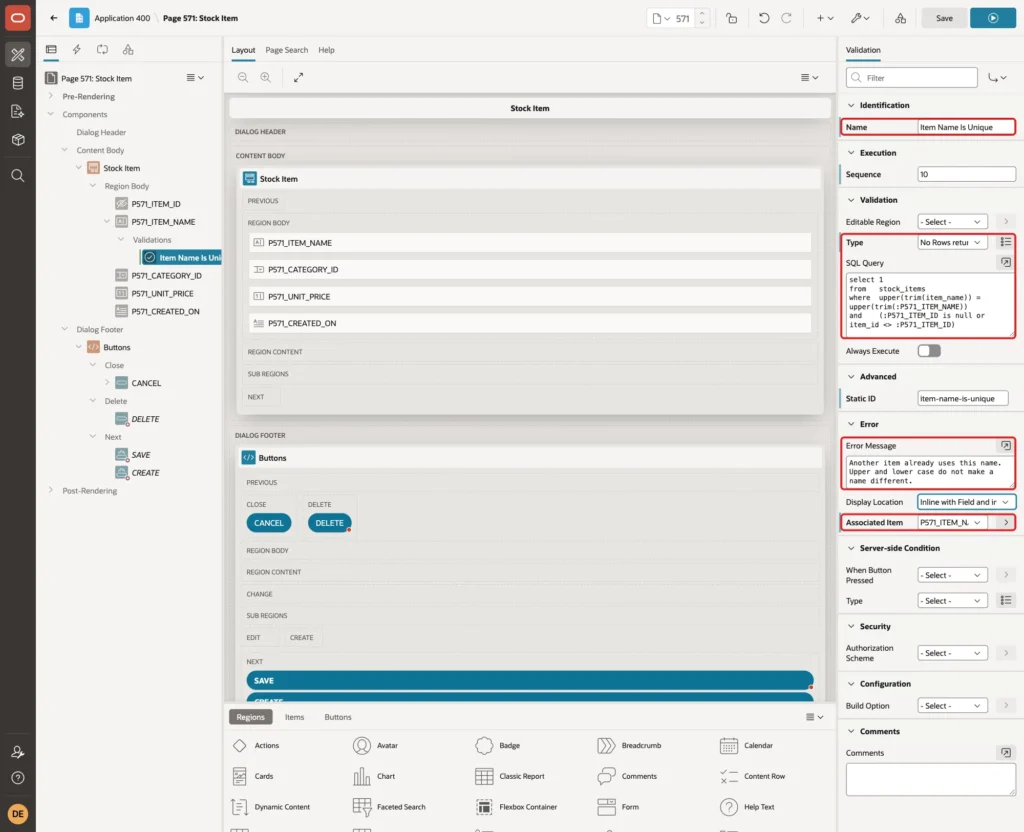
Click Save. The query uses the same expression as the index. The second condition leaves out the row being edited, so a user can still save an item without changing its name, or change only its case.
Because the expressions match, Oracle reads the unique index instead of the whole table:
Example:
explain plan for
select 1
from   stock_items
where  upper(trim(item_name)) = upper(trim('laptop '));

select plan_table_output from table(dbms_xplan.display(format => 'BASIC'));
Output:
Explained.

PLAN_TABLE_OUTPUT
____________________________________________________
Plan hash value: 207289722

-------------------------------------------------
| Id  | Operation         | Name                |
-------------------------------------------------
|   0 | SELECT STATEMENT  |                     |
|   1 |  INDEX UNIQUE SCAN| STOCK_ITEMS_NAME_UK |
-------------------------------------------------

8 rows selected.
Step 6: Test the Validation
Run page 570 and click Create. Enter Item Name "laptop " in lower case with a trailing space, select Category Computers, enter Unit Price 899 and click Create. The validation stops the save and shows the message under the field:
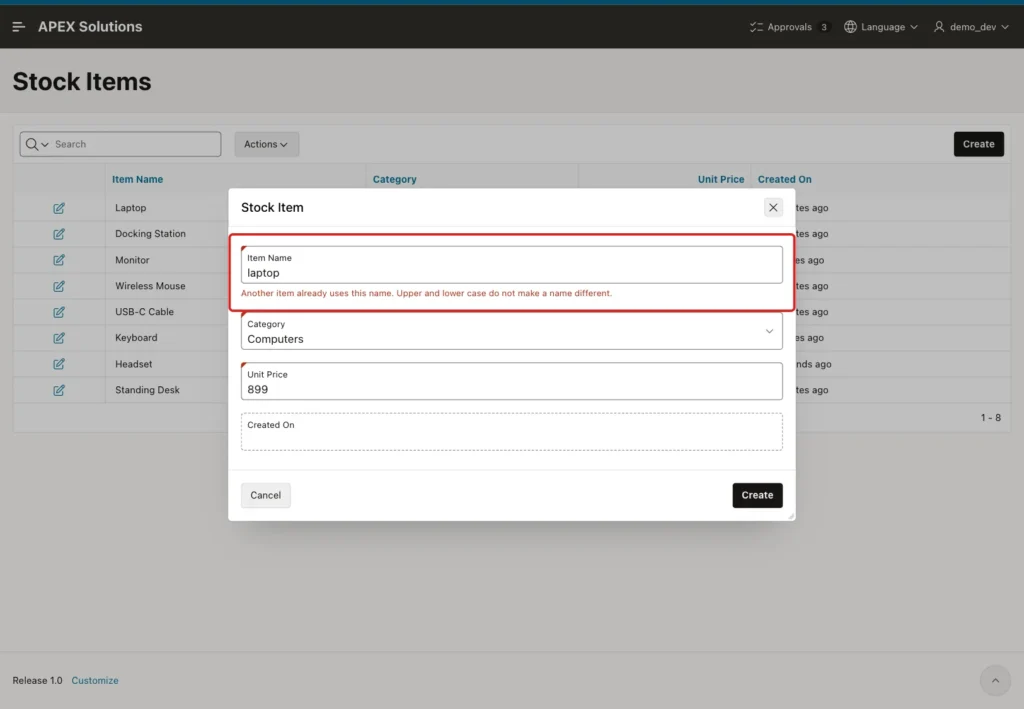
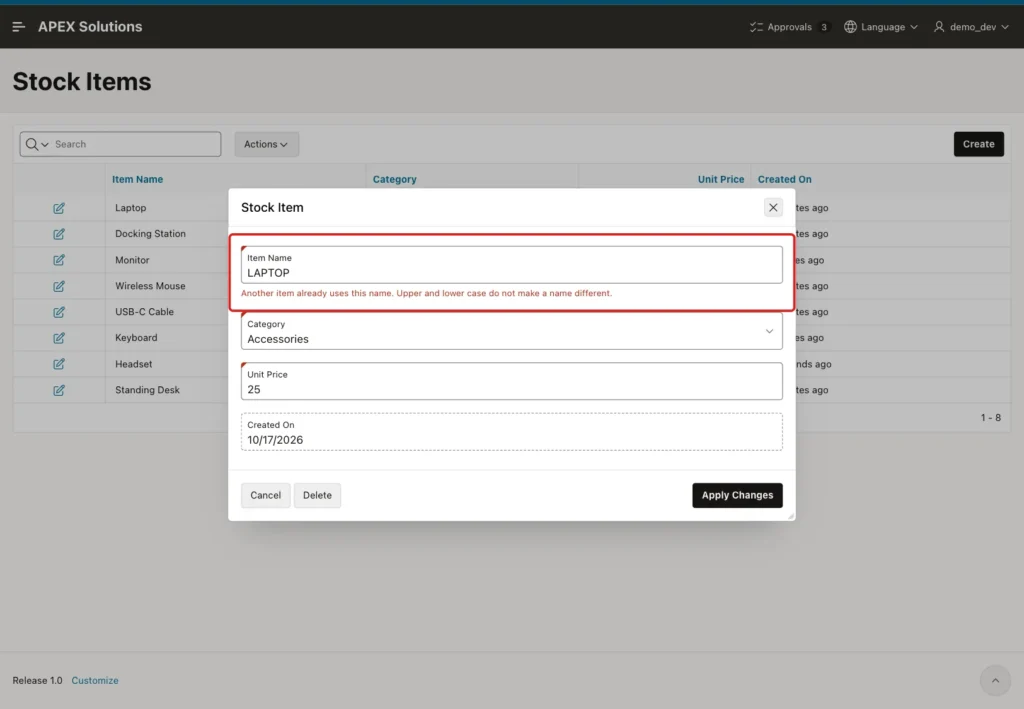
Next, edit Wireless Mouse and change its name to LAPTOP. Click Apply Changes. The same message appears, so renaming an item into a duplicate is also blocked:
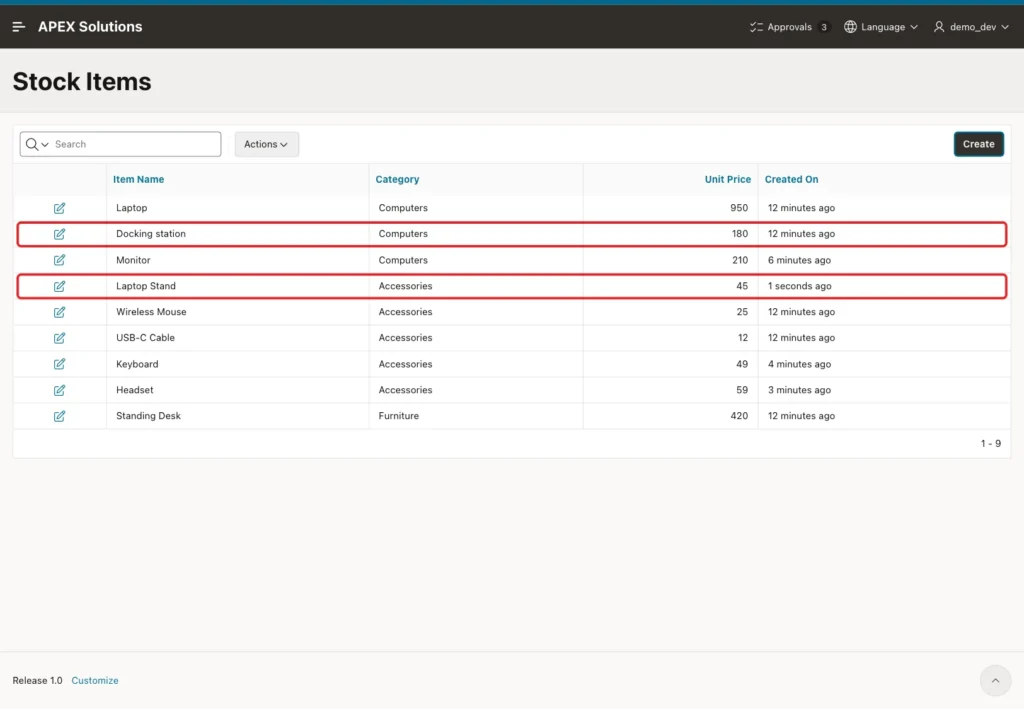
Now edit Docking Station, change it to "Docking station" and click Apply Changes. The row saves, because the only matching name is its own. Finally, create Laptop Stand in Accessories with Unit Price 45. It saves, because it is a different name:
Step 7: Handle Two Users Saving the Same Name
A validation reads only committed rows. If two users save the same new name at the same moment, both validations pass. The first insert wins, and the second one hits the unique index.
To test this, one SQL session inserted Monitor and waited 25 seconds before COMMIT. During that wait, the form created "monitor". The validation found no committed row, the insert waited for the other session, and after the COMMIT it failed with the raw error:
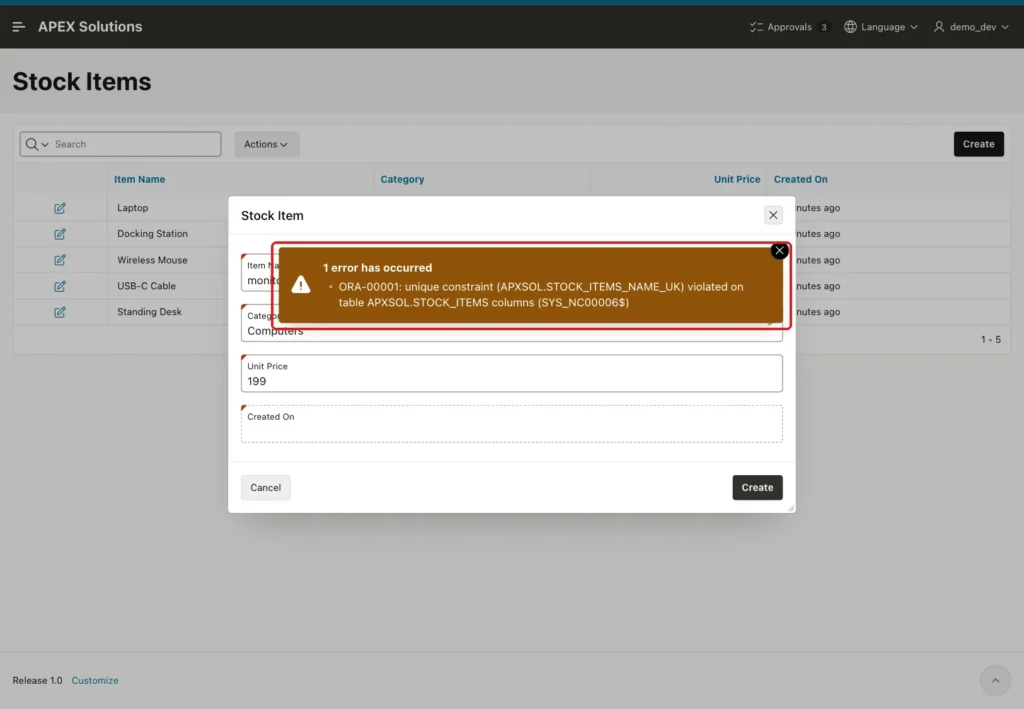
The data stayed correct, because the index did its job. Only the message needs fixing. An error handling function receives every error on the page and can replace the text when it finds the index name.
Create this function in the parsing schema of the application. The test block at the end checks that APEX finds the index name in the 26ai message format:
Example:
create or replace function stock_items_error_handler (
  p_error in apex_error.t_error
) return apex_error.t_error_result
is
  l_result apex_error.t_error_result;
begin
  l_result := apex_error.init_error_result(p_error => p_error);

  if p_error.ora_sqlcode = -1
     and apex_error.extract_constraint_name(p_error => p_error) = 'STOCK_ITEMS_NAME_UK'
  then
    l_result.message         := 'Another item already uses this name. Upper and lower case do not make a name different.';
    l_result.additional_info := null;
    l_result.page_item_name  := 'P571_ITEM_NAME';
    l_result.display_location := apex_error.c_inline_with_field_and_notif;
  end if;

  return l_result;
end stock_items_error_handler;
/

show errors

set serveroutput on
declare
  l_error apex_error.t_error;
begin
  l_error.ora_sqlcode := -1;
  l_error.ora_sqlerrm := 'ORA-00001: unique constraint (APXSOL.STOCK_ITEMS_NAME_UK) violated on table APXSOL.STOCK_ITEMS columns (SYS_NC00006$)';
  dbms_output.put_line('Constraint: ' || apex_error.extract_constraint_name(p_error => l_error));
end;
/
Output:
Function STOCK_ITEMS_ERROR_HANDLER compiled

No errors.
Constraint: STOCK_ITEMS_NAME_UK

PL/SQL procedure successfully completed.
- APEX_ERROR.INIT_ERROR_RESULT copies the original error, so every other error keeps its normal text.
- APEX_ERROR.EXTRACT_CONSTRAINT_NAME returns the name inside the brackets of ORA-00001. For a function-based unique index, that is the index name.
- PAGE_ITEM_NAME and DISPLAY_LOCATION show the message under the Item Name field as well as in the notification.
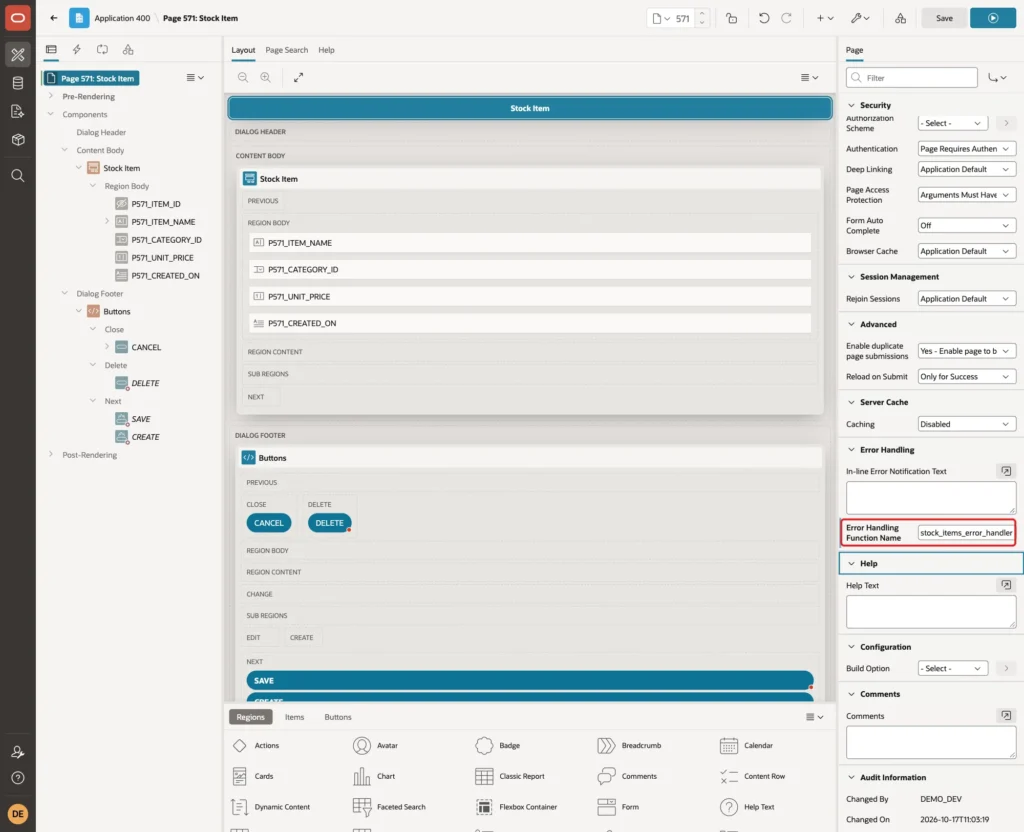
In Page Designer, click the page node Page 571: Stock Item. In the Error Handling group, enter Error Handling Function Name stock_items_error_handler and click Save:
The same test was repeated with Headset in the SQL session and "HEADSET" in the form. This time the form showed the friendly message:
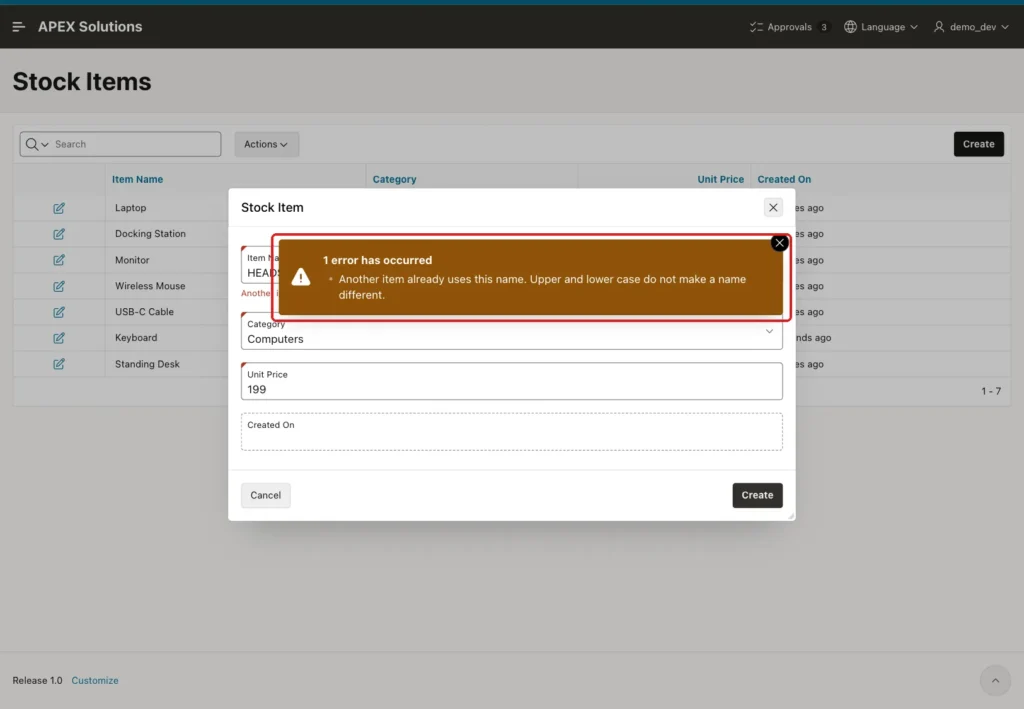
Other errors are not changed. A Mouse Pad with Unit Price -5 still showed "ORA-02290: check constraint (APXSOL.STOCK_ITEMS_PRICE_CK) violated", because the function only rewrites ORA-00001 for STOCK_ITEMS_NAME_UK. The final rows in the table:
Example:
column item_name format a16
select item_id, item_name, unit_price, to_char(created_on, 'YYYY-MM-DD') as created
from   stock_items
order by item_id;
Output:
   ITEM_ID ITEM_NAME             UNIT_PRICE CREATED
__________ __________________ _____________ _____________
         1 Laptop                       950 2026-10-17
         2 Docking station              180 2026-10-17
         3 Wireless Mouse                25 2026-10-17
         4 USB-C Cable                   12 2026-10-17
         5 Standing Desk                420 2026-10-17
        26 Monitor                      210 2026-10-17
        28 Keyboard                      49 2026-10-17
        30 Headset                       59 2026-10-17
        32 Laptop Stand                  45 2026-10-17

9 rows selected.
Docking station keeps its new case, Laptop Stand is saved, and there is only one Laptop. Monitor, Keyboard and Headset came from the SQL sessions of the two-user test. The gaps in ITEM_ID come from the identity cache and the failed inserts, and are normal.
Things to Know
- Keep the validation and the index on the same expression. If the index uses upper(trim(...)) and the validation only upper(...), a name with outer spaces can pass the validation and fail at the index.
- A column collation such as COLLATE BINARY_CI would make a plain unique constraint case-insensitive. In this 26ai Free database it failed with ORA-43929, because collation needs MAX_STRING_SIZE=EXTENDED. The function-based index works with the default setting.
- The validation does not replace the index. Data loaded outside the form is only protected by the index, and the race test shows that the validation alone can miss a duplicate.
- The page-level handler is useful when one page needs special messages. If the application already has an error handling function, add the same IF block there instead.
- Keep the error message free of user input. A fixed text is safe to show and easy to translate.
Related Guides
- How to Fix ORA-00001: Unique Constraint Violated in Oracle
- Handle All Errors in One Place in Oracle APEX: Error Handling Function and Error Log
Conclusion
Case-insensitive unique names need a rule in the database and a message in the form. A unique index on upper(trim(name)) blocks every near duplicate, and a No Rows returned validation with the same expression explains the problem before the insert.
A small error handling function covers the last gap, when two users save the same name at once. The user then sees one clear message in every case, and the table never holds two versions of the same name.
